In This Article
Samsung
 Samsung will be mostly showing off its technology other than smartphones at CES 2019. We are expecting to see the Samsung Galaxy Home that it unveiled at Galaxy Note 9’s launch and also its Notebook 9 laptop. The Windows laptop by Samsung has a colour scheme similar to that of Galaxy Note 9 smartphone and comes with a pop-out S Pen. The South Korean technology giant will also be seen showcasing televisions at CES 2019. Although there is no confirmation about the company has up its sleeve, it is expected to showcase devices with 8K and QLED. Usually, Samsung also has refrigerators and stoves at CES 2019, so we are expecting to see some of them too. While there are reports that claim that Samsung’s foldable phone will also make an appearance at the Consumer Electronics Show, we’ll have to wait to see how true is that.
LG
 While we aren’t sure about Samsung showcasing its foldable device at CES 2019, there are numerous reports that suggest that LG will give us the first look of its foldable phone at the tech show. But then again, we would have to wait a little more to see how credible these reports really are. However, even if we don’t get to see the foldable phone, we will get to see some televisions, display technologies and smart kitchen appliances from the consumer electronics maker. CES 2018 saw LG showcasing a prototype of its rollable TV so this year, we are keeping our fingers crossed to see its commercial version.
 CES 2018 saw Google make its debut at the technology event. And much like last year, the technology giant is expected to focus on Google Assistant and related products at CES 2019. It’s highly unlikely that Google will announce new hardware, but yes, we can expect to see some new services like Google Pay pop-up like they did last year.
Huawei
 2018 was the year of controversies for Huawei. The biggest controversy that surrounded the company is the one that alleges its ties with the Chinese government, which led to multiple countries banning Huawei’s networking equipment. Considering all of this, we don’t expect to see any smartphones from the company at CES 2019. However, it may launch some laptops and tablets. If we aren’t wrong, Huawei is likely to maintain a low-profile the tech event this year.
Honor
 While we don’t expect to see any smartphones from Huawei at CES 2019, we do expect to see the recently unveiled Honor View 20. The device from Huawei’s sub-brand was launched in China recently and its global launch is scheduled for later part of January in Paris. But we are hoping that it makes an appearance at CES 2019 too.
Sony
 Sony is one company which is mostly seen launching its new smartphones at the Consumer Electronics Show. And this year should be no different. Reports have suggested that Sony Xperia XA3 Plus will be launched at the show. And it is highly unlikely that it will be unveiled alone as Sony always launches an entire smartphone range together. We can also expect the company to showcase some televisions and display technologies this year. And needless to say, we are really looking forward to some audio products from the technology firm.
Lenovo
 The Chinese consumer electronics brand usually focuses on its laptop lineup at CES, and we don’t really expect this year to be any different. A listing from Lenovo recently surfaced online and it mentioned Legion Y530 and Y7000P devices that come with NVIDIA GTX 1160. So there is a possibility of these two being showcased at CES 2019. We may also get to see some smart home products, but as of now, there is no other word on what Lenovo plans on doing.
BlackBerry
 While we don’t expect to see smartphones from BlackBerry at CES 2019, we do expect to see some of its automotive-based software, BlackBerry QNX. However, considering that the company never really gives up on making Android smartphones with physical keyboards, we wouldn’t be surprised if that pops-up at the event too.
Asus
 When it comes to Taiwanese technology giant Asus, we expect to see some laptops and Chromebooks from the company at the event. Reports have suggested that the company will launch a Chromebook at CES 2019 that will be powered by Intel’s Gemini Lake series chip. A Chrome OS tablet is also expected to be showcased. What we are not expecting from Asus is a smartphone or a tablet, but we would like to be surprised.
HTC
 Media reports suggest that HTC will only be focussing on HTC Vive this year at CES. So we can expect to see some gaming demonstrations and accessories at the tech show. Since HTC hasn’t had the best year in smartphones, chances of a mobile device being showcased are really slim.
For the latest gadget and tech news, and gadget reviews, follow us on Twitter, Facebook and Instagram. For newest tech & gadget videos subscribe to our YouTube Channel.
[td_smart_list_end]
Media reports suggest that HTC will only be focussing on HTC Vive this year at CES. So we can expect to see some gaming demonstrations and accessories at the tech show. Since HTC hasn’t had the best year in smartphones, chances of a mobile device being showcased are really slim.
For the latest gadget and tech news, and gadget reviews, follow us on Twitter, Facebook and Instagram. For newest tech & gadget videos subscribe to our YouTube Channel.
[td_smart_list_end] ![[Video] How to find your lost Android smartphone](https://www.gadgetbridge.com/wp-content/uploads/2019/01/maxresdefault-1-768x432.jpg "[Video] How to find your lost Android smartphone")




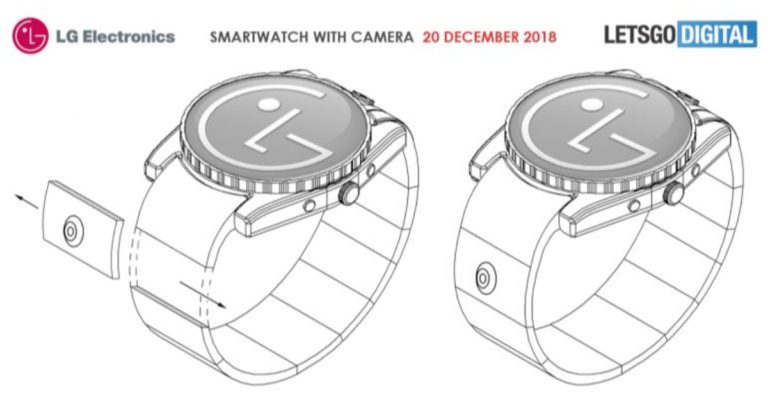
 That’s not all. LG’s patent also says that the smartwatch will have a crown on the side and come with a touchscreen that would let users click images using the
  Besides this, the upcoming

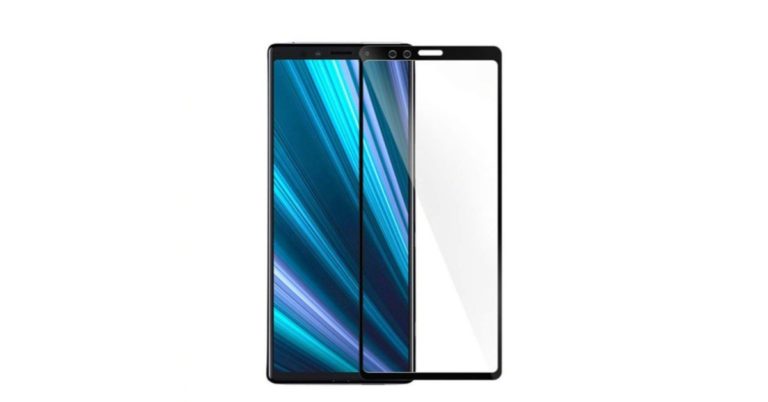
 Images of Sony Xperia XZ4’s screen protector have reportedly surfaced online and its evident from them how big the screen of the smartphone will be. The upcoming
  The same source has also leaked some images showcasing the rear panel of the Sony Xperia XZ4
  Reports suggest that
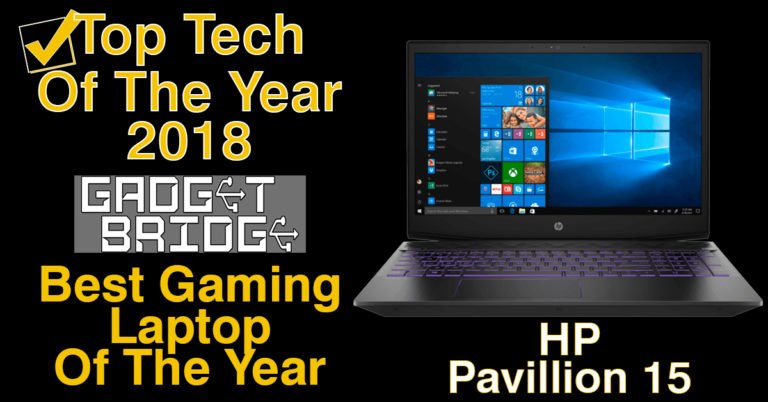
 HP is known to build some great gaming laptops since quite some time now. In 2018 they launched the new Pavilion gaming laptop range out of which the Pavilion 15-CXO144TX caught our eye. We tested the device out and it just blew off the charts. The specs of the laptop include a 15.6-inch Full HD LED display with 220 nits brightness, Intel Core i7 CPU (8th gen) with clock speed of 2.20 GHz and 8GB RAM. This is partnered with a 128GB SSD for super quick boot times and 1TB 7200RPM hard drive. Graphics on this
  The Acer Nitro 5 AN515-52-50YX is one of the best-looking gaming laptops in the market. Launched in early 2018 this laptop swept us away with its great looks and superb gaming performance. Over that, it is light to hold and carry. Tech specs of this gaming notebook include the latest Intel i5 8300 CPU with clock speed of 2.3GHz, 12 gigs of RAM and 256GB solid state drive. The 15.6-inch screen does perfect justice to games, which is backed by a NVIDIA GeForce 1050ti graphics card. Windows 10 pro is native on the system and this gaming monster can run the latest games from high to very high settings. You might find an occasional lag here and there (at the highest settings), but nothing to worry about as it quickly subsides. On the test bench it was almost neck to neck with the HP machine.
 The Lenovo Ideapad 330 series has just about everything. The various configurations are built for regular day to day use and also for gaming. Out of the lineup, the one stood out for gaming on our charts was the Lenovo Ideapad 330 81FK00DKIN. This laptop comes with 8th generation of Intel Core i5 CPU that clocks at 2.3GHz, has 8GB RAM and for storage packs 1TB hard drive inside. For graphical performance it has the NVIDIA GeForce GTX 1050 graphics card with 4GB GDDR5 RAM on it. The setup was quite unusual since the laptop does not come across as a gaming one, but blew us away when we turned on the best games on it. This one was able to play most games like DOTA 2 and CS:GO at ultra settings, and games like PUBG at high settings. A good value for money gaming machine.
For the latest
The Lenovo Ideapad 330 series has just about everything. The various configurations are built for regular day to day use and also for gaming. Out of the lineup, the one stood out for gaming on our charts was the Lenovo Ideapad 330 81FK00DKIN. This laptop comes with 8th generation of Intel Core i5 CPU that clocks at 2.3GHz, has 8GB RAM and for storage packs 1TB hard drive inside. For graphical performance it has the NVIDIA GeForce GTX 1050 graphics card with 4GB GDDR5 RAM on it. The setup was quite unusual since the laptop does not come across as a gaming one, but blew us away when we turned on the best games on it. This one was able to play most games like DOTA 2 and CS:GO at ultra settings, and games like PUBG at high settings. A good value for money gaming machine.
For the latest 

 If you are sending a heavy attachment via Gmail, then you can use Google Drive to make the task simpler for yourself. When you open a new message in Gmail, click on the triangular Drive icon at the bottom of the page and then select the files you wish to send. If the files you wish to send are saved in your Google Drive, you shall be able to see it below ‘My Drive’ or else you can also upload the file you want to send. Do note that if you try and attach a file larger than 25MB in Gmail, Google Drive automatically kicks in.
 While Gmail allows only 25MB of files before it enables Gmail, Outlook allows files as large as 33MB. After that, it prompts you to use your OneDrive account. On following this prompt, your files will get uploaded to OneDrive email attachments folder and the recipient will receive a link of the file once you send it to him. You can share files up to 2GB in size with OneDrive.
 If you use Apple Mail and wish to send large files to someone, you can use the iCloud Mail Drop feature. Much like Gmail, where Google Drive automatically kicks in after the size of the file being sent exceeds 25MB, Mail Drop feature gets enabled if the size of the files being sent via Apple Mail goes beyond 20MB. So, the file gets uploaded to iCloud and a link of the same is shared with your contact. It is worth noticing that this link expires after 30 days. You can send files up to 5GB via Mail Drop.
 If you are someone who doesn’t want to rely on Google, Microsoft or Apple, then Firefox Send is the option for you. The service enables users to upload, encrypt and send files up to 1GB in size. The best part of this service is that you don’t even have to install an add-on. Just go to Firefox Send homepage and press on the ‘Upload’ button to select files you need to send. Once the files are uploaded, a link is created that you can share via email. However, the link expires after 24 hours so it must be accessed before that.
 In case you are sending heavy files from your smartphone, you can download the Send Anywhere app to do it. If you are doing it from your laptop, you can just visit the website. You can send up to 10GB of files to anyone using the free service. The premium one allows you to send up to 50GB of files. And the best part is that you can add a 6-digit key to your files that also has to be entered by the recipient in order to download the files. Your files will be sent in real time and the best part is that you are not even required to log in. This is definitely our pick to send and receive large files.
 If you use Dropbox, then Dropbox’s Chrome extension enables you to send and preview files and links from your Gmail window itself. It’s as simple as clicking on Dropbox icon and selecting the file from your Dropbox account. The link of this file is then sent to the recipient in an email message. With a free account on Dropbox, users can send files of up to 2GB in size.
 WeTransfer is another service that can be used to send large files by those who don’t wish to rely on Google, Microsoft and Apple. Just go to the website, click on ‘Add your files’ and select files you wish to send from your computer. Enter the recipient’s email address, your own email address and put a message on the transfer mail if you wish to. A link to the files you selected will be sent to the recipient automatically and it stays valid for seven days after that. It is worth noticing that in one transfer, you can only send files up to 2GB in size. WeTransfer is a very straightforward service and we love how it doesn’t require us to download any Chrome extensions or register for it.
 This is one of among the services that let you send large files without any registration. You just need to visit the page, add your files by selecting the ‘Click here to add files’ option and then you can send files up to 5GB at once. However, note that an individual file must not exceed 200MB in size. Collectively, they can be up to 5GB. Furthermore, you can send files up to 10 recipients at once. But they will receive the email link in a few hours, so only use the service if you don’t need to immediately send a file. The link remains valid for a week after being sent.
 This is another service where you don’t have to sign up to send large files. You just need to visit the homepage of DropSend, enter your and recipient’s email IDs, attach files and then select ‘Send Your File’ button. The file link is sent via email to the recipient and stays valid for seven days. With the free plan, you can send files up to 4GB in size, and you can use it for five sends in a month.
 SendThisFile is another service that you can use to send large files. Create an account and then select the Send Files button to upload your files. Put in the recipient’s email address and select ‘Send’. You can send up to 2GB of files with the free account. With the premium plan, you can send up to 25GB of encrypted files.
For the latest
SendThisFile is another service that you can use to send large files. Create an account and then select the Send Files button to upload your files. Put in the recipient’s email address and select ‘Send’. You can send up to 2GB of files with the free account. With the premium plan, you can send up to 25GB of encrypted files.
For the latest 
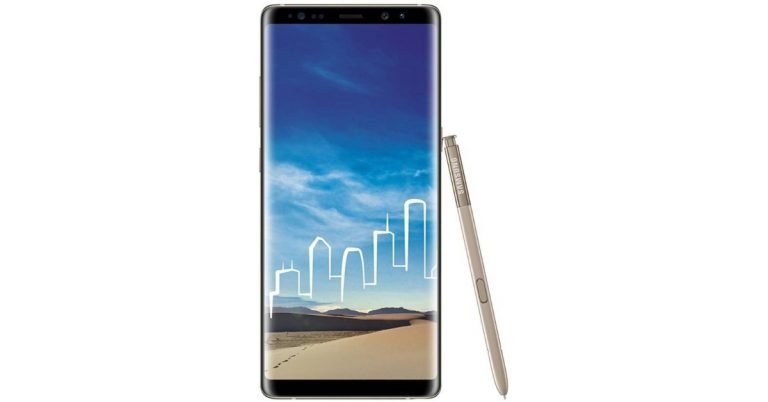
 Coming back to Samsung Galaxy Note 8, the company’s Members app shows that the
 ![[Video] Fitbit Charge 3 Special Edition Unboxing and First Look](https://www.gadgetbridge.com/wp-content/uploads/2019/01/maxresdefault-768x432.jpg "[Video] Fitbit Charge 3 Special Edition Unboxing and First Look")