

In This Article
Logitech G413 TKL SE review: Design
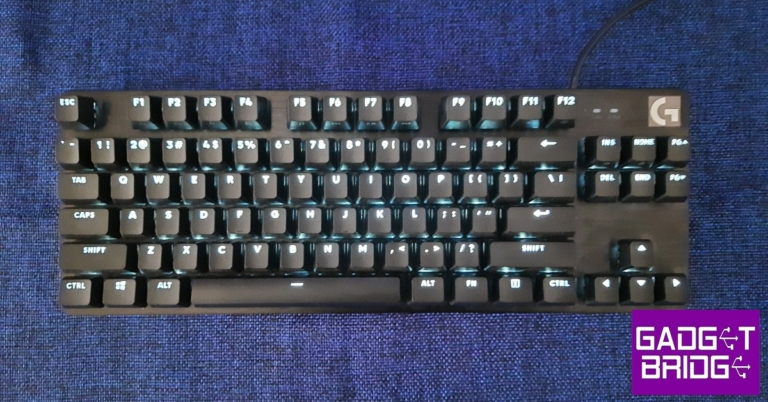
Pulling the G413 TKL SE out of the box, you’ll immediately notice the clean design and robust build. Logitech has stripped the gaming keyboard to its bare essentials, getting rid of all the bells and whistles without compromising on the make and the form. Inside the box, you will also find the user documentation, a hotkey guide, and a Logitech sticker along with the mechanical keyboard. The ‘TKL’ stands for ‘tenkeyless’ which means that the G413 TKL SE does not have the number pad on the right side of the keyboard. This adds to the compactness of the keyboard and users who do not find much use for the Numpad will welcome this layout. If a Numpad is something you deem essential to a keyboard, you can go for the non-TKL G413 SE. There are also no macro keys, wrist rest, or dedicated media keys (although the F keys double up to serve some media functions). There are capslock and scroll lock indicators on the top right part along with the Logitech logo.
 Moving on, the G413 TKL SE feels like a rock-solid keyboard with the top case made out of a low-carbon aluminium alloy. It is a build that inspires confidence and leaves no questions about the case’s durability. The PBT plastic keypads are an upgrade over the ones found in the standard G413 and give the keyboard a more premium feel. The keys are stable, lacking a significant wobble, and can sustain heavy usage without showing any signs of wear. You can even pull out the pair of feet at the bottom to elevate the keyboard.
The keys are individually illuminated by white LED backlights, with no other colour options. Logitech has not offered RGB lighting on this keyboard. The brightness can be directly controlled from the keyboard itself by using the ‘Fn + F2 or F3’ shortcut. Since the G413 TKL SE is not compatible with Logitech’s G Hub app, this feature does come in handy. Unlike the G413, the keycaps of the G413 TKL SE are swappable.
Moving on, the G413 TKL SE feels like a rock-solid keyboard with the top case made out of a low-carbon aluminium alloy. It is a build that inspires confidence and leaves no questions about the case’s durability. The PBT plastic keypads are an upgrade over the ones found in the standard G413 and give the keyboard a more premium feel. The keys are stable, lacking a significant wobble, and can sustain heavy usage without showing any signs of wear. You can even pull out the pair of feet at the bottom to elevate the keyboard.
The keys are individually illuminated by white LED backlights, with no other colour options. Logitech has not offered RGB lighting on this keyboard. The brightness can be directly controlled from the keyboard itself by using the ‘Fn + F2 or F3’ shortcut. Since the G413 TKL SE is not compatible with Logitech’s G Hub app, this feature does come in handy. Unlike the G413, the keycaps of the G413 TKL SE are swappable.
Logitech G413 TKL SE review: Performance
In terms of performance, the Logitech G413 TKL SE does exactly what it’s supposed to do. We didn’t expect any extra features that would knock our socks off but were anticipating a satisfactory experience while gaming and performing typing tasks. For those looking for an affordable gaming keyboard, the G413 TKL SE is a great place to start. Perhaps the most important change in the G413 TKL SE is the presence of ‘Long Hua’ switches instead of the Romer-G switches found in its predecessor. The Long Hua is similar to Cherry MX switches but doesn’t replicate the exact performance of Romer-G. You will need a slightly stronger keypress while gaming and typing. However, it is something that you get used to pretty quickly and is an understandable change given the low cost of the keyboard. According to Logitech’s official numbers, the G413 TKL SE offers an Actuation distance of 0.07in with the Actuation force required being 50g. The total travel distance is 0.16in.
 We played several different games like Apex Legends, Destiny 2, and DOOM Eternal using the G413 TKL SE. You don’t need a driver or installation software to use this keyboard, it is entirely ‘plug n play.’ The tactile switches performed decently but we were impressed by the degree to which Logitech has restored the low latency on this keyboard. The keypresses were registered immediately and we never felt like the keyboard was a step behind while gaming. With a 6-key rollover, you can press up to 6 keys at once and the keyboard will register your input correctly. We would highly recommend the G413 TKL SE to newbie gamers who are looking for a high-performing keyboard within a budget.
Gaming performance aside, the typing experience on this keyboard was also very satisfactory. However, if you want to use it exclusively for non-gaming-related tasks, there are other more affordable choices you can go for. Unlike other Logitech keyboards, the G413 TKL SE is not compatible with the G Hub software. This means you cannot customise the keys or access any additional functions.
Read Also: Sony HT-A5000 and HT-A3000 soundbars with 360 Spatial Sound Mapping launched in India
We played several different games like Apex Legends, Destiny 2, and DOOM Eternal using the G413 TKL SE. You don’t need a driver or installation software to use this keyboard, it is entirely ‘plug n play.’ The tactile switches performed decently but we were impressed by the degree to which Logitech has restored the low latency on this keyboard. The keypresses were registered immediately and we never felt like the keyboard was a step behind while gaming. With a 6-key rollover, you can press up to 6 keys at once and the keyboard will register your input correctly. We would highly recommend the G413 TKL SE to newbie gamers who are looking for a high-performing keyboard within a budget.
Gaming performance aside, the typing experience on this keyboard was also very satisfactory. However, if you want to use it exclusively for non-gaming-related tasks, there are other more affordable choices you can go for. Unlike other Logitech keyboards, the G413 TKL SE is not compatible with the G Hub software. This means you cannot customise the keys or access any additional functions.
Read Also: Sony HT-A5000 and HT-A3000 soundbars with 360 Spatial Sound Mapping launched in India
 Step 2:
 Step 3:
 Step 4:
 Step 3:
 Step 4:
 Step 3:





 Step 3:
 Step 4:
 Step 5:
 Step 6:
 Step 5:
 Step 6:

 Step 3:
 Step 5:
  Step 7:

 Step 2:
 Step 2: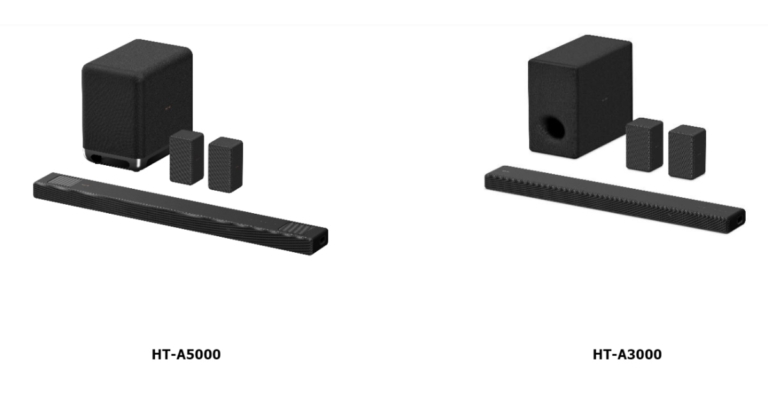







 Motorola Edge 30
 Vivo X80 Pro

 Mediatek Helio G99
Snapdragon 4 Gen 1
Mediatek Helio G99
Snapdragon 4 Gen 1
 MediaTek Dimensity 8100
Google Tensor G2
Snapdragon 6 Gen 1
MediaTek Dimensity 8100
Google Tensor G2
Snapdragon 6 Gen 1
 Apple A16 Bionic
Qualcomm Snapdragon 8+ Gen 1
MediaTek Dimensity 9200
Exynos 2200
Apple A16 Bionic
Qualcomm Snapdragon 8+ Gen 1
MediaTek Dimensity 9200
Exynos 2200




 Acer Aspire 3
Lenovo IdeaPad Gaming 3i
Samsung Galaxy Book2
Xiaomi Notebook Pro 120G
Asus VivoBook S15
Acer Aspire 3
Lenovo IdeaPad Gaming 3i
Samsung Galaxy Book2
Xiaomi Notebook Pro 120G
Asus VivoBook S15

 Acer Travelmate P6
Dell Latitude 7430
HP Pavilion Plus 14
Lenovo ThinkBook 14 Gen 4
Asus ZenBook 17 Fold
Acer Travelmate P6
Dell Latitude 7430
HP Pavilion Plus 14
Lenovo ThinkBook 14 Gen 4
Asus ZenBook 17 Fold

 Samsung Tab S8 Ultra
Xiaomi Pad 5
Lenovo Tab P12 Pro
Oppo Pad Air
Samsung Tab S8 Ultra
Xiaomi Pad 5
Lenovo Tab P12 Pro
Oppo Pad Air


 Xiaomi OLED Vision TV
Thomson Google TV 55-inch
LG OLED EVO G2
Sony Bravia A95K
Xiaomi OLED Vision TV
Thomson Google TV 55-inch
LG OLED EVO G2
Sony Bravia A95K


 Sony INZONE H9
Logitech G435
Audio-Technica ATH-GDL3
Sony INZONE H9
Logitech G435
Audio-Technica ATH-GDL3
 Apple Airpods Pro 2
Sennheiser Momentum True Wireless 3
Sony LinkBuds S
Apple Airpods Pro 2
Sennheiser Momentum True Wireless 3
Sony LinkBuds S

 Sony HT-A7000
Sony XV900
LG XBOOM 360 RP4G
Mivi Fort S200 Soundbar
Sony HT-A7000
Sony XV900
LG XBOOM 360 RP4G
Mivi Fort S200 Soundbar
 Netflix
Disney+Hotstar
Apple TV+
Prime Video
Netflix
Disney+Hotstar
Apple TV+
Prime Video
 Jio Saavn
Spotify
Amazon Music
Apple Music
Jio Saavn
Spotify
Amazon Music
Apple Music
 WD Blue SN570 NVMe SSD
Logitech MX Mechanical Wireless Keyboard
Logitech Master3S
Viewsonic XG2431 Gaming Monitor
ASUS Marshmallow mouse
For the latest
WD Blue SN570 NVMe SSD
Logitech MX Mechanical Wireless Keyboard
Logitech Master3S
Viewsonic XG2431 Gaming Monitor
ASUS Marshmallow mouse
For the latest 
 Step 2:
 Step 3:
 Step 2:
 Step 3:



 Step 3:
 Step 4:
 Step 5:
 Step 8:
 Step 9:
 Step 10:


 Step 3:
 Step 4:
 Step 5:
 Step 5:
 Read Also:
 Step 1:
 Step 4:
 Step 9:
 Step 10:
 Step 11:
 For the latest
 Step 3:
  Step 5:
 Step 2:

