

Here are some of the next steps to be taken against Battlegrounds Mobile India cheaters
- More detailed revalidation of game data for top-ranked users.
- Prevent advertising of cheaters and cheat programs
- Strengthen its security system



In This Article
In This Article
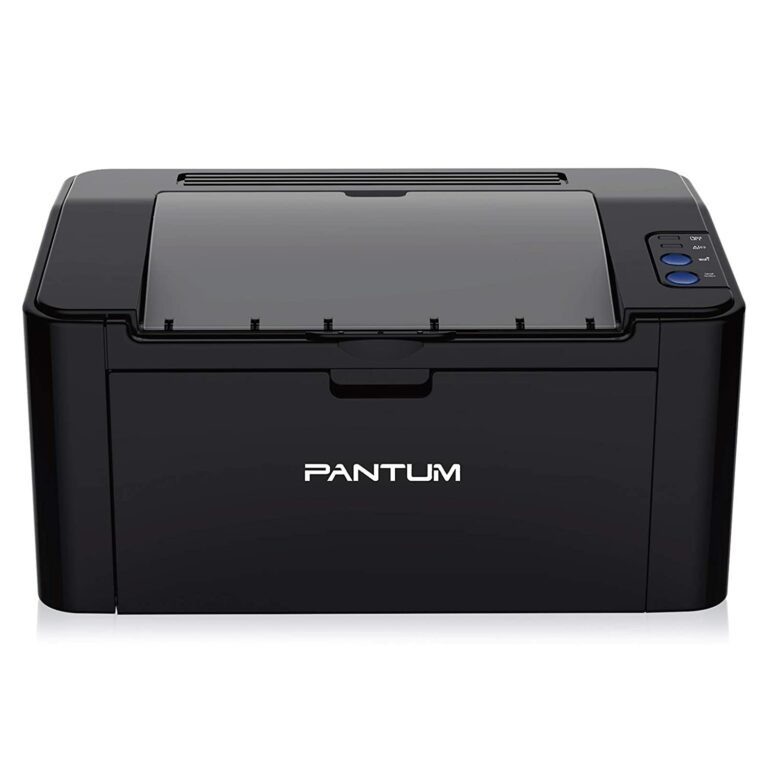
 Compact and smart, Pantum P2500W is designed for convenient use, print high-quality documents and remains budget-friendly to the pocket. It offers fast and high resolution printing up to 22 ppm (A4) / 23 ppm (Letter) in black and white. It supports multiple media sizes. Also, It fits nicely on any workstation. Metal frame structure and build help in long term use. It can print a maximum number of 15,000 pages in one month.
You can connect the printer with Hi-Speed USB 2.0 and WiFi as well. You can install the Pantum App from Google Play Store and Apple App Store to use it wirelessly. It allows Google cloud printing features also. Over that, it comes with a 1-year standard warranty from the date of purchase.
It is priced at Rs 11,400.
Dimensions: 33.7 x 22 x 17.8 cm
Printer Type: Monochrome/ Black and white
Buy from: Pantum P2500W
Read also: 5 features Pantum M6502NW laser printer has that will compel you to buy it right now
Compact and smart, Pantum P2500W is designed for convenient use, print high-quality documents and remains budget-friendly to the pocket. It offers fast and high resolution printing up to 22 ppm (A4) / 23 ppm (Letter) in black and white. It supports multiple media sizes. Also, It fits nicely on any workstation. Metal frame structure and build help in long term use. It can print a maximum number of 15,000 pages in one month.
You can connect the printer with Hi-Speed USB 2.0 and WiFi as well. You can install the Pantum App from Google Play Store and Apple App Store to use it wirelessly. It allows Google cloud printing features also. Over that, it comes with a 1-year standard warranty from the date of purchase.
It is priced at Rs 11,400.
Dimensions: 33.7 x 22 x 17.8 cm
Printer Type: Monochrome/ Black and white
Buy from: Pantum P2500W
Read also: 5 features Pantum M6502NW laser printer has that will compel you to buy it right now
 The HP toner reloading kit and black laser imaging drum deliver thousands of pages for a smooth printing workflow and easy mess-free toner replacement. You can count on it to get consistent superb prints. It produces sharp text and bold blacks.
It’s an innovative laser printer that helps you to print high volume at an ultra-low print cost. Pages up to A4 in size are supported in this monochrome WiFi printer. It comes with a 1-year standard warranty and all Windows versions up to Windows 10 are supported.
Dimensions: 29.34 x 38.05 x 21.1 cm
Printer Type: Monochrome
It is priced at Rs 14,699.
Buy from: HP Neverstop 1000w
The HP toner reloading kit and black laser imaging drum deliver thousands of pages for a smooth printing workflow and easy mess-free toner replacement. You can count on it to get consistent superb prints. It produces sharp text and bold blacks.
It’s an innovative laser printer that helps you to print high volume at an ultra-low print cost. Pages up to A4 in size are supported in this monochrome WiFi printer. It comes with a 1-year standard warranty and all Windows versions up to Windows 10 are supported.
Dimensions: 29.34 x 38.05 x 21.1 cm
Printer Type: Monochrome
It is priced at Rs 14,699.
Buy from: HP Neverstop 1000w
 This HP Laserjet printer can give you good printing performance at an affordable price, and also produces high-quality results at the same time. This printer can also be connected through the HP Smart app – an app that’s designed to control your printer wirelessly. Users can simply set up, print, scan, and copy via the phone using the HP Smart app. Just connect your smartphone or tablet directly to this printer using WiFi Direct and easily print without accessing any network.
It is a compact printer that’s designed to fit well on any type of desk. You can share your documents to third-party software like Dropbox and Google Drive using the HP Smart app too. It also comes with a 1-year standard warranty that can be extended up to 5 years by paying a few extra bucks. If you want to read the full review of the HP Laserjet 108w laser printer click here.
Dimensions: 38.4 x 28 x 26.1 cm
Printer Type: Monochrome
It is priced at Rs 11,399.
Buy Now: HP Laserjet 108w
This HP Laserjet printer can give you good printing performance at an affordable price, and also produces high-quality results at the same time. This printer can also be connected through the HP Smart app – an app that’s designed to control your printer wirelessly. Users can simply set up, print, scan, and copy via the phone using the HP Smart app. Just connect your smartphone or tablet directly to this printer using WiFi Direct and easily print without accessing any network.
It is a compact printer that’s designed to fit well on any type of desk. You can share your documents to third-party software like Dropbox and Google Drive using the HP Smart app too. It also comes with a 1-year standard warranty that can be extended up to 5 years by paying a few extra bucks. If you want to read the full review of the HP Laserjet 108w laser printer click here.
Dimensions: 38.4 x 28 x 26.1 cm
Printer Type: Monochrome
It is priced at Rs 11,399.
Buy Now: HP Laserjet 108w
 You can print crisp and clear documents, presentations and more with this professional laser printer that is compact. With super-fast printouts of 18 pages per minute of A4 paper, this printer delivers speed and quality. It is ideal for frequent home and office usage with medium to high volume requirements at a fast speed.
You get quick quality results with almost no waiting time, thanks to Canon’s exclusive On-Demand fixing technology, which transfers heat instantly when activated. Quick warm-up time also enables the WiFi ready printer to respond quickly from standby mode, delivering fast prints while saving you power costs. It also comes with a 1-year standard warranty.
It is priced at Rs 11,319.
Dimensions: 36.4 x 24.9 x 19.9 cm
Printer Type: Monochrome
Buy from: Canon LBP6030W
Read also: An inexpensive multi-function ADF duplex laser printer for corporate user
You can print crisp and clear documents, presentations and more with this professional laser printer that is compact. With super-fast printouts of 18 pages per minute of A4 paper, this printer delivers speed and quality. It is ideal for frequent home and office usage with medium to high volume requirements at a fast speed.
You get quick quality results with almost no waiting time, thanks to Canon’s exclusive On-Demand fixing technology, which transfers heat instantly when activated. Quick warm-up time also enables the WiFi ready printer to respond quickly from standby mode, delivering fast prints while saving you power costs. It also comes with a 1-year standard warranty.
It is priced at Rs 11,319.
Dimensions: 36.4 x 24.9 x 19.9 cm
Printer Type: Monochrome
Buy from: Canon LBP6030W
Read also: An inexpensive multi-function ADF duplex laser printer for corporate user
 Pantum P3302DW has an automatic duplexing function for easy office documentation. Also, it offers 256MB large memory with a 350MHz processor, which increases monthly print productivity by up to 60,000 pages. It makes your printing more convenient with wireless and NFC connections.
It supports various media types and sizes. In addition, it offers an easy one-step installation. It is not as small as some of the other laser printers on the list, however, it is not as large as the full-fledged office laser printer. The printer maker does say there is less ink wastage using this monochrome printer. A unique feature of this printer is the Silent mode. It creates less noise and provides a comfortable environment. This one too comes with a 1-year standard warranty.
Dimensions: 35.56 x 33.53 x 23.37 cm
Printer Type: Monochrome
It is priced at Rs 13,590.
Buy from: Pantum P3302DW
So, these are the top wireless laser printers, which you can check before making any decision regarding laser printers.
For the latest gadget and tech news, and gadget reviews, follow us on Twitter, Facebook and Instagram. For newest tech & gadget videos subscribe to our YouTube Channel. You can also stay up to date using the Gadget Bridge Android App. You can find the latest car and bike news here.
Pantum P3302DW has an automatic duplexing function for easy office documentation. Also, it offers 256MB large memory with a 350MHz processor, which increases monthly print productivity by up to 60,000 pages. It makes your printing more convenient with wireless and NFC connections.
It supports various media types and sizes. In addition, it offers an easy one-step installation. It is not as small as some of the other laser printers on the list, however, it is not as large as the full-fledged office laser printer. The printer maker does say there is less ink wastage using this monochrome printer. A unique feature of this printer is the Silent mode. It creates less noise and provides a comfortable environment. This one too comes with a 1-year standard warranty.
Dimensions: 35.56 x 33.53 x 23.37 cm
Printer Type: Monochrome
It is priced at Rs 13,590.
Buy from: Pantum P3302DW
So, these are the top wireless laser printers, which you can check before making any decision regarding laser printers.
For the latest gadget and tech news, and gadget reviews, follow us on Twitter, Facebook and Instagram. For newest tech & gadget videos subscribe to our YouTube Channel. You can also stay up to date using the Gadget Bridge Android App. You can find the latest car and bike news here. 
In This Article
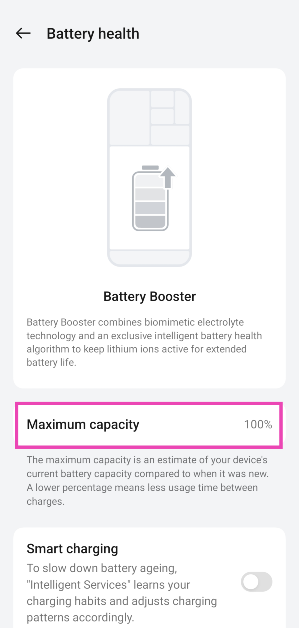
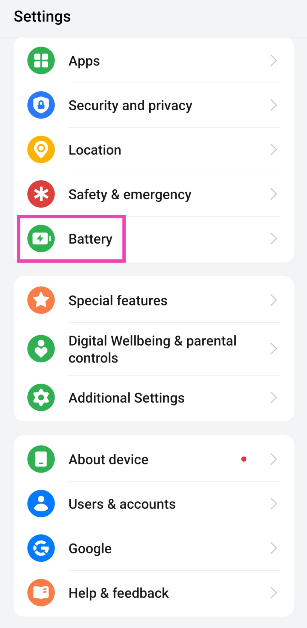 Step 2: Tap on Battery health.
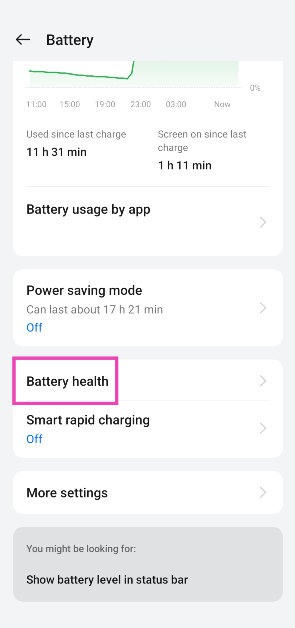 Step 3: Check the maximum capacity of the battery.
 Read also: Nvidia announced GeForce RTX 3080 Ti and GeForce RTX 3070 Ti graphics card at Computex 2021: Will soon come to India
 The above method gives you merely a vague idea of battery health. To get technical details in numbers, you can use a third-party app called Ampere. All you need to do is install Ampere from the Play Store, as you complete a couple of recharging cycles, the app will start showing an estimate of your battery data within the app. This number will keep getting accurate over the recharging sessions.
Usually, the app will show health, status, max capacity, etc. You might know that anything above 80% is considered good. Also, please do not overcharge the phone, that will reduce battery life.
The above method gives you merely a vague idea of battery health. To get technical details in numbers, you can use a third-party app called Ampere. All you need to do is install Ampere from the Play Store, as you complete a couple of recharging cycles, the app will start showing an estimate of your battery data within the app. This number will keep getting accurate over the recharging sessions.
Usually, the app will show health, status, max capacity, etc. You might know that anything above 80% is considered good. Also, please do not overcharge the phone, that will reduce battery life.
 Ampere is simply an app, and it doesn’t have any magical powers to increase your smartphone’s battery life. All it does is analyse your phone’s software and hardware battery usage to urge an estimate of your smartphone’s current capacity and give you an idea about its battery health.
It gives you useful stats like battery charging and discharging speeds per hour, temperature, and battery wear per recharge cycle. So looking at that you can adjust your battery usage type to prolong its life.
Ampere is simply an app, and it doesn’t have any magical powers to increase your smartphone’s battery life. All it does is analyse your phone’s software and hardware battery usage to urge an estimate of your smartphone’s current capacity and give you an idea about its battery health.
It gives you useful stats like battery charging and discharging speeds per hour, temperature, and battery wear per recharge cycle. So looking at that you can adjust your battery usage type to prolong its life.
In This Article


In This Article
| Models | Current Price | Diwali Offer | Bank Offer | Bundle Offer | Effective Consumer Price post Cashback offer |
| Tab S7+ LTE | INR 79999 | INR 76999 | INR 10000 | Keyboard Cover at INR 10000 off on MRP INR 17999 | INR 66999 |
| Tab S7+ Wi-Fi | INR 71999 | INR 54999 | INR 4000 | INR 50999 | |
| Tab S7 FE LTE (128) | INR 50999 | INR 48999 | INR 4000 | Keyboard Cover at INR 10000 off on MRP INR 14999 | INR 44999 |
| Tab S7 FE LTE 64 | INR 46999 | INR 44999 | INR 4000 | INR 40000 | |
| Tab S7 FE Wi-Fi | INR 41999 | INR 38999 | INR 4000 | INR 34999 | |
| Tab S6 Lite Wi-Fi | INR 27999 | INR 25999 | INR 3000 | Buds Live @ 1999 | INR 22999 |
| Tab S6 Lite LTE | INR 31999 | INR 30999 | INR 3000 | INR 27999 | |
| Tab A7 Wi-Fi 64 GB | INR 18999 | INR 16999 | INR 2000 | Book Cover @999 | INR 14999 |
| Tab A7 Wi-Fi 32 GB | INR 17999 | INR 15999 | INR 1500 | INR 14499 | |
| Tab A7 LTE | INR 21999 | INR 20999 | INR 2000 | INR 18999 | |
| Tab A7 Lite | INR 14999/ INR 11999 | 10% | INR 13499, | ||
| (LTE/Wi-Fi) | INR 10799 |

In This Article
 Step 2 – Tap on the App info.
Step 3 – Head to Advance.
Step 4 – In the option, you will find Picture in Picture mode, tap on that and toggle on the option.
Step 2 – Tap on the App info.
Step 3 – Head to Advance.
Step 4 – In the option, you will find Picture in Picture mode, tap on that and toggle on the option.
 After following this step double-check by heading Settings>General>Picture-in-picture in the YouTube application to make sure this option is switched on.
Read Also: WhatsApp to roll out PIP feature for WhatsApp Web
Step 2 – Tap on the App info.
Step 3 – Had to Storage and Cache.
Step 4 – Press Clear Cache.
After following this step double-check by heading Settings>General>Picture-in-picture in the YouTube application to make sure this option is switched on.
Read Also: WhatsApp to roll out PIP feature for WhatsApp Web
Step 2 – Tap on the App info.
Step 3 – Had to Storage and Cache.
Step 4 – Press Clear Cache.
 Read Also: WhatsApp rolls out PiP mode to all Android users
Following these steps will surely fix YouTube PiP (Picture in Picture) not Working on Android. Also if the user doesn’t have a premium subscription and still wants to enjoy the PIP feature. he/she must consider using a VPN and setting it to the USA.
For the latest gadget and tech news, and gadget reviews, follow us on Twitter, Facebook and Instagram. For newest tech & gadget videos subscribe to our YouTube Channel. You can also stay up to date using the Gadget Bridge Android App. You can find the latest car and bike news here.
Read Also: WhatsApp rolls out PiP mode to all Android users
Following these steps will surely fix YouTube PiP (Picture in Picture) not Working on Android. Also if the user doesn’t have a premium subscription and still wants to enjoy the PIP feature. he/she must consider using a VPN and setting it to the USA.
For the latest gadget and tech news, and gadget reviews, follow us on Twitter, Facebook and Instagram. For newest tech & gadget videos subscribe to our YouTube Channel. You can also stay up to date using the Gadget Bridge Android App. You can find the latest car and bike news here. 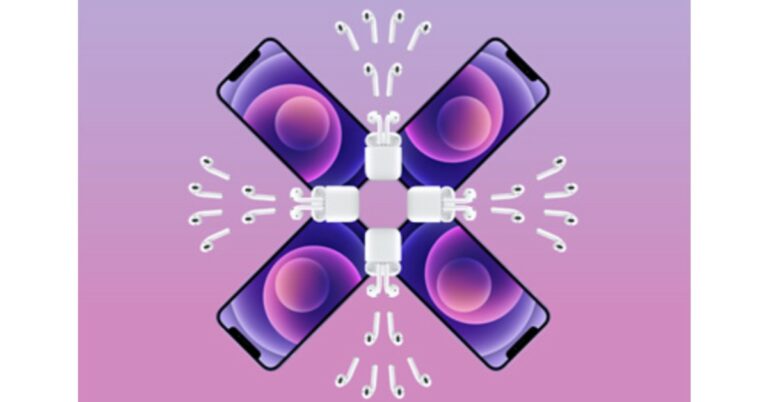
 But here is the catch, both the Apple iPhone 12 and the iPhone 12 Mini will be sold at their original MRPs. Also, you are free to choose any of the models of AirPods, but in the end, the final decision on what offer will be applied to what model will be made by Apple only.
The revised price of the Apple iPhone 12 starts at Rs 65,900, whereas the price of the iPhone 12 Mini begins at Rs 59,900. There will be no discounts on these devices. Instead, one can choose any of the AirPods models that include AirPods without a charging case, AirPods with a charging case, or AirPods Pro. The final value will be decided by Apple when you have decided what combination you will go for. More details will be revealed when the deal goes live in a few days time.
The Apple AirPods with a charging case come at Rs 18,900, whereas without the charging case, the price is cut down to Rs 14,900. The AirPods Pro are originally priced at Rs 24,900. Like we mentioned above, Apple will decide the final value of the combination you choose. Similarly, it will decide how much of a discount will be applied to it at the time of check out. One can also ask for engraving to personalise their AirPods case, which is absolutely free.
So now you must be wondering what the point of this offer is if Apple is not offering any discount on these products. The point is, if you choose to go with the first combination, which is the iPhone 12/iPhone 12 Mini with AirPods without the charging case, you will definitely save Rs 14,900.
Likewise, when you combine your iPhone with AirPods with a charging case, it will let you save at least Rs 18,900, the same as the offer on the AirPods Pro. Also, the invoice value will decide whether the discount will be applied fully or partially.
But if you are looking to buy only the iPhone, then we would suggest you look somewhere else. More deals and discounts will be available during the Amazon Great India Festival Sale and the Flipkart Big Billion Days Sale, which will begin on October 3. Here you might get extra discounts on various bank debit and credit cards.
For the latest gadget and tech news, and gadget reviews, follow us on Twitter, Facebook and Instagram. For newest tech & gadget videos subscribe to our YouTube Channel. You can also stay up to date using the Gadget Bridge Android App. You can find the latest car and bike news here.
But here is the catch, both the Apple iPhone 12 and the iPhone 12 Mini will be sold at their original MRPs. Also, you are free to choose any of the models of AirPods, but in the end, the final decision on what offer will be applied to what model will be made by Apple only.
The revised price of the Apple iPhone 12 starts at Rs 65,900, whereas the price of the iPhone 12 Mini begins at Rs 59,900. There will be no discounts on these devices. Instead, one can choose any of the AirPods models that include AirPods without a charging case, AirPods with a charging case, or AirPods Pro. The final value will be decided by Apple when you have decided what combination you will go for. More details will be revealed when the deal goes live in a few days time.
The Apple AirPods with a charging case come at Rs 18,900, whereas without the charging case, the price is cut down to Rs 14,900. The AirPods Pro are originally priced at Rs 24,900. Like we mentioned above, Apple will decide the final value of the combination you choose. Similarly, it will decide how much of a discount will be applied to it at the time of check out. One can also ask for engraving to personalise their AirPods case, which is absolutely free.
So now you must be wondering what the point of this offer is if Apple is not offering any discount on these products. The point is, if you choose to go with the first combination, which is the iPhone 12/iPhone 12 Mini with AirPods without the charging case, you will definitely save Rs 14,900.
Likewise, when you combine your iPhone with AirPods with a charging case, it will let you save at least Rs 18,900, the same as the offer on the AirPods Pro. Also, the invoice value will decide whether the discount will be applied fully or partially.
But if you are looking to buy only the iPhone, then we would suggest you look somewhere else. More deals and discounts will be available during the Amazon Great India Festival Sale and the Flipkart Big Billion Days Sale, which will begin on October 3. Here you might get extra discounts on various bank debit and credit cards.
For the latest gadget and tech news, and gadget reviews, follow us on Twitter, Facebook and Instagram. For newest tech & gadget videos subscribe to our YouTube Channel. You can also stay up to date using the Gadget Bridge Android App. You can find the latest car and bike news here. 
In This Article
 Google Opinion Rewards is a rewards-based app that gives you money in the form of Google Play balance/credits for filling out surveys. The amount you get depends on the number of questions you answered in the survey. This is a method which many users around the world employ to buy apps for free.
Once installed, the app will automatically notify you whenever a suitable survey is available for you. As you answer the surveys, you keep earning Google Play credits, which can be redeemed when buying paid apps on the Google Play Store. So yes, you can use this app to download paid apps and games for free on your Android smartphone.
If you want to, you can keep earning small credits regularly. Soon, you’ll have enough credits to buy your favourite apps using the credits you accumulated over a period of time.
Google Opinion Rewards is a rewards-based app that gives you money in the form of Google Play balance/credits for filling out surveys. The amount you get depends on the number of questions you answered in the survey. This is a method which many users around the world employ to buy apps for free.
Once installed, the app will automatically notify you whenever a suitable survey is available for you. As you answer the surveys, you keep earning Google Play credits, which can be redeemed when buying paid apps on the Google Play Store. So yes, you can use this app to download paid apps and games for free on your Android smartphone.
If you want to, you can keep earning small credits regularly. Soon, you’ll have enough credits to buy your favourite apps using the credits you accumulated over a period of time.
 Google Play Points is a great way to accumulate points that can later be redeemed to buy paid apps. If you make a lot of purchases on the Play Store or buy in-app items using Google Play, there is no reason why you should miss out on Google Play Points. These points are credited to your profile. Over a period of time, you can collect enough points to buy a paid app for free.
Download from: Google Opinion Rewards
Google Play Points is a great way to accumulate points that can later be redeemed to buy paid apps. If you make a lot of purchases on the Play Store or buy in-app items using Google Play, there is no reason why you should miss out on Google Play Points. These points are credited to your profile. Over a period of time, you can collect enough points to buy a paid app for free.
Download from: Google Opinion Rewards
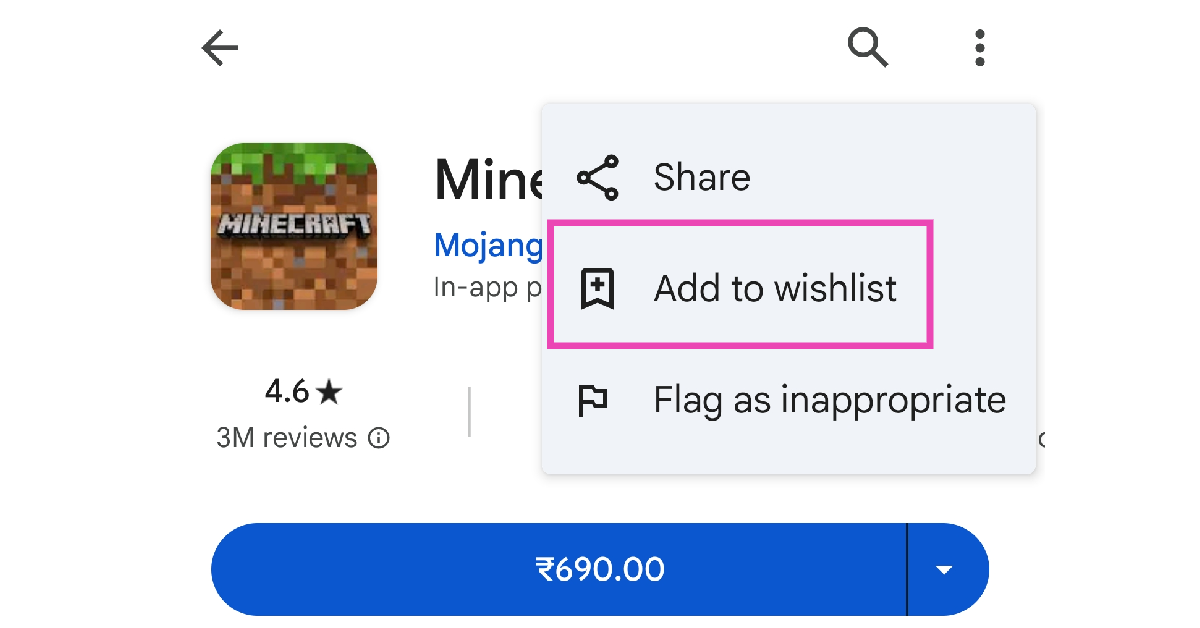 If you want someone else to buy you an app, simply put it on your wishlist and share it with them. If you have a lot of followers on social media, you can share your wishlist with them as well. To add a paid app to your wish list, go to its page in the Google Play Store, hit the ellipses at the top right corner of the screen, and select ‘Add to wishlist’.
Read also: PUBG Mobile Game: Search for Easter Eggs in the Blazing Treasure Event to get premium crate coupon for free
If you want someone else to buy you an app, simply put it on your wishlist and share it with them. If you have a lot of followers on social media, you can share your wishlist with them as well. To add a paid app to your wish list, go to its page in the Google Play Store, hit the ellipses at the top right corner of the screen, and select ‘Add to wishlist’.
Read also: PUBG Mobile Game: Search for Easter Eggs in the Blazing Treasure Event to get premium crate coupon for free
 Aptoide is a third-party app bazaar that competes directly with Google Play and other app stores. By using it, you may be able to install paid apps on your Android smartphones for free. All the user needs to do is to install the Aptoide app store and find the paid apps you want to use/try and install. There are plenty of apps that can be installed for free from the Aptoide app store.
The apps uploaded on the Aptoide app store are safe and are checked by a couple of developers, these include some big-ticket antivirus companies too (for extra safety). This is also mentioned on their website – after which you can decide whether or not to download the apps.
Download from: Aptoide
Aptoide is a third-party app bazaar that competes directly with Google Play and other app stores. By using it, you may be able to install paid apps on your Android smartphones for free. All the user needs to do is to install the Aptoide app store and find the paid apps you want to use/try and install. There are plenty of apps that can be installed for free from the Aptoide app store.
The apps uploaded on the Aptoide app store are safe and are checked by a couple of developers, these include some big-ticket antivirus companies too (for extra safety). This is also mentioned on their website – after which you can decide whether or not to download the apps.
Download from: Aptoide
 Blackmart Alpha is another third-party app store that offers paid apps on Android smartphones and devices for free. For this, you don’t need to pay any money. It has a simple UI and can be used for trying the paid apps before purchasing them.
Additionally, you may categorise apps here as well. It sorts between the free and the paid apps. The best feature of this software store is that you may also access apps that are unavailable in your region. It was very popular amongst PUBG: Mobile players when the game was banned in India.
Download from: Blackmart Alpha
Disclaimer / Note: We at Gadget Bridge, don’t support piracy in any form/manner. Please use these listed app stores at your own risk.
Blackmart Alpha is another third-party app store that offers paid apps on Android smartphones and devices for free. For this, you don’t need to pay any money. It has a simple UI and can be used for trying the paid apps before purchasing them.
Additionally, you may categorise apps here as well. It sorts between the free and the paid apps. The best feature of this software store is that you may also access apps that are unavailable in your region. It was very popular amongst PUBG: Mobile players when the game was banned in India.
Download from: Blackmart Alpha
Disclaimer / Note: We at Gadget Bridge, don’t support piracy in any form/manner. Please use these listed app stores at your own risk.
 AppSales is not an app store, instead, it tells its users about the apps that are now available for free. But, you may use it to view and install newly released apps and games with a great discount on Google Play Store.
Those who are watching for discounts on specific apps can add them to their watchlist to keep an eye on their prices. Overall, it’s also a great app to stay updated about the latest app discounts on the Google Play Store. Additionally, you might also see the app pricing history for comparison.
Download from: AppSales
AppSales is not an app store, instead, it tells its users about the apps that are now available for free. But, you may use it to view and install newly released apps and games with a great discount on Google Play Store.
Those who are watching for discounts on specific apps can add them to their watchlist to keep an eye on their prices. Overall, it’s also a great app to stay updated about the latest app discounts on the Google Play Store. Additionally, you might also see the app pricing history for comparison.
Download from: AppSales
In This Article
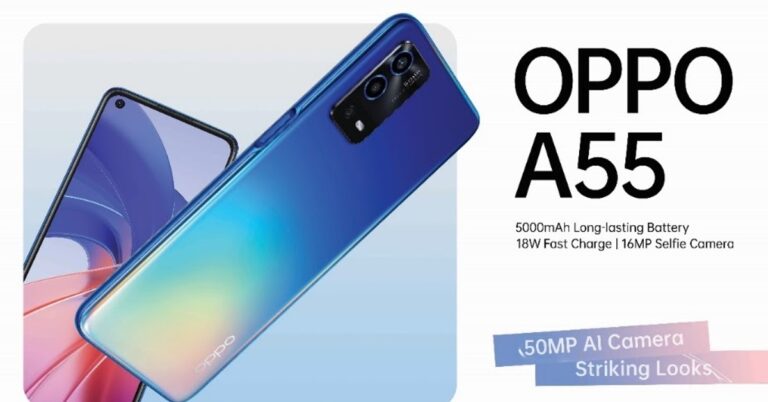
 A55 comes with ColorOS 11.1 out of the box, which is based on Android 11. In the optics department, the device features a triple camera setup that consists of a 50MP primary main camera, a 2MP depth sensor and a 2MP macro lens. The front of the smartphone sports a 16MP punch hole camera on the top left corner for selfies and video calls.
Read Also: Oppo Watch review: For the everyday power user
You can expect a full day battery with a big 5000mAh battery that supports 18W fast charging. Further, the device supports a dual sim, Wi-Fi 802.11 b/g/n/ac, Bluetooth 5.0, GPS, a long lost 3.5mm headphone jack, and a USB Type-C port. Oppo has placed a side-mounted fingerprint sensor for security. With that one can also use the AI face unlock feature.
For the latest gadget and tech news, and gadget reviews, follow us on Twitter, Facebook and Instagram. For newest tech & gadget videos subscribe to our YouTube Channel. You can also stay up to date using the Gadget Bridge Android App. You can find the latest car and bike news here.
A55 comes with ColorOS 11.1 out of the box, which is based on Android 11. In the optics department, the device features a triple camera setup that consists of a 50MP primary main camera, a 2MP depth sensor and a 2MP macro lens. The front of the smartphone sports a 16MP punch hole camera on the top left corner for selfies and video calls.
Read Also: Oppo Watch review: For the everyday power user
You can expect a full day battery with a big 5000mAh battery that supports 18W fast charging. Further, the device supports a dual sim, Wi-Fi 802.11 b/g/n/ac, Bluetooth 5.0, GPS, a long lost 3.5mm headphone jack, and a USB Type-C port. Oppo has placed a side-mounted fingerprint sensor for security. With that one can also use the AI face unlock feature.
For the latest gadget and tech news, and gadget reviews, follow us on Twitter, Facebook and Instagram. For newest tech & gadget videos subscribe to our YouTube Channel. You can also stay up to date using the Gadget Bridge Android App. You can find the latest car and bike news here. 
In This Article
 Step 4 – Hower over the Download option to discover multiple options.
Step 5 – Select the PDF Document option from the list.
Step 4 – Hower over the Download option to discover multiple options.
Step 5 – Select the PDF Document option from the list.
 Step 6 – The PDF file with its name will be downloaded to your system.
 Read Also: Google Drive offline mode is now available to access files
Step 4 – Select the Print option, one can press Ctrl+P directly as well.
Read Also: Google Drive offline mode is now available to access files
Step 4 – Select the Print option, one can press Ctrl+P directly as well.
 Step 5 – Select Save as PDF in the Destination column. If you want to save it at a different location select another location from the drop-down and save directly to any cloud service available.

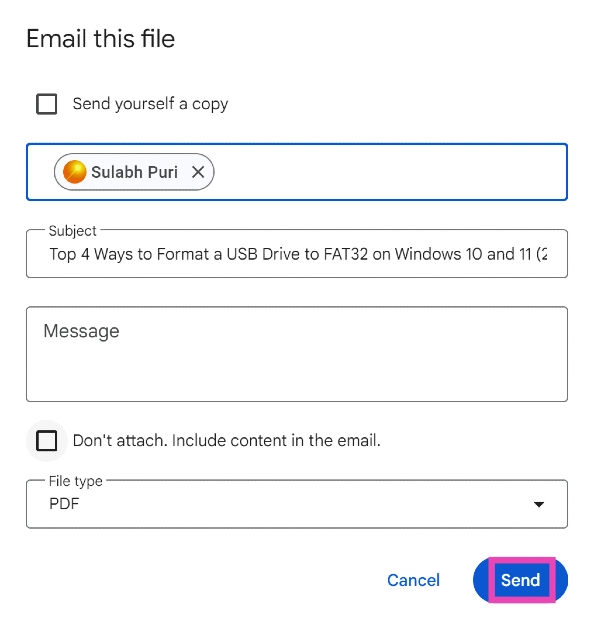
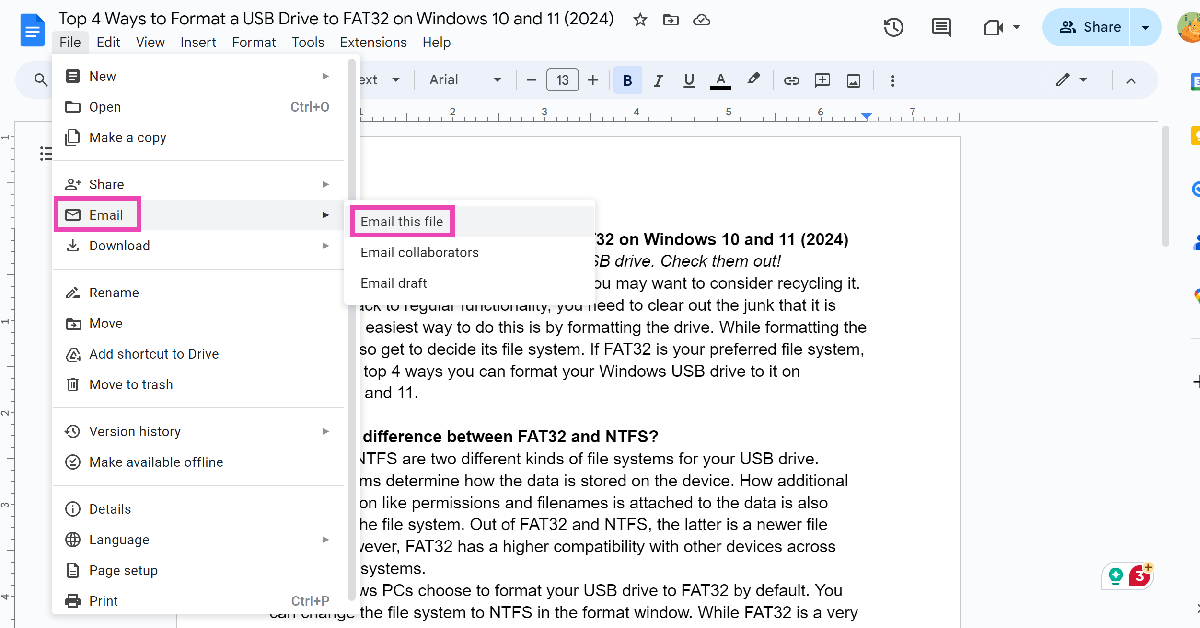 Step 3: Click on File type and select PDF.
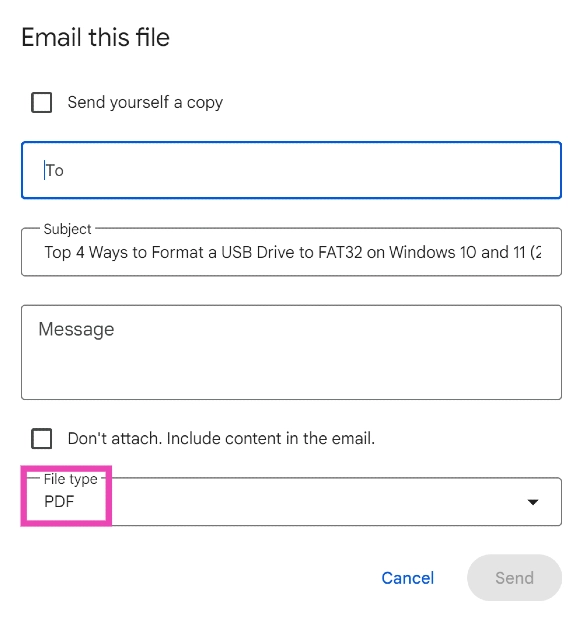 Step 4: Enter the email address of the recipient in the ‘To‘ field.
Step 5: Hit Send. You can also choose to save yourself a copy.
Step 4: Enter the email address of the recipient in the ‘To‘ field.
Step 5: Hit Send. You can also choose to save yourself a copy.
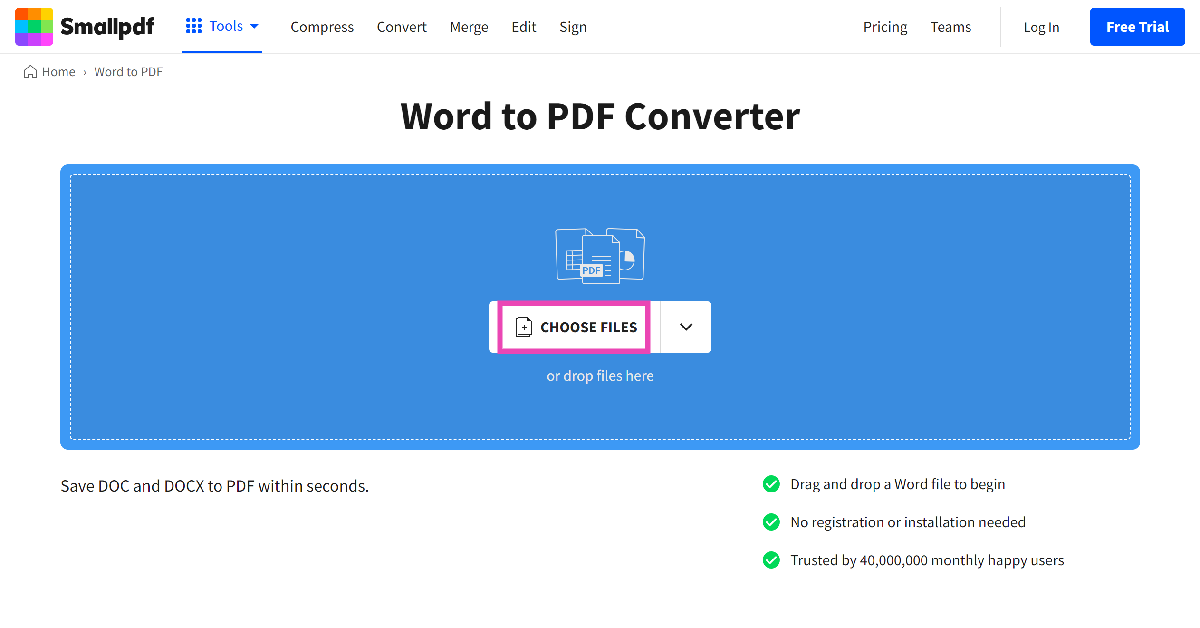 Step 2: Upload the docx file from your PC’s storage.
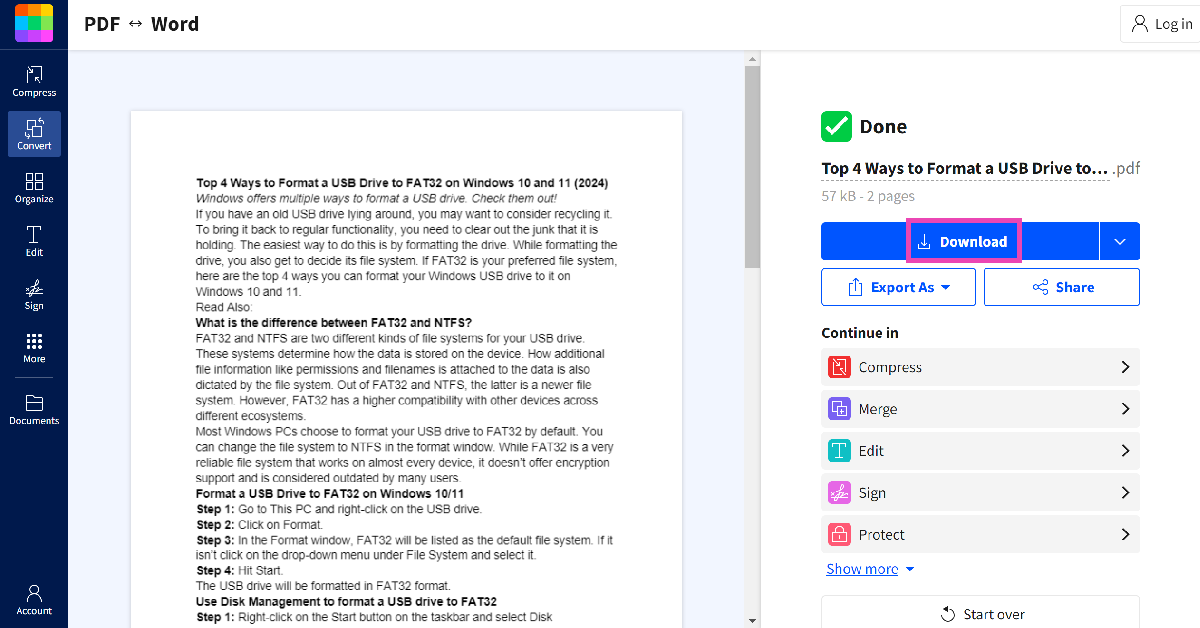
Step 3: The docx file will be converted to PDF. Hit Download to store it on your PC.
Step 2: Upload the docx file from your PC’s storage.
Step 3: The docx file will be converted to PDF. Hit Download to store it on your PC.
In This Article



In This Article
 The Apple Student Discount is only available on MacBook Air, MacBook Pro, iMac, iMac Pro, Mac Pro, Mac Mini, Pro Display XDR, iPad Pro, iPad Air, iPad, and iPad Mini versions. You cannot claim the offer on other products like the iPhone, Apple Watch, AirPods, Apple TV, or any other accessories. The discounted price offered on the selected range of products is as follows:
MacBook Air – Starting at Rs 83,691
MacBook Pro – Starting at Rs 1,10,691
iMac – Starting at Rs 89,910
iMac Pro – Starting at Rs 4,18,410
Mac Pro – Starting at Rs 4,49,910
Mac Mini – Starting at Rs 67,410
Pro Display XDR – Starting at Rs 4,04,910
iPad Pro – Starting at Rs 68,305
iPad Air – Starting at Rs 50,783
iPad – Starting at Rs 28,106
iPad Mini – Starting at Rs 33,155
Read also: YouTube Premium and Music’s 3 months subscription is being given to students for free
The Apple Student Discount is only available on MacBook Air, MacBook Pro, iMac, iMac Pro, Mac Pro, Mac Mini, Pro Display XDR, iPad Pro, iPad Air, iPad, and iPad Mini versions. You cannot claim the offer on other products like the iPhone, Apple Watch, AirPods, Apple TV, or any other accessories. The discounted price offered on the selected range of products is as follows:
MacBook Air – Starting at Rs 83,691
MacBook Pro – Starting at Rs 1,10,691
iMac – Starting at Rs 89,910
iMac Pro – Starting at Rs 4,18,410
Mac Pro – Starting at Rs 4,49,910
Mac Mini – Starting at Rs 67,410
Pro Display XDR – Starting at Rs 4,04,910
iPad Pro – Starting at Rs 68,305
iPad Air – Starting at Rs 50,783
iPad – Starting at Rs 28,106
iPad Mini – Starting at Rs 33,155
Read also: YouTube Premium and Music’s 3 months subscription is being given to students for free
 Buyers must provide information like student ID and college or institution address for further verification. Parents or teachers shopping for Apple products for their wards and students too have to provide all the related details to Apple authorities.
The verification process can be completed through UNiDAYS after one enrols for the offer. If facing any problem, you can verify it through an acceptance letter issued from University. UNiDAYS is a free app that connects you with exclusive discounts from top brands – only for students.
Buyers must provide information like student ID and college or institution address for further verification. Parents or teachers shopping for Apple products for their wards and students too have to provide all the related details to Apple authorities.
The verification process can be completed through UNiDAYS after one enrols for the offer. If facing any problem, you can verify it through an acceptance letter issued from University. UNiDAYS is a free app that connects you with exclusive discounts from top brands – only for students.

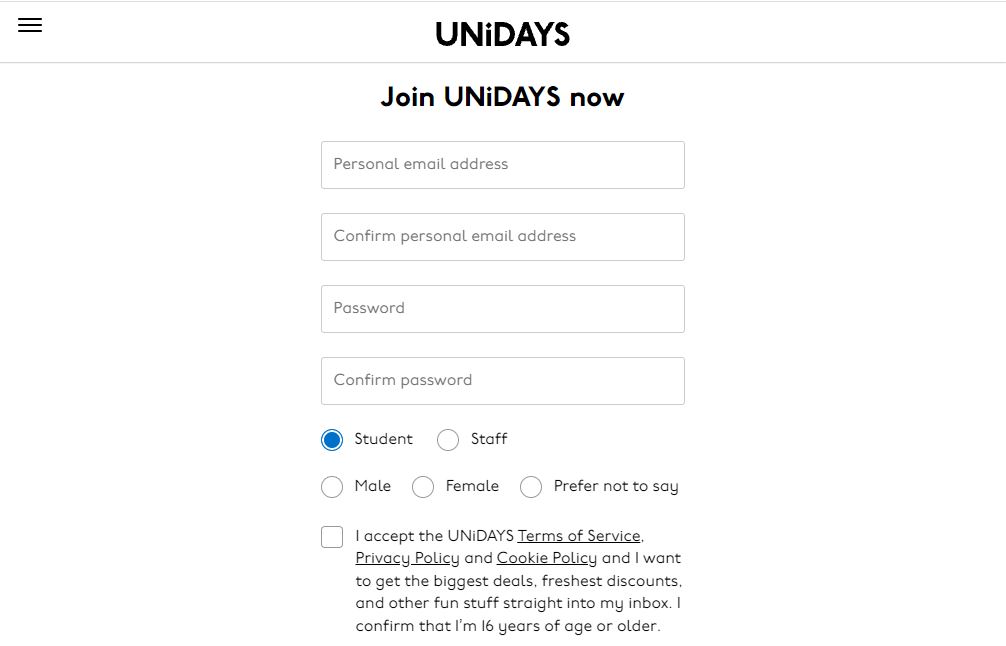 Now follow the process by clicking continue. You will be asked to create an account after which you will be asked to add documents. When you are accepted by UNiDAYS apple India, you are eligible for student discounts.
Read also: Apple’s new AirPods earbuds likely to launch in May: Leak
After verification by UNiDAYS, Apple India will mark the account’s purchase eligible for the ‘Back to School’ programme, and then consumers can avail any of the discounts or get a free pair of AirPods, whichever they find more suitable.
The free AirPods being offered under this scheme come with wired charging. Buyers can upgrade to an AirPods with wireless charging by paying an extra amount of Rs 4,000, or to AirPods Pro for Rs 10,000. The original cost of AirPods, AirPods with Wireless Charging, and AirPods Pro are Rs 14,900, Rs 18,900, and Rs 24,900 respectively.
Now follow the process by clicking continue. You will be asked to create an account after which you will be asked to add documents. When you are accepted by UNiDAYS apple India, you are eligible for student discounts.
Read also: Apple’s new AirPods earbuds likely to launch in May: Leak
After verification by UNiDAYS, Apple India will mark the account’s purchase eligible for the ‘Back to School’ programme, and then consumers can avail any of the discounts or get a free pair of AirPods, whichever they find more suitable.
The free AirPods being offered under this scheme come with wired charging. Buyers can upgrade to an AirPods with wireless charging by paying an extra amount of Rs 4,000, or to AirPods Pro for Rs 10,000. The original cost of AirPods, AirPods with Wireless Charging, and AirPods Pro are Rs 14,900, Rs 18,900, and Rs 24,900 respectively.
In This Article
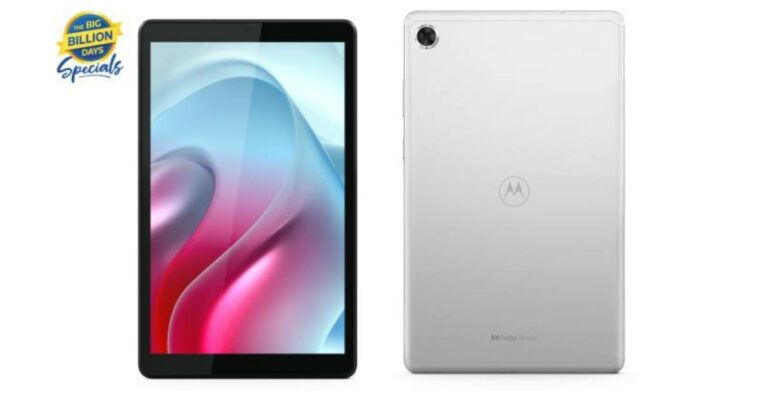
Presenting the all-new #mototabg20 that packs remarkable features to help you experience #PureLearningPureFun at just ₹10,999. What’s more? Get an additional ₹1,000 off by exchanging your old device! Pre-order starts 2nd Oct, 12 PM on @Flipkart. https://t.co/0Qqq1DXdFR
— Motorola India (@motorolaindia) September 30, 2021
In This Article

In This Article

In This Article

In This Article
 Plate with 0.5-inch screw: It is quick and easy for setting up the smartphone mount and cameras onto and off the tripod.
Bubble Level: It ensures level at all times.
Excellent 3-way pan head: A horizontally tilting camera platform for switching to 90-degree portrait orientation, tilt motion pivots up to 180 degrees.
3 Sections Aluminum legs: It allows you to adjust the tripod to the desired height for shooting.
Non-slippery Rubber Leg Bases: It ensures tripod stability.
Price: Rs. 649
Click here to buy: Venganza Adjustable Aluminium Alloy tripod
Plate with 0.5-inch screw: It is quick and easy for setting up the smartphone mount and cameras onto and off the tripod.
Bubble Level: It ensures level at all times.
Excellent 3-way pan head: A horizontally tilting camera platform for switching to 90-degree portrait orientation, tilt motion pivots up to 180 degrees.
3 Sections Aluminum legs: It allows you to adjust the tripod to the desired height for shooting.
Non-slippery Rubber Leg Bases: It ensures tripod stability.
Price: Rs. 649
Click here to buy: Venganza Adjustable Aluminium Alloy tripod
 Twist and swivel: It moves up to 360 degrees to capture your perfect shot. The adaptable legs allow you to take shots from all angles making this accessory a unique portable and lightweight flexible tripod.
Large: This tripod is large and can hold up to 2Kg in weight making it near enough possible to hold any DSLR.
ABS plastic: The durable material on the extra-large tripod makes it dependable in all conditions. The ABS plastic holds well and it is resistant to any chemicals.
Base: The rubberized ring and foot grips provide enhanced stability on uneven terrain.
Price: Rs 399
Click here to buy: Venganza 13-inch Flexible tripod
Read also: Top 5 professional tripods you can buy under Rs 3,000
Twist and swivel: It moves up to 360 degrees to capture your perfect shot. The adaptable legs allow you to take shots from all angles making this accessory a unique portable and lightweight flexible tripod.
Large: This tripod is large and can hold up to 2Kg in weight making it near enough possible to hold any DSLR.
ABS plastic: The durable material on the extra-large tripod makes it dependable in all conditions. The ABS plastic holds well and it is resistant to any chemicals.
Base: The rubberized ring and foot grips provide enhanced stability on uneven terrain.
Price: Rs 399
Click here to buy: Venganza 13-inch Flexible tripod
Read also: Top 5 professional tripods you can buy under Rs 3,000
 BMC Mobile Tripod Stand is another decent tripod on the list. It will serve your outside shooting needs well and you can take it with you on excursions as well.
Material: Aluminum alloy & ABS
Camera Mount: Universal 0.5-inch screw
Folded Length: 2 feet.
Maximum Length: 5 feet.
Max Load Bearing: 3.5 Kg.
Price: Rs 599
Click here to buy: BMC Mobile Tripod Stand
BMC Mobile Tripod Stand is another decent tripod on the list. It will serve your outside shooting needs well and you can take it with you on excursions as well.
Material: Aluminum alloy & ABS
Camera Mount: Universal 0.5-inch screw
Folded Length: 2 feet.
Maximum Length: 5 feet.
Max Load Bearing: 3.5 Kg.
Price: Rs 599
Click here to buy: BMC Mobile Tripod Stand
 Heavy Duty: The Gorillapod mobile tripod is made of high-quality ABS. Making it a very heavy duty product and giving it an exponentially longer life, as compared to other plastic-based camera tripods. Ensuring that even with rough usage your mobile phone, and tripod stand will be safe.
Rotating Sphere: An anodised finishing rotating sphere in tripods for mobile or gorilla tripod ensures that you get a great load-bearing capacity for your mobile tripod. Along with an accurate angle lock.
Free Holder: A free mobile tripod with a holder ensures that you don’t have to purchase a separate accessory for your tripod.
Portable & Lightweight: A portable design ensures that you can carry and use your mini tripods for mobile effortlessly throughout the day. ABS makes the mini tripod exceptionally lightweight and durable. It is perfect for a long day of tripod shooting.
Clasp Lock: A clasp based lock comes with the tripod. It helps you lock in the exact angle you desire for your tripod for the mobile camera.
Price: Rs 399
Click here to buy: Tygot Gorilla tripod
Read also:
Heavy Duty: The Gorillapod mobile tripod is made of high-quality ABS. Making it a very heavy duty product and giving it an exponentially longer life, as compared to other plastic-based camera tripods. Ensuring that even with rough usage your mobile phone, and tripod stand will be safe.
Rotating Sphere: An anodised finishing rotating sphere in tripods for mobile or gorilla tripod ensures that you get a great load-bearing capacity for your mobile tripod. Along with an accurate angle lock.
Free Holder: A free mobile tripod with a holder ensures that you don’t have to purchase a separate accessory for your tripod.
Portable & Lightweight: A portable design ensures that you can carry and use your mini tripods for mobile effortlessly throughout the day. ABS makes the mini tripod exceptionally lightweight and durable. It is perfect for a long day of tripod shooting.
Clasp Lock: A clasp based lock comes with the tripod. It helps you lock in the exact angle you desire for your tripod for the mobile camera.
Price: Rs 399
Click here to buy: Tygot Gorilla tripod
Read also:
 Universal phone holder: This is a new tripod with excellent quality that comes with a phone bracket.
Level tester: This tripod is equipped with a level bubble tester, which can detect and adjust the horizontal position.
Shaft jacking system: Turn this button lightly to control the jacking system, when the button is loose, the centre shaft can move up or down easily.
3-Way Head: The tripod’s 3-way head allows for ultimate versatility. The phone bracket is adjustable and lightweight, easy to use and can be connected with a standard tripod hole.
Price: Rs 650
Click here to buy: Ionix Flexible Foldable tripod
Universal phone holder: This is a new tripod with excellent quality that comes with a phone bracket.
Level tester: This tripod is equipped with a level bubble tester, which can detect and adjust the horizontal position.
Shaft jacking system: Turn this button lightly to control the jacking system, when the button is loose, the centre shaft can move up or down easily.
3-Way Head: The tripod’s 3-way head allows for ultimate versatility. The phone bracket is adjustable and lightweight, easy to use and can be connected with a standard tripod hole.
Price: Rs 650
Click here to buy: Ionix Flexible Foldable tripod
 Tripod Holder: Marklif brings to you this adjustable tripod with a mobile holder, which is made from aluminium alloy and is silver in colour. It is suitable for cameras, smartphones with cameras etc for shooting your favourite images.
4 Section Legs: It features 4 section legs to adjust the tripod and give it enough mobility to click your pictures or shoot videos with ease at different heights and angles.
Light Weight: The tripod holder measures only 400 grams and can be lifted easily for mobility. It can be set up within minutes with a simple clip-on or off feature, which provides ease of use to the tripod stand for the phone.
Price: Rs 699
Click here to buy: Marklif Mini Aluminum Alloy tripod
Read also: Apple has announced the price of all-new Watch Series 5 variants in India
Tripod Holder: Marklif brings to you this adjustable tripod with a mobile holder, which is made from aluminium alloy and is silver in colour. It is suitable for cameras, smartphones with cameras etc for shooting your favourite images.
4 Section Legs: It features 4 section legs to adjust the tripod and give it enough mobility to click your pictures or shoot videos with ease at different heights and angles.
Light Weight: The tripod holder measures only 400 grams and can be lifted easily for mobility. It can be set up within minutes with a simple clip-on or off feature, which provides ease of use to the tripod stand for the phone.
Price: Rs 699
Click here to buy: Marklif Mini Aluminum Alloy tripod
Read also: Apple has announced the price of all-new Watch Series 5 variants in India
 Material: Aluminium Alloy
3-Way Head: The tripod’s three-way head allows for ultimate versatility. Users can easily change the orientation of the camera from portrait to landscape–and almost any angle in between with the handy tilt motion. Users can turn the knobs to secure them in one place.
Level tester: This tripod is equipped with a bubble level tester, which can detect and adjust its horizontal position. When the ground is not levelled, you can recognise it immediately and adjust the tripod leg to keep it levelled.
Special Features: It features a pan-tilt-swivel head with bubblehead, 3 Section Legs, extendable legs
Colour: Black, Silver
Universal Phone Holder: A phone bracket comes with it that can stretch a clip from 5.4-8.8 cm. The phone bracket is adjustable and lightweight, easy to use and carry.
Price: Rs 529
Click here to buy: PROSmart Aluminium Adjustable Portable and Foldable tripod
For the latest gadget and tech news, and gadget reviews, follow us on Twitter, Facebook and Instagram. For newest tech & gadget videos subscribe to our YouTube Channel. You can also stay up to date using the Gadget Bridge Android App. You can find the latest car and bike news here.
Material: Aluminium Alloy
3-Way Head: The tripod’s three-way head allows for ultimate versatility. Users can easily change the orientation of the camera from portrait to landscape–and almost any angle in between with the handy tilt motion. Users can turn the knobs to secure them in one place.
Level tester: This tripod is equipped with a bubble level tester, which can detect and adjust its horizontal position. When the ground is not levelled, you can recognise it immediately and adjust the tripod leg to keep it levelled.
Special Features: It features a pan-tilt-swivel head with bubblehead, 3 Section Legs, extendable legs
Colour: Black, Silver
Universal Phone Holder: A phone bracket comes with it that can stretch a clip from 5.4-8.8 cm. The phone bracket is adjustable and lightweight, easy to use and carry.
Price: Rs 529
Click here to buy: PROSmart Aluminium Adjustable Portable and Foldable tripod
For the latest gadget and tech news, and gadget reviews, follow us on Twitter, Facebook and Instagram. For newest tech & gadget videos subscribe to our YouTube Channel. You can also stay up to date using the Gadget Bridge Android App. You can find the latest car and bike news here. 
In This Article
 Wombo is the most popular AI application that makes any face or picture into a lip-sync video. You can create viral videos with your selfies, upload them on social media and get popular.
All you have to do is install the application and select from the song library, which has a lot of options. After selecting it click a selfie or upload any picture from the gallery. The rest of the work Wombo will do for you.
Download: iOS, Android
Read Also: 6 gadgets you didn’t know you need this summer
Wombo is the most popular AI application that makes any face or picture into a lip-sync video. You can create viral videos with your selfies, upload them on social media and get popular.
All you have to do is install the application and select from the song library, which has a lot of options. After selecting it click a selfie or upload any picture from the gallery. The rest of the work Wombo will do for you.
Download: iOS, Android
Read Also: 6 gadgets you didn’t know you need this summer
 Mug Life works a little differently than Wombo as the application scans the selfie of a person and transforms it into a 3D animated character. Though the application does not give you an option to add songs, one can use it to create animations, videos or memes.
The applications come with face-tracking technology which is accurate and the animation quality is superior to other applications. With being able to move each facial expression using highly processed AI power, there are endless possibilities. One can create quality content using Mug Life.
Download: iOS, Android
Mug Life works a little differently than Wombo as the application scans the selfie of a person and transforms it into a 3D animated character. Though the application does not give you an option to add songs, one can use it to create animations, videos or memes.
The applications come with face-tracking technology which is accurate and the animation quality is superior to other applications. With being able to move each facial expression using highly processed AI power, there are endless possibilities. One can create quality content using Mug Life.
Download: iOS, Android
 Then the app was widely used to create trending videos and reels with animated faces and songs. Earlier in the starting stages, the application was a little buggy. But the company had major improvements over the AI processing power and User Interface.
One can upload their photo to make it sing or use a unique feature, unlike any other application. It is called live animation mode, which helps to make a video of a still picture singing in real-time. The company recently introduced this application for Android as well. Download from the below link, make some videos of you and your friends, and go viral.
Download: iOS, Android
Read Also: Mi A3 launch teased by Xiaomi’s spokesperson
This was all about top apps to make your photos sing on Android and iPhone mobile. Try these apps to make some fun videos and spread happiness. Also, there are a few pictures with copyright in the app. Do not use those images without the owner’s permission to make videos, as it can cause you trouble if you upload them without proper rights.
For the latest gadget and tech news, and gadget reviews, follow us on Twitter, Facebook and Instagram. For newest tech & gadget videos subscribe to our YouTube Channel. You can also stay up to date using the Gadget Bridge Android App. You can find the latest car and bike news here.
Then the app was widely used to create trending videos and reels with animated faces and songs. Earlier in the starting stages, the application was a little buggy. But the company had major improvements over the AI processing power and User Interface.
One can upload their photo to make it sing or use a unique feature, unlike any other application. It is called live animation mode, which helps to make a video of a still picture singing in real-time. The company recently introduced this application for Android as well. Download from the below link, make some videos of you and your friends, and go viral.
Download: iOS, Android
Read Also: Mi A3 launch teased by Xiaomi’s spokesperson
This was all about top apps to make your photos sing on Android and iPhone mobile. Try these apps to make some fun videos and spread happiness. Also, there are a few pictures with copyright in the app. Do not use those images without the owner’s permission to make videos, as it can cause you trouble if you upload them without proper rights.
For the latest gadget and tech news, and gadget reviews, follow us on Twitter, Facebook and Instagram. For newest tech & gadget videos subscribe to our YouTube Channel. You can also stay up to date using the Gadget Bridge Android App. You can find the latest car and bike news here. 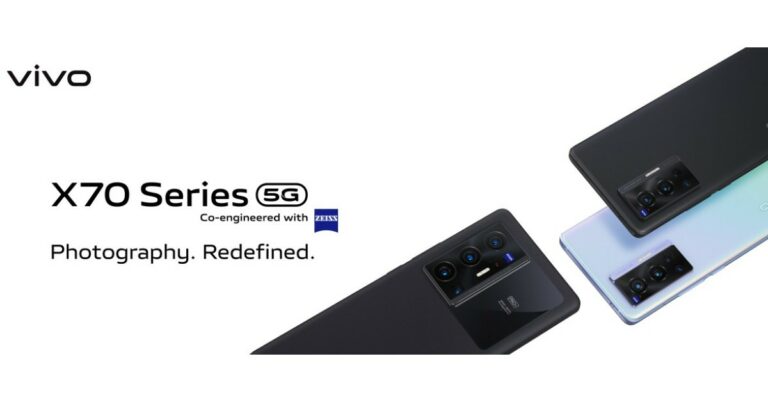
In This Article
 For the photos and videos, Vivo X70 Pro houses a quad rear camera set up with a 50MP primary sensor with Ultra Gimbal tech. Further assisted by a 12MP ultra wide-angle sensor, a 12-megapixel portrait sensor and an 8MP periscopic lens and OIS. For selfies, there will be a 32MP front-facing camera.
It has a 4,450mAh battery with 44W Flash Charge fast charging support. In terms of connectivity, there is 5G, 4G LTE, Wifi 6, Bluetooth v5, GPS/ A-GPS/ NavIC. While the sensors on the phone include an accelerometer, ambient light, gyroscope and more.
For the photos and videos, Vivo X70 Pro houses a quad rear camera set up with a 50MP primary sensor with Ultra Gimbal tech. Further assisted by a 12MP ultra wide-angle sensor, a 12-megapixel portrait sensor and an 8MP periscopic lens and OIS. For selfies, there will be a 32MP front-facing camera.
It has a 4,450mAh battery with 44W Flash Charge fast charging support. In terms of connectivity, there is 5G, 4G LTE, Wifi 6, Bluetooth v5, GPS/ A-GPS/ NavIC. While the sensors on the phone include an accelerometer, ambient light, gyroscope and more.
 The quad-camera set up on the X70 Pro+ will include a 48MP Sony IMX578 ultra-wide-angle sensor with gimbal support, a 50MP primary sensor, a 12MP portrait and an 8MP periscope lens and OIS. The selfie camera remains the same
There is a 5,000mAh battery with 55W Flash Charge with 50W Wireless Flash Charge fast charging support. The connectivity options and sensors are the same as above.
For the latest gadget and tech news, and gadget reviews, follow us on Twitter, Facebook and Instagram. For newest tech & gadget videos subscribe to our YouTube Channel. You can also stay up to date using the Gadget Bridge Android App. You can find the latest car and bike news here.
The quad-camera set up on the X70 Pro+ will include a 48MP Sony IMX578 ultra-wide-angle sensor with gimbal support, a 50MP primary sensor, a 12MP portrait and an 8MP periscope lens and OIS. The selfie camera remains the same
There is a 5,000mAh battery with 55W Flash Charge with 50W Wireless Flash Charge fast charging support. The connectivity options and sensors are the same as above.
For the latest gadget and tech news, and gadget reviews, follow us on Twitter, Facebook and Instagram. For newest tech & gadget videos subscribe to our YouTube Channel. You can also stay up to date using the Gadget Bridge Android App. You can find the latest car and bike news here. ![How to fix YouTube-server connection error [400] on Android smartphone](https://www.gadgetbridge.com/wp-content/uploads/2021/09/Untitled-2-2-768x402.jpg "How to fix YouTube-server connection error [400] on Android smartphone")
In This Article
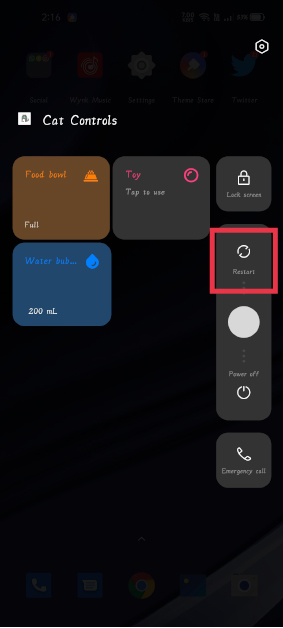
 Step B: Then click on ‘Storage‘ and press ‘Clear cache’.

 Step C: This may reset your default YouTube app and probably restore server error [400].
Read also: Fortnite is getting Apex Legends’ best feature: Get details about it here
Step C: This may reset your default YouTube app and probably restore server error [400].
Read also: Fortnite is getting Apex Legends’ best feature: Get details about it here
 Step b: Tap on App List, choose “YouTube”.
Step c: Press “Uninstall Updates”.
Step b: Tap on App List, choose “YouTube”.
Step c: Press “Uninstall Updates”.
 Once you uninstall the app updates, the YouTube videos will begin normally. You can now update the app once more from the Google Play store in case you want to. However, if the error reappears, maintain an older version, till Google releases a new stable update.
 Step b: Go to the cellular network and reset your APN(Access Point Name) settings.
 You may additionally try using another DNS(Domain Name System) to see if it fixes the issues. you’ll be able to use Cloudflare app 1.1.1.1, which may be downloaded from Google Play save right here. You can also try uninstalling and reinstalling the YouTube app on your Android smartphone, it also fixes error 400 youtube on android mobile.
Read also: Contacts not appearing in Android smartphones? Best ways to fix the problem.
So these were some easy suggestions that you can try if you are stuck with a ‘Youtube Server Connection error on Android’. Tell us in the comments section below, which mentioned method helped you fix error 400 youtube on mobile. Or did you try a new one, not on the list?
For the latest gadget and tech news, and gadget reviews, follow us on Twitter, Facebook and Instagram. For newest tech & gadget videos subscribe to our YouTube Channel. You can also stay up to date using the Gadget Bridge Android App. You can find the latest car and bike news here.
You may additionally try using another DNS(Domain Name System) to see if it fixes the issues. you’ll be able to use Cloudflare app 1.1.1.1, which may be downloaded from Google Play save right here. You can also try uninstalling and reinstalling the YouTube app on your Android smartphone, it also fixes error 400 youtube on android mobile.
Read also: Contacts not appearing in Android smartphones? Best ways to fix the problem.
So these were some easy suggestions that you can try if you are stuck with a ‘Youtube Server Connection error on Android’. Tell us in the comments section below, which mentioned method helped you fix error 400 youtube on mobile. Or did you try a new one, not on the list?
For the latest gadget and tech news, and gadget reviews, follow us on Twitter, Facebook and Instagram. For newest tech & gadget videos subscribe to our YouTube Channel. You can also stay up to date using the Gadget Bridge Android App. You can find the latest car and bike news here. 
In This Article
Read also: How to live with a smartphone with low internal storage
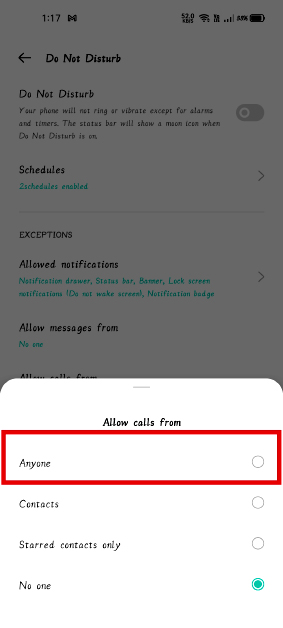
 Step b: Now tap on “Do not Disturb”, and if it is on, turn it off.
 Step c: However, if you want DND mode turned on for some reason, tap on “Calls” and allow calls from anyone in DND mode.
 Step b: Find the Phone app, tap on it.
 Step c: After that tap on ‘Manage Notifications’ and see if the toggle is on.
 Read also: Download these top Android apps to manage your finances
Step b: Look for ‘App list’ and find the Phone App.
Step c: Tap on it and then tap on Storage.
Read also: Download these top Android apps to manage your finances
Step b: Look for ‘App list’ and find the Phone App.
Step c: Tap on it and then tap on Storage.
 Step d: On the next page, tap on the clear cache and clear data button. If the issue still persists, follow the same steps as above and this time tap Clear data.
 Note: Clearing data will also delete your call logs, use them accordingly and with caution.
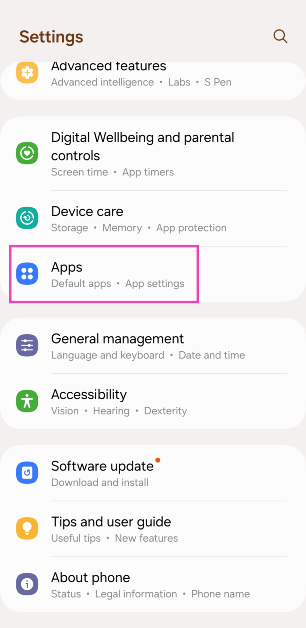 Step 2: Hit the ellipses at the top right corner of the screen.
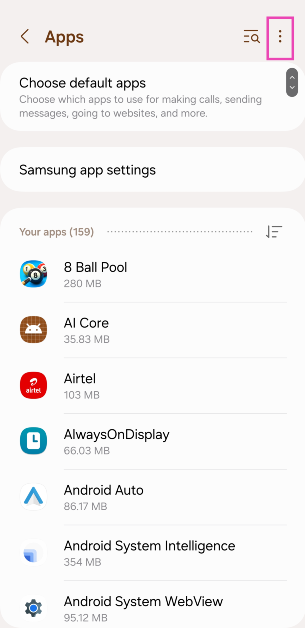 Step 3: Select Reset app preferences and confirm your selection in the pop-up box.
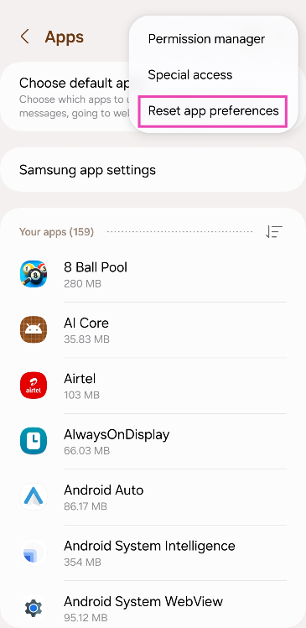 Step 2: Hit the ellipses at the top right corner of the screen.
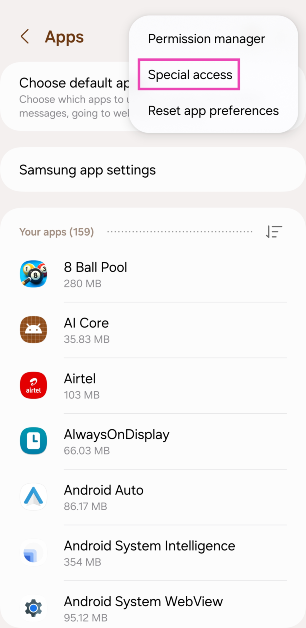
Step 3: Tap on Special Access.
Step 2: Hit the ellipses at the top right corner of the screen.
Step 3: Tap on Special Access.
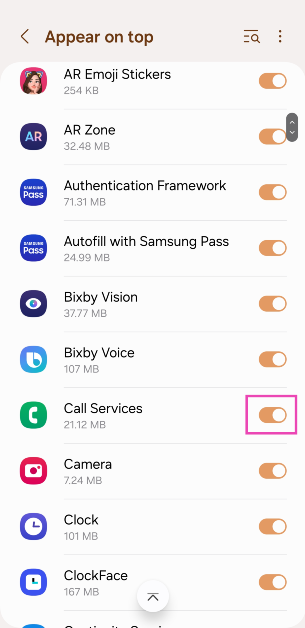
 Step 4: Select Appear on Top.
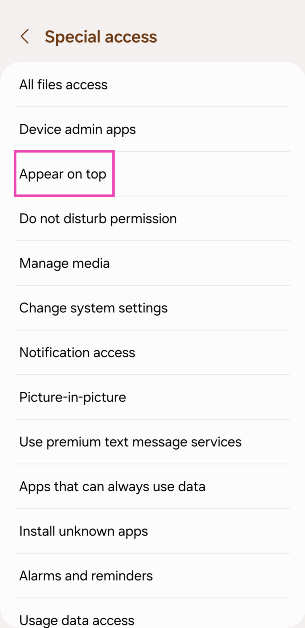 Step 5: Scroll down and turn on the toggle switch for Call services.
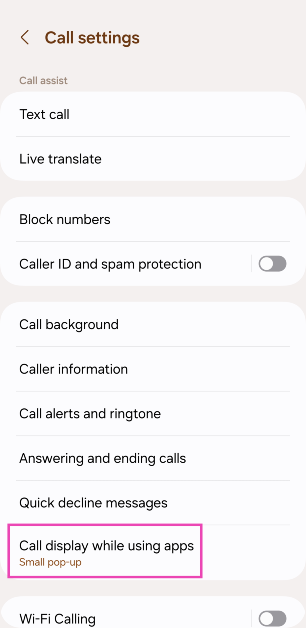
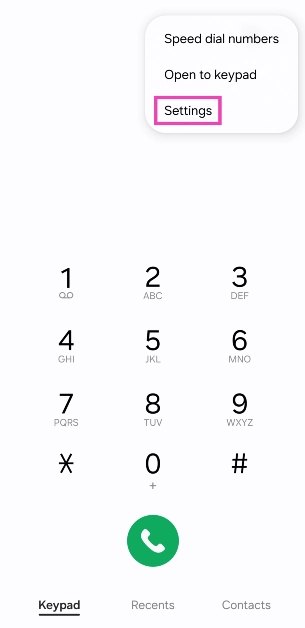 Step 3: Tap on Call display while using apps.
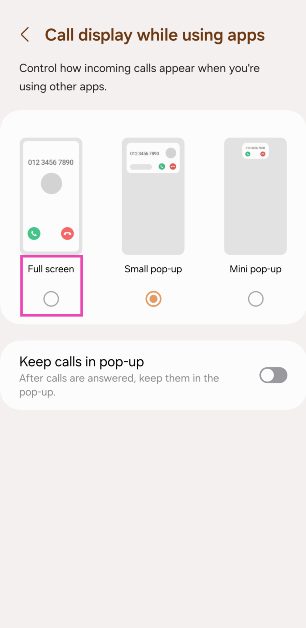
 Step 4: Select Full screen.
In This Article


 Also Read:
  Step 3 –
 Also Read: