Creating a google account gives you access to most Google products. Google Ads, Gmail, and YouTube can be logged in easily from your Google account. But when you sign in from multiple devices, your account opened on all those devices might not be safe. You can log out from all those devices at once easily. Follow the steps to know how to.
In This Article
From laptop or computers
For many reasons, you might sign your Google account to multiple devices. For example, for work, you need to sign in to your Google account on your work devices. And again your Google account might be logged in from your personal laptops or computers. Signing in multiple devices will run the risk for safety and online security. The process to sign out of all devices at once does not take long. You can log out of your Google accounts from the web with these steps. Follow below:
First, open a Web browser
Open your Gmail account
Scroll to “Details”: On the bottom right corner
It will open up a page “Activity on this account”
Click on Security Check-up
On the Security Check-up: There bunch of options
Click on Your device: You will see all the sign-in devices
Now using the vertice three-dot icon: log out from unwanted devices
If the devices are stolen or lost. It runs the risk of hacking by unknown sources. To avoid your information being accessed by an unknown person. It is better to log out of your google account from devices you do not use. Here are the steps that you can do to log out all the devices that your Google accounts are signed in.
You might lose your phone or need to change to a new phone. Using your previous Google account to your new phone is required. And when you have logged in to your Google account from your new phone it is safer to log out from all of the other previous devices. You can log out from multiple devices easily by following these steps.
Go to your phone “Setting”
Scroll down to “Accounts”
On the Accounts page: Tap on google
Now you will see all the devices log in to your Google account
In a rare accident, an Apple iPhone 6S Plus caught fire. However, the phone was not kept on charge when it caught fire. Fortunately, the device was not in the pocket, however, it was kept on the mattress while the owner of the phone was asleep. The iPhone 6S is owned by a man who is from India.Mr Chaudhary from India is a user of the Apple iPhone 6S Plus which caught fire randomly in the middle of the night when he and his family members were asleep. However, the user was able to douse the fire so the situation was under control before the handset went up in flames.
The user took to Twitter to report this scary incident to the company and its head Tim Cook and called for support. As per the tweet sent to the company and its chief, the Apple iPhone 6S Plus caught the fire at midnight. His tweet reads, “@tim_cook My iPhone 6s plus Catch the Fire at Midnight But thank Fully it’s not Burnt in my Pocket. I Request to apply Brand Pls Do something!”
Other than this the user has also made a video and uploaded it to YouTube in which he has shown the burnt iPhone 6S. As we said before the owner was asleep when the iPhone burnt. Due to this the bedsheet, as well as the mattress, had also caught fire which was thankfully beaten out resulting in no serious injury. Till now the company has not commented on the incident.This is not the first time such an incident happened. A similar incident was experienced when an iPhone 6 owned by an 11-year-old girl who is from California, USA suddenly caught fire and burned holes in her blanket. The girl used to watchYouTube videos and occasionally lets her younger siblings play games on it.Another shocking incident took place when a user named Hillard saw smoke coming from his iPhone XS Max and also suddenly started feeling a “large amount of heat” clubbed with a burning sensation on his skin. He reportedly rushed and took off his pants where he had placed his iPhone XS Max and a fire extinguisher had to be used to put out the flames of the burningsmartphone.
For the latest gadget and tech news, and gadget reviews, follow us on Twitter, Facebook and Instagram. For newest tech & gadget videos subscribe to our YouTube Channel. You can also stay up to date using the Gadget Bridge Android App.
The e-commerce website Flipkart is hosting Daily Trivia Quiz. Every day it brings a bunch of new questions for its users. By answering them correctly you can win exciting prizes. The questionnaire is based on questions related to general knowledge. Also, the users can win free vouchers and super coins, among other offers via the daily quiz. June 15 Flipkart Daily Trivia Quiz Answers has already gone live on its platform.
The participant should be at least 18 years old and should have a valid login ID. The Quiz is available on the mobile platform and not the web version. E-commerce conducts the quiz on daily basis and goes live at 12:00 AM IST and runs till 11:59 PM IST. The winners are announced within 15 days from the date of participation that can be viewed under the Gems/Rewards section in the app.
In This Article
How to participate in the Flipkart Daily Trivia Quiz
To participate download the Flipkart app on your phone. Then open the Flipkart app then head to Game Zone. Now click on the Daily Trivia Banner or search for Daily Trivia. Enter the game and answer all 5 questions with correct answers.
June 15 Flipkart Daily Trivia Quiz Answers
Question 1: Which Aamir Khan starring film was also produced by him?
Answer: Lagaan
Question 2: The movie ‘Shadow of the Cobra’ is based on which man’s life?
Answer: Charles Sobhraj
Question 3: In which of these movies do aliens come to earth?
Answer: Independence Day
Question 4: Who was Sanjay Dutt’s co-star in his debut film Rocky?
Answer: Tina Munim
Question 5: Which is the first Bollywood film to premiere at Leicester Square?
Answer: Life In A… Metro
Every day Amazon India brings a daily quiz for its customers to win exciting new prizes every day on its platform. The Amazon Quiz can be played daily from 12 AM to 11:59 PM. Today you can win a Rs 30,000 Amazon Pay Balance if you managed to answer all the questions correctly. Daily a new set of questions is presented in front of the participants that gives millions of people across the country to win exciting prizes.
The Amazon Quiz has gone live on its mobile platform. The participants have to answer 5 questions that are based on general knowledge and current affairs. After clearing the daily quiz their name will be shortlisted for a lucky draw to select a winner. Amazon announces the results of the lucky draw at the end of the month. So today’s Quiz will let you win a Rs 30,000 Amazon Pay Balance.
June 15 Amazon Quiz Answers
Question 1: In the final of which of these ATP Masters 1000 series tournaments in 2021 did Rafael Nadal beat Novak Djokovic?
The answer is- Italian Open
Question 2: In which country would you find the hot and dry deserts called Gibson, Simpson and Tanami?
The answer is- Australia
Question 3: Which popular series of books on dragons is authored by Tui T. Sutherland?
The answer is- Wings of Fire
Question 4: According to legend, on the order of King Arthur people like these spent their lives searching for which precious treasure?
The answer is- Holy Grail
Question 5: What do the ear flaps in this animal help it do?
The answer is- Stay cool
For the latest gadget and tech news, and gadget reviews, follow us on Twitter, Facebook and Instagram. For newest tech & gadget videos subscribe to our YouTube Channel. You can also stay up to date using the Gadget Bridge Android App.
Changing from one mobile service provider to another can be useful from time to time. You need the right service provider, which gives you the best network connectivity and internet services. There are some ways you can port your mobile in easy steps. Read the steps given below. And port a mobile number today.
In This Article
Through SMS service
The process to port your number has become easier than before. MNP (Mobile Number Portability) retains your number and chooses your desired service provider. You do not have to get stuck with the same service provider just to retain your number. You can start porting a mobile number easily by SMS. To port a mobile number you need to make sure the existing connection is active for 90 days. And all the bills are paid. The requirement is only these two. Start porting your mobile number with the steps below.
Decide which service provider you want to port to
Send text: PORT space Mobile number to 1900
You will receive an SMS accepting the request
Go to the nearest operator store
Show them the request SMS: give details, take your ID cards
Charges are 19 Rupees
Now the process will take only 7 days: or it may take up to 15 days
Insert the new: with the same number
Subscriber can withdraw the porting request in 24 hours
On apps and websites of the service provider: Online
You can now port/order your SIM online and get it at your doorstep. The steps are as simple and easy as above. The mobile number you like to port should be active for 90 days. All bills should be cleared. You can visit the website or download the app of the service provider. Here are the simple steps to port your mobile number.
Open the app or visit the website of the service provider
Find the MNP option and click
Two option: New sim and Keep the existing number
Select keep existing number: to retain your number but change the service provider
Enter details: Pincode, Contact number, address
Generate OTP from the number you entered
Enter OTP
Select the Plan of the service provider you want to switch to
Your request has been recorded
Choose delivery at doorstep or store pick up
Any time the representative you call and deliver you the new with the same number
Or you can pick up the store according to convenience
Storing all your WhatsApp chats and files online is important. It will help backup all your data without the fear of losing it. But restoring it can get complicated for users. By following a few simple steps given below you will be able to restore the WhatsApp backup successfully.
In This Article
Using Google drive backup
If you are changing to a new phone and restoring all your backup, all it takes is an easy few steps. You need to use your Google Drive account and you can easily restore the backup. The steps below will show you how. Most important note, you will need the same phone number and the same Google account to restore. Using google drive to restore backup works even when you want to uninstall and reinstall the WhatsApp app on the same phone. Let us get started with the steps. (But make sure you have taken a backup from the previous smartphone onto your Google Drive)
Install the Whatsapp (Changing the phone) or reinstall the app (Same phone)
Open Whatsapp
Verify your number
Restore Backup page in settings (or will show on the screen as a check box): Hit restore
The restoration process will start
After completion press next
All media will automatically be restored via Google drive:
To restore your files from local backup. First, you need to save all the WhatsApp media files to your new phone via a computer, or SD card. After you have completed transferring all files to your new mobile. You will be able to restore all media files and chat from your previous WhatsApp account. Your phone will be able to restore backup files from the last seven days. Follow the steps to know how to backup from local backup.
First, you need to save all the media files on your new phone
Use a File manager to access the media files
Locate the saved backed files> WhatsApp files
Make sure the Media files had been transferred to your new phone
Install WhatsApp now
Enter your phone number associated with the WhatsApp account and verify
Select restore on the screen
The app will now load and search for the local backup file saved on your new phone
In a minute you will be able to restore all your backup
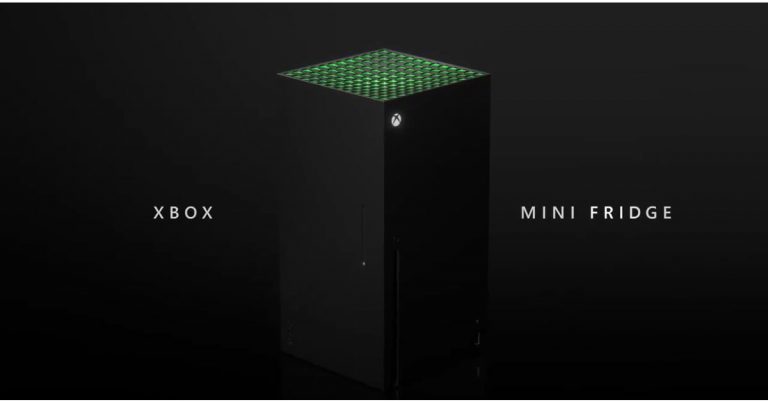
At the ongoing Electronics Entertainment Expo 2021 also known as E3 the tech giant, Microsoft took the wraps off its Xbox Series X-shaped mini-fridge. This is said to be the first most powerful mini-fridge that will allow gamers to stay cool through an immersive gaming experience. However, it is not a refrigerator but looks a lot like the one. The device is also said to arrive during this holiday. Read on to know more. In 2019 when Microsoft introduced its Xbox console people mocked it for its shape and compared it to a refrigerator. So the company took that seriously and the new Xbox Mini Fridge is inspired by the memes posted on social media then a defeated Skittles in a Twitter poll announced that an actual mini-Xbox fridge will be released in holiday 2021. Microsoft’s Xbox Games Marketing, Aaron Greenberg in April on Twitter said, “Thanks to everyone who voted, this was down to the wire and thrilling to follow. Now that @Xbox won, we will move forward on our promise to make those Xbox Series X Mini Fridges. First one off the line will be filled with games & headed to our friends @Skittles of course! Green heart.”Inspired by this the tech giant at the ongoing virtual E3 gaming conference presented the mini-fridge named the Xbox Mini Fridge. As per Microsoft, the product will arrive in the holiday season this year. As per the company, the Xbox Mini Fridge is going to be the world’s most powerful mini-fridge that will help gamers stay cool as they go through an immersive gaming experience that uses a technology named Xbox Velocity Cooling Architecture. It will be available in the iconic grey and neon colour scheme. However, information on the Mini Fridge is very scarce but will be available through Microsoft Store in the future. As for the pricing, this electronic device is said to be priced less than its console and would fall somewhere between $200 to $300.
For the latest gadget and tech news, and gadget reviews, follow us on Twitter, Facebook and Instagram. For newest tech & gadget videos subscribe to our YouTube Channel. You can also stay up to date using the Gadget Bridge Android App.
The best messaging app has enabled the consumers to use the app on computers as well. Now you can text, call and video call other WhatsApp users from your computer. You can know exactly how to do it by reading the below guide. Follow the steps to WhatsApp video call on the web today.
Installed the app
WhatsApp introduced the desktop version in 2020 to a small group of users first. Now users can easily use the app on their computers and avail all the features. Download the WhatsApp desktop app from google and install it on your laptop and PCs. Before making free voice and video calls on the WhatsApp Desktop app. You have to make sure your computer supports Windows 10 64-bit version or newer, or a macOS 10.13 or newer.
Read more: How to do voice and video call on WhatsApp desktop?To make or receive calls, your computer needs an audio output device. And microphone for all voice and video calls. A webcam for video is necessary. Also, an active internet connection is necessary. But don’t worry too much about the features, every standard laptop has all these features. Download the WhatsApp desktop app
Install it on your computer
Once you install the app open the app on your computer
Sign in using your WhatsApp mobile app on your phone
Scan the QR code
Now you the WhatsApp page your computer screen
Select any contact you want to video call
Tap the video call icon on the top right corner
By clicking the video icon it will initiate the video on your contact list.
Read also: Video and Voice call button goes live for WhatsApp desktopWhatsApp claims that video calling through the WhatApp desktop app will be more enjoyable. The larger screen on your laptop or PC will give you a better experience. This is true of the saying as for a long time the video calling market on the computer has been dominated by Skype and Zoom. WhatsApp entering into the competition makes things easier for users. Now everyone can use WhatsApp for multipurpose with their regular contacts. Moreover, WhatsApp has put in end-to-end encryption for voice and video calls here, too. So, after the mobile app for video calls, the WhatsApp desktop app will also provide end-to-end encryption.
For the latest gadget and tech news, and gadget reviews, follow us on Twitter, Facebook and Instagram. For newest tech & gadget videos subscribe to our YouTube Channel. You can also stay up to date using the Gadget Bridge Android App.
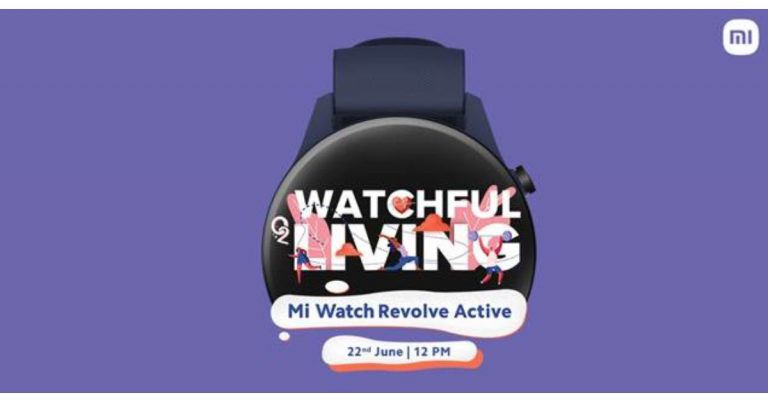
Xiaomi recently announced the launch of Mi 11 Lite in India on June 22. Today the company has also confirmed to introduce the Mi Watch Revolve Active in the country on the same day. The wearable is the follow up of the Mi Watch Revolve that was launched in India last year. The upcoming watch will be featuring a blood oxygen saturation (SpO2) monitor which is an essential feature to rule out the COVID symptoms.The Chinese smartphone company Xiaomi has officially announced to launch its next iteration of Mi Watch Revolve in India this month. The company has revealed that Mi Watch Revolve Active will make its debut on June 22 at 12 noon. The upcoming device has also been listed on its e-commerce portal as well as on Amazon to tease its availability. The microsite has also revealed the key specs of the smartphone.While announcing the launch the company said, “Mi India is geared up to bring the era of choosing health over everything. Our mantras guide us to live mindfully and consciously, root for happier minds and healthier bodies, and always getting more from life. Block your date for #WatchfulLiving with #MiWatchRevolveActive on June 22nd at 12 PM. Stay tuned to our social media channels for more updates.”As per the listing, the Mi Watch Revolve Active will have built-in GPS, Glonass, Galileo and BDS as connectivity options. The device will further include a blood oxygen saturation (SpO2) monitor, VO2 Max, Body Energy Monitor and HR Monitor. The smartwatch is listed to offer maximum sports mode. In addition to this, there will be sleep management features onboard as well as a sleep monitor. Besides all this, the Mi smartwatch will be Amazon Alexa enabled for voice control and will offer other features like calls, app notification and more. On the other hand on the same day of the launch of Mi Watch Revolve Active, Xiaomi is also going to unveil Mi 11 Lite in India. The device was introduced in China in March this year.Mi 11 Lite will be offering a 90Hz 6.55-inch full-HD+ AMOLED display. It runs MIUI 12 on top of Android 11 and will be powered by the Qualcomm Snapdragon 732G SoC. For the photos and videos, it will include a triple rear camera set up that would include a 64-megapixel primary sensor with an f/1.79 aperture. Further assisted by an 8-megapixel ultra-wide-angle lens with f/2.2 and a 5-megapixel tele-macro camera with f/2.4 aperture. For taking photos and videos there is a 16-megapixel front-facing camera with an f/2.45 aperture. Moreover, the smartphone will be backed by a 4,250mAh battery that supports 33W fast charging.
For the latest gadget and tech news, and gadget reviews, follow us on Twitter, Facebook and Instagram. For newest tech & gadget videos subscribe to our YouTube Channel. You can also stay up to date using the Gadget Bridge Android App.
Google keeps updating the Playstore without you even knowing. So many updates are available regularly. Updating the Play Store app regularly can help the performance of your other apps, too. Here is a useful guide to update your Google Play Store app. Follow the steps.
In This Article
From the Play Store app settings
It is always in your best interest to update the Play Store app. Running the latest version of the Play Store fixes bugs. The update will also give you stability improvement and new features to the digital store. To update the Play Store app from the settings. Follow the steps
Open the Play Store app on your phone
Check for the three-line icon on the top left corner
Play Store is the hub for all apps in an Android operating system mobile. Updating to the latest version will enhance the performance of all the apps you have installed on your phone. Another method to keep the Google Play Store updated is to clear all data. When you clear all data Google will automatically check for all updates. Here are the steps.
Go to main settings on your phone (Not Play Store settings)
Find the option on Apps & notification
Then the page opens up for All apps
Scroll and find Google Play Store
Tap on Google Play Store
Select the third option “Storage”: depending on the phone (Storage)
Now Tap clear data
The last step is to restart your device.: Will Update automatically
With a Play Store APK (Android Application Package)
You can also manually update the Google Play Store app. For this process, you need to download an APK file. You can download it from the APK mirror using a browser. Here are the steps to update the Playstore by using APK files.
First, download Playstore APK files from APK mirror using a browser
Open the setting on your Phone
Go to security: Lock icon
Enable the Unknown source
Confirm when a pop up shows up
Now you need to install the downloaded APK files
Again open settings
Go to apps and application
Scroll and find special file access
Go to install unknown apps
Click the browser you downloaded the APK file from
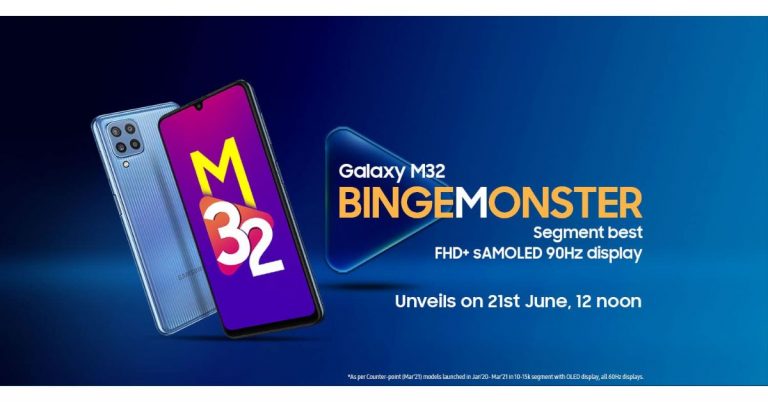
After getting listed on the BIS certification website Samsung Galaxy M32 now has a launch date. The South Korean giant today confirmed that the Galaxy M32 will get launched in India on June 21. The leaks and reports about the upcoming device have been doing the rounds on the web for some time now. Also, it appeared on the Samsung Mobile Press site earlier. The key highlights of the handset are said to include a 90Hz Super AMOLED display and a 6,000mAh battery that is claimed to last for a whole day on a single charge. As per the dedicated microsite the device will launch in India on June 21 at 12 noon. In addition to this, the listing has also revealed some of the key specifications of the handset. Besides this, the quad rear camera set up will include a 64-megapixel primary sensor. In addition to this, the listing has also revealed that a front will be featuring a 20-megapixel selfie camera sensor. As per the DEKRA certification website reported by 91Mobiles, the battery will ship a 15W fast charger. Additionally, the smartphone is said to be powered bya MediaTek Helio G80 processor, with 6GB of RAM. Whereas the quad rear camera setup will also include a 64-megapixel primary camera with f/1.8 aperture, an 8-megapixel ultra-wide-angle lens with 123-degrees of FoV, a 5-megapixel macro sensor and a 2-megapixel depth sensor. For taking selfies, there is a 20-megapixel front-facing camera. The upcoming Galaxy M32 will also come with a 6.4-inch full HD+ Infinity-U sAMOLED display with a 90Hz refresh rate.The Samsung Galaxy M32 is confirmed to feature a waterdrop-style 90Hz Super AMOLED display on the front. The back panel will include a quad rear camera set up and will be backed by a 6,000mAh battery. Prior to the official announcement, the device had also appeared on the Samsung India site as well as on the Samsung Mobile Press site that revealed the three colour options it would come in.As far as the pricing is concerned the Samsung Galaxy M32 will make its debut in the country at Rs 15,000 price segment. The phone has been spotted before with a model number via Geekbench 5 website with model number SM-M325FV. Thebenchmark listing reveals the Samsung Galaxy M32 will be powered by a MediaTek Helio G80 SoC paired with 6GB of RAM. It is also likely to ship Samsung One UI 3.1 based on Android 11. The device has managed to achieve a single-core score of 361 and a multi-core score of 1,254.For the latest gadget and tech news, and gadget reviews, follow us on Twitter, Facebook and Instagram. For newest tech & gadget videos subscribe to our YouTube Channel. You can also stay up to date using the Gadget Bridge Android App.
Watching Youtube has become a daily activity for many. Watching a DIY video keeps us motivated in doing things we never knew. It educates us. There are some great channels you can follow to make your chores easier. Check out the top channels on our list. Subscribe to them today
In This Article
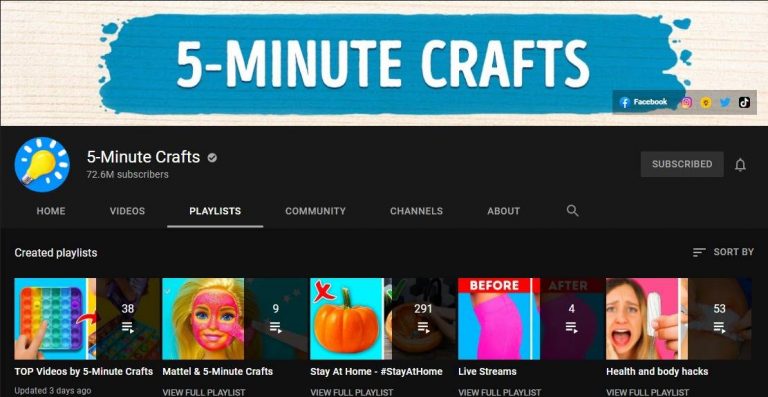
5-Minute Crafts
This channel is all about life hacks videos and some are very innovative. The channel has an incredible 72.6 Million subscribers on YouTube. You will never get bored watching their videos. Besides the great edited videos, the channel gives unending knowledge on day-to-day hacks. Once you start watching it is highly addicting for more information on DIY. The 5-Minute crafts project revolves around crafts and experience. And also experimentation on many daily use things. Some popular ones are glue guns, kitchen hacks, and more. The target audience is both adults and children. Watch the channel here
Read more: 6 things that make ethical hacking a great career
I like to make stuff
The next on the list is I like to make stuff. The channel is very popular among those who like to watch crafts and make videos. The channel has an incredible 3.17 Million subscribers on YouTube. The channel is presented and performed by Bob who puts it “demystifying the process” about the channel. The channel will show you how to make a bed, assemble a 3D printer, and metalwork. He is an expert in both woodwork and metalworks. The channel is all about empowering people to make stuff. Watch the channel here
Crafty Panda
Believe it or not, but Crafty pandy has 18.9million subscribers on YouTube. How about that? It is one of the highest on the list and it won’t disappoint you. The channel will help you discover hacks to reuse your old markers and teach how you can upgrade your notebooks. The best part of the channel is it has a hacks section for kids. Learn these hacks today for your kids from the channel. Watch the channel here
Read also: PUBG Mobile may actually launch in India as Battlegrounds Mobile India, the company teased on Facebook
Kipkay
The second last on the list is the channel Kipkay. We included this channel with the least subscriber of 2.57 Million. Because the channel is all about recycling, upcycling the waste, and discarded items around. The channel works on restoring old, rusted, damaged, and expired items. From restoring tools to gadgets. Watch this channel for some never-before videos. And get education on hacks of restoring and recycling. Watch the channel here
Sarabeautycorner
This one on the list is for all those who love to use makeup and nail art. The channel has a whopping 10.5 Million followers on YouTube. The genre of the channel is quite at large. You can watch DIY videos on make-up, nail art with a twisty comedy. DIY videos on the channel are worth your time. All the videos on the channel are designed for beginners. So the audience is targeted at all levels. Watch the channel here
For the latest gadget and tech news, and gadget reviews, follow us on Twitter, Facebook and Instagram. For newest tech & gadget videos subscribe to our YouTube Channel. You can also stay up to date using the Gadget Bridge Android App.
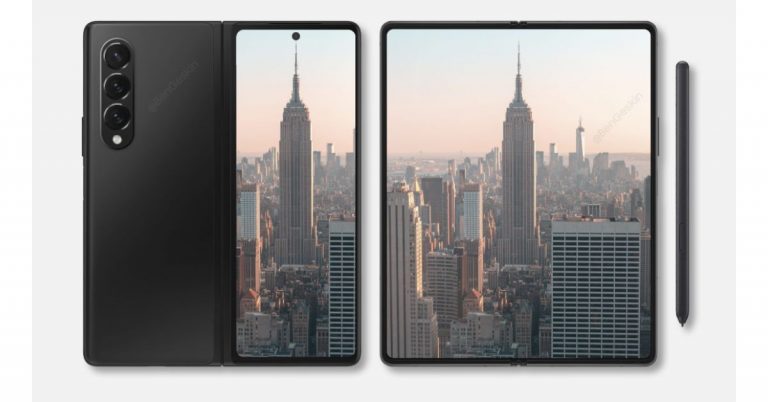
Samsung Galaxy Z Fold 3, Galaxy Z Flip 3, Galaxy Watch 4, and Galaxy Watch Active 4 are the new upcoming devices that are lined up to launch at the company’s next Galaxy Unpacked Event. As per the latest leaks, all four devices are set to make their debut on August 3. However, there is no official word from the company on the said event, but the leaks related to the gadgets are already doing rounds on the web. Tipster Max Weinbach has taken the lid off about Samsung’s upcoming Unpacked event along with key details about the anticipated products, foldable phones and smartwatches. As per the tipster, the South Korean firm is said to host the Galaxy Unpacked event on August 3. The company is said to unveil two foldable phones Galaxy Z Fold 3 and Galaxy Z Flip 3. Additionally, there will be two more products: Samsung Galaxy Watch 4 and Samsung Galaxy Watch Active 4. On the other hand, another tipster has disclosed that the Samsung Galaxy Watch 4 series will begin shipping from August 11 a week after the launch, whereas the Galaxy Z Fold 3 and Galaxy Z Flip 3 are said to start shipping from August 27, that is three weeks after the launch.Moreover, the Samsung Galaxy Watch 4 is claimed to become available in two sizes 42mm and 46mm. On the other hand, Samsung Galaxy Watch Active 4 will be available in 40mm and 44mm sizes.This is not the first time that a leak related to Samsung Galaxy Z Fold 3 has appeared on the internet. The past leaks claim that the phone will be made available in Black, Dark Green, and Silver options. The upcoming foldable will be featuring an under-display camera which is one of a kind. In addition to this, there will be hybrid S Pen support too. This type of S Pen is slated to bring in a blunt tip that will prevent the screen from scratches. There will be armour protection on the screen as well as on the hinge and bezels. The outer part of the foldable smartphone will be protected with Corning Gorilla Glass Victus. Leaks also suggest that the Z Fold 3 will also pack either a 4,275mAh or a 4,380mAh battery.
For the latest gadget and tech news, and gadget reviews, follow us on Twitter, Facebook and Instagram. For newest tech & gadget videos subscribe to our YouTube Channel. You can also stay up to date using the Gadget Bridge Android App.
The Android 12 beta version has been recently rolled out by Google. It has many features available such as privacy and “hidden game mode” in the beta version. The all-new Android 12 will be available as an OTA update around September or October this year. Here is a handy guide to enable the hidden game mode when using Android 12 beta.
In This Article
Go to the setting menu on your mobile
This is the first thing you need to do before enabling the hidden game feature in Android 12 beta. Downloaded it and install it for those who have not, you need to install it. After successfully installing it go to the settings menu on your Android device to enjoy the features newly rolled out by Google.
Navigate to the Digital Wellbeing option
The next step to enable the hidden game mode is to navigate to the Digital wellbeing sub-menu. You can manually go to the option or you can use the search bar to search for it. The sub-menu is highlighted as Digital wellbeing and parental controls. So scroll down to Digital Wellbeing and follow the next step
Read more: Instagram rolling out Guides features for all the users
Select the Do not disturb
The next thing to do is tap on the Do not disturb menu. It is located in the reduce interruption sub- categorisation when you open the Digital Wellbeing menu. It is easily visible. Now you will find a list of options for apps and people that you can enable Do not disturb for. Next, scroll down to schedule
Next, when you open the Schedule menu. You have to make sure you click on the game mode Checkbox. This will enable a floating menu with a Game mode option available.
Game mode setting
When you are done with clicking the game mode checkbox. The next step is to click on the setting icon which is on the right of the screen. Now you can see six lists on the screen. Tap on it.
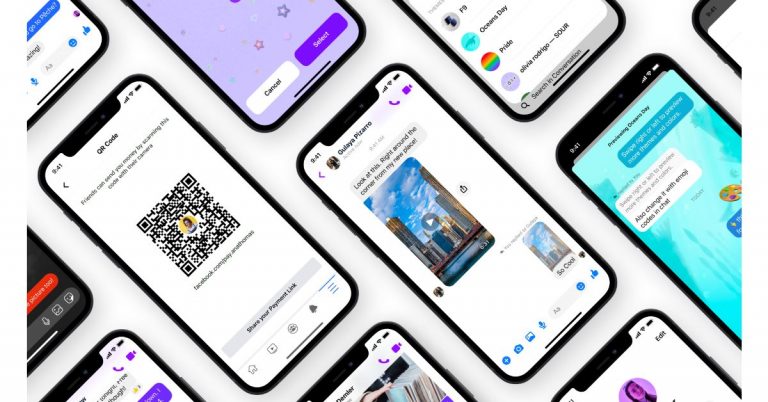
Facebook Messenger is now getting new messaging features that are said to bring a better user experience to its platform. The company has released new chat themes, a quick reply bar, QR codes and payments links.Facebook via its blog post announced the three new messaging features that will boost the Messenger experience. The three features: new chat themes, a quick reply bar, QR codes and payments links will be available on Instagram as well beside Messenger.The new Chat theme will allow the users to personalize and enhance their conversations. They will be able to change the background of their chat into a delightful and fun way to communicate with friends. The first theme is Olivia Rodrigo which has been brought to celebrate the launch of Olivia’s new album, Sour. Users will get a whimsical chat theme featuring Olivia’s signature face stickers that can be used to share their favourite song from the new album. Next on the list is World Oceans Day chat themes that will allow users to virtually explore the world’s oceans but also promote sustainability and the importance of keeping our oceans clean for future generations. Whereas the Fast & Furious 9 (F9) theme has been launched to celebrate its Fast Saga’s 20th anniversary. The users can try out a new chat theme on Messenger and Instagram, go to your chat settings, tap “Theme”.The quick reply bar in messenger will make it easier to respond to the content shared by your friends and family making it easier to have conversations sparked by a cool photo or video without needing to go back to your main chat thread. All you need is to tap on the photo or video and send a response through the quick reply bar at the bottom of the screen. Swipe up to exit the full-screen media viewer and head back to your main chat thread.Lastly QR codes and payment links in Messenger enable you to send and receive money from anyone, even if you’re not Facebook friends. This feature will be enabled for US Messenger users to leverage QR codes and payment links when they want to send or request money with Facebook Pay. To access the personal QR code and payment link, visit your Messenger settings and tap “Facebook Pay.” Simply share the payment link or allow your friends to scan your QR code to send or request money.
For the latest gadget and tech news, and gadget reviews, follow us on Twitter, Facebook and Instagram. For newest tech & gadget videos subscribe to our YouTube Channel. You can also stay up to date using the Gadget Bridge Android App.
The e-commerce website Flipkart is hosting Daily Trivia Quiz. Every day it brings a bunch of new questions for its users. By answering them correctly you can win exciting prizes. The questionnaire is based on questions related to general knowledge. Also, the users can win free vouchers and super coins, among other offers via the daily quiz. June 14 Flipkart Daily Trivia Quiz Answers has already gone live on its platform.
The participant should be at least 18 years old and should have a valid login ID. The Quiz is available on the mobile platform and not the web version. E-commerce conducts the quiz on daily basis and goes live at 12:00 AM IST and runs till 11:59 PM IST. The winners are announced within 15 days from the date of participation that can be viewed under the Gems/Rewards section in the app.
In This Article
How to participate in the Flipkart Daily Trivia Quiz
To participate download the Flipkart app on your phone. Then open the Flipkart app then head to Game Zone. Now click on the Daily Trivia Banner or search for Daily Trivia. Enter the game and answer all 5 questions with correct answers.
June 14 Flipkart Daily Trivia Quiz Answers
Question 1: Which is the world’s oldest national broadcasting organisation?
Answer: BBC
Question 2: Which country has the largest immigrant population in the world in absolute number?
Answer: USA
Question 3: Which deity in Hindu mythology maintains a register called Agra Sandhani?
Answer Chitragupta
Question 4: Which monument served as the final refuge for the Bahadur Shah Zafar during the 1867 Mutiny?
Answer: Humayun’s Tomb
Question 5: In which computer is the Rub’ al Khali, the largest uninterrupted sand desert in the world?
Answer: Saudi Arabia
Amazon Quiz has gone live now. The quiz can be played daily from 12 AM to 11:59 PM. Amazon gives the opportunity to millions of its customers to play and win free gadgets as well as Amazon Pay Balance. Today e-commerce gives you a chance to win Rs 25,000 Amazon Pay Balance.
Every day the e-commerce platform brings a new set of questionnaires to which the participants have to answer correctly. The quiz contains only five questions that are based on current affairs and general knowledge. Answering all the questions correctly will get your name selected for a lucky draw. Only one person will be selected as the winner and the results are announced at the end of every month. The lucky ones might win something by answering all the questions correctly, and the wrong answers will get you eliminated from the quiz. So to make sure you answer all the questions correctly Gadget Bridge everyday updates all the correct answers to all 5 questions. To win Rs 25,000 Amazon Pay Balance check out today’s answers for the Amazon Quiz.
June 14 Amazon Quiz Answers
Question 1: With which medicine company has India’s DRDO collaborated to develop the 2DG drug for the treatment of COVID-19?
The answer is- Dr Reddy’s
Question 2: What name was given to the most famous rock formation in the Galapagos Islands that has recently collapsed into the sea?
The answer is- Darwin’s Arch
Question 3: As of May 2021, Ole Gunnar Solskjaer, a former Norweigian player, is the current manager of which EPL club?
The answer is- Manchester United
Question 4: Called Hanboks, these are the traditional clothes worn by the people of which Asian county?
The answer is- South Korea
Question 5: Which legendary hero from Switzerland was made to shoot an arrow at this fruit balanced on his son’s head?
The answer is- William Tell
For the latest gadget and tech news, and gadget reviews, follow us on Twitter, Facebook and Instagram. For newest tech & gadget videos subscribe to our YouTube Channel. You can also stay up to date using the Gadget Bridge Android App.
The e-commerce website Flipkart is hosting Daily Trivia Quiz. Every day it brings a bunch of new questions for its users. By answering them correctly you can win exciting prizes. The questionnaire is based on questions related to general knowledge. Also, the users can win free vouchers and super coins, among other offers via the daily quiz. June 13 Flipkart Daily Trivia Quiz Answers has already gone live on its platform.
The participant should be at least 18 years old and should have a valid login ID. The Quiz is available on the mobile platform and not the web version. E-commerce conducts the quiz on daily basis and goes live at 12:00 AM IST and runs till 11:59 PM IST. The winners are announced within 15 days from the date of participation that can be viewed under the Gems/Rewards section in the app.
In This Article
How to participate in the Flipkart Daily Trivia Quiz
To participate download the Flipkart app on your phone. Then open the Flipkart app then head to Game Zone. Now click on the Daily Trivia Banner or search for Daily Trivia. Enter the game and answer all 5 questions with correct answers.
June 13 Flipkart Daily Trivia Quiz Answers
Question 1: To which country did famous boxer Muhammad Ali belong?
Answer: The USA
Question 2: Which country’s highest division of football is the La Liga?
Answer: Spain
Question 3: Who was the first cricketer to hit 400 sixes in international cricket?
Answer: Chris Gayle
Question 4: Who holds the record for scoring the fastest Ranji double century?
Answer: Ravi Shastri
Question 5:Which country was recently banned by WADA from global sports for 4 years over doping?
Answer: Russia
Get ready to answer a new set of questions as the June 13 Amazon Quiz is live on its platform. The e-commerce platform brings a daily quiz on its mobile platform, which every day gives chance to millions of people across the country to win exciting prizes. The quiz goes live at 8 AM and runs till 12 noon. Today’s Amazon Quiz prize is the Rs 20,000 Amazon Pay Balance.
By participating in Amazon Quiz every day you can stand a chance to win prizes such as iPhone X, iPhone Xs, Seagate HDD, GoPro Hero 8 Camera, LG Smartphones, Samsung Galaxy S20, Air Purifier, Oppo smartphones, Amazon Pay Balance among others. Every day Amazon brings a fresh new quiz on its app, here we would like to mention that the quiz is not available for desktop users, only app users can participate in the daily quiz.
The company puts 5 questions based on general knowledge and current affairs to which the contestants have to answer all the questions correctly. A wrong answer will eliminate you from the quiz. After giving correct answers to all the questions, your name will get further selected for a lucky draw. The results of the lucky draw will be announced at the end of the month. So today’s quiz winner’s name will be declared at the end of the month. We have updated today’s five questions with their correct answers below so that you can win Amazon Quiz and get Rs 20,000 Amazon Pay Balance
June 13 Amazon Quiz Answers
Question 1: If the first was ‘Inkheart’ and the second was ‘Inkspell’, then what is the third in the trilogy?
The answer is- Inkdeath
Question 2: Which of the following has been given the name ‘Tauktae’ by Myanmar, which means ‘gecko’?
The answer is- A cyclone
Question 3: Which artist’s painting titled “Painting for Saints” as a tribute to the NHS and healthcare workers, recently auctioned for £14.4m?
The answer is- Banksy
Question 4: This animal became famous across the world with the release of which animated film in 2005?
The answer is- Madagascar
Question 5: Identify the festival from this picture.
The answer is- Burning Man
Hunting down your most used app becomes exhausting when apps are scattered everywhere on your phone. There are a few smart ways you can arrange your apps on the screen. Check the guide below for a beautiful and organised screen. Here is the list below.
In This Article
Organise them in a folder
The first thing you can do is organise them in folders. The best way is to assign the folders according to the usage of the apps. Naming them or putting them in numbers is a great start. Organising them in accordance with their actions is the simplest. Then you can easily tap on the folder you need to open when you need an app. Organising the app in a folder can be done easily in your phone setting.
Alphabetical order
Putting the apps in alphabetical order is another option for arranging your apps. Alphabets are easier to remember and opening an app with it makes it easier. For example, when you want to open Instagram your reflexes will easily find the alphabet “I”. You can create this alphabetical order folder by going to settings. And then reset the home screen layout.
Using Emoji
Emojis are usually used for expression. But using emoji for assigning the function of the app by using a folder is very creative. For example for music apps like Spotify, you can use the music emoji or the headphone emoji. It will not only look amazing. But it will refresh your screen and look more bright.
Read also: Google to roll out 25 new multi-skin toned handshake emojis by 2022
Delete the never use apps
This is not a trick to organise your apps. But this suggestion can contribute to making your phone look very organised. This will also create a lot of room on your screen. Making it easier to find your apps. Delete all those apps you rarely use. It is a very innovative way to arrange those daily apps. All those unused apps will drain your battery. It will only result in slowing down of apps you use regularly. Uninstall the apps you don’t use today and see the change in your screen and phone habits.
Read more: How to run Android apps on your PC without using an emulator?
Colour Coding
Some people excel at colour organisational skills. This option is on the list for those who find colour more attractive. For example, app developers always associate their app with a colour. Facebook is blue, Instagram is red/pink, Snapchat is yellow, WhatsApp is green, and so on. For all those colour lovers this is a way of organising the apps that will lighten up the phone. Try this today and let your screen look vibrant.
For the latest gadget and tech news, and gadget reviews, follow us on Twitter, Facebook and Instagram. For newest tech & gadget videos subscribe to our YouTube Channel. You can also stay up to date using the Gadget Bridge Android App.
You create a signature when you watermark your photos. It helps you to protect all your hard work and make it safe on the internet. Downloading on the internet has become easier and this is why you should start to apply a watermark to your images today. Here are top 5 ways you can watermark your photos. Follow the steps below. Read Also:Top 4 Ways to Turn On Your Android Phone’s Flashlight Without Waking Up The Screen
In This Article
Watermark in Photoshop
Photographers and painters put their signatures on the photo or a painting. This is to maintain the authenticity of their work. Similarly, your edited work and photos on the internet should be under copyright. Your work on a digital platform can be safer with the watermark you will be creating. It will give you the ownership claim as well. These are some steps on how you can watermark in Photoshop.
The website can watermark your images and protect them in a few easy steps. The best part of Watermarkly is that you can watermark it for free. It enables you to import it from computers, Google Drive, or dropbox. The website claims to watermark your images in 5 min. It is very easy. Follow the steps below.
Save the files in a folder or you can choose from drive or dropbox
Open the Watermarkly website
Choose the option watermark for free
The page: drag your file open up
Select image from the options given
Go to the next step on the top right corner
There are two option: add text and logo
Choose one: text or logo
Enter all the option you like: text, font, colour, size, etc
Now on the right top corner select watermark image
The app comes with many exciting features. You can watermark images offline also. The app has 260 fonts that you choose from. It is compatible with Windows or Mac. You can download the app from the website visualwatermark.com for free. To watermark your images from the app. It is fairly simple. Follow these simple steps to
Save the images to a folder on your computer
Open the app
Drag your photos here
Select image from the folder
Go to the next step on the top right corner
Now you see the page add text
Enter text, font, size, colour
Drag to where you put the watermarks
Go to next step: top right corner
Then again go to the next step
Choose output folder
Save it in a folder
Press watermark
Add a watermark to your images on your Android phone
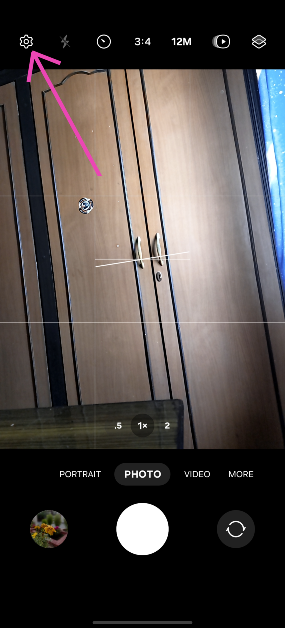
Launch the native Camera app on your smartphone.
Tap the gear icon for settings.
Turn on the toggle switch for Watermark and tap on it.
Hit Edit next to Model name.
Enter the text for your watermark and hit Save.
Any pictures you take will be watermarked with the text of your choice.
Watermark: Logo, Text on Photo
Download from the Google Play Store
The ‘Watermark: Logo, Text on Photo’ app is one of the best third-party tools you can use on your Android phone to add a watermark to your images. It has over 250 creative fonts and 1000+ stickers that can be utilised to create an eye-catching watermark. You can even create a signature for your images on this app. The app gives you the option to change the pen size and colour. Before posting your images on social media, you can use the ‘Logo, Text on Photo’ app to resize and edit them.
Frequently Asked Questions (FAQs)
How do I add a watermark to my images on an Android phone?
Go to Camera>Settings>Watermark, turn on its toggle switch, and add the text. Go back when you’re done. The pictures you take using your phone will now have the watermark.
How do I add a watermark to my images on a PC?
Install Visual Watermark on your PC. Open the app and drag your image in the box. Hit ‘Next’ and add text. Change its font and size and drag it along the picture to place it wherever you want. Hit ‘Next’ again and save the image in the target folder.
Which are some good apps to add watermarks to images?
These are the top 5 ways to put a watermark in your images on an Android phone or Windows PC. If you know any other ways to go about your task, let us know in the comments. While you’re here, read this article to learn how to watermark your Google Docs.
After launching Tecno Spark 7 and 7 Pro in India the Transsion holding smartphone brand today expanded the lineup. The company has introduced Spark 7T which is the third edition to the series. The device falls under the sub Rs 10,000 price segment. The phone features a 6,000mAh battery and a 48-megapixel dual rear camera set up. In addition to this, there is an HD display and it is powered by octa-core MediaTek Helio G35 SoC.Tecno Spark 7T pricing and availabilityTecno Spark 7T has been launched in India in a single configuration of 4GB RAM with 64GB storage priced at Rs 8,999. Tecno has also announced a consumer launch offer of flat Rs 1000 off on the first day of the Spark 7T sale so that consumers can buy the new smartphone at just Rs 7999 for that day. The device will be available for purchase starting June 15 at 12 noon via Amazon.
Tecno Spark 7T specifications
Coming to the specifications Tecno Spark 7T features a 6.52-inch HD+ Dot Notch IPS display having 720×1,600 pixels of resolution. It offers 480 nits peak brightness and a 20:9 aspect ratio. The phone runs HiOS v7.6 based on Android 11. There is an octa-core MediaTek Helio G35 SoC paired with 4GB of DDR4x RAM and 64GB of storage. The internal storage can be expanded up to 512GB using a microSD card.In terms of cameras, Tecno Spark 7T comes with a dual rear camera setup that consists of a 48-megapixel primary sensor with an ƒ/1.8 aperture and a secondary AI lens with four flashes. The rear camera features various modes that include AI Beauty, Smile Shot, 20 AI Scene Detection, Portrait Bokeh, HDR, 10X Zoom, AR Shot, AI Body Shaping, Burst Shot, Google Lens, Documents, Panorama, 2K time Lapse, Slow Motion, Short Video, Video Beauty, Video Bokeh and 2K Recording.On the front, the smartphone sports an 8-megapixel selfie camera with ƒ/2.0 aperture and dual camera. The front camera also features AI HDR, Time Lapse, Smile Shot, AI Portrait, AR Shot, Wide Selfie, Burst Shot, 7 AI Scene Detection, AI Beauty.Tecno Spark 7T also includes a 6,000mAh battery that is claimed to provide a standby time of up to 36 days, 41 hours calling time, 18 hours of web browsing, 193 hours of music playback, 18 hours of game playing and 29 hours of video playback. On the connectivity front, the device includes dual-band Wi-Fi, 4G, GPS, Bluetooth v5, OTG support, among others.
For the latest gadget and tech news, and gadget reviews, follow us on Twitter, Facebook and Instagram. For newest tech & gadget videos subscribe to our YouTube Channel. You can also stay up to date using the Gadget Bridge Android App.
Games are not always about fun. Some of you might like games that test your solving skills and test your logic ability. Such games give you the dual pleasure of enjoying the game as well as training your brain. Here is a list of the best games and apps you can download now on the Play Store to start playing.
In This Article
The list of games
Searching for the best games that test your brain can be confusing and energy draining. These games are designed to train your brain through various methods. It helps you in understanding how your brain’s ability works. It develops your cognitive skills, too. These games can be of many types: puzzle games, memory testing games, language skills games, and critical thinking games. Moreover, the games keep you active mentally. So check our list of the best games.
Read more: Creative Stage V2 soundbar launched, now available in India at a special price of Rs 9,999
Skillz
This is a skills test game that you can download on the Play Store for free. It is based on your logical skills and improves your cognitive ability. You can start playing with your friends or random people online. Start the game with 2 people and the maximum is 4. A few important features to make note of is it compares your performance with other players online and attends daily or weekly programs. Download here
Lumosity
It is an interactive puzzle game to test your skills. It develops accuracy, speed, and strategy. One of the advantages of the game is you can increase your reading skills and also your vocabulary. One of the important features is practice mode, it gives you a complete set of innovative ways to boost your skills. And it is not time-consuming; you can play it quickly. The best part of the game is, it is suitable for both adults and kids. Download here
Peak
Peak is designed to keep your mind active with brain games and puzzles. Peak will increase your memory, language skills, and critical thinking. Peak has more than 45 games just for you to play. This game allows you to play online and compete with others. The game contains 30 mini-games that will excite you non-stop. The important feature is that you can play the mobile game offline, too. The con of the game is if you want to update to Pro and enable many features it asks for a small subscription fee. Download it
The list of Apps
Every person comes with a different skill set, which they acquire in life. This list of apps below will help to improve your speaking skills, processing speed, memory, and math skills. Using an app that does not make you lose brain cells and improve your creativity is not an easy task to search. Use these apps and develop your concentration and organisational skills. These apps will help you focus at work or on education and increase your self-confidence.
Read also: Apple Store India introduces ‘Today at Apple’ virtual Photography and Music Sessions
Elevate
The app can be downloaded and installed for free. It has more than 40 games. The app runs on your math, writing, reading, and listening ability. It increases your vocabulary, grammar, and reading comprehension. The app takes help from AI technology to help with your exercise. The goals you set and the more you use will determine what level you need. You have the option to download for free and later upgrade to PRO with a minimum subscription.Download here
Duo lingo
This app is very popular among people who love to learn a new language. You can download the app for free. This app can make learning a language simple and easy. It will help you to read, write and speak the language you choose on the app. The app contains 32 different languages in the form of games and quizzes. The best feature is that it directly resumes where you left off (last time) making it very convenient. Want to learn a new language today. Here is an app. Download now
For the latest gadget and tech news, and gadget reviews, follow us on Twitter, Facebook and Instagram. For newest tech & gadget videos subscribe to our YouTube Channel. You can also stay up to date using the Gadget Bridge Android App.
If your professional work involves a lot of editing of photos it becomes time-consuming. Saving valuable time helps in productivity and also time management. With the list given below find out how you can bulk resize images easily. We have created some of the best ways in the list. Check them below.
In This Article
On Windows 10
You can bulk resize your images on Windows 10 manually. First, you need to turn on the Windows 10 explorer. Many do think there is no function that directly allows this. But there is a hack. Follow the steps
Read more: Samsung Galaxy Z Fold 2 price announced and pre-order details
Use the mail recipient hack
Using this function you can send, edit, and save the images in bulk. Here is how
First, save all the images in a folder
Press ctrl+A
Select right click and choose to send to
Now navigate Mail recipient
It will pop up attach files in the Windows
Now specify the image size you need (Smaller, small, medium, large, and original size)
With the chosen size it shows the Total estimated
In the last process click on Attach
Now Microsoft Outlook will come up and you access the resize attachment
Select the arrow on any attachment. It will allow a drop-down option.
Choose Select All
Click the arrow again and choose to Save as
Select the path where to save and tap Ok. Hack completed
On a Freeware tool
The Image Resizer has to be used for this tool. Download this tool to make use of it. You can download it for free and it is completely malware-free. Once you download you have to install it to start the process.
Photoshop allows you to resize images in bulk with the option of an image processing script. And lets you save the file in a few simple processes. Follow these steps.
Save all the images in a folder before starting the process
Now open the Photoshop app on your computer
Navigate it to the file option bar once you open Photoshop
Go to the script option
Select image processor
Now select the image that you want to resize which is saved in the folder
The e-commerce website Flipkart is hosting Daily Trivia Quiz. Every day it brings a bunch of new questions for its users. By answering them correctly you can win exciting prizes. The questionnaire is based on questions related to general knowledge. Also, the users can win free vouchers and super coins, among other offers via the daily quiz. June 12 Flipkart Daily Trivia Quiz Answers has already gone live on its platform.
The participant should be at least 18 years old and should have a valid login ID. The Quiz is available on the mobile platform and not the web version. E-commerce conducts the quiz on daily basis and goes live at 12:00 AM IST and runs till 11:59 PM IST. The winners are announced within 15 days from the date of participation that can be viewed under the Gems/Rewards section in the app.
In This Article
How to participate in the Flipkart Daily Trivia Quiz
To participate download the Flipkart app on your phone. Then open the Flipkart app then head to Game Zone. Now click on the Daily Trivia Banner or search for Daily Trivia. Enter the game and answer all 5 questions with correct answers.
June 12 Flipkart Daily Trivia Quiz Answers
Question 1: Which winner of the show Bigg Boss also was the winner of the MTV Roadies and Splitsvilla?
Answer: Prince Narula
Question 2: Which Character in Permanent Roommates is portrayed by Sumeet Vyas?
Answer: Mikesh Chaudhary
Question 3: Which film was the first in which Abhishek and Aishwarya worked together?
Answer: Dhaai Akshar Prem Ke
Question 4: Which FM Channel would you find at this frequency 105.6 MHz in Delhi?
Answer: Gyan Vani
Question 5: In which crime drama would you come across the restaurant: Los Pollos Hermannos ?
Answer: Breaking Bad



 For many reasons, you might sign your Google account to multiple devices. For example, for work, you need to sign in to your Google account on your work devices. And again your Google account might be logged in from your personal laptops or computers. Signing in multiple devices will run the risk for safety and online security. The process to sign out of all devices at once does not take long. You can log out of your Google accounts from the web with these steps. Follow below:
 If the devices are stolen or lost. It runs the risk of hacking by unknown sources. To avoid your information being accessed by an unknown person. It is better to log out of your google account from devices you do not use. Here are the steps that you can do to log out all the devices that your Google accounts are signed in.
 You might lose your phone or need to change to a new phone. Using your previous Google account to your new phone is required. And when you have logged in to your Google account from your new phone it is safer to log out from all of the other previous devices. You can log out from multiple devices easily by following these steps.



























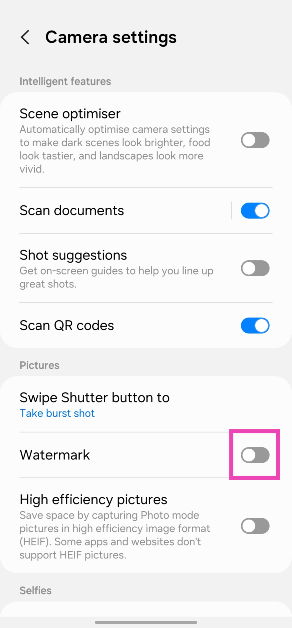
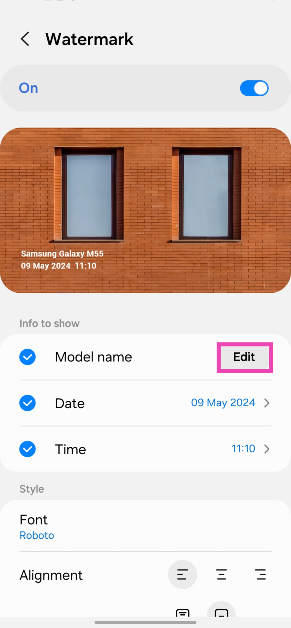
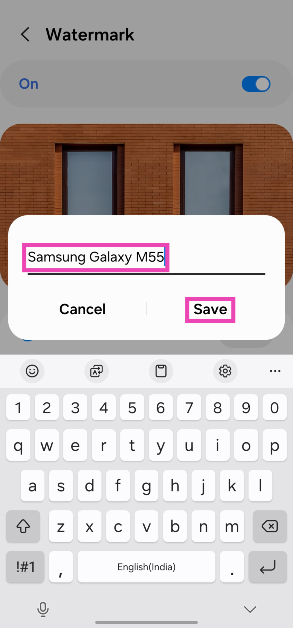 Any pictures you take will be watermarked with the text of your choice.
 The ‘Watermark: Logo, Text on Photo’ app is one of the best third-party tools you can use on your Android phone to add a watermark to your images. It has over 250 creative fonts and 1000+ stickers that can be utilised to create an eye-catching watermark. You can even create a signature for your images on this app. The app gives you the option to change the pen size and colour. Before posting your images on social media, you can use the ‘Logo, Text on Photo’ app to resize and edit them.