The e-commerce website Flipkart is hosting Daily Trivia Quiz. Every day it brings a bunch of new questions for its users. By answering them correctly you can win exciting prizes. The questionnaire is based on questions related to general knowledge. Also, the users can win free vouchers and super coins, among other offers via the daily quiz. 18 August 2021 Flipkart Daily Trivia Quiz Answers has already gone live on its platform.
The participant should be at least 18 years old and should have a valid login ID. The Quiz is available on the mobile platform and not the web version. E-commerce conducts the quiz on daily basis and goes live at 12:00 AM IST and runs till 11:59 PM IST. The winners are announced within 15 days from the date of participation that can be viewed under the Gems/Rewards section in the app.
In This Article
How to participate in the Flipkart Daily Trivia Quiz
To participate download the Flipkart app on your phone. Then open the Flipkart app then head to Game Zone. Now click on the Daily Trivia Banner or search for Daily Trivia. Enter the game and answer all 5 questions with correct answers.
18 August 2021 Flipkart Daily Trivia Quiz Answers
Question 1: In the United States, What sport is known as ‘the national pastime’?
Answer: Baseball
Question 2: Who is the owner of the Football Club Inter Miami CF?
Answer: David Beckham
Question 3: Matches of which of these sports are officiated by a referee called gyoji?
Answer: Suma Wrestling
Question 4: The women teams of which two countries played the first-ever T20I match?
Answer: England-New Zealand
Question 5: Sydney?
Answer: Sydney
Amazon India is back with another lucrative quiz on its platform. 18 August 2021 Amazon Quiz has already gone live and today you can stand a chance to win Rs 5,000 Amazon Pay Balance.
Every day the e-commerce platform brings an opportunity for its customers to win amazing prizes by answering five questions. The questionnaire is based on general knowledge and current affairs. If you managed to answer all the questions correctly you will be eligible to win gifts such as iPhone X, iPhone Xs, Seagate HDD, GoPro Hero 8 Camera, LG Smartphones, Air Purifier, Oppo smartphones, Amazon Pay Balance among others.
The Amazon Quiz is hosted for the app users only which means desktops users cannot participate in the quiz. So before participating just make sure you have downloaded the App. The lucky users might win something by answering all the questions correctly. The Amazon Quiz can be played daily from 12 AM to 11:59 PM. Daily the e-commerce platform gives a chance to millions of people across the country to win exciting prizes. To participate and win Rs 5,000 Amazon Pay Balance check out today’s answers.
18 August 2021 Amazon Quiz Answers
Question 1: Valmiki National Park is the only national park in which state of India?
The answer is- D) Bihar
Question 2 of 5:
In July 2021, the Department of Public Enterprises was shifted to which ministry?
The answer is- A) Ministry of Finance
Question 3 of 5:
Which reusable robotic space plane is scheduled by NASA to deliver cargo to the International Space Station in 2022?
The answer is- B) Dream Chaser
Question 4 of 5:
Which Indian city is this UNESCO World Heritage Site located in?
The answer is- D) Agra
Question 5 of 5:
Which famous basketball player from this country recently became the MVP in the NBA finals?
The answer is- B) Giannis Antetokounmpo
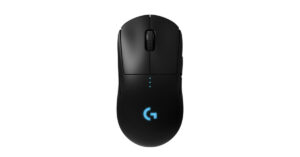
Logitech today announced the availability of the Logitech G Pro Wireless gaming mouse in India. The device comes with a new carbon impact label which the company introduced to its product last year. Also, it is an upgraded variant of the Logitech G Pro wired gaming mouse. The device is powered by a Hero 25K sensor. Before launching it in India the wireless gaming mouse first debuted in the US in 2018.
In This Article
Logitech G Pro Wireless Gaming Mouse price and availability
Logitech G Pro Wireless has been launched in India with a price tag of Rs 10,995. The device can be purchased via the e-commerce website Amazon. The e-retailer is also offering Rs 6,00 off on the purchase of the wireless gaming mouse. In addition to this, there will be a 5 percent instant discount on the HSBC Cashback card and Amazon Pay ICICI Bank credit card for Prime members only. There will be a 3 percent cashback to other customers.
Logitech G Pro Wireless gaming mouse specifications
The Logitech G PRO Wireless Gaming Mouse is powered by the company’s own Hero 25K sensor that supports 100 to 25,400dpi sensitivity. The sensor incorporates an all-new lens and an updated tracking algorithm that delivers ultra-precise tracking with no acceleration, smoothing, or filtering over the entire DPI range. There is a USB report rate of 1,000Hz and runs on a 32-bit ARM microprocessor. The mouse is designed to withstand pro esports players during training and tournaments. It is a lightweight mouse with an advanced 1mm thin wall construction and unique endoskeleton design which weighs 80gms. The surface of PRO is coated for durability and grip while the feet are tested to perform for over 250 km of use. It is compatible with the Logitech G POWERPLAY Wireless Charging System. As per the company Hero 25K consumes 10x less power than predecessors, like PMW3366, enabling a lighter battery and longer battery life.The wireless functionality of the device overcomes the limitations of latency, connectivity and power to provide consistent, lag-free, 1 ms report rate connection—without a wire. It is paired with Logitech G’s ultra-fast LIGHTSPEED wireless technology that provides a lag-free gaming experience, end-to-end optimized wireless connection and increased responsiveness for reliable competition-level performance. The Wireless USB receiver can be stored inside the mouse for easy portability. There are left and right side buttons that can be removed easily to make the mouse truly ambidextrous. Furthermore, all the buttons feature LIGHTSYNC RGB lighting can also be customized using the Logitech GHUB Software. While the DPI button is located on the underside of the Logitech G PRO Wireless to prevent unintentional DPI shifts in-game.Additionally, the Logitech G PRO Wireless Gaming Mouse offers ~16.8M colour customization that represents your team colours, personalizing your setup, or synchronizing with other G products. The mouse is compatible with Windows 7 or later, as well as macOS 10.11 or later. The company says the mouse represents more than 2 years of development in collaboration with more than 50 professional esports players globally and blends extreme performance with the most advanced technologies into a gaming mouse design.
For the latest gadget and tech news, and gadget reviews, follow us on Twitter, Facebook and Instagram. For newest tech & gadget videos subscribe to our YouTube Channel. You can also stay up to date using the Gadget Bridge Android App. You can find the latest car and bike news here.
Every year Amazon brings a new set of Echo devices that not only are good to look at but has one of the most intelligent AI (Alexa) available in the market. The latest to come is Amazon Echo Show 10, which not only has Alexa in it but comes with a 10.1-inch touchscreen that rotates and follows you around the room. This is our Amazon Echo Show 10 review.
In This Article
Amazon Echo Show 10: Design and display
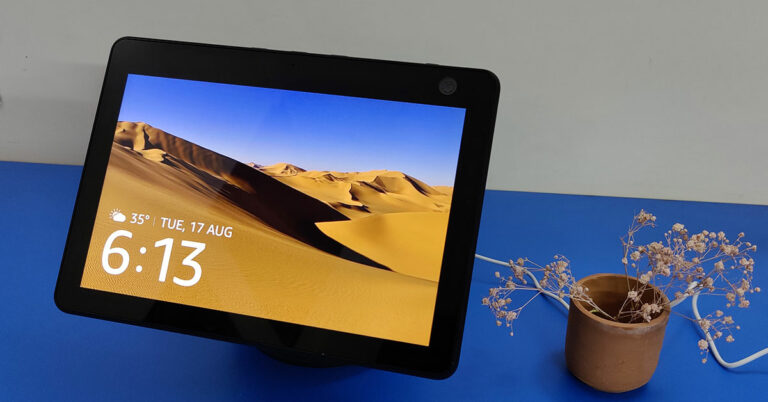
The Amazon Echo Show 10 comes in one of the largest (eco-friendly) boxes any Echo device comes in. Neatly tucked in, after unboxing, we were greeted with a large cylindrical speaker that has a rotating crown on top, which attaches the touchscreen to the speaker. The display is not edge to edge, but we did not mind the extra bezels. More so because on the top right you also get a large camera with a privacy shutter.
The top of the screen has a couple of buttons as well. These include volume up and down along with the Mics/Camera on/off buttons. So, there is no power button on Amazon Echo Show 10. Just connect the power adaptor to the port located at the bottom of the speaker and you are good to go. The speaker cylinder has two 1-inch tweeters along with a 3-inch woofer inside. More on the audio part in the next section.
The 10.1-inch display on the Amazon Echo Show 10 works really well. The brightness is nice and you can read and see everything easily. We tried it in the kitchen as well as the living room. And no matter what we were up to, checking recipes online or watching soaps on Prime Video or Netflix, the experience was mighty fine. The user interface is easy to grasp, and not once did we felt we were lost. In case you feel lost, you can always ask Alexa for help and she will do the rest. Saying that, we hardly tapped or swiped the screen, as that is the beauty of having a smart speaker connected with a display powered by Alexa.
Amazon Echo Show 10 review: Performance
Amazon Echo Show 10 does everything the regular Echo speakers do and more. The sound of the speakers is great. If you are throwing a small party at home, this speaker is all you need to fill the room with great tunes.
Setting up the Amazon Echo Show 10 is child’s play and we were up and running in no time at all. Since we already have our Amazon account ready, our setup time was very less. In case it is your first time with an Amazon device, then you will take a few extra minutes to set it up. Once up, Alexa takes care of everything. As always, she will learn your preferences. She will put reminders for you, manage your shopping lists, play songs or movies and even turn on the smart lights. As the days go by, she becomes smarter and learns to become a better assistant.
You can have multiple profiles connected to it so that she is able to address you with your name, which brings a more personalised feel to the whole AI-human portico. She will understand what kind of music you like, what kind of recipes to show and will be part of the family. Amazon Echo Show 10 can also make audio and video calls for you since there is a screen and camera in it. The camera keeps you in focus and rotates the screen as you move across the room.
A rotating camera is a great feature, as it adds to the security. How? The Amazon Echo Show 10 is a smart security camera also, which you can access from anywhere around the world. You can access and rotate the camera in all directions. Not bad Alexa, not bad! Alexa can hear commands from as far away as 15 feet with ease. Even if there is noise in the room, Alexa will answer you 9 out of 10 times.
Verdict
At Rs 24,999 is Amazon Echo Show 10 worth the purchase? That is a definite yes. You can use the device in so many ways. It is a smart speaker, security camera as well as display you can watch movies on in one. Alexa will be a great addition to the family.
In the past, Intel was expected to launch its new discrete GPU Named Intel DG2. Now the company has officially announced the launch of its first consumer gaming-grade GPU that is going to retail under the name called Intel Arc. The company has itself designed the new high-end discrete GPUs which is likely to be shipped with both desktops and notebook by Q1 2022.Roger Chandler, Intel vice president and general manager of Client Graphics Products and Solutions commented on the launch, “Today marks a key moment in the graphics journey we started just a few years ago. The launch of the Intel Arc brand and the reveal of future hardware generations signifies Intel’s deep and continued commitment to gamers and creators everywhere. We have teams doing incredible work to ensure we deliver first-class and frictionless experiences when these products are available early next year.”According to the company the high-performance graphics products: Intel Arc will cover hardware, software and services, and will span multiple hardware generations, with the first generation, based on the Xe HPG microarchitecture, code-named Alchemist (formerly known as DG2). Intel has also released a video teaser that showcases the performance capabilities of its upcoming GPU’s. The company has not much revealed about the Arc-based GPUs but as per the teaser but the high-end discreet GPUs will be capable of running demanding titles such as Psychonauts 2, Mount & Blade II Bannerlord, Forza Horizon 4, PUBG, Subnautica Below Zero, Metro Exodus, the Rift Breaker, Days Gone, Chivalry and more.
Intel also revealed the code names of future generations under the Arc brand: Battlemage, Celestial and Druid. As per the company, Intel Arc will be based on the Xe-HPG microarchitecture, a convergence of Intel’s Xe-LP, HP and HPC microarchitectures, that will deliver scalability and compute efficiency with advanced graphics features. Alchemist, the first generation of Intel Arc products, will feature hardware-based ray tracing and artificial intelligence-driven super sampling, and offer full support for DirectX 12 Ultimate. It will also help Intel’s long-term vision is to bring frictionless gaming and content creation experiences to gamers and creators worldwide, giving them innovation and choice in hardware coupled with open and accessible software tools. The Alchemist products will arrive in the first quarter of 2022.Speculations suggest that the Graphics card will comprise TCMC’s 6nm node to deliver a speed of up to 512 execution units and a clock frequency of up to 2.2Ghz. In addition to this, it may come with a 256-bit memory and have a TDP (Thermal Design Power) of about roughly 275W.
For the latest gadget and tech news, and gadget reviews, follow us on Twitter, Facebook and Instagram. For newest tech & gadget videos subscribe to our YouTube Channel. You can also stay up to date using the Gadget Bridge Android App. You can find the latest car and bike news here
As of now, the government is releasing lockdown norms and places are opening up slowly. Meeting people, we not only should look good, but you should stand out in the crowd. Here are a few apps that will allow you to manage your wardrobe and put a star mark on your style.
In This Article
1. Glamoutfit
This app is best when you really need some external help. Yes, this app is the best in what it does. Here, you can book your own stylist and ask them to style your outfit according to your taste. The stylist will pick up clothes for you and set you up with what looks good on you. They will also tell you the do’s and don’ts. Once you are done with the combination you want to wear, you can mark that up in the inbuilt calendar. The inbuilt calendar feature keeps track of what you wore and thus help you to not repeat the same outfit again.Download here.
2.Closet Space
This app allows you to pick clothes out of your own wardrobe. Although setting up this app takes a lot of time as you have to click pictures of each and every pair of clothing in your wardrobe. It is worth the pain as it categorises your clothes into categories and arranges them properly. Now you can set up what you want to wear easily as you can see all the combinations the app will make for you. It also gives you fashion advice and the stories of people on top of the fashion industry are included.Download here.Read Also: Samsung AirDresser that kills 99.9% of Bacteria and Viruses from clothes launched in India
3. Closet+
This app is at the bottom of our list as it’s only available for iOS users, currently. The app is refined and easy to use. The algorithm for arranging your clothes works extremely well. You can favourite your clothes and plan ahead what you have to wear the following week.Download here.These are the top app picks from our end that will step up your fashion game a level and help you look outstanding on any and every occasion.For the latest gadget and tech news, and gadget reviews, follow us on Twitter, Facebook and Instagram. For newest tech & gadget videos subscribe to our YouTube Channel. You can also stay up to date using the Gadget Bridge Android App. You can find the latest car and bike news here.
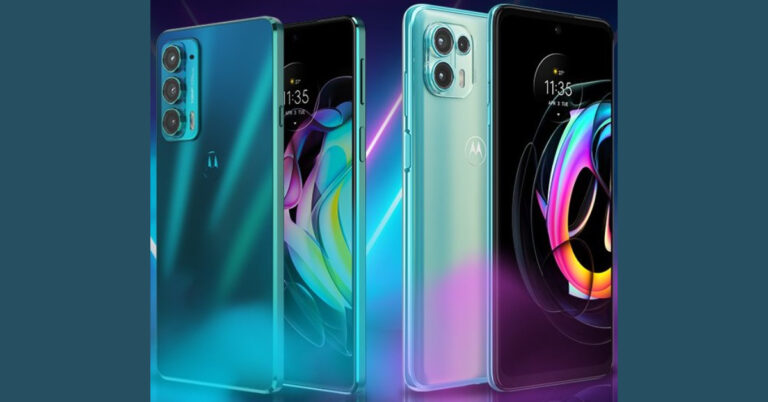
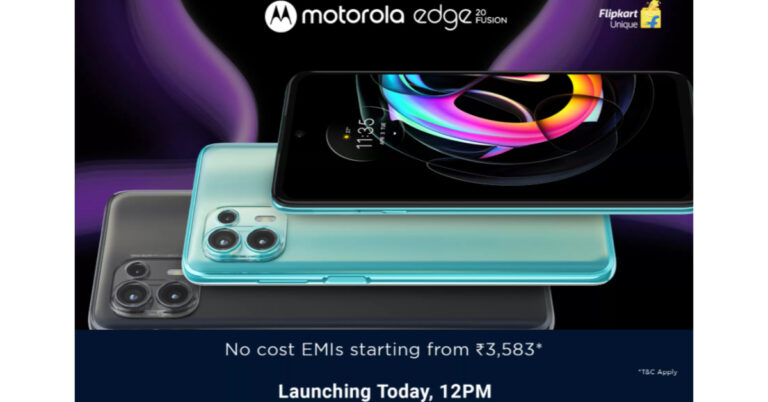
The Chinese smartphone company, Motorola, today officially announced the launch of two new smartphones in the Indian market. The company has introduced Motorola Edge 20 and Motorola Edge 20 Fusion smartphones. The new lineup includes a 108-megapixel primary sensor along with 10-bit AMOLED displays and both the phones support up to 5G band for connectivity.
In This Article
Motorola Edge 20, Edge 20 Fusion pricing and availability details
Motorola Edge 20 has been launched in India with a price tag of Rs 29,999 for the single 8GB RAM with 128GB of storage option. Whereas the Motorola Edge 20 Fusion will be available at Rs 21,499 for the 6GB RAM with 128GB storage and at Rs 22,999 for the 8Gb RAM with 128GB storage model.The standard model will be made available in two colour options of Frosted Pearl and Frosted Emerald. On the other hand, Fusion will come in Cyber Teal and Electric Graphite colour options. Both the devices will be available for purchase via Flipkart from August 24 and August 27 respectively in the country. The sale will commence at 12 noon onwards.
Motorola Edge 20 specifications
Motorola Edge 20 features a full-HD+ 6.7-inch OLED Max Vision display with 1,080×2,400 pixels of resolution. It offers a 144Hz refresh rate and up to 576Hz of touch latency, DCI-P3 colour gamut space coverage and with 20:9 aspect ratio. The phone runs MyUX on top of Android 11 and is powered by octa-core Qualcomm Snapdragon 778G SoC, along with 8GB of LPDDR4 RAM and 128GB of storage.For the phones and videos, the device equips a triple camera setup on the back of Edge 20 Pro housing a 108-megapixel Samsung ISOCELL HM2 sensor, a 16-megapixel ultra-wide-angle sensor and a macro lens, and an 8-megapixel sensor with a 3x high-res optical zoom and 30X Super Zoom telephoto lens. There is a 32-megapixel front-facing camera on the front.In addition to this, the handset is laden with a 4,000mAh battery that also supports 30W TurboPower fast charging. For connectivity, it includes a 5G, 4G LTE, Wi-Fi 6, Bluetooth v5.2, GPS/ A-GPS, NFC, and a USB Type-C port. Whereas the sensors on the phone include an accelerometer, ambient light sensor, gyroscope, magnetometer, and proximity sensor.
Motorola Edge 20 Fusion specifications
Motorola Edge 20 Fusion comes with a similar screen size but with a lower 90Hz refresh rate. The phone also runs Android 11 on top of MyUX custom skin. Under the hood, there is an octa-core MediaTek Dimensity 800U 5G SoC paired with up to 8GB of RAM and 128GB of onboard storage. Edge 20 Fusion also includes a triple rear camera set up that includes a 108-megapixel primary sensor, an 8-megapixel ultra-wide-angle lens and Macro Vision, and a 2-megapixel depth sensor. Similarly to its sibling the phone offers a 32-megapixel selfie camera on the front.In terms of connectivity, there is 5G, 4G LTE, Wi-Fi 802.11ac, Bluetooth v5, GPS/ A-GPS, and a USB Type-C port. There is a side-mounted fingerprint sensor along with other sensors on the board including an accelerometer, ambient light sensor, gyroscope, magnetometer, and proximity sensor. The phone boasts a 5,000mAh battery that comes with 30W TurboPower fast charging support.
For the latest gadget and tech news, and gadget reviews, follow us on Twitter, Facebook and Instagram. For newest tech & gadget videos subscribe to our YouTube Channel. You can also stay up to date using the Gadget Bridge Android App. You can find the latest car and bike news here.
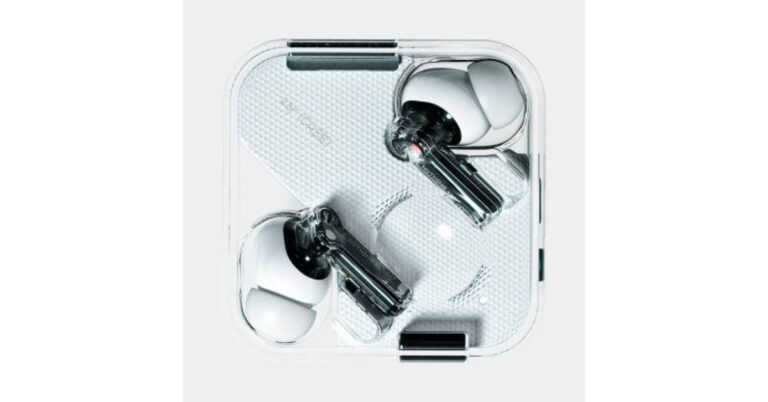
Nothing, the UK based tech firm owned by OnePlus’s ex Co-founder, Carl Pei last month brought its first product in the Indian market and globally. The company launched Nothing ear (1) TWS earbuds. The audio device is all set to go for pre-orders starting today that is August 17 via Flipkart in the country. In addition to this, the company has also announced pre-orders offers and discounts for the customers purchasing the Nothing earphones. Nothing ear (1) pricing, pre-order details and launch offersNothing ear (1) launched in India with a price tag of Rs Rs 5,999. The TWS earphones will be available for pre-orders from today onwards at 12 noon via homegrown e-commerce brand Flipkart. The customers pre-booking the earbuds are eligible to get a flat ₹500 Instant Discount only with ICICI bank credit cards and also, free subscription for 6 months on Gaana Plus. In addition to this, Flipkart Axis Bank credit cardholders will also be able to get a 5 percent unlimited cash back while Amex Network Cards issued by ICICI Bank, IndusInd Bank, SBI Cards. Whereas the Mobikwik users will be able to avail of 20 percent off up to Rs 300 on their first transaction. Moreover, the company will also offer exchange offers on old audio devices as well as no-cost EMI starting at Rs 1,000 per month.To recall, the Nothing ear (1) was launched in other markets where it was offered at $99 in the US that transṣlates to Rs 7,351, GBP 99 in the UK that comes around Rs 10,165 and EUR 99 for the European market translated to Rs 8,654. Nothing ear (1) specifications Speaking of the specifications, Nothing ear (1) features a transparent design. The true wireless earphones equip a 1.6mm dynamic driver and a spacious air chamber that provide advanced bass, mid, and treble performance. The audio device comes with pressure-relieving vents and two different modes of ANC- light mode and maximum mode.The Nothing ear (1) can be paired instantly withGoogle Fast Pair compatible devices. The earphones are IPX4 certified for sweat and dust resistance. These have Bluetooth 5.2 connectivity with SBC and AAC codecs. The audio device also offers a customized equalizer, gestures, Find My Earbud, and more with the ear (1) app, available on iOS and Android. It comes with three high definition mics to provide better audio quality. While the power case charges wirelessly and charges your earbuds fast. On the battery front it earbuds provide 5 hours of listening time and 34 hours with the case.
For the latest gadget and tech news, and gadget reviews, follow us on Twitter, Facebook and Instagram. For newest tech & gadget videos subscribe to our YouTube Channel. You can also stay up to date using the Gadget Bridge Android App. You can find the latest car and bike news here.
Motorola Edge 20 Series is all set to launch in India today. Yes, the company is going to introduce the Edge 20 and Edge 20 Fusion smartphones in the country. Before coming to India the company had already introduced the device a week ago in the European market. Both the phones have been listed on Flipkart to tease their availability. Previously Fusion also appeared on the Geekbench benchmarking website and the Indian pricing was also leaked ahead of the official launch.Motorola Edge 20 and Edge 20 Fusion smartphones are going to launch in India today via Flipkart at 12 noon. The company has been teasing the key details of the smartphones through teasers and via a dedicated microsite in Flipkart. But recently Motorola Edge 20 Fusion was spotted on Geekbench which revealed that the device will be available in a 6GB RAM variant and will run Android 11 out of the box. In addition to this, the phone has scored 564 points in the single-core tests and 1,624 points in the multi-core tests.Apart from this the Indian pricing of both devices were also leaked on the web. The Motorola Edge 20 is expected to be available with a single 8GB of RAM with a 128GB of storage variant that is likely to be priced at Rs 29,999. On the other hand, Motorola Edge 20 Fusion is tipped to come in two different configurations of 6GB RAM with 128GB storage and 8GB RAM with 128GB onboard storage priced at Rs 21,499 and Rs 23,999 respectively. These prices are not official so you can take it with a grain of salt.Speaking of the specifications, the Motorola Edge 20 will run on My UX on top of Android 11. It will feature a 6.7-inch full-HD+OLED display with 1,080×2,400 pixels of resolution and a 144Hz refresh rate. Under the hood there will be an octa-core Qualcomm Snapdragon 778G SoC, paired with 8GB of RAM and 256GB of storage option.On the camera front, Edge 20 will sport a triple rear camera setup that includes a 108-megapixel primary sensor, a 16-megapixel ultra-wide and macro lens, and an 8-megapixel telephoto lens with 3x high-res optical zoom and 30X Super Zoom. Upfront there is a 32-megapixel camera sensor for taking selfies and video calling.The phone will pack a 4,000mAh battery with support for TurboPower 30 fast charging. For connectivity, there is 5G, LTE, Wi-Fi 6, GPS, and Bluetooth and more. On the other side, Motorola Edge 20 Fusion is reportedly going to be a rebranded variant of Motorola Edge 20 Lite that comes with a 6.7-inch OLED display with 90Hz refresh rate support. The software support will be the same as its sibling but the handset will be powered by MediaTek Dimensity 800U SoC paired with 6ṣGB of RAM and 128GB of storage option. The phone may also include a 5,000mAh battery with 30W TurboPower fast charging support.In terms of photos, Edge 20 Fusion will also come with a triple rear camera set up that includes a 108-megapixel primary sensor, an 8-megapixel sensor with an ultra-wide-angle lens with Macro Vision, and a 2-megapixel depth sensor. For selfies, there will be a 32-megapixel front-facing camera.
For the latest gadget and tech news, and gadget reviews, follow us on Twitter, Facebook and Instagram. For newest tech & gadget videos subscribe to our YouTube Channel. You can also stay up to date using the Gadget Bridge Android App. You can find the latest car and bike news here.
The e-commerce website Flipkart is hosting Daily Trivia Quiz. Every day it brings a bunch of new questions for its users. By answering them correctly you can win exciting prizes. The questionnaire is based on questions related to general knowledge. Also, the users can win free vouchers and super coins, among other offers via the daily quiz. 17 August 2021 Flipkart Daily Trivia Quiz Answers has already gone live on its platform.
The participant should be at least 18 years old and should have a valid login ID. The Quiz is available on the mobile platform and not the web version. E-commerce conducts the quiz on daily basis and goes live at 12:00 AM IST and runs till 11:59 PM IST. The winners are announced within 15 days from the date of participation that can be viewed under the Gems/Rewards section in the app.
In This Article
How to participate in the Flipkart Daily Trivia Quiz
To participate download the Flipkart app on your phone. Then open the Flipkart app then head to Game Zone. Now click on the Daily Trivia Banner or search for Daily Trivia. Enter the game and answer all 5 questions with correct answers.
17 August 2021 Flipkart Daily Trivia Quiz Answers
Question 1: What surname does the lead couple of the 2007 film Saawariya share?
Answer: Kapoor
Question 2: Which duo gave the music for the iconic film ‘Dilwale Dulhaniya Le Jayenge’?
Answer: Jatin-Lalit
Question 3: Which Indian actress is also known for her role in the film ‘Kashmir Ki Kali’?
Answer: Sharmila Tagore
Question 4: The title of the iconic film ‘Do Bigha Zamin’ was inspired from a poem by?
Answer: Rabindranath Tagore
Question 5: In the film, ‘The Sky is Pink’ Aisha fondly calls her mother Moose and her father?
Answer: Panda
Every day Amazon India brings a daily quiz for its customers to win exciting new prizes every day on its platform. 17 August 2021 Amazon Quiz can be played daily from 12 AM to 11:59 PM. Today you can win a Rs 50,000 Amazon Pay Balance if you managed to answer all the questions correctly. Daily a new set of questions is presented in front of the participants that gives millions of people across the country to win exciting prizes.
The 17 August 2021 Amazon Quiz has gone live on its mobile platform. The participants have to answer 5 questions that are based on general knowledge and current affairs. After clearing the daily quiz their name will be shortlisted for a lucky draw to select a winner. Amazon announces the results of the lucky draw at the end of the month. So today’s Quiz will let you win a Rs 50,000 Amazon Pay Balance.
17 August 2021 Amazon Quiz Answers
Question 1: Which organisation will help the government in implementing satellite TV classrooms in rural India?
The answer is- A) ISRO
Question 2: Jovenel Moïse, who was assassinated in July 2021, was the president of which country?
The answer is- B) Haiti
Question 3: Which of these actors has handed back his three Golden Globes in protest of a lack of diversity in HFPA?
The answer is- A) Tom Cruise
Question 4: What are these popularly known as?
The answer is- D) Vinyls
Question 5: Which Mexican holiday are they seen celebrating?
The answer is- B) Day of the Dead
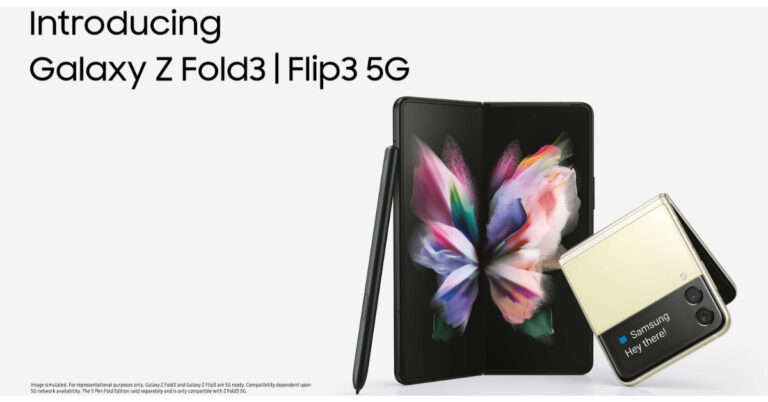
Samsung Galaxy Z Fold 3 and Samsung Galaxy Z Flip 3 have now been launched in India as well, after the global launch held on August 11. Before this, both foldable phones were available for reservations and now they will be available for pre-orders from August 24 in the country. The pricing of both the devices has also been revealed along with availability details and launch offers.
Samsung Galaxy Z Fold 3, Samsung Galaxy Z Flip price and availability details
Samsung Galaxy Z Fold 3 has been launched in India with a starting price of Rs 1,49,999 for the 12GB RAM with a 256GB storage variant. The price for the 12GB RAM with a 512GB storage variant is set at Rs 1,57,999. It will be available in two colour options of Phantom Black and Phantom Green.Whereas the Samsung Galaxy Z Flip 3 is priced in India at Rs 84,999 for the 8GB RAM with 128GB storage option and the 256GB storage model will come at Rs 88,999. This foldable phone will also be offered in two colour options of Phantom Black and Cream.Speaking of the launch offers, on the pre-booking of Galaxy Z Fold 3 and Galaxy Z Flip 3 the customers are eligible for either an upgrade voucher of up to Rs 7,000 or HDFC Bank cashback of up to Rs 7,000 using credit and debit cards. They can also avail of free 1 year Samsung Care+ Accidental & Liquid Damage Protection worth Rs 7,999 on pre-booking Galaxy Z Fold3 5G and Rs 4,799 on pre-booking Galaxy Z Flip3 5G. Whereas those who have already pre-reserved the foldable phones will be eligible for all pre-booking offers along with a free Galaxy SmartTag. In terms of availability, Samsung says that the pre-bookings will open from August 24 and run till September 9 in the country while the sale will commence from September 10 via Samsung.com and leading retail stores.
Also Read: Samsung Galaxy Z Fold 3 and Samsung Galaxy Z Flip 3 unveiled at Galaxy Unpacked: Pricing and Specifications
Samsung Galaxy Z Fold 3 specifications
The Samsung Galaxy Z Fold 3 features a 7.6-inch foldable QXGA AMOLED 2X Infinity Flex main display having 2,208×1,768 pixels of resolution, 22.5:18 aspect ratio, and 374ppi pixel density. The secondary screen comes with a 6.2-inch HD AMOLED display on the outside with 832×2,268 pixels resolution, 24.5:9 aspect ratio, and 387ppi pixel density. Both the screens refresh at 120Hz and haveṣ HDR10+ support withGorilla Glass Victus protection on top. The Samsung Galaxy Z Fold 3 is powered by a 5nm octa-core SoC with up to 12 GB RAM with 512GB storage options. The foldable phone runs on Android 11 on top of One UI. It comes with a side-mounted fingerprint sensor. For the cameras, the device is highlighted with a triple rear camera setup that includes a 12-megapixel primary sensor, along with a 12-megapixel secondary telephoto lens and a 12-megapixel ultra-wide lens. There is an under-display camera on the Galaxy ZFold 3 with a 4-megapixel sensor along with an f/1.8 aperture and a 10-megapixel selfie camera with an f/2.2 aperture at the cover.
Also Read: Samsung Galaxy Z Fold 3 Vs Samsung Galaxy Z Fold 2: What’s different this time?
Fold 3 packs a 4,400mAh battery along with 25W wireless and reverse charging support. It also supports two new S Pen models- S Pen Fold Edition and the S Pen Pro. The Fold Edition supports Air Command gestures and has a Pro tip but lacks support for Bluetooth connectivity. On the other hand, the latter one comes with a USB socket for charging, Air Command and Air Actions. In terms of connectivity, there is Wi-Fi 6, Bluetooth v5.2, NFC, Ultra-Wideband (UWB), and a USB Type-C port and more.
Samsung Galaxy Z Flip 3 specificationsSamsung Galaxy Z Flip 3 comes with a 6.7-inch primary full-HD+ dynamic display offering 1,080×2,640 pixels of resolution along with the support for HDR10+ and120Hz refresh rate. The primary display offers a 22:9 aspect ratio, and 425ppi pixel density and Corning Gorilla Glass Victus protection. There is a 1.9-inch AMOLED display with a 512×260 pixels resolution on the lid. Under the hood, there is a 5nm octa-core SoC coupled with up to 8GB RAM and up to 256GB UFS 3.1 storage. For taking photos and videos the clamshell-like foldable phone features a dual rear camera setup that includes a 12-megapixel primary sensor with an f/1.8 aperture and a 12-megapixel wide-angle lens. In terms of selfies, there is a 10-megapixel sensor on the front having an f/2.4 aperture.ṣThe Galaxy Z Flip 3 includes 5G, 4G LTE, Wi-Fi 6, Bluetooth v5.2, GPS/ A-GPS, NFC, and a USB Type-C port as connectivity options. Whereas the sensor on the phone includes a side-mounted fingerprint sensor, an accelerometer, ambient light sensor, geomagnetic, gyrometer, hall sensor, and a proximity sensor. In addition to this, the device is backed by a 3,300mAh battery with wireless and reverse charging support and 15W fast charging.
For the latest gadget and tech news, and gadget reviews, follow us on Twitter, Facebook and Instagram. For newest tech & gadget videos subscribe to our YouTube Channel. You can also stay up to date using the Gadget Bridge Android App. You can find the latest car and bike news here.
Ola Electric Mobility announced the launch of its much-awaited electric scooter in India. Ola S1 and Ola S1 Pro are the two variants that the company has introduced. Both the scooter come with a peak power of 8.5kW. Both the two-wheelers are battery operated and the company offers it in two options: 2.98kWh battery on the former and the 3.97kWh battery on the latter variant. The vehicle is going to take on other electric scooters like Ather 450X, Bajaj Chetak Electric, TVS iQube and more in India.The price of the S1 starts at Rs 99,999 while the Pro version will be available at a starting price of Rs 1,29,999. The pricing will depend on region to region. Like in Gujarat the vehicle is priced as low as 79,999 and Rs 109,999 respectively. This price is ex-showroom including FAME II subsidy but excludes state subsidies. The company has tied up with banks and financial institutes for an EMI plan starting at Rs 2,999.In terms of availability, the company will officially open Ola S1 scooters for purchase from September 8 and will start delivering across 1,000 cities and towns in October. Till then, these are available for reservation at just Rs 499. Starting with the design, Ola Electric Scooter S1 and S1 Pro will be available in 5 and 10 colour options of satin, matte and glossy finishes respectively. Each will feature a 7.0-inch TFT display. In addition to this, the scooters come with multiple microphones and AI speech recognition algorithms. They run MoveOS — built by Ola Electric and are powered by an octa-core processor with 3GB of RAM. There are four modes at launch — Bolt, Care, Vintage, and Wonder. Both the electric scooters are almost the same in design and features but the only difference is the battery capacity. The Ola S1 comes with a 2.98kWh battery with a riding range of 121km whereas the Ola S1 Pro packs a 3.97kWh battery with a maximum range of 181km. So as the difference in the batteries the charging times are also different on each vehicle. Because of the lower battery capacity, the simple variant takes less time to charge than the pro version. Both the Ola Electric scooters are incorporated with Battery Management System (BMS) that monitors their durability, performance, range and safety. Both the scooters also accelerate from 0 to 40Kmph in under 3.6 seconds, and get 8.5kW of peak power.Similarly, the vanilla variant can achieve a top speed of 90kmph and is claimed to give it a range of 121KMs on the other hand the Ola S1 Pro comes with a claimed range of 181KMs and a top speed of 115kmph. The Ola S1 offers two riding modes — Normal and Sports whereas its elder sibling comes with Normal, Sports, and Hyper modes.In terms of connectivity, the Ola Electric Scooters features 4G, Wi-Fi, and Bluetooth. The vehicle is also voice-enabled and can be controlled with your voice command to control tasks on the screen.Additionally, the Ola Scooter includes an alert system, geo-fencing, and a flame retardant, dust and water-resistant battery. They also equip 110/70 R12 tyres with a rear mono-shock suspension and a front single fork suspension. Moreover, the S1 Pro offers a Hill-Hold feature, which makes riding in traffic and navigating inclines easy along with Reverse mode that makes it easy to park and exit tight spaces.
The world has been suffering through the pandemic for a year now and people are bored sitting in their homes. Everyone is trying to be productive in their own different way. There are thousands of languages spoken around the world and few of the professionals feel like learning a new one but don’t know where to start. Gadget bridge has got you covered with the top 5 websites/applications from where you can learn a new language easily.
In This Article
1.Duolingo
Duolingo is one of the leading applications for learning basic phrases and words. It has an interactive interface, which will help you to learn reading and even writing a language properly. It also gives goals and motivation to keep you going. Consumers can use duolingo cross-platform as well, putting it at the top of our list.Download from here.
2.Babbel
Babbel is in the same category as Duolingo but has in fact more variety of languages to offer. It feels like a game for learning new languages that keep users engaged. The interface of Babbel looks like that of a chatting app and is one of the best you can use to learn a new language.Download from here.
3. Rosetta Stone
Rosetta Stone is one of the basic and oldest offerings in the market. Its interface is easy and simple to grasp, making it children friendly. The only drawback of this application is there is no real-life interaction. So it’s difficult to learn pronunciations that are necessary, we feel. If you want to take baby steps and just want to learn the basics of a language, this application is meant for you. Download from here.
4. BBC Languages
BBC languages, part of BBC is the best website for learning a new language. It includes tons of courses to choose from with video tutorials. It feels like hiring a language teacher for yourself and contains lots of common yet exotic languages. Read Also: How to change your country and language settings in Windows 10?
5.Rype
If you like personal interaction with people to learn a particular language then, Rype is for you. The best thing about Rype is that they even pay you to teach a particular language. It feels like you are a part of a local community and it’s available for you 24/7. Currently, Rype is only available for a bunch of languages but is improving every day.This list will surely help you to sharpen your language skills. Everyone is trying to enhance their knowledge, and learning a new language or two is worth the extra time one has in this period.For the latest gadget and tech news, and gadget reviews, follow us on Twitter, Facebook and Instagram. For newest tech & gadget videos subscribe to our YouTube Channel. You can also stay up to date using the Gadget Bridge Android App. You can find the latest car and bike news here.
It’s really easy to go into the control panel and remove an application from your Windows machine. Although, sometimes a few apps like an antivirus prevents themselves from getting uninstalled. Below are some simple steps that can be used to uninstall such stubborn apps, which will help you and run your PC clog-free.
In This Article
Using Command Prompt
Command prompt accepts input from the user and performs tasks. It is really easy to use the command prompt and delete filesStep 1 – Open the Run dialogue box by pressing Windows Key + R. Step 2 – Now type cmd in the prompt box then press Ctrl+Shift+Enter to open Command Prompt with administrative rights.Step 3 – In the Command Prompt pop up window, type wmic and press Enter. Then type the product, get the name and press Enter.All the programs installed in your machine will be mentioned. Step 4 – use this commandproduct where name=”program name” call uninstall (replace program name with the name of the programStep 5 – Press Y to accept
Using Registry Editor
Windows Registry contains all the files of the programs including windows so it is advised to be very careful while using the registry editor. Removing the files of the troublesome software will automatically result in uninstalling it.Step 1 – Type registry editor in Start menuStep 2 – Quickly navigate to the address bar and type the below address.Computer\HKEY_LOCAL_MACHINE\SOFTWARE\Microsoft\Windows\CurrentVersion\UninstallStep 3 – Under uninstall, find the program you want to remove. Press right click then delete to completely remove the program.
Program Install and Uninstall Troubleshooter
Microsoft provides utility tools that help users to perform utility tasks at ease. One of the utility tools is Program Install and Uninstall troubleshooting. It helps users to troubleshoot problems related to uninstalling particular software. It just needs to be downloaded and there will be step by step instructions on the screen.
Safe Mode
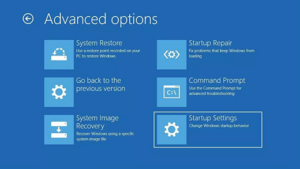
Processes running in the background can be a reason sometimes for a program not being able to uninstall. This can easily be fixed by booting the system in safe mode. By doing so will eliminate the program to run in the background and thus can be uninstalled. Following the below steps can take you to safe mode. Step 1 – Press Windows + IStep 2 – Go to update and securityStep 3 – Go to recoveryStep 4 – Under Advance Startup, press restart nowStep 5 – Head to troubleshootStep 6 – Click Advanced Options>Startup settingStep 7 – Click restart. After restarting and selecting your desired safe mode setting. Use any of the methods above to uninstall the programRead Also: How to fix apps not updating on Android smartphone
System Restore Point
This isn’t an exact way to uninstall an app, but you can revert to system recovery. It can restore your system at the point when the application was not installed. Be careful using this method as the settings and apps installed after recovery will be reverted too.
Third-party apps/ tools
Uninstallers like Revo can be used to uninstall stubborn applications. These apps are specifically designed to fulfil the function of removing these apps and their files completely from your system.This easy stem by stem guide will surely help you to uninstall these apps and never worry about stubborn software troubling you again.For the latest gadget and tech news, and gadget reviews, follow us on Twitter, Facebook and Instagram. For newest tech & gadget videos subscribe to our YouTube Channel. You can also stay up to date using the Gadget Bridge Android App.
The Chinese smartphone company, Xiaomi, has suspended the Redmi Note 10 Pro and Redmi Note 10 Pro Max 6GB RAM with 64GB storage options. The base variant of both the devices appears to no longer exist on the company’s website. Both the devices were earlier available in multiple configurations and the base version was the cheapest out of the pack.Referring to Xiaomi’s official online store mi.com, the 6GB RAM with 64GB storage for Redmi Nṣote 10 Pro and Redmi Note 10 Pro Max seem to be discontinued as the configuration is no longer listed on the website. In fact, Amazon is also not showing up the base model of both smartphones. Both the websites now list the 6GB RAM with 128GB storage and 8GB RAM with 128GB memory options. However, the change doesn’t affect the colour options and pricing of both the available models. This change indicates the upcoming Redmi 10 launch which the company has confirmed today only. Redmi has officially released the first teaser of the smartphone although it has not yet confirmed the exact launch date. The teaser poster shows the design of the phone from the back. It will be available in three colour options and the back panel will feature quad rear cameras housed inside a rectangular-shaped camera module positioned at the top left corner. The company also teases that that handset will come with a 50-megapixel camera sensor. In addition to this, the device will also equip a side-mounted fingerprint sensor.As per the recent blog leak, the Redmi 10 will be available in different configurations of 4GB RAM with 64GB storage, 4GB RAM with 128GB storage, and 6GB RAM with 128GB storage. It may arrive in three colour options of Carbon Gray, Pebble White, and Sea Blue.Moreover, the device is leaked to feature a 6.5-inch full-HD+ display with a 90Hz adaptive refresh rate. It may run on Android 11 with MIUI 12.5 out of the box and be powered by an octa-core MediaTek Helio G88 SoC.In terms of cameras, the Redmi 10 blog leak revealed that the phone will come with a quad rear camera setup that will include a 50-megapixel primary sensor, an 8-megapixel ultra-wide, 2-megapixel macro and 2-megapixel depth sensor. It is likely to sport an 8-megapixel front-facing camera for taking selfies. The phone is also stated to pack a 5,000mAh battery with 18W fast charging as well as 9W reverse charging support.
For the latest gadget and tech news, and gadget reviews, follow us on Twitter, Facebook and Instagram. For newest tech & gadget videos subscribe to our YouTube Channel. You can also stay up to date using the Gadget Bridge Android App. You can find the latest car and bike news here.
Back in March this year Samsung introduced Galaxy A52 in India. Now the South Korean company is planning to launch its tweaked variant which is Samsung Galaxy A52s in the country. Now the device support page has gone live on the Indian website hinting at its upcoming launch. The device has been spotted on various certification platforms and was leaked before the company’s official announcement. Samsung Galaxy A52s support page has been spotted on the company’s India website. The device has appeared with model number SM-A528B which is speculated to be A52s. The support page did not reveal any information except that it would come with dual-SIM support. Before this, the handset also showed up on Geekbench as well as on the Bureau of Indian Standards (BIS) website.Previously the Samsung Galaxy A52s pricing and specification were also leaked on the web. The leaks suggest that the device could also launch in the European market in a 6GB RAM with 128GB storage model and is likely to be available in an 8GB RAM with 256GB storage variant in other markets. The price is tipped to start at EUR 499 that translates to Rs 39,100.If rumours and leaks are to be believed then Samsung Galaxy A52s could offer a 6.5-inch full-HD+ Super AMOLED display. It may also run One UI 3.1 based on top of Android 11 and be powered by Qualcomm’s Snapdragon 778G SoC. It could be offered with up to 8GB RAM and 256GB of storage with an option to expand the internal storage via a microSD card. In addition to this, the device is also suggested to come with a quad rear camera setup that may house a 64-megapixel primary lens with f/1.8 aperture, a secondary 12-megapixel ultra-wide-angle sensor with f/2.2 aperture. Further, it may include a 5-megapixel macro lens with f/2.4 aperture and a 5-megapixel depth sensor with an f/2.4 aperture. For taking selfies and video calling it is expected to come with a 32-megapixel selfie camera with f/2.2 aperture.Along with this, the Samsung Galaxy A52s is likely to pack a 4,500mAh battery with 25W charging support. For connectivity, it is tipped to include a USB Type-C port, Bluetooth v5, and NFC support. The alleged smartphone could also come with an IP67 certified build for protection against dust and splashes.
For the latest gadget and tech news, and gadget reviews, follow us on Twitter, Facebook and Instagram. For newest tech & gadget videos subscribe to our YouTube Channel. You can also stay up to date using the Gadget Bridge Android App. You can find the latest car and bike news here.
Samsung Galaxy A72 is the premium mid-range smartphone that was launched in India some time back. The device comes with some high-end features. There is a 5G model too but that is limited to the western market. We have spent a considerable amount of time on the device and this is our detailed review of the Samsung Galaxy A72.
In This Article
Samsung Galaxy A72 Review: Design and Display
In terms of looks, Samsung Galaxy A72 is definitely an eye candy. The device has been made available in pastel colour options Awesome Black, Awesome Blue, Awesome Violet, and Awesome White colour options. As the name suggests the device looks absolutely awesome and we have the Awesome Violet variant. The phone comes with a bigger form factor and also incorporates IP67 dust and water protection, which is something we don’t get to see on non-flagship phones. The device feels premium and great in the hand and for us, it’s one of the best looking mid-range smartphones currently available in the market. The phone feels comfortable while holding and does not have sharp edges. Despite being over 200 grams the phone also doesn’t feel heavier either. It features a matte finish so no more fingerprints. Although it comes with an all-plastic build, which is a letdown at this pricing, we have liked a glass or metal build. Although the handset doesn’t look like a boring slab.Upfront it is endowed with a 6.7-inch full-HD+ Super AMOLED Infinity-O Display. We don’t call it flagship quality, but it is good enough as it supports HDR playback. The screen comes with a refresh rate of 90Hz with excellent colour reproduction. The brightness and colour contrast is also pleasing to the eyes. There were no jitters or slow scrolling experience. The Samsung Galaxy A72 supports an under-display fingerprint sensor, which we found to be slightly slow. The edges on the sides are relatively slimmer than the bottom chin, which is more exaggerated than it should have been on the 6.7-inch screen. But the good thing is the punch hole cut out at the top centre is almost not there. There is a stereo speaker system in this smartphone. Though it produces balanced audio as it supports Dolby Atmos audio. we expected it to be better in terms of loudness. There is a dedicated Dolby Atmos game mode that enhances the audio while gaming. Moreover, Galaxy A72 includes a 3.5mm headphone jack which is a big relief. To put it all together, Samsung Galaxy A72 has nailed it in terms of design and display.
Samsung Galaxy A72 Review: Performance and Cameras
Now moving on to the performance side of the smartphone it has Qualcomm’s Snapdragon 720G, which is a major letdown considering the pricing. There are plenty of options available in the market that offer great performance and 5G connectivity too. But this doesn’t mean that the device is terrible in performance, but it is just that competition is hardcore out there.We had 8GB of RAM with a 128GB storage variant. Although the company has worked to improve the optimisation of the device, it is of no match considering other smartphones available in the market have slightly better SoC and storage. Nonetheless, the handset can easily hold apps in the memory well and we had no issues during our testing. Getting to the gaming side of things, frankly speaking, this phone is not made for high-end gaming. When gaming for long, the mobile heats up and you will notice frame drops as well. However, the device can handle day to day regimes, even heavy multitasking. Samsung does offer 3 years of OS updates and 4 years of security updates on this mobile phone. When it comes to software, Samsung’s One UI is the best Android skin. It is simple to use, has less bloatware and comes with features like system-wide dark mode and always-on display.Quickly shifting gears, let’s get to the cameras now. Samsung Galaxy A72 features a quad rear camera setup that includes a 64-megapixel primary sensor with an f/1.8 lens. In addition to this, there is a 12-megapixel ultra-wide-angle sensor, a 5-megapixel macro lens, and an 8-megapixel telephoto camera.Samsung has also provided a 32-megapixel selfie camera sensor on the front.It should be noted that the primary and the telephoto lenses equip OIS, which is something we don’t get to see in this price range. In normal daytime, the camera produced a better dynamic range and natural colours. So you can expect the camera to be reliable under any circumstance. Ultra-wide images have a wider field of view with good HDR capabilities too. The telephoto lens is capable of up to 3X optical zoom and up to 30 times digital zoom. The images look good up to 10x magnification but beyond that, the outcome depends upon the lighting conditions. The portraits from the primary lens look nice too offering a more natural undertone. Whereas the selfies also looked warm yet natural.Macro shotThe nighttime images from the Galaxy A72 primary camera give better exposure details and look even better when night mode is turned on. The device does not have a 4K @ 60fps option, but it does provide 4K@30fps. The plus point is that the company has provided an OIS in its cameras hence the videos are stable from the rear as well as on the front. standard modePortrait modeIn terms of battery endurance, the 5,000mAh battery can deliver more than a day’s screen on time under normal usage, whereas during heavy usage the phone will last you through the day only. The company also provides a 25W charger that takes from 0 to 100 percent in 1 hr and 25 minutes.
Verdict
Here comes the final part of our review. Though some might feel the device is overpriced, Samsung has practically nailed every other aspect of this phone. The display has good colour optimisation and even touch response. Yes, the device is not made for heavy gamers, but Samsung is not marketing it like that. Here we would like to mention that the company introduced the phone alongside Galaxy A52, which offers similar specs and chipset. The only difference is a bigger display, battery and telephoto lens. So if you are looking for a more affordable option and a slightly smaller screen is not an issue then you can go for the Galaxy A52.Pros
Popular Social media platform Facebook is now rolling out end-to-end encryption for voice and video calls on Messenger. The text messages sent by users are already encrypted on WhatsApp as well as on Facebook Messenger but now the company has added an extra layer of protection to keep the calls more secure and private. In addition, the company has also brings updated controls for disappearing messages.Facebook via a blog post announced, “Today, we’re rolling out the option to make voice and video call end-to-end encrypted on Messenger, along with updated controls for disappearing messages. People expect their messaging apps to be secure and private, and with these new features, we’re giving them more control over how private they want their calls and chats to be.” With the new Facebook Messenger update, you will get the option for end-to-end encrypted voice and video calls. Users will be introduced to chat modeWith the new Facebook Messenger update, you will get the option for end-to-end encrypted voice and video calls. Users will be introduced to chat mode so you can secure your audio and video calls with this same technology if you choose. End-to-end encryption is already available for chats on WhatsApp and Facebook Messenger. This helps in keeping your communication safe from hackers and criminals. All your content under the setting will stay protected from the moment it leaves your device to the moment it reaches the receiver’s device. “This means that nobody else, including Facebook, can see or listen to what’s sent or said. Keep in mind, you can report an end-to-end encrypted message to us if something’s wrong,” the company added.In addition to this Facebook has also updated the controls over disappearing messages also known as expiring messages within end-to-end encrypted chats. Now you can control the timer in the setting to decide when you want your chats to be deleted. Facebook Messenger has updated the setting to provide more options for people in the chat to choose the amount of time before all new messages disappear, from as low as 5 seconds to as long as 24 hours.Facebook has also informed that in the next few weeks it will begin testing end-to-end encryption for group chats, including voice and video calls, for friends and family that already have an existing chat thread or are already connected. The social media giant will also perform a test for your delivery controls to work with your end-to-end encrypted chats. This will help in preventing unwanted interactions by deciding who can reach your chats list, who goes to your requests folder, and who can’t message you at all.Moreover, the company will also carry out opt-in end-to-end encryption for Instagram DMs as well. However, this will be tested out on a limited number in select countries that lets them opt-in to end-to-end encrypted messages and calls for one-on-one conversations on Instagram.
For the latest gadget and tech news, and gadget reviews, follow us on Twitter, Facebook and Instagram. For newest tech & gadget videos subscribe to our YouTube Channel. You can also stay up to date using the Gadget Bridge Android App. You can find the latest car and bike news here.
The e-commerce website Flipkart is hosting Daily Trivia Quiz. Every day it brings a bunch of new questions for its users. By answering them correctly you can win exciting prizes. The questionnaire is based on questions related to general knowledge. Also, the users can win free vouchers and super coins, among other offers via the daily quiz. 16 August 2021 Flipkart Daily Trivia Quiz Answers has already gone live on its platform.
The participant should be at least 18 years old and should have a valid login ID. The Quiz is available on the mobile platform and not the web version. E-commerce conducts the quiz on daily basis and goes live at 12:00 AM IST and runs till 11:59 PM IST. The winners are announced within 15 days from the date of participation that can be viewed under the Gems/Rewards section in the app.
In This Article
How to participate in the Flipkart Daily Trivia Quiz
To participate download the Flipkart app on your phone. Then open the Flipkart app then head to Game Zone. Now click on the Daily Trivia Banner or search for Daily Trivia. Enter the game and answer all 5 questions with correct answers.
16 August 2021 Flipkart Daily Trivia Quiz Answers
Question 1: Founded by Jawaharlal Nehru, which newspaper had a Hindi edition named Navjivan?
Answer: National Herald
Question 2: Which fruit was first named ‘Yang Tao’ but was then given a bird’s name?
Answer: Kiwifruit
Question 3: Which king invited Balarama and Krishna to Mathura and advised him to kill Kamsa?
Answer: Akrura
Question 4: Who was the first Indian recipient of the Stalin Peace Prize?
Answer: Saifuddin Kitchlew
Question 5: Which was the first Indian company to sponsor a car in NASCAR Series?
Answer: Mahindra
16 August 2021 Amazon Quiz has gone live now. The quiz can be played daily from 12 AM to 11:59 PM. Amazon gives the opportunity to millions of its customers to play and win free gadgets as well as Amazon Pay Balance. Today e-commerce gives you a chance to win Rs 30,000 Amazon Pay Balance.
Every day the e-commerce platform brings a new set of questionnaires to which the participants have to answer correctly. The quiz contains only five questions that are based on current affairs and general knowledge. Answering all the questions correctly will get your name selected for a lucky draw. Only one person will be selected as the winner and the results are announced at the end of every month. The lucky ones might win something by answering all the questions correctly, and the wrong answers will get you eliminated from the quiz. So to make sure you answer all the questions correctly Gadget Bridge everyday updates all the correct answers to all 5 questions. To win Rs 30,000 Amazon Pay Balance check out today’s answers for the Amazon Quiz.
16 August 2021 Amazon Quiz Answers
Question 1: President Ramnath Kovind recently laid the foundation stone of Dr Bhimrao Ambedkar cultural centre in which of these cities?
The answer is- B) Lucknow
Question 2: The #benderaputih (white flag) campaign has gained momentum on social media in which country?
The answer is- C) Malaysia
Question 3: Virbhadra Singh, who passed away recently, was the former chief minister of which Indian state?
The answer is- D) Himachal Pradesh
Question 4: What is this condition of differing eye colours known as?
The answer is- A) Heterochromia
Question 5: Which of the following cultures are these mythical animals associated with?
The answer is- A) Chinese
The e-commerce website Flipkart is hosting Daily Trivia Quiz. Every day it brings a bunch of new questions for its users. By answering them correctly you can win exciting prizes. The questionnaire is based on questions related to general knowledge. Also, the users can win free vouchers and super coins, among other offers via the daily quiz. 14 August 2021 Flipkart Daily Trivia Quiz Answers has already gone live on its platform.
The participant should be at least 18 years old and should have a valid login ID. The Quiz is available on the mobile platform and not the web version. E-commerce conducts the quiz on daily basis and goes live at 12:00 AM IST and runs till 11:59 PM IST. The winners are announced within 15 days from the date of participation that can be viewed under the Gems/Rewards section in the app.
In This Article
How to participate in the Flipkart Daily Trivia Quiz
To participate download the Flipkart app on your phone. Then open the Flipkart app then head to Game Zone. Now click on the Daily Trivia Banner or search for Daily Trivia. Enter the game and answer all 5 questions with correct answers.
14 August 2021 Flipkart Daily Trivia Quiz Answers
Question 1: Who plays a Delhi man masquerading as a Russian in ‘Go Goa Gone’?
Answer: Saif Ali Khan
Question 2: Kilikili is a fictional language spoken in which of these films?
Answer: Baahubali
Question 3: The instrument ____ is generally used to create sound effects in horror films?
Answer: Waterphone
Question 4: Which Indian classical music instrument was ‘Ustad Vilayat Khan’ an exponent of?
Answer: Sitar
Question 5: Complete the dialogue from the film Psycho- “A boy’s best friend ____?
Answer: is his mother
Get ready to answer a new set of questions as the 14 August 2021 Amazon Quiz is live on its platform. The e-commerce platform brings a daily quiz on its mobile platform, which every day gives chance to millions of people across the country to win exciting prizes. Today’s Amazon Quiz prize is the Rs 25,000 Amazon Pay Balance.
By participating in Amazon Quiz every day you can stand a chance to win prizes such as iPhone X, iPhone Xs, Seagate HDD, GoPro Hero 8 Camera, LG Smartphones, Samsung Galaxy S20, Air Purifier, Oppo smartphones, Amazon Pay Balance among others. Every day Amazon brings a fresh new quiz on its app, here we would like to mention that the quiz is not available for desktop users, only app users can participate in the daily quiz.
The company puts 5 questions based on general knowledge and current affairs to which the contestants have to answer all the questions correctly. A wrong answer will eliminate you from the quiz. After giving correct answers to all the questions, your name will get further selected for a lucky draw. The results of the lucky draw will be announced at the end of the month. So today’s quiz winner’s name will be declared at the end of the month. We have updated today’s five questions with their correct answers below so that you can win Amazon Quiz and get Rs 25,000 Amazon Pay Balance
14 August 2021 Amazon Quiz Answers
Question 1: Mariyappan Thangavelu, who has been named the flag bearer for the Indian contingent at Tokyo Paralympics, represents India in which sport?
The answer is- D) High Jump
Question 2:Which country’s prime minister recently gifted India 2600 kgs of the Haribhanga variety of mangoes?
The answer is- C) Bangladesh
Question 3: Nihal Sarin is one of the youngest to represent India in which sport?
The answer is- B) Chess
Question 4: Identify the Indian dance form.
The answer is- D) Kathakali
Question 5: This tourist attraction is in which US city?
The answer is- A) Los Angeles
For the latest gadget and tech news, and gadget reviews, follow us on Twitter, Facebook and Instagram. For newest tech & gadget videos subscribe to our YouTube Channel. You can also stay up to date using the Gadget Bridge Android App. You can find the latest car and bike news here.
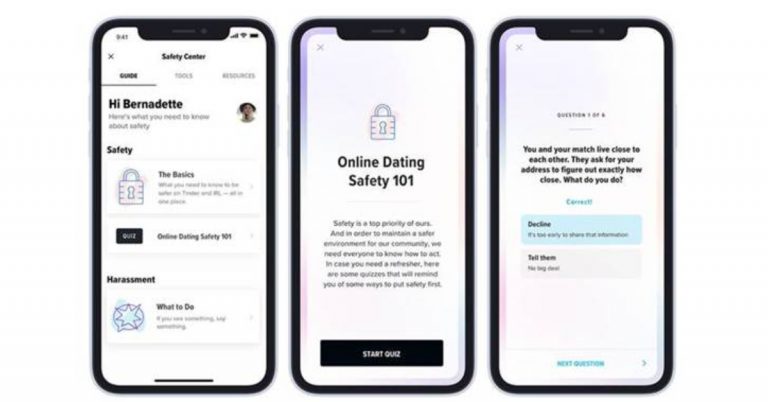
Online dating platform Tinder, today announced a comprehensive in-app Safety Center in India. The company keeps rolling out useful features to its platform to enhance the user experience. But the new dedicated features will allow users easy access to tools relevant to their well-being while using the platform.Commenting on the announcement Bernadette Morgan, Director, Trust & Safety Product at Tinder said, “Every day, millions of our members trust us to introduce them to new people, and we’re committed to building safety features that meet the needs of today’s online dating communities. I’m proud to announce the availability of this feature in India. For us, it represents an important step in driving our safety work forward at an unmatched scale in the market.” The Tinder in-app Safety Center has been built by the company’s dedicated Trust & Safety team. As an evolving section of the app, content in the Safety Center will continually be reviewed and updated as needed. Topics will include the latest guidance for dating safely and offer educational resources –as well as list local NGOs and hotlines offering support– such as National Commission for Women, Pink Legal, Umang LBT Support Group, One Future Collective and The Humsafar Trust. In order to access the Safety Centre on the Tinder app, all you need to do is open the application on your device and tap on your profile icon. Then simply select Safety from there.According to Tinder, its aim is to centralise safety-related resources and provide avenues of support that connect members in need with relevant experts. Also, the Safety Center will be available at members’ fingertips via the app’s main menu and any time members chat with potential matches. With the launch, Tinder is trying to make the platform a trusted and safe space for everyone who joins. It has also worked closely with theMatch Group Advisory Council (MGAC) as well as NGOs to continue buildingfeatures and processes to keep members safer.
Previously the online dating application Tinder also rolled out the functionality to block them up by their contact number to avoid awkwardly swiping your ex, relatives and colleagues. The Block Contacts feature on Tinder can be accessed within the profile setting from where the member will be able to enter their contact which they’d rather not see, or not be seen by, on the dating app.
Not long ago the company also introduced features like videos in profiles, an Explore section, and a Hot Takes section to provide a new social experience. The users will be able to add a video to their profile allowing them to express themselves through videos on their profiles. Whereas the Explore section lets the users discover matches who share similar Passions and explore different sides of Tinder-like Festival or Chef Mode. On the other hand, the Hot Takes section gives an opportunity to the members to chat with someone before they match in a low-stakes session of the feature’s namesake.
In this pandemic state, the world has leaned more towards online communication for either study or work. This we think will be the new norm for years to come, as many industries and businesses have realised that there is a lot of savings if the employee works from home. For work-from-home culture, many new tools cropped up such as Microsoft Teams. Microsoft Teams is one of the most used video calling applications in the market that resolves most of the WFH interconnectivity issues. Consumers being new to this online ecosystem face a lot of trouble while using these apps. Here are the top 10 ways to fix the sign in error on Microsoft Teams.Read Also:Top 3 Free Ways to Transcribe Voice Memos on iPhone (2024)
In This Article
Check your Internet Connection
As Microsoft Teams is an online-based software it requires a good and stable connection to work properly. Users can google any speed test online to check the internet connection and its speed. If the speeds are low, try connecting to a different WiFi connection. If no other WiFi is available try connecting it with a mobile hotspot.
Exiting Teams
Sometimes the app becomes unresponsive and thus starts to misbehave either due to a bug or a trigger. The easy way to quit Microsoft Teams is by right-clicking on the taskbar and clicking quit. Another way is to go to the Task Manager and click the end task from there. Both methods will shut down Microsoft Teams and then try to restart the application. Now you should be able to log in.
Check your login credentials
It is possible that you entered the wrong credentials while logging into Microsoft Teams. Even a spelling error can keep you from logging into the service. Carefully go through each letter of your Email ID and password. Once you have verified that the login details are correct, hit Enter.
Checking Teams Server
It often happens that everything is fine from the client site but there is an error on the server site. Checking is also simple nowadays just open any browser and search Down Detector. If there are lots of reports you can ensure that the issue is regarding the server from Microsoft’s side.Also Read: Beware: These are the 9 apps stealing Facebook login credentials from Google Play
Clearing Cache Memory
To speed up the process of common tasks, computers often collect data in the background. If the computer collects a bad cache file it can show errors like login errors. The easy way to do this is:Step 1 – Press Windows + R to open the run menu.Step 2 – Type %appdata%MicrosoftTeams in the box and press Enter.Step 3 – Delete all the files and folders.
Repairing Teams
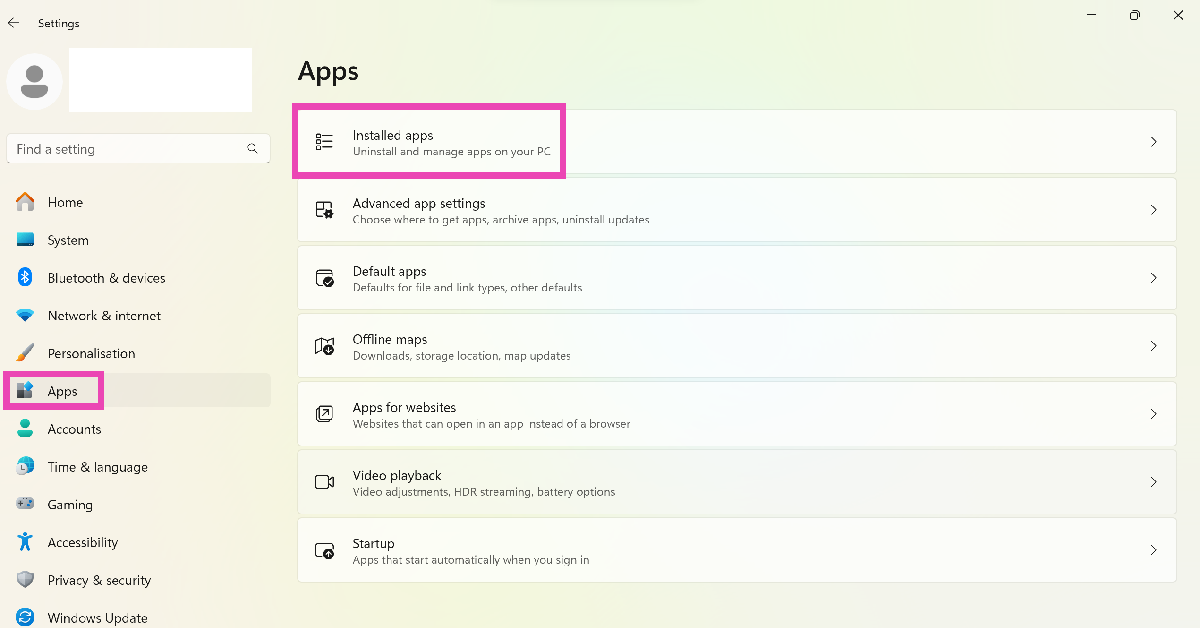
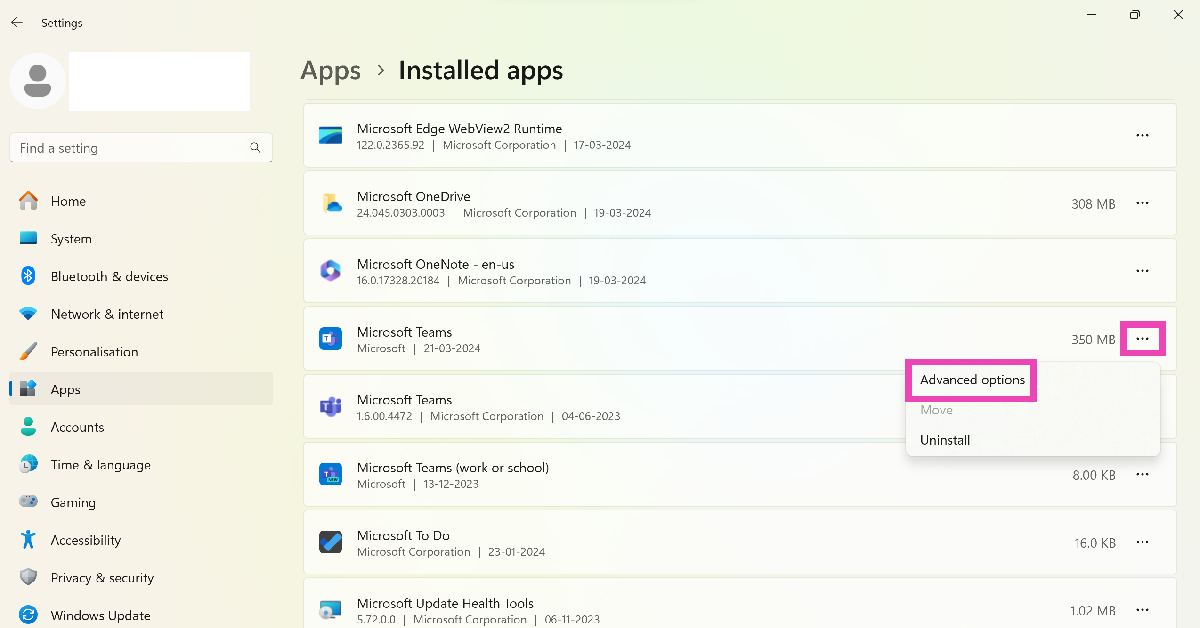
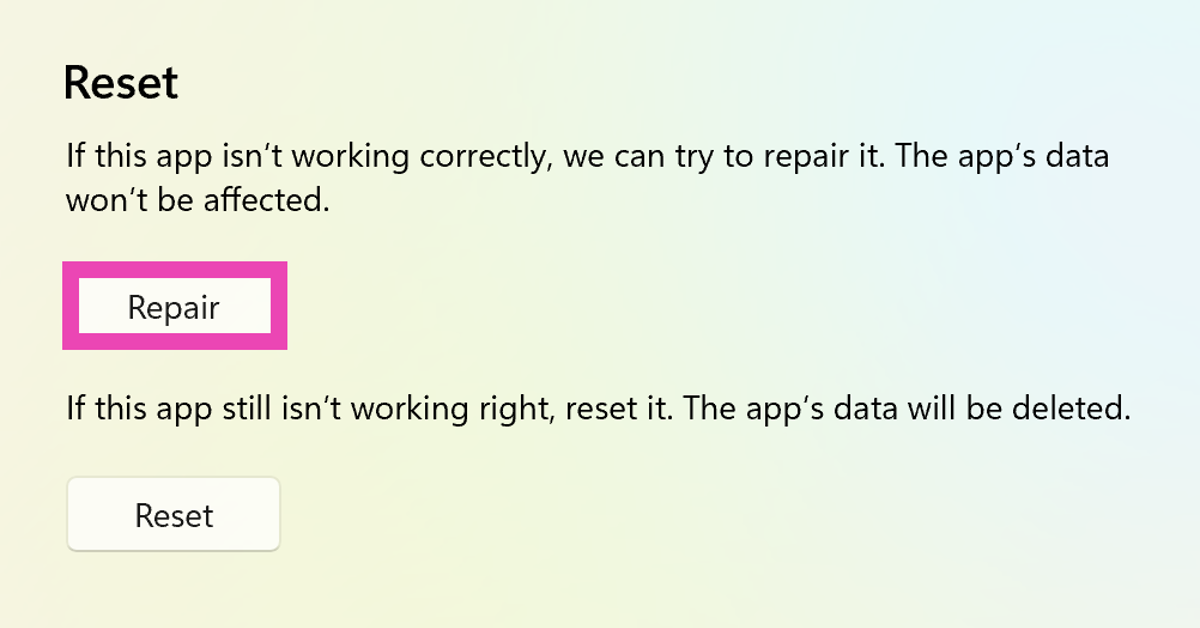
There might as well be a bug in your system that is throwing Microsoft Teams an error thus resulting in a login issue. Repairing teams will solve this issue. This can be done by the following method:Step 1 – Press Windows + I.Step 2 – Go to Apps>Installed apps.Step 3 – Hit the ellipses next to Microsoft Teams and select Advanced options.Step 4 – In the advanced menu under Reset there will be an option to Repair.Step 5 – After the process is completed try running Teams once again.
Disable the VPN
If you’re using a VPN for your network, it can interfere with the Microsoft Teams software and cause an error while trying to sign in. If you don’t want to disable the VPN altogether, try changing the server location to another country. If that doesn’t work, pause the VPN and check if the issue has been fixed.
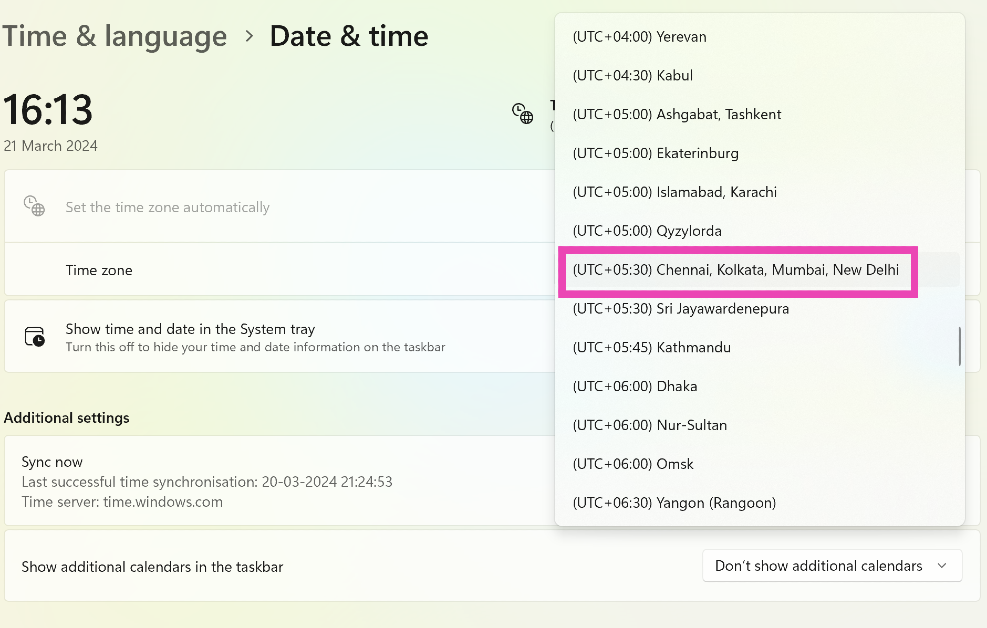
Set the correct time zone
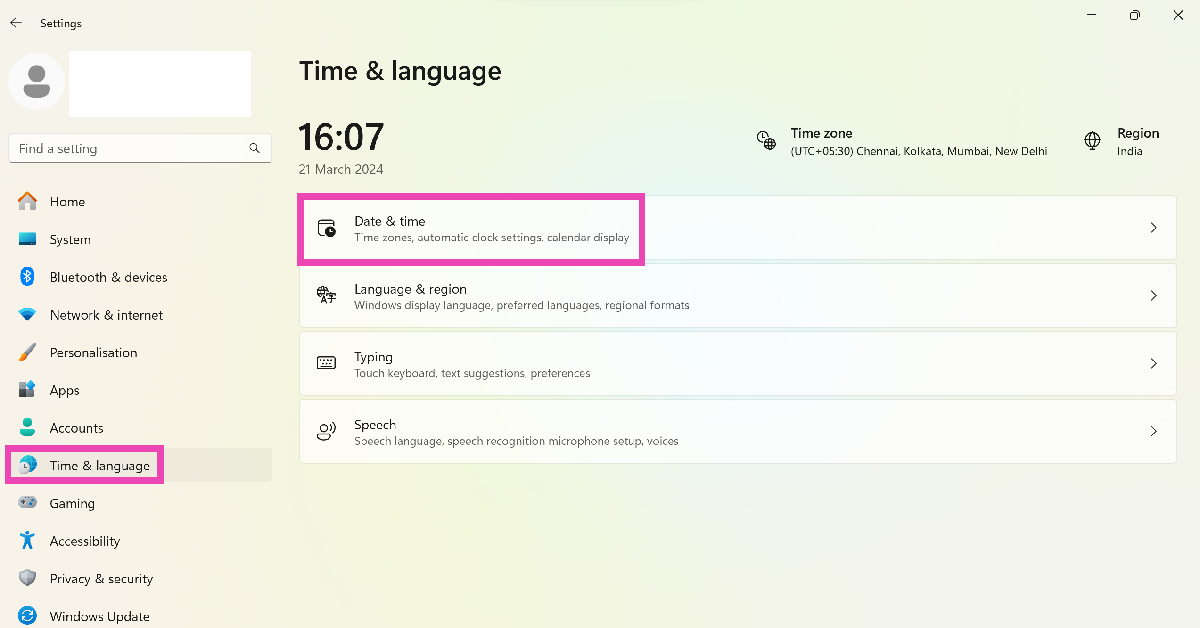
Incorrect date and time settings can cause Microsoft Teams to freeze. Here’s how you can fix it.
Step 1: Press Windows + I to open settings.
Step 2: Switch to the Time & language tab and select Date & time.
Step 3: Click on the dropdown menu next to Time zone and select the appropriate option.
Clear the Credential Manager
Step 1: Go to Control Panel and select Credential Manager.
Step 2: Select your Microsoft account.
Step 3: Hit Remove.
Uninstall and reinstall Teams
If none of the steps works for you try reinstalling Microsoft Teams from scratch, that should resolve the login issue. If your app is outdated, try installing the updated version from Microsoft Store. Older versions of apps are more prone to bug-related issues. Developers are quick to fix these bugs in later updates. Once you install the updated app, the sign in error on Microsoft Teams will be fixed.
Frequently Asked Questions (FAQs)
How do I check if Microsoft Teams is down?
Go to DownDetector.in and search for Microsoft Teams. If you see a spike in user reports, it means that the app is currently facing a server outage.
How do I update the Microsoft Teams app on my PC?
Go to the Microsoft Store, search for Microsoft Teams, go to the app page, and hit ‘Update’.
How do I clear Microsoft Teams’ app cache on Windows?
These are the top 10 ways to fix the sign in error on Microsoft Teams. Facing trouble with the Android app for Teams? Make sure it is updated and try clearing its cache. If you’re facing any other issues with Teams, let us know in the comments!






 The top of the screen has a couple of buttons as well. These include volume up and down along with the Mics/Camera on/off buttons. So, there is no power button on Amazon Echo Show 10. Just connect the power adaptor to the port located at the bottom of the speaker and you are good to go. The speaker cylinder has two 1-inch tweeters along with a 3-inch woofer inside. More on the audio part in the next section.
The 10.1-inch display on the
The top of the screen has a couple of buttons as well. These include volume up and down along with the Mics/Camera on/off buttons. So, there is no power button on Amazon Echo Show 10. Just connect the power adaptor to the port located at the bottom of the speaker and you are good to go. The speaker cylinder has two 1-inch tweeters along with a 3-inch woofer inside. More on the audio part in the next section.
The 10.1-inch display on the 
 A rotating camera is a great feature, as it adds to the security. How? The Amazon Echo Show 10 is a smart security camera also, which you can access from anywhere around the world. You can access and rotate the camera in all directions. Not bad Alexa, not bad! Alexa can hear commands from as far away as 15 feet with ease. Even if there is noise in the room, Alexa will answer you 9 out of 10 times.













 Step 3 –
 Step 4 –
 Step 2
 Step 5
 Step 6
 Step 7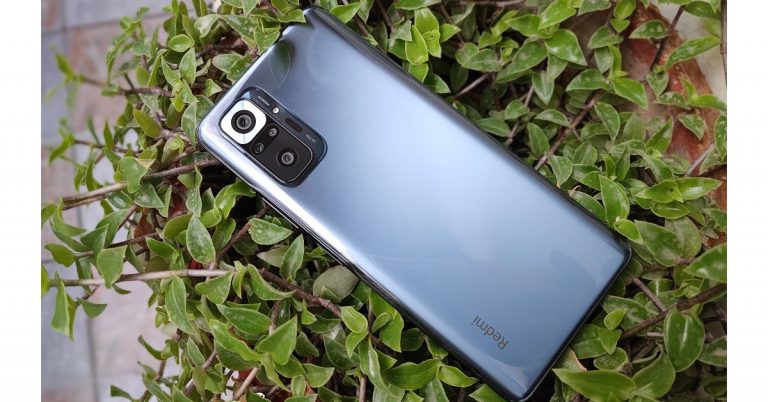
























 Step 3: Click on the dropdown menu next to Time zone and select the appropriate option.