Saving your files on your smartphones is performed by the built-in tools on your mobile. So if the name of the file is messy and it is such a pain to find the recently saved files. The files you have saved are in numbers or are in computer format generated by the tools. This creates such discomfort in searching for your files. Here is how you can batch rename files on your Android mobile to make the search easier.
In This Article
Batch multiple files using ES files explorer app:
ES files explorer is a great software that lets you rename your files in bulk. It is one of the best free batch renamer apps available that you can download. Follow the steps below to batch rename files on your Android mobile.
Download and install the app from Google Play Store: Link
Find the location you want to rename the files on your Android smartphones.
Now long-press the files and folders until you see a green tick icon>Do the same and tick all files you want to batch.
Next, find the rename button on the top bar and click on it.
Wait for a pop-up showing Batch rename>Configure the options given on the page.
From the rename the files with a number or a name.
The next option to batch rename files on your Android mobile is by using the Bulk Rename Wizard app. This app has more customisation and it is a free renaming tool designed for Android mobile. You can rename multiple files and folders easily and faster with this minimal operations app. Follow the guide below to batch your rename files.
Facebook news is an attractive part of browsing the online social network. And without interesting news on your feed on Facebook homepage, social networking becomes dull and incomplete. However, if you follow too many pages on FB it can get your new feed messy. Here are some ways you can clean up your Facebook news feed.
In This Article
Filter your preferences:
The first step you can start with is to filter out your preferences for all the pages and people you have followed. By filtering out the preferences the Facebook algorithm will show you the content based on your preference and what you have selected in what interests you. Since browsing Facebook on the app has been the trend this step is for the FB app but the steps are not different on the Web.
Login to your credential on the app and open the app.
Click on the Hamburger icon.
Scroll and find the option “Settings”.
And go to the section: News Feed Preference.
From the open-up page, you will see some options: Prioritise who sees first, Unfollow people to hide their post, reconnect with people you have followed, and discover pages.
Unfollow or Snooze pages or people you have followed:
Decluttering your Facebook news feed also means not wanting to see posts from particular pages or people you have followed. With many FB users demanding this option Facebook includes three options you can either unfollow, take a break from the page or profile, or snooze them for 30 days. The steps to go to these options are below.
Open your Facebook account.
Go to the Page or the Profile.
Tap on the three-dot icon.
Now scroll down and Choose: Hide post, Snooze, Unfollow.
Reducing the personalised ads you are allowed is one of the options to declutter your Facebook news feed. The Facebook algorithm enables ads based on your FB usage, which can sometimes show unwanted ads. But Facebook also has added the option to stop these ads on the news feed. Now you can manually hide advertisers, control ad topics, and manage the data used to show ads. Here are the steps to hide, control, and manage the ads.
Login to your Facebook official account.
On the top-right corner click on the down arrow icon
Go to Settings & Privacy>Settings>Select Ads.
Now you will see three options on the left side panel: Advertisers, Ad topics, Ad settings.
Using the options hide, control, and manage your Personalised Ads.
Prioritise who to see first:
This option to clutter your Facebook news feed is by prioritising who you want to see first on your news feed and who you do not want to. You can now prioritise the post from a profile or pages you have followed, you can make these settings using the news feed preferences options. Here are the steps below.
Login to your FB profile.
Go to the top-right corner and Tap on the down arrow icon.
The demand for tablets has been on the rise ever since the pandemic hit. This is when work and study from home became a necessity. However, there were not many budget-friendly Tablets out there. If there were some, then those did not have good performance. As a solution, Samsung introduced Samsung Galaxy Tab A7 Lite, which drops in the budget segment. We spent some time with the neat tablet that is made for beginners, light travellers or people who want a large screen for their day to day Zoom calls. This is a Samsung Galaxy Tab A7 Lite review that could very well be the answer to your work meetings.
In This Article
Samsung Galaxy Tab A7 Lite design and display
To begin with, Samsung Galaxy Tab A7 Lite is a very well-built machine. You get all the ingredients including a beautiful display and metal back for a premium feel. Yes, the head and chin area on the front could be smaller, but overall, it looks smashing. The front also has the video/selfie camera on top along with the earpiece speaker grille. The right side has the volume rocker and power buttons along with the secondary microphone.
The left side holds the 4G SIM tray, which can also accommodate a microSD card of up to 1 TB. So yes, users can make audio calls from this tablet too. At the bottom, the company has placed a loudspeaker grille, 3.5mm audio ports, USB Type-C charging port as well as the primary microphone on the Samsung Galaxy Tab A7 Lite. The top has a second speaker grille, which makes it a stereo speaker setup on this device. Coming to the back, the rear of the Samsung Galaxy Tab A7 Lite has a single camera and Samsung branding can be seen here.
Moving on, the display is one of the best features the Samsung Galaxy Tab A7 Lite has. The 8.7-inch TFT display has HD+ resolution and 16M colour depth. We played a lot of YouTube videos on the device along with Netflix shows and the experience was far superior to any other tablet in the price segment. The sound was loud and great thanks to the dual speakers. Outside visibility is good too. The brightness is nice, and the display does not get washed out under direct sunlight. All in all, the screen does justice to its price point.
Samsung Galaxy Tab A7 Lite review: Performance and Camera
The company has tried to equip the Samsung Galaxy Tab A7 Lite with the best it can in the budget segment. Under the hood, users get a MediaTek octa-core CPU with a clock speed of up to 2.3Ghz. There is 3GB RAM and 32GB storage. Which by budget standards is just about okay, but we did feel it is 1 GB too less of a RAM if you ask us. This is why we faced jerks and lag in the system.
The apps open quickly, but you do find jitters when browsing the Android 11 OS with Samsung ONE UI 3.1 on top of it. For, the elder sibling S7, it is a stroll in the park. But for Samsung Galaxy Tab A7 Lite it is a bit of a workout. Games like Asphalt 9 legends or COD-Mobile run fine on the lowest settings, but as soon as you crank it up, you will find the frames dropping and lag in the games. So best to keep it on low settings if you want to enjoy these games. Nonetheless, these games run on the Samsung Galaxy Tab A7 Lite, which is a big plus.
The battery life of the Samsung Galaxy Tab A7 Lite is another good feature of this tablet. We got over 3 days of battery life out of it. We watched 2 Netflix movies, couple of hours of YouTube and even made few phone calls with it. Not bad for a 5,100 mAh battery inside. All this with Wi-Fi on. However, after prolonged use, the tablet does get a little warm.
Coming to the cameras, they are just there for your simple work. The front 2MP camera is decent for video calls or if you are connecting with your study group. It will not give you the best selfies which your smartphone can provide. The rear 8MP camera is better. While the results outdoors were filled with vibrant colours and decent details, the images shot inside lacked the punch. Again, if you want to click good pictures, keep your smartphone handy.
Samsung Galaxy Tab A7 Lite review: Verdict
Overall, the Samsung Galaxy Tab A7 Lite is a good buy for people who want to attend video classes or office video calls. At Rs 14,999 the tablet does make a lot of sense for anyone who does not want to spend a lot but wants portability, a good display, and a loud sound. Can go for it if you are a budget buyer, if not then look at the Tab S7 or the new Apple iPad.
For the latest gadget and tech news, and gadget reviews, follow us on Twitter, Facebook and Instagram. For newest tech & gadget videos subscribe to our YouTube Channel. You can also stay up to date using the Gadget Bridge Android App.
Blaupunkt, a popular German brand that manufactures audio devices has announced the launch of 4 new models of ‘Made in India’ Android TVs here. The company has introduced Blaupunkt CyberSound Series Smart TVs, which include 32-inches, 42-inches, 43-inches and 55-inches, ranging from HD to Ultra-HD TV Models. Blaupunkt CyberSound Series Smart TVs price and availabilityBlaupunkt CyberSound Series Smart TVs will be available in 4 different variants: 32-inch, 42-inch, 43-inch, and 55-inch. The 32-inch HD model is priced at Rs 14,999, 42-inch Full-HD at Rs 21,999 and the 43-inch 4K Ultra-HD for Rs 30,999. Lastly, the 55-inch Ultra-HD model will be available with a price tag of Rs 40,999. The Android TVs will be available for purchase from July 10th onwards via Flipkart in the country. Blaupunkt CyberSound Series Smart TVs tech specsStarting from a 32-inch HD Ready Cybersound Android TV comes with a bezel-less design offering 1,366×768 pixels of resolution. It runs Android 9 and offers 1GB of RAM with 8GB of internal storage. The Smart TV comes with 40W speaker output, Edge-free sound technology and 2 speakers. 32 Inches -BLThe 42-inch Full-HD Blaupunkt CyberSound Series Smart TV comes with 1,920×1080 pixels of resolution. It features Ultra-thin bezels and also runs Android 9 with 1GB RAM and 8GB ROM. It equips dual speakers of 40W speaker output and Edge-free sound technology. 42 Inches – BLOn the other hand, the 43-inch 4K Ultra-HD model of the Blaupunkt CyberSound Series offers 3,840×2,160 pixels of resolution. This model comes incorporated with 4 amazing speakers with 50W speaker output and the audio is further enhanced by Dolby Digital Plus, DTS TruSurround certified audio. According to the company, it has used Dolby MS12 sound technology that can decode and improve Dolby Atmos, Dolby Digital Plus powered sound technologies. The model is powered by Android 10 and is inbuilt with 2GB RAM and 8GB ROM. 43 Inches – BLThe 55-inch Ultra-HD is highlighted with a bezel-less design and runs Android 10, with 2GB RAM and 8GB ROM. The device is powered by an ARM Cortex A53 Processor and has 4 speakers that offer 60W speaker output. The speakers support Dolby Digital Plus, DTS TruSurround certified audio, Dolby MS12 sound technology that can decode and improve Dolby Atmos, Dolby Digital Plus powered sound technologies. For connectivity, the Blaupunkt TV includes 5.0 Bluetooth, 2 USB ports, 3 HDMI ports along with a voice-enabled remote.
For the latest gadget and tech news, and gadget reviews, follow us on Twitter, Facebook and Instagram. For newest tech & gadget videos subscribe to our YouTube Channel. You can also stay up to date using the Gadget Bridge Android App.
If you are in the market to buy a new PC or laptop, which is the first software you need to download? Well, many would say a messenger or a sharing app or streaming software. The most important software you should get first and install is an anti-virus. We for one have faced so many questions coming from end-users around viruses hitting their precious PCs within days of first use. All because they did not install an anti-virus and connected to the Internet or an unauthorised USB drive.
In today’s day and age, there are many good anti-viruses available on the market, however, our pick is Bitdefender. This is a great software which you can put in your PCs or laptops from day one. It is available in various versions and there is something for everyone. In case you are a new user and do not want to spend, you can try free anti-virus protection and then gradually progress and upgrade to the paid versions, which give you additional features and advantages.
Bitdefender is one of the fastest to detect and eliminate viruses. The free version gives you good all-round protection and will be best suited if you are a single PC user. In fact, it is light on resources and will not hamper your work or put any load on your precious PC resources. It comes with real-time threat detection, which immediately eliminates any threats being thrown towards your PC.
Read Also: 5 reasons not to install the Windows 11 leaked version/build
It also has Anti-Phishing and Anti-fraud features that helps protect you when you are on banking websites or are making online transactions. These features are not available on any other free anti-virus program. Overall, it is a very good protective software to own and install. However, in case you want advanced security for your PC or Laptop then you can opt for something like the Bitdefender Anti-virus Plus edition, which is filled with excellent features such as Bitdefender VPN that enables the users to securely browse the internet and provides an extra layer of security.
Along with that, there is a password manager, Wi-Fi security advisor and social network protection where you get protection from malicious links sent to you unknowingly from your family or friends via a social media platform. The best part about the premium antivirus versions is that you can install them on up to 10 devices. You can check out these Bitdefender discounts if you do decide to go with a premium antivirus and you want to save some money in the process.
Read Also:5 best backpacks for your laptop and its accessories
To sum up, whenever you are buying a new PC or laptop, the first software you need to download is an anti-virus and our pick is Bitdefender as it gives you both a free version as well as the chance to upgrade to the paid version using a good discount.
For the latest gadget and tech news, and gadget reviews, follow us on Twitter, Facebook and Instagram. For newest tech & gadget videos subscribe to our YouTube Channel. You can also stay up to date using the Gadget Bridge Android App.
Indian electronics accessories maker, Boat, has announced the launch of its most affordable smartwatch in India. The company has introduced the Boat Xtend smartwatch that comes with a built-in Alexa along with other health and fitness tracking sensors. The device includes a stress monitor, SpO2 sensor, heart rate sensor, sleep monitor, over 50 watch faces along with 7 days of battery life.Excited with the next addition to the smartwatch line, Aman Gupta, Co-Founder, boAt said, “Our boAt head community has accepted our smartwatches with open arms and we are excited to launch another feature-packed model. We are thrilled to introduce a smartwatch with built-in Alexa which adds a whole new dimension and capabilities to the smartwatch category as a whole. This truly is one of the smartest wearable experiences out there.”Boat Xtend smartwatch price and availabilityBoat Xtend smartwatch has been launched in India with an introductory price of Rs 2,999. The original price of the smartwatch is Rs 7,990. The device comes with a 1-year standard Industry warranty period and is now available via Amazon as well as the company’s official website in the country.Boat Xtend smartwatch tech specsBoat Xtend smartwatch features a 1.69-inch LCD display with touch support. The device will be available in Olive Green, Sandy Cream, Pitch Black and Deep Blue colour options. It also offers more than 50 watch faces accessible via the boAt Wave app.Besides the Boat Xtend smartwatch includes a built-in Alexa voice assistant for a smart and touch-free experience. It can also be used to set up reminders, alarms, checking cricket scores as well as weather and looking up various queries on the internet instantaneously. The device offers Daily activity tracker along with 14 fitness modes such as walking, running, cycling, hiking, swimming, and tracks sports such as rowing, playing cricket, working out among others. This fitness watch can automatically recognise to track walking and running while all the data is summarised and made accessible to the user on the boAt Wave app. Apart from this, the smart wearable includes a host of health monitoring sensors such as Heart rate, Stress, SPo2, and Sleeping patterns automatically as well as manually. The stress monitor reads HRV (Heart Rate Variabilities) to indicate stress levels. If the stress monitor indicates stress levels to be more than 80, one can use the Guided Meditative Breathing app to regulate and relax with its 3 modes: slow, normal and rapid.The device also features notification alerts for calls, texts, alarms, hydration as well as third party social media apps. It has curated controls to track weather, change music and set the watch to Do Not Disturb mode to block out all the unnecessary notifications. The Boat Xtend is backed by a 300mAh battery that is touted to last for a whole week on a single charge. In addition to this, the watch comes with a 5ATM rating for water and dust resistance and ensures durability and allows the watch to survive a depth of up to 50 metres for 30 minutes.
For the latest gadget and tech news, and gadget reviews, follow us on Twitter, Facebook and Instagram. For newest tech & gadget videos subscribe to our YouTube Channel. You can also stay up to date using the Gadget Bridge Android App.
Recently, Garena partnered with Capcom to bring its Street Fighter franchise characters to the Free Fire game. The latest crossover event with Street Fighter V went live last week that brought stylish outfits of fan favourites Chun-Li and Ryu into battlegrounds and other outfits, emotes, skins, and more.Now the Free Fire’s Street Fighter V crossover event is going to enter into the Final Round on July 10. As the crossover’s epic peak day fast approaches, Street Fighter stalwarts Ryu and Chun-Li are inviting players to unleash the results of their training and K.O. their enemies. The event will bring an array of exciting in-game activities and content await players, including the chance to claim time-limited Street Fighter V-exclusive items such as Ryu’s iconic outfit.From today onwards the players of the Indian mobile gaming community, Garena Free Fire players will be getting the chance to add Ryu’s iconic outfit to their wardrobes. The whole wardrobe will include his battle-worn white karate gi, red headband, and red gloves. This outfit will allow players to channel Ryu’s warrior spirit as they charge onto the battlefield. Moreover, the players will also get the opportunity to channel Ryu’s warrior spirit as they charge onto the battlefield. During the final round of the Free Fire Street Fighter V crossover event, the player will get an opportune time to add a host of time-limited Street Fighter V items to their collection for free just by logging into Free Fire. For this, the player needs to complete various in-game missions and activities till July 18. This will include e exclusive themed skins such as the Pet Skin: SF Shiba and Pan- Street Fighter; the Ryu Backpack; and Ryu T-Shirt and much more.Those who are unaware of Garena Free Fire’s crossover event with Street Fighter V is a fighting video game franchise developed and published by Capcom. According to the developers it has sold 46 million units worldwide as of March 21, 2021. Street Fighter V was released for the PlayStation 4 and PC in 2016.
For the latest gadget and tech news, and gadget reviews, follow us on Twitter, Facebook and Instagram. For newest tech & gadget videos subscribe to our YouTube Channel. You can also stay up to date using the Gadget Bridge Android App.
Buying a laptop backpack is all about anti theft, USB charging, and the waterproof capability that these backpacks will give you. Choosing the right backpack with the best facility and the premium material is as tough as choosing the right laptop, so we are making it simpler for you. Here is the list of the 5 best backpacks for your laptops and its accessories.
In This Article
YESO backpack: Lightweight, Anti Tear, and Waterproof.
This amazing laptop backpack comes with an anti-theft pocket. It is built from premium material and high-quality water-resistant polyester. The backpack is multi-functional and has enough storage for your phone and tablet, a secret compartment lets you protect yourself from theft during your journey. Price: Rs 1,800Buy from Amazon.in
Read more: Best ways to waterproof your gadgets
Arctic hunter backpack: Front hard shell
The backpack comes with an earphone hole and it is anti-theft and waterproof. The attraction of this laptop backpack is the front side of the bag is made of hard shell material which protects your laptop even if it falls. And the hard shell is made up of PVC material and the zippers are of premium quality. And the backside is cushioned for convenience and easy to carry. Price: Rs 3,500Buy at Amazon.in
Read also: OnePlus 8T smartphone gets new OxygenOS update in some region
Bange BG7078 backpack: Waterproof with USB Port
This backpack from Bange has two separate compartments one for a laptop and the other to store all your things providing you a large capacity. It is also equipped with a USB port for you to charge your phone or any other electronic device while carrying the bag. The backpack is made up of premium-quality material, which is water repellent nylon. It is also ideal for your journey with its trolley strap designed.Price: Rs 2,700Buy the product from Amazon.in
Fur Jaden backpack: Anti-theft with USB charging Port.
The backpack is big enough to fit a 15.6-inch laptop with retro-reflective tape for night. The zipper design makes the backpack an anti-theft design and there are also secret pockets everywhere to safely hide your valuable belongings. The backpack also features a Charging on the Go option where you can charge your phone or electronic device while you carry the bag and travel. And it is made up of water repellent material making it waterproof. Price: Rs 3,500Buy it on Amazon.in
Backpack by Fur Jaden: Hard Case
The last backpack on the list comes with a Hardcase to shield your laptop from any damages while you carry it. Unlike any average backpack, this Fur Jaden backpack features Charging on the Go facilities for you to charge your phone or tablet. This product has a sleek and ergonomic design with a balanced weight distribution through its straps making it easier for you to carry your laptop in the bag. The most attractive feature is it is an anti-theft backpack that comes with a hard case on the front. Price: Rs 1,200Buy on Amazon.in
For the latest gadget and tech news, and gadget reviews, follow us on Twitter, Facebook and Instagram. For newest tech & gadget videos subscribe to our YouTube Channel. You can also stay up to date using the Gadget Bridge Android App.
The e-commerce website Flipkart is hosting Daily Trivia Quiz. Every day it brings a bunch of new questions for its users. By answering them correctly you can win exciting prizes. The questionnaire is based on questions related to general knowledge. Also, the users can win free vouchers and super coins, among other offers via the daily quiz. 9 July 2021 Flipkart Daily Trivia Quiz Answers has already gone live on its platform.
The participant should be at least 18 years old and should have a valid login ID. The Quiz is available on the mobile platform and not the web version. E-commerce conducts the quiz on daily basis and goes live at 12:00 AM IST and runs till 11:59 PM IST. The winners are announced within 15 days from the date of participation that can be viewed under the Gems/Rewards section in the app.
In This Article
How to participate in the Flipkart Daily Trivia Quiz
To participate download the Flipkart app on your phone. Then open the Flipkart app then head to Game Zone. Now click on the Daily Trivia Banner or search for Daily Trivia. Enter the game and answer all 5 questions with correct answers.
9 July 2021 Flipkart Daily Trivia Quiz Answers
Question 1: Who plays the character of Danial Ocean in the Ocean’s – 11,12 And 13 Movies?
Answer: George Clooney
Question 2:Director Farah Khan runs an NGO Called __ For women and children living in slums.
Answer: Sneha
Question 3: In an iconic Complan ad, if Shahid Kapoor was Complan Boy then who was Complan Girl ?
Answer: Ayesha Takia
Question 4: What role did Judy Dench play in the James Bond series?
Answer: M
Question 5: Which of these Bollywood Films was a remake of Korean Film, Montage?
Answer: Te3n
The e-commerce platform is back with another new quiz on its platform. The 9 July 2021 Amazon Quiz can be played on the mobile app. All you need to do is answer all the questions correctly and win free products and goodies such as gadgets and Amazon Pay Balance up to Rs 50,000, today you have a chance to win Rs 5,000 Pay Balance.
9 July 2021 Amazon Quiz has gone live and a new set of questions have also been updated. The daily quiz on the Amazon app has become the hottest topic as it gives a chance to win exciting free gifts. In today’s Amazon quiz you have a chance to win Rs 5,000 Pay Balance. The quiz contains only five questions that are based on current affairs and general knowledge. Answering all the questions correctly will get your name selected for a lucky draw. Only one person will be selected as the winner and the results are announced at the end of every month. The lucky ones might win something by answering all the questions correctly, and the wrong answers will get you eliminated from the quiz. To participate and win check out today’s answers of the Amazon Quiz.
9 July 2021 Amazon Quiz Answers
Question 1: Scientists have recently discovered a new species of African violet plant in which the state of India?
The answer is- Mizoram
Question 2: Yuan Longping, a Chinese agronomist who recently passed away, is known for developing the first varieties of what in the 1970s?
The answer is- Hybrid rice
Question 3: In the G7 summit, which country proposed a minimum global corporation tax rate of 15%?
The answer is- USA
Question 4: What is this animal called?
The answer is- Bobcat
Question 5: Which online video game store is named after this water phenomenon?
The answer is- Steam
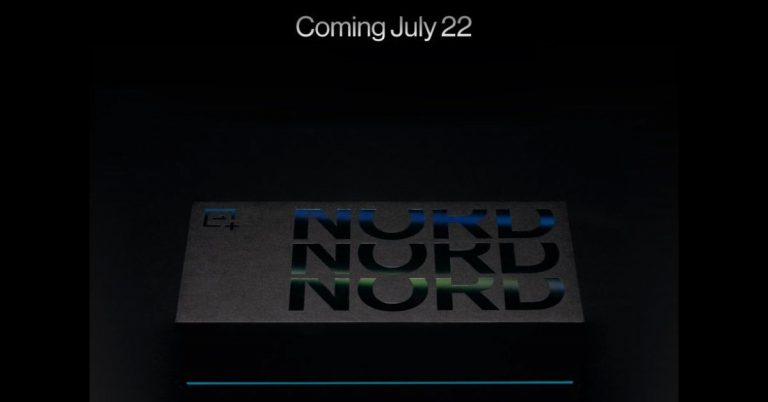
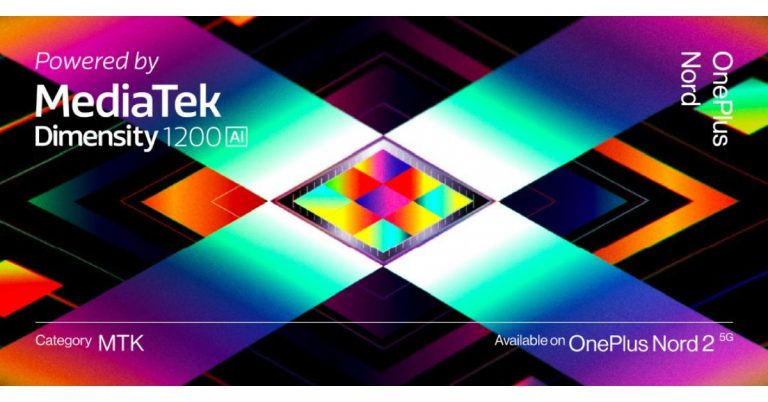
OnePlus has officially announced the launch of another Nord smartphone in India. Just like the last version, the OnePlus Nord 2 5G is going to debut in India first. The launch here is set for July 22. In addition to this, the company has also listed the device on the Amazon India website to tease its availability.Recently, the Chinese smartphone company revealed that the OnePlus Nord will be equipped with a MediaTek Dimensity 1200-AI SoC which is specially designed for the handset offering improved AI capabilities. However, the exact launch date was not revealed but the company’s CEO Pete Lau took to Twitter to announce the arrival of the smartphone. According to his tweet, the smartphone will be making its way to the Indian market on July 22. This is going to be a second Nord device OnePlus Nord CE 5G that debuted a few weeks back in the country.Besides launching in India the smartphone will also get launched in Europe. The forum post says, “The “Never Settle” spirit is about the constant pursuit of perfection. The first OnePlus Nord was a fantastic product, but in the year since we launched it, we have continued reviewing your feedback and working on ways to improve the user experience for the next OnePlus Nord device. The OnePlus Nord 2 5G is a comprehensive upgrade from the first OnePlus Nord, from camera to performance to charging, as well as the newly AI-focused Dimensity 1200-AI SoC. We are confident that it delivers the dependable OnePlus fast and smooth experience you love, and lives up to the “Never Settle” ethos.Join us on July 22 as we officially introduce the OnePlus Nord 2 5G for our users in Europe and India.”Moreover, the next generation of Nord has also been listed on Amazon ahead of the official launch. The Notify Me button has also gone live on the e-commerce platform. It should also be noted that the e-retailer will also be hosting its Amazon Prime Day Sale in India during the end week of July that is from July 26 to 27. So the OnePlus Nord 2 5G is expected to go on sale during that period only. The price point at which the device will be available will be announced at the time of the 2,000 that translates to Rs 23,000. To recall, the OnePlus Nord was made available for purchase in India at a starting price tag of Rs 24,999. So this time the handset will be cheaper than the older version.Speaking of the specifications, the OnePlus Nord 2 5G is confirmed to be powered by MediaTek Dimensity 1200-AI SoC. Whereas the rumours suggest that the mobile phone will feature a 6.43-inch full-HD+ AMOLED display with 90Hz refresh rate support. There could be a triple rear camera set up that will be highlighted with a 50-megapixel primary sensor. Upfront, it is said to have a 32-megapixel selfie camera. The handset is slated to come with a 4,500mAh battery and an in-display fingerprint sensor. The speculation also suggests that the phone may be offered in two different configurations of 8GB RAM with 128GB storage and 12GB RAM with 256GB of internal storage options.
For the latest gadget and tech news, and gadget reviews, follow us on Twitter, Facebook and Instagram. For newest tech & gadget videos subscribe to our YouTube Channel. You can also stay up to date using the Gadget Bridge Android App.
When you own an Apple MacBook you should first consider what accessories are there to make full use of the Apple product, and also how to protect it. With this equipment, you can take maximum advantage of your MacBook, at the same time keep it safe from scratches and any sort of damage. Here is the list of 5 accessories you should own.
In This Article
Plastic Shell case for your Macbook
Protection of your MacBook should be one of the highest priority considering it is an investment for durability. The hardshell case protects your Macbook from any unwanted damage and keeps it safe. There are many options you can choose from online but here is a product you can keep an option for: Aavjo hardshell case for MacBook. It is an Ultra slim light weight hard case with a soft rubberised coating that protects your device from scratch. Price: Rs 2,000Buy from Amazon.in
Read more: MSI launched 2 new Summit Series 2-in-1 Laptops with PenStylus and USB-C Docking Station Gen 2
A MacBook stand
Another accessory you should own is the MacBook stand to keep your laptop firm and perfectly still. It will help in avoiding any unwanted fall of your laptop from your table. And make your work comfortable while preventing it from overheating also. Here is a product you can check out on Amazon: Proffisy Laptop Stand Adjustable Computer Stand. Price: Rs 4,000Buy at Amazon.in
Read also: Apple to host another event on November 10, Macs to steal the show
A Sleeve cover for your Macbook
Keeping your Macbook in a sleeve pouch works in many ways, it prevents scratches, dirt, and also breakage. The advantage of the cover is you can carry your laptop easily anywhere you go. The leather sleeve from Apple is the perfect product for this purpose. This product is crafted from the finest leather and the soft microfibre protects your MacBook wherever you go. Price: Rs 17,900Buy the product from Apple.com
Magic Mouse 2
Using your trackpad most of the time will harm the trackpad and also damage the MacBook. So it recommended you should own this Magic Mouse 2 which is an amazing accessory. The device is rechargeable so you do not have to worry much about an external battery. The product is super light and has an optimised foot design. It also comes with a Multi-Touch surface for you to make simple gestures like swiping between web pages and scrolling through documents. Price: Rs 7,500Buy at Apple.com
USB-C Digital AV Multiport Adapter
The multiport adapter is designed to let you connect a USB-C-enabled Mac or iPad to an HDMI display, at the same connect your standard USB device and a USB-C charging cable. The best feature is the product allows you to mirror your Mac display to an HDMI-enabled TV or display. And you can also connect your flash drive or a camera. Price: Rs 7,000Buy it on Apple.com
For the latest gadget and tech news, and gadget reviews, follow us on Twitter, Facebook and Instagram. For newest tech & gadget videos subscribe to our YouTube Channel. You can also stay up to date using the Gadget Bridge Android App.
Yes, Poco today again teased the launch of its upcoming gaming smartphone Poco F3 GT. The launch of the device was earlier teased by a company’s executive who shared that the Poco F3 GT smartphone will be launched in India in the third quarter of 2021. The device is speculated to be a rebranded version of the Redmi K40 Game Enhanced Edition. Whereas the latest video teaser released by the company falls in line with a recent report that tipped to launch the handset in the first 10 days of August. The company took to Twitter to roll out the teaser of the Poco F3 GT. The video teaser is 15 seconds long and it says that Q3 is here which indicates the upcoming launch. The phone is visible in restricted light against a brighter background. However, the outline of the device still shows a pair of gaming triggers on the right side of the frame. In the same way a side-mounted fingerprint sensor, the volume rocker is also seen clearly. Previously in May this year Anuj Sharma, the Country Director of POCO India shared a 30-second video on Twitter that revealed that Poco F3 GT will be powered by MediaTek Dimensity 1200 SoC. He also revealed that the device will arrive in Q3 of 2021 which begins from July 1. Also reportedly the launch of the gaming smartphone will take place before August 10 in India.As per the speculations, the Poco F3 GT will be a rebranded variant of the Redmi K40 Game Enhanced edition. If rumours are to be believed then the device could feature a 6.67-inch full-HD+ OLED display with a 120Hz refresh rate and HDR10+ support. It will run MIUI 12.5 on top of Android 11 and will be powered by aMediaTek Dimensity 1200 SoC with up to 12GB of LPDDR4x RAM and up to 256GB of UFS 3.1 storage. The phone will also come integrated with vapour chamber LiquidCool technology with white graphene for better cooling and extensive gaming.For the photos and videos, the gaming smartphone by Poco will come with a triple rear camera setup that will bring a 64-megapixel primary sensor with an f/1.65 aperture. Additionally, there will be an 8-megapixel secondary sensor and a 2-megapixel tertiary lens. Upfront there will be a 16-megapixel selfie shooter. Besides this, there will be Wi-Fi, 5G, GPS, NFC, and a USB Type-C port as connectivity options. In addition to this, there will be a side-mounted fingerprint scanner for authentication. The device will come with an IP53 rating for water and dust resistance. The smartphone will ship a 5,065mAh battery with support for 67W fast charging
For the latest gadget and tech news, and gadget reviews, follow us on Twitter, Facebook and Instagram. For newest tech & gadget videos subscribe to our YouTube Channel. You can also stay up to date using the Gadget Bridge Android App.
For people who spend a lot of time on their laptops for work, most of their valuable work is saved on the computer. There are times when you leave your laptop unattended. For such cases it is very important to lock the keyboard and trackpad so that nobody touches your work. Here are some tools and apps you can download to lock the keyboard and trackpad.
In This Article
Kid Key Lock:
This utility can help you lock your keyboard or mouse completely or partially. There are many functions you can enable such as lock system key combinations, lock all keys except characters, lock space and enter or all keys on the keyboard. For the trackpad, you can lock right-click or left-click. You have to install the Kid Key Key Lock app on your laptop. And to make its settings you can either open the app and go to its Setup or you can right-click on its icon. The app has three main lock functions: Mouse Locks, Keyboard Locks, and Passwords.
Download link
Read more: 5 best smart locks available in India right now
KeyFreeze:
The tool is simple and easy to use. The process to enable KeyFreeze on your laptop is to install it and you have to press the button signed “Lock Keyboard & Mouse”. And your keyboard and trackpad will be locked in less than 5 seconds. Now there is no risk of anyone pressing any keys when you leave your laptop unattended. To reverse the function and disable the lock you just have to press Ctrl+Alt+Del. The KeyFreeze program is only 85KB.
Download link
Read also: How to find, lock, or erase data on a lost Android device?
Toddler Keys:
The toddler keys app has some interesting features apart from locking the keyboard and trackpad. You can lock the CD-ROM from opening and also the option to disable the Power button. When you have locked your laptop the screen will appear black and cannot be open until a passphrase is typed. And some additional features are you can add pictures and sound to the locked screen. To enable Toddler Keys on your laptop you have to right-click on its icon and select from the options given.
Download link
KeyboardLock:
This is another easy tool to lock your keyboard and trackpad for safety. To start using the app you just have to enter a password that will be used to lock it and you have to press start. Once you type the password the Windows will automatically disappear and lock all functions. And if you want to disable the function you simply have to type the password again.
Download link
Child Lock:
The unique feature of Child Lock is the app will automatically lock the screen of the laptop that is not in use for 10 minutes. You can also use some key functions to instantly lock it and unlock it. Press Shift+Alt+End or Shift+Alt+Home. There are some functions available but for Auto-Lock open the app and make the settings.
Download link
For the latest gadget and tech news, and gadget reviews, follow us on Twitter, Facebook and Instagram. For newest tech & gadget videos subscribe to our YouTube Channel. You can also stay up to date using the Gadget Bridge Android App.
In an emergency security update, Microsoft has released a patch to fix a critical flaw in the Windows Print Spooler service. The vulnerability called PrintNightmare was discovered by some security analysts who accidentally published a proof-of-concept (PoC) exploit. The security flaw allows attackers to remotely execute code with system-level privileges and take over the victim host completely, to carry out malicious operations. To address the PrintNightmare security flaw impacting the Windows Print Spooler service, Microsoft has rolledout-of-band security updates for all supported versions of Windows. This vulnerability allows attackers to print functionality inside local networks when print capabilities are exposed to the Internet. As explained by the company, the remote code execution vulnerability exists when the Windows Print Spooler service improperly performs privileged file operations. An attacker who successfully exploited this vulnerability could run arbitrary code with SYSTEM privileges. An attacker could then install programs; view, change, or delete data; or create new accounts with full user rights.However, this is said to be a cumulative update release, so it contains all previous security fixes and should be applied immediately to fully protect your systems. As per the company, the fix fully addresses the public vulnerability, and it also includes a new feature that allows customers to implement stronger protections. See:KB5005010: Restricting installation of new printer drivers after applying the July 6, 2021 updates.Microsoft also states that “ Please note that not all versions of the update are available today as some packages are not quite ready for release. We feel that it is important to provide security updates as quickly as possible for systems that we can confidently protect today. Unfortunately, security updates for Windows Server 2016, Windows 10, version 1607, and Windows Server 2012 will be delayed for a short period, but they are expected soon.” One can also disable the inbound remote printing as explained below:Go to Computer Configuration > Administrative Templates > Printers and switch off the Allow Print Spooler to accept client connections option. The user is also required to restart the Print Spooler service to make the changes.But soon after the pact was released, a security researcher brought another issue with the security update revealing how exploits could bypass the patch.Benjamin Delpy, a developer of the hacking and network utility Mimikatz via tweet said, “ Dealing with strings & filenames is hard😉 New function in #mimikatz 🥝to normalize filenames (bypassing checks by using UNC instead of \\server\share format). So an RCE (and LPE) with #printnightmare on a fully patched server, with Point & Print enabled.He also shared a video that demonstrates the security pact failed to fix the vulnerability using a certain setting named paint and print that simply allows networks users to get hands-on with the required printer drivers.However, the fix may be incomplete but it does provide protection from other types of attacks that exploit the print spooler vulnerability. So the Windows users are recommended to install these updates immediately and should wait for further instructions.
For the latest gadget and tech news, and gadget reviews, follow us on Twitter, Facebook and Instagram. For newest tech & gadget videos subscribe to our YouTube Channel. You can also stay up to date using the Gadget Bridge Android App.
Formatting a hard drive will help with the compatibility of computers operating systems. And USB is a perfect option for storing or backing up data, and it works wonders for transferring data between devices. To enable the computer to read the USB drive it needs to be formatted properly. External hard drives or USB drives can be formatted in many different file systems. Check the guide below.
In This Article
Format an external hard drive or USB pen drive on Windows OS:
The first reminder before formatting is to make sure you have not stored any data on the hard drive or USB pen drive since everything will be deleted. You can format a hard drive or USB pen drive using these file systems: NTFS, FAT, HFS APFS, EXT, etc. Follow the guide below to format an external hard drive or USB drive on Windows OS.
Connect the external drive or USB drive to your computers.
Click the Windows icon and open File Explorer.
Go to This PC>Select the external hard drive or USB.
Now find the option “Manage” on the top bar menu next to view>Tap on it.
From the drop-down menu>Select Format.
Now when the open-up window comes up>Select File system.
Formatting an external hard drive or USB pen drive on Mac OS:
Mac OS comes with some complications when inserting an external hard drive or USB pen drive. Some of the external hard drives or pen drives need to be formatted before you want to transfer files on them. The disk utility tools that come with Mac helps in formatting any external drive. Here are the steps you have to perform to format your external hard drive or USB pen drive on Mac OS.
Plugin your hard drive or pen drive on the Mac computer.
Open the Finder app from the taskbar below the screen.
From the top menu click on Go.
And from the drop-down menu>Scroll down to Utilities and click on it.
From the Disk Utility which has an icon of a hard disk>Double click>Open it.
On the left side panel, find your external hard drive or your USB pen drive.
Click on it>From the right-side panel>Select Erase from the top menu.
OnePlus has officially announced the launch of OnePlus Nord 2 5G with a premium MediaTek chipset. The device is going to succeed the OnePlus Nord, which first debuted in India last year. The company has also revealed that the upcoming smartphone will be powered by MediaTek Dimensity 1200-AI SoC.The news comes by way of a forum post that finally reveals the existence of the Nord 2. The company has not disclosed much but the all-new processor will bring features like AI-assisted imaging for an improved photography experience, display enhancements, better response times for faster and smoother gaming, and much more.The forum post says, “The MediaTek Dimensity 1200 is a powerful processor. But the “Never Settle” spirit means always striving for better. So, by collaborating with the MediaTek team on top of the Dimensity Open Resource Architecture, we were able to push the limits of this processor and bring you a host of AI-based features which enhances the user experience across a variety of touchpoints. To highlight the new AI-focused enhancements from the chipset, we’ve even given the processor a unique name: the MediaTek Dimensity 1200-AI.”Besides this, the company is also hosting a throwback challenge and a lucky draw to allow users to win a OnePlus Nord 2 5G. Last month some alleged renders of the upcoming OnePlus Nord 2 were leaked on the web. The leaked renders suggest that the phone will feature a hole-punch design display to house a selfie camera which is placed on the top left corner of the screen. As per the OnePlus Nord 2 renders it will have slim bezels on both sides, top and a noticeable chin. On the utility front, there is a volume rocker on the left side of the frame while the power button on either side along with the alert slider. While the bottom of the frame houses a USB Type-C port, SIM tray, and a speaker grille.The upcoming smartphone will come with a different design on the back panel. The OnePlus Nord 2 will include a rectangular camera module on the top left corner instead of a pill-shaped camera system. The camera set-up will also include three sensors stacked vertically with an LED flash. The device is said to measure 160×73.8×8.1 mm. The renders show the green colour variant however the Nord 2 is likely to arrive in more colour options.In terms of specifications, theAI Benchmark listing suggests that the OnePlus Nord 2 could be powered by MediaTek Dimansity 1200 SoC with 8GB of RAM and will run Android 11.
For the latest gadget and tech news, and gadget reviews, follow us on Twitter, Facebook and Instagram. For newest tech & gadget videos subscribe to our YouTube Channel. You can also stay up to date using the Gadget Bridge Android App.
Playing different games on an Android has reached its peak with so many games to choose from. But have you ever wondered if these games could be played on your Windows 10 laptop or PC? Surprisingly there are some ways you can run your Android games on Windows 10 PC or laptop. Here are some options below.
In This Article
Play the Android games using BlueStacks:
BlueStacks is one of the many Android emulators that you can play your Android games on. Before you start playing your games on Bluestack smooth;y it is better if you make some changes. On the first step make sure to enable Intel VT-x or AMD-V from the computer BIOS. BlueStacks is a great emulator when it comes to playing games. Here are the steps to install the Android emulator.
This emulator is designed to give you a full Android experience. You will be able to explore the full Android operating system rather than individual games. Genymotion Android emulator uses VirtualBox to emulate your Android. Below are the steps to install the emulator.
Android-x86 is an open-source project that lets you port your device to the x86 platform that lets you run it on your Windows 10 instead of an ARM-based device. Android-x86 brings Android to x86 based PCs with AMD and Intel processors. It also lets you customise your Android.To use your PC must have the following:
An AMD or Intel processor.
A RAM of 2GB or more.
Disk space of more than 4GB.
And a USB port.
Tools needed for installation:
An empty USB drive.
Downloaded Android-x86 on your Windows 10: Link for download
There is an option to get Android on your Windows 10. Download the Your Phone app on your Windows and it will mirror your phone screen to your Windows. Microsoft has been working to make additional features like the ability to pin Android apps on your taskbar and launch them individually. Microsoft’s Your Phone app allows you to send and receive a text from their Windows PC using the Android device. The steps to use the Your Phone app are below.
Swide down to the Quick Panel and Tap link to Windows.
Sign in Manually if asked.
Allow the permission when it shows.
Now it will synchronise.
Surface duo and Microsoft’s emulator:
This is a high-tech device by the Surface duo that has a dual-screen. This device with a dual-screen is an Android mobile that runs on Qualcomm Snapdragon 855 Soc. And it has a feature that lets you connect to Windows 10. Also amazingly you can use the official Google Android Emulator with the device.
For the latest gadget and tech news, and gadget reviews, follow us on Twitter, Facebook and Instagram. For newest tech & gadget videos subscribe to our YouTube Channel. You can also stay up to date using the Gadget Bridge Android App.
The e-commerce website Flipkart is hosting Daily Trivia Quiz. Every day it brings a bunch of new questions for its users. By answering them correctly you can win exciting prizes. The questionnaire is based on questions related to general knowledge. Also, the users can win free vouchers and super coins, among other offers via the daily quiz. 8 July 2021 Flipkart Daily Trivia Quiz Answers has already gone live on its platform.
The participant should be at least 18 years old and should have a valid login ID. The Quiz is available on the mobile platform and not the web version. E-commerce conducts the quiz on daily basis and goes live at 12:00 AM IST and runs till 11:59 PM IST. The winners are announced within 15 days from the date of participation that can be viewed under the Gems/Rewards section in the app.
In This Article
How to participate in the Flipkart Daily Trivia Quiz
To participate download the Flipkart app on your phone. Then open the Flipkart app then head to Game Zone. Now click on the Daily Trivia Banner or search for Daily Trivia. Enter the game and answer all 5 questions with correct answers.
8 July 2021 Flipkart Daily Trivia Quiz Answers
Question 1: The first-ever butterfly park was opened in which Indian city in 2006?
Answer: Bengaluru
Question 2: Which food item’s name is used in tennis to refer to a 6-0 defeat in a set?
Answer: Donut
Question 3: Which athletic event gets its name from a battle between the Persians and Greeks?
Answer: Marathon
Question 4: Which of these is not a part of the Holy Week of Christianity?
Answer: Easter Sunday
Question 5: The vehicle holding the record of the highest land speed had engines made by
Answer: Rolls-Royce
The e-commerce platform is back with another new quiz on its platform. The 8 July 2021 Amazon Quiz can be played daily on the mobile app that goes live via the mobile app. All you need to do is answer all the questions correctly and win free products and goodies such as gadgets and Amazon Pay Balance up to Rs 50,000, today you have a chance to win Rs 50,000 Amazon Pay Balance.
8 July 2021 Amazon Quiz has gone live and a new set of questions have also been updated. The daily quiz on the Amazon app has become the hottest topic as it gives a chance to win exciting free gifts. In today’s Amazon quiz you have a chance to win Rs 50,000 Amazon Pay Balance. The quiz contains only five questions that are based on current affairs and general knowledge. Answering all the questions correctly will get your name selected for a lucky draw. Only one person will be selected as the winner and the results are announced at the end of every month. The lucky ones might win something by answering all the questions correctly, and the wrong answers will get you eliminated from the quiz. To participate and win check out today’s answers of the Amazon Quiz.
8 July 2021 Amazon Quiz Answers
Question 1: In May 2021, which of these ships was decommissioned from the Indian Navy after 41 years of service?
The answer is- INS Rajput
Question 2: Which naturalist has been announced as the 2021 winner of the Templeton Prize?
The answer is- Jane Goodall
Question 3: In May 2021, which of these became the first named storm of the Atlantic hurricane season?
The answer is- Ana
Question 4: Which Italian artist sculpted this famous statue?
The answer is- Michaelangelo
Question 5: Which ancient Indian game is the earliest predecessor of this modern game?
The answer is- Chaturanga
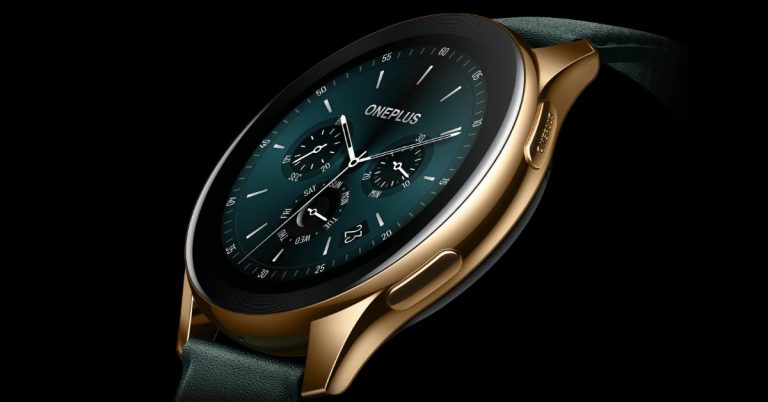
OnePlus is slowly trying to establish a foothold in the smart wearable industry. So today the company has introduced a new variant of the OnePlus Watch. The new OnePlus Watch Cobalt Limited Edition smartwatch has been launched today in India. The specifications are the same as the original one but comes with a new cobalt alloy built. OnePlus Watch Cobalt Limited Edition price and availabilityThe OnePlus Watch Cobalt Limited Edition smartwatch has been launched in India with a price tag of Rs 19,999. The original price of the device is set at Rs 21,999. The device is now available for pre-booking from July 7 to 10 July via the OnePlus online store in the country. The smartwatch will go on sale starting July 16 from 12 noon onwards. The launch offer includes Rs 1000 off with HDFC Bank Credit Cards & EMI. and 5% cashback on select American Express Cards along with 3 months No Cost EMI with HDFC Bank Cards.OnePlus Watch Cobalt Limited Edition tech specsOnePlus Watch Cobalt Limited Edition features a Cobalt Alloy case in Gold colour. It comes with a 1.39-inch HD AMOLED display that offers 454×454 pixels. The screen offers 326ppi pixel density and has treated sapphire glass for improved brightness. According to the company the Mohs rating of 9 on the display, which is second only to diamond in hardness for exceptional scratch-resistance. Also, the company is the first to utilize cobalt alloy in its middle frame that is twice as hard as stainless steel, it grants a stunning lustre and corrosion resistance. It’s nickel-free to greatly reduce any skin allergic reactions. Also Read:OnePlus Watch Cyberpunk 2077 Limited Edition with a Johnny Silverhand holder-cum-charger launched
The smartwatch runs on RTOS-based OS while offering 4GB standalone storage. The device is 5ATM and IP68 rated for water and dust resistance. The OnePlus Watch Cobalt Limited Edition also offers 110 workout modes and can automatically detect workouts such as jogging marathons, outdoor cycling, indoor cycling, freestyle training and running as it has inbuilt sensors on it. It can also be utilised as a remote control for the OnePlus TV so you can turn the TV off after 30 minutes from your wrist when it detects that you have fallen asleep or it turns the volume down if you get an incoming call.
In addition to this, the smartwatch also includes health monitoring features such asSpO2, stress detection, breathing, rapid heart rate alerts, and sedentary reminders. There is also support for Bluetooth as well as GPS as connectivity options. Backed by a 405mAh battery, the OnePlus smartwatch comes with Warp Charge fast charging support. It is touted to deliver about a week with 20 minutes of charge and can run for a whole day with just five minutes of charge. On nominal use, it can last for up to 2 weeks.
For the latest gadget and tech news, and gadget reviews, follow us on Twitter, Facebook and Instagram. For newest tech & gadget videos subscribe to our YouTube Channel. You can also stay up to date using the Gadget Bridge Android App.
The South Korean electronics giant, Samsung, today introduced a new set of Soundbars in the Indian market. The company has launched a new lineup of Q series, A series, and S series 2021 soundbars in the country. A total of 8 new audio devices have been released ranging from Rs 27,990 and going up to Rs 1,47,990. Samsung Q series, A series, and S series 2021 soundbar price and availability detailsThe Q Series includes four models Q950A, Q900A, Q800A, and Q600A priced at Rs 147,990, Rs 111,990, Rs 61,990 and Rs 43,990 respectively. The A-Series soundbar model includes Q950A, Q900A, Q800A, and Q600A available for Rs 147,990, Rs 111,990, Rs 61,990 and Rs 43,990 respectively. Lastly, the S series soundbar model S61A will be available with a price tag of Rs 47,990.All the Samsung Soundbars are now available for sale via Samsung’s official online store, Samsung Shop and select Samsung Smart Plazas in the country. The launch offer includes up to 10% additional cashback of up to INR 6,000 on all leading credit and debit cards of HDFC Bank, ICICI Bank, Axis Bank, Federal Bank and Bank of Baroda.Samsung Q Series Soundbar specificationsStarting with the Q-Series all the models come with exclusive Q-Symphony technology that seamlessly syncs audio from Samsung QLED TV to deliver 3D sound. The Q950A and Q900A models support true Dolby Atmos whereas Q800A and Q600A models along with true Dolby Atmos support along with Samsung patented technology, the Acoustic Beam that acts as an upward-firing speaker delivering an immersive overhead sound.All the soundbars in this range are the first 11.1.4 channels in the world that sends out detailed expressions of sound motion in 11 directions. Moreover, the Waveguide technology, engineered by Samsung Audio Lab, enables up-firing speakers to project audio above you, maximizing the overhead and surround sound effect. Whereas the Q-Symphony allows your soundbar to sync with your Samsung TV that combines and enhances sound through the soundbar’s front, side, and up-firing speakers as well as the TV’s speakers.The SpaceFit Sound enables the surrounding environment of your living space and provides optimized sound for you. The Game Mode Pro provides multidimensional 3D dynamic sound optimized for gaming. The soundbar automatically switches to Game Mode when connected to your Samsung TV so you can focus on playing. Both the Samsung Soundbar and TV come with the same interface that lets you turn their soundbar on and off and control various features like mute, sound effects and EQ settings with the remote control for Samsung TV. Plus all the models come with built-in Amazon Alexa support to provide hands-free control.Samsung A-Series Soundbar specificationsComing to the A-Series, all the devices in this range comes with Dolby Audio/ DTS Virtual:X support. With Bass Boost the speakers allow users to add ‘more boom’ and are also provided with an in-built wireless subwoofer. In addition to this, the Adaptive Sound Lite offers optimised sound for TV series, sports, and news by automatically analyzing the audio tracks of each content.in-built wireless subwoofer. The soundbars in the series have the same interface as Samsung TV so one can control the soundbar too with a Samsung TV remote. Samsung S-Series Soundbar specificationsThe Samsung S-Series Soundbar comes with a side horn speaker with an Acoustic beam that has multiple up-firing holes. According to the company, each of these holes works like a single speaker and generates more dynamic and panoramic sound effects. The side horn speaker mounted at both ends of the soundbar has a spacious delivery with sound acting like a megaphone that amplifies sound. There is built-in Amazon Alexa support whereas Airplay2 is newly supported through OTN enabling it to be used to stream audio from iPhones and other Apple ecosystem devices. Tap Sound is a feature that mirrors the mobile sound to the powerful soundbar by a single tap.
For the latest gadget and tech news, and gadget reviews, follow us on Twitter, Facebook and Instagram. For newest tech & gadget videos subscribe to our YouTube Channel. You can also stay up to date using the Gadget Bridge Android App.
Anime has created its own genre and it has been watched and streamed by all ages of people throughout the globe. When one says anime it is easily understandable, it is the Japanese form of creative cartoons and not the cartoons that people traditionally knows. And now many amazing anime movies are available on Netflix that have good story-lines. Check the list out.
In This Article
Flavors of Youth:
This anime movie is jointly produced by Haoliners Animation league and CoMix Wave Films. And the Anime movies were released in 2018. It is an anthology drama of three short stories: The rice noodles, A Little Fashion show, and Love in Shanghai. The directors of the three short stories are Li Haoling/Jiaoshou Yi Xiaoxing/Yoshitaka Takeuchi. Released: 2018.Genre: Drama.Stream: Netflix.
A Whisker away:
It was recently released in 2020 one of the latest anime movies you can drool at. A Whisker away is exclusively released on Netflix and it is a Fantasy and Romance genre. The story of the anime movie revolves around the two-character Muge and Kento who are Junior-High school students. Muge wears a magical mask that can transform her into a cat.Released: 2020.Genre: Romance, Fantasy.Stream: Netflix
Read more: Upcoming new movies on Netflix and Amazon Prime Video you need to check out
Batman Ninja:
For all the Batman comic readers there is an anime movie about Batman. The Batman Ninja is produced by Warner Bros and it is directed by Junpei Mizusaki. With no such changes to the character here in this anime movie, Batman fights off against famous characters such as Joker and Penguin. The storyline is a trip to feudal Japan. Released: 2018 Genre: Action/SuperheroStream: Netflix
Read also: Garena announced a crossover event between Free Fire and One Punch Man
A silent Voice:
One of the highest-rated Anime movies, this is one to watch. The Anime movie is directed by Naoko Yamada and the story is about two girls Shoko who is deaf and Shoya who bullies her. The two main characters study together in the same class and there are many moral lessons to learn from the anime movie.Released: 2016Genre: DramaStream: Netflix
Anohana: The flower that we saw that day
This Anime movies circle around the characters of the protagonist Jintan, a girl Menma, and 4 Super Peace Busters members. The storyline will teach about caring and about friendship. Many who have watched Anohana commented that a tear is inevitable at the end of the anime.Released: 2013Genre: Fantasy, Slice of lifeStream: Netflix
Genocidal Organ:
It was initially released as a sci-fi novel in the 200s and later adapted to an anime movie in 2017. The story starts with a terrorising nuclear bomb in a place called Sarajevo which resulted in increasing terrorism and conflicts all around the globe. Since then the government has controlled the people and monitored them to prevent any further terrors from happening.Released: 2017Genre: Sci-FiStream: Netflix
Spirited Away:
This is the first anime movie to ever win an academy award. It won the Best Animated Feature in the 75th Academy awards. It is from the production of Studio Ghibli and the creator needs no introduction if you are an Otaku, it is created by Hayao Miyazaki. This anime movie is not to be missed if you have not watched it on Netflix yet.Released: 2001Genre: Family/FantasyStream: Netflix
Princess Mononoke:
This anime is the first of its kind to have a star-studded cast for dubbed English version and prove anime are also watched on a global scale. For example, the two noted big names are Gillian Anderson and Billy Bob Thorton. The anime movie will take you on a spiritual journey and will understand the environmental issue brought by many factors. Released: 1997
Genre: Fantasy/ActionStream: Netflix
The tale of Princess Kaguya:
The Tale of the Princess Kaguya is directed by Isao Takahata and it is an anime movie based on a book. The story is mythical and it is about a magical nymph from a bamboo stalk who rapidly grows up to be a gorgeous woman. Released: 2013Genre: Fantasy/DramaStream: Netflix
5 Centimeter per Second:
This anime movie will take you on an emotional roller coaster ride. The story of 5 centimeters per second begins with the two main characters: Takaki Tonoo and Akari Shinohara. The anime climax is when these two characters who both shared a love for books started drifting apart when their families relocated. Released: 2007Genre: Emotional/Intimate
Stream: Netflix
For the latest gadget and tech news, and gadget reviews, follow us on Twitter, Facebook and Instagram. For newest tech & gadget videos subscribe to our YouTube Channel. You can also stay up to date using the Gadget Bridge Android App.
There are some next-gen speakers available now and home speakers are the best of it. All home speakers come with Bluetooth connectivity for you to enjoy anywhere. And most of the home speakers enabled AI technology, even Amazon Alexa, which will assist you with countless commands ranging from weather, news, playing music to making a call, the unit becoming a speakerphone. Here are some of the best speakers.
In This Article
Bose Home speakers 300:
The Bose Home speakers have Amazon Alexa built-in. And as most speakers, fans know Bose is reputed for the best sound engineering that can provide room-filling sound in your home. The speaker comes with voice control using Google assistant and Alexa built-in with a superior voice pick up from a noise rejecting six-microphone array. It also has Wi-Fi and Bluetooth connectivity and also enables Apple AirPlay 2 connectivity where you can play your music from any phone or Tablet. A fully charged battery of the Bose home speakers can last up to 8 hours long.Price: Rs 27, 000Buy from Amazon.in
Read more: May 8 Amazon Quiz: Participate to win Bose Soundbar
Echo Studio:
With built-in Dolby-Atmos technology, this home speaker will give you an immersive sound experience. This home speaker also comes with voice control for your unlimited music from any platform from Apple music to Amazon Prime that you command with Alexa. To many users, voice control devices can bring privacy concerns but the Echo Studio is built with multi-layered privacy protections and controls including a microphone off button. It also has the function to view, hear, and delete your voice recording. Build your acoustic room with Echo Studio today.Price: Rs 29,000Buy at Amazon.in
Read also: October 3 Amazon Quiz: Participate and win Sony Speakers
Marshall Uxbridge:
It has Amazon Alexa built-in for the best voice speakers. The Uxbridge is designed to deliver some thunderous sound by its compact frame and has an advanced setup that has some high-end components coming together to produce screaming high quality. This home speaker gives you immersive sound by creating a multi-room system with Amazon Echo and also supports Alexa built-in speakers or AirPlay 2. This smart speaker will help you play music, answer calls and control other devices in your home. Price: Rs 25,000Buy it on Amazon.in
Sonos One Gen 2 Speaker:
This home speakers product will work with Amazon Alexa, Apple AirPlay, and also HomeKit which can be great perks for Mac and iPhone users. The smart homes speakers are designed ideally for any room space from the living room to the kitchen, but caution using it in the bathroom since the product is not waterproof. The setting up of the Sonos One gen 2 speakers is simple: you have to download the Sonos app and plug in the power on the speaker. Price: Rs 22,000Buy the product from Amazon.in
Echo Dot: 4th Gen:
The smart home speakers are added to the list for a lower price range. The Echo Dot 4th gen had a LED display and it comes with Alexa built-in with smart speakers and improves bass. You can play music using Alexa voice commands from all apps and platforms from Spotify to Apple Music. The smart device also comes with privacy protection that has a microphone off button. This speaker comes with 4 microphones so that Alexa can hear your commands from across the room. Price: Rs 5,500Buy the product from Amazon.in
For the latest gadget and tech news, and gadget reviews, follow us on Twitter, Facebook and Instagram. For newest tech & gadget videos subscribe to our YouTube Channel. You can also stay up to date using the Gadget Bridge Android App.
Anuj Sharma, Country Director of POCO India in May this year revealed that Poco F3 GT will be launched in India in the third quarter of 2021. Now the launch of the device is tipped to happen in August. The smartphone will arrive in India as the rebranded Redmi K40 Game Enhanced Edition made its debut in China in April this year. The device has also been leaked on various certification websites ahead of its Q3 India launch.According to a report, the Poco F3 GT launch will take place in the first week or first 10 days of August. However, the company has not yet revealed anything but it is expected to roll out teasers just weeks before the India launch. If rumours are to be believed then the Poco F3 GT will share all the specifications of the Redmi K40 Game Enhanced edition. It will feature a 6.67-inch full-HD+ OLED display with a 120Hz refresh rate and HDR10+ support. The device will run MIUI 12.5 on top of Android 11. Under the hood, there will be a MediaTek Dimensity 1200 SoC with up to 12GB of LPDDR4x RAM and up to 256GB of UFS 3.1 storage. The phone will also come integrated with vapour chamber LiquidCool technology with white graphene for better cooling and extensive gaming.
"Locked & loaded, finger on the triggers" The next F is closer than ever.
In addition to this, the Poco F3 GT might come with a triple rear camera setup that will bring a 64-megapixel primary sensor with an f/1.65 aperture. Additionally, there will be an 8-megapixel secondary sensor and a 2-megapixel tertiary lens. Upfront there will be a 16-megapixel selfie shooter. On the connectivity front, there could be Wi-Fi, 5G, GPS, NFC, and a USB Type-C port. The phone may also include a side-mounted fingerprint scanner and will be IP53-certified for dust and water resistance. The mobile phone will be backed by a 5,065mAh battery with support for 67W fast charging, Previously the device was also spotted on a US retailer’s website with detailed specifications. The phone got listed on Welectronics.com carrying model number M2104K10I which is also associated with the Redmi K40 Game Enhanced Edition. The device was also reportedly spotted in a US FCC listing with model number 21061110AG. As per the listing, the upcoming smartphone will include Wi-Fi 6 support. In addition to this, the handset will ship MIUI 12 and come with Bluetooth as well as NFC capability.
For the latest gadget and tech news, and gadget reviews, follow us on Twitter, Facebook and Instagram. For newest tech & gadget videos subscribe to our YouTube Channel. You can also stay up to date using the Gadget Bridge Android App.



 ES files explorer is a great software that lets you rename your files in bulk. It is one of the best free batch renamer apps available that you can download. Follow the steps below to batch rename files on your Android mobile.
 The next option to batch rename files on your Android mobile is by using the Bulk Rename Wizard app. This app has more customisation and it is a free renaming tool designed for Android mobile. You can rename multiple files and folders easily and faster with this minimal operations app. Follow the guide below to batch your rename files.



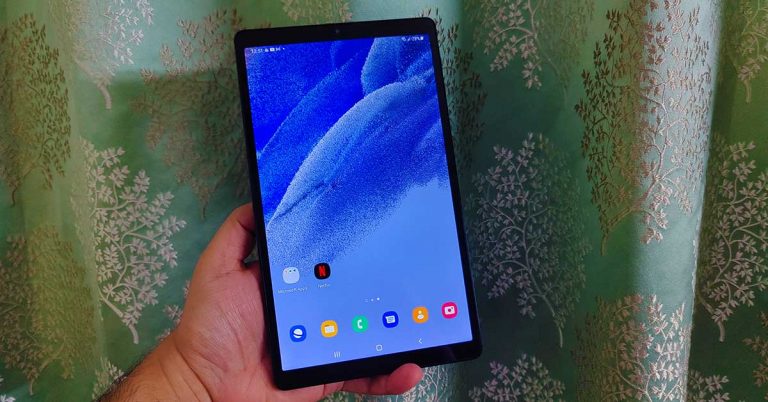
 Moving on, the display is one of the best features the Samsung Galaxy Tab A7 Lite has. The 8.7-inch TFT display has HD+ resolution and 16M colour depth. We played a lot of YouTube videos on the device along with Netflix shows and the experience was far superior to any other tablet in the price segment. The sound was loud and great thanks to the dual speakers. Outside visibility is good too. The brightness is nice, and the display does not get washed out under direct sunlight. All in all, the screen does justice to its price point.
 Coming to the cameras, they are just there for your simple work. The front 2MP camera is decent for video calls or if you are connecting with your study group. It will not give you the best selfies which your smartphone can provide. The rear 8MP camera is better. While the results outdoors were filled with vibrant colours and decent details, the images shot inside lacked the punch. Again, if you want to click good pictures, keep your smartphone handy.
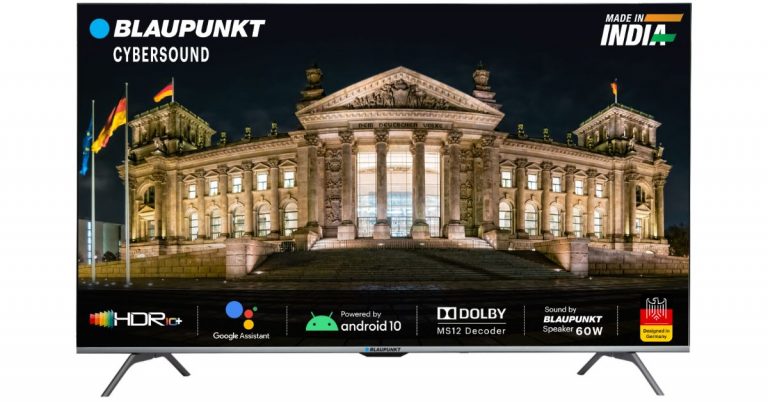
 Blaupunkt CyberSound Series Smart TVs tech specs



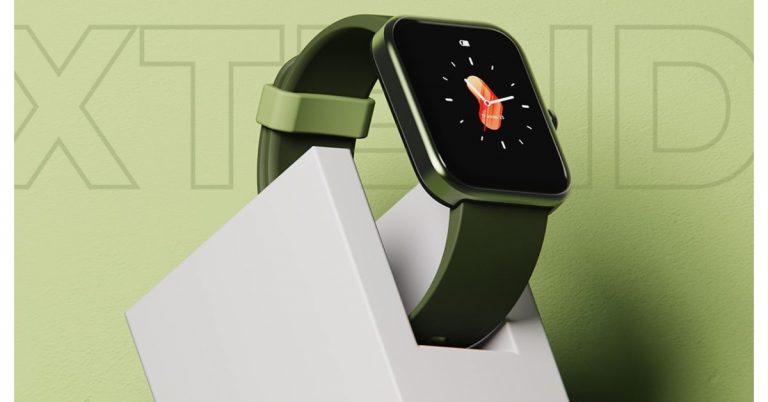
 Boat Xtend smartwatch tech specs






















 OnePlus Watch Cobalt Limited Edition tech specs






 This anime is the first of its kind to have a star-studded cast for dubbed English version and prove anime are also watched on a global scale. For example, the two noted big names are Gillian Anderson and Billy Bob Thorton. The anime movie will take you on a spiritual journey and will understand the environmental issue brought by many factors. Released: 1997