


In This Article
Recall emails in Gmail
 Yes, there is a way of recalling emails in Gmail and it can prove to be extremely useful at times. You clearly don’t want to send an email meant for your office best friend to your client, right? But you should know that once you send an email, it can be recalled via a box that appears on the bottom right. You can even increase the time limit of that box to stay up to 30 seconds so that you have an option of recalling an email during this time. You can read further here on how this can be done.
Send emails in Confidential mode
 This feature lets you send self-destructing emails to your friends. You can write an email and then click on the ‘lock’ icon on the bottom bar to set a timer on it. While the timer is not visible, it gets turned on the moment the receiver opens the email. After the time pre-set by you, they would not be able to access the email.
Add an extra layer of security to your emails with an SMS passcode
 If you wish to keep an important email more secure, you can add an SMS passcode on it. Press on the same lock-shaped icon on the bottom bar and select the option of ‘SMS passcode’. This will add an extra layer of security to the email you are sending.
Mute email chains that you don’t care about
 Suppose somebody tagged you in a mail that already has a number of people tagged in it. While there are times when you care about what is being spoken about in the mail, there are times when it has got nothing to do with you. If you find yourself in the latter situation, you can mute the email by selecting it and then tapping on the three-dot icon and clicking on ‘Mute’.
Canned responses
 This is a good way to cut down the time you spend on the email service every day. If you’re tired of typing out the same reply every time someone emails you with a question that you are asked often, you can compose your reply once and save the message text so that it is easier for you to resend it again and again.
Got the Wrong Bob?
 Do you know two people named Bob? And wait, is one of them your CEO and the other is a goofy friend from college? We can imagine that you don’t want to send an email to a wrong Bob. You can rule out this possibility by enabling the ‘Got the wrong Bob?‘ feature in Google Labs.
Use Gmail in offline mode
 Okay, so you cannot send emails in offline mode, but at least you can access the service and compose and save emails. The moment your smartphone gets internet connectivity; your email will be sent.
Gmail security checklist
 We know that some of you may consider privacy to be a little overrated, but then we also know that for some of you, it’s very important. Here, you can access all the security guidelines on Gmail’s list that includes 18 items in five categories. We recommend you to go through the list to make sure your account is secure.
Add tasks to remember
 The new Gmail design has a sidebar that has Tasks, Keep and Calendar. Here, you can select the option of ‘Tasks’ to make a list of things to do during the day. Considering we all access Gmail a number of times during the day, it should prove to keep your day more organised.
Add important dates to your Calendar
 Instead of accessing your Google Calendar separately to add important events, you can directly add them there by accessing it on the sidebar of the email service.
For the latest gadget and tech news, and gadget reviews, follow us on Twitter, Facebook and Instagram. For newest tech & gadget videos subscribe to our YouTube Channel.
[td_smart_list_end]













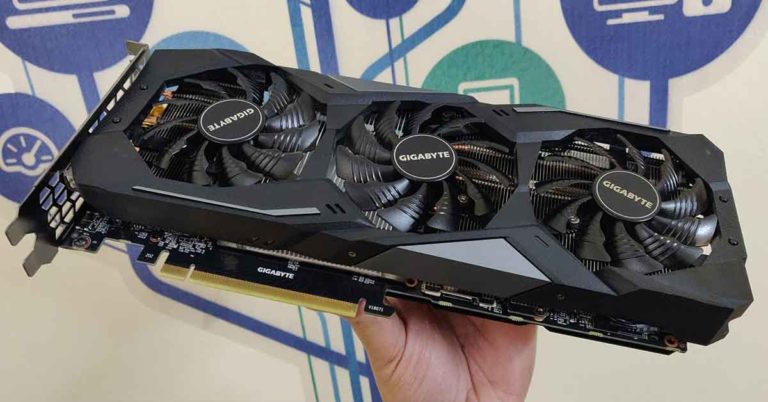
 It is actually simple science. The first and third fan rotate counter clockwise and the middle one spins clockwise. What this does is that it enables the GPU to get the right amount of airflow to keep it cool. The fans also have 3D strips on it to enhance the air flow further. The next thing on the card, adding to the show, is an RGB LED light driven Gigabyte branding. This can be customised using the software supplied with the graphic card. The LED supports over 16million colours so you can choose the one you like.
 The rear of the graphic card has 3 display as well as 1 HDMI ports. So, the latest 4K gaming monitors are supported. To power the device, the company has installed an 8 PIN power connector on the side. Also, the copper heat sync touches the GPU, to keep it extra cool. Overall, the graphic card looks chunky yet modern, which will definitely get you the eyeballs at your next BYOC party.
 When it came to pure gaming performance, we loved every bit of it. Most games ran extremely well at ultra-high settings. Let us start with some of our favourite and widely played games like CS:Go and DOTA 2. We were easily able to extract 100-120 FPS in them. The graphics were crisp and detailed, but since these are older games, they seemed just a notch above on this graphic card. However, the real test came when we played games like PUBG and Fortnite.
The Gigabyte
When it came to pure gaming performance, we loved every bit of it. Most games ran extremely well at ultra-high settings. Let us start with some of our favourite and widely played games like CS:Go and DOTA 2. We were easily able to extract 100-120 FPS in them. The graphics were crisp and detailed, but since these are older games, they seemed just a notch above on this graphic card. However, the real test came when we played games like PUBG and Fortnite.
The Gigabyte 





 The latest instalment in the Ace Combat adds high-flying, ‘trigger’-ed aerial dog-fights with photorealistic world and engaging missions, good gameplay and an engaging story. The gameplay revolves around a story which has much human drama, politics, aerial combat and war. Ace Combat 7 also features multiplayer and it also has a






 After that, the photo-sharing app started sending occasional notifications to users informing them about new videos that they may be interested in. And now, IGTV has been integrated with the main Instagram app even more closely as users will be able to see videos they are interested in on their News Feed itself.
 It is worth noticing that IGTV was launched by Instagram to compete with