The popular Amazon Quiz is now live on the Amazon app. The 16 June 2022 Amazon Quiz gives a chance to win Rs 20,000 Amazon Pay Balance by answering all the questions correctly. The quiz can be played every day from 12 AM to 11:59. Only app users are eligible to participate in the Quiz as it is not accessible on the web platform.
The Amazon Quiz brings a fresh set of questions for its customers that contains five easy questions. The questionnaire consists of five questions related to general knowledge and current affairs. The participants need to answer all the questions correctly and their names will be selected for a lucky draw. The daily quiz brings an opportunity for the customers to win exciting prizes. They can win Amazon Pay Balance ranging from Rs 1,000 to Rs 50,000. The participants need to answer all the questions correctly and their names will be selected for a lucky draw. The winner will be announced at the end of the month. Check Out 16 June 2022 Amazon Quiz Answers.
Question 1: Matte Middelkoop partnered with which Indian in the 2022 French Open, where they reached the semi-finals?
Answer: Rohan Bopanna
Question 2: Farhan Akhtar will make his MCU debut by starring in which Marvel Studios web series?
Answer: Ms Marvel
Question 3: According to the Forbes Real time billionaire list, who did Mukesh Ambani replace to become India’s richest man again?
Answer: Gautam Adani
Question 4: Where is the tiniest desert of the world located?
Answer: Canada
Question 5: The founder of this app initially created a website known as what?
Answer: FaceMash
How To Play Amazon Quiz
Only app users are eligible to play the Amazon quiz every morning from 12 AM to 11:59 PM. The quiz is not available on the desktop. For those who are unaware of how to play the Amazon quiz below are the steps, you can follow to take the quiz.
Firstly download the Amazon app from Google Play Store or App Store
Now fill in the required information through the Sign Up option.
You need to log in to the Amazon app and scroll down on the home screen to find the Amazon Quiz banner.
Tap on the Amazon Quiz banner and tap on the Start button to start the Quiz.
Now you will get 5 questions and you need to answer them correctly. One wrong answer will eliminate you from the Quiz.
After answering all the questions correctly you are now eligible for a Lucky Draw.
The winner’s name will be announced today at 12 PM.
Snapchat is typically a very straightforward app to use. On sending a message, Snapchat lets you know that it’s been ‘delivered’ using a blue pointer for text, and red for an image or video. The pointer turns white when the message gets ‘read’. Often times users are left clueless when their message is left ‘pending’ on Snapchat.
You have been unfriended: Perhaps the most common reason why messages are left on ‘pending’. Click on the user’s account to see if you’ve been unfriended.
You have been blocked: Snapchat doesn’t notify its users when they’ve been blocked. Once blocked, your messages get stuck on ‘pending’.
Your add request hasn’t been accepted: Snapchat only allows users to send messages once they’ve added each other. If you’re sending a message to someone that has removed you from their list, your message will be left ‘pending’ until they accept your request again.
Snapchat flagged your account: Your Snapchat account could have been restricted for violation of TOS.
You can try sending messages to other people in your friend list to figure out if there’s an issue with your account or if you’ve been unfriended by someone. If everything checks out yet your messages are left ‘pending’, try reinstalling the app on your phone.
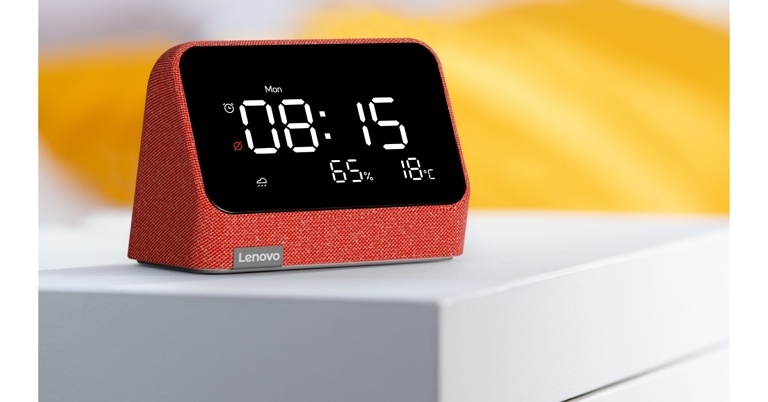
Lenovo has launched Smart Clock Essential with Alexa Built-in in India, expanding its smart home offerings. Thanks to hands-free voice control with Alexa, the latest addition to Lenovo’s smart device lineup brings digital smart clock capabilities and time-saving convenience to the next level. The device can be used as a smart speaker as well as a voice control device for your electronic equipment.
In This Article
Smart Clock Essential with Alexa Built-in price in India and availability
Lenovo Smart Clock Essential with Alexa Built-in has been launched in India with a price tag of Rs 4,999. The new smart clock will be offered in two colour options Clay Red and Misty Blue. It will go on sale on Lenovo.com and Amazon.in from today and will then be available through Lenovo’s offline retail channels.
Smart Clock Essential with Alexa Built-in specifications
The Lenovo Smart Clock Essential is made of a soft-touch fabric designed to blend into and compliment any space at home. With a 4″ LED display for weather, humidity, and the temperature outside, users can keep informed at all times or simply ask Alexa.
Users of the newest Smart Clock Essential with Alexa Built-in can utilise easy voice commands to set timers, alarms, reminders, and add goods to their Amazon shopping cart.
Lenovo’s new Smart Clock Essential is just a smart speaker with an LED display. Users may listen to audiobooks and podcasts, as well as stream songs from Amazon Music, Gaana, JioSaavn, Spotify, and other services, with a clean and crisp sound that fills the room thanks to the device’s 3W front-firing speaker. To play media across many devices and rooms, add your Smart Clock Essential to a speaker group. You may now make hands-free Alexa-to-Alexa calls to your friends who have Alexa-enabled devices.
The Smart Clock Essential takes care of privacy and preferences. For users who are photosensitive to light. When sleeping, the Smart Clock Essential’s auto-dim display may be adjusted to fit your needs. while still displaying the time, the user’s requirement Users can still utilise the top buttons, which are soft and clicky. They can use their voice to control the Smart Clock Essential. In addition, the Smart Clock protects your privacy. A mic mute toggle is included, which electrically disconnects the mics.
Users can now operate all connected smart home appliances with a ‘Works with Alexa’ label using only their voice with Smart Clock Essential. Control all of your electronic equipment using voice commands, including lights, plugs, air conditioners, locks, TVs, and fans. Users can also utilise numerous Lenovo Smart Clock Essential with Alexa Built-in to create a one-to-all intercom system in their home. Once linked to the same WiFi network, all it takes is a button press to send messages to other Smart Clocks, making it a perfect feature for checking on the kids or sending a “DND” alert to family members in the event of an online conference or class.
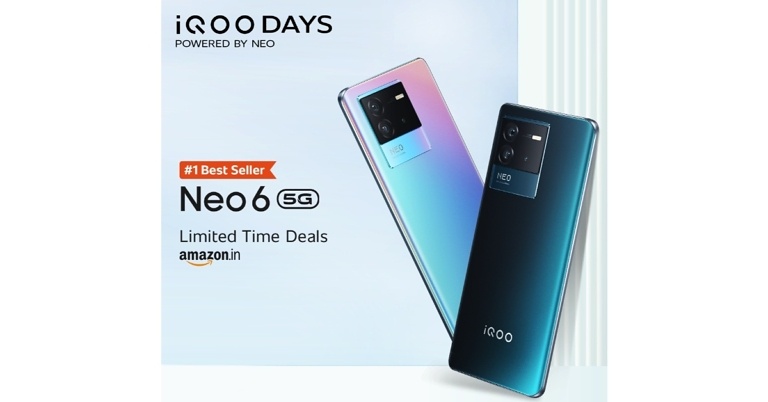
The iQoo Days Sale is currently happening on Amazon, with discounts, deals, and offers for online buyers. Customers can get discounts on a variety of smartphones under 30K, including the iQOO Neo 6, iQOO Z series, and iQOO 9 Series, as part of an ongoing deal that concludes on June 18. All phones purchased during this offer will come with a two-year servicing warranty.
During the current iQoo Days Sale, here are some of the finest smartphone deals available.
On ICICI bank credit cards and all EMI purchases, buyers would receive a flat Rs 3,000 discount. On top of that, there’s an extra Rs 3,000 savings on exchange. On credit/debit cards and all EMI transactions, SBI customers can get an instant discount of up to Rs 4,000.
The Neo 6 costs Rs 29,999 for the 8GB RAM with 128GB storage option and Rs 33,999 for the 12GB RAM with 256GB model. The iQoo Neo 6 will be available at a discounted price of Rs 25,999 during the sale. The Neo 6 has a 120Hz E4 AMOLED display. It is powered by Snapdragon 870 Soc and features a 4700mAh battery and 80W rapid wired charging.
The iQoo 9 Pro will be offered at Rs 64,990. It comprises a Rs 2,000 Amazon coupon and a Rs 4,000 instant discount. Whereas the iQoo 9 is also discounted by Rs 6,000.
The 6GB RAM with 128GB storage edition of the iQoo Z6 Pro 5G will cost Rs 21,999 during the iQoo Days on Amazon. This includes a Rs 1,000 Amazon coupon and a Rs 1,000 immediate discount with an SBI credit card. On the other hand, iQoo 9 SE ICICI bank cards buyers can get Rs 2,000 instantly.
During the Amazon iQOO Days Sale, the iQOO Z6 5G is offered for a 19% discount. During the deal, you may acquire this smartphone for Rs. 16,999 and up. During the sale, you can acquire the iQoo Z3 5G smartphone for Rs 20,990, which is a Rs 4,000 discount.
The iQOO 7 5G and the iQOO 7 Legend 5G are also available at the Amazon iQOO Days Sale. The Legend edition will come at a discounted price of Rs 39,990.
The SBI credit card offer is also valid for the iQoo Z5 5G and iQoo 7 5G phones. With the SBI credit card, buyers of these phones would receive an instant discount of Rs 1,000.
Garena Free Fire is a battle royale game with regular awards and tournaments to keep players interested. If you play Garena Free Fire, you should be aware of the redeem codes that are released on a daily basis. However, because the battle royale game is banned in India, players from other countries can use the Free Fire Redeem codes daily. If you’re unfamiliar with the Garena Free Fire redeem codes or don’t know how to get them, we’ve put together a step-by-step guide to help you redeem them. Check out Garena Free Fire Redeem Codes for June 15.
The Free Fire redeem codes are a great way to get free stuff. These are 12-digit codes that contain alphabets and numbers, as well as an expiration date and time. Because the Garena FF redeem codes cannot be used more than once, you should hurry to the redemption page to claim your free reward before someone else does. To get a free reward, all you have to do is go to reward.ff.garena.com/en, which is the official redemption page. Also, keep an eye on this space for daily updates on Garena Free Fire redemption codes and rewards.
In This Article
Garena Free Fire Redeem Codes Today June 15 2022
FF9MJ31CXKRG
FFCO8BS5JW2D
PCNF5CQBAJLK
FFAC2YXE6RF2
FFICJGW9NKYT
WEYVGQC3CT8Q
3IBBMSL7AK8G
FV5BNJ45IT8U
F4N5K6LYOU9I
FH2GYFDHE34G
F7YGT1BE456Y
FJBHVFS4TY23
F87GYF3DGE6B
FD9A Q1FG H2Y3
FBI8 YT8G VB7N
K2OG IUY6 T7EA
How to Get Free Fire Redeem Codes for Garena on June 15?
Apple’s airtight privacy policy does not allow its users to record any phone calls made from the device. Most Android devices come with a native call recorder, but there is no such option for an iPhone. While privacy is a major priority for a large share of Apple users, they still might want to record their phone calls for a bunch of reasons, be it documentation or personal safety. Luckily, there are a few workarounds that allow you to record any call made from or received on your iPhone. Today we bring to you the easiest ways with which you can record your phone calls on your iPhone. Some of these might use a third-party app.
This is perhaps the easiest way to record phone calls on your iPhone. You will require a second device to record your phone conversation. If you do not have another device, scroll down and refer to the other options to record calls on your iPhone itself.
Step 1:Turn on the voice recorder on the second device and hit record. Make sure you do this before placing the call so you do not miss out on recording anything. If you wish to record the phone call you’re receiving, turn on the voice recorder before you accept the call.
Step 2:Make the phone call from your iPhone and turn on the speaker. Conversely, if you are receiving a phone call, make sure you put your iPhone on speaker as soon as you pick up the call.
Step 3: Ensure the voice recorder is recording the conversation. Place it close to the speaker on your iPhone for maximum clarity in recording.
Step 4: If there are any extended pauses in your conversation, you can pause the voice recording on the second device as well. Do not forget to resume recording once the conversation picks up again.
Step 5: Once you’ve hung up the call, hit the stop button on the voice recorder. Ensure that the voice recording has been saved.
Using Google Voice to record calls on your iPhone
If you do not have another device available to record your calls, you might want to use a third-party app to do so. Google Voice is one of the best apps that you can use for this purpose. It is available to download from the App Store. Once you’ve installed it on your iPhone, follow these easy steps to record your phone calls.
Step 1: Sign in to Google Voice using your Google account. If you do not have a Google account, you can easily create one here.
Step 2: Google Voice gives you a free number once you’ve signed up. You can access it by clicking on the Search option.
Step 3: Once you’ve selected the number you want to use, you will need to link your phone number on your iPhone to Google Voice.
Step 4: Google Voice will send you a code on the number you’ve just linked. Verify this code on the Google Voice app in order to use the service.
Step 5: Go to Settings and select Calls. Press the option to record incoming calls.
Step 6: On receiving a phone call, press 4 on your iPhone number pad to start recording the call. Press 4 again when you wish to stop the recording. You will be able to access the recording in the Recorded option on the Menu.
One thing you should keep in mind is that Google Voice notifies the other party once you’ve started recording the call. While you can record an incoming call, Google Voice does not have the option to record an outgoing call yet.
There are a few other apps that you can use to record your phone calls on an iPhone. Some of these are, Rev Voice Recorder, Tape A Call, Call Recorder App for iPhone by Profuse, and Call Recorder iCall. However, not all of these apps are available in India, and some require a subscription fee to use their service.
If you have recently made the switch to an iPhone, you would know that Whatsapp did not let you transfer its data from Android to iOS. However, that is now set to change. Mark Zuckerberg on Tuesday announced on his Facebook post that you can now migrate your WhatsApp data from Android to iOS. The option to transfer data from iPhone to Android had been rolled out last year. This was one of the most requested features by WhatsApp users. Today, we show you how to carry on with your Whatsapp experience seamlessly between the platforms. Following these easy steps, you’ll be able to transfer your WhatsApp data from Android to iPhone without using a PC.
Firstly, you need to ensure that these pre-requisites are met
Make sure you have iOS 15.5 installed on your iPhone and Android 5 on your Android device.
Move to iOS app installed on your Android device.
Your iPhone must be installed with WhatsApp version 2.22.10.70 or higher.
Your Android device must be installed with Whatsapp version 2.22.7.74 or higher.
Your phone number across both devices needs to be the same.
Your iPhone must be reset to factory settings in order to pair with the Move to iOS app. If you’re using a new iPhone, you can ignore this instruction.
Both devices must be connected to a power source.
Both devices must be connected to the same WiFi network. If that isn’t possible, connect your Android device to the iPhone’s hotspot.
Now, follow these easy steps to migrate your WhatsApp data from Android to iPhone
Step 1: Open the Move to iOS app on your Android smartphone.
Step 2: Your iPhone will display a code. Enter this code to your Android device when you are prompted to do so.
Step 3: Press Continue and follow the prompts that come up on the screen.
Step 4: Select WhatsApp on the transfer data screen.
Step 5: Press START on your Android device and wait as Whatsapp prepares data to export to your iPhone. Once the data is prepared, you will be signed out of WhatsApp on your Android device.
Step 6: Press NEXT and return to the Move to iOS app
Step 7: Press CONTINUE to transfer the data prepared by Whatsapp from your Android device to the iPhone. Wait until the transfer is complete.
Step 8: Open WhatsApp on your iPhone and login using your phone number. Make sure it is the same phone number as your previous device.
Step 9: Press START on your iPhone in order to finish the process.
Step 10: Activate WhatsApp on your iPhone. You will find all data restored there.
This process will allow you to transfer your WhatsApp chat history, images, videos, and voice notes between the two platforms, while still preserving end-to-end encryption. However, WhatsApp does not allow call history to be transferred yet. Peer-to-peer payment cannot be transferred either.
Make sure you create an iCloud backup on your iPhone in order to preserve your WhatsApp data and transfer it to another device in the future. Meanwhile, your Android device will still hold the data that you’ve just transferred.
After considerable anticipation, WhatsApp brings the ability to move from an Android phone to an iPhone. Yes, the Meta-owned instant chatting app has added the option to transfer your WhatsApp chat data from an Android phone to an iPhone. The new feature was launched in beta on Tuesday. Earlier last year the users were made capable of migrating their chats from an iPhone to an Android phone. Now that users may migrate their WhatsApp data from Android to iOS, here’s how to do it.
WhatsApp Users may now switch from an Android phone to an iPhone and transfer their WhatsApp account information, profile photo, individual and group chats, chat history, media, and settings. However, this modification is currently only available on a few Samsung and Google phones. This feature was first announced 10 months back at the Samsung Galaxy Unpacked event.
Mark Zuckerberg, Founder and CEO, Meta took to Facebook to announce that WhatsApp began giving out the option to transmit data from Android phones to iPhones. He said, “We’re adding to WhatsApp the ability to securely switch between phones and transfer your chat history, photos, videos, and voice messages between Android and iPhone while maintaining end-to-end encryption. This is a top requested feature. We launched the ability to switch from iPhone–>Android last year, and now adding Android–>iPhone as well.”
The migration from Android to iPhone is done wirelessly, unlike the data transfer from an iPhone to an Android phone, which requires both devices to be physically connected through a connection. Both devices must be linked to the same Wi-Fi network, or the Android device must connect to the iPhone’s hotspot connection. The devices must be attached to a power source in order to send data.
In order to begin the transfer procedure, users must have the most recent version of the Move to iOS software loaded on their Android phone. Users must have an Android 5 or later handset for the transfer. While the iPhone to which the data must be moved must be running at least iOS 15.5. To enable data transfer, WhatsApp for Android version 2.22.7.74 or above is required. The Move to iOS software must also be installed on the Android phone.
Furthermore, in order to transfer data, customers must have the same phone number on their iPhone as they have on their Android phone.
Note that the process works through the Move to iOS software, the iPhone to which the WhatsApp data needs to be transported should be brand new or reset to factory settings.
This feature is said to be going out slowly and would take approximately a week to reach all users.
How to migrate WhatsApp data from Android to iPhone
On your Android phone, open the Move to iOS app and follow the on-screen instructions.
On your iPhone, a code will appear. Enter the code on your Android phone when prompted.
Continue by tapping the Continue button and following the on-screen instructions.
Wait for WhatsApp to prepare the data for export by pressing START on your Android phone. Once the data is ready, you’ll be signed out of your Android phone.
To return to the Move to iOS app, tap NEXT.
Wait for Move to iOS to ensure that the data transfer from your Android phone to your iPhone is complete before tapping CONTINUE.
From the App Store, download the most recent version of WhatsApp.
Log in to WhatsApp using the same phone number you had on your old handset.
When prompted, tap Start and wait for the process to finish.
After you’ve finished activating your new device, your chats will be ready for you.
15 June 2022 Amazon Quiz has gone live on its platform. The quiz timings are 12 AM to 11:59 PM. The interested users can participate in the Amazon daily quiz to win exciting prizes. The company puts up 5 questions based on general awareness. You can submit the correct answers from the four options. Today the participants have the chance to win a Rs 1,000 Amazon Pay Balance.
Daily the e-commerce platform Amazon brings a new set of questionnaires that includes five easy questions. The Amazon Quiz can be played from 12 AM to 11:59. The users have to answer all the questions correctly to enter into a lucky draw. The result of today’s quiz will be announced at the end of the month and only one person is declared a winner. We at Gadget Bridge update all the answers to the Amazon Quiz on our website for the convenience of our readers. Here are the answers of the 15 June 2022 Amazon Quiz that will make you win Rs 1,000 Amazon Pay Balance.
Question 1: Which country recently defeated Italy to win the Finalissima trophy, played between the Copa America and Euro champions?
Answer: Argentina
Question 2: The movie ‘Runway 34’ is directed by which famous Bollywood actor?
Answer: Ajay Devgn
Question 3: The telecom infrastructure company ‘Bharti Infratel’ recently merged with which company?
Answer: Indus Towers
Question 4: On which space shuttle in 1991, was this species launched into space by NASA?
Answer: Columbia
Question 5: Which is the only continent where this reptile is not found?
Answer: Antarctica
How To Play Amazon Quiz
Only app users are eligible to play the Amazon quiz every morning from 12 AM to 11:59 PM. The quiz is not available on the desktop. For those who are unaware of how to play the Amazon quiz below are the steps, you can follow to take the quiz.
Firstly download the Amazon app from Google Play Store or App Store
Now fill in the required information through the Sign Up option.
You need to log in to the Amazon app and scroll down on the home screen to find the Amazon Quiz banner.
Tap on the Amazon Quiz banner and tap on the Start button to start the Quiz.
Now you will get 5 questions and you need to answer them correctly. One wrong answer will eliminate you from the Quiz.
After answering all the questions correctly you are now eligible for a Lucky Draw.
The winner’s name will be announced today at 12 PM.
Apple is set to bedazzle its consumers this year by launching theiPhone 14 series at its fall event in September this year (2022). Amidst all the speculation, iPhone users worldwide are curious to see how Apple will outdo its previous bestselling flagship offering, the iPhone 13 Pro Max. The Apple iPhone 13 Pro Max is regarded by many as the best smartphone in the market, so Apple has its task cut out for the forthcoming iPhone 14. Today, we explore the ins and outs of the highly anticipated new release and take you through a comprehensive set of new developments, which you may see in the newest Apple offering – the iPhone 14 series.
The most significant update that most analysts including us seem to agree on is that Apple will ditch its Mini series for the new iPhone. This means that theiPhone 13 Mini will be replaced by iPhone 14. The iPhone 14 series will consist of iPhone 14(6.1-inch screen), iPhone 14 Max(6.7-inch), iPhone 14 Pro(6.1-inch), and iPhone 14 Pro Max(6.7-inch). This hardly comes as a surprise as the previous two versions of Mini did not fare well in the market.
According to Apple's rules for naming iPhones, the four new 2H22 iPhones could be called iPhone 14 (6.1"), iPhone 14 Max (6.7"), iPhone 14 Pro (6.1”), and iPhone 14 Pro Max (6.7").
The iPhone 14 Pro and Pro Max are both rumoured to have 48MP main cameras. In addition to that, it will come equipped with a 12MP ultra wide-angle shooter and a 12MP telephoto lens. According to Apple analyst Ming-Chi Kuo, “the front camera of four new iPhone 14 models would likely upgrade to AF (autofocus) & about f/1.9 aperture.” This is in sharp contrast to iPhone 13’s FF (fixed-focus) and f/2.2 aperture, making it the biggest camera upgrade in recent iPhones. This upgrade will provide a better shallow depth-of-field effect for selfie/portrait mode. It will also enhance the focus effect for Facetime, video calls, and live streaming.
(1/2) The front camera of four new iPhone 14 models in 2H22 would likely upgrade to AF (autofocus) & about f/1.9 aperture (vs. iPhone 13's FF (fixed-focus) and f/2.2).
The Apple iPhone 14 is projected to be priced at $800 (roughly Rs 62,500) with the iPhone 14 Pro Max priced at upwards of $1000 (Rs 77,500 approx). The iPhone 13 Mini is currently priced at $699 (Rs 54,000 approx) in the USA, which makes a difference of around $100between the two base models. The price rise could be attributed to the iPhone 14 being larger in dimensions than the iPhone 13 Mini it replaces, along with the rise in production costs.
Yes, the new iPhone 14 series will bring in a new Bionic A16 chipset. The news is that it is 15-20% faster than the previous Bionic A15 chipset seen in the iPhone 13 series and the iPhone SE 2022. With that, even though Apple does not talk about it, RAM will be increased in the top-end models. The battery will also see a slight bump over the previous generations.
And yes, the notch which most people dread in the current iPhone 13 series is not going to be there in the iPhone 14. A lot of renders show that Apple will move to a pill shape camera cutout in the iPhone 14 series. Now that will be one pill, which is not hard to swallow.
With the iPhone 14 Pro Max, Apple seeks to leave no stone unturned as it faces direct competition with theSamsung Galaxy S22. The two tech giants are set to battle it out in the market to establish their product as the best smartphone available. The much-awaited Apple fall event in September 2022 will witness the launch of the iPhone 14. Keep following this space as we bring you all the updates along the way.
At times what happens is that due to less or no battery the PS5 controller disconnects from the console. Also at times due to a bug, the PS5 console might disconnect from the controller. In this article, we will show you how to easily connect your Sony DualSense controller to your Sony PS5 console. Just follow these quick, easy steps to connect and sync a PS 5 controller, and you will be able to begin your immersive gaming experience in no time.
In order to connect your DualSense controller to your PS5 console, you will need a USB cable that came along with your setup.
In This Article
This is how you canconnect your DualSense controller to your PS5 console
Step 1: Turn on your PS5 console.
Step 2: Turn on your DualSense controller by pressing the PS button on it.
Step 3: Connect your controller to the console using the supplied USB cable.
Use the following steps to pair an additional controller wirelessly
Step 1: Ensure that the light bar of your controller is off. If it is lit, press and hold the PS button until it isn’t.
Step 2: Use the paired controller to navigate to Settings>Accessories>General>Bluetooth Accessories.
Step 3: Press and hold the create and PS buttons on the controller you want to pair.
Step 4: You will find the additional controller listed on your screen. Select the option to add your other controller using the already-paired controller.
The PS5 DualSense controller is equipped with haptic feedback to provide an unmatchable immersive experience. It also comes with dynamic adaptive triggers and an integrated microphone, providing a smooth and uninhibited gaming experience. The handy ‘Capture and broadcast’ button can be used to record your gameplay and share your impressive gaming moments with the world. So, using the above methods you can easily connect and sync a PS 5 Controller to your PlayStation 5 in no time at all.
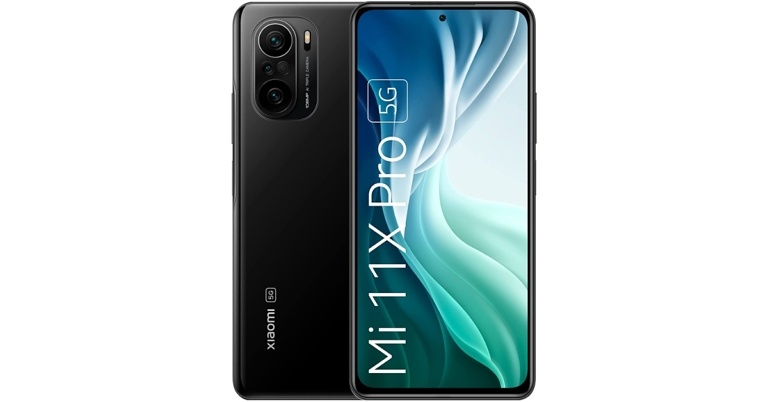
Amazon has slashed the price of the Xiaomi Mi 11X Pro by more than half, bringing it under Rs 30,000. The phone first arrived in India in 2021 with a starting price of Rs 39,999. The smartphone features a 120Hz AMOLED display and is powered by Snapdragon 888 processor. With these high-end features, the specifications are a little out of date but still, the device is a good value for money that may fit your pocket.
In This Article
Xiaomi Mi 11X Pro price details and sale offers
The Xiaomi Mi 11X Pro was selling at Rs 39,999 for the 8GB RAM with 128GB variant and Rs 41,999 for the 12GB RAM with 256GB model when it was first released. But after a massive price cut, the device will be available on Amazon for as little as Rs 29,999. Moreover, e-commerce is also providing an instant discount of up to Rs 1,000 to the customers using an SBI card. Amazon is also offering a Rs 23,500 exchange rebate and an SBI card offer in addition to the price reduction, therefore, reducing the price to Rs 28,999.
The device is available in three colours: Cosmic Black, Frosty White, and Celestial Silver.
Xiaomi Mi 11X Pro specifications
The Mi 11X Pro has a 6.67-inch full-HD+ E4 AMOLED display with a resolution of 1,0802,400 pixels. It also has a 120Hz refresh rate panel, a peak brightness of 1,300 nits, a 360Hz touch sampling rate, and a 20:9 aspect ratio. Out of the box, the phone runs MIUI 12 on top of Android 11. There’s an octa-core Qualcomm Snapdragon 888 SoC with Adreno 660 GPU, 8GB of RAM, and up to 256GB of storage under the hood.
The Mi 11X Pro has a triple rear camera setup with a 108-megapixel Samsung HM2 sensor with an f/1.75 aperture. It also has a 5-megapixel macro lens and an 8-megapixel ultra-wide-angle lens. A 20-megapixel selfie camera is located on the front of the phone.
There are 5G, 4G LTE, Wi-Fi 6, Bluetooth, GPS/ A-GPS, NFC, Infrared (IR), and a USB Type-C connection for connectivity. The phone is also equipped with a 4,520mAh battery that enables 33W rapid charging. On the side of the phone is a fingerprint scanner, as well as dual speakers with Dolby Atmos.
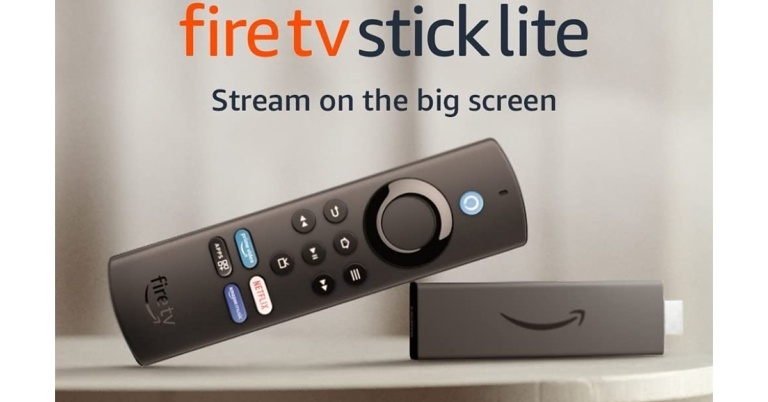
The official new model in Amazon’s popular range of streaming gadgets is the Amazon Fire TV Stick Lite which has arrived in India. Alexa Voice Remote Lite is included with the new Fire TV Stick. The new included remote has specific buttons for accessing Amazon Prime Video and Netflix, among other apps. It supports content streaming in full-HD at 60 frames per second, HDR formats, and Alexa, among other new capabilities. The new streaming device comes with an 8GB internal storage capacity, among other features.
In This Article
Amazon Fire TV Stick Lite price in India
In India, the Amazon Fire TV Stick Lite costs Rs 2,999 and includes an Alexa Voice Remote Lite. The device will be available through Amazon and is presently on sale for Rs 2,499, which includes the older voice remote but not the dedicated app buttons.
Amazon Fire TV Stick Lite specifications
Over a year and a half after launching the first Fire TV Stick Lite in September 2020, Amazon has released the Fire TV Stick Lite with the new Alexa Voice Remote Lite. The Fire TV Stick Lite is similar to the conventional version but comes at a lower cost. It has all of the same functions as the Fire TV Stick. It comes bundled with Alexa Voice Remote Lite which has separate controls for Amazon Prime Video and Netflix, among other apps. There’s also a shortcut for getting to additional apps on the Fire TV Stick Lite. The small shape fits nicely behind your TV and plugs directly into an HDMI connection.
It supports HDR and the new Alexa Voice Remote Lite that lets you find, launch, and control content with your voice. Improved voice controls are included. To access the Live TV guide, simply say “Alexa, go to Live,” or “Alexa, go to Find” to browse programmes. It comes with 8GB of storage and offers full-HD content streaming (1080p).
Prime Video, Netflix, YouTube, Disney+ Hotstar, ZEE5, Voot Select, and other services are available. Live news, sports, and must-see shows are all available to stream. Thousands of HDR titles are available. Plus, with sites like Amazon Music, Spotify, Gaana, and others, you may listen to over a hundred million songs. It’s possible that you’ll have to pay a subscription charge.
The Alexa Voice Remote Lite that comes with the device lacks distinct power and volume controls for controlling the television. If you’re interested in these features, we recommend the Fire TV Stick.
The Microsoft Xbox One comes with a wireless controller, adding massively to the ease of access elevating the gaming experience by leaps and bounds. The Xbox One controller is not only compatible with your Xbox One console but also with your PC and other Bluetooth devices, taking its functionality to a whole new level. Below are the two easiest ways to connect and sync your Xbox One controller to your Xbox One gaming console. Before you proceed, make sure your controller is equipped with either AA or rechargeable batteries.
This is how to wirelessly connect your Xbox One controller to the Xbox One console:
Step 1:Turn on your Xbox One console.
Step 2: Make sure your controller has either AA or rechargeable batteries.
Step 3:Press and hold the Xbox button to turn on your controller. Once the button flashes and stays lit, your Xbox controller has successfully turned on.
Step 4: Press the Pair button on your Xbox console.
Step 5:Press and hold the controller’s Pair button. The Xbox button on your controller will flash a few times, signifying that it’s searching for a console. Once it pairs with your console it will stay lit.
How to connect your Xbox One controller to the console using a USB cable.
Step 1: Plug one end of the USB cable to the USB port on the left side of your Xbox console.
Step 2: Plug the other end of the USB cable to the USB port at the centre of your controller.
Step 3: Check the Xbox button on your controller and your console. If both stay lit, it means your controller and console are connected and in sync.
If you’re not able to connect your controller after following these steps, restart your console and try again. Check the batteries, and replace them if they aren’t functional. If you’re still unable to connect, check your controller for any physical damage.
Also remember, you can easily switch and connect your controller to different devices such as Xbox series S, Xbox series X, Windows 10 PC, Android, or IOS.
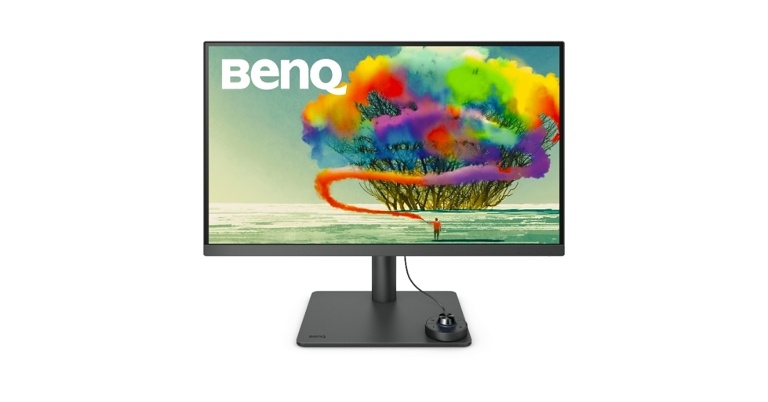
BenQ has announced the launch of two new Type-C (with power delivery) 4K DesignVue Monitors PD2705U and PD3205U in India. Both the monitors are 27 and 32 inches in size respectively and come with 4K resolution, AMD FreeSync Technology, which allows for a variable refresh rate up to 60hz.
The PD2705U and PD3205U are the most recent additions to the PD series, and they use AQCOLOR Technology to ensure the highest level of image integrity for all designers. Picture in Picture and Picture by Picture modes are available on BenQ’s PD2705U and PD3205U monitors. These features allow users to operate on two distinct computers at the same time, and both displays can be displayed on the monitor at the same time. The BenQ 4K DesignVue Monitors also have Multiple Display Color Modes with 350 nits HDR, as well as Darkroom mode, CAD/CAM mode, and Animation mode, all of which are targeted at improving colour accuracy. The monitors also have a 4K UHD resolution, together with 99 percent sRGB colour gamut coverage and Display HDR 10 with Calman, Solidworks, and Pantone Verification. HDR 10 is a clever High Dynamic Range technology that focuses on increased fluctuation in light output levels, resulting in a larger range of colours. Brighter whites and darker blacks are more accurate and balanced as a result of this.
Web Designers, Graphic Designers, Animation Designers, Motion Graphics Designers, Industrial Designers, UI/UX Designers, Architectural Designers, 3D Modellers, Digital Illustration Artists, Game Designers, Concept Artists, CAD/CAM Designers, Vehicle Designers, Rigging Artists, Rendering Artists, and other creative professionals will benefit from these monitors.
In addition, the PD2705U and PD3205U displays include a USB-C port with 65W and 90W Power Delivery, respectively, as well as a new Hotkey Puck G2.
The expanded connectivity choices on the BenQ PD2705U and PD3205U with HDMI 2.0, DP 1.4, and USB Type C accept inputs directly from compatible PCs, Laptops, Mobiles, and other devices making it one of the most adaptable monitors for customers to use. On a 27″ and 32″ display, BenQ DesignVue monitors have received Calman Verified, Solidworks, and Pantone Validated recognition as one of the industry’s pioneers.
The KVM switch reduces desk clutter by allowing designers to handle two PC systems with just one keyboard and mouse. The new DesignVue monitors PD2705U and PD3205U include a Hotkey Puck G2 for quick access to the monitor menu, which includes a revolving dial and preset options. By utilising the dial, it is possible to control all of the monitor’s functions.
In terms of pricing the PD2705U and PD3205U are priced at Rs 49,990 and Rs 64,990, respectively. It will be accessible through Amazon, at India’s top IT retail stores and business partners.
The Samsung Galaxy F22 was a respectable product from the South Korean company last year, and now the Galaxy F23 5G is its successor. It was launched in India as part of the company’s F-series of smartphones. This mobile has a Snapdragon 750G processor, a TFT LCD 120Hz screen, and a 5,000mAh battery with support for 25-watt rapid charging. In this review, we’ll see if the Samsung Galaxy F23 is a good value for money under Rs 20,000.
In This Article
Samsung Galaxy F23 5G Review: Design and Display
Starting with the design, Samsung has mastered the phone’s unique style for the most part, and we are particularly fond of the Forest Green colour variant we have. The corporation did not overdo it with the camera island. The phone’s display is protected by Gorilla Glass 5, but that’s it. There is no official IP classification, and the SIM slot, which accommodates two SIM cards and a microSD card, lacks a rubber gasket. Regardless, we like how the Galaxy F23 5G is lighter and smaller. As a result, carrying it about in your pocket will be a breeze.
Samsung is also staying with curved frames in this field, while other brands have begun to dabble with flat edges. The curved edges, on the other hand, appealed to us more. The fingerprint scanner is exactly where we want it to be, and it is also, for the most part, fast and accurate. Similarly, all of the ports are located on the bottom frame, including a 3.5mm headphone jack, a USB Type-C port, and a single downward-firing speaker. We were anticipating stereo speakers on the Galaxy F23 5G, as amazing as they sound, given how ubiquitous stereo speakers are in this price bracket.
Another shortcoming with the Galaxy F23 5G is its TFT LCD display, which we are split on. Given that the SAMOLED display was one of the best features of the Galaxy F22, Samsung’s decision to switch to an LCD panel is not what we had expected. The firm should, in our opinion, have included a 90Hz FHD AMOLED display.
Sure, the 120Hz refresh rate feels fluid, and it hasn’t caused us any jitters during testing, but if it had been an AMOLED panel instead, we wouldn’t have had a problem with a little lower refresh rate. That being said, we don’t believe it’s as bad as the TFT moniker suggests.
Obviously, the colours don’t match those of an AMOLED screen, and the blacks appear less dark. But this is true of any LCD panel, even the IPS panel that many believe Samsung should have chosen. The display offers a broader field of view, brighter content, and improved image quality.
On this phone, we had no issues streaming Netflix and Prime video material. On both of them, HD playback is supported, however, there is no support for HDR. Outside visibility is just average, viewing this screen in direct sunlight would be difficult if not kept at peak brightness.
Samsung Galaxy F23 5G Review: Performance and Cameras
So, let’s speak about the performance now. Samsung has chosen the Qualcomm Snapdragon 750G octa-core SoC, which comes with up to 6GB of RAM and 128GB of internal storage. Because this chipset is well-developed and optimised for games, you can run the most prominent titles at their top settings; however, for stable gameplay, you’ll want to crank down the settings. Call of Duty Mobile, for example, with high visuals and high frame rates are the most optimal settings, you cannot go beyond. The phone warmed up quickly around the camera bump when gaming for long periods. But it cools down instantly when the game is shut down.
The Galaxy F23, like many other new Galaxy phones, comes pre-installed with Android 12 and One UI 4.1. Samsung even guarantees software upgrades for two years and security patches for three years. Unlike its predecessor, which just ran the Core edition, this one has a full UI. As much as we like the Samsung custom skin, the phone’s bloatware problem is a bit frustrating. Thankfully the extra apps can be removed.
Let’s jump right into the cameras now. According to our findings, the Samsung Galaxy F23 5G is one of the greatest camera configurations in this price range. A 50-megapixel Samsung ISOCELL JN1 main sensor with an f/1.8 aperture is included in the Samsung Galaxy F23 5G’s triple rear camera configuration. The camera also includes an 8-megapixel ultra-wide lens and a 2-megapixel macro sensor. For selfies and video chats, the phone sports an 8-megapixel selfie camera sensor on the front.
Primary cameraPrimary camera
Though there’s nothing particularly noteworthy about it, the image signal processor and colour optimisation elevate it to a level that we found very appealing. In general, the photos taken with the Galaxy F23 5G have good colours, contrast, and dynamic range. Similarly, auto HDR worked flawlessly for us, and there was no noticeable colour change when shifting from the primary to the ultrawide angle camera. The dynamic range of the extreme wide-angle photos was rather good. Portrait background separation is also good, albeit the subjects appear to be warm.
Portrait
When it comes to nighttime shots, the device produces dark, grainy images that try to mimic natural colours as closely as possible. While using night mode brightens the images, it does not always increase noise and detail levels. Although selfies have a faint reddish tint, dynamic range is hit or miss.
The rear cameras can record footage in 4K at 30 frames per second. The videos are usually more stable in most circumstances. Here, the selfie films are 1080p @ 30fps and cropped inside the frame with a blue hue.
In terms of battery life, the phone easily lasted over a day when used normally, which included navigating through social networking apps, watching videos, and taking photos. However, due to the power-hungry 120Hz refresh rate but with an LCD panel, battery life is far better than we anticipated. When recreational gaming was thrown into the mix, we frequently found ourselves reaching for the charger at the end of the day. The 5,000mAh battery in the F23 took an hour and thirty minutes to charge using the 25W charger.
Our Take
The smartphone is priced at Rs 17,499, making it the company’s first phone without a charger in this price range. Because a 25W brick must be purchased separately, the 17,499 price tag is a bit of a ruse.
To sum up this review, the Samsung Galaxy F23 5G is a good smartphone for the money. The camera, design, and general performance are all excellent. In the mid-range sector, Samsung’s software optimization is also unrivalled. So if these are your top priorities, it is unquestionably an excellent choice for you; however, if you watch a lot of movies, you may want to consider other smartphones that feature a high-quality AMOLED screen and quick charging with a charger included in the box.
14 June 2022 Amazon Quiz has gone live on its platform. The quiz timings are 12 AM to 11:59 PM. The Amazon App users can participate in the quiz daily and all they have to do is submit correct answers to the questions asked on the e-commerce platform. Today’s participants can get a chance to win Rs 40,000 Amazon Pay Balance.
Amazon brings a fresh questionnaire that contains 5 questions daily. These questions are based on current affairs and general knowledge. The quiz can be played from 8 AM to 11:59 PM and the contestants need to answer correctly to enter into a lucky draw.
Only one person is declared as a winner and the results will be announced at the end of every month. And to make sure that you give correct answers to all the 5 questions Gadget Bridge everyday updates all the answers to the Amazon Quiz. Do check out 14 June 2022 Amazon Quiz Answers to win Rs 40,000 Amazon pay Balance.
Question 1: A commentary box at Lord’s has recently been named after which Australian cricket legend?
Answer: Shane Warne
Question 2: Who among these played the role of ‘Laila’ in the recent movie ‘Heropanti 2’?
Answer: Nawazuddin Siddiqui
Question 3: Famous singer KK, recently passed away after a live performance in which city?
Answer: Kolkata
Question 4: What is a group of this bird known as?
Answer: Parliament
Question 5: Due to which reason, does the moon appear in shades of red during this phenomenon?
Answer: Refraction
How To Play Amazon Quiz
Only app users are eligible to play the Amazon quiz every morning from 12 AM to 11:59 PM. The quiz is not available on the desktop. For those who are unaware of how to play the Amazon quiz below are the steps, you can follow to take the quiz.
Firstly download the Amazon app from Google Play Store or App Store
Now fill in the required information through the Sign Up option.
You need to log in to the Amazon app and scroll down on the home screen to find the Amazon Quiz banner.
Tap on the Amazon Quiz banner and tap on the Start button to start the Quiz.
Now you will get 5 questions and you need to answer them correctly. One wrong answer will eliminate you from the Quiz.
After answering all the questions correctly you are now eligible for a Lucky Draw.
The winner’s name will be announced today at 12 PM.
Samsung today announced the release of Crystal 4K Neo TV in India. The new TV is 43 inches in size featuring a bezel-less design. It comes with HDR10+ compatibility as well as built-in voice assistance. The TV is built to boost the content viewing experience in 4K resolution for new-age consumers.
In This Article
Samsung Crystal 4K Neo TV price in India and availability
Samsung Crystal 4K Neo TV will be available for Rs 35,990 on Samsung’s main online store Samsung Shop, Amazon, and Flipkart. When purchasing the television from Amazon, customers will receive a one-year Amazon Prime membership as well as a one-year membership to Disney Hotstar. When purchasing the television from Flipkart, customers will receive a one-year membership to Amazon Prime and a one-year membership to Disney Hotstar.
Leading banks such as SBI and HDFC Bank offer consumers a 12-month no-cost EMI when purchasing the television.
Samsung Crystal 4K Neo TV specifications
The Samsung Crystal 4K Neo TV is a 43-inch Ultra-HD display with 3,840×2,160 pixels of resolution. The Smart TV comes with HDR10+ compatibility that runs Tizen. The screen features UHD Dimming and produces a billion genuine colours.
The Crystal 4K Neo TV by Samsung is equipped with a Crystal Processor 4K with 1.5GB of RAM, and 16GB of inbuilt storage. The Auto Game Mode and Motion Xcelerator will get you better frame transition and low latency for the ultimate gaming experience. The users can enjoy 3D sound effects with Dolby digital plus. The Crystal 4K Neo TV comes equipped with a smart adaptive sound feature to adjust the sound according to the content for an optimal viewing experience.
The music player improves the whole auditory experience by incorporating realistic visual components into the playlist, effectively transforming the television into a virtual music system. You may also listen to tens of thousands of songs on Gaana Music. To access a more comfortable and connected ecosystem, this UHD TV offers built-in connectivity with Google Assistant, Alexa, and Bixby. Consumers may now use their voice to search for content, change channels, adjust volume, control playback, and more.
Users can spend more time viewing than searching using a universal content guide. It allows users to search through a selection of selected material from India’s most popular streaming applications to find their favourite movies and TV episodes. By logging into Samsung TV Plus for free, you may get 55 worldwide and local live channels such as Republic TV, Discovery TV, and others. The PC mode transforms the television into a personal computer. It allows users to work or create documents on the cloud. It also includes wireless screen mirroring for a big screen or extended screen experience without the need for an internet connection.
Downloading a YouTube video can help you save the data that would be used on viewing it over and over again. YouTube offers a subscription service called YouTube Premium, which allows you to save videos on the YouTube app on your iPhone, giving you the option to view them multiple times without needing to stream them. The saved videos can also be accessed while you’re offline. The only downside is that you can only view your saved videos until your subscription lasts. So, here is how to download YouTube videos to your iPhone camera roll to view them anytime.
VideoProc Converter is the most impressive of all the free video downloaders so far. It not only saves 4K/HD videos with intact audio and subtitles but also converts them to almost any format including MP4 (HEVC/H.264), MP3, AVI, MOV, MKV, 3GP, WAV, M4A, WMA, OGG, FLAC, etc. It’s very user-friendly. Simply paste and analyze a video or playlist URL, choose an output format and quality, and then click “Download” to save the files to the folder of your choice. You can download multiple videos simultaneously, download entire playlists or channels, record live streams, and make quick edits such as cut, crop, rotate, split, adjust video speed, add subtitles, etc.
There are also services that help you with MP3 download as well. However today we will specifically talk about Downloading Videos from YouTube.
Downloading the YouTube video as a file to your phone does not require a YouTube Premium subscription, and you can keep it saved on your phone for however long you want.
In This Article
Follow these steps to download your desired YouTube video directly to your iPhone camera roll.
Step 1: Copy the URL of the YouTube video you want to download.
Step 2: Open www.8downloader.com on your Safari browser.
Step 3: Paste the YouTube video URL in the download box.
Step 4: Click on the download button next to the download box.
Step 5: Select the resolution in which you want to download the video. Higher resolution videos will be greater in size. You can also decide whether you want to download the video with or without sound.
Step 6: Visit the Downloads folder in your iPhone. You will find our downloaded video there.
In order to move the downloaded video to Camera roll, you need to download the Documents app from the App store.
Step 7: Download the Documents app from the App Store.
Step 8: Open the Documents app and visit the Downloads folder to access your downloaded video.
Step 9: Select the video you’ve downloaded (by long-pressing it) and click the ‘Move To’ option.
Step 10: Select the Photos folder under My Files to save your video in the Camera roll.
Step 11: Visit the Camera roll folder to access your downloaded video at any time.
You can use this process to save videos from other websites (Facebook, Instagram, Vimeo, Dailymotion etc.) as well. All you need to do is paste the link to the location of the video, as shown in Step 3 and follow other steps accordingly.
There are several different websites that use the same method to download YouTube videos to your phone. Some of them are offeo.com, ytb.rip, videodownloaderpro.net. Let us know in the comments which website you find the most useful to download YT videos from.
The first thing anyone does when a summer road trip plan begins to take shape is to write a list of requirements to be taken along. Right? Just the thought of a vacation instils such a strong sense of excitement in you, that you’re not even able to sleep at night. It is this thrill and excitement of an upcoming adventure that keeps us on our toes, especially a day before the date of departure. One usually plans to take along their favourite gadgets, clothes, food items and whatnots, in accordance with the itinerary and the ease of their availability. We have brought to you today, the top 10 gadgets to carry with you on a road trip this summer vacation.
These include some cool new gadgets that you can enjoy operating during your travel time, along with some necessary ones that will prove to be extremely handy.
In This Article
All-In-One Travel Adapter
The first on our list of the top 10 gadgets to carry on a road trip during your summer vacations is an all-in-one travel adapter. It may happen that the cafe you chose to work from for the day during your workcation, only offers you a single plug point, while you have multiple devices to connect. This may also happen in your hotel room. Hence it is better to pack with yourself an all-in-one adapter.
The RTS dual-USB universal travel adapter is compatible with plug types of more than 150 countries. It includes 5 different input plugs that tightly fit into 1 adapter. It is compatible with almost all USB devices including iPhone, Sony, Lenovo, Blackberry, and more. It has a power rating of 6A and 100-250V AC. It is priced at Rs 598.
It is the era of voice assistance. So how can your vehicle be left out of the same? Amazon offers its Echo Auto device for adding Alexa voice assistance to your car, in case it does not come built-in with one. Echo Auto is connected to your car’s charging socket or USB port. It connects to your car dashboard through a 3.5mm auxiliary cable or Bluetooth connection.
It is exclusively designed for in-car usage with 8 microphones and far-field technology. It can hear you over music, AC and even on-road noise. You get hands-free control not only over the music but also for executing tasks like paying bills, listening to the latest news, weather or cricket scores, all merely by giving voice commands.
In every travel group, there is at least one such person who cannot stand the music taste of others at all. Therefore, they are mostly seen with their headphones on and are inseparable from it. If you admit to belonging to the same category, you would surely not want to leave your doorstep without your precious headphones.
The Boat Rockerz 550 are Bluetooth on-ear wireless headphones that come with a mic. It has a playback time of up to 20hrs and gets charged within 2.5 hours. Moreover, it also offers physical noise isolation for providing an immersive audio experience to the user. It comes with a battery capacity of 500mAh. It is available for Rs 1,599.
Next on our list of the top 10 gadgets to carry on your road trip this summer is a power bank. The importance of a power bank on any trip or vacation is needless to elaborate upon. The Mi 3i 20,000mAh capacity power bank offers 18W fast charging and comes with advanced 12-layered circuit protection. It has triple port output as well as dual input ports. It comes at Rs 1,799.
For those who are into photography and filmmaking, a summer road trip is like a box full of golden opportunities to capture breathtaking images and videos to your heart’s content. And even if you’re not a professional, you can polish your skills by equipping yourself with the right set of shooting equipment. Amongst the essential ones comes a camera tripod stand.
There are many types of tripods available in the market which vary by function, material and size. One of the known brands in the segment is DigiTek. Its DTR 520 BH model is a professional aluminium tripod cum monopod which comes with a multipurpose swivel head for low-level shooting, panning and DV camera. It can reach up to a height of 4.95ft and is light in weight. It is priced at Rs 5,995.
Now, if you are an Instagrammer or a Youtuber and are into making reels and videos, you might already be familiar with what a gimbal is. For those who are unaware, a gimbal is shooting equipment which helps in stabilising video camera shots. It removes the ‘shakiness’ that creeps into the videos when you capture them by hand, by stabilising the camera or the mobile phone itself.
The number one bestseller on Amazon in this category is from the widely popular brand DJI. Its DJI OM 4 SE model is a handheld 3-axis smartphone gimbal stabiliser. It comes with a magnetic phone clamp, 2450mAh battery capacity, dynamic zoom, gesture control and many more such capabilities. It is compatible with almost all types of smartphones. It is available for Rs 8,949.
Another one of the top gadgets to carry with you on your summer vacation road trip is a drone camera. Drone camera shots and video reels are the latest in trend on social media sites like Instagram. This one will surely take your excitement levels to the seventh heaven, especially if you are into making travel-based content. It is the perfect shooting device that can actually do justice to the shots of the heavenly valleys you traverse in the north.
One of the top-rated drone cameras includes the DJI Mavic Mini, which has a 2.7k resolution camera. It comes with a 3-axis gimbal and GPS and has a 30-minute flight time. It is priced at Rs 74,999.
We are sure that at some point, each one of you must have encountered the need for a clothing iron during your previous travels. But due to the large size of a traditional iron, it may not be suitable for taking on a summer trip each time. And as many may agree, it creates quite a hindrance while packing. To tell you, there is an even more compact solution to the problem. Yes! A hand iron.
The Philips handheld garment steamer STH300/20 model is a 1000W hand iron which is compact and foldable. It is easy to use and store, provides an extremely hassle-free ironing experience, and even kills 99.9% of bacteria and dust mites to refresh and iron your clothes. It is priced at Rs 3,324.
Whether you’re on the hills or near the coastline, you never know when there would be a sudden downpour over your head. While you may be a person who enjoys getting drenched, your favourite gadgets and gizmos surely aren’t. Hence, to keep them safe and away from moisture, it is always wise to carry waterproof pouches. Moreover, you can even use a waterproof pouch for capturing the beautiful underwater life, while you take a dip and swim with the fish.
The final one on our list of the top 10 gadgets to carry on a road trip during your summer vacations is a car tyre pump. Now, you don’t want to be stuck with your car having a flat tyre in the middle of nowhere, do you? There are many types of air pumps available in the market. There are portable electric air pumps as well, which are so compact that they can even fit inside your pocket.
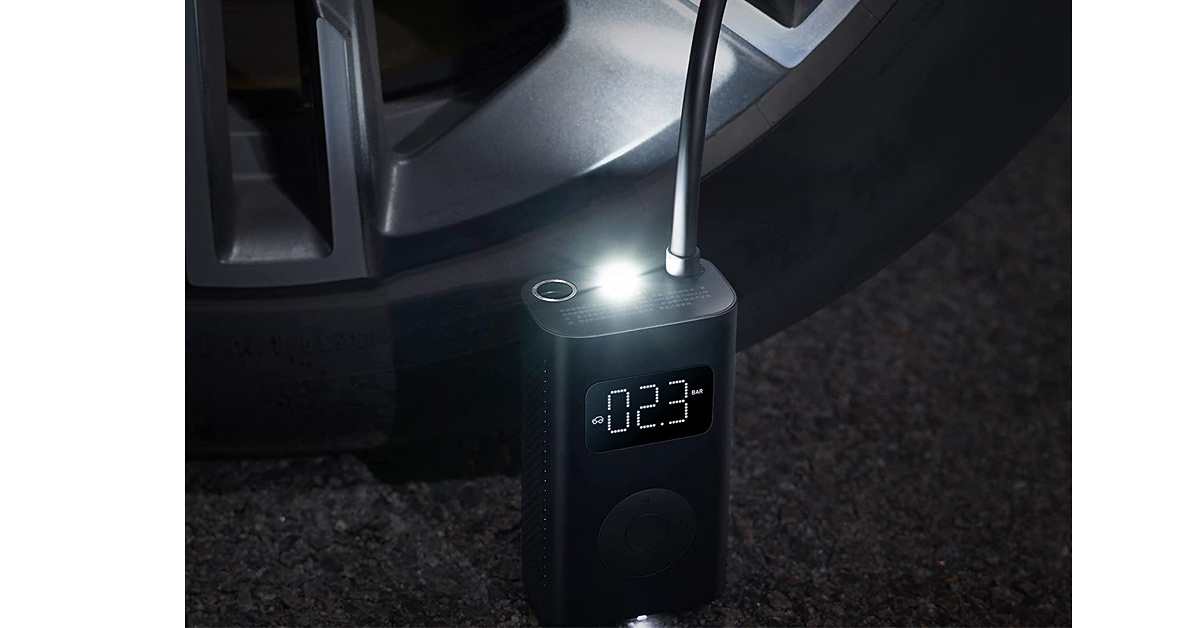
The Xiaomi 150 PSI portable electric air pump can fully inflate two car tyres or top up 8 times. It even has an LED light for night-time use and an SOS flashing feature for emergencies. It comes with an inbuilt 2,000mAh lithium-ion battery and is priced at Rs 2,699.
So those were our best picks for the top 10 gadgets to carry on your next road trip this summer vacation. In case we missed out on your essentials and favourites, do share with us in the comments section below. Happy holidays everyone!
Knowing the date of creation of your Gmail account can be very helpful in case you ever get locked out of your account. It is one of the recovery questions that Google asks you when you try to restore your account. You can browse to the welcome mail you received from Google on the day you created your account. It is the first mail that gets sent to you from Google as soon as you create your account. However, a lot of users delete the welcome mail soon after receiving it. So our suggestion is not to do that, keep that email intact. Luckily, there is another way you can find out the date on which you created your Google account. Just follow these easy steps to know how old is your Gmail account.
Step 1: Log in to your Gmail account and click on the Settings option at the top right end of your screen.
This is also the date on which your Google account was created since Google creates it along with your Gmail account. Gmail was launched in 2004 and has since evolved into becoming the largest email service provider with 425 million monthly active users. You can also request Google to provide you with your extensive user data. So this is how you can find out how old your Gmail account is. Using this trick, you can come to know exactly when you created your email account with Google.
Recently Poco announced that the Poco F4 5G smartphone worldwide and its Indian debut will take place very soon. Poco had previously stated that a smartphone in its F series would be released soon but had not disclosed the name. At the time, the company had only confirmed no information about its specifications, pricing, or availability was available. The Qualcomm Snapdragon 870 chipset has already been confirmed by the company now the price information has also been leaked.
An authorised Xiaomi retailer has released the global price of the POCO F4 5G. According to the poster, the POCO F4 will be available in a single form worldwide and will cost $459 translating to Rs 35,000.
In India, it is expected to cost Rs 26,999, with bank discounts bringing the price down to Rs 23,999. If the rumoured pricing is correct, it will be the cheapest Snapdragon 870-powered phone on the market.
The new Poco phone is expected to make its global premiere in India in the near future. Rumours claim it could simply be a rebranded version of the Redmi K40S. Qualcomm’s Snapdragon 870 SoC will power the Poco F4 5G, the company said. The Redmi phone had the same Snapdragon 870 SoC as the Xiaomi phone, as well as a triple rear camera configuration and a 120Hz AMOLED display.
The Poco F4 GT, which arrived in Europe in April as a rebranded version of the Redmi K50 Gaming Edition, is one of the most recent examples that the company usually launches repackaged Redmi phones in India and other territories under its own brand name.
Other data about the Poco F4 5G is still unknown. It’s worth noting, though, that the Poco F3 was introduced with a Snapdragon 870 SoC, the same as this year’s model. However, that model did not make it to India.
The Poco F4 5G is expected to come with a 6.67-inch Full HD+ AMOLED display with a 120Hz refresh rate, and a punch-hole cutout for the selfie camera. The Qualcomm Snapdragon 870 chipset will be used, along with up to 12GB of LPDDR5 RAM and 256GB of UFS 3.1 storage, according to the business. The phone is expected to run Android 12 with the MIUI 13 overlay.
Since the very beginning, the OnePlus phones have included a physical alert slider, which is located on the phone’s upper left side. The alert slider lets the users set the phone’s sound profile to silence, vibrate, or ring. But in a new update, the physical alert slider will be limited to the company’s flagship models. According to the leak, the OnePlus Nord 2T, which was just released, was the last mid-range device to have an alert slider.
OnePlus’s alert slider has been a company trademark since the launch of its first smartphone OnePlus One. But according to a leak, it will now be limited to the company’s most premium models like Pro models. Not just that it will be available on Oppo flagships from now on. On Twitter, well-known tipster Yogesh Brar claimed that only a handful OnePlus phones will now have the alert slider. According to the tweet, the OnePlus Nord 2T, which was released in May, was the last handset to include an alert slider. The OnePlus 10T is expected to be released sans the alert slider.
The alert slider is also missing in a leaked render of the smartphone. However, OnePlus is yet to confirm the rumour, so take the information with a grain of salt.
Previously, Yogesh Brar, in collaboration with Onsitego, has revealed the OnePlus 10T renders. The handset is shown in black with no alert slider in the leaked renders. The device is believed to be known as the OnePlus 10 or OnePlus 10T. It is also displayed using a hole-punch display design. The phone’s volume rocker is located on the right spine, while the power button is located on the left. According to the tipped information, the device will likely equip a Snapdragon 8+ Gen 1 SoC.
According to the leak, the OnePlus 10 will be powered by OxygenOS 12 and will include a 6.7-inch full-HD+ AMOLED display with a 120Hz refresh rate.
The OnePlus 10T is reported to have a triple-back camera system, featuring a 50-megapixel primary sensor with optical image stabilisation (OIS) (Optical Image Stabilisation). On the front, the smartphone could include a 32-megapixel camera for selfies. It is also expected to have a 4,800mAh battery.
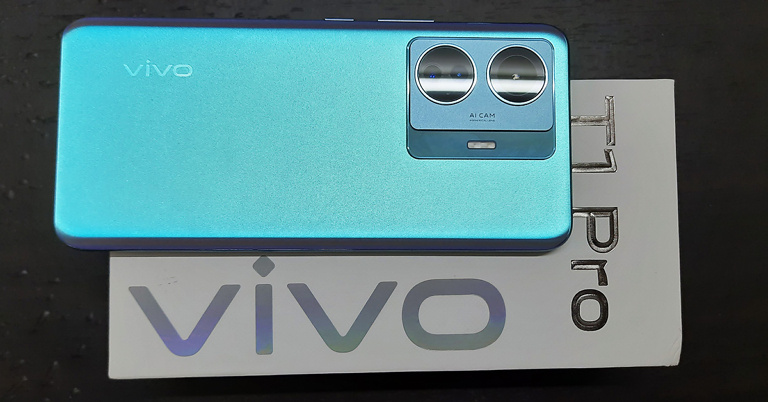
We got the opportunity to review the all-new Vivo T1 Pro 5G, the latest smartphone model from the Vivo brand. The device is offered with 6GB/8GB RAM options combined with 128GB internal storage. It comes with a 6.44-inch HDR 10+ AMOLED display and a Qualcomm SM7325 Snapdragon 778G 5G (6 nm) Octa-core processor. You get to enjoy Android 12-based FunTouch 12 OS on the smartphone, dual-SIM, 5G connectivity, as well as a 64MP rear triple camera system along with a 16MP front camera. Here is a complete review of the new Vivo T1 Pro 5G, so you can decide whether to invest in this smartphone or not.
In This Article
Vivo T1 Pro 5G Review: Design And Display
The Vivo T1 Pro smartphone comes riding in a big rectangular box, white in colour, which makes the Vivo branding on top look even more prominent. Along with the smartphone comes a silicone case, a SIM ejector tool, a Vivo FlashCharge adapter, a USB to Type-C cable, a quick start guide and an information booklet.
Opening the lid, you face its 6.44-inch sleek black display, which has about 86% screen-to-body ratio. Picking the phone in hand, it does not feel too heavy in weight. Flip it over and you’ll meet its plastic back coated in its body colour panel with a glimmering shine. The smartphone is available in two colours in India, Turbo Black and Turbo Cyan, out of which we were able to get our hands on the latter.
The triple camera system is structured in a well-planned and symmetrical manner. The rear cameras and the flashlight are mounted on a double-level platform. The first level, made up of glass, hosts the flashlight. The second level, made of plastic, has the cameras fixed in it. While the rest of the back reflects a range of colours complementing the main shade, the shades of the mount are steady.
The back of the smartphone has sides sloping towards the left and right direction. This navigates your eyes to its frame, which is also made of plastic. The volume button and the power button lie on the right side while the left side has been kept free. At the bottom lies the SIM card tray, a USB Type-C port, as well as the speaker of its mono audio system. The device has an under-display fingerprint sensor.
Bring the smartphone to life, and you’ll be greeted by its HDR10+ AMOLED display. It has a screen resolution of 1080×2404 pixels, a 20:9 aspect ratio, and 409ppi pixel density. The look and feel of the smartphone interface is quite nice. The colour range is pretty wide and the default theme is subtle. The legibility of the device under sunlight is also good, thanks to its 1,300 nits brightness. Speaking of the touch experience, it is soft and fluid.
The experience of watching videos on Youtube was great on the Vivo T1 Pro smartphone. The video quality can be enhanced up to 2160p at a 60fps rate. Playing any UHD content on the app completely immerses you in it. The same can be said about streaming movies and TV series on Netflix.
The colours on the screen are full of contrast and pop out, appealing to the eyes. The picture quality is also clear. Together with the commendable sound system, the streaming experience is taken to the next level. When set to more than 70%, the smartphone audio is blaring loud. However, one still does miss a stereo audio output on the device.
Gaming on the device was tested by playing high-end games like Asphalt 9 Legends. The graphics quality is quite pleasing to the eyes. The colours are full of vibrance. The response to touch is also pretty swift. Overall, the gameplay is buttery smooth.
All in all, the design of the Vivo T1 Pro 5G is stylish and has a pinch of glamour sprinkled to it. It would make a perfect companion during night-outs and parties. The display quality is also good.
Elaborating further on the new Vivo T1 Pro specifications, it offers 6GB/8GB RAM options with 128GB internal storage. The device runs on a Qualcomm SM7325 Snapdragon 778G 5G (6 nm) Octa-core processor, with Adreno 642L GPU. The battery capacity of the phone is 4,700mAh and supports 66W fast charging.
It gets fully charged in about 1 hour. The battery life is also pretty impressive. Upon mild to moderate usage, it can last up to two days. Upon heavy usage, it can pull through an entire day, or even more.
The Vivo T1 Pro is a dual-SIM smartphone that supports 5G connectivity. It also supports Wi-Fi and Bluetooth 5.2. Other than the fingerprint scanner, the device comes equipped with other sensors like an accelerometer, gyro, proximity and compass.
One gets to enjoy working on the Android 12 based Funtouch 12 OS. The home screen and the app drawer interface are easy to acquaint with. You can set up gesture navigation for yourself, change the fingerprint scan animation, lock screen and even charging animation.
However, a minor negative aspect is that the smartphone comes loaded with unnecessary applications. But on the plus side, no app crash was observed and switching between multiple applications is also smooth. The phone also does not get heated up easily.
Coming to the Vivo T1 Pro camera review, it comes with a 64MP+8MP+2MP triple rear camera setup, along with a 16MP front selfie camera. There are multiple zoom modes offered, but only for the rear camera. The clarity of images starts degrading from 3x and above. Videos can be recorded in up to 4k resolution at a 30fps frame rate from the rear camera and up to 1080p at 30fps from the front.
The camera interface has a very efficient design. Most tools are accessible right away, without one having to open the camera settings. Moreover, the camera also provides you with a Level tool which helps in levelling your shots in case the camera’s position is not linear or stable.
Vivo T1 Pro 5G: Photo Mode and Portrait ModeVivo T1 Pro 5G: Photo Mode Vs Night Mode
The standard rear camera Photo mode clicks great shots. In daylight, the colours appear close to reality while the clarity of the captures is commendable. The Portrait mode is one step ahead, and combined with the bokeh effect, makes pictures come alive. However, in low light, a slight greenish tint was observed in the Photo mode captures. The rear camera’s Night mode does correct the tint and brightens up the shot, although the colours get faded a little. But the end result produced is quite decent, overall.
Images taken from the 64MP mode are even more vivid. The details are captured pretty well. Some may observe the contrast to be a little on the upside. The whites in the shot also increase. But under the right external conditions, this may also work in your favour.
Selfies from the front camera are also impressive. The details are captured thoroughly and the colours and skin tones are very close to reality. The selfie camera Portrait mode provides you with a wide range of beautification tools like facial features and skin tone adjustments, buffing and more. You can tweak these in real-time to achieve your desired effects. You can also set the focus of the aperture and select filters for your images.
All in all, the camera package offered with the Vivo T1 Pro 5G is pretty decent for its price range.
To sum up, the Vivo T1 Pro 5G is a decent smartphone in its price range. The various features it offers with its package neither stand out exceptionally, nor lack in quality, and therefore stand somewhere in the middle. Its body design is appreciative while the display gives a nice visual experience during streaming and gaming.
The device delivers pretty smooth performance and the cameras are also fair. Geekbench 5 CPU benchmarking gives it a single-core score of 754 and a multi-core score of 2,700. Only a few comparable smartphones score higher than it. It is certainly a significant upgrade over feature phones. However, we would leave it to you to weigh its pros and cons according to your requirements and make a buying decision on it. As for us, we do not mind the kind of good features this smartphone offers at the price point.
The Vivo T1 Pro 5G comes at a starting price of Rs 23,999.
Garena Free Fire is a battle royale game with regular awards and tournaments to keep players interested. If you play Garena Free Fire, you should be aware of the redeem codes that are released on a daily basis. However, because the battle royale game is banned in India, players from other countries can use the Free Fire Redeem codes daily. If you’re unfamiliar with the Garena Free Fire redeem codes or don’t know how to get them, we’ve put together a step-by-step guide to help you redeem them. Check out Garena Free Fire Redeem Codes for June 13.
The Free Fire redeem codes are a great way to get free stuff. These are 12-digit codes that contain alphabets and numbers, as well as an expiration date and time. Because the Garena FF redeem codes cannot be used more than once, you should hurry to the redemption page to claim your free reward before someone else does. To get a free reward, all you have to do is go to reward.ff.garena.com/en, which is the official redemption page. Also, keep an eye on this space for daily updates on Garena Free Fire redemption codes and rewards.
In This Article
Garena Free Fire Redeem Codes Today 13 June 2022
BDYDIDJT2VDTU
HSUDJDYENVDIM
SHUSHDYWFFW7
2Y6E7265R7ND72
SHDBBDUUW685G
BDUDIK2JJ2682976
NEHDIJ2NDY62881
NSJWJDNH26E889
NSJJSH26286E627
BSHWH628R662BD
BSHSH25E8UE62H8
BZHSJDH628D628
BSJSHHEH276282
BSHWJH728R8638
JOIUYW72792726U
CGSVFSTY2IW8EI8
ENDJKEY35527653
BSHSNBE62577568
BSHWIJSHWHY5721
LSOOWJWY35821N
BSJEJH2YYE752HW
BDJAKZJWO626E
BSU2JHSUSK2IG
SBSUSHYWY2YI2I
VSHSBWGGWYW57
BSJJWHWU2U6517
BSJWJWBSBHW4
FFE7ERIRNRUO2U
BSHEHHEDB66446BG
NSHSHEH62IIE628862
How to Get Free Fire Redeem Codes for Garena on June 13?