South Korean company Samsung has announced a bunch of attractive offers for those customers buying its Galaxy S22 flagship. The company is offering a cashback of up to Rs 5,000 on the purchase of the smartphones. Also, there will be a massive discount on Galaxy Watch 4 and Galaxy Buds2 when purchased with Galaxy S22, Galaxy S22+ and Galaxy S22 Ultra. Continue reading to find out how to take advantage of the country’s best discounts and deals on premium smartphones.Samsung has announced exciting offers in the country on its latest Galaxy S22 flagship. Customers who purchase the Galaxy S22 Ultra will receive a Galaxy Watch 4 valued at Rs 26999 for just Rs 2999. Customers of the Galaxy Note series will also receive an upgrade bonus of Rs 12000, while customers of the Galaxy S, Galaxy Z Fold, and Galaxy Z Flip series will receive an upgrade bonus of Rs 8000. Other device owners will receive a Rs 5000 upgrade bonus. Customers who purchase these devices using Samsung Finance+ or HDFC Bank credit/debit cards, on the other hand, will receive a cashback of Rs 5000.Customers who buy a Galaxy S22+ or Galaxy S22 will receive a Galaxy Buds2 worth Rs 11999 for just Rs 2999. Additionally, customers of the Galaxy S, Galaxy Z Fold, Galaxy Z Flip, and Galaxy Note series will receive an upgrade bonus of Rs 8000, while owners of other devices will receive an upgrade bonus of INR 5000. Customers who purchase these devices using Samsung Finance+ or HDFC Bank credit/debit cards, on the other hand, will receive a cashback of Rs 5000.The Galaxy S22 Series is available from all major retailers, as well as the Samsung online store and Amazon.com.Samsung Galaxy S22 series price in India and availabilityThe standard Galaxy S22 costs Rs 72,999 and Rs 76,999, respectively, in two configurations with 8GB RAM and 128GB/512GB storage. Similarly, the Samsung Galaxy S22+ starts at Rs 84,999 for an 8GB RAM model with 128GB of storage and Rs 88,999 for an 8GB RAM model with 256GB of storage. Phantom Black and Phantom White colour schemes will be available for both devices.The Samsung Galaxy S22 Ultra, on the other hand, starts at Rs 1,09,999 for 12GB RAM and 256GB storage and goes up to Rs 1,18,999 for 12GB RAM and 512GB storage. For the 12GB RAM with 256GB model, Burgundy, Phantom Black, and Phantom White will be available, while Burgundy and Phantom Black will be available for the 12GB RAM with 512GB model.
For the latest gadget and tech news, and gadget reviews, follow us on Twitter, Facebook and Instagram. For newest tech & gadget videos subscribe to our YouTube Channel. You can also stay up to date using the Gadget Bridge Android App. You can find the latest car and bike news here.
The Redmi Note Series is a versatile smartphone lineup that fits into any pocket and is a strong mid-range contender. With the launch of the Redmi Note 11 Series in India earlier this month, Xiaomi has updated its portfolio. So far, Xiaomi’s sub-brand has released two variants: the Redmi Note 11 Pro, which is powered by a MediaTek chipset and supports 4G connectivity, and the Redmi Note 11 Pro+ 5G, which is powered by a Snapdragon chipset and supports 5G connectivity. Except for connectivity and cameras, the specifications of both smartphones are nearly identical. For the time being, we’ll talk about the Note 11 Pro+ 5G, which has been our daily driver for quite some time. So here is our Redmi Note 11 Pro+ 5G review.
In This Article
Redmi Note 11 Pro+ 5G review: Design and Display
First and foremost, let’s talk about the design. The design of the latest Redmi Note 11 Pro+ 5G differs from that of its predecessor. The construction and design appear to be more durable and modern than the previous generation. It has a flat design language with sharp edges, which is very similar to the Xiaomi 11i (review) that we previously reviewed. The back panel is also protected by Gorilla Glass, which we appreciate.When light reflects on the Mirage Blue variant, it creates a glossy wavy pattern that looks like water waves. Despite the glossy finish on the back, fingerprints and smudges are less noticeable, which is surprising. However, instead of the pattern’s glossy finish, we’d prefer to see a matte finish. Phantom White and Stealth Black, both with a simple matte finish, are two more colour options.The three rear cameras are arranged in a two-step design on the top left corner, with the 108MP primary sensor being more prominent and receiving its own space. A fingerprint sensor is embedded inside the power button on the right side of the frame, while the volume keys are located just above the power button. The 3.5mm headphone jack, IR blaster, and stereo speakers are present on the Redmi Note 11 Pro+ 5G. The earpiece speaker grille, as well as a 3.5mm audio socket and an IR emitter, are all located on the top. On the bottom, you’ll find the primary speaker, USB Type-C port, and hybrid dual-SIM tray.The phone isn’t overly heavy, but it has just the right amount of weight. It’s also not very comfortable to grip or use single-handedly due to its flat, squarish design. The body, on the other hand, is splash-resistant, and the SIM tray has a rubber seal to keep moisture out. Its audio output is quite loud and adequate for listening to music and watching movies, and it has left a lasting impression on us.On the front of the phone is a 6.67-inch full-HD+ AMOLED display with a 120Hz refresh rate and a brightness of up to 1,200 nits. Corning Gorilla Glass 5 is used to make the display. Because it supports 360Hz, the screen response rate is quite good.We immediately noticed how responsive the touch is here, which is something you’d only find on premium mid-rangers (By the way we loved playing Subway Surfer on this phone.) The fluidity has improved with the 120Hz refresh rate, and we haven’t experienced any stutter or jitters during our testing. As a result, scrolling through the UI is much more fluid. On this device, we had a lot of fun watching movies and Netflix and Prime series. The videos showcased vivid colours and deep blacks, and the content is bright and readable even in direct sunlight. The automatic brightness adjustment, on the other hand, is a little slower, but that’s not a deal-breaker for us.
Redmi Note 11 Pro+ 5G: Performance and Cameras
Now we’ll move on to the performance aspect of things. The Qualcomm Snapdragon 695 SoC in the Redmi Note 11 Pro+ 5G is octa-core. The processor is adequate for everyday use and responds quickly when you launch an application. We also didn’t notice any lags, which is a good thing considering the price.The device is HDR 10 certified, but when you try to play any HDR content on Netflix, you’ll only get an HD option, and YouTube video playback is limited to 1080p. In fact, the device is unable to play videos in 4K resolution. As a result, HDR is not supported by the processor.Now that that’s done, let’s take a look at the gaming performance. We used smooth graphics and a high frame rate to play BGMI. It can also be played in high-definition graphics with a high frame rate. When we switched to the smooth ultra settings, we didn’t notice any lags or stutters, but when we switched to the HD and high settings, we noticed glitches and lags. At the time of testing, no heating issues were discovered. However, given the price, the gaming experience falls short of what we would expect from a low-cost smartphone in the 10k to 15k range.When it comes to software, the Redmi Note 11 Pro+ 5G runs on Android 11 with the MIUI 13 overlay on top, which is unfortunate because many phones nowadays come with Android 12 out of the box. Xiaomi also provides two years of Android updates, which means this device can only receive updates up to Android 13. But the best part is that when compared to other brands, MIUI 13 is much more optimised.Before we get to the optics, take a look at the camera specifications. A 108-megapixel Samsung HM2 main sensor, an 8-megapixel ultra-wide camera, and a 2-megapixel macro camera make up the Redmi Note 11 Pro+ 5G’s triple rear camera setup. A 16-megapixel selfie camera with an f/2.45 lens is included in the device.Surprisingly, this 5G variant does not include the 2-megapixel depth sensor found on the 4G Redmi Note 11 Pro. Last year’s Redmi Note series camera performance left us unsatisfied, but this year’s model has some improvements over its predecessor. The colour optimisation is flawless, the images do not appear oversaturated, and the contrast is also flawless. Under good lighting conditions, the 108-megapixel primary sensor, as well as the selfie camera, produce some good images. When compared to other smartphone images, however, the photos taken with this phone lacked detail, which could be due to slower processing or other factors.Macro shotsThe low-light images are adequate but not spectacular. However, it improves when photos are taken in night mode, but you must keep your hands steady for 4 to 5 seconds. Also, the 8-megapixel ultra-wide lens will not produce sharp or detailed images. Last but not least, the 2-megapixel macro sensor is useless.The macro lens can record videos up to 720p in terms of videography. The bad news is that you can only record videos at a resolution of up to 1080p @30fps, which is the same as a 10K smartphone. The front camera is adequate but not exceptional. The portraits are also acceptable to us.Wide angleUltra-WideA 5,000mAh battery powers the Redmi Note 11 Pro+ 5G. The best part is that a 67W charger is included in the box. The device is said to take about 40 minutes to charge fully. In our tests, the phone takes about 45 minutes to charge fully. However, this device’s battery life is exceptional. Under heavy usage, we were able to get 5 hours of screen time, which included gaming, videography, video watching, video calling, and scrolling through our social media accounts. So, if you’re a light user, the battery should last you more than a day.
Cryptocurrency, the hottest topic of the decade, takes the mind for a spin, doesn’t it? Sitting at home, one keeps hearing people making and losing fortunes through Bitcoins, Dogecoins and Ethereum. We’re sure this question might have arisen at some point in each one of your minds whether you can actually make or lose money through cryptocurrency. And if yes, then what are the ways through which we can gain profits. The most important question that arises is when should one cash out their cryptocurrency investment in order to benefit the maximum from one’s portfolio. But don’t you worry at all, since we are here to demystify cryptocurrency for you and answer all your queries.
In This Article
How To Make Or Lose Money Through Cryptocurrency
Cryptocurrency can be thought of as digital currency. If you’re thinking of making profits via cryptocurrency, then you can consider it to be similar to stocks. Just like the way you can gain capital within stock markets through either investing in or trading stocks, the same way you can make or lose money through cryptocurrency.
Cryptocurrency Investing And Trading
However, the first thing that is very crucial to understand in this sphere is that as compared to the stock market, the cryptocurrency market, for example, Bitcoin, has tremendous volatility. This is why if you take one right step, it can result in you making fortunes of profit, but one wrong step has also the potential to push you into a deep pit of loss. However, this can still be considered as an advantage by the Bitcoin traders, if they carefully make an investment and then quickly jump out before the Bitcoin trend turns, and thus book profits. You then can convert your profits into cash through an exchange or a broker. It is sort of like day trading in stocks, but the difference is that crypto often makes double-digit percentage movements within a single day itself, which makes it ideal for traders.Read also:10 Essential Apps To Install First On Your New Windows Laptop
Cryptocurrency Mining
Apart from investing in and trading cryptocurrency, it can also be mined. Unlike the current paper-based currency system that is centralised with the banks being at its heart, the system of cryptocurrency is decentralised. Every cryptocurrency transaction is digitally recorded in what is known as a ‘Ledger’, which is protected by blockchain structural technology. In Bitcoin mining, you basically produce additional Bitcoins by solving complex algorithms to unlock blockchain ledger transactions. When you unlock these blockchain ledger transactions, you are paid in Bitcoins, for which the current rate is 6.25 Bitcoins. This number reportedly halves every four years. However, it is important to keep in mind that for successfully mining Bitcoins, massive computer server farms and enormous amounts of electricity are used, which may not be ideal for everyone. With that being said, there are over a million Bitcoin miners in the world. Read also: How to Pay Someone With Apple Pay on Your iPhone?
When To Cash Out?
One of the most critical questions, however, remains unanswered. And there is no easy answer to it. While some might suggest that encashing your cryptocurrency can be more favourable when the values of most of the major cryptocurrencies are at their peak. However, there is no sure way to tell as there is no fool-proof plan for it. One might have to research at their own level in order to make an informed investment decision, since slipping into a loss otherwise becomes very easy, making you lose your valuable money. It is also recommended to study the trajectories of cryptocurrencies like Bitcoin as well as their historical price movements, especially during their halving cycles. For the latest gadget and tech news, and gadget reviews, follow us on Twitter, Facebook and Instagram. For newest tech & gadget videos subscribe to our YouTube Channel. You can also stay up to date using the Gadget Bridge Android App. You can find the latestcar and bike news here.
WhatsApp, a super popular instant messaging software for your mobile, is constantly introducing new features and improving the infrastructure to make it more effective and secure for its users. In a new WhatsApp Update, Message forwarding on the app is now subject to a new limitation imposed by the corporation. Users on Android and iOS will be unable to send a message to several groups.
The latest change on WhatsApp beta for Android and iOS was discovered by WhatsApp tracker WABetaInfo. The outlet also published screenshots of the feature, which show a warning that shows when users try to forward a message to numerous group chats.
Read also:WhatsApp starts limiting forward messages to 5 chats globally
WABetaInfo discovered the limit in WhatsApp Beta version 2.22.7.2 for Android last month. It appears that the Meta-owned social networking platform is now testing it on beta versions of the iOS app.
Image: WABetainfoWhatsApp beta versions 2.22.7.2 for Android and 22.7.0.76 for iOS have the new feature. According to the screenshots provided by WABetaInfo, after a message has been labelled as forwarded, it can no longer be forwarded to more than one group. If a user attempts to forward a message that has already been forwarded to another group, an alert will appear stating, “Forwarded messages can only be sent to one group chat.”
If you still need to forward the message to another group, you will have to do so manually for each individual group. WABetaInfo points out that the new restriction takes effect even if the messages are simply forwarded once. Users on Android and iOS can currently forward messages to up to five recipients at once.
Also Read:WhatsApp is said to be working on password-protected encrypted
For the lesser-known, in 2018, WhatsApp reduced the number of people to whom a user could transmit a message to just five. This effort started in India and was rolled out globally in January 2019.
This comes just a few days after WhatsApp’s Android version was updated with additional voice messaging features. The six new features added to WhatsApp voice notes are draught preview, the ability to pause/resume the message, and out of chat playback, which is another name for the global voice note player. WhatsApp is also introducing resume playback for voice notes and waveform visualisations.
The new WhatsApp update might just roll out on both Android and iOS in the coming weeks. Will it be a good way to curb misinformation on WhatsApp? Well, only time will tell.
For the latest gadget and tech news, and gadget reviews, follow us on Twitter, Facebook and Instagram. For newest tech & gadget videos subscribe to our YouTube Channel. You can also stay up to date using the Gadget Bridge Android App. You can find the latest car and bike news here.
Daily Amazon brings a fresh quiz for its customers with exciting rewards on its platform. The Amazon quiz can be played every day from 12 AM to 11:59. 5 April 2022 Amazon Quiz has gone live on its platform and the e-commerce platform Amazon is today giving you a chance to win Rs 30,000 Amazon Pay Balance.To participate all you need to do is log in to your Amazon app on your device and give answers. Daily a new set of questions are presented to the participants which gives them a chance to win exciting prizes. The questionnaire consists of five easy questions that are usually based on general knowledge and current affairs. You can submit the correct answers and can win an Amazon Pay Balance of up to Rs 50,000. It should be noted that the quiz is not accessible on the web platform instead you have to participate only through the dedicated app.After clearing the daily quiz the participants will be shortlisted for a lucky draw to select a winner. The results will be announced at the end of the month. To increase your chances of winning, Gadget Bridge updates all the answers so that you can win the reward. Check out today’s answers for Amazon Quiz to win Rs 30,000 Amazon Pay Balance.Amazon Quiz Today Prize – Rs 30,000 Amazon Pay BalanceQuiz Date – 5 April 2022Daily Timing – 12 AM to 11:59 PMWinner Announcement – Today 12 PM
In This Article
Amazon Quiz Answers Today 5 April 2022
Question 1: Atharva – Which pair recently became India’s first to reach the semis of the All England Badminton Championships in Women’s Doubles?
Answer: Treesa Jolly and Gayatri Gopichand
Question 2: Who is the director of the movie ‘Kashmir Files’ which has been in the news?
Answer: Vivek Agnihotri
Question 3: Russia recently revealed that it used a ______ missile in Ukraine called Kinzhal. Fill in the blanks
Answer: Hypersonic
Question 4: This is the flag of which country?
Answer: Iran
Question 5: What is the name of this tradition of serving carefully cut raw meat as food in Japan?
Answer: Sashimi
How To Play Amazon Quiz
Only app users are eligible to play the Amazon quiz every morning from 12 AM to 11:59 PM. The quiz is not available on the desktop. For those who are unaware of how to play the Amazon quiz below are the steps, you can follow to take the quiz.
Firstly download the Amazon app from Google Play Store or App Store
Now fill in the required information through the Sign Up option.
You need to log in to the Amazon app and scroll down on the home screen to find the Amazon Quiz banner.
Tap on the Amazon Quiz banner and tap on the Start button to start the Quiz.
Now you will get 5 questions and you need to answer them correctly. One wrong answer will eliminate you from the Quiz.
After answering all the questions correctly you are now eligible for a Lucky Draw.
The winner’s name will be announced today at 12 PM.
Indian audio brand Boult has announced the launch of its new TWS earphones in the market today. The Boult Audio AirBass ENCore X true wireless stereo earphones have touch-sensitive controls and provide environmental noise cancellation (ENC). These also have support for the voice assistants Siri and Google Assistant and can last up to 30 hours.
In This Article
Boult Audio AirBass ENCore X price in India and availability
Boult Audio AirBass ENCore X price in India has been set at Rs 1,799 for a very limited time. The TWS earphones will be available in two colour options of Black and White. In terms of availability, the earbuds will be available for purchase beginning April 8 via Boult’s official site and Amazon in the country. The audio device comes with a standard industry warranty of 1 year.
Boult Audio AirBass ENCore X specifications
The Boult Audio AirBass ENCore X has an angled bud with extra-soft silicone tips for added comfort while using it for long periods of time. The body is made of a high-quality ABS shell with a premium finish that protects it from water and sweat. So don’t let the rain or sweat stop you from going outside. The earbuds are touch-sensitive and can be used to adjust the volume, change tracks, answer calls, or command your voice assistant right from your fingertips.The all-new ‘ENCore X’ from Boult Audio features Environmental Noise Cancellation and a Pro+ calling experience with a Quad Mic setup.The ENCore X is equipped with Bluetooth 5.1 wireless connectivity, which ensures quick pairing and strong signals over a greater distance from the source.The device is water-resistant to IPX5 standards and can be used both outdoors and in the gym. After successful pairing, these earbuds can be used separately as a monopod or in stereo mode with both earbuds. The latest Bluetooth technology in the Boult Audio AirBass ENCore X not only speeds up pairing and ensures stable connectivity over longer distances, but also saves power.The carrying case can charge the earbuds four times more, giving them a total playtime of up to 30 hours. The earphones are said to provide a total of 100 minutes of playback time in just 10 minutes of charging. The device is packed with features like Type-C fast charging ensuring that the buds are fully charged in no time, allowing you to get on with your day as soon as possible.
For the latest gadget and tech news, and gadget reviews, follow us on Twitter, Facebook and Instagram. For newest tech & gadget videos subscribe to our YouTube Channel. You can also stay up to date using the Gadget Bridge Android App. You can find the latest car and bike news here.
Getting a new laptop is exciting, no doubt. However, downloading all the required applications and transferring data to make it ready for use is quite a tedious process. New laptops, which may come with a new OS, may or may not have certain apps pre-installed in them that you may be accustomed to using. And in case you lose track of some of them during the setting up process, we are here to assist you with the same. Here are the top 10 essential apps we recommend you to install first on your new Windows laptop, for its smooth and efficient functioning.
In This Article
Google Chrome
The first one to be on top of our list of the 10 essential apps to install first on your new windows laptop had to be Google Chrome. Windows OS does not come pre-installed with Google Chrome in it. Even the latest Windows 10 and 11 come with Microsoft Edge as their default browser. Considering its efficiency, speed, vast network and features like cross-platform syncing across all your devices, Chrome still is the number one choice of most web users. Download from here.
Spotify
Why should listening to music be limited to only smartphone devices? Spotify’s desktop version is the perfect music application for you if you are a music enthusiast and often work on your laptop while listening to music. Spotify’s intelligent algorithms identify your taste in music according to your listening preferences, frequency and more factors, and in turn provide a range of services based upon the same, such as customised playlists, albums, podcasts, and much more. Moreover, Spotify’s desktop app is considered better than its web player. So why not give it a try?Download from here.Read also:Spotify Web Player: How To Best Access And Use All Its Features
Adobe Lightroom
Coming third in our list of the top 10 essential apps to install first on your new windows laptop is Adobe Lightroom. One of the best apps for photo editing, Adobe Lightroom is not just for professionals but is also beginner-friendly. One can easily arrange and enhance their images by editing in lightroom. It allows you to control everything from the basic photo correction to advanced colour grading needed in your captures via the various tools and features it provides. Download from here.
7Zip
We’re sure this one also everybody will agree on. A zip file extractor is a must on every system! Windows is not said to natively support zip files, and Winrar can only do so much without a full subscription. However, 7zip is a free open source software that is even better for accessing RAR files and works just like Winrar. Download from here.Read also:Top 5 Best Free Benchmark Apps for Android 2022
AntiVirus
The fifth on our list of the top 10 essential items to install first on your new windows laptop is an antivirus package. Just like humans need doctors for their health checkups, laptops need antivirus programs to keep their health in line, i.e., keep the system free from any kind of virus or malware attacks so that it runs efficiently. There are many antiviruses available in the market, like McAfee, Kaspersky, etc. Download from here.
VLC Media Player
VLC is a popular media player application, that supports a wide range of file formats and offers many plugins to further customise it, therefore making for an ideal application recommendation. Moreover, it is completely free to use and is totally ad-free. Download from here.
IObit Driver Booster
Up-to-date drivers are key to the smooth functioning of your system. Outdated drivers can cause a lot of trouble and affect the performance of your laptop, as a result of which you have to then take out time and figure out the issue behind the problem, which actually is all because of the device drivers acting up. Hence, for checking whether your system has the latest drivers, driver booster softwares like IObit are available.Download from here.
GeekBench 5 Benchmarking
Next on our list of the top 10 essential apps to install first on your new Windows laptop is this one. In order to thoroughly test the performance of your system, Geekbench 5 is one of the best benchmarking apps and can be used not only for Windows but also on macOS, iOS, Android and Linux. It provides a CPU Benchmark module, which tests your CPU’s single-core and multi-core performance. Its Compute Benchmark module helps test your GPU’s performance, thus determining your system’s gaming, image processing and video potential. Not only that, but it also is able to compare the performance of your device to the newest devices on the market. Download from here.
Video Calling Apps
Needless to say, video calling apps have become one of the most essential to have in your pocket, especially after the COVID-19 pandemic. With offices now having happily adopted the work from home culture, video conferences have become crucial for keeping a touch base. Hence, apps like GoogleDuo and Zoom become permanent members of your Windows family of apps. Download from here.
Flashback Express Screen Recorder
The final item on our list of the top 10 essential items to install first on your new windows laptop comes right in the support of video calling apps that we suggested. Now, suppose you’re on an official video conference and are required to record your meeting for future reference. What will you do? Yes, that’s exactly where screen recording apps like Flashback Express come in handy. It allows you to record your partial or entire screen, trim your recording, and add captions, commentary and images. You can save your recording as an MP4, AVI or WMV file. Moreover, the Express edition of Flashback is completely free to use. Download from here.So those were our top picks for the 10 most essential apps to install first on your new windows laptop. In case your essentials are different from the ones mentioned above, we would love to hear about them in the comments section below. For the latest gadget and tech news, and gadget reviews, follow us on Twitter, Facebook and Instagram. For newest tech & gadget videos subscribe to our YouTube Channel. You can also stay up to date using the Gadget Bridge Android App. You can find the latestcar and bike news here.
In India, OnePlus recently unveiled its most anticipated flagship smartphone, the OnePlus 10 Pro. The device is loaded with premium features and costs less than other flagships such as the Samsung Galaxy S22 Ultra and the iPhone 13. Our OnePlus 10 Pro vs iPhone 13 comparison is already live on our website. So we’ve pitted the OnePlus 10 Pro against the Samsung Galaxy S22 Ultra to see which offers the most features for the best price.
OnePlus 10 Pro: Snapdragon 8 Gen 1 SoCSamsung Galaxy S22 Ultra: 4nm Exynos 2200 or Snapdragon 8 Gen 1 chipset
Rear camera(s)
OnePlus 10 Pro: Triple rear camera array for photos and videos, which includes a 48-megapixel Sony IMX789 main sensor with f/1.8 aperture and optical image stabilisation (OIS). The camera configuration also includes a 50-megapixel Samsung ISOCELL JN1 ultra-wide sensor with an f/2.2 aperture and an 8-megapixel telephoto lens with OIS.Samsung Galaxy S22 Ultra: A quad rear camera configuration with a 108-megapixel wide-angle sensor (f/1.8 aperture). In addition, the smartphone has a 12-megapixel ultra-wide-angle camera, 10-megapixel telephoto camera (3x optical zoom) and 10-megapixel telephoto camera (10x optical zoom).
Selfie camera
OnePlus 10 Pro: 32-megapixel Sony IMX615 camera sensorSamsung Galaxy S22 Ultra: 40-megapixel camera sensor with an f/2.2 aperture lens
RAM and storage
OnePlus 10 Pro: 8GB RAM with 128GB storage and 12GB RAM with 256GB storageSamsung Galaxy S22 Ultra: 12GB RAM with 256GB storage, 12GB RAM with 512GB storage, 12GB RAM with 256GB, 12GB RAM with 512GB and 12GB RAM with 1TB storage options.
The display on the OnePlus 10 Pro is slightly smaller than that on the Samsung Galaxy S22 Ultra. Both devices have a QHD+ AMOLED display with a 120Hz refresh rate on both. In countries other than India, the S22 Ultra is equipped with a Snapdragon 8 Gen 1 processor, but in the United States, it is equipped with an Exynos 2200 processor. The OnePlus phone, on the other hand, is equipped with a Snapdragon 8 Gen 1 processor, which is more efficient, but Samsung’s handset has more storage options than its competitor. The S22 Ultra’s 108MP primary sensor clearly outperforms the OnePlus 10 Pro’s 48MP main sensor. However, we would like to point out that higher resolution does not always imply better images. OnePlus, on the other hand, has a 50MP ultrawide angle sensor as well as an 8MP telephoto sensor. Samsung, on the other hand, has a 12MP ultra-wide lens and a 10MP telephoto lens. Both are IP68 certified and are water and dust resistant. Both devices are missing the headphone jack and the microSD card slot.The OnePlus phone has a signature alert slider, whereas the Galaxy has an S Pen. Both of these smartphones have 5,000mAh batteries and will last longer. However, when it comes to charging, the OnePlus takes the lead because it comes with a charger, which the Galaxy does not. Both of these phones come with Android 12 pre-installed, but OnePlus’ OxygenOS offers a close to stock Android experience.In our opinion, the OnePlus 10 Pro is a promising Android smartphone that can compete with most flagships. It’s also worth considering because the device has top-of-the-line specifications for the price. As a result, it’s a tie between both handsets. You can select any of them based on your preferences and pricing considerations. Please let us know which one you prefer in the comments section.
For the latest gadget and tech news, and gadget reviews, follow us on Twitter, Facebook and Instagram. For newest tech & gadget videos subscribe to our YouTube Channel. You can also stay up to date using the Gadget Bridge Android App. You can find the latest car and bike news here.
WhatsApp is constantly working on new features to enhance the user experience on its platform. Recently, the instant messaging app was seen experimenting with new features allowing users to get rid of WhatsApp’s forwarded messages. The corporation is now claimed to be working on eliminating the hassle of forwarded messages in group chats in order to prevent users from spreading false information. If you’re interested in learning more about how this new feature will work, continue reading.On WhatsApp beta for Android and iOS, new restrictions are now available when forwarding forwarded messages to other group chats. It appears to be aimed at preventing users from forwarding messages to more than one group chat at a time. Previously, the Meta-owned messaging app had a limit of five individual chats for sharing forwarded messages. According to WABetaInfo, WhatsApp users will be allowed to only forward one message to one group chat at a time with this update.A screenshot has also been shared which shows forwarding forwarded messages to more than one group chat at a time is no longer possible, which is another way to reduce spam and misinformation. This means if you forward a message to a group chat, you can’t send it to other chats at the same time. If you want to forward this message to more than one group chat, you’ll have to select it separately for each one. The new rules for forwarding messages only apply to messages that have already been forwarded. If you consider sending messages to even more than one chat at the same time a message will appear from WhatsApp stating that the forwarded message can be sent multiple times in the same group chat.According to the report, the new restriction has already been rolled out to a select group of Android beta testers, but WhatsApp is now making the same restriction available to all users who download the latest WhatsApp beta for Android 2.22.8.11 update, and more people will be affected in the coming weeks.
For the latest gadget and tech news, and gadget reviews, follow us on Twitter, Facebook and Instagram. For newest tech & gadget videos subscribe to our YouTube Channel. You can also stay up to date using the Gadget Bridge Android App. You can find the latest car and bike news here.
Snapchat recently rolled out a new update for both Android and iOS. The latest Snapchat update brings the ability to share YouTube videos eliminating the need for tedious copying and pasting. If you are an avid user of the photo-sharing platform then you might be interested in knowing how to share YouTube videos on Snapchat. So here is our step by step guide on how you can use the feature.While announcing the feature Snapchat said, “Starting today, all Snapchatters across iOS and Android can seamlessly share their favourite YouTube videos with their friends straight through the Snapchat Camera – no more pesky copying and pasting required!”Snapchat users will now be able to share videos directly from the YouTube app, therefore, removing the need for users to manually copy and paste video links into the content. Snapchatters on iOS and Android can now share their favourite YouTube videos with their friends directly from the Snapchat Camera.YouTube viewers can send their favourite clips and videos right where they’re already conversing with their friends on Snapchat with this new integration. For the first time, YouTube links can be visually shared to Snapchat Stories and one-on-one Snaps while still having access to the Camera and the full suite of Snapchat Creative Tools for self-expression. Snapchatters can use the tappable YouTube stickers to go straight to the video in the YouTube app or their preferred mobile browser.
If you’re scratching your head thinking about how to check your screen time on your iPhone, let us assure you that we are right here for your assistance. Just like the Digital Wellbeing feature available on Android smartphones, iPhones also provide you with the option to keep a record of how much time you and your family members spend on your devices, the apps you use most frequently, how often you pick up your device and much more. The Screen Time feature of iPhones helps you monitor your iPhone usage and take appropriate action to improve your digital well being, like scheduling some time away from your screen, limiting your app usage, etc. Below is a step-by-step guide for you on how to check your screen time on your iPhone. Read also: How To Check Screen Time On Android?
In This Article
Turn On Screen Time
Unlike in Android, you have to first turn on Screen Time before you can view your device and app usage. Step 1: Go to Settings > Screen TimeStep 2: Tap Turn on Screen Time and then tap on Continue.Step 3: Tap on This is My iPhone if you’re setting up Screen Time for yourself. If you’re setting up the same for monitoring your child’s or any other family member’s usage, tap on This is My Child’s iPhone. That’s it!In case you want to use Screen Time on all your Apple devices, you can turn on the Share Across Devices option by scrolling down from Step 3. Read also: How To Start Or Stop Screen Recording On A Mac?
4 April 2022 Amazon Quiz is now live. Today the e-commerce platform is offering Rs 1,000 Amazon Pay Balance to the winner of the quiz. The quiz is accessible from 12 AM to 11:59 PM.To participate in today’s Amazon quiz all you need to do is log in to your Amazon app on your smartphone as the quiz is not accessible on the web platform. Every day Amazon brings a fresh questionnaire that consists of five easy questions that are usually based on general knowledge and current affairs. You have to submit the correct answers and can win an Amazon Pay Balance of up to Rs 50,000.One should also note that the winners are announced through a lucky draw. In order to enter into the lucky draw, the participants have to give all the correct answers to the five-question as one of the wrong answers will eliminate you from the quiz. The participants will be shortlisted for the lucky draw and the results will be announced at the end of the month.Amazon Quiz Today Prize – Rs 1,000 Amazon Pay BalanceQuiz Date – 21 March 2022Daily Timing – 12 AM to 11:59 PMWinner Announcement – Today 12 PM
In This Article
Check out today’s Amazon Quiz answers to win Rs 1,000 Amazon Pay Balance.
Question 1: Volodymyr Zelenskyy, in the news these days, is the President of which country?
Answer: Ukraine
Question 2: Who was the Man of the Series in the recently concluded Test series between India and Sri Lanka?
Answer: Rishabh Pant
Question 3: The recent movie Gangubai Kathiawadi shows a meeting between the titular character and which Indian Prime Minister?
Answer: Jawaharlal Nehru
Question 4: This letter confirming Harry Potter’s admission to Hogwarts was sent through which animal?
Answer: Owl
Question 5: Name this Greek god who controls the sea.
Answer: Poseidon
How To Play Amazon Quiz
Only app users are eligible to play the Amazon quiz every morning from 12 AM to 11:59 PM. The quiz is not available on the desktop. For those who are unaware of how to play the Amazon quiz below are the steps, you can follow to take the quiz.
Firstly download the Amazon app from Google Play Store or App Store
Now fill in the required information through the Sign Up option.
You need to log in to the Amazon app and scroll down on the home screen to find the Amazon Quiz banner.
Tap on the Amazon Quiz banner and tap on the Start button to start the Quiz.
Now you will get 5 questions and you need to answer them correctly. One wrong answer will eliminate you from the Quiz.
After answering all the questions correctly you are now eligible for a Lucky Draw.
The winner’s name will be announced today at 12 PM.
The Xiaomi 12 Pro will be released in India in the near future, according to Xiaomi. The Chinese firm has not yet revealed the launch date, but it is expected to happen this month. To recall, the Xiaomi 12 Series, which includes three devices: the Xiaomi 12, Pro, and 12X, was launched in China in late December of last year. The Xiaomi 12 Pro is powered by the Qualcomm Snapdragon 8 Gen 1 SoC and features a 120Hz dynamic refresh rate display.Xiaomi used its social media platforms, including Twitter, to announce the Xiaomi 12 Pro’s upcoming launch in India. The company has begun teasing its flagship smartphone, but the exact launch date has yet to be confirmed. However, the handset is expected to be released this month.
Xiaomi 12 Pro price in India, specifications expected
Xiaomi did not reveal the Xiaomi 12 Pro’s exact launch date or key specifications in India, as we previously stated. However, in China, the phone was released with an 8GB RAM and 128GB storage option for CNY 4,699 (roughly Rs 55,100). The 8GB RAM with 256GB storage model, on the other hand, costs CNY 4,999 (approximately Rs 58,600), while the 12GB RAM with 256GB storage model costs CNY 5,399 (approximately Rs 63,300). Blue, Grey, and Purple were the three colour options for the device.On the specification front, the Xiaomi 12 Pro has a 6.73-inch WQHD+ E5 AMOLED display with a 1,4403,200-pixel resolution. The panel has a 120Hz dynamic refresh rate and 1,500 nits of peak brightness. Apple’s low-temperature polycrystalline oxide (LTPO) backplane technology, Corning Gorilla Glass Victus protection, and a touch sampling rate of 480Hz are all included in the display. Under the hood, the Snapdragon 8 Gen 1 SoC is paired with up to 12GB of LPDDR5 RAM and up to 256GB of UFS 3.1 storage.A 50-megapixel main Sony IMX707 sensor with OIS and an f/1.9 aperture, a 50-megapixel portrait sensor, and a 50-megapixel ultra-wide-angle lens make up the Xiaomi 12 Pro’s triple rear camera setup. There is also a 32-megapixel selfie camera sensor on the front of the phone.A 4,600mAh battery with 120W rapid wired charging is also included.Wireless charging at a rate of 50 watts and reverse wireless charging at a rate of 10 watts are also supported. 5G, 4G LTE, Wi-Fi 6E, Bluetooth v5.2, GPS/ A-GPS, NFC, IR, and a USB Type-C connector are among the connectivity options.
For the latest gadget and tech news, and gadget reviews, follow us on Twitter, Facebook and Instagram. For newest tech & gadget videos subscribe to our YouTube Channel. You can also stay up to date using the Gadget Bridge Android App. You can find the latest car and bike news here.
Google has announced changes to Search and News in order to help people spot misinformation online and to support the fact-checking ecosystem in the long run. It will provide users with simple tools for fact-checking information and sources. The search giant will provide information and tips on how to use the online fact-checking tools, as well as how to check whether a source is trustworthy on a topic.Determining which information is reliable and how to deal with this situation can be difficult. On the occasion of International Fact-Checking Day on April 2, Google is releasing new features with the goal of providing accurate information and emphasising the importance of fact-checking in today’s complex information environment. It’s helpful to have easy-to-use tools to check sources, get valuable context, and evaluate information to do this efficiently. Here are four ways to use Google to assist you:According to Google When news breaks or a new topic becomes popular, the information you’re looking for may not be widely available yet. In these cases, Search will display a notice on your search results informing you that it may take time for a variety of sources to publish information on a topic. Currently, these notices are available in more than 20 languages all over the world. These notices will include tips to help you evaluate information online on searches in English in the United States. One can also visit the new resource page, which includes pointers based on research from information literacy experts to help you navigate the information you find online. Here you’ll find handy reminders for when you come across new information, such as searching for the author of a piece of content to assess their credibility or double-checking the publication date to ensure it’s still current.Google has also introduced a new feature that will help you find stories that have been frequently cited by other news outlets, making it easy to find the most useful or relevant information for a news story. Therefore allows you to see the original story, which had a special meaning.Top Stories will feature this label. You can find it on anything from an investigative article to an interview, an announcement, a press release, or a local news story, as long as other publishers link to it. The well-known label will launch on mobile in English in the United States soon, followed by a global rollout in the coming weeks.Another way to quickly find information that has been verified by independent fact-checking organisations is to use Google’s fact-checking features. You may see fact-check articles in your search results if you search for a topic that is debatable. These results show snippets to help you understand the context of a claim. Furthermore, when using Google News on a desktop, you can see recently fact-checked claims from independent publishers in your area when they are related to the top stories of the day. Google’s Fact Check Explorer allows you to look up information on a variety of topics and lets you double-check the facts on a topic or story you heard about.The About this Result has already been added to Google Search. This tool can be utilised to find out more about the website that originally published the story. To do so click the “more about this page” link when you tap the three dots on any search result to:
Learn about the source to get a sense of how they describe themselves.
To get a second opinion on a website, look at what others have said about it on the internet.
Learn more about the topic, such as recent news coverage, to see what a variety of sources have to say.
These features will be available for all English-language searches around the world in the near future.
On Saturday, Samsung launched the Galaxy M33 5G in India. In terms of specifications and pricing, the device competed with the Samsung Galaxy A33. Check out our comparison of the Samsung Galaxy M33 5G vs Samsung Galaxy A33 5G if you’re thinking about getting one. It may assist you in comprehending how the phones differ from one another.
In This Article
Display
Samsung Galaxy M33 5G: 6.6-inch full HD+ Infinity-V displaySamsung Galaxy A33 5G: 6.4-inch Full HD+ Super AMOLED Infinity O display
Samsung Galaxy M33 5G: 50-megapixel primary sensor with an f/1.8 aperture is included in the Galaxy M33 5G’s quad rear camera setup. A 5-megapixel ultra-wide-angle lens with an f/2.2 aperture, as well as dual 2-megapixel macro and depth sensors with an f/2.4 aperture, are included.Samsung Galaxy A33 5G: A quad-camera setup with a 48MP primary sensor with OIS, an 8MP ultra-wide sensor, a 2MP depth sensor, and a 5MP macro lens on the back.
Selfie camera
Samsung Galaxy M33 5G: An 8-megapixel unit with an f/2.2 apertureSamsung Galaxy A33 5G: 13MP front-facing camera
RAM and storage
Samsung Galaxy M33 5G: 6GB RAM with 128GB storage and 8GB RAM with 128GB storageSamsung Galaxy A33 5G: 6GB RAM with 128GB variant and 8GB RAM with 128GB storage option
In terms of design and specifications, both phones have significant differences. The Galaxy M33 5G, despite being less expensive, has specifications that are even better than the A33 5G. The Samsung Galaxy M33 5G has a better camera than its predecessor. The Samsung Galaxy A33 5G has a 6.4-inch TFT screen, which is smaller than the 6.6-inch AMOLED screen on the Samsung Galaxy M33 5G. Despite this, M33 has a 120Hz refresh rate while A33 has a 90Hz refresh rate. The Samsung Galaxy A33 5G has a 6.4-inch screen, which is smaller than the Samsung Galaxy M33 5G’s 6.6-inch screen.If you want to take a lot of selfies, the Samsung Galaxy A33 5G is a better choice than the Samsung Galaxy M33 5G because it has a better 13 MP front camera. Both phones are powered by Android 12 and feature OneUI. On the Galaxy M33, the chipset’s name is still unknown, whereas the Galaxy A33 5G is powered by a 5nm Exynos 1280 SoC. M33 overpowers A33 in terms of battery life, thanks to its massive 6,000mAh battery. So, if you’re looking for a device with a lot of features that also fits in your pocket, the Samsung Galaxy M33 5G is the way to go.
For the latest gadget and tech news, and gadget reviews, follow us on Twitter, Facebook and Instagram. For newest tech & gadget videos subscribe to our YouTube Channel. You can also stay up to date using the Gadget Bridge Android App. You can find the latest car and bike news here.
The Samsung Galaxy M33 5G has officially made its debut in the Indian market today. The smartphone has a 6,000mAh battery and a quad-camera setup on the back. The phone also comes pre-installed with Android 12. Additionally, the phone features a 120Hz refresh rate display and supports 25W charging.
In This Article
Samsung Galaxy M33 5G India price and availability
Samsung Galaxy M33 5G costs Rs 18,999 for 6GB RAM with 128GB storage and Rs 20,499 for 8GB RAM with 128GB storage. The Galaxy M33 5G will be available at a special introductory price of Rs 17,999 for the 6GB RAM with 128GB storage variant and Rs 19,499 for the 8GB RAM with 128GB storage option. The device will be available in two colour options.ICICI Bank cardholders can also get an instant cashback of Rs 2000. Samsung.com, Amazon.in, and select retail stores will begin selling the Galaxy M33 5G on April 8 at 12 p.m.Also Read: Comparison: Samsung Galaxy M33 5G vs Samsung Galaxy A33 5G
Samsung Galaxy M33 5G specifications
The Samsung Galaxy M33 5G is highlighted with a 6.6-inch full HD+ Infinity-V display with a resolution of 1,0802,408 pixels. The screen has a 120Hz refresh rate and is protected with Gorilla Glass 5. In addition, OneUI 4.1, which is based on Android 12, will be used to power the phone. There’s an unknown octa-core 5nm Exynos SoC under the hood, along with up to 8GB of RAM and 128GB of storage. The RAM on the Galaxy M33 5G can be virtually extended by up to 16GB using the inbuilt storage thanks to Samsung’s RAM Plus feature.In terms of optics, a 50-megapixel primary sensor with an f/1.8 aperture is included in the Galaxy M33 5G’s quad rear camera setup. A 5-megapixel ultra-wide-angle lens with an f/2.2 aperture, as well as dual 2-megapixel macro and depth sensors with an f/2.4 aperture, are included. The phone’s front-facing camera is an 8-megapixel unit with an f/2.2 aperture. Single Take, Object Eraser, and Video TNR (Temporal Noise Reduction) are among the new 5G smartphone features that will help you capture stunning photos and videos.The Galaxy M33 5G packs a 6,000mAh battery with 25W fast charging support and a fingerprint sensor on the side. An accelerometer, gyroscope, ambient light sensor, and proximity sensor are among the onboard sensors. Even after hours of use, the Galaxy M33 5G’s Power Cool Tech keeps it cool. This technology, which is primarily designed for mobile gamers and heavy video callers, keeps the phone cool by preventing overheating.
For the latest gadget and tech news, and gadget reviews, follow us on Twitter, Facebook and Instagram. For newest tech & gadget videos subscribe to our YouTube Channel. You can also stay up to date using the Gadget Bridge Android App. You can find the latest car and bike news here.
Samsung Galaxy M33 5G India launch is all set to take place today. As the name suggests the smartphone will come with 5G connectivity. There will be a quad rear camera set up, a 120Hz LCD display and a 6,000mAh battery with 25W charging support. The handset also comes pre-installed with Android 12.
In This Article
How to watch the launch of Samsung Galaxy M33 5G in India live
Samsung Galaxy M33 5G India launch is scheduled to take place today at 12 noon. The event will be broadcast live on the company’s official social media channels and YouTube.The smartphone has also been listed on the Amazon India website to tease its availability and highlight its key features. Keen customers can sign up for an alert when the mobile phone goes up for sale by clicking the ‘Notify Me’ button on the e-commerce platform.
The Samsung Galaxy M33 5G will be available in two colours: blue and green, according to the dedicated microsite. A USB Type-C port and a 3.5mm headphone jack will be included on the phone. A fingerprint scanner can also be seen on the right side of the frame.The phone will also have a 6,000mAh battery and support for 25W fast charging, according to the listing. The smartphone will be available in two different RAM and storage configurations: 6GB RAM with 128GB storage and 8GB RAM with 128GB storage. According to an Amazon listing, the Galaxy M33 5G will have a quad-camera setup on the back.A 6.6-inch TFT Infinity-V full-HD+ display with a resolution of 1,080,408 pixels is featured on the Samsung Galaxy M33 5G. The screen’s refresh rate is 120Hz. OneUI 4.1, which is based on Android 12, will also be installed on the phone. Under the hood, there’s an unknown octa-core SoC with up to 8GB of RAM and 128GB of storage.The Galaxy M33 5G has a quad-camera setup with a 50-megapixel primary sensor and an f/1.8 aperture on the back. There are also dual 2-megapixel macro and depth sensors with an f/2.4 aperture, as well as a 5-megapixel ultra-wide angle lens with an f/2.2 aperture. The phone’s front-facing camera is an 8-megapixel sensor with an f/2.2 aperture.A 6,000mAh battery powers the Galaxy M33 5G, which also has a fingerprint sensor on the side. Onboard sensors include an accelerometer, gyroscope, ambient light sensor, and proximity sensor.
2 April 2022 Amazon Quiz has gone live. Customers from different parts of the country are participating in the daily quiz. The quiz begins from 12 AM to 11:59 PM. Those participating in the quiz can win exciting prizes by answering all the questions correctly. Today participants have a chance to win a Rs 15,000 Amazon Pay Balance.Amazon quiz brings an opportunity for its customers to win Amazon Pay Balance ranging from Rs 1,000 to Rs 50,000. The Quiz can be played from 12 AM to 11:59 PM. The e-commerce platform brings a fresh quiz on a daily basis which consists of five questions related to general knowledge and current affairs. The participants need to answer all the questions correctly and their names will be selected for a lucky draw. The winner will be announced at the end of the month.One wrong answer could eliminate you from the quiz. If you manage to answer all the questions correctly you can stand a chance to win a Rs 15,000 Amazon Pay Balance today. Only app users are eligible to participate in the Quiz. Check Out 2 April 2022 Amazon Quiz Answers.Amazon Quiz Today Prize – Rs 15,000 Amazon Pay BalanceQuiz Date – 2 April 2022Daily Timing – 12 AM to 11:59 PMWinner Announcement – Today 12 PM
In This Article
Amazon Quiz Answers Today 2 April 2022
Question 1: Which Indian state has formed 13 new districts in 2022?
Answer: Andhra Pradesh
Question 2: “I hereby challenge Vladimir Putin to single combat. Stakes are Ukraine”. Whose recent quote?
Answer: Elon Musk
Question 3: Vayu Raghavan played by Tanuj Virwani plays a key role in which of these web series?
Answer: Inside Edge
Question 4: Name this fish which is commonly kept in garden ponds in Japan as pets.
Answer: Koi
Question 5: Which Indian state has this animal as the state animal?
Answer: Sikkim
How To Play Amazon Quiz
Only app users are eligible to play the Amazon quiz every morning from 12 AM to 11:59 PM. The quiz is not available on the desktop. For those who are unaware of how to play the Amazon quiz below are the steps, you can follow to take the quiz.
In case you’re concerned about your increasing screen time and are wondering how to check your screen time on Android, then let us assure you that you’ve come to the right place. The latest Android devices that support operating systems from Android 10 and above come with a brilliant built-in function known as Digital Wellbeing, which we are sure you must not have been aware of. You can find it in your Settings app enlisted with the option of parental controls. It is this Digital Wellbeing feature that provides you with detailed information about your daily and weekly smartphone usage, including your overall screen time and that on each app. Not only that, but it also contains tools for setting up goals, app timers and parental control that one can use to monitor and limit their or their child’s screen time and thus, improve their digital well being. Below are the steps demonstrated pictorially on how to check your screen time on Android through the Digital Wellbeing interface. Read also: AMOLED Display: Everything You Need To Know About It
In This Article
Check Screen Time on your Android phone using Digital Wellbeing
Step 1: From your Android device, go to Settings > Digital Wellbeing and parental controls.Step 2: Once within the Digital Wellbeing window, you’ll be able to see right away the top 3 apps that you use each day and for how long. Step 3: You can tap on the chart to enter the Digital Wellbeing dashboard, which displays detailed metrics about your total and app-wise screen time, the number of notifications received both in total and app-wise and the number of times you unlocked your smartphone each day.
Use YourHour app
YourHour is one of our favourite apps to track the time spent using the phone. One of the better features of this app is the floating timer, which appears on your phone’s home page and also over the apps you use, letting you know the time you’ve spent on your phone. This timer is colour-coded, which means it goes from green to red as you cross the stipulated time limit. YourHour also gives you a detailed breakdown of the time spent on each app and generates periodic reports with insights about your smartphone usage.
Frequently Asked Questions (FAQs)
How do I find my screen time on my Android device?
Go to Settings>Digital Wellbeing to find the time you’ve spent using your phone on the current day. You will also be able to see the time you’ve spent on individual apps.
How do I find the screen time on Android without using Digital Wellbeing features?
Apps like YourHour and StayFree give you detailed metrics about the time you spend on your phone. You can get periodic reports that contain insights about how often you use your phone.
How do I get a live screen time timer on my phone?
This is how you can find the screen time on Android. Using Digital Wellbeing, you can further click on any particular app to see complete app-wise usage data for that application, both on a daily and weekly basis. All this information is available for the current day as well as the previous days’ usage so you can check your screen time stats for any day that has gone by. Moreover, you can limit how much time you spend on each app per day and use more of Digital Wellbeing’s tools and services to improve your digital well-being. For the latest gadget and tech news, and gadget reviews, follow us on Twitter, Facebook and Instagram. For newest tech & gadget videos subscribe to our YouTube Channel. You can also stay up to date using the Gadget Bridge Android App. You can find the latestcar and bike news here.
Instagram is introducing a slew of new messaging features for improved user experience on its platform. The social media app owned by meta has announced the ability to share music previews, send a message silently, see who’s online to chat with, and more. These new features are available in select countries, with plans to expand globally.As a part of the announcement, the photo-sharing app has launched seven new messaging features on Instagram today. This announcement is part of our ongoing efforts to improve how you communicate with and share information with your closest friends.While announcing the features Instagram stated, “Today, we’re introducing seven new messaging features to Instagram. As we announced at the end of last year, we’re making more investments in messaging to help you connect with your closest friends in more fun and seamless ways.”The photo and video sharing platform now allows users to reply to messages while browsing, as well as send messages silently. You can now respond without having to navigate to your inbox and risk losing your place. This new feature makes chatting on the app even easier and more convenient.Instagram has also made resharing more easier now. You can easily reshare posts to your closest friends by tapping and holding the share button. To see who’s online, at the top of your inbox, you can see who’s available to chat right now, which can help you find unexpected ways to connect with friends.In addition to this Instagram has also added the ability to customise messaging threads. You can now share a 30-second preview of that song you can’t get out of your head, and your friends can listen directly from the chat window, thanks to integrations with Apple Music, Amazon Music, and Spotify coming soon.Instagram users can now add “@silent” to their messages to send messages without waking up their friends late at night or when they’re busy. You can now communicate without fear of sending unwanted notifications. The @silent shortcut command was first introduced to Facebook Messenger recently. In order to make your conversations feel more personal, try the new lo-fi chat theme.Users on Instagram can also now try one of Messenger’s most popular group chat features on Instagram, allowing you to make a poll right in your group chat.
For the latest gadget and tech news, and gadget reviews, follow us on Twitter, Facebook and Instagram. For newest tech & gadget videos subscribe to our YouTube Channel. You can also stay up to date using the Gadget Bridge Android App. You can find the latest car and bike news here.
If you still haven’t heard, loads of new entertainment will be coming your way on Netflix this April. Pop up the popcorn or get a large crunchy nachos platter to munch. We have specially handpicked for you the best movies and TV series to watch on Netflix without losing a moment. Whether you’re a Bollywood buff, a hopeless romantic, a mystery maniac or a thriller enthusiast, there is one for each one of you. Here are the top 10 shows and movies to watch on Netflix in April 2022.
In This Article
Movies
Dasvi (April 7)
The first one in our list of the top 10 shows and movies to watch on Netflix in April 2022 is for all of you Bollywood buffs. This Abhishek Bachchan and Yami Gautam starrer is hitting the Netflix floors on April 7th. It is a social-comedy revolving around an 8th-grade pass out politician who lands behind bars after his involvement in a teacher recruitment scam.
The In Between (8th April)
For all the Joey King fans out there, April brings a treat for you. The Kissing Booth actress will be seen starring in this emotional romantic movie which is coming to Netflix on 8th April. The plot revolves around a brokenhearted teen who after losing the love of her life in a tragic accident believes that he’s sending her signals from beyond the grave.
Along for the Ride (22nd April)
Another addition to the feel-good romantic genre will be Along for the Ride, which is set for release on Netflix on the 22nd of April this year. Written and directed by Sofia Alvarez from the big hit “To All The Boys I’ve Loved Before”, this movie is an adaptation of Sarah Dessen’s bestselling novel by the same name. Read also: 10 Best TV Series And Movies To Watch On Netflix In March 2022
TV Shows
Elite Season 5 (8th April)
The first one within the category of TV shows coming to Netflix in April 2022 is the 5th season of this Spanish mystery crime thriller series. It stars Jaime Lorente, Maria Pedraza and Miguel Herran who were also seen in Money Heist, one of the biggest hit TV series of all time. The show, which currently has 4 seasons, revolves around the lives of 3 working-class teens and their constant tussle with the so-called ‘elite’ of their society.
Queen Of The South Season 5 (8th April)
Next on our list is this drama thriller TV series, which was launched first in 2016. Queen of the South is said to wrap up with its final season launching on April 8th this year. The plot of the series is set around the underworld drug cartels of the US.
Mai: A Mother’s Rage Season 1 (15th April)
For all the Indian web series lovers, the next one for you amongst the top 10 TV shows and movies on Netflix is coming on the 15th of April. Mai: A Mother’s Rage is an emotional dark mystery thriller starring Sakshi Tanwar, that revolves around a grieving mother that turns from meek to merciless to uncover the mystery behind her daughter’s tragic death and chase the criminals responsible for it.
Anatomy Of A Scandal (15th April)
Based on Emmy winner David E Kelley’s adaptation of the bestselling novel, Anatomy of a Scandal stars Sienna Miller, Rupert Friend and Michelle Dockery. The plot revolves around the wife of a powerful politician whose life unravels when scandalous secrets are revealed. Read also: 8 Best Shows and Movies To Watch On Prime Video And Disney+Hotstar In March 2022
Heirs To The Land (15th April)
At number eight in our list of the top 10 TV shows and movies to watch on Netflix this April, stands this historical period drama. Set with the backdrop of 14th century Barcelona, this Spanish series, which is also based on books, hits the floors of Netflix on 15th April.
Heartstopper Season 1 (22nd April)
Coming to Netflix on April 22nd is this feel-good romantic LGBTQ+ uplifting British TV drama that is based on teen friendship and young romance, totally swoon-worthy. The series is based on the graphic novel by Alice Oseman.
Ozark Season 4 Part 2 (29th April)
Finally, we arrive at the last entry on our list of the top 10 TV shows and movies to watch on Netflix in April 2022. The final episodes of the hit series Ozark are dropping on Netflix on April 29th, bringing the era of Byrdes and Langmores to an end. The Emmy-award winning crime thriller series which debuted in 2017 will be concluded within 7 episodes. So those were our top picks for the best 10 TV shows and movies to watch on Netflix in April 2022. In case we missed out on any of your favourites scheduled to arrive on Netflix this April, do let us know in the comments section below. Netflix and chill you all!For the latest gadget and tech news, and gadget reviews, follow us on Twitter, Facebook and Instagram. For newest tech & gadget videos subscribe to our YouTube Channel. You can also stay up to date using the Gadget Bridge Android App. You can find the latestcar and bike news here.
Dell has updated its Latitude and Precision series with the 12th Gen Intel ‘Alder Lake’ processors. The new Latitude 5000 series now have updated Dell Latitude 9000, 7000, and 5000 series of laptops. Additionally, the company has also introduced the updated Dell Precision series of laptops alongside Dell Optimiser 3.0. Read on to know more about the pricing and specifications.
In This Article
Dell Latitude 5000 series Pricing and availability
The price of the Dell Latitude 9430 begins at $2,245 that translates to Rs 1,70,800. Whereas the price of the Latitude 7330 starts at $1,969, 7430 at $1,969 and 7530 at Rs $2,023. The Dell Latitude 5330, 5430, 5530, 5431 and 5531 have starting prices of $1,562, $1,419, $1,442, $1,771 and $1,749 respectively.According to the company, the Dell Latitude laptop series will be available from this month however it is yet to reveal the availability details of the devices in other regions as well as for India.
Dell Latitude 5000 series specifications
Starting with the Dell Latitude 9430, which has a 14-inch quad-HD+ touchscreen with a resolution of 2,560 x 1,600 pixels and full-HD+ displays with a resolution of 1,920×1,200 pixels and a peak brightness of 500 nits. There are 12th Gen Intel Core i7 processors with vPro and Intel Iris Xe graphics under the chassis. It can support up to 32GB of LPDDR5 RAM. It has an NVMe SSD storage capacity of up to 1TB. The laptop is powered by a 60Whr battery with 90W fast charging capability. A quad-speaker array with Waves MaxxAudio Pro support is also available.The Dell Latitude 5431, on the other hand, has a 14-inch full-HD+ display with a resolution of 1,920×1,080 pixels. The screen has a 100% sRGB colour gamut coverage and a peak brightness of 300 nits. Up to 12th Gen Intel Core i7 processors with vPro and up to 2GB Nvidia GeForce MX550 GDDR6 graphics power the device. Up to 64GB of DDR5 RAM is available on the laptop. Up to 2TB of NVMe SSD storage is available on the laptop. Waves MaxxAudio Pro is compatible with the dual speaker setup onboard. The machine has a 64-watt-hour battery that can be charged at 130 watts.A 15.6-inch full-HD+ display comes standard on the Dell Latitude 5531. The sRGB colour gamut is 100% covered, and the peak brightness is 400 nits. Up to 12th Gen Intel Core i7 processors with vPro and up to 2GB Nvidia GeForce MX550 GDDR6 graphics power the laptop. The laptop also includes up to 64GB DDR5 RAM and up to 2TB of NVMe SSD storage. The device, like the 5431, has a dual speaker system and Waves MaxxAudio Pro support. A 97Whr battery powers the laptop, which also supports 130W fast charging.The Dell Latitude 7330 comes with a 13.3-inch full-HD+ touchscreen and two full-HD+ displays in a clamshell design. Up to 12th Gen Intel Core i7 processors with vPro and Intel Iris Xe graphics power the device. There is also up to 32GB of DDR4 RAM available. It has an NVMe SSD storage capacity of up to 1TB. The laptop is powered by a 58Whr battery with 90W fast charging capability.The Dell Latitude 7430 has a 14-inch full-HD+ touchscreen and ultra-HD displays in a 2-in-1 clamshell design. Up to 12th Gen Intel Core i7 processors with vPro and Intel Iris Xe graphics are available under the chassis, along with up to 32GB of LPDDR5 RAM and up to 1TB of NVMe SSD storage. The laptop has a 58-watt-hour battery that supports 90-watt fast charging.The Dell Latitude 7530 is distinguished by a 15.6-inch ultra-HD display with a resolution of 3,840×2,160 pixels. It has up to 12th-generation Intel Core i7 processors with vPro and Intel Iris Xe graphics, as well as up to 32GB of DDR4 RAM and 1TB of NVMe SSD storage. A quad-speaker system with Waves MaxxAudio Pro support and a 58Whr battery with 90W fast charging support is included.The Dell Latitude 5330 has a clamshell design with a 2-in-1 13.3-inch full-HD+ touchscreen and full-HD+ displays. Up to 12th Gen Intel Core i7 processors with vPro and Intel Iris Xe graphics are available in the laptop. Up to 32GB of DDR4 RAM and 2TB of NVMe SSD storage are available. The laptop is powered by a 58Whr battery with 90W fast charging capability.The Dell Latitude 5430 has a 14-inch full-HD+ display with a resolution of 1,920×1,080 pixels. The laptop is powered by Intel Core i7 processors with vPro and Intel Iris Xe graphics from the 12th generation. Up to 64GB of LPDDR5 RAM and 2TB of NVMe SSD storage are available. The laptop is powered by a 58Whr battery that supports 90W fast charging.Last but not least, the Dell Latitude 5530 has a 15.6-inch ultra-HD display with a resolution of 3,840×2,160 pixels. Up to 12th Gen Intel Core i7 processors with vPro and up to 2GB Nvidia GeForce MX450 DDR6 graphics are housed beneath the chassis. It can be configured with up to 32GB of DDR4 RAM and 2TB of NVMe SSD storage. There’s also a 58Whr battery with 90W fast charging capability.
For the latest gadget and tech news, and gadget reviews, follow us on Twitter, Facebook and Instagram. For newest tech & gadget videos subscribe to our YouTube Channel. You can also stay up to date using the Gadget Bridge Android App. You can find the latest car and bike news here.
Owning a car comes at its own costs, doesn’t it? More than the cost of buying a car, one has to bear the expenses of its maintenance constantly. And even though your car might suffer from a flat tyre seldomly, however, nobody wants to be in a situation where you’re in the middle of nowhere at night with your car tyre acting up all moody, and the nearest car mechanic or petrol pump is miles away. Therefore, one necessarily has to invest in saviours like air pumps or tyre inflators to avoid such a situation. Hence, we bring to you the 5 best digital car air pumps that you can buy for your vehicle for under Rs 6,000 in 2022.
In This Article
FORTEM Digital Tyre Inflator
The one taking the numero uno position in our list of the 5 best digital car air pumps under Rs 6,000 is from Fortem, the highest rated on Amazon. This portable and compact air compressor can be used for not just cars but trucks, SUVs, motorcycle tyres as well. It comes with a 14ft long power cable and 3 nozzle attachments for comparatively small inflatables like air mattresses, sports balls, pool toys, etc. It is compatible with all vehicles with a DC-12V cigarette lighter power outlet and has built-in safety features like an automatic LED flashlight for support during a nighttime emergency. Considered among the best heavy duty tyre inflators, it comes with a 1-year warranty as well as a carrying case, is imported from the USA, and is priced at Rs 5,079.Buy from here.Read also: Top 5 Cheapest Cool New Gadgets On Amazon That You Can Buy Under Rs 1500 In 2022
Xiaomi Portable Air Inflator
Yes, the Chinese brand Xiaomi which is currently the leader in the Indian smartphone market as per 2021 sales also provides a car tyre inflator, which is rated as the second-highest on Amazon. This tiny sized super-compact air compressor is portable such that it can even fit inside your pocket. Its high precision alloy allows compression up to 150 PSI and can inflate anything ranging from footballs to car tyres. It does not need to be plugged in to work and has a long-lasting 18650 lithium-ion battery. It is priced at Rs 2,499.Buy from here.
AmazonBasics Portable Digital Tyre Inflator
The third one in our list of the 5 best digital tyre inflators under Rs 6,000 is from AmazonBasics. This portable 12V digital car air pump plugs easily into the cigarette lighter port and is useful for tyres having a 120 PSI rating. It has a 10ft power cord, a 23.6-inch air hose, a digital gauge with auto shut off capability as well as a built-in LED light for dim light operations. It is priced at Rs 2,179.Buy from here.
HausBell Portable Digital Car Air Pump
This 12V DC air compressor has a 120W high power engine delivering a super-fast inflation rate of 35L/min. You can inflate everything from a basketball to a 195/55/R15 car tyre from 0 to 35 PSI in no time. It comes with a 9.8ft power cord, a digital tyre pressure gauge display, 3 additional nozzles, auto shut off functionality and a bright LED flashlight. This one again has to be imported from the USA and is priced at Rs 4,189.Buy from here.Read also: 5 Best Sitting-Standing Desks You Can Buy In India Under Rs 30,000
Xiaomi Portable Electric Car Air Pump
The final one in our list of the 5 best digital tyre inflators for your car under Rs 6,000 is again from Xiaomi. It comes with 5 inflation modes, digitally controlled air-pressure sensors to improve inflation accuracy, a 2000 mAh lithium-ion battery, a Type-C charging port and an in-built LED light for nighttime use with an SOS flash feature for emergence. It is priced at Rs 2,999. Buy from here.So those were our top picks for the 5 best digital car air pumps that you can buy for under Rs 6,000 in 2022. If you know of any better option than the ones mentioned above, we would love to hear about it in the comments section below.
Content Courtesy: Motor BridgeFor the latest gadget and tech news, and gadget reviews, follow us on Twitter, Facebook and Instagram. For newest tech & gadget videos subscribe to our YouTube Channel. You can also stay up to date using the Gadget Bridge Android App. You can find the latestcar and bike news here.
OnePlus, a Chinese premium smartphone manufacturer has announced the launch of the OnePlus 10 Pro in India. This high-end smartphone is powered by Qualcomm’s latest Snapdragon 8 Gen 1 SoC and comes pre-installed with Android 12. It has a striking design and high-end specifications, and it’s priced to compete with the iPhone 13. Let’s compare the two handsets to see which one offers the best value for money.
OnePlus 10 Pro: Triple rear camera array for photos and videos, which includes a 48-megapixel Sony IMX789 main sensor with f/1.8 aperture and optical image stabilisation (OIS). The camera configuration also includes a 50-megapixel Samsung ISOCELL JN1 ultra-wide sensor with an f/2.2 aperture and an 8-megapixel telephoto lens with OIS.iPhone 13: Dual rear cameras- 12MP wide-angle and 12MP ultra-wide lens
Selfie camera
OnePlus 10 Pro: 32-megapixel Sony IMX615 camera sensoriPhone 13: 12MP selfie camera
RAM and storage
OnePlus 10 Pro: 8GB RAM with 128GB storage and 12GB RAM with 256GB storageiPhone 13: 128GB storage, 256GB storage and 512GB storage
Battery
OnePlus 10 Pro: 5,000mAh dual-cell batteryiPhone 13: 3,240 mAh
Operating system
OnePlus 10 Pro: ColorOS 12.1 runs on top of Android 12iPhone 13: iOS 15
Both phones have a new design, but the OnePlus smartphone’s camera setup is more prominent, adding premiumness to its form factor. Apple uses a notch for the selfie camera, while OnePlus uses a punch-hole cutout to make the screen look more appealing and less intrusive. The screens on both devices are roughly the same size, so don’t be fooled by the fact that Apple uses an XDR display while the OnePlus phone uses an LTPO display. Both displays are OLED screens; the only difference is the branding. Despite being thicker, the OnePlus 10 Pro is lighter than the iPhone 13 due to the OnePlus’ use of aluminium rather than Apple’s use of stainless steel.Apple uses a 12MP sensor for both its wide and ultra-wide lenses, as well as a LiDAR sensor on the back for better focusing and handling extreme low light photography. OnePlus, on the other hand, offers Hasselblad-branded high-resolution camera sensors that provide computational photography benefits similar to those offered by Apple. On the front, OnePlus has a 32MP selfie camera, while Apple has a 12MP selfie camera.On the hardware side, the OnePlus 10 Pro is powered by the Snapdragon 8 Gen 1 SoC. While the iPhone 13 has its own A15 Bionic chipset, both devices are capable of handling high-end gaming and other tasks.In terms of battery life, the OnePlus 10 Pro has a 5,000mAh battery, while the iPhone 13 has a 3,240mAh battery. However, you will spend a significant amount of time on both devices. Furthermore, the OnePlus’ phone is significantly less expensive than Apple’s iPhone 13. So, if you’re thinking about upgrading your Android phone, the OnePlus 10 Pro is the way to go.
For the latest gadget and tech news, and gadget reviews, follow us on Twitter, Facebook and Instagram. For newest tech & gadget videos subscribe to our YouTube Channel. You can also stay up to date using the Gadget Bridge Android App. You can find the latest car and bike news here.
OnePlus 10 Pro has officially launched in India. Aside from that, the Chinese firm has released new earphones, the OnePlus Bullets Wireless Z2. The earphones are the successor of OnePlus Bullets Wireless Z neckband-style wireless earphones which were launched in 2020. The device comes with a water resistance build and includes a bass response. Additionally, the wireless earphones feature 12.4mm drivers. Alongside the wireless earphones, the company has also introduced OnePlus Buds Pro Silver Edition which is similar to the regular OnePlus Buds Pro.
In This Article
OnePlus Bullets Wireless Z2 specifications
The Bullets Wireless Z2 comes with a silicone-made neckband. It has an IP55-rated body with hydrophobic nano-coating that is resistant to dust and moisture. The wireless earphones sport three buttons including a volume rocker and a multi-functional button. The angular silicone tips on the earphones have magnets in the earbuds that can be attached to switch off the earphones and connect to any OnePlus phone when separated. Note that this feature is not functional on devices other than OnePlus phones in that case you need to pair them manually.The OnePlus Bullets Wireless Z2 earbuds have 12.4mm drivers and an AI scene-model algorithm for call noise reduction via the built-in microphone. The earbuds have an impedance of 32 ohms and can deliver a maximum sound pressure level of 102 decibels. It has Bluetooth v5 connectivity and supports AAC and SBC codecs.Also Read:OnePlus 10 Pro powered by Snapdragon 8 Gen 1 SoC debuts in IndiaThe 200mAh battery in the OnePlus wireless earphones is rated to provide 30 hours of playback time at 50% volume. The OnePlus Bullets Wireless Z2 also supports fast charging via USB Type-C, which is rated to provide 20 hours of battery life in just 10 minutes of charging.
OnePlus Bullets Wireless Z2 price in India and availability
The OnePlus Bullets Wireless Z2 has been launched in India with a price tag of Rs 1,999 and will be available in Beam Blue and Magico Black shades.Additionally, the company has also unveiled silver-coloured OnePlus Buds Z along with Bullets Wireless Z2. The OnePlus Buds Z silver colour option costs Rs 9,990. In terms of availability, both the devices are scheduled to go on sale from April 5 onwards alongside the OnePlus 10 Pro.In India, the OnePlus 10 Pro is available in two models: 8GB RAM with 128GB storage and 12GB RAM with 256GB storage. The former is priced at Rs 66,999, while the latter is priced at Rs 71,999. Emerald Forest and Volcanic Black are the two colour options for this device.Also Read:Comparison: OnePlus 10 Pro vs iPhone 13
For the latest gadget and tech news, and gadget reviews, follow us on Twitter, Facebook and Instagram. For newest tech & gadget videos subscribe to our YouTube Channel. You can also stay up to date using the Gadget Bridge Android App. You can find the latest car and bike news here.


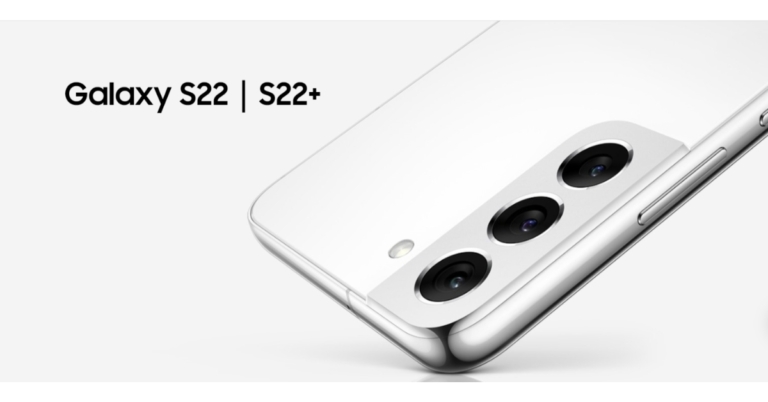
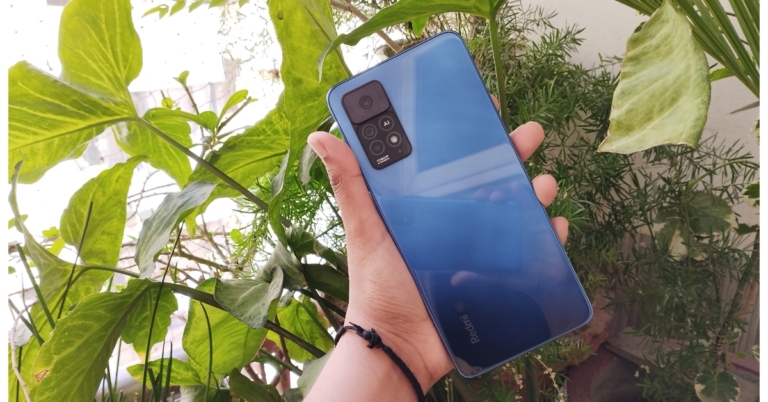
 When light reflects on the Mirage Blue variant, it creates a glossy wavy pattern that looks like water waves. Despite the glossy finish on the back, fingerprints and smudges are less noticeable, which is surprising. However, instead of the pattern’s glossy finish, we’d prefer to see a matte finish. Phantom White and Stealth Black, both with a simple matte finish, are two more colour options.
 The three rear cameras are arranged in a two-step design on the top left corner, with the 108MP primary sensor being more prominent and receiving its own space. A fingerprint sensor is embedded inside the power button on the right side of the frame, while the volume keys are located just above the power button. The 3.5mm headphone jack, IR blaster, and stereo speakers are present on the Redmi Note 11 Pro+ 5G. The earpiece speaker grille, as well as a 3.5mm audio socket and an IR emitter, are all located on the top. On the bottom, you’ll find the primary speaker, USB Type-C port, and hybrid dual-SIM tray.

 The phone isn’t overly heavy, but it has just the right amount of weight. It’s also not very comfortable to grip or use single-handedly due to its flat, squarish design. The body, on the other hand, is splash-resistant, and the SIM tray has a rubber seal to keep moisture out. Its audio output is quite loud and adequate for listening to music and watching movies, and it has left a lasting impression on us.
On the front of the phone is a 6.67-inch full-HD+ AMOLED display with a 120Hz refresh rate and a brightness of up to 1,200 nits. Corning Gorilla Glass 5 is used to make the display. Because it supports 360Hz, the screen response rate is quite good.
The phone isn’t overly heavy, but it has just the right amount of weight. It’s also not very comfortable to grip or use single-handedly due to its flat, squarish design. The body, on the other hand, is splash-resistant, and the SIM tray has a rubber seal to keep moisture out. Its audio output is quite loud and adequate for listening to music and watching movies, and it has left a lasting impression on us.
On the front of the phone is a 6.67-inch full-HD+ AMOLED display with a 120Hz refresh rate and a brightness of up to 1,200 nits. Corning Gorilla Glass 5 is used to make the display. Because it supports 360Hz, the screen response rate is quite good.
 We immediately noticed how responsive the touch is here, which is something you’d only find on premium mid-rangers (By the way we loved playing Subway Surfer on this phone.) The fluidity has improved with the 120Hz refresh rate, and we haven’t experienced any stutter or jitters during our testing. As a result, scrolling through the UI is much more fluid. On this device, we had a lot of fun watching movies and Netflix and Prime series. The videos showcased vivid colours and deep blacks, and the content is bright and readable even in direct sunlight. The automatic brightness adjustment, on the other hand, is a little slower, but that’s not a deal-breaker for us.
 Before we get to the optics, take a look at the camera specifications. A 108-megapixel Samsung HM2 main sensor, an 8-megapixel ultra-wide camera, and a 2-megapixel macro camera make up the Redmi Note 11 Pro+ 5G’s triple rear camera setup. A 16-megapixel selfie camera with an f/2.45 lens is included in the device.
 Surprisingly, this 5G variant does not include the 2-megapixel depth sensor found on the 4G Redmi Note 11 Pro. Last year’s Redmi Note series camera performance left us unsatisfied, but this year’s model has some improvements over its predecessor. The colour optimisation is flawless, the images do not appear oversaturated, and the contrast is also flawless. Under good lighting conditions, the 108-megapixel primary sensor, as well as the selfie camera, produce some good images. When compared to other smartphone images, however, the photos taken with this phone lacked detail, which could be due to slower processing or other factors.


 When light reflects on the Mirage Blue variant, it creates a glossy wavy pattern that looks like water waves. Despite the glossy finish on the back, fingerprints and smudges are less noticeable, which is surprising. However, instead of the pattern’s glossy finish, we’d prefer to see a matte finish. Phantom White and Stealth Black, both with a simple matte finish, are two more colour options.
 The three rear cameras are arranged in a two-step design on the top left corner, with the 108MP primary sensor being more prominent and receiving its own space. A fingerprint sensor is embedded inside the power button on the right side of the frame, while the volume keys are located just above the power button. The 3.5mm headphone jack, IR blaster, and stereo speakers are present on the Redmi Note 11 Pro+ 5G. The earpiece speaker grille, as well as a 3.5mm audio socket and an IR emitter, are all located on the top. On the bottom, you’ll find the primary speaker, USB Type-C port, and hybrid dual-SIM tray.

 The phone isn’t overly heavy, but it has just the right amount of weight. It’s also not very comfortable to grip or use single-handedly due to its flat, squarish design. The body, on the other hand, is splash-resistant, and the SIM tray has a rubber seal to keep moisture out. Its audio output is quite loud and adequate for listening to music and watching movies, and it has left a lasting impression on us.
On the front of the phone is a 6.67-inch full-HD+ AMOLED display with a 120Hz refresh rate and a brightness of up to 1,200 nits. Corning Gorilla Glass 5 is used to make the display. Because it supports 360Hz, the screen response rate is quite good.
The phone isn’t overly heavy, but it has just the right amount of weight. It’s also not very comfortable to grip or use single-handedly due to its flat, squarish design. The body, on the other hand, is splash-resistant, and the SIM tray has a rubber seal to keep moisture out. Its audio output is quite loud and adequate for listening to music and watching movies, and it has left a lasting impression on us.
On the front of the phone is a 6.67-inch full-HD+ AMOLED display with a 120Hz refresh rate and a brightness of up to 1,200 nits. Corning Gorilla Glass 5 is used to make the display. Because it supports 360Hz, the screen response rate is quite good.
 We immediately noticed how responsive the touch is here, which is something you’d only find on premium mid-rangers (By the way we loved playing Subway Surfer on this phone.) The fluidity has improved with the 120Hz refresh rate, and we haven’t experienced any stutter or jitters during our testing. As a result, scrolling through the UI is much more fluid. On this device, we had a lot of fun watching movies and Netflix and Prime series. The videos showcased vivid colours and deep blacks, and the content is bright and readable even in direct sunlight. The automatic brightness adjustment, on the other hand, is a little slower, but that’s not a deal-breaker for us.
 Before we get to the optics, take a look at the camera specifications. A 108-megapixel Samsung HM2 main sensor, an 8-megapixel ultra-wide camera, and a 2-megapixel macro camera make up the Redmi Note 11 Pro+ 5G’s triple rear camera setup. A 16-megapixel selfie camera with an f/2.45 lens is included in the device.
 Surprisingly, this 5G variant does not include the 2-megapixel depth sensor found on the 4G Redmi Note 11 Pro. Last year’s Redmi Note series camera performance left us unsatisfied, but this year’s model has some improvements over its predecessor. The colour optimisation is flawless, the images do not appear oversaturated, and the contrast is also flawless. Under good lighting conditions, the 108-megapixel primary sensor, as well as the selfie camera, produce some good images. When compared to other smartphone images, however, the photos taken with this phone lacked detail, which could be due to slower processing or other factors.





 Read also: 10 Essential Apps To Install First On Your New Windows Laptop
 Read also: 10 Essential Apps To Install First On Your New Windows Laptop
 Read also: How to Pay Someone With Apple Pay on Your iPhone?


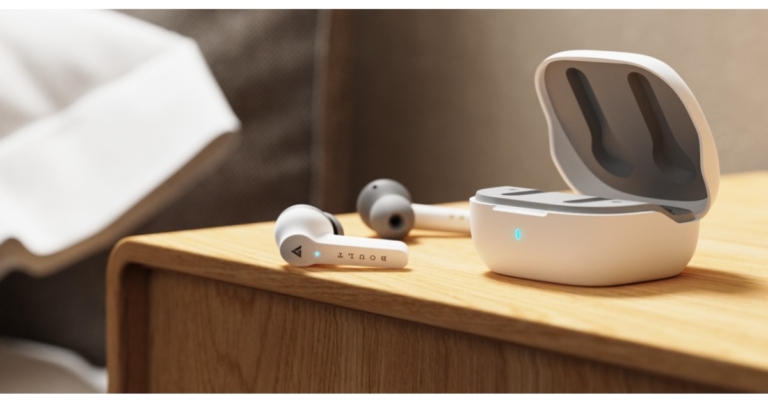



 The first one to be on top of our list of the 10 essential apps to install first on your new windows laptop had to be Google Chrome. Windows OS does not come pre-installed with Google Chrome in it. Even the latest Windows 10 and 11 come with Microsoft Edge as their default browser. Considering its efficiency, speed, vast network and features like cross-platform syncing across all your devices, Chrome still is the number one choice of most web users.
Download from here.
The first one to be on top of our list of the 10 essential apps to install first on your new windows laptop had to be Google Chrome. Windows OS does not come pre-installed with Google Chrome in it. Even the latest Windows 10 and 11 come with Microsoft Edge as their default browser. Considering its efficiency, speed, vast network and features like cross-platform syncing across all your devices, Chrome still is the number one choice of most web users.
Download from here.
 Why should listening to music be limited to only smartphone devices? Spotify’s desktop version is the perfect music application for you if you are a music enthusiast and often work on your laptop while listening to music. Spotify’s intelligent algorithms identify your taste in music according to your listening preferences, frequency and more factors, and in turn provide a range of services based upon the same, such as customised playlists, albums, podcasts, and much more. Moreover, Spotify’s desktop app is considered better than its web player. So why not give it a try?
Download from here.
Read also: Spotify Web Player: How To Best Access And Use All Its Features
Why should listening to music be limited to only smartphone devices? Spotify’s desktop version is the perfect music application for you if you are a music enthusiast and often work on your laptop while listening to music. Spotify’s intelligent algorithms identify your taste in music according to your listening preferences, frequency and more factors, and in turn provide a range of services based upon the same, such as customised playlists, albums, podcasts, and much more. Moreover, Spotify’s desktop app is considered better than its web player. So why not give it a try?
Download from here.
Read also: Spotify Web Player: How To Best Access And Use All Its Features
 Coming third in our list of the top 10 essential apps to install first on your new windows laptop is Adobe Lightroom. One of the best apps for photo editing, Adobe Lightroom is not just for professionals but is also beginner-friendly. One can easily arrange and enhance their images by editing in lightroom. It allows you to control everything from the basic photo correction to advanced colour grading needed in your captures via the various tools and features it provides.
Download from here.
Coming third in our list of the top 10 essential apps to install first on your new windows laptop is Adobe Lightroom. One of the best apps for photo editing, Adobe Lightroom is not just for professionals but is also beginner-friendly. One can easily arrange and enhance their images by editing in lightroom. It allows you to control everything from the basic photo correction to advanced colour grading needed in your captures via the various tools and features it provides.
Download from here.
 We’re sure this one also everybody will agree on. A zip file extractor is a must on every system! Windows is not said to natively support zip files, and Winrar can only do so much without a full subscription. However, 7zip is a free open source software that is even better for accessing RAR files and works just like Winrar.
Download from here.
Read also: Top 5 Best Free Benchmark Apps for Android 2022
We’re sure this one also everybody will agree on. A zip file extractor is a must on every system! Windows is not said to natively support zip files, and Winrar can only do so much without a full subscription. However, 7zip is a free open source software that is even better for accessing RAR files and works just like Winrar.
Download from here.
Read also: Top 5 Best Free Benchmark Apps for Android 2022
 The fifth on our list of the top 10 essential items to install first on your new windows laptop is an antivirus package. Just like humans need doctors for their health checkups, laptops need antivirus programs to keep their health in line, i.e., keep the system free from any kind of virus or malware attacks so that it runs efficiently. There are many antiviruses available in the market, like McAfee, Kaspersky, etc.
Download from here.
The fifth on our list of the top 10 essential items to install first on your new windows laptop is an antivirus package. Just like humans need doctors for their health checkups, laptops need antivirus programs to keep their health in line, i.e., keep the system free from any kind of virus or malware attacks so that it runs efficiently. There are many antiviruses available in the market, like McAfee, Kaspersky, etc.
Download from here.
 VLC is a popular media player application, that supports a wide range of file formats and offers many plugins to further customise it, therefore making for an ideal application recommendation. Moreover, it is completely free to use and is totally ad-free.
Download from here.
VLC is a popular media player application, that supports a wide range of file formats and offers many plugins to further customise it, therefore making for an ideal application recommendation. Moreover, it is completely free to use and is totally ad-free.
Download from here.
 Up-to-date drivers are key to the smooth functioning of your system. Outdated drivers can cause a lot of trouble and affect the performance of your laptop, as a result of which you have to then take out time and figure out the issue behind the problem, which actually is all because of the device drivers acting up. Hence, for checking whether your system has the latest drivers, driver booster softwares like IObit are available.
Download from here.
Up-to-date drivers are key to the smooth functioning of your system. Outdated drivers can cause a lot of trouble and affect the performance of your laptop, as a result of which you have to then take out time and figure out the issue behind the problem, which actually is all because of the device drivers acting up. Hence, for checking whether your system has the latest drivers, driver booster softwares like IObit are available.
Download from here.
 Next on our list of the top 10 essential apps to install first on your new Windows laptop is this one. In order to thoroughly test the performance of your system, Geekbench 5 is one of the best benchmarking apps and can be used not only for Windows but also on macOS, iOS, Android and Linux. It provides a CPU Benchmark module, which tests your CPU’s single-core and multi-core performance. Its Compute Benchmark module helps test your GPU’s performance, thus determining your system’s gaming, image processing and video potential. Not only that, but it also is able to compare the performance of your device to the newest devices on the market.
Download from here.
Next on our list of the top 10 essential apps to install first on your new Windows laptop is this one. In order to thoroughly test the performance of your system, Geekbench 5 is one of the best benchmarking apps and can be used not only for Windows but also on macOS, iOS, Android and Linux. It provides a CPU Benchmark module, which tests your CPU’s single-core and multi-core performance. Its Compute Benchmark module helps test your GPU’s performance, thus determining your system’s gaming, image processing and video potential. Not only that, but it also is able to compare the performance of your device to the newest devices on the market.
Download from here.
 Needless to say, video calling apps have become one of the most essential to have in your pocket, especially after the COVID-19 pandemic. With offices now having happily adopted the work from home culture, video conferences have become crucial for keeping a touch base. Hence, apps like GoogleDuo and Zoom become permanent members of your Windows family of apps.
Download from here.
Needless to say, video calling apps have become one of the most essential to have in your pocket, especially after the COVID-19 pandemic. With offices now having happily adopted the work from home culture, video conferences have become crucial for keeping a touch base. Hence, apps like GoogleDuo and Zoom become permanent members of your Windows family of apps.
Download from here.
 The final item on our list of the top 10 essential items to install first on your new windows laptop comes right in the support of video calling apps that we suggested. Now, suppose you’re on an official video conference and are required to record your meeting for future reference. What will you do? Yes, that’s exactly where screen recording apps like Flashback Express come in handy. It allows you to record your partial or entire screen, trim your recording, and add captions, commentary and images. You can save your recording as an MP4, AVI or WMV file. Moreover, the Express edition of Flashback is completely free to use.
Download from here.
So those were our top picks for the 10 most essential apps to install first on your new windows laptop. In case your essentials are different from the ones mentioned above, we would love to hear about them in the comments section below.
For the latest gadget and tech news, and gadget reviews, follow us on Twitter, Facebook and Instagram. For newest tech & gadget videos subscribe to our YouTube Channel. You can also stay up to date using the Gadget Bridge Android App. You can find the latest car and bike news here.
The final item on our list of the top 10 essential items to install first on your new windows laptop comes right in the support of video calling apps that we suggested. Now, suppose you’re on an official video conference and are required to record your meeting for future reference. What will you do? Yes, that’s exactly where screen recording apps like Flashback Express come in handy. It allows you to record your partial or entire screen, trim your recording, and add captions, commentary and images. You can save your recording as an MP4, AVI or WMV file. Moreover, the Express edition of Flashback is completely free to use.
Download from here.
So those were our top picks for the 10 most essential apps to install first on your new windows laptop. In case your essentials are different from the ones mentioned above, we would love to hear about them in the comments section below.
For the latest gadget and tech news, and gadget reviews, follow us on Twitter, Facebook and Instagram. For newest tech & gadget videos subscribe to our YouTube Channel. You can also stay up to date using the Gadget Bridge Android App. You can find the latest car and bike news here. 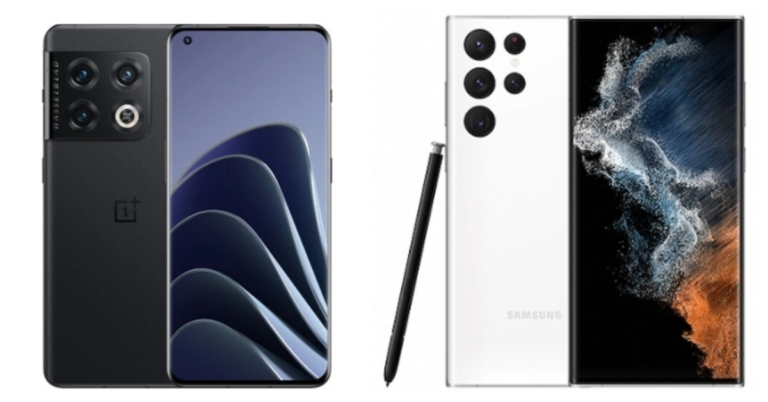
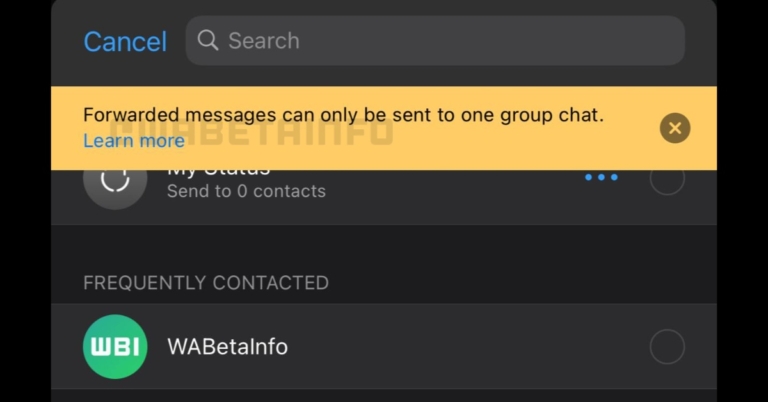




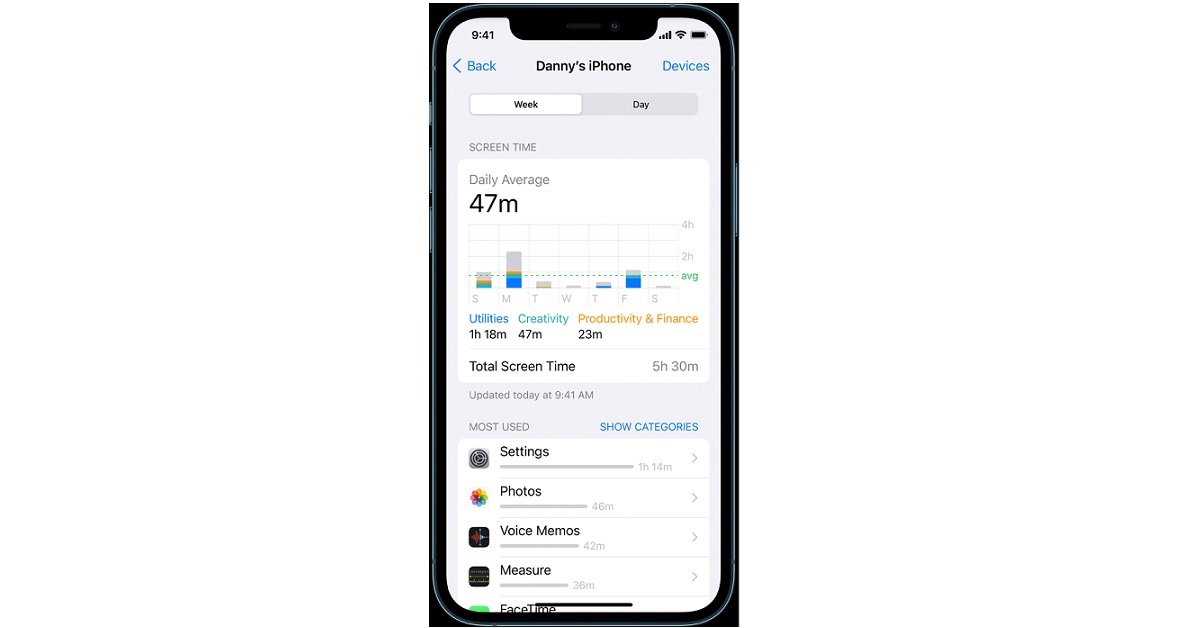 After turning on Screen Time on your Apple device, you can then view detailed usage metrics, both on a daily and weekly basis, including the apps you spend most of your time on and by how much, the apps that send you the maximum number of notifications and much more. You can also add a widget to your home screen in order to keep a track of your smartphone usage right from your home screen.
For the latest gadget and tech news, and gadget reviews, follow us on Twitter, Facebook and Instagram. For newest tech & gadget videos subscribe to our YouTube Channel. You can also stay up to date using the Gadget Bridge Android App. You can find the latest car and bike news here.
After turning on Screen Time on your Apple device, you can then view detailed usage metrics, both on a daily and weekly basis, including the apps you spend most of your time on and by how much, the apps that send you the maximum number of notifications and much more. You can also add a widget to your home screen in order to keep a track of your smartphone usage right from your home screen.
For the latest gadget and tech news, and gadget reviews, follow us on Twitter, Facebook and Instagram. For newest tech & gadget videos subscribe to our YouTube Channel. You can also stay up to date using the Gadget Bridge Android App. You can find the latest car and bike news here. 
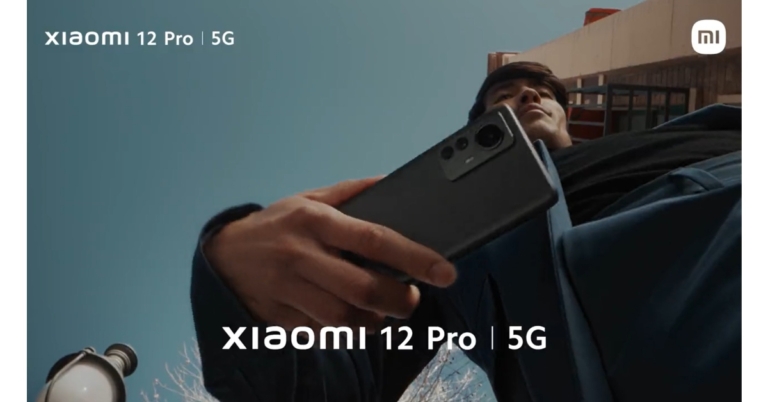

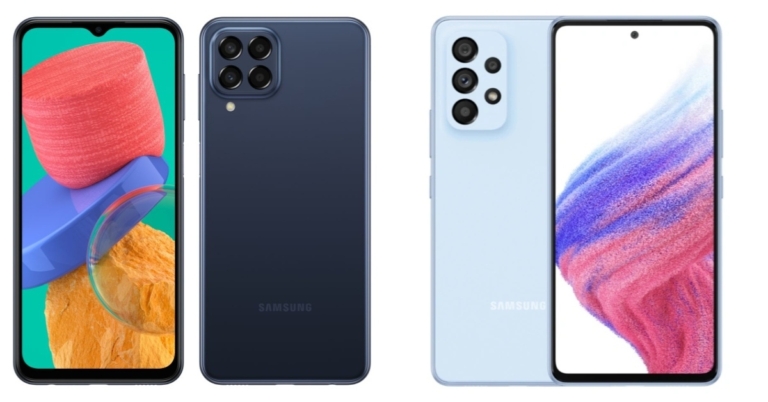
 If you want to take a lot of selfies, the Samsung Galaxy A33 5G is a better choice than the Samsung Galaxy M33 5G because it has a better 13 MP front camera. Both phones are powered by Android 12 and feature OneUI. On the Galaxy M33, the chipset’s name is still unknown, whereas the Galaxy A33 5G is powered by a 5nm Exynos 1280 SoC. M33 overpowers A33 in terms of battery life, thanks to its massive 6,000mAh battery. So, if you’re looking for a device with a lot of features that also fits in your pocket, the Samsung Galaxy M33 5G is the way to go.
For the latest gadget and tech news, and gadget reviews, follow us on Twitter, Facebook and Instagram. For newest tech & gadget videos subscribe to our YouTube Channel. You can also stay up to date using the Gadget Bridge Android App. You can find the latest car and bike news here.
If you want to take a lot of selfies, the Samsung Galaxy A33 5G is a better choice than the Samsung Galaxy M33 5G because it has a better 13 MP front camera. Both phones are powered by Android 12 and feature OneUI. On the Galaxy M33, the chipset’s name is still unknown, whereas the Galaxy A33 5G is powered by a 5nm Exynos 1280 SoC. M33 overpowers A33 in terms of battery life, thanks to its massive 6,000mAh battery. So, if you’re looking for a device with a lot of features that also fits in your pocket, the Samsung Galaxy M33 5G is the way to go.
For the latest gadget and tech news, and gadget reviews, follow us on Twitter, Facebook and Instagram. For newest tech & gadget videos subscribe to our YouTube Channel. You can also stay up to date using the Gadget Bridge Android App. You can find the latest car and bike news here.  If you want to take a lot of selfies, the Samsung Galaxy A33 5G is a better choice than the Samsung Galaxy M33 5G because it has a better 13 MP front camera. Both phones are powered by Android 12 and feature OneUI. On the Galaxy M33, the chipset’s name is still unknown, whereas the Galaxy A33 5G is powered by a 5nm Exynos 1280 SoC. M33 overpowers A33 in terms of battery life, thanks to its massive 6,000mAh battery. So, if you’re looking for a device with a lot of features that also fits in your pocket, the Samsung Galaxy M33 5G is the way to go.
For the latest gadget and tech news, and gadget reviews, follow us on Twitter, Facebook and Instagram. For newest tech & gadget videos subscribe to our YouTube Channel. You can also stay up to date using the Gadget Bridge Android App. You can find the latest car and bike news here.
If you want to take a lot of selfies, the Samsung Galaxy A33 5G is a better choice than the Samsung Galaxy M33 5G because it has a better 13 MP front camera. Both phones are powered by Android 12 and feature OneUI. On the Galaxy M33, the chipset’s name is still unknown, whereas the Galaxy A33 5G is powered by a 5nm Exynos 1280 SoC. M33 overpowers A33 in terms of battery life, thanks to its massive 6,000mAh battery. So, if you’re looking for a device with a lot of features that also fits in your pocket, the Samsung Galaxy M33 5G is the way to go.
For the latest gadget and tech news, and gadget reviews, follow us on Twitter, Facebook and Instagram. For newest tech & gadget videos subscribe to our YouTube Channel. You can also stay up to date using the Gadget Bridge Android App. You can find the latest car and bike news here. 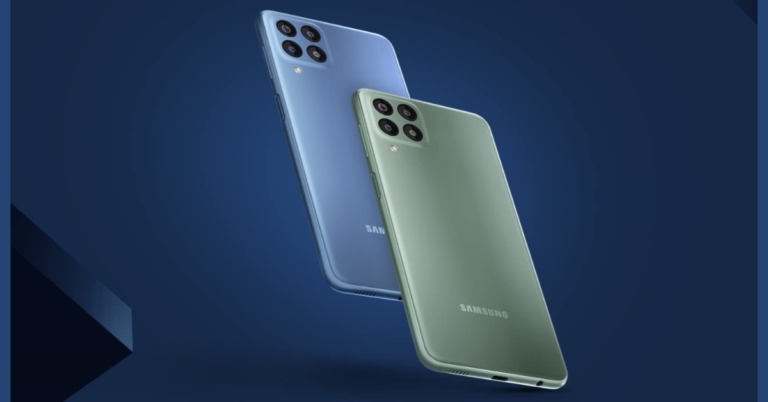
 ICICI Bank cardholders can also get an instant cashback of Rs 2000. Samsung.com, Amazon.in, and select retail stores will begin selling the Galaxy M33 5G on April 8 at 12 p.m.
Also Read: Comparison: Samsung Galaxy M33 5G vs Samsung Galaxy A33 5G
ICICI Bank cardholders can also get an instant cashback of Rs 2000. Samsung.com, Amazon.in, and select retail stores will begin selling the Galaxy M33 5G on April 8 at 12 p.m.
Also Read: Comparison: Samsung Galaxy M33 5G vs Samsung Galaxy A33 5G
 In terms of optics, a 50-megapixel primary sensor with an f/1.8 aperture is included in the Galaxy M33 5G’s quad rear camera setup. A 5-megapixel ultra-wide-angle lens with an f/2.2 aperture, as well as dual 2-megapixel macro and depth sensors with an f/2.4 aperture, are included. The phone’s front-facing camera is an 8-megapixel unit with an f/2.2 aperture. Single Take, Object Eraser, and Video TNR (Temporal Noise Reduction) are among the new 5G smartphone features that will help you capture stunning photos and videos.
The Galaxy M33 5G packs a 6,000mAh battery with 25W fast charging support and a fingerprint sensor on the side. An accelerometer, gyroscope, ambient light sensor, and proximity sensor are among the onboard sensors. Even after hours of use, the Galaxy M33 5G’s Power Cool Tech keeps it cool. This technology, which is primarily designed for mobile gamers and heavy video callers, keeps the phone cool by preventing overheating.
For the latest gadget and tech news, and gadget reviews, follow us on Twitter, Facebook and Instagram. For newest tech & gadget videos subscribe to our YouTube Channel. You can also stay up to date using the Gadget Bridge Android App. You can find the latest car and bike news here.
In terms of optics, a 50-megapixel primary sensor with an f/1.8 aperture is included in the Galaxy M33 5G’s quad rear camera setup. A 5-megapixel ultra-wide-angle lens with an f/2.2 aperture, as well as dual 2-megapixel macro and depth sensors with an f/2.4 aperture, are included. The phone’s front-facing camera is an 8-megapixel unit with an f/2.2 aperture. Single Take, Object Eraser, and Video TNR (Temporal Noise Reduction) are among the new 5G smartphone features that will help you capture stunning photos and videos.
The Galaxy M33 5G packs a 6,000mAh battery with 25W fast charging support and a fingerprint sensor on the side. An accelerometer, gyroscope, ambient light sensor, and proximity sensor are among the onboard sensors. Even after hours of use, the Galaxy M33 5G’s Power Cool Tech keeps it cool. This technology, which is primarily designed for mobile gamers and heavy video callers, keeps the phone cool by preventing overheating.
For the latest gadget and tech news, and gadget reviews, follow us on Twitter, Facebook and Instagram. For newest tech & gadget videos subscribe to our YouTube Channel. You can also stay up to date using the Gadget Bridge Android App. You can find the latest car and bike news here.  In terms of optics, a 50-megapixel primary sensor with an f/1.8 aperture is included in the Galaxy M33 5G’s quad rear camera setup. A 5-megapixel ultra-wide-angle lens with an f/2.2 aperture, as well as dual 2-megapixel macro and depth sensors with an f/2.4 aperture, are included. The phone’s front-facing camera is an 8-megapixel unit with an f/2.2 aperture. Single Take, Object Eraser, and Video TNR (Temporal Noise Reduction) are among the new 5G smartphone features that will help you capture stunning photos and videos.
The Galaxy M33 5G packs a 6,000mAh battery with 25W fast charging support and a fingerprint sensor on the side. An accelerometer, gyroscope, ambient light sensor, and proximity sensor are among the onboard sensors. Even after hours of use, the Galaxy M33 5G’s Power Cool Tech keeps it cool. This technology, which is primarily designed for mobile gamers and heavy video callers, keeps the phone cool by preventing overheating.
For the latest gadget and tech news, and gadget reviews, follow us on Twitter, Facebook and Instagram. For newest tech & gadget videos subscribe to our YouTube Channel. You can also stay up to date using the Gadget Bridge Android App. You can find the latest car and bike news here.
In terms of optics, a 50-megapixel primary sensor with an f/1.8 aperture is included in the Galaxy M33 5G’s quad rear camera setup. A 5-megapixel ultra-wide-angle lens with an f/2.2 aperture, as well as dual 2-megapixel macro and depth sensors with an f/2.4 aperture, are included. The phone’s front-facing camera is an 8-megapixel unit with an f/2.2 aperture. Single Take, Object Eraser, and Video TNR (Temporal Noise Reduction) are among the new 5G smartphone features that will help you capture stunning photos and videos.
The Galaxy M33 5G packs a 6,000mAh battery with 25W fast charging support and a fingerprint sensor on the side. An accelerometer, gyroscope, ambient light sensor, and proximity sensor are among the onboard sensors. Even after hours of use, the Galaxy M33 5G’s Power Cool Tech keeps it cool. This technology, which is primarily designed for mobile gamers and heavy video callers, keeps the phone cool by preventing overheating.
For the latest gadget and tech news, and gadget reviews, follow us on Twitter, Facebook and Instagram. For newest tech & gadget videos subscribe to our YouTube Channel. You can also stay up to date using the Gadget Bridge Android App. You can find the latest car and bike news here. 


 Step 2: Once within the Digital Wellbeing window, you’ll be able to see right away the top 3 apps that you use each day and for how long.
 Step 3: You can tap on the chart to enter the Digital Wellbeing dashboard, which displays detailed metrics about your total and app-wise screen time, the number of notifications received both in total and app-wise and the number of times you unlocked your smartphone each day.
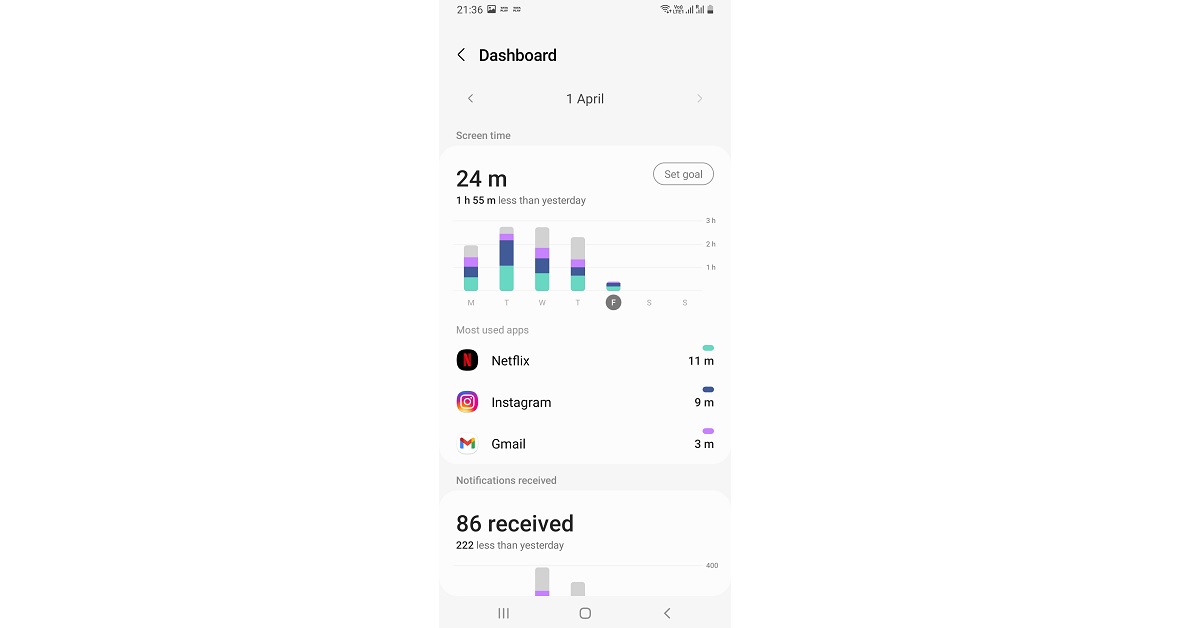

 The photo and video sharing platform now allows users to reply to messages while browsing, as well as send messages silently. You can now respond without having to navigate to your inbox and risk losing your place. This new feature makes chatting on the app even easier and more convenient.
Instagram has also made resharing more easier now. You can easily reshare posts to your closest friends by tapping and holding the share button. To see who’s online, at the top of your inbox, you can see who’s available to chat right now, which can help you find unexpected ways to connect with friends.
In addition to this Instagram has also added the ability to customise messaging threads. You can now share a 30-second preview of that song you can’t get out of your head, and your friends can listen directly from the chat window, thanks to integrations with Apple Music, Amazon Music, and Spotify coming soon.
The photo and video sharing platform now allows users to reply to messages while browsing, as well as send messages silently. You can now respond without having to navigate to your inbox and risk losing your place. This new feature makes chatting on the app even easier and more convenient.
Instagram has also made resharing more easier now. You can easily reshare posts to your closest friends by tapping and holding the share button. To see who’s online, at the top of your inbox, you can see who’s available to chat right now, which can help you find unexpected ways to connect with friends.
In addition to this Instagram has also added the ability to customise messaging threads. You can now share a 30-second preview of that song you can’t get out of your head, and your friends can listen directly from the chat window, thanks to integrations with Apple Music, Amazon Music, and Spotify coming soon.
 Instagram users can now add “@silent” to their messages to send messages without waking up their friends late at night or when they’re busy. You can now communicate without fear of sending unwanted notifications. The @silent shortcut command was first introduced to Facebook Messenger recently. In order to make your conversations feel more personal, try the new lo-fi chat theme.
Users on Instagram can also now try one of Messenger’s most popular group chat features on Instagram, allowing you to make a poll right in your group chat.
For the latest gadget and tech news, and gadget reviews, follow us on Twitter, Facebook and Instagram. For newest tech & gadget videos subscribe to our YouTube Channel. You can also stay up to date using the Gadget Bridge Android App. You can find the latest car and bike news here.
Instagram users can now add “@silent” to their messages to send messages without waking up their friends late at night or when they’re busy. You can now communicate without fear of sending unwanted notifications. The @silent shortcut command was first introduced to Facebook Messenger recently. In order to make your conversations feel more personal, try the new lo-fi chat theme.
Users on Instagram can also now try one of Messenger’s most popular group chat features on Instagram, allowing you to make a poll right in your group chat.
For the latest gadget and tech news, and gadget reviews, follow us on Twitter, Facebook and Instagram. For newest tech & gadget videos subscribe to our YouTube Channel. You can also stay up to date using the Gadget Bridge Android App. You can find the latest car and bike news here.  The photo and video sharing platform now allows users to reply to messages while browsing, as well as send messages silently. You can now respond without having to navigate to your inbox and risk losing your place. This new feature makes chatting on the app even easier and more convenient.
Instagram has also made resharing more easier now. You can easily reshare posts to your closest friends by tapping and holding the share button. To see who’s online, at the top of your inbox, you can see who’s available to chat right now, which can help you find unexpected ways to connect with friends.
In addition to this Instagram has also added the ability to customise messaging threads. You can now share a 30-second preview of that song you can’t get out of your head, and your friends can listen directly from the chat window, thanks to integrations with Apple Music, Amazon Music, and Spotify coming soon.
The photo and video sharing platform now allows users to reply to messages while browsing, as well as send messages silently. You can now respond without having to navigate to your inbox and risk losing your place. This new feature makes chatting on the app even easier and more convenient.
Instagram has also made resharing more easier now. You can easily reshare posts to your closest friends by tapping and holding the share button. To see who’s online, at the top of your inbox, you can see who’s available to chat right now, which can help you find unexpected ways to connect with friends.
In addition to this Instagram has also added the ability to customise messaging threads. You can now share a 30-second preview of that song you can’t get out of your head, and your friends can listen directly from the chat window, thanks to integrations with Apple Music, Amazon Music, and Spotify coming soon.
 Instagram users can now add “@silent” to their messages to send messages without waking up their friends late at night or when they’re busy. You can now communicate without fear of sending unwanted notifications. The @silent shortcut command was first introduced to Facebook Messenger recently. In order to make your conversations feel more personal, try the new lo-fi chat theme.
Users on Instagram can also now try one of Messenger’s most popular group chat features on Instagram, allowing you to make a poll right in your group chat.
For the latest gadget and tech news, and gadget reviews, follow us on Twitter, Facebook and Instagram. For newest tech & gadget videos subscribe to our YouTube Channel. You can also stay up to date using the Gadget Bridge Android App. You can find the latest car and bike news here.
Instagram users can now add “@silent” to their messages to send messages without waking up their friends late at night or when they’re busy. You can now communicate without fear of sending unwanted notifications. The @silent shortcut command was first introduced to Facebook Messenger recently. In order to make your conversations feel more personal, try the new lo-fi chat theme.
Users on Instagram can also now try one of Messenger’s most popular group chat features on Instagram, allowing you to make a poll right in your group chat.
For the latest gadget and tech news, and gadget reviews, follow us on Twitter, Facebook and Instagram. For newest tech & gadget videos subscribe to our YouTube Channel. You can also stay up to date using the Gadget Bridge Android App. You can find the latest car and bike news here. 
 The first one in our list of the top 10 shows and movies to watch on Netflix in April 2022 is for all of you Bollywood buffs. This Abhishek Bachchan and Yami Gautam starrer is hitting the Netflix floors on April 7th. It is a social-comedy revolving around an 8th-grade pass out politician who lands behind bars after his involvement in a teacher recruitment scam.
 For all the Joey King fans out there, April brings a treat for you. The Kissing Booth actress will be seen starring in this emotional romantic movie which is coming to Netflix on 8th April. The plot revolves around a brokenhearted teen who after losing the love of her life in a tragic accident believes that he’s sending her signals from beyond the grave.
 Another addition to the feel-good romantic genre will be Along for the Ride, which is set for release on Netflix on the 22nd of April this year. Written and directed by Sofia Alvarez from the big hit “To All The Boys I’ve Loved Before”, this movie is an adaptation of Sarah Dessen’s bestselling novel by the same name.
Read also: 10 Best TV Series And Movies To Watch On Netflix In March 2022
Another addition to the feel-good romantic genre will be Along for the Ride, which is set for release on Netflix on the 22nd of April this year. Written and directed by Sofia Alvarez from the big hit “To All The Boys I’ve Loved Before”, this movie is an adaptation of Sarah Dessen’s bestselling novel by the same name.
Read also: 10 Best TV Series And Movies To Watch On Netflix In March 2022
 The first one within the category of TV shows coming to Netflix in April 2022 is the 5th season of this Spanish mystery crime thriller series. It stars Jaime Lorente, Maria Pedraza and Miguel Herran who were also seen in Money Heist, one of the biggest hit TV series of all time. The show, which currently has 4 seasons, revolves around the lives of 3 working-class teens and their constant tussle with the so-called ‘elite’ of their society.
 Next on our list is this drama thriller TV series, which was launched first in 2016. Queen of the South is said to wrap up with its final season launching on April 8th this year. The plot of the series is set around the underworld drug cartels of the US.
 For all the Indian web series lovers, the next one for you amongst the top 10 TV shows and movies on Netflix is coming on the 15th of April. Mai: A Mother’s Rage is an emotional dark mystery thriller starring Sakshi Tanwar, that revolves around a grieving mother that turns from meek to merciless to uncover the mystery behind her daughter’s tragic death and chase the criminals responsible for it.
 Based on Emmy winner David E Kelley’s adaptation of the bestselling novel, Anatomy of a Scandal stars Sienna Miller, Rupert Friend and Michelle Dockery. The plot revolves around the wife of a powerful politician whose life unravels when scandalous secrets are revealed.
Read also: 8 Best Shows and Movies To Watch On Prime Video And Disney+Hotstar In March 2022
Based on Emmy winner David E Kelley’s adaptation of the bestselling novel, Anatomy of a Scandal stars Sienna Miller, Rupert Friend and Michelle Dockery. The plot revolves around the wife of a powerful politician whose life unravels when scandalous secrets are revealed.
Read also: 8 Best Shows and Movies To Watch On Prime Video And Disney+Hotstar In March 2022
 At number eight in our list of the top 10 TV shows and movies to watch on Netflix this April, stands this historical period drama. Set with the backdrop of 14th century Barcelona, this Spanish series, which is also based on books, hits the floors of Netflix on 15th April.
 Coming to Netflix on April 22nd is this feel-good romantic LGBTQ+ uplifting British TV drama that is based on teen friendship and young romance, totally swoon-worthy. The series is based on the graphic novel by Alice Oseman.
 Finally, we arrive at the last entry on our list of the top 10 TV shows and movies to watch on Netflix in April 2022. The final episodes of the hit series Ozark are dropping on Netflix on April 29th, bringing the era of Byrdes and Langmores to an end. The Emmy-award winning crime thriller series which debuted in 2017 will be concluded within 7 episodes.
So those were our top picks for the best 10 TV shows and movies to watch on Netflix in April 2022. In case we missed out on any of your favourites scheduled to arrive on Netflix this April, do let us know in the comments section below. Netflix and chill you all!
For the latest gadget and tech news, and gadget reviews, follow us on Twitter, Facebook and Instagram. For newest tech & gadget videos subscribe to our YouTube Channel. You can also stay up to date using the Gadget Bridge Android App. You can find the latest car and bike news here.
Finally, we arrive at the last entry on our list of the top 10 TV shows and movies to watch on Netflix in April 2022. The final episodes of the hit series Ozark are dropping on Netflix on April 29th, bringing the era of Byrdes and Langmores to an end. The Emmy-award winning crime thriller series which debuted in 2017 will be concluded within 7 episodes.
So those were our top picks for the best 10 TV shows and movies to watch on Netflix in April 2022. In case we missed out on any of your favourites scheduled to arrive on Netflix this April, do let us know in the comments section below. Netflix and chill you all!
For the latest gadget and tech news, and gadget reviews, follow us on Twitter, Facebook and Instagram. For newest tech & gadget videos subscribe to our YouTube Channel. You can also stay up to date using the Gadget Bridge Android App. You can find the latest car and bike news here. 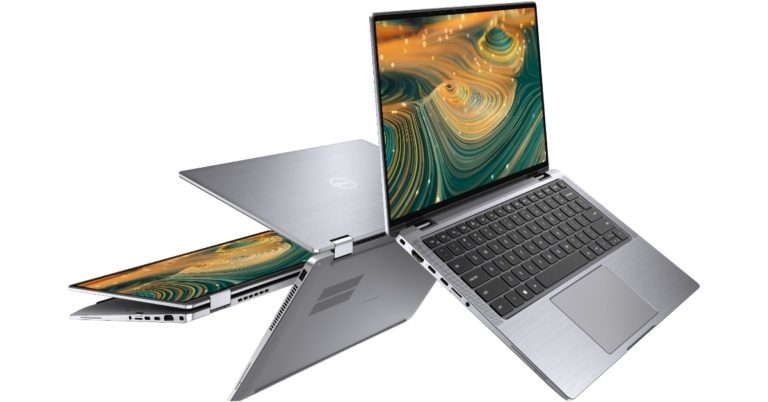



 The one taking the numero uno position in our list of the 5 best digital car air pumps under Rs 6,000 is from Fortem, the highest rated on Amazon. This portable and compact air compressor can be used for not just cars but trucks, SUVs, motorcycle tyres as well. It comes with a 14ft long power cable and 3 nozzle attachments for comparatively small inflatables like air mattresses, sports balls, pool toys, etc.
It is compatible with all vehicles with a DC-12V cigarette lighter power outlet and has built-in safety features like an automatic LED flashlight for support during a nighttime emergency. Considered among the best heavy duty tyre inflators, it comes with a 1-year warranty as well as a carrying case, is imported from the USA, and is priced at Rs 5,079.
Buy from here.
Read also: Top 5 Cheapest Cool New Gadgets On Amazon That You Can Buy Under Rs 1500 In 2022
The one taking the numero uno position in our list of the 5 best digital car air pumps under Rs 6,000 is from Fortem, the highest rated on Amazon. This portable and compact air compressor can be used for not just cars but trucks, SUVs, motorcycle tyres as well. It comes with a 14ft long power cable and 3 nozzle attachments for comparatively small inflatables like air mattresses, sports balls, pool toys, etc.
It is compatible with all vehicles with a DC-12V cigarette lighter power outlet and has built-in safety features like an automatic LED flashlight for support during a nighttime emergency. Considered among the best heavy duty tyre inflators, it comes with a 1-year warranty as well as a carrying case, is imported from the USA, and is priced at Rs 5,079.
Buy from here.
Read also: Top 5 Cheapest Cool New Gadgets On Amazon That You Can Buy Under Rs 1500 In 2022
 Yes, the Chinese brand Xiaomi which is currently the leader in the Indian smartphone market as per 2021 sales also provides a car tyre inflator, which is rated as the second-highest on Amazon. This tiny sized super-compact air compressor is portable such that it can even fit inside your pocket. Its high precision alloy allows compression up to 150 PSI and can inflate anything ranging from footballs to car tyres. It does not need to be plugged in to work and has a long-lasting 18650 lithium-ion battery. It is priced at Rs 2,499.
Buy from here.
Yes, the Chinese brand Xiaomi which is currently the leader in the Indian smartphone market as per 2021 sales also provides a car tyre inflator, which is rated as the second-highest on Amazon. This tiny sized super-compact air compressor is portable such that it can even fit inside your pocket. Its high precision alloy allows compression up to 150 PSI and can inflate anything ranging from footballs to car tyres. It does not need to be plugged in to work and has a long-lasting 18650 lithium-ion battery. It is priced at Rs 2,499.
Buy from here.
 The third one in our list of the 5 best digital tyre inflators under Rs 6,000 is from AmazonBasics. This portable 12V digital car air pump plugs easily into the cigarette lighter port and is useful for tyres having a 120 PSI rating. It has a 10ft power cord, a 23.6-inch air hose, a digital gauge with auto shut off capability as well as a built-in LED light for dim light operations. It is priced at Rs 2,179.
Buy from here.
The third one in our list of the 5 best digital tyre inflators under Rs 6,000 is from AmazonBasics. This portable 12V digital car air pump plugs easily into the cigarette lighter port and is useful for tyres having a 120 PSI rating. It has a 10ft power cord, a 23.6-inch air hose, a digital gauge with auto shut off capability as well as a built-in LED light for dim light operations. It is priced at Rs 2,179.
Buy from here.
 This 12V DC air compressor has a 120W high power engine delivering a super-fast inflation rate of 35L/min. You can inflate everything from a basketball to a 195/55/R15 car tyre from 0 to 35 PSI in no time. It comes with a 9.8ft power cord, a digital tyre pressure gauge display, 3 additional nozzles, auto shut off functionality and a bright LED flashlight. This one again has to be imported from the USA and is priced at Rs 4,189.
Buy from here.
Read also: 5 Best Sitting-Standing Desks You Can Buy In India Under Rs 30,000
This 12V DC air compressor has a 120W high power engine delivering a super-fast inflation rate of 35L/min. You can inflate everything from a basketball to a 195/55/R15 car tyre from 0 to 35 PSI in no time. It comes with a 9.8ft power cord, a digital tyre pressure gauge display, 3 additional nozzles, auto shut off functionality and a bright LED flashlight. This one again has to be imported from the USA and is priced at Rs 4,189.
Buy from here.
Read also: 5 Best Sitting-Standing Desks You Can Buy In India Under Rs 30,000
 The final one in our list of the 5 best digital tyre inflators for your car under Rs 6,000 is again from Xiaomi. It comes with 5 inflation modes, digitally controlled air-pressure sensors to improve inflation accuracy, a 2000 mAh lithium-ion battery, a Type-C charging port and an in-built LED light for nighttime use with an SOS flash feature for emergence. It is priced at Rs 2,999.
Buy from here.
So those were our top picks for the 5 best digital car air pumps that you can buy for under Rs 6,000 in 2022. If you know of any better option than the ones mentioned above, we would love to hear about it in the comments section below.
Content Courtesy: Motor Bridge
For the latest gadget and tech news, and gadget reviews, follow us on Twitter, Facebook and Instagram. For newest tech & gadget videos subscribe to our YouTube Channel. You can also stay up to date using the Gadget Bridge Android App. You can find the latest car and bike news here.
The final one in our list of the 5 best digital tyre inflators for your car under Rs 6,000 is again from Xiaomi. It comes with 5 inflation modes, digitally controlled air-pressure sensors to improve inflation accuracy, a 2000 mAh lithium-ion battery, a Type-C charging port and an in-built LED light for nighttime use with an SOS flash feature for emergence. It is priced at Rs 2,999.
Buy from here.
So those were our top picks for the 5 best digital car air pumps that you can buy for under Rs 6,000 in 2022. If you know of any better option than the ones mentioned above, we would love to hear about it in the comments section below.
Content Courtesy: Motor Bridge
For the latest gadget and tech news, and gadget reviews, follow us on Twitter, Facebook and Instagram. For newest tech & gadget videos subscribe to our YouTube Channel. You can also stay up to date using the Gadget Bridge Android App. You can find the latest car and bike news here. 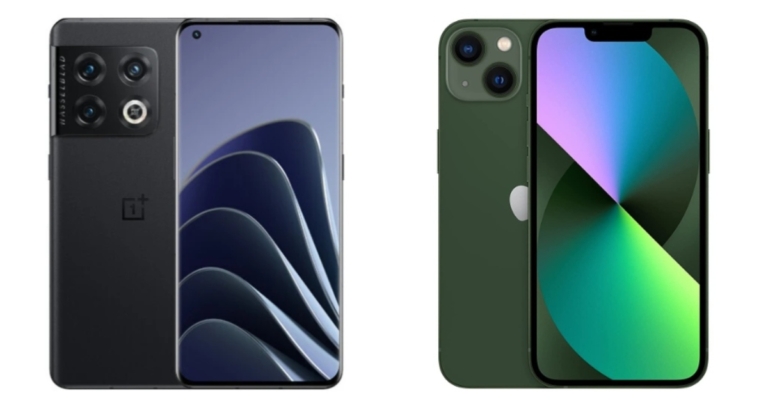

 The OnePlus Bullets Wireless Z2 earbuds have 12.4mm drivers and an AI scene-model algorithm for call noise reduction via the built-in microphone. The earbuds have an impedance of 32 ohms and can deliver a maximum sound pressure level of 102 decibels. It has Bluetooth v5 connectivity and supports AAC and SBC codecs.
Also Read: OnePlus 10 Pro powered by Snapdragon 8 Gen 1 SoC debuts in India
The 200mAh battery in the OnePlus wireless earphones is rated to provide 30 hours of playback time at 50% volume. The OnePlus Bullets Wireless Z2 also supports fast charging via USB Type-C, which is rated to provide 20 hours of battery life in just 10 minutes of charging.
The OnePlus Bullets Wireless Z2 earbuds have 12.4mm drivers and an AI scene-model algorithm for call noise reduction via the built-in microphone. The earbuds have an impedance of 32 ohms and can deliver a maximum sound pressure level of 102 decibels. It has Bluetooth v5 connectivity and supports AAC and SBC codecs.
Also Read: OnePlus 10 Pro powered by Snapdragon 8 Gen 1 SoC debuts in India
The 200mAh battery in the OnePlus wireless earphones is rated to provide 30 hours of playback time at 50% volume. The OnePlus Bullets Wireless Z2 also supports fast charging via USB Type-C, which is rated to provide 20 hours of battery life in just 10 minutes of charging.
 In India, the OnePlus 10 Pro is available in two models: 8GB RAM with 128GB storage and 12GB RAM with 256GB storage. The former is priced at Rs 66,999, while the latter is priced at Rs 71,999. Emerald Forest and Volcanic Black are the two colour options for this device.
Also Read: Comparison: OnePlus 10 Pro vs iPhone 13
For the latest gadget and tech news, and gadget reviews, follow us on Twitter, Facebook and Instagram. For newest tech & gadget videos subscribe to our YouTube Channel. You can also stay up to date using the Gadget Bridge Android App. You can find the latest car and bike news here.
In India, the OnePlus 10 Pro is available in two models: 8GB RAM with 128GB storage and 12GB RAM with 256GB storage. The former is priced at Rs 66,999, while the latter is priced at Rs 71,999. Emerald Forest and Volcanic Black are the two colour options for this device.
Also Read: Comparison: OnePlus 10 Pro vs iPhone 13
For the latest gadget and tech news, and gadget reviews, follow us on Twitter, Facebook and Instagram. For newest tech & gadget videos subscribe to our YouTube Channel. You can also stay up to date using the Gadget Bridge Android App. You can find the latest car and bike news here.  The OnePlus Bullets Wireless Z2 earbuds have 12.4mm drivers and an AI scene-model algorithm for call noise reduction via the built-in microphone. The earbuds have an impedance of 32 ohms and can deliver a maximum sound pressure level of 102 decibels. It has Bluetooth v5 connectivity and supports AAC and SBC codecs.
Also Read: OnePlus 10 Pro powered by Snapdragon 8 Gen 1 SoC debuts in India
The 200mAh battery in the OnePlus wireless earphones is rated to provide 30 hours of playback time at 50% volume. The OnePlus Bullets Wireless Z2 also supports fast charging via USB Type-C, which is rated to provide 20 hours of battery life in just 10 minutes of charging.
The OnePlus Bullets Wireless Z2 earbuds have 12.4mm drivers and an AI scene-model algorithm for call noise reduction via the built-in microphone. The earbuds have an impedance of 32 ohms and can deliver a maximum sound pressure level of 102 decibels. It has Bluetooth v5 connectivity and supports AAC and SBC codecs.
Also Read: OnePlus 10 Pro powered by Snapdragon 8 Gen 1 SoC debuts in India
The 200mAh battery in the OnePlus wireless earphones is rated to provide 30 hours of playback time at 50% volume. The OnePlus Bullets Wireless Z2 also supports fast charging via USB Type-C, which is rated to provide 20 hours of battery life in just 10 minutes of charging.
 In India, the OnePlus 10 Pro is available in two models: 8GB RAM with 128GB storage and 12GB RAM with 256GB storage. The former is priced at Rs 66,999, while the latter is priced at Rs 71,999. Emerald Forest and Volcanic Black are the two colour options for this device.
Also Read: Comparison: OnePlus 10 Pro vs iPhone 13
For the latest gadget and tech news, and gadget reviews, follow us on Twitter, Facebook and Instagram. For newest tech & gadget videos subscribe to our YouTube Channel. You can also stay up to date using the Gadget Bridge Android App. You can find the latest car and bike news here.
In India, the OnePlus 10 Pro is available in two models: 8GB RAM with 128GB storage and 12GB RAM with 256GB storage. The former is priced at Rs 66,999, while the latter is priced at Rs 71,999. Emerald Forest and Volcanic Black are the two colour options for this device.
Also Read: Comparison: OnePlus 10 Pro vs iPhone 13
For the latest gadget and tech news, and gadget reviews, follow us on Twitter, Facebook and Instagram. For newest tech & gadget videos subscribe to our YouTube Channel. You can also stay up to date using the Gadget Bridge Android App. You can find the latest car and bike news here.