

Redmi Note 11 4G tipped to launch in India soon
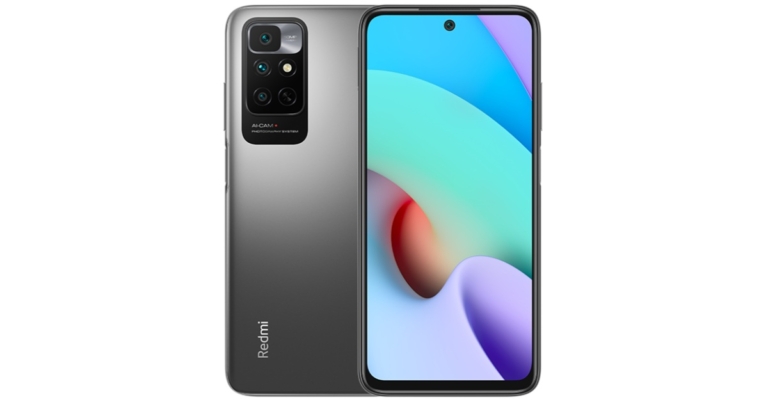
Xiaomi is all set to launch another new smartphone in the Indian market under its sub-brand Redmi. The company recently launched Redmi Note 11 4G in China and soon the device will make its way to the Indian market. This is going to be the second handset to debut under the Redmi Note 11 series in the country after the Redmi Note 11T 5G that arrived late in November.
According to a report Redmi Note 11 4G will be released in India soon. The exact launch date, however, has yet to be determined. The upcoming device has already made its debut in China, and as the report suggests an Indian launch is not far off.
The configurations will vary slightly from the RAM and storage option available in China. Here it is said to be made available in three variants of 4GB RAM with 64GB storage, 4GB with 128GB storage, and 6GB RAM with 128GB. The Redmi Note 11 4G could be offered in Graphite Grey, Star Blue, and Twilight Blue colour options.
In China, Redmi Note 11 4G was launched in two different configurations. The 4GB RAM with 128GB of storage option is priced at CNY 999 which converts to Rs 11,700 whereas the price of the 6GB RAM with 128GB storage variant is set at CNY 1,099 that translates to Rs 12,800. There it is available in Dreamy Clear Sky, Mysterious Blackland and Tome Monologue colour options.
How to turn your Android or iPhone’s flashlight On and Off

Smartphones in today’s time are very important tools for us. They not only entertain us or help us connect with people, but they are also an essential part of our life. We have our smartphones always sitting close to us, and in case of a power cut or if you want to see under the bed, it can be a handy tool to help us see.
Since most of the latest smartphones have built-in flashlights users do not need to install any other third-party apps to get the job done.
Here is how you can turn on/off the flashlight on your Android or iOS smartphone:
 Also, if you have a Motorola phone then this will be an even easier and cooler way for you. Just turn on the gesture controls and over there you should be able to find the Chop-Chop gesture to turn on/off the flashlight.
Read also: 5 Android apps you should install on your elderly parents’
If you have the latest iPhone (iPhone X, iPhone XS, iPhone 12 etc) you can find Torch Icon in the pull down menu from top, and with that, you will be able to turn on/off the flashlight on your iPhone.
iPhones also let you to control the intensity of the flashlight as an extra feature, which can be helpful in many situations, just tap and hold on to the flashlight toggle and you should be able to control the intensity.
Apart from using the flashlight as a tool to find things in the dark, you can also use the flashlight in case of an emergency. Just turn on/off the flashlight continuously, it is considered as an SOS message and it can be very helpful in certain situations. You can also install an app to do this for you freely available on Android Play Store as well as Apple App Store.
Read also: How to remotely access your PC from anywhere in the world
For the latest gadget and tech news, and gadget reviews, follow us on Twitter, Facebook and Instagram. For newest tech & gadget videos subscribe to our YouTube Channel. You can also stay up to date using the Gadget Bridge Android App. You can find the latest car and bike news here.
Also, if you have a Motorola phone then this will be an even easier and cooler way for you. Just turn on the gesture controls and over there you should be able to find the Chop-Chop gesture to turn on/off the flashlight.
Read also: 5 Android apps you should install on your elderly parents’
If you have the latest iPhone (iPhone X, iPhone XS, iPhone 12 etc) you can find Torch Icon in the pull down menu from top, and with that, you will be able to turn on/off the flashlight on your iPhone.
iPhones also let you to control the intensity of the flashlight as an extra feature, which can be helpful in many situations, just tap and hold on to the flashlight toggle and you should be able to control the intensity.
Apart from using the flashlight as a tool to find things in the dark, you can also use the flashlight in case of an emergency. Just turn on/off the flashlight continuously, it is considered as an SOS message and it can be very helpful in certain situations. You can also install an app to do this for you freely available on Android Play Store as well as Apple App Store.
Read also: How to remotely access your PC from anywhere in the world
For the latest gadget and tech news, and gadget reviews, follow us on Twitter, Facebook and Instagram. For newest tech & gadget videos subscribe to our YouTube Channel. You can also stay up to date using the Gadget Bridge Android App. You can find the latest car and bike news here.
In This Article
Turn on/off flashlight on Android:
The flashlight was a missing feature on the earlier version of Android. Although, some of the OEMs did offer flashlight features baked into their phones. Unfortunately, stock Android users were not that lucky. But now every Android phone offers a flashlight feature. So you do not need any flashlight app for this. If your phone is on Android 5.0 Lollipop or higher, then you can simply swipe down to quick settings, and over there you should be able to find a Torch Icon, just tap on that icon and you are good to go. Also, if you have a Motorola phone then this will be an even easier and cooler way for you. Just turn on the gesture controls and over there you should be able to find the Chop-Chop gesture to turn on/off the flashlight.
Read also: 5 Android apps you should install on your elderly parents’
Also, if you have a Motorola phone then this will be an even easier and cooler way for you. Just turn on the gesture controls and over there you should be able to find the Chop-Chop gesture to turn on/off the flashlight.
Read also: 5 Android apps you should install on your elderly parents’ 
Turn on/off flashlight on iPhone:
Turning on the flashlight is also very easy, you just need to Swipe Up if you have an older iPhone (iPhone SE, iPhone 8, iPhone 7…) you should be able to find the Torch Icon. If you have the latest iPhone (iPhone X, iPhone XS, iPhone 12 etc) you can find Torch Icon in the pull down menu from top, and with that, you will be able to turn on/off the flashlight on your iPhone.
 iPhones also let you to control the intensity of the flashlight as an extra feature, which can be helpful in many situations, just tap and hold on to the flashlight toggle and you should be able to control the intensity.
Apart from using the flashlight as a tool to find things in the dark, you can also use the flashlight in case of an emergency. Just turn on/off the flashlight continuously, it is considered as an SOS message and it can be very helpful in certain situations. You can also install an app to do this for you freely available on Android Play Store as well as Apple App Store.
Read also: How to remotely access your PC from anywhere in the world
For the latest gadget and tech news, and gadget reviews, follow us on Twitter, Facebook and Instagram. For newest tech & gadget videos subscribe to our YouTube Channel. You can also stay up to date using the Gadget Bridge Android App. You can find the latest car and bike news here.
iPhones also let you to control the intensity of the flashlight as an extra feature, which can be helpful in many situations, just tap and hold on to the flashlight toggle and you should be able to control the intensity.
Apart from using the flashlight as a tool to find things in the dark, you can also use the flashlight in case of an emergency. Just turn on/off the flashlight continuously, it is considered as an SOS message and it can be very helpful in certain situations. You can also install an app to do this for you freely available on Android Play Store as well as Apple App Store.
Read also: How to remotely access your PC from anywhere in the world
For the latest gadget and tech news, and gadget reviews, follow us on Twitter, Facebook and Instagram. For newest tech & gadget videos subscribe to our YouTube Channel. You can also stay up to date using the Gadget Bridge Android App. You can find the latest car and bike news here. Launching today: Moto G51 5G set to make its debut in India today

Motorola’s newest smartphone, the Moto G51 5G, will be released in India today. The upcoming smartphone is yet to be released but it has been widely publicised since its launch in the European market last month. Also, Flipkart is going to be the official sales partner for Moto G51 5G. Continue reading to learn about the expected pricing and specifications.
In This Article
Moto G51 5G launch details and expected pricing
Motorola, a Lenovo-owned company, will launch the Moto G 5G in India at 12 p.m. today. The company also announced that the device will be available for purchase starting today on the e-commerce website Flipkart. The company has not yet revealed the price of the upcoming device, but it is expected to be comparable to that of the European market. The phone is expected to cost Rs 19,999 in India, but it debuted in Europe for EUR 229.99, which translates to Rs 19,600 in India for the single 4GB of RAM with 64GB of storage option.Moto G51 5G specifications expected
According to some reports the Moto G51 5G is expected to bear the Snapdragon 480+ chipset instead of the Qualcomm Snapdragon 480 chipset that powers the original device. The Moto G51 5G will be the company’s first mobile phone to feature this 5G processor, which will support 12, 5G bands. The display on the Moto G51 5G is a 6.8-inch FHD+ LCD with a 120Hz refresh rate, according to the specifications. The phone is equipped with a Snapdragon 480+ processor, 4GB of RAM, and 64GB of internal storage that can be expanded to 512GB using a microSD card. Android 11 is pre-installed on it. On the back of the phone, there’s a 50-megapixel primary sensor, an 8-megapixel ultra-wide lens, and a 2-megapixel macro lens, with a 50-megapixel primary sensor, an 8-megapixel ultra-wide lens, and a 2-megapixel macro lens. The phone has a 16-megapixel front-facing camera for selfies and video calls. There’s also a 5,000mAh battery and a 10W charger included. For the latest gadget and tech news, and gadget reviews, follow us on Twitter, Facebook and Instagram. For newest tech & gadget videos subscribe to our YouTube Channel. You can also stay up to date using the Gadget Bridge Android App. You can find the latest car and bike news here.10 December 2021 Amazon Quiz today answers: Answer to win Rs 10,000 Amazon Pay Balance

The 10 December 2021 Amazon Quiz is now live on the Amazon app. In today’s quiz participants have a chance to win Rs 10,000 Amazon Pay Balance by answering all the questions correctly. The quiz can be played every day from 12 AM to 11:59. Only app users are eligible to participate in the Quiz as it is not accessible on the web platform.
The Amazon Quiz brings a fresh set of questions for its customers that contains five easy questions. The questionnaire consists of five questions related to general knowledge and current affairs. The participants need to answer all the questions correctly and their names will be selected for a lucky draw. The daily quiz brings an opportunity for the customers to win exciting prizes. They can win Amazon Pay Balance ranging from Rs 1,000 to Rs 50,000. The participants need to answer all the questions correctly and their names will be selected for a lucky draw. The winner will be announced at the end of the month. Check out 10 December 2021 Amazon Quiz Answers.
In This Article
16 November 2021 Amazon Quiz Answers
Question 1: The movie ‘Hum Do Humare Do’ starring Rajkumar Rao and Kirti Sanon, also features which two actors in important roles?
Answer: Paresh Rawal and Ratna Pathak ShahQuestion 2: Primoz Roglic who won the 2021 Vuelta e Espana title, one of cycling’s grand tours is from which country?
Answer: SloveniaQuestion 3: Not just a ___ ad’ uses machine learning to use Shahrukh Khan’s face and voice to promote local stores. Fill in the blanks
Answer: CadburyQuestion 4: This is a view of which planet as seen from Voyager 2?
Answer: UranusQuestion 5: This is the Bara Imambara located in which Indian city?
Answer: Lucknow For the latest gadget and tech news, and gadget reviews, follow us on Twitter, Facebook and Instagram. For newest tech & gadget videos subscribe to our YouTube Channel. You can also stay up to date using the Gadget Bridge Android App. You can find the latest car and bike news here.Acer Aspire Vero laptop with 11th Gen Intel Core Processor launched in India
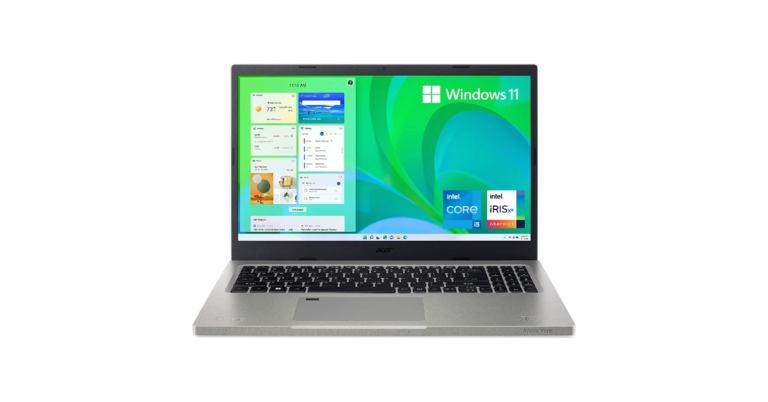
Acer has added a new eco-friendly laptop under its Vero lineup. The company has introduced the Acer Aspire Vero laptop in the Indian market today. The PC is made out of recycled plastic. In addition to this, it comes with inbuilt software, VeroSense which further the goals of eco-minded users, such as energy-saving to extend battery life. The Acer laptop is powered by an 11th Gen Intel Core Processor with Intel Iris Xe Graphics. Continue reading to know more.
Speaking on the launch Sudhir Goel, Chief Business Officer, Acer India said, “More than just a stylish computer the Aspire Vero is a tangible manifestation of Acer’s commitment to more sustainable operations. This is a deliberate initiative that has been designed and conceptualised to bring about a change for our future. Vero will reduce plastic waste and thereby CO2 emissions. We, at Acer, are proud of this initiative and look forward to manufacturing products that promote sustainability and preserve our planet.”

In This Article
Acer Aspire Vero laptop price in India and availability
The Acer Aspire Vero laptop has been launched in India at a starting price of Rs 60,990. The newly arrived Acer laptop will be available in the country via Acer online Store, Acer Exclusive stores and other authorised retail stores. The company is offering a special exchange deal where any laptop exchanged for Aspire Vero will get an additional Rs 2000 off. In addition to this as a token of thanks, Acer is including a free plant with each purchase, which compliments the eco-friendly nature of the laptop.
Acer Aspire Vero laptop specifications
Coming to the design and specifications, the Aspire Vero laptop comes with a 30% PCR plastic chassis cutting CO2 emissions by 21% to produce that part. The PC utilises PCR (Post-consumer Recycled)plastic across the entire chassis. The keyboard design is intended to emphasise eco ideals with the R and E keys standing out in yellow based on the concepts (Reduce, Reuse and Recycle). The Aspire Vero is highlighted with a 15.6-inch FHD IPS display with 1920 x 1080 pixels of resolution. The screen has sleek bezels offering a screen-to-body ratio of 81.42%. It is powered by an 11th Gen Intel Core i5-1155G7 processor with a clock speed of 2.50 GHz. This has been paired with Intel Iris Xe Graphics. The laptop comes with 8GB DDR4 SDRAM and 512GB of SSD configuration. The PC operates on Windows 11 Home edition While the new generation of Acer PurifiedVoice with AI noise reduction actively suppresses background noise for both users and is compatible with external headphones and mics. In terms of network and communication, the Acer Aspire Vero laptop supports IEEE 802.11 a/b/g/n/ac/ax, Gigabit Ethernet, Bluetooth 5.0, Wi-Fi 6, a Type-C, and two Type-A ports, with one supporting power-off charging and 1 HDMI port. The touchpad on the keyboard supports multi-touch gestures. There is a 3-cell Lithium-Ion (Li-Ion) which is claimed to provide 7 hours of battery life and is shipped with a 65W charger. For the latest gadget and tech news, and gadget reviews, follow us on Twitter, Facebook and Instagram. For newest tech & gadget videos subscribe to our YouTube Channel. You can also stay up to date using the Gadget Bridge Android App. You can find the latest car and bike news here.How to record phone calls and conversations on Apple iPhone

Recording phone calls is a feature that everyone wants, but not everyone has the luxury to record calls on their phone. If you have an iPhone, recording calls might be a little tricky for you, this is because Apple does not allow natively to record incoming as well as outgoing calls.
It’s true that in recent times Android users are also facing issues with recording calls. Most of the android phones are now coming with Google Dialer as the default dialer and it does allow you to record calls. Over that, every time when you press the record button it will notify the other party about that. But, at least android users can record calls, unlike Apple who does not even let you record calls in the first place.
Although recording calls without permission is not a good practice, if you have the consent of the other party to record calls, you can go ahead and try these tricks.
Here is how you can record calls and conversations on an iPhone:
TapACall also provides you with a Transripted version of your call as well but you have to pay extra for that. With that, this is undoubtedly the best call recording app if you are an iPhone user.
You can download TapACall Pro from the app store.
It is a paid app with its weekly subscription costing $6.99 with 3 days of free trial, and monthly subscription costs $14.99
The best thing about this app is that it is available in India as well.
You can download Automatic Call Recorder from the app store here.
And this is how you can record call and conversations with your iPhone easily.
Read also: 7 best ways to fix alarm volume too high or low on iPhone
For the latest gadget and tech news, and gadget reviews, follow us on Twitter, Facebook and Instagram. For newest tech & gadget videos subscribe to our YouTube Channel. You can also stay up to date using the Gadget Bridge Android App. You can find the latest car and bike news here.
In This Article
Use another phone as a recorder
Since the iPhone doesn’t allow you to record calls natively and most of the apps on AppStore don’t work or you have to pay a hefty subscription. You can always put your phone on speaker and record calls with another phone. So, if you have an extra phone lying around you can use its voice recorder to record the conversation using an iPhone’s loudspeaker. This is not the ideal way to record calls as you have to put your phone on loudspeaker and the recording quality won’t be as good either. Read also: New to iPhone? Do the following first if you own an iPhone 13Install Apps from AppStore
There are a few useful apps on Apple’s AppStore that you can use to record calls. Here are two of them:TapACall Pro:
TapACall Pro is one of the best and quite famous apps for iPhone. TapACall allows users to record both incoming and outgoing calls as well without any time limit. However, this is a paid app. You have to pay $11 for a one year subscription, and if you want to renew your subscription after that, then it will cost you $20. TapACall Pro creates a three way call (a conference call) between You, TapACall and the Person you want to record. After the call is recorded TapACall sends you the recorded call, which you can store to your iPhone, iCloud, Dropbox or anywhere you want. TapACall also provides you with a Transripted version of your call as well but you have to pay extra for that. With that, this is undoubtedly the best call recording app if you are an iPhone user.
You can download TapACall Pro from the app store.
TapACall also provides you with a Transripted version of your call as well but you have to pay extra for that. With that, this is undoubtedly the best call recording app if you are an iPhone user.
You can download TapACall Pro from the app store.
Automatic Call Recorder:
Out of a few call recording apps that are available on Apple App Store, Automatic Call Recorder is one of the best call recording applications. Automatic Call Recorder allows users to record incoming and outgoing calls and on top of that, you can also record international calls if you want. The app works with/without the internet so you need not worry about your internet connection. The working of Automatic Call Recorder is the same as that of TapACall, when you hit the record button it creates a conference call. The only requirement for this app is your carrier should support 3-way calling. It is a paid app with its weekly subscription costing $6.99 with 3 days of free trial, and monthly subscription costs $14.99
The best thing about this app is that it is available in India as well.
You can download Automatic Call Recorder from the app store here.
And this is how you can record call and conversations with your iPhone easily.
Read also: 7 best ways to fix alarm volume too high or low on iPhone
For the latest gadget and tech news, and gadget reviews, follow us on Twitter, Facebook and Instagram. For newest tech & gadget videos subscribe to our YouTube Channel. You can also stay up to date using the Gadget Bridge Android App. You can find the latest car and bike news here.
It is a paid app with its weekly subscription costing $6.99 with 3 days of free trial, and monthly subscription costs $14.99
The best thing about this app is that it is available in India as well.
You can download Automatic Call Recorder from the app store here.
And this is how you can record call and conversations with your iPhone easily.
Read also: 7 best ways to fix alarm volume too high or low on iPhone
For the latest gadget and tech news, and gadget reviews, follow us on Twitter, Facebook and Instagram. For newest tech & gadget videos subscribe to our YouTube Channel. You can also stay up to date using the Gadget Bridge Android App. You can find the latest car and bike news here. Now users can make voice and video calls through Gmail in the Google Chat

In September this year, Google provided Google Meet the ability to make voice and video calls. So now the Google Chat in Gmail is getting the ability to make 1:1 voice and video calls individually to the users in your chats. Other details like missed calls and ongoing call details will also be seen in the chats.
For those who are unaware of the ability, audio and video calls were integrated into Google Meet some time ago, but now it is being extended to Google Chats as well. In Google Meet one can access the feature by tapping on the link generated by the caller to join a call. Now one can directly make calls to an individual chat and no special link is needed to be generated for conversations. The users can simply dial a call to a person from their contact list.
Announcing the new functionality, Google said, “You can now start or join meetings and audio calls from 1:1 chats in Google Chat in Gmail on Android and iOS. At the moment, this feature will be available for 1:1 chats only.”
 Within the 1:1 chat, select the phone or video chat to join a call. You’ll see a banner of the person you’re on the phone with, the call duration, and a Meet icon in the chat roster while on the phone.
 Missed calls will be indicated with a red phone or video icon within the conversation and the chat roster.
 While you can select “Join a call” from the Google Chat app, the call will be transferred to the Gmail app. You’ll be prompted to download the Gmail app from the Google Play Store or the App Store if you don’t already have it on your device. When this feature is available for the Google Chat mobile app, we’ll post an update on the Google Workspace Updates Blog.
Note that this feature will be available for Google Chat in Gmail and when Meet video calling is enabled. Also, it will be accessible by default on Android and iOS devices — both the caller and receiver will need the latest version of Gmail.
Google also stated, “As some teams begin to return to the office, while others remain distributed, we hope this makes it easier to connect with your colleagues in the hybrid work world. This feature will allow you to seamlessly switch between chat to a video or audio call when needed, helping you collaborate and move your work forward.”
For the latest gadget and tech news, and gadget reviews, follow us on Twitter, Facebook and Instagram. For newest tech & gadget videos subscribe to our YouTube Channel. You can also stay up to date using the Gadget Bridge Android App. You can find the latest car and bike news here.
While you can select “Join a call” from the Google Chat app, the call will be transferred to the Gmail app. You’ll be prompted to download the Gmail app from the Google Play Store or the App Store if you don’t already have it on your device. When this feature is available for the Google Chat mobile app, we’ll post an update on the Google Workspace Updates Blog.
Note that this feature will be available for Google Chat in Gmail and when Meet video calling is enabled. Also, it will be accessible by default on Android and iOS devices — both the caller and receiver will need the latest version of Gmail.
Google also stated, “As some teams begin to return to the office, while others remain distributed, we hope this makes it easier to connect with your colleagues in the hybrid work world. This feature will allow you to seamlessly switch between chat to a video or audio call when needed, helping you collaborate and move your work forward.”
For the latest gadget and tech news, and gadget reviews, follow us on Twitter, Facebook and Instagram. For newest tech & gadget videos subscribe to our YouTube Channel. You can also stay up to date using the Gadget Bridge Android App. You can find the latest car and bike news here.
Here is how to make or join voice and video calls in Google Chats in Gmail
First and foremost select the phone or video icon in the top right corner of a 1:1 chat to call someone directly. Within the 1:1 chat, select the phone or video chat to join a call. You’ll see a banner of the person you’re on the phone with, the call duration, and a Meet icon in the chat roster while on the phone.
 Missed calls will be indicated with a red phone or video icon within the conversation and the chat roster.
 While you can select “Join a call” from the Google Chat app, the call will be transferred to the Gmail app. You’ll be prompted to download the Gmail app from the Google Play Store or the App Store if you don’t already have it on your device. When this feature is available for the Google Chat mobile app, we’ll post an update on the Google Workspace Updates Blog.
Note that this feature will be available for Google Chat in Gmail and when Meet video calling is enabled. Also, it will be accessible by default on Android and iOS devices — both the caller and receiver will need the latest version of Gmail.
Google also stated, “As some teams begin to return to the office, while others remain distributed, we hope this makes it easier to connect with your colleagues in the hybrid work world. This feature will allow you to seamlessly switch between chat to a video or audio call when needed, helping you collaborate and move your work forward.”
For the latest gadget and tech news, and gadget reviews, follow us on Twitter, Facebook and Instagram. For newest tech & gadget videos subscribe to our YouTube Channel. You can also stay up to date using the Gadget Bridge Android App. You can find the latest car and bike news here.
While you can select “Join a call” from the Google Chat app, the call will be transferred to the Gmail app. You’ll be prompted to download the Gmail app from the Google Play Store or the App Store if you don’t already have it on your device. When this feature is available for the Google Chat mobile app, we’ll post an update on the Google Workspace Updates Blog.
Note that this feature will be available for Google Chat in Gmail and when Meet video calling is enabled. Also, it will be accessible by default on Android and iOS devices — both the caller and receiver will need the latest version of Gmail.
Google also stated, “As some teams begin to return to the office, while others remain distributed, we hope this makes it easier to connect with your colleagues in the hybrid work world. This feature will allow you to seamlessly switch between chat to a video or audio call when needed, helping you collaborate and move your work forward.”
For the latest gadget and tech news, and gadget reviews, follow us on Twitter, Facebook and Instagram. For newest tech & gadget videos subscribe to our YouTube Channel. You can also stay up to date using the Gadget Bridge Android App. You can find the latest car and bike news here. Oppo to launch its first foldable phone Oppo Find N on December 15, to feature a retractable camera

Oppo, a Chinese smartphone company, has debuted its first and only foldable phone. The Oppo Find N will be competing against Samsung’s foldable device. The new device has been introduced by Oppo’s Chief Product Officer Pete Lau through an open letter on the blog.
Oppo Find N foldable phone is claimed to be the company’s first foldable flagship smartphone, the culmination of four years of intense R&D and six prototype generations. While introducing the foldable phone the company founder Pete Lau said the first-gen of the Oppo Find N prototype was made internally in April 2018 till then many other companies have already launched their foldable devices. But the company wanted its device to be more competitive and attractive, simple in design, natural and comfortable in the material.
 It must provide powerful performance while remaining within a reasonable weight and size range. It must feel good in the hand, especially for a foldable device with a large screen. Each of these goals has been met by the OPPO Find N.
The blog post said, “In the past, smartphone evolution focused on the display panel, first combining a small display with a big keyboard, and evolving to today’s full-screen smartphones. But in an era where everyone has a phone with similar configurations, the smartphone experience has come to a standstill. If we can find a way to break through the bottleneck of smartphone displays, we could once again revolutionise efficiency and interactivity.”
Pete Lau further added, “OPPO realised this four years ago, and since then the team has worked tirelessly to find a creative solution. OPPO has always dared to venture into the unknown to look for breakthroughs and innovative answers, while also exercising restraint when it comes to impacting the user experience. For OPPO, it is better to launch a product at a later date when it is ready to offer a great user experience instead of simply rushing to keep up with trends.”
Furthermore, Oppo wanted its foldable phone to be both useful and simple to operate. The Oppo Find N closes inwards similar to the Galaxy Z Fold series. According to Pete, both the closed-screen and open-screen experiences for a foldable smartphone should be equally simple to use. Then, on top of that, it should create a revolutionary efficient experience that no traditional smartphone can match.
Oppo Find N is scheduled to make its debut during Oppo INNO Day 2021 on December 15.
Talking about the officially released teasers the Oppo Find N will have slim bezels on the outer cover and the primary display. The display has a hole punch cut out on the inside while on the cover we may see a hidden under-display shooter.
It must provide powerful performance while remaining within a reasonable weight and size range. It must feel good in the hand, especially for a foldable device with a large screen. Each of these goals has been met by the OPPO Find N.
The blog post said, “In the past, smartphone evolution focused on the display panel, first combining a small display with a big keyboard, and evolving to today’s full-screen smartphones. But in an era where everyone has a phone with similar configurations, the smartphone experience has come to a standstill. If we can find a way to break through the bottleneck of smartphone displays, we could once again revolutionise efficiency and interactivity.”
Pete Lau further added, “OPPO realised this four years ago, and since then the team has worked tirelessly to find a creative solution. OPPO has always dared to venture into the unknown to look for breakthroughs and innovative answers, while also exercising restraint when it comes to impacting the user experience. For OPPO, it is better to launch a product at a later date when it is ready to offer a great user experience instead of simply rushing to keep up with trends.”
Furthermore, Oppo wanted its foldable phone to be both useful and simple to operate. The Oppo Find N closes inwards similar to the Galaxy Z Fold series. According to Pete, both the closed-screen and open-screen experiences for a foldable smartphone should be equally simple to use. Then, on top of that, it should create a revolutionary efficient experience that no traditional smartphone can match.
Oppo Find N is scheduled to make its debut during Oppo INNO Day 2021 on December 15.
Talking about the officially released teasers the Oppo Find N will have slim bezels on the outer cover and the primary display. The display has a hole punch cut out on the inside while on the cover we may see a hidden under-display shooter.
 The official teaser also suggests a metal built with metal framing on the sides. The short teaser also shows a USB Type C port along with a fingerprint sensor on the side. Speaking on the cameras another video teaser shows a retractable rear camera setup consisting of triple sensors and a flash.
For the latest gadget and tech news, and gadget reviews, follow us on Twitter, Facebook and Instagram. For newest tech & gadget videos subscribe to our YouTube Channel. You can also stay up to date using the Gadget Bridge Android App. You can find the latest car and bike news here.
The official teaser also suggests a metal built with metal framing on the sides. The short teaser also shows a USB Type C port along with a fingerprint sensor on the side. Speaking on the cameras another video teaser shows a retractable rear camera setup consisting of triple sensors and a flash.
For the latest gadget and tech news, and gadget reviews, follow us on Twitter, Facebook and Instagram. For newest tech & gadget videos subscribe to our YouTube Channel. You can also stay up to date using the Gadget Bridge Android App. You can find the latest car and bike news here.
 It must provide powerful performance while remaining within a reasonable weight and size range. It must feel good in the hand, especially for a foldable device with a large screen. Each of these goals has been met by the OPPO Find N.
The blog post said, “In the past, smartphone evolution focused on the display panel, first combining a small display with a big keyboard, and evolving to today’s full-screen smartphones. But in an era where everyone has a phone with similar configurations, the smartphone experience has come to a standstill. If we can find a way to break through the bottleneck of smartphone displays, we could once again revolutionise efficiency and interactivity.”
Pete Lau further added, “OPPO realised this four years ago, and since then the team has worked tirelessly to find a creative solution. OPPO has always dared to venture into the unknown to look for breakthroughs and innovative answers, while also exercising restraint when it comes to impacting the user experience. For OPPO, it is better to launch a product at a later date when it is ready to offer a great user experience instead of simply rushing to keep up with trends.”
Furthermore, Oppo wanted its foldable phone to be both useful and simple to operate. The Oppo Find N closes inwards similar to the Galaxy Z Fold series. According to Pete, both the closed-screen and open-screen experiences for a foldable smartphone should be equally simple to use. Then, on top of that, it should create a revolutionary efficient experience that no traditional smartphone can match.
Oppo Find N is scheduled to make its debut during Oppo INNO Day 2021 on December 15.
Talking about the officially released teasers the Oppo Find N will have slim bezels on the outer cover and the primary display. The display has a hole punch cut out on the inside while on the cover we may see a hidden under-display shooter.
It must provide powerful performance while remaining within a reasonable weight and size range. It must feel good in the hand, especially for a foldable device with a large screen. Each of these goals has been met by the OPPO Find N.
The blog post said, “In the past, smartphone evolution focused on the display panel, first combining a small display with a big keyboard, and evolving to today’s full-screen smartphones. But in an era where everyone has a phone with similar configurations, the smartphone experience has come to a standstill. If we can find a way to break through the bottleneck of smartphone displays, we could once again revolutionise efficiency and interactivity.”
Pete Lau further added, “OPPO realised this four years ago, and since then the team has worked tirelessly to find a creative solution. OPPO has always dared to venture into the unknown to look for breakthroughs and innovative answers, while also exercising restraint when it comes to impacting the user experience. For OPPO, it is better to launch a product at a later date when it is ready to offer a great user experience instead of simply rushing to keep up with trends.”
Furthermore, Oppo wanted its foldable phone to be both useful and simple to operate. The Oppo Find N closes inwards similar to the Galaxy Z Fold series. According to Pete, both the closed-screen and open-screen experiences for a foldable smartphone should be equally simple to use. Then, on top of that, it should create a revolutionary efficient experience that no traditional smartphone can match.
Oppo Find N is scheduled to make its debut during Oppo INNO Day 2021 on December 15.
Talking about the officially released teasers the Oppo Find N will have slim bezels on the outer cover and the primary display. The display has a hole punch cut out on the inside while on the cover we may see a hidden under-display shooter.
 The official teaser also suggests a metal built with metal framing on the sides. The short teaser also shows a USB Type C port along with a fingerprint sensor on the side. Speaking on the cameras another video teaser shows a retractable rear camera setup consisting of triple sensors and a flash.
For the latest gadget and tech news, and gadget reviews, follow us on Twitter, Facebook and Instagram. For newest tech & gadget videos subscribe to our YouTube Channel. You can also stay up to date using the Gadget Bridge Android App. You can find the latest car and bike news here.
The official teaser also suggests a metal built with metal framing on the sides. The short teaser also shows a USB Type C port along with a fingerprint sensor on the side. Speaking on the cameras another video teaser shows a retractable rear camera setup consisting of triple sensors and a flash.
For the latest gadget and tech news, and gadget reviews, follow us on Twitter, Facebook and Instagram. For newest tech & gadget videos subscribe to our YouTube Channel. You can also stay up to date using the Gadget Bridge Android App. You can find the latest car and bike news here. Jabra PanaCast 20 portable video conferencing camera launched
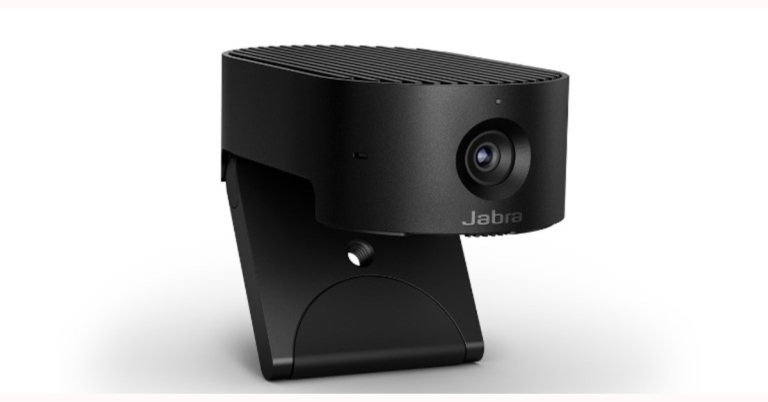
Danish audio equipment manufacturer Jabra has announced the launch of a portable video conferencing device in the market. The company has introduced PanaCast 20 premium video conferencing device which is a plug-and-play video conferencing solution that has been completely reimagined for today’s hybrid world.
PanaCast 20 premium video conferencing device can be clipped to any monitor. The tool can deliver a real-time 4K Ultra-HD image that is said to be sharp and crystal-clear, with virtually no latency, thanks to advanced processors, powerful onboard AI, and a premium 13-megapixel camera.
Intelligent Zoom from Jabra uses artificial intelligence to follow the user’s movements and adjust framing in real-time. This keeps the user in the middle of the frame while allowing for more natural movement, giving the impression that everyone is in the same room. The PanaCast 20 is capable of adapting to almost any lighting situation. Jabra uses Intelligent Lighting Optimization to analyse the environment and automatically adjust the image to improve video quality, even in low-light situations.
 In addition to this, Picture in Picture mode is also available on the PanaCast 20, which combines two real-time video streams into one with the help of Edge AI processing. It integrates the second stream with the main image in a separate window. Even if dual-stream devices are not supported, this mode works with any UC platform.
The video conferencing device by Jabra comes integrated with an AI processor that controls all of the features of the device, the intelligent personal camera is designed for data security. As a result, all actions are performed on the device itself, lowering the risk of a data breach significantly. Simultaneously, the PanaCast 20 has an integrated privacy cover that can be positioned over the camera lens, giving the user complete control over whether or not they want to be seen.
The Jabra PanaCast 20 is compatible with all major UC platforms, and users of the personal camera can pair it with other Jabra audio products like the Evolve2 75 headphones and the Speak 750. Throughout the product’s lifespan, regular software updates will be available, ensuring maximum ROI.
In terms of pricing Jabra PanaCast 20 will be available for purchase at a price tag of $299 that translates to Rs 22,572.
For the latest gadget and tech news, and gadget reviews, follow us on Twitter, Facebook and Instagram. For newest tech & gadget videos subscribe to our YouTube Channel. You can also stay up to date using the Gadget Bridge Android App. You can find the latest car and bike news here.
In addition to this, Picture in Picture mode is also available on the PanaCast 20, which combines two real-time video streams into one with the help of Edge AI processing. It integrates the second stream with the main image in a separate window. Even if dual-stream devices are not supported, this mode works with any UC platform.
The video conferencing device by Jabra comes integrated with an AI processor that controls all of the features of the device, the intelligent personal camera is designed for data security. As a result, all actions are performed on the device itself, lowering the risk of a data breach significantly. Simultaneously, the PanaCast 20 has an integrated privacy cover that can be positioned over the camera lens, giving the user complete control over whether or not they want to be seen.
The Jabra PanaCast 20 is compatible with all major UC platforms, and users of the personal camera can pair it with other Jabra audio products like the Evolve2 75 headphones and the Speak 750. Throughout the product’s lifespan, regular software updates will be available, ensuring maximum ROI.
In terms of pricing Jabra PanaCast 20 will be available for purchase at a price tag of $299 that translates to Rs 22,572.
For the latest gadget and tech news, and gadget reviews, follow us on Twitter, Facebook and Instagram. For newest tech & gadget videos subscribe to our YouTube Channel. You can also stay up to date using the Gadget Bridge Android App. You can find the latest car and bike news here.
 In addition to this, Picture in Picture mode is also available on the PanaCast 20, which combines two real-time video streams into one with the help of Edge AI processing. It integrates the second stream with the main image in a separate window. Even if dual-stream devices are not supported, this mode works with any UC platform.
The video conferencing device by Jabra comes integrated with an AI processor that controls all of the features of the device, the intelligent personal camera is designed for data security. As a result, all actions are performed on the device itself, lowering the risk of a data breach significantly. Simultaneously, the PanaCast 20 has an integrated privacy cover that can be positioned over the camera lens, giving the user complete control over whether or not they want to be seen.
The Jabra PanaCast 20 is compatible with all major UC platforms, and users of the personal camera can pair it with other Jabra audio products like the Evolve2 75 headphones and the Speak 750. Throughout the product’s lifespan, regular software updates will be available, ensuring maximum ROI.
In terms of pricing Jabra PanaCast 20 will be available for purchase at a price tag of $299 that translates to Rs 22,572.
For the latest gadget and tech news, and gadget reviews, follow us on Twitter, Facebook and Instagram. For newest tech & gadget videos subscribe to our YouTube Channel. You can also stay up to date using the Gadget Bridge Android App. You can find the latest car and bike news here.
In addition to this, Picture in Picture mode is also available on the PanaCast 20, which combines two real-time video streams into one with the help of Edge AI processing. It integrates the second stream with the main image in a separate window. Even if dual-stream devices are not supported, this mode works with any UC platform.
The video conferencing device by Jabra comes integrated with an AI processor that controls all of the features of the device, the intelligent personal camera is designed for data security. As a result, all actions are performed on the device itself, lowering the risk of a data breach significantly. Simultaneously, the PanaCast 20 has an integrated privacy cover that can be positioned over the camera lens, giving the user complete control over whether or not they want to be seen.
The Jabra PanaCast 20 is compatible with all major UC platforms, and users of the personal camera can pair it with other Jabra audio products like the Evolve2 75 headphones and the Speak 750. Throughout the product’s lifespan, regular software updates will be available, ensuring maximum ROI.
In terms of pricing Jabra PanaCast 20 will be available for purchase at a price tag of $299 that translates to Rs 22,572.
For the latest gadget and tech news, and gadget reviews, follow us on Twitter, Facebook and Instagram. For newest tech & gadget videos subscribe to our YouTube Channel. You can also stay up to date using the Gadget Bridge Android App. You can find the latest car and bike news here. Want to download videos from the internet? We have selected the 11 best tools for you

With the internet revolution in India, it became very easy and affordable for almost everyone to consume online videos, as much as someone wants to. But if you have a bad internet connection video watching experience can be very painful and unpleasant. So that you might want to have your favourite video song downloaded offline on your device.
We have used and made a list of 11 different websites and apps that you can use to download videos from the internet. Here they are:
To download a video, just download the HitPaw software from here. Follow the on-screen instructions to install the app on your computer and then you can download any video from the internet using it. They also have 24-hour tech support, in case you need it.
You can download it from here.
Or you can just copy and paste the video link. You can download videos from the internet’s all the famous platforms including YouTube, Facebook, Instagram, Daily motion, and many more, with the help of this tool.
 Downloading videos with Snaptube is again just copying the video link and pasting it in the app. The best part about this app is that users can download the videos in original upload quality. So, you can now also download 4K UHD videos with this.
The process of downloading the video is again the same, just copy the video link of the video that you want to download and simply paste it in the search box.
Read also: How to download Twitter videos on a PC or a smartphone?
For the latest gadget and tech news, and gadget reviews, follow us on Twitter, Facebook and Instagram. For newest tech & gadget videos subscribe to our YouTube Channel. You can also stay up to date using the Gadget Bridge Android App. You can find the latest car and bike news here.
Downloading videos with Snaptube is again just copying the video link and pasting it in the app. The best part about this app is that users can download the videos in original upload quality. So, you can now also download 4K UHD videos with this.
The process of downloading the video is again the same, just copy the video link of the video that you want to download and simply paste it in the search box.
Read also: How to download Twitter videos on a PC or a smartphone?
For the latest gadget and tech news, and gadget reviews, follow us on Twitter, Facebook and Instagram. For newest tech & gadget videos subscribe to our YouTube Channel. You can also stay up to date using the Gadget Bridge Android App. You can find the latest car and bike news here.
In This Article
HitPaw Video Converter and downloader
HitPaw is one of the best video converters and downloader out there in the market. You can try it for free. You can download videos through this software from places like YouTube, Instagram, Facebook, TikTok and more. If you just want to extract audio or just the thumbnail out of the video, you can do that too. After Downloading you can convert the video to a format of your choice with the application as well. To download a video, just download the HitPaw software from here. Follow the on-screen instructions to install the app on your computer and then you can download any video from the internet using it. They also have 24-hour tech support, in case you need it.
You can download it from here.
To download a video, just download the HitPaw software from here. Follow the on-screen instructions to install the app on your computer and then you can download any video from the internet using it. They also have 24-hour tech support, in case you need it.
You can download it from here.
SaveFrom
This is a video downloader site with the help of which you can download YouTube videos in a few simple steps.- Open the video on YouTube that you want to download
- Look for the URL in your browser and simply add “ss” to it you will be redirected to a new window
- Select the resolution in which you want to download the video and that’s it.
 Or you can just copy and paste the video link. You can download videos from the internet’s all the famous platforms including YouTube, Facebook, Instagram, Daily motion, and many more, with the help of this tool.
Y2 Mate
It is yet another amazing tool through which you can download YouTube videos.Y2 Mate also allows users to download videos from the internet up to Full HD resolution. Using this tool is also very simple and you can download Youtube videos just by following these simple steps:

- Open Y2 Mate on the browser
- Copy the link of the YouTube video that you want to download
- Paste the link inside the box and select the video resolution, and hit download.
Snaptube– Another popular mobile application
Snaptube is one of the most popular and used apps among many users. It not only allows users to download the video but one can also stream video on it Downloading videos with Snaptube is again just copying the video link and pasting it in the app. The best part about this app is that users can download the videos in original upload quality. So, you can now also download 4K UHD videos with this.
YooDownload
YooDownload is another popular and simple to use tool on our list by which you can download videos from YouTube, Facebook, Twitter, Instagram, and SoundCloud is YooDownload. The process of downloading the video is again the same, just copy the video link of the video that you want to download and simply paste it in the search box.
 Read also: How to download Twitter videos on a PC or a smartphone?
Freemake Video Downloader: Another simple to use tool
It is another simple and easy to use tool, just copy and paste the link and you are good to go. You can also download the videos in 4K resolution using this tool. Freemake is available free for both Windows and Mac users. So, no matter what device you use you can download 4K videos on any device.
Twitter video downloader
Unlike other tools in the list, which can download video from all platforms, this tool as the name says download video from Twitter only. You just need to put the Twitter video URL in it and that’s it. You can download videos in mp3, mp4 and mp4 HD format with this tool. Twitter video downloader is again very simple to use and easy to understand tool.
Instagram downloader
Just like Twitter, Instagram has its downloader tool too. Instagram Downloader allows users to download videos from posts as well as stories. So, now if you see an interesting story that you want to share with your friends who are not on Instagram you can download the video and share it. Interface of this tool is quite simple
VideoGrabby
Is yet another internet instrument with which you can just copy and paste the link of the video that you want to download from the internet. Users can download videos from YouTube, Instagram, SoundCloud, and many more. The interface of VideoGrabby is quite straightforward and anyone can use this tool.
FastestTube: A very fast and simple video downloading tool
Out of all the tools mentioned this is the simplest tool to download YouTube videos. FastestTube is an extension that users can add to their browser which adds a download button on YouTube. So, if you think copying and pasting is too much work for you, this tool will help you out.
4K Video Downloader
This tool again uses copy and paste format to download the video and as the name says, it helps you to download videos in 4K quality. Just add the URL and you are ready to download your favourite video. Also, you can subscribe channels with this tool after you sign in.
For the latest gadget and tech news, and gadget reviews, follow us on Twitter, Facebook and Instagram. For newest tech & gadget videos subscribe to our YouTube Channel. You can also stay up to date using the Gadget Bridge Android App. You can find the latest car and bike news here. Telegram update: Brings new privacy tools to prevent others from saving content in groups and channels

Telegram has released updates that now include features protecting users’ content in groups and channels. The new Telegram update also brings improved privacy tools to prevent others from saving content in groups and channels, the ability to delete messages from specific dates and so on. In addition to this, the popular messaging service has also added iOS features like Live Text support and more.
Telegram’s new update will assist creators in protecting their Telegram content and ensuring that it is only available to their intended audience. Owners of Groups and Channels who want to keep their content exclusive to their members can disable message forwarding from their chat, which also disables screenshots and limits the ability to save media from posts.
Open the Group or Channel Info page > Group / Channel Type > Restrict Saving Content to restrict users’ ability to forward messages.
Telegram users have complete control over their online presence and can delete any message from a conversation at any time. You can now delete chat history from a specific day or date range in any one-on-one chat. To access the calendar, tap the date bar that appears as you scroll through the conversation, then select which days you want to clear.
Clearing history by date is currently only available in one-on-one chats, but messages can be set to delete themselves one day, week, or month after they are sent in any chat.
Telegram has now also added a new button for quickly linking a desktop device, as well as a setting to log out inactive devices after a certain amount of time.
To view more information about any device in the list, tap it. You can also toggle whether it can accept calls or new Secret Chats by tapping it.
An option to post anonymously in public groups on behalf of your channel has also been added. Tap the profile picture next to the message bar and choose one of your channels – the messages you send after that will appear with the name and photo of the channel instead of your personal account.
Instead of receiving codes via text message, some mobile devices will be given the option of receiving a login call from Telegram and then entering several digits of the phone number that called.
iOS-specific features
Text Recognition (Live Text) for photos in Telegram chats is enabled on iOS 13 and higher devices, allowing you to quickly select, copy, and search without touching your keyboard. This image recognition is handled entirely on your device in a secure manner.
iOS users can now use all text formatting options in media captions, including text links, to add just the right amount of emphasis to a message with a little bit of bold or italics. Note that this feature is already available on the Android platform.
Telegram has also redesigned contact info on iOS. Contacts, Groups and Channels have updated info pages with a new look in the style of iOS 15.
For the latest gadget and tech news, and gadget reviews, follow us on Twitter, Facebook and Instagram. For newest tech & gadget videos subscribe to our YouTube Channel. You can also stay up to date using the Gadget Bridge Android App. You can find the latest car and bike news here.
9 December 2021 Amazon Quiz today answers: Answer to win Rs 5,000 Amazon Pay Balance

9 December 2021 Amazon Quiz has gone live on its platform. The quiz timings are 12 AM to 11:59 PM. The Amazon App users can participate in the quiz daily and all they have to do is submit correct answers to the questions asked on the e-commerce platform. Today’s participants can get a chance to win Rs 5,000 Amazon Pay Balance.
Amazon brings a fresh questionnaire that contains 5 questions daily. These questions are based on current affairs and general knowledge. The quiz can be played from 8 AM to 11:59 PM and the contestants need to answer correctly to enter into a lucky draw.
Only one person is declared as a winner and the results will be announced at the end of every month. And to make sure that you give correct answers to all the 5 questions Gadget Bridge everyday updates all the answers to the Amazon Quiz. Do check out 9 December 2021 Amazon Quiz Answers to win Rs 5,000 Amazon pay Balance.
In This Article
9 December 2021 Amazon Quiz Answers
Question 1: Which person in the news was the voice for the character of Simba, in the Hindi dubbing of Disney’s The Lion King (2019)?
Answer: Aryan KhanQuestion 2: Biological E-company that is receiving $50 million funding from US International Development Finance Corporation is based in which city?
Answer: HyderabadQuestion 3: Among the 11 sportspeople who have been recommended for the Dhyan Chand Khel Ratna 2021, there are how many Paralympians?
Answer: 5Question 4: This is the Sheikh Zayed Grand Mosque Center located in which city?
Answer: Abu DhabiQuestion 5: This is a famous site located in Amman, Jordan. It is called the Temple of ____. Fill in the blanks
Answer: Hercules For the latest gadget and tech news, and gadget reviews, follow us on Twitter, Facebook and Instagram. For newest tech & gadget videos subscribe to our YouTube Channel. You can also stay up to date using the Gadget Bridge Android App. You can find the latest car and bike news here.Daiwa 4K UHD Smart TV D43U1WOS and Daiwa 4K UHD Smart TV D55U1WOS launched
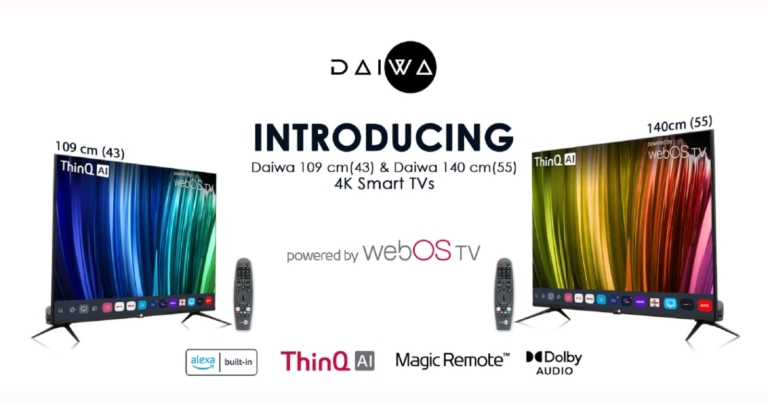
The Homegrown Indian Appliance brand Daiwa has announced the launch of its new range of 4K UHD televisions in the Indian market today. The company has introduced Daiwa 4K UHD Smart TV D43U1WOS and Daiwa 4K UHD Smart TV D55U1WOS. As the name suggests the former one will come in 43-inch size while the latter is 55-inch in size. Both the televisions are powered by webOS TV and include other features like ThinQ AI Voice assistance, an intuitive user interface supporting new technologies and a wide range of streaming services.
 There is support for a multi-HDR format that includes HDR10 and HLG (Hybrid Log-Gamma). HDR10 delivers detailed images with rich colours by optimising every single scene. According to the company, the dynamic scene-by-scene adjustment technology builds impressive HDR-quality visuals. While the HLG provides an extended colour gamut, with enhanced brightness and contrast. MEMC (Motion Estimation and Motion Compensation) supporting 4K at 60Hz ensures smooth blur-free visuals and lively transitions while watching sports or playing games. The TVs also support ALLM (Auto Low Latency Mode), which lowers input lag for a smooth gaming experience.
Both Daiwa 4K UHD Smart TVs are powered by ARM CA55 1.1 GHz Quad-core processor paired with RAM of 1.5 GB with an internal storage of 8 GB. The TVs support a content store with infotainment apps; that includes Netflix, Amazon Prime Video, YouTube, Disney+ Hotstar, Spotify and many more.
ThinQ AI lets you access voice assistance via the Magic Remote or the LG ThinQ App on your smartphone. It learns user patterns and builds suggestions and recommendations for music, movies, and other media based on those patterns. Smart TVs’ intelligent edit function organises apps and programmes based on previous choices and usage frequency. Alexa Built-in is now available on 4K Ultra HD Daiwa Smart TVs running webOS TV, allowing users to access all Alexa functions on the TV and control it with Alexa. Daiwa Smart TVs create the ultimate hands-free experience with voice command operations using ThinQ AI and Alexa Built-in.
The TVs have Dual-Band Wi-Fi, Miracast, and 2 Way Bluetooth 5.0 for high-speed connectivity. The TVs come with a Magic Remote that includes Universal Control of all connected devices (such as set-top boxes, soundbars, and so on) as well as Voice Command, dedicated Netflix and Amazon Prime Video hotkeys, and a unique click wheel.
For the latest gadget and tech news, and gadget reviews, follow us on Twitter, Facebook and Instagram. For newest tech & gadget videos subscribe to our YouTube Channel. You can also stay up to date using the Gadget Bridge Android App. You can find the latest car and bike news here.
There is support for a multi-HDR format that includes HDR10 and HLG (Hybrid Log-Gamma). HDR10 delivers detailed images with rich colours by optimising every single scene. According to the company, the dynamic scene-by-scene adjustment technology builds impressive HDR-quality visuals. While the HLG provides an extended colour gamut, with enhanced brightness and contrast. MEMC (Motion Estimation and Motion Compensation) supporting 4K at 60Hz ensures smooth blur-free visuals and lively transitions while watching sports or playing games. The TVs also support ALLM (Auto Low Latency Mode), which lowers input lag for a smooth gaming experience.
Both Daiwa 4K UHD Smart TVs are powered by ARM CA55 1.1 GHz Quad-core processor paired with RAM of 1.5 GB with an internal storage of 8 GB. The TVs support a content store with infotainment apps; that includes Netflix, Amazon Prime Video, YouTube, Disney+ Hotstar, Spotify and many more.
ThinQ AI lets you access voice assistance via the Magic Remote or the LG ThinQ App on your smartphone. It learns user patterns and builds suggestions and recommendations for music, movies, and other media based on those patterns. Smart TVs’ intelligent edit function organises apps and programmes based on previous choices and usage frequency. Alexa Built-in is now available on 4K Ultra HD Daiwa Smart TVs running webOS TV, allowing users to access all Alexa functions on the TV and control it with Alexa. Daiwa Smart TVs create the ultimate hands-free experience with voice command operations using ThinQ AI and Alexa Built-in.
The TVs have Dual-Band Wi-Fi, Miracast, and 2 Way Bluetooth 5.0 for high-speed connectivity. The TVs come with a Magic Remote that includes Universal Control of all connected devices (such as set-top boxes, soundbars, and so on) as well as Voice Command, dedicated Netflix and Amazon Prime Video hotkeys, and a unique click wheel.
For the latest gadget and tech news, and gadget reviews, follow us on Twitter, Facebook and Instagram. For newest tech & gadget videos subscribe to our YouTube Channel. You can also stay up to date using the Gadget Bridge Android App. You can find the latest car and bike news here.
In This Article
Daiwa 4K UHD Smart TV D43U1WOS and Daiwa 4K UHD Smart TV D55U1WOS pricing
Daiwa 4K UHD Smart TV D43U1WOS has been launched in India at Rs 34,999. Whereas Daiwa 4K UHD Smart TV D55U1WOS bears a price tag of Rs 49,999. Both the smart televisions come with a 12 months complete warranty and additional 12 months Panel Warranty (T&C apply). These can be bought through the company’s official website and other online retailers in the country.Daiwa 4K UHD Smart TV D43U1WOS and Daiwa 4K UHD Smart TV D55U1WOS features
Both Daiwa 4K UHD Smart TV D43U1WOS and Daiwa 4K UHD Smart TV D55U1WOS feature a bezel-less display with a screen to body ratio of 96%. The screen supports 4K visuals with 1.07 billion colours, and the Cinema Mode is calibrated to D6500 Colour Temperature for users to experience a cinema-like viewing experience just the way the director intended. While the deep learning AI and Quantum Luminit+ Technology up-scales the low-resolution images to 4K to offer sharp and vivid visuals. The Smart TVs also support personalised picture and sound settings while viewing the content on OTT apps as per the user’s preference. There is support for a multi-HDR format that includes HDR10 and HLG (Hybrid Log-Gamma). HDR10 delivers detailed images with rich colours by optimising every single scene. According to the company, the dynamic scene-by-scene adjustment technology builds impressive HDR-quality visuals. While the HLG provides an extended colour gamut, with enhanced brightness and contrast. MEMC (Motion Estimation and Motion Compensation) supporting 4K at 60Hz ensures smooth blur-free visuals and lively transitions while watching sports or playing games. The TVs also support ALLM (Auto Low Latency Mode), which lowers input lag for a smooth gaming experience.
Both Daiwa 4K UHD Smart TVs are powered by ARM CA55 1.1 GHz Quad-core processor paired with RAM of 1.5 GB with an internal storage of 8 GB. The TVs support a content store with infotainment apps; that includes Netflix, Amazon Prime Video, YouTube, Disney+ Hotstar, Spotify and many more.
ThinQ AI lets you access voice assistance via the Magic Remote or the LG ThinQ App on your smartphone. It learns user patterns and builds suggestions and recommendations for music, movies, and other media based on those patterns. Smart TVs’ intelligent edit function organises apps and programmes based on previous choices and usage frequency. Alexa Built-in is now available on 4K Ultra HD Daiwa Smart TVs running webOS TV, allowing users to access all Alexa functions on the TV and control it with Alexa. Daiwa Smart TVs create the ultimate hands-free experience with voice command operations using ThinQ AI and Alexa Built-in.
The TVs have Dual-Band Wi-Fi, Miracast, and 2 Way Bluetooth 5.0 for high-speed connectivity. The TVs come with a Magic Remote that includes Universal Control of all connected devices (such as set-top boxes, soundbars, and so on) as well as Voice Command, dedicated Netflix and Amazon Prime Video hotkeys, and a unique click wheel.
For the latest gadget and tech news, and gadget reviews, follow us on Twitter, Facebook and Instagram. For newest tech & gadget videos subscribe to our YouTube Channel. You can also stay up to date using the Gadget Bridge Android App. You can find the latest car and bike news here.
There is support for a multi-HDR format that includes HDR10 and HLG (Hybrid Log-Gamma). HDR10 delivers detailed images with rich colours by optimising every single scene. According to the company, the dynamic scene-by-scene adjustment technology builds impressive HDR-quality visuals. While the HLG provides an extended colour gamut, with enhanced brightness and contrast. MEMC (Motion Estimation and Motion Compensation) supporting 4K at 60Hz ensures smooth blur-free visuals and lively transitions while watching sports or playing games. The TVs also support ALLM (Auto Low Latency Mode), which lowers input lag for a smooth gaming experience.
Both Daiwa 4K UHD Smart TVs are powered by ARM CA55 1.1 GHz Quad-core processor paired with RAM of 1.5 GB with an internal storage of 8 GB. The TVs support a content store with infotainment apps; that includes Netflix, Amazon Prime Video, YouTube, Disney+ Hotstar, Spotify and many more.
ThinQ AI lets you access voice assistance via the Magic Remote or the LG ThinQ App on your smartphone. It learns user patterns and builds suggestions and recommendations for music, movies, and other media based on those patterns. Smart TVs’ intelligent edit function organises apps and programmes based on previous choices and usage frequency. Alexa Built-in is now available on 4K Ultra HD Daiwa Smart TVs running webOS TV, allowing users to access all Alexa functions on the TV and control it with Alexa. Daiwa Smart TVs create the ultimate hands-free experience with voice command operations using ThinQ AI and Alexa Built-in.
The TVs have Dual-Band Wi-Fi, Miracast, and 2 Way Bluetooth 5.0 for high-speed connectivity. The TVs come with a Magic Remote that includes Universal Control of all connected devices (such as set-top boxes, soundbars, and so on) as well as Voice Command, dedicated Netflix and Amazon Prime Video hotkeys, and a unique click wheel.
For the latest gadget and tech news, and gadget reviews, follow us on Twitter, Facebook and Instagram. For newest tech & gadget videos subscribe to our YouTube Channel. You can also stay up to date using the Gadget Bridge Android App. You can find the latest car and bike news here. Krafton’s Thunder Tier One debuts in the market, now available on Steam: Details Inside

Thunder Tier One, Krafton’s latest to enter into the PC industry for the military-strategic gameplay enthusiasts. This shooter game is now available for purchase on Steam.
Pawel Smolewski, Creative Director of Thunder Tier One, said: “Thunder Tier One started as a personal project, somewhere for myself and friends to play around and try out new ideas. The fact it has now developed into a full game for fans to enjoy is truly exciting. The small Thunder Tier One team has been fully focused on bringing the title to life. We are thankful for KRAFTON’s support in helping us to bring a new experience to this genre and its core audience. Now we’re looking forward to our community jumping into Salobia and experiencing the world we’ve created.”
Players interested in military tactics and strategy will enjoy Thunder Tier One. Fans will lead an elite special operations team in the fictional Eastern European country of Salobia as they fight to stop a dangerous network of terrorist insurgents. A nine-mission story-driven campaign is included in the game, which can be played in four-player co-op, online PVP, or solo with AI teammates. Exfil, Advance & Secure, Domination, and Deathmatch are among the four-game modes available.
Exfil is a 4v4 mode in which the attacking team must exfiltrate a package within a set amount of time while the defending team must prevent them from doing so by any means necessary. Advance & Secure, a 4v4 mode, pits teams against each other to fight for a number of sectors and claim victory. Domination is a PVE game in which up to four players compete against the clock to control a series of checkpoints, disarm explosives, and defend against counter-attacks. Last but not least, Deathmatch is a classic free-for-all with up to eight players.
The game will also be accessible to modding in the near future, allowing fans to create their own characters, maps, missions, game modes, weapons and more.
Thunder Tier One the military tactics and strategy game is now available for sale on Steam and will cost Rs 529 in India.
For the latest gadget and tech news, and gadget reviews, follow us on Twitter, Facebook and Instagram. For newest tech & gadget videos subscribe to our YouTube Channel. You can also stay up to date using the Gadget Bridge Android App. You can find the latest car and bike news here.
Now you can set reminders to take a break while scrolling through Instagram
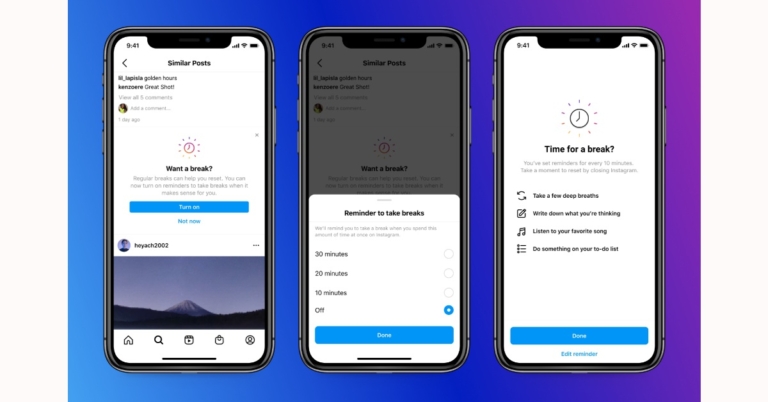
Users can now set reminders to take a break while scrolling through Instagram, starting today for a positive and purposeful Instagram experience. In addition to this, the photo-sharing app has also announced some new tools and features to keep young people even safer on Instagram.
In order to improve the experience on Instagram for teens, parents and guardians. Instagram has developed new tools for parents and guardians and launched the ‘Take A Break’ feature.
Instagram has planned to launch its first tools in March 2022 to help parents and guardians to help them guide and support their teens on the platform. They will be able to view how much time their teens spend on Instagram and set time limits. Teens will also get a new option to notify their parents if they report someone, giving their parents the opportunity to talk about it with them.
 It is also developing a new educational hub for parents and guardians that will include additional resources such as product tutorials and expert advice to help them talk to their kids about social media.
Take a Break has also been launched to give people the tools they need to make better decisions about how they spend their time. Instagram will also ask users to take a break from Instagram if they’ve been scrolling for a certain amount of time, and we’ll suggest they set reminders to take more breaks in the future.
The users will also be notified suggesting they turn these reminders on. Take A Break feature will be first rolled out in the US, UK, Ireland, Canada, New Zealand and Australia and will be made accessible to user regions by early next year.
Instagram is also testing out a new feature that let teens manage their content when they grow up. They will be able to bulk delete content they’ve posted like photos and videos, as well as their previous likes and comments.
It is also developing a new educational hub for parents and guardians that will include additional resources such as product tutorials and expert advice to help them talk to their kids about social media.
Take a Break has also been launched to give people the tools they need to make better decisions about how they spend their time. Instagram will also ask users to take a break from Instagram if they’ve been scrolling for a certain amount of time, and we’ll suggest they set reminders to take more breaks in the future.
The users will also be notified suggesting they turn these reminders on. Take A Break feature will be first rolled out in the US, UK, Ireland, Canada, New Zealand and Australia and will be made accessible to user regions by early next year.
Instagram is also testing out a new feature that let teens manage their content when they grow up. They will be able to bulk delete content they’ve posted like photos and videos, as well as their previous likes and comments.
 This new experience will be available to everyone in January 2022. In addition to this, the ability for people to tag or mention teens who don’t follow them, or to include their content in Reels Remixes or Guides by default when they first join Instagram will also be switched off.
For the latest gadget and tech news, and gadget reviews, follow us on Twitter, Facebook and Instagram. For newest tech & gadget videos subscribe to our YouTube Channel. You can also stay up to date using the Gadget Bridge Android App. You can find the latest car and bike news here.
This new experience will be available to everyone in January 2022. In addition to this, the ability for people to tag or mention teens who don’t follow them, or to include their content in Reels Remixes or Guides by default when they first join Instagram will also be switched off.
For the latest gadget and tech news, and gadget reviews, follow us on Twitter, Facebook and Instagram. For newest tech & gadget videos subscribe to our YouTube Channel. You can also stay up to date using the Gadget Bridge Android App. You can find the latest car and bike news here.
 It is also developing a new educational hub for parents and guardians that will include additional resources such as product tutorials and expert advice to help them talk to their kids about social media.
Take a Break has also been launched to give people the tools they need to make better decisions about how they spend their time. Instagram will also ask users to take a break from Instagram if they’ve been scrolling for a certain amount of time, and we’ll suggest they set reminders to take more breaks in the future.
The users will also be notified suggesting they turn these reminders on. Take A Break feature will be first rolled out in the US, UK, Ireland, Canada, New Zealand and Australia and will be made accessible to user regions by early next year.
Instagram is also testing out a new feature that let teens manage their content when they grow up. They will be able to bulk delete content they’ve posted like photos and videos, as well as their previous likes and comments.
It is also developing a new educational hub for parents and guardians that will include additional resources such as product tutorials and expert advice to help them talk to their kids about social media.
Take a Break has also been launched to give people the tools they need to make better decisions about how they spend their time. Instagram will also ask users to take a break from Instagram if they’ve been scrolling for a certain amount of time, and we’ll suggest they set reminders to take more breaks in the future.
The users will also be notified suggesting they turn these reminders on. Take A Break feature will be first rolled out in the US, UK, Ireland, Canada, New Zealand and Australia and will be made accessible to user regions by early next year.
Instagram is also testing out a new feature that let teens manage their content when they grow up. They will be able to bulk delete content they’ve posted like photos and videos, as well as their previous likes and comments.
 This new experience will be available to everyone in January 2022. In addition to this, the ability for people to tag or mention teens who don’t follow them, or to include their content in Reels Remixes or Guides by default when they first join Instagram will also be switched off.
For the latest gadget and tech news, and gadget reviews, follow us on Twitter, Facebook and Instagram. For newest tech & gadget videos subscribe to our YouTube Channel. You can also stay up to date using the Gadget Bridge Android App. You can find the latest car and bike news here.
This new experience will be available to everyone in January 2022. In addition to this, the ability for people to tag or mention teens who don’t follow them, or to include their content in Reels Remixes or Guides by default when they first join Instagram will also be switched off.
For the latest gadget and tech news, and gadget reviews, follow us on Twitter, Facebook and Instagram. For newest tech & gadget videos subscribe to our YouTube Channel. You can also stay up to date using the Gadget Bridge Android App. You can find the latest car and bike news here. 6 Great Ways to Fix the Spotify Web Player when it stops working

Spotify is one of the most popular audio streaming platforms around the world. It has everything, from a great collection of music to some very insightful and knowledgeable podcasts. Users can listen to them from any device, be it an Android, an iPhone or a Windows machine users can use Spotify on any device they want. Many users prefer to use the web player instead of installing an application on their device, but what if it stops working? Here are some quick remedies to fix Spotify Web Player if it stops working.
Read Also: 10 Best smartphones under Rs 10000 in India (February 2024)
 You can switch the device by clicking on the PC icon sitting close to the speaker icon.
From there you can select the device from which you want to listen to the songs, and that’s how you can fix this issue.
If you can not switch the device then simply sign out from everywhere else.
Step 2: Click on Clear browsing data.
Step 3: Select all three options and hit Clear data.
You can switch the device by clicking on the PC icon sitting close to the speaker icon.
From there you can select the device from which you want to listen to the songs, and that’s how you can fix this issue.
If you can not switch the device then simply sign out from everywhere else.
Step 2: Click on Clear browsing data.
Step 3: Select all three options and hit Clear data.
In This Article
Disable Extensions
Out of many reasons for the Spotify web player not working, interference by extensions is one of the most common ones. Certain extensions that you add to your browser create a problem and interfere with the working of the Spotify web player. If you have extensions installed on your browser then remove all of them and then add them back, one by one, to see which extension was creating the problem. After you remove the problematic extension try to play Spotify on your web browser. It should start working fine. Alternatively, if you don’t want to remove the extensions that you have installed on your browser then open the web player in a private window or in incognito mode and open the Spotify web player, it should work fine after this fast fix. If the problem still occurs try to play the web player on a different browser. Read also: Spotify gets integration with Google Assistant in IndiaEnable or allow to Play Protected Content
If Spotify on your web browser is giving the notification “Play of protected content not enabled,” then you have to enable it in order to fix the Spotify Web player. To enable play-protected content in Chrome browser you have to head over to the settings menu and follow the given steps:
- Click on Privacy and security and open the site settings
- Select Additional content settings and enable the Sites to ask to play the Protected Content option.


Change the audio playing device
Spotify is one of the most popular audio streaming platforms across the world and that’s because users can have access to multiple devices and connect them by logging from one account. However, there are times when this can be a bit confusing as to which device is playing the audio. So, if Spotify Web Player is not playing audio then the problem might be that you have accidentally switched the device and now the audio is being played on another device. You can switch the device by clicking on the PC icon sitting close to the speaker icon.
From there you can select the device from which you want to listen to the songs, and that’s how you can fix this issue.
If you can not switch the device then simply sign out from everywhere else.
You can switch the device by clicking on the PC icon sitting close to the speaker icon.
From there you can select the device from which you want to listen to the songs, and that’s how you can fix this issue.
If you can not switch the device then simply sign out from everywhere else.
Clear browsing data
Step 1: Go to Settings and switch to the Privacy and security tab.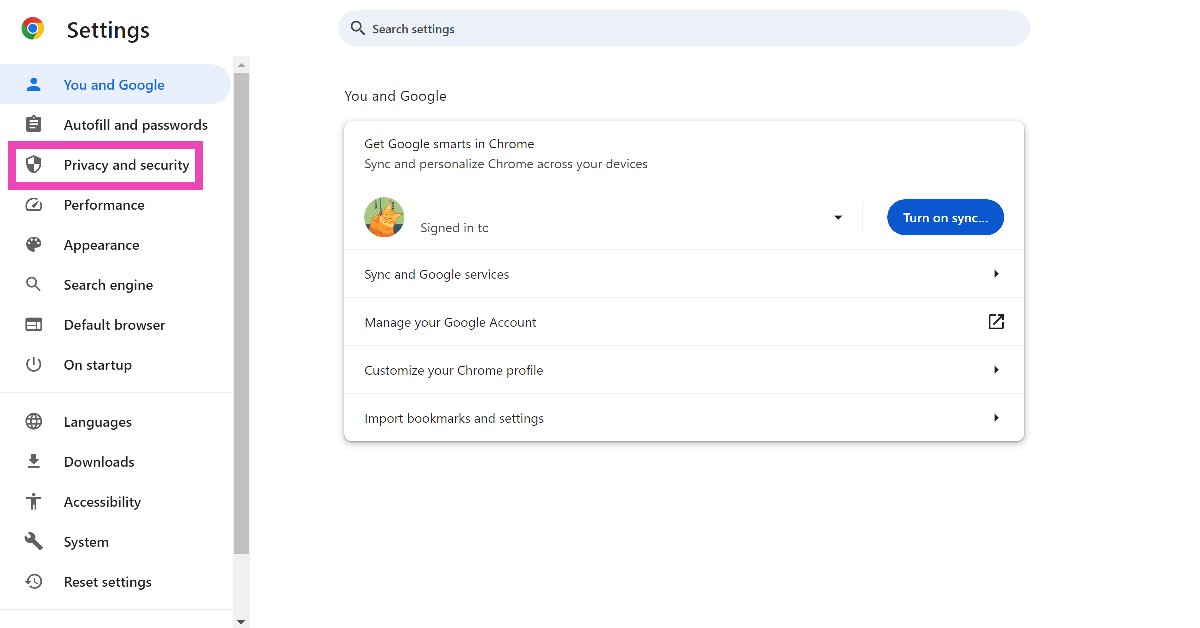 Step 2: Click on Clear browsing data.
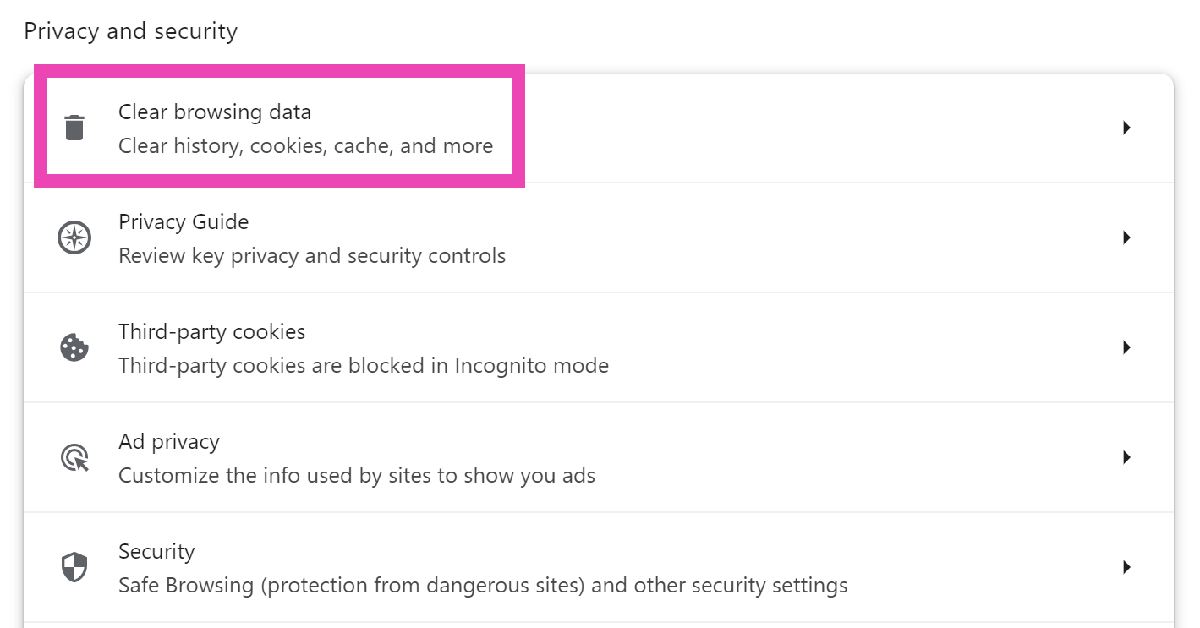 Step 3: Select all three options and hit Clear data.
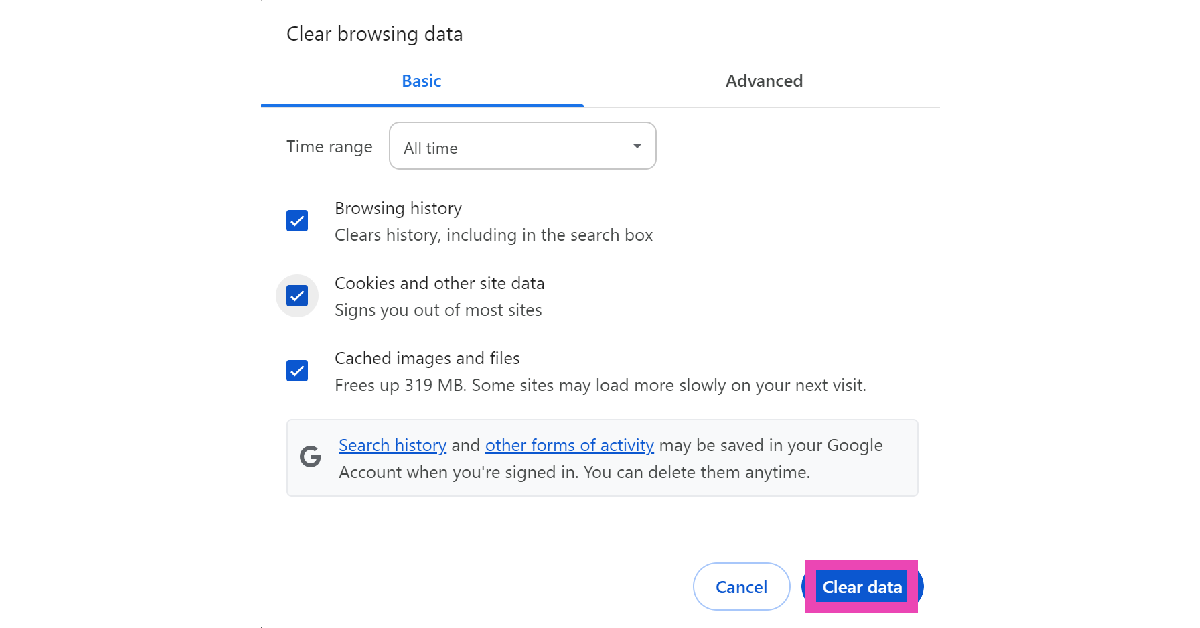
Update your web browser
If you’re using a very old version of your web browser, it may no longer be compatible with Spotify’s web player. In Google Chrome, if you see a red arrow where the ellipses should be, click on it and hit ‘Update’. Other web browsers have the ‘update’ option in the ‘About’ section of the settings. On your smartphone, go to Google Play Store, open the web browser’s page, and hit ‘Update’.Restore your web browser to its original settings
Sometimes, customised settings can meddle with the functioning of Spotify’s web player. If you don’t know which setting is causing the issue, it is a good idea to reset the web browser to its factory default settings. Go to the ‘Reset Settings’ tab in Google Chrome’s settings and select ‘Restore settings to their original defaults’.Frequently Asked Questions (FAQs)
How do I fix Spotify’s web player if it isn’t working?
Make sure the ‘Play Protected Content’ setting is turned on in your web browser. Disable the extensions that may be interfering with the web player’s functioning. Clearing the cache and browsing data is also a good idea.How do I log out of Spotify on all devices at once?
Go to the Spotify web player, access your account page, and select ‘Sign out everywhere’. This will ensure that other devices don’t pause the media playback at random times.How much does Spotify Premium cost?
A standard Spotify Premium membership for one person costs Rs 119 per month. Read Also: How to Hide Your Number With *67? (2024)Conclusion
We are sure the above tips will help you fix the Spotify web player problem. Try them on your web browser and go back to rocking your jams! If you know of any additional tips, let us know in the comments section below.OnePlus Android 12 Update: OnePlus 9 and OnePlus 9 Pro started receiving OxygenOS 12 update

Google and Samsung recently rolled out a stable Android 12 update for their devices. Now OnePlus has pushed out OxygenOS 12 update to its flagship devices. OnePlus 9 and OnePlus 9 Pro are the first to have started receiving the stable Android 12 update, which brings some of the system improvement and added features.
The new OxygenOS 12 update comes via an over-the-air (OTA) update. The OTA update is also available to users in India and is 4.04GB in size. This OTA will be incremental, as usual. A small percentage of users will receive the OTA, and we’ll begin a wider rollout in a few days.
OxygenOS 12 comes with a slew of new features, including a new Shelf with new cards and built-in OnePlus Scout, an improved Work-Life Balance mode that is now available to all of our users, and a new Canvas AOD experience that opens the door to customization, in addition to the improvements Android 12 brings – such as improved privacy features. The changelog below contains a more detailed list of the new features.
According to the changelog, the OnePlus 9 and OnePlus 9 Pro will now get improved textures on desktop icons, thanks to a design inspired by new materials and combining lights and layers.
Dark mode now has three levels that can be adjusted, allowing for a more personalised and comfortable user experience. Additional Card style options have been added, making data content more visually appealing and easier to read.
Earphone Control Card with Bluetooth earphone one-click adjustment has been added. OnePlus Scout is now available in Shelf, allowing you to search multiple contents on your phones, such as Apps, Settings, Media Data, and more. The OnePlus Watch Card was recently added to the Shelf, allowing you to quickly check your health stats.
In addition to this with the rollout of OxygenOS 12 update, all users now have access to the Work-Life Balance feature, which allows you to switch between Work and Life mode with ease using quick settings.
WLB 2.0 now allows for automatic Work/Life mode switching based on specific locations, Wi-Fi networks, and times, as well as personalised App notification profiles based on personalization.
With a two-finger pinch gesture, Gallery now allows you to switch between different layouts, intelligently recognising the best-quality photos and cropping the thumbnail based on the content, making the gallery layout more pleasing.
Moreover, Canvas AOD adds a new line and colour styles to your lock screen for a more personalised experience with inspiring visuals.
Multiple brushes and strokes have been added, as well as colour adjustment support.
Improved face recognition and optimization of the software algorithm to better identify the features and skin colour of various figures. While announcing the OxygenOS 12 update for India the firm said, “We are excited to announce the roll-out of OxygenOS 12 for our user community.
Over the years, the India R&D team have made key contributions to several innovative OxygenOS features such as OnePlus Scout, OnePlus Work-Life Balance, and the OnePlus Shelf. Right from research and conceptualization to development and testing, the India R&D team has helmed the roll-out of these features to be enjoyed by OnePlus users across the world.”
For the latest gadget and tech news, and gadget reviews, follow us on Twitter, Facebook and Instagram. For newest tech & gadget videos subscribe to our YouTube Channel. You can also stay up to date using the Gadget Bridge Android App. You can find the latest car and bike news here.
Google Pixel 6, Pixel 6 Pro receiving features like digital car keys and ultra-wideband etc: Details Inside

Google is now rolling out the December Android 12 Pixel features to the new Pixel 6 and Pixel 6 Pro devices. The fresh update also brings other useful features like digital car key support, a new Quick Tap to Snap feature and extra improvements. These features are also being extended to older Pixel phones.
Google via a Blog Post made the announcement of the new update rollout. The latest functionalities will be released over the next few weeks, starting today with relevant updates coming to Pixel 3a through Pixel 5a (5G) devices – see g.co/pixel/updates for details. Pixel 6 and Pixel 6 Pro devices will begin receiving their updates next week.
When you use Quick Tap, you can already customise the actions your Pixel performs, from taking a screenshot to playing music. You can access Snapchat directly from your lock screen with Quick Tap to Snap, making Pixel the fastest phone to make a Snap. All Pixel 4a with 5G or newer Pixel phones can use Quick Tap to Snap. Plus, starting this month, you’ll be able to add a new Pixel-only Lens to your Snaps: Pixel Face.
 For the Pixel 6 and Pixel 6 Pro, Google has teamed up with BMW to enable digital car keys. You can now unlock and lock your car by tapping your phone on the door handle, and you can start your car by placing your Pixel on the interior key reader and pressing the engine start button on select 2020-2022 BMW models in certain countries.
The Pixel 6 Pro now has ultra-wideband capability. This technology enhances Nearby Share, allowing you to send files, videos, map locations, and more to other ultra-wideband devices in close proximity in a quick and secure manner.
In addition to this, the Conversation mode, a beta version of the Sound Amplifier app’s early-stage accessibility feature, is now available on Pixel. This feature employs on-device machine learning to aid anyone in hearing conversations in noisy environments by focusing on their conversation partner while filtering out background noise. While Google Research continues to work on conversation mode, you can get a sneak peek and help make it better for everyone by volunteering to be an early tester.
Pixel’s Now Playing experience has been updated to make it easier for you to find your next favourite song. Automatic recognition in Now Playing is done entirely on-device, as it always is. Turn on the new search button and tap to let Pixel find a song for you if Now Playing hasn’t automatically identified one playing nearby (available on Pixel 4 or newer Pixel phones). If you really like it, you can save it as a favourite by pressing the music note icon next to the track’s recognition on your lock screen.
December Android 12 Pixel update also brings improved bass-level control for the Pixel Buds A-Series. With any Android 6.0+ device, you can now open the Pixel Buds app and use a slider to adjust the bass from -1 to +4, giving you twice the bass range you currently have.
For the Pixel 6 and Pixel 6 Pro, Google has teamed up with BMW to enable digital car keys. You can now unlock and lock your car by tapping your phone on the door handle, and you can start your car by placing your Pixel on the interior key reader and pressing the engine start button on select 2020-2022 BMW models in certain countries.
The Pixel 6 Pro now has ultra-wideband capability. This technology enhances Nearby Share, allowing you to send files, videos, map locations, and more to other ultra-wideband devices in close proximity in a quick and secure manner.
In addition to this, the Conversation mode, a beta version of the Sound Amplifier app’s early-stage accessibility feature, is now available on Pixel. This feature employs on-device machine learning to aid anyone in hearing conversations in noisy environments by focusing on their conversation partner while filtering out background noise. While Google Research continues to work on conversation mode, you can get a sneak peek and help make it better for everyone by volunteering to be an early tester.
Pixel’s Now Playing experience has been updated to make it easier for you to find your next favourite song. Automatic recognition in Now Playing is done entirely on-device, as it always is. Turn on the new search button and tap to let Pixel find a song for you if Now Playing hasn’t automatically identified one playing nearby (available on Pixel 4 or newer Pixel phones). If you really like it, you can save it as a favourite by pressing the music note icon next to the track’s recognition on your lock screen.
December Android 12 Pixel update also brings improved bass-level control for the Pixel Buds A-Series. With any Android 6.0+ device, you can now open the Pixel Buds app and use a slider to adjust the bass from -1 to +4, giving you twice the bass range you currently have.
 In celebration of International Day of Persons with Disabilities, the tech giant has collaborated with Dana Kearly, a disabled multidisciplinary artist from Vancouver B.C., to create three beautiful new wallpapers for the Curated Culture collection.
Last but not least December Android 12 Pixel features also include Car crash detection which is now supported in Taiwan, Italy and France, in addition to Spain, Ireland, Japan, the U.K., Australia, Singapore and the U.S. Newest and the older Pixel devices can help detect if you’ve been in a serious car accident when car crash detection is turned on in the Personal Safety app. If your phone detects a crash, it will contact you to see if you’re okay. Pixel can share your location and other relevant details with emergency responders if there is no response. (This feature is dependent on network connectivity and other factors, and it may not be reliable or available in all areas for emergency communications.)
In addition to this, the Recorder app now supports new languages for transcription. On Pixel 3 and newer Pixel phones, these include Japanese, French, and German.
For the latest gadget and tech news, and gadget reviews, follow us on Twitter, Facebook and Instagram. For newest tech & gadget videos subscribe to our YouTube Channel. You can also stay up to date using the Gadget Bridge Android App. You can find the latest car and bike news here.
In celebration of International Day of Persons with Disabilities, the tech giant has collaborated with Dana Kearly, a disabled multidisciplinary artist from Vancouver B.C., to create three beautiful new wallpapers for the Curated Culture collection.
Last but not least December Android 12 Pixel features also include Car crash detection which is now supported in Taiwan, Italy and France, in addition to Spain, Ireland, Japan, the U.K., Australia, Singapore and the U.S. Newest and the older Pixel devices can help detect if you’ve been in a serious car accident when car crash detection is turned on in the Personal Safety app. If your phone detects a crash, it will contact you to see if you’re okay. Pixel can share your location and other relevant details with emergency responders if there is no response. (This feature is dependent on network connectivity and other factors, and it may not be reliable or available in all areas for emergency communications.)
In addition to this, the Recorder app now supports new languages for transcription. On Pixel 3 and newer Pixel phones, these include Japanese, French, and German.
For the latest gadget and tech news, and gadget reviews, follow us on Twitter, Facebook and Instagram. For newest tech & gadget videos subscribe to our YouTube Channel. You can also stay up to date using the Gadget Bridge Android App. You can find the latest car and bike news here.
 For the Pixel 6 and Pixel 6 Pro, Google has teamed up with BMW to enable digital car keys. You can now unlock and lock your car by tapping your phone on the door handle, and you can start your car by placing your Pixel on the interior key reader and pressing the engine start button on select 2020-2022 BMW models in certain countries.
The Pixel 6 Pro now has ultra-wideband capability. This technology enhances Nearby Share, allowing you to send files, videos, map locations, and more to other ultra-wideband devices in close proximity in a quick and secure manner.
In addition to this, the Conversation mode, a beta version of the Sound Amplifier app’s early-stage accessibility feature, is now available on Pixel. This feature employs on-device machine learning to aid anyone in hearing conversations in noisy environments by focusing on their conversation partner while filtering out background noise. While Google Research continues to work on conversation mode, you can get a sneak peek and help make it better for everyone by volunteering to be an early tester.
Pixel’s Now Playing experience has been updated to make it easier for you to find your next favourite song. Automatic recognition in Now Playing is done entirely on-device, as it always is. Turn on the new search button and tap to let Pixel find a song for you if Now Playing hasn’t automatically identified one playing nearby (available on Pixel 4 or newer Pixel phones). If you really like it, you can save it as a favourite by pressing the music note icon next to the track’s recognition on your lock screen.
December Android 12 Pixel update also brings improved bass-level control for the Pixel Buds A-Series. With any Android 6.0+ device, you can now open the Pixel Buds app and use a slider to adjust the bass from -1 to +4, giving you twice the bass range you currently have.
For the Pixel 6 and Pixel 6 Pro, Google has teamed up with BMW to enable digital car keys. You can now unlock and lock your car by tapping your phone on the door handle, and you can start your car by placing your Pixel on the interior key reader and pressing the engine start button on select 2020-2022 BMW models in certain countries.
The Pixel 6 Pro now has ultra-wideband capability. This technology enhances Nearby Share, allowing you to send files, videos, map locations, and more to other ultra-wideband devices in close proximity in a quick and secure manner.
In addition to this, the Conversation mode, a beta version of the Sound Amplifier app’s early-stage accessibility feature, is now available on Pixel. This feature employs on-device machine learning to aid anyone in hearing conversations in noisy environments by focusing on their conversation partner while filtering out background noise. While Google Research continues to work on conversation mode, you can get a sneak peek and help make it better for everyone by volunteering to be an early tester.
Pixel’s Now Playing experience has been updated to make it easier for you to find your next favourite song. Automatic recognition in Now Playing is done entirely on-device, as it always is. Turn on the new search button and tap to let Pixel find a song for you if Now Playing hasn’t automatically identified one playing nearby (available on Pixel 4 or newer Pixel phones). If you really like it, you can save it as a favourite by pressing the music note icon next to the track’s recognition on your lock screen.
December Android 12 Pixel update also brings improved bass-level control for the Pixel Buds A-Series. With any Android 6.0+ device, you can now open the Pixel Buds app and use a slider to adjust the bass from -1 to +4, giving you twice the bass range you currently have.
 In celebration of International Day of Persons with Disabilities, the tech giant has collaborated with Dana Kearly, a disabled multidisciplinary artist from Vancouver B.C., to create three beautiful new wallpapers for the Curated Culture collection.
Last but not least December Android 12 Pixel features also include Car crash detection which is now supported in Taiwan, Italy and France, in addition to Spain, Ireland, Japan, the U.K., Australia, Singapore and the U.S. Newest and the older Pixel devices can help detect if you’ve been in a serious car accident when car crash detection is turned on in the Personal Safety app. If your phone detects a crash, it will contact you to see if you’re okay. Pixel can share your location and other relevant details with emergency responders if there is no response. (This feature is dependent on network connectivity and other factors, and it may not be reliable or available in all areas for emergency communications.)
In addition to this, the Recorder app now supports new languages for transcription. On Pixel 3 and newer Pixel phones, these include Japanese, French, and German.
For the latest gadget and tech news, and gadget reviews, follow us on Twitter, Facebook and Instagram. For newest tech & gadget videos subscribe to our YouTube Channel. You can also stay up to date using the Gadget Bridge Android App. You can find the latest car and bike news here.
In celebration of International Day of Persons with Disabilities, the tech giant has collaborated with Dana Kearly, a disabled multidisciplinary artist from Vancouver B.C., to create three beautiful new wallpapers for the Curated Culture collection.
Last but not least December Android 12 Pixel features also include Car crash detection which is now supported in Taiwan, Italy and France, in addition to Spain, Ireland, Japan, the U.K., Australia, Singapore and the U.S. Newest and the older Pixel devices can help detect if you’ve been in a serious car accident when car crash detection is turned on in the Personal Safety app. If your phone detects a crash, it will contact you to see if you’re okay. Pixel can share your location and other relevant details with emergency responders if there is no response. (This feature is dependent on network connectivity and other factors, and it may not be reliable or available in all areas for emergency communications.)
In addition to this, the Recorder app now supports new languages for transcription. On Pixel 3 and newer Pixel phones, these include Japanese, French, and German.
For the latest gadget and tech news, and gadget reviews, follow us on Twitter, Facebook and Instagram. For newest tech & gadget videos subscribe to our YouTube Channel. You can also stay up to date using the Gadget Bridge Android App. You can find the latest car and bike news here. Here are the 5 best alternatives for Omegle

Humans are social animals but with the era of technology it is not necessary to move out to make new friends, one can just relax in their homes and talk to people all around the world. That is the reason, why social media is so popular. So we thought of giving you the best alternative to Omegle.
Omegle is a very popular platform to have conversations with strangers all around the world using a video format, but there are other good options also if you really want to talk to people all around the world, who you do not know.
Here is a list of the 5 best Omegle alternatives:
It has some interesting features like rating your partner, and a history feature so that if you had a good conversation with someone you can always call them back.
With Emerald chat, users can connect through 1 on 1 text chat, videos chats, and group chats. Also, it offers a bot-free experience.
You can find Emerald chat here.
Read also: Now you can talk with up to 10 people at the same time using Jio
If someone accepts you then you add 5 points/currency to your amount and when you search for a new partner 5 points get deducted from your amount. So, if your balance is less than 5 you won’t be able to chat for the next 60 seconds. Hence, offers the cleanest calling experience.
Also, a bonus fact, this site was created by a 17 old year teen.
You can find Chatroullete here.
Download from here.
Read also: Are you a video creator? Here are 7 YouTube alternatives you can
You can find Chatspin here.
It is also a very simple to use platform so anyone can use it by just spending a few minutes with it. Also, to use this platform you don’t have to log in. Chatliv also offers different chat rooms so you can have a group conversation with anyone around the globe.
You can find Chatliv here.
For the latest gadget and tech news, and gadget reviews, follow us on Twitter, Facebook and Instagram. For newest tech & gadget videos subscribe to our YouTube Channel. You can also stay up to date using the Gadget Bridge Android App. You can find the latest car and bike news here.
In This Article
Emerald chat
Emerald chat can be a great option if you want to make friends across borders. You need not have to be tech-savvy or a geek to understand the clean and easy interface of Emerald chat. Once you click on the start button it starts connecting you to other users. It has some interesting features like rating your partner, and a history feature so that if you had a good conversation with someone you can always call them back.
With Emerald chat, users can connect through 1 on 1 text chat, videos chats, and group chats. Also, it offers a bot-free experience.
It has some interesting features like rating your partner, and a history feature so that if you had a good conversation with someone you can always call them back.
With Emerald chat, users can connect through 1 on 1 text chat, videos chats, and group chats. Also, it offers a bot-free experience.
 You can find Emerald chat here.
Read also: Now you can talk with up to 10 people at the same time using Jio
You can find Emerald chat here.
Read also: Now you can talk with up to 10 people at the same time using Jio
Chatroulette – One of the best alternative to omegle
This is by far the best platform to talk to strangers. When you start Chatroulette, it gives you 30 points/currency and only if you have the currency left you can talk more. If someone accepts you then you add 5 points/currency to your amount and when you search for a new partner 5 points get deducted from your amount. So, if your balance is less than 5 you won’t be able to chat for the next 60 seconds. Hence, offers the cleanest calling experience.
 Also, a bonus fact, this site was created by a 17 old year teen.
You can find Chatroullete here.
Also, a bonus fact, this site was created by a 17 old year teen.
You can find Chatroullete here.
Paltalk
It is again an amazing platform to make new friends, Paltalk offers an interface that most of us are already familiar with. It looks a lot like facebook’s messenger app. The best part of the platform is that it has over 5000+ public chat rooms so you will never feel alone and can always get into a group conversation. It also offers users to send stickers, to break the ice. Also, its application is available for Android and iOS.
 Download from here.
Read also: Are you a video creator? Here are 7 YouTube alternatives you can
Download from here.
Read also: Are you a video creator? Here are 7 YouTube alternatives you can
Chatspin
Chatspin offers its users two ways to connect with other people. One is through text and the other one is through video calls. It is a great platform if you want to learn a new language, that’s the reason it is gaining popularity in recent times. It allows users to communicate in 12 different languages. So, if you want to learn a language that is supported by Chatspin you can talk to a native speaker of that language. You can also use location filters in this. You can find Chatspin here.
Chatliv – Another best alternative to omegle
Is also a very good alternative to Omegle and that’s because unlike Omegle, which has tons of bots in it this offers a clean bot-free experience so you won’t share your screen with a bot using this platform.
 It is also a very simple to use platform so anyone can use it by just spending a few minutes with it. Also, to use this platform you don’t have to log in. Chatliv also offers different chat rooms so you can have a group conversation with anyone around the globe.
You can find Chatliv here.
For the latest gadget and tech news, and gadget reviews, follow us on Twitter, Facebook and Instagram. For newest tech & gadget videos subscribe to our YouTube Channel. You can also stay up to date using the Gadget Bridge Android App. You can find the latest car and bike news here.
It is also a very simple to use platform so anyone can use it by just spending a few minutes with it. Also, to use this platform you don’t have to log in. Chatliv also offers different chat rooms so you can have a group conversation with anyone around the globe.
You can find Chatliv here.
For the latest gadget and tech news, and gadget reviews, follow us on Twitter, Facebook and Instagram. For newest tech & gadget videos subscribe to our YouTube Channel. You can also stay up to date using the Gadget Bridge Android App. You can find the latest car and bike news here. 8 December 2021 Amazon Quiz today answers: Answer to win Rs 25,000 Amazon Pay Balance

The popular Amazon Quiz is now live on the Amazon app. The 8 December 2021 Amazon Quiz gives a chance to win Rs 25,000 Amazon Pay Balance by answering all the questions correctly. The quiz can be played every day from 12 AM to 11:59. Only app users are eligible to participate in the Quiz as it is not accessible on the web platform.
The Amazon Quiz brings a fresh set of questions for its customers that contains five easy questions. The questionnaire consists of five questions related to general knowledge and current affairs. The participants need to answer all the questions correctly and their names will be selected for a lucky draw. The daily quiz brings an opportunity for the customers to win exciting prizes. They can win Amazon Pay Balance ranging from Rs 1,000 to Rs 50,000. The participants need to answer all the questions correctly and their names will be selected for a lucky draw. The winner will be announced at the end of the month. Check Out 8 December 2021 Amazon Quiz Answers.
In This Article
8 December 2021 Amazon Quiz Answers
Question 1: NASA’s Juno probe recently offered the first 3D view of the atmosphere of which planet?
Answer: JupiterQuestion 2: As per the new retention rules, ahead of the auction for the 2022 IPL, each franchise would be allowed to retain a maximum of how many players?
Answer: 4Question 3: Which famous singer has sung the theme song for the new James Bond movie No Time to Die?
Answer: Billie EilishQuestion 4: This is the flag of which nation?
Answer: MoroccoQuestion 5: This is a doll of which Disney character?
Answer: Snow White For the latest gadget and tech news, and gadget reviews, follow us on Twitter, Facebook and Instagram. For newest tech & gadget videos subscribe to our YouTube Channel. You can also stay up to date using the Gadget Bridge Android App. You can find the latest car and bike news here.D-Link R15 EAGLE PRO AI AX1500 AI-enabled Smart Router launched in India
D-Link has added to its networking equipment lineup by introducing a new line of Wi-Fi routers. The company has launched D-Link R15 EAGLE PRO AI AX1500 Smart Router in India that is an AI-enabled Router for a better Wi-Fi experience.
In This Article
D-Link R15 EAGLE PRO AI AX1500 Smart Router price and availability
The D-Link R15 EAGLE PRO AI AX1500 Smart Router has been launched in India with a price tag of Rs 3,299. The new AI-enabled router can be bought through the e-commerce website Amazon in the country.D-Link R15 EAGLE PRO AI AX1500 Smart Router specifications
The all-new R15 EAGLE PRO AI Router combines cutting-edge Wi-Fi 6 technology with artificial intelligence to provide unrivalled Wi-Fi coverage and speed. The D Link router series includes AI-enhanced capabilities for optimising Wi-Fi, ensuring peak network performance throughout, and allowing users to enjoy the convenience of an AI-powered Wi-Fi network. In addition to this the D-Link R15 EAGLE PRO AI AX1500 Smart Router offers a host of AI-enabled features. The built-in AI Wi-Fi Optimizer continuously scans for the least-interfering Wi-Fi channel to ensure the best possible connection. Simultaneously, the AI Traffic Optimizer prioritises the most important internet usage for the best possible online experience and stability. While the AI Parental Control gives parents complete control over their children’s online activities, including internet pause/start, website filtering, managing multiple profiles, internet access scheduling, and bedtime schedule, among other things. The AI Mesh Optimizer is also included in this router, which strengthens the connection between mesh nodes to provide seamless and reliable Wi-Fi. With the integrated AI Assistant, managing Wi-Fi is now easier than ever before. It continuously monitors data usage and reviews the network, sending recommendations and weekly reports to the EAGLE PRO AI app. Also, the R15 EAGLE PRO AI AX1500 Smart Router provides dual-band wireless speeds of up to 1,500 Mbps for lightning-fast wireless coverage with increased range and reliability. This router, which is backed by the EAGLE PRO AI App, offers an intelligent one-touch setup for seamless connectivity as well as a slew of AI features. For the latest gadget and tech news, and gadget reviews, follow us on Twitter, Facebook and Instagram. For newest tech & gadget videos subscribe to our YouTube Channel. You can also stay up to date using the Gadget Bridge Android App. You can find the latest car and bike news here.Acer Predator Helios 500 (PH517-52) gaming laptop launched in India

The Taiwanese computer manufacturing giant, Acer, today expanded its Predator lineup with the launch of a new gaming laptop in the Indian market. The company has introduced the Acer Predator Helios 500 that packs a 4K 120 Hz Mini LED display. Under the hood, there is an 11th Gen Intel Core i9 processor and NVIDIA GeForce RTX 3080 Laptop GPU. It also features custom-engineered 5th Gen AeroBlade 3D Fan Technology with Vortex flow and Powergem advanced cooling.
 Users can activate the Predator Pulsar and customise the light cluster with PredatorSense to customise their keyboard with per-key RGB backlighting. Acer’s patented MagForce keys, which both feature a MagTek mechanical switch to turn the keypress function into a joystick mechanism, can be added to the WASD key assembly. This allows gamers to gradually increase key pressure for precise control of the character’s / car’s speed – from the initial (0.8 mm) to full speed at 100 percent (3 / 3.1 mm) actuation.
The Helios 500 has multiple ports to give players even more control, including one HDMI 2.1, one mini-DP1.4, two USB Type-C Thunderbolt 4 ports, three USB 3.2 Gen2 ports with offline charging, and one RJ45 port. Better connectivity and lower latency are provided by the Intel Killer E3100 Ethernet Controller, Intel Killer Wi-Fi 6 AX1650, and the Killer Intelligence Center.
For the latest gadget and tech news, and gadget reviews, follow us on Twitter, Facebook and Instagram. For newest tech & gadget videos subscribe to our YouTube Channel. You can also stay up to date using the Gadget Bridge Android App. You can find the latest car and bike news here.
Users can activate the Predator Pulsar and customise the light cluster with PredatorSense to customise their keyboard with per-key RGB backlighting. Acer’s patented MagForce keys, which both feature a MagTek mechanical switch to turn the keypress function into a joystick mechanism, can be added to the WASD key assembly. This allows gamers to gradually increase key pressure for precise control of the character’s / car’s speed – from the initial (0.8 mm) to full speed at 100 percent (3 / 3.1 mm) actuation.
The Helios 500 has multiple ports to give players even more control, including one HDMI 2.1, one mini-DP1.4, two USB Type-C Thunderbolt 4 ports, three USB 3.2 Gen2 ports with offline charging, and one RJ45 port. Better connectivity and lower latency are provided by the Intel Killer E3100 Ethernet Controller, Intel Killer Wi-Fi 6 AX1650, and the Killer Intelligence Center.
For the latest gadget and tech news, and gadget reviews, follow us on Twitter, Facebook and Instagram. For newest tech & gadget videos subscribe to our YouTube Channel. You can also stay up to date using the Gadget Bridge Android App. You can find the latest car and bike news here.
In This Article
Acer Predator Helios 500 price in India and availability
The Acer Predator Helios 500 has been launched in India with a starting price of Rs 3,37,999. The gaming laptop can be purchased through the Acer online Store, Acer Exclusive stores and other authorised retail stores in the country.
Acer Predator Helios 500 (PH517-52) specifications
Acer Predator Helios 500 (PH517-52)It has a 17.3-inch 4K Mini LED 120 Hz display, which is powered by AUO AmLED technology and supports Full-array local dimming for the best colour saturation and contrast. It offers 512 backlight zones, making it possible to reach VESA’s DisplayHDR 1000 specification. It has an overclockable 11th Gen Intel Core i9 processor and NVIDIA GeForce RTX 3080 Laptop GPU with 16GB VRAM and is designed to delight gamers by bringing desktop-like gameplay to users on the go. The laptop also supports PCIe NVMe SSDs in RAID 0 and one SATA HDD. The Acer Predator Helios 500 also includes Acer PowerGem, a custom-engineered technology made from a metal-alloy polymer that sits on top of the CPU and serves to distribute the heat it generates throughout the device. Acer’s Vortex Flow technology uses two fans, one of which is a 5th Generation AeroBlade 3D Fan, to direct airflow to critical components and boost performance during long gaming sessions. Users can activate the Predator Pulsar and customise the light cluster with PredatorSense to customise their keyboard with per-key RGB backlighting. Acer’s patented MagForce keys, which both feature a MagTek mechanical switch to turn the keypress function into a joystick mechanism, can be added to the WASD key assembly. This allows gamers to gradually increase key pressure for precise control of the character’s / car’s speed – from the initial (0.8 mm) to full speed at 100 percent (3 / 3.1 mm) actuation.
The Helios 500 has multiple ports to give players even more control, including one HDMI 2.1, one mini-DP1.4, two USB Type-C Thunderbolt 4 ports, three USB 3.2 Gen2 ports with offline charging, and one RJ45 port. Better connectivity and lower latency are provided by the Intel Killer E3100 Ethernet Controller, Intel Killer Wi-Fi 6 AX1650, and the Killer Intelligence Center.
For the latest gadget and tech news, and gadget reviews, follow us on Twitter, Facebook and Instagram. For newest tech & gadget videos subscribe to our YouTube Channel. You can also stay up to date using the Gadget Bridge Android App. You can find the latest car and bike news here.
Users can activate the Predator Pulsar and customise the light cluster with PredatorSense to customise their keyboard with per-key RGB backlighting. Acer’s patented MagForce keys, which both feature a MagTek mechanical switch to turn the keypress function into a joystick mechanism, can be added to the WASD key assembly. This allows gamers to gradually increase key pressure for precise control of the character’s / car’s speed – from the initial (0.8 mm) to full speed at 100 percent (3 / 3.1 mm) actuation.
The Helios 500 has multiple ports to give players even more control, including one HDMI 2.1, one mini-DP1.4, two USB Type-C Thunderbolt 4 ports, three USB 3.2 Gen2 ports with offline charging, and one RJ45 port. Better connectivity and lower latency are provided by the Intel Killer E3100 Ethernet Controller, Intel Killer Wi-Fi 6 AX1650, and the Killer Intelligence Center.
For the latest gadget and tech news, and gadget reviews, follow us on Twitter, Facebook and Instagram. For newest tech & gadget videos subscribe to our YouTube Channel. You can also stay up to date using the Gadget Bridge Android App. You can find the latest car and bike news here. HP Omen 16 gaming laptop with 11th Gen Intel Core and NVIDIA GeForce RTX 30 Series launched in India

HP on Tuesday introduced a new gaming laptop in the Indian market under its Omen Series. The company has introduced a new HP Omen 16 that comes with improved features like fan design and thermals. It is capable of handling high-end gaming titles and supports up to a 165Hz refresh rate. In addition to this, the HP gaming laptop includes a Next-gen 11th Gen Intel Core Processor & NVIDIA GeForce RTX 30 Series graphics.
 In terms of hardware, the gaming laptops equips up to Intel Core i7-11800H3 series processors Mobile Processors with up to an NVIDIA GeForce RTX 3070 Laptop GPU 8 GB. The device will be available with up to 16 GB DDR4 3200 MHz and with up to 1TB PCIe Gen 4×4 SSD which has up to 2X storage access speed than traditional SSD.
HP Omen 16 comes with an upgraded new fan design that is 2.5X slimmer and has twice the number of fan blades as the previous generation offering a 200% increase in blade count compared to the OMEN 15. There is OMEN Dynamic Power along with the IR thermopile sensor that can identify real-time CPU and GPU capacity and dynamically allocate power between the CPU and GPU, thereby providing additional headroom and optimising in-game FPS based on the current game scenery. The IR thermopile sensor on the gaming laptop can absorb passive infrared energy from an item, an infrared thermopile sensor may determine the temperature of that object without direct contact. According to HP, the IR thermopile sensor is used to enable thermal, performance, and acoustic optimization based on the current user scenario, resulting in a better user experience.
For the latest gadget and tech news, and gadget reviews, follow us on Twitter, Facebook and Instagram. For newest tech & gadget videos subscribe to our YouTube Channel. You can also stay up to date using the Gadget Bridge Android App. You can find the latest car and bike news here.
In terms of hardware, the gaming laptops equips up to Intel Core i7-11800H3 series processors Mobile Processors with up to an NVIDIA GeForce RTX 3070 Laptop GPU 8 GB. The device will be available with up to 16 GB DDR4 3200 MHz and with up to 1TB PCIe Gen 4×4 SSD which has up to 2X storage access speed than traditional SSD.
HP Omen 16 comes with an upgraded new fan design that is 2.5X slimmer and has twice the number of fan blades as the previous generation offering a 200% increase in blade count compared to the OMEN 15. There is OMEN Dynamic Power along with the IR thermopile sensor that can identify real-time CPU and GPU capacity and dynamically allocate power between the CPU and GPU, thereby providing additional headroom and optimising in-game FPS based on the current game scenery. The IR thermopile sensor on the gaming laptop can absorb passive infrared energy from an item, an infrared thermopile sensor may determine the temperature of that object without direct contact. According to HP, the IR thermopile sensor is used to enable thermal, performance, and acoustic optimization based on the current user scenario, resulting in a better user experience.
For the latest gadget and tech news, and gadget reviews, follow us on Twitter, Facebook and Instagram. For newest tech & gadget videos subscribe to our YouTube Channel. You can also stay up to date using the Gadget Bridge Android App. You can find the latest car and bike news here.
In This Article
HP Omen 16 gaming laptop price in India and availability
HP Omen 16 price in India starts at Rs 1,39,999. It can be purchased at HP world stores, HP online stores & other leading large format retail & online stores in the country.
HP Omen 16 gaming laptop specifications
Talking about the design first, HP Omen 16 gaming laptop comes with a sustainable PC design made with ocean-bound plastics and recycled materials. It features a 16-inch QHD IPS display with a 165Hz Hz refresh rate and 3ms response time. The screen offers 100% sRGB, Flicker-free and colours accurate low blue light with Eyesafe display certification by TÜVRheinlan to keep eyes fresh during extended gaming sessions. It also has the 4 Zone RGB anti-ghosting keyboard with OMEN Gaming Hub Light Studio integration to achieve a look that is on point with any gaming setup theme. In terms of hardware, the gaming laptops equips up to Intel Core i7-11800H3 series processors Mobile Processors with up to an NVIDIA GeForce RTX 3070 Laptop GPU 8 GB. The device will be available with up to 16 GB DDR4 3200 MHz and with up to 1TB PCIe Gen 4×4 SSD which has up to 2X storage access speed than traditional SSD.
HP Omen 16 comes with an upgraded new fan design that is 2.5X slimmer and has twice the number of fan blades as the previous generation offering a 200% increase in blade count compared to the OMEN 15. There is OMEN Dynamic Power along with the IR thermopile sensor that can identify real-time CPU and GPU capacity and dynamically allocate power between the CPU and GPU, thereby providing additional headroom and optimising in-game FPS based on the current game scenery. The IR thermopile sensor on the gaming laptop can absorb passive infrared energy from an item, an infrared thermopile sensor may determine the temperature of that object without direct contact. According to HP, the IR thermopile sensor is used to enable thermal, performance, and acoustic optimization based on the current user scenario, resulting in a better user experience.
For the latest gadget and tech news, and gadget reviews, follow us on Twitter, Facebook and Instagram. For newest tech & gadget videos subscribe to our YouTube Channel. You can also stay up to date using the Gadget Bridge Android App. You can find the latest car and bike news here.
In terms of hardware, the gaming laptops equips up to Intel Core i7-11800H3 series processors Mobile Processors with up to an NVIDIA GeForce RTX 3070 Laptop GPU 8 GB. The device will be available with up to 16 GB DDR4 3200 MHz and with up to 1TB PCIe Gen 4×4 SSD which has up to 2X storage access speed than traditional SSD.
HP Omen 16 comes with an upgraded new fan design that is 2.5X slimmer and has twice the number of fan blades as the previous generation offering a 200% increase in blade count compared to the OMEN 15. There is OMEN Dynamic Power along with the IR thermopile sensor that can identify real-time CPU and GPU capacity and dynamically allocate power between the CPU and GPU, thereby providing additional headroom and optimising in-game FPS based on the current game scenery. The IR thermopile sensor on the gaming laptop can absorb passive infrared energy from an item, an infrared thermopile sensor may determine the temperature of that object without direct contact. According to HP, the IR thermopile sensor is used to enable thermal, performance, and acoustic optimization based on the current user scenario, resulting in a better user experience.
For the latest gadget and tech news, and gadget reviews, follow us on Twitter, Facebook and Instagram. For newest tech & gadget videos subscribe to our YouTube Channel. You can also stay up to date using the Gadget Bridge Android App. You can find the latest car and bike news here. Samsung Galaxy A03 with 5,000mAh battery launched in India
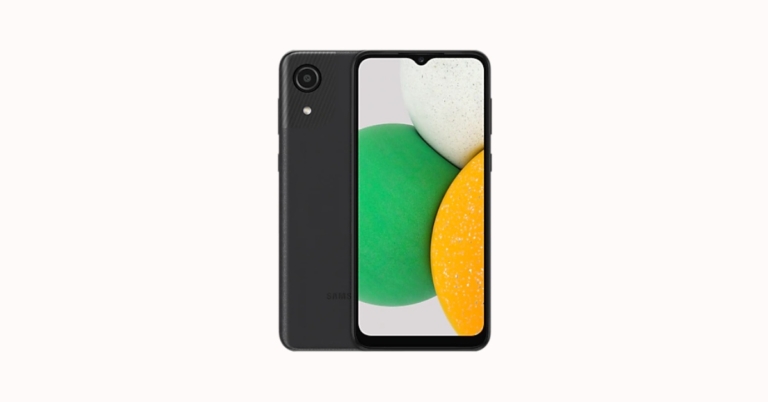
The South Korean giant Samsung has launched yet another pocket-friendly smartphone in the Indian market. The company has officially released the Samsung Galaxy A03 Core. The smartphone is a sibling of Samsung Galaxy A03s which debuted in the country in August this year. The newly launched budget smartphone by Samsung houses a 5,000mAh battery. It comes with Unisoc SC98A SoC. There is also a single rear camera and operates on Android 11 Go Edition.

In This Article
Samsung Galaxy A03 Core price and availability
Samsung Galaxy A03 Core price in India is set at Rs 7,999 for the single 2GB RAM with 32GB storage option. The device is being offered in two colour options of Blue and Black. Galaxy A03 Core is available across retail stores, Samsung.com and leading online portals.
Samsung Galaxy A03 Core tech specs
Android 11 is installed on the Samsung Galaxy A03 Core (Go edition). It has a 6.5-inch HD+ PLS TFT LCD display with 720×1,600 pixels of resolution. It is powered by an octa-core Unisoc SC9836A SoC with 2GB of RAM. Onboard storage is 32GB, and it can be expanded further with a microSD card to up to 1TB. Only an 8-megapixel rear camera with an f/2.0 aperture lens and up to 4x digital zoom is available on the Samsung Galaxy A03 Core. It has a 5-megapixel camera with an f/2.2 aperture lens for selfies and video calls. A 5,000mAh battery powers the phone. An accelerometer, light sensor, and proximity sensor are among the Samsung Galaxy A03 Core’s onboard sensors. 4G LTE, Wi-Fi 802.11 b/g/n with a 2.4GHz band, Wi-Fi Direct, Bluetooth v4.2, a 3.5mm headphone jack, GPS, and GLONASS are all available connectivity options.Samsung Galaxy A03s specs
The Samsung Galaxy A03s has a 6.5-inch HD+ Infinity V TFT screen with 720×1,600 pixels of resolution and a 20:9 aspect ratio that was released in India. Out of the box, the phone runs One UI 3.1 Core on top of Android 11. The phone is powered by a MediaTek Helio P35 octa-core processor with up to 4GB of RAM and 64GB of storage. A microSD card can be used to expand the storage up to 1TB. A 13-megapixel primary sensor with an f/2.2 aperture is included in the Samsung Galaxy A03s’ triple-rear camera setup. A 2-megapixel depth sensor with an f/2.4 aperture and a 2-megapixel macro sensor with an f/2.4 aperture are also included. A 5-megapixel front-facing camera with an f/2.2 aperture is available for selfies. A 5,000mAh battery powers the budget-friendly device. For the latest gadget and tech news, and gadget reviews, follow us on Twitter, Facebook and Instagram. For newest tech & gadget videos subscribe to our YouTube Channel. You can also stay up to date using the Gadget Bridge Android App. You can find the latest car and bike news here.Moto G51 5G to officially debut in India on December 10
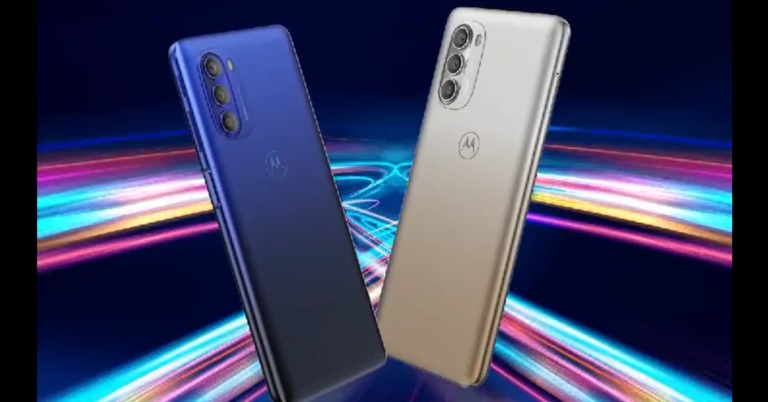
After a lot of anticipation Moto G51 5G finally has a launch date. Motorola has officially confirmed that it arriving with the smartphone on December 10. Most of the leaks and rumours in the past tipped a similar launch date but there was no official confirmation from the Chinese smartphone company. This is going to be the second device by the company to be added to the company’s Moto G-Series lineup after Moto G31.
Lenovo owned smartphone company Motorola took to Twitter to announce the launch of its upcoming smartphone in India. According to the latest Tweet by the company Moto G51 5G will be making its debut in India on December 10. The smartphone will be available via the e-commerce platform Flipkart.
 The phone is expected to cost Rs 19,999 in India, but the 5G-ready smartphone debuted in Europe for EUR 229.99, which translates to Rs 19,600 in India for the single 4GB of RAM with 64GB of storage option.
The Qualcomm Snapdragon 480 chipset powers the original Moto G51 5G, but it’s also possible that the smartphone will arrive in India with the Snapdragon 480+ chipset. This 5G processor will support 12 5G bands and will be the company’s first mobile phone to include a 5G chipset.
In terms of specifications on the Moto G51 5G, the display is a 6.8-inch FHD+ LCD with a 120Hz refresh rate. The phone has a Snapdragon 480+ processor, 4GB of RAM, and 64GB of internal storage that can be expanded to 512GB with a microSD card. It comes pre-installed with Android 11.
There’s a triple camera setup on the back of the phone, with a 50-megapixel primary sensor, an 8-megapixel ultra-wide lens, and a 2-megapixel macro lens. For selfies and video calls, the phone has a 16-megapixel sensor on the front.
A 5,000mAh battery and a 10W charger are also included.
For the latest gadget and tech news, and gadget reviews, follow us on Twitter, Facebook and Instagram. For newest tech & gadget videos subscribe to our YouTube Channel. You can also stay up to date using the Gadget Bridge Android App. You can find the latest car and bike news here.
The phone is expected to cost Rs 19,999 in India, but the 5G-ready smartphone debuted in Europe for EUR 229.99, which translates to Rs 19,600 in India for the single 4GB of RAM with 64GB of storage option.
The Qualcomm Snapdragon 480 chipset powers the original Moto G51 5G, but it’s also possible that the smartphone will arrive in India with the Snapdragon 480+ chipset. This 5G processor will support 12 5G bands and will be the company’s first mobile phone to include a 5G chipset.
In terms of specifications on the Moto G51 5G, the display is a 6.8-inch FHD+ LCD with a 120Hz refresh rate. The phone has a Snapdragon 480+ processor, 4GB of RAM, and 64GB of internal storage that can be expanded to 512GB with a microSD card. It comes pre-installed with Android 11.
There’s a triple camera setup on the back of the phone, with a 50-megapixel primary sensor, an 8-megapixel ultra-wide lens, and a 2-megapixel macro lens. For selfies and video calls, the phone has a 16-megapixel sensor on the front.
A 5,000mAh battery and a 10W charger are also included.
For the latest gadget and tech news, and gadget reviews, follow us on Twitter, Facebook and Instagram. For newest tech & gadget videos subscribe to our YouTube Channel. You can also stay up to date using the Gadget Bridge Android App. You can find the latest car and bike news here.
 The phone is expected to cost Rs 19,999 in India, but the 5G-ready smartphone debuted in Europe for EUR 229.99, which translates to Rs 19,600 in India for the single 4GB of RAM with 64GB of storage option.
The Qualcomm Snapdragon 480 chipset powers the original Moto G51 5G, but it’s also possible that the smartphone will arrive in India with the Snapdragon 480+ chipset. This 5G processor will support 12 5G bands and will be the company’s first mobile phone to include a 5G chipset.
In terms of specifications on the Moto G51 5G, the display is a 6.8-inch FHD+ LCD with a 120Hz refresh rate. The phone has a Snapdragon 480+ processor, 4GB of RAM, and 64GB of internal storage that can be expanded to 512GB with a microSD card. It comes pre-installed with Android 11.
There’s a triple camera setup on the back of the phone, with a 50-megapixel primary sensor, an 8-megapixel ultra-wide lens, and a 2-megapixel macro lens. For selfies and video calls, the phone has a 16-megapixel sensor on the front.
A 5,000mAh battery and a 10W charger are also included.
For the latest gadget and tech news, and gadget reviews, follow us on Twitter, Facebook and Instagram. For newest tech & gadget videos subscribe to our YouTube Channel. You can also stay up to date using the Gadget Bridge Android App. You can find the latest car and bike news here.
The phone is expected to cost Rs 19,999 in India, but the 5G-ready smartphone debuted in Europe for EUR 229.99, which translates to Rs 19,600 in India for the single 4GB of RAM with 64GB of storage option.
The Qualcomm Snapdragon 480 chipset powers the original Moto G51 5G, but it’s also possible that the smartphone will arrive in India with the Snapdragon 480+ chipset. This 5G processor will support 12 5G bands and will be the company’s first mobile phone to include a 5G chipset.
In terms of specifications on the Moto G51 5G, the display is a 6.8-inch FHD+ LCD with a 120Hz refresh rate. The phone has a Snapdragon 480+ processor, 4GB of RAM, and 64GB of internal storage that can be expanded to 512GB with a microSD card. It comes pre-installed with Android 11.
There’s a triple camera setup on the back of the phone, with a 50-megapixel primary sensor, an 8-megapixel ultra-wide lens, and a 2-megapixel macro lens. For selfies and video calls, the phone has a 16-megapixel sensor on the front.
A 5,000mAh battery and a 10W charger are also included.
For the latest gadget and tech news, and gadget reviews, follow us on Twitter, Facebook and Instagram. For newest tech & gadget videos subscribe to our YouTube Channel. You can also stay up to date using the Gadget Bridge Android App. You can find the latest car and bike news here.