

In This Article
Redmi Note 11 Review: Design and Display
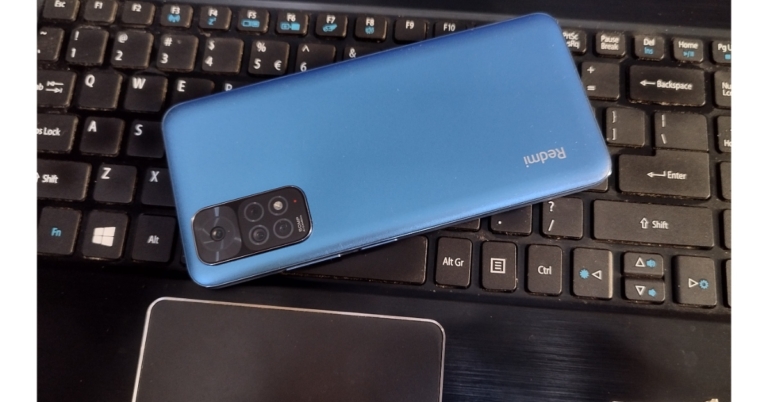
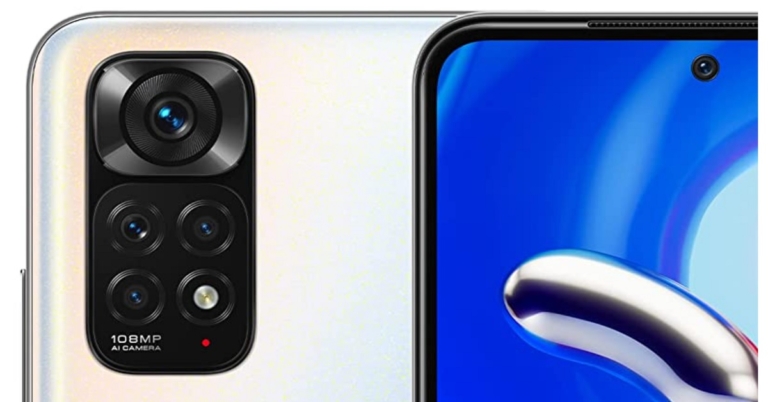
The phone is the first thing you see when you open the relatively large box. Although we have it in Horizon Blue, the black and white colour variant also look quite nice. So, we’ve been using the phone for a few days now, and the design and build quality are the first things that have impressed us. Because it is not overly bulky and weighs around 180 grams, the device feels quite light when held. With a minimalistic design, the phone appears to be quite durable. The matte finish does a good job of keeping fingerprints and smudges at bay. Unlike the Redmi Note 11 Pro+ 5G (Review), which has a two-step design, the camera module seamlessly houses all four sensors. Because the phone is entirely made up of plastic, including the side frames. Our recommendation, you should use the silicon case that comes with it to avoid any mishaps.
 The volume keys and a power button with a fingerprint sensor (embedded within) are located on the right frame. The scanner is both fast and dependable. It has a SIM tray on the left that can hold two nano-SIM cards and a microSD card. There’s a 3.5mm headphone jack on top, as well as an IR blaster and speaker grill, as you can see. A USB Type-C port, as well as a speaker grill, are located at the phone’s bottom.
 On the front of the Redmi Note 11, Xiaomi has included a 6.43-inch FHD+ AMOLED screen with a resolution of 1,080×2,400 pixels. It has a 20:9 aspect ratio and a refresh rate of up to 90Hz.
Outdoor visibility is not an issue because the colours pop well and the display can get quite bright. Unlike the Redmi Note 10 from last year, Xiaomi has included a much improved 90Hz panel on this one, which is a significant improvement over the standard 60Hz panel.
On the front of the Redmi Note 11, Xiaomi has included a 6.43-inch FHD+ AMOLED screen with a resolution of 1,080×2,400 pixels. It has a 20:9 aspect ratio and a refresh rate of up to 90Hz.
Outdoor visibility is not an issue because the colours pop well and the display can get quite bright. Unlike the Redmi Note 10 from last year, Xiaomi has included a much improved 90Hz panel on this one, which is a significant improvement over the standard 60Hz panel.
 As a result, having a higher refresh rate panel improves the overall smartphone experience by making scrolling through the UI and social media feeds much more fluid. In addition, Gorilla Glass 3 is used to protect the screen, which is welcomed in this price bracket.
Redmi Note 11 Review: Performance and Cameras
A 6nm octa-core Qualcomm Snapdragon 680 SoC and up to 6GB of LPDDR4X RAM are found under the hood. The phone has a built-in storage capacity of up to 128GB, which can be expanded to 1TB using a microSD card. The chipset is an upgrade over the Snapdragon 678 from last year. The new 680 SoC is faster than the 678, but it is still not as fast as the Snapdragon 732G processor. However, the 680 uses less energy than its predecessor. The Redmi Note 11 is capable of handling everyday tasks with ease. While browsing the internet, watching videos, using social media, and playing games, performance did not stutter. When it comes to gaming, the Redmi Note 11 can run games like COD, BGMI, and Asphalt 9. We played Asphalt 9 on high settings, but the graphics appeared to be a little off. While the COD gameplay remained stable, the device did not become warm over time. Furthermore, the smartphone comes preloaded with MIUI 13 based on Android 11. Although the mobile device comes with bloatware, most of the apps can be uninstalled with ease. We didn’t notice any micro stutters or lags because the user interface is well-designed. The phone is responsive and smooth thanks to the presence of a 90Hz refresh rate and a 180Hz dot sampling rate.
In fact, the RAM management is excellent, and the apps do not consume a lot of memory in the background. With MIUI 13, the dark mode optimization has been improved.
When it comes to cameras, the Redmi Note 11 has a quad-camera setup with a 50-megapixel main sensor and an f/1.8 aperture on the back. The rear camera setup also consists of an 8-megapixel secondary sensor with an ultra-wide lens, a 2-megapixel macro lens, and a 2-megapixel depth sensor. A 13-megapixel selfie camera sensor with an f/2.4 aperture is included for selfies, too.
Furthermore, the smartphone comes preloaded with MIUI 13 based on Android 11. Although the mobile device comes with bloatware, most of the apps can be uninstalled with ease. We didn’t notice any micro stutters or lags because the user interface is well-designed. The phone is responsive and smooth thanks to the presence of a 90Hz refresh rate and a 180Hz dot sampling rate.
In fact, the RAM management is excellent, and the apps do not consume a lot of memory in the background. With MIUI 13, the dark mode optimization has been improved.
When it comes to cameras, the Redmi Note 11 has a quad-camera setup with a 50-megapixel main sensor and an f/1.8 aperture on the back. The rear camera setup also consists of an 8-megapixel secondary sensor with an ultra-wide lens, a 2-megapixel macro lens, and a 2-megapixel depth sensor. A 13-megapixel selfie camera sensor with an f/2.4 aperture is included for selfies, too.
 The Redmi Note 11 has a native resolution of 12.5-megapixels, which is achieved by combining four pixels. So, when the lighting is good, the image quality from the main sensor is great. It manages to produce good images in bright ambient lighting. The colour, contrast, and sharpness appear to be adequate. However, it struggles to take good photos in low light. The photos taken in low light lacked detail and appears to be noisy. The device does, however, have a night mode, but it appears to be not doing too much. Best is to use the flash at night time for optimum results.


Our Take
So, is the Redmi Note 11 a good buy? The device is aimed at casual users who want a device with a good design, decent display and long battery life in a budget. If you fall in any of those categories go for it without a doubt. You will get good imagery from the primary sensor and you can do a bit of everyday gaming on this handset too.Redmi Note 11 Pros
- Excellent display
- 90Hz refresh rate
- power-efficient
Redmi Note 11 Cons
- Average secondary and selfie camera performance
- Lacks 4K video recording
- No video stabilisation






 Step 1:
 Step 3:
 Step 4:
 Step 3: Launch the
  Step 5: Select a resolution and playback speed for the video.
 Step 6: Hit Download.



 Step 1:
 Step 3:
 Step 5:
 Step 2:
 Step 3:




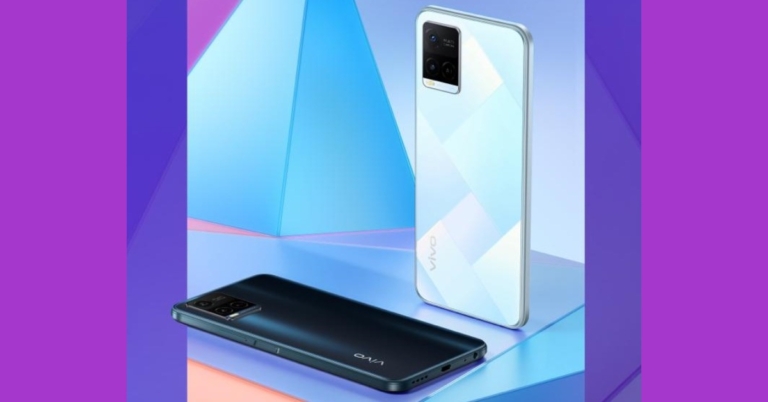













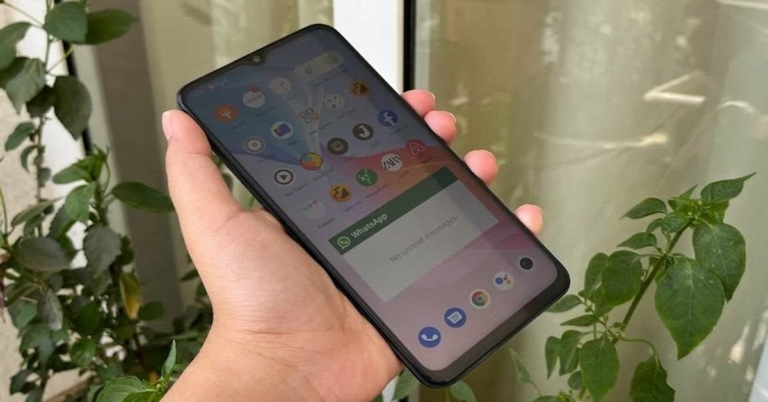
 The edges of the device – much like its back – are completely flat too. The right one has the Volume Rocker keys and the Power button with a fingerprint scanner embedded in it. The SIM tray and the secondary microphone are on the top while the Type-C port, speaker grille, microphone and headphones are at the bottom.
Vivo T1 5G is available in two colours – Starlight Black and Rainbow Fantasy – and we got the former one for our review. It also has multiple options in terms of RAM – the base variant with 4GB RAM while the other two higher variants with 6GB and 8GB RAM.
The edges of the device – much like its back – are completely flat too. The right one has the Volume Rocker keys and the Power button with a fingerprint scanner embedded in it. The SIM tray and the secondary microphone are on the top while the Type-C port, speaker grille, microphone and headphones are at the bottom.
Vivo T1 5G is available in two colours – Starlight Black and Rainbow Fantasy – and we got the former one for our review. It also has multiple options in terms of RAM – the base variant with 4GB RAM while the other two higher variants with 6GB and 8GB RAM.
 Coming to the display of the device, it sports a 6.58-inch LCD panel that comes with a refresh rate of 120Hz, peak touch sampling mode of 240Hz and is protected by a layer of Panda glass. The colours projected on the screen were vibrant and they remained consistent at different viewing angles. The images and the app icons were sharp and clear and the sunlight readability was decent too. We watched YouTube videos on the phone during our time with the device and they all played well. The video was clear and the audio quality was good too.
 The user interface of the device is simple to use and comes with customizations like a privacy dashboard, privacy indicators, and location sharing options. But on the downside, Vivo T1 also comes with a considerable number of bloatware apps including CRED, Josh, Moj, ShareChat, etc. We must point out though that these can be uninstalled, so it really shouldn’t be that much of a problem. The smartphone also comes with gaming features like GameSpace and Ultra Game mode. While the former lets you access all your games in one place, the latter offers an array of functions that are useful to gamers and turn on when a game is launched on the device.
Coming to the performance of Vivo T1 5G, it was smooth most of the time. We did not face any stutters or slowing down during our time with it. We switched between multiple apps and tabs of Chrome and never once faced an issue with working on them. The fingerprint scanner of the smartphone, embedded in its Power button, did a great job most of the time and facial recognition also worked well.
The user interface of the device is simple to use and comes with customizations like a privacy dashboard, privacy indicators, and location sharing options. But on the downside, Vivo T1 also comes with a considerable number of bloatware apps including CRED, Josh, Moj, ShareChat, etc. We must point out though that these can be uninstalled, so it really shouldn’t be that much of a problem. The smartphone also comes with gaming features like GameSpace and Ultra Game mode. While the former lets you access all your games in one place, the latter offers an array of functions that are useful to gamers and turn on when a game is launched on the device.
Coming to the performance of Vivo T1 5G, it was smooth most of the time. We did not face any stutters or slowing down during our time with it. We switched between multiple apps and tabs of Chrome and never once faced an issue with working on them. The fingerprint scanner of the smartphone, embedded in its Power button, did a great job most of the time and facial recognition also worked well.
 During our time with the device, we watched a lot of YouTube videos and played a lot of games on the phone too, and both aspects of the Vivo T1 5G turned out to be good. The battery life of the smartphone is another plus and it lasted us around 2 days with moderate usage (including an active WhatsApp account).
Finally, let’s talk about the triple rear cameras of Vivo T1 5G. The smartphone sports a 50MP primary sensor, a 2MP macro lens, and a 2MP depth sensor. It also has a 16MP lens on its front panel for selfies and video calls. Strangely, the ultra-wide camera is absent. During the day, the device managed to get photos with a good number of details and the ones taken outdoors from the primary lens showcased vibrant colours.
During our time with the device, we watched a lot of YouTube videos and played a lot of games on the phone too, and both aspects of the Vivo T1 5G turned out to be good. The battery life of the smartphone is another plus and it lasted us around 2 days with moderate usage (including an active WhatsApp account).
Finally, let’s talk about the triple rear cameras of Vivo T1 5G. The smartphone sports a 50MP primary sensor, a 2MP macro lens, and a 2MP depth sensor. It also has a 16MP lens on its front panel for selfies and video calls. Strangely, the ultra-wide camera is absent. During the day, the device managed to get photos with a good number of details and the ones taken outdoors from the primary lens showcased vibrant colours.
 Indoor shots had more natural colours. The images turned out to be sharp and clear, and that remained consistent even when we zoomed in. The macro camera performed well in well-lit conditions but the same cannot really be said about the Portrait lens as its performance was inconsistent.
 Shots that the camera captured in low-lit conditions didn’t match up to the ones taken in daylight as far as the quality goes. The colours weren’t always accurate and the images didn’t turn out to be with as many details. However, the results improved with the Super Night Mode enabled.
 Selfies taken in well-lit conditions turned out to be good and they had the right amount of details, but the quality dropped in dim lights.