
In This Article
What Happens Upon Permanently Deleting A Facebook Account?
If you choose to permanently delete your Facebook account, you won’t be able to reactivate it. All of your profile data, including your posts, photos and videos uploaded will get deleted permanently. You would no longer be able to use Facebook Messenger or log in to other websites and apps via Facebook. Moreover, any pages that are controlled by you solely will also get deleted. In case you don’t want your page to get deleted, you can give someone else full control of your page. However, if you don’t feel like deleting your FB account permanently, you can instead take a break from Facebook and temporarily deactivate your account. When you temporarily deactivate your account, your profile data including the posts, images or videos that you uploaded won’t get deleted. You will still be able to use Facebook Messenger. However, people won’t be able to see or go to your Facebook profile and the pages that you control will also get deactivated. You can come back any time you want. Read also: What Is Facebook Touch and Is It Worth Using?How To Delete Facebook Account On A PC?
Before you delete your FB account permanently, we suggest you download a copy of your profile data from Facebook to avoid any information loss. Step 1: Log in to Facebook from your PC, and from your main profile click the down arrow key on the top right corner of the interface.
Step 2: Go to Settings & Privacy > Settings.
Step 1: Log in to Facebook from your PC, and from your main profile click the down arrow key on the top right corner of the interface.
Step 2: Go to Settings & Privacy > Settings.
 Step 3: Click on Your Facebook Information in the left column. If you have access to a Facebook page in the new Pages experience, then click on Privacy > Your Facebook Information.
Step 4: Click on Deactivation and Deletion > Delete Account > Continue to Account Deletion.
Step 3: Click on Your Facebook Information in the left column. If you have access to a Facebook page in the new Pages experience, then click on Privacy > Your Facebook Information.
Step 4: Click on Deactivation and Deletion > Delete Account > Continue to Account Deletion.
 Step 5: Click Delete Account, enter your password and then click Continue. That’s it!
Read also: How to Block or Unblock Someone on Facebook?
Step 5: Click Delete Account, enter your password and then click Continue. That’s it!
Read also: How to Block or Unblock Someone on Facebook?
How To Delete Facebook Account On Mobile?
Step 1: From your Facebook mobile app interface, click on the hamburger menu in the top right corner and go to Settings & Privacy > Settings. Step 2: Go to Account > Personal and account information > Account ownership and control.
 Step 3: Click on Deactivation and deletion > Delete account > Continue to account deletion. That’s it!
 So that’s how you can delete your Facebook account via your PC or mobile. An important thing to remember here is that you can cancel your account deletion if it has been less than 30 days since you initiated the deletion. However, it is said that it takes only 21 days to cultivate or drop a habitat. Now what’s to see is whether you win the challenge or accept your defeat at it.
For the latest gadget and tech news, and gadget reviews, follow us on Twitter, Facebook and Instagram. For newest tech & gadget videos subscribe to our YouTube Channel. You can also stay up to date using the Gadget Bridge Android App. You can find the latest car and bike news here.
So that’s how you can delete your Facebook account via your PC or mobile. An important thing to remember here is that you can cancel your account deletion if it has been less than 30 days since you initiated the deletion. However, it is said that it takes only 21 days to cultivate or drop a habitat. Now what’s to see is whether you win the challenge or accept your defeat at it.
For the latest gadget and tech news, and gadget reviews, follow us on Twitter, Facebook and Instagram. For newest tech & gadget videos subscribe to our YouTube Channel. You can also stay up to date using the Gadget Bridge Android App. You can find the latest car and bike news here. 



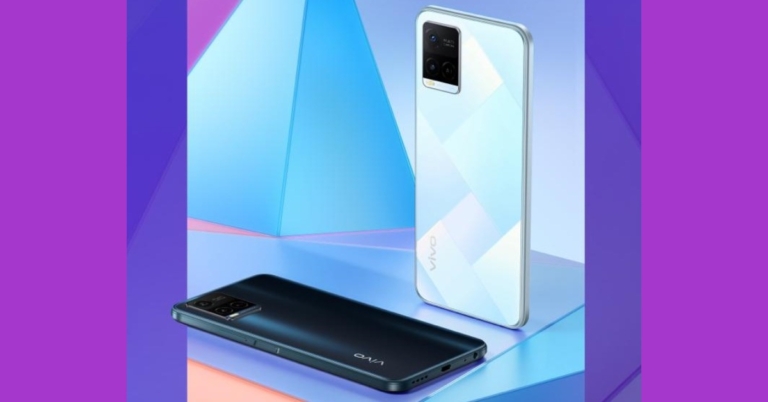











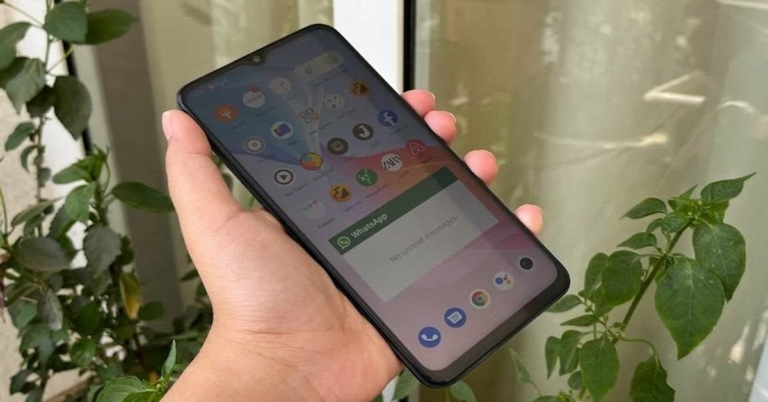
 The edges of the device – much like its back – are completely flat too. The right one has the Volume Rocker keys and the Power button with a fingerprint scanner embedded in it. The SIM tray and the secondary microphone are on the top while the Type-C port, speaker grille, microphone and headphones are at the bottom.
Vivo T1 5G is available in two colours – Starlight Black and Rainbow Fantasy – and we got the former one for our review. It also has multiple options in terms of RAM – the base variant with 4GB RAM while the other two higher variants with 6GB and 8GB RAM.
The edges of the device – much like its back – are completely flat too. The right one has the Volume Rocker keys and the Power button with a fingerprint scanner embedded in it. The SIM tray and the secondary microphone are on the top while the Type-C port, speaker grille, microphone and headphones are at the bottom.
Vivo T1 5G is available in two colours – Starlight Black and Rainbow Fantasy – and we got the former one for our review. It also has multiple options in terms of RAM – the base variant with 4GB RAM while the other two higher variants with 6GB and 8GB RAM.
 Coming to the display of the device, it sports a 6.58-inch LCD panel that comes with a refresh rate of 120Hz, peak touch sampling mode of 240Hz and is protected by a layer of Panda glass. The colours projected on the screen were vibrant and they remained consistent at different viewing angles. The images and the app icons were sharp and clear and the sunlight readability was decent too. We watched YouTube videos on the phone during our time with the device and they all played well. The video was clear and the audio quality was good too.
 The user interface of the device is simple to use and comes with customizations like a privacy dashboard, privacy indicators, and location sharing options. But on the downside, Vivo T1 also comes with a considerable number of bloatware apps including CRED, Josh, Moj, ShareChat, etc. We must point out though that these can be uninstalled, so it really shouldn’t be that much of a problem. The smartphone also comes with gaming features like GameSpace and Ultra Game mode. While the former lets you access all your games in one place, the latter offers an array of functions that are useful to gamers and turn on when a game is launched on the device.
Coming to the performance of Vivo T1 5G, it was smooth most of the time. We did not face any stutters or slowing down during our time with it. We switched between multiple apps and tabs of Chrome and never once faced an issue with working on them. The fingerprint scanner of the smartphone, embedded in its Power button, did a great job most of the time and facial recognition also worked well.
The user interface of the device is simple to use and comes with customizations like a privacy dashboard, privacy indicators, and location sharing options. But on the downside, Vivo T1 also comes with a considerable number of bloatware apps including CRED, Josh, Moj, ShareChat, etc. We must point out though that these can be uninstalled, so it really shouldn’t be that much of a problem. The smartphone also comes with gaming features like GameSpace and Ultra Game mode. While the former lets you access all your games in one place, the latter offers an array of functions that are useful to gamers and turn on when a game is launched on the device.
Coming to the performance of Vivo T1 5G, it was smooth most of the time. We did not face any stutters or slowing down during our time with it. We switched between multiple apps and tabs of Chrome and never once faced an issue with working on them. The fingerprint scanner of the smartphone, embedded in its Power button, did a great job most of the time and facial recognition also worked well.
 During our time with the device, we watched a lot of YouTube videos and played a lot of games on the phone too, and both aspects of the Vivo T1 5G turned out to be good. The battery life of the smartphone is another plus and it lasted us around 2 days with moderate usage (including an active WhatsApp account).
Finally, let’s talk about the triple rear cameras of Vivo T1 5G. The smartphone sports a 50MP primary sensor, a 2MP macro lens, and a 2MP depth sensor. It also has a 16MP lens on its front panel for selfies and video calls. Strangely, the ultra-wide camera is absent. During the day, the device managed to get photos with a good number of details and the ones taken outdoors from the primary lens showcased vibrant colours.
During our time with the device, we watched a lot of YouTube videos and played a lot of games on the phone too, and both aspects of the Vivo T1 5G turned out to be good. The battery life of the smartphone is another plus and it lasted us around 2 days with moderate usage (including an active WhatsApp account).
Finally, let’s talk about the triple rear cameras of Vivo T1 5G. The smartphone sports a 50MP primary sensor, a 2MP macro lens, and a 2MP depth sensor. It also has a 16MP lens on its front panel for selfies and video calls. Strangely, the ultra-wide camera is absent. During the day, the device managed to get photos with a good number of details and the ones taken outdoors from the primary lens showcased vibrant colours.
 Indoor shots had more natural colours. The images turned out to be sharp and clear, and that remained consistent even when we zoomed in. The macro camera performed well in well-lit conditions but the same cannot really be said about the Portrait lens as its performance was inconsistent.
 Shots that the camera captured in low-lit conditions didn’t match up to the ones taken in daylight as far as the quality goes. The colours weren’t always accurate and the images didn’t turn out to be with as many details. However, the results improved with the Super Night Mode enabled.
 Selfies taken in well-lit conditions turned out to be good and they had the right amount of details, but the quality dropped in dim lights.
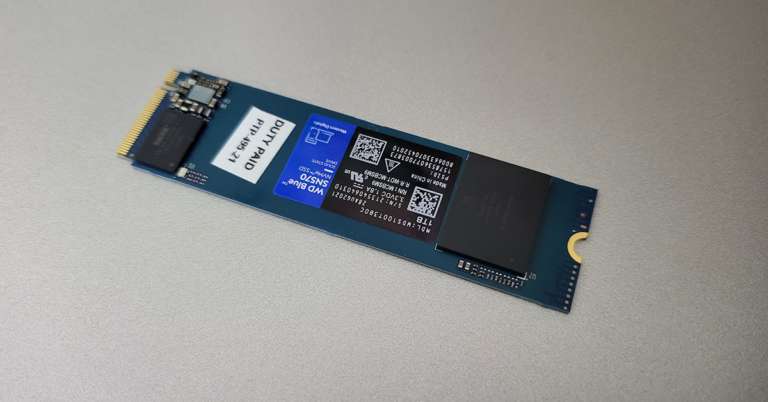
 Compared to 2.5-inch Kingston SSD, which we use in our test PC, this one is 2.5X faster. This meant the 4K videos that took 3 hours to render were now rendering in under 1.5 hours for us (since CPU and GPU performance remained the same). Apps open faster, Windows boots swiftly and gaming performance also becomes more efficient.
Read Also:
Compared to 2.5-inch Kingston SSD, which we use in our test PC, this one is 2.5X faster. This meant the 4K videos that took 3 hours to render were now rendering in under 1.5 hours for us (since CPU and GPU performance remained the same). Apps open faster, Windows boots swiftly and gaming performance also becomes more efficient.
Read Also: 





 The
The  Apple has installed the newest Bionic A15 chipset, which is the company’s latest and quickest. This is combined with up to 1 TB of storage, so people who were arguing about the brand not providing a memory card slot in the iPhone can just get a larger storage-driven iPhone 13 Pro. The RAM and battery size have been increased, and when combined with Apple’s latest CPU, the smartphone can launch the most demanding games and programmes in the blink of an eye. The Apple iPhone 13 Pro’s battery life has also improved. When compared to the previous version, you will gain a few more hours of playtime.
Age group that prefers these: 25 years and above
Apple has installed the newest Bionic A15 chipset, which is the company’s latest and quickest. This is combined with up to 1 TB of storage, so people who were arguing about the brand not providing a memory card slot in the iPhone can just get a larger storage-driven iPhone 13 Pro. The RAM and battery size have been increased, and when combined with Apple’s latest CPU, the smartphone can launch the most demanding games and programmes in the blink of an eye. The Apple iPhone 13 Pro’s battery life has also improved. When compared to the previous version, you will gain a few more hours of playtime.
Age group that prefers these: 25 years and above
 The device’s small size and wall-mounted construction make it simple to deploy and move around. TP-TL-WA850RE, LINK’s 300Mbps Range Extender, is designed to effortlessly increase the range and boost the signal strength of an existing wireless network to eliminate “dead zones”. Users can simply extend wireless coverage with a click of the WPS button while remaining within range of their existing wireless network and without the need for extra wires or cords. Two internal antennas help to improve Wi-Fi coverage. With a single press of the Range Extender button, you can easily extend wireless range. Range Extender function flawlessly extends wireless signal to previously unreachable or difficult-to-wire locations, Transmit Power 20 dBm (EIRP). Tether App enables simple access and administration from any mobile device.
Age group that prefers these: Any in the household who wants better internet access
The device’s small size and wall-mounted construction make it simple to deploy and move around. TP-TL-WA850RE, LINK’s 300Mbps Range Extender, is designed to effortlessly increase the range and boost the signal strength of an existing wireless network to eliminate “dead zones”. Users can simply extend wireless coverage with a click of the WPS button while remaining within range of their existing wireless network and without the need for extra wires or cords. Two internal antennas help to improve Wi-Fi coverage. With a single press of the Range Extender button, you can easily extend wireless range. Range Extender function flawlessly extends wireless signal to previously unreachable or difficult-to-wire locations, Transmit Power 20 dBm (EIRP). Tether App enables simple access and administration from any mobile device.
Age group that prefers these: Any in the household who wants better internet access
 The display panel is approximately 1.55-inches in size, with a resolution of 360320 pixels and a pixel density of 311. To do so, first download the Xiaomi Wear/Wear Lite software on your smartphone and then use your phone to scan the barcode displayed on your smartwatch’s screen. This will allow you to better control your Redmi smartwatch by linking it to your smartphone and combining the two into a single unit. Bluetooth connectivity is essential to link your Redmi wristwatch to your smartphone. Once linked, you may use the Xiaomi Wear app on your smartphone to access all of your wearable applications, reports, and activity statistics.
Age group that prefers these: Teenagers to under 30-year-olds
The display panel is approximately 1.55-inches in size, with a resolution of 360320 pixels and a pixel density of 311. To do so, first download the Xiaomi Wear/Wear Lite software on your smartphone and then use your phone to scan the barcode displayed on your smartwatch’s screen. This will allow you to better control your Redmi smartwatch by linking it to your smartphone and combining the two into a single unit. Bluetooth connectivity is essential to link your Redmi wristwatch to your smartphone. Once linked, you may use the Xiaomi Wear app on your smartphone to access all of your wearable applications, reports, and activity statistics.
Age group that prefers these: Teenagers to under 30-year-olds
 The Dyson V12 Detect Slim Total Clean employs 11 cyclone technology to keep vacuumed dirt and particles contained within the dust canister. The VC has a suction power of 150 AW, which is far superior to any other vacuum cleaner of this size on the market. The best feature of the new package is the laser slim fluffy cleaning head, which is 25 CM broad. It effectively sends a laser beam at an inward 30–35-degree angle, allowing you to view the smallest dust particles under the green laser light. The bristle bar in this head may also be simply removed and washed.
Age group that prefers these: 30 years and above
We are sure you would love to own at least one if not all of these gadgets. As we know, technology is constantly evolving and you get to see new gadgets coming up every now and then. The gadgets mentioned above can easily last you 2-3 years if not more, then you will need an upgrade. So, this was our list of the 5 best gadgets to use in 2022, and we hope you like them.
For the latest
The Dyson V12 Detect Slim Total Clean employs 11 cyclone technology to keep vacuumed dirt and particles contained within the dust canister. The VC has a suction power of 150 AW, which is far superior to any other vacuum cleaner of this size on the market. The best feature of the new package is the laser slim fluffy cleaning head, which is 25 CM broad. It effectively sends a laser beam at an inward 30–35-degree angle, allowing you to view the smallest dust particles under the green laser light. The bristle bar in this head may also be simply removed and washed.
Age group that prefers these: 30 years and above
We are sure you would love to own at least one if not all of these gadgets. As we know, technology is constantly evolving and you get to see new gadgets coming up every now and then. The gadgets mentioned above can easily last you 2-3 years if not more, then you will need an upgrade. So, this was our list of the 5 best gadgets to use in 2022, and we hope you like them.
For the latest