The Chinese smartphone companies OnePlus and Oppo have announced a merger to provide better product quality as well as services. CEO Pete Lau has officially declared its partnership with its sister company Oppo, however, OnePlus will continue to operate as a separate brand and Oppo’s sub-brand. Those who are unaware, both the companies are a part of the same parent company BBK Electronics and the OnePlus has always shared support to its sibling as we have already noticed in the design features of Oppo smartphones.The news came through the forum post by CEO Pete Lau who is also the co-founder of this premium smartphone company along with Carl Pei. However, Carl Pei went away to start its own venture Nothing. The blog post said, “As many of you know, last year I took on some additional responsibilities to oversee product strategy for both OnePlus and OPPO. Since then, we have integrated a number of our teams together with OPPO to better streamline our operations and capitalize on additional shared resources. After seeing a positive impact from those changes, we’ve decided to further integrate our organization with OPPO.”Also Read: OnePlus Nord CE 5G and TV U1S launched in India: Here are all the price and availability detailsThrowing more light on how both the companies will exactly work on their upcoming products the CEO went on to say that he believes that the integration will bring a positive change for the community as well as for the users and will provide more resources at hand to create even better products, bringing faster and more stable software updates for OnePlus users.Even after this partnership, OnePlus will continue to operate independently. “We will continue launching OnePlus products, holding events (hopefully in person soon) and engaging directly with you for feedback through the same OnePlus channels as before. OnePlus’ commitment to you remains the same.” the OnePlus founder assured.Also read: OnePlus Nord CE 5G Vs Nord Vs Xiaomi Mi 10i: Which one should you go for?Lau further added that “Now, we’re at a turning point for the future of OnePlus. As we’ve begun growing our product portfolio, we’re able to give you more choices than ever before. True to our Never Settle spirit, we want to continue giving you the highest-quality OnePlus experience possible. And to do that, we must adapt as a team and as a brand.”The company did not explicitly state but we have reached the conclusion that with this merger OP aims to expand its product portfolio and bring positive impact to the new users. It should also be noted that OP ships its latest OnePlus 9 Series in China with Oppo’s ColorOS rather than its HydrogenOS. Also, those who are unaware Vivo, iQOO, Realme, Oppo and OnePlus are also the subsidiaries of BBK Electronics therefore it is one of the largest smartphone manufacturers in the world. This merger came when OnePlus is firming its roots in the US market with the launch of the OnePlus 9 and Nord N200 5G.
For the latest gadget and tech news, and gadget reviews, follow us on Twitter, Facebook and Instagram. For newest tech & gadget videos subscribe to our YouTube Channel. You can also stay up to date using the Gadget Bridge Android App.
The e-commerce website Flipkart is hosting Daily Trivia Quiz. Every day it brings a bunch of new questions for its users. By answering them correctly you can win exciting prizes. The questionnaire is based on questions related to general knowledge. Also, the users can win free vouchers and super coins, among other offers via the daily quiz. June 17 Flipkart Daily Trivia Quiz Answers has already gone live on its platform.
The participant should be at least 18 years old and should have a valid login ID. The Quiz is available on the mobile platform and not the web version. E-commerce conducts the quiz on daily basis and goes live at 12:00 AM IST and runs till 11:59 PM IST. The winners are announced within 15 days from the date of participation that can be viewed under the Gems/Rewards section in the app.
In This Article
How to participate in the Flipkart Daily Trivia Quiz
To participate download the Flipkart app on your phone. Then open the Flipkart app then head to Game Zone. Now click on the Daily Trivia Banner or search for Daily Trivia. Enter the game and answer all 5 questions with correct answers.
June 17 Flipkart Daily Trivia Quiz Answers
Question 1: Which of these creature kills its prey by a method called ‘contraction’
Answer: Rock Python
Question 2: In which religion would you find a ritual and family celebration named Bar Mitzvah?
Answer: Judaism
Question 3: Which team won the Syad Mushtaq Ali Trophy 2019 final recently?
Answer: Karnataka
Question 4: On which author’s work is the Hollywood movie ‘ Journey to the Center of the Earth’ based?
Answer: Jules Verne
Question 5: What is used to forward data packets to the appropriate parts of a computer network?
Answer: Router
Amazon India is back with another lucrative quiz on its platform. Amazon Quiz has already gone live and today you can stand a chance to win Rs 15,000 Amazon Pay Balance. Every day the e-commerce platform brings an opportunity for its customers to win amazing prizes by answering five questions. The questionnaire is based on general knowledge and current affairs. If you managed to answer all the questions correctly you will be eligible to win gifts such as iPhone X, iPhone Xs, Seagate HDD, GoPro Hero 8 Camera, LG Smartphones, Air Purifier, Oppo smartphones, Amazon Pay Balance among others.
The Amazon Quiz is hosted for the app users only which means desktops users cannot participate in the quiz. So before participating just make sure you have downloaded the App. The lucky users might win something by answering all the questions correctly. The Amazon Quiz can be played daily from 8 AM to 12 noon. Daily the e-commerce platform gives a chance to millions of people across the country to win exciting prizes. To participate and win Rs 15,000 Amazon Pay Balance check out today’s answers.
June 17 Amazon Quiz Answers
Question 1: Sunderlal Bahuguna, the man who taught India to hug trees, recently passed away. He was behind which of these?
The answer is- Chipko Movement
Question 2: In March 2021, which cricketer scored the fastest 50 by a player on his ODI debut?
The answer is- Krunal Pandya
Question 3: Name the 2020 film starring Tom Hanks as Commander Ernest Krause, commanding officer of the USS Keeling.
The answer is- Greyhound
Question 4: Known for hodoo rock formationa and hot air balloon rides, which place in Turkey in this?
The answer is- Cappadocia
Question 5: Name this iconic car from Volkswagen
The answer is- Beetle
Using Wi-Fi is very convenient indoors or outdoors. Wi-Fi gives you the desired bandwidth to browse and download. However, at times it gets very unnecessary to keep saving that Wi-Fi you no longer connect to. It only creates an unwanted long list of Wi-Fi points you have connected to in the past. You can easily remove that old password from your Android mobile. Here are the steps.
In This Article
On Android stock
This guide to delete old Wi-Fi networks is for Google Pixel, Motorola, and Nokia smartphones that are running the Android one operating system. And the steps will also work on Android 9, Android 10, Android 11. Here are the steps.
First, you need to open the screen or unlock the screen if there is a password
Now you have to open the settings on your Android smartphones which have a tool icon
After opening the setting the next step you have to do is open the Network and Internet option
Scroll down and press on the Wi-Fi options
Now the list of Wi-Fi you were connected
Select the wifi you want to forget
Click on the setting with the tool icon
And now press the forget button: that is a Bin icon
On Xiaomi Phones
Xiaomi also gives the options to delete the old Wi-Fi options. The steps are for MIUI 10, MIUI 11, and MIUI 12 versions. Follow the steps.
These steps are for those Samsung smartphones, which have One User Interface. The company allows the user to forget and delete the old and unnecessary Wi-Fi networks.Follow the steps.
You can follow this step for Oneplus smartphones, which have OxygenOS. The steps on this operating system are also simple.
Go to device setting
Press Wi-Fi and internet option
Tap on the Saved Wi-Fi option
Then click on Delete and you will be able to remove the old Wi-Fi
On Sony smartphones
The mobile sony also gives you the option to forget the unwanted Wi-Fi that you do not connect to it anymore. The steps are for Sony Xperia phones which have Xperia UI. Check the steps below.
Facebook has become the most popular social networking website ever. The users of Facebook range from children to the elderly. It is almost like the word “Social” is created by Facebook. Some socially awkward users like to browse the site offline. Check out the guide below to go offline and not let anyone know you are there.
In This Article
On the Facebook website
Even though it holds the word “Social” that is closely associated while browsing Facebook there are instances that we want to use it offline. For example, you want to quickly check your notifications and the message but seeing you come online might attract those friends to who you do not want to reply. It takes you to a situation where it only creates hurdles for yourself. Why don’t you avoid those situational encounters and go incognito? Here are the easy steps you can follow:
First, open Facebook.com on your browser
Log in with your Username and Password
Once you open the page: go to the messenger(message)
On the right side of the screen: Click the three-dot icon
It will take you to chat settings
Click on the turn off the active status option
It will make you active status page
Choose from: turn off active status for all contacts, all contacts except, and for only some contact
Facebook has unbelievable millions of users. And maybe a hundred or thousand people who are your friends on the platform. Facebook recently introduced the green icon to let the users know who is online and who is not. Many consider it advantageous and many do not. For those who value privacy by browsing Facebook without the green icon, the popular social network allows you to turn it off in a few simple steps. Facebook also allows you to turn it off for those who use the Facebook app. On the app, you need to turn it off on the messenger app with some simple steps. Turning the green icon and going offline on the app is easy and simple. Please follow the steps below.
Life has become more challenging with the pandemic. Being confined only to the house and room have brought the struggle of mental health. Seeking physical help has been more difficult with the lockdown across the country. With the mental health problem rising significantly, but fewer resources to help yourself, here are the best 5 apps. Read the list.
In This Article
Moodfit
Moodfit will help you maintain mental health. The app charts your mood, medications, and activities by setting goals like a companion. Regularly exercising your mind on the app will help shape up your mood and mental health. The questionnaire function in the app will determine the condition and stability of your mental health. Moodfit will help you identify the best treatment strategies for you and help you understand medication and therapy better. The app is available on the play store.Download here
Calm
Calm gives you the best soothing soundtracks to help heal your mental health. The app includes mindful movement and a meditation program for a speedy recovery. It will help you improve your sleep immensely and make you feel fresh and alive the next morning. Calm is the leading app for meditation and sleep that will help you with improving mental health. The app has Sleep stories, breathing exercises, masterclasses, and relaxing music. Try now by downloading from the Google Play Store.Download here
Read more: 10 best smartwatches for tech freaks that were launched this year
Headspace
Headspace app will help you recover from anxiety and help you with meditation and sleep. The app will give you guided meditation, sleep casts, and assist you in how to centre yourself to bring happiness. Headspace is quick and easy to use and helps you in tracking your daily medication progress. The app will help you focus, breathe, stay calm, and perform at your best with the medication exercise they have. It will also make you sleep better for a mindful tomorrow. You can download the app from the play store.Download here
Read also: Mi Watch Lite with 11 workout modes and 120 watch faces launched
Talkspace: Counseling & therapy
Talkspace has a different service from the other apps on the list. The app is designed to be used online by letting you match with licensed therapists for better one-on-one support. The app provides you to chat, audio, or video message 24/7 and the expert will get back to you. The app is the most convenient platform if you want to improve your mental health. Talkspace gives you the best face-to-face therapy session in an app. And it is safe and secure, the app is protected using banking-grade encryption. Try now. Download the app here
Better help: online counselling & therapy
The app offers you weekly live sessions with licensed therapists. And for better communication with your therapist, you can send voice messages, text messages, voice messages. The app also gives you the option for group therapy. Better help includes sessions from depression to anxiety for individuals, couples, and family. Using the app is very simple. You need to fill up a questionnaire and the app will match you with the best-licensed counsellor. You can also get your own secure and private “counselling room”. Download here
For the latest gadget and tech news, and gadget reviews, follow us on Twitter, Facebook and Instagram. For newest tech & gadget videos subscribe to our YouTube Channel. You can also stay up to date using the Gadget Bridge Android App.
Today, Truecaller announced that it has released new features for Android smartphone users on the demand of user feedback. The new update will bring a slew of important functionalities such as group voice calling, Smart SMS, and Inbox Cleaner. With the new group voice call, the users will be able to make international calls with up to eight people on its platform. On the other hand, the Smart SMS will help them filter out spam messages and make day-to-day communication a lot more convenient. Whereas, Inbox Cleaner lets consumers free up space on their phone by removing unused messages.Commenting on the new additions, Rishit Jhunjhunwala, MD India, Truecaller said, “We continue to remain focused on the evolving needs of our users and meet those needs with innovative solutions. These features get us closer to our mission: to make communication safer and more efficient for everyone. Truecaller has evolved into a powerful communication hub and for the people who wish to use the app to its fullest, these features will greatly add value. With Group voice calling, Smart SMS and Inbox cleaner, I am hopeful that consumers will be able to operate more effectively given the benefits of staying connected, using messaging service smartly to stay on top of important information and lastly inbox cleaner to save the mobile phone from running out of space.”In order to improve the user experience on its platform, Truecaller has brought three new features with the new update that will allow the user to group call, filter out spam messages as well as unused messages from their phone using the app.The first feature is the Group Voice Calling, which is free for all users. It will allow users to add up to eight participants to a call while retaining high voice clarity. This can be done without adding them to their phonebook. In addition to this, the ongoing call will show each participant’s city and this will be visible to all people in the call. When initiating a call, Truecaller will also indicate when a user is busy in another call or is offline. Importantly, all group voice calls are secured with symmetric encryption. There will also be a dial back option from call logs that help to manage the group (including adding or removing participants) when calling them back.Smart SMS is another feature that comes with the new Truecaller update. It will help the user to filter out spam messages and in categorising useful information. The built-in SMS intelligence will allow users to work offline and it also reminds you of payments and in general making your SMS inbox a more organised place. Currently, this feature will be rolled out to users in India, Kenya, Nigeria and South Africa. It will soon be available in the US, Sweden, Malaysia, Indonesia and Egypt. Lastly, the Inbox Cleaner will help you clear out all those old, unwanted messages in just a few seconds. There is no need to spend individual time selecting SMSs to delete. A quick tap on Inbox Cleaner from the menu will show you how many old OTPs and spam SMSes you have accumulated and another tap on the ‘clean up’ button will quickly and effectively remove old SMSes without affecting your important data.This feature is designed to run in the background, allowing users to continue working on other tasks within Truecaller or any other app on the device while Inbox Cleaner works its magic.
For the latest gadget and tech news, and gadget reviews, follow us on Twitter, Facebook and Instagram. For newest tech & gadget videos subscribe to our YouTube Channel. You can also stay up to date using the Gadget Bridge Android App.
Apple Music gives you the best sound quality for audio music. But with the Apple music lossless the music will even get better. Apple lossless audio compression preserves all the original data from the source file that gives you the clearest audio for a better music experience. Follow the steps below to get the Apple music lossless.
In This Article
Compatibility of Apple music lossless
Apple Lossless Audio Codec (ALAC) has a resolution ranging from 16-bit/44.1 kHz (CD Quality) up to 24-bit/192 kHz. With the lossless audio compression technology, you get to listen to the original sound without any compression. The ALAC (Apple Lossless Audio Codec) will let you experience an identical sound with what the artist has recorded. Here are the Apple devices that support the latest Apple music lossless:
On iPhone or iPad
Apple music lossless is compatible with iPhone and iPad which iOS or iPadOS is 14.6 updated. To enable it on the above device. Go to settings on the Apple music. Click on Audio Quality. Choose the Lossless on or off button. You can listen to it from the iPhone or iPad speakers, wired headphones or earphones, and powered speakers.
Read more: 10 headphones launched in 2020 to offer amazing sound experience
On Mac
The Apple music lossless can be played on a Mac with built-in speakers, wired connection headphones, or powered speakers. To turn on the lossless first open the music app. Go to the music bar. Select Music>Preferences. Tap the Playback. Find Audio Quality and choose to turn it on or off.
Read also: Apple could soon foray in to cloud game streaming service
On Apple TV 4K
To get the availability on your Apple TV first you need to update to tvOS14.6. And connect it to an AV receiver using an HDMI cable. The steps to enable the Apple music lossless in your Apple TV are simple. Go to settings>Open Apps and select music. Now select Audio Quality and select on or off lossless. Apple music lossless will be available from June 2021 in the Apple Music catalogue, which includes more than 75 million songs. The sound will be supporting Dolby Atmos for that surround sound. With the Apple Music subscription, you will be able to listen to Apple music lossless on the above devices. Get the Apple Music subscription today and enable the Apple music lawless on your Apple devices to listen to the exact sound that the artist has recorded.
For the latest gadget and tech news, and gadget reviews, follow us on Twitter, Facebook and Instagram. For newest tech & gadget videos subscribe to our YouTube Channel. You can also stay up to date using the Gadget Bridge Android App.
This year June 20 will be celebrated as Father’s Day and you must be scratching your head to decide what to gift your dad this year too. Due to the COVID situation in the country, you must be scared to go out and pick a gift for him. So your’s truly Gadget Bridge has a solution for your problem as we have curated a list of the best gadgets that will definitely make your father feel special if he is tech-savvy. Saregama Carvaan II Multimedia Speaker
In This Article
Gifts for your music lover dad:
Saregama Carvaan II Multimedia SpeakerIf your dad is old and retired then this portable music player is a perfect gift to make him feel relaxed and stress-free. Because of its portability and premium look, this device also works as a decor item in your home. It can be easily carried on a terrace, balcony or garden area to spend some quality time alone or with your family. The device comes pre-loaded with over 5,000 Hindi songs. Available viaReliance Digitalat Rs 5,990The Gateway True Wireless EarbudsThe Gateway True Wireless EarbudsThe Gateway True Wireless Earbuds is Acer’s premium offering that comes with an ‘in the ear’ design. These have a fast pairing feature that allows them to pair with the user’s phone, tablet or PC the moment when the case is opened. It comes with 24 hours of long standby time. There is Touch/Tap Control for music, calls as well as voice assistance apps. The device is priced at Rs 1,492 via AmazonFujifilm Instax Mini 40
If your day loves to click pictures:
Fujifilm Instax Mini 40Fujifilm Instax Mini 40 is a perfect gift for your superhero that will bring a big smile to his face. The portable camera supports mini-format film letting the users enjoy on-the-spot photo printing. It features Automatic Exposure, Selfie Mode and more. He can simply pull out the lens to instantly switch toSelfie Mode and the users can also check their framing with the mirror next to the lens. This device is available via Amazon at 8,499.Amazon Echo Dot 3rd gen
Gift for the tech-savvy father:
Amazon Echo Dot 3rd genThis Father’s day you can also gift your father this smart speaker. Amazon Echo Dot can be controlled by voice and is compact in size so it fits anywhere in your home. It can be paired with your phone or can be connected with other speakers. Your father can stream music, news and can use it to control lights, ACs, TVs, geysers, water motors and more. The device is priced at Rs 2,599 and is available atAmazon.Mi Beard Trimmer 1C
If loves to pamper himself:
Mi Beard Trimmer 1CYes, this is a beard grooming device for your handsome dad if he loves to pamper himself or groom. Because of such kinds of gifts he will go out of the house less for grooming purposes and will stay protected at home from COVID. It comes with self-sharpening blades and longer battery life. There are 20 length settings with 0.5mm precision to ensure accuracy. The beard trimmer can last up to 60 minutes on a single charge. There is an LED battery indicator that directs you how much battery is left before you start styling your beard. The device is priced at Rs 999 and can be purchased viaFlipkart.Mi Smart Band 5
Fitness Accessory for your dad:
Mi Smart Band 5 If your father loves to stay healthy and regularly goes on a walk or a gym then Mi Smart Band 5 is a smart option. This smart band offers 11 fitness tracking modes which include outdoor running, walking, riding, indoor running, indoor swim, free exercise, yoga, rowing machine, indoor riding, elliptical machine, as well as rope skipping. It further includeshealth monitoring features such as resting heart rate, deep sleep, light sleep, REM (rapid eye movement), stress monitoring, guided breathing exercise, step count, calorie count, and goal setting. You can buy it fromAmazonat Rs 2,499.Acer Extensa 15 laptop
If he is working from home:
Acer Extensa 15 laptopThe Acer Extensa laptop is powered by 10th Gen Intel Core i3 Processors paired with Intel UHD graphics and up to 12GB of DDR4 memory using a single soDIMM module. It features a 15.6 inches Full HD display with narrow bezels and comes with ComfyView technology that limits the reflected light to reduce eye strain along with BlueLightShield to cut harmful blue light. The device is available via Acer E-Store at Rs 26,499
For the latest gadget and tech news, and gadget reviews, follow us on Twitter, Facebook and Instagram. For newest tech & gadget videos subscribe to our YouTube Channel. You can also stay up to date using the Gadget Bridge Android App.
Video calling has become the new normal in work life and education. The Pandemic has taken all life indoors. And Zoom has become the most popular platform for video calling. Zoom can be confusing with the availability of many of its features and buttons. This guide below will make your video calling experience on Zoom easier and help you use all its advanced options like an expert. Here is the guide.
In This Article
Guide on how to use Zoom
Daily lives have changed, virtual reality has become the new normal. Work environment and educational assessment have become very dependent on Zoom or any other video calling platform. Zoom offers you the simplicity in using a video calling app yet there are a variety of advanced options to improve your remote work and education productivity. Zoom is compatible with Windows, Mac, Linux, IOS, and Android. The guide below has all the tips to use the popular Zoom video calling app like a pro.
Read more: How can you view multiple participants in Google Meet?
Zoom web portal
To use Zoom video calling on their web portal, you need to open any browser on the internet and open Zoom.us to start video calling. Next, sign up with your account if you need you can also change your profile. Now you see three options on the top corner: Schedule a meeting, Join a meeting, and Host a meeting choose the option and start the video call. When you start video calling on Zoom you have the option to video call with video or without video and also with the audio or with audio using the icon the will be shown on the screen
To use the Zoom desktop app, first, download the app from the internet/App Store/Play Store using a browser and install it on your computers. Create an account on the desktop app and set your profile. Now you will see four icons on the top of the page: home, chat, meeting, contacts. Press home for a new meeting, or join. You will also see the options schedule or share screen. Now you can start or join a meeting by pressing the icon given. On the desktop app also you have the option to choose with audio and without, and with video or without video.
Changing the video layout on zoom
Zoom allows you to change the layout that displays in the Zoom Rooms screen. Zoom allows you to have a room with one screen or a room with multiple screens.For the Zoom screen with one screen, you can change the layout by tapping on the Change View option. And for the Zoom room with multiple screens, you can toggle the icon for Active speaker and Gallery views. There are three layouts you can change into according to the room screen. Zoom gives you Active speaker view, Thumbnail View, and Gallery view. And in a Zoom room with one screen or multiple screens, you can share the screen too. Check the guide below on how to do that.
Zoom room screen with one screen
To change the display for a room with one screen: tap “Change View”. For a room screen with one screen, you can have an active view option and a Thumbnail view option. During the screen share for Active Speaker view: go-to options to move floating video. You can also stop the floating video with the Off button option, enlarge it, or you can swap content.
Zoom room screen with multiple screens
For zoom rooms with multiple screens, you can have the Gallery view option and the Active view screen option. You can share content in the multi-screen room and also change the background image of the room.
Last month Samsung introduced two new tablets Samsung Galaxy Tab A7 Lite and Galaxy Tab S7 FE to its portfolio. However, the devices have only launched in the UK and other select markets. Today the company has announced to launch both the tablets in the Indian market on June 18. Prior to the announcement, the Samsung Galaxy Tab A7 Lite was already listed on Amazon ahead of the launch to tease its availability. But now the company has created a microsite to tease both the devices.Samsung has today officially announced to launch Galaxy Tab S7 FE and Galaxy Tab A7 Lite – in India on June 18. According to the company, both the devices will go on sale from June 23. Additionally, the teaser site for both the tablets have also gone live.To recallSamsung Galaxy S7 FE 5G was launched at GBP 589 translates to Rs 60,989 for the 4GB RAM with a 64GB internal storage option. The 6GB RAM with 128GB storage variant at GBP 629 translates to Rs 65,123. The device will be offered in different shades of Mystic Black, Mystic Silver, Mystic Green, and Mystic Pink colours.On the other hand,Samsung Galaxy Tab A7 Lite was launched last month in May at GBP 149 that translates to Rs 15,429 for the WiFi model while the LTE model will be available at GBP 179 that translates to Rs 18,531. The tablet was offered in two colour options, Grey and Silver. Also Read: Samsung Galaxy Tab A7 Lite and Galaxy Tab S7 FE launched Samsung Galaxy Tab S7 FE 5G specifications Samsung Galaxy Tab S7 FE 5G will come with a 12.4-inch WQXGA TFT display with 2,560×1,600 pixels of resolutions. It will run Samsung One UI based on top of Android 11 and will be powered by Qualcomm Snapdragon 750G SoC with up to 6GB of RAM and 128GB of storage options. The storage can be expanded up to 1TB via a microSD card.For the cameras, there is an 8-megapixel main rear sensor that supports 1080p video recording at 30fps. On the front, there is a 5-megapixel camera sensor for taking selfies.For connectivity, there is Bluetooth v5, USB Type-C port, Gigabit Wi-Fi among others. The device packs a 10,090mAh battery with 45W fast charging support and offers up to 12 hours of runtime via the cellular network. There is an S-Pen Samsung DeX app support along with dual speakers optimised by AKG.Also Read: Samsung Galaxy Tab A7 Lite to launch in India on June 23, gets listed on Amazon
Samsung Galaxy Tab A7 Lite specifications
TheSamsung Galaxy Tab A7 Lite was launched with an 8.7-inch display. It runs on Samsung One UI based on top of Android 11. Under the hood, there isMediaTek Helio P22T paired with up to 4GB of RAM and 64GB of storage. The internal storage can be expanded up to 1TB using a microSD card.For imaging, there is a single 8-megapixel main sensor on the back of the phone and a 5-megapixel camera sensor for taking selfies on the front. It is backed by a 5,100mAh battery that supports 15W fast charging. In terms of connectivity, there is 4GLTE (optional), Wi-Fi 802.11ac, Bluetooth v5, GPS, USB Type-C, and a 3.5mm audio jack. The sensor on the tab includes an accelerometer, ambient light sensor, and magnetometer.
For the latest gadget and tech news, and gadget reviews, follow us on Twitter, Facebook and Instagram. For newest tech & gadget videos subscribe to our YouTube Channel. You can also stay up to date using the Gadget Bridge Android App.
Learning English can get difficult with every level you go up. English has become the language of the learned. The language has been widely used in education and work in India and abroad. Skilled in the English language will open up many opportunities in your life. We bring you the list of the best websites and apps that will help you learn the language. Here is the list.
In This Article
Grammarly
Available both on websites and app Grammarly gives you the option to copy all your text on the website or app directly for correction or you can type it there. The English learning does not stop in this software. You can also use it for your Facebook, Gmail, WordPress, and any online typing software by downloading an extension. Grammarly is like your virtual editor; it helps you review your mistakes before changing them. The writing tool helps you find your grammatical mistakes and gives appropriate suggestions and alternative vocabulary. If you want to use it for work-related writing they give you the option to upgrade (for a nominal fee) for better writing.
Read also: Google to roll out Indian language support Search, Maps and more apps in India
Duo lingo
DuolingoDuo lingo is an app for learning many languages that you choose from. Learning on the app is in the form of games and quizzes, which makes it very interesting. The app is the most popular app for learning a language. The app has around 32 different languages to learn besides English that you can compare and practice your English grammar in it. The English learning experience comes in the form of games. And the app also allows you to compete online with others who are also learning the same language.
The British Council: English grammar
The British Council has both a website and app that will help you learn English faster and easier. The website has many online courses, skills options to practice, grammar to learn, vocabulary, and even train you for IELTS. The British council app offers you learning English while playing games. The app has the option to learn the English language from beginner to advanced level.
Read more: How to change your language in Google on a PC or a smartphone?
Udemy
Udemy is an online website platform for mainly educational learning. The website has a variety of learning courses you learn. Choosing the English learning courses gives you the option to choose from basic level to speciality. The website is the perfect educational online resource to learn English from today and practice your vocabulary. The website charges you a minimum fee for the online classes you will be attending and help you reach from basic to the advanced level.
FluentU
The learning platform has a website as well as an app. FluentU is the most innovative learning platform you can find today. The platform takes to the world of videos from music, movie trailers, news, inspiring talks, etc, and turns them into a personalised language learning lesson. The education platform turns watching videos into a fun activity of learning the English language.
For the latest gadget and tech news, and gadget reviews, follow us on Twitter, Facebook and Instagram. For newest tech & gadget videos subscribe to our YouTube Channel. You can also stay up to date using the Gadget Bridge Android App.
Apple has announced the release of its new podcast subscription and channels for the global market. With this initiative, the users will be able to purchase subscriptions for individual shows and group of shows through its channels. In addition to this, the listeners can also avail themselves of benefits such as ad-free listening and early access. The Podcast service by Apple was announced a few months back and now it has been officially launched for iOS, iPadOS, and macOS users. Commenting on the launch the company said, “Starting today, listeners in more than 170 countries and regions1 can purchase subscriptions for individual shows and groups of shows through channels, making it easy to support their favourite creators, enjoy new content, and unlock additional benefits such as ad-free listening and early access, directly on Apple Podcasts.”The users can get access to several subscriptions and channels featuring brand new shows including news, comedy, sports, and true crime. With the launch of Apple Podcasts Subscriptions and channels, the company aims to keep its customers stay informed, entertained, connected, and inspired. You can also subscribe to the shows from essential independent voices like “Birthful” with Adriana Lozada, “Pantsuit Politics” with Beth Silvers and Sarah Stewart Holland, “Snap Judgment” with Glynn Washington, and “You Had Me At Black” with Martina Abrams Ilunga; premier studios such as Lemonada Media, Luminary, Realm, and Wondery; and leading media and entertainment brands, including CNN, NPR, The Washington Post, and Sony Music Entertainment. Additionally, the listeners can also experience never-before-heard stories on Luminary’s “The Midnight Miracle” with Talib Kweli, Yasiin Bey, and Dave Chappelle, and Pushkin Industries’ “Revisionist History” with Malcolm Gladwell; the next chapters of QCODE’s apocalyptic thriller “Blackout,” starring Rami Malek and Aja Naomi King, and Realm’s “Orphan Black,” featuring Tatiana Maslany; the unrivalled chemistry and insightful commentary driving CNN’s “The Handoff,” and Politico’s “Playbook: Deep Dive”; and many more.According to Apple, when the listeners buy a subscription to a show, they automatically follow the show and the page is updated with a Subscriber Edition label so they know they have access to the premium experience. You will also be able to Search, explore recommendations from the Listen Now and Browse tabs, and share channels using Messages, Mail, and other apps. When they are subscribed to the channels the Listen Now tab expands with new rows that provide easy access to all of the content included in the channel and with their subscription. With two or more channel subscriptions you will see the My Channels row in the Listen Now tab, where you will be able to browse and follow all of the shows offered. More perks include early access to new seasons of critically acclaimed and fan-favourite series and ad-free listening. Moreover, some shows may offer bonus episodes throughout the season.Pricing and availabilityIn terms of availability, the Apple Podcasts Subscriptions and channels are available to listeners in more than 170 countries and regions on Apple devices running iOS 14.6, iPadOS 14.6, and macOS 11.4 or later. So the subscribed content can be played on Apple Watch with watchOS 7.5 or later, on Apple TV with tvOS 14.6 or later, and with HomePod, HomePod mini, and CarPlay.As per the company the pricing will be set by the creator whereas the listeners can manage their subscriptions, and switch from monthly to annual billing if offered, from their Apple ID Account Settings, accessible from the top of the Listen Now tab in Apple Podcasts. The service can be shared among six family members through Family Sharing.
For the latest gadget and tech news, and gadget reviews, follow us on Twitter, Facebook and Instagram. For newest tech & gadget videos subscribe to our YouTube Channel. You can also stay up to date using the Gadget Bridge Android App.
Measuring things in daily life is now made possible by using an app from your smartphone. From rooms to small objects using an app on your smartphone makes the task easier to measure. To make it easier and find out which is the best app available for measurement, read the rest of the best measurement apps down below
In This Article
Ruler: Nix game
The app will make your daily measurement easier by turning your phone into a smart ruler. The unit converter on the app is (mm to inches, centimetre to inches). The app basically allows you to measure the calculation of the length, of any straight line, and the calculation of any area. The app will help you to define the thread pitch, calliper and turn your phones into smart rulers online. Download it on the Play store
The app allows you to measure the distance of the height and width of an object. By downloading this app you will be able to use your smartphone as a virtual ruler. It is very simple to operate, aim the camera at the object you want to measure and it will determine the height and width of the object. The app for the measurement uses trigonometry based on geometric triangles. The measurement units supported are meters, inches, feet, yards. Download on Play store
The Quick Measure app measures the distance of an object and the height of the human body using augmented reality technology through your camera phones. The app will help in measuring the distance from the camera to the point you aim at. That is to measure two manually specified points. The Quick Measure app can also measure the height of a human from the foot to the head. The app is designed to measure the length, width, and area on your smartphone screens. You can download it on Playstore
For the latest gadget and tech news, and gadget reviews, follow us on Twitter, Facebook and Instagram. For newest tech & gadget videos subscribe to our YouTube Channel. You can also stay up to date using the Gadget Bridge Android App.
Last week OnePlus took the wraps off its most anticipated OnePlus Nord CE 5G smartphone in India. The device features a 64-megapixel triple rear camera and is powered by Qualcomm Snapdragon 750G processor to offer 5G connectivity. Today, the newly launched phone will go on its first sale in India via the e-commerce website Amazon. Read on to know more about the sale details.OnePlus Nord CE 5G price, launch offers and availability detailsOnePlus Nord CE 5G is the latest handset by the Chinese premium smartphone company. The device has been variants of 6GB RAM with 128GB storage priced at Rs 22,999. Whereas the price of the 8GB RAM with 128GB storage variant can be owned at Rs 24,999 and the 12GB RAM with 256GB at Rs 27,999. The phone will be offered in three colour options of Blue Void, Silver ray and Charcoal Ink.Today the phone will go on sale in India via e-commerce website Amazon and OnePlus.in. The sale will begin at 12 noon on both websites. The sale offers Rs 1,000 off to the HDFC Bank credit card or on EMI transactions. The company is also offering no-cost EMI options for up to 6 months along with Jio benefits worth Rs 6,000 on the recharge of Rs 999. In addition to this, there will be Rs 500 off to Nord CE customers getting the OnePlus Buds Z or OnePlus Band via the official website. Lastly, there will be up to 5 percent cashback on select American Express cards. Also, the customers purchasing the device within the first day of the sale via the OnePlus Store App can get a chance to win the OnePlus Watch and other products.
There is also a triple rear camera set up on its back featuring a 64-megapixel primary camera sensor with f/1.79 aperture and EIS. In addition to this, there is an 8-megapixel ultra-wide camera with 119 degrees of FoV and f/2.25 aperture lastly a 2-megapixel monochrome sensor with f/2.4 aperture. Upfront there is a Sony IMX471 16-megapixel camera sensor with f/2.45 aperture and EIS for taking selfies and video calling.
OnePlus Nord CE 5G houses a 4,500mAh battery that is supported by Warp Charge 30T Plus. The charger is claimed to charge from 0% to 70% in 30 minutes. On the connectivity front, there is 5G, 4G LTE, Wi-Fi 802.11ac, Bluetooth v5.1, GPS/ A-GPS/ NaVIC, NFC, USB Type-C, and a 3.5mm audio jack. Whereas the sensor on the phone includes an accelerometer, ambient light sensor, gyroscope, magnetometer, proximity sensor and in-display fingerprint sensor. In addition to this, there is a superlinear speaker which comes with noise cancellation support.
For the latest gadget and tech news, and gadget reviews, follow us on Twitter, Facebook and Instagram. For newest tech & gadget videos subscribe to our YouTube Channel. You can also stay up to date using the Gadget Bridge Android App.
Using a microSD card can help you increase your phone storage. But the options to choose from are always tricky. You will want the highest capacity microSD card for your smartphone that can also give you great durability. Here is the list of some of the best microSD cards available.
In This Article
Samsung Evo Plus: 128 GB upwards
The Samsung Evo Plus microSD card can transfer files at a speed of 100 Mbps. The microSD card is rated UHS 3 (Ultra High Speed). Compatible with both phones and tablets, it can shoot up to 1080p videos. You also have the option to choose from 32GB, 64GB, 128GB, or 256 GB. Price: Rs 1,400 upwardsBuy it on Amazon
Read also: Comparison: Redmi Note 10 Pro vs Redmi Note 9 Pro vs Poco X3
SanDisk Extreme: 64 GB upwards
The SanDisk Extreme has read speeds of up to 100 MBps and write speeds of up to 60 MBps. The most attractive feature is that the microSD can easily store 1080p video and can even handle 4K video shooting. The microSD card has been rated A2 for faster loading and app performance. It is also a certified UHD (Ultra High Speed) class. Price: Rs 1,100 upwardsBuy on Amazon
Read more: Xiaomi Mi 10i be priced upwards of Rs 26,999, features a 108MP rear camera and will launch tomorrow in India
Lexar Professional: 1667x 64 GB upwards
The Lexar Professional is one of the best MicroSD designed for drone shooting or action camera shooting capable of delivering high-resolution videos. The microSD card has (Ultra High Speed) UHS-Ⅱ technology for an incredible high read speed of 270 Mbps and a write speed of 90 Mbps. The microSD card is also capable of shooting 1080p, 3D, and 4K videos on your smartphone or other devices. Price: Rs 2,800Buy at Amazon
Strontium Nitro A1: 64 GB upwards
The strontium Nitro has a transfer speed of 100 Mbps. The microSD card has (Ultra High Speed) UHS-Ⅰ certification. The Strontium is compatible with smartphones, tablets, and drones that allow action camera shooting with high-resolution video. The best feature of the microSD card is its long life. It has been tested for waterproof, temperature proof, magnetic proof, and X-ray proof. Price: Rs 900 upwardsBuy at Amazon. in
The e-commerce website Flipkart is hosting Daily Trivia Quiz. Every day it brings a bunch of new questions for its users. By answering them correctly you can win exciting prizes. The questionnaire is based on questions related to general knowledge. Also, the users can win free vouchers and super coins, among other offers via the daily quiz. June 16 Flipkart Daily Trivia Quiz Answers has already gone live on its platform.
The participant should be at least 18 years old and should have a valid login ID. The Quiz is available on the mobile platform and not the web version. E-commerce conducts the quiz on daily basis and goes live at 12:00 AM IST and runs till 11:59 PM IST. The winners are announced within 15 days from the date of participation that can be viewed under the Gems/Rewards section in the app.
In This Article
How to participate in the Flipkart Daily Trivia Quiz
To participate download the Flipkart app on your phone. Then open the Flipkart app then head to Game Zone. Now click on the Daily Trivia Banner or search for Daily Trivia. Enter the game and answer all 5 questions with correct answers.
June 16 Flipkart Daily Trivia Quiz Answers
Question 1: In which country did chess first appear in the 6th century CE?
Answer: India
Question 2: For which ISL team do Jackichand Singh, Mandar Rao Desai and Brandon Fernandes play?
Answer: FC Goa
Question 3: Who was named The Best FIFA Men’s Player 2019?
Answer: Lionel Messi
Question 4:Who became the first ever cricketer to play 150 Ranji matches?
Answer: Wasim Jaffer
Question 5: Who recently recorded most number of Test matches as an umpire?
Answer: Aleem Dar
Amazon India is back with another lucrative quiz on its platform. Amazon Quiz has already gone live and today you can stand a chance to win Rs 50,000 Amazon Pay Balance. Every day the e-commerce platform brings an opportunity for its customers to win amazing prizes by answering five questions. The questionnaire is based on general knowledge and current affairs. If you managed to answer all the questions correctly you will be eligible to win gifts such as iPhone X, iPhone Xs, Seagate HDD, GoPro Hero 8 Camera, LG Smartphones, Air Purifier, Oppo smartphones, Amazon Pay Balance among others.
The Amazon Quiz is hosted for the app users only which means desktops users cannot participate in the quiz. So before participating just make sure you have downloaded the App. The lucky users might win something by answering all the questions correctly. The Amazon Quiz can be played daily from 12 AM to 11:59 PM. Daily the e-commerce platform gives a chance to millions of people across the country to win exciting prizes. To participate and win Rs 50,000 Amazon Pay Balance check out today’s answers.
June 16 Amazon Quiz Answers
Question 1: In April 2021, which space agency launched the SHIELDS Mission?
The answer is- NASA
Question 2: Which football club topped the EPL table in 2020-21 to win its fifth Premier League title?
The answer is- Manchester City
Question 3: Who has recently won the Best Actor Oscar in 2021 for playing an old man with dementia?
The answer is- Anthony Hopkins
Question 4: Name these nomadic people of the Sahara desert who are known for their unique tea ceremony and blue coloured veil.
The answer is- Tuaregs
Question 5: Which of the following was invented by Alan Shugart while working for this company?
The answer is- Floppy Disk
Projectors can give you a better experience than a small TV. They can turn your home into a mini-theatre perfectly suited for family get-togethers. If you are looking to set up a home theatre, you need to look no further. The list below has some of the best projectors available under Rs 50,000. Check it out.
In This Article
Nebula: Anker Capsule Portable Smart Projector
The best feature of the Nebula Anker Capsule is it has a Pocket-Sized design. The projector comes with Android 7.1. And has a good sound that supports the immersive 360-degree audio with incredible 4-hour video playtime. The projector is specially designed for outdoors and travelers with less to worry about damages. The video quality can be up to 720p HD and the connectivity is via HDMI or USB for your convenience. Price: Rs 31, 000Buy it on Amazon. inRead more: NASA’s Ingenuity Mars Helicopter runs the same processor as Samsung Galaxy S5
Nebula Mars Ⅱ Portable projectors: 720p DLP pictures, Android 7.1
The Nebula Mars Ⅱ is another portable projector but has a better system than the Nebula: Anker capsule. The company claims that the DLP technology in Mars Ⅱ will provide more detailed and vibrant videos. You can also connect the projector by downloading the Nebula connect app for better connectivity with a compatible device. The Nebula projector can be connected via HDMI and USB also. Designed for the outdoors (especially) it gives you 4-hours of non-stop entertainment. Price: Rs 49,079Buy on Amazon. in
Read also: HP Chromebook x360 14c (2021) refreshed with 11th-generation Intel Core processors
ViewSonic M1+ Portable Smart Wi-Fi Projector
The ViewSonic M1+ comes with a ton of advanced specifications. The projector has Bluetooth connectivity with HDMI and USB Type-C. The ultra-portable projector has a picture resolution of (854x480p), for decent projection. The lens can project up to 100-inches from a distance of 8 feet 9 inches. A built-in type battery provides you about 6 long hours of power and entertainment. The projector also has Dual Harman Kardon Bluetooth speakers inside that deliver room-filling sound. The integrated Wi-Fi options let you connect with YouTube directly.Price: Rs 45,000Buy on Amazon. in
BenQ XGA: Business & Education Projector MX560P
The BenQ XGA 4,000 lumens high brightness comes with a contrast ratio of 22000:1. The projector has a Dual HDMI for expanded connectivity. BenQ XGA has an incredibly extra-long lamp life of up to 15,000 hours. The projector also comes with a USB 2.0 type connection for your convenience. The main attractive feature of the projector is the SmartEco Mode that can save lamp power up to 70% cutting down on the electricity bills. Price: Rs 39,000Buy it on Amazon. in
ViewSonic PA 503S-3600: Lumens Projector
The projector is designed for education and small businesses also. The flexible connectivity makes it ideal for all. The projector supports most media players from PCs to mobile and also has an HDMI connection option. The projection of the screen maxes at 120 inches from 5-feet-8-inches. And has a screen resolution of Full HD (1,920 x 1,080). The best feature is the long lamp life, which can last up to 15,000 hours with the SmartEco save mode. Price: Rs 30,000Buy on Amazon
For the latest gadget and tech news, and gadget reviews, follow us on Twitter, Facebook and Instagram. For newest tech & gadget videos subscribe to our YouTube Channel. You can also stay up to date using the Gadget Bridge Android App.
Deleting images accidentally or losing photos on your phones is very common. Important photos often get lost when you are switching to a new phone or the phone is stolen. But it has become quite easy to restore important images in quick ways. Read the list below and restore your images.
In This Article
Restore from the Cloud
You can easily restore deleted images on your Android phones from the cloud. Android is connected to a kind of cloud storage, whether Gmail or others. And it has uploaded all files to the cloud storage such as Google Photos, Dropbox, or Microsoft one drive. Restoring all your deleted photos from Cloud storage is the easiest method you can find. So let’s get started. (but this can only be done if you opted for it)
From Google Photos
If your images are stored in the Google photos it has been synced in your Gmail account and you can easily restore from the Google account using the Gmail login. Follow the steps to know how to restore Google Photos.
Log in to Google Photos using the Gmail account
Once your sign-in on the Google Photos page, you will see all your images
Some Android phone users prefer to upload photos on Dropbox. For those who use Dropbox. Follow the steps
Open Dropbox: app or website
Find Deleted images
Click and select all the photos you wish to restore
Hit the three-dot icon
Press on Save to device
From Microsoft OneDrive
Another option to upload your photos on the cloud is through Microsoft OneDrive. Images uploaded to the OneDrive can be recovered easily. Here are the easy steps.
Using an Android app from Playstore: DiskDigger photo recovery
You can download the DiskDigger app from Playstore for free, and it comes in handy to restore all your deleted photos. DiskDigger allows you to undelete your photos and restore them. And later you can upload the recovered photos to your Cloud storage for safer storage. The app is compatible with Android phones 4.1 and above and the size of the app is only 4.3MB. Follow the steps below to undelete and recover your photos using the DiskDigger app.
Google’s Chief Sundar Pichai today announced that Google Workspace services will be accessible to all users with a Google account for free. The company has also integrated smart canvas that was announced at this year’s Google I/O. The company via its blog post said. “Over the last year, we’ve delivered innovations that bring together the content, communications and tasks that help millions of businesses, nonprofits and classrooms transform how they collaborate, make the most of their time, and have more impact. Now we’re bringing those same innovations to everyone else. Starting today, all of Google Workspace is available to anyone with a Google account.”With this announcement, the tech giant aims to make it easy for the users to stay connected as well as organised.
Happy to share that the fully integrated @GoogleWorkspace experience, including smart canvas that we announced at #GoogleIO, is now available to everyone with a Google account.https://t.co/UriwEFb6Y1
As per the company, the users will be now able to collaborate space in Google Chat to keep everyone up-to-date, share ideas, and keep track of all your important info in one place, from videos and pictures of your last trip to a Google Sheet of your family’s annual budget. Smart suggestions help you bring in recommended files and quickly include the right people with @-mentions, whether you’re drafting a message in Gmail to the whole group or scheduling a meeting invite in a shared Calendar. Also with the integration of Smart Canvas, the users can generate a checklist in Google Docs and quickly assign roles and next steps. If the project calls for a spontaneous conversation, you can present the Doc, Sheet or Slide you’re working on together directly into a Google Meet call with just one click, as per the company. In addition to this, the users can also enable Google Chat in the Workspace and use Rooms to connect, create and collaborate with others. In the coming months, the company will also replace Rooms with Spaces and introduce a streamlined and flexible user interface with new features like in-line topic threading, presence indicators, custom statuses, expressive reactions, and a collapsible view, Spaces will seamlessly integrate with your files and tasks.With Google Workspace Individual, individual small business owners can get more done, show up more professionally and better serve their customers. This will also provide premium capabilities, including smart booking services, professional video meetings, personalised email marketing and much more. As per the firm, the subscribers within their existing Google account will be able to manage all their personal and professional commitments from one place with access to Google support. Initially, Workspace Individual is rolling out to six markets, including the United States, Canada, Mexico, Brazil, Australia and Japan.
For the latest gadget and tech news, and gadget reviews, follow us on Twitter, Facebook and Instagram. For newest tech & gadget videos subscribe to our YouTube Channel. You can also stay up to date using the Gadget Bridge Android App.
Working from home has become the new normal for the past year. We have seen a surge in the setting up of a home office as the old normal is not going to be back soon and we have to accept the current situation. With the increase in video conferencing, one also needs to have a pair of good headphones for better communication. The market is filled with such devices offering both wired or wireless headphones that suit you the best at the comfort of your home. So we have compiled a list for you of the best headphones with microphones in India. We have brought you the options that are easy on your pocket to read on to find out our top picks.boAt Bassheads 900 On-Ear Wired Headphones
In This Article
boAt Bassheads 900 On-Ear Wired Headphones
boAt Bassheads 900 comes with a PVC cable that is said to be durable and tangle-free. The headset comes with a corrosion-resistant 3.5mm audio jack. There is an in-line microphone and the headphones can be folded to be easily carried in a bag or storage. In India, this product will be available with a price tag of Rs 699 and will be available via Amazon.Mi Super Bass On-Ear Wireless Headphones with Mic
Mi Super Bass On-Ear Wireless Headphones with Mic
These on-ear wireless headphones by Xiaomi come with a price tag of Rs 1,789. It includes a 40mm dynamic driver and comes with voice control to pick your genre of music or even to pick important calls. The audio device can be used both wired or wirelessly. The headphones deliver 20 hours of battery life and take 2 hours to get completely charged. You can purchase them from Amazon.in.Logitech H111 Wired Headset with Noise-Cancelling Microphone
Logitech H111 Wired Headset with Noise-Cancelling Microphone
As the name suggests Logitech H111 is wired headphones available in India with a price tag of Rs 899. The device can be purchased via Amazon is one of the low-cost headphones with a microphone available in India. It features an adjustable headband. It comes with a 180 degrees rotating microphone that is to be worn on the left or right and can be easily removed when not in use. It has a background noise reduction and is compatible with computers, smartphones and tablets. There is a 3.5mm jack for connectivity.
Cosmic Byte Blazar Headphones with Flexible Mic
These headphones with a microphone by Cosmic Byte are also a gaming headset that can be used for both playing games and listening to music. There is a Soft cushion head-pad and ear-pad with adjustable hinges. It comes with a flexible microphone for exact positioning. It has a 3.5mm Jack for sound and mic. The headset is available for purchase via Amazon with a price tag of Rs 759.Infinity Glide 510 by Harman
Infinity Glide 510 by Harman
Last but not least Infinity Glide 510 are wireless on-ear headphones with a microphone. It offers 72 hours of battery life and comes integrated with a 36mm Driver. With just 10 minutes of charging, it offers 2 hours of playtime. In addition to this, there is hands-free calling with 3 Button Remote. The audio device is available for purchase via Amazon at Rs 1,699.
For the latest gadget and tech news, and gadget reviews, follow us on Twitter, Facebook and Instagram. For newest tech & gadget videos subscribe to our YouTube Channel. You can also stay up to date using the Gadget Bridge Android App.
Vivo’s entry-level smartphone Vivo Y1s was launched in India last year. Then the device was introduced in a single 2GB RAM option. Today the Chinese smartphone company announced the introduction of a 3GB RAM variant in the country. The rest of the specs of the smartphone includes a single rear camera set up and a 4,030mAh battery. The phone is powered by MediaTek Helio P35 SoC and ships Android 10 software out of the box.Vivo Y1s 3GB RAM with 32Gb storage price and availabilityVivo Y1s is now available in a new 3GB RAM with a 32GB storage option. The new configuration will be available with a price tag of Rs 9,490. The device will be offered in two colour options of Aurora Blue and Olive Black on Vivo India E-store, Amazon, Flipkart, Paytm, Tatacliq, Bajaj EMI Store and across all partner retail stores.To recall, Vivo Y1s was launched in India last year in 2GB RAM with 32GB storage with a price tag of Rs 7,990. Vivo Y1s 3GB RAM with 32GB storage specificationsVivo Y1s features a 6.22-inch HD+ LCD with 720×1,520 pixels of resolution and an 88.6 percent screen-to-body ratio. The device runs on FunTouch OS 10.5 based on Android 10. Under the hood, there will be a MediaTek Helio P35 MT6765 SoC paired with 3GB RAM with 32GB storage. The internal storage can be expanded up to 256GB using a microSD card.For the photos and videos, Vivo Y1s comes with a single 13-megapixel rear camera with an f/2.2 aperture. Upfront there is a 5-megapixel selfie camera with an f/1.8 aperture. The Vivo Y1s supports bokeh mode and includes a dedicated beauty feature that offers tailored solutions for more refined skin tones and textures in both daylight and night. Vivo Y1s is backed by a 4,030mAh battery and it further includes 2.4G Wi-Fi, Bluetooth v5, Micro USB port, GPS, USB OTG, FM Radio, 3.5mm audio jack, and more as connectivity options. Whereas the sensors onboard include an accelerometer, ambient light sensor, proximity sensor, e-compass, and virtual gyroscope. In addition to this, the smartphone also has a Dark Mode that switches during the night.
For the latest gadget and tech news, and gadget reviews, follow us on Twitter, Facebook and Instagram. For newest tech & gadget videos subscribe to our YouTube Channel. You can also stay up to date using the Gadget Bridge Android App.
The digital thermometer has made work easier and saves time. Instead of waiting for minutes to get the result like the previous mercury thermometer. Now the digital thermometer scanner can give you instant results. Using the device correctly will give you better readings. Check our guide to correctly use the digital thermometer scanner.
In This Article
Scan at the forehead
The first correct step to use a digital thermometer scanner is to aim at the forehead properly. If it is not positioned accurately at the forehead it will not give you the right reading. The digital scanner can be used on adults, children, and infants. The digital thermometer scanner is measured with an infrared sensor to check the body temperature. So placing it at the right place on your forehead will give better readings and accuracy.
Use it from a distance
The digital thermometer should be used from a distance for an accurate reading. To get the best result the scanner should aim at the forehead from a minimum distance of 1-2 inches. The device also should not be used near electromagnetic fields such as mobile phones and radios. Avoid dropping the device on the ground to yield the best result.
Read more: Try these easy fixes if your laptop’s camera is not working
Making sure the digital thermometer scanner is clean and dry
The infrared sensor is easily affected by moisture and dirt. So making sure the digital thermometer is clean and dry is another way to get accurate results. To clean the device you can use a thin cloth or cotton with very little water. You can also use medical alcohol to clean the scanner. Wipe the lens first and the body of the thermometer carefully. And make sure before using, the device is dry and clean.
Read also: Amazon Halo band and companion app introduced for tech freaks
Using the right functional settings
For optimal readings, you should select the right functional settings. First, check for the temperature unit switch, the button that has the sign °C/F°. Press on it and make sure you have on the switch adjusting your temperature unit. The next step is to press the button on which “Mode”/ “Body”/“Object” is written. Choose these settings to get the best and accurate reading on your digital thermometer scan. The different devices have a different setting name, but these are settings you need to adjust. The temperature unit button and the object reading button need to be put on to the right settings.
There should not be any obstructions between body and thermometer/use it on another body part
The digital thermometer is to be used on the optimal body parts. The first step suggested using on the forehead for effectiveness. The device is not effective on the forehead for various reasons. For example, wearing a hat for a long time will not give better results. And also the forehead is exposed to the outside temperature and is easily affected by the outside temperature. For such conditions, it is advised to scan on the wrist or the armpit for optimal reading on your device. Also make sure there are no obstructions between the scanner and the body like clothing, jewelry, etc.
For the latest gadget and tech news, and gadget reviews, follow us on Twitter, Facebook and Instagram. For newest tech & gadget videos subscribe to our YouTube Channel. You can also stay up to date using the Gadget Bridge Android App.
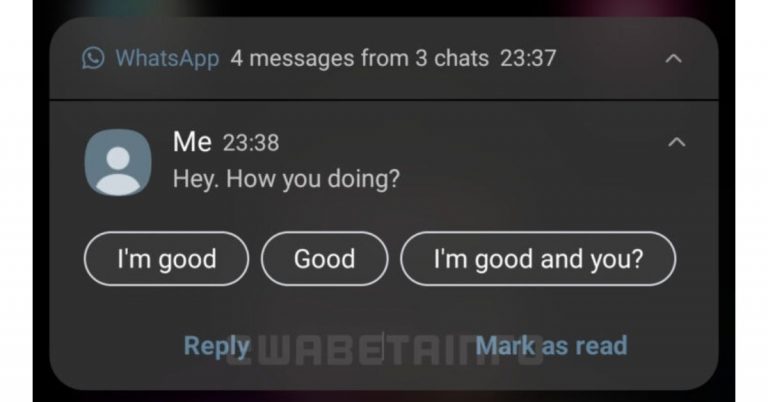
According to a report, WhatsApp has been testing green colour notifications for its Android beta app. Earlier the instant messaging app was testing blue colour for its notifications on Android which is said to be restored to green colour after getting feedback from the users. This change came with the 2.21.12.12 beta update where the company started with a dark blue colour and ultimately had to restore the original colour scheme for the notifications. A report by WABetaInfo stated that a new dark blue colour in notifications arrived in the 2.21.12.12 beta update, but WhatsApp but the company has to restore the colour. With the update, the company is said to bring few changes to UI and colours in the previous updates. They started removing theline separators in the list of your chats, and they changed the tint colour in push notifications, choosing a dark blue colour.However, WhatsApp is said to have restored the old green colour after users complained that the new colour wasn’t correctly visible in the notification, due to its contrast. Listening to the feedback WhatsApp has reverted the changes.Recently the instant messaging app owned by Facebook was also spotted working on a feature called Flash Call that helps users to log into WhatsApp quickly. It is an automatic verification method over call to quickly get verified to log into WhatsApp that arrived in the WhatsApp beta for the Android 2.21.11.7 update. As per the report, WhatsApp’s flash feature will call your phone number and then automatically end the call, verifying the last phone number in your phone’s log is equal to the number that gives you the 6-digit code. This automatic verification method is a safe method of login as all mobile numbers are different and one cannot trick. However, this feature will be optional and the users can choose to go for the old mentioned method of logging intoWhatsApp confirming the 6-digit code received via SMS or call. As far as privacy is concerned the messaging app is said to never use the user’s call history for any other purposes. However, it will just compare the last entry from your call history with the phone number that’s supposed to call you.
For the latest gadget and tech news, and gadget reviews, follow us on Twitter, Facebook and Instagram. For newest tech & gadget videos subscribe to our YouTube Channel. You can also stay up to date using the Gadget Bridge Android App.





 Xiaomi also gives the options to delete the old Wi-Fi options. The steps are for MIUI 10, MIUI 11, and MIUI 12 versions. Follow the steps.
 These steps are for those Samsung smartphones, which have One User Interface. The company allows the user to forget and delete the old and unnecessary Wi-Fi networks.
Follow the steps.
These steps are for those Samsung smartphones, which have One User Interface. The company allows the user to forget and delete the old and unnecessary Wi-Fi networks.
Follow the steps.
 You can follow this step for Oneplus smartphones, which have OxygenOS. The steps on this operating system are also simple.
 The mobile sony also gives you the option to forget the unwanted Wi-Fi that you do not connect to it anymore. The steps are for Sony Xperia phones which have Xperia UI. Check the steps below.
 Xiaomi also gives the options to delete the old Wi-Fi options. The steps are for MIUI 10, MIUI 11, and MIUI 12 versions. Follow the steps.
 These steps are for those Samsung smartphones, which have One User Interface. The company allows the user to forget and delete the old and unnecessary Wi-Fi networks.
Follow the steps.
These steps are for those Samsung smartphones, which have One User Interface. The company allows the user to forget and delete the old and unnecessary Wi-Fi networks.
Follow the steps.
 You can follow this step for Oneplus smartphones, which have OxygenOS. The steps on this operating system are also simple.
 The mobile sony also gives you the option to forget the unwanted Wi-Fi that you do not connect to it anymore. The steps are for Sony Xperia phones which have Xperia UI. Check the steps below.

 Even though it holds the word “Social” that is closely associated while browsing Facebook there are instances that we want to use it offline. For example, you want to quickly check your notifications and the message but seeing you come online might attract those friends to who you do not want to reply. It takes you to a situation where it only creates hurdles for yourself. Why don’t you avoid those situational encounters and go incognito? Here are the easy steps you can follow:
 Facebook has unbelievable millions of users. And maybe a hundred or thousand people who are your friends on the platform. Facebook recently introduced the green icon to let the users know who is online and who is not. Many consider it advantageous and many do not. For those who value privacy by browsing Facebook without the green icon, the popular social network allows you to turn it off in a few simple steps. Facebook also allows you to turn it off for those who use the Facebook app. On the app, you need to turn it off on the messenger app with some simple steps. Turning the green icon and going offline on the app is easy and simple. Please follow the steps below.
 Even though it holds the word “Social” that is closely associated while browsing Facebook there are instances that we want to use it offline. For example, you want to quickly check your notifications and the message but seeing you come online might attract those friends to who you do not want to reply. It takes you to a situation where it only creates hurdles for yourself. Why don’t you avoid those situational encounters and go incognito? Here are the easy steps you can follow:
 Facebook has unbelievable millions of users. And maybe a hundred or thousand people who are your friends on the platform. Facebook recently introduced the green icon to let the users know who is online and who is not. Many consider it advantageous and many do not. For those who value privacy by browsing Facebook without the green icon, the popular social network allows you to turn it off in a few simple steps. Facebook also allows you to turn it off for those who use the Facebook app. On the app, you need to turn it off on the messenger app with some simple steps. Turning the green icon and going offline on the app is easy and simple. Please follow the steps below.

 Moodfit will help you maintain mental health. The app charts your mood, medications, and activities by setting goals like a companion. Regularly exercising your mind on the app will help shape up your mood and mental health. The questionnaire function in the app will determine the condition and stability of your mental health. Moodfit will help you identify the best treatment strategies for you and help you understand medication and therapy better. The app is available on the play store.
Download here
Moodfit will help you maintain mental health. The app charts your mood, medications, and activities by setting goals like a companion. Regularly exercising your mind on the app will help shape up your mood and mental health. The questionnaire function in the app will determine the condition and stability of your mental health. Moodfit will help you identify the best treatment strategies for you and help you understand medication and therapy better. The app is available on the play store.
Download here
 Calm gives you the best soothing soundtracks to help heal your mental health. The app includes mindful movement and a meditation program for a speedy recovery. It will help you improve your sleep immensely and make you feel fresh and alive the next morning. Calm is the leading app for meditation and sleep that will help you with improving mental health. The app has Sleep stories, breathing exercises, masterclasses, and relaxing music. Try now by downloading from the Google Play Store.
Download here
Read more: 10 best smartwatches for tech freaks that were launched this year
Calm gives you the best soothing soundtracks to help heal your mental health. The app includes mindful movement and a meditation program for a speedy recovery. It will help you improve your sleep immensely and make you feel fresh and alive the next morning. Calm is the leading app for meditation and sleep that will help you with improving mental health. The app has Sleep stories, breathing exercises, masterclasses, and relaxing music. Try now by downloading from the Google Play Store.
Download here
Read more: 10 best smartwatches for tech freaks that were launched this year
 Headspace app will help you recover from anxiety and help you with meditation and sleep. The app will give you guided meditation, sleep casts, and assist you in how to centre yourself to bring happiness. Headspace is quick and easy to use and helps you in tracking your daily medication progress. The app will help you focus, breathe, stay calm, and perform at your best with the medication exercise they have. It will also make you sleep better for a mindful tomorrow. You can download the app from the play store.
Download here
Read also: Mi Watch Lite with 11 workout modes and 120 watch faces launched
Headspace app will help you recover from anxiety and help you with meditation and sleep. The app will give you guided meditation, sleep casts, and assist you in how to centre yourself to bring happiness. Headspace is quick and easy to use and helps you in tracking your daily medication progress. The app will help you focus, breathe, stay calm, and perform at your best with the medication exercise they have. It will also make you sleep better for a mindful tomorrow. You can download the app from the play store.
Download here
Read also: Mi Watch Lite with 11 workout modes and 120 watch faces launched
 Talkspace has a different service from the other apps on the list. The app is designed to be used online by letting you match with licensed therapists for better one-on-one support. The app provides you to chat, audio, or video message 24/7 and the expert will get back to you. The app is the most convenient platform if you want to improve your mental health. Talkspace gives you the best face-to-face therapy session in an app. And it is safe and secure, the app is protected using banking-grade encryption. Try now.
Download the app here
Talkspace has a different service from the other apps on the list. The app is designed to be used online by letting you match with licensed therapists for better one-on-one support. The app provides you to chat, audio, or video message 24/7 and the expert will get back to you. The app is the most convenient platform if you want to improve your mental health. Talkspace gives you the best face-to-face therapy session in an app. And it is safe and secure, the app is protected using banking-grade encryption. Try now.
Download the app here
 The app offers you weekly live sessions with licensed therapists. And for better communication with your therapist, you can send voice messages, text messages, voice messages. The app also gives you the option for group therapy. Better help includes sessions from depression to anxiety for individuals, couples, and family. Using the app is very simple. You need to fill up a questionnaire and the app will match you with the best-licensed counsellor. You can also get your own secure and private “counselling room”.
Download here
For the latest gadget and tech news, and gadget reviews, follow us on Twitter, Facebook and Instagram. For newest tech & gadget videos subscribe to our YouTube Channel. You can also stay up to date using the Gadget Bridge Android App.
The app offers you weekly live sessions with licensed therapists. And for better communication with your therapist, you can send voice messages, text messages, voice messages. The app also gives you the option for group therapy. Better help includes sessions from depression to anxiety for individuals, couples, and family. Using the app is very simple. You need to fill up a questionnaire and the app will match you with the best-licensed counsellor. You can also get your own secure and private “counselling room”.
Download here
For the latest gadget and tech news, and gadget reviews, follow us on Twitter, Facebook and Instagram. For newest tech & gadget videos subscribe to our YouTube Channel. You can also stay up to date using the Gadget Bridge Android App.  Moodfit will help you maintain mental health. The app charts your mood, medications, and activities by setting goals like a companion. Regularly exercising your mind on the app will help shape up your mood and mental health. The questionnaire function in the app will determine the condition and stability of your mental health. Moodfit will help you identify the best treatment strategies for you and help you understand medication and therapy better. The app is available on the play store.
Download here
Moodfit will help you maintain mental health. The app charts your mood, medications, and activities by setting goals like a companion. Regularly exercising your mind on the app will help shape up your mood and mental health. The questionnaire function in the app will determine the condition and stability of your mental health. Moodfit will help you identify the best treatment strategies for you and help you understand medication and therapy better. The app is available on the play store.
Download here
 Calm gives you the best soothing soundtracks to help heal your mental health. The app includes mindful movement and a meditation program for a speedy recovery. It will help you improve your sleep immensely and make you feel fresh and alive the next morning. Calm is the leading app for meditation and sleep that will help you with improving mental health. The app has Sleep stories, breathing exercises, masterclasses, and relaxing music. Try now by downloading from the Google Play Store.
Download here
Read more: 10 best smartwatches for tech freaks that were launched this year
Calm gives you the best soothing soundtracks to help heal your mental health. The app includes mindful movement and a meditation program for a speedy recovery. It will help you improve your sleep immensely and make you feel fresh and alive the next morning. Calm is the leading app for meditation and sleep that will help you with improving mental health. The app has Sleep stories, breathing exercises, masterclasses, and relaxing music. Try now by downloading from the Google Play Store.
Download here
Read more: 10 best smartwatches for tech freaks that were launched this year
 Headspace app will help you recover from anxiety and help you with meditation and sleep. The app will give you guided meditation, sleep casts, and assist you in how to centre yourself to bring happiness. Headspace is quick and easy to use and helps you in tracking your daily medication progress. The app will help you focus, breathe, stay calm, and perform at your best with the medication exercise they have. It will also make you sleep better for a mindful tomorrow. You can download the app from the play store.
Download here
Read also: Mi Watch Lite with 11 workout modes and 120 watch faces launched
Headspace app will help you recover from anxiety and help you with meditation and sleep. The app will give you guided meditation, sleep casts, and assist you in how to centre yourself to bring happiness. Headspace is quick and easy to use and helps you in tracking your daily medication progress. The app will help you focus, breathe, stay calm, and perform at your best with the medication exercise they have. It will also make you sleep better for a mindful tomorrow. You can download the app from the play store.
Download here
Read also: Mi Watch Lite with 11 workout modes and 120 watch faces launched
 Talkspace has a different service from the other apps on the list. The app is designed to be used online by letting you match with licensed therapists for better one-on-one support. The app provides you to chat, audio, or video message 24/7 and the expert will get back to you. The app is the most convenient platform if you want to improve your mental health. Talkspace gives you the best face-to-face therapy session in an app. And it is safe and secure, the app is protected using banking-grade encryption. Try now.
Download the app here
Talkspace has a different service from the other apps on the list. The app is designed to be used online by letting you match with licensed therapists for better one-on-one support. The app provides you to chat, audio, or video message 24/7 and the expert will get back to you. The app is the most convenient platform if you want to improve your mental health. Talkspace gives you the best face-to-face therapy session in an app. And it is safe and secure, the app is protected using banking-grade encryption. Try now.
Download the app here
 The app offers you weekly live sessions with licensed therapists. And for better communication with your therapist, you can send voice messages, text messages, voice messages. The app also gives you the option for group therapy. Better help includes sessions from depression to anxiety for individuals, couples, and family. Using the app is very simple. You need to fill up a questionnaire and the app will match you with the best-licensed counsellor. You can also get your own secure and private “counselling room”.
Download here
For the latest gadget and tech news, and gadget reviews, follow us on Twitter, Facebook and Instagram. For newest tech & gadget videos subscribe to our YouTube Channel. You can also stay up to date using the Gadget Bridge Android App.
The app offers you weekly live sessions with licensed therapists. And for better communication with your therapist, you can send voice messages, text messages, voice messages. The app also gives you the option for group therapy. Better help includes sessions from depression to anxiety for individuals, couples, and family. Using the app is very simple. You need to fill up a questionnaire and the app will match you with the best-licensed counsellor. You can also get your own secure and private “counselling room”.
Download here
For the latest gadget and tech news, and gadget reviews, follow us on Twitter, Facebook and Instagram. For newest tech & gadget videos subscribe to our YouTube Channel. You can also stay up to date using the Gadget Bridge Android App. 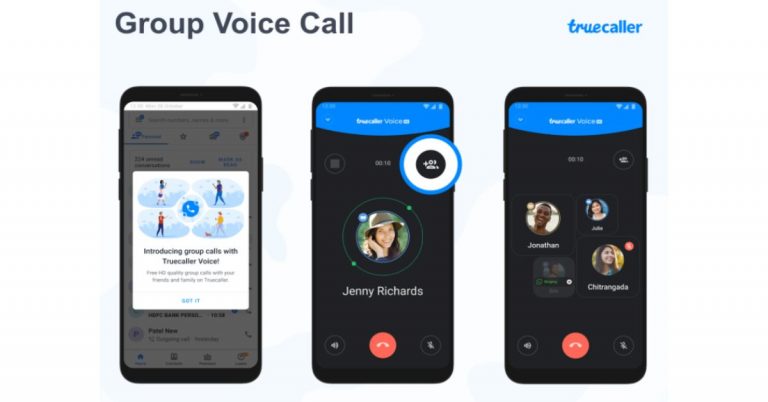
 Smart SMS is another feature that comes with the new Truecaller update. It will help the user to filter out spam messages and in categorising useful information. The built-in SMS intelligence will allow users to work offline and it also reminds you of payments and in general making your SMS inbox a more organised place. Currently, this feature will be rolled out to users in India, Kenya, Nigeria and South Africa. It will soon be available in the US, Sweden, Malaysia, Indonesia and Egypt.
 Lastly, the Inbox Cleaner will help you clear out all those old, unwanted messages in just a few seconds. There is no need to spend individual time selecting SMSs to delete. A quick tap on Inbox Cleaner from the menu will show you how many old OTPs and spam SMSes you have accumulated and another tap on the ‘clean up’ button will quickly and effectively remove old SMSes without affecting your important data.
This feature is designed to run in the background, allowing users to continue working on other tasks within Truecaller or any other app on the device while Inbox Cleaner works its magic.
For the latest gadget and tech news, and gadget reviews, follow us on Twitter, Facebook and Instagram. For newest tech & gadget videos subscribe to our YouTube Channel. You can also stay up to date using the Gadget Bridge Android App.
Lastly, the Inbox Cleaner will help you clear out all those old, unwanted messages in just a few seconds. There is no need to spend individual time selecting SMSs to delete. A quick tap on Inbox Cleaner from the menu will show you how many old OTPs and spam SMSes you have accumulated and another tap on the ‘clean up’ button will quickly and effectively remove old SMSes without affecting your important data.
This feature is designed to run in the background, allowing users to continue working on other tasks within Truecaller or any other app on the device while Inbox Cleaner works its magic.
For the latest gadget and tech news, and gadget reviews, follow us on Twitter, Facebook and Instagram. For newest tech & gadget videos subscribe to our YouTube Channel. You can also stay up to date using the Gadget Bridge Android App.  Smart SMS is another feature that comes with the new Truecaller update. It will help the user to filter out spam messages and in categorising useful information. The built-in SMS intelligence will allow users to work offline and it also reminds you of payments and in general making your SMS inbox a more organised place. Currently, this feature will be rolled out to users in India, Kenya, Nigeria and South Africa. It will soon be available in the US, Sweden, Malaysia, Indonesia and Egypt.
 Lastly, the Inbox Cleaner will help you clear out all those old, unwanted messages in just a few seconds. There is no need to spend individual time selecting SMSs to delete. A quick tap on Inbox Cleaner from the menu will show you how many old OTPs and spam SMSes you have accumulated and another tap on the ‘clean up’ button will quickly and effectively remove old SMSes without affecting your important data.
This feature is designed to run in the background, allowing users to continue working on other tasks within Truecaller or any other app on the device while Inbox Cleaner works its magic.
For the latest gadget and tech news, and gadget reviews, follow us on Twitter, Facebook and Instagram. For newest tech & gadget videos subscribe to our YouTube Channel. You can also stay up to date using the Gadget Bridge Android App.
Lastly, the Inbox Cleaner will help you clear out all those old, unwanted messages in just a few seconds. There is no need to spend individual time selecting SMSs to delete. A quick tap on Inbox Cleaner from the menu will show you how many old OTPs and spam SMSes you have accumulated and another tap on the ‘clean up’ button will quickly and effectively remove old SMSes without affecting your important data.
This feature is designed to run in the background, allowing users to continue working on other tasks within Truecaller or any other app on the device while Inbox Cleaner works its magic.
For the latest gadget and tech news, and gadget reviews, follow us on Twitter, Facebook and Instagram. For newest tech & gadget videos subscribe to our YouTube Channel. You can also stay up to date using the Gadget Bridge Android App. 
 Apple music lossless is compatible with iPhone and iPad which iOS or iPadOS is 14.6 updated. To enable it on the above device. Go to settings on the Apple music. Click on Audio Quality. Choose the Lossless on or off button. You can listen to it from the iPhone or iPad speakers, wired headphones or earphones, and powered speakers.
Read more: 10 headphones launched in 2020 to offer amazing sound experience
Apple music lossless is compatible with iPhone and iPad which iOS or iPadOS is 14.6 updated. To enable it on the above device. Go to settings on the Apple music. Click on Audio Quality. Choose the Lossless on or off button. You can listen to it from the iPhone or iPad speakers, wired headphones or earphones, and powered speakers.
Read more: 10 headphones launched in 2020 to offer amazing sound experience
 The Apple music lossless can be played on a Mac with built-in speakers, wired connection headphones, or powered speakers. To turn on the lossless first open the music app. Go to the music bar. Select Music>Preferences. Tap the Playback. Find Audio Quality and choose to turn it on or off.
Read also: Apple could soon foray in to cloud game streaming service
The Apple music lossless can be played on a Mac with built-in speakers, wired connection headphones, or powered speakers. To turn on the lossless first open the music app. Go to the music bar. Select Music>Preferences. Tap the Playback. Find Audio Quality and choose to turn it on or off.
Read also: Apple could soon foray in to cloud game streaming service
 To get the availability on your Apple TV first you need to update to tvOS14.6. And connect it to an AV receiver using an HDMI cable. The steps to enable the Apple music lossless in your Apple TV are simple. Go to settings>Open Apps and select music. Now select Audio Quality and select on or off lossless.
Apple music lossless will be available from June 2021 in the Apple Music catalogue, which includes more than 75 million songs. The sound will be supporting Dolby Atmos for that surround sound. With the Apple Music subscription, you will be able to listen to Apple music lossless on the above devices. Get the Apple Music subscription today and enable the Apple music lawless on your Apple devices to listen to the exact sound that the artist has recorded.
For the latest gadget and tech news, and gadget reviews, follow us on Twitter, Facebook and Instagram. For newest tech & gadget videos subscribe to our YouTube Channel. You can also stay up to date using the Gadget Bridge Android App.
To get the availability on your Apple TV first you need to update to tvOS14.6. And connect it to an AV receiver using an HDMI cable. The steps to enable the Apple music lossless in your Apple TV are simple. Go to settings>Open Apps and select music. Now select Audio Quality and select on or off lossless.
Apple music lossless will be available from June 2021 in the Apple Music catalogue, which includes more than 75 million songs. The sound will be supporting Dolby Atmos for that surround sound. With the Apple Music subscription, you will be able to listen to Apple music lossless on the above devices. Get the Apple Music subscription today and enable the Apple music lawless on your Apple devices to listen to the exact sound that the artist has recorded.
For the latest gadget and tech news, and gadget reviews, follow us on Twitter, Facebook and Instagram. For newest tech & gadget videos subscribe to our YouTube Channel. You can also stay up to date using the Gadget Bridge Android App.  Apple music lossless is compatible with iPhone and iPad which iOS or iPadOS is 14.6 updated. To enable it on the above device. Go to settings on the Apple music. Click on Audio Quality. Choose the Lossless on or off button. You can listen to it from the iPhone or iPad speakers, wired headphones or earphones, and powered speakers.
Read more: 10 headphones launched in 2020 to offer amazing sound experience
Apple music lossless is compatible with iPhone and iPad which iOS or iPadOS is 14.6 updated. To enable it on the above device. Go to settings on the Apple music. Click on Audio Quality. Choose the Lossless on or off button. You can listen to it from the iPhone or iPad speakers, wired headphones or earphones, and powered speakers.
Read more: 10 headphones launched in 2020 to offer amazing sound experience
 The Apple music lossless can be played on a Mac with built-in speakers, wired connection headphones, or powered speakers. To turn on the lossless first open the music app. Go to the music bar. Select Music>Preferences. Tap the Playback. Find Audio Quality and choose to turn it on or off.
Read also: Apple could soon foray in to cloud game streaming service
The Apple music lossless can be played on a Mac with built-in speakers, wired connection headphones, or powered speakers. To turn on the lossless first open the music app. Go to the music bar. Select Music>Preferences. Tap the Playback. Find Audio Quality and choose to turn it on or off.
Read also: Apple could soon foray in to cloud game streaming service
 To get the availability on your Apple TV first you need to update to tvOS14.6. And connect it to an AV receiver using an HDMI cable. The steps to enable the Apple music lossless in your Apple TV are simple. Go to settings>Open Apps and select music. Now select Audio Quality and select on or off lossless.
Apple music lossless will be available from June 2021 in the Apple Music catalogue, which includes more than 75 million songs. The sound will be supporting Dolby Atmos for that surround sound. With the Apple Music subscription, you will be able to listen to Apple music lossless on the above devices. Get the Apple Music subscription today and enable the Apple music lawless on your Apple devices to listen to the exact sound that the artist has recorded.
For the latest gadget and tech news, and gadget reviews, follow us on Twitter, Facebook and Instagram. For newest tech & gadget videos subscribe to our YouTube Channel. You can also stay up to date using the Gadget Bridge Android App.
To get the availability on your Apple TV first you need to update to tvOS14.6. And connect it to an AV receiver using an HDMI cable. The steps to enable the Apple music lossless in your Apple TV are simple. Go to settings>Open Apps and select music. Now select Audio Quality and select on or off lossless.
Apple music lossless will be available from June 2021 in the Apple Music catalogue, which includes more than 75 million songs. The sound will be supporting Dolby Atmos for that surround sound. With the Apple Music subscription, you will be able to listen to Apple music lossless on the above devices. Get the Apple Music subscription today and enable the Apple music lawless on your Apple devices to listen to the exact sound that the artist has recorded.
For the latest gadget and tech news, and gadget reviews, follow us on Twitter, Facebook and Instagram. For newest tech & gadget videos subscribe to our YouTube Channel. You can also stay up to date using the Gadget Bridge Android App. 






 Daily lives have changed, virtual reality has become the new normal. Work environment and educational assessment have become very dependent on Zoom or any other video calling platform. Zoom offers you the simplicity in using a video calling app yet there are a variety of advanced options to improve your remote work and education productivity. Zoom is compatible with Windows, Mac, Linux, IOS, and Android. The guide below has all the tips to use the popular Zoom video calling app like a pro.
Read more: How can you view multiple participants in Google Meet?
Daily lives have changed, virtual reality has become the new normal. Work environment and educational assessment have become very dependent on Zoom or any other video calling platform. Zoom offers you the simplicity in using a video calling app yet there are a variety of advanced options to improve your remote work and education productivity. Zoom is compatible with Windows, Mac, Linux, IOS, and Android. The guide below has all the tips to use the popular Zoom video calling app like a pro.
Read more: How can you view multiple participants in Google Meet?
 Zoom allows you to change the layout that displays in the Zoom Rooms screen. Zoom allows you to have a room with one screen or a room with multiple screens.
For the Zoom screen with one screen, you can change the layout by tapping on the Change View option. And for the Zoom room with multiple screens, you can toggle the icon for Active speaker and Gallery views. There are three layouts you can change into according to the room screen. Zoom gives you Active speaker view, Thumbnail View, and Gallery view. And in a Zoom room with one screen or multiple screens, you can share the screen too. Check the guide below on how to do that.
Zoom allows you to change the layout that displays in the Zoom Rooms screen. Zoom allows you to have a room with one screen or a room with multiple screens.
For the Zoom screen with one screen, you can change the layout by tapping on the Change View option. And for the Zoom room with multiple screens, you can toggle the icon for Active speaker and Gallery views. There are three layouts you can change into according to the room screen. Zoom gives you Active speaker view, Thumbnail View, and Gallery view. And in a Zoom room with one screen or multiple screens, you can share the screen too. Check the guide below on how to do that.
 Daily lives have changed, virtual reality has become the new normal. Work environment and educational assessment have become very dependent on Zoom or any other video calling platform. Zoom offers you the simplicity in using a video calling app yet there are a variety of advanced options to improve your remote work and education productivity. Zoom is compatible with Windows, Mac, Linux, IOS, and Android. The guide below has all the tips to use the popular Zoom video calling app like a pro.
Read more: How can you view multiple participants in Google Meet?
Daily lives have changed, virtual reality has become the new normal. Work environment and educational assessment have become very dependent on Zoom or any other video calling platform. Zoom offers you the simplicity in using a video calling app yet there are a variety of advanced options to improve your remote work and education productivity. Zoom is compatible with Windows, Mac, Linux, IOS, and Android. The guide below has all the tips to use the popular Zoom video calling app like a pro.
Read more: How can you view multiple participants in Google Meet?
 Zoom allows you to change the layout that displays in the Zoom Rooms screen. Zoom allows you to have a room with one screen or a room with multiple screens.
For the Zoom screen with one screen, you can change the layout by tapping on the Change View option. And for the Zoom room with multiple screens, you can toggle the icon for Active speaker and Gallery views. There are three layouts you can change into according to the room screen. Zoom gives you Active speaker view, Thumbnail View, and Gallery view. And in a Zoom room with one screen or multiple screens, you can share the screen too. Check the guide below on how to do that.
Zoom allows you to change the layout that displays in the Zoom Rooms screen. Zoom allows you to have a room with one screen or a room with multiple screens.
For the Zoom screen with one screen, you can change the layout by tapping on the Change View option. And for the Zoom room with multiple screens, you can toggle the icon for Active speaker and Gallery views. There are three layouts you can change into according to the room screen. Zoom gives you Active speaker view, Thumbnail View, and Gallery view. And in a Zoom room with one screen or multiple screens, you can share the screen too. Check the guide below on how to do that.
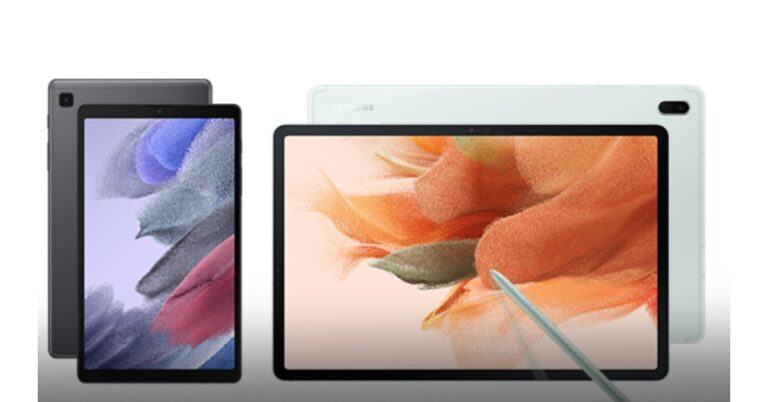

 Available both on websites and app Grammarly gives you the option to copy all your text on the website or app directly for correction or you can type it there. The English learning does not stop in this software. You can also use it for your Facebook, Gmail, WordPress, and any online typing software by downloading an extension. Grammarly is like your virtual editor; it helps you review your mistakes before changing them. The writing tool helps you find your grammatical mistakes and gives appropriate suggestions and alternative vocabulary. If you want to use it for work-related writing they give you the option to upgrade (for a nominal fee) for better writing.
Read also: Google to roll out Indian language support Search, Maps and more apps in India
Available both on websites and app Grammarly gives you the option to copy all your text on the website or app directly for correction or you can type it there. The English learning does not stop in this software. You can also use it for your Facebook, Gmail, WordPress, and any online typing software by downloading an extension. Grammarly is like your virtual editor; it helps you review your mistakes before changing them. The writing tool helps you find your grammatical mistakes and gives appropriate suggestions and alternative vocabulary. If you want to use it for work-related writing they give you the option to upgrade (for a nominal fee) for better writing.
Read also: Google to roll out Indian language support Search, Maps and more apps in India

 The British Council has both a website and app that will help you learn English faster and easier. The website has many online courses, skills options to practice, grammar to learn, vocabulary, and even train you for IELTS. The British council app offers you learning English while playing games. The app has the option to learn the English language from beginner to advanced level.
Read more: How to change your language in Google on a PC or a smartphone?
The British Council has both a website and app that will help you learn English faster and easier. The website has many online courses, skills options to practice, grammar to learn, vocabulary, and even train you for IELTS. The British council app offers you learning English while playing games. The app has the option to learn the English language from beginner to advanced level.
Read more: How to change your language in Google on a PC or a smartphone?
 The learning platform has a website as well as an app. FluentU is the most innovative learning platform you can find today. The platform takes to the world of videos from music, movie trailers, news, inspiring talks, etc, and turns them into a personalised language learning lesson. The education platform turns watching videos into a fun activity of learning the English language.
For the latest gadget and tech news, and gadget reviews, follow us on Twitter, Facebook and Instagram. For newest tech & gadget videos subscribe to our YouTube Channel. You can also stay up to date using the Gadget Bridge Android App.
The learning platform has a website as well as an app. FluentU is the most innovative learning platform you can find today. The platform takes to the world of videos from music, movie trailers, news, inspiring talks, etc, and turns them into a personalised language learning lesson. The education platform turns watching videos into a fun activity of learning the English language.
For the latest gadget and tech news, and gadget reviews, follow us on Twitter, Facebook and Instagram. For newest tech & gadget videos subscribe to our YouTube Channel. You can also stay up to date using the Gadget Bridge Android App.  Available both on websites and app Grammarly gives you the option to copy all your text on the website or app directly for correction or you can type it there. The English learning does not stop in this software. You can also use it for your Facebook, Gmail, WordPress, and any online typing software by downloading an extension. Grammarly is like your virtual editor; it helps you review your mistakes before changing them. The writing tool helps you find your grammatical mistakes and gives appropriate suggestions and alternative vocabulary. If you want to use it for work-related writing they give you the option to upgrade (for a nominal fee) for better writing.
Read also: Google to roll out Indian language support Search, Maps and more apps in India
Available both on websites and app Grammarly gives you the option to copy all your text on the website or app directly for correction or you can type it there. The English learning does not stop in this software. You can also use it for your Facebook, Gmail, WordPress, and any online typing software by downloading an extension. Grammarly is like your virtual editor; it helps you review your mistakes before changing them. The writing tool helps you find your grammatical mistakes and gives appropriate suggestions and alternative vocabulary. If you want to use it for work-related writing they give you the option to upgrade (for a nominal fee) for better writing.
Read also: Google to roll out Indian language support Search, Maps and more apps in India

 The British Council has both a website and app that will help you learn English faster and easier. The website has many online courses, skills options to practice, grammar to learn, vocabulary, and even train you for IELTS. The British council app offers you learning English while playing games. The app has the option to learn the English language from beginner to advanced level.
Read more: How to change your language in Google on a PC or a smartphone?
The British Council has both a website and app that will help you learn English faster and easier. The website has many online courses, skills options to practice, grammar to learn, vocabulary, and even train you for IELTS. The British council app offers you learning English while playing games. The app has the option to learn the English language from beginner to advanced level.
Read more: How to change your language in Google on a PC or a smartphone?
 Udemy is an online website platform for mainly educational learning. The website has a variety of learning courses you learn. Choosing the English learning courses gives you the option to choose from basic level to speciality. The website is the perfect educational online resource to learn English from today and practice your vocabulary. The website charges you a minimum fee for the online classes you will be attending and help you reach from basic to the advanced level.
 The learning platform has a website as well as an app. FluentU is the most innovative learning platform you can find today. The platform takes to the world of videos from music, movie trailers, news, inspiring talks, etc, and turns them into a personalised language learning lesson. The education platform turns watching videos into a fun activity of learning the English language.
For the latest gadget and tech news, and gadget reviews, follow us on Twitter, Facebook and Instagram. For newest tech & gadget videos subscribe to our YouTube Channel. You can also stay up to date using the Gadget Bridge Android App.
The learning platform has a website as well as an app. FluentU is the most innovative learning platform you can find today. The platform takes to the world of videos from music, movie trailers, news, inspiring talks, etc, and turns them into a personalised language learning lesson. The education platform turns watching videos into a fun activity of learning the English language.
For the latest gadget and tech news, and gadget reviews, follow us on Twitter, Facebook and Instagram. For newest tech & gadget videos subscribe to our YouTube Channel. You can also stay up to date using the Gadget Bridge Android App. 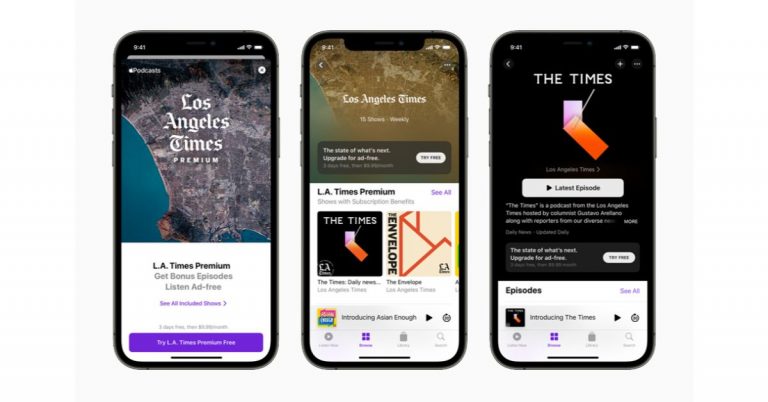

 The app will make your daily measurement easier by turning your phone into a smart ruler. The unit converter on the app is (mm to inches, centimetre to inches). The app basically allows you to measure the calculation of the length, of any straight line, and the calculation of any area. The app will help you to define the thread pitch, calliper and turn your phones into smart rulers online.
Download it on the Play store
The app will make your daily measurement easier by turning your phone into a smart ruler. The unit converter on the app is (mm to inches, centimetre to inches). The app basically allows you to measure the calculation of the length, of any straight line, and the calculation of any area. The app will help you to define the thread pitch, calliper and turn your phones into smart rulers online.
Download it on the Play store
 This measuring app basically measures the distance and height using trigonometry. You can start measuring by pressing the shutter button in the app and aiming the camera at the ground. And if you are measuring the distance from someone to your camera point make sure you point and aim at their shoes (ground).
Download now from the Play store
Read more: Google’s new WebXR apps help you see the world around you in Augmented Reality
This measuring app basically measures the distance and height using trigonometry. You can start measuring by pressing the shutter button in the app and aiming the camera at the ground. And if you are measuring the distance from someone to your camera point make sure you point and aim at their shoes (ground).
Download now from the Play store
Read more: Google’s new WebXR apps help you see the world around you in Augmented Reality
 The app allows you to measure the distance of the height and width of an object. By downloading this app you will be able to use your smartphone as a virtual ruler. It is very simple to operate, aim the camera at the object you want to measure and it will determine the height and width of the object. The app for the measurement uses trigonometry based on geometric triangles. The measurement units supported are meters, inches, feet, yards.
Download on Play store
The app allows you to measure the distance of the height and width of an object. By downloading this app you will be able to use your smartphone as a virtual ruler. It is very simple to operate, aim the camera at the object you want to measure and it will determine the height and width of the object. The app for the measurement uses trigonometry based on geometric triangles. The measurement units supported are meters, inches, feet, yards.
Download on Play store
 The app uses augmented reality technology in your smartphones for measurement. The AR ruler app measuring unit is cm, m, mm, inches, feet, and yards. The app also allows you to tape measure the size of 3D objects. The app can measure the size of your room and its height which will display directly on the smartphone’s screen.
Download the app on the Play store
Read also: Know how Apple iPhone 12 Pro, iPhone 12 Pro Max can help visually impaired users
The app uses augmented reality technology in your smartphones for measurement. The AR ruler app measuring unit is cm, m, mm, inches, feet, and yards. The app also allows you to tape measure the size of 3D objects. The app can measure the size of your room and its height which will display directly on the smartphone’s screen.
Download the app on the Play store
Read also: Know how Apple iPhone 12 Pro, iPhone 12 Pro Max can help visually impaired users
 The Quick Measure app measures the distance of an object and the height of the human body using augmented reality technology through your camera phones. The app will help in measuring the distance from the camera to the point you aim at. That is to measure two manually specified points. The Quick Measure app can also measure the height of a human from the foot to the head. The app is designed to measure the length, width, and area on your smartphone screens.
You can download it on Playstore
For the latest gadget and tech news, and gadget reviews, follow us on Twitter, Facebook and Instagram. For newest tech & gadget videos subscribe to our YouTube Channel. You can also stay up to date using the Gadget Bridge Android App.
The Quick Measure app measures the distance of an object and the height of the human body using augmented reality technology through your camera phones. The app will help in measuring the distance from the camera to the point you aim at. That is to measure two manually specified points. The Quick Measure app can also measure the height of a human from the foot to the head. The app is designed to measure the length, width, and area on your smartphone screens.
You can download it on Playstore
For the latest gadget and tech news, and gadget reviews, follow us on Twitter, Facebook and Instagram. For newest tech & gadget videos subscribe to our YouTube Channel. You can also stay up to date using the Gadget Bridge Android App.  The app will make your daily measurement easier by turning your phone into a smart ruler. The unit converter on the app is (mm to inches, centimetre to inches). The app basically allows you to measure the calculation of the length, of any straight line, and the calculation of any area. The app will help you to define the thread pitch, calliper and turn your phones into smart rulers online.
Download it on the Play store
The app will make your daily measurement easier by turning your phone into a smart ruler. The unit converter on the app is (mm to inches, centimetre to inches). The app basically allows you to measure the calculation of the length, of any straight line, and the calculation of any area. The app will help you to define the thread pitch, calliper and turn your phones into smart rulers online.
Download it on the Play store
 This measuring app basically measures the distance and height using trigonometry. You can start measuring by pressing the shutter button in the app and aiming the camera at the ground. And if you are measuring the distance from someone to your camera point make sure you point and aim at their shoes (ground).
Download now from the Play store
Read more: Google’s new WebXR apps help you see the world around you in Augmented Reality
This measuring app basically measures the distance and height using trigonometry. You can start measuring by pressing the shutter button in the app and aiming the camera at the ground. And if you are measuring the distance from someone to your camera point make sure you point and aim at their shoes (ground).
Download now from the Play store
Read more: Google’s new WebXR apps help you see the world around you in Augmented Reality
 The app allows you to measure the distance of the height and width of an object. By downloading this app you will be able to use your smartphone as a virtual ruler. It is very simple to operate, aim the camera at the object you want to measure and it will determine the height and width of the object. The app for the measurement uses trigonometry based on geometric triangles. The measurement units supported are meters, inches, feet, yards.
Download on Play store
The app allows you to measure the distance of the height and width of an object. By downloading this app you will be able to use your smartphone as a virtual ruler. It is very simple to operate, aim the camera at the object you want to measure and it will determine the height and width of the object. The app for the measurement uses trigonometry based on geometric triangles. The measurement units supported are meters, inches, feet, yards.
Download on Play store
 The app uses augmented reality technology in your smartphones for measurement. The AR ruler app measuring unit is cm, m, mm, inches, feet, and yards. The app also allows you to tape measure the size of 3D objects. The app can measure the size of your room and its height which will display directly on the smartphone’s screen.
Download the app on the Play store
Read also: Know how Apple iPhone 12 Pro, iPhone 12 Pro Max can help visually impaired users
The app uses augmented reality technology in your smartphones for measurement. The AR ruler app measuring unit is cm, m, mm, inches, feet, and yards. The app also allows you to tape measure the size of 3D objects. The app can measure the size of your room and its height which will display directly on the smartphone’s screen.
Download the app on the Play store
Read also: Know how Apple iPhone 12 Pro, iPhone 12 Pro Max can help visually impaired users
 The Quick Measure app measures the distance of an object and the height of the human body using augmented reality technology through your camera phones. The app will help in measuring the distance from the camera to the point you aim at. That is to measure two manually specified points. The Quick Measure app can also measure the height of a human from the foot to the head. The app is designed to measure the length, width, and area on your smartphone screens.
You can download it on Playstore
For the latest gadget and tech news, and gadget reviews, follow us on Twitter, Facebook and Instagram. For newest tech & gadget videos subscribe to our YouTube Channel. You can also stay up to date using the Gadget Bridge Android App.
The Quick Measure app measures the distance of an object and the height of the human body using augmented reality technology through your camera phones. The app will help in measuring the distance from the camera to the point you aim at. That is to measure two manually specified points. The Quick Measure app can also measure the height of a human from the foot to the head. The app is designed to measure the length, width, and area on your smartphone screens.
You can download it on Playstore
For the latest gadget and tech news, and gadget reviews, follow us on Twitter, Facebook and Instagram. For newest tech & gadget videos subscribe to our YouTube Channel. You can also stay up to date using the Gadget Bridge Android App. 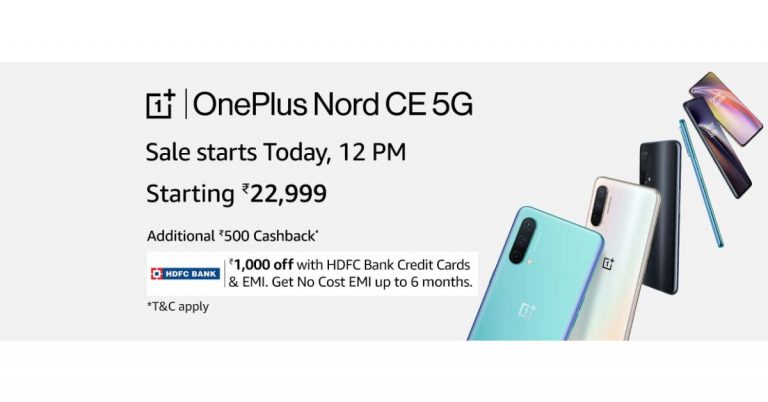
 OnePlus Nord CE 5G houses a 4,500mAh battery that is supported by Warp Charge 30T Plus. The charger is claimed to charge from 0% to 70% in 30 minutes. On the connectivity front, there is 5G, 4G LTE, Wi-Fi 802.11ac, Bluetooth v5.1, GPS/ A-GPS/ NaVIC, NFC, USB Type-C, and a 3.5mm audio jack. Whereas the sensor on the phone includes an accelerometer, ambient light sensor, gyroscope, magnetometer, proximity sensor and in-display fingerprint sensor. In addition to this, there is a superlinear speaker which comes with noise cancellation support.
For the latest gadget and tech news, and gadget reviews, follow us on Twitter, Facebook and Instagram. For newest tech & gadget videos subscribe to our YouTube Channel. You can also stay up to date using the Gadget Bridge Android App.
OnePlus Nord CE 5G houses a 4,500mAh battery that is supported by Warp Charge 30T Plus. The charger is claimed to charge from 0% to 70% in 30 minutes. On the connectivity front, there is 5G, 4G LTE, Wi-Fi 802.11ac, Bluetooth v5.1, GPS/ A-GPS/ NaVIC, NFC, USB Type-C, and a 3.5mm audio jack. Whereas the sensor on the phone includes an accelerometer, ambient light sensor, gyroscope, magnetometer, proximity sensor and in-display fingerprint sensor. In addition to this, there is a superlinear speaker which comes with noise cancellation support.
For the latest gadget and tech news, and gadget reviews, follow us on Twitter, Facebook and Instagram. For newest tech & gadget videos subscribe to our YouTube Channel. You can also stay up to date using the Gadget Bridge Android App. 
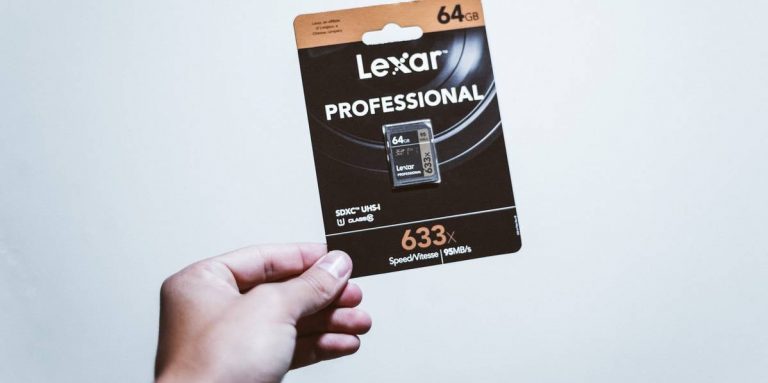
 The Samsung Evo Plus microSD card can transfer files at a speed of 100 Mbps. The microSD card is rated UHS 3 (Ultra High Speed). Compatible with both phones and tablets, it can shoot up to 1080p videos. You also have the option to choose from 32GB, 64GB, 128GB, or 256 GB.
Price: Rs 1,400 upwards
Buy it on Amazon
Read also: Comparison: Redmi Note 10 Pro vs Redmi Note 9 Pro vs Poco X3
The Samsung Evo Plus microSD card can transfer files at a speed of 100 Mbps. The microSD card is rated UHS 3 (Ultra High Speed). Compatible with both phones and tablets, it can shoot up to 1080p videos. You also have the option to choose from 32GB, 64GB, 128GB, or 256 GB.
Price: Rs 1,400 upwards
Buy it on Amazon
Read also: Comparison: Redmi Note 10 Pro vs Redmi Note 9 Pro vs Poco X3
 The SanDisk Extreme has read speeds of up to 100 MBps and write speeds of up to 60 MBps. The most attractive feature is that the microSD can easily store 1080p video and can even handle 4K video shooting. The microSD card has been rated A2 for faster loading and app performance. It is also a certified UHD (Ultra High Speed) class.
Price: Rs 1,100 upwards
Buy on Amazon
Read more: Xiaomi Mi 10i be priced upwards of Rs 26,999, features a 108MP rear camera and will launch tomorrow in India
The SanDisk Extreme has read speeds of up to 100 MBps and write speeds of up to 60 MBps. The most attractive feature is that the microSD can easily store 1080p video and can even handle 4K video shooting. The microSD card has been rated A2 for faster loading and app performance. It is also a certified UHD (Ultra High Speed) class.
Price: Rs 1,100 upwards
Buy on Amazon
Read more: Xiaomi Mi 10i be priced upwards of Rs 26,999, features a 108MP rear camera and will launch tomorrow in India
 The Lexar Professional is one of the best MicroSD designed for drone shooting or action camera shooting capable of delivering high-resolution videos. The microSD card has (Ultra High Speed) UHS-Ⅱ technology for an incredible high read speed of 270 Mbps and a write speed of 90 Mbps. The microSD card is also capable of shooting 1080p, 3D, and 4K videos on your smartphone or other devices.
Price: Rs 2,800
Buy at Amazon
The Lexar Professional is one of the best MicroSD designed for drone shooting or action camera shooting capable of delivering high-resolution videos. The microSD card has (Ultra High Speed) UHS-Ⅱ technology for an incredible high read speed of 270 Mbps and a write speed of 90 Mbps. The microSD card is also capable of shooting 1080p, 3D, and 4K videos on your smartphone or other devices.
Price: Rs 2,800
Buy at Amazon
 The strontium Nitro has a transfer speed of 100 Mbps. The microSD card has (Ultra High Speed) UHS-Ⅰ certification. The Strontium is compatible with smartphones, tablets, and drones that allow action camera shooting with high-resolution video. The best feature of the microSD card is its long life. It has been tested for waterproof, temperature proof, magnetic proof, and X-ray proof.
Price: Rs 900 upwards
Buy at Amazon. in
The strontium Nitro has a transfer speed of 100 Mbps. The microSD card has (Ultra High Speed) UHS-Ⅰ certification. The Strontium is compatible with smartphones, tablets, and drones that allow action camera shooting with high-resolution video. The best feature of the microSD card is its long life. It has been tested for waterproof, temperature proof, magnetic proof, and X-ray proof.
Price: Rs 900 upwards
Buy at Amazon. in
 This microSD allows you to shoot full HD video of up to 4K. Kingston canvas select has been certified (Ultra High Speed) UHS-Ⅰ. This card has been tested for waterproof, high and low temperatures, shock and vibration, and X-ray.
Price: Rs 1,800
Buy on Amazon
For the latest gadget and tech news, and gadget reviews, follow us on Twitter, Facebook and Instagram. For newest tech & gadget videos subscribe to our YouTube Channel. You can also stay up to date using the Gadget Bridge Android App.
This microSD allows you to shoot full HD video of up to 4K. Kingston canvas select has been certified (Ultra High Speed) UHS-Ⅰ. This card has been tested for waterproof, high and low temperatures, shock and vibration, and X-ray.
Price: Rs 1,800
Buy on Amazon
For the latest gadget and tech news, and gadget reviews, follow us on Twitter, Facebook and Instagram. For newest tech & gadget videos subscribe to our YouTube Channel. You can also stay up to date using the Gadget Bridge Android App.  The Samsung Evo Plus microSD card can transfer files at a speed of 100 Mbps. The microSD card is rated UHS 3 (Ultra High Speed). Compatible with both phones and tablets, it can shoot up to 1080p videos. You also have the option to choose from 32GB, 64GB, 128GB, or 256 GB.
Price: Rs 1,400 upwards
Buy it on Amazon
Read also: Comparison: Redmi Note 10 Pro vs Redmi Note 9 Pro vs Poco X3
The Samsung Evo Plus microSD card can transfer files at a speed of 100 Mbps. The microSD card is rated UHS 3 (Ultra High Speed). Compatible with both phones and tablets, it can shoot up to 1080p videos. You also have the option to choose from 32GB, 64GB, 128GB, or 256 GB.
Price: Rs 1,400 upwards
Buy it on Amazon
Read also: Comparison: Redmi Note 10 Pro vs Redmi Note 9 Pro vs Poco X3
 The SanDisk Extreme has read speeds of up to 100 MBps and write speeds of up to 60 MBps. The most attractive feature is that the microSD can easily store 1080p video and can even handle 4K video shooting. The microSD card has been rated A2 for faster loading and app performance. It is also a certified UHD (Ultra High Speed) class.
Price: Rs 1,100 upwards
Buy on Amazon
Read more: Xiaomi Mi 10i be priced upwards of Rs 26,999, features a 108MP rear camera and will launch tomorrow in India
The SanDisk Extreme has read speeds of up to 100 MBps and write speeds of up to 60 MBps. The most attractive feature is that the microSD can easily store 1080p video and can even handle 4K video shooting. The microSD card has been rated A2 for faster loading and app performance. It is also a certified UHD (Ultra High Speed) class.
Price: Rs 1,100 upwards
Buy on Amazon
Read more: Xiaomi Mi 10i be priced upwards of Rs 26,999, features a 108MP rear camera and will launch tomorrow in India
 The Lexar Professional is one of the best MicroSD designed for drone shooting or action camera shooting capable of delivering high-resolution videos. The microSD card has (Ultra High Speed) UHS-Ⅱ technology for an incredible high read speed of 270 Mbps and a write speed of 90 Mbps. The microSD card is also capable of shooting 1080p, 3D, and 4K videos on your smartphone or other devices.
Price: Rs 2,800
Buy at Amazon
The Lexar Professional is one of the best MicroSD designed for drone shooting or action camera shooting capable of delivering high-resolution videos. The microSD card has (Ultra High Speed) UHS-Ⅱ technology for an incredible high read speed of 270 Mbps and a write speed of 90 Mbps. The microSD card is also capable of shooting 1080p, 3D, and 4K videos on your smartphone or other devices.
Price: Rs 2,800
Buy at Amazon
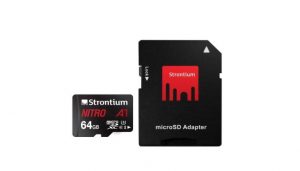 The strontium Nitro has a transfer speed of 100 Mbps. The microSD card has (Ultra High Speed) UHS-Ⅰ certification. The Strontium is compatible with smartphones, tablets, and drones that allow action camera shooting with high-resolution video. The best feature of the microSD card is its long life. It has been tested for waterproof, temperature proof, magnetic proof, and X-ray proof.
Price: Rs 900 upwards
Buy at Amazon. in
The strontium Nitro has a transfer speed of 100 Mbps. The microSD card has (Ultra High Speed) UHS-Ⅰ certification. The Strontium is compatible with smartphones, tablets, and drones that allow action camera shooting with high-resolution video. The best feature of the microSD card is its long life. It has been tested for waterproof, temperature proof, magnetic proof, and X-ray proof.
Price: Rs 900 upwards
Buy at Amazon. in
 This microSD allows you to shoot full HD video of up to 4K. Kingston canvas select has been certified (Ultra High Speed) UHS-Ⅰ. This card has been tested for waterproof, high and low temperatures, shock and vibration, and X-ray.
Price: Rs 1,800
Buy on Amazon
For the latest gadget and tech news, and gadget reviews, follow us on Twitter, Facebook and Instagram. For newest tech & gadget videos subscribe to our YouTube Channel. You can also stay up to date using the Gadget Bridge Android App.
This microSD allows you to shoot full HD video of up to 4K. Kingston canvas select has been certified (Ultra High Speed) UHS-Ⅰ. This card has been tested for waterproof, high and low temperatures, shock and vibration, and X-ray.
Price: Rs 1,800
Buy on Amazon
For the latest gadget and tech news, and gadget reviews, follow us on Twitter, Facebook and Instagram. For newest tech & gadget videos subscribe to our YouTube Channel. You can also stay up to date using the Gadget Bridge Android App. 


 The best feature of the Nebula Anker Capsule is it has a Pocket-Sized design. The projector comes with Android 7.1. And has a good sound that supports the immersive 360-degree audio with incredible 4-hour video playtime. The projector is specially designed for outdoors and travelers with less to worry about damages. The video quality can be up to 720p HD and the connectivity is via HDMI or USB for your convenience.
Price: Rs 31, 000
Buy it on Amazon. in
Read more: NASA’s Ingenuity Mars Helicopter runs the same processor as Samsung Galaxy S5
The best feature of the Nebula Anker Capsule is it has a Pocket-Sized design. The projector comes with Android 7.1. And has a good sound that supports the immersive 360-degree audio with incredible 4-hour video playtime. The projector is specially designed for outdoors and travelers with less to worry about damages. The video quality can be up to 720p HD and the connectivity is via HDMI or USB for your convenience.
Price: Rs 31, 000
Buy it on Amazon. in
Read more: NASA’s Ingenuity Mars Helicopter runs the same processor as Samsung Galaxy S5
 The Nebula Mars Ⅱ is another portable projector but has a better system than the Nebula: Anker capsule. The company claims that the DLP technology in Mars Ⅱ will provide more detailed and vibrant videos. You can also connect the projector by downloading the Nebula connect app for better connectivity with a compatible device. The Nebula projector can be connected via HDMI and USB also. Designed for the outdoors (especially) it gives you 4-hours of non-stop entertainment.
Price: Rs 49,079
Buy on Amazon. in
Read also: HP Chromebook x360 14c (2021) refreshed with 11th-generation Intel Core processors
The Nebula Mars Ⅱ is another portable projector but has a better system than the Nebula: Anker capsule. The company claims that the DLP technology in Mars Ⅱ will provide more detailed and vibrant videos. You can also connect the projector by downloading the Nebula connect app for better connectivity with a compatible device. The Nebula projector can be connected via HDMI and USB also. Designed for the outdoors (especially) it gives you 4-hours of non-stop entertainment.
Price: Rs 49,079
Buy on Amazon. in
Read also: HP Chromebook x360 14c (2021) refreshed with 11th-generation Intel Core processors
 The ViewSonic M1+ comes with a ton of advanced specifications. The projector has Bluetooth connectivity with HDMI and USB Type-C. The ultra-portable projector has a picture resolution of (854x480p), for decent projection. The lens can project up to 100-inches from a distance of 8 feet 9 inches. A built-in type battery provides you about 6 long hours of power and entertainment. The projector also has Dual Harman Kardon Bluetooth speakers inside that deliver room-filling sound. The integrated Wi-Fi options let you connect with YouTube directly.
Price: Rs 45,000
Buy on Amazon. in
The ViewSonic M1+ comes with a ton of advanced specifications. The projector has Bluetooth connectivity with HDMI and USB Type-C. The ultra-portable projector has a picture resolution of (854x480p), for decent projection. The lens can project up to 100-inches from a distance of 8 feet 9 inches. A built-in type battery provides you about 6 long hours of power and entertainment. The projector also has Dual Harman Kardon Bluetooth speakers inside that deliver room-filling sound. The integrated Wi-Fi options let you connect with YouTube directly.
Price: Rs 45,000
Buy on Amazon. in
 The BenQ XGA 4,000 lumens high brightness comes with a contrast ratio of 22000:1. The projector has a Dual HDMI for expanded connectivity. BenQ XGA has an incredibly extra-long lamp life of up to 15,000 hours. The projector also comes with a USB 2.0 type connection for your convenience. The main attractive feature of the projector is the SmartEco Mode that can save lamp power up to 70% cutting down on the electricity bills.
Price: Rs 39,000
Buy it on Amazon. in
The BenQ XGA 4,000 lumens high brightness comes with a contrast ratio of 22000:1. The projector has a Dual HDMI for expanded connectivity. BenQ XGA has an incredibly extra-long lamp life of up to 15,000 hours. The projector also comes with a USB 2.0 type connection for your convenience. The main attractive feature of the projector is the SmartEco Mode that can save lamp power up to 70% cutting down on the electricity bills.
Price: Rs 39,000
Buy it on Amazon. in
 The projector is designed for education and small businesses also. The flexible connectivity makes it ideal for all. The projector supports most media players from PCs to mobile and also has an HDMI connection option. The projection of the screen maxes at 120 inches from 5-feet-8-inches. And has a screen resolution of Full HD (1,920 x 1,080). The best feature is the long lamp life, which can last up to 15,000 hours with the SmartEco save mode.
Price: Rs 30,000
Buy on Amazon
For the latest gadget and tech news, and gadget reviews, follow us on Twitter, Facebook and Instagram. For newest tech & gadget videos subscribe to our YouTube Channel. You can also stay up to date using the Gadget Bridge Android App.
The projector is designed for education and small businesses also. The flexible connectivity makes it ideal for all. The projector supports most media players from PCs to mobile and also has an HDMI connection option. The projection of the screen maxes at 120 inches from 5-feet-8-inches. And has a screen resolution of Full HD (1,920 x 1,080). The best feature is the long lamp life, which can last up to 15,000 hours with the SmartEco save mode.
Price: Rs 30,000
Buy on Amazon
For the latest gadget and tech news, and gadget reviews, follow us on Twitter, Facebook and Instagram. For newest tech & gadget videos subscribe to our YouTube Channel. You can also stay up to date using the Gadget Bridge Android App.  The best feature of the Nebula Anker Capsule is it has a Pocket-Sized design. The projector comes with Android 7.1. And has a good sound that supports the immersive 360-degree audio with incredible 4-hour video playtime. The projector is specially designed for outdoors and travelers with less to worry about damages. The video quality can be up to 720p HD and the connectivity is via HDMI or USB for your convenience.
Price: Rs 31, 000
Buy it on Amazon. in
Read more: NASA’s Ingenuity Mars Helicopter runs the same processor as Samsung Galaxy S5
The best feature of the Nebula Anker Capsule is it has a Pocket-Sized design. The projector comes with Android 7.1. And has a good sound that supports the immersive 360-degree audio with incredible 4-hour video playtime. The projector is specially designed for outdoors and travelers with less to worry about damages. The video quality can be up to 720p HD and the connectivity is via HDMI or USB for your convenience.
Price: Rs 31, 000
Buy it on Amazon. in
Read more: NASA’s Ingenuity Mars Helicopter runs the same processor as Samsung Galaxy S5
 The Nebula Mars Ⅱ is another portable projector but has a better system than the Nebula: Anker capsule. The company claims that the DLP technology in Mars Ⅱ will provide more detailed and vibrant videos. You can also connect the projector by downloading the Nebula connect app for better connectivity with a compatible device. The Nebula projector can be connected via HDMI and USB also. Designed for the outdoors (especially) it gives you 4-hours of non-stop entertainment.
Price: Rs 49,079
Buy on Amazon. in
Read also: HP Chromebook x360 14c (2021) refreshed with 11th-generation Intel Core processors
The Nebula Mars Ⅱ is another portable projector but has a better system than the Nebula: Anker capsule. The company claims that the DLP technology in Mars Ⅱ will provide more detailed and vibrant videos. You can also connect the projector by downloading the Nebula connect app for better connectivity with a compatible device. The Nebula projector can be connected via HDMI and USB also. Designed for the outdoors (especially) it gives you 4-hours of non-stop entertainment.
Price: Rs 49,079
Buy on Amazon. in
Read also: HP Chromebook x360 14c (2021) refreshed with 11th-generation Intel Core processors
 The ViewSonic M1+ comes with a ton of advanced specifications. The projector has Bluetooth connectivity with HDMI and USB Type-C. The ultra-portable projector has a picture resolution of (854x480p), for decent projection. The lens can project up to 100-inches from a distance of 8 feet 9 inches. A built-in type battery provides you about 6 long hours of power and entertainment. The projector also has Dual Harman Kardon Bluetooth speakers inside that deliver room-filling sound. The integrated Wi-Fi options let you connect with YouTube directly.
Price: Rs 45,000
Buy on Amazon. in
The ViewSonic M1+ comes with a ton of advanced specifications. The projector has Bluetooth connectivity with HDMI and USB Type-C. The ultra-portable projector has a picture resolution of (854x480p), for decent projection. The lens can project up to 100-inches from a distance of 8 feet 9 inches. A built-in type battery provides you about 6 long hours of power and entertainment. The projector also has Dual Harman Kardon Bluetooth speakers inside that deliver room-filling sound. The integrated Wi-Fi options let you connect with YouTube directly.
Price: Rs 45,000
Buy on Amazon. in
 The BenQ XGA 4,000 lumens high brightness comes with a contrast ratio of 22000:1. The projector has a Dual HDMI for expanded connectivity. BenQ XGA has an incredibly extra-long lamp life of up to 15,000 hours. The projector also comes with a USB 2.0 type connection for your convenience. The main attractive feature of the projector is the SmartEco Mode that can save lamp power up to 70% cutting down on the electricity bills.
Price: Rs 39,000
Buy it on Amazon. in
The BenQ XGA 4,000 lumens high brightness comes with a contrast ratio of 22000:1. The projector has a Dual HDMI for expanded connectivity. BenQ XGA has an incredibly extra-long lamp life of up to 15,000 hours. The projector also comes with a USB 2.0 type connection for your convenience. The main attractive feature of the projector is the SmartEco Mode that can save lamp power up to 70% cutting down on the electricity bills.
Price: Rs 39,000
Buy it on Amazon. in
 The projector is designed for education and small businesses also. The flexible connectivity makes it ideal for all. The projector supports most media players from PCs to mobile and also has an HDMI connection option. The projection of the screen maxes at 120 inches from 5-feet-8-inches. And has a screen resolution of Full HD (1,920 x 1,080). The best feature is the long lamp life, which can last up to 15,000 hours with the SmartEco save mode.
Price: Rs 30,000
Buy on Amazon
For the latest gadget and tech news, and gadget reviews, follow us on Twitter, Facebook and Instagram. For newest tech & gadget videos subscribe to our YouTube Channel. You can also stay up to date using the Gadget Bridge Android App.
The projector is designed for education and small businesses also. The flexible connectivity makes it ideal for all. The projector supports most media players from PCs to mobile and also has an HDMI connection option. The projection of the screen maxes at 120 inches from 5-feet-8-inches. And has a screen resolution of Full HD (1,920 x 1,080). The best feature is the long lamp life, which can last up to 15,000 hours with the SmartEco save mode.
Price: Rs 30,000
Buy on Amazon
For the latest gadget and tech news, and gadget reviews, follow us on Twitter, Facebook and Instagram. For newest tech & gadget videos subscribe to our YouTube Channel. You can also stay up to date using the Gadget Bridge Android App. 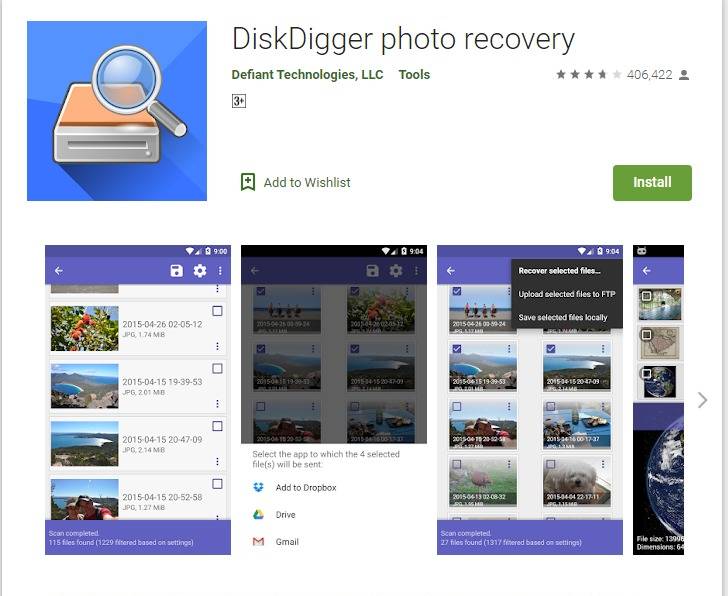
 If your images are stored in the Google photos it has been synced in your Gmail account and you can easily restore from the Google account using the Gmail login. Follow the steps to know how to restore Google Photos.
 Some Android phone users prefer to upload photos on Dropbox. For those who use Dropbox. Follow the steps
 Another option to upload your photos on the cloud is through Microsoft OneDrive. Images uploaded to the OneDrive can be recovered easily. Here are the easy steps.
 You can download the DiskDigger app from Playstore for free, and it comes in handy to restore all your deleted photos. DiskDigger allows you to undelete your photos and restore them. And later you can upload the recovered photos to your Cloud storage for safer storage. The app is compatible with Android phones 4.1 and above and the size of the app is only 4.3MB. Follow the steps below to undelete and recover your photos using the DiskDigger app.
 If your images are stored in the Google photos it has been synced in your Gmail account and you can easily restore from the Google account using the Gmail login. Follow the steps to know how to restore Google Photos.
 Some Android phone users prefer to upload photos on Dropbox. For those who use Dropbox. Follow the steps
 Another option to upload your photos on the cloud is through Microsoft OneDrive. Images uploaded to the OneDrive can be recovered easily. Here are the easy steps.
 You can download the DiskDigger app from Playstore for free, and it comes in handy to restore all your deleted photos. DiskDigger allows you to undelete your photos and restore them. And later you can upload the recovered photos to your Cloud storage for safer storage. The app is compatible with Android phones 4.1 and above and the size of the app is only 4.3MB. Follow the steps below to undelete and recover your photos using the DiskDigger app.
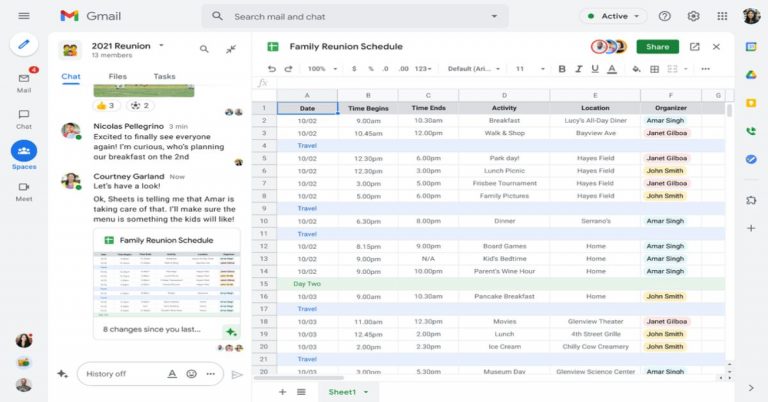
 With Google Workspace Individual, individual small business owners can get more done, show up more professionally and better serve their customers. This will also provide premium capabilities, including smart booking services, professional video meetings, personalised email marketing and much more. As per the firm, the subscribers within their existing Google account will be able to manage all their personal and professional commitments from one place with access to Google support.
Initially, Workspace Individual is rolling out to six markets, including the United States, Canada, Mexico, Brazil, Australia and Japan.
For the latest gadget and tech news, and gadget reviews, follow us on Twitter, Facebook and Instagram. For newest tech & gadget videos subscribe to our YouTube Channel. You can also stay up to date using the Gadget Bridge Android App.
With Google Workspace Individual, individual small business owners can get more done, show up more professionally and better serve their customers. This will also provide premium capabilities, including smart booking services, professional video meetings, personalised email marketing and much more. As per the firm, the subscribers within their existing Google account will be able to manage all their personal and professional commitments from one place with access to Google support.
Initially, Workspace Individual is rolling out to six markets, including the United States, Canada, Mexico, Brazil, Australia and Japan.
For the latest gadget and tech news, and gadget reviews, follow us on Twitter, Facebook and Instagram. For newest tech & gadget videos subscribe to our YouTube Channel. You can also stay up to date using the Gadget Bridge Android App. 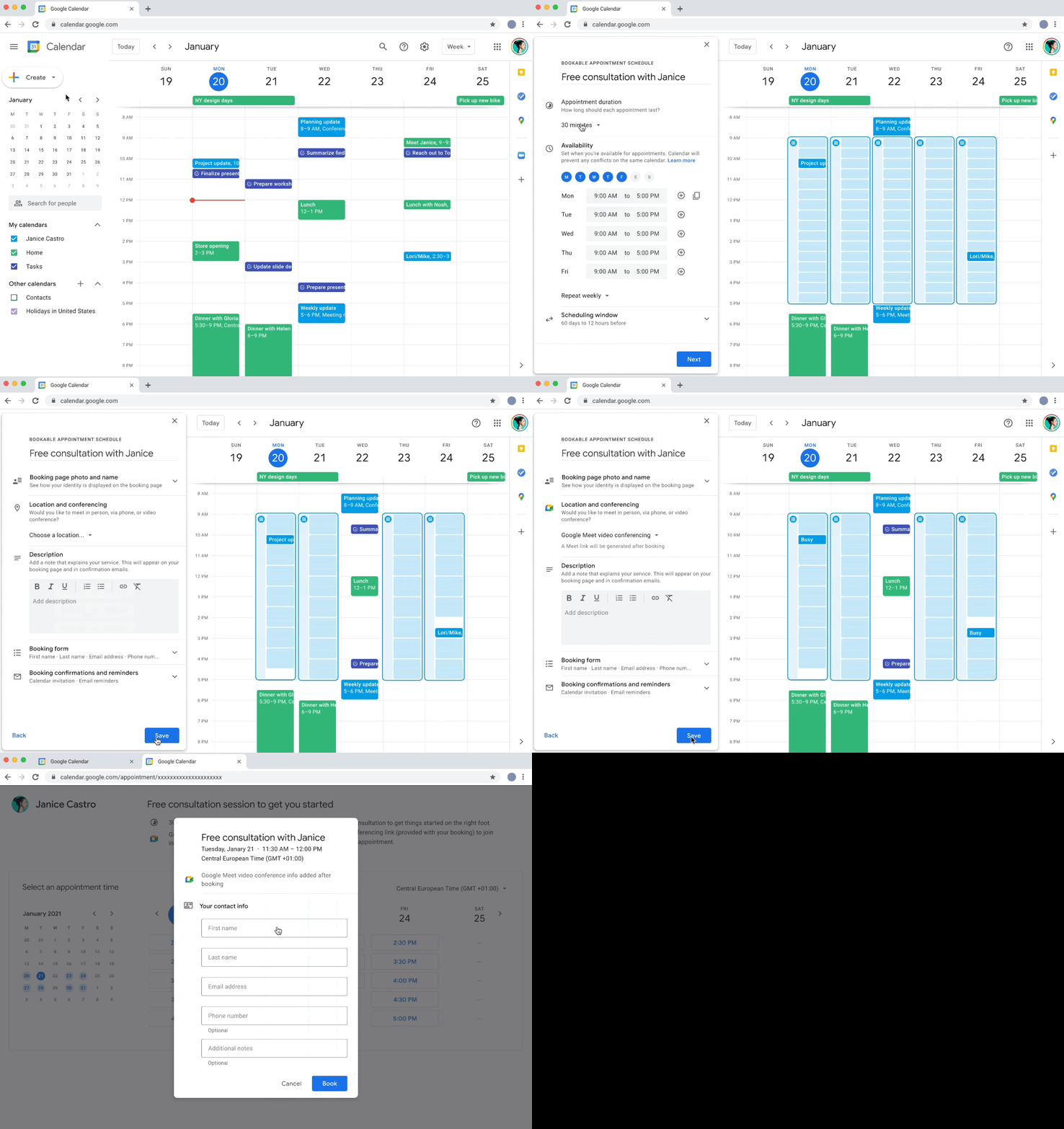 With Google Workspace Individual, individual small business owners can get more done, show up more professionally and better serve their customers. This will also provide premium capabilities, including smart booking services, professional video meetings, personalised email marketing and much more. As per the firm, the subscribers within their existing Google account will be able to manage all their personal and professional commitments from one place with access to Google support.
Initially, Workspace Individual is rolling out to six markets, including the United States, Canada, Mexico, Brazil, Australia and Japan.
For the latest gadget and tech news, and gadget reviews, follow us on Twitter, Facebook and Instagram. For newest tech & gadget videos subscribe to our YouTube Channel. You can also stay up to date using the Gadget Bridge Android App.
With Google Workspace Individual, individual small business owners can get more done, show up more professionally and better serve their customers. This will also provide premium capabilities, including smart booking services, professional video meetings, personalised email marketing and much more. As per the firm, the subscribers within their existing Google account will be able to manage all their personal and professional commitments from one place with access to Google support.
Initially, Workspace Individual is rolling out to six markets, including the United States, Canada, Mexico, Brazil, Australia and Japan.
For the latest gadget and tech news, and gadget reviews, follow us on Twitter, Facebook and Instagram. For newest tech & gadget videos subscribe to our YouTube Channel. You can also stay up to date using the Gadget Bridge Android App. 


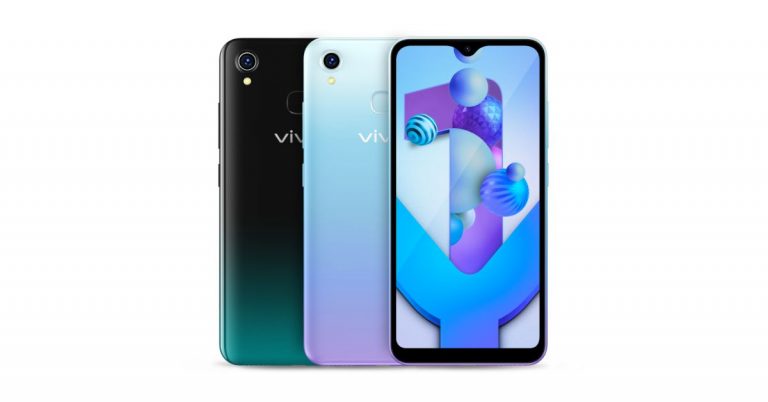

 The first correct step to use a digital thermometer scanner is to aim at the forehead properly. If it is not positioned accurately at the forehead it will not give you the right reading. The digital scanner can be used on adults, children, and infants. The digital thermometer scanner is measured with an infrared sensor to check the body temperature. So placing it at the right place on your forehead will give better readings and accuracy.
 For optimal readings, you should select the right functional settings. First, check for the temperature unit switch, the button that has the sign °C/F°. Press on it and make sure you have on the switch adjusting your temperature unit. The next step is to press the button on which “Mode”/ “Body”/“Object” is written. Choose these settings to get the best and accurate reading on your digital thermometer scan. The different devices have a different setting name, but these are settings you need to adjust. The temperature unit button and the object reading button need to be put on to the right settings.
 The first correct step to use a digital thermometer scanner is to aim at the forehead properly. If it is not positioned accurately at the forehead it will not give you the right reading. The digital scanner can be used on adults, children, and infants. The digital thermometer scanner is measured with an infrared sensor to check the body temperature. So placing it at the right place on your forehead will give better readings and accuracy.
 For optimal readings, you should select the right functional settings. First, check for the temperature unit switch, the button that has the sign °C/F°. Press on it and make sure you have on the switch adjusting your temperature unit. The next step is to press the button on which “Mode”/ “Body”/“Object” is written. Choose these settings to get the best and accurate reading on your digital thermometer scan. The different devices have a different setting name, but these are settings you need to adjust. The temperature unit button and the object reading button need to be put on to the right settings.