Back in March this year Samsung introduced Galaxy A52 in India. Now the South Korean company is planning to launch its tweaked variant which is Samsung Galaxy A52s in the country. Now the device support page has gone live on the Indian website hinting at its upcoming launch. The device has been spotted on various certification platforms and was leaked before the company’s official announcement. Samsung Galaxy A52s support page has been spotted on the company’s India website. The device has appeared with model number SM-A528B which is speculated to be A52s. The support page did not reveal any information except that it would come with dual-SIM support. Before this, the handset also showed up on Geekbench as well as on the Bureau of Indian Standards (BIS) website.Previously the Samsung Galaxy A52s pricing and specification were also leaked on the web. The leaks suggest that the device could also launch in the European market in a 6GB RAM with 128GB storage model and is likely to be available in an 8GB RAM with 256GB storage variant in other markets. The price is tipped to start at EUR 499 that translates to Rs 39,100.If rumours and leaks are to be believed then Samsung Galaxy A52s could offer a 6.5-inch full-HD+ Super AMOLED display. It may also run One UI 3.1 based on top of Android 11 and be powered by Qualcomm’s Snapdragon 778G SoC. It could be offered with up to 8GB RAM and 256GB of storage with an option to expand the internal storage via a microSD card. In addition to this, the device is also suggested to come with a quad rear camera setup that may house a 64-megapixel primary lens with f/1.8 aperture, a secondary 12-megapixel ultra-wide-angle sensor with f/2.2 aperture. Further, it may include a 5-megapixel macro lens with f/2.4 aperture and a 5-megapixel depth sensor with an f/2.4 aperture. For taking selfies and video calling it is expected to come with a 32-megapixel selfie camera with f/2.2 aperture.Along with this, the Samsung Galaxy A52s is likely to pack a 4,500mAh battery with 25W charging support. For connectivity, it is tipped to include a USB Type-C port, Bluetooth v5, and NFC support. The alleged smartphone could also come with an IP67 certified build for protection against dust and splashes.
For the latest gadget and tech news, and gadget reviews, follow us on Twitter, Facebook and Instagram. For newest tech & gadget videos subscribe to our YouTube Channel. You can also stay up to date using the Gadget Bridge Android App. You can find the latest car and bike news here.
Samsung Galaxy A72 is the premium mid-range smartphone that was launched in India some time back. The device comes with some high-end features. There is a 5G model too but that is limited to the western market. We have spent a considerable amount of time on the device and this is our detailed review of the Samsung Galaxy A72.
In This Article
Samsung Galaxy A72 Review: Design and Display
In terms of looks, Samsung Galaxy A72 is definitely an eye candy. The device has been made available in pastel colour options Awesome Black, Awesome Blue, Awesome Violet, and Awesome White colour options. As the name suggests the device looks absolutely awesome and we have the Awesome Violet variant. The phone comes with a bigger form factor and also incorporates IP67 dust and water protection, which is something we don’t get to see on non-flagship phones. The device feels premium and great in the hand and for us, it’s one of the best looking mid-range smartphones currently available in the market. The phone feels comfortable while holding and does not have sharp edges. Despite being over 200 grams the phone also doesn’t feel heavier either. It features a matte finish so no more fingerprints. Although it comes with an all-plastic build, which is a letdown at this pricing, we have liked a glass or metal build. Although the handset doesn’t look like a boring slab.Upfront it is endowed with a 6.7-inch full-HD+ Super AMOLED Infinity-O Display. We don’t call it flagship quality, but it is good enough as it supports HDR playback. The screen comes with a refresh rate of 90Hz with excellent colour reproduction. The brightness and colour contrast is also pleasing to the eyes. There were no jitters or slow scrolling experience. The Samsung Galaxy A72 supports an under-display fingerprint sensor, which we found to be slightly slow. The edges on the sides are relatively slimmer than the bottom chin, which is more exaggerated than it should have been on the 6.7-inch screen. But the good thing is the punch hole cut out at the top centre is almost not there. There is a stereo speaker system in this smartphone. Though it produces balanced audio as it supports Dolby Atmos audio. we expected it to be better in terms of loudness. There is a dedicated Dolby Atmos game mode that enhances the audio while gaming. Moreover, Galaxy A72 includes a 3.5mm headphone jack which is a big relief. To put it all together, Samsung Galaxy A72 has nailed it in terms of design and display.
Samsung Galaxy A72 Review: Performance and Cameras
Now moving on to the performance side of the smartphone it has Qualcomm’s Snapdragon 720G, which is a major letdown considering the pricing. There are plenty of options available in the market that offer great performance and 5G connectivity too. But this doesn’t mean that the device is terrible in performance, but it is just that competition is hardcore out there.We had 8GB of RAM with a 128GB storage variant. Although the company has worked to improve the optimisation of the device, it is of no match considering other smartphones available in the market have slightly better SoC and storage. Nonetheless, the handset can easily hold apps in the memory well and we had no issues during our testing. Getting to the gaming side of things, frankly speaking, this phone is not made for high-end gaming. When gaming for long, the mobile heats up and you will notice frame drops as well. However, the device can handle day to day regimes, even heavy multitasking. Samsung does offer 3 years of OS updates and 4 years of security updates on this mobile phone. When it comes to software, Samsung’s One UI is the best Android skin. It is simple to use, has less bloatware and comes with features like system-wide dark mode and always-on display.Quickly shifting gears, let’s get to the cameras now. Samsung Galaxy A72 features a quad rear camera setup that includes a 64-megapixel primary sensor with an f/1.8 lens. In addition to this, there is a 12-megapixel ultra-wide-angle sensor, a 5-megapixel macro lens, and an 8-megapixel telephoto camera.Samsung has also provided a 32-megapixel selfie camera sensor on the front.It should be noted that the primary and the telephoto lenses equip OIS, which is something we don’t get to see in this price range. In normal daytime, the camera produced a better dynamic range and natural colours. So you can expect the camera to be reliable under any circumstance. Ultra-wide images have a wider field of view with good HDR capabilities too. The telephoto lens is capable of up to 3X optical zoom and up to 30 times digital zoom. The images look good up to 10x magnification but beyond that, the outcome depends upon the lighting conditions. The portraits from the primary lens look nice too offering a more natural undertone. Whereas the selfies also looked warm yet natural.Macro shotThe nighttime images from the Galaxy A72 primary camera give better exposure details and look even better when night mode is turned on. The device does not have a 4K @ 60fps option, but it does provide 4K@30fps. The plus point is that the company has provided an OIS in its cameras hence the videos are stable from the rear as well as on the front. standard modePortrait modeIn terms of battery endurance, the 5,000mAh battery can deliver more than a day’s screen on time under normal usage, whereas during heavy usage the phone will last you through the day only. The company also provides a 25W charger that takes from 0 to 100 percent in 1 hr and 25 minutes.
Verdict
Here comes the final part of our review. Though some might feel the device is overpriced, Samsung has practically nailed every other aspect of this phone. The display has good colour optimisation and even touch response. Yes, the device is not made for heavy gamers, but Samsung is not marketing it like that. Here we would like to mention that the company introduced the phone alongside Galaxy A52, which offers similar specs and chipset. The only difference is a bigger display, battery and telephoto lens. So if you are looking for a more affordable option and a slightly smaller screen is not an issue then you can go for the Galaxy A52.Pros
Popular Social media platform Facebook is now rolling out end-to-end encryption for voice and video calls on Messenger. The text messages sent by users are already encrypted on WhatsApp as well as on Facebook Messenger but now the company has added an extra layer of protection to keep the calls more secure and private. In addition, the company has also brings updated controls for disappearing messages.Facebook via a blog post announced, “Today, we’re rolling out the option to make voice and video call end-to-end encrypted on Messenger, along with updated controls for disappearing messages. People expect their messaging apps to be secure and private, and with these new features, we’re giving them more control over how private they want their calls and chats to be.” With the new Facebook Messenger update, you will get the option for end-to-end encrypted voice and video calls. Users will be introduced to chat modeWith the new Facebook Messenger update, you will get the option for end-to-end encrypted voice and video calls. Users will be introduced to chat mode so you can secure your audio and video calls with this same technology if you choose. End-to-end encryption is already available for chats on WhatsApp and Facebook Messenger. This helps in keeping your communication safe from hackers and criminals. All your content under the setting will stay protected from the moment it leaves your device to the moment it reaches the receiver’s device. “This means that nobody else, including Facebook, can see or listen to what’s sent or said. Keep in mind, you can report an end-to-end encrypted message to us if something’s wrong,” the company added.In addition to this Facebook has also updated the controls over disappearing messages also known as expiring messages within end-to-end encrypted chats. Now you can control the timer in the setting to decide when you want your chats to be deleted. Facebook Messenger has updated the setting to provide more options for people in the chat to choose the amount of time before all new messages disappear, from as low as 5 seconds to as long as 24 hours.Facebook has also informed that in the next few weeks it will begin testing end-to-end encryption for group chats, including voice and video calls, for friends and family that already have an existing chat thread or are already connected. The social media giant will also perform a test for your delivery controls to work with your end-to-end encrypted chats. This will help in preventing unwanted interactions by deciding who can reach your chats list, who goes to your requests folder, and who can’t message you at all.Moreover, the company will also carry out opt-in end-to-end encryption for Instagram DMs as well. However, this will be tested out on a limited number in select countries that lets them opt-in to end-to-end encrypted messages and calls for one-on-one conversations on Instagram.
For the latest gadget and tech news, and gadget reviews, follow us on Twitter, Facebook and Instagram. For newest tech & gadget videos subscribe to our YouTube Channel. You can also stay up to date using the Gadget Bridge Android App. You can find the latest car and bike news here.
The e-commerce website Flipkart is hosting Daily Trivia Quiz. Every day it brings a bunch of new questions for its users. By answering them correctly you can win exciting prizes. The questionnaire is based on questions related to general knowledge. Also, the users can win free vouchers and super coins, among other offers via the daily quiz. 16 August 2021 Flipkart Daily Trivia Quiz Answers has already gone live on its platform.
The participant should be at least 18 years old and should have a valid login ID. The Quiz is available on the mobile platform and not the web version. E-commerce conducts the quiz on daily basis and goes live at 12:00 AM IST and runs till 11:59 PM IST. The winners are announced within 15 days from the date of participation that can be viewed under the Gems/Rewards section in the app.
In This Article
How to participate in the Flipkart Daily Trivia Quiz
To participate download the Flipkart app on your phone. Then open the Flipkart app then head to Game Zone. Now click on the Daily Trivia Banner or search for Daily Trivia. Enter the game and answer all 5 questions with correct answers.
16 August 2021 Flipkart Daily Trivia Quiz Answers
Question 1: Founded by Jawaharlal Nehru, which newspaper had a Hindi edition named Navjivan?
Answer: National Herald
Question 2: Which fruit was first named ‘Yang Tao’ but was then given a bird’s name?
Answer: Kiwifruit
Question 3: Which king invited Balarama and Krishna to Mathura and advised him to kill Kamsa?
Answer: Akrura
Question 4: Who was the first Indian recipient of the Stalin Peace Prize?
Answer: Saifuddin Kitchlew
Question 5: Which was the first Indian company to sponsor a car in NASCAR Series?
Answer: Mahindra
16 August 2021 Amazon Quiz has gone live now. The quiz can be played daily from 12 AM to 11:59 PM. Amazon gives the opportunity to millions of its customers to play and win free gadgets as well as Amazon Pay Balance. Today e-commerce gives you a chance to win Rs 30,000 Amazon Pay Balance.
Every day the e-commerce platform brings a new set of questionnaires to which the participants have to answer correctly. The quiz contains only five questions that are based on current affairs and general knowledge. Answering all the questions correctly will get your name selected for a lucky draw. Only one person will be selected as the winner and the results are announced at the end of every month. The lucky ones might win something by answering all the questions correctly, and the wrong answers will get you eliminated from the quiz. So to make sure you answer all the questions correctly Gadget Bridge everyday updates all the correct answers to all 5 questions. To win Rs 30,000 Amazon Pay Balance check out today’s answers for the Amazon Quiz.
16 August 2021 Amazon Quiz Answers
Question 1: President Ramnath Kovind recently laid the foundation stone of Dr Bhimrao Ambedkar cultural centre in which of these cities?
The answer is- B) Lucknow
Question 2: The #benderaputih (white flag) campaign has gained momentum on social media in which country?
The answer is- C) Malaysia
Question 3: Virbhadra Singh, who passed away recently, was the former chief minister of which Indian state?
The answer is- D) Himachal Pradesh
Question 4: What is this condition of differing eye colours known as?
The answer is- A) Heterochromia
Question 5: Which of the following cultures are these mythical animals associated with?
The answer is- A) Chinese
The e-commerce website Flipkart is hosting Daily Trivia Quiz. Every day it brings a bunch of new questions for its users. By answering them correctly you can win exciting prizes. The questionnaire is based on questions related to general knowledge. Also, the users can win free vouchers and super coins, among other offers via the daily quiz. 14 August 2021 Flipkart Daily Trivia Quiz Answers has already gone live on its platform.
The participant should be at least 18 years old and should have a valid login ID. The Quiz is available on the mobile platform and not the web version. E-commerce conducts the quiz on daily basis and goes live at 12:00 AM IST and runs till 11:59 PM IST. The winners are announced within 15 days from the date of participation that can be viewed under the Gems/Rewards section in the app.
In This Article
How to participate in the Flipkart Daily Trivia Quiz
To participate download the Flipkart app on your phone. Then open the Flipkart app then head to Game Zone. Now click on the Daily Trivia Banner or search for Daily Trivia. Enter the game and answer all 5 questions with correct answers.
14 August 2021 Flipkart Daily Trivia Quiz Answers
Question 1: Who plays a Delhi man masquerading as a Russian in ‘Go Goa Gone’?
Answer: Saif Ali Khan
Question 2: Kilikili is a fictional language spoken in which of these films?
Answer: Baahubali
Question 3: The instrument ____ is generally used to create sound effects in horror films?
Answer: Waterphone
Question 4: Which Indian classical music instrument was ‘Ustad Vilayat Khan’ an exponent of?
Answer: Sitar
Question 5: Complete the dialogue from the film Psycho- “A boy’s best friend ____?
Answer: is his mother
Get ready to answer a new set of questions as the 14 August 2021 Amazon Quiz is live on its platform. The e-commerce platform brings a daily quiz on its mobile platform, which every day gives chance to millions of people across the country to win exciting prizes. Today’s Amazon Quiz prize is the Rs 25,000 Amazon Pay Balance.
By participating in Amazon Quiz every day you can stand a chance to win prizes such as iPhone X, iPhone Xs, Seagate HDD, GoPro Hero 8 Camera, LG Smartphones, Samsung Galaxy S20, Air Purifier, Oppo smartphones, Amazon Pay Balance among others. Every day Amazon brings a fresh new quiz on its app, here we would like to mention that the quiz is not available for desktop users, only app users can participate in the daily quiz.
The company puts 5 questions based on general knowledge and current affairs to which the contestants have to answer all the questions correctly. A wrong answer will eliminate you from the quiz. After giving correct answers to all the questions, your name will get further selected for a lucky draw. The results of the lucky draw will be announced at the end of the month. So today’s quiz winner’s name will be declared at the end of the month. We have updated today’s five questions with their correct answers below so that you can win Amazon Quiz and get Rs 25,000 Amazon Pay Balance
14 August 2021 Amazon Quiz Answers
Question 1: Mariyappan Thangavelu, who has been named the flag bearer for the Indian contingent at Tokyo Paralympics, represents India in which sport?
The answer is- D) High Jump
Question 2:Which country’s prime minister recently gifted India 2600 kgs of the Haribhanga variety of mangoes?
The answer is- C) Bangladesh
Question 3: Nihal Sarin is one of the youngest to represent India in which sport?
The answer is- B) Chess
Question 4: Identify the Indian dance form.
The answer is- D) Kathakali
Question 5: This tourist attraction is in which US city?
The answer is- A) Los Angeles
For the latest gadget and tech news, and gadget reviews, follow us on Twitter, Facebook and Instagram. For newest tech & gadget videos subscribe to our YouTube Channel. You can also stay up to date using the Gadget Bridge Android App. You can find the latest car and bike news here.
Online dating platform Tinder, today announced a comprehensive in-app Safety Center in India. The company keeps rolling out useful features to its platform to enhance the user experience. But the new dedicated features will allow users easy access to tools relevant to their well-being while using the platform.Commenting on the announcement Bernadette Morgan, Director, Trust & Safety Product at Tinder said, “Every day, millions of our members trust us to introduce them to new people, and we’re committed to building safety features that meet the needs of today’s online dating communities. I’m proud to announce the availability of this feature in India. For us, it represents an important step in driving our safety work forward at an unmatched scale in the market.” The Tinder in-app Safety Center has been built by the company’s dedicated Trust & Safety team. As an evolving section of the app, content in the Safety Center will continually be reviewed and updated as needed. Topics will include the latest guidance for dating safely and offer educational resources –as well as list local NGOs and hotlines offering support– such as National Commission for Women, Pink Legal, Umang LBT Support Group, One Future Collective and The Humsafar Trust. In order to access the Safety Centre on the Tinder app, all you need to do is open the application on your device and tap on your profile icon. Then simply select Safety from there.According to Tinder, its aim is to centralise safety-related resources and provide avenues of support that connect members in need with relevant experts. Also, the Safety Center will be available at members’ fingertips via the app’s main menu and any time members chat with potential matches. With the launch, Tinder is trying to make the platform a trusted and safe space for everyone who joins. It has also worked closely with theMatch Group Advisory Council (MGAC) as well as NGOs to continue buildingfeatures and processes to keep members safer.
Previously the online dating application Tinder also rolled out the functionality to block them up by their contact number to avoid awkwardly swiping your ex, relatives and colleagues. The Block Contacts feature on Tinder can be accessed within the profile setting from where the member will be able to enter their contact which they’d rather not see, or not be seen by, on the dating app.
Not long ago the company also introduced features like videos in profiles, an Explore section, and a Hot Takes section to provide a new social experience. The users will be able to add a video to their profile allowing them to express themselves through videos on their profiles. Whereas the Explore section lets the users discover matches who share similar Passions and explore different sides of Tinder-like Festival or Chef Mode. On the other hand, the Hot Takes section gives an opportunity to the members to chat with someone before they match in a low-stakes session of the feature’s namesake.
In this pandemic state, the world has leaned more towards online communication for either study or work. This we think will be the new norm for years to come, as many industries and businesses have realised that there is a lot of savings if the employee works from home. For work-from-home culture, many new tools cropped up such as Microsoft Teams. Microsoft Teams is one of the most used video calling applications in the market that resolves most of the WFH interconnectivity issues. Consumers being new to this online ecosystem face a lot of trouble while using these apps. Here are the top 10 ways to fix the sign in error on Microsoft Teams.Read Also:Top 3 Free Ways to Transcribe Voice Memos on iPhone (2024)
In This Article
Check your Internet Connection
As Microsoft Teams is an online-based software it requires a good and stable connection to work properly. Users can google any speed test online to check the internet connection and its speed. If the speeds are low, try connecting to a different WiFi connection. If no other WiFi is available try connecting it with a mobile hotspot.
Exiting Teams
Sometimes the app becomes unresponsive and thus starts to misbehave either due to a bug or a trigger. The easy way to quit Microsoft Teams is by right-clicking on the taskbar and clicking quit. Another way is to go to the Task Manager and click the end task from there. Both methods will shut down Microsoft Teams and then try to restart the application. Now you should be able to log in.
Check your login credentials
It is possible that you entered the wrong credentials while logging into Microsoft Teams. Even a spelling error can keep you from logging into the service. Carefully go through each letter of your Email ID and password. Once you have verified that the login details are correct, hit Enter.
Checking Teams Server
It often happens that everything is fine from the client site but there is an error on the server site. Checking is also simple nowadays just open any browser and search Down Detector. If there are lots of reports you can ensure that the issue is regarding the server from Microsoft’s side.Also Read: Beware: These are the 9 apps stealing Facebook login credentials from Google Play
Clearing Cache Memory
To speed up the process of common tasks, computers often collect data in the background. If the computer collects a bad cache file it can show errors like login errors. The easy way to do this is:Step 1 – Press Windows + R to open the run menu.Step 2 – Type %appdata%MicrosoftTeams in the box and press Enter.Step 3 – Delete all the files and folders.
Repairing Teams
There might as well be a bug in your system that is throwing Microsoft Teams an error thus resulting in a login issue. Repairing teams will solve this issue. This can be done by the following method:Step 1 – Press Windows + I.Step 2 – Go to Apps>Installed apps.Step 3 – Hit the ellipses next to Microsoft Teams and select Advanced options.Step 4 – In the advanced menu under Reset there will be an option to Repair.Step 5 – After the process is completed try running Teams once again.
Disable the VPN
If you’re using a VPN for your network, it can interfere with the Microsoft Teams software and cause an error while trying to sign in. If you don’t want to disable the VPN altogether, try changing the server location to another country. If that doesn’t work, pause the VPN and check if the issue has been fixed.
Set the correct time zone
Incorrect date and time settings can cause Microsoft Teams to freeze. Here’s how you can fix it.
Step 1: Press Windows + I to open settings.
Step 2: Switch to the Time & language tab and select Date & time.
Step 3: Click on the dropdown menu next to Time zone and select the appropriate option.
Clear the Credential Manager
Step 1: Go to Control Panel and select Credential Manager.
Step 2: Select your Microsoft account.
Step 3: Hit Remove.
Uninstall and reinstall Teams
If none of the steps works for you try reinstalling Microsoft Teams from scratch, that should resolve the login issue. If your app is outdated, try installing the updated version from Microsoft Store. Older versions of apps are more prone to bug-related issues. Developers are quick to fix these bugs in later updates. Once you install the updated app, the sign in error on Microsoft Teams will be fixed.
Frequently Asked Questions (FAQs)
How do I check if Microsoft Teams is down?
Go to DownDetector.in and search for Microsoft Teams. If you see a spike in user reports, it means that the app is currently facing a server outage.
How do I update the Microsoft Teams app on my PC?
Go to the Microsoft Store, search for Microsoft Teams, go to the app page, and hit ‘Update’.
How do I clear Microsoft Teams’ app cache on Windows?
These are the top 10 ways to fix the sign in error on Microsoft Teams. Facing trouble with the Android app for Teams? Make sure it is updated and try clearing its cache. If you’re facing any other issues with Teams, let us know in the comments!
The Chinese electronics company, TCL, a few months back introduced India’s first Mini LED TVs (C825) in India. The TCL Mini LED QLED 4K C825 TV features Quantum Dot Technology, a 120Hz MEMC along Dolby Vision and Dolby Vision IQ support. Besides the range comes with voice control support along with other advanced features. Now the company will be making the TCL Mini LED TV available in the offline market. Now you can buy the Television at Reliance Digital Stores in the country. Mike Chen, General Manager, TCL India, says, “The launch of Mini LED affirms TCL’s commitment to constant innovation and delivering excellence in terms of cutting-edge technologies to the new-age users. The brand since its inception has been focusing on both online as well as offline sales and the availability of Mini LED at our offline partner store will certainly give our prospective customers a chance to experience ultimate entertainment themselves. As a brand, we promise our customers to redefine their smart TV space with our latest offering. This offline launch will also enhance the brand’s leadership stance in the offline market.”
The TCL Mini LED QLED 4K C825 comes in two different sizes 55-inches and 65-inches. The Televisions can be purchased at a price tag of Rs 1,14,990 and 1,49,990 respectively.
Speaking of the specifications, TCL Mini LEDQLED 4K C825 supports Dolby Vision IQ and packs 120Hz MEMC and TCL’s exclusive algorithm that makes viewing action-packed content glitch-free. It comes with Game Master with a dedicated HDMI 2.1 port for the gamers to allow them to play even high-quality games with smoother processing and powerful optimization. The Mini LED technology on the Television promises wide colour gamut performance coupled with high contrast ratio and HDR. The device also supports local dimming that gives the viewers a totally immersive viewing experience. According to the company, the use of mini LEDs will also result in thinner and lighter product designs.
The MagiConnect feature on the TCL Mini LED QLED 4K C825 allows the users to connect their TV to their smartphone. In addition to this, the users will be able to take screenshots of live TV, share content via social media, cast audio and video and much more. Whereas the Magnetic Camera lets you make and take video calls via the Google Duo app.
Mahinda is all set to unveil its upcoming flagship model XUV700 tomorrow and as the launch date is inching closer the automobile company layer by layer revealing the key features of its upcoming SUV car. Mahindra recently shared that its upcoming three-row XUV700 SUV will don its new logo and would be its first vehicle with Alexa Voice AI. Now the company has revealed that Mahindra SUV will bring Sony 3D sound system including a 445W 13 channel DSP amplifier and 12 speakers and a subwoofer.The Indian Automobile company Mahindra has been aggressively teasing the key features of its upcoming Mahindra XUV700 ahead of the official unveiling on August 14. The flagship model is the most anticipated one and will be a big competitor to the Hyundai Alcazar and Tata Safari. In yet another reveal the company has shared that Sony will introduce its premium 3D sound system, powered by Sound Building Block technology, for an immersive audio experience with its new SUV. According to the carmaker, this is for the first time that its upcoming global SUV, the XUV700 will get a Sony 3D sound system that is designed and engineered by Sony’s expert sound engineers. Also Read:MAHINDRA XUV 700 TO FEATURE ALEXA VOICE ASSISTANT: EVERYTHING YOU NEED TO KNOWThe Mahindra XUV700’s in-built 3D sound system is custom-made with the finest sound tuning that will give an incredibly immersive 3D audio experience through its (powerful or 445W) 13 channel DSP amplifier, 12 custom-designed speakers including subwoofer and the Sound Building Blocks technology. According to Mahindra, Sony’s 3D sound system has been precisely engineered for optimum performance, thereby ensuring unique cabin acoustics for the XUV700. This will bring a highly realistic 3D immersive spatial sound field from the stereo music source inside the XUV700.All stereo sources, be it radio, online streaming, USB or mobile phone to be enjoyed in 3D. Also, the car will provide multiple unique sound settings available to customize the audio listening experience based on the passengers.In addition to this Sony’s 3D sound system features DSEE technology that will help in enhancing the sound quality of compressed audio files and SDVC (Speed Dependent Volume/EQ Control) for maintaining volume and tonal balance at any vehicle speed and volume to minimize the influence of outside noise.
Besides this, the Mahindra XUV700 is India’s first SUV to come with Alexa Voice AI for hands-free command integration. So the users will be able to control windows and sunroof, temperature, music, monitoring traffic and controlling compatible home devices just by their voice commands. In addition to this XUV700 will also offer offline access to Alexa in remote areas or places with low accessibility of internet connectivity. In addition, the car can also be connected with Echo devices once you reach back home.
Additionally, the new SUV will come with a new logo designed by Pratap Bose, the carmaker’s new Chief Design Officer. Mahindra XUV700 will be featuring a dual-tone interior along with a new UI called Adrenox, paired with Alexa. The car is anticipated to be powered by a 2.0-litre mStallion petrol engine with a 200 PS of maximum power. It is likely to come in a 2.2-litre mHawk diesel engine option which is capable of churning out 185 PS of maximum power.Article first appeared in:MotorBridge.com
Tired of performing a particular task at a specific time again and again? A handy feature (schedule tasks in Windows 10) has been readily available to users of Windows 10 by Microsoft for years and yet only a handful of people know about it. Windows has many such gems and in the coming articles, we will tell you all about it. Today we are going to talk about the task scheduler in Windows 10. It will help you perform a particular task and will be like your extension and a time saver. We for one have started using it and it makes a world of difference.Below is a step by step guide on how to use a task scheduler that will make your life easy if you are a Windows 11 user.
In This Article
Step 1
Press start > then search for the control panel in search bar > open control panel.
Step 2
Firstly click on the view by the menu on the top right corner and select a small view to see the administrator tools and other options, next click on the administrator tools.
Now that Samsung Galaxy Z Fold 3 has officially made it to the stores and if you are planning to buy one read our comparison of Samsung Galaxy Z Fold 3 Vs Galaxy Z Fold 2. The latest foldable phone is more sturdy as it includes an IP8X rating, Gorilla Glass Victus protection and an aluminium hinge area. We think the device is definitely going to take over the second generation.
In This Article
Display
Samsung Galaxy Z Fold 3: 7.6-inch foldable QXGA+ AMOLED 2X Infinity Flex main display and 6.2-inch HD+ AMOLED display on the outsideSamsung Galaxy Z Fold 2: Primary display of 7.6-inch Infinity-O Display, Secondary Display- 6.2-inch Infinity-O Super AMOLED Infinity Flex Display
Samsung Galaxy Z Fold 3: 12-megapixel primary sensor, along with a 12-megapixel secondary telephoto lens and a 12-megapixel ultra-wide lens.Samsung Galaxy Z Fold 2: 12-megapixel sensor with f/1.8 aperture, 12-megapixel ultra-wide-angle lens with f/2.2 aperture, and a 2-megapixel telephoto lens with f/2.4 aperture.
Selfie camera
Samsung Galaxy Z Fold 3: 4-megapixel under-display camera and a 10-megapixel selfie cameraSamsung Galaxy Z Fold 2: two 10-megapixel sensors with an f/2.2 aperture on the display as well as on the cover for taking selfies.
RAM and storage
Samsung Galaxy Z Fold 3: 2GB + 256GB as well as 12GB + 512GB storage configurationsSamsung Galaxy Z Fold 2: 12GB RAM and 512GB internal storage
Battery
Samsung Galaxy Z Fold 3: 4,400mAh batterySamsung Galaxy Z Fold 2: 4,500mAh battery
Operating system
Samsung Galaxy Z Fold 3: Android 11 on top of One UISamsung Galaxy Z Fold 2: Android 10
Price
Samsung Galaxy Z Fold 3: $1,799 (Rs 1,33,600 approx) in the USSamsung Galaxy Z Fold 2: Rs 1,49,999
Our Verdict
In terms of design both the foldables come with a similar form factor, however, the latest one comes with an IPX8 rating and this time the company has incorporated an under-display camera on the primary display of the Samsung Galaxy Z Fold 3. The refresh rate has been upgraded to 120Hz and well as S Pen support. The punch hole is almost not nonexistent and the screen comes with Gorilla Glass Victus protection. On the hardware front, Samsung has included the latest Snapdragon 888 SoC. With the S Pen support, we see that the device could easily replace the Galaxy Note series. So we would definitely be going to recommend you to go for the latest Galaxy Z Fold 3.
For the latest gadget and tech news, and gadget reviews, follow us on Twitter, Facebook and Instagram. For newest tech & gadget videos subscribe to our YouTube Channel. You can also stay up to date using the Gadget Bridge Android App. You can find the latest car and bike news here.
Motorola Edge 20 Series is all set to launch in India on August 17. The company is going to introduce the Edge 20 and Edge 20 Fusion smartphones in the country. Ahead of the official launch, the Indian pricing of both devices have been leaked on the web. The pricing is expected to start at Rs 21,499 for the base model which goes up to Rs 29,999. As of now, the company has not shared the pricing of both of its upcoming handsets. Motorola Edge is said to come in a single 8GB of RAM with 128GB of storage variant that is likely to be priced at Rs 29,999. Whereas Motorola Edge 20 Fusion is tipped to come to India in two different configurations of 6GB RAM with 128GB storage and 8GB RAM with 128GB onboard storage. The former one is expected to be priced at Rs 21,499 whereas the latter is tipped to come with a price tag of Rs 23,999. Ahead of the official announcement, the lineup has been listed onFlipkart to tease its availability. According to the social media channel and listing both the devices. The dedicated microsite highlights the key specs of the upcoming smartphones that include a 10-bit AMOLED display that would come with a 90Hz refresh rate. The device is going to be powered by MediaTek Dimensity 800U SoC. The listing also reveals that the phone will feature a triple rear camera setup.Motorola Edge 20 specifications Motorola Edge 20 will feature a 6.7-inch full-HD+OLED display with 1,080×2,400 pixels of resolution and a 144Hz refresh rate. It will run on My UX on top of Android 11 and is powered by an octa-coreQualcomm Snapdragon 778G SoC, paired with 8GB of RAM and 256GB of storage option. For the cameras, there will be a triple rear camera setup that includes a 108-megapixel primary sensor, a 16-megapixel ultra-wide and macro lens, and an 8-megapixel telephoto lens with 3x high-res optical zoom and 30X Super Zoom. Upfront there is a 32-megapixel camera sensor for taking selfies and video calling.The device will include a 4,000mAh battery with support for TurboPower 30 fast charging. For connectivity, there is 5G, LTE, Wi-Fi 6, GPS, and Bluetooth and more. The device includes a 4,000mAh battery with support for TurboPower 30 fast.Also Read:Motorola Edge 20 Pro, Edge 20, Edge 20 Lite unveiled: Pricing and specification details
Motorola Edge 20 Fusion specifications
Reports suggest that Motorola Edge 20 Fusion is going to be a rebranded variant of Motorola Edge 20 Lite that will feature a 6.7-inch OLED display with 90Hz refresh rate support. The upcoming phone will run on My UX based on top of Android 11. Under the hood, it will include a MediaTek Dimensity 800U SoC paired with 6GB of RAM and 128GB of storage option. For the photos and videos, the handset will come with a triple rear camera set up that includes a 108-megapixel primary sensor, an 8-megapixel sensor with an ultra-wide-angle lens with Macro Vision, and a 2-megapixel depth sensor. For selfies, there will be a 32-megapixel front-facing camera The phone may also include a 5,000mAh battery with 30W TurboPower fast charging support.
For the latest gadget and tech news, and gadget reviews, follow us on Twitter, Facebook and Instagram. For newest tech & gadget videos subscribe to our YouTube Channel. You can also stay up to date using the Gadget Bridge Android App. You can find the latest car and bike news here.
The e-commerce website Flipkart is hosting Daily Trivia Quiz. Every day it brings a bunch of new questions for its users. By answering them correctly you can win exciting prizes. The questionnaire is based on questions related to general knowledge. Also, the users can win free vouchers and super coins, among other offers via the daily quiz. 13 August 2021 Flipkart Daily Trivia Quiz Answers has already gone live on its platform.
The participant should be at least 18 years old and should have a valid login ID. The Quiz is available on the mobile platform and not the web version. E-commerce conducts the quiz on daily basis and goes live at 12:00 AM IST and runs till 11:59 PM IST. The winners are announced within 15 days from the date of participation that can be viewed under the Gems/Rewards section in the app.
In This Article
How to participate in the Flipkart Daily Trivia Quiz
To participate download the Flipkart app on your phone. Then open the Flipkart app then head to Game Zone. Now click on the Daily Trivia Banner or search for Daily Trivia. Enter the game and answer all 5 questions with correct answers.
13 August 2021 Flipkart Daily Trivia Quiz Answers
Question 1: Which of these is a book written by the Congress leader Shashi Tharoor?
Answer: Why I am Hindu
Question 2: Which of these creatures performs two kinds of dances – the round and the waggle?
Answer: Honeybees
Question 3: The original Lifebuoy jingle was composed and sung by?
Answer: Jagjit Singh
Question 4: Who was the first teenager to score a goal in a FIFA World Cup final?
Answer: Pele
Question 5: Which planet was named by 11-year old Venetia after the Roman god of the underworld?
Answer: Pluto
For the latest gadget and tech news, and gadget reviews, follow us on Twitter, Facebook and Instagram. For newest tech & gadget videos subscribe to our YouTube Channel. You can also stay up to date using the Gadget Bridge Android App. You can find the latest car and bike news here.
Get ready to answer a new set of questions as the 13 August 2021 Amazon Quiz is live on its platform. The e-commerce platform brings a daily quiz on its mobile platform, which every day gives chance to millions of people across the country to win exciting prizes. The quiz goes live from 12 AM to 11:59 PM. Today’s Amazon Quiz prize is Rs 10,000 Amazon Pay Balance.
By participating in Amazon Quiz every day you can stand a chance to win prizes such as iPhone X, iPhone Xs, Seagate HDD, GoPro Hero 8 Camera, LG Smartphones, Samsung Galaxy S20, Air Purifier, Oppo smartphones, Amazon Pay Balance among others. Every day Amazon brings a fresh new quiz on its app, here we would like to mention that the quiz is not available for desktop users, only app users can participate in the daily quiz.
The company puts 5 questions based on general knowledge and current affairs to which the contestants have to answer all the questions correctly. A wrong answer will eliminate you from the quiz. After giving correct answers to all the questions, your name will get further selected for a lucky draw. The results of the lucky draw will be announced at the end of the month. So today’s quiz winner’s name will be declared at the end of the month. We have updated today’s five questions with their correct answers below so that you can win Amazon Quiz and get a Rs 10,000 Amazon Pay Balance.
13 August 2021 Amazon Quiz Answers
Question 1: Crocodiles were relocated for the safety of tourists to do boat rides in the Panchmuli lake located in which state of India?
The answer is- A) Gujarat
Question 2: Which actor, who passed away recently, won the Filmfare Award for Best Actor a record 8 times?
The answer is- B) Dilip Kumar
Question 3: The World Health Organisation estimates that half of the world’s population will deal with which eye ailment by 2050?
The answer is- B) Myopia
Question 4: Identify the sport played on this court.
The answer is- C) Tennis
Question 5: Which Animal Class do they belong to?
The answer is- B) Mammalia
Oppo the Chinese smartphone manufacturer today announced its tie-up with the Sweden-based music streaming platform Spotify. This collaboration is in accordance with the newly launched Oppo Reno 6 series that allows users to capture “every emotion in the portrait” with industry-first Bokeh Flare Portrait Video in professional-grade quality. Together with Spotify, the company has launched their latest campaign “Every Emotion In Portrait” to bring personalized playlists to users that suit their moods and emotions. Speaking on the partnership, Damyant Singh Khanoria, Chief Marketing Officer, Oppo India, commented, “We are excited to associate with Spotify, the world’s largest music streaming app, to deepen our relationship with consumers by providing a personalized listening experience. This partnership will allow users to capture their emotions in portrait and listen to their favourite music curated to their moods. Music transcends boundaries and speaks to your deepest emotions and that is what this personalised playlist is designed to do. By understanding how exactly you’re feeling, it fetches music that truly resonates with you.”From now onwards the owner of the Oppo Reno 6 Series smartphones will be able to listen to their favourite songs, along with fresh selections, curated on the basis of moods and emotions. New users are introduced to new playlists and songs that are gradually fine-tuned to the listener’s tastes.To curate your own playlist as per your current mood and emotion all you need to do is link Spotify to your Oppo Reno 6 Series. Then go tohttps://opporeno6series.withspotify.com. After this, you will be asked to Log in/Sign up to your Spotify account. If you access this page from your computer, you also get an option to skip this step. Then you will be able to choose from a table of four primary emotions: Happy, Low, Sensitive and Passionate as per your mood. As you slide your cursor between these, you get access to 27 moods like amused, triumphant, calm, satisfied, amazed, affectionate, grateful, romantic, and others—that are fine-tuned to suit exactly how you feel. After you have chosen the mood you will be able to see the percentage of other listeners who are feeling the same as you at that point; you can also share your emotion captured in a portrait with friends. Also, the Oppo Reno 6 users will be presented with a personalized playlist that matches the mood they chose. You can listen to the songs on your computer, and if you have signed in with your login credentials, the playlist will also appear in the ‘Your Library’ section of your Spotify app on your mobile device.
For the latest gadget and tech news, and gadget reviews, follow us on Twitter, Facebook and Instagram. For newest tech & gadget videos subscribe to our YouTube Channel. You can also stay up to date using the Gadget Bridge Android App. You can find the latest car and bike news here.
As covid has hit the world pretty hard people have leaned towards the online medium a lot more than before. The following apps will not only help you convert your speech to text but will also help to make your day to day life easy. Today we are bringing you 5 speech to text apps, which you can download from the Google Play Store.
In This Article
1. Speechnotes
Speech notes handily converts your speech to text with ease. The major feature that makes it stand out against its rivals is the keyboard it offers.Generally, it’s very difficult to add punctuations and emojis during a speech to text conversion, but with its keyboard, it gets really easy for users to add them.It comes with a continuous recording feature thus one saves a lot of time. You can just go on speaking and the app will convert all your golden words to text. Bluetooth and widget support make this app one of the best in this segment. Download from here. Read Also: Apple Music released the ‘Saylists’ feature to assist people with Speech Sound Disorder (SSD)
2. Voice Notes
Voice Notes specializes in short note taking. It basically records the audio first, then saves the file, and then converts it. This two-way process helps the user to either read the text or listen to the audio on the go.The app has tons of editing and customization options like it can edit text and mark them separately. Also, the theme of the app can be customised.Download from here.
3. Speech to Text
It is the most basic app in the list and does what it says, converts the speech into text. The user interface is minimalistic and the app is really very easy to use.In case you are looking for an app with no extra confusing features, minimalistic looks, and design, which performs the only basic conversion process, then your search ends here. This app is highly recommended.Download from here.
4. Voice Notebook
Voice Notebook is a full-fledged smart speech to words conversion app with tons of smart features like changing the punctuation and words from its local dictionary.It automatically capitalises the first letter of the speech and also works well offline. It accepts the input with a trigger button and the converted data can be shared online on all platforms.Download from here. Read Also:15 Microsoft Word keyboard shortcuts every beginner should know and use
5. Google Assistant
Google assistant is the smartest AI assistant in the market with top of the class features. Google Assistant is not an application just for the specific reason of converting speech to text, but for many other things. However, it is understandable how good a job it does when it comes to accepting your voice commands and properly executing them into text.Not only does Google Assistant accept voice commands it can also make notes for you, set reminders, and will be helpful for you to perform day to day tasks without ever pressing a button on the keyboard.Download from hereFor the latest gadget and tech news, and gadget reviews, follow us on Twitter, Facebook and Instagram. For newest tech & gadget videos subscribe to our YouTube Channel. You can also stay up to date using the Gadget Bridge Android App. You can find the latestcar and bike news here.
The all-new model of Samsung Galaxy A12 with the company’s own Exynos mobile processor has been launched today in India. To recall, the South Korean mobile manufacturer introduced the smartphone with a similar name but with a MediaTek processor. The new variant is powered by Exynos 850 SoC and it was earlier launched in Russia with different branding namely Galaxy A12 Nacho. The phone runs on One UI core on top of Android 11. It has a quad rear camera setup and packs a 5,000mAh battery.
In This Article
Samsung Galaxy A12 price and availability
The price of the Samsung Galaxy A12 is set at Rs 13,999 for the base 4Gb RAM with a 64GB storage variant. Whereas the 6GB RAM with 128GB storage comes at Rs 16,499. The device will be available in three colour options of Black, Blue, and White and can be purchased via the company’s official website in the country.To recollect, Samsung Galaxy A12 debuted in India in February this year. It was launched in two different configurations of 4GB RAM with 64GB storage option and 4GB RAM with 128GB storage option which is now available at Rs 13,999 and Rs 14,999 respectively.
Samsung Galaxy A12 tech specs
Samsung Galaxy A12 features a 6.5-inch HD+ TFT Infinity-V Display with 720×1,600 pixels of resolution. It runs on One UI Core on top of Android 11. Under the hood, there is an octa-core Exynos 850 SoC paired with 6GB of RAM and 128GB of storage The internal storage can be expanded up to 1TB using a microSD card.Also Read:Samsung Galaxy A12 Review: A good day to day budget handset
For the cameras, Samsung Galaxy A12 features a quad rear camera setup that includes a 48-megapixel primary sensor with f/2.0 aperture. In addition to this, there is a 5-megapixel ultra-wide-angle lens with f/2.2 aperture, a 2-megapixel macro lens with f/2.4 aperture and lastly a 2-megapixel depth sensor with an f/2.4 aperture. On the front, there is an 8-megapixel selfie sensor with an f/2.2 aperture.
Whatsapp owned by Facebook is the most popular messenger app in the world with billions of people using it. It has a new feature up its sleeve (called missed Whatsapp video calls), which many people were eagerly waiting for. They have a habit of upgrading their platform and re-joining missed video calls is one of the latest.
In This Article
About the feature
Earlier, if the user’s call dropped on WhatsApp for some reason he/she had to ask other members in the call to add them again. But after this new update, things have changed. In this case, now If the user missed a video call or a voice call or for some, the call is dropped, the user can simply rejoin if the ongoing session is still active. This is a great feature and we for one quite like it. This is how you can join a missed video call on WhatsApp.
How to use the missed Whatsapp video calls feature:
Step 1 – Head to the calls panel in WhatsApp, the ongoing calls will be highlighted
Step 2 – select the call you want to join, a panel consisting of the information of the call like people who are currently active and who are yet to join will be mentioned
Step 3 – click the “join” button and you will be able to re-enter the session.
Whatsapp has been really listening to its consumers and adding these great useful features. These features seem to be following the online meeting apps and software approach and would be really helpful especially during this pandemic time. There are more new features like disappearing messages etc, also being added to WhatsApp. They are still in beta stages and will be out soon. Do keep a lookout for that if you want SnapChat like features in your WhatsApp. For the latest gadget and tech news, and gadget reviews, follow us on Twitter, Facebook and Instagram. For newest tech & gadget videos subscribe to our YouTube Channel. You can also stay up to date using the Gadget Bridge Android App. You can find the latestcar and bike news here.
The South Koran electronics brand, Samsung, has introduced a premium range of The Premiere projector keeping in mind the growing demand for projectors in India. The range includes two models Samsung LSP7T and LSP9T. To recall Samsung The Premiere projector was launched last year and is now being brought to the country. This will offer you a big-screen private cinema experience in the comfort of your home during pandemic times. The Premiere’ 4K Ultra Short Throw Laser Projector has been ergonomically designed which comes with a compact form factor and space-saving design that blends perfectly into a variety of settings and arrangements in your living space. You can place it on a coffee table or chest of drawers at just a fist-sized distance (11.3 cm) away from the wall to project a high-quality screen of up to 130-inch creating a big-screen private cinema experience anywhere in your home.In addition to this, it has rounded edges and a fabric finish to give it an aesthetic look and the Samsung projector is easy to install and comes with built-in woofers and built-in room-filling surround sound experience with Acoustic Beam technology so that no additional sound devices are required for an immersive experience. The feature provides up to 40W and 4.2 channel sound for the LSP9T and an output of 30W and 2.2 channel experience for the LSP7T. The Premiere will be available in up to 130-inch and 120-inch screen size models – LSP9T(Triple Laser-enabled model) and LSP7T (a Single Laser-enabled model) respectively. It supports a laser-powered 4K picture resolution. The former is an HDR10+ certified projector with triple laser technology which delivers revolutionary contrast details as the user watches from bright to dark scenes with a peak brightness of up to 2,800 ANSI lumens.The Premiere comes with a full smart TV experience through access to all kinds of content when connected to the Internet such as Netflix, YouTube and Amazon Prime, and music streaming services where popular sports podcasts can be found including Apple Music and Spotify. One can even search for the content you want to watch using voice recognition. The Projectors also work with Bixby, Amazon Alexa and Google Assistant to make your life easier.According to the company, the LSP9T model of The Premiere is available at Rs 6,29,900 while the LSP7T is available at Rs 3,89,900. The Samsung projectors can be purchased via the company’s official online store, Samsung Shop and at select Samsung Smart Plazas. Early bird consumers will get complimentary Amazon Echo Plus when buying any of the two models from Samsung’s official online store.
For the latest gadget and tech news, and gadget reviews, follow us on Twitter, Facebook and Instagram. For newest tech & gadget videos subscribe to our YouTube Channel. You can also stay up to date using the Gadget Bridge Android App. You can find the latest car and bike news here.
Gambling is a thriving industry and it’s getting bigger each year to the point that any related activities can be easily accessed by people all over the world. It’s also making its way into the regular video games that we play and some probably aren’t even aware of this.
However, there are already video games that do not low-key include gambling like Red Dead Online and GTA V. Both video games are released by the same gaming company, Rockstar. These games having actual casino games are simply not surprising as Rockstar has always been at the centre of controversy when it comes to its adult-only gameplay. GTA V, for example, has crime, sex, gambling, and violence in it.
Now, 10CRIC is the best casino app in India and people can just easily play real money games on this. However, for people who do not want to blow up some cash on these games, they go for simulated casino gaming which is found on video games like GTA V. Playing casino games this way is now labelled as social casino gaming.
In This Article
More on Simulated or Social Casino Gaming
Social casino gaming is not defined as gambling as this is a way for people to play casino games like slot machines, video pokies, blackjack, roulette, poker, and many more without necessarily spending money. However, this is also starting to become like a gateway to gambling as most social casino games are allowing people to purchase in-game currencies that supposedly have no value in the real world.
This is also the case for loot boxes in popular video games like FIFA, Call of Duty, Fortnite, and PUBG. These loot boxes allow players to gain in-game items like character skins, weapons, team cards, and many more that don’t affect their gameplay but rather their gaming experience. Being able to afford these loot boxes simply means that they can spend more money on the games that they play.
Loot boxes have become an issue in many countries as there have been reports of people getting addicted to them. Countries like the UK, Germany, and the United States are already taking a look at whether these loot boxes should be considered gambling. Meanwhile, in countries like the Netherlands and Belgium, it is illegal to have a loot box system (LBS) in video games. China regulates LBS by limiting the purchases of loot boxes in a day.
These loot boxes have the same effects as actual gambling on a person. The desire to win is there when purchasing and opening crates. It’s similar to playing slot machine games and the more you feel like you’re close to winning, the more likely you are to spend more money. In Canada, there are already lawsuits filed against gaming companies like EA for unlawful gambling because of their games with an LBS like FIFA. However, Canada is yet to decide on whether LBS should be banned in the country.
EA games are not necessarily banned in countries where loot boxes are illegal. They can still offer their games in Netherlands, China, and Belgium as long as the LBS is disabled. If more countries will also ban loot boxes, they will only have to do this.
Regulating Social Casino Games
Playing at The Vinewood in GTA V isn’t free as players need to purchase in-game currency to be able to gamble. While GTA V does this, Rockstar isn’t getting in any trouble for this just yet. After all, this video game is designed for ages 18 and up, and generally, this is the legal age for many countries. Also, if people win from playing at this casino, the in-game money they win supposedly does not have value in the real world.
However, we say that it is supposedly because gamers find ways to make money from what they win from social casino gaming. A quick search would allow them to find a market where they can sell these items. While this is generally not allowed by gaming companies and is under their terms and conditions, many still get away from it.
Still, the casino gameplay on GTA V is somehow better than including low-key gambling activities in other video games. Oli Welsh, the editor-in-chief of Eurogamer.net wrote about how GTA V’s casino is at least not pretending to be anything else.
Welsh pointed out, “Frist, it doesn’t pretend to be anything other than what it is – gambling or at least a simulacrum of it. It’s not dressed up like some nostalgic sticker-book collection or capsule toy machine; it’s not garlanded with showy crate-opening animations. It’s blackjack and slot machines and roulette and the strictly seedy glamour of the real-life casino.
“Second, it’s a sideshow. Whilst you can argue that it plays directly into the main goal of GTA Online – the accumulation of wealth – it’s certainly not the only way to go about it. Nor is it the only way to acquire cosmetic bragging rights; nor is its real-money gambling locked into core game mechanics. That sets it apart from the likes of FIFA in particular, where gambling on opening packs is central to getting better players for your Ultimate Team squad.”
Overall, it’s still really up for countries to decide whether social casino gaming including loot boxes should be regulated. However, research and studies still prove that playing these games is still the gateway to actual gambling, which is why regulations may be necessary.
For the latest gadget and tech news, and gadget reviews, follow us on Twitter, Facebook and Instagram. For newest tech & gadget videos subscribe to our YouTube Channel. You can also stay up to date using the Gadget Bridge Android App. You can find the latest car and bike news here.
In an attempt to put a stop to offensive comments and unwanted abuse the photo-sharing app Instagram is rolling out new tools to protect users from abuse. From now onward the app will also show strict warnings when users try to post potential hate comments on social media platforms. The new functionality will allow users to limit comments and DM requests during spikes of increased attention.While announcing the feature Instagram said, “We have a responsibility to make sure everyone feels safe when they come to Instagram. We don’t allow hate speech or bullying on Instagram, and we remove it whenever we find it. We also want to protect people from having to experience this abuse in the first place, which is why we’re constantly listening to feedback from experts and our community, anddeveloping new features to give people more control over their experience on Instagram, and help protect them from abuse.”Instagram’s new anti-abuse tools are rolled out globally with the new Hidden Words feature, which gives people the ability to filter abusive DM requests. The move will help protect people when they experience or anticipate a rush of abusive comments and DMs so Limits- will automatically hide comments and DM requests from people who don’t follow you, or who only recently followed you easily. According to the company, this feature was developed when it came across creators and public figures sometimes experiencing sudden spikes of comments and DM requests from people they don’t know. Instagram says, “In many cases, this is an outpouring of support — like if they go viral after winning an Olympic medal. But sometimes it can also mean an influx of unwanted comments or messages. Now, if you’re going through that — or think you may be about to — you can turn on Limits and avoid it.”As per the research done by the social media owned by Facebook a lot of negativity towards public figures comes from people who don’t actually follow them, or who have only recently followed them, and who simply pile on at the moment. Creators also don’t want to switch off comments and messages completely; they still want to hear from their community and build those relationships. Limits allow you to hear from your long-standing followers while limiting contact from people who might only be coming to your account to target you.Instagram Limits will be accessible to everyone and can be easily turned on/off from the privacy setting. The application is also finding ways to detect when you may be experiencing a spike in comments and DMs, so it can prompt you to turn on Limits.In addition to this people will now get Stronger warnings when people try to post potentially offensive comments. “And if they try to post potentially offensive comments multiple times, we show an even stronger warning – reminding them of our Community Guidelines and warning them that we may remove or hide their comment if they proceed,” the company explained. Rather than waiting for the second or third comment, we’ll show this stronger message the first time, this will discourage harassment and posting something hurtful. And to help protect people from abuse in their DM requests Instagram has also introduced Hidden Words, which allows you to automatically filter offensive words, phrases and emojis into a Hidden Folder, that you never have to open if you don’t want to. It will also filter out spam or low-quality DM requests. Moreover, Instagram has also expanded the list of potentially offensive words, hashtags and emojis that automatically filters out comments, and will continue updating it frequently. The photo-sharing application recently added a new opt-in option to “Hide More Comments” that may be potentially harmful, even if they may not break our rules.“We hope these new features will better protect people from seeing abusive content, whether it’s racist, sexist, homophobic or any other type of abuse. We know there’s more to do, including improving our systems to find and remove abusive content more quickly, and holding those who post it accountable”, Instagram stated.
For the latest gadget and tech news, and gadget reviews, follow us on Twitter, Facebook and Instagram. For newest tech & gadget videos subscribe to our YouTube Channel. You can also stay up to date using the Gadget Bridge Android App. You can find the latest car and bike news here.
Samsung officially announced the launch of Galaxy Watch 4 and Galaxy Watch 4 Classic at the Galaxy Unpacked event today. Both the smart wearables have been launched along with Galaxy Z Fold 3 and Galaxy Z Flip 3. The smartwatches run on Samsung’s latest One UI Watch operating system that has been designed together with Google. The former one comes with a circular dial whereas the Classic comes with a rotating bezel design.
The Samsung Galaxy Watch 4 will be available in 40mm and 44mm size price starting at $249.99 for Bluetooth versions and $299.99 for LTE models. The 40mm variant will be available in Black, Silver and Pink Gold, while the 44mm variant will be offered in Black, Silver and a sophisticated Green.On the other hand Galaxy Watch 4 Classic price will start at $349.99 for Bluetooth versions and $399.99 for LTE models and will be available in 42mm and 46mm variants in Black and Silver.Both the smartwatches are now available for pre-order in select markets later today with retail availability starting August 27.
Samsung Galaxy Watch 4 and Galaxy Watch 4 Classic specs
Both the newly launched smartwatches by Samsung feature the new Wear OS Powered by Samsung, built jointly with Google, and are equipped with One UI Watch. The Samsung Galaxy Watch 4 and Classing 40mm and 42mm comes with a 1.2-inch AMOLED display with a 396×396 pixels resolution. Whereas the 44mm and 46mm variant of Watch 4 and Classic has a bigger 1.4-inch AMOLED display with 450×450 pixels of resolution. The display of the watches comes with Gorilla Glass DX protection. Under the hood, there is Exynos W920 SoC paired with 1.5GB RAM and 16GB of storage. According to the company, the 5nm processor in the Galaxy Watch comes with a 20% faster CPU and 50% more RAM, and a GPU 10 times faster than the previous generation.Both Samsung Galaxy Watch 4 and Galaxy Watch 4 Classic includes BioActive Sensor, which boasts a smaller and more compact design that doesn’t detract from measurement accuracy. According to the company, the 3-in-1 sensor uses a single chip to precisely run three powerful health sensors — Optical Heart Rate, Electrical Heart and Bioelectrical Impedance Analysis. This allows users to monitor their blood pressure, detect an AFib irregular heartbeat, blood oxygen level as well as calculate their body composition in about 15 seconds, your watch’s sensor will capture 2,400 data points. The Body Composition measurement tool gives users a deeper understanding of their general health and fitness, with key measurements like skeletal muscle, basal metabolic rate, body water and body fat percentage.The users can also choose from an array of guided workouts, enjoy Group Challenges with their friends and family, or set up a home gym by connecting your Galaxy Watch 4 to your compatible Samsung Smart TV, where calorie counts and heart rate metrics appear on screen for easier tracking. The compatible smartphone detects the sounds of your snores, while your smartwatch measures your blood oxygen level when you sleep4 Together with advanced Sleep Scores, you can learn more about your sleep patterns to get better rest.Also, the compatible apps are automatically installed on your watch when downloaded on your phone as well as setting thanks to the new OS. The Auto Switch allows you to toggle your earbud’s audio between your phone and watch. One can also control their mobile experience with Bixby voice bezel and Gesture Controls. To receive a call all you need to do is move your forearm up and down twice and rotate your wrist twice to reject them or to dismiss notifications and alarms.The UI also supports third-party apps, like Adidas Running, Calm, Strava, and Spotify. Both the Galaxy Watches are IP68-certified for water and dust resistance. For connectivity, there is 4G LTE which is optional, dual-band Wi-Fi, Bluetooth v5.0, GPS/ Glonass/ Beidou/ Galileo, and NFC.Both the 40mm models of Galaxy Watch 4 and Classic equip a 247mAh battery whereas the 44mm and 46mm variants equip a 361mAh battery. These are claimed to provide up to 40 hours of battery life and 30 minutes of charging provides up to 10 hours of battery life.For the latest gadget and tech news, and gadget reviews, follow us on Twitter, Facebook and Instagram. For newest tech & gadget videos subscribe to our YouTube Channel. You can also stay up to date using the Gadget Bridge Android App. You can find the latest car and bike news here.
The e-commerce website Flipkart is hosting Daily Trivia Quiz. Every day it brings a bunch of new questions for its users. By answering them correctly you can win exciting prizes. The questionnaire is based on questions related to general knowledge. Also, the users can win free vouchers and super coins, among other offers via the daily quiz. 12 August 2021 Flipkart Daily Trivia Quiz Answers has already gone live on its platform.
The participant should be at least 18 years old and should have a valid login ID. The Quiz is available on the mobile platform and not the web version. E-commerce conducts the quiz on daily basis and goes live at 12:00 AM IST and runs till 11:59 PM IST. The winners are announced within 15 days from the date of participation that can be viewed under the Gems/Rewards section in the app.
In This Article
How to participate in the Flipkart Daily Trivia Quiz
To participate download the Flipkart app on your phone. Then open the Flipkart app then head to Game Zone. Now click on the Daily Trivia Banner or search for Daily Trivia. Enter the game and answer all 5 questions with correct answers.
12 August 2021 Flipkart Daily Trivia Quiz Answers
Question 1: Who is the only Asian player to win a Match of the Match award in a Test at WACA, Pune?
Answer: Irfan Pathan
Question 2: Which of these is not a football position?
Answer: Tackle
Question 3: While watching what among these would you witness a matador?
Answer: Bullfighting
Question 4: Who is the youngest cricketer to lead a side in the Deodhar Trophy?
Answer: Shubman Gill
Question 5: How many overs were played in the first-ever ODI match?
Answer: 40


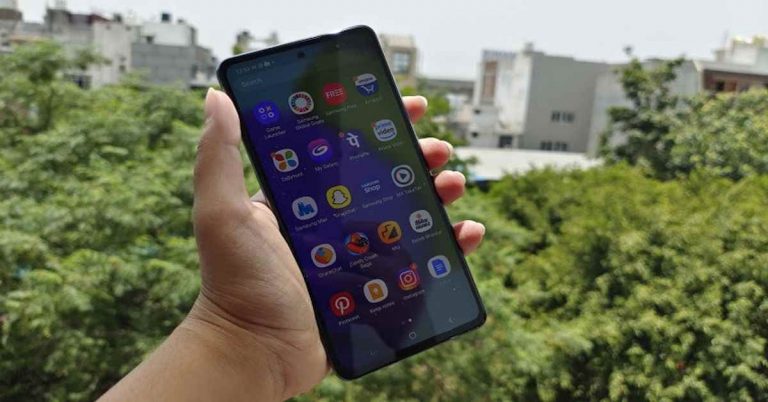

 The device feels premium and great in the hand and for us, it’s one of the best looking mid-range smartphones currently available in the market. The phone feels comfortable while holding and does not have sharp edges. Despite being over 200 grams the phone also doesn’t feel heavier either. It features a matte finish so no more fingerprints. Although it comes with an all-plastic build, which is a letdown at this pricing, we have liked a glass or metal build. Although the handset doesn’t look like a boring slab.
 Upfront it is endowed with a 6.7-inch full-HD+ Super AMOLED Infinity-O Display. We don’t call it flagship quality, but it is good enough as it supports HDR playback. The screen comes with a refresh rate of 90Hz with excellent colour reproduction. The brightness and colour contrast is also pleasing to the eyes. There were no jitters or slow scrolling experience. The Samsung Galaxy A72 supports an under-display fingerprint sensor, which we found to be slightly slow.
The edges on the sides are relatively slimmer than the bottom chin, which is more exaggerated than it should have been on the 6.7-inch screen. But the good thing is the punch hole cut out at the top centre is almost not there. There is a stereo speaker system in this smartphone. Though it produces balanced audio as it supports Dolby Atmos audio. we expected it to be better in terms of loudness. There is a dedicated Dolby Atmos game mode that enhances the audio while gaming. Moreover, Galaxy A72 includes a 3.5mm headphone jack which is a big relief. To put it all together, Samsung Galaxy A72 has nailed it in terms of design and display.
Upfront it is endowed with a 6.7-inch full-HD+ Super AMOLED Infinity-O Display. We don’t call it flagship quality, but it is good enough as it supports HDR playback. The screen comes with a refresh rate of 90Hz with excellent colour reproduction. The brightness and colour contrast is also pleasing to the eyes. There were no jitters or slow scrolling experience. The Samsung Galaxy A72 supports an under-display fingerprint sensor, which we found to be slightly slow.
The edges on the sides are relatively slimmer than the bottom chin, which is more exaggerated than it should have been on the 6.7-inch screen. But the good thing is the punch hole cut out at the top centre is almost not there. There is a stereo speaker system in this smartphone. Though it produces balanced audio as it supports Dolby Atmos audio. we expected it to be better in terms of loudness. There is a dedicated Dolby Atmos game mode that enhances the audio while gaming. Moreover, Galaxy A72 includes a 3.5mm headphone jack which is a big relief. To put it all together, Samsung Galaxy A72 has nailed it in terms of design and display.
 Getting to the gaming side of things, frankly speaking, this phone is not made for high-end gaming. When gaming for long, the mobile heats up and you will notice frame drops as well. However, the device can handle day to day regimes, even heavy multitasking. Samsung does offer 3 years of OS updates and 4 years of security updates on this mobile phone. When it comes to software, Samsung’s One UI is the best Android skin. It is simple to use, has less bloatware and comes with features like system-wide dark mode and always-on display.


 It should be noted that the primary and the telephoto lenses equip OIS, which is something we don’t get to see in this price range. In normal daytime, the camera produced a better dynamic range and natural colours. So you can expect the camera to be reliable under any circumstance. Ultra-wide images have a wider field of view with good HDR capabilities too. The telephoto lens is capable of up to 3X optical zoom and up to 30 times digital zoom. The images look good up to 10x magnification but beyond that, the outcome depends upon the lighting conditions. The portraits from the primary lens look nice too offering a more natural undertone. Whereas the selfies also looked warm yet natural.


 The device feels premium and great in the hand and for us, it’s one of the best looking mid-range smartphones currently available in the market. The phone feels comfortable while holding and does not have sharp edges. Despite being over 200 grams the phone also doesn’t feel heavier either. It features a matte finish so no more fingerprints. Although it comes with an all-plastic build, which is a letdown at this pricing, we have liked a glass or metal build. Although the handset doesn’t look like a boring slab.
 Upfront it is endowed with a 6.7-inch full-HD+ Super AMOLED Infinity-O Display. We don’t call it flagship quality, but it is good enough as it supports HDR playback. The screen comes with a refresh rate of 90Hz with excellent colour reproduction. The brightness and colour contrast is also pleasing to the eyes. There were no jitters or slow scrolling experience. The Samsung Galaxy A72 supports an under-display fingerprint sensor, which we found to be slightly slow.
The edges on the sides are relatively slimmer than the bottom chin, which is more exaggerated than it should have been on the 6.7-inch screen. But the good thing is the punch hole cut out at the top centre is almost not there. There is a stereo speaker system in this smartphone. Though it produces balanced audio as it supports Dolby Atmos audio. we expected it to be better in terms of loudness. There is a dedicated Dolby Atmos game mode that enhances the audio while gaming. Moreover, Galaxy A72 includes a 3.5mm headphone jack which is a big relief. To put it all together, Samsung Galaxy A72 has nailed it in terms of design and display.
Upfront it is endowed with a 6.7-inch full-HD+ Super AMOLED Infinity-O Display. We don’t call it flagship quality, but it is good enough as it supports HDR playback. The screen comes with a refresh rate of 90Hz with excellent colour reproduction. The brightness and colour contrast is also pleasing to the eyes. There were no jitters or slow scrolling experience. The Samsung Galaxy A72 supports an under-display fingerprint sensor, which we found to be slightly slow.
The edges on the sides are relatively slimmer than the bottom chin, which is more exaggerated than it should have been on the 6.7-inch screen. But the good thing is the punch hole cut out at the top centre is almost not there. There is a stereo speaker system in this smartphone. Though it produces balanced audio as it supports Dolby Atmos audio. we expected it to be better in terms of loudness. There is a dedicated Dolby Atmos game mode that enhances the audio while gaming. Moreover, Galaxy A72 includes a 3.5mm headphone jack which is a big relief. To put it all together, Samsung Galaxy A72 has nailed it in terms of design and display.
 Getting to the gaming side of things, frankly speaking, this phone is not made for high-end gaming. When gaming for long, the mobile heats up and you will notice frame drops as well. However, the device can handle day to day regimes, even heavy multitasking. Samsung does offer 3 years of OS updates and 4 years of security updates on this mobile phone. When it comes to software, Samsung’s One UI is the best Android skin. It is simple to use, has less bloatware and comes with features like system-wide dark mode and always-on display.
 Quickly shifting gears, let’s get to the cameras now. Samsung Galaxy A72 features a quad rear camera setup that includes a 64-megapixel primary sensor with an f/1.8 lens. In addition to this, there is a 12-megapixel ultra-wide-angle sensor, a 5-megapixel macro lens, and an 8-megapixel telephoto camera.
Samsung has also provided a 32-megapixel selfie camera sensor on the front.
Quickly shifting gears, let’s get to the cameras now. Samsung Galaxy A72 features a quad rear camera setup that includes a 64-megapixel primary sensor with an f/1.8 lens. In addition to this, there is a 12-megapixel ultra-wide-angle sensor, a 5-megapixel macro lens, and an 8-megapixel telephoto camera.
Samsung has also provided a 32-megapixel selfie camera sensor on the front.


 It should be noted that the primary and the telephoto lenses equip OIS, which is something we don’t get to see in this price range. In normal daytime, the camera produced a better dynamic range and natural colours. So you can expect the camera to be reliable under any circumstance. Ultra-wide images have a wider field of view with good HDR capabilities too. The telephoto lens is capable of up to 3X optical zoom and up to 30 times digital zoom. The images look good up to 10x magnification but beyond that, the outcome depends upon the lighting conditions. The portraits from the primary lens look nice too offering a more natural undertone. Whereas the selfies also looked warm yet natural.




 In addition to this Facebook has also updated the controls over disappearing messages also known as expiring messages within end-to-end encrypted chats. Now you can control the timer in the setting to decide when you want your chats to be deleted. Facebook Messenger has updated the setting to provide more options for people in the chat to choose the amount of time before all new messages disappear, from as low as 5 seconds to as long as 24 hours.
Facebook has also informed that in the next few weeks it will begin testing end-to-end encryption for group chats, including voice and video calls, for friends and family that already have an existing chat thread or are already connected. The social media giant will also perform a test for your delivery controls to work with your end-to-end encrypted chats. This will help in preventing unwanted interactions by deciding who can reach your chats list, who goes to your requests folder, and who can’t message you at all.
Moreover, the company will also carry out opt-in end-to-end encryption for Instagram DMs as well. However, this will be tested out on a limited number in select countries that lets them opt-in to end-to-end encrypted messages and calls for one-on-one conversations on Instagram.
For the latest gadget and tech news, and gadget reviews, follow us on Twitter, Facebook and Instagram. For newest tech & gadget videos subscribe to our YouTube Channel. You can also stay up to date using the Gadget Bridge Android App. You can find the latest car and bike news here.
In addition to this Facebook has also updated the controls over disappearing messages also known as expiring messages within end-to-end encrypted chats. Now you can control the timer in the setting to decide when you want your chats to be deleted. Facebook Messenger has updated the setting to provide more options for people in the chat to choose the amount of time before all new messages disappear, from as low as 5 seconds to as long as 24 hours.
Facebook has also informed that in the next few weeks it will begin testing end-to-end encryption for group chats, including voice and video calls, for friends and family that already have an existing chat thread or are already connected. The social media giant will also perform a test for your delivery controls to work with your end-to-end encrypted chats. This will help in preventing unwanted interactions by deciding who can reach your chats list, who goes to your requests folder, and who can’t message you at all.
Moreover, the company will also carry out opt-in end-to-end encryption for Instagram DMs as well. However, this will be tested out on a limited number in select countries that lets them opt-in to end-to-end encrypted messages and calls for one-on-one conversations on Instagram.
For the latest gadget and tech news, and gadget reviews, follow us on Twitter, Facebook and Instagram. For newest tech & gadget videos subscribe to our YouTube Channel. You can also stay up to date using the Gadget Bridge Android App. You can find the latest car and bike news here. 
 In addition to this Facebook has also updated the controls over disappearing messages also known as expiring messages within end-to-end encrypted chats. Now you can control the timer in the setting to decide when you want your chats to be deleted. Facebook Messenger has updated the setting to provide more options for people in the chat to choose the amount of time before all new messages disappear, from as low as 5 seconds to as long as 24 hours.
Facebook has also informed that in the next few weeks it will begin testing end-to-end encryption for group chats, including voice and video calls, for friends and family that already have an existing chat thread or are already connected. The social media giant will also perform a test for your delivery controls to work with your end-to-end encrypted chats. This will help in preventing unwanted interactions by deciding who can reach your chats list, who goes to your requests folder, and who can’t message you at all.
Moreover, the company will also carry out opt-in end-to-end encryption for Instagram DMs as well. However, this will be tested out on a limited number in select countries that lets them opt-in to end-to-end encrypted messages and calls for one-on-one conversations on Instagram.
For the latest gadget and tech news, and gadget reviews, follow us on Twitter, Facebook and Instagram. For newest tech & gadget videos subscribe to our YouTube Channel. You can also stay up to date using the Gadget Bridge Android App. You can find the latest car and bike news here.
In addition to this Facebook has also updated the controls over disappearing messages also known as expiring messages within end-to-end encrypted chats. Now you can control the timer in the setting to decide when you want your chats to be deleted. Facebook Messenger has updated the setting to provide more options for people in the chat to choose the amount of time before all new messages disappear, from as low as 5 seconds to as long as 24 hours.
Facebook has also informed that in the next few weeks it will begin testing end-to-end encryption for group chats, including voice and video calls, for friends and family that already have an existing chat thread or are already connected. The social media giant will also perform a test for your delivery controls to work with your end-to-end encrypted chats. This will help in preventing unwanted interactions by deciding who can reach your chats list, who goes to your requests folder, and who can’t message you at all.
Moreover, the company will also carry out opt-in end-to-end encryption for Instagram DMs as well. However, this will be tested out on a limited number in select countries that lets them opt-in to end-to-end encrypted messages and calls for one-on-one conversations on Instagram.
For the latest gadget and tech news, and gadget reviews, follow us on Twitter, Facebook and Instagram. For newest tech & gadget videos subscribe to our YouTube Channel. You can also stay up to date using the Gadget Bridge Android App. You can find the latest car and bike news here. 



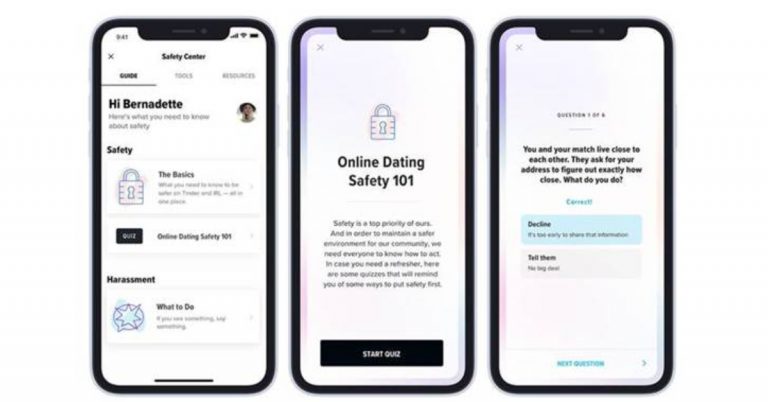

 In order to access the Safety Centre on the Tinder app, all you need to do is open the application on your device and tap on your profile icon. Then simply select Safety from there.
According to Tinder, its aim is to centralise safety-related resources and provide avenues of support that connect members in need with relevant experts. Also, the Safety Center will be available at members’ fingertips via the app’s main menu and any time members chat with potential matches. With the launch, Tinder is trying to make the platform a trusted and safe space for everyone who joins. It has also worked closely with the Match Group Advisory Council (MGAC) as well as NGOs to continue building features and processes to keep members safer.
In order to access the Safety Centre on the Tinder app, all you need to do is open the application on your device and tap on your profile icon. Then simply select Safety from there.
According to Tinder, its aim is to centralise safety-related resources and provide avenues of support that connect members in need with relevant experts. Also, the Safety Center will be available at members’ fingertips via the app’s main menu and any time members chat with potential matches. With the launch, Tinder is trying to make the platform a trusted and safe space for everyone who joins. It has also worked closely with the Match Group Advisory Council (MGAC) as well as NGOs to continue building features and processes to keep members safer.

 As Microsoft Teams is an online-based software it requires a good and stable connection to work properly. Users can google any speed test online to check the internet connection and its speed. If the speeds are low, try connecting to a different WiFi connection. If no other WiFi is available try connecting it with a mobile hotspot.
 Sometimes the app becomes unresponsive and thus starts to misbehave either due to a bug or a trigger. The easy way to quit Microsoft Teams is by right-clicking on the taskbar and clicking quit. Another way is to go to the Task Manager and click the end task from there. Both methods will shut down Microsoft Teams and then try to restart the application. Now you should be able to log in.
 It often happens that everything is fine from the client site but there is an error on the server site. Checking is also simple nowadays just open any browser and search Down Detector. If there are lots of reports you can ensure that the issue is regarding the server from Microsoft’s side.
Also Read: Beware: These are the 9 apps stealing Facebook login credentials from Google Play
It often happens that everything is fine from the client site but there is an error on the server site. Checking is also simple nowadays just open any browser and search Down Detector. If there are lots of reports you can ensure that the issue is regarding the server from Microsoft’s side.
Also Read: Beware: These are the 9 apps stealing Facebook login credentials from Google Play
 To speed up the process of common tasks, computers often collect data in the background. If the computer collects a bad cache file it can show errors like login errors. The easy way to do this is:
Step 1 – Press Windows + R to open the run menu.
Step 2 – Type %appdata%MicrosoftTeams in the box and press Enter.
Step 3 – Delete all the files and folders.
To speed up the process of common tasks, computers often collect data in the background. If the computer collects a bad cache file it can show errors like login errors. The easy way to do this is:
Step 1 – Press Windows + R to open the run menu.
Step 2 – Type %appdata%MicrosoftTeams in the box and press Enter.
Step 3 – Delete all the files and folders.
 Step 3 – Hit the ellipses next to Microsoft Teams and select Advanced options.

 As Microsoft Teams is an online-based software it requires a good and stable connection to work properly. Users can google any speed test online to check the internet connection and its speed. If the speeds are low, try connecting to a different WiFi connection. If no other WiFi is available try connecting it with a mobile hotspot.
 Sometimes the app becomes unresponsive and thus starts to misbehave either due to a bug or a trigger. The easy way to quit Microsoft Teams is by right-clicking on the taskbar and clicking quit. Another way is to go to the Task Manager and click the end task from there. Both methods will shut down Microsoft Teams and then try to restart the application. Now you should be able to log in.
 It often happens that everything is fine from the client site but there is an error on the server site. Checking is also simple nowadays just open any browser and search Down Detector. If there are lots of reports you can ensure that the issue is regarding the server from Microsoft’s side.
Also Read: Beware: These are the 9 apps stealing Facebook login credentials from Google Play
It often happens that everything is fine from the client site but there is an error on the server site. Checking is also simple nowadays just open any browser and search Down Detector. If there are lots of reports you can ensure that the issue is regarding the server from Microsoft’s side.
Also Read: Beware: These are the 9 apps stealing Facebook login credentials from Google Play
 To speed up the process of common tasks, computers often collect data in the background. If the computer collects a bad cache file it can show errors like login errors. The easy way to do this is:
Step 1 – Press Windows + R to open the run menu.
Step 2 – Type %appdata%MicrosoftTeams in the box and press Enter.
Step 3 – Delete all the files and folders.
To speed up the process of common tasks, computers often collect data in the background. If the computer collects a bad cache file it can show errors like login errors. The easy way to do this is:
Step 1 – Press Windows + R to open the run menu.
Step 2 – Type %appdata%MicrosoftTeams in the box and press Enter.
Step 3 – Delete all the files and folders.
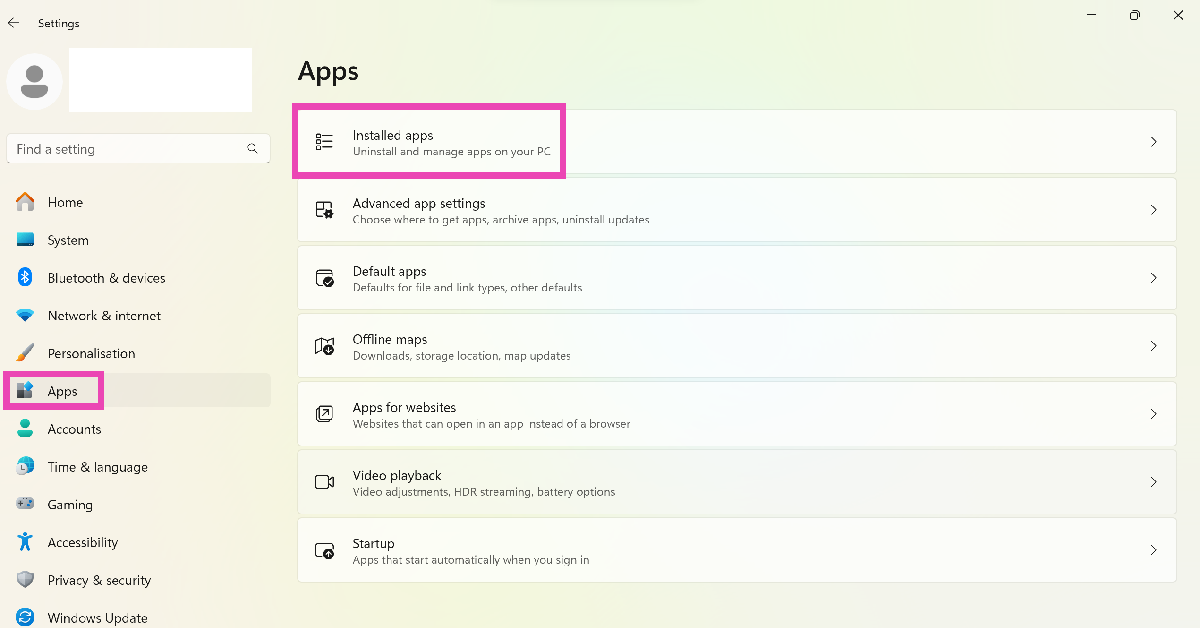 Step 3 – Hit the ellipses next to Microsoft Teams and select Advanced options.
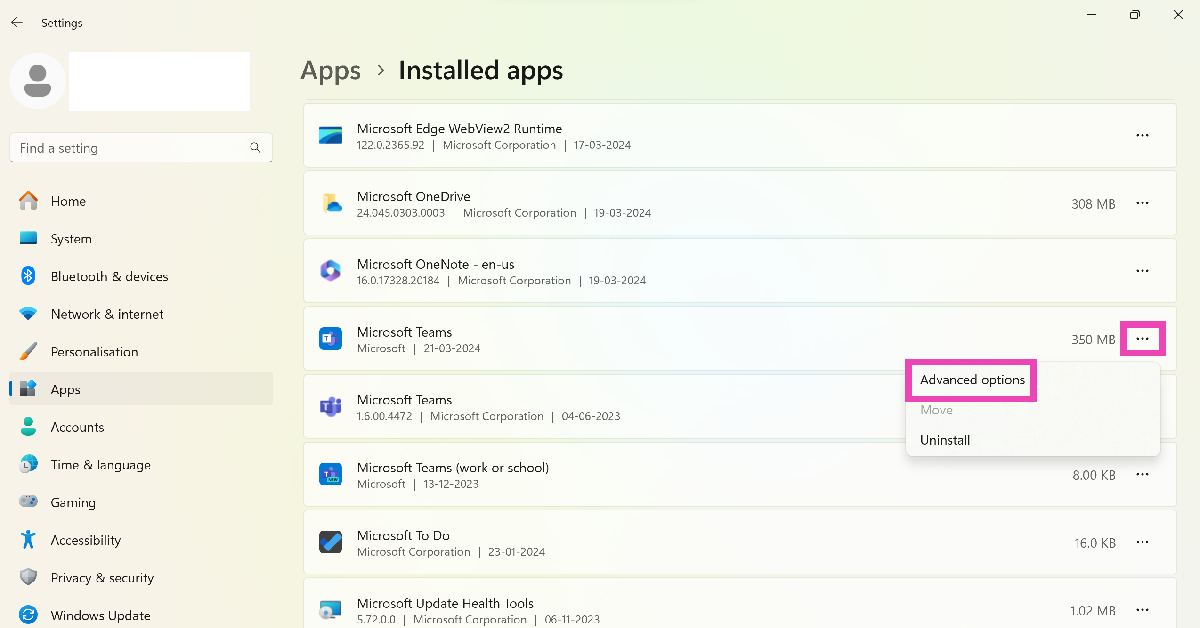 Step 4 – In the advanced menu under Reset there will be an option to Repair.
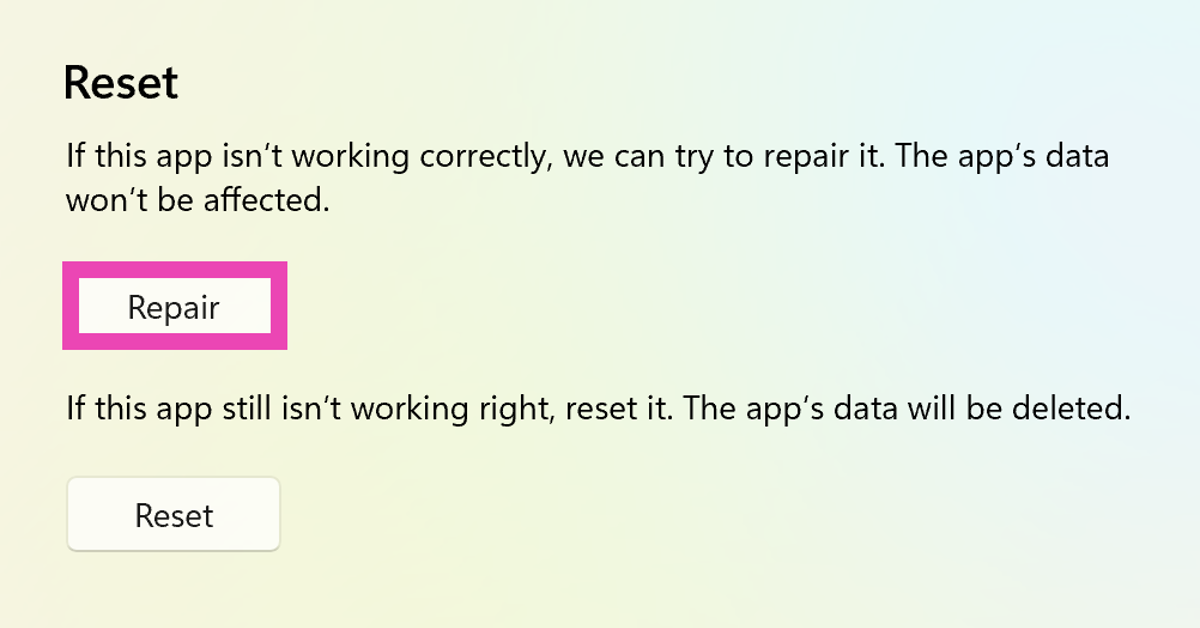 Step 5 – After the process is completed try running Teams once again.
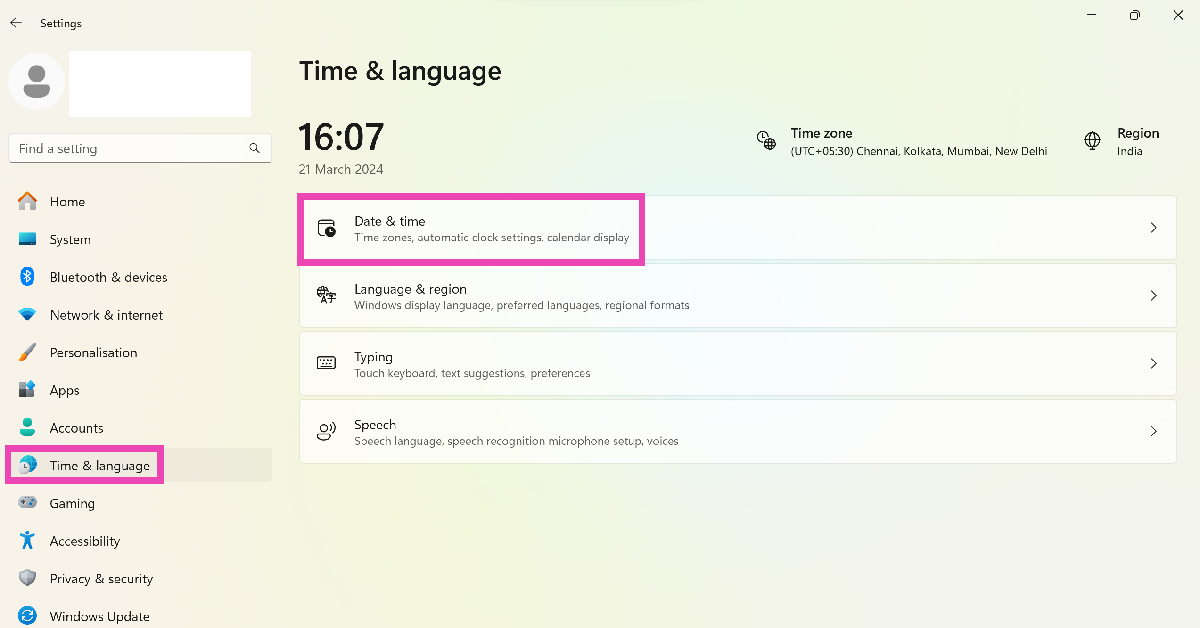 Step 3: Click on the dropdown menu next to Time zone and select the appropriate option.
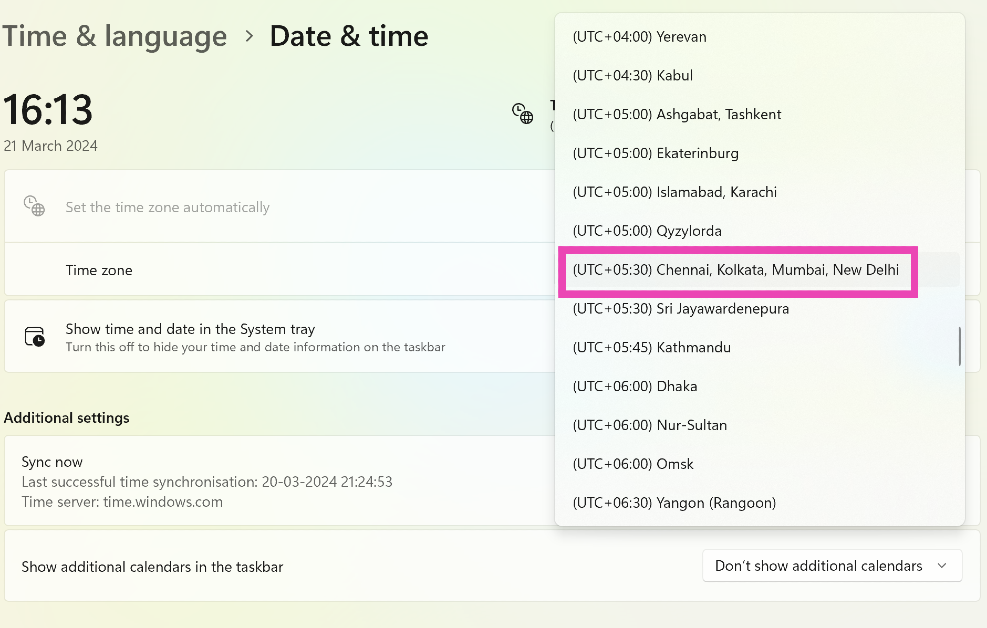
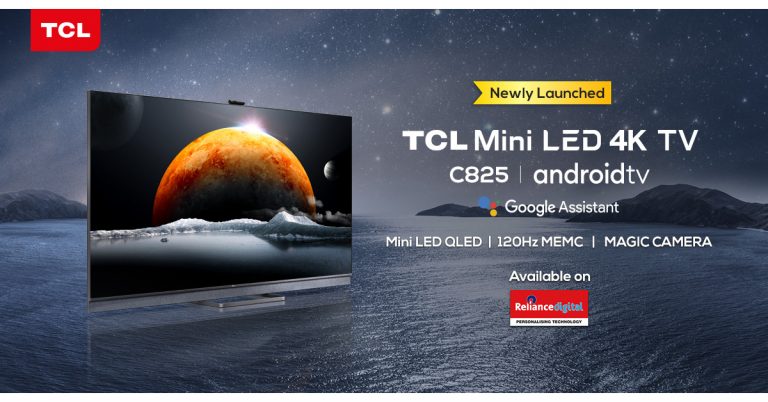

 All stereo sources, be it radio, online streaming, USB or mobile phone to be enjoyed in 3D. Also, the car will provide multiple unique sound settings available to customize the audio listening experience based on the passengers.
In addition to this Sony’s 3D sound system features DSEE technology that will help in enhancing the sound quality of compressed audio files and SDVC (Speed Dependent Volume/EQ Control) for maintaining volume and tonal balance at any vehicle speed and volume to minimize the influence of outside noise.
All stereo sources, be it radio, online streaming, USB or mobile phone to be enjoyed in 3D. Also, the car will provide multiple unique sound settings available to customize the audio listening experience based on the passengers.
In addition to this Sony’s 3D sound system features DSEE technology that will help in enhancing the sound quality of compressed audio files and SDVC (Speed Dependent Volume/EQ Control) for maintaining volume and tonal balance at any vehicle speed and volume to minimize the influence of outside noise.


 After naming the task select triggers like on what day, time or action it needs to be triggered.
In action, the menu selects how the trigger will perform and at the last click finish to complete the task scheduling.
Read Also: Motorola one fusion review – The complete package in a budget
For the latest gadget and tech news, and gadget reviews, follow us on Twitter, Facebook and Instagram. For newest tech & gadget videos subscribe to our YouTube Channel. You can also stay up to date using the Gadget Bridge Android App. You can find the latest car and bike news here.
After naming the task select triggers like on what day, time or action it needs to be triggered.
In action, the menu selects how the trigger will perform and at the last click finish to complete the task scheduling.
Read Also: Motorola one fusion review – The complete package in a budget
For the latest gadget and tech news, and gadget reviews, follow us on Twitter, Facebook and Instagram. For newest tech & gadget videos subscribe to our YouTube Channel. You can also stay up to date using the Gadget Bridge Android App. You can find the latest car and bike news here. 


 After naming the task select triggers like on what day, time or action it needs to be triggered.
In action, the menu selects how the trigger will perform and at the last click finish to complete the task scheduling.
Read Also: Motorola one fusion review – The complete package in a budget
For the latest gadget and tech news, and gadget reviews, follow us on Twitter, Facebook and Instagram. For newest tech & gadget videos subscribe to our YouTube Channel. You can also stay up to date using the Gadget Bridge Android App. You can find the latest car and bike news here.
After naming the task select triggers like on what day, time or action it needs to be triggered.
In action, the menu selects how the trigger will perform and at the last click finish to complete the task scheduling.
Read Also: Motorola one fusion review – The complete package in a budget
For the latest gadget and tech news, and gadget reviews, follow us on Twitter, Facebook and Instagram. For newest tech & gadget videos subscribe to our YouTube Channel. You can also stay up to date using the Gadget Bridge Android App. You can find the latest car and bike news here. 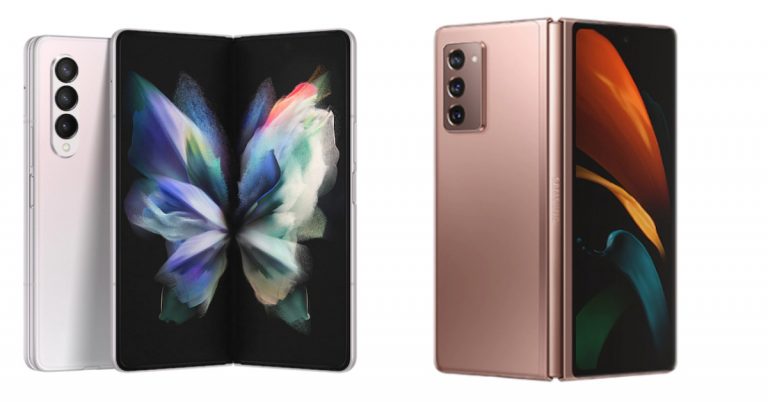
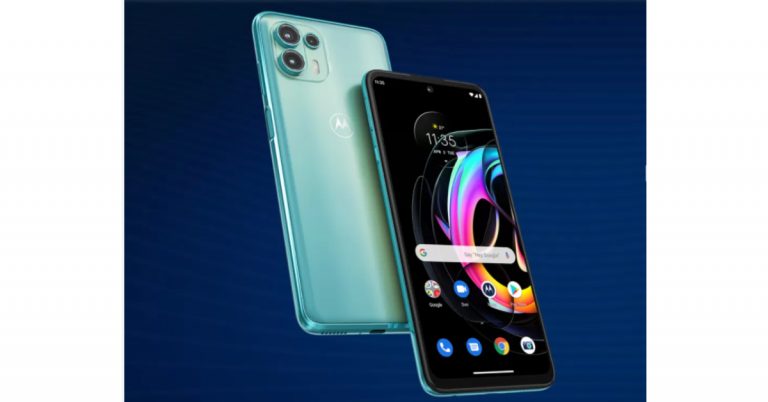


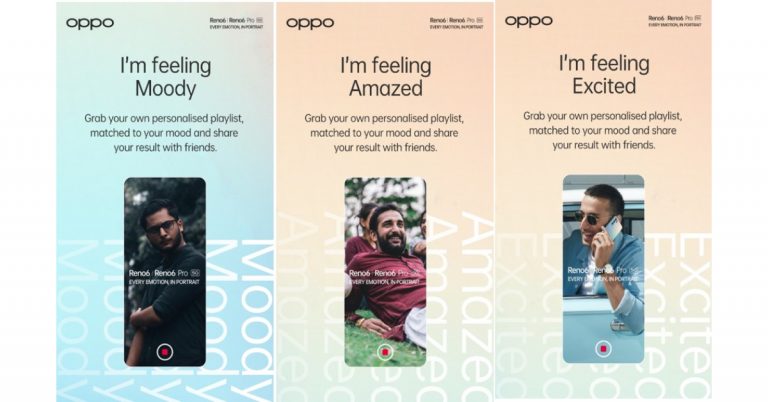
 Speech notes handily converts your speech to text with ease. The major feature that makes it stand out against its rivals is the keyboard it offers.
Generally, it’s very difficult to add punctuations and emojis during a speech to text conversion, but with its keyboard, it gets really easy for users to add them.
It comes with a continuous recording feature thus one saves a lot of time. You can just go on speaking and the app will convert all your golden words to text. Bluetooth and widget support make this app one of the best in this segment.
Download from here.
Read Also: Apple Music released the ‘Saylists’ feature to assist people with Speech Sound Disorder (SSD)
Speech notes handily converts your speech to text with ease. The major feature that makes it stand out against its rivals is the keyboard it offers.
Generally, it’s very difficult to add punctuations and emojis during a speech to text conversion, but with its keyboard, it gets really easy for users to add them.
It comes with a continuous recording feature thus one saves a lot of time. You can just go on speaking and the app will convert all your golden words to text. Bluetooth and widget support make this app one of the best in this segment.
Download from here.
Read Also: Apple Music released the ‘Saylists’ feature to assist people with Speech Sound Disorder (SSD)
 Voice Notes specializes in short note taking. It basically records the audio first, then saves the file, and then converts it. This two-way process helps the user to either read the text or listen to the audio on the go.
The app has tons of editing and customization options like it can edit text and mark them separately. Also, the theme of the app can be customised.
Download from here.
Voice Notes specializes in short note taking. It basically records the audio first, then saves the file, and then converts it. This two-way process helps the user to either read the text or listen to the audio on the go.
The app has tons of editing and customization options like it can edit text and mark them separately. Also, the theme of the app can be customised.
Download from here.
 It is the most basic app in the list and does what it says, converts the speech into text. The user interface is minimalistic and the app is really very easy to use.
In case you are looking for an app with no extra confusing features, minimalistic looks, and design, which performs the only basic conversion process, then your search ends here. This app is highly recommended.
Download from here.
It is the most basic app in the list and does what it says, converts the speech into text. The user interface is minimalistic and the app is really very easy to use.
In case you are looking for an app with no extra confusing features, minimalistic looks, and design, which performs the only basic conversion process, then your search ends here. This app is highly recommended.
Download from here.
 Voice Notebook is a full-fledged smart speech to words conversion app with tons of smart features like changing the punctuation and words from its local dictionary.
It automatically capitalises the first letter of the speech and also works well offline. It accepts the input with a trigger button and the converted data can be shared online on all platforms.
Download from here.
Read Also: 15 Microsoft Word keyboard shortcuts every beginner should know and use
Voice Notebook is a full-fledged smart speech to words conversion app with tons of smart features like changing the punctuation and words from its local dictionary.
It automatically capitalises the first letter of the speech and also works well offline. It accepts the input with a trigger button and the converted data can be shared online on all platforms.
Download from here.
Read Also: 15 Microsoft Word keyboard shortcuts every beginner should know and use
 Google assistant is the smartest AI assistant in the market with top of the class features. Google Assistant is not an application just for the specific reason of converting speech to text, but for many other things. However, it is understandable how good a job it does when it comes to accepting your voice commands and properly executing them into text.
Not only does Google Assistant accept voice commands it can also make notes for you, set reminders, and will be helpful for you to perform day to day tasks without ever pressing a button on the keyboard.
Download from here
For the latest gadget and tech news, and gadget reviews, follow us on Twitter, Facebook and Instagram. For newest tech & gadget videos subscribe to our YouTube Channel. You can also stay up to date using the Gadget Bridge Android App. You can find the latest car and bike news here.
Google assistant is the smartest AI assistant in the market with top of the class features. Google Assistant is not an application just for the specific reason of converting speech to text, but for many other things. However, it is understandable how good a job it does when it comes to accepting your voice commands and properly executing them into text.
Not only does Google Assistant accept voice commands it can also make notes for you, set reminders, and will be helpful for you to perform day to day tasks without ever pressing a button on the keyboard.
Download from here
For the latest gadget and tech news, and gadget reviews, follow us on Twitter, Facebook and Instagram. For newest tech & gadget videos subscribe to our YouTube Channel. You can also stay up to date using the Gadget Bridge Android App. You can find the latest car and bike news here.  Speech notes handily converts your speech to text with ease. The major feature that makes it stand out against its rivals is the keyboard it offers.
Generally, it’s very difficult to add punctuations and emojis during a speech to text conversion, but with its keyboard, it gets really easy for users to add them.
It comes with a continuous recording feature thus one saves a lot of time. You can just go on speaking and the app will convert all your golden words to text. Bluetooth and widget support make this app one of the best in this segment.
Download from here.
Read Also: Apple Music released the ‘Saylists’ feature to assist people with Speech Sound Disorder (SSD)
Speech notes handily converts your speech to text with ease. The major feature that makes it stand out against its rivals is the keyboard it offers.
Generally, it’s very difficult to add punctuations and emojis during a speech to text conversion, but with its keyboard, it gets really easy for users to add them.
It comes with a continuous recording feature thus one saves a lot of time. You can just go on speaking and the app will convert all your golden words to text. Bluetooth and widget support make this app one of the best in this segment.
Download from here.
Read Also: Apple Music released the ‘Saylists’ feature to assist people with Speech Sound Disorder (SSD)
 Voice Notes specializes in short note taking. It basically records the audio first, then saves the file, and then converts it. This two-way process helps the user to either read the text or listen to the audio on the go.
The app has tons of editing and customization options like it can edit text and mark them separately. Also, the theme of the app can be customised.
Download from here.
Voice Notes specializes in short note taking. It basically records the audio first, then saves the file, and then converts it. This two-way process helps the user to either read the text or listen to the audio on the go.
The app has tons of editing and customization options like it can edit text and mark them separately. Also, the theme of the app can be customised.
Download from here.
 It is the most basic app in the list and does what it says, converts the speech into text. The user interface is minimalistic and the app is really very easy to use.
In case you are looking for an app with no extra confusing features, minimalistic looks, and design, which performs the only basic conversion process, then your search ends here. This app is highly recommended.
Download from here.
It is the most basic app in the list and does what it says, converts the speech into text. The user interface is minimalistic and the app is really very easy to use.
In case you are looking for an app with no extra confusing features, minimalistic looks, and design, which performs the only basic conversion process, then your search ends here. This app is highly recommended.
Download from here.
 Voice Notebook is a full-fledged smart speech to words conversion app with tons of smart features like changing the punctuation and words from its local dictionary.
It automatically capitalises the first letter of the speech and also works well offline. It accepts the input with a trigger button and the converted data can be shared online on all platforms.
Download from here.
Read Also: 15 Microsoft Word keyboard shortcuts every beginner should know and use
Voice Notebook is a full-fledged smart speech to words conversion app with tons of smart features like changing the punctuation and words from its local dictionary.
It automatically capitalises the first letter of the speech and also works well offline. It accepts the input with a trigger button and the converted data can be shared online on all platforms.
Download from here.
Read Also: 15 Microsoft Word keyboard shortcuts every beginner should know and use
 Google assistant is the smartest AI assistant in the market with top of the class features. Google Assistant is not an application just for the specific reason of converting speech to text, but for many other things. However, it is understandable how good a job it does when it comes to accepting your voice commands and properly executing them into text.
Not only does Google Assistant accept voice commands it can also make notes for you, set reminders, and will be helpful for you to perform day to day tasks without ever pressing a button on the keyboard.
Download from here
For the latest gadget and tech news, and gadget reviews, follow us on Twitter, Facebook and Instagram. For newest tech & gadget videos subscribe to our YouTube Channel. You can also stay up to date using the Gadget Bridge Android App. You can find the latest car and bike news here.
Google assistant is the smartest AI assistant in the market with top of the class features. Google Assistant is not an application just for the specific reason of converting speech to text, but for many other things. However, it is understandable how good a job it does when it comes to accepting your voice commands and properly executing them into text.
Not only does Google Assistant accept voice commands it can also make notes for you, set reminders, and will be helpful for you to perform day to day tasks without ever pressing a button on the keyboard.
Download from here
For the latest gadget and tech news, and gadget reviews, follow us on Twitter, Facebook and Instagram. For newest tech & gadget videos subscribe to our YouTube Channel. You can also stay up to date using the Gadget Bridge Android App. You can find the latest car and bike news here. 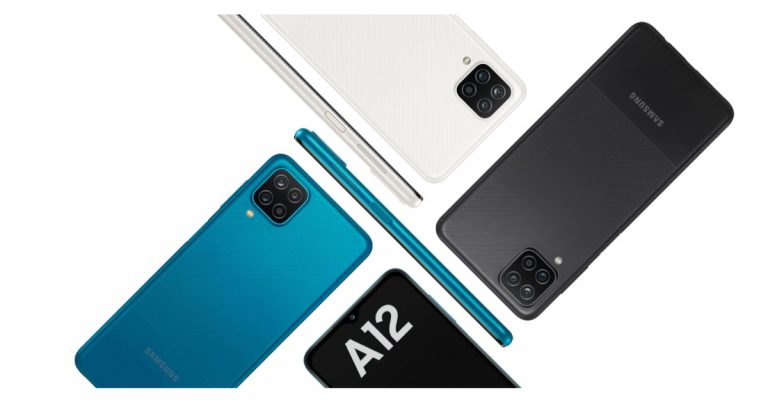
 To recollect, Samsung Galaxy A12 debuted in India in February this year. It was launched in two different configurations of 4GB RAM with 64GB storage option and 4GB RAM with 128GB storage option which is now available at Rs 13,999 and Rs 14,999 respectively.
The new handset is backed by a 5,000mAh battery with a 15W fast charging via a USB Type-C port. In terms of connectivity, there is LTE, Wi-Fi, Bluetooth, GPS, and a 3.5mm headphone jack. The sensors on the phone include a side-mounted fingerprint sensor, an accelerometer, ambient light, magnetometer, and proximity sensor.
For the latest gadget and tech news, and gadget reviews, follow us on Twitter, Facebook and Instagram. For newest tech & gadget videos subscribe to our YouTube Channel. You can also stay up to date using the Gadget Bridge Android App. You can find the latest car and bike news here.
To recollect, Samsung Galaxy A12 debuted in India in February this year. It was launched in two different configurations of 4GB RAM with 64GB storage option and 4GB RAM with 128GB storage option which is now available at Rs 13,999 and Rs 14,999 respectively.
The new handset is backed by a 5,000mAh battery with a 15W fast charging via a USB Type-C port. In terms of connectivity, there is LTE, Wi-Fi, Bluetooth, GPS, and a 3.5mm headphone jack. The sensors on the phone include a side-mounted fingerprint sensor, an accelerometer, ambient light, magnetometer, and proximity sensor.
For the latest gadget and tech news, and gadget reviews, follow us on Twitter, Facebook and Instagram. For newest tech & gadget videos subscribe to our YouTube Channel. You can also stay up to date using the Gadget Bridge Android App. You can find the latest car and bike news here.  To recollect, Samsung Galaxy A12 debuted in India in February this year. It was launched in two different configurations of 4GB RAM with 64GB storage option and 4GB RAM with 128GB storage option which is now available at Rs 13,999 and Rs 14,999 respectively.



 Whatsapp has been really listening to its consumers and adding these great useful features. These features seem to be following the online meeting apps and software approach and would be really helpful especially during this pandemic time. There are more new features like disappearing messages etc, also being added to WhatsApp. They are still in beta stages and will be out soon. Do keep a lookout for that if you want SnapChat like features in your WhatsApp.
For the latest gadget and tech news, and gadget reviews, follow us on Twitter, Facebook and Instagram. For newest tech & gadget videos subscribe to our YouTube Channel. You can also stay up to date using the Gadget Bridge Android App. You can find the latest car and bike news here.
Whatsapp has been really listening to its consumers and adding these great useful features. These features seem to be following the online meeting apps and software approach and would be really helpful especially during this pandemic time. There are more new features like disappearing messages etc, also being added to WhatsApp. They are still in beta stages and will be out soon. Do keep a lookout for that if you want SnapChat like features in your WhatsApp.
For the latest gadget and tech news, and gadget reviews, follow us on Twitter, Facebook and Instagram. For newest tech & gadget videos subscribe to our YouTube Channel. You can also stay up to date using the Gadget Bridge Android App. You can find the latest car and bike news here. 

 Whatsapp has been really listening to its consumers and adding these great useful features. These features seem to be following the online meeting apps and software approach and would be really helpful especially during this pandemic time. There are more new features like disappearing messages etc, also being added to WhatsApp. They are still in beta stages and will be out soon. Do keep a lookout for that if you want SnapChat like features in your WhatsApp.
For the latest gadget and tech news, and gadget reviews, follow us on Twitter, Facebook and Instagram. For newest tech & gadget videos subscribe to our YouTube Channel. You can also stay up to date using the Gadget Bridge Android App. You can find the latest car and bike news here.
Whatsapp has been really listening to its consumers and adding these great useful features. These features seem to be following the online meeting apps and software approach and would be really helpful especially during this pandemic time. There are more new features like disappearing messages etc, also being added to WhatsApp. They are still in beta stages and will be out soon. Do keep a lookout for that if you want SnapChat like features in your WhatsApp.
For the latest gadget and tech news, and gadget reviews, follow us on Twitter, Facebook and Instagram. For newest tech & gadget videos subscribe to our YouTube Channel. You can also stay up to date using the Gadget Bridge Android App. You can find the latest car and bike news here. 
 The Premiere comes with a full smart TV experience through access to all kinds of content when connected to the Internet such as Netflix, YouTube and Amazon Prime, and music streaming services where popular sports podcasts can be found including Apple Music and Spotify. One can even search for the content you want to watch using voice recognition. The Projectors also work with Bixby, Amazon Alexa and Google Assistant to make your life easier.
According to the company, the LSP9T model of The Premiere is available at Rs 6,29,900 while the LSP7T is available at Rs 3,89,900. The Samsung projectors can be purchased via the company’s official online store, Samsung Shop and at select Samsung Smart Plazas. Early bird consumers will get complimentary Amazon Echo Plus when buying any of the two models from Samsung’s official online store.
For the latest gadget and tech news, and gadget reviews, follow us on Twitter, Facebook and Instagram. For newest tech & gadget videos subscribe to our YouTube Channel. You can also stay up to date using the Gadget Bridge Android App. You can find the latest car and bike news here.
The Premiere comes with a full smart TV experience through access to all kinds of content when connected to the Internet such as Netflix, YouTube and Amazon Prime, and music streaming services where popular sports podcasts can be found including Apple Music and Spotify. One can even search for the content you want to watch using voice recognition. The Projectors also work with Bixby, Amazon Alexa and Google Assistant to make your life easier.
According to the company, the LSP9T model of The Premiere is available at Rs 6,29,900 while the LSP7T is available at Rs 3,89,900. The Samsung projectors can be purchased via the company’s official online store, Samsung Shop and at select Samsung Smart Plazas. Early bird consumers will get complimentary Amazon Echo Plus when buying any of the two models from Samsung’s official online store.
For the latest gadget and tech news, and gadget reviews, follow us on Twitter, Facebook and Instagram. For newest tech & gadget videos subscribe to our YouTube Channel. You can also stay up to date using the Gadget Bridge Android App. You can find the latest car and bike news here. 
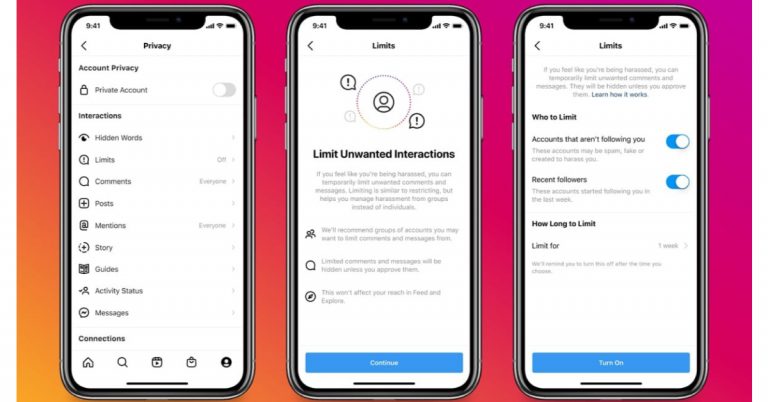
 Instagram Limits will be accessible to everyone and can be easily turned on/off from the privacy setting. The application is also finding ways to detect when you may be experiencing a spike in comments and DMs, so it can prompt you to turn on Limits.
In addition to this people will now get Stronger warnings when people try to post potentially offensive comments. “And if they try to post potentially offensive comments multiple times, we show an even stronger warning – reminding them of our Community Guidelines and warning them that we may remove or hide their comment if they proceed,” the company explained. Rather than waiting for the second or third comment, we’ll show this stronger message the first time, this will discourage harassment and posting something hurtful. And to help protect people from abuse in their DM requests Instagram has also introduced Hidden Words, which allows you to automatically filter offensive words, phrases and emojis into a Hidden Folder, that you never have to open if you don’t want to. It will also filter out spam or low-quality DM requests. Moreover, Instagram has also expanded the list of potentially offensive words, hashtags and emojis that automatically filters out comments, and will continue updating it frequently. The photo-sharing application recently added a new opt-in option to “Hide More Comments” that may be potentially harmful, even if they may not break our rules.
“We hope these new features will better protect people from seeing abusive content, whether it’s racist, sexist, homophobic or any other type of abuse. We know there’s more to do, including improving our systems to find and remove abusive content more quickly, and holding those who post it accountable”, Instagram stated.
For the latest gadget and tech news, and gadget reviews, follow us on Twitter, Facebook and Instagram. For newest tech & gadget videos subscribe to our YouTube Channel. You can also stay up to date using the Gadget Bridge Android App. You can find the latest car and bike news here.
Instagram Limits will be accessible to everyone and can be easily turned on/off from the privacy setting. The application is also finding ways to detect when you may be experiencing a spike in comments and DMs, so it can prompt you to turn on Limits.
In addition to this people will now get Stronger warnings when people try to post potentially offensive comments. “And if they try to post potentially offensive comments multiple times, we show an even stronger warning – reminding them of our Community Guidelines and warning them that we may remove or hide their comment if they proceed,” the company explained. Rather than waiting for the second or third comment, we’ll show this stronger message the first time, this will discourage harassment and posting something hurtful. And to help protect people from abuse in their DM requests Instagram has also introduced Hidden Words, which allows you to automatically filter offensive words, phrases and emojis into a Hidden Folder, that you never have to open if you don’t want to. It will also filter out spam or low-quality DM requests. Moreover, Instagram has also expanded the list of potentially offensive words, hashtags and emojis that automatically filters out comments, and will continue updating it frequently. The photo-sharing application recently added a new opt-in option to “Hide More Comments” that may be potentially harmful, even if they may not break our rules.
“We hope these new features will better protect people from seeing abusive content, whether it’s racist, sexist, homophobic or any other type of abuse. We know there’s more to do, including improving our systems to find and remove abusive content more quickly, and holding those who post it accountable”, Instagram stated.
For the latest gadget and tech news, and gadget reviews, follow us on Twitter, Facebook and Instagram. For newest tech & gadget videos subscribe to our YouTube Channel. You can also stay up to date using the Gadget Bridge Android App. You can find the latest car and bike news here. 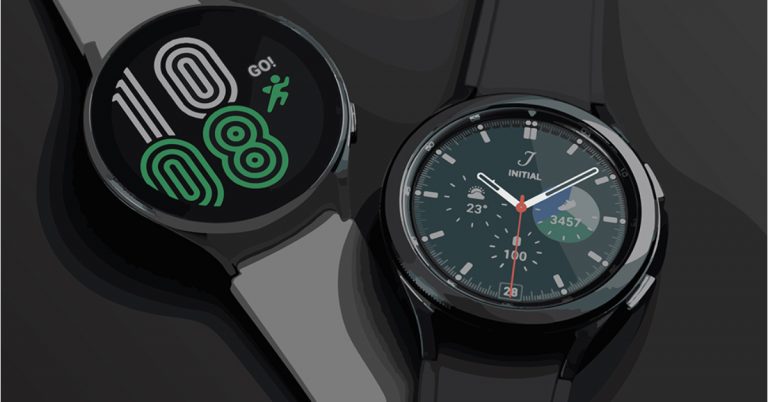
 Both Samsung Galaxy Watch 4 and Galaxy Watch 4 Classic includes BioActive Sensor, which boasts a smaller and more compact design that doesn’t detract from measurement accuracy. According to the company, the 3-in-1 sensor uses a single chip to precisely run three powerful health sensors — Optical Heart Rate, Electrical Heart and Bioelectrical Impedance Analysis. This allows users to monitor their blood pressure, detect an AFib irregular heartbeat, blood oxygen level as well as calculate their body composition in about 15 seconds, your watch’s sensor will capture 2,400 data points. The Body Composition measurement tool gives users a deeper understanding of their general health and fitness, with key measurements like skeletal muscle, basal metabolic rate, body water and body fat percentage.
The users can also choose from an array of guided workouts, enjoy Group Challenges with their friends and family, or set up a home gym by connecting your Galaxy Watch 4 to your compatible Samsung Smart TV, where calorie counts and heart rate metrics appear on screen for easier tracking. The compatible smartphone detects the sounds of your snores, while your smartwatch measures your blood oxygen level when you sleep4 Together with advanced Sleep Scores, you can learn more about your sleep patterns to get better rest.
Both Samsung Galaxy Watch 4 and Galaxy Watch 4 Classic includes BioActive Sensor, which boasts a smaller and more compact design that doesn’t detract from measurement accuracy. According to the company, the 3-in-1 sensor uses a single chip to precisely run three powerful health sensors — Optical Heart Rate, Electrical Heart and Bioelectrical Impedance Analysis. This allows users to monitor their blood pressure, detect an AFib irregular heartbeat, blood oxygen level as well as calculate their body composition in about 15 seconds, your watch’s sensor will capture 2,400 data points. The Body Composition measurement tool gives users a deeper understanding of their general health and fitness, with key measurements like skeletal muscle, basal metabolic rate, body water and body fat percentage.
The users can also choose from an array of guided workouts, enjoy Group Challenges with their friends and family, or set up a home gym by connecting your Galaxy Watch 4 to your compatible Samsung Smart TV, where calorie counts and heart rate metrics appear on screen for easier tracking. The compatible smartphone detects the sounds of your snores, while your smartwatch measures your blood oxygen level when you sleep4 Together with advanced Sleep Scores, you can learn more about your sleep patterns to get better rest.
 Also, the compatible apps are automatically installed on your watch when downloaded on your phone as well as setting thanks to the new OS. The Auto Switch allows you to toggle your earbud’s audio between your phone and watch. One can also control their mobile experience with Bixby voice bezel and Gesture Controls. To receive a call all you need to do is move your forearm up and down twice and rotate your wrist twice to reject them or to dismiss notifications and alarms.
The UI also supports third-party apps, like Adidas Running, Calm, Strava, and Spotify. Both the Galaxy Watches are IP68-certified for water and dust resistance. For connectivity, there is 4G LTE which is optional, dual-band Wi-Fi, Bluetooth v5.0, GPS/ Glonass/ Beidou/ Galileo, and NFC.
Both the 40mm models of Galaxy Watch 4 and Classic equip a 247mAh battery whereas the 44mm and 46mm variants equip a 361mAh battery. These are claimed to provide up to 40 hours of battery life and 30 minutes of charging provides up to 10 hours of battery life.
For the latest gadget and tech news, and gadget reviews, follow us on Twitter, Facebook and Instagram. For newest tech & gadget videos subscribe to our YouTube Channel. You can also stay up to date using the Gadget Bridge Android App. You can find the latest car and bike news here.
Also, the compatible apps are automatically installed on your watch when downloaded on your phone as well as setting thanks to the new OS. The Auto Switch allows you to toggle your earbud’s audio between your phone and watch. One can also control their mobile experience with Bixby voice bezel and Gesture Controls. To receive a call all you need to do is move your forearm up and down twice and rotate your wrist twice to reject them or to dismiss notifications and alarms.
The UI also supports third-party apps, like Adidas Running, Calm, Strava, and Spotify. Both the Galaxy Watches are IP68-certified for water and dust resistance. For connectivity, there is 4G LTE which is optional, dual-band Wi-Fi, Bluetooth v5.0, GPS/ Glonass/ Beidou/ Galileo, and NFC.
Both the 40mm models of Galaxy Watch 4 and Classic equip a 247mAh battery whereas the 44mm and 46mm variants equip a 361mAh battery. These are claimed to provide up to 40 hours of battery life and 30 minutes of charging provides up to 10 hours of battery life.
For the latest gadget and tech news, and gadget reviews, follow us on Twitter, Facebook and Instagram. For newest tech & gadget videos subscribe to our YouTube Channel. You can also stay up to date using the Gadget Bridge Android App. You can find the latest car and bike news here.  Both Samsung Galaxy Watch 4 and Galaxy Watch 4 Classic includes BioActive Sensor, which boasts a smaller and more compact design that doesn’t detract from measurement accuracy. According to the company, the 3-in-1 sensor uses a single chip to precisely run three powerful health sensors — Optical Heart Rate, Electrical Heart and Bioelectrical Impedance Analysis. This allows users to monitor their blood pressure, detect an AFib irregular heartbeat, blood oxygen level as well as calculate their body composition in about 15 seconds, your watch’s sensor will capture 2,400 data points. The Body Composition measurement tool gives users a deeper understanding of their general health and fitness, with key measurements like skeletal muscle, basal metabolic rate, body water and body fat percentage.
The users can also choose from an array of guided workouts, enjoy Group Challenges with their friends and family, or set up a home gym by connecting your Galaxy Watch 4 to your compatible Samsung Smart TV, where calorie counts and heart rate metrics appear on screen for easier tracking. The compatible smartphone detects the sounds of your snores, while your smartwatch measures your blood oxygen level when you sleep4 Together with advanced Sleep Scores, you can learn more about your sleep patterns to get better rest.
Both Samsung Galaxy Watch 4 and Galaxy Watch 4 Classic includes BioActive Sensor, which boasts a smaller and more compact design that doesn’t detract from measurement accuracy. According to the company, the 3-in-1 sensor uses a single chip to precisely run three powerful health sensors — Optical Heart Rate, Electrical Heart and Bioelectrical Impedance Analysis. This allows users to monitor their blood pressure, detect an AFib irregular heartbeat, blood oxygen level as well as calculate their body composition in about 15 seconds, your watch’s sensor will capture 2,400 data points. The Body Composition measurement tool gives users a deeper understanding of their general health and fitness, with key measurements like skeletal muscle, basal metabolic rate, body water and body fat percentage.
The users can also choose from an array of guided workouts, enjoy Group Challenges with their friends and family, or set up a home gym by connecting your Galaxy Watch 4 to your compatible Samsung Smart TV, where calorie counts and heart rate metrics appear on screen for easier tracking. The compatible smartphone detects the sounds of your snores, while your smartwatch measures your blood oxygen level when you sleep4 Together with advanced Sleep Scores, you can learn more about your sleep patterns to get better rest.
 Also, the compatible apps are automatically installed on your watch when downloaded on your phone as well as setting thanks to the new OS. The Auto Switch allows you to toggle your earbud’s audio between your phone and watch. One can also control their mobile experience with Bixby voice bezel and Gesture Controls. To receive a call all you need to do is move your forearm up and down twice and rotate your wrist twice to reject them or to dismiss notifications and alarms.
The UI also supports third-party apps, like Adidas Running, Calm, Strava, and Spotify. Both the Galaxy Watches are IP68-certified for water and dust resistance. For connectivity, there is 4G LTE which is optional, dual-band Wi-Fi, Bluetooth v5.0, GPS/ Glonass/ Beidou/ Galileo, and NFC.
Both the 40mm models of Galaxy Watch 4 and Classic equip a 247mAh battery whereas the 44mm and 46mm variants equip a 361mAh battery. These are claimed to provide up to 40 hours of battery life and 30 minutes of charging provides up to 10 hours of battery life.
For the latest gadget and tech news, and gadget reviews, follow us on Twitter, Facebook and Instagram. For newest tech & gadget videos subscribe to our YouTube Channel. You can also stay up to date using the Gadget Bridge Android App. You can find the latest car and bike news here.
Also, the compatible apps are automatically installed on your watch when downloaded on your phone as well as setting thanks to the new OS. The Auto Switch allows you to toggle your earbud’s audio between your phone and watch. One can also control their mobile experience with Bixby voice bezel and Gesture Controls. To receive a call all you need to do is move your forearm up and down twice and rotate your wrist twice to reject them or to dismiss notifications and alarms.
The UI also supports third-party apps, like Adidas Running, Calm, Strava, and Spotify. Both the Galaxy Watches are IP68-certified for water and dust resistance. For connectivity, there is 4G LTE which is optional, dual-band Wi-Fi, Bluetooth v5.0, GPS/ Glonass/ Beidou/ Galileo, and NFC.
Both the 40mm models of Galaxy Watch 4 and Classic equip a 247mAh battery whereas the 44mm and 46mm variants equip a 361mAh battery. These are claimed to provide up to 40 hours of battery life and 30 minutes of charging provides up to 10 hours of battery life.
For the latest gadget and tech news, and gadget reviews, follow us on Twitter, Facebook and Instagram. For newest tech & gadget videos subscribe to our YouTube Channel. You can also stay up to date using the Gadget Bridge Android App. You can find the latest car and bike news here. 