


Amazon India is back with another lucrative quiz on its platform. 19 August 2021 Amazon Quiz has already gone live and today you can stand a chance to win Rs 15,000 Amazon Pay Balance. Every day the e-commerce platform brings an opportunity for its customers to win amazing prizes by answering five questions. The questionnaire is based on general knowledge and current affairs. If you managed to answer all the questions correctly you will be eligible to win gifts such as iPhone X, iPhone Xs, Seagate HDD, GoPro Hero 8 Camera, LG Smartphones, Air Purifier, Oppo smartphones, Amazon Pay Balance among others. The Amazon Quiz is hosted for the app users only which means desktops users cannot participate in the quiz. So before participating just make sure you have downloaded the App. The lucky users might win something by answering all the questions correctly. The Amazon Quiz can be played daily from 8 AM to 12 noon. Daily the e-commerce platform gives a chance to millions of people across the country to win exciting prizes. To participate and win Rs 15,000 Amazon Pay Balance check out 19 August 2021 Amazon Quiz answers.
MG Astor to be India’s first car to feature an AI assistant and Autonomous Level 2 technology

 MG Astor is the first in the segment to feature AI assistant as well as Autonomous Level 2 technology. The AI assistant is designed by the acclaimed American firm ‘Star Design’ which understands your language and depicts human-like emotions & voices and can give detailed information on every topic through Wikipedia. It will engage with people in the car and is powered by i-Smart Hub. It is a platform on which the partnerships, services, and subscriptions of CAAP will reside. It will allow customers to personalize their set of services.
On the other hand, the Autonomous Level 2 on the MG Astor comes with mid-range radars and a multi-purpose camera that can realize a series of advanced driver-assistance systems (ADAS). In addition to this the upcoming SUV will also offer Adaptive Cruise Control, Forward Collision Warning, Automatic Emergency Braking, Lane Keeping Assist, Lane Departure Warning, Lane Departure Prevention, Intelligent Headlamp Control (IHC), Moreover there will be Rear Drive Assist (RDA) and Speed Assist System which will not only improve the driving experience but provide safety as well as comfort.
MG Astor is the first in the segment to feature AI assistant as well as Autonomous Level 2 technology. The AI assistant is designed by the acclaimed American firm ‘Star Design’ which understands your language and depicts human-like emotions & voices and can give detailed information on every topic through Wikipedia. It will engage with people in the car and is powered by i-Smart Hub. It is a platform on which the partnerships, services, and subscriptions of CAAP will reside. It will allow customers to personalize their set of services.
On the other hand, the Autonomous Level 2 on the MG Astor comes with mid-range radars and a multi-purpose camera that can realize a series of advanced driver-assistance systems (ADAS). In addition to this the upcoming SUV will also offer Adaptive Cruise Control, Forward Collision Warning, Automatic Emergency Braking, Lane Keeping Assist, Lane Departure Warning, Lane Departure Prevention, Intelligent Headlamp Control (IHC), Moreover there will be Rear Drive Assist (RDA) and Speed Assist System which will not only improve the driving experience but provide safety as well as comfort.
 The company has also introduced CAAP which is MG’s Concept of Car-as-a-Platform which will offer in-car personalised services like subscriptions and services, maps and navigation with MapMyIndia, Jio connectivity, the first-of-its-kind Blockchain-protected vehicle digital passport by KoineArth and more. MG Astor will also offer access to music via Jio Saavn.
In addition to this, the midsize SUV will also come with the industry-first feature of reserving a parking slot through a head unit (powered by Park+ – select cities to begin with) in the car.
For the latest gadget and tech news, and gadget reviews, follow us on Twitter, Facebook and Instagram. For newest tech & gadget videos subscribe to our YouTube Channel. You can also stay up to date using the Gadget Bridge Android App. You can find the latest car and bike news here.
The company has also introduced CAAP which is MG’s Concept of Car-as-a-Platform which will offer in-car personalised services like subscriptions and services, maps and navigation with MapMyIndia, Jio connectivity, the first-of-its-kind Blockchain-protected vehicle digital passport by KoineArth and more. MG Astor will also offer access to music via Jio Saavn.
In addition to this, the midsize SUV will also come with the industry-first feature of reserving a parking slot through a head unit (powered by Park+ – select cities to begin with) in the car.
For the latest gadget and tech news, and gadget reviews, follow us on Twitter, Facebook and Instagram. For newest tech & gadget videos subscribe to our YouTube Channel. You can also stay up to date using the Gadget Bridge Android App. You can find the latest car and bike news here. Top 10 most useful websites on the internet

In This Article
1.Clean PNG 
This website is very helpful for your school or college projects. You can easily download high-quality png images for official use to make your project really beautiful. There is no need to pay anything or register to use this website. It’s easier to download from here than making your own image’s background transparent.
Visit the site: https://www.cleanpng.com/

2.Pixlr
 Ever felt like editing your pictures but photoshop seems very difficult and heavy to use? Try using Pixlr in which you can edit your pictures very easily. It has a minimalistic design and does the job of basic editing. Once you are used to this site you can also pay the subscription amount for additional features. We have been using it for some time and it is a good basic alternative to Photoshop or MS paint.
Visit the site: https://pixlr.com/
Ever felt like editing your pictures but photoshop seems very difficult and heavy to use? Try using Pixlr in which you can edit your pictures very easily. It has a minimalistic design and does the job of basic editing. Once you are used to this site you can also pay the subscription amount for additional features. We have been using it for some time and it is a good basic alternative to Photoshop or MS paint.
Visit the site: https://pixlr.com/
3.Pixabay
 Another good one on our list of useful websites is Pixabay. Many times we are faced with a situation when we need an image for our project. But where to get free images from? For casual users, sites like shutter stock are really not affordable and will burn a hole in your wallet. Pixabay is the best alternative to get Royalty-free content like images and videos. The website has a minimalistic design and is very easy to use. You can get thousands of videos and images on this website to choose from completely free of cost.
Visit the site: https://pixabay.com/
Another good one on our list of useful websites is Pixabay. Many times we are faced with a situation when we need an image for our project. But where to get free images from? For casual users, sites like shutter stock are really not affordable and will burn a hole in your wallet. Pixabay is the best alternative to get Royalty-free content like images and videos. The website has a minimalistic design and is very easy to use. You can get thousands of videos and images on this website to choose from completely free of cost.
Visit the site: https://pixabay.com/
4. Bachelorstudies
 Confused about what to study for your higher studies? Or which is the best college for you? Bachelorstudies is your one-stop solution. It specifies to you the time you need to give the college you can choose and what will be the cost of your studies. You can choose any course as per your need and interest. The site is completely free and the user interface is very neat and easy to use.
Visit the site: https://www.bachelorstudies.com/
Read Also: How to live stream sports online at low or no cost
Confused about what to study for your higher studies? Or which is the best college for you? Bachelorstudies is your one-stop solution. It specifies to you the time you need to give the college you can choose and what will be the cost of your studies. You can choose any course as per your need and interest. The site is completely free and the user interface is very neat and easy to use.
Visit the site: https://www.bachelorstudies.com/
Read Also: How to live stream sports online at low or no cost
5.Ninite
 Since the Web is so vast, there are tons of spam links for the software you want. Ninite comes to the rescue. It has all the links to the software you need or might want, which are categorised. It eliminates the hassle of searching and downloading the software, Ninite will download an application on your device with just a click. After which the selected programs will be downloaded hassle free. No permissions needed, no popup to waste your time.
Visit the site: https://ninite.com/
Since the Web is so vast, there are tons of spam links for the software you want. Ninite comes to the rescue. It has all the links to the software you need or might want, which are categorised. It eliminates the hassle of searching and downloading the software, Ninite will download an application on your device with just a click. After which the selected programs will be downloaded hassle free. No permissions needed, no popup to waste your time.
Visit the site: https://ninite.com/
6. Lucidchart
 You can make diagrams, flowcharts and wireframes with Lucidcharts. The best feature about this site is you can also collaborate with your friends and can make flowcharts together. There is no application download required for this site. It works right in your web browser. The free plan allows you to make three documents. If for any chance the count of documents exceeds three, there is a small subscription fee they charge to the consumers.
Visit the site here: https://www.lucidchart.com/pages/
You can make diagrams, flowcharts and wireframes with Lucidcharts. The best feature about this site is you can also collaborate with your friends and can make flowcharts together. There is no application download required for this site. It works right in your web browser. The free plan allows you to make three documents. If for any chance the count of documents exceeds three, there is a small subscription fee they charge to the consumers.
Visit the site here: https://www.lucidchart.com/pages/
7.EatThisMuch
 The new generation is getting more diet continuous, day by day. EatThisMuch comes in handy when it comes to an automatic diet planner. You can enter your day to day calorie intake and the site will suggest a diet plan to you. You can also input your calorie consumption while you are dieting. There are different diets supported as well, like Veg, keto, Paleo etc. There is a diet plan for everyone and the site will really help you stay healthy.
Visit the site: https://www.eatthismuch.com/
Read Also: Best Health and Fitness Apps 2021
The new generation is getting more diet continuous, day by day. EatThisMuch comes in handy when it comes to an automatic diet planner. You can enter your day to day calorie intake and the site will suggest a diet plan to you. You can also input your calorie consumption while you are dieting. There are different diets supported as well, like Veg, keto, Paleo etc. There is a diet plan for everyone and the site will really help you stay healthy.
Visit the site: https://www.eatthismuch.com/
Read Also: Best Health and Fitness Apps 2021
8. JustWatch
 One of the most useful websites is Just Watch. This site is a must for movies and TV buffs. This site does a very basic yet useful job. It checks for movies and TV series available across different platforms. It also compares the prices of different Streaming platforms so you don’t end up paying extra. It also checks if the movie you want to watch is available on an OTT platform that you already own. This way you don’t end up paying for an extra subscription. It is better to have everything in one place than go to different websites for content consumption. We call it the aggregator of OTT platforms.
Visit the site: https://www.justwatch.com/
One of the most useful websites is Just Watch. This site is a must for movies and TV buffs. This site does a very basic yet useful job. It checks for movies and TV series available across different platforms. It also compares the prices of different Streaming platforms so you don’t end up paying extra. It also checks if the movie you want to watch is available on an OTT platform that you already own. This way you don’t end up paying for an extra subscription. It is better to have everything in one place than go to different websites for content consumption. We call it the aggregator of OTT platforms.
Visit the site: https://www.justwatch.com/
9.Fast.com
 With users consuming more and more internet data every day, it’s essential for you to have a proper internet connection. Fast.com is a quick way to check your Internet speed and is powered by Netflix. It has a minimal design that shows you your internet speed. If the user wishes they can also check upload speed and detailed information by clicking on more information.
Visit the site: https://fast.com/
With users consuming more and more internet data every day, it’s essential for you to have a proper internet connection. Fast.com is a quick way to check your Internet speed and is powered by Netflix. It has a minimal design that shows you your internet speed. If the user wishes they can also check upload speed and detailed information by clicking on more information.
Visit the site: https://fast.com/
10. AlternativeTo
 Ever like an application or software that got discontinued? Or the app is too expensive for you to buy? An alternative is this site that shines in this case. It finds an alternative application for you. You can just input the name of the software you want an alternative for. You can also ask the site to give an alternative for a different platform.
Visit the site: https://alternativeto.net/
These are the top 10 picks of websites for our readers, which will really help you in day to day life tasks and make your internet surfing joyful.
For the latest gadget and tech news, and gadget reviews, follow us on Twitter, Facebook and Instagram. For newest tech & gadget videos subscribe to our YouTube Channel. You can also stay up to date using the Gadget Bridge Android App. You can find the latest car and bike news here.
Ever like an application or software that got discontinued? Or the app is too expensive for you to buy? An alternative is this site that shines in this case. It finds an alternative application for you. You can just input the name of the software you want an alternative for. You can also ask the site to give an alternative for a different platform.
Visit the site: https://alternativeto.net/
These are the top 10 picks of websites for our readers, which will really help you in day to day life tasks and make your internet surfing joyful.
For the latest gadget and tech news, and gadget reviews, follow us on Twitter, Facebook and Instagram. For newest tech & gadget videos subscribe to our YouTube Channel. You can also stay up to date using the Gadget Bridge Android App. You can find the latest car and bike news here.
Acer Predator Helios 300 with 11th-generation Intel Core H-series processor and Nvidia GeForce RTX 3070 graphics card launched in India
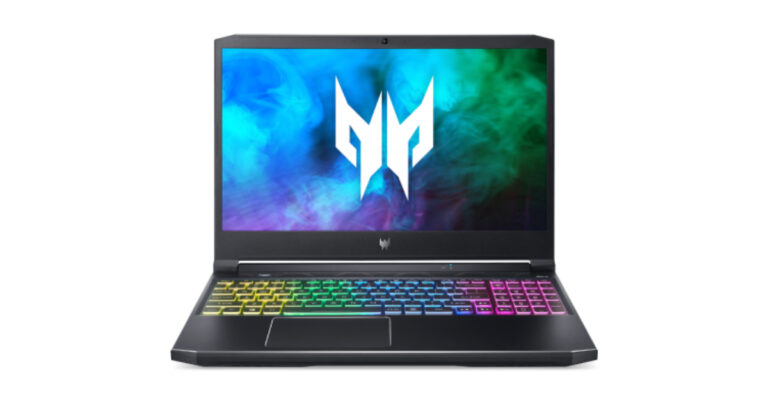
Acer Predator Helios 300 gaming laptop price and availability
The Acer Predator Helios 300 has been launched in India with a starting price of Rs 1,29,999. The laptop will be available for purchase via Acer Online Store, Flipkart, Acer Exclusive stores and other authorised retail stores in the country. Acer Predator Helios 300 gaming laptop specifications Acer Predator Helios 300 gaming laptop features a 15.6-inch Full HD IPS display with a 360 Hz refresh rate. The company also offers a Quad HD IPS display with a 165Hz refresh rate. The screen covers 100 percent sRGB colour gamut. The 3ms overdrive response makes this laptop into high gear a tear-free, seamless experience with minimal ghosting. There is a 4-zone RGB customised keyboard with Predator typeface. Over that, it also has see-through concave-shaped keycaps for WASD, and features two integral keys to take note of Turbo and PredatorSense. The users can monitor their system, overclock, customize RGB preferences, and much more using the utility app.
The Acer Predator Helios 300 gaming laptop is powered by an 11th Gen Intel Core i7-11800H processor paired with up to Nvidia GeForce RTX 3070 graphics. It comes with up to 32GB of DDR4 RAM and 1TB of PCIe Gen 4 SSD storage. The laptop comes with Acer’s Vortex Flow cooling design, featuring a triple-fan cooling system, including a 5th Generation custom-engineered AeroBlade 3D Fan, to redirect airflow.
Acer Predator Helios 300 also has a 360-degree surround sound system – enabling users to experience favourite movies, music, and games with real-world spatial sound. This helps create a wide expansive sound stage centred on the listener with improved harmonics for both mono and stereo.
In terms of connectivity, there is Killer’s E2600 Ethernet Controller, Killer Wi-Fi 6 AX1650i, an HDMI 2.1, MiniDP, Thunderbolt 4 port, and the newest USB 3.2 standard. The gaming laptop also has a 59Whr battery shipped with a 230W power adapter.
For the latest gadget and tech news, and gadget reviews, follow us on Twitter, Facebook and Instagram. For newest tech & gadget videos subscribe to our YouTube Channel. You can also stay up to date using the Gadget Bridge Android App. You can find the latest car and bike news here.
There is a 4-zone RGB customised keyboard with Predator typeface. Over that, it also has see-through concave-shaped keycaps for WASD, and features two integral keys to take note of Turbo and PredatorSense. The users can monitor their system, overclock, customize RGB preferences, and much more using the utility app.
The Acer Predator Helios 300 gaming laptop is powered by an 11th Gen Intel Core i7-11800H processor paired with up to Nvidia GeForce RTX 3070 graphics. It comes with up to 32GB of DDR4 RAM and 1TB of PCIe Gen 4 SSD storage. The laptop comes with Acer’s Vortex Flow cooling design, featuring a triple-fan cooling system, including a 5th Generation custom-engineered AeroBlade 3D Fan, to redirect airflow.
Acer Predator Helios 300 also has a 360-degree surround sound system – enabling users to experience favourite movies, music, and games with real-world spatial sound. This helps create a wide expansive sound stage centred on the listener with improved harmonics for both mono and stereo.
In terms of connectivity, there is Killer’s E2600 Ethernet Controller, Killer Wi-Fi 6 AX1650i, an HDMI 2.1, MiniDP, Thunderbolt 4 port, and the newest USB 3.2 standard. The gaming laptop also has a 59Whr battery shipped with a 230W power adapter.
For the latest gadget and tech news, and gadget reviews, follow us on Twitter, Facebook and Instagram. For newest tech & gadget videos subscribe to our YouTube Channel. You can also stay up to date using the Gadget Bridge Android App. You can find the latest car and bike news here. Top Google Chrome extensions you should install today.

In This Article
1.Save to pockets.
 Save to pockets actually saves bits of web pages and images to your clipboard which you can personalise. Once you save a web page, image or link while surfing you can view them back in your free time. The best thing about this extension is that it syncs your saved content across all your devices. Pocket also suggests content related to your saved data, which is really productive.
Download here
Also Read: How to take a screenshot on Windows 10 using a laptop or a PC?
Save to pockets actually saves bits of web pages and images to your clipboard which you can personalise. Once you save a web page, image or link while surfing you can view them back in your free time. The best thing about this extension is that it syncs your saved content across all your devices. Pocket also suggests content related to your saved data, which is really productive.
Download here
Also Read: How to take a screenshot on Windows 10 using a laptop or a PC?
2.LastPass
 It feels very tempting to keep an easy password for you to remember. Remembering difficult passwords for all the different sites is very difficult. Well, LastPass got you covered in this case. It remembers what forms you filled and your suggestions over a field. Also, there is no worry about your passwords getting stolen as the extension stores your data locally with encryption methods. All you have to do now is remember one password, which opens up your account in LastPass and you are good to go.
Download here
It feels very tempting to keep an easy password for you to remember. Remembering difficult passwords for all the different sites is very difficult. Well, LastPass got you covered in this case. It remembers what forms you filled and your suggestions over a field. Also, there is no worry about your passwords getting stolen as the extension stores your data locally with encryption methods. All you have to do now is remember one password, which opens up your account in LastPass and you are good to go.
Download here
3.The Great Suspender
 When you open multiple tabs in Google Chrome there is a lot of RAM usage in your System. Google Chrome has a tendency to become a notorious memory hog when it comes to the extra load.
The Great Suspender helps you by suspending the tabs which are not being used and are still open in your system. You can personalise the behaviour of your tabs. Also, If you use a tab less often, but do not want this extension to kill your tab, you can whitelist the particular tab. This extension will surely help you clear the clutter and give some extra power to your system.
Download here
Also Read: Tenda rolls out 4G LTE Advanced Pocket Mobile Wi-Fi Hotspots in India
When you open multiple tabs in Google Chrome there is a lot of RAM usage in your System. Google Chrome has a tendency to become a notorious memory hog when it comes to the extra load.
The Great Suspender helps you by suspending the tabs which are not being used and are still open in your system. You can personalise the behaviour of your tabs. Also, If you use a tab less often, but do not want this extension to kill your tab, you can whitelist the particular tab. This extension will surely help you clear the clutter and give some extra power to your system.
Download here
Also Read: Tenda rolls out 4G LTE Advanced Pocket Mobile Wi-Fi Hotspots in India
4.GoFullPage
 This extension really comes in handy when it comes to taking a screenshot. Loved the feature of the extended screenshots in your smartphone? This extension works the same way. With the smart page detection algorithm used by the extension, taking a screenshot and saving it into any image format is easy.
If you have a habit of saving a lot of screenshots this extension will really come in handy.
Download here
This extension really comes in handy when it comes to taking a screenshot. Loved the feature of the extended screenshots in your smartphone? This extension works the same way. With the smart page detection algorithm used by the extension, taking a screenshot and saving it into any image format is easy.
If you have a habit of saving a lot of screenshots this extension will really come in handy.
Download here
5.PushBullet
 Remove all the distractions while you browse the internet on your chrome. PushBullets send you notifications of your connected devices to your Chrome extension directly. You can also cut calls and reply to messages directly from the extension. It supports services like WhatsApp, Messenger and SMS in-built making it hassle-free to reply to others. The extension and app need to be installed on the device you wish to connect. This extension is ideal for people who find it difficult to manage so many devices together.
Download Here
These extensions are some of our best that will really help you to take full advantage of your Google Chrome browser and make you even more productive while surfing or working on the internet.
For the latest gadget and tech news, and gadget reviews, follow us on Twitter, Facebook and Instagram. For newest tech & gadget videos subscribe to our YouTube Channel. You can also stay up to date using the Gadget Bridge Android App. You can find the latest car and bike news here.
Remove all the distractions while you browse the internet on your chrome. PushBullets send you notifications of your connected devices to your Chrome extension directly. You can also cut calls and reply to messages directly from the extension. It supports services like WhatsApp, Messenger and SMS in-built making it hassle-free to reply to others. The extension and app need to be installed on the device you wish to connect. This extension is ideal for people who find it difficult to manage so many devices together.
Download Here
These extensions are some of our best that will really help you to take full advantage of your Google Chrome browser and make you even more productive while surfing or working on the internet.
For the latest gadget and tech news, and gadget reviews, follow us on Twitter, Facebook and Instagram. For newest tech & gadget videos subscribe to our YouTube Channel. You can also stay up to date using the Gadget Bridge Android App. You can find the latest car and bike news here. Vivo announced a price cut of Rs 3,000 on Vivo X60 5G
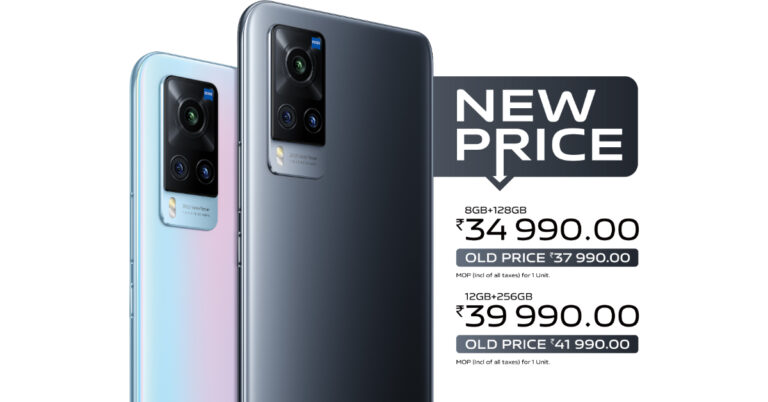
 In order to reward the customers, Vivo has also announced attractive offers on the purchase of the smartphone. They can now avail a cashback of Rs 5,000 with HDFC Bank and ICICI Bank on credit card regular and credit/debit card EMI transactions, no-cost EMI up to 12 months and one-time screen replacement through official e-store as well as through other online partners in the country. Through the mainline stores, the customers can get up to 10% cashback with HDFC Bank, ICICI Bank and Bajaj Finance along with a one-time screen replacement offer. You should also note that these offers are valid till August 31. This price change shall be applicable across all offline retail partners, Vivo India E-store and major e-commerce websites.
Vivo X60 5G specifications
Vivo X60 5G features a 6.5-inch full-HD+ AMOLED display with 1,080×2,376 pixels of resolution and a 19.8:9 aspect ratio and a 120Hz refresh rate. The device runs on Funtouch OS 11.1 on top of Android 11 and is powered by Snapdragon 870 SoC with up to 12GB RAM and 256GB of storage.
For the photos and videos, Vivo X60 5G comes with a triple rear camera set up that includes a 48-megapixel primary sensor with f/1.48 aperture. In addition to this, there is a 13-megapixel secondary sensor and a 13-megapixel tertiary sensor. While on the front there is a 32-megapixel selfie sensor.
The phone packs a 4,200mAh battery and comes with 33W fast charging support. For connectivity, there is 5G, 4G LTE, Wi-Fi, Bluetooth 5.1, GPS/ A-GPS, NFC, and a USB Type-C port. While the sensors on the device include an accelerometer, colour temperature sensor, ambient light sensor, proximity sensor, e-compass, gyroscope, and laser-focussing sensor.
For the latest gadget and tech news, and gadget reviews, follow us on Twitter, Facebook and Instagram. For newest tech & gadget videos subscribe to our YouTube Channel. You can also stay up to date using the Gadget Bridge Android App. You can find the latest car and bike news here.
In order to reward the customers, Vivo has also announced attractive offers on the purchase of the smartphone. They can now avail a cashback of Rs 5,000 with HDFC Bank and ICICI Bank on credit card regular and credit/debit card EMI transactions, no-cost EMI up to 12 months and one-time screen replacement through official e-store as well as through other online partners in the country. Through the mainline stores, the customers can get up to 10% cashback with HDFC Bank, ICICI Bank and Bajaj Finance along with a one-time screen replacement offer. You should also note that these offers are valid till August 31. This price change shall be applicable across all offline retail partners, Vivo India E-store and major e-commerce websites.
Vivo X60 5G specifications
Vivo X60 5G features a 6.5-inch full-HD+ AMOLED display with 1,080×2,376 pixels of resolution and a 19.8:9 aspect ratio and a 120Hz refresh rate. The device runs on Funtouch OS 11.1 on top of Android 11 and is powered by Snapdragon 870 SoC with up to 12GB RAM and 256GB of storage.
For the photos and videos, Vivo X60 5G comes with a triple rear camera set up that includes a 48-megapixel primary sensor with f/1.48 aperture. In addition to this, there is a 13-megapixel secondary sensor and a 13-megapixel tertiary sensor. While on the front there is a 32-megapixel selfie sensor.
The phone packs a 4,200mAh battery and comes with 33W fast charging support. For connectivity, there is 5G, 4G LTE, Wi-Fi, Bluetooth 5.1, GPS/ A-GPS, NFC, and a USB Type-C port. While the sensors on the device include an accelerometer, colour temperature sensor, ambient light sensor, proximity sensor, e-compass, gyroscope, and laser-focussing sensor.
For the latest gadget and tech news, and gadget reviews, follow us on Twitter, Facebook and Instagram. For newest tech & gadget videos subscribe to our YouTube Channel. You can also stay up to date using the Gadget Bridge Android App. You can find the latest car and bike news here. TATA is going all green with the release of TATA Tigor EV
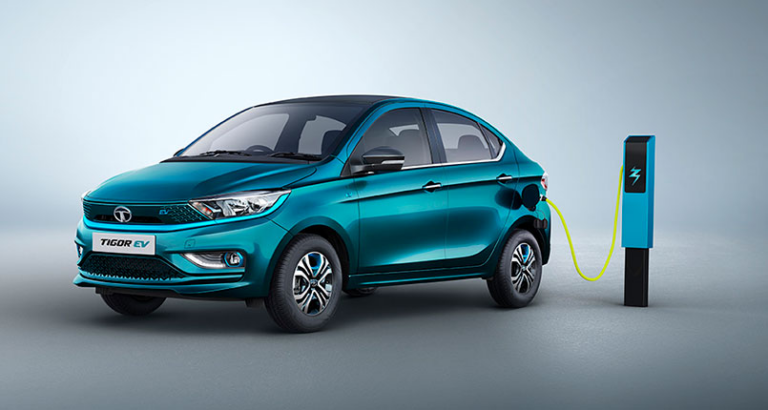
TATA Tigor EV Specs:
TATA did no compromise in adding new features to its new EV. The heart of the car is the 26 kWh lithium-ion battery, which will run for a long time. If you are worried about the battery it comes with an IP 67 rating with the company providing 8 years and 160,000 KM of warranty on it. Talking about the motor, it produces 55kW of power and 170 Nm of peak torque. The Tigor EV does 0 to 60 in just 5.7 seconds. This is really impressive for an entry level car. With great power comes great responsibility. TATA took care of this by building a rear crash compatible structure and complied Tigor with OBD 64 test standards. Tigor EV is technically sound as well with a globally acceptable CCS2 charging protocol. Meaning it accepts fast charging from any charging depo. Tigor can also be charged with a 15A wall socket. Tata Tigor EV is equipped with 30+ car connect features including remote command and remote diagnosis so the consumer can check on their car from their smartphone. The New Tigor looks gorgeous and with these exciting features, it seems future ready. Right now you can book your TATA Tigor at a selective dealership by paying Rs 21,000. For more information on this topic stay connected with Motor Bridge. The car is expected to carry a price tag of just under Rs 11 lakhs in India (ex-showroom). Source: Motor Bridge For the latest gadget and tech news, and gadget reviews, follow us on Twitter, Facebook and Instagram. For newest tech & gadget videos subscribe to our YouTube Channel. You can also stay up to date using the Gadget Bridge Android App. You can find the latest car and bike news here.The wait is over Battlegrounds Mobile India iOS version is now available for download: How to download BGMI on your iPhones and iPads

How to Download Battleground Mobile India iOS version aka BGMI from Apple Store?
- Go to AppStore and click on the link or search for the game.
- Now click on the Get button and then tap on the Install button.
- Sign in for the BGMI using your Apple ID and password.
- Now you are ready to go open button and start playing the game.
How to schedule a Google Meeting using Google calendar

In This Article
1. On System
Step 1 – Open Google calendar on Google via browser. Step 2 – On the top left corner click on the + Create button Step 3 – Create an event accordingly by adding guests or friends you want to attend the meeting. Then click on “Add Google meet video conferencing” and you are good to go.

2. On Mobile
On your mobile, setting up the meeting is pretty much the same and it is very easy to schedule a meeting via your google calendar. Step 1 – Open the Google calendar application on your phone Step 2 – Tap on the multicolour + symbol on the bottom right of your phone Step 3 – Add title and people accordingly. Set up the event and click on “add video conference “ and you are good to go.
 This was a perfect step by step guide on how to add meetings or conferences directly via your google calendar. We hope this was a hidden future for many and will come in handy. This feature will surely make your work from home a lot easier and smooth.
For the latest gadget and tech news, and gadget reviews, follow us on Twitter, Facebook and Instagram. For newest tech & gadget videos subscribe to our YouTube Channel. You can also stay up to date using the Gadget Bridge Android App. You can find the latest car and bike news here
This was a perfect step by step guide on how to add meetings or conferences directly via your google calendar. We hope this was a hidden future for many and will come in handy. This feature will surely make your work from home a lot easier and smooth.
For the latest gadget and tech news, and gadget reviews, follow us on Twitter, Facebook and Instagram. For newest tech & gadget videos subscribe to our YouTube Channel. You can also stay up to date using the Gadget Bridge Android App. You can find the latest car and bike news here iQoo 8, iQoo 8 Pro with fast charging and higher refresh rate support launched

In This Article
iQoo 8, iQoo 8 Pro price and availability details
The vanilla iQoo 8 will be available in two different configurations and will come in two different colour options: Legendary Edition with the BMW M Motorsport colourway and a Black colour variant. The 8GB RAM with 128GB storage option is priced at CNY 3,799 that translates to Rs 43,600 whereas the 12GB RAM with 256GB storage model will be priced at CNY 4,199 which translates to Rs 48,200. On the other hand, the iQoo 8 Pro model will come in a Legendary Edition and Track Version. The device will be priced at CNY 4,999 for the 8GB RAM with 256GB storage which comes around Rs 43,600, the 12GB RAM with 256GB model will be available at CYN 4,199 that translates to Rs 63,100 and the top-notch 12GB RAM with 512GB storage option at CYN 5,999 translating to Rs 68,800. Both the devices are now available for pre-orders in China. While the sale of gaming smartphones will begin from August 24 onward in the country.iQoo 8 specifications
iQoo 8 features a 6.56-inch full-HD+ 10-bit colour AMOLED display with a 1,080×2,376 pixels of resolution. The screen also comes with 120Hz refresh rate support, a pixel density of 398ppi and a 19.8:9 aspect ratio. The device runs on Origin OS 1.0 for iQoo and is powered by the Qualcomm Snapdragon 888 SoC paired with 12GB of LPDDR5 RAM and up to 256GB of UFS 3.1 storage. In terms of photography, the vanilla model is highlighted with a triple rear camera setup that includes a 48-megapixel IMX598 sensor main camera sensor with f/1.79 aperture, a 13-megapixel ultra-wide-angle sensor with f/2.2 aperture and a 13-megapixel depth sensor with f/2.46 aperture. Upfront, there is a 16-megapixel sensor for taking selfies with an f/2.45 aperture.
The iQoo 8 also packs a 4,350mAh battery with 120W fast charging support. In terms of connectivity, there is 5G, dual-band Wi-Fi, NFC, GPS, Bluetooth v5.2, and a USB Type-C port. The device comes with an in-display fingerprint scanner, ambient light sensor, proximity sensor, gyroscope, accelerometer, and e-compass.
In terms of photography, the vanilla model is highlighted with a triple rear camera setup that includes a 48-megapixel IMX598 sensor main camera sensor with f/1.79 aperture, a 13-megapixel ultra-wide-angle sensor with f/2.2 aperture and a 13-megapixel depth sensor with f/2.46 aperture. Upfront, there is a 16-megapixel sensor for taking selfies with an f/2.45 aperture.
The iQoo 8 also packs a 4,350mAh battery with 120W fast charging support. In terms of connectivity, there is 5G, dual-band Wi-Fi, NFC, GPS, Bluetooth v5.2, and a USB Type-C port. The device comes with an in-display fingerprint scanner, ambient light sensor, proximity sensor, gyroscope, accelerometer, and e-compass.
iQoo 8 Pro specifications
iQoo 8 Pro comes with a massive 6.78-inch 2K AMOLED display with 1,440×3,200 pixels of resolution. It features a 120Hz refresh rate and HDR support along with 517ppi pixel density as well as a 20:9 aspect ratio. This gaming smartphone is powered by the very latest Qualcomm Snapdragon 888+ SoC along with Adreno 660 GPU for graphics. It will be available with up to 12GB of LPDDR5 RAM and up to 512GB of UFS 3.1 storage for storing content. In addition to this, the phone includes a triple rear camera set-up that includes a 50-megapixel IMX766V sensor with an f/1.75 sensor and gimbal stabilisation. Further, it is supported by a 48-megapixel sensor with ultra-wide-angle with f/2.2 aperture and a 16-megapixel depth sensor with f/2.23 aperture. In terms of selfies, the phone includes a 16-megapixel front-facing camera with an f/2.4 aperture.
The Pro model is backed by a 4,500mAh battery with 120W fast charging and 50W fast wireless charging support. The device includes all the necessary connectivity options and sensors similar to the standard model. However, there is an ultrasonic 3D wide-area in-display fingerprint sensor for authentication.
For the latest gadget and tech news, and gadget reviews, follow us on Twitter, Facebook and Instagram. For newest tech & gadget videos subscribe to our YouTube Channel. You can also stay up to date using the Gadget Bridge Android App. You can find the latest car and bike news here.
In addition to this, the phone includes a triple rear camera set-up that includes a 50-megapixel IMX766V sensor with an f/1.75 sensor and gimbal stabilisation. Further, it is supported by a 48-megapixel sensor with ultra-wide-angle with f/2.2 aperture and a 16-megapixel depth sensor with f/2.23 aperture. In terms of selfies, the phone includes a 16-megapixel front-facing camera with an f/2.4 aperture.
The Pro model is backed by a 4,500mAh battery with 120W fast charging and 50W fast wireless charging support. The device includes all the necessary connectivity options and sensors similar to the standard model. However, there is an ultrasonic 3D wide-area in-display fingerprint sensor for authentication.
For the latest gadget and tech news, and gadget reviews, follow us on Twitter, Facebook and Instagram. For newest tech & gadget videos subscribe to our YouTube Channel. You can also stay up to date using the Gadget Bridge Android App. You can find the latest car and bike news here. 18 August 2021 Flipkart Daily Trivia Quiz Answers: Answer to win exciting prizes

In This Article
How to participate in the Flipkart Daily Trivia Quiz
To participate download the Flipkart app on your phone. Then open the Flipkart app then head to Game Zone. Now click on the Daily Trivia Banner or search for Daily Trivia. Enter the game and answer all 5 questions with correct answers.18 August 2021 Flipkart Daily Trivia Quiz Answers
Question 1: In the United States, What sport is known as ‘the national pastime’? Answer: Baseball Question 2: Who is the owner of the Football Club Inter Miami CF? Answer: David Beckham Question 3: Matches of which of these sports are officiated by a referee called gyoji? Answer: Suma Wrestling Question 4: The women teams of which two countries played the first-ever T20I match? Answer: England-New Zealand Question 5: Sydney? Answer: Sydney18 August 2021 Amazon Quiz: Answer five easy questions to win Rs 5,000 Amazon Pay Balance

Amazon India is back with another lucrative quiz on its platform. 18 August 2021 Amazon Quiz has already gone live and today you can stand a chance to win Rs 5,000 Amazon Pay Balance. Every day the e-commerce platform brings an opportunity for its customers to win amazing prizes by answering five questions. The questionnaire is based on general knowledge and current affairs. If you managed to answer all the questions correctly you will be eligible to win gifts such as iPhone X, iPhone Xs, Seagate HDD, GoPro Hero 8 Camera, LG Smartphones, Air Purifier, Oppo smartphones, Amazon Pay Balance among others. The Amazon Quiz is hosted for the app users only which means desktops users cannot participate in the quiz. So before participating just make sure you have downloaded the App. The lucky users might win something by answering all the questions correctly. The Amazon Quiz can be played daily from 12 AM to 11:59 PM. Daily the e-commerce platform gives a chance to millions of people across the country to win exciting prizes. To participate and win Rs 5,000 Amazon Pay Balance check out today’s answers. 18 August 2021 Amazon Quiz Answers Question 1: Valmiki National Park is the only national park in which state of India? The answer is- D) Bihar Question 2 of 5: In July 2021, the Department of Public Enterprises was shifted to which ministry? The answer is- A) Ministry of Finance Question 3 of 5: Which reusable robotic space plane is scheduled by NASA to deliver cargo to the International Space Station in 2022? The answer is- B) Dream Chaser Question 4 of 5: Which Indian city is this UNESCO World Heritage Site located in? The answer is- D) Agra Question 5 of 5: Which famous basketball player from this country recently became the MVP in the NBA finals? The answer is- B) Giannis Antetokounmpo
Logitech G Pro Wireless Gaming Mouse goes on sale in India via Amazon

In This Article
Logitech G Pro Wireless Gaming Mouse price and availability
Logitech G Pro Wireless has been launched in India with a price tag of Rs 10,995. The device can be purchased via the e-commerce website Amazon. The e-retailer is also offering Rs 6,00 off on the purchase of the wireless gaming mouse. In addition to this, there will be a 5 percent instant discount on the HSBC Cashback card and Amazon Pay ICICI Bank credit card for Prime members only. There will be a 3 percent cashback to other customers.
Logitech G Pro Wireless gaming mouse specifications
The Logitech G PRO Wireless Gaming Mouse is powered by the company’s own Hero 25K sensor that supports 100 to 25,400dpi sensitivity. The sensor incorporates an all-new lens and an updated tracking algorithm that delivers ultra-precise tracking with no acceleration, smoothing, or filtering over the entire DPI range. There is a USB report rate of 1,000Hz and runs on a 32-bit ARM microprocessor. The mouse is designed to withstand pro esports players during training and tournaments. It is a lightweight mouse with an advanced 1mm thin wall construction and unique endoskeleton design which weighs 80gms. The surface of PRO is coated for durability and grip while the feet are tested to perform for over 250 km of use. It is compatible with the Logitech G POWERPLAY Wireless Charging System. As per the company Hero 25K consumes 10x less power than predecessors, like PMW3366, enabling a lighter battery and longer battery life. The wireless functionality of the device overcomes the limitations of latency, connectivity and power to provide consistent, lag-free, 1 ms report rate connection—without a wire. It is paired with Logitech G’s ultra-fast LIGHTSPEED wireless technology that provides a lag-free gaming experience, end-to-end optimized wireless connection and increased responsiveness for reliable competition-level performance.
The Wireless USB receiver can be stored inside the mouse for easy portability. There are left and right side buttons that can be removed easily to make the mouse truly ambidextrous. Furthermore, all the buttons feature LIGHTSYNC RGB lighting can also be customized using the Logitech GHUB Software. While the DPI button is located on the underside of the Logitech G PRO Wireless to prevent unintentional DPI shifts in-game.
Additionally, the Logitech G PRO Wireless Gaming Mouse offers ~16.8M colour customization that represents your team colours, personalizing your setup, or synchronizing with other G products. The mouse is compatible with Windows 7 or later, as well as macOS 10.11 or later.
The company says the mouse represents more than 2 years of development in collaboration with more than 50 professional esports players globally and blends extreme performance with the most advanced technologies into a gaming mouse design.
For the latest gadget and tech news, and gadget reviews, follow us on Twitter, Facebook and Instagram. For newest tech & gadget videos subscribe to our YouTube Channel. You can also stay up to date using the Gadget Bridge Android App. You can find the latest car and bike news here.
The wireless functionality of the device overcomes the limitations of latency, connectivity and power to provide consistent, lag-free, 1 ms report rate connection—without a wire. It is paired with Logitech G’s ultra-fast LIGHTSPEED wireless technology that provides a lag-free gaming experience, end-to-end optimized wireless connection and increased responsiveness for reliable competition-level performance.
The Wireless USB receiver can be stored inside the mouse for easy portability. There are left and right side buttons that can be removed easily to make the mouse truly ambidextrous. Furthermore, all the buttons feature LIGHTSYNC RGB lighting can also be customized using the Logitech GHUB Software. While the DPI button is located on the underside of the Logitech G PRO Wireless to prevent unintentional DPI shifts in-game.
Additionally, the Logitech G PRO Wireless Gaming Mouse offers ~16.8M colour customization that represents your team colours, personalizing your setup, or synchronizing with other G products. The mouse is compatible with Windows 7 or later, as well as macOS 10.11 or later.
The company says the mouse represents more than 2 years of development in collaboration with more than 50 professional esports players globally and blends extreme performance with the most advanced technologies into a gaming mouse design.
For the latest gadget and tech news, and gadget reviews, follow us on Twitter, Facebook and Instagram. For newest tech & gadget videos subscribe to our YouTube Channel. You can also stay up to date using the Gadget Bridge Android App. You can find the latest car and bike news here. Amazon Echo Show 10 review: Follow me everywhere

In This Article
Amazon Echo Show 10: Design and display
The Amazon Echo Show 10 comes in one of the largest (eco-friendly) boxes any Echo device comes in. Neatly tucked in, after unboxing, we were greeted with a large cylindrical speaker that has a rotating crown on top, which attaches the touchscreen to the speaker. The display is not edge to edge, but we did not mind the extra bezels. More so because on the top right you also get a large camera with a privacy shutter. The top of the screen has a couple of buttons as well. These include volume up and down along with the Mics/Camera on/off buttons. So, there is no power button on Amazon Echo Show 10. Just connect the power adaptor to the port located at the bottom of the speaker and you are good to go. The speaker cylinder has two 1-inch tweeters along with a 3-inch woofer inside. More on the audio part in the next section.
The 10.1-inch display on the Amazon Echo Show 10 works really well. The brightness is nice and you can read and see everything easily. We tried it in the kitchen as well as the living room. And no matter what we were up to, checking recipes online or watching soaps on Prime Video or Netflix, the experience was mighty fine. The user interface is easy to grasp, and not once did we felt we were lost. In case you feel lost, you can always ask Alexa for help and she will do the rest. Saying that, we hardly tapped or swiped the screen, as that is the beauty of having a smart speaker connected with a display powered by Alexa.
The top of the screen has a couple of buttons as well. These include volume up and down along with the Mics/Camera on/off buttons. So, there is no power button on Amazon Echo Show 10. Just connect the power adaptor to the port located at the bottom of the speaker and you are good to go. The speaker cylinder has two 1-inch tweeters along with a 3-inch woofer inside. More on the audio part in the next section.
The 10.1-inch display on the Amazon Echo Show 10 works really well. The brightness is nice and you can read and see everything easily. We tried it in the kitchen as well as the living room. And no matter what we were up to, checking recipes online or watching soaps on Prime Video or Netflix, the experience was mighty fine. The user interface is easy to grasp, and not once did we felt we were lost. In case you feel lost, you can always ask Alexa for help and she will do the rest. Saying that, we hardly tapped or swiped the screen, as that is the beauty of having a smart speaker connected with a display powered by Alexa.

Amazon Echo Show 10 review: Performance
Amazon Echo Show 10 does everything the regular Echo speakers do and more. The sound of the speakers is great. If you are throwing a small party at home, this speaker is all you need to fill the room with great tunes. Setting up the Amazon Echo Show 10 is child’s play and we were up and running in no time at all. Since we already have our Amazon account ready, our setup time was very less. In case it is your first time with an Amazon device, then you will take a few extra minutes to set it up. Once up, Alexa takes care of everything. As always, she will learn your preferences. She will put reminders for you, manage your shopping lists, play songs or movies and even turn on the smart lights. As the days go by, she becomes smarter and learns to become a better assistant. You can have multiple profiles connected to it so that she is able to address you with your name, which brings a more personalised feel to the whole AI-human portico. She will understand what kind of music you like, what kind of recipes to show and will be part of the family. Amazon Echo Show 10 can also make audio and video calls for you since there is a screen and camera in it. The camera keeps you in focus and rotates the screen as you move across the room. A rotating camera is a great feature, as it adds to the security. How? The Amazon Echo Show 10 is a smart security camera also, which you can access from anywhere around the world. You can access and rotate the camera in all directions. Not bad Alexa, not bad! Alexa can hear commands from as far away as 15 feet with ease. Even if there is noise in the room, Alexa will answer you 9 out of 10 times.
Verdict
At Rs 24,999 is Amazon Echo Show 10 worth the purchase? That is a definite yes. You can use the device in so many ways. It is a smart speaker, security camera as well as display you can watch movies on in one. Alexa will be a great addition to the family.Amazon Echo Show 10 Pros
Good Sound Alexa Decent touchscreenAmazon Echo Show 10 Cons
Some might find it expensive The screen is on edge to edge For the latest gadget and tech news, and gadget reviews, follow us on Twitter, Facebook and Instagram. For newest tech & gadget videos subscribe to our YouTube Channel. You can also stay up to date using the Gadget Bridge Android App. You can find the latest car and bike news hereIntel announced to launch its first consumer gaming-grade GPU Intel Arc

Intel also revealed the code names of future generations under the Arc brand: Battlemage, Celestial and Druid. As per the company, Intel Arc will be based on the Xe-HPG microarchitecture, a convergence of Intel’s Xe-LP, HP and HPC microarchitectures, that will deliver scalability and compute efficiency with advanced graphics features. Alchemist, the first generation of Intel Arc products, will feature hardware-based ray tracing and artificial intelligence-driven super sampling, and offer full support for DirectX 12 Ultimate. It will also help Intel’s long-term vision is to bring frictionless gaming and content creation experiences to gamers and creators worldwide, giving them innovation and choice in hardware coupled with open and accessible software tools. The Alchemist products will arrive in the first quarter of 2022. Speculations suggest that the Graphics card will comprise TCMC’s 6nm node to deliver a speed of up to 512 execution units and a clock frequency of up to 2.2Ghz. In addition to this, it may come with a 256-bit memory and have a TDP (Thermal Design Power) of about roughly 275W. For the latest gadget and tech news, and gadget reviews, follow us on Twitter, Facebook and Instagram. For newest tech & gadget videos subscribe to our YouTube Channel. You can also stay up to date using the Gadget Bridge Android App. You can find the latest car and bike news hereHere's a sneak peek of pre-production Intel Arc graphics in action. https://t.co/VOMsMN6r2y #IntelArc pic.twitter.com/b9fOsXdRCq
— Intel Graphics (@IntelGraphics) August 16, 2021
Best apps that give you how to dress up tips for each occasion

In This Article
1. Glamoutfit
 This app is best when you really need some external help. Yes, this app is the best in what it does. Here, you can book your own stylist and ask them to style your outfit according to your taste. The stylist will pick up clothes for you and set you up with what looks good on you. They will also tell you the do’s and don’ts.
Once you are done with the combination you want to wear, you can mark that up in the inbuilt calendar. The inbuilt calendar feature keeps track of what you wore and thus help you to not repeat the same outfit again.
Download here.
This app is best when you really need some external help. Yes, this app is the best in what it does. Here, you can book your own stylist and ask them to style your outfit according to your taste. The stylist will pick up clothes for you and set you up with what looks good on you. They will also tell you the do’s and don’ts.
Once you are done with the combination you want to wear, you can mark that up in the inbuilt calendar. The inbuilt calendar feature keeps track of what you wore and thus help you to not repeat the same outfit again.
Download here.
2.Closet Space
 This app allows you to pick clothes out of your own wardrobe. Although setting up this app takes a lot of time as you have to click pictures of each and every pair of clothing in your wardrobe. It is worth the pain as it categorises your clothes into categories and arranges them properly. Now you can set up what you want to wear easily as you can see all the combinations the app will make for you. It also gives you fashion advice and the stories of people on top of the fashion industry are included.
Download here.
Read Also: Samsung AirDresser that kills 99.9% of Bacteria and Viruses from clothes launched in India
This app allows you to pick clothes out of your own wardrobe. Although setting up this app takes a lot of time as you have to click pictures of each and every pair of clothing in your wardrobe. It is worth the pain as it categorises your clothes into categories and arranges them properly. Now you can set up what you want to wear easily as you can see all the combinations the app will make for you. It also gives you fashion advice and the stories of people on top of the fashion industry are included.
Download here.
Read Also: Samsung AirDresser that kills 99.9% of Bacteria and Viruses from clothes launched in India
3. Closet+
 This app is at the bottom of our list as it’s only available for iOS users, currently. The app is refined and easy to use. The algorithm for arranging your clothes works extremely well. You can favourite your clothes and plan ahead what you have to wear the following week.
Download here.
These are the top app picks from our end that will step up your fashion game a level and help you look outstanding on any and every occasion.
For the latest gadget and tech news, and gadget reviews, follow us on Twitter, Facebook and Instagram. For newest tech & gadget videos subscribe to our YouTube Channel. You can also stay up to date using the Gadget Bridge Android App. You can find the latest car and bike news here.
This app is at the bottom of our list as it’s only available for iOS users, currently. The app is refined and easy to use. The algorithm for arranging your clothes works extremely well. You can favourite your clothes and plan ahead what you have to wear the following week.
Download here.
These are the top app picks from our end that will step up your fashion game a level and help you look outstanding on any and every occasion.
For the latest gadget and tech news, and gadget reviews, follow us on Twitter, Facebook and Instagram. For newest tech & gadget videos subscribe to our YouTube Channel. You can also stay up to date using the Gadget Bridge Android App. You can find the latest car and bike news here. Motorola Edge 20, Edge 20 Fusion with 108-megapixel camera and 5G support launched in India

In This Article
Motorola Edge 20, Edge 20 Fusion pricing and availability details
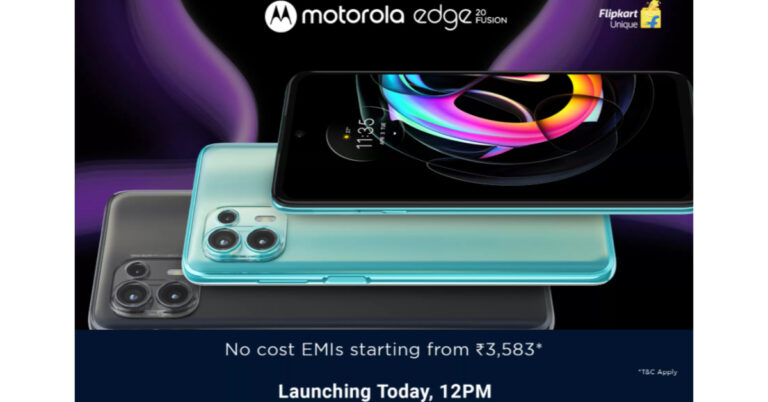
Motorola Edge 20 has been launched in India with a price tag of Rs 29,999 for the single 8GB RAM with 128GB of storage option. Whereas the Motorola Edge 20 Fusion will be available at Rs 21,499 for the 6GB RAM with 128GB storage and at Rs 22,999 for the 8Gb RAM with 128GB storage model. The standard model will be made available in two colour options of Frosted Pearl and Frosted Emerald. On the other hand, Fusion will come in Cyber Teal and Electric Graphite colour options. Both the devices will be available for purchase via Flipkart from August 24 and August 27 respectively in the country. The sale will commence at 12 noon onwards.Motorola Edge 20 specifications
Motorola Edge 20 features a full-HD+ 6.7-inch OLED Max Vision display with 1,080×2,400 pixels of resolution. It offers a 144Hz refresh rate and up to 576Hz of touch latency, DCI-P3 colour gamut space coverage and with 20:9 aspect ratio. The phone runs MyUX on top of Android 11 and is powered by octa-core Qualcomm Snapdragon 778G SoC, along with 8GB of LPDDR4 RAM and 128GB of storage. For the phones and videos, the device equips a triple camera setup on the back of Edge 20 Pro housing a 108-megapixel Samsung ISOCELL HM2 sensor, a 16-megapixel ultra-wide-angle sensor and a macro lens, and an 8-megapixel sensor with a 3x high-res optical zoom and 30X Super Zoom telephoto lens. There is a 32-megapixel front-facing camera on the front.
In addition to this, the handset is laden with a 4,000mAh battery that also supports 30W TurboPower fast charging. For connectivity, it includes a 5G, 4G LTE, Wi-Fi 6, Bluetooth v5.2, GPS/ A-GPS, NFC, and a USB Type-C port. Whereas the sensors on the phone include an accelerometer, ambient light sensor, gyroscope, magnetometer, and proximity sensor.
For the phones and videos, the device equips a triple camera setup on the back of Edge 20 Pro housing a 108-megapixel Samsung ISOCELL HM2 sensor, a 16-megapixel ultra-wide-angle sensor and a macro lens, and an 8-megapixel sensor with a 3x high-res optical zoom and 30X Super Zoom telephoto lens. There is a 32-megapixel front-facing camera on the front.
In addition to this, the handset is laden with a 4,000mAh battery that also supports 30W TurboPower fast charging. For connectivity, it includes a 5G, 4G LTE, Wi-Fi 6, Bluetooth v5.2, GPS/ A-GPS, NFC, and a USB Type-C port. Whereas the sensors on the phone include an accelerometer, ambient light sensor, gyroscope, magnetometer, and proximity sensor.
Motorola Edge 20 Fusion specifications
Motorola Edge 20 Fusion comes with a similar screen size but with a lower 90Hz refresh rate. The phone also runs Android 11 on top of MyUX custom skin. Under the hood, there is an octa-core MediaTek Dimensity 800U 5G SoC paired with up to 8GB of RAM and 128GB of onboard storage. Edge 20 Fusion also includes a triple rear camera set up that includes a 108-megapixel primary sensor, an 8-megapixel ultra-wide-angle lens and Macro Vision, and a 2-megapixel depth sensor. Similarly to its sibling the phone offers a 32-megapixel selfie camera on the front.
In terms of connectivity, there is 5G, 4G LTE, Wi-Fi 802.11ac, Bluetooth v5, GPS/ A-GPS, and a USB Type-C port. There is a side-mounted fingerprint sensor along with other sensors on the board including an accelerometer, ambient light sensor, gyroscope, magnetometer, and proximity sensor. The phone boasts a 5,000mAh battery that comes with 30W TurboPower fast charging support.
For the latest gadget and tech news, and gadget reviews, follow us on Twitter, Facebook and Instagram. For newest tech & gadget videos subscribe to our YouTube Channel. You can also stay up to date using the Gadget Bridge Android App. You can find the latest car and bike news here.
Edge 20 Fusion also includes a triple rear camera set up that includes a 108-megapixel primary sensor, an 8-megapixel ultra-wide-angle lens and Macro Vision, and a 2-megapixel depth sensor. Similarly to its sibling the phone offers a 32-megapixel selfie camera on the front.
In terms of connectivity, there is 5G, 4G LTE, Wi-Fi 802.11ac, Bluetooth v5, GPS/ A-GPS, and a USB Type-C port. There is a side-mounted fingerprint sensor along with other sensors on the board including an accelerometer, ambient light sensor, gyroscope, magnetometer, and proximity sensor. The phone boasts a 5,000mAh battery that comes with 30W TurboPower fast charging support.
For the latest gadget and tech news, and gadget reviews, follow us on Twitter, Facebook and Instagram. For newest tech & gadget videos subscribe to our YouTube Channel. You can also stay up to date using the Gadget Bridge Android App. You can find the latest car and bike news here. Nothing ear (1) is now available for pre-orders in India via Flipkart

 To recall, the Nothing ear (1) was launched in other markets where it was offered at $99 in the US that transṣlates to Rs 7,351, GBP 99 in the UK that comes around Rs 10,165 and EUR 99 for the European market translated to Rs 8,654.
Nothing ear (1) specifications
Speaking of the specifications, Nothing ear (1) features a transparent design. The true wireless earphones equip a 1.6mm dynamic driver and a spacious air chamber that provide advanced bass, mid, and treble performance. The audio device comes with pressure-relieving vents and two different modes of ANC- light mode and maximum mode.
The Nothing ear (1) can be paired instantly with Google Fast Pair compatible devices. The earphones are IPX4 certified for sweat and dust resistance. These have Bluetooth 5.2 connectivity with SBC and AAC codecs. The audio device also offers a customized equalizer, gestures, Find My Earbud, and more with the ear (1) app, available on iOS and Android. It comes with three high definition mics to provide better audio quality. While the power case charges wirelessly and charges your earbuds fast. On the battery front it earbuds provide 5 hours of listening time and 34 hours with the case.
For the latest gadget and tech news, and gadget reviews, follow us on Twitter, Facebook and Instagram. For newest tech & gadget videos subscribe to our YouTube Channel. You can also stay up to date using the Gadget Bridge Android App. You can find the latest car and bike news here.
To recall, the Nothing ear (1) was launched in other markets where it was offered at $99 in the US that transṣlates to Rs 7,351, GBP 99 in the UK that comes around Rs 10,165 and EUR 99 for the European market translated to Rs 8,654.
Nothing ear (1) specifications
Speaking of the specifications, Nothing ear (1) features a transparent design. The true wireless earphones equip a 1.6mm dynamic driver and a spacious air chamber that provide advanced bass, mid, and treble performance. The audio device comes with pressure-relieving vents and two different modes of ANC- light mode and maximum mode.
The Nothing ear (1) can be paired instantly with Google Fast Pair compatible devices. The earphones are IPX4 certified for sweat and dust resistance. These have Bluetooth 5.2 connectivity with SBC and AAC codecs. The audio device also offers a customized equalizer, gestures, Find My Earbud, and more with the ear (1) app, available on iOS and Android. It comes with three high definition mics to provide better audio quality. While the power case charges wirelessly and charges your earbuds fast. On the battery front it earbuds provide 5 hours of listening time and 34 hours with the case.
For the latest gadget and tech news, and gadget reviews, follow us on Twitter, Facebook and Instagram. For newest tech & gadget videos subscribe to our YouTube Channel. You can also stay up to date using the Gadget Bridge Android App. You can find the latest car and bike news here. Motorola Edge 20 and Edge 20 Fusion launching in India today
17 August 2021 Flipkart Daily Trivia Quiz Answers: Answer to win exciting prizes

In This Article
How to participate in the Flipkart Daily Trivia Quiz
To participate download the Flipkart app on your phone. Then open the Flipkart app then head to Game Zone. Now click on the Daily Trivia Banner or search for Daily Trivia. Enter the game and answer all 5 questions with correct answers.17 August 2021 Flipkart Daily Trivia Quiz Answers
Question 1: What surname does the lead couple of the 2007 film Saawariya share? Answer: Kapoor Question 2: Which duo gave the music for the iconic film ‘Dilwale Dulhaniya Le Jayenge’? Answer: Jatin-Lalit Question 3: Which Indian actress is also known for her role in the film ‘Kashmir Ki Kali’? Answer: Sharmila Tagore Question 4: The title of the iconic film ‘Do Bigha Zamin’ was inspired from a poem by? Answer: Rabindranath Tagore Question 5: In the film, ‘The Sky is Pink’ Aisha fondly calls her mother Moose and her father? Answer: Panda17 August 2021 Amazon Quiz: Participate and win Rs 50,000 Amazon Pay Balance

Every day Amazon India brings a daily quiz for its customers to win exciting new prizes every day on its platform. 17 August 2021 Amazon Quiz can be played daily from 12 AM to 11:59 PM. Today you can win a Rs 50,000 Amazon Pay Balance if you managed to answer all the questions correctly. Daily a new set of questions is presented in front of the participants that gives millions of people across the country to win exciting prizes.
The 17 August 2021 Amazon Quiz has gone live on its mobile platform. The participants have to answer 5 questions that are based on general knowledge and current affairs. After clearing the daily quiz their name will be shortlisted for a lucky draw to select a winner. Amazon announces the results of the lucky draw at the end of the month. So today’s Quiz will let you win a Rs 50,000 Amazon Pay Balance.17 August 2021 Amazon Quiz Answers
Question 1: Which organisation will help the government in implementing satellite TV classrooms in rural India? The answer is- A) ISRO Question 2: Jovenel Moïse, who was assassinated in July 2021, was the president of which country? The answer is- B) Haiti Question 3: Which of these actors has handed back his three Golden Globes in protest of a lack of diversity in HFPA? The answer is- A) Tom Cruise Question 4: What are these popularly known as? The answer is- D) Vinyls Question 5: Which Mexican holiday are they seen celebrating? The answer is- B) Day of the DeadSamsung Galaxy Z Fold 3, Samsung Galaxy Z Flip launched in India: Pricing and launch offer details of the foldable phones
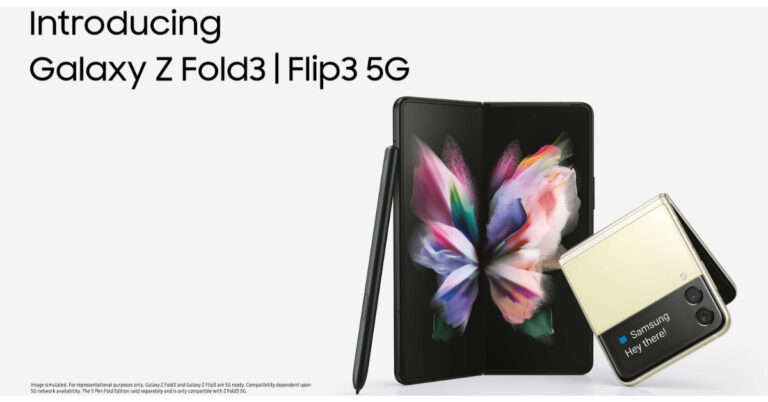
Samsung Galaxy Z Fold 3, Samsung Galaxy Z Flip price and availability details
Samsung Galaxy Z Fold 3 has been launched in India with a starting price of Rs 1,49,999 for the 12GB RAM with a 256GB storage variant. The price for the 12GB RAM with a 512GB storage variant is set at Rs 1,57,999. It will be available in two colour options of Phantom Black and Phantom Green. Whereas the Samsung Galaxy Z Flip 3 is priced in India at Rs 84,999 for the 8GB RAM with 128GB storage option and the 256GB storage model will come at Rs 88,999. This foldable phone will also be offered in two colour options of Phantom Black and Cream. Speaking of the launch offers, on the pre-booking of Galaxy Z Fold 3 and Galaxy Z Flip 3 the customers are eligible for either an upgrade voucher of up to Rs 7,000 or HDFC Bank cashback of up to Rs 7,000 using credit and debit cards. They can also avail of free 1 year Samsung Care+ Accidental & Liquid Damage Protection worth Rs 7,999 on pre-booking Galaxy Z Fold3 5G and Rs 4,799 on pre-booking Galaxy Z Flip3 5G. Whereas those who have already pre-reserved the foldable phones will be eligible for all pre-booking offers along with a free Galaxy SmartTag.
In terms of availability, Samsung says that the pre-bookings will open from August 24 and run till September 9 in the country while the sale will commence from September 10 via Samsung.com and leading retail stores.
Also Read: Samsung Galaxy Z Fold 3 and Samsung Galaxy Z Flip 3 unveiled at Galaxy Unpacked: Pricing and Specifications
Speaking of the launch offers, on the pre-booking of Galaxy Z Fold 3 and Galaxy Z Flip 3 the customers are eligible for either an upgrade voucher of up to Rs 7,000 or HDFC Bank cashback of up to Rs 7,000 using credit and debit cards. They can also avail of free 1 year Samsung Care+ Accidental & Liquid Damage Protection worth Rs 7,999 on pre-booking Galaxy Z Fold3 5G and Rs 4,799 on pre-booking Galaxy Z Flip3 5G. Whereas those who have already pre-reserved the foldable phones will be eligible for all pre-booking offers along with a free Galaxy SmartTag.
In terms of availability, Samsung says that the pre-bookings will open from August 24 and run till September 9 in the country while the sale will commence from September 10 via Samsung.com and leading retail stores.
Also Read: Samsung Galaxy Z Fold 3 and Samsung Galaxy Z Flip 3 unveiled at Galaxy Unpacked: Pricing and Specifications
 The Samsung Galaxy Z Fold 3 is powered by a 5nm octa-core SoC with up to 12 GB RAM with 512GB storage options. The foldable phone runs on Android 11 on top of One UI. It comes with a side-mounted fingerprint sensor.
For the cameras, the device is highlighted with a triple rear camera setup that includes a 12-megapixel primary sensor, along with a 12-megapixel secondary telephoto lens and a 12-megapixel ultra-wide lens. There is an under-display camera on the Galaxy Z Fold 3 with a 4-megapixel sensor along with an f/1.8 aperture and a 10-megapixel selfie camera with an f/2.2 aperture at the cover.
Also Read: Samsung Galaxy Z Fold 3 Vs Samsung Galaxy Z Fold 2: What’s different this time?
The Samsung Galaxy Z Fold 3 is powered by a 5nm octa-core SoC with up to 12 GB RAM with 512GB storage options. The foldable phone runs on Android 11 on top of One UI. It comes with a side-mounted fingerprint sensor.
For the cameras, the device is highlighted with a triple rear camera setup that includes a 12-megapixel primary sensor, along with a 12-megapixel secondary telephoto lens and a 12-megapixel ultra-wide lens. There is an under-display camera on the Galaxy Z Fold 3 with a 4-megapixel sensor along with an f/1.8 aperture and a 10-megapixel selfie camera with an f/2.2 aperture at the cover.
Also Read: Samsung Galaxy Z Fold 3 Vs Samsung Galaxy Z Fold 2: What’s different this time?
 For taking photos and videos the clamshell-like foldable phone features a dual rear camera setup that includes a 12-megapixel primary sensor with an f/1.8 aperture and a 12-megapixel wide-angle lens. In terms of selfies, there is a 10-megapixel sensor on the front having an f/2.4 aperture.ṣ
The Galaxy Z Flip 3 includes 5G, 4G LTE, Wi-Fi 6, Bluetooth v5.2, GPS/ A-GPS, NFC, and a USB Type-C port as connectivity options. Whereas the sensor on the phone includes a side-mounted fingerprint sensor, an accelerometer, ambient light sensor, geomagnetic, gyrometer, hall sensor, and a proximity sensor. In addition to this, the device is backed by a 3,300mAh battery with wireless and reverse charging support and 15W fast charging.
For the latest gadget and tech news, and gadget reviews, follow us on Twitter, Facebook and Instagram. For newest tech & gadget videos subscribe to our YouTube Channel. You can also stay up to date using the Gadget Bridge Android App. You can find the latest car and bike news here.
For taking photos and videos the clamshell-like foldable phone features a dual rear camera setup that includes a 12-megapixel primary sensor with an f/1.8 aperture and a 12-megapixel wide-angle lens. In terms of selfies, there is a 10-megapixel sensor on the front having an f/2.4 aperture.ṣ
The Galaxy Z Flip 3 includes 5G, 4G LTE, Wi-Fi 6, Bluetooth v5.2, GPS/ A-GPS, NFC, and a USB Type-C port as connectivity options. Whereas the sensor on the phone includes a side-mounted fingerprint sensor, an accelerometer, ambient light sensor, geomagnetic, gyrometer, hall sensor, and a proximity sensor. In addition to this, the device is backed by a 3,300mAh battery with wireless and reverse charging support and 15W fast charging.
For the latest gadget and tech news, and gadget reviews, follow us on Twitter, Facebook and Instagram. For newest tech & gadget videos subscribe to our YouTube Channel. You can also stay up to date using the Gadget Bridge Android App. You can find the latest car and bike news here. Ola S1 and Ola S1 Pro electric scooter launched in India: Here is everything about the new vehicles

 Starting with the design, Ola Electric Scooter S1 and S1 Pro will be available in 5 and 10 colour options of satin, matte and glossy finishes respectively. Each will feature a 7.0-inch TFT display. In addition to this, the scooters come with multiple microphones and AI speech recognition algorithms. They run MoveOS — built by Ola Electric and are powered by an octa-core processor with 3GB of RAM. There are four modes at launch — Bolt, Care, Vintage, and Wonder.
Both the electric scooters are almost the same in design and features but the only difference is the battery capacity. The Ola S1 comes with a 2.98kWh battery with a riding range of 121km whereas the Ola S1 Pro packs a 3.97kWh battery with a maximum range of 181km. So as the difference in the batteries the charging times are also different on each vehicle. Because of the lower battery capacity, the simple variant takes less time to charge than the pro version. Both the Ola Electric scooters are incorporated with Battery Management System (BMS) that monitors their durability, performance, range and safety. Both the scooters also accelerate from 0 to 40Kmph in under 3.6 seconds, and get 8.5kW of peak power.
Starting with the design, Ola Electric Scooter S1 and S1 Pro will be available in 5 and 10 colour options of satin, matte and glossy finishes respectively. Each will feature a 7.0-inch TFT display. In addition to this, the scooters come with multiple microphones and AI speech recognition algorithms. They run MoveOS — built by Ola Electric and are powered by an octa-core processor with 3GB of RAM. There are four modes at launch — Bolt, Care, Vintage, and Wonder.
Both the electric scooters are almost the same in design and features but the only difference is the battery capacity. The Ola S1 comes with a 2.98kWh battery with a riding range of 121km whereas the Ola S1 Pro packs a 3.97kWh battery with a maximum range of 181km. So as the difference in the batteries the charging times are also different on each vehicle. Because of the lower battery capacity, the simple variant takes less time to charge than the pro version. Both the Ola Electric scooters are incorporated with Battery Management System (BMS) that monitors their durability, performance, range and safety. Both the scooters also accelerate from 0 to 40Kmph in under 3.6 seconds, and get 8.5kW of peak power.
 Similarly, the vanilla variant can achieve a top speed of 90kmph and is claimed to give it a range of 121KMs on the other hand the Ola S1 Pro comes with a claimed range of 181KMs and a top speed of 115kmph. The Ola S1 offers two riding modes — Normal and Sports whereas its elder sibling comes with Normal, Sports, and Hyper modes.
In terms of connectivity, the Ola Electric Scooters features 4G, Wi-Fi, and Bluetooth. The vehicle is also voice-enabled and can be controlled with your voice command to control tasks on the screen.
Additionally, the Ola Scooter includes an alert system, geo-fencing, and a flame retardant, dust and water-resistant battery. They also equip 110/70 R12 tyres with a rear mono-shock suspension and a front single fork suspension. Moreover, the S1 Pro offers a Hill-Hold feature, which makes riding in traffic and navigating inclines easy along with Reverse mode that makes it easy to park and exit tight spaces.
Similarly, the vanilla variant can achieve a top speed of 90kmph and is claimed to give it a range of 121KMs on the other hand the Ola S1 Pro comes with a claimed range of 181KMs and a top speed of 115kmph. The Ola S1 offers two riding modes — Normal and Sports whereas its elder sibling comes with Normal, Sports, and Hyper modes.
In terms of connectivity, the Ola Electric Scooters features 4G, Wi-Fi, and Bluetooth. The vehicle is also voice-enabled and can be controlled with your voice command to control tasks on the screen.
Additionally, the Ola Scooter includes an alert system, geo-fencing, and a flame retardant, dust and water-resistant battery. They also equip 110/70 R12 tyres with a rear mono-shock suspension and a front single fork suspension. Moreover, the S1 Pro offers a Hill-Hold feature, which makes riding in traffic and navigating inclines easy along with Reverse mode that makes it easy to park and exit tight spaces.
Want to learn another language sitting at home? Here are the recommended apps and websites

In This Article
1.Duolingo
 Duolingo is one of the leading applications for learning basic phrases and words. It has an interactive interface, which will help you to learn reading and even writing a language properly. It also gives goals and motivation to keep you going. Consumers can use duolingo cross-platform as well, putting it at the top of our list.
Download from here.
Duolingo is one of the leading applications for learning basic phrases and words. It has an interactive interface, which will help you to learn reading and even writing a language properly. It also gives goals and motivation to keep you going. Consumers can use duolingo cross-platform as well, putting it at the top of our list.
Download from here.
2.Babbel
 Babbel is in the same category as Duolingo but has in fact more variety of languages to offer. It feels like a game for learning new languages that keep users engaged. The interface of Babbel looks like that of a chatting app and is one of the best you can use to learn a new language.
Download from here.
Babbel is in the same category as Duolingo but has in fact more variety of languages to offer. It feels like a game for learning new languages that keep users engaged. The interface of Babbel looks like that of a chatting app and is one of the best you can use to learn a new language.
Download from here.
3. Rosetta Stone
 Rosetta Stone is one of the basic and oldest offerings in the market. Its interface is easy and simple to grasp, making it children friendly. The only drawback of this application is there is no real-life interaction. So it’s difficult to learn pronunciations that are necessary, we feel. If you want to take baby steps and just want to learn the basics of a language, this application is meant for you.
Download from here.
Rosetta Stone is one of the basic and oldest offerings in the market. Its interface is easy and simple to grasp, making it children friendly. The only drawback of this application is there is no real-life interaction. So it’s difficult to learn pronunciations that are necessary, we feel. If you want to take baby steps and just want to learn the basics of a language, this application is meant for you.
Download from here.
4. BBC Languages
 BBC languages, part of BBC is the best website for learning a new language. It includes tons of courses to choose from with video tutorials. It feels like hiring a language teacher for yourself and contains lots of common yet exotic languages.
Read Also: How to change your country and language settings in Windows 10?
BBC languages, part of BBC is the best website for learning a new language. It includes tons of courses to choose from with video tutorials. It feels like hiring a language teacher for yourself and contains lots of common yet exotic languages.
Read Also: How to change your country and language settings in Windows 10?
5.Rype
 If you like personal interaction with people to learn a particular language then, Rype is for you. The best thing about Rype is that they even pay you to teach a particular language. It feels like you are a part of a local community and it’s available for you 24/7. Currently, Rype is only available for a bunch of languages but is improving every day.
This list will surely help you to sharpen your language skills. Everyone is trying to enhance their knowledge, and learning a new language or two is worth the extra time one has in this period.
For the latest gadget and tech news, and gadget reviews, follow us on Twitter, Facebook and Instagram. For newest tech & gadget videos subscribe to our YouTube Channel. You can also stay up to date using the Gadget Bridge Android App. You can find the latest car and bike news here.
If you like personal interaction with people to learn a particular language then, Rype is for you. The best thing about Rype is that they even pay you to teach a particular language. It feels like you are a part of a local community and it’s available for you 24/7. Currently, Rype is only available for a bunch of languages but is improving every day.
This list will surely help you to sharpen your language skills. Everyone is trying to enhance their knowledge, and learning a new language or two is worth the extra time one has in this period.
For the latest gadget and tech news, and gadget reviews, follow us on Twitter, Facebook and Instagram. For newest tech & gadget videos subscribe to our YouTube Channel. You can also stay up to date using the Gadget Bridge Android App. You can find the latest car and bike news here. Top 5 ways to force uninstall programs in Windows 10

In This Article
Using Command Prompt
Command prompt accepts input from the user and performs tasks. It is really easy to use the command prompt and delete files Step 1 – Open the Run dialogue box by pressing Windows Key + R. Step 2 – Now type cmd in the prompt box then press Ctrl+Shift+Enter to open Command Prompt with administrative rights. Step 3 – In the Command Prompt pop up window, type wmic and press Enter. Then type the product, get the name and press Enter.
All the programs installed in your machine will be mentioned.
Step 3 – In the Command Prompt pop up window, type wmic and press Enter. Then type the product, get the name and press Enter.
All the programs installed in your machine will be mentioned.
 Step 4 – use this command
product where name=”program name” call uninstall (replace program name with the name of the program
Step 5 – Press Y to accept
Step 4 – use this command
product where name=”program name” call uninstall (replace program name with the name of the program
Step 5 – Press Y to accept
Using Registry Editor
Windows Registry contains all the files of the programs including windows so it is advised to be very careful while using the registry editor. Removing the files of the troublesome software will automatically result in uninstalling it. Step 1 – Type registry editor in Start menu Step 2 – Quickly navigate to the address bar and type the below address.
Computer\HKEY_LOCAL_MACHINE\SOFTWARE\Microsoft\Windows\CurrentVersion\Uninstall
Step 3 – Under uninstall, find the program you want to remove. Press right click then delete to completely remove the program.
Step 2 – Quickly navigate to the address bar and type the below address.
Computer\HKEY_LOCAL_MACHINE\SOFTWARE\Microsoft\Windows\CurrentVersion\Uninstall
Step 3 – Under uninstall, find the program you want to remove. Press right click then delete to completely remove the program.

Program Install and Uninstall Troubleshooter
Microsoft provides utility tools that help users to perform utility tasks at ease. One of the utility tools is Program Install and Uninstall troubleshooting. It helps users to troubleshoot problems related to uninstalling particular software. It just needs to be downloaded and there will be step by step instructions on the screen.Safe Mode
Processes running in the background can be a reason sometimes for a program not being able to uninstall. This can easily be fixed by booting the system in safe mode. By doing so will eliminate the program to run in the background and thus can be uninstalled. Following the below steps can take you to safe mode. Step 1 – Press Windows + I Step 2 – Go to update and security Step 3 – Go to recovery Step 4 – Under Advance Startup, press restart now Step 5 – Head to troubleshoot
 Step 6 – Click Advanced Options>Startup setting
 Step 7 – Click restart. After restarting and selecting your desired safe mode setting. Use any of the methods above to uninstall the program
Read Also: How to fix apps not updating on Android smartphone
Step 7 – Click restart. After restarting and selecting your desired safe mode setting. Use any of the methods above to uninstall the program
Read Also: How to fix apps not updating on Android smartphone