Apple has finally announced the Indian availability of the Apple Watch Series 7. The new smartwatch from the company is going to be available from October 15 onwards in the country. The Watch model was unveiled in India last month along with the iPhone 13 series. At the time of the announcement, the price of the smartwatch series was not revealed but now the price of the devices, as well as their availability details, have been officially declared.
In This Article
Apple Watch Series 7 price in India and availability
According to the company, the price of the Apple Watch Series 7 will begin at Rs 41,900 in India. The pre-orders for the premium smartwatch will open from October 8 starting 1 PM onwards and will be available from October 15 onwards. The device will be available in beautiful new aluminium case finishes, including midnight, starlight, green, and a new blue and (PRODUCT)RED, along with a range of new band colours and styles. Stainless steel models are available in silver, graphite, and gold stainless steel, along with Apple Watch Edition in titanium and space black titanium. Other than in India the device will be available in Australia, Canada, China, France, Germany, India, Japan, Mexico, Russia, South Korea, the UAE, the UK, the US, and more than 50 other countries and regions.
Apple Watch Series 7 specs
Apple Watch Series 7 comes in 41mm and 45mm sizes. It is the company’s first to have an IP6X certification for resistance to dust and maintains a WR50 water resistance rating. The most premium smartwatch has an always-on Retina display with significantly more screen area and thinner borders. The device is just 1.7 mm thin. In addition to this, the Apple Watch features a user interface optimised for the larger display, a new QWERTY keyboard, plus two unique watch faces Contour and Modular Duo designed specifically for the new device.The Watch Series 7 also includes health and wellness features like an electrical heart sensor and ECG app, and a Blood Oxygen sensor and app. The smartwatch operates on the latest version of watchOS 8 that helps users stay healthy, active, and connected through new workout types, the new Mindfulness app, innovative accessibility features, greater access with Apple Wallet, and more capabilities with the Home app, along with enhancements to Messages and the Photos app.
For the latest gadget and tech news, and gadget reviews, follow us on Twitter, Facebook and Instagram. For newest tech & gadget videos subscribe to our YouTube Channel. You can also stay up to date using the Gadget Bridge Android App. You can find the latest car and bike news here.
Applications are an important part of the Android ecosystem. With so many options to choose from, you might have downloaded an app for a trial purpose. But, what if you are unable to uninstall the application. Fret not, as this article will help you out. Here is how to remove apps on Android that the phone won’t let you uninstall. Try these following simple steps.To understand the applications that are unable to uninstall, we must know the reason and which specific applications can’t be removed. There are 3 cases in which your Android smartphone will not let you uninstall a particular application.
System application – If the application is a system app the smartphone will not let you uninstall it. These are required and essential to run Android. You need some necessary files/software and these apps are among those.
Pre-installed applications – Some companies allow you to uninstall a few pre-installed apps. On the other hand, there are few which come from the factory and cannot be uninstalled even if you try to factory reset your smartphone.
Apps with Admin Privileges – You might have installed some application or some important pre-installed applications have admin privileges. If any app has admin privilege on your smartphone, then it won’t allow these applications to be uninstalled.
In the first two cases, users can disable the application and then they will not be bothering you. For the third case, users can take the privilege away from the application and uninstall it, simple as that. Here is how you can do it.
In This Article
Disable the Application
Few of the unnecessary pre-installed apps can be annoying with their push notifications or ads in some cases. Though it cannot be completely uninstalled from your device without rooting it, there is a way you can disable them so they don’t bother you anymore.Step 1 – Long press the application to find App info.Step 2 – An information screen will pop up in front of you.Step 3 – Tap on the disable option.Once disabled the application will no longer show up in your library and won’t run in the background. This will also save some space on your smartphone as the application will be reset to its factory settings.Read Also: Top 5 ways to force uninstall programs in Windows 10
Take away administrator privileges
Few applications require administrator privileges in order to perform a specific task. Fetching something from the lock screen is a prime example of this. While using these applications, one might have given admin rights to them in a hurry and do not remember it. With these rights given, the smartphone won’t uninstall the application. In such a case, first we have to take the privileges back and then try to uninstall them. Here is how.Step 1 – Head to Setting.Step 2 – Go on Security settings.Step 3 – Choose Device admin apps. (This feature might be called something else in your Android mobile)Step 4 – Toggle off the applications to take away the administrator privileges.After completing these steps uninstall the application following the normal way and this time it should uninstall.Read Also: Best ways to fix if Steam is not downloading games on your PCThese are the steps you can follow to fix remove apps on Android that the phone won’t let you uninstall. If none of them work for you there are 3 methods you can consider. First , rooting your smartphone, which is kind of a tricky task and voids the warranty of the company (and we will not recommend it). The other method is resetting your phone to the factory settings. The last option is using the ADB command line in Windows Powershell, which again is not recommended as it requires professional skills and may result in bricking your phone.
For the latest gadget and tech news, and gadget reviews, follow us on Twitter, Facebook and Instagram. For newest tech & gadget videos subscribe to our YouTube Channel. You can also stay up to date using the Gadget Bridge Android App. You can find the latest car and bike news here.
Facebook services were down for the longest time on Monday. The outage affected the Facebook app, WhatsApp, Instagram as well as Messenger. All these services were back online after several hours. According to the Down Detector, the services went down from 9 PM onwards (IST). When Gadget Bridge staff attempted to access these apps, they were all consistently unavailable. As we said, this is the longest Facebook outage in recent memory. The company’s CEO Mark Zuckerberg’s personal wealth has plummeted by more than $6 billion, which is equal to Rs 22,790 crores in Indian currency. Taking him down a notch on the list of the world’s wealthiest people.The Facebook, WhatsApp and Instagram outage is likely to be caused by a problem in the company domain name system (DNS). Though DNS is unnoticed but is a very vital component in the world on the Internet. The company itself apologised for the inconvenience caused to the users. It has released an official statement that said, “To all the people and businesses around the world who depend on us, we are sorry for the inconvenience caused by today’s outage across our platforms. We’ve been working as hard as we can to restore access, and our systems are now back up and running. The underlying cause of this outage also impacted many of the internal tools and systems we use in our day-to-day operations, complicating our attempts to quickly diagnose and resolve the problem.”According to the company its technical teams have discovered that changes to the configuration of the backbone routers that coordinate network traffic between its data centres caused issues that interrupted this communication. This disruption to network traffic had a cascading effect on how its data centres communicate, therefore bringing its services to a pause.Although all the Facebook services are back online and are fully functional. The company is also not sure whether user data was compromised as a result of this outage. The Social media giant at last added, “People and businesses around the world rely on us every day to stay connected. We understand the impact outages like these have on people’s lives, and our responsibility to keep people informed about disruptions to our services. We apologize to all those affected, and we’re working to understand more about what happened today so we can continue to make our infrastructure more resilient.”
For the latest gadget and tech news, and gadget reviews, follow us on Twitter, Facebook and Instagram. For newest tech & gadget videos subscribe to our YouTube Channel. You can also stay up to date using the Gadget Bridge Android App. You can find the latest car and bike news here.
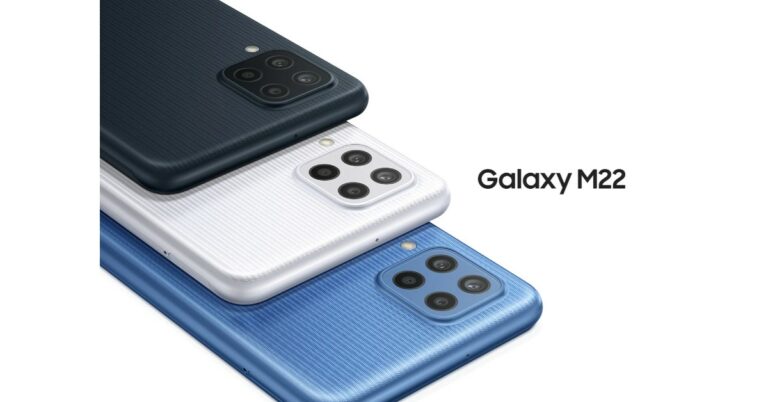
Samsung Galaxy M22 India launch is expected to take place soon. The device’s support page is now live on the company’s official website in the country. However, the Samsung India website does not reveal any details with regard to the upcoming smartphone except for the model number. But the phone will be the same variant of the Galaxy M22 smartphone that debuted in Germany last month.The phone is listed to bear a model number SM-M225FV/DS. The DS at the end of the model number hints at the Dual-SIM functionality that would come with the alleged smartphone. Also, the model number matches up to the similar device of which the support page was spotted in Russia last month.
In This Article
Samsung Galaxy M22 price in India (expected)
Like we mentioned earlier, the upcoming smartphone could be similar to the Samsung Galaxy M22 that was introduced in Germany last month. The pricing of the phone was not revealed, but the smartphone was tipped to be priced around EUR 239.90 that converts to around Rs 20,700. In Germany, the device is available in three colour options of Black, Light Blue and White.
Samsung Galaxy M22 specs (expected)
In terms of specifications, the Samsung Galaxy M22 variant that was launched in Germany features a 6.4-inch HD+ Super AMOLED Display with 720×1,600 pixels of resolution. The phone runs on Android OS and is powered by an unnamed octa-core processor with 4GB of RAM and 128GB of internal storage. The memory can be expanded up to 1TB using a microSD card.The Galaxy M22 may come with a quad rear camera set up that includes a 48MP primary sensor, an 8MP secondary and dual 2 MP sensors. In addition to this, there is a 13MP front-facing camera for taking selfies and video calling. The German variant of the Samsung Galaxy M22 packs a 5,000mAh battery that supports 25W fast charging. In terms of connectivity, there are dual-SIM slots, NFC, Bluetooth v5, WiFI 802.11ac 3.4mm jack and a USB Type C port for charging.
For the latest gadget and tech news, and gadget reviews, follow us on Twitter, Facebook and Instagram. For newest tech & gadget videos subscribe to our YouTube Channel. You can also stay up to date using the Gadget Bridge Android App. You can find the latest car and bike news here.
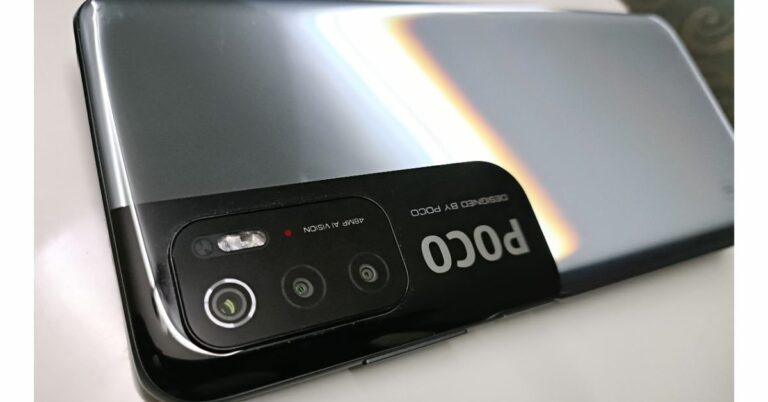
Poco M4 Pro 5G is reported to launch soon in the market. The alleged smartphone has been spotted on various benchmarking and certifications websites in the past. Now the device has appeared on the Eurasian Economic Commission(EEC) and Compulsory Certificate of China also known as 3C. In addition to this, the phone has also been spotted on IMEI and TENAA certification sites hinting at the imminent launch. The device is going to be a successor of the Poco M3 Pro 5G, which was launched in India a few months ago.According to an Indian tipster, Poco M4 Pro 5G has appeared on all the above-mentioned certification websites with the same model number 2109116AC. The EEC, 3C, IMEI and TENAA listing also suggests that the phone will have the support of 33W fast charging.Poco M3 Pro 5G is also tipped to be listed bearing a model number 21091116AG that suggests it to come with a MediaTek processor. Not much has been revealed about the upcoming smartphone but it would be coming with upgraded features and specs over its predecessor Poco M3 Pro 5GAlso Read: Poco M3 Pro 5G ReviewOnly a little time passed when Poco M3 Pro 5G was launched in India. But the device is suggested to be an upgrade over the 4G Poco M3 that was introduced earlier this year.The Poco M3 phone is powered by an Octa-core Qualcomm Snapdragon 662 SoC paired with 4GB of LPDDR4x RAM and up to 128GB of storage. It features a 6.53 full HD+ display and runs on MIUI 12 for Poco based on the top of Android 10. The device also comes with a triple camera set up on its back that includes a 48MP primary sensor, a 2MP macro lens and a 2MP depth sensor. Upfront there is a selfie camera. The smartphone is backed by a 6,000mAh battery that comes with 18W fast chagrin support.The Poco M3 comes in 4GB RAM 64GB storage, 6GB RAM with 64GB storage and 6GB RAM with 128GB storage options. The price of the phone starts at Rs 10,499 and goes up to Rs 12,499.
For the latest gadget and tech news, and gadget reviews, follow us on Twitter, Facebook and Instagram. For newest tech & gadget videos subscribe to our YouTube Channel. You can also stay up to date using the Gadget Bridge Android App. You can find the latest car and bike news here.
Amazon Quiz for October 5 2021 has gone live on the company’s mobile platform. The daily quiz contest brings an opportunity for Amazon users to win exciting prizes. In today Amazon Quiz the participants have the chance to win Rs 5,000 Amazon Pay Balance. All they have to do is answer all the questions correctly.A fresh question is posted on the Amazon app daily which consists of five simple questions based on general knowledge and current events. The quiz can be played on the Amazon App from 12 AM to 11:59 PM. You have to answer all the questions correctly. Then the participants will be shortlisted for a lucky draw. The result of the lucky draw will be announced at the end of the month. The participants can win Amazon Pay Balance to up to Rs 50,000. Check out the 5 October 2021 Amazon Quiz question and their answers to win a Rs 5,000 Amazon Pay Balance.
In This Article
5 October 2021 Amazon Quiz Answers
Question 1: Dahi Handi is a festival associated with which occasion that fell on 30th August this year?
Answer: Janmashtami
Question 2: The Independence Dua of which country is also known as Hari Merdeka?
Answer: Malaysia
Question 3: After Mariyappan Thangavelu went into quarantine due to possible exposure to COVID-19, who was named India’s Tokyo Paralympics flag bearer?
Answer: Tek Chand
Question 4: This is the European Commission Berlaymont building located in which city?
Answer: Brussels
Question 5: This is a famous monument located in which city?
YouTube recently released a Picture in Picture mode update in iPhone with an update of iOS. YouTube has been the last to update iOS devices with PiP mode as other streaming services like Apple TV, Prime Video, Netflix, etc have got it before. Though the feature is introduced it might not be convenient for everyone and also not works for everyone as well. If you are habitual of watching YouTube on PiP, but now it’s not working for you, here are a few troubleshooters you can perform to fix the problem.
In This Article
Check for updates
An outdated build might result in not getting this feature or if there is a bug in the old build. It is always better in most cases to keep your application up to date. Along with that also make sure that your iPhone is running the latest version of iOS. As it can lead to the same issue in future as well. To fix it, head to the Apple store, tap on your profile on the top right corner and scroll down to find the update all button. To update the iPhone head to General > Software Update and check for updates.Read Also: WhatsApp to roll out PIP feature for WhatsApp Web
Subscribe to YouTube Premium
Unfortunately, YouTube has kept the picture in picture mode exclusively for premium members. If the company is planning to make this feature free for everyone is still unknown. But, for now, one has to pay for a premium subscription to use YouTube in PiP mode. Along with PiP you also get an ad-free YouTube experience, unlimited video download option, background video playing, and YouTube Music when you buy the subscription. One can opt for a student discount by verifying him/her as a student, too.
Use YouTube in the browser
It is the best work around if YouTube premium feels heavy on your pocket and all you want is to watch videos in PiP, and advertisements don’t bother you. You can do it with the built-in browser. Follow the below steps.Step 1 – Go to YouTube.com in the Safari browser.Step 2 – Tap Aa on the top left of the screen. Step 3 – Select the Request Desktop Site option from the drop-down menu.Step 4 – Once the desktop site loads, start playing a video and make it full screen.Step 5 – Tap the PiP button on the top left corner of the display.Read Also: WhatsApp rolls out PiP mode to all Android usersThese are a few steps that will allow you to watch YouTube videos in picture in picture (PiP) mode on your iOS devices. If none of these work, try uninstalling the YouTube application and reinstalling it. As there is no clear data or clear cache option like Android in iOS, all you can do is uninstall and reinstall the application.
For the latest gadget and tech news, and gadget reviews, follow us on Twitter, Facebook and Instagram. For newest tech & gadget videos subscribe to our YouTube Channel. You can also stay up to date using the Gadget Bridge Android App. You can find the latest car and bike news here.
With Android 12 still in the beta stages, Android 11 is the best OS available for Android. With Android 11, there is a wide range of applications that one can download from its Play Store service. Google Play Store is a digital distribution service owned by Google and provides service to all Android users and sometimes the users hit a roadblock. There are multiple reasons because of which a user is unable to update apps on Android 11. Below are some fixes that will come in handy if apps are not downloading on Android 11.
In This Article
Check the internet connection
If you are unable to reach the update page or the Playstore is showing you offline, it can be a problem with your internet connection. There are two possibilities because of which this error can occur. The first being there is no internet connection at all. The other reason for this error is the slow internet. Make sure you are connected to an Internet connection that is strong, stable and has a decent speed. If you are connected to Wi-Fi, try switching to mobile data or vice versa. Also, make sure the VPN on your smartphone is disabled.
Force stop and clear data
Force stopping the Play Store and clearing the data will refresh it. If the problem is related to Playstore, performing this method will most probably solve it. General bugs related or updating issues are cleared from Playstore’s memory. Here is how to do it.Step 1 – Hold the Play Store icon for 1 second to see options.Step 2 – Select App info from the listed options.Step 3 – First press force stop in the opened window.Step 4 – Next head to the Storage option.Step 5 – Press the Clear storage option.Play store majorly relies on Play Services and Download Manager for updating applications. If the problem by this step persists try to clear the data of the Play Services and Download manager as well.Read Also: Microsoft brings a much-needed update to its Xbox One
Check storage
The applications won’t update from Playstore if there is no storage space left on the device. With new updates, there are more system files that are integrated, which increases the application size. To check storage, head to Setting> Storage, we advise that at least 20% storage in your smartphone should be free.
Reinstall play store
There might have been some bug or issue while updating the Playstore. There also could be that the current version of the store has got some bug. One cannot remove Playstore and reinstall it but they can remove the update to make it go back to factory setting and updating it again will get rid of the problem. To perform this one should follow these steps.Step 1 – Hold the play store icon for 1 second to see options.Step 2 – Select App info from the listed options.Step 3 – Tap the three-dot on the top right corner of the screen.Step 4 – Select Uninstall Updates and then press Ok to confirm.Start using the Play Store and the application will automatically update in the background. As the Play Store has gone back to its factory settings, give some time for the update to complete.Read Also: Google announces Top Play Store apps
Remove Google account and re-add it
There is a strong possibility that the specific Google account you are using has some issues related to application updates. Users can consider removing their Google account and re-adding it to eliminate this doubt.Step 1 – Open Setting. Step 2 – Head to the Accounts section.Step 3 – Select the Google account that is needed to be removed. (Phone might ask you for the pin or password to complete the process)Open Google Play Store again and it will ask you to sign in. Just input the credentials and you are good to go. We advise restarting the phone once the process is done as well.Following the above steps, one can fix Apps not updating on the Android 11 problem. If none of these methods work we advise you to factory reset the device once to make your Android start afresh. If the issue has recently occurred and you are not able to diagnose, factory resetting will probably fix that issue.
For the latest gadget and tech news, and gadget reviews, follow us on Twitter, Facebook and Instagram. For newest tech & gadget videos subscribe to our YouTube Channel. You can also stay up to date using the Gadget Bridge Android App. You can find the latest car and bike news here.
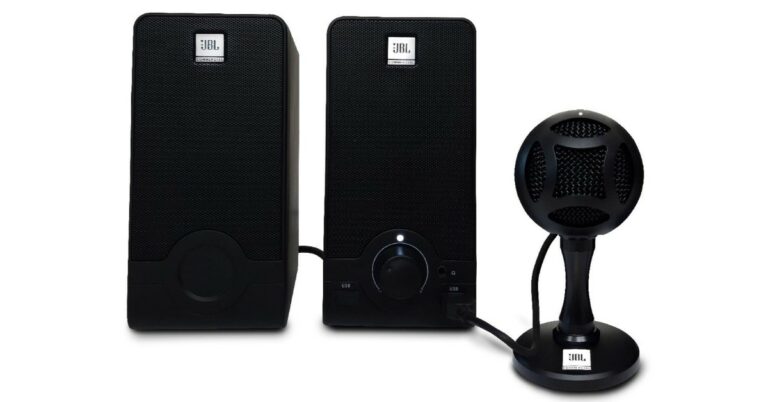
Harman Professional Solution has expanded its Commercial Microphone line up in India today with the launch of a new audio device. The company has introduced the JBL Commercial CSUM06 Mini USB microphone and WFH100 USB microphone along with the speaker. The latest addition is targeted at people working from home, content creation online classes and much more. Both the newly launched JBL Commercial microphones will be available for purchase via Flipkart during the ongoing Big Billion Days Sale 2021 that will be live until October 10. Speaking of the pricing, the JBL Commercial CSUM06 microphone is available at a launch price of Rs 2,499 whereas the JBL Commercial WFH100 bundle can be purchased for Rs 4,999 in the country.
In This Article
Features of JBL Commercial CSUM06 microphone
JBL Commercial CSUM06 microphone is suited for voice-overs, podcasters, vloggers, gamers, vocalists, acoustic instrument users, and users of web conferencing. It comes with an LED indicator to know when the mic is on mute and when it’s connected. There is a plug-and-play feature on the JBL microphone for high-quality recording and streaming. In addition to this, the mic includes a mute button and is compatible with PC, Mac, and smartphones with OTG function. One can simply plug this MIC into their PC or Mac and start recording, cancelling the need to install drivers. It equips a 14mm condenser capsule and offers a frequency range of 50Hz-18KHz.JBL Commercial CSUM06 microphone features an adjustable head and is compact to be easily kept on your desktop as it comes with a durable metal stand for sturdy support.
Features of JBL Commercial WFH100 USB microphone along with the speaker
The JBL Commercial WFH100 bundle comes with a mini USB microphone and USB powered speakers designed to enable ease-of-use for office work, online classes or even support with content creation. The microphone includes a 14mm Condenser Capsule, too. It has a frequency range of 50Hz – 18KHz and sports USB 2.0 connection that allows for plug-and-play operation. There is a mute switch on the microphone, while the USB Speakers also include in-built USB ports for connectivity. The speakers are said to deliver high voice output with a frequency range of 80 – 20KHz.
For the latest gadget and tech news, and gadget reviews, follow us on Twitter, Facebook and Instagram. For newest tech & gadget videos subscribe to our YouTube Channel. You can also stay up to date using the Gadget Bridge Android App. You can find the latest car and bike news here.
It’s raining discounts on smartphones on Amazon.in. The Great Indian Festival 2021 sale has just begun and now is the best time to upgrade from 4G to 5G smartphone, as the website is offering huge discounts on 5G mobiles from Samsung, Poco, Oppo, Xiaomi, OnePlus and more during the sale period. So, today we bring to you a list of the best 5G smartphones that you can buy during Amazon’s festival sale at a cheaper price.
In This Article
Top 5G smartphones to buy under Rs 25,000 at Amazon during Great Indian Festival sale:
Samsung 5G smartphones
Samsung Galaxy M42 5G: The smartphone is now getting a 23 percent discount, therefore, making you save Rs 7,000 on its MRP. It will be available for purchase at Rs 22,999.Samsung Galaxy M42 5G reviewSamsung Galaxy A22 5G: Galaxy A22 5G is another 5G smartphone that is part of the Amazon Great India Festival Sale. One can buy it at Rs 19,699 (6GB+128GB). So if you purchase this smartphone during the sale period you can save Rs 2,800.Samsung Galaxy M32 5G: The 6GB+128GB variant of Galaxy M32 5G is getting a discount of Rs 2,999. So you can purchase this phone for Rs 20,999.
OnePlus/Oppo 5G smartphones
OnePlus Nord CE 5G: OnePlus Nord CE 8GB+128GB option is listed at Rs 24,999.OnePlus Nord CE 5GOppo A74 5G: Oppo A74 5G has got a 24 percent price-cut, which makes you save Rs 5,000 on its original price tag. The device now costs Rs 15,999.
Vivo/iQoo 5G smartphones
Vivo V21e 5G: Now you can save Rs 3,000 on the purchase of Vivo V21e 5G smartphone. The mobile phone is now available at Rs 24,990.Vivo Y72 5G: Vivo Y72 5G is available with a discount of Rs 4,000 during the Amazon Great Indian Festival Sale. The phone will be available at Rs 20,990.iQoo Z3 5GiQoo Z3 5G: The iQoo Z3 5G’s 6GB RAM with 128GB storage options can be purchased at Rs 17,990 during the Amazon sale.
We often switch to other mobile networks due to network congestion and call drops. This is a very common problem in metro cities where there are high-rise buildings or in basements where there is a weak cell signal. A feature of Wi-Fi calling in iPhone and Android smartphones has been added by the makers, but if not enabled users can face low networks issues.This results in you not getting important calls and most of the time outgoing calls will have bad reception or call drop issues. Addressing this problem, the latest mobile phones these days come with the feature of Wi-Fi calling for stable voice calls. So in this article, we will show you how to make stable calls using the Wi-Fi calling feature on your iPhone or Android smartphone.The biggest USP of the Wi-Fi calling feature is that the users will be able to experience better signal quality with the service, and the best part is it is absolutely free. Yes, you are not charged extra to make a free call over Wi-Fi. All you need to do is just check your device’s compatibility for Wi-Fi calling. The users can easily turn on the voice-over Wi-Fi calling feature when they are inside their offices or at home. But one needs to be in a stable Wi-Fi zone to make voice calls over broadband/internet to any number.
In This Article
How to enable Wi-Fi calling on iPhone to make voice calls
If you are an iOS user, anyone can enable the Wi-Fi calling feature on their device provided that your Telecom operator supports the functionality.
Go to settings in your iPhone
Next, click on the Mobile data option and select Wi-Fi calling.
Tap/toggle on the Wi-Fi calling on This iPhone feature and you are good to go.
Note that the Wi-Fi calling option will only show up if the telecom operator supports it. When the function is enabled on your iPhone you will also see Wi-Fi next to the carrier name in the status bar.
How to enable Wi-Fi calling on Android smartphone to make voice calls
Head to Settings on your device and then go to the Networks option. Depending upon the make of your smartphone, this option might be listed in Connection or Mobile Networks instead of the Network section on your Android smartphone.
On opening the Networks section, go to Wi-Fi preferences.
Now tap on Advanced and look for the Wi-Fi calling option. (If you don’t find the option, your device is not compatible with this service or your telecom operator doesn’t support the functionality.)
Choose a number to enable the service if you have installed two SIM cards. However, you can also enable the service on both networks.
Many users would have faced this annoying issue that they are successfully connected to the Wi-Fi network but could not get any internet. There is not one reason that this issue can happen to you, but a few of them together. Worry not, below are some of the issues that we are addressing and how to fix them. These will fix your smartphone Wi-Fi issue and won’t stop the daily dose of the internet from reaching you.
In This Article
Try reconnecting
There might be some issues while connecting to the Wi-Fi. The first rule of the tech world says to restart the device. Try switching off the Wi-Fi of your phone and switching it on again. Try connecting back to your Wi-Fi network and see if the issue still persists. If not, don’t worry, this is just the first step. There are a few more steps below to consider.
Forget network
If the above step didn’t work for you, the next step is to forget the network so all the details related to the specific network will be reset giving it a fresh start. Here is how you can do it.Step 1 – From the drop-down menu in Android, press and hold the Wi-Fi option till the settings open.Step 2 – Select the Wi-Fi that is creating the issue.Step 3 – Tap Forget in the Wi-Fi setting.After following these steps simply re-enter the password and try to reconnect to your WiFi and check if the problem solves.Read Also: 5 Ways to Fix Wi-Fi Keeps disconnecting and reconnecting
Check from the network provider side
Nowadays service providers help you to diagnose your Wi-Fi with just a few taps. Open the application or website of your service provider. They may ask you to log in to your network. After logging in, check for the network you are trying to connect. It will show you the real-time status of your network and active days. If there are internet issues, then you contact your service provider.
Reset Router
A good possibility is that some automatic setting inside the router may have cropped up to cause this issue. To solve it a simple way is to reset the router. Follow these instructions.Step 1 – Remove all the wires from the router except the power cord.Step 2 – There will be a small hole around the on-off button of the router. The below image is an example of how the reset button will look like. (D-link router is used for example purpose)Step 3 – Keep pressing the button with a sim ejector tool for 10-15 seconds until the lights of the router blink and the router restarts.
Reset network setting on your Android phone
If the issue is still not solved, we will advise you to try resetting your network setting for your Android Smartphone as well. Following these steps will only remove all the stored wireless settings of your device, not the other data. Follow the below steps to execute it. Step 1 – Open Settings.Step 2 – Search for ”Reset Options” (or similar setting) and select Wi-Fi.Step 3 – Press “Reset Setting”.Once the step is done successfully (some smartphones might restart), try reconnecting to your Wi-Fi network now and check if the internet works for you.Read Also: How to join missed Whatsapp video calls?With this, we come to the end of the best ways to fix Android connected to WiFi but no internet issue. One of these steps should surely work for you, if not. Try connecting some other device to the same network. If the device gets to connect, we advise you to take the smartphone to the respective service centre and get it checked.
For the latest gadget and tech news, and gadget reviews, follow us on Twitter, Facebook and Instagram. For newest tech & gadget videos subscribe to our YouTube Channel. You can also stay up to date using the Gadget Bridge Android App. You can find the latest car and bike news here.
One can use the Android auto-rotate feature to utilise the smartphone’s screen completely. But sometimes your Android phone’s auto-rotate doesn’t work when you turn your phone into landscape mode. It becomes very frustrating especially when you are trying to play games or consume multimedia. In the case of the game, it will simply crash or show a video that keeps playing in either portrait mode or in a stretched format. If you are facing an Android screen auto rotate not working issue worry not here are a few fixes one can try, which will surely help you out to solve the problem.
In This Article
Restart Phone
As we all know, restarting any smart device fixes most of the issues in it. Restarting any smartphone kills all the applications and clears up the memory. Doing this can result in fixing bad system cache, which may be causing this issue as well. This should be the first and basic step of fixing the issue. If the issue is not resolved. Head to the next step.
Ensure auto rotation is turned on
The next step will be to check if this feature is turned on for your mobile. For doing so, swipe down from top to open the Quick setting menu. Check for the Auto-rotate option. If it is turned off, press the icon to turn it on. In some phones, they will be named as portrait or landscape mode. Switching to landscape if in portrait will switch on the auto-rotate option.Read Also: How to rotate your computer screen or desktop
Check for rotation settings on the specific application
There are applications available on Playstore that override the current screen orientation from the UI and the orientation in those applications are hidden somewhere in the setting. Make sure that any application you are using is not hindering or overwriting screen rotation protocols. If the auto rotation is not working for that specific application try to search for orientation options in the application’s setting. Toggling that one should absolve the issue.
Calibrate the phone’s G sensor
There might be a reason that the G sensor and accelerometer sensor has lost their calibration, which is causing issues with the auto-rotate feature. The smartphone uses these sensors to know if the phone is in landscape mode or in portrait and shifts accordingly. To fix this try making 8 in the air while holding the smartphone(refer to the image above). This will fix the calibration issue if any.
Uninstall recently installed application
If the issue started to occur after installing or updating a specific application. Try uninstalling them. A bad version of the application or a bad update can cause a bug that may stop auto-rotation. To make sure, try uninstalling any recent add ons to your application library and check if the auto-rotate feature is functioning alright after that.
Update your phone
The previous update of android may have or caused some issues or triggered some bug in the UI. To solve it simply check for updates. If any updates are pending, we recommend completing them. Smartphone companies notice these minor bugs and address them by giving regular updates. So, it’s important to update your smartphone to the latest version by the company.Read Also: How to rotate your computer screen or desktop
Head to the service centre
If none of the solutions worked for you, we advise you to visit the nearest service centre. There are good chances that due to minor falls, water damage or part malfunction the issue has cropped up in your Android smartphone. Due to faulty hardware, examples being G sensors, the phone won’t be able to detect when you tilt the phone, resulting in auto-rotation not working for you.
Bonus tip
There is a force screen tilt option if you use the manual navigation buttons on your Android smartphone (not the gestures). Head to the application you want to use in landscape mode. After opening, tilt your screen to see the rotation option in the right corner of your screen(consider the above image for reference). By pressing that it will force landscape the screen of your mobileThese are the top 7 methods to fix the Android screen auto rotate not working issue. One of the methods will surely work for you and you will continue to enjoy your phone experience utilising the screen completely.
For the latest gadget and tech news, and gadget reviews, follow us on Twitter, Facebook and Instagram. For newest tech & gadget videos subscribe to our YouTube Channel. You can also stay up to date using the Gadget Bridge Android App. You can find the latest car and bike news here.
The Amazon Great Indian Festival sale is live on its platform. So now is the best time to purchase some of the best laptops that will be available during the sale period at their lowest prices. Amazon is giving up to 50 percent off on laptop brands like Asus, HP, Dell Lenovo and many more. In case you have plans to upgrade to a new laptop that doesn’t burn a hole in your pocket here are our top recommendations. Here are the best laptop deals on Amazon.We have curated the list of best laptop deals from the Amazon Great India Festival. E-commerce is offering up to 50 percent off on laptops and the buyers can get an instant discount of 10 percent with up to Rs 12,750 to the HDFC debit and credit cardholders. Check out our top recommendations.
In This Article
Best laptop deals on Amazon Great Indian Festival 2021
HP 14 2021
The HP 14 2021 laptop is nowavailableat 40,000 during the Great Indian Festival sale. This laptop is powered by an 11th Gen Intel Core i3-1115G4 processor. It operates on Windows 10 Home but is upgradable to Windows 11. The device comes pre-installed with Microsoft Office Home and Student 2019 and is Alexa Built-in for hands-free operation. The machine features a 14-inch FHD screen and DDR4 RAM with 256GB SSD.
Acer Aspire 3
The Acer Aspire 3 laptop is nowsellingfor Rs 36,990. The device is powered by an Intel Core i3-1115G4 processor paired with 4GB of DDR4 ARM and 1TB HHD. It features a 15.6 IPS LCD LED-backlit display.
Asus VivoBook 14 Laptop
You can nowpurchaseAsus VivoBook 14 at Rs 55,990 on Amazon during the Great India Festival Sale. The laptop features a 14-Inch LED-Backlit, FHD display. The device equips an 11th Gen Intel Core i5-1135G7 Processor with 8GB of DDR4 RAM with 512GB solid-state drive.
HP Pavilion Aero
The HP Pavilion Aero is now available at Rs 69,990. The laptop comes with a 13.3 inch IPS display. The device is powered by AMD Ryzen 5 5600U processor with 16 GB DDR4-3200 MHz RAM and 512GB PCIe NVMe M.2 SSD.
Asus TUF Gaming F15
Asus TUF Gaming F15 will make you save Rs 28,000 and is now available at Rs 55,990. t is powered by an Intel Core i5-10300H 10th Gen CPU paired with NVIDIA GeForce GTX 1650 4GB GDDR6 GPU. The laptop comes with a 144Hz IPS FHD 15.6-Inch screen. The device is offered with 8GB RAM installed with 512GB NVMe storage.
Lenovo Ideapad Gaming 3
The next on the list is Lenovo Ideapad Gaming 3 laptop. This gaming laptop features an 11th Gen Intel Core i5 – 11300H processor with NVIDIA GeForce GTX 1650 4GB GDDR6 for graphics. It comes in 8GB RAM DDR4-3200 and 512GB SSD. It will be available in a 15.6-inch FHD IPS backlit display that comes with 120Hz refresh rate support. It is listed at a discounted price of Rs 65,990
Dell 15 i5-10200H
Now you can save Rs 13,334 on the purchase of Dell 15 i5-10200H gaming laptop during the Great Indian Festival Sale. The laptop is now available at Rs 64,990. It comes with a 15.4-inch FHD display and is powered by Intel Core i5-10200H paired with NVIDIA GeForce GTX 1650 4GB GDDR6.
In the light of the increasing unauthorised use of one’s Adhaar number for the purpose of obtaining mobile SIM cards and misusing them for illegal activities, the Department of Telecommunication has launched a web portal. Using this tool people can find out how many mobile numbers are in active use on their name. Here is a step by step guide on how to check how many SIMs are registered on your Aadhar card.With the assistance of this tool, an individual can easily get rid of the unauthorised active SIM card numbers that they are not actually using. According to the departments, there have been such incidents where someone’s details are being used to issue mobile SIM cards and are being used in their name without their knowledge for unlawful or illegal purposes. So that you dont get into trouble the Department of Telecommunication has come up with a portal- tafcop.dgtelecom.gov.in. This particular website will assist users in determining the number of mobile connections issued in their name. An individual can request that numbers issue in their name but not used by them be blocked. According to the government, the number of mobile connections that can be issued to a single person is limited to nine only but more than nine mobile connections are active in the names of specific users. However, the portal aims to simplify the process for users in the licenced service area. (Currently, this service is available in Telangana and Andhra Pradesh but it has worked for some in Delhi as well.)The Department of Telecommunication will notify consumers via SMS of the number of mobile connections active in their names. The portal can be used to report numbers that are no longer in use or are no longer required. After the user takes the action, the telecom service providers will block or deactivate the numbers. In addition to this, the customers will be given ticket IDs that will allow them to track the progress of the requested action.
In This Article
Here is how to find out how many cards are registered to your Aadhaar card:
4 October 2021 Amazon Quiz has gone live on its mobile app platform. The quiz can be played from 12 AM to 11:59. All you need to do is just answer five easy questions that the e-commerce website puts before you. Today you can stand a chance to win Rs 50,000 Amazon Pay Balance.Every day Amazon posts a new questionnaire that consists of five simple questions about general knowledge and current events. To enter a lucky draw, participants must correctly answer the questions. One incorrect answer will result in your elimination from the quiz. Each month, only one person will be declared the winner and the results will be announced at the end of the month. Amazon customers who submit correct answers can win Amazon Pay Balance worth up to Rs 50,000. To ensure that you answer all five questions correctly, Gadget Bridge updates all of the correct answers on a daily basis. Take a look at today’s answers:
In This Article
4 October 2021 Amazon Quiz Answers
Question 1: August 26 was selected as Women’s Equality Day in the USA, as it was the date when an amendment was passed granting what right to women?
Answer: Right to Vote
Question 2: Janssen pharmaceuticals is a pharmaceutical company headquartered in Belgium, that is a subsidiary of which firm?
Answer: Johnson & Johnson
Question 3: Olympic bronze medalist Bajrang Puni, pulled out of the 2021 World Wrestling Championship scheduled to be held in which city?
Answer: Oslo
Question 4: This is the CN Tower in which city?
Answer: Toronto
Question 5: The flag of which country has been shown in the picture?
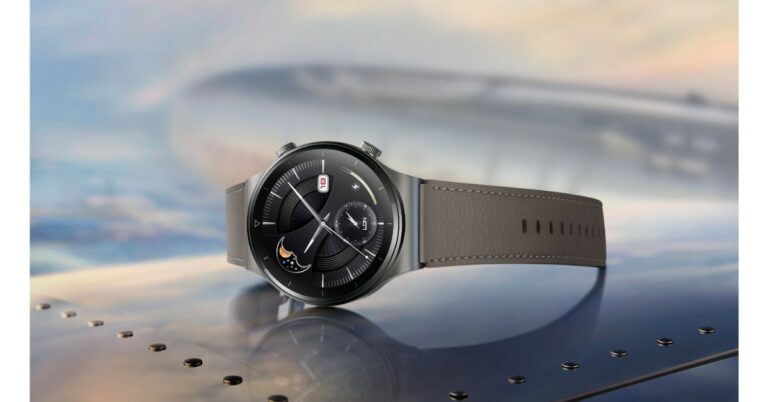
Amazon Great Indian Festival for prime and Flipkart Big Billion Days sale for plus users has already kicked off on their respective platforms. All the other users will be able to access the sale from October 3 that is from tomorrow. So if you are looking to buy a new Huawei smartwatch and fitness band now is the best time as the company is offering exciting deals and discounts on its smart wearable like Watch GT 2 Pro, Watch GT 2 and Band 6. check out the the best deals and discounts on Huawei smartwatches and fitness bands.Huawei Watch GT 2 ProHuawei Watch GT 2 ProDuring the Flipkart Big Billion Day sale, Huawei will be offering No Cost EMI from Bajaj Finserv and 5% unlimited cashback on Flipkart Axis Bank Credit Cards. The device can be bought for Rs 22,990 and was earlier selling at Rs 24,990. The device comes with a 1.39-inch AMOLED display and runs on a Kirin A1 + STL4R9 processor paired with 4GB of storage. The sensors on the device include GPS,accelerometer, gyroscope, geomagnetic sensor, ambient light sensor, air pressure sensor, capacitive sensor, and an optical heart rate sensor. It has 100 sports modes with 17 professional modes and 85 custom modes. Huawei Band 6Huawei Band 6On the other hand, Huawei Band 6 will be making you save with 10% Cashback and additional bank discounts on select debit and credit cards at Amazon Great India Festival. The buyers can also avail of the no-cost EMI option available during the sale period. So one can purchase the fitness band for Rs 3,990 down from its original price of Rs 4,490. The device features a 1.47inch AMOLED full view display. It also includes 96 workout modes including running, swimming, treadmill and more. The smart band also offers health features like TruSeen 4.0 24×7 heart rate monitoring, TruSleep 2.0 sleep monitoring and supports SpO2.Huawei Watch GT 2Huawei Watch GT 2 can either be purchased from Amazon or on Flipkart. So those purchasing from Flipkart can avail of a 5% unlimited cashback on Flipkart Axis Bank Credit Card along with No Cost EMI from Bajaj Finserv. Whereas Amazon users can get the No Cost EMI with Amazon ICICI credit card & Prime saving 10% cashback with other exciting offers on select cards. comes with 2 dial types. One is 42mm, which is the 1.2-inch dial and the other is 46mm, which is the 1.39-inch dial. Both of them are AMOLED displays with a resolution of 390×390 pixels and 454×453 pixels respectively. It offers a heart rate monitor, sleep monitoring system and fitness tracker and is water-resistant up to 50 meters that is roughly 160 feet underwater.
For the latest gadget and tech news, and gadget reviews, follow us on Twitter, Facebook and Instagram. For newest tech & gadget videos subscribe to our YouTube Channel. You can also stay up to date using the Gadget Bridge Android App. You can find the latest car and bike news here.
Amazon Great Indian Festival 2021 has kicked off today for the Prime members only as they are eligible to get early access to all the deals and discounts on the platform. The sale will go live for regular users from midnight today, which is October 3. Top brands like OnePlus, Samsung, Apple, Xiaomi and more will be offering the best deals on smartphones. Amazon will be offering up to 40 percent off on smartphones during the Great Indian Festival 2021. This offer is also applicable on premium devices such as iPhone 11, OnePlus 9 Series, Samsung Galaxy S20 FE 5G and more.
In This Article
Here are the best deals and offers on smartphones:
OnePlus
All the smartphones from the OnePlus 9 Series range are listed with price cuts as well as bank offers. The vanilla variant is getting a Rs 3,000 discount, therefore, bringing the price down to Rs 46,999. Whereas, the OnePlus 9R has got a similar Rs 3,000 price cut and will be available at Rs 36,999. Whereas the top model, the OnePlus 9 Pro, will make you save Rs 4,000 and is now up for sale at Rs 60,999. The buyers can also save up to Rs 10,000 with the addition of up to Rs 3,000 exchange discount and avail up to Rs 7,000 with HDFC Bank cards. There will be no-cost EMI options for up to 9 months as well.On the other hand, the recently launched OnePlus Nord 2 and Nord CE 5G will also get an additional Rs 1,000 off on the exchange of your old devices(select models). Moreover, the e-commerce platform has also listed the Nord 2 12GB RAM model with an additional Rs 1,000 off using a coupon.
iPhone
Apple iPhone 11, which was originally selling for Rs 68,300 will now be available at Rs 29,301 lower. It can now be purchased for Rs 38,999 for the 64GB storage option. The price will be further reduced by Rs 12,440 by opting for an exchange discount that will bring the price of the device to Rs 26,599. The bank offers also fetch up to 5 percent off on the purchase of the iPhone 11. Other models like 128GB storage will be available at Rs 43,999 combined with a maximum exchange offer value of Rs 12,400. This will bring down the price to Rs 31,599. Similarly, the 256GB model will be available for Rs 59,999 using the same offers.
Samsung
The Samsung Galaxy S20 FE will be up for grabs at Rs 36,999 during the Great Indian Festival Sale on Amazon. The original price of the smartphone is Rs 70,499. The additional discount will be offered on HDFC Bank debit and credit cards.The recently launched Samsung Galaxy M52 5G will be offered at Rs 26,999 and Rs 28,999 for the 6GB RAM and 8GB RAM options during the sale period. Samsung Galaxy Note 20 and Note 20 Ultra can now be purchased for Rs 43,449 and Rs 68,499 respectively. On the other hand, Galaxy S2 Ultra will be selling for Rs 1,04,999.
iQoo
All the variants of iQoo 7 will be getting a discount of up to Rs 3,000 and can be purchased for Rs Rs 26,990, Rs 28,990 and Rs 30,900 for the 8GB with 128GB storage, 8GB with 256GB storage model and a 12GB with 256GB storage option. The iQoo 7 Legend 8GB RAM model will be selling for Rs 32,490 and the 12GB RAM option will be available at Rs 38,490. There will be an extra Rs 4,000 off on exchange, flat Rs 1,500 off on HDFC bank debit/credit cards & EMI and no-cost EMI for up to 9 months.The recently launched iQoo Z5 can now be purchased for Rs 20,990 and Rs 23,990 for the 8GB RAM and 12GB RAM options respectively.iQoo Z3 will be available at Rs 15,490 for the 6GB RAM with 128GB storage, 8GB RAM with 128GB storage will be available at Rs 16,490 and the 8GB RAM with 256GB storage will cost you Rs 18,400.
Xiaomi’s sub-brand Redmi has officially announced the launch of its last budget smartphone in the Indian market. Redmi Note 10 Lite is the newest smartphone to join its successful series which already includes no less than four models. The latest device is the rebranded variant of the Redmi Note 9 Pro which was introduced last year. The phone comes with a quad rear camera set up, a 5,020mAh battery and a hole-punch display.
In This Article
Redmi Note 10 Lite price in India and availability details
Redmi Note 10 Lite in India has been launched in three different configurations. The 4GB RAM with 64GB storage costs Rs 13,999 whereas the 4GB RAM with 128GB storage model comes at Rs 15,999. The 6GB RAM with 128GB storage model will be selling at Rs 16,999. The device will be offered in shades of Aurora Blue, Champagne Gold, Glacier White and Interstellar Black.The budget smartphone is now available for sale via Amazon and Mi.com. The launch offers include a Rs 1,250 instant discount to SBI credit cardholders.
Redmi Note 10 Lite specs and features
Redmi Note 10 Lite comes with a 6.67-inch full HD+ IPS display offering 1,080×2,400 pixels of resolution. The screen also has TUV Rheinland low blue light certification and also includes Reading Mode 2.0. The display is protected with Corning Gorilla Glass 5. Under the hood, there is an octa-core Qualcomm Snapdragon 720G SoC paired with Adreno 618 GPU for graphics. It will be offered in a 6GB RAM LPDDr4X RAM and up to 128GB of internal storage.In addition to this, there is a quad-camera set up on the back of Redmi Note 10 Lite consisting of a 48MP primary lens with an f/1.89 aperture. It further includes an 8MP ultra-wide-angle lens with f/2.2 aperture, a 5MP macro lens with f/2.4 aperture and a 2 MP depth sensor with f/2.4 aperture. For taking selfies and video calling there is a 16MP front-facing camera with an f/2.48 aperture.On the connectivity front, there is 4G VoLTE, WiFI 802.11ac, Bluetooth v5.0, GPS/A-GPS, NavIC, USB Type C port and 3.5mm audio jack. Moreover, the mobile phone also includes authentication features like a side-mounted fingerprint sensor and AI Face Unlock. Redmi Note 10 Lite is backed by a 5,020mAh battery with an 18W fast charging support.
For the latest gadget and tech news, and gadget reviews, follow us on Twitter, Facebook and Instagram. For newest tech & gadget videos subscribe to our YouTube Channel. You can also stay up to date using the Gadget Bridge Android App. You can find the latest car and bike news here.
Cheating during the Battlegrounds Mobile India gameplay always goes against the fair play gamers. Also, BGMI has always made efforts to curb the trouble and has banned lots of illegal accounts practising cheating and being a pain in the neck of others. To address the issue BGMI has now announced strict measures against illegal programs, cheats and cheaters.While detailing the measures Krafton said, “We have noted countless reports of cheaters using illegal programs to gain the advantage. A cheater is a cheater, and we understand your frustration when you come across one. We would like to take this opportunity to tell you the steps we have taken, and more importantly, the steps we will be taking to make BGMI a fair gaming environment.”According to the company it has been regularly working on logic enforcement and updates to illegal programs, blocking ad channels, and monitoring real-time, and have permanently sanctioned more than 1.52 million accounts to date and are working on modernizing the systems. Despite all its efforts, the players find a way to employ illegal means to win the gameplay, therefore, creating a lot of nuisance and ultimately affecting the fair gameplay. This is so frustrating that many of the genuine players of Battlegrounds Mobile India have urged the developers to take strict action against illegal accounts and cheaters. In order to provide a fair gaming environment to the Battlegrounds Mobile India players, it will take all means and measures necessary to address any action that hinders it.
Here are some of the next steps to be taken against Battlegrounds Mobile India cheaters
More detailed revalidation of game data for top-ranked users.
Krafton will perform detailed scrutiny of the top rankings of the leaderboards. The company stated, “We are cleaning it up”. So if you are cheating then you will be banned or if found to be promoting cheats or cheat assisted rank push. Battlegrounds Mobile India players will still be permanently banned if they have cheated in the past and are not currently cheating right now.
Prevent advertising of cheaters and cheat programs
Battlegrounds Mobile India players will not be allowed to advertise the sale of illegal programs and cheats through in-game profile images, or distribute illegal program usage videos, promotional videos/images on other websites. This will lead to permanent suspension of use in the game and the closing of channels.
Amazon Great Indian Festival Sale will start from October 3 while prime members get special 24 hours early access to the sale from today onwards. It is going to be a month-long sale that will bring massive discounts across its product portfolio. During the sale, the iQoo smartphone will be up for sale with a saving up to Rs 7,500. Check out iQoo deals and offers on its smartphones.Vivo’s sub-brand iQoo has officially revealed its offers for the Great Indian Festival Sale. All the deals will be available starting October 2 onwards and are applicable on the entire iQoo range which consists of iQoo 5, iQoo 7, iQoo 7 Legend and iQoo Z3.
iQoo deals and offers on its smartphones
All the variants of iQoo 7 including the 8GB with 128GB storage, 8GB with 256GB storage model and a 12GB with 256GB storage option will see a Rs 2,000 price drop along with flat Rs 3,000 off on HDFC bank debit/credit cards & EMI and no-cost EMI for up to 6 months. So now the device will be available at Rs 26,990, Rs 28,990 and Rs 30,900 respectively.Whereas iQoo 7 Legend comes in 8GB with a 128GB storage variant and 12GB with a 256GB storage variant. The 8GB RAM model will be selling for Rs 32,490. The device will get Rs 3,000 off with an Amazon coupon, extra Rs 3,000 off on exchange, flat Rs 3,000 off on HDFC bank debit/credit cards & EMI and no-cost EMI for up to 9 months. Whereas the 12GB RAM option will be available at Rs 38,490. There will be an extra Rs 4,000 off on exchange, flat Rs 1,500 off on HDFC bank debit/credit cards & EMI and no-cost EMI for up to 9 months.All the variants of the recently launched iQoo Z5 will see flat Rs 1,500 off with Amazon coupon, flat Rs 1,500 off on HDFC bank debit/credit cards & EMI and no-cost EMI up to 6 months. Therefore you can now purchase it for Rs 20,990 and Rs 23,990 for the 8GB RAM and 12GB RAM options respectively.On the other hand, all the variants of iQoo Z3 will get a Rs 2,000 price drop along with flat Rs 2,500 off on HDFC bank debit/credit cards & EMI and no-cost EMI up to 6 months. So during the sale, the phone will be available at Rs 15,490 for the 6GB RAM with 128GB storage, 8GB RAM with 128GB storage will be available at Rs 16,490 and the 8GB RAM with 256GB storage will cost you Rs 18,400.Besides these offers, iQoo will also be providing 6 Months Free Replacement offer on all iQOO smartphones (only for Amazon’s Prime customers)
For the latest gadget and tech news, and gadget reviews, follow us on Twitter, Facebook and Instagram. For newest tech & gadget videos subscribe to our YouTube Channel. You can also stay up to date using the Gadget Bridge Android App. You can find the latest car and bike news here.
Have you participated in the Amazon Quiz today? If not then participate in the 2 October 2021 Amazon Quiz as it has already gone live on the app. The daily quiz can be played from 12 AM to 11:59 every day on the mobile app platform. Today the e-commerce is giving the chance to win Rs 20,000 Amazon Pay Balance.Every day Amazon brings a fresh quiz for its customers. By participating in the quiz the participants can win an Amazon Pay Balance of up to Rs 50,000. The quiz can only be played on the mobile app as it is not available for the desktop platform. The quiz contains five easy questions and you have to answer all the questions correctly. The participants will then be shortlisted for a lucky draw to select a winner. Whereas the results are declared at the end of the month. Check out today Amazon quiz answers to win Rs 20,000.
In This Article
2 October 2021 Amazon Quiz Answers
Question 1: F-Pace, I-Pace and F-Type are models of cars from which famous brand?
Answer: Jaguar
Question 2: Kieron Pollard is the captain of which franchise in the Caribbean Premier League?
Answer: Trinbago Knight Riders
Question 3: Directed by Ahmed Khan and scheduled to release toward the end of 2021, Heropanti 2 stars which actress in the female lead?
Answer: Tara Sutaria
Question 4: Name this popular variety of flowers
Answer: Marigold
Question 5: This painting is located at the Van Gogh Museum located in which city?
In the last few years, it has become very important to keep the printer inside our offices or homes. Imagine how much of your daily office-related work can be accomplished by having a printer handy. And if it is a laser one, it makes your job easier.There are many types of laser printers available in the market including wireless ones. However, the final decision should be based on your needs. Also, proper research is needed for this. But worry not, we have done all the heavy lifting for you we will help you out.Today we are going to talk about laser printers. When compared to other types of printers(Deskjet), laser printers are much faster. We are going to give you a list of the 5 best wireless laser printers in India 2021, which you can buy for less than Rs 15,000.
In This Article
Pantum P2500W laser printer
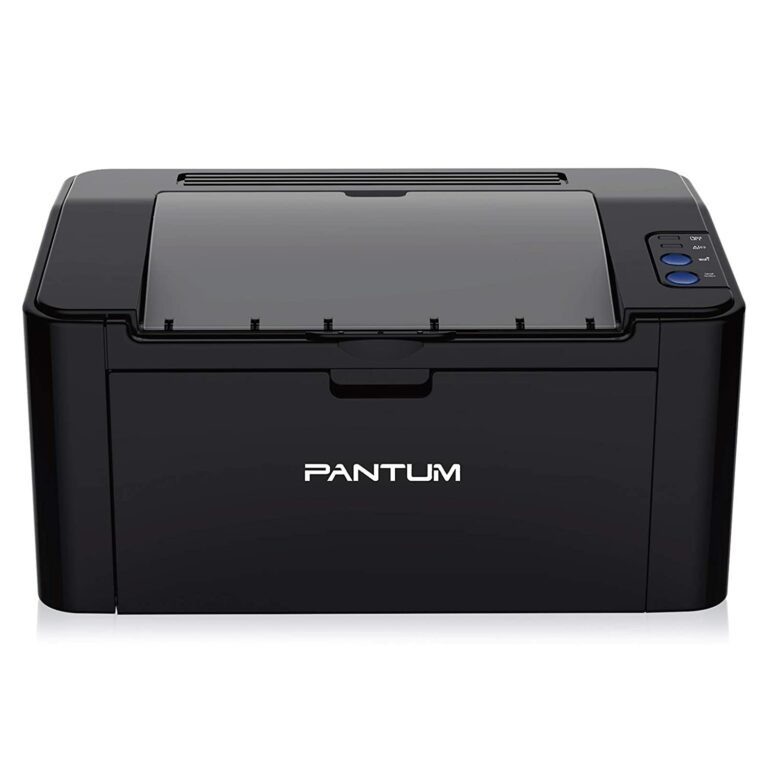
Compact and smart, Pantum P2500W is designed for convenient use, print high-quality documents and remains budget-friendly to the pocket. It offers fast and high resolution printing up to 22 ppm (A4) / 23 ppm (Letter) in black and white. It supports multiple media sizes. Also, It fits nicely on any workstation. Metal frame structure and build help in long term use. It can print a maximum number of 15,000 pages in one month.You can connect the printer with Hi-Speed USB 2.0 and WiFi as well. You can install the Pantum App from Google Play Store and Apple App Store to use it wirelessly. It allows Google cloud printing features also. Over that, it comes with a 1-year standard warranty from the date of purchase.It is priced at Rs 11,400.Dimensions:33.7 x 22 x 17.8 cmPrinter Type: Monochrome/ Black and whiteBuy from: Pantum P2500WRead also: 5 features Pantum M6502NW laser printer has that will compel you to buy it right now
HP Neverstop 1000w laser printer
The HP toner reloading kit and black laser imaging drum deliver thousands of pages for a smooth printing workflow and easy mess-free toner replacement. You can count on it to get consistent superb prints. It produces sharp text and bold blacks. It’s an innovative laser printer that helps you to print high volume at an ultra-low print cost. Pages up to A4 in size are supported in this monochrome WiFi printer. It comes with a 1-year standard warranty and all Windows versions up to Windows 10 are supported.Dimensions:29.34 x 38.05 x 21.1 cmPrinter Type: MonochromeIt is priced at Rs 14,699.Buy from: HP Neverstop 1000w
HP Laserjet 108w laser printer
This HP Laserjet printer can give you good printing performance at an affordable price, and also produces high-quality results at the same time. This printer can also be connected through the HP Smart app – an app that’s designed to control your printer wirelessly. Users can simply set up, print, scan, and copy via the phone using the HP Smart app. Just connect your smartphone or tablet directly to this printer using WiFi Direct and easily print without accessing any network.It is a compact printer that’s designed to fit well on any type of desk. You canshare your documents to third-party software like Dropbox and Google Drive using the HP Smart app too. It also comes with a 1-year standard warranty that can be extended up to 5 years by paying a few extra bucks. If you want to read the full review of the HP Laserjet 108w laser printer click here.Dimensions:38.4 x 28 x 26.1 cmPrinter Type: MonochromeIt is priced at Rs 11,399.Buy Now: HP Laserjet 108w
Canon LBP6030W laser printer
You can print crisp and clear documents, presentations and more with this professional laser printer that is compact. With super-fast printouts of 18 pages per minute of A4 paper, this printer delivers speed and quality. It is ideal for frequent home and office usage with medium to high volume requirements at a fast speed.You get quick quality results with almost no waiting time, thanks to Canon’s exclusive On-Demand fixing technology, which transfers heat instantly when activated. Quick warm-up time also enables the WiFi ready printer to respond quickly from standby mode, delivering fast prints while saving you power costs. It also comes with a 1-year standard warranty.It is priced at Rs 11,319.Dimensions: 36.4 x 24.9 x 19.9 cmPrinter Type: MonochromeBuy from: Canon LBP6030WRead also: An inexpensive multi-function ADF duplex laser printer for corporate user
Pantum P3302DW laser printer
Pantum P3302DW has an automatic duplexing function for easy office documentation. Also, it offers 256MB large memory with a 350MHz processor, which increases monthly print productivity by up to 60,000 pages. It makes your printing more convenient with wireless and NFC connections. It supports various media types and sizes. In addition, it offers an easy one-step installation. It is not as small as some of the other laser printers on the list, however, it is not as large as the full-fledged office laser printer. The printer maker does say there is less ink wastage using this monochrome printer. A unique feature of this printer is the Silent mode. It creates less noise and provides a comfortable environment. This one too comes with a 1-year standard warranty.Dimensions:35.56 x 33.53 x 23.37 cmPrinter Type: MonochromeIt is priced at Rs 13,590.Buy from: Pantum P3302DW
So, these are the top wireless laser printers, which you can check before making any decision regarding laser printers.
For the latest gadget and tech news, and gadget reviews, follow us on Twitter, Facebook and Instagram. For newest tech & gadget videos subscribe to our YouTube Channel. You can also stay up to date using the Gadget Bridge Android App. You can find the latest car and bike news here.
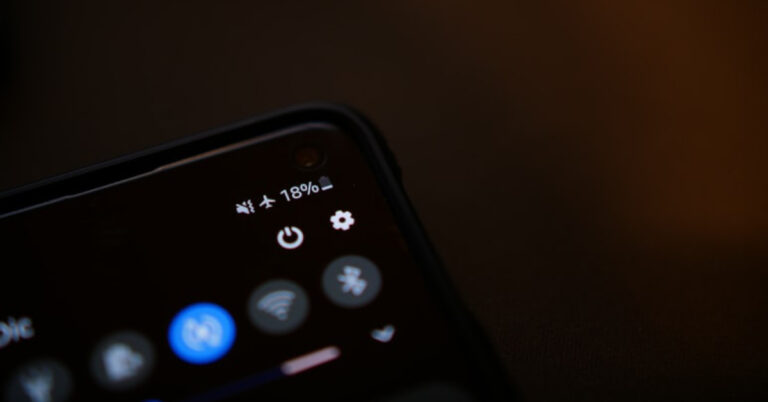
Almost all smartphones available in the market use lithium-ion batteries. But, the basic problem with these batteries is that they degrade over a period of time, affecting both the charging capacity and also the recharging period. While most Android smartphones offer some data regarding battery usage, there’s absolutely no way to check and stop the battery from degrading, except for a few solutions that can slow down the process. In this article, we’ll tell you some easy methods to see your Android smartphone’s battery health and prevent it from degradation.
The above method gives you merely a vague idea of battery health. To get technical details in numbers, you can use a third-party app called Ampere. All you need to do is install Ampere from the Play Store, as you complete a couple of recharging cycles, the app will start showing an estimate of your battery data within the app. This number will keep getting accurate over the recharging sessions.
Usually, the app will show health, status, max capacity, etc. You might know that anything above 80% is considered good. Also, please do not overcharge the phone, that will reduce battery life.
Ampere is simply an app, and it doesn’t have any magical powers to increase your smartphone’s battery life. All it does is analyse your phone’s software and hardware battery usage to urge an estimate of your smartphone’s current capacity and give you an idea about its battery health.
It gives you useful stats like battery charging and discharging speeds per hour, temperature, and battery wear per recharge cycle. So looking at that you can adjust your battery usage type to prolong its life.
Use a dial code
If your Android smartphone does not allow you to view the battery health from settings and you don’t want to download a third-party app, you’re left with only one option — using a dial code. By pressing the appropriate dial codes, you can get a lot of information about your phone. Dial the following code on your phone to check its battery health — *#*#4636*#*#. In the following window, tap on ‘Battery Information’.
Read also: Vivo takes Indian Smartphone market by storm, leaves Samsung behind
Tips to prevent Android smartphone’s battery degradation
Battery degradation is inevitable and it’ll eventually happen over a period of time. However, if you follow some of these useful tips mentioned below, it can minimise the risk of battery health on your phone. Use these battery-saving tips whenever possible.
Avoid extreme levels of charge. Charging up to 100 per cent or discharging all the way to 0 per cent.
Try to keep the battery within the safe (40-80) per cent zone. Frequent, small top-ups are better than full recharges overnight.
Avoid fast charging if you’re not in a hurry.
Keep the phone in a cool place, especially while charging. Please don’t use it while plugged in.
Also, the lesser the drainage, the fewer recharges required. So, always try to optimise usage and only when required use your smartphone.
Use the original charger and cable or a licensed third-party charger with an equivalent specification.
While phones do stop charging at 100 per cent, you must still avoid overnight charging.
If you’re storing (putting the phone on standby) the phone for a long time, charge the battery to 50% rather than 100%.
Frequently Asked Questions (FAQs)
How do I check the battery health on my phone?
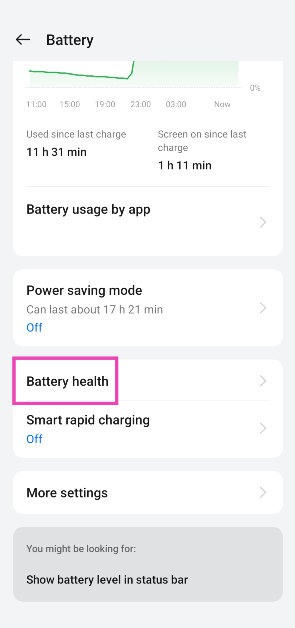
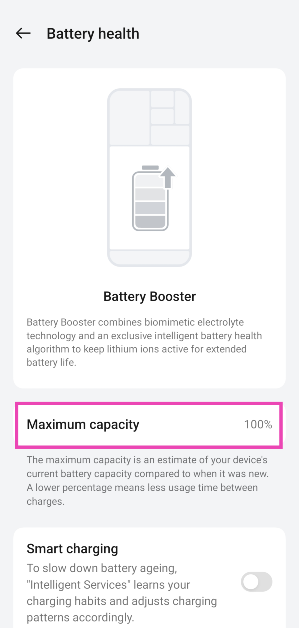
Go to Settings>Battery and tap on Battery Health to find out its maximum capacity.
What is the dial code to find the battery information on Android?
Dial *#*#4636#*#* to learn more about your phone’s battery.
Which are some good third-party apps for battery info and management on Android?
Ampere, AccuBattery, Battery Guru, and Charger Alert are some of the best apps for battery management on Android.
Conclusion
So, by following the above methods you’ll be able to check your Android smartphone’s battery health and avoid battery degradation. If you cannot employ all of them in your daily routine, you can at least pick a few of them. Over a period of time, you will yourself feel a difference, after using these battery tips for Android.
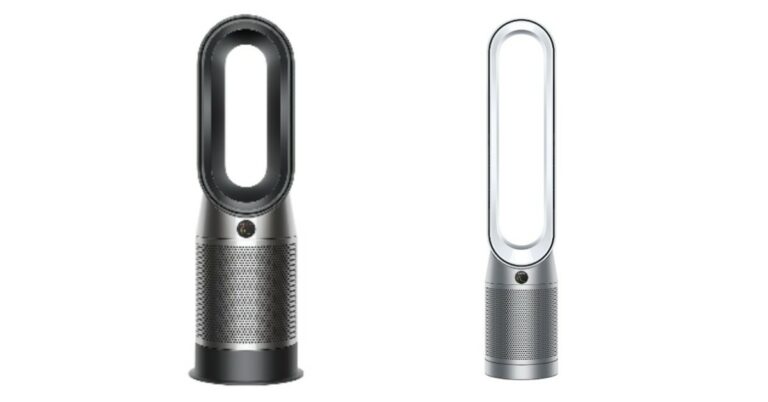
The UK-based company, Dyson, known for its high-end and premium technology products has expanded its air purifier range even further with the launch of two new products. Dyson Purifier Hot+Cool and Purifier Cool have made their debut together today in the Indian market. Both air filtration devices include a HEPA H13 filter capable of separating 99.95 percent of solid particles as small as 0.1 microns in diameter in order to deliver fresh and clean air. The launch of the Dyson air purifiers comes just before the onset of winter in the country.
In This Article
Dyson Purifier Hot + Cool, Purifier Cool price and availability in India
The Dyson Purifier Hot + Cool is the most premium one and will be available with a price tag of Rs 55,900. On the other hand, the Dyson Purifier Cool will come with a price tag of Rs 45,900. These products will be offered in two colour options: White/Silver and Black/Nickel. Both the Dyson Air Purifiers are now up for sale in the country and are being sold through all 12 Dyson Demo spaces in Delhi, Gurugram, Chandigarh, Mumbai, Pune, Bengaluru, Chennai, Hyderabad; on Dyson.in; Amazon, Flipkart; and in select Croma & Reliance retail stores.
Dyson Purifier Hot + Cool, Dyson Purifier Cool specs and features
The key distinction between the two air filtration devices, as the name implies, is their ability to change temperature. The most expensive and premium Dyson Purifier Hot + Cool is capable of not only filtering the air inside the room/house but also heating the air, which can be very useful in winter. With self-regulating ceramic plates positioned at the front of the loop, they heat the air as it leaves the machine. As the plates heat up, they conduct less electricity to help ensure they do not overheat. With thermostat control, once your target temperature is reached the machine automatically stops heating, which saves energy. If the temperature starts to drop, it reactivates to maintain it.Dyson Purifier Hot + CoolDyson’s new range of air purifiers reflects the latest technology in two core areas: filtration and acoustics. Both the air purifiers come with HEPA H13 standard air filters that can even capture the H1N1 virus and 99.95% of particles as small as 0.1 microns, such as allergens, bacteria, viruses, pollen, and mould spores. This can also filter out pollutants like PM10, PM2.5, VOCs, and NO2.Also, the sound output has been reduced and has been re-engineered to be 20 per cent quieter than their predecessor machines.Dyson Purifier CoolThe Dyson Purifier Hot+Cool, and the Dyson Purifier Cool project fresh and filtered air into every corner of the room. The auto mode enables the machine to maintain a preferred room temperature and air quality levels, the machine can be entirely controlled by the Dyson Link App and activated by voice control. The machines are compatible with Google Home, Alexa and Siri for hands-free control. The Night mode on its monitors and purifies using its quiet settings, with a dimmed display.
For the latest gadget and tech news, and gadget reviews, follow us on Twitter, Facebook and Instagram. For newest tech & gadget videos subscribe to our YouTube Channel. You can also stay up to date using the Gadget Bridge Android App. You can find the latest car and bike news here.



 Other than in India the device will be available in Australia, Canada, China, France, Germany, India, Japan, Mexico, Russia, South Korea, the UAE, the UK, the US, and more than 50 other countries and regions.
 Step 2 –
 Step 3 –
 Step 4 –




 Read Also:
 Step 3 –
  Step 5 –

 Step 3 –






 For the latest
 Step 2 –
 Step 3 –
 Step 3 –
 Step 3 –



















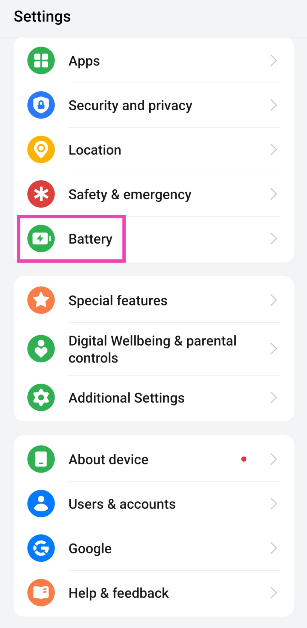 Step 2: Tap on Battery health.
 Step 3: Check the maximum capacity of the battery.
 Read also:
  The above method gives you merely a vague idea of battery health. To get technical details in numbers, you can use a third-party app called Ampere. All you need to do is install
  Ampere is simply an app, and it doesn’t have any magical powers to increase your smartphone’s battery life. All it does is analyse your phone’s software and hardware battery usage to urge an estimate of your smartphone’s current capacity and give you an idea about its battery health.
It gives you useful stats like battery charging and discharging speeds per hour, temperature, and battery wear per recharge cycle. So looking at that you can adjust your battery usage type to prolong its life.
Ampere is simply an app, and it doesn’t have any magical powers to increase your smartphone’s battery life. All it does is analyse your phone’s software and hardware battery usage to urge an estimate of your smartphone’s current capacity and give you an idea about its battery health.
It gives you useful stats like battery charging and discharging speeds per hour, temperature, and battery wear per recharge cycle. So looking at that you can adjust your battery usage type to prolong its life.