Google is rolling out a fresh update for Android devices. The new update comes for the Google Messages application, which will be delivering two new features to your devices. The first is the auto delete OTPs messages and the other one is the sorting feature, which is going to sort all your messages into categories. This will make it easier for users to not manually segregate or delete the promotional or One Time Passwords that we receive from businesses or while making money transactions and logging in accounts.The news comes by way of a blog post by the company, which has announced a very important update for the Google Messages application to make text or messages on your device simpler to consume. The blog post says, “With our Messages app, we’re bringing a seamless and helpful experience on Android. We’ve heard from many users in India that they receive a lot of different types of messages, from friends and family and businesses sending promotions, receipts, order confirmations and more. With so many incoming texts vying for your attention, it can be difficult to separate the important ones from everything else. To help you easily manage your messages, today we have two new updates to the Messages app to share.”In order to keep your inbox clutter-free, the Messages app has received a feature in which it uses machine learning technology to automatically sort your messages into categories, including personal, transactions and OTPs. The new functionality will filter out bank transactions and bills to the transitions tab while the conversations with saved numbers can be easily located in the personal tab. The decluttering of the messages will not hamper any of your conversations they will stay in a device but will be more manageable. We all have a habit of not deleting one-time passwords (OTPs) from our phones after money transitions, payments or account log-in is complete. So now the Google Messages app will take the lead by auto-deleting the OTPs from your phone. The application will provide the option to automatically delete your one-time passwords (OTPs) 24-hours after they’re received, so you don’t have to spend time deleting them manually. To enable the feature, just tap continue when you see the suggestion prompt to confirm your selection.As per the company, the new update for the Messages app will be pushed out over the coming weeks (in English) on Android phones in India running Android 8 or newer. These features are optional and can be managed in settings, too. To try them out, update your Messages app to the latest version or download the apphere.
For the latest gadget and tech news, and gadget reviews, follow us on Twitter, Facebook and Instagram. For newest tech & gadget videos subscribe to our YouTube Channel. You can also stay up to date using the Gadget Bridge Android App.
The website or the app of CoWIN have allowed you to correct any particular errors on your vaccine certificates. There are some details you should keep in mind before you make those changes. Make sure to fill in all the information correctly since the chance of fixing the errors is allotted just one time. The website has opened a portal to change your name, gender, photo ID number, and date of birth.
In This Article
How to fix errors on the vaccine certificates online:
The CoWIN vaccination certificates are produced when you are traveling and will help in entering many premises. Earlier the status update on your vaccination was through the Aarogya Setu app, but now CoWIN has allowed you to make changes. Here are the steps to fix the errors.
Go to cowin.gov.in and sign in with your mobile number that has been registered
Once the mobile number is verified it will show your account details
Click on the “Raise an issue” option on the top and select the member’s name
Press on the “Correction in certificate” option
There will be four options given: Name, Year of Birth, Photo ID Number, and Gender
Those who have received the first dose will have a single blue border with vaccination status on the home screen. And for those who have gotten the second dose have a “Blue Shield” with a double tick displayed on CoWin after 14 days of the vaccination. When you get vaccinated the certificate that has been issued includes a secure QR code to maintain authenticity and you can do the authentication from the CoWIN portal. Here are the steps:
Open the CoWIN site and click on Verify Certificate on the top bar
Select the button Scan your QR code using the notification that will prompt you to activate your camera
Aim the camera at the QR code of your vaccine certificate and scan it
Wait for the response for the certification
It will either show “Certificate successful” or “Certificate Invalid”
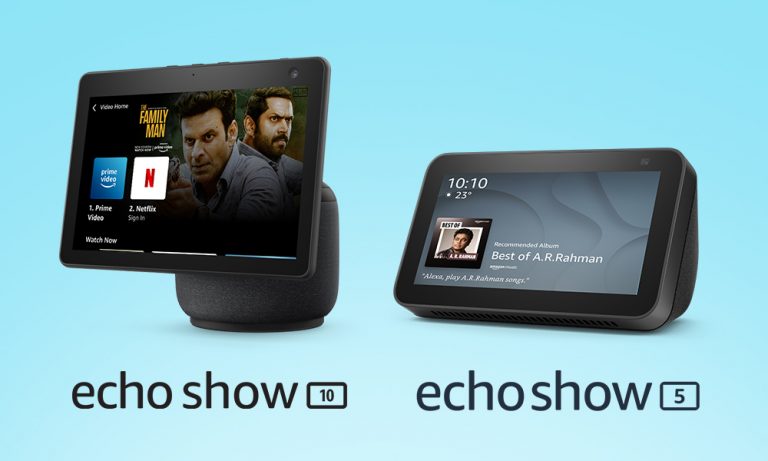
Amazon has expanded its lineup of Echo Show devices with the announcement of the third generation of Echo Show 10 in India. The new smart display officially made its debut along with other Echo devices in September last year. The Amazon Echo Show 10 (3rd generation) comes with an all-new design while holding on to its 10-inch display. The biggest USP of the device is that it comes with a 360-degrees rotating body which automatically rotates when you interact with Alexa. Alongside this, the company has also launched Echo Show 5 which was launched in the US last month.Amazon Echo Show 10 (3rd generation) and Echo Show 5 price in India and availabilityAmazon Echo Show 10 (3rd generation) has made its debut in India with a price tag of Rs 24,999. It should be noted that the device was launched in the US at $250 that translates to Rs 18,600 which is cheaper than the price quoted for the Indian market. This smart device will be available in India in a single black colour variant via the e-commerce website only. Whereas in the US it comes in two colour variants Charcoal and Glacier White. Besides this, the company has also introduced another smart display- Echo Show 5 (2nd Generation) at Rs 8,999. However, the smaller and affordable Echo Show will be available at a discounted price of Rs 6,999. It comes in three colour variants: Black, White, and Blue. Amazon Echo Show 10 featuresAmazon Echo Show 10 features a 10-inch adaptive HD display. It equips a 360-degrees rotating body that automatically rotates when you interact with Alexa. Also, the display will rotate with you during a video call and watching videos that makes sure that it is always in view. There is a 13-megapixel wide-angle camera that moves left to right and right to leftkeep you at the centre of the frame.Amazon Echo Show 10The Amazon Echo Show 10 also incorporates Alexa Group Calling features that lets you connect with up to 8 people for video calling. Besides this, it also supports Zoom and Amazon Chime video conferencing as well.There are dual front-firing tweeters and a powerful woofer onboard. With Netflix support Echo Show 10 will be able to stream content. The smart display also uses advanced computer vision algorithms to help make your home smarter and more secure. When Alexa Guard is in Away Mode, Echo Show 10 can periodically pan the room and will send you a Smart Alert if it detects someone in its field of view. Echo Show 5Amazon Echo Show 5 featuresThe Echo Show 5 is a smaller and more affordable smart display by Amazon. It features a 5.5-inch touch display and comes with an upgraded 2-megapixel HD camera. The camera can also be accessed through the Alexa app to check in on home when you are out of town or away from your home. It can also control smart home devices and also play news and provide weather updates and more. It is also capable of recognising sounds of a crying baby, dog barking, person coughing or snoring—and automate a series of actions.
For the latest gadget and tech news, and gadget reviews, follow us on Twitter, Facebook and Instagram. For newest tech & gadget videos subscribe to our YouTube Channel. You can also stay up to date using the Gadget Bridge Android App.
The pandemic is changing our lifestyle and work ethics, along with education and entertainment. We have started valuing products that offer convenience and enable us to multitask seamlessly. Dell is the latest entrant in the market to offer a webcam for 4K video conferencing. The brand has announced the launch of the Dell UltraSharp Webcam that comes with an auto framing feature. It will compete against Mi TV Webcam and the OnePlus TV camera.Dell UltraSharp Webcam price and availability detailsDell UltraSharp Webcam has been introduced in India with a hefty price tag of Rs 18,999. The device will be available for purchase via Dell’s enterprise channels across the country. Similar to the Dell Webcam, other brands such as Xiaomi and OnePlus have also brought their proprietary webcam for the Smart TVs in the Indian market. OnePlus TV Camera is priced in India at Rs 2,999 whereas Mi TV Webcam comes at a much lesser price tag of Rs 1,999. Both the webcam modules are currently available for purchase in the country.Dell UltraSharp Webcam specificationsSpeaking of the design first, the Dell UltraSharp Webcam features an all-aluminium cylindrical body. There is a magnetic mount along with a tripod adapter so that it can be attached to your device easily. It comes with a magnetic snap-on cover for privacy. There is a white LED light indicator, which lets us know when the webcam is in use.This Webcam from Dell comes with an 8.3-megapixel Sony STARVIS CMOS sensor. The camera is capable of offering 4K UHD resolution at 24fps/ 30fps frame rate and full-HD and HD resolution at up to 60fps frame rate. In addition to this, the camera module also comes integrated with the multi-element lens on top for well light videos and Digital Overlap HDR capability. Over that, the webcam features an AI-backed Auto-Framing feature to keep you stay focused during video conferencing. The device is compatible with both Windows and macOS devices.The Dell UltraSharp Webcam uses 3D/2D video noise reduction for not so grainy picture quality and offers a customisable field of view options to choose from 65, 78, and 90-degrees of FOV. Additionally, it is also capable of providing 5x digital zoom. Furthermore, there is a Dell Express Sign-In feature to detect motion with a built-in proximity sensor. This also lets it log you out when it detects you have stepped away from the sensor. With an IR sensor, it logs in users using Windows Hello.On the connectivity front, there is a USB Type-C port, which can be used to connect with a PC using a USB-A-to-USB-Type C cable that comes inside the box.
For the latest gadget and tech news, and gadget reviews, follow us on Twitter, Facebook and Instagram. For newest tech & gadget videos subscribe to our YouTube Channel. You can also stay up to date using the Gadget Bridge Android App.
Live wallpaper is basically one that contains some form of animation. These wallpapers are interactive wallpapers that are used on your Android home screen. The Google Play Store is home to a vast array of live wallpaper with so many options to choose from. So if you are ever sick of the same dull wallpapers try the live wallpapers by following the guide below.
In This Article
Pre-installed live wallpaper on Android smartphone
There are not many options to choose from for the pre-installed live wallpaper library. But android smartphones do come with some pre-loaded live wallpapers that you can set on your home screen. Here are the steps:
From your home screen press the menu button or go to Settings from the gear icon
Select Display from the options given in Settings
Press on wallpapers
From the three options that pop up choose one: Home screen, Lockscreen, Both home screen, and Lock screen
Now from the page “Select wallpaper from” choose Live wallpaper: Gallery, Live wallpaper, wallpaper
From the list of live wallpaper select one and change your homescreen layout
As mentioned, Playstore has thousands of Live wallpaper apps on the market for you to download and install and most of them are for free. There are many ways to download a live wallpaper. You can either check the live wallpaper for rating, search on Google for the best live wallpaper on Play Store, or just go Google Playstore and type live wallpaper on the search box and click on the one you like. Here is how you can download and install a live wallpaper app.
Open the Play Store on your Android smartphone and search live wallpaper
Browse for the live wallpaper whose aesthetic appeals to you
Open the page and click install
After the download of the app
Go to phone settings>Display>Wallpaper
Choose Home screen, Lock screen, or Both>Live wallpaper>Set wallpaper
Set videos as live wallpaper on your Android smartphones:
Most Android phones do not come with pre-installed video live wallpaper, but you can always download it from the Google Play Store. The video live wallpaper is to be added to your home screen through a third-party app so make sure you have the best-looking app. Here is a guide to add video as live wallpaper.
Open your Google Play Store and download the best video live wallpaper app you can do that by just typing Video live paper on the search box and choose the one which has the best rating and that is of your taste
Download and install the app on your phones
Open the app on your smartphone after installation
Go to choose options and select the video from your gallery or from other platforms you have a video you want to use as live wallpaper
Previously Google confirmed that Pixel 5A will be a mid-range option that is going to be available later this year in the worldwide markets. But according to a fresh report the company is expected to launch the device in August. In addition to this, the phone may also go on sale in a similar month of the launch. However, the past rumours suggested that this time the company might not bring the device to the stores. Reportedly, Google Pixel 5A is said to be announced in August. The device is a follow up of the original Pixel 5, which was launched last year. However, the upcoming devices are said to be low-cost handsets. Another report suggests, that the phone has been spotted with multiple references to the codename “Barbet” in the latest Android 12 Developer Preview that is slated to be used for the models which were launched last year. These references have a model number “sm7250” that is believed to be the Qualcomm Snapdragon 765G SoC which is also present in the Pixel 5 and Pixel 4a 5G.Earlier Google Pixel 5a was rumoured to be cancelled by the company but the company took this matter into its hands therefore by confirming the launch. Google released a statement saying “Pixel 5a 5G is not cancelled. It will be available later this year but will be available in the US and Japan. This statement contradicts an alleged BIS listing which indicated the launch in India as well. Last year Google Pixel 4a and 5 was launched in the month of October. In the same way, the launch of the Pixel 5a is expected to happen around the same timeline or maybe earlier. Image Courtesy: Jon Prosser/YouTubeSeparately, Google Pixel 6 is also scheduled for a launch. The device is said to be powered by the company’s in-house chipset codenamed “Whitechapel” which is also being referred to as GS101. The GS in the acronym stands for Google Silicon. The new chipset is said to be co-developed with Samsung that may share some similarities with its Exynos chipsets. The Google Silicon is also said to have an octa-core ARM CPU with two Cortex-A78 plus two Cortex-A76 and four Cortex-A55 cores. This can be further paired with ARM Mali GPU which is based on Samsung’s 5nm manufacturing architecture.
For the latest gadget and tech news, and gadget reviews, follow us on Twitter, Facebook and Instagram. For newest tech & gadget videos subscribe to our YouTube Channel. You can also stay up to date using the Gadget Bridge Android App.
The e-commerce website Flipkart is hosting Daily Trivia Quiz. Every day it brings a bunch of new questions for its users. By answering them correctly you can win exciting prizes. The questionnaire is based on questions related to general knowledge. Also, the users can win free vouchers and super coins, among other offers via the daily quiz. June 30 Flipkart Daily Trivia Quiz Answers has already gone live on its platform.
The participant should be at least 18 years old and should have a valid login ID. The Quiz is available on the mobile platform and not the web version. E-commerce conducts the quiz on daily basis and goes live at 12:00 AM IST and runs till 11:59 PM IST. The winners are announced within 15 days from the date of participation that can be viewed under the Gems/Rewards section in the app.
In This Article
How to participate in the Flipkart Daily Trivia Quiz
To participate download the Flipkart app on your phone. Then open the Flipkart app then head to Game Zone. Now click on the Daily Trivia Banner or search for Daily Trivia. Enter the game and answer all 5 questions with correct answers.
June 30 Flipkart Daily Trivia Quiz Answers
Question 1: Starring Irrfan Khan, which film was a biopic on a 7-time national steeplechase champion?
Answer: Paan Singh Tomar
Question 2: Who replaced Navjot Singh Sidhu in the Kapil Sharma Show?
Answer: Archana Puran Singh
Question 3: Who replaced Navjot Singh Sidhu in the Kapil Sharma Show?
Answer: Ramayana
Question 4:Who wins the title of the best student in the film ‘Student of the Year’?
Answer: Varun Dhawan
Question 5: Who acted as the boxer ‘Apollo Creed’ in the ‘Rocky’ film series?
Answer: Bruce Bennet
The e-commerce platform Amazon is back with another new session of the quiz on its platform. It brings Amazon Quiz sessions for its customers on a daily basis. Customers can stand a chance to win bumper prizes just by playing at home from 12 AM to 11:59 PM. Every day Amazon asks 5 questions that the customers have to answer correctly. This session is only available for app user in India.
In today’s Amazon Quiz the winners will get a chance to win Rs 25,000 Amazon Pay Balance. Check out June 30 Amazon Quiz answers:
Question 1: Parul Debi Das, who recently passed away, was the first female IAS officer from which state?
The answer is- Assam
Question 2: Litani river and Qaraoun lake, which is in news due to heavy pollution, is located in which country?
The answer is- Lebanon
Question 3: Which country recently became the first country in the world to allow driverless cars on roads?
The answer is- UK
Question 4: What colour is the centre scoring zone of the target in this sport?
The answer is- Gold
Question 5: What type of accident happened at this place in Ukraine in 1986?
The answer is- Nuclear
Carl Pei today officially announced the launch of his very first product that is Ear 1 TWS earbuds on July 27 under his newly founded tech firm Nothing. Prior to the announcement, the CEO confirmed the first truly wireless earbuds that were earlier teased to launch on June 1. CEO Carl Pei took to Twitter to announce the final date of the launch of Nothing Ear 1 TWS earbuds in the market. With the launch of its first truly wireless earbuds that will be looking to go after consumer tech giants such as Apple, Samsung and OnePlus offering AirPods, Galaxy Buds and OnePlus Buds respectively. Earlier the Nothing Ear 1 TWS earbuds were announced to launch on June 1st but now the company’s head itself confirmed July 27 as the final date for the unveiling. His tweet reads, “ A month ago we announced that ear (1) would be revealed in June. We’re near the finish line and there are a few things left to finalize. For this reason, @Nothing ear (1) will now come out a bit later this summer. Your support and patience mean the world to us. More updates soon!”The launch is scheduled to kickstart at 2 PM BST and 6:30 PM IST. To launch the product in the Indian market Nothing has appointed Samsung’s executive Manu Sharma who recently announced the collaboration of Nothing with Flipkart. He took to Twitter to announce the association to make its TWS earbuds available for purchase in India. His tweet reads, “For the upcoming launch of @nothing ear (1), we are excited to partner with Flipkart as we mark Nothing’s entry in India #ear1 #SoundOfChange #nothing #buildingnothing”The doesn’t divulge much information but the previous design concept of its upcoming TWS earphones shared by the company mentions that Ear 1 TWS will be a combination of transparency, iconic form, and refined functionality. It is the starting point that will define the artistry, confidence and craftsmanship that will carry our products and services for years to come.Whereas the teaser shows the form factor of the audio device. It should be noted that the Noting earbuds are designed in association with Stockholm-based Teenage Engineering.
For the latest gadget and tech news, and gadget reviews, follow us on Twitter, Facebook and Instagram. For newest tech & gadget videos subscribe to our YouTube Channel. You can also stay up to date using the Gadget Bridge Android App.
It will come as a surprise to some Amazon buyers that put product reviews sometimes can be fake. You can identify and know which is a fake review, as it can be critical to buying the best product online. An integral part of the online shopping experience has become which product is worth buying or not and the reviews for the product say so much about them. With more and more cases of fake reviews being caught by experts, it is high time you learn how to differentiate. Here are some ways you can spot fake Amazon reviews.
In This Article
There is a huge number of reviews in a short span of time:
Generally, it takes a lot of time to get reviews on a product. Considering the fact that there are limited customers that are going to review the product on the Amazon website. If you spot flooding of reviews it is high time you should consider the reviews are paid reviews, for which people are being paid to write positive reviews.
Read more: Redmi Note 10 review: Insanely good budget smartphone
Company website not available:
Another thing you need to look at to spot fake reviews is by checking the company which uploaded the product. If you do not seem to locate an authentic company website, it is highly probable that the company is not trustworthy and all the reviews are to be reconsidered. These are signs that you can spot fake reviews easily.
Read also: How to spot a phishing email or SMS message and avoid it?
Similar wording reviews:
The writing style of a person does not change completely. If the reviews are from the same person but different accounts the content and the words will not be very different. If you are able to observe such similarities you can easily spot a fake review on the Amazon website.
Using a review tool is the best method to check if the review is genuine or fake. Reviewmeta simply uses the grading process as an Amazon-only analyzer. The steps to verify the review on the tool are easy and simple: you copy the URL and paste it on the website. The website will eliminate all the unreliable reviews and help you spot fake reviews on Amazon. The algorithm works in a unique way, letting you grade the reviews and provide detailed breakdowns with graphs. You can also add an extension to your browser.
The review tools will rate how reliable product pages are on Amazon and other websites. You can open the fakespot website and copy the URL from Amazon and paste it on site. Fakespot will then grade the page and see how reliable the information can be. The algorithm of Fakespot finds reviews, analyses language, checks previous reviews, and purchase history to determine the product and the reviews. It filters out all the fake reviews for you to shop better and you can also add an extension of it to your browser.
For the latest gadget and tech news, and gadget reviews, follow us on Twitter, Facebook and Instagram. For newest tech & gadget videos subscribe to our YouTube Channel. You can also stay up to date using the Gadget Bridge Android App.
For the unknown, just clicking on the ‘Allow Notifications’ popup of an app/software during the setup process gives internet access to the app. There are other instances as well when you want your applications to connect to a local network and better internet, but not all of them. Here are the top 4 ways to block the app access to the internet on your Windows computers.
In This Article
From Windows Defenders Firewall
Although allowing apps to run online using the internet on the laptop is usually good, there are many reasons to block an app from accessing the internet on your computer. One example is to stop automatic updates of an app or disable an app that cannot be used offline. The following are the steps to block an app on Windows computers.
Open your computer, go to the bottom left corner on the Search bar and type Windows Defenders Firewall
On the next page click on Windows Defenders Firewall and open it
From the left side, panel scroll down and select Advanced settings
When the Advanced settings program is open click outbound rules from the side panel
Now from the right-side panel click on New rule
New Outbound Rule Wizard will open and from the options choose Program and click Next
From This program, path browse the apps you want to block, select the app, and press Next
On the next screen tap on Block the Connection
The program will ask when/where you want to apply this rule, tick on all three options: Domain, Private, Public
Next name the rule and add a description to it
Hit finish and the app will be blocked from accessing the internet
By disabling the network adapter you can also block the app access to the internet. Access to all utilities or setups of your computers will be blocked if you disable the network and will help the app in denying access to the internet on your computers. Follow the steps to disable the network adaptor.
Open the Run app on your Windows computers by searching from the search box on the bottom left corner Or you can use the command key Win+R>msc
Open Device Manager on your computers by searching it from the search box
From the Device Manager navigate to Network adapters
From the page click on the arrow icon to expand the list
From the drop-down page, you will see what applications are connected to the internet
Select the application or program you want to disable by using right-click
From the option that appears from the right-click choose to disable
Use Command Prompt
A simple command in CMD can block internet access for any app. But first, you need to copy the app’s path. You can do this by locating the app in its source folder, right clicking on it, and selecting ‘Copy as path’. Once that’s done, launch CMD and enter the following command:
netsh advfirewall firewall add rule name=”FF Block In” protocol=TCP dir=in action=block program=(paste the path of the app here)
Use a third-party tool
If the methods mentioned above seem complicated to you, using a third-party tool can make things easier. OneClickFirewall is one such tool. After installing OCF on your PC, simply right-click on the app you want to prevent from using the internet and select ‘Block Internet Access’. It’s that easy.
Frequently Asked Questions (FAQs)
How do I block an app from accessing the Internet?
You can use Windows Firewall Defender to block an app from using the Internet on your PC. If Firewall Defender is too confusing for you, download OneClickFirewall, right click on the app, and select ‘Block Internet Access’.
How do I block an app from accessing the Internet using Command Prompt?
Copy the app’s path, go to CMD and enter: netsh advfirewall firewall add rule name=”FF Block In” protocol=TCP dir=in action=block program=(paste the path of the app here)
How do I turn off background data usage for an app on Android?
These are the top 4 ways to block an app from accessing the Internet on a Windows PC or laptop. Windows Firewall Defender also lets you block apps on your PC from using the Internet. You can make a whitelist of apps for which you don’t want the ban to apply. If you know any other ways to go about this task, let us know in the comments!
In a new update, the video streaming application Netflix is now allowing users to watch videos before they are partially downloaded. The partial downloading functionality comes for Android users and allows them to start watching series or movies even before the app has completed downloading. The users can choose to finish the download and keep watching, therefore, improving the Netflix download and watch experience.Netflix’s Partial downloading feature is now accessible to Android phones as well as tablets and is currently under testing for iOS devices, which will be launching in the coming months. Keela Robinson, Vice President, Product Innovation said, “So we know the disappointment when you realize your download never completed because of unreliable wifi or a maxed-out data plan. That’s why we’ve improved the Netflix download experience so you can now start watching The Mitchells vs The Machines or the next episode of Luis Miguel – The Series even if it hasn’t completed downloading. Once you’ve regained a strong enough connection, you can choose to finish the download and keep watching — avoiding those surprise notices that you’ve gone over your data limits.”Prior to this, the user’s were not allowed to stream until the download was complete. Netflix’s partial downloads feature will liberate users to watch the videos in case the download gets disrupted due to poor internet connection. So even if the download is incomplete you will be able to watch the downloaded part while the rest of the part can be streamed later on, when the device gets access to the internet. Separately, Netflix earlier this year introduced Downloads For You, a new feature that automatically downloads recommended shows or movies to your mobile device based on your tastes. How to automatically download videos or movies:
Go to the Downloads tab on your mobile device and toggle on Downloads For You.
Choose the amount of content you want to be downloaded to your device (1GB, 3GB, or 5GB) and click Turn On. The more space you allow, the more recommendations Netflix will download for you.
It seems Clubhouse is attracting a lot of attention. The recently released audio-based app has been in the headlines lately. The invite-only social media audio app lets you host a room for audio discussion and live audio. Officially as everyone knows there has not been a Clubhouse version for PC, but to ease the thought there are some ways you can download and install Clubhouse on PC.
In This Article
Using BlueStacks: Android Apps Emulator
The Android application emulator is one of the best options available to run your Clubhouse app on your PC. You can download the BlueStack software on your computers and the Android apps emulator will let you download and install the Clubhouse app on your PC. The BlueStack emulator is available for both Windows and Mac. The following steps is how to download and install the BlueStacks programming and Clubhouse app.
For those who are new to Clubdeck, it is an unofficial desktop client app for the Cubhouse app. Using the Cludeck website you can access your Clubhouse app on your Windows or Mac PC. The websites you can use have some features for Clubhouse Moderators also. The best part of Clubdeck websites is all the functionality of the app is made available. And also features some advanced functions like recording, streaming to other social networks, and playing custom local audio. Check out the guide below to know more about Clubdeck.
Download the installer and install it properly on your computers and correctly
Open the app and sign in using your mobile number registered on your Clubhouse account
Wait for the verification send to the number and enter the code
After you press submit it will open your Clubhouse account and you can use all features available to the app
The Clubdeck allows you some additional features: Professional microphone for better quality, reroute audio through software like Loopback or Blackhole, Play custom sounds and jiggles files from local media or YouTube, Record and restream the session on Social Media, real-time insight from listeners of your Clubhouse room, backchannel chat to coordinate live with co-moderators, and shortcuts to navigate and moderate Clubhouse like a pro.
Twitter has now enabled the features to host Spaces for accounts that have 600 or more followers. Twitter space is an online community to share their knowledge, their professional abilities, and a place to come together. Twitter Space is an audio-based feature, which lets people interact in groups for a live session. Twitter has added a new ticketed feature in Twitter Space that lets you create a ticket for joining the Space session. The creator of the Ticketed Twitter Space can charge the ticket fee from 1 dollar to 999 dollars.Twitter is synonymous with discussions of what’s happening around the world. The unfiltered thought of users is often shared and expressed. With the Ticketed Twitter Space, the discussion will be brought to live audio experiences. The Twitter account that has enabled the Ticketed space will be able to monetise their Space and charge a fee as a Ticket to join the Twitter Space.
Read more: Now you can be the first to try Ticketed Spaces and Super Follows with your audience, Twitter opens applications
In This Article
How can you start a Ticketed Twitter Space?
The following steps are to enable the Ticketed feature in your Twitter account. And make sure you meet the requirement set out by Twitter to enable the feature.
Open the Twitter app
Go to the top left corner and click on the three horizontal line icon: (Hamburger menu)
Scroll down on the side panel and select Monetization
And from the options click on Ticketed Space
From the page open up press on “Apply for Ticketed Spaces beta”
Now you have registered and Twitter will get back to you
The tickets let you host an audio-based live session and let you control the entry of other participants by putting a fee to join your sessions. Know more below:
Monetisation: The audience of your session through Twitter Space is charged a fee from 1 dollar to high as 999 dollars as a ticket.
Intimate settings: The live session created on Twitter Space lets you host invitees from 5 to 100 for deeper discussion and live audio sharing
Promote Space: The promotion of your upcoming live audio discussion can be alerted with a push of an in-app notification that will be sent to their devices and you can share the details on your Timeline as well.
Super Follows:
If your Twitter account starts to get more Super Follows you can earn more revenue and also create more content. With the increase in Super Follows, you can earn monthly revenue by creating a direct relationship with your active followers. Also, you can create bonus content and offer it to your biggest followers. Customisation is another great feature of having Super Follows. You can customise the price from 2.99 dollars to 9.99 dollars per month.
For the latest gadget and tech news, and gadget reviews, follow us on Twitter, Facebook and Instagram. For newest tech & gadget videos subscribe to our YouTube Channel. You can also stay up to date using the Gadget Bridge Android App.
At the ongoing MWC 2021 Samsung at its virtual tech conference introduced the One UI Watch user experience, which is its new unified platform jointly built with Google. According to the company, the new operating system will bring performance enhancements between the Galaxy Watch and Android smartphones. In addition to this, the upcoming Galaxy Watch will be the first to bring the new interface at its Unpacked event that is scheduled for late summer.While presenting the new unified platform and One UI Watch Patrick Chomet, EVP and Head of Customer Experience Office, Mobile Communications Business at Samsung Electronics said, “To unlock the full potential of these wearables, we’re leveraging our long legacy of mobile innovations and our partnerships with trusted industry leaders who have grown with us in our open ecosystem. Through these efforts, we will enrich our smartwatch experience and convenience of the Galaxy ecosystem for our consumers.”One UI Watch will offer a whole new watch experience between the Watch and Android smartphones. As per the company when you install watch-compatible apps on your smartphone they will automatically get downloaded onto your Galaxy Watch. Additionally, if you personalise your clock app on your phone to show the time in different cities around the globe, this will be automatically reflected on your watch as well. Similarly, when you block calls or messages on your phone they will also be blocked on your Watch as well.Besides this, the users will also be able to integrate third-party apps like Adidas Running, GOLFBUDDY Smart Caddie, Strava and Swim.com, Spotify and YouTube Music as well as Google Maps via Google Play directly on your Galaxy Watch.On top of that, One UI Watch user experience will also accompany an improved watch face design tool. This will enable designers to create new watch faces. Moreover, the Android developers will be able to create new designs that will be added to Samsung’s collection of watch faces later this year. This will give more customisation options to users.Like we mentioned earlier the upcoming Galaxy Watch will be the first to feature the new One UI Watch. As per the company the unified platform is scheduled to be announced at Samsung’s Unpacked event later this summer.
For the latest gadget and tech news, and gadget reviews, follow us on Twitter, Facebook and Instagram. For newest tech & gadget videos subscribe to our YouTube Channel. You can also stay up to date using the Gadget Bridge Android App.
The American chipset maker, Qualcomm Technologies Inc., announced the launch of its Snapdragon 888+ SoC at MWC 2021. This is an upgrade over the existing 5G mobile processor (Qualcomm Snapdragon 888) which was introduced last year. The new flagship mobile platform is said to ship in the second half of 2021 in devices from Asus, Honour, Motorola, Vivo and Xiaomi. The just-announced Qualcomm Snapdragon 888+ will be more powerful and will come with Adreno 660 GPU, and increased Qualcomm Kryo 680 CPU Prime core clock speed at up to 3.0 GHz, to deliver improved gaming as well as content creation. The 6th generation Qualcomm AI Engine with up to 32 TOPS AI performance, which has been upgraded to more than 20% for AI performance. This will enable it to run multiple neural networks simultaneously that work specifically to make your video calls and entertainment experiences more immersive. In addition, it will also bring AI super-resolution and AI-based noise cancellation that suppresses unwanted sounds and camera enhancement features such as single-camera bokeh effects.The new Snapdragon 888+ will also come integrated with the 3rd gen Snapdragon X60 5G Modem-RF System and the Qualcomm FastConnect 6900 Mobile for better connectivity. The X60 5G Modem-RF System will support a 5G network and offer download speeds up to 7.5 Gbps. Whereas the FastConnect 6900 Mobile Connectivity System will provide multi-gigabit Wi-Fi 6 and Wi-Fi 6E to connect game, stream and share backed by unprecedented speed, accessibility and reliability. Besides this, it will also include Bluetooth v5.2 and NFC. With additional support for GPS, GLONASS, BeiDou, Galileo, QZSS, NavIC, and SBAS. For camera capabilities, the Qualcomm Snapdragon 888+ will deliver triple capture of 4K HDR videos or 28 MP photos, with parallel processing up to 2.7 gigapixels per second with the inclusion of Qualcomm Spectra 580 ISP. This will also enable 120FPS burst photos at 12MP and capture clear pictures in low lighting. The new chipset is also capable of offering AI-based auto-focus and auto-exposureIn terms of gaming, the 888+ will equip Snapdragon Elite Gaming features that include Game Quick Touch, reducing touch latency by up to 20%, and increasing display responsiveness. Whereas the updatable drivers deliver the latest graphics and performance improvements in real-time. Whereas Natural Language Processing enables voice commands and real-time translation for smarter global gaming.According to the company, the smartphones with Qualcomm Snapdragon 888 Plus are expected to be announced in the third quarter of 2021.
For the latest gadget and tech news, and gadget reviews, follow us on Twitter, Facebook and Instagram. For newest tech & gadget videos subscribe to our YouTube Channel. You can also stay up to date using the Gadget Bridge Android App.
Apple will be introducing iOS 15 soon and it is coming with some exciting new functions with FaceTime, a new notification system, and offline Siri support. Apple mostly releases new iOS every June-Sep but the great news is, there is a beta version of the iOS available for you to try before the official release of the iOS 15. Read the blow to enroll in the beta program.
In This Article
Disclaimer before downloading the beta version:
Before downloading the developer’s version of the iOS 15 beta. There are some precautions you should take and some information you should be aware of. For those who are unaware, all beta versions are like unfinished versions designed mostly for testing. So there are chances involved to contract bugs, glitches, and even crashes sometimes. So it is highly advised before downloading the beta version you should upload all your data and files to the cloud or transfer them to external storage.
Read more: Android 12 Beta 1 now available for download: These are the compatible devices
How to enroll in the iOS 15 beta program:
An Apple developer program will cost you 100 dollars annually and you can join the developer program. There are also some requirements you need to meet, such as turn-on two-factor sign in and you also have to provide your full legal name and address. After you have your developer ID you can download the beta version. The following steps are on how to install the beta version.
Using the Safari browser search for developer.apple.com and log in with your Apple ID
In the left-hand menu go to downloads
Scroll down to iOS 15 beta and click install “Profile button” and Accept
Now go to the phone Settings and click on Profile downloaded
Or go to General>Profile and select iOS beta profile
Software is tagged as beta when it is at a stage of development but not yet complete. The basic features are in place but not fully developed. The public betas do lag behind the developer version and it is rolled out significantly late. The public beta is to be available in July 2021. Here are the steps to install a public beta version.
Open the webpage of the Apple Beta Software Program
And sign up with your Apple ID
Scroll down to Get started and Click Enroll your iOS device
Now on your iOS device go to beta.apple.com/profile
Download and install the configuration profile
Now Settings>Profile downloaded>Install>Restart your iOS device
Last step Settings>General>Software update>Tap Download and install
USB has been an essential part of all devices may it be for wired data or power transfers. The importance of a USB has been widespread from laptops, PCs, to mobile phones. The use of USB is understood in many aspects of charging your devices, file transfer, and many others. Over the years USB has been upgrading to meet your requirement and the new USB 4 will bring enhanced features. Read below to know more. The specification of USB 4 was first announced in 2019 and it is now time to deliver the new generation of USB connectivity. The upgrade will include the Thunderbolt 3 for faster data transfer and it will be supported in Intel’s 11th generation core processor as well as Apple Silicon Macs. Apart from the faster transfer speed, it will give you better management of video bandwidth and compatibility with all devices supporting Thunderbolt 3. The first update that USB 4 will be bringing is the support of DisplayPort 2.0. Breaking down the specs of Display 2.0 it can support an 8K resolution display at 60 Hz with HDR10 colour. Also, it has a transfer speed of up to 80 Gbps because it sends all data in one direction, and does not need to send anything back to the host device. And for the conclusion, the combination of USB 4 and DisplayPort 2.0 will bring in very high speeds to transfer files.
Read more: Top 10 Laptops of the year 2020: List worth checking outThe new USB 4 will deliver a stable speed of 40Gbps of transfer speed and come with two-speed variants of 20Gbps and 40Gbps. The two speeds of USB 4 20Gbps and USB 4 40Gbps have dual-lane cables enabling greater bandwidth and faster data travel between two devices. The Thunderbolt 3 enables this top speed of 40Gbps transfers, but speeds can go up to 80 Gbps. Using two sets of four bidirectional lanes it can send video and data in the same lane. The USB 4 will use the lanes to send video and data together by sharing resources and will display the bandwidth required to support the data transfer.
Read also: How to transfer your PlayStation4 games and saved data to your new PlayStation5 console?It is also expected to give better resource allocation for video. The devices supporting USB 4 will be using a process called “protocol tunneling” that sends DisplayPort, PCIe, and USB packets at the same time while allocating proper bandwidth accordingly. For example, if 20 percent of the bandwidth is allocated to power a video of 1080p in your system the remaining 80% will be made free to transfer files from your external SSD, which will operate over either USB protocol or PCIe. The USB 4 also has the best compatibility with its previous generations. USB 4 will function with USB 3, USB 2 devices, and ports. Though it is compatible you should note the ports of USB 3 and USB 2 will not be delivering the 40Gbps top speeds. All in all, USB 4 will be faster, better and can manage simultaneous uploads and downloads at high speeds from any device.
For the latest gadget and tech news, and gadget reviews, follow us on Twitter, Facebook and Instagram. For newest tech & gadget videos subscribe to our YouTube Channel. You can also stay up to date using the Gadget Bridge Android App.
Recently OnePlus launched its most affordable Nord CE 5G in India, which is a successor to the OnePlus Nord N10 5G. Now the company is prepping up to bring the OnePlus Nord 2, which is the follow up of the original Nord that was first launched in India in July last year. Not long ago, the device’s specifications were tipped by AI benchmark listing and now its alleged renders have surfaced on the web showcasing the handset’s design from front to back. Tipster Steve Hemmerstoffer aka @OnLeaks not only shared the renders of the OnePlus Nord 2 but has also thrown some light on its key specifications in his previous leaks. As per the latest leaked renders the device will come with a hole-punch design display to house a selfie camera which is placed on the top left corner of the screen. The renders show slim renders of both sides, top and a noticeable chin. On the utility front, there is a volume rocker on the left side of the frame while the power button on either side along with the alert slider. While the bottom of the frame houses a USB Type-C port, SIM tray, and a speaker grille.Image Courtesy: Twitter/@onleaksComing to the back of the phone, you will notice some changes in the design of the back panel. Unlike the original one, the upcoming OnePlus Nord 2 will feature a rectangular camera module on the top left corner instead of a pill-shaped camera system. The camera set-up can be seen housing three sensors stacked vertically with an LED flash. The device is said to measure 160×73.8×8.1 mm. The renders show the green colour variant however the Nord 2 is likely to arrive in more colour options.Speaking of the specification, the AI Benchmark listing tipped that the OnePlus Nord 2 could be powered by MediaTek Dimansity 1200 SoC. The device is said to be a rebadged version of Realme X9 Pro. The upcoming phone is said to be offering 8GB of RAM and will run Android 11.In the past, the Chinese smartphone company itself confirmed the OnePlus Nord 2 moniker. The handset accidentally got listed in the eligible phone’s list for free Stadia Premiere Edition in theFAQ section of the OnePlus UK website where it was running a promotional offer for OnePlus phone buyers to get free Stadia Premiere Edition. The FAQ also includes other eligible phones in its list of supported phones: the OnePlus 9, OnePlus 9 Pro, OnePlus 8T, OnePlus 8 Pro, OnePlus Nord, and the OnePlus Nord 2. However, the alleged phone has now been removed from the list. Besides this, the device is expected to feature a 90Hz 6.43-inch full-HD+ AMOLED display and an octa-core MediaTek Dimensity 1200 SoC under its hood. For the photos and videos, the OnePlus Nord 2 is slated to come with a triple rear camera setup with a 50-megapixel primary sensor accompanied by an 8-megapixel and 2-megapixel sensors. For selfies, it is said to include a 32-megapixel sensor on the front. Moreover, the phone is tipped to have a 4,500mAh battery on board along with an in-display fingerprint sensor.
For the latest gadget and tech news, and gadget reviews, follow us on Twitter, Facebook and Instagram. For newest tech & gadget videos subscribe to our YouTube Channel. You can also stay up to date using the Gadget Bridge Android App.
The e-commerce website Flipkart is hosting Daily Trivia Quiz. Every day it brings a bunch of new questions for its users. By answering them correctly you can win exciting prizes. The questionnaire is based on questions related to general knowledge. Also, the users can win free vouchers and super coins, among other offers via the daily quiz. June 29 Flipkart Daily Trivia Quiz Answers has already gone live on its platform.
The participant should be at least 18 years old and should have a valid login ID. The Quiz is available on the mobile platform and not the web version. E-commerce conducts the quiz on daily basis and goes live at 12:00 AM IST and runs till 11:59 PM IST. The winners are announced within 15 days from the date of participation that can be viewed under the Gems/Rewards section in the app.
In This Article
How to participate in the Flipkart Daily Trivia Quiz
To participate download the Flipkart app on your phone. Then open the Flipkart app then head to Game Zone. Now click on the Daily Trivia Banner or search for Daily Trivia. Enter the game and answer all 5 questions with correct answers.
June 29 Flipkart Daily Trivia Quiz Answers
Question 1: Which Of The Following Vehicles means a wasp in Italian?
Answer: Vespa
Question 2: The Shahid Kapoor starrer Batti Gul Meter Chalu is about the problem of inflated
Answer: Electricity Bill
Question 3: Which Country recently recorded the first polio case in 27 years?
Answer: Malaysia
Question 4: Which of these companies invented the transistor in 1947?
Answer: Bell Labs
Question 5: Which Of These is housed in the Peace Palace Of Netherlands?
Answer: ICJ
India’s leading e-commerce website Amazon hosts an Amazon Quiz session for its customers. The website brings an app quiz on a daily basis, which begins at 12 AM to 11:59 PM daily. As part of the quiz, the participants stand a chance to prizes as well as cash prizes on a daily basis.
The Amazon Quiz session allows the customers to win bumper prizes such as Apple iPhone x, iPhone Xs, Go Pro Hero 8 and many more every day while sitting at home. To win the participants must answer five questions correctly based on current affairs and general knowledge. One wrong answer can eliminate you from the quiz and the results will be announced at the end of the month. Today’s question will let you win Rs 20,000 Amazon Pay Balance. Check below for today’s Amazon quiz answers.
Amazon Quiz Answers for June 29
Question 1: Chandro Tomar from Uttar Pradesh, who passed away recently, was popularly known by which of these monikers?
The answer is- Shooter Dadi
Question 2: Recently found to be stranded in the Pacific Ocean, what is Patania II?
The answer is- Mining Robot
Question 3: Which of these states has launched the ‘Parvat Dhara Yojna’ to rejuvenate water sources?
The answer is- Himachal Pradesh
Question 4: What term, possibly first used in mid-15th century Scandinavia and later made popular in Florence, is used to describe this meal?
The answer is- Steak
Question 5: How many complete voyages had this ship made when it hit an iceberg and sank in 1912?
The answer is- Zero
Compaq a familiar brand in laptops and computing made its come back in India last year with the launch of its 55-inch and 65-inch model of Hex 4K QLED TV. Today the company announced the operating system update for its flagship model. The Hex 65 QLED TV has been upgraded with Android 9.0. In addition to this, the Television will also come integrated with Mimi technology which offers sound personalisation. Speaking about the product, (Spokesperson) said, “Compaq TVs offer the Indian consumers with highly advanced and future-forward technology. We aim to deliver a seamless, home entertainment experience, and cater to every household as we bring our A-Game with the HEX 65 QLED TV, powered by Android 9.0.”According to the company the Compaq Hex 65 QLED Smart TV will be running Android 9.0. In addition to this, the 4K Television will be shipped with Mimi audio technology that is said to be based on a unique bio-algorithm integrated into the smart TV through the Mimi App, that replicates the way the human ear responds to sound. Basically, this technology adapts the sound to match an individual’s unique hearing profile by focusing on the intensity and delivery mechanism of various components of sound, improving the overall TV experience. Apart from this rest of the specification remains the same. It should also be noted that only the 65-inch model of Hex 4K QLED TV has been configured while the 55-inch variant remains the same. Compaq Hex 65 QLED TV was launched in India with a price tag of Rs 89,999. It features an Ultra-HD QLED screen offering 3840×2160-pixel of resolution and HDR10 support. Now the 4K Tv will run Android 9.0 with access to Google Play Store to download over 5,000 apps and games. The display comes with an LED backlight that lets you see every image in vivid, breath-taking colours. It is capable of presenting over 1.07 billion colours.The Compaq Hex 65 QLED TV also has support for Dolby Audio and DTS TruSurround Technology. It offers 2.5GB of RAM and 16GB of storage. In terms of connectivity, it includes Wi-Fi connectivity up to 5GHz, four HDMI ports, and three USB ports. Besides this, the device incorporates an Experience Stabilisation Engine that ensures vivid visuals and crisp fast-action sequences without any blur or lag using dynamic frame transitions. With Google Assistant support the users can control the Compaq TV with their voice The TV remote comes with a dedicated button for the Google Assistant. Whereas the Chromecast allows you to mirror your phone onto the screen to play content on a bigger screen.
For the latest gadget and tech news, and gadget reviews, follow us on Twitter, Facebook and Instagram. For newest tech & gadget videos subscribe to our YouTube Channel. You can also stay up to date using the Gadget Bridge Android App.
A laptop with low audio volume is the biggest hardship to face when you want to enjoy movies or YouTube videos. What can be more annoying than not being able to feel the videos because of the low sound? You often get stuck in such a situation not knowing what to do at times with no speakers to fix the problems. The problem can be fixed to some extent. Follow the guide below.
In This Article
On Windows laptops:
The low audio volume on laptop has been a common problem faced by many Windows users. But it is not a tough issue that cannot be fixed or not a situation that you will be needing a technician for. There are some simple ways for you to start fixing the problems. Follow the guide.
Read more: Nokia Power Earbuds Lite with 35 hours of music playback launched in India
Check the loudness equalizer settings
Here is a step you can start doing to solve the low audio volume on your Windows laptop. The step is to stabilise the audio playback.
Open settings>Sound Settings
Scroll down and click on the Sound control panel
From the page open up tap on speakers>right-click Properties
Now go to Enhancement and press the tick on Loudness equalisation
Press Apply and click Ok
Manage the default playback device
The settings in the laptop change sometimes without even you knowing it. The reasons may be many, maybe because of the plugin’s external speakers, the default gets changed. Check the steps below to check the default setting.
Right-click on the sound icon on the taskbar
Tap on the Sound
And select Playback devices
Go to Playback and select the speakers
Set as Default Device
Update the audio drivers
Another setting that you can do to fix the low audio on your Windows laptop is to update the audio drivers. The audio drive may cause problems with the output volume so updating the drivers might help the volume problem.
Read also: How can you display your smartphone screen on a TV
On Apple Macbook:
The low audio volume problem on a laptop can be faced on a Mac as well. But there are some ways to fix it if the problem arises. Here are some ways you can boost the audio output on Mac.
Run Maintenance scripts
You can run the maintenance script by downloading the CleanMyMac X’s app. The process will help in optimising the performance of your Mac by running some routine checks. Follow the steps to run the functions.
Download the app and open it
Select maintenance from the sidebar
Now click on Run maintenance Scripts
Press Run button
It will repair disk, verify startup disk, rebuild the launch service database
Fixing the functions will result in sound settings and might fix the low sound issue
Check the sound setting
Checking the sound settings might help in identifying the cause of the problem and will be able to solve the low audio volume problem. Follow the steps.
Press on the Apple menu and open the System Preferences
Sending files on the internet has been easy and simple with many platforms available now. But what about the limitation that these sites have, sending big files being one? Files are regularly transferred through mail or other platforms but large files cannot be sent on mail or other usual platforms. Check the list for the 8 best websites to transfer/send large files from a PC or Mac.Read Also:Top 5 Things to Know Before Buying a VR Headset
The DropSend website lets you send/transfer large files through an email link that will be sent to the recipient. The email link that he/she will receive can be downloaded or viewed according to preference. The website offers three paid subscriptions that differ depending on the size you want to send. For 10GB online storage with 25 sends a month you can subscribe to the basic plan, the standard plan gives you 25GB of storage and 50 sends a month, and the professional plan offers you unlimited send each month. Worry not, the website also gives you a free plan option in which you can send files with a maximum size of 8GB.
FileWhopper allows you to transfer files up to 5GB for free and lets you transfer files after 5GB to 10TB for a paid subscription. The file transfer is an easy and simple process you can upload it online or choose from a folder. The files you will be sending are encrypted with zero-knowledge encryption for a more secure transfer. The best function of the website is it lets you pause the upload and save the process in case of an emergency. The attraction of FileWhopper file transfer is no size limit, data protection and simple interface.
Read more: 5 apps and software you can use to wirelessly transfer files from your smartphone to PC and vice versa.
Transferring large files will be easier and very convenient with WeTransfer, a user-friendly website. The file transferring on the website has very few limitations and it is a free file sharing service for all. It allows you to transfer files up to 2GB but the Pro version allows you up to 20GB with many benefits. The process to transfer the files is simple and easy: select the file, enter the email address of the recipients and press transfer. The best part of this website is that you do not need to open an account to transfer the files. In some cases, you might need to verify with a code that will come to your email address.
Read also: How to transfer your PlayStation4 games and saved data to your new PlayStation5 console?
This website has some unique features: it gives you control over the link, which will last till 7 days. Filemail offers a transfer of data of 30GB maximum file size and it is simple to send a file. Just fill out the email address, attach the file you want to transfer and hit send. And also for more interesting functions, the website allows you to add as many recipients as you want. The advantages of this website worth consideration are its download management options, download tracker, unlimited recipients, and no registration.
MediaFire makes your large file sharing easier with its cloud storage service. The website offers 10GB of storage that can be increased up to 50GB later. When you upload your large files on the website’s cloud storage service you will receive a download link that can be shared with others. There is no limit to downloads and you have complete control of the shared download link.
ToffeeShare is one of the websites for sending large files from your PC or Mac to another device. The process of transferring files using ToffeeShare is very simple. Open the official ToffeeShare website on your web browser, hit the plus icon, and upload the file. Once the file has been uploaded, ToffeeShare will generate a QR code and link for the download. Sharing this link with the recipient gives them access to the file. Files are shared straight from your device, which means the transfer process will be terminated as soon as you close the tab.
If you’re looking for a cloud solution, then Google Drive should be on top of your list. Every Google Account gets 15GB of free cloud storage. This is more than enough to store or transfer a large volume of pictures, videos, and other files. Google Drive is available for all major platforms, so compatibility should not be an issue. It may not be as fast as other websites on this list but it is reliable and gets the job done.
Ending this list is Send Anywhere, one of the simplest file-sharing tools for your PC and Mac. Once you upload a file on Send Anywhere, it generates a six-digit code which can be used to download the file on any device. All you need to do is open the Send Anywhere website in another browser and enter the code. If you’re using the website on your smartphone, make sure you enable its desktop version. You can send up to 10GB of files using Send Anywhere for free.
Read Also:Telegram business introduced, to offer customer support
Conclusion
These are the top 8 websites to transfer large files from your PC or Mac. All of these websites work fine for cross-platform sharing. While you can use them all for free, some may require a premium subscription for very large transfers. If you’re looking for an app that can carry out the transfers, check out Xender and Feem.
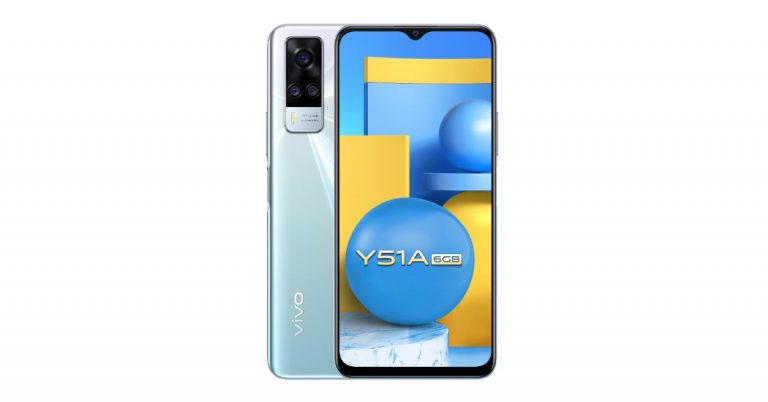
Vivo Y51A was launched in India earlier this year. Then the company only introduced it in a single 8GB RAM model, but today the new 6GB RAM with 128GB variant has been introduced in the country. Besides this, the specification remains the same. The phone includes a triple rear camera set up, a 5,000mAh battery and is powered by Snapdragon 662 SoC.
In This Article
Vivo Y51A 6GB RAM with 128GB storage price and availability
The price of the 6GB RAM with 128GB of Vivo Y51 has been set at Rs 16,990. The phone will be available in two colour options of Titanium Sapphire and Crystal Symphony. The new variant is now up for sale via Vivo India E-store in the country. The company is offering cashback to HDFC Bank cardholders. There will be exchange offers and no-cost EMI for up to 12 months as well.To recall, in January this year the phone was introduced at Rs 17,990 for the 8GB RAM with 128GB storage option.
Vivo Y51A tech specs
Vivo Y51A comes with a 6.58-inch full-HD+ LCD offering 1,080×2,408 pixels of resolution. The device runs Funtouch OS 11 on top of Android 11 and it is powered by Qualcomm Snapdragon 662 SoC paired with 8GB RAM with 128GB storage. The internal storage can be expanded up to 1TB using a microSD card.In terms of cameras, Vivo Y51A features a triple rear camera setup that includes a 48-megapixel primary sensor with an f/1.79 aperture. It is accompanied by an 8-megapixel ultra-wide-angle lens with an f/2.2 aperture and a 2-megapixel tertiary lens with f/2.4. The rear camera also offers Ultra-Stable video with Electronic Image Stabilization (EIS) technology along with Super Night Camera capabilities for both front and rear. Moreover, there are other modes like Ultra Stable video, Super Night mode and Macro mode. On the front, there is a 16-megapixel selfie camera with an f/2.0 aperture.In terms of connectivity, there is dual-band Wi-Fi, Bluetooth 5.0, USB Type-C, GPS among others. There is a side-mounted fingerprint sensor for phone unlocking and it also packs a5,000mAh battery with 18W Fast Charge support and Reverse Charging feature.
For the latest gadget and tech news, and gadget reviews, follow us on Twitter, Facebook and Instagram. For newest tech & gadget videos subscribe to our YouTube Channel. You can also stay up to date using the Gadget Bridge Android App.


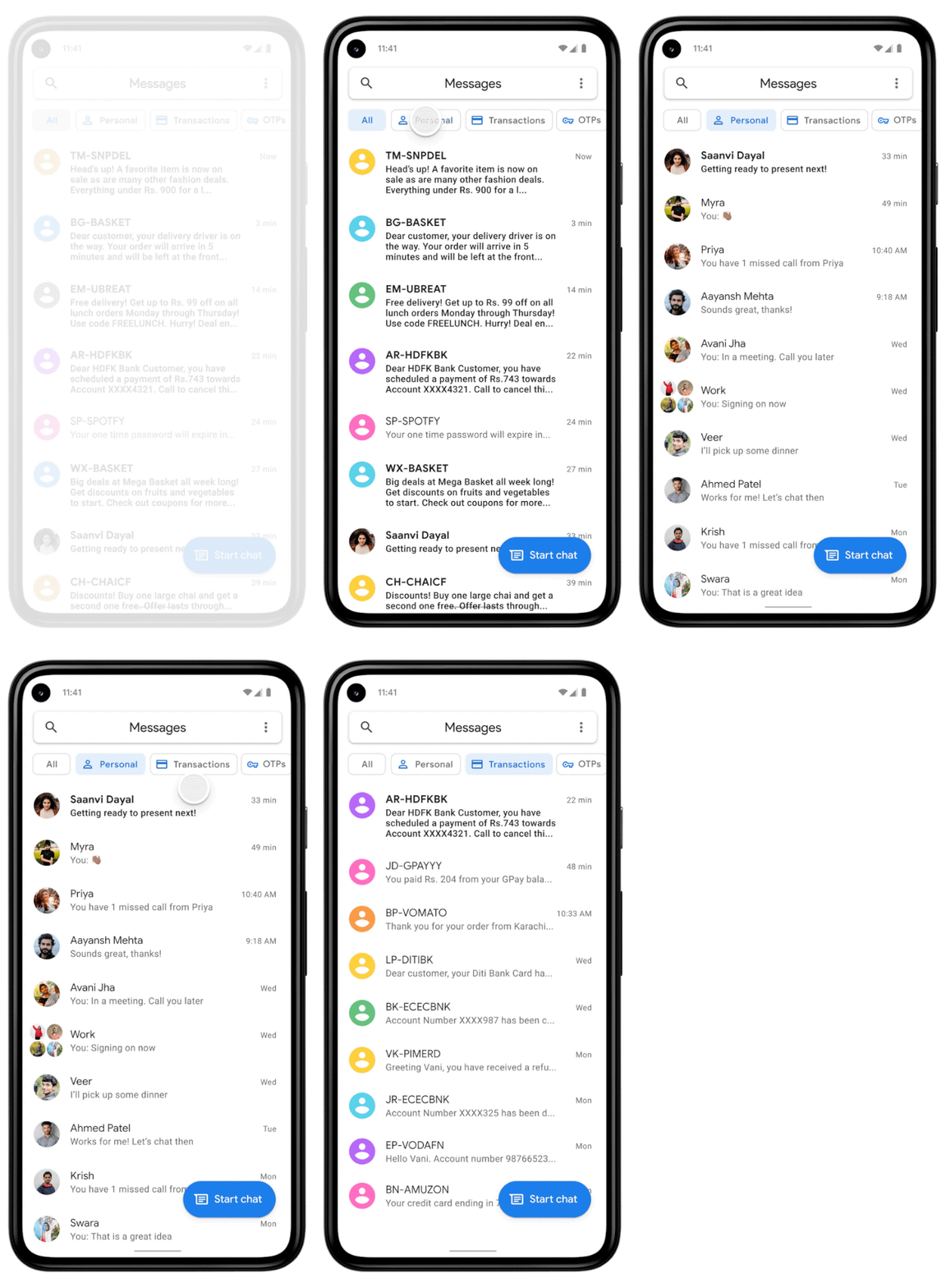 In order to keep your inbox clutter-free, the Messages app has received a feature in which it uses machine learning technology to automatically sort your messages into categories, including personal, transactions and OTPs. The new functionality will filter out bank transactions and bills to the transitions tab while the conversations with saved numbers can be easily located in the personal tab. The decluttering of the messages will not hamper any of your conversations they will stay in a device but will be more manageable.
We all have a habit of not deleting one-time passwords (OTPs) from our phones after money transitions, payments or account log-in is complete. So now the Google Messages app will take the lead by auto-deleting the OTPs from your phone. The application will provide the option to automatically delete your one-time passwords (OTPs) 24-hours after they’re received, so you don’t have to spend time deleting them manually. To enable the feature, just tap continue when you see the suggestion prompt to confirm your selection.
As per the company, the new update for the Messages app will be pushed out over the coming weeks (in English) on Android phones in India running Android 8 or newer. These features are optional and can be managed in settings, too. To try them out, update your Messages app to the latest version or download the app here.
For the latest gadget and tech news, and gadget reviews, follow us on Twitter, Facebook and Instagram. For newest tech & gadget videos subscribe to our YouTube Channel. You can also stay up to date using the Gadget Bridge Android App.
In order to keep your inbox clutter-free, the Messages app has received a feature in which it uses machine learning technology to automatically sort your messages into categories, including personal, transactions and OTPs. The new functionality will filter out bank transactions and bills to the transitions tab while the conversations with saved numbers can be easily located in the personal tab. The decluttering of the messages will not hamper any of your conversations they will stay in a device but will be more manageable.
We all have a habit of not deleting one-time passwords (OTPs) from our phones after money transitions, payments or account log-in is complete. So now the Google Messages app will take the lead by auto-deleting the OTPs from your phone. The application will provide the option to automatically delete your one-time passwords (OTPs) 24-hours after they’re received, so you don’t have to spend time deleting them manually. To enable the feature, just tap continue when you see the suggestion prompt to confirm your selection.
As per the company, the new update for the Messages app will be pushed out over the coming weeks (in English) on Android phones in India running Android 8 or newer. These features are optional and can be managed in settings, too. To try them out, update your Messages app to the latest version or download the app here.
For the latest gadget and tech news, and gadget reviews, follow us on Twitter, Facebook and Instagram. For newest tech & gadget videos subscribe to our YouTube Channel. You can also stay up to date using the Gadget Bridge Android App. 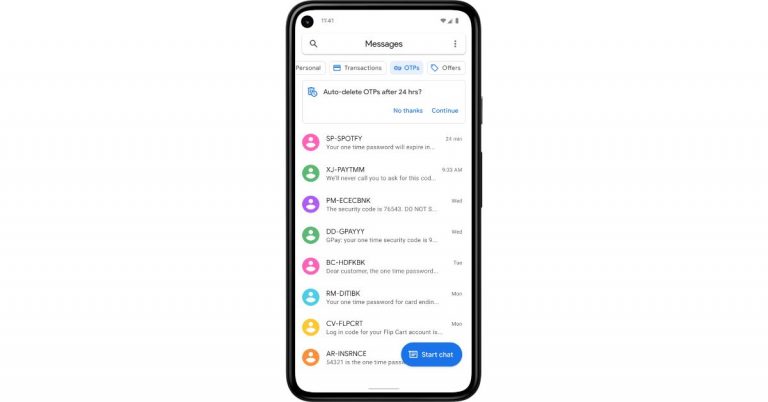
 In order to keep your inbox clutter-free, the Messages app has received a feature in which it uses machine learning technology to automatically sort your messages into categories, including personal, transactions and OTPs. The new functionality will filter out bank transactions and bills to the transitions tab while the conversations with saved numbers can be easily located in the personal tab. The decluttering of the messages will not hamper any of your conversations they will stay in a device but will be more manageable.
We all have a habit of not deleting one-time passwords (OTPs) from our phones after money transitions, payments or account log-in is complete. So now the Google Messages app will take the lead by auto-deleting the OTPs from your phone. The application will provide the option to automatically delete your one-time passwords (OTPs) 24-hours after they’re received, so you don’t have to spend time deleting them manually. To enable the feature, just tap continue when you see the suggestion prompt to confirm your selection.
As per the company, the new update for the Messages app will be pushed out over the coming weeks (in English) on Android phones in India running Android 8 or newer. These features are optional and can be managed in settings, too. To try them out, update your Messages app to the latest version or download the app here.
For the latest gadget and tech news, and gadget reviews, follow us on Twitter, Facebook and Instagram. For newest tech & gadget videos subscribe to our YouTube Channel. You can also stay up to date using the Gadget Bridge Android App.
In order to keep your inbox clutter-free, the Messages app has received a feature in which it uses machine learning technology to automatically sort your messages into categories, including personal, transactions and OTPs. The new functionality will filter out bank transactions and bills to the transitions tab while the conversations with saved numbers can be easily located in the personal tab. The decluttering of the messages will not hamper any of your conversations they will stay in a device but will be more manageable.
We all have a habit of not deleting one-time passwords (OTPs) from our phones after money transitions, payments or account log-in is complete. So now the Google Messages app will take the lead by auto-deleting the OTPs from your phone. The application will provide the option to automatically delete your one-time passwords (OTPs) 24-hours after they’re received, so you don’t have to spend time deleting them manually. To enable the feature, just tap continue when you see the suggestion prompt to confirm your selection.
As per the company, the new update for the Messages app will be pushed out over the coming weeks (in English) on Android phones in India running Android 8 or newer. These features are optional and can be managed in settings, too. To try them out, update your Messages app to the latest version or download the app here.
For the latest gadget and tech news, and gadget reviews, follow us on Twitter, Facebook and Instagram. For newest tech & gadget videos subscribe to our YouTube Channel. You can also stay up to date using the Gadget Bridge Android App. 
 The CoWIN vaccination certificates are produced when you are traveling and will help in entering many premises. Earlier the status update on your vaccination was through the Aarogya Setu app, but now CoWIN has allowed you to make changes. Here are the steps to fix the errors.
 Those who have received the first dose will have a single blue border with vaccination status on the home screen. And for those who have gotten the second dose have a “Blue Shield” with a double tick displayed on CoWin after 14 days of the vaccination. When you get vaccinated the certificate that has been issued includes a secure QR code to maintain authenticity and you can do the authentication from the CoWIN portal. Here are the steps:
 The CoWIN vaccination certificates are produced when you are traveling and will help in entering many premises. Earlier the status update on your vaccination was through the Aarogya Setu app, but now CoWIN has allowed you to make changes. Here are the steps to fix the errors.
 Those who have received the first dose will have a single blue border with vaccination status on the home screen. And for those who have gotten the second dose have a “Blue Shield” with a double tick displayed on CoWin after 14 days of the vaccination. When you get vaccinated the certificate that has been issued includes a secure QR code to maintain authenticity and you can do the authentication from the CoWIN portal. Here are the steps:


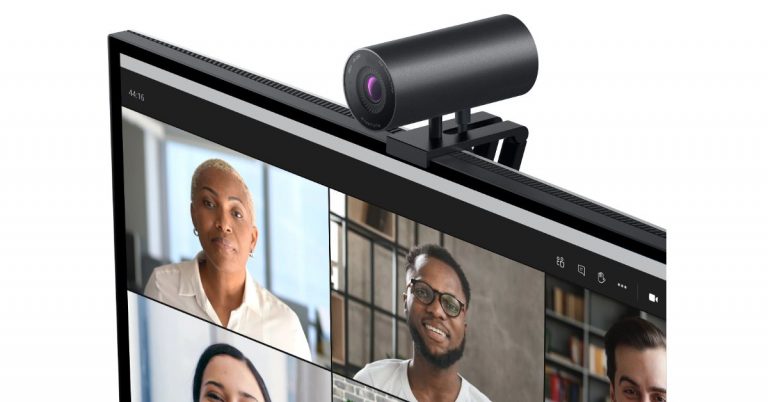
 Dell UltraSharp Webcam specifications
Speaking of the design first, the Dell UltraSharp Webcam features an all-aluminium cylindrical body. There is a magnetic mount along with a tripod adapter so that it can be attached to your device easily. It comes with a magnetic snap-on cover for privacy. There is a white LED light indicator, which lets us know when the webcam is in use.
This Webcam from Dell comes with an 8.3-megapixel Sony STARVIS CMOS sensor. The camera is capable of offering 4K UHD resolution at 24fps/ 30fps frame rate and full-HD and HD resolution at up to 60fps frame rate. In addition to this, the camera module also comes integrated with the multi-element lens on top for well light videos and Digital Overlap HDR capability. Over that, the webcam features an AI-backed Auto-Framing feature to keep you stay focused during video conferencing. The device is compatible with both Windows and macOS devices.
The Dell UltraSharp Webcam uses 3D/2D video noise reduction for not so grainy picture quality and offers a customisable field of view options to choose from 65, 78, and 90-degrees of FOV. Additionally, it is also capable of providing 5x digital zoom. Furthermore, there is a Dell Express Sign-In feature to detect motion with a built-in proximity sensor. This also lets it log you out when it detects you have stepped away from the sensor. With an IR sensor, it logs in users using Windows Hello.
On the connectivity front, there is a USB Type-C port, which can be used to connect with a PC using a USB-A-to-USB-Type C cable that comes inside the box.
For the latest gadget and tech news, and gadget reviews, follow us on Twitter, Facebook and Instagram. For newest tech & gadget videos subscribe to our YouTube Channel. You can also stay up to date using the Gadget Bridge Android App.
Dell UltraSharp Webcam specifications
Speaking of the design first, the Dell UltraSharp Webcam features an all-aluminium cylindrical body. There is a magnetic mount along with a tripod adapter so that it can be attached to your device easily. It comes with a magnetic snap-on cover for privacy. There is a white LED light indicator, which lets us know when the webcam is in use.
This Webcam from Dell comes with an 8.3-megapixel Sony STARVIS CMOS sensor. The camera is capable of offering 4K UHD resolution at 24fps/ 30fps frame rate and full-HD and HD resolution at up to 60fps frame rate. In addition to this, the camera module also comes integrated with the multi-element lens on top for well light videos and Digital Overlap HDR capability. Over that, the webcam features an AI-backed Auto-Framing feature to keep you stay focused during video conferencing. The device is compatible with both Windows and macOS devices.
The Dell UltraSharp Webcam uses 3D/2D video noise reduction for not so grainy picture quality and offers a customisable field of view options to choose from 65, 78, and 90-degrees of FOV. Additionally, it is also capable of providing 5x digital zoom. Furthermore, there is a Dell Express Sign-In feature to detect motion with a built-in proximity sensor. This also lets it log you out when it detects you have stepped away from the sensor. With an IR sensor, it logs in users using Windows Hello.
On the connectivity front, there is a USB Type-C port, which can be used to connect with a PC using a USB-A-to-USB-Type C cable that comes inside the box.
For the latest gadget and tech news, and gadget reviews, follow us on Twitter, Facebook and Instagram. For newest tech & gadget videos subscribe to our YouTube Channel. You can also stay up to date using the Gadget Bridge Android App.  Dell UltraSharp Webcam specifications
Speaking of the design first, the Dell UltraSharp Webcam features an all-aluminium cylindrical body. There is a magnetic mount along with a tripod adapter so that it can be attached to your device easily. It comes with a magnetic snap-on cover for privacy. There is a white LED light indicator, which lets us know when the webcam is in use.
This Webcam from Dell comes with an 8.3-megapixel Sony STARVIS CMOS sensor. The camera is capable of offering 4K UHD resolution at 24fps/ 30fps frame rate and full-HD and HD resolution at up to 60fps frame rate. In addition to this, the camera module also comes integrated with the multi-element lens on top for well light videos and Digital Overlap HDR capability. Over that, the webcam features an AI-backed Auto-Framing feature to keep you stay focused during video conferencing. The device is compatible with both Windows and macOS devices.
The Dell UltraSharp Webcam uses 3D/2D video noise reduction for not so grainy picture quality and offers a customisable field of view options to choose from 65, 78, and 90-degrees of FOV. Additionally, it is also capable of providing 5x digital zoom. Furthermore, there is a Dell Express Sign-In feature to detect motion with a built-in proximity sensor. This also lets it log you out when it detects you have stepped away from the sensor. With an IR sensor, it logs in users using Windows Hello.
On the connectivity front, there is a USB Type-C port, which can be used to connect with a PC using a USB-A-to-USB-Type C cable that comes inside the box.
For the latest gadget and tech news, and gadget reviews, follow us on Twitter, Facebook and Instagram. For newest tech & gadget videos subscribe to our YouTube Channel. You can also stay up to date using the Gadget Bridge Android App.
Dell UltraSharp Webcam specifications
Speaking of the design first, the Dell UltraSharp Webcam features an all-aluminium cylindrical body. There is a magnetic mount along with a tripod adapter so that it can be attached to your device easily. It comes with a magnetic snap-on cover for privacy. There is a white LED light indicator, which lets us know when the webcam is in use.
This Webcam from Dell comes with an 8.3-megapixel Sony STARVIS CMOS sensor. The camera is capable of offering 4K UHD resolution at 24fps/ 30fps frame rate and full-HD and HD resolution at up to 60fps frame rate. In addition to this, the camera module also comes integrated with the multi-element lens on top for well light videos and Digital Overlap HDR capability. Over that, the webcam features an AI-backed Auto-Framing feature to keep you stay focused during video conferencing. The device is compatible with both Windows and macOS devices.
The Dell UltraSharp Webcam uses 3D/2D video noise reduction for not so grainy picture quality and offers a customisable field of view options to choose from 65, 78, and 90-degrees of FOV. Additionally, it is also capable of providing 5x digital zoom. Furthermore, there is a Dell Express Sign-In feature to detect motion with a built-in proximity sensor. This also lets it log you out when it detects you have stepped away from the sensor. With an IR sensor, it logs in users using Windows Hello.
On the connectivity front, there is a USB Type-C port, which can be used to connect with a PC using a USB-A-to-USB-Type C cable that comes inside the box.
For the latest gadget and tech news, and gadget reviews, follow us on Twitter, Facebook and Instagram. For newest tech & gadget videos subscribe to our YouTube Channel. You can also stay up to date using the Gadget Bridge Android App. 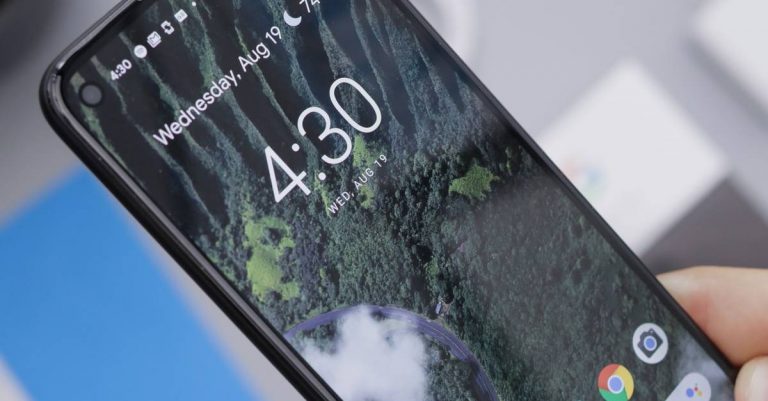
 Most Android phones do not come with pre-installed video live wallpaper, but you can always download it from the Google Play Store. The video live wallpaper is to be added to your home screen through a third-party app so make sure you have the best-looking app. Here is a guide to add video as live wallpaper.
 As mentioned, Playstore has thousands of Live wallpaper apps on the market for you to download and install and most of them are for free. There are many ways to download a live wallpaper. You can either check the live wallpaper for rating, search on Google for the best live wallpaper on Play Store, or just go Google Playstore and type live wallpaper on the search box and click on the one you like. Here is how you can download and install a live wallpaper app.
 Most Android phones do not come with pre-installed video live wallpaper, but you can always download it from the Google Play Store. The video live wallpaper is to be added to your home screen through a third-party app so make sure you have the best-looking app. Here is a guide to add video as live wallpaper.
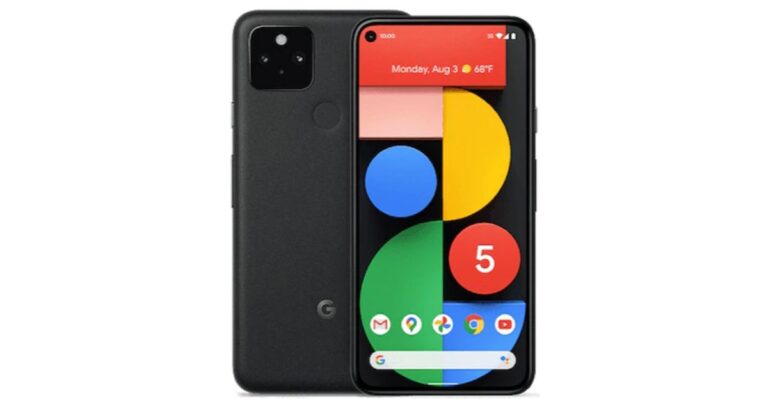





 The doesn’t divulge much information but the previous design concept of its upcoming TWS earphones shared by the company mentions that Ear 1 TWS will be a combination of transparency, iconic form, and refined functionality. It is the starting point that will define the artistry, confidence and craftsmanship that will carry our products and services for years to come.
Whereas the teaser shows the form factor of the audio device. It should be noted that the Noting earbuds are designed in association with Stockholm-based Teenage Engineering.
For the latest gadget and tech news, and gadget reviews, follow us on Twitter, Facebook and Instagram. For newest tech & gadget videos subscribe to our YouTube Channel. You can also stay up to date using the Gadget Bridge Android App.
The doesn’t divulge much information but the previous design concept of its upcoming TWS earphones shared by the company mentions that Ear 1 TWS will be a combination of transparency, iconic form, and refined functionality. It is the starting point that will define the artistry, confidence and craftsmanship that will carry our products and services for years to come.
Whereas the teaser shows the form factor of the audio device. It should be noted that the Noting earbuds are designed in association with Stockholm-based Teenage Engineering.
For the latest gadget and tech news, and gadget reviews, follow us on Twitter, Facebook and Instagram. For newest tech & gadget videos subscribe to our YouTube Channel. You can also stay up to date using the Gadget Bridge Android App.  The doesn’t divulge much information but the previous design concept of its upcoming TWS earphones shared by the company mentions that Ear 1 TWS will be a combination of transparency, iconic form, and refined functionality. It is the starting point that will define the artistry, confidence and craftsmanship that will carry our products and services for years to come.
Whereas the teaser shows the form factor of the audio device. It should be noted that the Noting earbuds are designed in association with Stockholm-based Teenage Engineering.
For the latest gadget and tech news, and gadget reviews, follow us on Twitter, Facebook and Instagram. For newest tech & gadget videos subscribe to our YouTube Channel. You can also stay up to date using the Gadget Bridge Android App.
The doesn’t divulge much information but the previous design concept of its upcoming TWS earphones shared by the company mentions that Ear 1 TWS will be a combination of transparency, iconic form, and refined functionality. It is the starting point that will define the artistry, confidence and craftsmanship that will carry our products and services for years to come.
Whereas the teaser shows the form factor of the audio device. It should be noted that the Noting earbuds are designed in association with Stockholm-based Teenage Engineering.
For the latest gadget and tech news, and gadget reviews, follow us on Twitter, Facebook and Instagram. For newest tech & gadget videos subscribe to our YouTube Channel. You can also stay up to date using the Gadget Bridge Android App. 
 Another thing you need to look at to spot fake reviews is by checking the company which uploaded the product. If you do not seem to locate an authentic company website, it is highly probable that the company is not trustworthy and all the reviews are to be reconsidered. These are signs that you can spot fake reviews easily.
Read also: How to spot a phishing email or SMS message and avoid it?
Another thing you need to look at to spot fake reviews is by checking the company which uploaded the product. If you do not seem to locate an authentic company website, it is highly probable that the company is not trustworthy and all the reviews are to be reconsidered. These are signs that you can spot fake reviews easily.
Read also: How to spot a phishing email or SMS message and avoid it?
 Using a review tool is the best method to check if the review is genuine or fake. Reviewmeta simply uses the grading process as an Amazon-only analyzer. The steps to verify the review on the tool are easy and simple: you copy the URL and paste it on the website. The website will eliminate all the unreliable reviews and help you spot fake reviews on Amazon. The algorithm works in a unique way, letting you grade the reviews and provide detailed breakdowns with graphs. You can also add an extension to your browser.
 The review tools will rate how reliable product pages are on Amazon and other websites. You can open the fakespot website and copy the URL from Amazon and paste it on site. Fakespot will then grade the page and see how reliable the information can be. The algorithm of Fakespot finds reviews, analyses language, checks previous reviews, and purchase history to determine the product and the reviews. It filters out all the fake reviews for you to shop better and you can also add an extension of it to your browser.
For the latest gadget and tech news, and gadget reviews, follow us on Twitter, Facebook and Instagram. For newest tech & gadget videos subscribe to our YouTube Channel. You can also stay up to date using the Gadget Bridge Android App.
The review tools will rate how reliable product pages are on Amazon and other websites. You can open the fakespot website and copy the URL from Amazon and paste it on site. Fakespot will then grade the page and see how reliable the information can be. The algorithm of Fakespot finds reviews, analyses language, checks previous reviews, and purchase history to determine the product and the reviews. It filters out all the fake reviews for you to shop better and you can also add an extension of it to your browser.
For the latest gadget and tech news, and gadget reviews, follow us on Twitter, Facebook and Instagram. For newest tech & gadget videos subscribe to our YouTube Channel. You can also stay up to date using the Gadget Bridge Android App.  Another thing you need to look at to spot fake reviews is by checking the company which uploaded the product. If you do not seem to locate an authentic company website, it is highly probable that the company is not trustworthy and all the reviews are to be reconsidered. These are signs that you can spot fake reviews easily.
Read also: How to spot a phishing email or SMS message and avoid it?
Another thing you need to look at to spot fake reviews is by checking the company which uploaded the product. If you do not seem to locate an authentic company website, it is highly probable that the company is not trustworthy and all the reviews are to be reconsidered. These are signs that you can spot fake reviews easily.
Read also: How to spot a phishing email or SMS message and avoid it?
 Using a review tool is the best method to check if the review is genuine or fake. Reviewmeta simply uses the grading process as an Amazon-only analyzer. The steps to verify the review on the tool are easy and simple: you copy the URL and paste it on the website. The website will eliminate all the unreliable reviews and help you spot fake reviews on Amazon. The algorithm works in a unique way, letting you grade the reviews and provide detailed breakdowns with graphs. You can also add an extension to your browser.
 The review tools will rate how reliable product pages are on Amazon and other websites. You can open the fakespot website and copy the URL from Amazon and paste it on site. Fakespot will then grade the page and see how reliable the information can be. The algorithm of Fakespot finds reviews, analyses language, checks previous reviews, and purchase history to determine the product and the reviews. It filters out all the fake reviews for you to shop better and you can also add an extension of it to your browser.
For the latest gadget and tech news, and gadget reviews, follow us on Twitter, Facebook and Instagram. For newest tech & gadget videos subscribe to our YouTube Channel. You can also stay up to date using the Gadget Bridge Android App.
The review tools will rate how reliable product pages are on Amazon and other websites. You can open the fakespot website and copy the URL from Amazon and paste it on site. Fakespot will then grade the page and see how reliable the information can be. The algorithm of Fakespot finds reviews, analyses language, checks previous reviews, and purchase history to determine the product and the reviews. It filters out all the fake reviews for you to shop better and you can also add an extension of it to your browser.
For the latest gadget and tech news, and gadget reviews, follow us on Twitter, Facebook and Instagram. For newest tech & gadget videos subscribe to our YouTube Channel. You can also stay up to date using the Gadget Bridge Android App. 
 Although allowing apps to run online using the internet on the laptop is usually good, there are many reasons to block an app from accessing the internet on your computer. One example is to stop automatic updates of an app or disable an app that cannot be used offline. The following are the steps to block an app on Windows computers.
 By disabling the network adapter you can also block the app access to the internet. Access to all utilities or setups of your computers will be blocked if you disable the network and will help the app in denying access to the internet on your computers. Follow the steps to disable the network adaptor.
 Although allowing apps to run online using the internet on the laptop is usually good, there are many reasons to block an app from accessing the internet on your computer. One example is to stop automatic updates of an app or disable an app that cannot be used offline. The following are the steps to block an app on Windows computers.
 By disabling the network adapter you can also block the app access to the internet. Access to all utilities or setups of your computers will be blocked if you disable the network and will help the app in denying access to the internet on your computers. Follow the steps to disable the network adaptor.
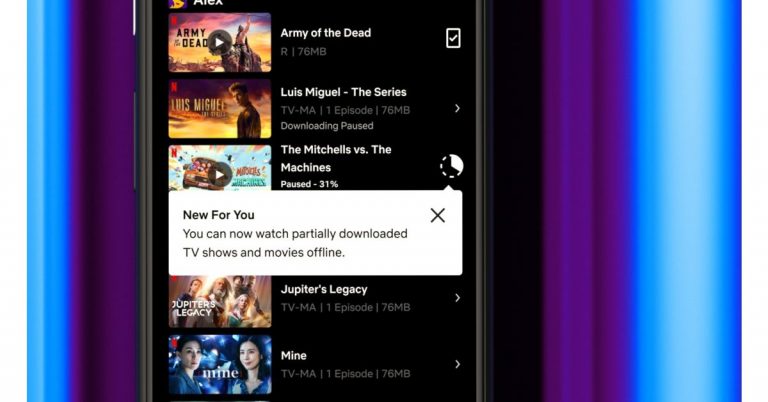
 The Android application emulator is one of the best options available to run your Clubhouse app on your PC. You can download the BlueStack software on your computers and the Android apps emulator will let you download and install the Clubhouse app on your PC.
The BlueStack emulator is available for both Windows and Mac. The following steps is how to download and install the BlueStacks programming and Clubhouse app.
The Android application emulator is one of the best options available to run your Clubhouse app on your PC. You can download the BlueStack software on your computers and the Android apps emulator will let you download and install the Clubhouse app on your PC.
The BlueStack emulator is available for both Windows and Mac. The following steps is how to download and install the BlueStacks programming and Clubhouse app.
 For those who are new to Clubdeck, it is an unofficial desktop client app for the Cubhouse app. Using the Cludeck website you can access your Clubhouse app on your Windows or Mac PC. The websites you can use have some features for Clubhouse Moderators also. The best part of Clubdeck websites is all the functionality of the app is made available. And also features some advanced functions like recording, streaming to other social networks, and playing custom local audio. Check out the guide below to know more about Clubdeck.
 The Android application emulator is one of the best options available to run your Clubhouse app on your PC. You can download the BlueStack software on your computers and the Android apps emulator will let you download and install the Clubhouse app on your PC.
The BlueStack emulator is available for both Windows and Mac. The following steps is how to download and install the BlueStacks programming and Clubhouse app.
The Android application emulator is one of the best options available to run your Clubhouse app on your PC. You can download the BlueStack software on your computers and the Android apps emulator will let you download and install the Clubhouse app on your PC.
The BlueStack emulator is available for both Windows and Mac. The following steps is how to download and install the BlueStacks programming and Clubhouse app.
 For those who are new to Clubdeck, it is an unofficial desktop client app for the Cubhouse app. Using the Cludeck website you can access your Clubhouse app on your Windows or Mac PC. The websites you can use have some features for Clubhouse Moderators also. The best part of Clubdeck websites is all the functionality of the app is made available. And also features some advanced functions like recording, streaming to other social networks, and playing custom local audio. Check out the guide below to know more about Clubdeck.

 The following steps are to enable the Ticketed feature in your Twitter account. And make sure you meet the requirement set out by Twitter to enable the feature.
 The tickets let you host an audio-based live session and let you control the entry of other participants by putting a fee to join your sessions. Know more below:
 If your Twitter account starts to get more Super Follows you can earn more revenue and also create more content. With the increase in Super Follows, you can earn monthly revenue by creating a direct relationship with your active followers. Also, you can create bonus content and offer it to your biggest followers. Customisation is another great feature of having Super Follows. You can customise the price from 2.99 dollars to 9.99 dollars per month.
For the latest gadget and tech news, and gadget reviews, follow us on Twitter, Facebook and Instagram. For newest tech & gadget videos subscribe to our YouTube Channel. You can also stay up to date using the Gadget Bridge Android App.
If your Twitter account starts to get more Super Follows you can earn more revenue and also create more content. With the increase in Super Follows, you can earn monthly revenue by creating a direct relationship with your active followers. Also, you can create bonus content and offer it to your biggest followers. Customisation is another great feature of having Super Follows. You can customise the price from 2.99 dollars to 9.99 dollars per month.
For the latest gadget and tech news, and gadget reviews, follow us on Twitter, Facebook and Instagram. For newest tech & gadget videos subscribe to our YouTube Channel. You can also stay up to date using the Gadget Bridge Android App.  The following steps are to enable the Ticketed feature in your Twitter account. And make sure you meet the requirement set out by Twitter to enable the feature.
 The tickets let you host an audio-based live session and let you control the entry of other participants by putting a fee to join your sessions. Know more below:
 If your Twitter account starts to get more Super Follows you can earn more revenue and also create more content. With the increase in Super Follows, you can earn monthly revenue by creating a direct relationship with your active followers. Also, you can create bonus content and offer it to your biggest followers. Customisation is another great feature of having Super Follows. You can customise the price from 2.99 dollars to 9.99 dollars per month.
For the latest gadget and tech news, and gadget reviews, follow us on Twitter, Facebook and Instagram. For newest tech & gadget videos subscribe to our YouTube Channel. You can also stay up to date using the Gadget Bridge Android App.
If your Twitter account starts to get more Super Follows you can earn more revenue and also create more content. With the increase in Super Follows, you can earn monthly revenue by creating a direct relationship with your active followers. Also, you can create bonus content and offer it to your biggest followers. Customisation is another great feature of having Super Follows. You can customise the price from 2.99 dollars to 9.99 dollars per month.
For the latest gadget and tech news, and gadget reviews, follow us on Twitter, Facebook and Instagram. For newest tech & gadget videos subscribe to our YouTube Channel. You can also stay up to date using the Gadget Bridge Android App. 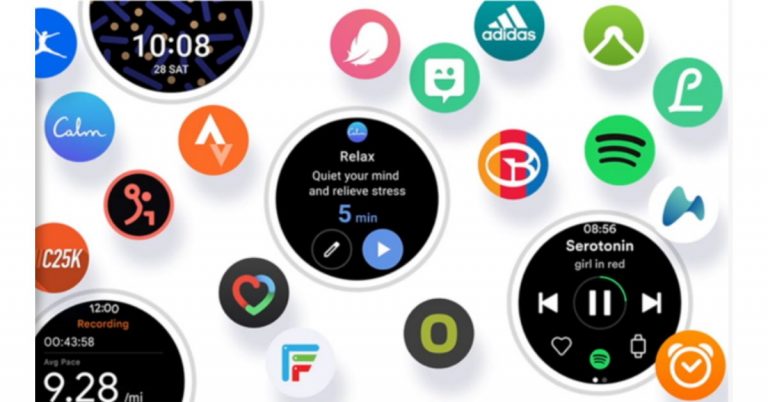

 An Apple developer program will cost you 100 dollars annually and you can join the developer program. There are also some requirements you need to meet, such as turn-on two-factor sign in and you also have to provide your full legal name and address. After you have your developer ID you can download the beta version. The following steps are on how to install the beta version.
 Software is tagged as beta when it is at a stage of development but not yet complete. The basic features are in place but not fully developed. The public betas do lag behind the developer version and it is rolled out significantly late. The public beta is to be available in July 2021. Here are the steps to install a public beta version.
 An Apple developer program will cost you 100 dollars annually and you can join the developer program. There are also some requirements you need to meet, such as turn-on two-factor sign in and you also have to provide your full legal name and address. After you have your developer ID you can download the beta version. The following steps are on how to install the beta version.
 Software is tagged as beta when it is at a stage of development but not yet complete. The basic features are in place but not fully developed. The public betas do lag behind the developer version and it is rolled out significantly late. The public beta is to be available in July 2021. Here are the steps to install a public beta version.
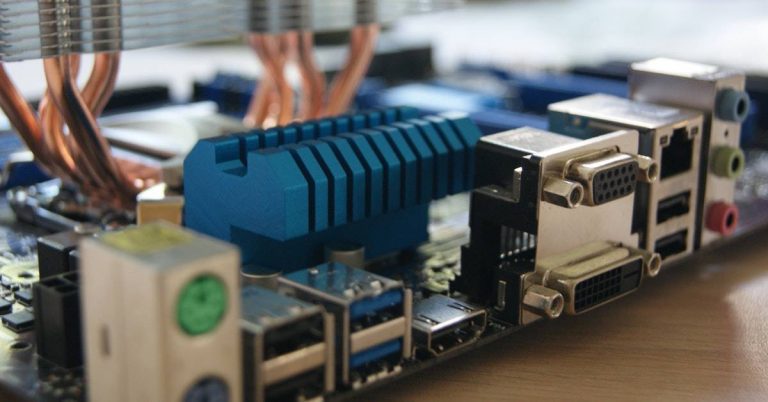
 The first update that USB 4 will be bringing is the support of DisplayPort 2.0. Breaking down the specs of Display 2.0 it can support an 8K resolution display at 60 Hz with HDR10 colour. Also, it has a transfer speed of up to 80 Gbps because it sends all data in one direction, and does not need to send anything back to the host device. And for the conclusion, the combination of USB 4 and DisplayPort 2.0 will bring in very high speeds to transfer files.
Read more: Top 10 Laptops of the year 2020: List worth checking out
The new USB 4 will deliver a stable speed of 40Gbps of transfer speed and come with two-speed variants of 20Gbps and 40Gbps. The two speeds of USB 4 20Gbps and USB 4 40Gbps have dual-lane cables enabling greater bandwidth and faster data travel between two devices. The Thunderbolt 3 enables this top speed of 40Gbps transfers, but speeds can go up to 80 Gbps. Using two sets of four bidirectional lanes it can send video and data in the same lane. The USB 4 will use the lanes to send video and data together by sharing resources and will display the bandwidth required to support the data transfer.
Read also: How to transfer your PlayStation4 games and saved data to your new PlayStation5 console?
The first update that USB 4 will be bringing is the support of DisplayPort 2.0. Breaking down the specs of Display 2.0 it can support an 8K resolution display at 60 Hz with HDR10 colour. Also, it has a transfer speed of up to 80 Gbps because it sends all data in one direction, and does not need to send anything back to the host device. And for the conclusion, the combination of USB 4 and DisplayPort 2.0 will bring in very high speeds to transfer files.
Read more: Top 10 Laptops of the year 2020: List worth checking out
The new USB 4 will deliver a stable speed of 40Gbps of transfer speed and come with two-speed variants of 20Gbps and 40Gbps. The two speeds of USB 4 20Gbps and USB 4 40Gbps have dual-lane cables enabling greater bandwidth and faster data travel between two devices. The Thunderbolt 3 enables this top speed of 40Gbps transfers, but speeds can go up to 80 Gbps. Using two sets of four bidirectional lanes it can send video and data in the same lane. The USB 4 will use the lanes to send video and data together by sharing resources and will display the bandwidth required to support the data transfer.
Read also: How to transfer your PlayStation4 games and saved data to your new PlayStation5 console?
 It is also expected to give better resource allocation for video. The devices supporting USB 4 will be using a process called “protocol tunneling” that sends DisplayPort, PCIe, and USB packets at the same time while allocating proper bandwidth accordingly. For example, if 20 percent of the bandwidth is allocated to power a video of 1080p in your system the remaining 80% will be made free to transfer files from your external SSD, which will operate over either USB protocol or PCIe.
The USB 4 also has the best compatibility with its previous generations. USB 4 will function with USB 3, USB 2 devices, and ports. Though it is compatible you should note the ports of USB 3 and USB 2 will not be delivering the 40Gbps top speeds.
All in all, USB 4 will be faster, better and can manage simultaneous uploads and downloads at high speeds from any device.
For the latest gadget and tech news, and gadget reviews, follow us on Twitter, Facebook and Instagram. For newest tech & gadget videos subscribe to our YouTube Channel. You can also stay up to date using the Gadget Bridge Android App.
It is also expected to give better resource allocation for video. The devices supporting USB 4 will be using a process called “protocol tunneling” that sends DisplayPort, PCIe, and USB packets at the same time while allocating proper bandwidth accordingly. For example, if 20 percent of the bandwidth is allocated to power a video of 1080p in your system the remaining 80% will be made free to transfer files from your external SSD, which will operate over either USB protocol or PCIe.
The USB 4 also has the best compatibility with its previous generations. USB 4 will function with USB 3, USB 2 devices, and ports. Though it is compatible you should note the ports of USB 3 and USB 2 will not be delivering the 40Gbps top speeds.
All in all, USB 4 will be faster, better and can manage simultaneous uploads and downloads at high speeds from any device.
For the latest gadget and tech news, and gadget reviews, follow us on Twitter, Facebook and Instagram. For newest tech & gadget videos subscribe to our YouTube Channel. You can also stay up to date using the Gadget Bridge Android App.  The first update that USB 4 will be bringing is the support of DisplayPort 2.0. Breaking down the specs of Display 2.0 it can support an 8K resolution display at 60 Hz with HDR10 colour. Also, it has a transfer speed of up to 80 Gbps because it sends all data in one direction, and does not need to send anything back to the host device. And for the conclusion, the combination of USB 4 and DisplayPort 2.0 will bring in very high speeds to transfer files.
Read more: Top 10 Laptops of the year 2020: List worth checking out
The new USB 4 will deliver a stable speed of 40Gbps of transfer speed and come with two-speed variants of 20Gbps and 40Gbps. The two speeds of USB 4 20Gbps and USB 4 40Gbps have dual-lane cables enabling greater bandwidth and faster data travel between two devices. The Thunderbolt 3 enables this top speed of 40Gbps transfers, but speeds can go up to 80 Gbps. Using two sets of four bidirectional lanes it can send video and data in the same lane. The USB 4 will use the lanes to send video and data together by sharing resources and will display the bandwidth required to support the data transfer.
Read also: How to transfer your PlayStation4 games and saved data to your new PlayStation5 console?
The first update that USB 4 will be bringing is the support of DisplayPort 2.0. Breaking down the specs of Display 2.0 it can support an 8K resolution display at 60 Hz with HDR10 colour. Also, it has a transfer speed of up to 80 Gbps because it sends all data in one direction, and does not need to send anything back to the host device. And for the conclusion, the combination of USB 4 and DisplayPort 2.0 will bring in very high speeds to transfer files.
Read more: Top 10 Laptops of the year 2020: List worth checking out
The new USB 4 will deliver a stable speed of 40Gbps of transfer speed and come with two-speed variants of 20Gbps and 40Gbps. The two speeds of USB 4 20Gbps and USB 4 40Gbps have dual-lane cables enabling greater bandwidth and faster data travel between two devices. The Thunderbolt 3 enables this top speed of 40Gbps transfers, but speeds can go up to 80 Gbps. Using two sets of four bidirectional lanes it can send video and data in the same lane. The USB 4 will use the lanes to send video and data together by sharing resources and will display the bandwidth required to support the data transfer.
Read also: How to transfer your PlayStation4 games and saved data to your new PlayStation5 console?
 It is also expected to give better resource allocation for video. The devices supporting USB 4 will be using a process called “protocol tunneling” that sends DisplayPort, PCIe, and USB packets at the same time while allocating proper bandwidth accordingly. For example, if 20 percent of the bandwidth is allocated to power a video of 1080p in your system the remaining 80% will be made free to transfer files from your external SSD, which will operate over either USB protocol or PCIe.
The USB 4 also has the best compatibility with its previous generations. USB 4 will function with USB 3, USB 2 devices, and ports. Though it is compatible you should note the ports of USB 3 and USB 2 will not be delivering the 40Gbps top speeds.
All in all, USB 4 will be faster, better and can manage simultaneous uploads and downloads at high speeds from any device.
For the latest gadget and tech news, and gadget reviews, follow us on Twitter, Facebook and Instagram. For newest tech & gadget videos subscribe to our YouTube Channel. You can also stay up to date using the Gadget Bridge Android App.
It is also expected to give better resource allocation for video. The devices supporting USB 4 will be using a process called “protocol tunneling” that sends DisplayPort, PCIe, and USB packets at the same time while allocating proper bandwidth accordingly. For example, if 20 percent of the bandwidth is allocated to power a video of 1080p in your system the remaining 80% will be made free to transfer files from your external SSD, which will operate over either USB protocol or PCIe.
The USB 4 also has the best compatibility with its previous generations. USB 4 will function with USB 3, USB 2 devices, and ports. Though it is compatible you should note the ports of USB 3 and USB 2 will not be delivering the 40Gbps top speeds.
All in all, USB 4 will be faster, better and can manage simultaneous uploads and downloads at high speeds from any device.
For the latest gadget and tech news, and gadget reviews, follow us on Twitter, Facebook and Instagram. For newest tech & gadget videos subscribe to our YouTube Channel. You can also stay up to date using the Gadget Bridge Android App. 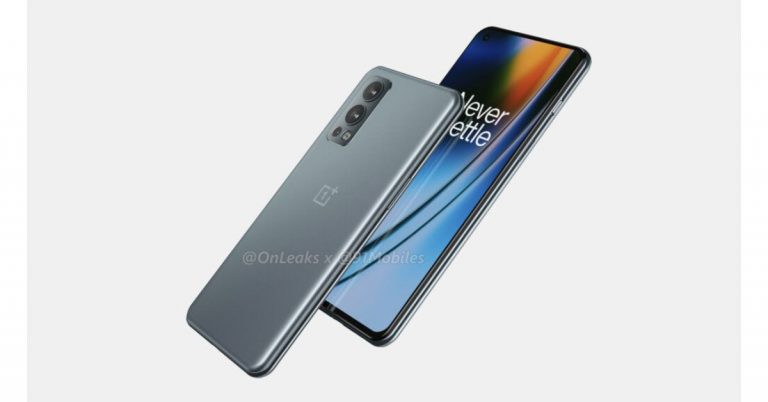




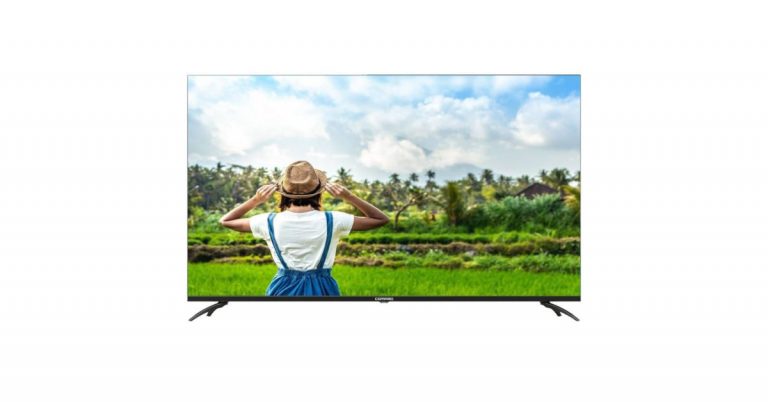
 The low audio volume on laptop has been a common problem faced by many Windows users. But it is not a tough issue that cannot be fixed or not a situation that you will be needing a technician for. There are some simple ways for you to start fixing the problems. Follow the guide.
Read more: Nokia Power Earbuds Lite with 35 hours of music playback launched in India
The low audio volume on laptop has been a common problem faced by many Windows users. But it is not a tough issue that cannot be fixed or not a situation that you will be needing a technician for. There are some simple ways for you to start fixing the problems. Follow the guide.
Read more: Nokia Power Earbuds Lite with 35 hours of music playback launched in India
 The low audio volume problem on a laptop can be faced on a Mac as well. But there are some ways to fix it if the problem arises. Here are some ways you can boost the audio output on Mac.
 The low audio volume on laptop has been a common problem faced by many Windows users. But it is not a tough issue that cannot be fixed or not a situation that you will be needing a technician for. There are some simple ways for you to start fixing the problems. Follow the guide.
Read more: Nokia Power Earbuds Lite with 35 hours of music playback launched in India
The low audio volume on laptop has been a common problem faced by many Windows users. But it is not a tough issue that cannot be fixed or not a situation that you will be needing a technician for. There are some simple ways for you to start fixing the problems. Follow the guide.
Read more: Nokia Power Earbuds Lite with 35 hours of music playback launched in India
 The low audio volume problem on a laptop can be faced on a Mac as well. But there are some ways to fix it if the problem arises. Here are some ways you can boost the audio output on Mac.

 The DropSend website lets you send/transfer large files through an email link that will be sent to the recipient. The email link that he/she will receive can be downloaded or viewed according to preference. The website offers three paid subscriptions that differ depending on the size you want to send. For 10GB online storage with 25 sends a month you can subscribe to the basic plan, the standard plan gives you 25GB of storage and 50 sends a month, and the professional plan offers you unlimited send each month. Worry not, the website also gives you a free plan option in which you can send files with a maximum size of 8GB.
 FileWhopper allows you to transfer files up to 5GB for free and lets you transfer files after 5GB to 10TB for a paid subscription. The file transfer is an easy and simple process you can upload it online or choose from a folder. The files you will be sending are encrypted with zero-knowledge encryption for a more secure transfer. The best function of the website is it lets you pause the upload and save the process in case of an emergency. The attraction of FileWhopper file transfer is no size limit, data protection and simple interface.
Read more: 5 apps and software you can use to wirelessly transfer files from your smartphone to PC and vice versa.
FileWhopper allows you to transfer files up to 5GB for free and lets you transfer files after 5GB to 10TB for a paid subscription. The file transfer is an easy and simple process you can upload it online or choose from a folder. The files you will be sending are encrypted with zero-knowledge encryption for a more secure transfer. The best function of the website is it lets you pause the upload and save the process in case of an emergency. The attraction of FileWhopper file transfer is no size limit, data protection and simple interface.
Read more: 5 apps and software you can use to wirelessly transfer files from your smartphone to PC and vice versa.
 Transferring large files will be easier and very convenient with WeTransfer, a user-friendly website. The file transferring on the website has very few limitations and it is a free file sharing service for all. It allows you to transfer files up to 2GB but the Pro version allows you up to 20GB with many benefits. The process to transfer the files is simple and easy: select the file, enter the email address of the recipients and press transfer. The best part of this website is that you do not need to open an account to transfer the files. In some cases, you might need to verify with a code that will come to your email address.
Read also: How to transfer your PlayStation4 games and saved data to your new PlayStation5 console?
Transferring large files will be easier and very convenient with WeTransfer, a user-friendly website. The file transferring on the website has very few limitations and it is a free file sharing service for all. It allows you to transfer files up to 2GB but the Pro version allows you up to 20GB with many benefits. The process to transfer the files is simple and easy: select the file, enter the email address of the recipients and press transfer. The best part of this website is that you do not need to open an account to transfer the files. In some cases, you might need to verify with a code that will come to your email address.
Read also: How to transfer your PlayStation4 games and saved data to your new PlayStation5 console?
 This website has some unique features: it gives you control over the link, which will last till 7 days. Filemail offers a transfer of data of 30GB maximum file size and it is simple to send a file. Just fill out the email address, attach the file you want to transfer and hit send. And also for more interesting functions, the website allows you to add as many recipients as you want. The advantages of this website worth consideration are its download management options, download tracker, unlimited recipients, and no registration.
 MediaFire makes your large file sharing easier with its cloud storage service. The website offers 10GB of storage that can be increased up to 50GB later. When you upload your large files on the website’s cloud storage service you will receive a download link that can be shared with others. There is no limit to downloads and you have complete control of the shared download link.
 ToffeeShare is one of the websites for sending large files from your PC or Mac to another device. The process of transferring files using ToffeeShare is very simple. Open the official ToffeeShare website on your web browser, hit the plus icon, and upload the file. Once the file has been uploaded, ToffeeShare will generate a QR code and link for the download. Sharing this link with the recipient gives them access to the file. Files are shared straight from your device, which means the transfer process will be terminated as soon as you close the tab.
 If you’re looking for a cloud solution, then Google Drive should be on top of your list. Every Google Account gets 15GB of free cloud storage. This is more than enough to store or transfer a large volume of pictures, videos, and other files. Google Drive is available for all major platforms, so compatibility should not be an issue. It may not be as fast as other websites on this list but it is reliable and gets the job done.
 The DropSend website lets you send/transfer large files through an email link that will be sent to the recipient. The email link that he/she will receive can be downloaded or viewed according to preference. The website offers three paid subscriptions that differ depending on the size you want to send. For 10GB online storage with 25 sends a month you can subscribe to the basic plan, the standard plan gives you 25GB of storage and 50 sends a month, and the professional plan offers you unlimited send each month. Worry not, the website also gives you a free plan option in which you can send files with a maximum size of 8GB.
 FileWhopper allows you to transfer files up to 5GB for free and lets you transfer files after 5GB to 10TB for a paid subscription. The file transfer is an easy and simple process you can upload it online or choose from a folder. The files you will be sending are encrypted with zero-knowledge encryption for a more secure transfer. The best function of the website is it lets you pause the upload and save the process in case of an emergency. The attraction of FileWhopper file transfer is no size limit, data protection and simple interface.
Read more: 5 apps and software you can use to wirelessly transfer files from your smartphone to PC and vice versa.
FileWhopper allows you to transfer files up to 5GB for free and lets you transfer files after 5GB to 10TB for a paid subscription. The file transfer is an easy and simple process you can upload it online or choose from a folder. The files you will be sending are encrypted with zero-knowledge encryption for a more secure transfer. The best function of the website is it lets you pause the upload and save the process in case of an emergency. The attraction of FileWhopper file transfer is no size limit, data protection and simple interface.
Read more: 5 apps and software you can use to wirelessly transfer files from your smartphone to PC and vice versa.
 Transferring large files will be easier and very convenient with WeTransfer, a user-friendly website. The file transferring on the website has very few limitations and it is a free file sharing service for all. It allows you to transfer files up to 2GB but the Pro version allows you up to 20GB with many benefits. The process to transfer the files is simple and easy: select the file, enter the email address of the recipients and press transfer. The best part of this website is that you do not need to open an account to transfer the files. In some cases, you might need to verify with a code that will come to your email address.
Read also: How to transfer your PlayStation4 games and saved data to your new PlayStation5 console?
Transferring large files will be easier and very convenient with WeTransfer, a user-friendly website. The file transferring on the website has very few limitations and it is a free file sharing service for all. It allows you to transfer files up to 2GB but the Pro version allows you up to 20GB with many benefits. The process to transfer the files is simple and easy: select the file, enter the email address of the recipients and press transfer. The best part of this website is that you do not need to open an account to transfer the files. In some cases, you might need to verify with a code that will come to your email address.
Read also: How to transfer your PlayStation4 games and saved data to your new PlayStation5 console?
 This website has some unique features: it gives you control over the link, which will last till 7 days. Filemail offers a transfer of data of 30GB maximum file size and it is simple to send a file. Just fill out the email address, attach the file you want to transfer and hit send. And also for more interesting functions, the website allows you to add as many recipients as you want. The advantages of this website worth consideration are its download management options, download tracker, unlimited recipients, and no registration.
 MediaFire makes your large file sharing easier with its cloud storage service. The website offers 10GB of storage that can be increased up to 50GB later. When you upload your large files on the website’s cloud storage service you will receive a download link that can be shared with others. There is no limit to downloads and you have complete control of the shared download link.
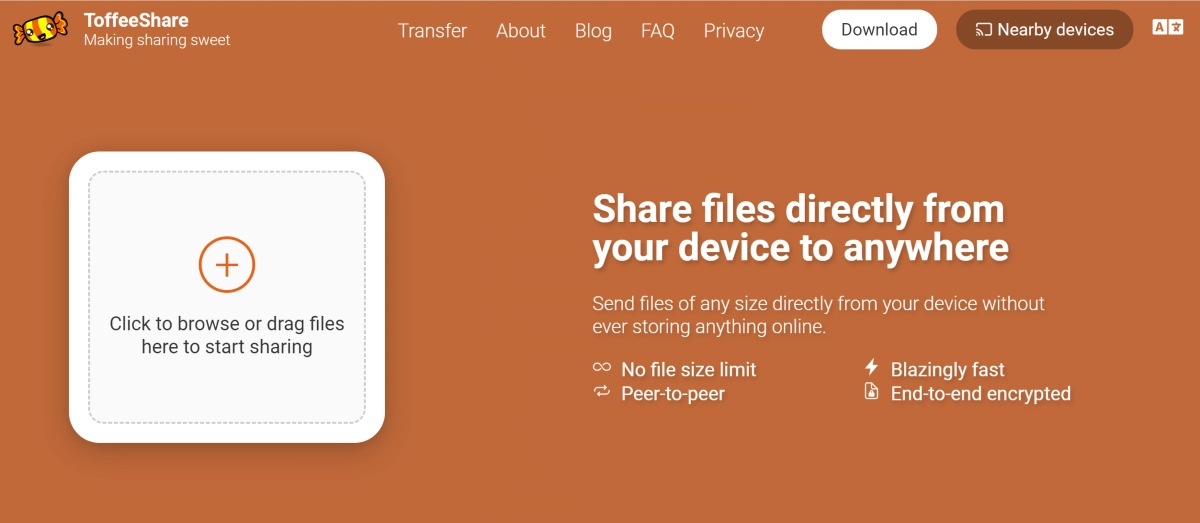 ToffeeShare is one of the websites for sending large files from your PC or Mac to another device. The process of transferring files using ToffeeShare is very simple. Open the official ToffeeShare website on your web browser, hit the plus icon, and upload the file. Once the file has been uploaded, ToffeeShare will generate a QR code and link for the download. Sharing this link with the recipient gives them access to the file. Files are shared straight from your device, which means the transfer process will be terminated as soon as you close the tab.
 If you’re looking for a cloud solution, then Google Drive should be on top of your list. Every Google Account gets 15GB of free cloud storage. This is more than enough to store or transfer a large volume of pictures, videos, and other files. Google Drive is available for all major platforms, so compatibility should not be an issue. It may not be as fast as other websites on this list but it is reliable and gets the job done.
 Ending this list is Send Anywhere, one of the simplest file-sharing tools for your PC and Mac. Once you upload a file on Send Anywhere, it generates a six-digit code which can be used to download the file on any device. All you need to do is open the Send Anywhere website in another browser and enter the code. If you’re using the website on your smartphone, make sure you enable its desktop version. You can send up to 10GB of files using Send Anywhere for free.
Read Also: Telegram business introduced, to offer customer support
Ending this list is Send Anywhere, one of the simplest file-sharing tools for your PC and Mac. Once you upload a file on Send Anywhere, it generates a six-digit code which can be used to download the file on any device. All you need to do is open the Send Anywhere website in another browser and enter the code. If you’re using the website on your smartphone, make sure you enable its desktop version. You can send up to 10GB of files using Send Anywhere for free.
Read Also: Telegram business introduced, to offer customer support