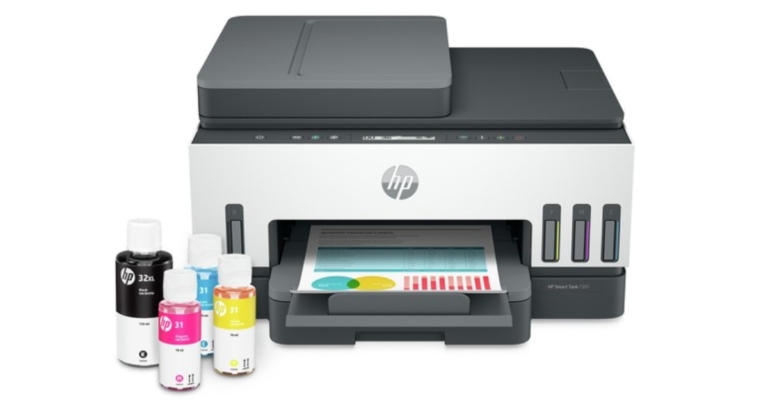
HP today expanded its lineup of smart tank printers in the Indian market. The HP Smart Tank 700 series printer is the latest addition by the company which is suited for small businesses and home users. The device comes with dual-band Wi-Fi 3 support and allows remote printing using the HP Smart App. Most importantly the printer can print on both sides.
In This Article
HP Smart Tank 700 series printers price in India and sale details
HP Smart Tank 700 series offers three models. The HP Smart Tank 720 is available at Rs 20,049 while the Smart Tank 750 is priced at Rs 22,480. The HP Smart Tank 790 wireless can be purchased at Rs 24,910. All the models are on sale via the HP Store in the country.
The HP Smart Tank 790 and HP Smart Tank 750 offer a warranty of one year or the first 50,000 pages, whichever is earlier. On the other hand, the HP Smart Tank 720 comes with a warranty of one year or the first 30,000 pages, whichever is earlier.
HP Smart Tank 700 series specifications
The HP Smart Tank 700 series printers are the first ink tank printer to be made from over 25% recycled plastic. The series is said to come with two years of ink supply that prints 12000 pages (black) and 8000 pages (colour) and saves up to 80% on ink costs, making it an ideal printing solution for users with high-volume needs. It supports a spill-free refill system while enabling organizations to print documents 50% faster with Smart Shortcuts, text recognition and intelligent file naming.
The HP Smart Tank 700 printers can be connected by dual-band Wi-Fi, & Bluetooth Low Energy (BLE). In addition to this, it is the company’s first smart tank printer to print on both sides for high-volume printing needs. While the HP Smart App lets users print from anywhere.
It comes with smart guided lighting, low ink and paper sensors with mobile alerts that inform users before the ink runs out. The HP smart printers also offer security features like secure boot, write protected memory and pre-set passwords for work from home requirements.
“The security features help maintain privacy and control, including the basic encryption and password control system. The printer ensures that it’s running without known vulnerabilities. While starting, it automatically checks the critical codes and if it’s compromised, instinctively stops. It also prevents the introduction of any malicious code while the printer is running,” the company stated.
The secure boot ensures that a device boots with the software trusted by the Original Equipment Manufacturer (OEM) and immediately stops if it’s compromised. The FW Code-Signing Validation validates memory code, then stops and notifies the consumer if it’s not authentic. The Write protected memory avoids the introduction of malicious codes while the printer is running. One can also pre-set a password to prevent intruders from accessing printer settings and the automatic update makes sure that the printers are running without any known vulnerabilities.
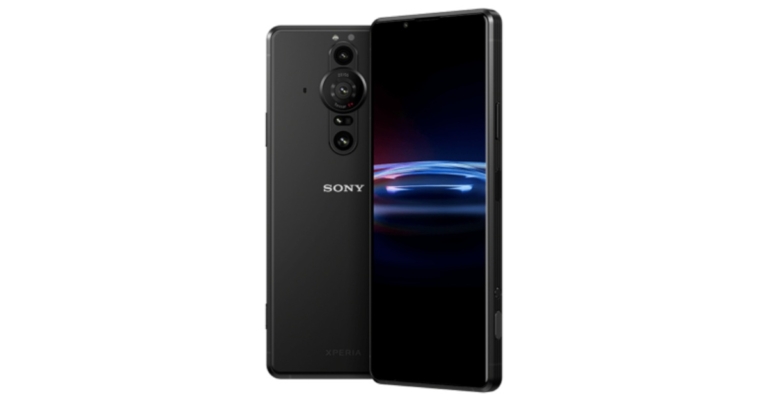
Sony has expanded its Xperia lineup with the launch of the Sony Xperia Pro-I. The device is claimed to come with the best smartphone camera. The company announced the phone via a virtual launch event. It is aimed at creative professionals including content creators, photographers and even filmmakers.
It features Zeiss optics and includes a dedicated shutter button given on the right side of the frame. It is powered by Qualcomm Snapdragon 888 SoC and is highlighted with a 1-inch Exmor RS CMOS sensor.
In This Article
Sony Xperia Pro-I price and sale details
Sony Xperia Pro-I has been introduced at a price tag of $1,7999 that converts to Rs 1.35 lakh. The phone comes in a single Frosted Black colour option. Alongside the smartphone, the company has also launched an additional accessory namely Vlog Monitor at $199, which translates to Rs 15,000. Both the products are said to go on sale from December.
Sony Xperia Pro-I specifications
Sony Xperia Pro-I features a 6.5-inch OLED display offering 3.840×1,644 pixels of resolution. The smartphone comes with a 120Hz refresh rate, 4K resolution and 240Hz touch sampling rate. The screen also has HDR support along with a 100 percent DCI-P3 colour gamut.
On the software front, the Sony Xperia phone runs on Android 11 and is powered by a Qualcomm Snapdragon 888 SoC with 12GB of RAM and 512GB of storage. The Internal storage can be expanded up to 1TB using a microSD card.
The biggest USP of the Sony Xperia Pro-I is its pro cameras. It is highlighted with a triple rear camera set up that houses a 12MP primary camera with a 1-inch Exmor RS sensor offering aperture ranging from /2.0 to f/4.0, There are two other 12MP lenses with 1/2.9 inch and 1/2.5 inch Exmor RS sensors. All the sensors support OIS while on the front there is an 8MP 1/4 inch selfie camera with f/2.0 aperture.
Apart from this, to protect the rear sensor the company has provided a dedicated shutter button on the right side of the frame which can be easily customised as per the liking.
Not only this, the Sony Xperia Pro-I comes packed with a 4,500mAh battery that supports 30W fast charging. The smartphone is IPX5, IPX8 and IP6x rated for protection against dust and water resistance. It further includes Bluetooth v5.2, WiFi 6, dual-band WiFi with 2.4Ghz and 5Ghz bands and NFC for wireless connectivity.
There is a 5G, 4G LTE, USB Type C port and 3.5mm headphone jack. The sensors on the phone include A-GPS, A-GLONASS, Galileo QZSS, fingerprint sensor and Beidou.
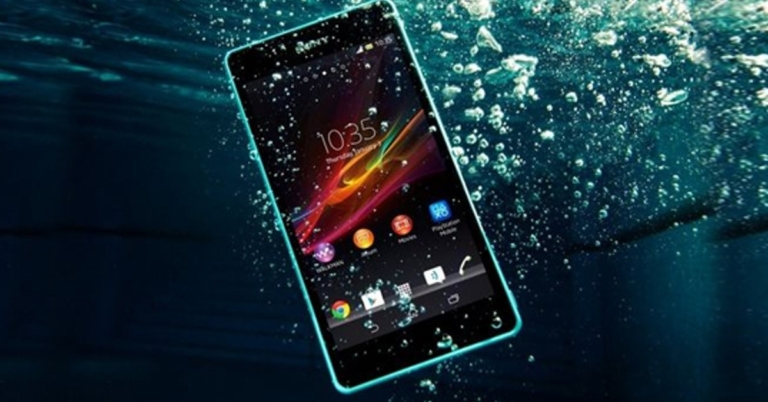
It’s in human nature to be clumsy sometimes and many of you might have spilt water on your smartphone. At times, the water might have been trapped inside your smartphone’s speaker, accidentally. Now all you can hear is a muffled sound and that is irritating and painful. Tired of hitting your smartphone again and again to expel the water? Confused about how to remove water from phone speaker? Worry not, here are some steps you can use to clean water from your smartphone’s speaker easily.
In This Article
Check for built-in feature
Hearing the muffled sound for the first time might have scared you by thinking you might have damaged your phone. In most cases, many phones have some water protection even with no IP rating. As a result, many companies put built-in features for cleaning smartphone’s speakers. For example, in MIUI, it can be found in Setting>Additional Setting>Clear Speaker. Try searching for similar phrases like “clean speaker”, “speaker cleaner”, etc.
If you are not successful in finding any such option, try using a third-party application like Speaker cleaner – Remove water & fix sound. The app will play the sound in such a frequency that the water will eject from your speaker automatically. Install the application and grant permissions. Start the app and run it until you hear a clear sound and don’t see any moisture near the speaker grill (make sure you are not connected to any Bluetooth earphones or speakers during this time).
Let it sit
If none of the above methods work, let the phone sit for a while in a downwards facing position (of the speaker). The water may take time to evaporate or eject from the speaker grill. Just leave the phone at room temperature for 24 hours and see if it fixes the problem. Also, we do not advise keeping the phone in direct sunlight or an extremely hot place in order to achieve this solution as it will damage the internals of your Android smartphone.
If you don’t feel like using any third-party application, we still have a solution for you. Head to Fix My Speakers 🔊 and press the blow button. It is an online solution that works exactly like the application above. Also, use it when away from pets or children as it produces a loud noise, which may disturb them or other people.
These are some simple ways to remove or clean water from your smartphone’s speaker. If none of these features work for you, there are chances that you might have damaged your smartphone and the only way left to fix it is to reach the nearest service centre. There might be the chance that the water has gone deep inside and there will be very little time for you now to get your phone fixed before it is gone forever.
The power button is one of the most essential pieces of hardware as it controls the screen of your phone and much more. There can be a lot of reasons why your power button may become unresponsive or get stuck. From wear and tear, water damage to software bugs can cause your power button to stop working. As you might have noticed by now, it is extremely painful and difficult to use a phone without a power button. Now the question is how to turn on your Android smartphone without the power button. Worry not, here are a couple of workarounds that you can use to solve your problem.
To operate anything on your smartphone you need to first turn on the screen. If the power button is not working then how do you do that, you ask? Just plug your phone into the charger or ask someone to call the number your phone is using. Another brilliant way is to use a fingerprint scanner. The fingerprint scanner is working on your phone all the time. Just place your registered finger on the scanner and this should allow you to use your phone.
Fix the power button
If your phone’s power button is broken, it can be quite tricky to restart it. Luckily, fixing it doesn’t always have to be tedious. There are a couple of ways you can go about it, depending on the nature of the problem. If your power button isn’t working due to the dirt that has accumulated around it, take a cotton swab, dip it in isopropyl alcohol, and gently rub the area surrounding the power button. If the button is stuck, take a hair dryer and use it to warm up the button. This will loosen it up a little.
Use third-party application
There are plenty of third-party applications on the Google Play Store. These applications help you to revamp your buttons. For such a task our choice is Button Mapper. All you have to do is install the application from the Play Store. Next grant all the permissions that the applications ask. Once this step is done now you will get tons of new options from which you can easily remap your power button to any other button.
If you don’t want to use a third-party application and all you want is to restart your smartphone? You can use the scheduled power on/off feature. This feature is available on all Android smartphones. Just head to Setting>Accessibility>Scheduled power on/off (if you don’t find it here just type it on the setting search bar). It’s good to keep this setting if your phone’s power button gives you trouble. For instance if your phone has shut down due to some reason, at least it will turn on at the scheduled point. Also, you can set small intervals on schedule to restart your phone.
Using ADB Command (little computer skills required)
You can use the ADB command to turn on your smartphone directly via a computer. The first thing to do is enable a USB debugger in the developer options. The second thing to do is set the default connection mode as “file transfer”. Now follow the next steps.
Connect your Android phone using a USB cable.
Install ADB drivers on your system (Windows, Mac, Linux) if it’s already there follow the next step.
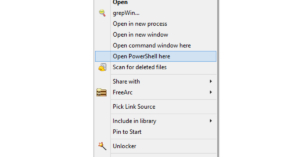
Right-click on the Phone’s folder and open Powershell.
As soon as you press enter the device will reboot, this will also solve temporary software issues if any.
Use Recovery Mode
You can turn on your Android smartphone in Recovery Mode without using the power button. Plug in the USB cable and long-press both volume keys simultaneously. After a few seconds, your smartphone will reboot in recovery mode. Exit the recovery mode to reboot your phone normally.
Bonus tip: Use the accessibility feature
Many phones have accessibility features like raise to wake up or double-tap to lock/unlock. These features will come in handy and will let you use your smartphone even when the power key is not working. There are a few companies that provide a floating widget that will include power options. If your phone does not have any of the options use Button Mapper from the second option. The application has a built-in gesture setup, which will come in handy.
Frequently Asked Questions (FAQs)
How do I turn on my Android smartphone without using the power button?
Plug your smartphone into the charger and long-press the volume keys together to enter recovery mode. Use the volume keys to navigate to the exit option and select it. This will reboot your phone in regular mode.
How do I fix a broken power button?
If the power button is broken due to accumulated dirt, clean it using a cotton swab dipped in isopropyl alcohol. If it is stiff, use a blow dryer to loosen it up.
How do I get Assistive Touch on Android?
Go to Settings>Accessibility on Android to enable Assistive Touch. This will allow you to restart your phone without using the power button.
This is it for how to turn on your Android smartphone without using the power button. In case none of the methods work for you, we advise you to take the phone to the nearest service centre and get your hardware or software(whichever is affected) changed. This will completely resolve the problem once and for all.
Dyson is a UK based brand that has been producing some great products for India and abroad. They recently launched the Dyson Purifier Hot+Cool and we brought it to our test table to understand everything about it. If you are in the market to pick up an air purifier before the air quality gets worse in your city, check this Dyson Purifier Hot+Cool review first.
In This Article
Dyson Purifier Hot+Cool review: Design
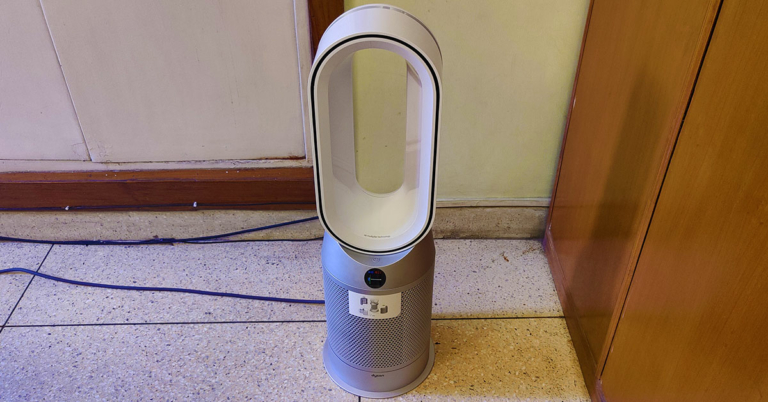
The Dyson Purifier Hot+Cool HP07 is the latest air purifier from the company that has been built on the same good structure that we have seen in the previous Dyson air purifiers, but with enhancements. The Dyson air purifiers have an identity of their own. While most air purifiers are boxy and look similar, the Dyson Purifier Hot+Cool looks very different.
These are more of a tower type air purifier that has a hollow oval to blast out clean air. The Dyson Purifier Hot+Cool is built of sturdy plastic and does not feel cheap at all. Available in two colour options we are reviewing the white/silver version. The other one is the black/nickel version, which also looks very good.
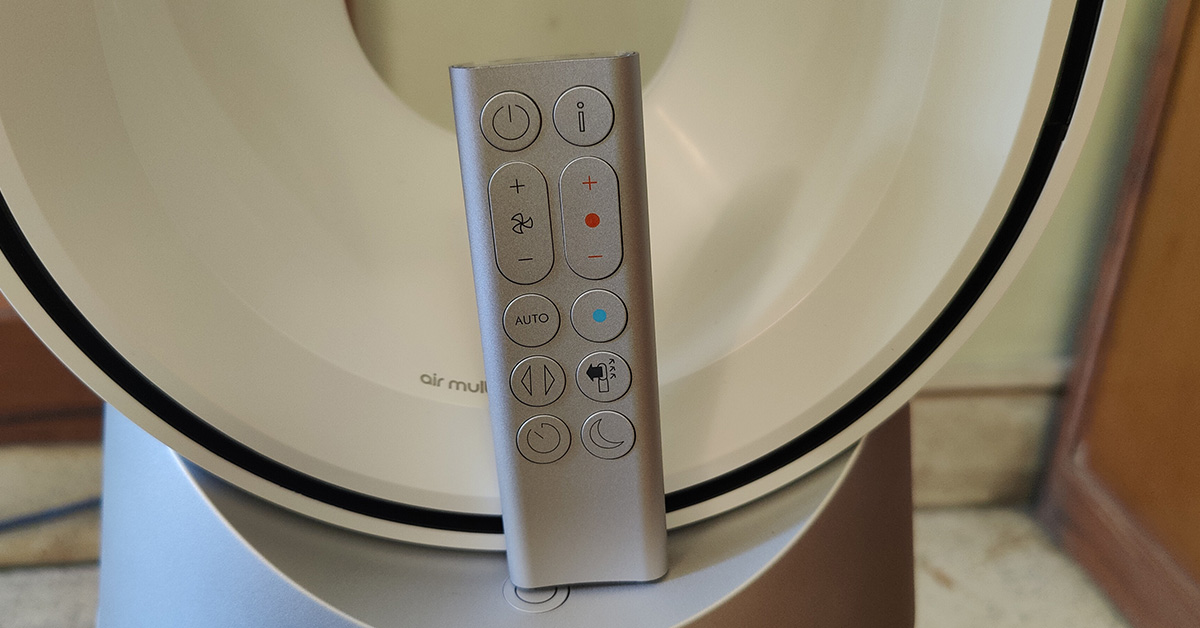
The twin enclosures at the bottom hide the HEPA H13 filters inside. The process to install them is fairly simple just snap them in and place them onto the Dyson Purifier Hot+Cool. A power button and an LCD screen can also be found on this air purifier which shows fan speed, air quality etc. A remote is also supplied with the air purifier to operate it. The remote is magnetic and can be placed magnetically on the top of the device. The purifier also has oscillation, and it can rotate up to 350 degrees.
In terms of dimensions, the Dyson Purifier Hot+Cool weighs 5.7Kg, 30-inch in height, 9.7-inch in width (at its fattest point) and has a 15AMP three pin plug with a cord length of 1.8 meters (5 feet 9-inches).
Dyson Purifier Hot+Cool review: Performance
The Dyson Purifier Hot+Cool can be controlled via the supplied remote as well as the Dyson Link app. The app shows everything from the air quality to when it is time to replace the filters. But what is the best part of this air purifier? Well, there are many. To begin with, it acts as an air heater in winter. Yes, you do not need an additional heater in the room. So it filters and blows out warm to hot air at the same time. You can set the temperature and it will do the rest.
The company says it can cool in summers as well, but it is not an A/C replacement. It will blow out a gush of air towards you at super high speed, so it can cool you off quickly on a hot day, but that is it. Over that, Dyson does extensive tests before bringing out a product. This time they did a CADR Vs Polar test. The previous is the industry standard, but the polar test is a more advanced version, which Dyson conducts. Putting it in layman terms, the Dyson Purifier Hot+Cool can purify air systematically from every nook and corner of the room (filtering the smallest particles) unlike most air purifiers that just clean around the place they have been placed.
Talking about which, the Dyson Purifier Hot+Cool is ideal for rooms up to 300 square feet. Which covers most of the rooms in an Indian household. Not only this, it can not just remove particles as small as 0.1 microns, but thanks to the activated carbon inside the filters it can remove odour as well.
There are multiple levels of fan speed available on this device. At the highest level, we would not call it quiet, but it is needed if you want to quickly purify the air around you. There is a sleep/night mode available too that reduces the brightness of the LCD screen as well as keeps the fan noise to a bare minimum. There is another smart feature added to this AP (air purifier). Dyson Purifier Hot+Cool also supports voice commands with the help of Alexa or Google Assistant.
Verdict
Using it, you do feel a change in the air quality around you. And as the winters approach you will need a good air purifier like Dyson Purifier Hot+Cool in your household to breathe better. After using this machine for more than a week, we found that the intelligent AP sensors in this one are much better than any other device in the market. At Rs 45,000 (limited time offer) the Dyson Purifier Hot+Cool HP07 is a very good deal to keep the air around you healthy. An ideal choice for small to medium rooms, especially in the winters. Also, you get 2 years of parts and labour guarantee on it.
Apple last week introduced the latest models of MacBook Pro along with AirPods 3. At the time of the launch, the company declared that both the devices will be available for purchase from October 26. But the company has now pushed back the sale date to October 29, which is on Friday.
On the company’s website, MacBook Pro and AirPods 3 new banners mention the new sale date. Like we said both the products were launched in India and globally on October 18 and the company provided October 26 as the sale date.
To recall, the Apple MacBook Pro 14-inch model will come with a price tag of Rs 1,94,400 for the 512GB variant. Whereas the 16-inch model price will start at Rs 2,39,900 for the 512GB model. The devices will come in a 1TB configuration as well. They can be purchased via select Apple Store locations and Apple Authorised Resellers starting Friday, October 29.
On the other hand, the Apple AirPods 3rd generation price in India has been set at Rs 18,500. Now the device can be ordered through Apple India online store from October 29.
Apple MacBook Pro specifications
Apple MacBook Pro is available in two sizes 14 inches and 16 inches featuring a Liquid Retina HDR display. The display supports up to 120Hz of refresh rate that automatically adapts to the type of content being played on the device. It also offers 1,000 nits of sustained and 1,600 nits of peak brightness. Both the laptops come equipped with M1 Pro/M1 Max processors with 10-core CPU and 32 core GPU.
MacBook Pros also comes with a 1080p web camera offering a wider aperture and 2 timed better low light performance. The devices are claimed to fast charge to 50 percent in just 30 minutes and it features MagSafe 3 magnetic charging.
The third generation of Apple AirPods looks similar to AirPods Pro. The device features a force sensor for pressure controls and includes a Siri voice assistant feature. The earphones comes with Dolby Atmos and Apple Music support. In addition to this, the AirPods 3rd generation provides FHD voice quality for FaceTime calls as it supports AAC-ELD codec. Not only this the Apple TWS includes Spatial audio and Adaptive EQ. The charging case comes with 30 hours of battery life and also supports MagSafe wireless charging.
iPhones are very popular. But sometimes they start slowing down not letting you watch Netflix or simply enter your 22Bet login. Using a few simple operations you can make your iPhone faster. Here are a few ways to speed up your gadget.
In This Article
Delete Old Photos
Nowadays, the number of pixels in cameras is high. There are smartphones everywhere with more than 10 million pixels, the capacity of photos is about 1-2 MB. If you have over hundreds or even thousands of photos on your phone, they will take up a lot of capacity on your device. Delete or save photos to your computer, or to iCloud cloud storage.
Delete Apps That Are Too Large
Typically, apps with too much capacity slow down your iPhone, find and delete those apps that you don’t normally use. To find these apps follow these steps: “Settings > General > Usage”.
Delete Old SMS
Text messages accumulated over the years may also be one of the reasons for slowing down iPhone performance. Therefore, it is better to delete all unnecessary SMS messages.
Turn off Automatic App Downloads and Updates
To switch all apps to manual control, go to “iTunes and App Store > Disable Auto Download” for music, apps, and updates.
Close All Unused Apps
Just like with your computer, opening too many apps reduces the speed of your iPhone. If you don’t need an app you’ve previously opened, close it.
Restart Your Phone
A smartphone is a small computer, and the machine needs a rest. Whenever you think about it, turn it off and let it rest.
If You Can Do It Manually, Don’t Do It Automatically
It’s undeniable that the iPhone auto-update system is convenient, but it will also slow down your phone. If you want your cell phone to run faster, I recommend leaving out features that run automatically. For example, from time to time the iPhone will ask you if you want to connect to the nearest Wi-Fi network. This is the equivalent of slowing down your phone.
Restore a Previous Backup
If you are still experiencing various problems while using your phone, you can restore your phone to its previous state using the backup. Simply connect your phone to your computer, open iTunes and select iPhone in the upper right corner, and then click “Restore previous backup” under “Backup” to restore your iPhone. Apple’s official website has detailed instructions on how to restore backups.
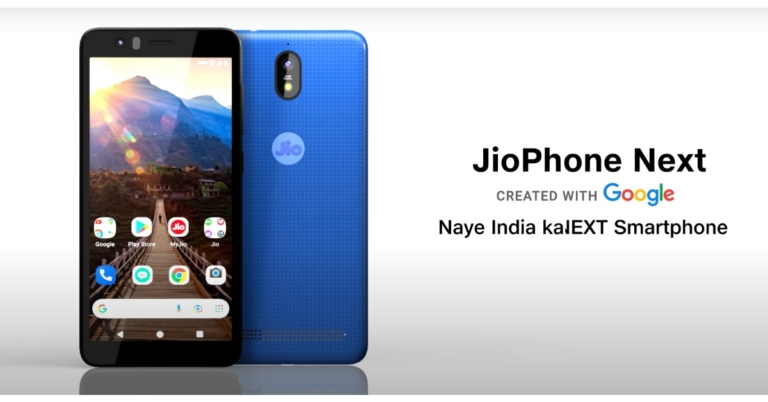
In June this year at its 44th AGM Reliance Jio announced a budget 4G smartphone called JioPhone Next. The company has developed the device in collaboration with Google and is expected to provide a more customised Android experience to the users.
Recently, the company delayed the sale of its upcoming smartphone due to a recent global shortage of chipsets. Earlier the company did not reveal the full specs but the phone was spotted on the Google Console listing.
While announcing the postponement of JioPhone Next last month the company promised that the rollout of its upcoming smartphone will begin before Diwali. As Diwali is approaching, the firm has begun teasing the JioPhone Next specifications. The telecom operator has released the first video of its forthcoming device. The video goes over the creation of the JioPhone Next.
It also details the key features of the JioPhone Next and is said to be manufactured at Tirupati, Andhra Pradesh. The smartphone is shown from various angles. As per the teaser video, the handset will provide a Micro USB port, touch-sensitive button and a pill-shaped camera module consisting of a 13-megapixel sensor. Just below the sensor, there is a flash. The camera app is said to offer features like night mode, portrait mode and other bundles of AR filters. While the selfie camera comes with a flash.
In terms of the design, the JioPhone Next will has a textured rear panel. It also consists of rear speakers and thick bezels on the sides.
According to the posted video, the phone will run on Pragati OS powered by Android which has been designed to cater the Indian market. The latest software for JioPhone Next promises maximum performance while preserving battery life. In addition to this, the Jio smartphone will include instantaneous software updates.
Furthermore, the JioPhone Next will include a voice assistant that is going to assist users while using the handset with the voice commands. Along with this, the phone will offer a Read Aloud option. As the name suggests it will provide the content on the screen read to them which means they can listen to the on-screen content in their preferred language. There will be a Translate functionality as well that will allow users to translate the text in the language they understand.
Apart from this, the JioPhone Next specifications were also tipped via Google Console listings lately. As per the listing, the handset will be sporting an HD+ display offering 720×1,440 pixels of resolution and 320dpi. The device is listed to include Qualcomm Snapdragon 215 (QM215) SoC under its hood. It will also equip an Adreno 306 GPU and quad-core Cortex-A53 CPU with 2GB of RAM.
The Internet is a wide world of entertainment. You can just sit for a while and enjoy tons of programs. But what about your children? Yes, there are many online streaming services that have kids sections. These services have some great kids shows to watch, too. Providing so many shows, these services charge you a monthly subscription. Do you want something more affordable, let’s say free? Head to YouTube and enjoy free content without any need to sign up. Today, we have filtered some great kids shows for you and your kids to enjoy on YouTube.
In This Article
Peppa Pig
Peppa pig’s story revolves around a big family which gets into an individual problem and teaches their children morals in the end while solving it. The best part about the show is that the channel plays Peppa pig 24/7 live so your child can watch the show anytime they want. The official channel is divided properly with easy to navigate content.
An old school TV show that has existed since the 1960s. Many movies and individual character episodes came out as well. The show has great visuals on muppets, which have been improving over the years. A good show to teach your kids some good ethics. Sesame Street has thousands of episodes free to watch on YouTube giving your children hours of entertainment and learning at the same time.
A YouTube kids shows inspired by the original comic book series of the same. The animation is old school but still looks great and your kids will enjoy it. The goal of Arthur is to keep the foster interested in reading, writing and solving problems. This show will help to enhance some social skills and model age-appropriate problem-solving skills. Good for viewers ages four to eight.
The plot of the story is of a retired circus bear who settles down in the woods to enjoy the rest of his life. Everything goes smoothly until he finds little adventurous girl Masha. Little Masha is curious about everything and creates a mess that the bear now takes care of in a fun and interesting way. Ideal for kids who want a little laugh and want to watch a light-hearted series.
Professor Utonium was fed up with the criminals and decided to help people create perfect little girls. He goes to the lab to compose sugar, spice and everything nice but by mistake, a lot of Chemical X falls into the jar and we get three little girls named Blossom, Bubbles and Buttercup. Now, these little girls fight crime with their extraordinary powers. If your kids love superheroes they will love Powerpuff girls as well.
The show is good for really small children. In the show, there are 4 Teletubbies playing and cooing in the Teletubbyland, which looks all green and futuristic. They do fun and infant pleasing activities like rolling on the ground, laughing and running about. In a few of the episodes, they teach you about basic things like a tiger or a bear with fun verses so you kids remember it. A YouTube kids shows which all generations will love
Initially, the show was known as Thomas the Tank Engine but later there was a change in the name of the show along with the animation. Now the animations look more futuristic and child friendly. Thomas is a steam engine that tries to solve every problem of him and his friends. The cartoon is good for teaching what to do and what not to do in your life. The YouTube channel still has the old episodes with old animation. Shuffle through the series and see which of your kids love them the most.
The show has been a hit since its comic book inception and now the franchise has its own movie, new animated TV series and merchandise. The hugely popular series revolves around a lazy and fat cat who loves lasagne and hates Mondays. He lives with his owner, Jon Arbuckle, and a drooling dog named Odie. His infinite craving gets him and Jon into all spurts of trouble.
Postman Pat is a classic animated series that revolves around a friendly postman named Pat who has a black and white cat. He delivers mail and parcels to the people across the village but every time he goes out he gets distracted by the issues, which the villagers of Greendale are facing. He solves the issues in a very interesting way that will keep your kids glued to the screen. It can be one of the best YouTube kids shows
Another classic in the list. Bob, a builder with his machine team, is ready to tackle any project. They demonstrate the power of positivity and can-do nature. They will teach your children how it’s easy to solve big problems with teamwork. Earlier Bob used to live in a small town and help people around. But with the updated series and graphics, now Bob is helping and working on a full-fledged city with big buildings and skyscrapers.
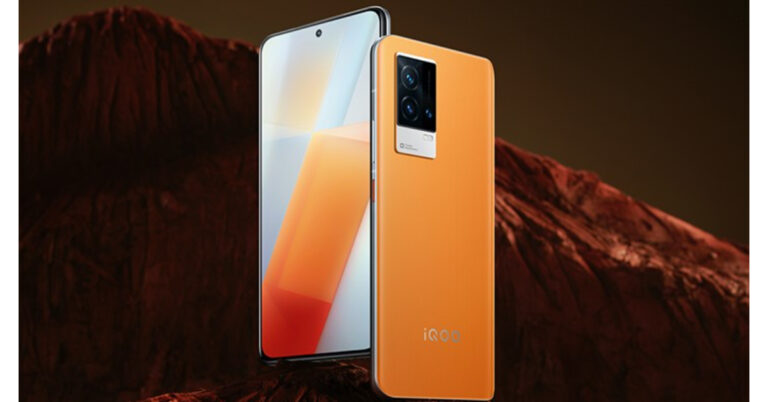
Not much time has passed when Vivo’s sub-brand iQoo introduced its iQoo 7 series in India. But now the company is prepping up to launch the next-gen of smartphones in the country. The company is tipped to introduce iQoo 8 and iQoo 8 Legend in the country soon.
iQoo 8 Series has already debuted in China in August this year. The lineup includes two devices iQoo 8 and iQoo 8 Pro. But according to the latest report, both the devices will be hitting the Indian shores soon. Dropping the Pro the company will go with the Legend branding here in India. The devices are expected to arrive as early as next month however the company has not made anything official but reportedly will begin advertising the phones in a couple of days.
In This Article
iQoo 8 specifications
According to the report, the iQoo 8 specs will remain the same as the Chinese variant. The phone runs on Origin OS 1.0 for iQoo and is powered by theQualcomm Snapdragon 888 SoC paired with 12GB of LPDDR5 RAM and up to 256GB of UFS 3.1 storage. It features a 6.56-inch full-HD+ 10-bit colour AMOLED display with 1,080×2,376 pixels of resolution and 120Hz refresh rate support.
For the optics, iQoo 8 comes with a triple rear camera setup that includes a 48-megapixel IMX598 sensor main camera sensor with f/1.79 aperture, a 13-megapixel ultra-wide-angle sensor with f/2.2 aperture and a 13-megapixel depth sensor with f/2.46 aperture. Upfront, there is a 16-megapixel sensor for taking selfies with an f/2.45 aperture.
The iQoo 8 Legend features a 6.78-inch 2K AMOLED display with 1,440×3,200 pixels of resolution along with a 120Hz refresh rate and HDR support. The phone is powered by the very latestQualcomm Snapdragon 888+ SoC along with Adreno 660 GPU for graphics. It comes with up to 12GB of LPDDR5 RAM and up to 512GB of UFS 3.1 storage.
For the photos and videos, iQoo 8 Legend is highlighted with a triple rear camera set-up that includes a50-megapixel IMX766V sensor with an f/1.75 sensor and gimbal stabilisation. Further, it is supported by a 48-megapixel sensor with ultra-wide-angle with f/2.2 aperture and a 16-megapixel depth sensor with f/2.23 aperture. In terms of selfies, the phone includes a 16-megapixel front-facing camera with an f/2.4 aperture.
It comes packed with a 500mAh battery with 120W fast charging and 50W fast wireless charging support.
Have you participated in the Amazon Quiz today? If not then participate in the 26 October 2021 Amazon Quiz as it has already gone live on the app. The daily quiz can be played from 12 AM to 11:59 every day on the mobile app platform. Today the e-commerce is giving the chance to win Rs 1,000 Amazon Pay Balance.
Every day Amazon brings a fresh quiz for its customers. By participating in the quiz the participants can win an Amazon Pay Balance of up to Rs 50,000. The quiz can only be played on the mobile app as it is not available for the desktop platform. The quiz contains five easy questions and you have to answer all the questions correctly. The participants will then be shortlisted for a lucky draw to select a winner. Whereas the results are declared at the end of the month. Check out today Amazon quiz answers to win Rs 1,000.
In This Article
26 October 2021 Amazon Quiz Answers
Question 1: 30th September the day of the feast of St Jerome was adopted in 2017 by the United Nations as what international day?
Answer: International translation day
Question 2: David Warner was recently dropped from the Sunrisers Hyderabad XI. Which international opener made his Sunrisers debut in his place?
Answer: Jason Roy
Question 3: The release of Rohit Shetty’s Sooryavanshi would be during which festival in 2021?
Answer: Diwali
Question 4: What is this phenomenon called when the moon comes in between the sun and earth?
Answer: Solar Eclipse
Question 5: Guess how long is one quartered of this game in the NBA if the whole game finishes in 4 quarters?
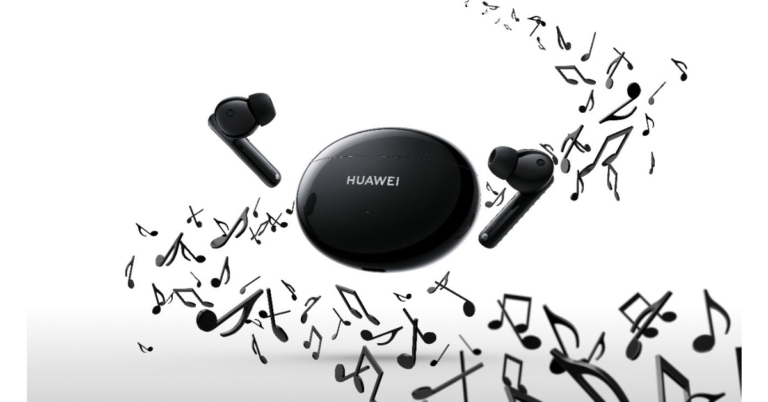
The Chinese electronics brand, Huawei, today introduced its new TWS earbuds in the Indian market. The Huawei FreeBuds 4i TWS earphones support noise cancellation technology and Awareness mode. The audio device claims to offer 10 hours of playtime and features 10mm, dynamic drivers. Read on to know its pricing in India and availability details.
In This Article
Huawei FreeBuds 4i specs and features
Huawei FreeBuds 4i comes packed with a 10mm large dynamic driver that promises a wider range of amplitudes for punchy bass and the rear chamber design ensures consistency in sound effects. The TWS earphones also offer PEEK+PU polymer diaphragm and are professionally tuned to deliver high-quality pop music.
The Huawei earphone also equips deep active noise cancellation technology that actively cancels out noise and achieves a more immersive audio experience for the user. Whereas the additional awareness mode allows the user to stay aware of their surroundings and communicate clearly with those around them.
The Huawei FreeBuds 4i TWS earphones charging case and earbuds sport a rounded design with smooth edges. The earbuds offer 10 hours of continuous music playback or 6.5 hours of voice call when completely charged. It also supports fast charging and with just 10 minutes of quick charge, it can provide 4 hours of audio playback.
These TWS are equipped with advanced low latency algorithms to minimise the lag between audio and video which is especially useful while playing first-person shooting (FPS) games when users sometimes rely on hearing the sound of footsteps to track the enemies down. In terms of connectivity, the audio device supports Bluetooth v5.2 and the earphones are touch-sensitive as well.
Huawei FreeBuds 4i price in India and availability details
Huawei FreeBuds 4i price in India has been set at Rs 7,990. The device comes in multiple shades of Ceramic White, Carbon Black, Red, and Silver Frost. The device will be available for purchase via Amazon starting October 27.
The customers can avail of a Rs 1,000 instant discount as a part of HUAWEI’s Diwali offer on the purchase of HUAWEI FreeBuds 4i till November 05, 2021. Moreover, select cardholders can avail of additional benefits on purchasing HUAWEI Freebuds 4i. Axis, Citi, CBCC and IndusInd Bank cardholders can avail of No Cost EMI and a 10% instant discount till 25th October 2021.
Additionally, consumers purchasing the HUAWEI FreeBuds 4i with their ICICI, Kotak or RuPay cards can also avail of these benefits between 26th October and 3rd November 2021. Amazon UPI users can get an additional 10% cashback up to Rs 100.
Chinese electronics major, Lenovo, today announced the launch of its new Tablet in the Indian market. Lenovo Tab K10 is the latest to hit the stores today. This is a Made in India tablet that is powered by a MediaTek processor and features a full-HD display. According to the company, the Lenovo Tablet is being manufactured at a fully digitized and automated plant in Tirupati, Andhra Pradesh.
In This Article
Lenovo Tab K10 specs and features
Lenovo Tab K10 features a 10.3-inch full HD TDDI display. It offers 1,920 x 1,200 pixels of resolution and 400 nits of peak brightness. The tablet also has Lenovo Active Pen support. Under the hood, there is an octa-core MediaTek Helio P22T processor paired with PowerVR GE8320 GPU. It comes with up to 4GB of RAM and up to 128GB of internal storage options, which is expandable up to 2TB using a microSD card. The device runs on Android 12 that is upgradable to Android 12.
On the camera front, Lenovo Tab K10 comes with an 8-megapixel rear camera and a 5-megapixel front camera for selfies and video calling. The front-facing camera also allows face unlock features for safety and ARCore support and AER.
The Lenovo tablet is fueled by a 7,500mAh battery that supports 10W charging. The device also includes Dual Speakers with Dolby Audio support.
In terms of connectivity, the tab includes Bluetooth version 5, 802.11 a/b/g/n/ac, 4G LTE. USB Type C port and 3.5mm headphone jack.
Lenovo Tab K10 price in India and availability
Lenovo Tab K10 has been launched in India with a starting price of Rs 25,000. The device can be purchased via the company online as well as offline channels in the country. The Lenovo online store in the country has listed both the WiFi-only and WiFi+ 4G LTE variants.
As per the website, the 3GB RAM with 32GB storage WiFi model is shown out of stock but is listed at Rs 13,999 on the other hand the WiFi+ 4G LTE model will be available in two different configurations 4GB RAM with 64GB storage and 4GB RAM with 128GB memory at Rs 15,999 and Rs 16,999 respectively.
Pankaj Harjai, Director – Tablets and Smart Devices, Lenovo India said “Our relationships with Indian EdTech startups such as Byju’s and Toppr are a testament of our efforts to help businesses thrive with best-in-class technology. Today, SMBs are developing more applications with tablets as digital devices. This increases the demand for affordable and practical solutions, which can be addressed by our locally manufactured K10 tablets.”
Clubhouse shortly will enable its users to share external links on its platform. With the announcement of the new pinned links functionality, the audio social networking app will allow users to generate revenue through their work. The feature will be released on October 27 to both iOS and Android platforms.
According to the company’s latest announcement by the CEO Paul Davidson, with the new pinned links feature the moderators will be able to pin external links to the top of a room that will take listeners to news articles or even a podcast.
While announcing the new pinned links feature on its platform Clubhouse said, “Many of the most popular rooms on Clubhouse point to things in the outside world. Clubs likeNews News News andTech News Around the World gather each morning to discuss the headlines. People host live fundraisers, raising thousands of dollars to build schools in Africa. Authors are doing book tours. Musicians, podcasters, and comedians are getting discovered and selling tickets to shows (Congrats,Austin!). Journalists are dissecting their pieces and introducing audiences to new writers. Fashion designers and entrepreneurs are selling amazing products they created. Somehow, they have been creative enough to do this using only their voices. Today, we’re introducing a new feature for creators called Pinned Links — to make all of this much easier.”
The users can pin a link to the top of their room using the Pinned Links. The moderators can simply tap the “…” menu in the upper right and then “Pin a Link”. Clubhouse says that any room moderator has the authority to change or remove the link at any time.
The audio social platform Clubhouse also expects that this feature will be used in a variety of entertaining ways like playing games, running polls, and sharing links to YouTube videos. The company is also looking forward to seeing how Pinned Links can help room creators drive preamble to subscribe to their Substack, download their podcast, read their books, see them at The Laugh Factory, discover their new single, buy their product and support their Patreon or GoFundMe page.
The new Pinned Links will be available on iOS and Android from October 27 that is on Wednesday alongside a slew of new features that were announced in the past weeks that will be beneficial for the users to begin rooms with friends, plan events and 1:1s, search for rooms, share clips, make great-sounding music and share Replays of their content much farther.
With the rise of the crypto market, you might be tempted to start your own currency as well. Well, the theory says anyone in this world can create a cryptocurrency. But the true side is that you need proper knowledge and resources to accomplish this task. Just creating a cryptocurrency is not sufficient, there is a lot of work to do later, which includes promotion, listing on exchanges, and ongoing maintenance and upgrade. If you have planned it all, let’s get started on the first step of your cryptocurrency journey.
In This Article
Understanding Cryptocurrency to start
Under cryptocurrency, the blanket falls into two things, a coin and a token. Coins are basically big players in the crypto world who have their own blockchain and work as an independent work body. While a token functions on top of already established blockchain technology. Etherium is a good example of a blockchain used by many tokens. Tokens usually have contracts with the blockchain for specific utility values.
BAT coin is a perfect example in this case as it rewards content creators through brave browsers. These tokens are further divided into two parts NFTs( Non-fungible tokens), which are based on the Ethereum blockchain and DeFi tokens. NFTs are used to represent a unique piece of digital property, like artwork, MP3, video and more.
On the other hand, DeFi is used for private keys and it is also based on the Ethereum blockchain platform. Right now Solana is also gaining popularity with its own blockchain technology(not a piece of financial advice).
Ways to create Cryptocurrency
There are three ways that can be used while creating a cryptocurrency.
Create a new blockchain – Require a professional level of coding skills and needs pre-existing knowledge.
Bifurcate an existing Blockchain – This is easier as you need a smaller amount of crafting skills and the codes are readily available on platforms like GitHub. You can take those codes, alter them and make a new coin.
Using a platform – If you are not at all familiar with coding use a pre-existing platform like using the ERC-20 standard for the Ethereum network. The service does all the work and hands you the final project.
Step 1 – Decide a consensus Mechanism (A protocol that helps to confirm if the blockchain and node will accept the transaction or not. Proof-of-work and Proof-of-Stake is a prime example).
Step 2 – Choose a blockchain(from the above ways).
Step 3 – Create node (This will determine the functioning of the blockchain with many aspects to consider from hardware details to permission from the blockchain).
Step 4 – Build a blockchain architecture (What functions does the coin or token will do as once the purpose is fed in the program and the crypto is launched there is no going back).
Step 5 – Integrate APIs (it is an application programming interface that will show the functioning of your cryptocurrency, not all the crypto have API so it will make you stand out from the market).
Step 6 – Design interface (Interface consists of web services, files and transfer protocols for both the front and backend).
Step 7 – Legalise your coin (before launching the crypto, make sure to check the law and regulations regarding the registration process to make the coin legally yours).
This is all about how to create a cryptocurrency. This is the only tip of the iceberg and a guide for beginners. There are a lot of aspects to be known and sub-points to be covered. We advise you to know all the technical aspects and what needs to be done once your cryptocurrency is launched. If these processes seem like a big hassle, it’s better to consider investing in cryptocurrency rather than making a new one on your own. Making it from scratch requires money, time, technical knowledge and a high amount of risk.
Bitcoin and other cryptocurrencies are making huge hype in the market. You often hear the term Crypto mining when someone talks about cryptocurrency. Many are drawn towards the cryptocurrency ecosystem as it is secured and very lucrative. Along with that, it can be profitable if you can mine them with your powerful computer system without paying any charges to a middleman.
At the current time mining bitcoin is a hard job with lots of investment needed in it so many people do not move towards doing it. But what users can do is mine fiats, which are relatively easy to obtain and exchange them for other big cryptocurrencies. To begin with, let’s talk about what crypto mining is.
It is a process in which a miner gains cryptocurrency by solving cryptographic equations with the use of high computation power. The formula is set specifically for encryption. The solving process involves verifying data blocks and adding transaction records to a blockchain, which is a public ledger and is secured by applying complex encryption techniques.
Cryptocurrencies use a decentralised method of distribution and for verification of each transaction, it takes the help of cryptographic algorithms. As soon as you solve the puzzle and obtain a coin, it is posted in the blockchain ledger. For all the pain miners take, they are paid with cryptocurrency. The first miner to solve the complex problem and show the transaction process gets the cryptocurrency as a reward and the amount is entered in the blockchain ledger.
How to mine
The first thing on your bucket list should be a powerful computer or a system. The next thing is to create a wallet, be it hardware or software to keep your cryptocurrency and make a pool to accelerate profitability. A pool is basically a set of many small miners to share resources and earn big. The profit created by the pool is evenly distributed. The mining process is complex for the addition of new blocks of transactions into the blockchain.
Talking about the blockchain it is a digital ledger of transactions that is duplicated to provide it to each and everyone across the network. For example, if there is any change in the ledger, everyone in the network will come to know about it. The records in the blockchain are signed by an immutable cryptographic signature called the hash.
There are further steps in a blockchain when there is an authentication request. The request is called a block, which is sent in the network to the verification code. The nodes then verify the transactions and add the block in the chain while giving the traction details to everyone in the network.
For mining, the equations are solved, which consist of random data that goes into the block. The block is encrypted by SHA256(encryption method) with an amount of 0‘s. The more the number of zeros the harder the equation is to solve, plus harder equations provide more returns.
A new bitcoin hash is added every 10 minutes and the outcome of a particular hash is unknown. This makes the process very complicated and difficult to reach the target hash. The reason why people are shifting towards GPU processing power rather than CPU is the reason.
There is also correction between many cryptocurrencies so no single authority becomes so powerful that it starts to run slow. As soon as the proof of work is shown a new block with the currency you earned is added to the blockchain. This also avoids other miners to cheat.
Bonus: Mining in India
The mining process has increased a lot in India. The country is becoming one of the fastest-growing countries with miners and traders as well. There are companies like Easify Network providing mining facilities and helping in blockchain development. Though mining is not very profitable in India. For mining, we require a lot of computation power as the system needs to be turned on 24/7.
With the rise of electricity costs in recent years, the profit margin is reducing. Adding to this is also lack of equipment availability, so to get any type of equipment, users need to pay extra import charges, further reducing the profit. Also, the inexplicit rules by the government make it risky. Many big companies have faced losses in the past due to the inconsistency of laws.
Xiaomi’s sub-brand Redmi is all set to announce the launch of its next generation of Note Series in the market. The company recently confirmed that the Redmi Note 11 Series launch will be hosted on October 28. Xiaomi has planned a dedicated event that will be hosted online, but the devices will first debut in China. Ahead of the launch event, the company itself confirmed how many models the upcoming lineup will be consisting of.
As per Redmi’s latest Weibo post, Redmi Note 11 Series will be including multiple variants. The company General Manager Lu Weibing has confirmed that there will be two Pro models this time. Not only this he has also shared some exclusive images to tease the key specs of the upcoming series.
According to the released teaser poster on the Chinese microblogging site Weibo, the upcoming Redmi Note 11 Series will be offering NFC, Bluetooth version 5.2 and Wi-Fi 6 for wireless connectivity. In addition to this, the phones will support 120W fast charging and an X-axis linear motor as well. The 3.5mm audio jack will be available on the smartphone while the audio is finetuned by JBL.
Image Courtesy: Weibo
In addition to this, the front panel will be having a punch hole cut out that will play house to the selfie camera. The rear of the Redmi Note 11 series will be featuring a quad-camera setup along with an LED flash.
Ahead of the official announcement the series has also been listed on JD.com to tease its availability. According to the listing, the lineup will consist of a vanilla Redmi Note 11, Redmi Note 11 Pro and Redmi Note 11 Pro+. Pro model is suggested to arrive in four colour options of Mysterious Blackland, Shallow Meng, Xinghe, Time Quiet Purple and Misty Forest.
On the other hand, the top-notch model Pro+ is listed to arrive in Time Quiet Purple, Mysterious Blackland and Misty Forest shades. Not just that the e-commerce website has also revealed that both the pro versions will be made available in 6GB RAM with 128GB storage, 8GB RAM with 128/256GB storage options. The company has also begun taking registrations of the smartphone.
Redmi Note 11 is tipped to be priced at CYN 1,199 for the base variant, which translates to Rs 14,050, while Redmi Note 11 Pro is likely to come with a starting price of CYN 1,599 that is roughly around Rs 18,700. Lastly, the top of line Redmi Note 10 Pro+ is expected to be priced at CYN 2,199 that converts to Rs 25,700
Google has officially rolled out its latest Android 12 operating system with the launch of the Pixel 6 Series phones. Other smartphone brands have also started announcing the release of the beta version of Android 12. Vivo and its sub brand iQoo have both declared that they will begin the rollout starting November end and December end onwards respectively.
Vivo’s Android 12 based on FunTouch OS Beta Version will be available for its X, V, Y and S series smartphones. According to the company, it will be releasing the Android 12 based FunTouch OS Beta Version for Vivo X70 Pro + at the end of November. Whereas X60 Pro+, X60 Pro, X60, V21 & Y72 5G.
Will start receiving from the end of December. The Vivo X50 Pro, X50, V20 Pro, V20 SE, Y33s, Y20G, Y53s & Y12s are also on the list and will be getting Android 12 beta from March 2022. Whereas the latest operating system will be available for Vivo S1 and Vivo Y19 from early April next year and other devices like Vivo V17 Pro, V17, S1 Pro, Y73, Y51, Y20, Y20i and Y30 will be last to receive the update in April 2022 end.
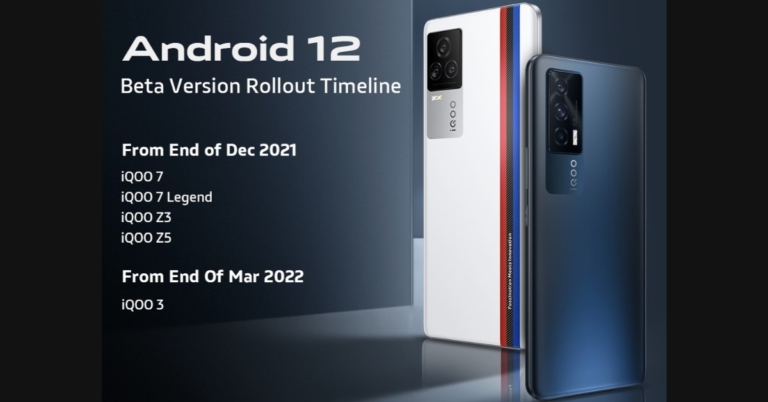
On the other hand, Vivo’s sub-brand iQoo has also announced the rollout timeline of Android 12 Beta for its smartphones including iQOO 7, iQOO 7 Legend, iQOO Z3, iQOO Z5 and iQOO 3. As per the company iQOO 7, iQOO 7 Legend, iQOO Z3, iQOO Z5 will start getting the Android 12 beta update from December end and will roll out the new OS for iQoo 3 at the end of March 2022.
Both the company says that the Android 12 Beta update with custom skin will be released in a staged manner. “This is the timeline of the roll-out plan and the Beta version will be released on a batch-by-batch basis.”
Other companies like Oppo also introduced the global version of its Android 12 based ColorOS 12. The custom skin will support 12 major Indian languages along with 54 other languages. The Chinese smartphone company says that the public beta will arrive in the Indian market from next month and devices like Oppo Reno 6, Pro and Pro Diwali Edition will be the first on the list to receive the update. While it will reach the rest of its smartphones by 2022.
Apple Watch is a versatile and powerful piece of equipment that you can wear on your hand. It is one of the best wearables you can find on the market with some of the best-in-class features. Want to relax or just don’t want the boredom to possess you? Here are some great games that you can download and play on your Apple watch, and kill time easily. From classics to some new interesting games, install these games and have fun on the go without taking out your iPhone. Here are some paid and free Apple Watch games 2021
In This Article
Par 72 Golf Watch
Golf may sound like a complicated game but actually, it’s easy once you have little knowledge. Even though there are limitations to the small form factor of the Apple Watch, Par 72 Golf works seamlessly. The graphics are good, making the game more interactive. Just select the right club, know the wind directions and apply the right amount of force, the game is that simple. The game is free for download and a must-have in your library.
Love those classic NES games, which you used to play on TV? This classic game pack is the same thing. It’s just that you don’t have to take your TV around as your Apple watch is powerful enough. There are many interactive games like the infamous snake game, Minesweeper, Maze Man, Brick Breaker, Sudoku, and more. Install the game and get in touch with your childhood memories on the go.
Bubble shooters have been one of the most widely played games for decades. Over 10 million downloads worldwide the game is famous and has been on Apple Watch for years. The size of the bubbles are tiny so if you own a smaller version of the Apple Watch you might not be very comfortable. If this is not a problem, you will have a lot of fun playing this game.
Solitaire is one of the best and easiest card games. If you are an early Windows user you might be very familiar with this game as it used to come pre-installed. The game is pretty much straight forward and you can kill hours to complete a game or two. Most of the people enjoy it and the game has a good rating on the store. If you don’t know how to play solitaire, search the internet. It is one of the easiest card games to understand and play.
The infamous ping pong game was the stepping stone in the journey of multiplayer gaming consoles. Yes, the screen size is small here and two players playing simultaneously will be difficult but at least you will be having an option to share a time-killing game. There is a solo mode as well so that if you are alone and can play with a computer. You can also select the difficulty level and challenge your skills.
Soviet artificial intelligence from 1985 is trying to communicate with you and it doesn’t know that the Cold war is over. Chat with AI to convince it not to start another war as it is connected to the second largest nuclear arsenal. You have to try various responses to see where the game takes you. Try this basic but fun adventure game to see if you can save the world.
Remember back in the days those huge arcade machines and spending hours to complete a level or kill time. Technology has changed it all, this game has multiple arcade games that you might have enjoyed in your childhood. Just install the application and enjoy. These games are highly optimised to utilise the Watch’s screen properly. The application has a total of 18 games with the same arcade soundtrack to enhance the experience.
Flappy birds took over the internet a few years ago. The game got famous because it was fun and difficult at the same time. This encouraged people to play it more. Jellyfish tap works on the same phenomenon. You have to tap the screen and stay afloat. To make it difficult there are obstacles that you must avoid to survive.
Imagine having a bubble wrap attached to your wrist, which you can use any time to relieve stress and pass your time. Pop is a bubble wrap simulator that you can use to pop bubbles. If you are not settled with only popping bubbles, try using the competition mode that helps you compete with your family and friends and see who can pop more bubbles in a period.
Way back in 1983, the 8-bit ball was the start of the smart assistants that we use now. It was more of a gimmick, but it is a prediction application with which you can have lots of fun. Are you confused about something like going to a place or with someone? Ask the Magical ball to solve your problem. Remember it is just an application and a fun time killer. Do not start to rely on all the decisions it makes.
Classic NYC game, which is played all over the world. Instead of finding a partner and talking out time with them to set up a checkerboard why not play the game anytime and compete with your Apple Watch. The best feature about this game is that it supports autosave so you might not complete a game in one go, but you can come back to it and continue from the last point whenever you want.
The game is simple yet challenging. All you have to do is avoid the square space crashing onto the wall. That’s not it, every time you tap the screen will rotate 90 degrees to confuse your mind. Adding to it, you will also face a direction change every 5 moves. The further you go the harder and faster it gets. A perfect time killer for you.
Get a Las Vegas slot machine-like experience just with a few taps on your Apple Watch. Remember, you cannot win real money with this application, but it is a fun way to pass time. Spend the 100 chips given to you in starting to unlock more games and slot machines to tickle the gambling worm in your brain.
This game is good for chess lovers. Now you can play chess on your wrist. With Apple Smartwatch you can play chess with real-time players across the globe and the game is free for everyone. If you use another Apple device you can also play this game with a computer to enhance your skills.
Love the classics like Tic Tac Toe, Hangman or 2048? The application is perfect for you. Challenge your spellings with a hangman and save the man from getting hanged or sharpen your maths by combining numbers in 2048. The application opens a window with a few games that you will love to play and invest your time in.
Trivia quizzes are the best way to learn something new every day. It’s crazy to imagine the fun of a trivia quiz right on your Apple Watch. Trivia Crack has many categories to choose from to play the quiz. The application is very easy to use with interesting graphics to keep you glued to your Watch’s screen for hours.
Staying healthy with your busy schedule seems difficult? Imagine making it a lot simpler. The Pocket Plants app helps you with goal-oriented jobs to progress through the game. You are responsible for a plant and to make it grow faster and better. You need to provide it with water and sunlight to get a better score. Seems easy? There is more to it, to provide essentials to your plant you will be needing coins and those can be earned by walking. Ideal for those who want to kill boredom and stay healthy.
Scientists have proved that having a pet gives a positive impact on your mental health and it gives you happiness. But is your landlord not allowing them or you do not have time to take care of them physically? The application is helpful for such users. They can own a pet in the virtual world and pet them whenever they want. Not only playing, but you also need to take proper care of them which makes it a little more challenging.
Are you throwing a party with your friends and want to have some fun? Why not try the truth or dare game. Usually, the questions become so unfair when played with your friends, but this application eliminates that as it picks up questions and dares for you. From easy to extreme, choose the level of session you want to have. Though some of the questions are not appropriate for children so do make sure to remove/bypass them if this is the case.
An interesting brain teaser to sharpen your motor skills as well. The game works on the Stroop Effect, which is a psychological phenomenon where the name of a colour is spelt out in a different colour. There will be a timer running to make it even more competitive. The game is fun and can be challenging so be careful not to smash your watch as Apple Care might not cover it.
After a humiliating loss to Pakistan, Indian fans are devastated. When India lost its first 2021 T20 World Cup match to rival Pakistan, die-hard cricket fans took to social media to express their feelings. While memes are a great way to express themselves Twitterati shared cringe-worthy memes on the social media platform to express their emotions and allowed us to loosen up a little. Take a look at how Indian fans took a jab at India Vs Pakistan’s first T20 match.
The next T20 world cup match between India and New Zealand is on Sunday, which is October 31. The match will begin at 7: 30 PM IST. So don’t be disappointed as we are very much sure that the Indian cricket team will bounce back and bring the trophy home (fingers crossed).
Daily Amazon brings a fresh quiz for its customers with exciting rewards on its platform. The Amazon quiz can be played every day from 12 AM to 11:59. 25 October 2021 Amazon Quiz has gone live on its platform and the e-commerce platform Amazon is today giving you a chance to win Rs 40,000 Amazon Pay Balance.
To participate all you need to do is log in to your Amazon app on your device and give answers. Daily a new set of questions are presented to the participants which give them a chance to win exciting prizes. The questionnaire consists of five easy questions that are usually based on general knowledge and current affair. You can submit the correct answers and can win an Amazon Pay Balance of up to Rs 50,000. It should be noted that the quiz is not accessible on the web platform instead you have to participate only through the dedicated app.
After clearing the daily quiz the participants will be shortlisted for a lucky draw to select a winner. The results will be announced at the end of the month. To increase your chances of winning, Gadget Bridge updates all the answers so that you can win the reward. Check out today’s answers for Amazon Quiz to win Rs 40,000 Amazon Pay Balance.
In This Article
25 October 2021 Amazon Quiz Answers
Question 1: World Heart Day is observed on 29 September. Complete the key message by the World Heart Federation in 2021- Use Heart to___.
Answer: Connect
Question 2: Who picked up the first hat-trick of the 2021 IPL season?
Answer: Harshal Patel
Question 3: Which is the latest cyclone to form in the month of September in the Bay of Bengal?
Answer: Cyclone Gulab
Question 4: This is a famous railway station located in which country?
Answer: Belgium
Question 5: Which Disney story is this flower significant to?
Cryptocurrencies have started to skyrocket since last year, and people who have keen knowledge are able to gain massive profits. So what are cryptocurrencies? They are digital assets that you can trade 24/7. The meaning of a cryptocurrency is that you are transferring the digital token from one party to another without it being a duplicate. Unlike physical currency, crypto tokens are primarily used to buy digital assets. Blockchain technology is used to ensure the transaction and its security.
Tokens like Bitcoin, Ethereum, Cardano, Dogecoin, Ripple and more have good scope (not a piece of financial advice). Before we get to how to buy them, here is a product overview of the basics. Here are some ways you can buy cryptocurrencies.
There are brokers available online that offer a good exchange. They offer you to buy and sell cryptocurrency in exchange for assets like stocks, bonds, and ETFs. The advantage of getting cryptocurrencies from a broker is that you will get them at a cheaper cost with trading cost-benefits as there won’t be any middlemen to take a cut from you. A major disadvantage is that you cannot trust all the brokers, there are a number of scams that can happen. Also even if the broker is genuine you won’t be able to use crypto features.
By Cryptocurrency Exchange
It is the most popular way of trading in cryptocurrencies. There are many cryptocurrency exchanges like Binance, Bybit, WazirX and more that offer wallet features. All your money and cryptocurrency quantity is stored safely. The transaction is easy and you can be assured that your money is safe(not until you liquidate). Different exchanges charge different asset-based fees from you. Apart from cryptocurrencies, there are NFTs and their stable counterparts which are backed by a currency (Rupee for example).
That is it on how you can buy cryptocurrency. Though it is an interesting way to earn money and one can make a fortune for you to hold. We strictly advise studying it carefully before entering the market as cryptocurrency trading is subject to market risk.
Ever been in a situation in which you can’t remember your account’s password? With so many accounts all over the internet and multiple logins, it becomes very difficult to remember all the passwords. If someone keeps the same password for all the accounts, it is a great security threat. Google thought of it and along with great extensions added a password manager in the Chrome browser. So, we thought why not tell you how to manage your password in Google Chrome in 2022.
This feature can save passwords for you and autofill them when needed. It can also suggest some strong passwords, which you can keep to secure your account easily. There are ups and downs in all the cases. If this feature is a boon it also has a drawback as if you use some other browser to log in and you don’t remember your password you have to manually enter by checking it on the Chrome password manager. So the question is how to use it and manage your password in Chrome.
In This Article
Manage passwords in Google Chrome
This can be used when you need to check the library of saved passwords.
Step 1 – Open Google Chrome (both MAC and Windows)
Step 2 – Click on the three-dot burger icon
Step 3 – Select Settings from the drop-down list.
Step 4 – Scroll down a little to find Advanced and click on that.
Step 6 – You will find all your saved passwords here.
There will be two toggle buttons offered in this setting, to save passwords and auto-login. Auto-login will directly log you in on the known sites. If you use a personal computer you can use this feature. We advise you to toggle on Offer to save passwords, by this Chrome will ask you if you want to save username and password for the current site.
Are you not satisfied with Chrome’s built-in password manager? We suggest you try 1Password. It is one of the best password managers available on all platforms across all devices. The application saves passwords for you and also warns you against vulnerability. 1Password has a Google Chrome extension making the process hassle-free. As the name suggests, all you need is 1 password to remember. Just log in to the application’s account and all your passwords will be saved in its library as soon as you enter them.
This is how to manage your password in Google Chrome, if you use any other way do share with the rest of us in the comments section below.
The IP of your device is an important and critical piece of information that you either don’t know or you don’t think about too often. There are times when you might need to get access. Some prime examples of this are when you need to access your NAS box to explore content, run a server based on WEB or connect to a self-made VPN. To do any of this one needs to know about Internal and external IP and how it works. Check out how to find your local and external IP address as well.
In This Article
External and Internal IP addresses
The term IP address is branched into 2 categories the first one is an internal IP address and the second one is an external IP address. Internal IP is a specific address given by your local network to all internal devices. For example, your router puts out different internal IPs for each device so it can distinguish between the devices that are connected to it.
While on the other hand, an external IP is for the World Wide Web to know about the network of your router. This lets the online web identify each router as a separate device. In other words, we can also say external IP is an internal IP on a larger scale for the service providers. Now the question comes, how to find your IP address whether it’s external or internal? Here is how you can do it.
Visit WhatIsMyIP.com, it will tell you your IPV4 address as well as the newer IPV6 address. Want to know the basic IPV4? Visit ipconfig.me. For now, all the cases use IPV4 as an address but in the near future, everyone will simply shift to IPV6 as it is a more advanced version.
Find External IP address using your router
You can also find your device’s external IP address by using your WiFi router’s gateway page. You can access this page by entering 192.168.1.1 on your web browser’s address bar. Some routers may have customised suites for management. Once you have logged in, you can find your IP address in the general tab.
Use a third-party app
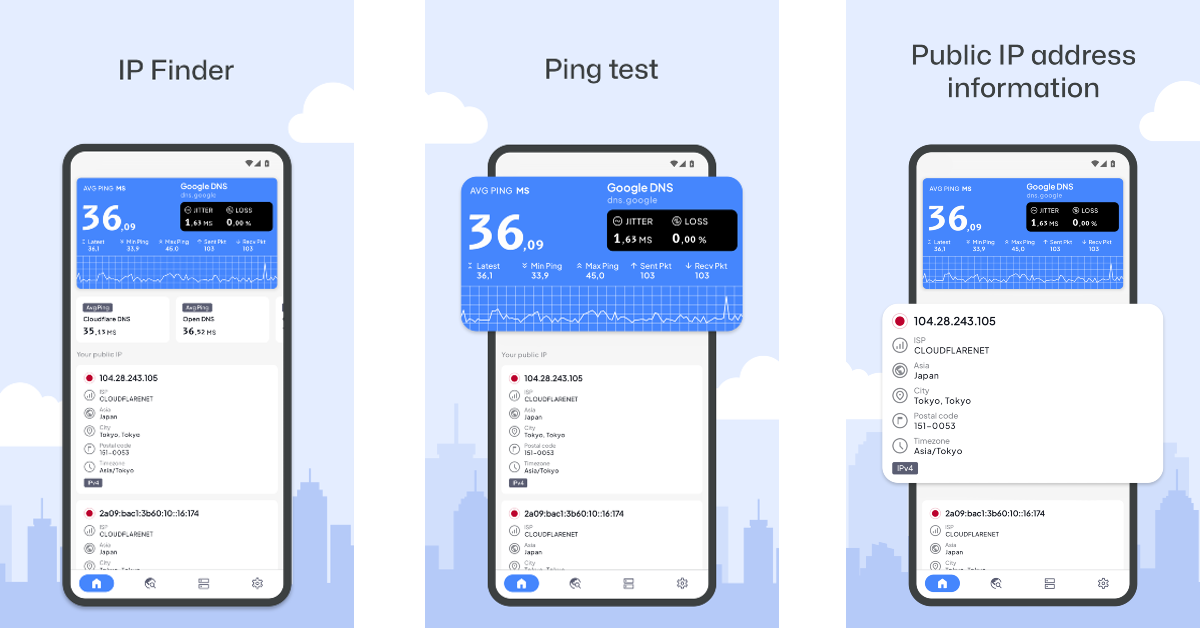
There are dedicated third-party apps that can help you manage your router and also let you know what your IP address is. Apps like Fing and All Router Admin allow you to view your WiFi router history, change its password, remove devices from the network and carry out other management tasks. If you’re looking for something more straightforward, use the IP Finder app to find your device’s external IP address.
Find internal IP
Finding an internal address is not as simple as clicking on some hyperlinks, for each device it is different.
For Windows
Open Command Prompt from the Windows search. Input the command ipconfig in the command line. You will see the details in front of you.
For MAC
Click on the apple icon on the top left corner of your screen. Open system preference>network.Select the type of network you are in.
For Android
It is complicated with Androids as different brands have placed the IP information differently. The most common way to find it is to head to Settings>Network & Wi-Fi> Select the network you connected with then press Advance to know the information related to IP.
For iPhone
Head to settings then tap on Wi-Fi. There, next to your connected network, there will be an “i” inside a circle. Tap on it to see the details.
Frequently Asked Questions (FAQs)
How do I find the local IP address on Windows?
Open Command Prompt on your PC and enter the ‘ipconfig’ command to view the local IP address.
How do I view my IP address using my WiFi router?
Go to your WiFi router’s gateway page by entering 192.168.1.1 in the web browser and go to the general management page to view the IP address.
How do I find my external IP address online?
Go to WhatIsMyIP.com and it will automatically tell you your IPV4 address as well as the newer IPV6 address.
These are some simple techniques you can try. If by any chance you are using some other device, fret not, the IP is usually in either status of your device under the ‘About’ section or just see the settings of the Wi-Fi to which you are connected.
Acer is a Taiwanese company that is famous for exceptional laptops and computer products. Now they have licensed their brand to Indkal Technologies who are producing Acer brand of TVs in India. The licensee has launched the P series of Android driven smart TVs. We got to play around with the 42-inch Acer smart television, and this is our review of the Acer P Series Android TV.
In This Article
Acer P Series Android TV review: Design
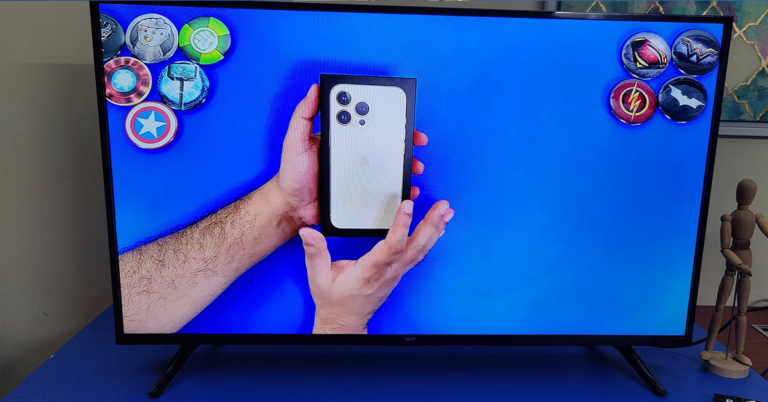
Out of the box, the Acer P Series Android TV is like any of the usual LED TVs you get in the price bracket. Thin black bezels, V-Type twin footings and a weight of under 6 Kg is what you get. The TV can be placed on a table or can be wall-mounted (wall mounts are not part of the package). Acer branding in chrome can be seen under the large 42-inch display upfront. Beneath that is where the company has placed the IR receiver and the LED off light. Behind which you will find the power button as well.
All the connectivity ports on the Acer P Series Android TV are side-mounted, facing the right side of the TV and not the usual left. The attachment ports include two HDMI, two USB, one Ethernet, one 3.5mm audio out, one 3.5mm aux to composite (adaptor included in the box), and one antenna port.
Most of the functions of the TV can be accessed using the ergonomically correct IR remote control. The remote is voice-enabled and once you set up the Google Assistant it can do everything from searching and playing your favourite show on Netflix, to searching for a recipe on YouTube. The remote also has dedicated buttons for Netflix, YouTube, Prime Video and TikiTV (here you get some free global channels, basically free online TV).
Acer P Series Android TV review: Performance
Setting up the Acer P Series Android TV is not hard at all. Just turn on the TV and follow the onscreen instructions and if you already have a Gmail account, which most of us do, you will be up and running in 5 minutes. The TV has WiFi capability as well and connects to any router.
Talking a bit more about the tech specs of the Acer P Series Android TV, this smart telly has a 64-bit Quad-Core CPU, 1.5GB RAM, 8GB Storage and 24W (12W x 2) speakers that are downward-firing hidden under the TV. The TV also supports Dolby audio and Pure sound. The LED screen resolution is 1,920 x 1080p (FHD), which supports 350 nits of peak brightness and a contrast ratio of 3,000:1.
When put on the test bench the Acer P Series Android TV did surprise us. We were not expecting this good a picture. There are plenty of display presets available like Movie and dynamic, and each does justice to the onscreen moving pictures. When you press the volume keys on the remote a special audio menu also appears to choose the audio genre you are listening to. This automatically equalises the Hz frequency.
The TV takes about a minute to start, which is a bit high when compared to the rest of the smart TVs in the bracket. Less RAM could be blamed for it. However, when the Android for TV OS 10 fully loads everything runs very smoothly. The apps open quickly, you can switch between them swiftly and the load time for any movie or show from places like Netflix, YouTube or Prime video is low.
The colours portrayed by the TV are on point and you do not see any ghosting or noise on the Acer P Series Android TV. IT has a special digital noise reduction feature as well, which reduce grains intelligently. The blacks are deep and no matter what you want to view, a sports game or your daily soap, this TV will do justice. Moreover, the sound is incredibly powerful on this TV. Not once did we feel that we needed a soundbar to be connected to this TV. The remote functions well and picks up all the audio commands using Google assistant nicely. We did not face any issues here either.
Verdict
All the popular formats like MP3, MPEG 4 are supported via USB pendrive as well. The Acer P Series Android TV consumes just 75 watts of power when in ‘on mode’. A lot of apps are preloaded and many more can be downloaded in the 4.5 GB of free storage (out of the total 8 GB). At Rs 21,999 Acer has got themselves a winner. It might be a new brand in the TV segment, but the Acer branding puts a lot of trust in this one. You can buy it without thinking twice.