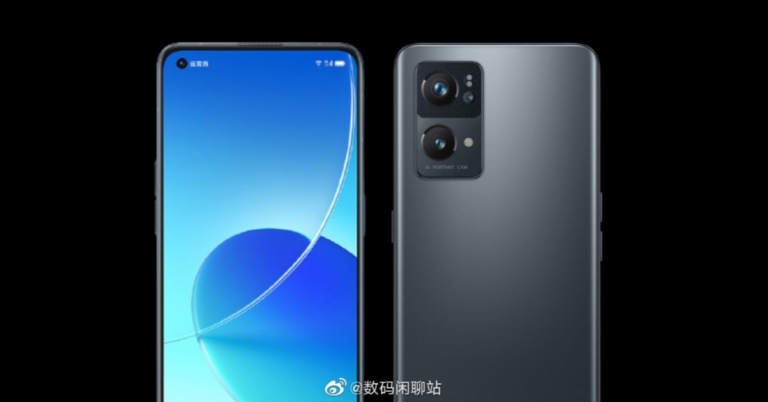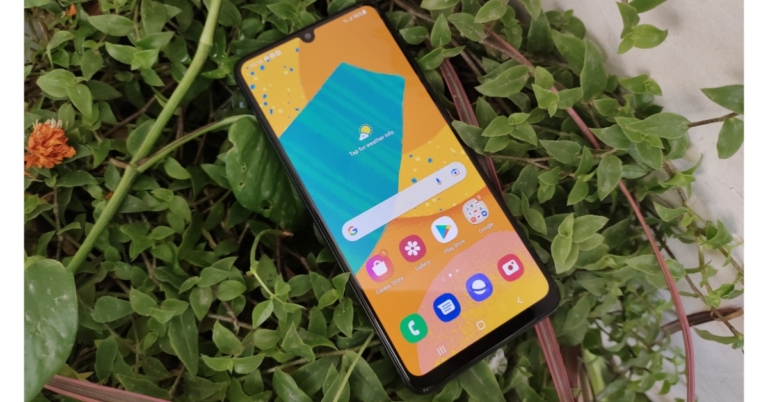
Redmi Note 11 5G, Redmi Note 11 Pro and Redmi Note 11 Pro+ with higher refresh rate, fast charging and Pro cameras launched

Redmi Note 11 5G, Redmi Note 11 Pro and Redmi Note 11 Pro+ have officially made their debut in the market. The new generation of the Redmi Note series has been launched in China and is expected to arrive in India as well but details about the Indian availability of the smartphone are still unknown. The devices have got some major design changes. Also, the phone now comes with improved fast charging and camera specifications.

Redmi Note 11 Series price and availability details

The Redmi devices come in multiple configurations. The 4GB RAM with 128GB storage model of the vanilla Redmi Note 11 5G is priced at CYN 1,999 which is Rs 14,000 in Indian currency. The 6GB RAM with 128GB storage variant comes with a price tag of CYN 1,299 which converts to Rs 16,400 and the 8GB RAM with 128GB storage model will be available at CYN 1,499 that translates to Rs 18,700. There is an 8GB RAM with 256GB storage configuration as well which costs CYN 1,699 converting to Rs 21,100. The phone will be offered in three colours: Slight Mint, Shallow Dream Galaxy and Black Realm.

The Redmi Note 11 Pro will be available in 6GB RAM with 128GB storage at CYN 1,599 that is approximately Rs 18,700 whereas the price of the 8GB RAM with 128GB storage is set at CYN 1,899 that translates to Rs 22,300. The 8GB RAM with 256GB storage model cost CYN 2,099 which converts to Rs 22,300.

Redmi Note 11 5G
Redmi Note 11 5G

Last but not least the top-notch Redmi Note 11 Pro+ will be available in a variety of options. The 6GB RAM with 128GB storage variant has been launched at CYN 1,899 which is approx. Rs 22,200. There is an 8GB RAM with 128GB/256B storage at CYN 2,099 that converts to Rs 24,500 and CYN 2,299 that is Rs 26,900. Both the Pro variants will be available in four colour options of Misty Forest, Mysterious Black, Shallow Dream Galaxy and Time Quite Purple. 

The Redmi Note 11 series will be available for purchase beginning November 1 in China.

Redmi Note 11 5G, Redmi Note 11 Pro, Redmi Note 11 Pro+ specifications

The Redmi Note 11 5G is powered by MediaTek Dimensity 810 SoC. It has up to 8GB of RAM and up to 256GB of storage space. The phone features a 6.6-inch FHD display and comes with a refresh rate of 90Hz. 

The vanilla Redmi Note 11 has been downgraded with dual rear cameras from triple sensors of the previous generation. The new one has a 50MP primary sensor and an 8MP secondary lens. While on the front the phone features a 16MP selfie camera.

Redmi Note 11 Pro
Redmi Note 11 Pro

Apart from this the smartphone houses a 5,000mAh battery and supports 33W fast charging. The 3.5mm audio jack and a USB Type C post are also available for connectivity. 

Both the Pro models are almost identical in terms of specifications. 

The devices feature a 6.67 inch AMOLED display with a hole punch to house a selfie camera. The screen supports a 120Hz refresh rate, 260Hz touch sampling rate 20:9 aspect ratio and HDR10+. The Redmi Note 11 Pro and Redmi Note 11 Pro+ are powered by MediaTek Dimensity 920 SoC. It is offered with up to 8GB of RAM and up to 256GB of storage. 

Redmi Note 11 Pro+
Redmi Note 11 Pro+

The smartphone comes with a quad rear camera set up that includes 108MP Samsung HM2 primary sensor. Apart from this, there is an 8MP wide-angle sensor and a 2MP depth sensor. There is a 16MP snapper on the front for taking selfies and video calling. 

The Redmi Note 10 Pro boasts a 5,160mAh battery with 67W fast charging support. On the other hand the Redmi Note 11 Pro+ houses a 4,500mAh battery with a mega 120W fast charging support. The combination of a 108MP camera sensor and 120W super-fast charging support take the device to another level. 

Both the handsets come with a side-mounted fingerprint sensor and equip JBL tuned stereo speakers. For connectivity, the phone includes 5G, 4G LTE, dual-band Wi-Fi, NFC, Bluetooth 5.1 GPS, Type C Port and a 3.5mm audio jack.

For the latest gadget and tech news, and gadget reviews, follow us on TwitterFacebook and Instagram. For newest tech & gadget videos subscribe to our YouTube Channel. You can also stay up to date using the Gadget Bridge Android App. You can find the latest car and bike news here.

29 October 2021 Amazon Quiz today answers: Answer to win Rs 25,000 Amazon Pay Balance

Amazon hosts a Quiz session for its customers daily. Its app platform brings a quiz on a daily basis, which begins at 12 AM and ends at 11:59 PM daily. The participants stand a chance to win cash prizes on a daily basis. Today’s 29 October 2021 Amazon Quiz will let you win Rs 25,000 Amazon Pay Balance.

By participating in the Amazon Quiz the participants can win Amazon Pay Balance ranging from Rs 5,000 to Rs 50,000 every day while sitting at home. To win the participants must answer five questions correctly that are based on current events and general knowledge.  One wrong answer can eliminate you from the quiz. The results will be announced at the end of the month. Today’s question will let you win Rs 25,000 Amazon Pay Balance. Check below for today Amazon quiz answers.

29 October 2021 Amazon Quiz Answers

Question 1: 3rd October is celebrated as the unity day in which country? (On this day in 1990 the eastern and the western blocks of a country became one)

Answer: Germany

Question 2: India would play 1 Test on their tour of England in 2022, after a Test match at which venue got called off in 2021 due to COVID-19?

Answer: Old Trafford

Question 3: Thena, Ikaris, Kingo and Ajak are a part of which group of people with superpowers that would appear in an upcoming Marvel movie?

AnswerEternals

Question 4: What nut is in the middle of this chocolate?

Answer: Hazelnut

Question 5: This famous tourist attraction is located in which country?

Answer: Thailand

For the latest gadget and tech news, and gadget reviews, follow us on TwitterFacebook and Instagram. For newest tech & gadget videos subscribe to our YouTube Channel. You can also stay up to date using the Gadget Bridge Android App. You can find the latest car and bike news here.
Intel 12th Generation Alder Lake CPUs for desktops announced

Chipset manufacturer Intel has unveiled its new 12th Generation Core processor for desktops. Six new models have been announced that are based on Alder Lake architecture on the 10nm process. These are the company’s new generation of chipsets including three models: Intel Core i9-12900K, Core i7-12700K and Core i5-12600K. While the other three models have a KF suffix at the end that lacks UHD Graphics 770 GPU.

All the 6 desktop processors are based on Intel’s performance hybrid architecture featuring a combination of Performance-cores (P-cores), the highest performing CPU core Intel has built, and Efficient-cores (E-cores), designed for scalable multithreaded workload performance. All the processors are unlocked and overclockable and come with a mix of diverse performance and efficiency cores in consumer X86 PCs. Along with this the DDR5 RAM and the PCIe5.0 interconnect standard have also debuted. 

The Alder Lake CPUs will be using a hybrid of two core types and is similar to how ARM-based smartphone chipsets are developed. While the new 10m Intel 7 process will be used to manufacture all 12 Gen Core CPUs. The latest Golden Clove performance core to replace the existing Tiger Lake’s platform Willow Cove cores. Besides this, the Gracemont Efficiency core architecture is the successor of Lakefield which is the company’s first hybrid CPU released in 2020. As of now, the 12th Gen desktop Core i9 CPUs are announced to have 16 cores which include 8 performance and efficiency cores, 12 cores include 8 performance and 4 efficiency cores as well as 10 cores including 6 performance and 4 efficiency cores. The performance cores benefit from Hyper-Threading letting two threads run at the same time vehicle Efficiency cores don’t really. Though there will be nonlinear core or thread counts. 

Intel 12th Generation Core processor

The Thread Director balanced workloads and assigned the best activities to each core which required Windows 11. 

According to the company, the Core i9-12900K provides astounding gen-over-gen performance increases, including up to 25% more FPS on Troy: A Total War Saga, up to 28% more FPS on Hitman 3, and up to 23% more FPS on Far Cry 63. Enhanced by Intel Killer Wi-Fi 6E for up to 75% less latency while gaming when multitasking, high-frequency P-cores paired with E-cores for offloading parallel tasks enable up to 84% more frames per second for simultaneous gaming, streaming, and recording.

Moreover, the 12th Gen Intel Core desktop processors are the first to DDR5 memory for up to 4800MT/s, PCIe 5.0 (up to 16 lanes), which offers up to 2X I/O throughput over PCIe 4.0, with up to an additional four lanes of PCIe 4.0 support. In addition to this, it brings 30MB Intel Smart Cache (L3) and 14MB L2 cache for increased memory capacity with reduced latency. It comes integrated with Discrete Thunderbolt 4 universal cable connectivity for external device expansion.

On the other hand, the Intel 600 Series Chipset includes new  PCIe Gen 4.0 lanes make for 28 total lanes off the chipset, integrated USB 3.2 Gen 2×2 provides up to double the bandwidth, DMI Gen 4.0 increases the chipset to CPU throughput for fast access to peripheral devices and networking. It also offers Intel Volume Management Device (VMD) to PC chipsets to simplify storage control by allowing direct control and management of NVMe-based SSDs from the PCIe bus without additional RAID controllers or other hardware adaptors.

Intel 12th Generation Alder Lake CPUs Availability

The unlocked 12th Gen Intel Core desktop processors are up for pre-orders now being offered by participating OEMs, channel partners, and retailers. Broad availability will start November 4 with more than 140 customers in more than 30 countries expected to add the new processors to their lineups by the end of the year. The price of the new Alder Lake processors will begin at   $264 to $589 for the unlocked desktop processors.

The company is likely to have hundreds of thousands of 12th Gen Intel Core desktop “K” processors by the end of the year and more than 2 million by the end of March 2022. To enable the expanded offerings for desktop, mobile and commercial segments expected in early 2022, Intel is also shipping 28 of the processor SKUs in the 12th Gen Intel Core processor family to OEM partners. 

For the latest gadget and tech news, and gadget reviews, follow us on TwitterFacebook and Instagram. For newest tech & gadget videos subscribe to our YouTube Channel. You can also stay up to date using the Gadget Bridge Android App. You can find the latest car and bike news here.

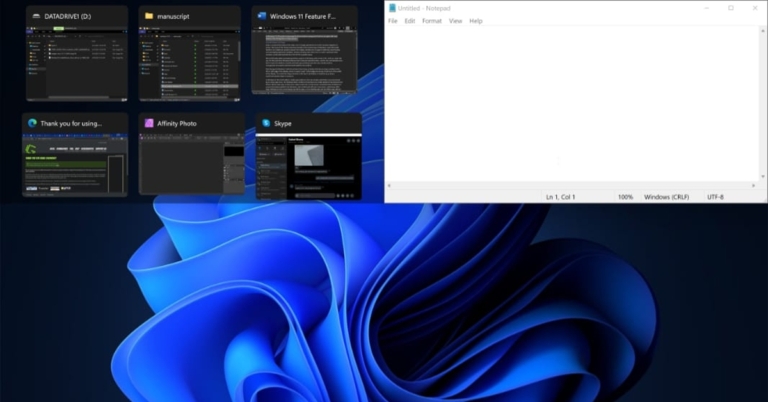
What is snap window feature and how to use it in Windows 11?

Since Windows 7, Microsoft introduced a split-screen feature and you could have done it by pressing Windows + Arrow keys to make the application divide in half screen. This feature is very useful while taking notes as in half of the screen you can open a browser and within the other half you can open a notepad or Word doc and start typing. The snap window feature in Windows 11 has seen an overhaul and we can say that it is the best when compared to all the past versions. The shortcut still works in the same manner, but now there is much more to just splitting the screen into two halves. Here is how to use the feature in Windows 11 properly.

Enable snap window

Though this feature is on by default, you can check it once again if it is enabled/disabled.

Step 1 – Press the start button on the keyboard or press the Windows icon on the toolbar.

Step 2 – Search by typing snap settings, and open it.

Enable snap window

Step 3 – Make sure the snap window option is toggle on.

toggle on snap window in windows 11

Read Also: OnePlus, Oppo, Xiaomi and more will come with Snapdragon 888

How to use snap window

Once the option is switched on now you can split the applications into 6 different layouts

  • Two, 50/50 splitSnap window layouts
  • Two, 70/30 split
  • Three windows into thirds
  • Three, 50/25/25 split
  • Four windows into quarters
  • Three, 25/50/25 split

To use it, hover over the window’s maximise button on any application to find out split-screen options (There might be only 4 options depending on the version of Windows and screen size) or simply press Win+Z to pop open the option.

Using snap window in Windows 11

Read Also: 6 Gadgets you should bring home this summer

Now you can enjoy multitasking and can have a seamless experience on Windows 11.

For the latest gadget and tech news, and gadget reviews, follow us on TwitterFacebook and Instagram. For newest tech & gadget videos subscribe to our YouTube Channel. You can also stay up to date using the Gadget Bridge Android App. You can find the latest car and bike news here.
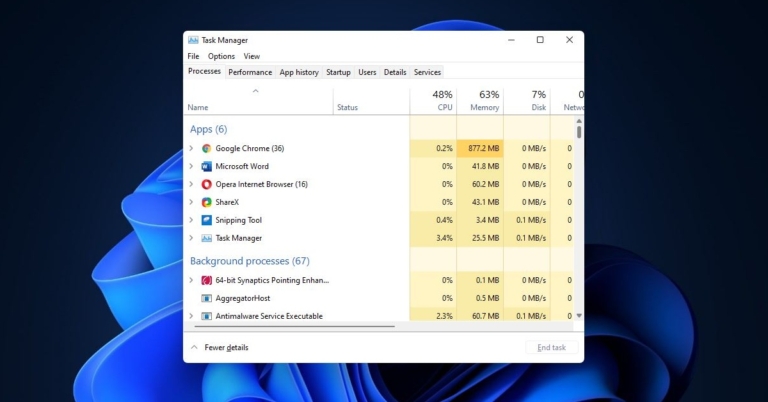
Top 10 ways to open Task Manager in Windows 11? (2024)

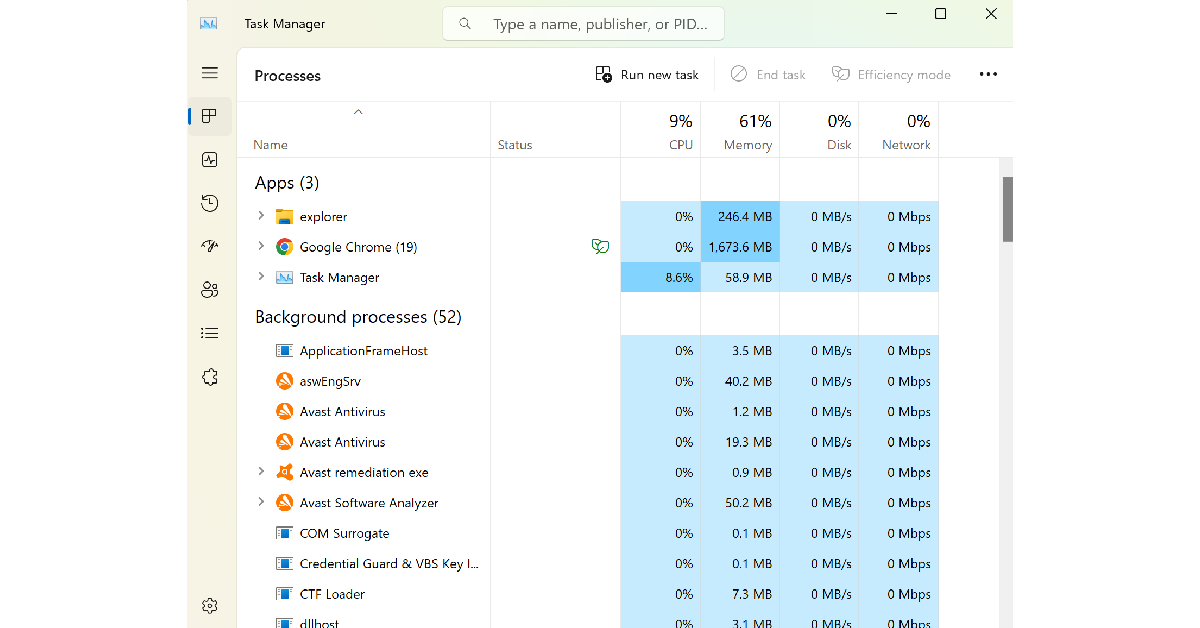
Task Manager is a tool that has been there in Windows for decades. It manages and shows users the way apps process as well as services running on your system. It can be very useful to know, which application is becoming a resource hog or many monitorable problems like RAM usage and memory usage. To do any of it you must first know how to open a task manager, as it has slightly changed from Windows 10. Here are the top 10 ways to open Task Manager in Windows 11.

Read Also: OnePlus 12R Genshin Impact Edition officially launched in India

Ctrl + Shift + Esc

Pressing these keys simultaneously will open the task manager instantly.

Open task manager shortcut

Ctrl + Alt + Del

Pressing them together will open quick shortcuts in which you can find the Task manager option.

Ctrl + Alt + Del

Read Also: 20 keyboard shortcuts you must know to save time

Win+X

As soon as you press Win+X it will open a drop-down list where you can find the task manager.

Win + X for task manager in Windows 11

Task Manager from Windows search

Press the Windows key on your keyboard or tap on the Windows icon on the task bar and search task manager in the search bar.

Windows Search

From Run Window

It is one of the fastest ways to open a task manager. All you have to do is either search for Run on Windows search or press Win+R and then type taskmgr and press enter. This will directly open the task manager in front of you.

Task manager from Run commant in Windows 11

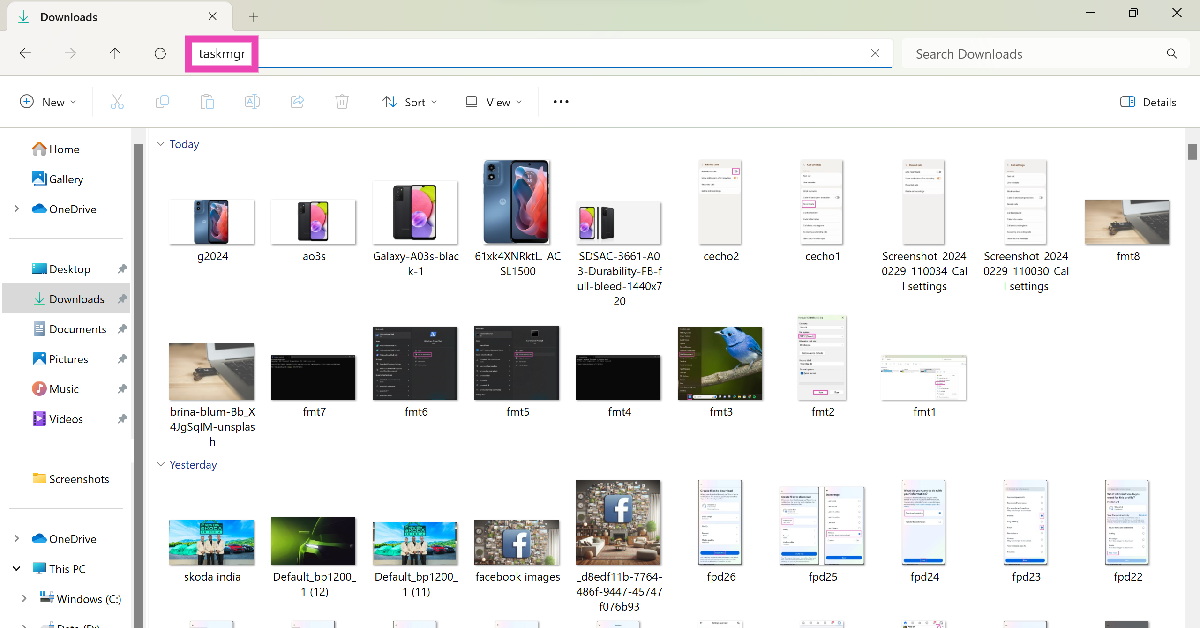
Open Task Manager using the File Explorer

Step 1: Hit the File Explorer icon in the taskbar.

Step 2: Click on the empty space in the address bar.

Step 2: Click on the empty space in the address bar.

Step 3: Type ‘taskmgr‘ and hit Enter.

Step 3: Type 'taskmgr' and hit Enter.

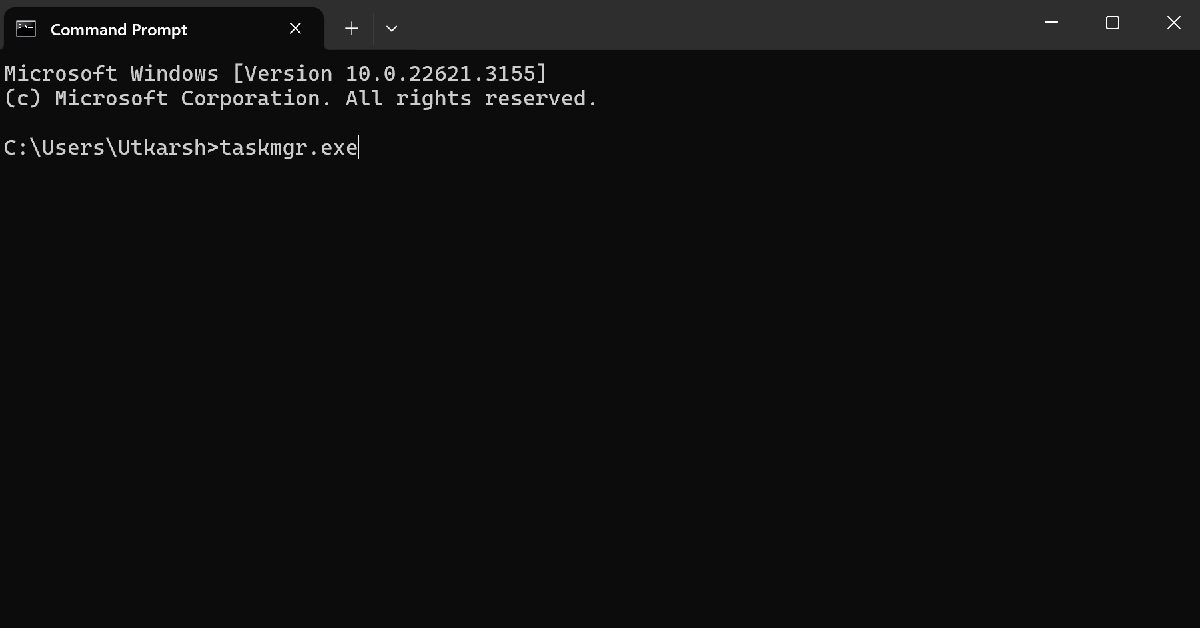
Use Command Prompt/Powershell to open Task Manager

Step 1: Launch Command Prompt or Powershell on your Windows 11 PC.

Step 2: Type ‘taskmgr.exe‘.

Step 2: Type 'taskmgr.exe'.

Step 3: Hit Enter.

Step 3: Type 'taskmgr' and hit Enter.

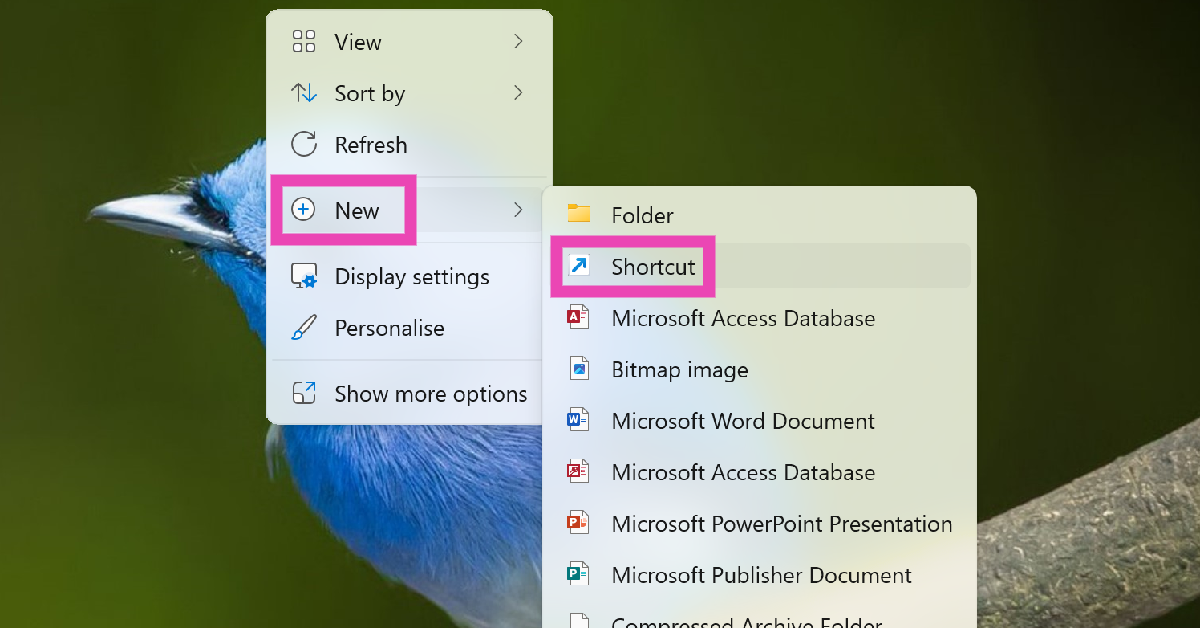
Create a desktop shortcut

Step 1: Right-click on any empty spot on the desktop.

Step 2: Select New>Shortcut.

Step 2: Select New>Shortcut.

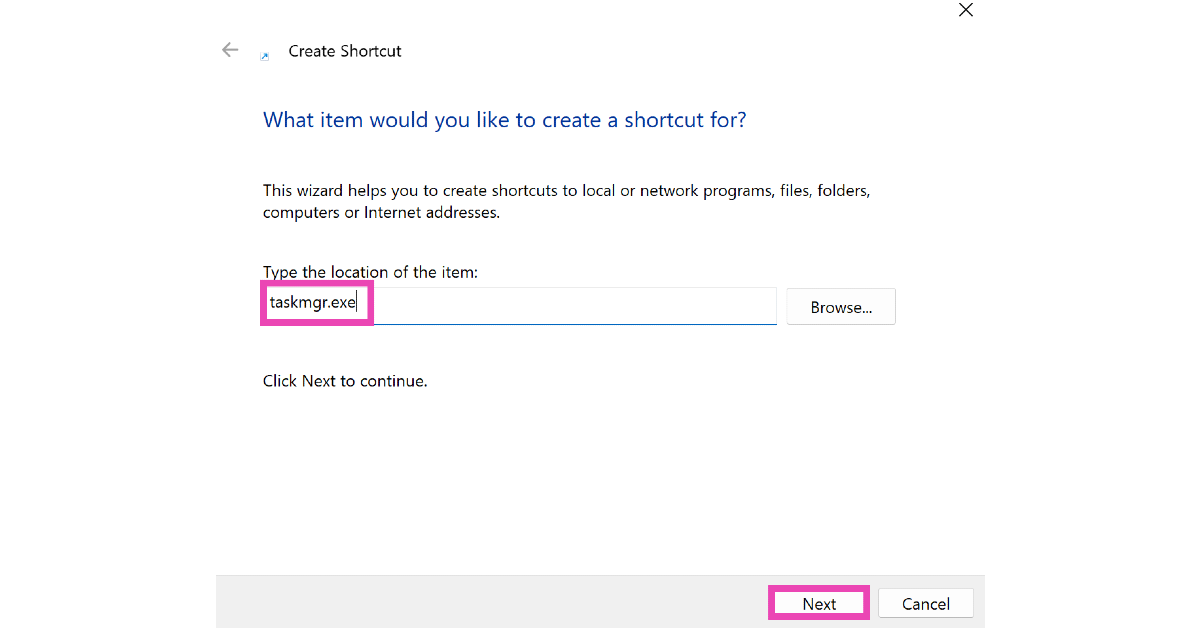
Step 3: Type ‘taskmgr.exe‘ in the location section.

Step 3: Type 'taskmgr.exe' in the location section.

Step 4: Hit Next.

Step 5: Give the shortcut a name and click on Finish.

Step 5: Give the shortcut a name and click on Finish.

Step 6: Double-click the shortcut on the desktop to launch the Task Manager.

Pin the Task Manager to the Taskbar

Step 1: Go to the System32 folder in C:>Windows.

Step 2: Scroll down and locate the Taskmgr application file.

Step 2: Scroll down and locate the Taskmgr application file.

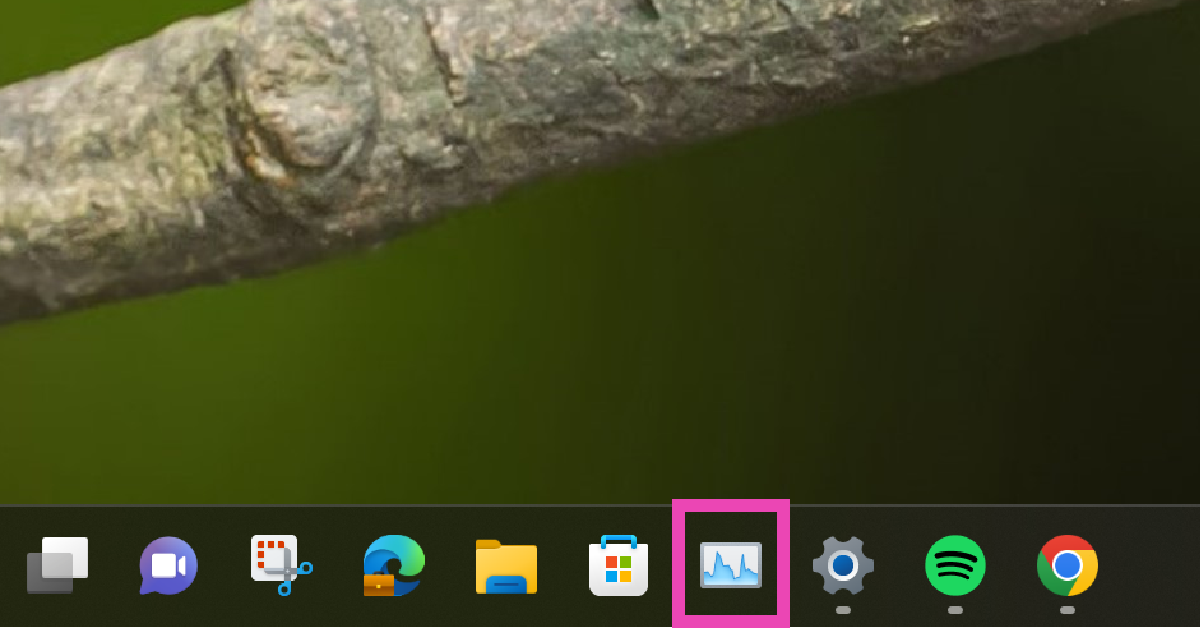
Step 3: Drag the application and drop it in the taskbar.

Step 3: Drag the application and drop it in the taskbar.

The Task Manager will be pinned to the taskbar.

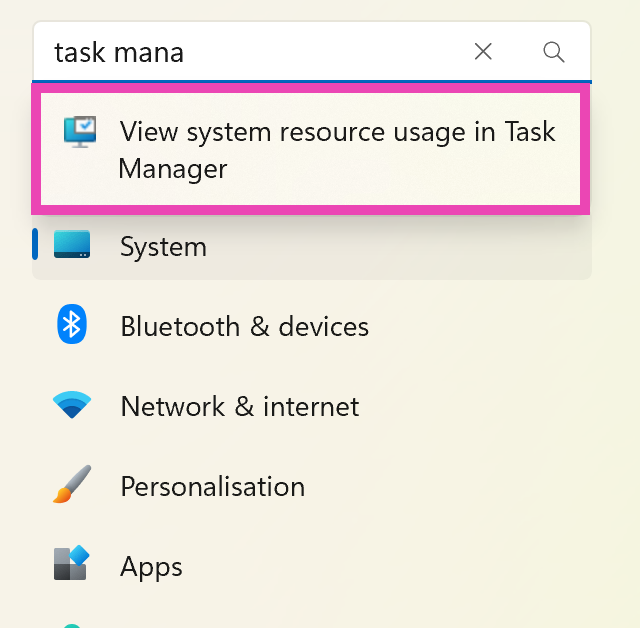
Open Task Manager from Settings

Step 1: Open Settings on your Windows 11 PC.

Step 2: Search for task manager in the search bar.

Step 2: Search for task manager in the search bar.

Step 3: Click on ‘View system resource usage in Task Manager‘.

Frequently Asked Questions (FAQs)

What is the keyboard shortcut for Windows Task Manager?

You can trigger the task manager on your Windows PC by pressing Ctrl+Shift+Esc simultaneously.

How do I create a desktop shortcut for the task manager?

Right-click anywhere on the desktop and select New>Shortcut. Type taskmgr.exe in the location field and hit ‘Next’. Give the shortcut a name and hit ‘Finish’.

How do I pin the task manager to the taskbar?

Locate the taskmgr application in the System32 folder. Drag and drop it to the taskbar to pin it there.

Read Also: 15 Google Docs Shortcuts that everyone should know

Conclusion

These are the best ways to open Task Manager on Windows 11. Now you can monitor your system and see resource utilisation from the applications easily. If you know any other way to easily access the task manager on your PC, let us know in the comments!

Google Play Store Great Diwali Offers: Deals and offers on apps and Games

Diwali has arrived and almost all the tech giants are lobbying offers as part of the festivities. And Google Play store is running Great Diwali Deals on its platform. It is offering its users special deals on some of the popular games and applications on the Android Play Store.

Some of the applications are also on sale along with in-app purchases. The deals are only available in India and let’s take a peek at what Google has to offer.

Teen Patti Gold gaming app is offering up to 85 percent on chips and bazaar items during Mega Diwali Sale. It is a limited time offer.

Google Play Store is also offering a Rs 20 discount on a single app, game or in-app item. These offers will be applied at the time of checkout.

Canva design Photo and video app is another app on the list that is letting you design Diwali cards for free. You can find Diwali templates for cards, invitations and posters while using the app.

Truecaller is providing 50 percent off on its annual subscription. You can subscribe to Truecaller premium and pay 50 percent less for the first year. Offer is only accessible to new subscribers to annual plans. While the users on monthly, 3 months and 6 months and can get the offer on upgrading to the annual subscription. 

Picsart photo and video editor is giving 50 percent off on its annual gold subscription for a limited period.

Other apps like Calm- meditate, sleep, relax is now offering 50 percent off on its premium subscription. You will be charged Rs 1,825 for a 1-year subscription that will renew at Rs 3,650 annually. Similarly, there will be 50 percent off on one year plan of the Kinemaster app during the Great Diwali sale on Google Play Store. PowerDirector is also offering 50 percent off on all its premium plans.

Garena Free Fire is also running a Diwali Special event. While Ludo King is putting up 100 coins at 50 percent off.

Apart from this Krafton has also announced Diwali offers for Battlegrounds Mobile India. It has brought in-game credits UC and other rewards such as lucky spin in which you can win new outfits, emotes, helmets and more. Those who purchase in-game credit bundles are eligible for extra UC. The basic pack is fr Rs 89 with 60 UC, Rs 499 pack offers 300 UC along with 25 bonus UC, for Rs 899 the plates will get 600 UC and 60 bonus UC and so on. You can purchase the UC by tapping on the UC icon given in the main menu.

For the latest gadget and tech news, and gadget reviews, follow us on TwitterFacebook and Instagram. For newest tech & gadget videos subscribe to our YouTube Channel. You can also stay up to date using the Gadget Bridge Android App. You can find the latest car and bike news here.

Paytm’s IPO to open from November 8: Price Band, bid details inside

Paytm India largest digital payment platform today announced that it has received approval from SEBI for its IPO and it has now filed the Red Herring Prospectus. It has also disclosed its financials for three months ended June 2021, as the company prepares for its mega IPO. 

As of now, the proposed IP is the largest of its kind. Notably, the Rs 15,200 crore initial public offering of Coal India in 2010 was the country’s largest to date. Paytm’s IPO will open for subscription from November 8 at a price range of Rs 2,080- 2,150 per share with a face value of Rs 1 each. While Paytm’s IPO will close for subscription on November 10. 

The booking running managers are as follow:

  • Morgan Stanley India Company Private Limited
  • Axis Capital Limited
  • ICICI Securities Limited
  • JP Morgan India Private Limited
  • Citigroup Global Markets India Private Limited
  • HDFC Bank Limited

Whereas Link Intime India Private Limited will be the registrar to the offer. According to the company, the bids can be made for a minimum of 6 equity shares and in multiples of 6 equity shares thereafter. Moreover, the Qualified Institutional Buyers will receive no more than 75 percent of the net offer, while the retail investors will receive 10 percent and non-institutional investors will receive the rest 15 percent (NIIs).

Investors must make certain that the bank account that will be used for bidding would be linked to their PAN

Paytm is planning an IPO worth Rs 18,300 crore making its largest market debut in the country till now. As a result of increased investor demand, it has increased the size of its initial public offering (IPO) from Rs 16,000 crore to Rs 18,600 crore.

According to the company’s RHP, Paytm’s revenues increased dramatically in three months ending June 2021 owing to its payments and financial service offerings. The Revenue from operations increased b 62 percent to $8,908 million in Q1FY22 from $5,512 million in Q1 for the year 2021. 

In addition to this Paytm’s payments and financial service revenue alone accounted for $6,894 million in Q1FY22 accounting for 77 percent of total revenue. The company’s contribution margin too increased significantly in Q1FY2022 rising from 14.9 percent in Q1FY21 to 27.4 percent in Q1FY22. Due to a loss of $3,819 million for the three months ending June 2021, the company’s marketing and promotional expenses increased to $ 1,3777 million for Q1FY22. Also, employee benefits expenses increased to $3,507 million in Q1FY22 from $2,138 million in Q1FY21. 

Paytm’s total user base has increased to 337 million registered consumers and over 21.8 million registered merchants as of June 30, 2021 according to the company’s RHP. 

For the latest gadget and tech news, and gadget reviews, follow us on TwitterFacebook and Instagram. For newest tech & gadget videos subscribe to our YouTube Channel. You can also stay up to date using the Gadget Bridge Android App. You can find the latest car and bike news here.

How to enable a system-wide dark mode in Windows 11?

The new Windows 11 was launched recently by Microsoft and the updated OS gets smarter design and faster interface. To make it user friendly the company didn’t make huge changes in usability so that it remains easy to grasp for the people who are upgrading. The theme is one of the traits that was carried forward from the previous generation. As default, Windows 11 boots with a light theme. Do you want the dark theme experience and enable a system-wide dark mode in Windows 11  as well? 

Here is how you can switch to a system-wide dark mode on Windows 11.

Read Also: Twitter adds a new dark mode called ‘Lights Out’ for iOS

Step 1 – Press the Windows button on your keyboard or press the icon on the taskbar.

Task manager in Windows 11

Step 2 – Search Dark Theme to find the option Turn on dark theme mode system-wide option.

Search dark mode in Windows 11 taskbar

Step 3 – In the opened setting choose the theme from Choose your mode option and select accordingly. This is it on how to enable a system-wide dark mode in Windows 11.

Personalization in Windows 11

Bonus Tip

You will find the Related settings tab after you scroll down a little. There will be an option of Contrast Themes. Users can choose from any of the themes to get an extra dark mode experience, too. 

Read Also: Whatsapp to finally release Dark Mode

Contrast theme in Windows 11

Note: This will remove all the animations and you will be left only with a bland Windows experience. It will completely depend upon your individual liking to use it or not.

For the latest gadget and tech news, and gadget reviews, follow us on TwitterFacebook and Instagram. For newest tech & gadget videos subscribe to our YouTube Channel. You can also stay up to date using the Gadget Bridge Android App. You can find the latest car and bike news here.

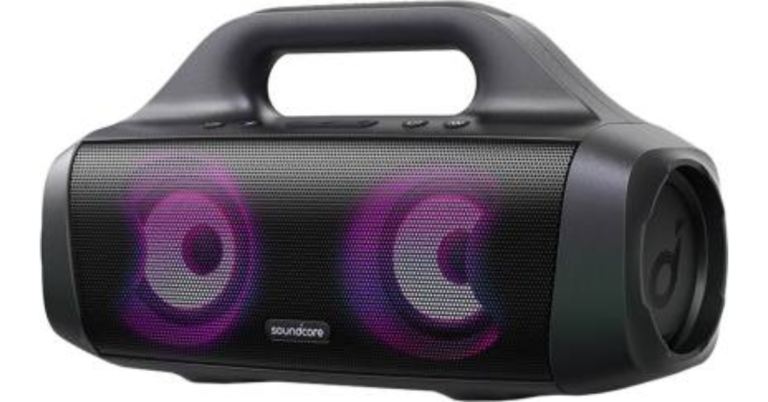
Soundcore Select Pro portable speaker launched in India

Chinese electronics brand, Anker, has announced its new audio product under its Soundcore sub-brand. The company has introduced a new portable speaker- Soundcore Select Pro. The device features a 6,700mAh battery that promises up to 16 hours of playback. The new audio device is IPX7 rated water-resistant and is ideal for pool parties as it is waterproof. Not just this, the speaker comes with a power output of up to 30W and supports the company’s proprietary BassUp technology.

Soundcore Select Pro portable speaker price in India and sale offers

The Soundcore Select Pro portable speaker has been launched in India with a price tag of Rs 7,999. The audio device is now available for purchase via the e-commerce platform Flipkart. The speaker comes in a single black colour option and on its purchase, the e-retailer is offering 6 months of free subscription to Gaana Plus and 18 months of warranty. The buyer also has the option of no-cost EMI starting at Rs 2,667 per month. However, the e-commerce platform has listed the product at a special price of Rs 5,999.

Soundcore Select Pro portable speaker specifications

The Soundcore Select Pro portable speaker is IPX7 rated, fully waterproof and floats. These outdoor speakers come with a 10m of wireless range and can be connected to your smartphone or other devices via Bluetooth Version 5. The equips customisable drivers that include four passive radiators that offer a total audio output of 30W paired with the company’s BassUp Technology.

Soundcore Select Pro price

While the customisable equaliser setting can be accessed via the Soundcore app available both on Android and iOS platforms. Besides this, the Soundcore Select Pro includes an LED list that changes lights in time according to the music. There is a PartyCast feature that works in conjunction with light and audio throughout numerous Soundcore speakers while connecting them together. In addition to this the Soundcore portable speaker houses a 6,700mAh battery which offers up to 16 hours of total playback time on a single charge and can be charged via USB Type C cable. Over that the Select Pro also comes integrated with PowerIQ charge-out tech that lets the users charge their smartphones. 

For the latest gadget and tech news, and gadget reviews, follow us on TwitterFacebook and Instagram. For newest tech & gadget videos subscribe to our YouTube Channel. You can also stay up to date using the Gadget Bridge Android App. You can find the latest car and bike news here.

6 methods to fix Apple logo shows and phone shuts down, does not start

Many iPhone users have been facing the problem of being stuck in the Apple logo or phone turning off automatically. This problem started to surface once in the past as well. Users started to face issues like the phone will not turn on, will go in a boot loop or won’t turn on at all. 

There can be many reasons for this problem. You might have tried to jailbreak the phone, an update that triggered some unnecessary bug or hardware malfunction. This situation can be extremely annoying and painful. Are you stuck in a similar situation? Worry not, here are some easy fixes that you can try on your own.

Plug your phone in the charger

If your device does not have enough charge it will show you the Apple logo but the phone won’t boot up, this usually happens with older iPhones more often, as the battery life is degraded, it often misbehaves. Try plugging your device in the charger and wait for some time before trying to start it.

  • Hard Reset

Hard reset iPhones

A hard reset usually fixes the temporary glitches. This method won’t work if there are any issues with your firmware or hardware.

  • For iPhone 8, SE 2020 and later –  Press and quickly release the Volume Up button, press and quickly release the Volume Down button, press and hold the Power button. When the Apple logo appears, release the button.
  • For iPhone 7 and later – Press and hold both the Volume Down button and the Power button at the same time. When the Apple logo appears, release both buttons.
  • For iPhone 6s and earlier – Press and hold both the Power button and the Home button at the same time. When the Apple logo appears, release both buttons.

Read Also: How to install iTunes on a Chromebook laptop?

  • Fix using iTunes

You can fix your iPhone using iTunes on your machine with the help of recovery mode. Here is how to do it.

Step 1 – Boot your phone into recovery mode.

  • iPhone 8 or later – Press and quickly release the Volume Up button. Press and quickly release the Volume Down button. Then, press and hold the Side button until you see the recovery-mode screen.
  • iPhone 7 series- Press and hold the Top (or Side) and Volume Down buttons simultaneously. Keep holding them until you see the recovery-mode screen.
  • iPhone 6s or earlier –  Press and hold both the Home and the power buttons simultaneously. Keep holding them until you see the recovery-mode screen.

Once done successfully you will see a power cable and a laptop icon on the screen (like the image below).

Fix iPhone using iTunes

Step 2 – Open your system and then iTunes on it.

Step 3 – Connect your iPhone and it will automatically ask you to update or restore the device.

Restore iPhone using iTunes

Warning: This will reset the iPhone to the factory setting and all your data including contacts, photos or any multimedia will be gone if not backed up previously.

  • DFU Restore

DFU stands for Device Firmware Update, it is similar to the above method. It is generally used for iPhones that are stuck in the boot loop due to bad software updates. This will also result in losing all the data from your iPhone. It is also an official method that you can consider using.

Step 1 – Plug your phone via USB and open iTunes on your laptop.

Step 2 – Now follow the instructions according to the device you own.

  • iPhone 8 or later – Quick-press the Volume Up button. Then, quick-press the Volume Down button. After this, press and hold down the Side button until the screen goes black. As soon as the screen goes black, hold down both the Side button and Volume Down button. After 5-6 seconds, release the Side button while continuing to hold down the Volume Down button.
  • iPhone 7 earlier – Press and hold both the Side button and Volume Down button. After 8 seconds, release the Side button while continuing to hold down the Volume Down button.
  • iPhone 6s and earlier – Hold down both the Home button and Lock button. After 7-8 seconds, release the Lock button while still holding down the Home button.

DFU restore on iPhone

There will be nothing on the iPhone’s display but iTunes will now automatically prompt that your phone is in DFU mode and you can select what next to be done.

Read Also: Apple to start iTunes for Samsung smart TVs

  • Use third party application

If doing this feels like a hassle you can always go with a third-party application. There are lots of applications but our recommendation is Tenorshare Reiboot. The application is very informative and gives you a step by step guide on how to do it. We will still like to give you an easy overview of using it.

Step 1 –  Download the application and fire up the application.

use Reiboot as third party application to fix iPhone

Step 2 – Press Start on the home screen to start the process.

Step 3 – Start the Standard Repair.

Standard repair

Step 4 – Put your device on Recovery or DFU mode using the above methods if the device is not detected.

Step 5 – Download the latest iOS for your device.

Download iPhone Firmware

Step 6 – Now press Start the repair and wait for it to complete.

Starndard repair iPhone

Once completed your device should start perfectly alright with a brand new OS.

  • Apple support/service centre

This is the last option you can opt for. If the phone didn’t start from any of the methods above there might be an issue with firmware or hardware, which needs to be fixed via a professional. We recommend going to the official apple service centre only as genuine parts last a little longer than any of the knockoffs in the market.

For the latest gadget and tech news, and gadget reviews, follow us on TwitterFacebook and Instagram. For newest tech & gadget videos subscribe to our YouTube Channel. You can also stay up to date using the Gadget Bridge Android App. You can find the latest car and bike news here.
Oppo Reno 7, Reno 7 Pro specifications tipped, renders surfaced on the web

The expected design, specs and price of the Oppo Reno 7 Series have surfaced on the web, therefore, indicating that the launch of the new smartphone series is imminent. Previously the Reno Pro’s camera specifications were leaked by a tipster and now the lineup has been spotted listed on the 3C certification website. Along with this, more reports, images have emerged confirming the form factor and pricing of the vanilla Reno 7 and  Reno 7 Pro.

According to GSMArena the prices of the Oppo Reno 7 Series have been leaked, The Oppo Reno 7 8GB RAM with 256GB storage is expected to cost CYN 2,999 that converts to Rs 35,200 whereas the 12GB RAM with 256GB storage model is likely to cost CYN 3,299 which is around Rs 38,700.

The patent images of the Oppo Reno 7 Pro were also leaked previously which were used to file with the China National Intellectual Property Administration. According to the leaked renders the upcoming Reno 7 Pro will bear a flat display similar to the existing one along with a punch hole cut out on the top left corner of the screen. There will be negligible bezels around the screen and the right spine of the phone will sport a power button while the volume rocker will be situated on the left. The device will keep the 3.5mm headphone jack, a SIM slot, Type C port and a speaker grille. The rear panel shows a rectangular-shaped quad-camera set-up. The report also suggests that the patent has been filed with four and triple sensors.

Oppo Reno 7, Reno 7 Pro specifications tipped, renders surfaced on the web
Image Courtesy: LetsGoDigital

Apart from this the key specifications and renders of vanilla Reno 7 were tipped via Twitter. The phone is expected to offer a 6.5-inch FHD+ display by BOE. It may support a 90Hz refresh rate panel along with 10-bit colour. They could also come with MediaTek Dimensity 920 SoC paired with LPDDR4x RAM and UFS 3.1 storage. Not just that the standard model is expected to house a 4,500mAh battery with 65W fast charging support.

Furthermore, the Oppo Reno 7 is said to have a triple camera set up on its back which may include a 50MP Sony IMX766 lens. The Pro model could also equip a similar display paired with a secondary 9MP Sony IMX355 sensor and a 2MP sensor. 

For selfies, it is speculated to sport a 32MP Sony IMX615 sensor. Not only these cameras will support the Z-axis linear motor. Besides this, there will be NFC and a vapour chamber liquid cooling system onboard. 

MySmartPrice discovered the Oppo Reno 7 Pro listed on China’s 3C certification website. Not much has been revealed but the device was found to be carrying model number PFDM00. It is suggested to support 65W SUPERVOOC 2.0 fast charging. Reportedly the smartphone will pack a 4,500mAh battery. On the other hand, the Oppo Reno 7 Pro is likely to include MediaTek Dimensity 1200 SoC with up to 12GB of RAM and 256GB of storage. The devices are said to be released in a few months.

For the latest gadget and tech news, and gadget reviews, follow us on TwitterFacebook and Instagram. For newest tech & gadget videos subscribe to our YouTube Channel. You can also stay up to date using the Gadget Bridge Android App. You can find the latest car and bike news here.

28 October 2021 Amazon Quiz today answers: Answer to win Rs 20,000 Amazon Pay Balance

Amazon Quiz for October 28 2021 has gone live on the company’s mobile platform. The daily quiz contest brings an opportunity for Amazon users to win exciting prizes. In today Amazon Quiz the participants have the chance to win Rs 20,000 Amazon Pay Balance. All they have to do is answer all the questions correctly.

A fresh question is posted on the Amazon app daily which consists of five simple questions based on general knowledge and current events. The quiz can be played on the Amazon App from 12 AM to 11:59 PM. You have to answer all the questions correctly. Then the participants will be shortlisted for a lucky draw. The result of the lucky draw will be announced at the end of the month. The participants can win Amazon Pay Balance to up to Rs 50,000. Check out the 28 October 2021 Amazon Quiz question and their answers to win a Rs 20,000 Amazon Pay Balance.

28 October 2021 Amazon Quiz Answers

Question 1: In 1977, an organisation abbreviated as NAVS established a day to promote a certain eating habit. What day was established?

Answer: World Vegetarian Day

Question 2: The celebration of the marriage between the crown prince of Bavaria and Princess Therese von Sachsen in 1810 led to what annual occasion?

Answer: Oktoberfest

Question 3: In the movie Bell Bottom which of these actors plays a RAW agent?

Answer: Akshay Kumar

Question 4: In the 2019 Women Women’s World Cup for this sport, who placed second?

Answer: Netherlands

Question 5: This is the famous UNESCO World Heritage Site of Pattadakal located in which Indian state?

Answer: Karnataka

For the latest gadget and tech news, and gadget reviews, follow us on TwitterFacebook and Instagram. For newest tech & gadget videos subscribe to our YouTube Channel. You can also stay up to date using the Gadget Bridge Android App. You can find the latest car and bike news here.

Poco announced discounts and offers on its smartphones in conjunction with Flipkart Big Diwali Sale

0

Flipkart recently concluded its Big Billion Days Sale and now another festive sale, the Big Diwali Sale will begin on October 28 that is tomorrow and will last until November 3 in the country. The sale will begin early for Flipkart Plus members and today Poco has revealed some offers for the upcoming sale event. 

During the sale, the company will be putting up its recent smartphone at a reduced price as well as providing additional discounts on prepaid transactions. Continue reading to learn more about the sale offers on Poco smartphones.

POCO X3 Pro which arrived in India earlier this year, its 8GB RAM with a 128GB storage model will be available at Rs 18,999 down from Rs 25,999. When bank offers are applied it will bring down the price to Rs 17,749. 

sale offers on Poco smartphones

On the other hand, the 6GB RAM with a 128GB storage model will come at a discounted price of Rs 16,999. The retail price of the smartphone is Rs 23,999 and when combined with bank offers it can be purchased for Rs 15,749.

The phone comes in three three colour options of Golden Bronze, Graphite Black, and Steel Blue. It features a 6.67-inch full-HD+ dot display with a 120Hz refresh rate, 240Hz touch sampling rate. The phone is powered by a 7mm octa-core Qualcomm Snapdragon 860 SoC and there is a 48-megapixel quad rear camera setup. Poco X3 Pro also houses a 5,160mAh battery along with a 33W Type-C charger.

On the other hand, both the 4GB RAM/ 6GB RAM with 64GB storage of the Poco M2 Pro will be available for Rs 11,999 and Rs 12,999 respectively. The smartphones are originally selling for Rs 16,999 and Rs 17,999 respectively. While the bank offers will further bring down the price of the device to Rs 10,799 and Rs 11,749 respectively.

Big Billion Days Sale

The smartphone features a 6.67-inch full-HD+ display with a notch to house a 16-megapixel selfie camera. It is powered by Qualcomm Snapdragon 720G processor. The device is fuelled by a 5,020mAh battery with 33W fast charging support. 

Lastly, the Poco C3 3GB RAM with a 32GB storage model will be selling at Rs 7,499 during the Flipkart Big Diwali sale. With bank offers, it can be purchased for Rs 6,749. The device comes with a 6.53-inch HD+ LCD waterdrop-style notch display and runs on MIUI 12 for Poco on top of Android 10. Under the hood, there is an octa-core MediaTek Helio G35 chipset and has a triple rear camera setup 

For the latest gadget and tech news, and gadget reviews, follow us on TwitterFacebook and Instagram. For newest tech & gadget videos subscribe to our YouTube Channel. You can also stay up to date using the Gadget Bridge Android App. You can find the latest car and bike news here.

Snapchat hits 100 million monthly users in India, collaborated with Flipkart to provide AR experience

Indian e-commerce platform Flipkart today announced its collaboration with Snap Inc to broaden its AR led e-commerce experience via its camera for its customers across the county. According to the company, this collaboration will play a critical role as announced on the sidelines of Snap in India. This is also the first time that Snap has ever partnered with an Indian e-commerce platform. 

Speaking about the partnership, Jeyandran Venugopal, Chief Product and Technology Officer at Flipkart, said, “The e-commerce landscape in India is changing rapidly with millions of new customers from all geographies looking for richer experiences online. As a homegrown e-commerce company, we are proud to take a lead on this with our augmented reality enabled app and are taking this vision ahead in partnership with Snap Inc, a global leader in AR technologies. This partnership will herald a new era in the e-commerce industry, enabling easy access for customers while driving growth for lakhs of our sellers.”

Now Flipkart will be integrating Snap’s cutting edge camera kit into its app as part of its partnership allowing Indian users to virtually try on products or view them in their physical world before making any purchase. Flipkart already offers an AR-enabled camera but this integration of Snap’s camera kit will expand its capabilities to allow customers to view a broader range of products across categories such as fashion, wearable technologies and more in a more immersive manner in the coming months.

For your information, Snap Inc. is also the developer of the popular mobile app Snapchat which is built around the camera that plays an important role in the lives of millions of users and will provide Flipkart customers with a unique AR experience. 

Separately Snapchat has also reached the 100 million user mark in India on a monthly basis. The company co-founder and CEO Evan Spiegel has shared the news at the virtual Snap of India 2021 event. 

For the latest gadget and tech news, and gadget reviews, follow us on TwitterFacebook and Instagram. For newest tech & gadget videos subscribe to our YouTube Channel. You can also stay up to date using the Gadget Bridge Android App. You can find the latest car and bike news here.

Audio not working on Instagram Reels and Stories? Top 7 ways to fix it

Instagram, owned by Facebook, is one of the leading social media platforms in the world. With millions of users, the developers try their best to keep it up to date. The reason why it has become so successful over the years is that it adapts and overcomes trends. The introduction of Reels in 2020 has paid off massively. Reels have completely changed how we consume and interact with media. The seamless integration of Reels into the Instagram app is also very clever. However, sometimes users report strange audio issues with Reels. In this article, we bring you the top 7 fixes to the ‘Audio not working on Instagram Reels and Stories’ issue.

Read Also: How to fix the bad signal strength of Android and iPhones

Restart your device to hear audio on Instagram Reels

Restart your device to hear audio on Instagram Reels

It is possible that a bug may have been triggered due to some action that you took on your device or even a background app. No need to fret, as you can just restart your phone to fix it. Restarting will give the UI and application a fresh start, eliminating the cause or reason for the bug. Also before restarting make sure your ringer is on. Just play any video and press the volume-up key to see if it changes anything.

Hit the unmute icon to hear audio on Instagram Reels

Instagram Reels and Stories are muted by default. To turn the audio on, simply hit the speaker icon at the bottom right corner of the Reel. If you are viewing the Reel in full screen, simply tap anywhere on the screen. While viewing Stories, press the Volume Up key to unmute them.

Unmute your phone to hear audio on Instagram Reels

It is possible that your phone is on mute. Simply hit the Volume Up key to unmute it. You can also swipe down from the status bar and unmute your phone from the Quick Settings Menu. Look for the speaker icon and tap on it.

Update Instagram

Visit the Instagram profile using a throwaway account

There might be bugs in the current version of Instagram you are using. These glitches often are reported by many users and the company rolls out updates as soon as possible to fix them. Head to the respective stores of whichever OS you are using and see if there are any pending updates left. If you find an update tab in front of the application on either Google Playstore or Apple Appstore press it to start the update.

Clear cache and data

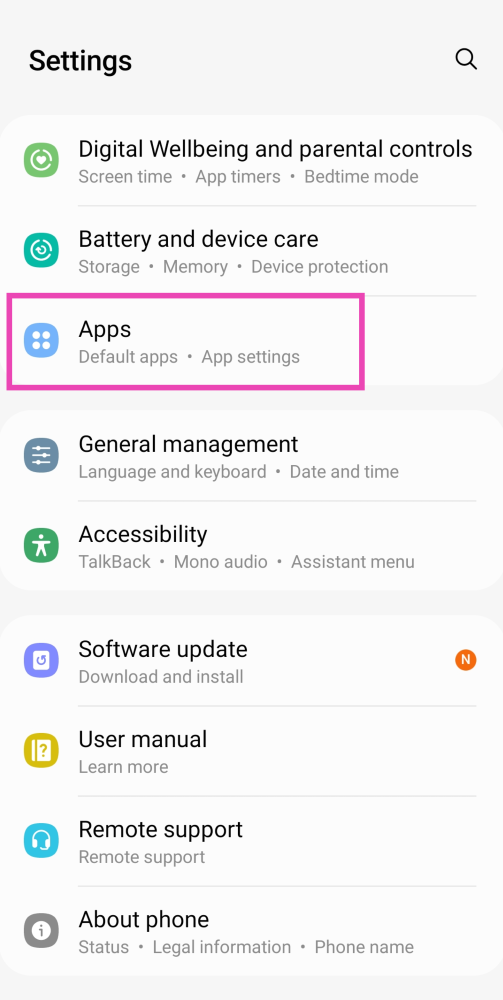
The cache is a small piece of information that any smart device stores to quickly access when needed like the opening of an application or the process of opening a tab you frequently open. Due to this small piece of information, the system is able to give you a much faster and smoother response. Though the clearing cache option is not available on iOS, here is how you can do it on Android.

Step 1: Go to Settings and select Apps.

Step 1: Go to Settings and select Apps.

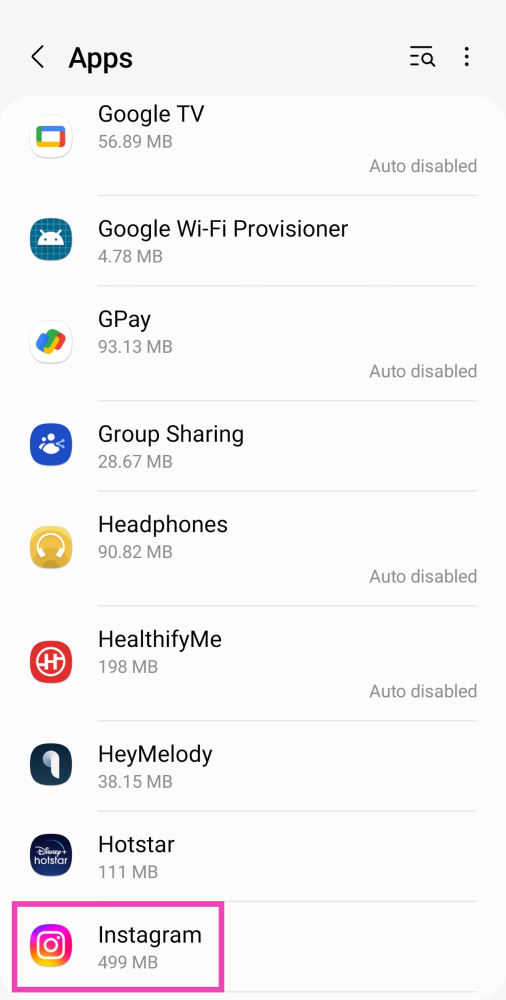
Step 2: Select Instagram.

Step 2: Select Instagram.

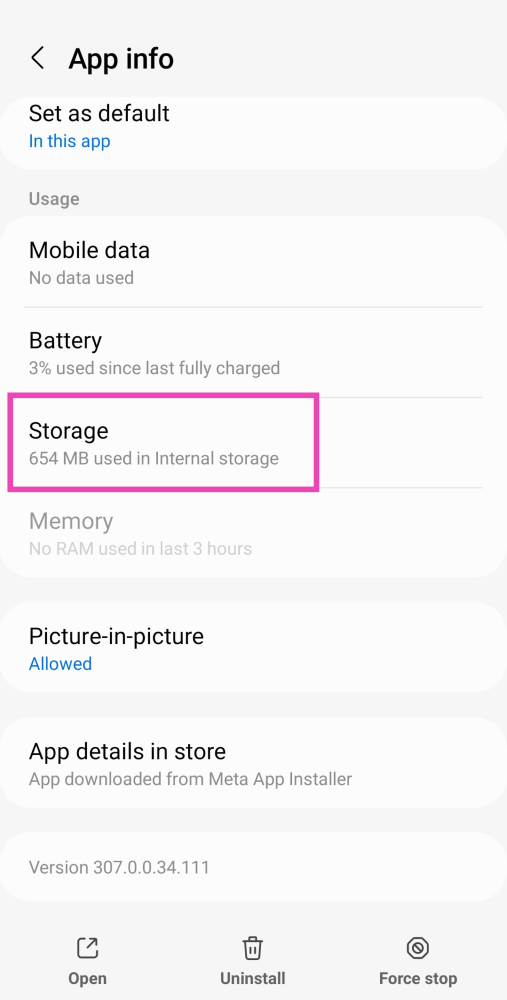
Step 3: Tap on Storage.

Step 3: Tap on Storage. How to fix 'Audio Not Working on Instagram Reels and Stories'

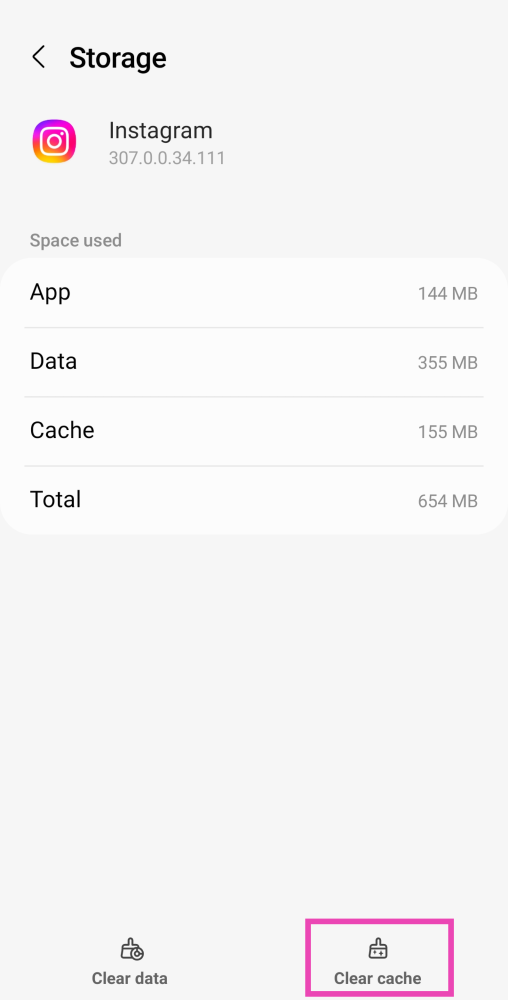
Step 4: Select Clear cache.

Step 4: Select Clear cache. How to fix 'Audio Not Working on Instagram Reels and Stories'

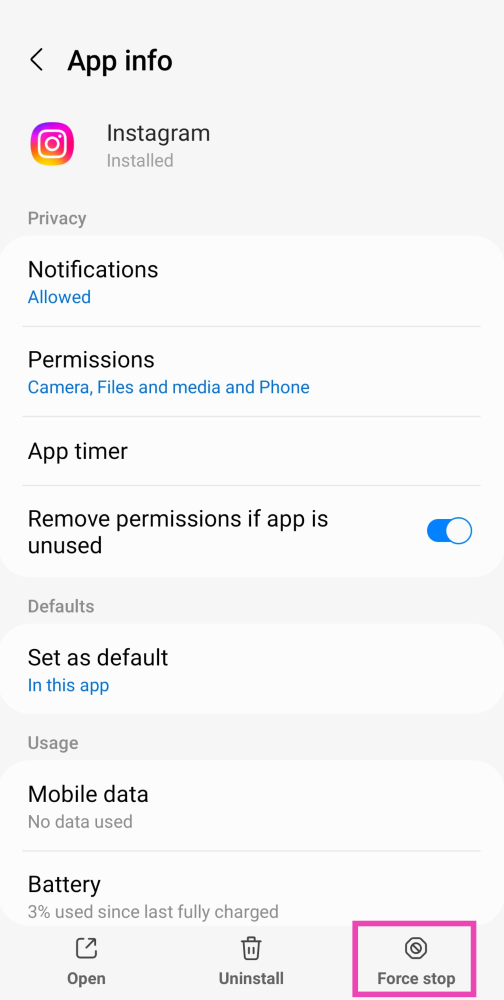
Force Stop the Instagram app

If you are making changes and the app is still running in the background the changes won’t apply right away. Sometimes restarting the app works as well to fix the ‘no audio on Instagram reels’ issue. Try the following steps.

Step 1: Go to Settings and select Apps.

Step 1: Go to Settings and select Apps. How to fix 'Audio Not Working on Instagram Reels and Stories'

Step 2: Select Instagram.

Step 2: Select Instagram. How to fix 'Audio Not Working on Instagram Reels and Stories'

Step 3: Hit Force Stop at the bottom of the screen.

Step 3: Hit Force Stop at the bottom of the screen. How to fix 'Audio Not Working on Instagram Reels and Stories'

Reinstall Instagram

Are you two not following each other on Instagram?

Sometimes, removing and reinstalling the Instagram app from your device can flush annoying bugs and resolve any issues you may be facing on the platform. To uninstall Instagram from your smartphone, simply long-press its icon on the app drawer and hit ‘Uninstall’. Go to the Google Play Store or App Store and reinstall the app.

Bonus Tip: Check your internet connection

Make sure that the internet connection you are connected with is proper and fast. To test that head to fast.com. Another thing to check is that you have enough storage left on your smartphone. Whenever any multimedia is consumed or an application is updated, it slightly increases the application size, no space left on board can also result in the malfunctioning of the application.

Frequently Asked Questions (FAQs)

How do I turn on the audio on Instagram Reels and Stories?

Tap anywhere on the screen to turn on the sound on Instagram Reels. If you’re watching Stories, simply press the Volume Up button to unmute them.

Why isn’t sound working on the Instagram app?

If you can’t hear any sound on Instagram Reels, Stories, or videos, make sure your app is updated. Give your phone a quick restart to resolve any background issues. Usually, this problem arises due to unexpected bugs in the app.

How do I clear Instagram’s cache?

To clear Instagram’s cache, go to Settings>Apps>Instagram>Storage>Clear Cache. Clearing the cache for Instagram does not log you out of the app or delete your drafts.

Read Also: Top 5 ways to fix if you are unable to download apps

Conclusion

These are the top 7 ways to fix the ‘audio not working on Instagram Reels and Stories’ issue on your smartphone. If none of these fixes worked for you, check if other apps are able to play sound on your device. If they aren’t the issue likely lies with your phone’s hardware.

EZVIZ TY1 Smart camera with 360-degree visual coverage launched in India

The Chinese electronics brand, EZVIZ, today announced the launch of its new wireless camera in the Indian market. The company has expanded its smart home security portfolio with the introduction of a new EZVIZ TY1 Smart camera. 

The new CCTV camera is a Wi-Fi pan and tilt camera that offers 360 degrees of field video. In addition to this, it comes with a 1080p video recording along with smart night vision and smart tracking.

Deepak Wadkar – AVP Sales – EZVIZ said “Increased consumer awareness around crime and security threats has led to a major growth of home security solutions in India. With the sudden spike in security breaches in the last few years, EZVIZ has witnessed an increased demand for smart home security cameras, since customers want to protect their homes and stay connected with their loved ones, now more than ever. In correlation to this, we have launched the new EZVIZ TY1 security camera with features like FHD 1080p resolution, 360-degree visual coverage, improved night vision and enhanced data protection and privacy, which accurately addresses the needs of the users and create a holistic experience for them.” He added “Providing our customers with home security solutions with best-in-class home functionalities and versatile use cases has always been our number one priority,” 

Also Read: EZVIZ C6N smart security camera review: Good pan and tilt CCTV wireless option

EZVIZ TY1 Smart camera is multifunctional and can be used to keep an eye on your children while you are out, monitor your housekeeper, and even your pets. The device comes with a smart tracking feature that can detect the motion of moving objects and alert the user with an image in real-time. It has a two-way built-in microphone along with a speaker letting you stay in touch with your family remotely via the EZVIZ App.

EZVIZ TY1 has a sensor with 2MP resolution. It offers a 360-degree field view, super-crisp 1080 video recording and smart tracking features.

According to the company, the EZVIZ security camera includes a motorised pan and tilt for 360-degree visual coverage allowing you to view the entire room with a single camera rather than multiple cameras in different corners. 

Like we said earlier it offers 1080p resolution for sharp and clear footage. The EZVIZ TY1 Smart camera also improves night vision with smart IR that helps in reducing areas of overexposure in video displays for clear nighttime monitoring of up to 10 meters. 

The EZVIZ TY1 2MP Smart Wi-Fi Pan & Tilt Camera will be available offline via the company’s official channel partners and distributors. 

For the latest gadget and tech news, and gadget reviews, follow us on TwitterFacebook and Instagram. For newest tech & gadget videos subscribe to our YouTube Channel. You can also stay up to date using the Gadget Bridge Android App. You can find the latest car and bike news here.

How to move Windows and other taskbar icons from middle to left side in Windows 11?

Windows 11 has been a big update by Microsoft this year. The UI feels more animated and the icons look polished and futuristic. Adding to it are the new round corners almost everywhere in the UI. Yes, Windows 11 looks better than Windows 10 but it completely depends on individual taste how you want to position it. 

With the new update, the taskbar icons including the search and Windows one got relocated to the centre of the taskbar. This gives the taskbar a minimalistic look, though many like the traditional left positioned of the icons and Windows button on it. Here is how to move Windows and other icons from the middle to the left side of the taskbar in Windows 11.

Step 1 – Open Windows and search the Taskbar settings.

Taskbar settings in Windows 11 Read Also: Windows 11 launched: Here are the top 5 features

Step 2 – Here click on Taskbar behaviour to bring down the options list.

Taskbar behaviours

Step 3 –  Choose taskbar alignment from centre to left.

Read Also: 6 steps that help you access error-free Microsoft Store

And that’s about it, doing this process will shift the taskbar and reposition it to the left side of the screen just like the traditional way.

For the latest gadget and tech news, and gadget reviews, follow us on TwitterFacebook and Instagram. For newest tech & gadget videos subscribe to our YouTube Channel. You can also stay up to date using the Gadget Bridge Android App. You can find the latest car and bike news here.
Did someone unfollow you on Instagram? 3 ways to find who unfollowed you on Instagram?

Instagram is an American photo and video sharing social media platform that is trending especially among youngsters as they share a lot of multimedia. Just like Twitter, this social media platform also has followers and the following tab on everyone’s profile. The more followers you have the more engagement and impactful your profile becomes (well, that’s what the current generation thinks, which is subjective). With so many people on Instagram how to know if someone unfollows you? Here is ways for Instagram unfollowers check.

You can find it out via application by opening the application and following the next steps below.

Step 1 – Open profile by tapping on profile picture towards the lower right corner

Open profile in Instagram application

Step 2 – Tap on the followers

Followers in instagram

Step 3 – Search from the followers you already have to know the missing names.

Search for followers in Insta application

It gets difficult to know if you lost a large number of followers, but you will get an idea of people who stopped following you. There can also be a possibility that a user has deleted their Instagram account.

Read Also: How to find who unfollowed you on Instagram

  • From Website

The steps from the website are pretty much the same as the above. Follow the below steps.

Step 1 – Login to your Instagram account from the website.

Instagram webpage

Step 2 – Click on profile on the top right corner of the screen

Tap on profile on insta web

Step 3 – Head to followers to search out the missing accounts from your profile.

Search for followers in Insta web

If you find it to be a big hassle and want to know instantly who unfollowed you, you can always use a third-party application to help you with Instagram unfollowers check

Read Also: How to declutter your Facebook news feed?

  • Third-party application

There are a lot of applications in app stores available for you to download in order to know who unfollowed you. Though Instagram is banning some of the applications as they are fetching data illegally from their platform. A popular application for this purpose is Followers and Unfollowers. You will be required to log in to your Instagram account via the app, which is always not recommended as any information can be fetched via your account or your account might be compromised. The app tells you who unfollowed you after you install the application and not of the incidents that happened in the past.

Remember: It is always good to read the T&C/Privacy policy of any app before installing.

For the latest gadget and tech news, and gadget reviews, follow us on TwitterFacebook and Instagram. For newest tech & gadget videos subscribe to our YouTube Channel. You can also stay up to date using the Gadget Bridge Android App. You can find the latest car and bike news here.
Infinix Smart 6 with 5,000mAh battery launched

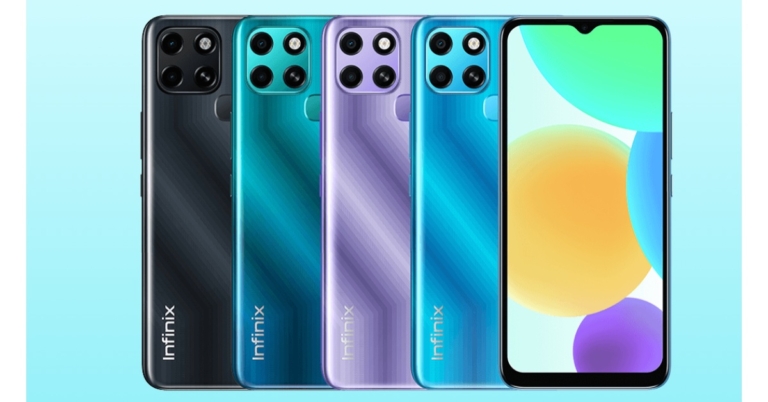
Transsion Group Holdings brand Infinix announced the launch of its new smartphone in the market. The company has introduced Infinix Smart 6 as its newest budget offering and is a successor of Infinix Smart 5A. The device features a dual rear camera set up and is powered by MediaTek Helio A20 SoC. It comes with Android 11 out of the box and an HD+ display. Read on to know its price and availability details.

Infinix Smart 6 price and sale details

Infinix Smart 6 is the company’s latest budget smartphone that has been introduced at $120 which translates to Rs 9,000. The phone will also be available in a limited market and offered in four colour options of Polar Black, Light Sea Green, Heart of Ocean and Starry Purple. 

Infinix Smart 6 price in India

Infinix Smart 6 specifications

Speaking of the specifications, Infinix Smart 6 comes with a new form factor than its predecessor. The phone features a square-shaped camera module and noticeable bezels around the display and a rear-mounted fingerprint sensor. 

The phone features a waterdrop design 6.6-inch HD+ LCD IPS display. The screen comes with 1600×720 pixels of resolution with 16 million colours and 266ppi pixel density. It runs on Android 11 Go Edition based XOS 7.6. Under the hood, there is a Unisonic SC9863A SoC paired with 2GB of RAM and 32GB of storage option. The internal storage can be expanded up to 512GB using a microSD card. 

In terms of optics, Infinix Smart 6 features a dual rear camera housed inside a square-shaped camera module. It includes an 8-megapixel primary sensor and a secondary 0.08-megapixel lens. Upfront there is a 5-megapixel sensor inside a waterdrop notch for selfies and video calling. 

The budget-friendly phone boasts a 5,000mAh battery and comes with 10W chagrin support. According to the company, the battery can provide 31 hours of talk time and 678 hours of standby. The device includes a 3.5mm headphone jack, Bluetooth and Micro USB port for connectivity. The sensors on the phone include a rear-mounted fingerprint sensor, G-Sensor, ambient light sensor and proximity sensor.

For the latest gadget and tech news, and gadget reviews, follow us on TwitterFacebook and Instagram. For newest tech & gadget videos subscribe to our YouTube Channel. You can also stay up to date using the Gadget Bridge Android App. You can find the latest car and bike news here.
13 Ways to fix ‘Google Maps not working’ (2024)

Google Maps is a versatile application which is used by many to navigate and help them locate places remotely. It might have happened sometimes that you are in need of Google Maps, but the app is either crashing or not working properly. Well, you are not alone, there are a few bugs and issues that do not let the application work in the way it is supposed to. No application is perfect and the same goes for Google Maps as well. Most of the time it will work absolutely flawlessly, but if you are stuck in such a rare case that your Maps application is not working properly, here are some fixes for your Google Maps that you can consider trying.

Read Also: OnePlus 12R Genshin Impact Edition officially launched in India

Restart your device

In most electronics a simple restart creates wonders. Restarting your device will give it a fresh start and allow the application to start again which will clear some basic bugs if any case they might have triggered while using Google Maps.

Location permission

Google Maps asks for permission for location, if by chance you have not given all the location permission the application will create a problem. Here is how to check and rectify.

Step 1 – Hold the application for two seconds and tap on app info.

App info

Step 2 – Select Permission.

Location permission

Step 3 – Tap on the location

Step 4 – Now select Allow all the time.

Allow all time location

Open Google apps and try again if it solves the problem.

Try updating the app

Updating the application fixes some features and adds features to the application. There might be some update pending on Google Maps so it’s better to check and get it updated.

Step 1 – One Google Play Store.

Step 2 – Tap on the profile picture.

Click on profile photo in play store

Step 3 – Select My apps & games

Step 4 – Click Update all.

If you do not want to update all apps, update Google Maps selectively. After that check, if the solution worked for you.

Uninstall updates

Doing so will convert the applications back to factory settings so by any chance if you update Maps with a buggy version, it will solve the problem. Here is how to do it.

Step 1 – Hold the application for two seconds to find the app info setting.

App info

Step 2 – Tap on the 3 dot burger sign and select Uninstall updates.

Following these steps, the app will go back to the factory setting, see if this method works for you.

Read Also: How to live with a smartphone with low internal storage

Force Stop

Force stop

If you are making changes to the application data and it is open in the background, there are chances that these changes won’t affect it. To make it work you need to force stop the application completely. Hold the application, go to app info and press force stop.

Clear data and cache

Clear Cache in Android 10 Ways to fix Google Maps not working

Buggy data or bad cache can be a major problem as to why your application is not functioning properly. You can clear the data and cache files by long-pressing the application. Heading to app info and then storage and cache. First try to clear the cache and see if it works for you, if not try removing the app data as well.

Check if Google Maps is down

Check if Google Maps is down

If Google Maps is experiencing a server outage, the app will not refresh on your device. To make sure this is the case, go to Downdetector.in and search for Google Maps. If you notice a spike in user reports, it means the service is temporarily down. Wait for Google to restore the servers or use an alternative like Waze or HERE WeGO.

Check the network connection

If the strength of the network connection on your phone is low, you will certainly face issues with the Google Maps app. Switch to a better WiFi network and try again. If you’re on the go, toggle Airplane Mode on and off to refresh the mobile internet network. You can also try using a WiFi hotspot from another device.

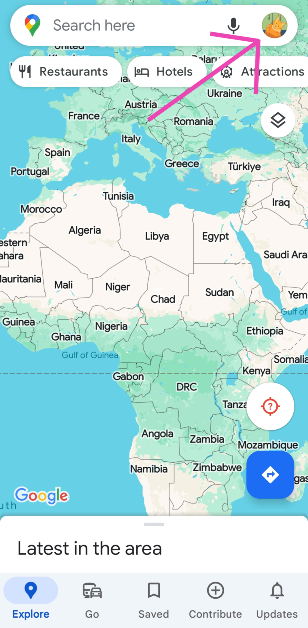
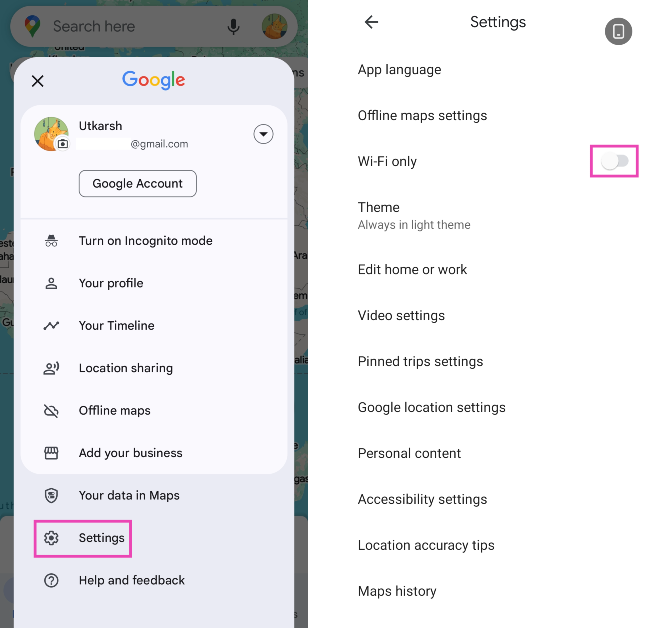
Disable WiFi Only Mode

The WiFi Only Mode on Google Maps does not let the app work on mobile data. Here’s how you can turn it off.

Step 1: Launch the Google Maps app and tap your profile icon at the top right corner of the screen.

Step 1: Launch the Google Maps app and tap your profile icon at the top right corner of the screen.

Step 2: Tap on Settings and turn off the toggle switch for WiFi Only.

Step 2: Tap on Settings and turn off the toggle switch for WiFi Only.

Unrestricted data

Due to Android’s smart management, it restricts data of applications that have not been used and still takes memory in the background. There is a good chance that this thing might have been interfering with the proper functioning of Google Maps. Here is how to fix it.

Step 1 – Hold the Google Maps app to discover more settings.

Step 2 – Tap on the App info.

App info 10 Ways to fix Google Maps not working

Step 3 – In the application setting tap on Mobile Data and Wi-Fi.

Step 4 – Make sure both the Background data and Unrestricted data usage options are turned on.

Unrestricted usage 10 Ways to fix Google Maps not working

Reset Google Play Services

Google Play Services keep all the Google applications working together and run constantly in the background. So in a nutshell, if the Google Play Services are not working fine it will create problems with maps and other applications as well. To solve it try the below method.

Step 1 – Go to Settings and open Apps.

Step 2 – In the list of applications search Google Play Services.

Step 3 – Head to storage and then clear all data.

This process will take a while, wait for the process to complete and try using Google Maps now.

Read Also: How to format an external hard drive or USB pen drive?

Location accuracy

By enabling high accuracy mode, Google Maps will be able to know your location more accurately. Though these options consume more data and battery it is required by the application to work properly.

Step 1 – Open Settings

Step 2 – Look for location.

Step 3 – Head to advance.

Step 4 – Here, select Google Location Accuracy.

10 Ways to fix Google Maps not working

Step 5 – Toggle on Improve Location Accuracy.

10 Ways to fix Google Maps not working

Fire up the application and see if it works. This should fix your Google Maps if it is not working.

Calibration

Google Maps shows you your precise location.  To achieve that calibration is very important. If the compass is not properly calibrated the Google map will not work properly and give incorrect locations. It’s easy to manually calibrate your Google Maps.

Step 1 – Open Google Maps and tap on the blue circle(your current location).

Step 2 – An option list will open with calibration as an option on it.

10 Ways to fix Google Maps not working

Step 3 – Calibrate your phone following the instructions on the screen.

10 Ways to fix Google Maps not working

This should most probably fix the problem and your Google Maps should be working fine again.

Frequently Asked Questions (FAQs)

How do I disable the WiFi Only mode on Google Maps?

Go to Google Maps>Profile>Settings and turn off the toggle switch for ‘WiFi Only’.

How do I check if Google Maps is down?

If your Google Maps is not working, go to Downdetector.in and search for Google Maps. If you see a spike in user reports, it means the app is down.

What are some good alternatives to Google Maps?

Waze, Apple Maps, and HERE WeGO are some good alternatives to Google Maps.

Read Also: Best Ways to Download All Your Photos From Facebook

Conclusion

These are the top 13 ways to fix Google Maps if it is not working. If none of these work the last option left for you is to reset your device, it will also free up the clutter making your phone smoother. If still there is a problem, then surely there is a hardware issue with your device. In such a case, we advise you to contact the nearest service centre and get it fixed.

Motorola is working on Moto G200 smartphone and Moto Watch 100: Expected specifications

Lenovo owned smartphone company, Motorola, is rumoured to be working on a new smartphone. Moto G200 is said to be under development and ahead of the official launch the device’s specification and other details have been leaked online. The alleged smartphone is likely to include a Snapdragon 888 SoC under its hood. In addition to this, the phone is expected to feature an FHD+ display with a 144Hz refresh rate.

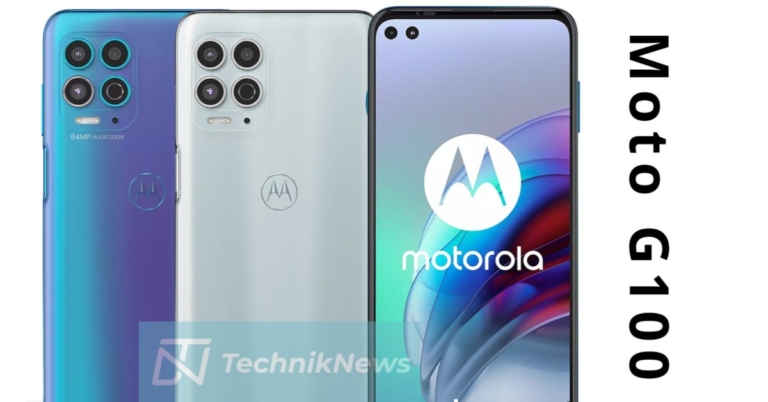
Ahead of the official announcement from Motorola, the key specs of its upcoming smartphone Moto G200 have been leaked on the web. The company has not yet confirmed anything about the alleged device. It is thought to be a follow up to the Moto G100, which was released in China earlier this year.

The purported Moto G200 has been codenamed Yukon according to tipster Evan Blass. Reportedly the Motorola smartphone is codenamed Yukon/Xpeng, which may hit the stores next month. 

As per the report by TechnikNews, a German publication, the G200 may feature a full HD+ display. The phone is likely to run on Android 11 and is said to be powered by Qualcomm Snapdragon 888 SoC. The upcoming Motorola phone could also be offered with 8GB of RAM. 

Whereas in terms of imaging, the Moto G200 might also come with a triple camera set up on its back panel. The camera system is said to house a Samsung’s 108-megapixel S5KHM2 sensor. Apart from this, there will be a 13-megapixel macro and a 2-megapixel depth sensor onboard. The Moto G200 is said to sport a 16-megapixel front-facing camera for selfies.

Rumours are that the Moto G200 may also arrive in China as Motorola Edge S30. Like we said earlier the company has not officially said anything with regard to the phone so this information should be treated with caution however the upcoming phone is speculated to share some common features as of Edge 20 Pro and Edge S Pro. 

Moto Watch 100
Image Courtesy: 9to5google

Besides this, the company is also preparing to launch its new smart wearable Moto Watch 100. The device has been co-created with CE Brands. The company has shared an investor press release that confirms the existence of the device. Not only that, the firm has also shared an operational update road map that reveals a few important details of the Motorola smartwatch. 

The device will feature an all circular dial with oval buttons on the sides. It may arrive with 5ATM water resistance and a heart rate sensor. Along with this, the wearable is said to include Bluetooth v5.2 and GPS for connection. It could run on Wear OS and come with an Aluminium casing. The smartwatch is also said to enter mass production from next month.

For the latest gadget and tech news, and gadget reviews, follow us on TwitterFacebook and Instagram. For newest tech & gadget videos subscribe to our YouTube Channel. You can also stay up to date using the Gadget Bridge Android App. You can find the latest car and bike news here.
Oppo A56 5G launched with 5,000mAh battery and Dimensity 700 SoC: Price and Specs

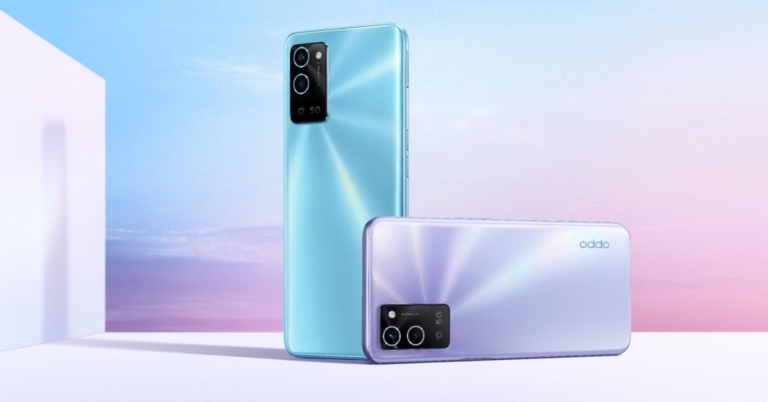
The Chinese smartphone company Oppo has expanded its A-Series lineup with the launch of a new smartphone. The company has released Oppo A56 5G, a mid-range smartphone. The device comes equipped with a 5,000mAh battery and features a dual rear camera set-up. The phone is powered by Dimensity 700 SoC.

Oppo A56 5G price and sale details

In China, the Oppo  A56 5G has been launched with a single 6GB RAM with 128GB storage. There the phone is priced at CYN 1,599 that translates to Rs18,800. The mid-range smartphone comes in three different colour options of Soft Fog Black, Wind Chime Purple and Cloud Smoke Blue. The phone is now available for pre-orders in its home market.

Oppo A56 5G specs

Oppo A56 5G tech specs

Speaking of the specifications, the Oppo A56 5G is powered by ColorOS 11.1 on top of Android 11 out of the box. Under its hood, there is an octa-core MediaTek Dimensity 700 SoC coupled with Mali-G57 MC2 GPU for graphics. It is offered in 6GB RAM with 128GB of storage capacity. There is an option to expand the memory via an SDXC card. In terms of display, there is a 6.5-inch HD+ A-Si display with 720×1,600 pixels of resolution. The screen offers a standard 60Hz refresh rate, a touch sampling rate of 120Hz and 480 nits of peak brightness. Moreover, the display comes with 269ppi pixel density, 88.7 percent screen to body ratio and is guarded with Corning Gorilla Glass 3.

Oppo A56 5G has a dual rear camera set up that houses a 13-megapixel primary sensor with f/2.2 aperture along with a 2-megapixel portrait sensor with f/2.4 aperture. Video portrait, slow motion, night scene mode, time-lapse and other features are available on the rear camera. This phone also has an 8-megapixel selfie camera with an f.2.0 aperture. 

Apart from this, Oppo’s latest mid-range device comes packed with a 5,000mAh battery. In terms of connectivity, the phone is equipped with GPS, Bluetooth v5.1, Wi-Fi 5, a USB Type C port, a 3.5mm audio jack and so on. The device bears a side-mounted fingerprint sensor and face unlock feature for biometrics. 

For the latest gadget and tech news, and gadget reviews, follow us on TwitterFacebook and Instagram. For newest tech & gadget videos subscribe to our YouTube Channel. You can also stay up to date using the Gadget Bridge Android App. You can find the latest car and bike news here.
Samsung Galaxy F22 review: Best budget smartphone 

When it comes to features, Samsung’s F-series smartphones are quite promising. It has everything at a reasonable price. We’ve been using the Samsung Galaxy F22 for a while now, and this is our long-term review. The phone costs Rs 11,999. It has a 90Hz HD+ SAMOLED display, a large 6,000mAh battery, and a 48-megapixel quad camera setup. Let’s look at if the smartphone is worth picking up?  

Samsung Galaxy F22 Review: Design and Display 

The Samsung Galaxy F22 has a simple design that includes a plastic back and curved edges. Denim Blue and Denim Black are the available colours. For the review, we have the former shade. The back panel has a textured finish with horizontal stripes, which provides a good grip but does not give the phone a very premium appearance.

Samsung Galaxy F22 Review

The phone weighs 203gms and has a heavy feel to it. The buttons on the side could have been placed better. The fingerprint scanner is set a little higher than we would like, making it difficult to reach with one hand. As a result, the volume rocker placement is further away, requiring you to stretch your thumb to reach both buttons. 

Samsung Galaxy F22 long term review

Samsung Galaxy F22 long term review

Samsung Galaxy F22 long term review

Samsung Galaxy F22 long term review

On the other side of the frame, there is a SIM tray, as well as a microSD card slot for storage expansion. A 3.5mm headphone jack, a USB Type C port, and a downward-firing speaker are located on the bottom of the device. 

Samsung Galaxy F22 review

The Samsung Galaxy F22 also has a 6.4-inch HD+ SAMOLED Infinity-U display. The screen has a resolution of 700×1,600 pixels, a refresh rate of 90Hz, and a brightness of 600 nits. The Galaxy M32, which has a similar SAMOLED display, was recently reviewed by us. The contrast level is excellent, with saturated colours and sufficient brightness when used both indoors and outdoors. Corning Gorilla Glass 5 safeguards the display from scratches and breakage. 

Because the screen only supports HD viewing, the sharpness is slightly diminished when compared to other phones. The touch response on this phone is poor but it does have a 90Hz refresh rate, which aids in making the interface smooth and fluid. 

Samsung Galaxy F22 Review: Performance and Cameras 

In terms of performance, the Samsung Galaxy F22 is powered by a 12nm octa-core MediaTek Helio G80 SoC. The device is available in two configurations: 4GB of RAM with 64GB of storage and 6GB of RAM with 128GB of storage. The fact is that the company includes this chipset in all of its mid-range smartphones. To be honest, we’re not thrilled with the chipset’s performance, but it’s not terrible either for the price bracket. 

The processor is capable of handling day-to-day tasks well, particularly when combined with Samsung’s UI. The phone comes with Samsung’s UI on top of Android 11. The UI is similar to that of other Samsung handsets, but it does come with pre-installed apps, many of which can be uninstalled immediately to make room for other apps. 

The phone handles lighter applications nicely and performs well too when multitasking. The handset is fine-tuned to keep apps in memory for a longer period of time. Gaming, on the other hand, is only adequate given the price tag. Call of Duty is playable at medium to high graphics and decent framerate settings. After about 30 minutes of gameplay, the phone gets a little warm, which most in the category do. 

Samsung Galaxy F22 long term review

In terms of cameras, the Samsung Galaxy F22 features a quadruple rear camera setup with a 64-megapixel primary sensor. There is also an 8-megapixel ultra-wide-angle camera, a 2-megapixel macro lens, and a 2-megapixel depth sensor. A 13-megapixel camera sensor is located on the front of the device for selfies and videography. 

Samsung Galaxy F22 camera samples Samsung Galaxy F22 camera samples

The camera specifications are comparable to those of the Galaxy M32. The images from the F22 come out softer at times, but not bad. The colour reproduction on both phones is identical, but we believe the F22 has a better dynamic range and contrast.

Samsung Galaxy F22 camera samples Samsung Galaxy F22 camera samples

While the ultra-wide photos are only sufficiently accurate, they can be used when necessary. The ultra-wide images come out a bit dark, but considering the price, we have no complaints. 

Samsung Galaxy F22 camera samples
macro shot

Samsung Galaxy F22 camera samples

We were astounded by the portrait results. They were superior to the Galaxy M32. The background separation and colour appear natural and pleasing, while the subject’s skin tone appears smooth and pinkish in tint. 

Samsung Galaxy F22 camera samples

The nighttime images are surprisingly good, despite our disappointment with the M32 in this regard. 

The selfies appear softer, but we prefer the ones taken by M32. Why you ask? The selfies on the Galaxy F22 are soft and have slightly dull colours. So, in one department the F22 wins and in the other the M32.

The Samsung Galaxy M32 is powered by a 6,000mAh battery. It easily lasts for days when multitasking, watching videos, gaming, browsing the web, and scrolling through social media feeds. However, you only get a 15W charger, which takes a long time to charge the device. Instead, we recommend, a 25W charger should be purchased separately for faster charging. 

Verdict

When we consider the phone’s price (Rs 11,999), we are quite pleased with its performance. The Samsung Galaxy F22, is best suited for light gaming, but the likes of demanding games such as Call of Duty can be played too. This, in our opinion, is the best budget smartphone available on the market right now.

Pros

Long battery life

Vibrant display

Clean UI

90Hz refresh rate support

Cons

Slow charging

Dull Selfies

For the latest gadget and tech news, and gadget reviews, follow us on TwitterFacebook and Instagram. For newest tech & gadget videos subscribe to our YouTube Channel. You can also stay up to date using the Gadget Bridge Android App. You can find the latest car and bike news here.
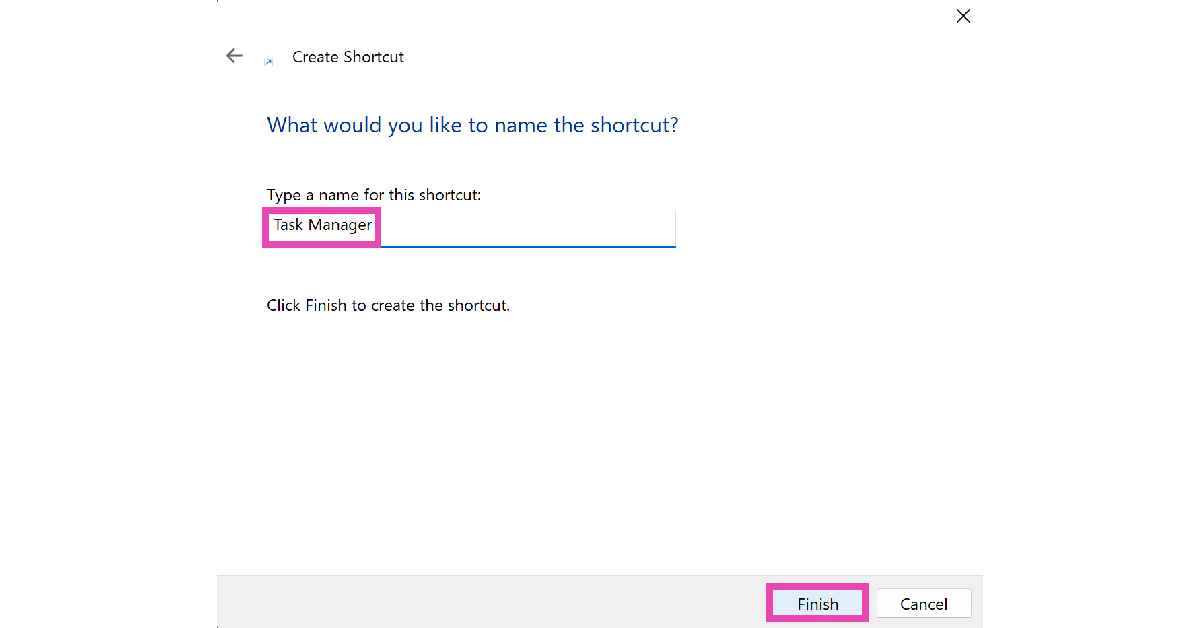
27 October 2021 Amazon Quiz today answers: Answer to win Rs 30,000 Amazon Pay Balance

27 October 2021 Amazon Quiz has gone live on its mobile app platform. The quiz can be played from 12 AM to 11:59. All you need to do is just answer five easy questions that the e-commerce website puts before you. Today you can stand a chance to win Rs 30,000 Amazon Pay Balance.

Every day Amazon posts a new questionnaire that consists of five simple questions about general knowledge and current events. To enter a lucky draw, participants must correctly answer the questions. One incorrect answer will result in your elimination from the quiz. Each month, only one person will be declared the winner and the results will be announced at the end of the month. Amazon customers who submit correct answers can win Amazon Pay Balance worth up to Rs 50,000. To ensure that you answer all five questions correctly, Gadget Bridge updates all of the correct answers on a daily basis. Take a look at today’s answers:

27 October 2021 Amazon Quiz Answers

Question 1: In September 2021, BTS performed their hit song Permission to Dance at which of these special locations?

Answer: UN General Assembly Hall

Question 2: In the recent FIDE Online Olympiad, India claimed the bronze medal. Which team did they lose to in the semi-finals?

Answer: USA

Question 3: Mahatma Gandhi’s birthday on 2nd October is celebrated as the International Day of what?

Answer: Non Violence

Question 4: Which of these British players has won three Grand Slam singles titles in this sport?

Answer: Andy Murray

Question 5: This element represents the lead character in which film franchise?

Answer: The Hunger Games

For the latest gadget and tech news, and gadget reviews, follow us on TwitterFacebook and Instagram. For newest tech & gadget videos subscribe to our YouTube Channel. You can also stay up to date using the Gadget Bridge Android App. You can find the latest car and bike news here.
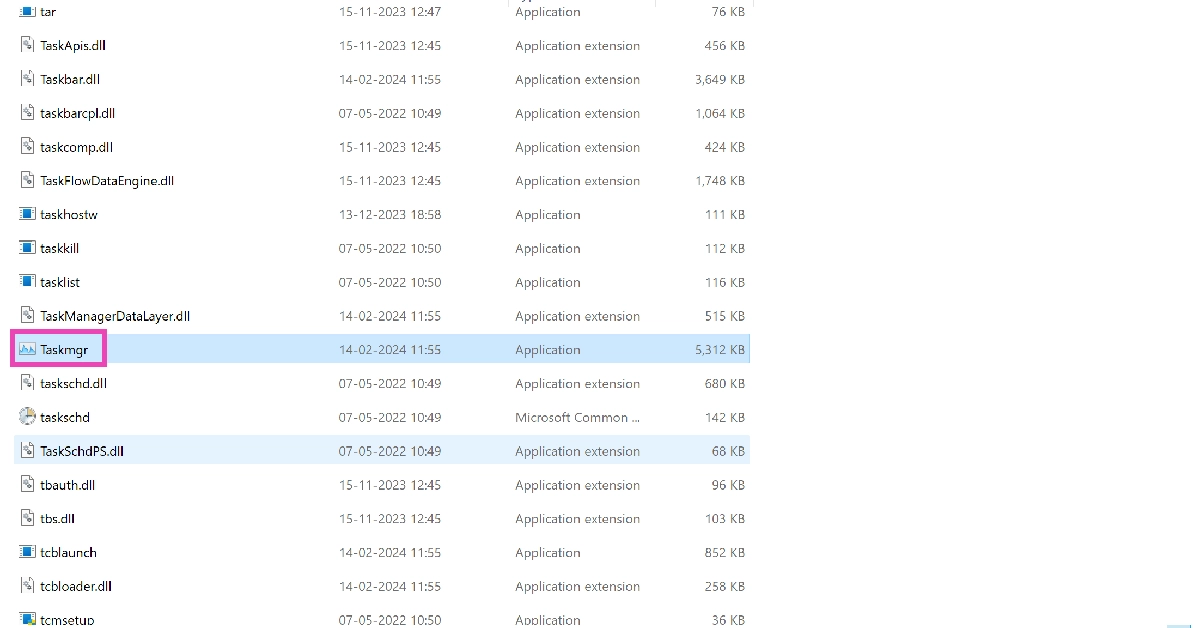
Samsung Live Shopping offer begins tomorrow on Samsung.com

Samsung India has today announced a four days festive live shopping event. The Samsung Live Shopping will begin from October 27 that is tomorrow and will be live until October 30. The South Korean firm will offer an exclusive exciting deal on Samsung.com across its product categories.

The Samsung Live Shopping offer will be live-streamed on YouTube and Facebook. According to the company, the Live Events are aimed at adding to the festive cheer of consumers by providing exciting offers and benefits on a large number of Samsung products.

Samsung Live Shopping will go live from 7 pm to 7:30 pm from October 27 to October 30, on samsung.com with limited period offers available till midnight. During the live sale event, it will provide exciting benefits and offers on the Galaxy Watch 4, Galaxy Tab S7+, Galaxy Tab S7 FE, the Sero and Neo QLED TV, Curd Maestro and Digi-Touch Cool range of refrigerators.

Samsung Live Shopping offer

Galaxy Watch 4 series sales will be live-streamed on the first day, which is tomorrow. The company is expected to offer the devices at discounted prices during the live shopping event on its platform. To recall, the Samsung Galaxy Watch 4 comes in 40mm and 44mm models (Bluetooth only) priced at Rs 23,999 and Rs 26,999 respectively. Whereas the LTE variant is priced at Rs 28,999 and Rs 31,999 for the same casing. 

On the other hand, Samsung Galaxy Watch 4 Classic Bluetooth model 40mm size comes at Rs 23,999 while the 44mm is priced at Rs 26,999. The LTE version is priced at Rs 28,999 and Rs 31,999 for similar dial sizes respectively.

Samsung Live Shopping offer

October 28 the company will be putting up Samsung Neo QLED and The Sero Television for live sale. 

On October 29 Samsung will be offering exciting discounts on its range of Curd Maestro and Digital Touch Cool refrigerators while on the last day of the Samsung Live Shopping you can purchase Samsung Galaxy Tab S7+ and S7 FE at reduced prices. Right now Galaxy Tab S7+ retails at Rs 79,999. On the other hand, Samsung Galaxy Tab S7 FE, which was launched recently, comes in a single 4GB RAM with 64GB storage. The device will be available with a price tag of Rs 41,999.

For the latest gadget and tech news, and gadget reviews, follow us on TwitterFacebook and Instagram. For newest tech & gadget videos subscribe to our YouTube Channel. You can also stay up to date using the Gadget Bridge Android App. You can find the latest car and bike news here.