Samsung is now getting ready to upgrade its Galaxy F-Series lineup in India. The smartphone series was introduced last year and until now it includes four 4G devices. But now it will be upgraded with the new 5G smartphone that is coming to the country. The company today confirmed to launch Samsung Galaxy F42 5G on September 29 in India. Besides this firm has also revealed some of the key features along with the official announcement.Samsung Galaxy F42 5G is scheduled to launch in India on September 29 at 12 noon. The device has also been listed on Flipkart and the company has created a dedicated microsite to tease the key features of the smartphone. Galaxy F42 5G will be the first Galaxy F Series smartphone to offer assured connectivity through Galaxy 5G – 12 bands support that includes N1 (2100), N3 (1800), N5 (850), N7 (2600), N8 (900), N20 (800), N66 (AWS-3), N38 (2600), N40 (2300), N41 (2500) and N78( 3500) bands. The phone will be available on Samsung.com, Flipkart.com and select retail outlets.As per the microsite, Samsung Galaxy F43 5G will come in two colour options of Blue and Black. In addition to this, the upcoming phone will be powered by MediaTek Dimensity 700 processor to ensure optimized performance, smooth multitasking and reduced power consumption even while browsing and using multiple apps.In terms of imaging, there will be a triple rear camera set up that will include a 64-megapixel primary sensor. The rest of the camera resolution is yet to be revealed. The sensor will support the Night Mode feature with an LED Flash housed inside the camera module. In addition, this device is lifted to include a 3.5mm headphone jack, a USB Type-C port and a speaker grille at the bottom. The right side of the frame includes a side-mounted fingerprint sensor and a volume bottom. Lastly, Galaxy F42 5G will boast a 5,000mAh battery that is claimed to provide a whole day of battery life.
For the latest gadget and tech news, and gadget reviews, follow us on Twitter, Facebook and Instagram. For newest tech & gadget videos subscribe to our YouTube Channel. You can also stay up to date using the Gadget Bridge Android App. You can find the latest car and bike news here.
Oppo launched the successor of Reno 5 Pro just months after its launch. But since that was a good smartphone in itself, we obviously were intrigued by Oppo Reno 6 Pro. It has a beautiful design, a bigger battery, and comes with a more powerful processor. We spent more than a week with it and here’s our Oppo Reno 6 Pro review detailing its pros and cons.
In This Article
Oppo Reno 6 Pro review: Design and Display
The beautiful design of Oppo Reno 6 Pro smartphone is definitely one among its pros. The handset has a curved front and back panel and it comes with a glossy-looking frame. The back panel is made up of glass, but it has a matte finish. It’s almost shiny in appearance – not in a blingy way, but instead, it looks like it subtly glitters. The back of the smartphone houses the camera module that has four lenses and an LED flash, and besides that, there is Oppo branding at the bottom right. Oppo Reno 6 Pro is available in two colour variants – Stellar Black and Aurora. We got the latter for review and we think it looked absolutely stunning.
The right edge of the smartphone has the Power button sandwiched on it while the volume rocker keys are on the left. The SIM tray, USB Type-C port, speaker and microphone are at the bottom while the secondary microphone is at the top. We could reach the keys easily at all times and one-handed usage was no problem at all. Another great thing about the device is its weight. It’s very refreshing to see a smartphone with a display and battery like Oppo Reno 6 Pro weigh just 177 grams.
Flip over and you will see the front panel of the smartphone, which is protected by a layer of Corning Gorilla Glass 5. As we mentioned earlier, the screen is curved and it makes the device look all the more premium. The bezels that surround it are really thin, and even the chin at the bottom is only marginally broader, making it ideal for anyone who loves to watch shows and movies on their smartphone. The screen of the smartphone also has a punch-hole camera on the top left and there is an on-screen fingerprint scanner embedded towards the bottom.
Speaking about the screen of the device, Oppo Reno 6 Pro comes with a 6.5-inch full-HD+ AMOLED display that has a refresh rate of 90Hz and a touch sampling rate of 180Hz. The display of the smartphone also comes with HDR10+ playback certification. We think that the display of Oppo Reno 6 Pro is another positive point of the smartphone, even though the company hasn’t upgraded the specifications from that of the predecessor of the device. But nevertheless, it performed well during our time with the handset. The display is bright and vibrant, and the colours showcased were accurate and remained consistent at different viewing angles. The sunlight readability was good too, and the images appeared sharp and clear at all times. Playing games and watching Netflix shows on the handset was a delightful experience thanks to the screen.
In a nutshell, we would say that the design and display of Oppo Reno 6 Pro will certainly not disappoint you. If looks matter to you when buying a phone, you would be happy with Oppo’s latest offering. The display could have been upgraded, but even then, we can’t complain about its performance. The phone could also include a stereo speaker at this price, it would have made a great addition to a package that’s already good.
Oppo Reno 6 Pro review: Performance and cameras
Before we start talking about the performance of Oppo Reno 6 Pro, let’s take a minute to discuss the rest of its specifications. The smartphone is powered by the new MediaTek Dimensity 1200 processor clubbed with 12GB of RAM and 256GB of internal storage. The handset houses a 4,500mAh battery and supports 65W fast charging. The device runs ColorOS 11.3 that gets with itself some customizations like always-on display, really cool animated wallpapers, a dedicated gaming mode, and more. There are some pre-installed apps on Oppo Reno 6 Pro including Soloop, Snapchat, Facebook, Josh, Hey Fun, Moj, et al. While most of them can be uninstalled, you’ll have to live with Hot Apps and a few other apps from Oppo’s family. This is a downside as some of them really spammed us with notifications during our time with the phone, and we didn’t really expect this from a device that is this expensive.
Finally, coming to the performance of Oppo Reno 6 Pro, we think that it did an excellent job. The smartphone could handle even heavy multitasking like streaming episodes from Netflix and navigation simultaneously (we weren’t driving ourselves of course!). Everyday tasks were an absolute cakewalk for it, but that’s what we expected from such a high-end phone. The biometric scanners of the device worked very smoothly and were very quick. The on-screen fingerprint scanner as well as the facial unlock didn’t disappoint us even once – not even when our finger was sweaty or when we tried unlocking our phone in dimly lit areas.
Gaming was another good experience on Oppo Reno 6 Pro and we are impressed by the fact that the device doesn’t heat up even after we stayed glued to the phone for playing games for long. We tried an array of games on the smartphone ranging from Temple Run 2 to heavy-graphic ones like Asphalt 9: Legends, and they all ran well. The battery life of Oppo Reno 6 Pro is quite long-lasting and even with usage involving two active Instagram accounts, gaming, watching Netflix shows and listening to Spotify pretty obsessively, the battery lasted for more than a day. Even when the battery falls below 20%, it lasts for quite a while. What’s even better is that it charges almost completely in about 30 minutes.
Finally, let’s talk about the cameras of the smartphone. Oppo Reno 6 Pro comes with a 64MP primary lens, an 8MP ultra-wide lens, a 2MP macro sensor and a 2MP monochrome sensor. It also has a 32MP camera on the front panel for selfies and video calls.
Clicked from the primary camera
During our time with the smartphone, the cameras performed well most of the times. During the day or in well-lit conditions, most of the images we took turned out to be great. They had accurate colours, were aptly bright and had plenty of details. But this is just the primary camera. Once you switch to the ultra-wide lens, you will see fewer details and a slight difference in colours. So, you must choose between near-perfect photos or capturing more area in your images.
Clicked from the ultra-wide camera
At night, however, things change a bit. We observed some noise in images — even the ones clicked from the primary lens. However, we wouldn’t really count it as a downside as the moment we switched to Night Mode, the problem was instantly fixed. In fact, with the Night Mode enabled, we managed to click some really nice pictures in dimly lit areas with colour accuracy and image quality intact. The macro and the monochrome lenses on the device performed well too.
We should mention that the cameras on the device come without optical stabilization, which is a downside at this price point. The upside of the cameras is the Bokeh Flare Portrait filter. As the name suggests, it adds Bokeh effect to your videos even when the subject is moving. We tried to use it and it gave us some good results. There is another fun mode on the camera called AI Color Portrait filter using which you can click images with a monochrome background around the subject.
Night Mode enabled
The selfie camera did a great job during the day as well as at night. It comes with an option called ‘Retouch’ which, as the name suggests, completely eliminates the need for make-up. You can smoothen out your skin, make your cheeks or nose thinner, eyes bigger, chin more pointed, and even touch up your make-up with this option before you click your selfie. Trust us, it can make you look exactly how you wish to look like. And if you, like us, prefer more natural-looking pictures, all you have to do is disable the Retouch.
Verdict
At Rs 39,990, Oppo Reno 6 Pro is certainly a good buy. The smartphone has a beautiful design, smooth performance, and a lasting battery. The cameras are great too and the biometric locks work excellently. There are a few features that are missing in the phone like a stereo speaker and optical stabilization in cameras, but we think a lot of people can live without those.
Although the display is a delight, at this price point we did expect it to be upgraded from the phone’s predecessor. Honestly, had the smartphone been slightly less expensive, we wouldn’t have even expected all of this, and definitely wouldn’t be counting these as features that the phone lacks. The bloatware apps and spammy notifications are the only real con of the device. But even then, the overall package is so good that we have to say that Oppo Reno 6 Pro would not disappoint you.
Pros
The Chinese smartphone company owned by Transsion Holding Itel has announced the launch of its latest pocket-friendly smartphone in the Indian market. The company has introduced Itel A26 smartphone with a teardrop-style notch display. The phone also includes a quad-core processor and runs on the Android Go edition. In addition to this, the device comes with a dual rear camera set and a 3,020mAh battery.
In This Article
Itel A26 price and availability
Itel A26 has been launched in India with a price tag of Rs 5,999 for the single 2GB RAM with 32GB storage variant, however, on Flipkart it is listed at Rs 6,299. The phone will come in three colour options of Deep Blue, Gradation Green and Light Purple. The phone will be available via Flipkart for purchase in the country.
Itel A26 tech specs
Itel A26 comes with a tear-drop style 5.7-inch HD+ IPS display. The screen offers 720X1,520 pixels of resolution and a 19:9 aspect ratio. The budget smartphone operates on Android 10 Go Edition and is powered by an unspecified 1.4Hz quad-core processor. The mobile phone will be available in 2GB of RAM and 32GB storage options. The Internal storage can be expanded up to 128GB using a microSD card. For taking photos and videos Itel A26 features a dual rear camera set up that includes a 5-megapixel AI sensor along with a VGA camera. While on the front there is a 2-megapixel sensor for taking selfies and video calling. In terms of connectivity, there is 4G VoLTE, 4G ViLTE, 3G and 2G. The device includes a 3,020mAh battery and a Social Turbo feature that allows users to record WhatsApp Calls, save status and do more. Along with this, there are call alerts and peek mode functionalities as well.
For the latest gadget and tech news, and gadget reviews, follow us on Twitter, Facebook and Instagram. For newest tech & gadget videos subscribe to our YouTube Channel. You can also stay up to date using the Gadget Bridge Android App. You can find the latest car and bike news here.
The HP 11-inch Tablet PC has been officially announced. The tablet comes with a rotating camera that can be flipped to the front when taking selfies. The company’s latest product comes with magnetic clips on both sides of the display to mount a removable keyboard in landscape and in portrait direction. The tablet comes with Windows 11 compatibility and is powered by an Intel Pentium Silver N6000 quad-core processor. Besides this, the company has also announced its upcoming Windows 11 HP laptops and Monitors.
In This Article
HP 11-inch Tablet PC price and availability details
HP 11-inch Tablet PC has been launched in the US and will be available with a starting price of $599 that translates to Rs 44,200. The device is said to be available later this year via the company’s official website. It will come in a single silver colour option. The company has not yet shared anything about the international or Indian availability of the tablet.
HP 11-inch Tablet PC tech specs
Speaking of the specification, the HP 11-inch Tablet PC features an 11-inch IPS touchscreen display. The screen comes with 2,160×1,440 pixels of resolution, 100%, 84.6% screen to body ratio sRGB and 400 nits of peak brightness. The display is protected with Corning Gorilla Glass 5 layering. Under the hood, there is a quad-core Intel Pentium Silver N6000 processor paired with Intel UHD graphics. The device is available with 4GB of LPDDR4x RAM and 128GB of M.2 PCIe NVMe SSD. The HP tablet operates on Windows 11 Home in S mode. HP 11-inch Tablet PC is headlined with a 13-megapixel rotating camera that can be flipped to the front for taking selfies and can be used as a webcam. The camera can also 3D scan objects and live share your work with colleagues during video calling.Besides this, the tablet comes with magnetic clips on two sides of the display to mount the keyboard on both sides in landscape and portrait inclination. On using vertically the HP tablet allowed the snapping of two apps in that orientation. In terms of connectivity, the HP 11-inch Tablet PC includes a USB Type-C port, Wi-Fi 6, and Bluetooth v5. It comes with a 32.2kWh battery and a 30W power adaptor. The device also supports HP Rechargeable Tilt Pen and a microSD card reader for media.
For the latest gadget and tech news, and gadget reviews, follow us on Twitter, Facebook and Instagram. For newest tech & gadget videos subscribe to our YouTube Channel. You can also stay up to date using the Gadget Bridge Android App. You can find the latest car and bike news here.
Advancements in technology are moving forward faster than ever before. The pandemic, global warming, healthcare, and many other sectors have contributed to the technologies we are all experiencing today.
The objective is to hit the jackpot with a new piece of tech, and these recent trends and developments are most certainly leading the way.
In This Article
Online Learning
One sector that has exploded since the start of the pandemic is that of online learning. While we are all familiar with the idea of doing short courses online, universities had to adapt to teaching students remotely.
This has led to the development of infrastructures that make this more accessible and has shown that no matter where you are in the world, you can join a virtual classroom simply by having an internet connection.
Artificial Eyes
While bionic eyes might sound like something out of Star Trek, many scientists and researchers are already quite deep into bringing this tech to market. Earlier this year, a team of Israeli surgeons implanted the world’s first artificial cornea into the eye of a bilaterally-blind man; after his bandages were removed, he could see relatively clearly.
There are also trials ongoing in Australia, where the patient will wear glasses fitted with a camera. This data will then be sent directly to an implant which will send information to the brain, giving the wearer a basic sense of sight.
Lab-Made Dairy Products
We have all become familiar with lab-grown beef, but the technology is now being extended to create lab-grown dairy products. The dairy industry is far from environmentally friendly, accounting for 4% of all carbon emissions in the world.
What is quite strange is that lab-grown milk is easier to create than lab-grown meat. T, soy, and oat milk are available but are more challenging to sell since they don’t have the same taste and texture as regular milk. This is the next step for scientists, to recreate the taste and texture of milk, but with none of the dairy.
Smart Sutures
Medicine as a whole has come on in leaps and bounds since the start of the pandemic, but one area that has seen a surprising advancement is that of sutures. A student has created sutures that change colour from bright red to deep purple when an infection is present.
Considering an infection can be pretty tricky to spot sometimes and, in some cases, fatal if not dealt with quickly, this simple yet effective solution will allow patients to know when to seek medical advice and possibly save their own life.
Energy Storing Bricks
Researchers in Missouri are currently testing the viability of energy-storing bricks. These bricks are the regular chip clay bricks with which so many houses are built but can store massive amounts of energy.
The technology is still in the proof-of-concept stage. However, this could revolutionize sustainable housing and allow residents to rely less on the power grid and use fewer resources to power homes.
Artificial Intelligence
AI is making waves in almost every sector. From medicine to cyber-security, AI is helping people to learn quicker and find problems faster. It can implement solutions more quickly than any human.
AI is being heavily used in the banking world as of late. Considering financial institutions have to defend themselves from hundreds, sometimes thousands of hacking attempts a day, proper security is needed. AI is being used to identify new viruses, fight them off, and stop future attacks.
Internet for Everyone
Google and Hiber are currently leading the charge to get the internet into every single home on the planet. Google’s approach involves launching large helium balloons that transmit an internet connection to a tower that can be accessed.
Hiber’s solution is slightly different. They are launching shoebox-sized satellites into low orbit, which then orbit the Earth sixteen times a day. These will connect to a modem plugged into your computer and transmit data as they fly over your home.
Considering the world is already heavily reliant on the internet, it will surprise many people to know that only half the world has a permanent internet connection. While this is largely down to socio-economic issues, these companies want to connect the world, so everyone can succeed using the web.
Tactile Virtual Reality
While VR has been around for a while now, it cannot feed your sense of touch or smell. However, scientists at Northwestern University have designed small nodes that vibrate, recreating the sense of touch while you are in a VR world.
This type of technology can be used to feel hits while playing a video game or simulate the feeling of rain falling on your skin. It is also hoped that this technology can be used with amputee patients to mimic their sense of touch.
As you can see, the world of technology is heading in a direction that we only thought was possible in sci-fi movies. However, while many of these technologies are still in their early stages, it is exciting to see what is becoming possible to achieve in our lifetimes.
For the latest gadget and tech news, and gadget reviews, follow us on Twitter, Facebook and Instagram. For newest tech & gadget videos subscribe to our YouTube Channel. You can also stay up to date using the Gadget Bridge Android App. You can find the latest car and bike news here.
The e-commerce website, Flipkart, is hosting Daily Trivia Quiz, 23 September 2021. Every day it brings a bunch of new questions for its users. By answering them correctly you can win exciting prizes. The questionnaire is based on questions related to general knowledge. Also, the users can win free vouchers and super coins, among other offers via the daily quiz. 23 September 2021 Flipkart Daily Trivia Quiz has already gone live on its platform.
The participant should be at least 18 years old and should have a valid login ID. The Quiz is available on the mobile platform and not the web version. E-commerce conducts the quiz on daily basis and goes live at 12:00 AM IST and runs till 11:59 PM IST. The winners are announced within 15 days from the date of participation that can be viewed under the Gems/Rewards section in the app.
In This Article
How to participate in the Flipkart Daily Trivia Quiz
To participate download the Flipkart app on your phone. Then open the Flipkart app then head to Game Zone. Now click on the Daily Trivia Banner or search for Daily Trivia. Enter the game and answer all 5 questions with correct answers.
23 September 2021 Flipkart Daily Trivia Quiz Answers
Q1: For which Ranji team does Sanju Samson play?
Answer: Kerala
Q2: Who holds the record of the highest average in Test cricket on home soil?
Answer: Don Bradman
Q3: Pokal is a knockout football cup competition held annually in which country?
Answer: Germany
Q4: In which sport would one use pull buoys while training to develop upper body strength?
Answer: Swimming
Q5: After India, which country won the most gold medals in the South Asian Games 2019?
Amazon Quiz has gone live on its platform. The quiz timings are daily from 12 AM to 11:59 PM. By submitting correct answers, millions of Amazon customers can win free gadgets as well as Amazon Pay Balance. By participating in the 23 September 2021 Amazon Quiz today you can stand a chance to win Rs 25,000 Amazon Pay Balance.
Daily the e-commerce platform brings a fresh questionnaire to which the contestants have to answer correctly to enter into a lucky draw. The quiz can be played daily from 8 AM to 12 noon. The Amazon Quiz contains five easy questions that are based on current affairs and general knowledge. Only one person is declared as a winner and the results are announced at the end of every month. Answering all the questions correctly might let you win something and a wrong answer will get you eliminated from the quiz. To make sure you answer all the questions correctly Gadget Bridge everyday updates all the correct answers to all 5 questions. check out 23 September answers for the Quiz to win a Rs 25,000 Amazon Pay Balance.
23 September 2021 Amazon Quiz Answers
Question 1: On 6th August ______ day is observed to commemorate a tragic day in human history. Fill in the blanks with the name of a city
The answer is- Hiroshima
Question 2: On August 26th, Mother Teresa was born in Skopje, located in which current day country?
The answer is- North Macedonia
Question 3: India won 11 medals at the recently concluded World Junior Wrestling Championships held in which country?
The answer is- Russia
Question 4: This breed of cat, takes its name from the former name of which country?
The answer is- Thailand
Question 5: What food substance do these insects prepare?
The answer is- Honey
For the latest gadget and tech news, and gadget reviews, follow us on Twitter, Facebook and Instagram. For newest tech & gadget videos subscribe to our YouTube Channel. You can also stay up to date using the Gadget Bridge Android App. You can find the latest car and bike news here.
Fossil Gen 6 is a new smartwatch available in India with a round dial option. Gen 5 was a successful product and pleased a lot of Indian customers. Right after that, Fossil released its Gen 6 in India with tons of new features. Here is everything we know about Fossil Gen 6 smartwatches that were unveiled today.
In This Article
Price and Availability
The Fossil Gen 6 watch comes in 2 dial options, the first one is a 42mm dial variant and the other being a bigger 44mm dial variant. The price of these smart wearables ranges from Rs 23,995 to Rs 24,995. The customers who are keen to buy the watch can pre-book it from the official Fossil site starting September 25. The smartwatch will be available for purchase via Fossil’s official website, Amazon, and offline via select retail outlets starting September 27. The bigger 44mm variant is available in 4 colour options, while the smaller 42mm is available in 3 colour options both with interchangeable straps. The smartwatch was unveiled in USA this August. The sale of the watch will start at the same time as other markets including India.Read Also: Fossil Hybrid HR smartwatch launched with heart rate tracking
Fossil Gen 6 specifications and features
The smartwatch will have a beautiful round 1.28-inch (416×416 pixels) colour AMOLED touch screen with a pixel density of 326ppi. The Fossil Gen 6 watch will run on Wear OS 2 out of the box at the moment and the company has promised it will be upgradable to Wear OS 3 in 2022. Under the hood, the smartwatch is powered by a new 30% faster Snapdragon Wear 4100+ SoC with 1GB of RAM and 8GB of storage. As the watch runs on Wear OS one can download applications from the Play Store directly on the smart wearable. The functional dials on the watch are customizable by the users.Read Also: Fossil Sport smartwatch with Google’s Wear OS launchedThe Fossil Gen 6 is also packed with all the features of a fitness tracker. These include an upgraded heart rate monitoring sensor, too. That allows continuous tracking and improved signal accuracy and a new blood oxygen monitoring (SpO2) sensor. Other sensors include an accelerometer, altimeter, gyroscope, off-body IR, compass, ambient light sensor and is swim-proof up to 3ATM (30 metres).To keep your Smartwatch connected all the time the company has included a lot of sensors including Bluetooth V5 LE, Wi-Fi, GPS, and NFC SE. The watch is compatible with both Android and iOS devices. The battery can be charged by a 4 pin charger that supports fast charging as well.Fossil also mentioned that the smartwatch can be charged up to 80 per cent in approximately half an hour and can last for more than 24 hours (when fully charged). Users can also switch to Extended battery mode to fetch multiple days of battery life. As the watch natively supports Google Assistant, one can use the watch hands-free anytime.
For the latest gadget and tech news, and gadget reviews, follow us on Twitter, Facebook and Instagram. For newest tech & gadget videos subscribe to our YouTube Channel. You can also stay up to date using the Gadget Bridge Android App. You can find the latest car and bike news here.
After the X series of smart TVs by the company. Xiaomi decided to launch new TVs in the smaller size segment as well. Today the company introduced Redmi Smart TV 32 and Smart TV 43. After seeing the sales of smaller screen size TVs it was a good move by the company to offer these to their Indian customers. Here is everything about their latest launches
In This Article
Redmi Smart TV 32 and Smart TV 43 price in India
The price of the smaller Redmi Smart TV 32 is set at Rs 15,999 while the bigger Redmi Smart TV 43 variant carries a tag of Rs 25,999. The TVs are available on Amazon, Mi.com, Mi Home stores, and offline retailers all over the country. These smart TVs will make their first online sale debut on Amazon Great Indian Festival 2021 and Diwali With Mi sales. Though dates of these sales are not revealed yet, we can expect them by the end of next month. The company also announced in the launch event that they will offer Redmi Smart TV 32 and Smart TV 43 with special festive offers and prices to attract new customers.Read Also: Nokia launched its first 4K smart TV
Specification
Both the Redmi Smart TV 32 and Redmi Smart TV 43 will run on the latest Android TV 11 with PatchWall 4 on top out-of-the-box. The PatchWall skin brings some exciting features like IMDB integration as well as features including Universal Search, Kids Mode, and Language Universe. The TVs have loud 20W speakers along with Xiaomi’s Vivid Picture Engine paired with Dolby Audio and DTS Virtual:X support. They will also support Dolby 5.1 to enhance the multimedia experience. Both the TVs will come with ChromeCast built-in with preloaded Google Assistant support for convenience. The remote on offer will be Xiaomi’s new Mi remote, which comes with a dedicated Google Assistant button and carries features including Quick Mute. This lets you mute the TV by double-tapping the volume down key. The remote will also consist of quick shortcut keys for Amazon Prime, Netflix and a Quick Wake button that is claimed to help turn on the TV in less than five seconds.Read Also: Apple TV+ (Plus) service goes live in India and across the worldFor connectivity, The Redmi Smart TV 32 and Redmi Smart TV 43 will have dual-band Wi-Fi and Bluetooth v5.0. There is also a treat for gamers by the company. The company introduced an Auto Low Latency mode that is claimed to help reduce the latency rate when using the TVs with a gaming console. Ports included are two HDMI, two USB 2.0, an AV, 3.5mm headphone jack, Ethernet, and an antenna port. Both the 32-inch and 43-inch variants of the TVs are full-HD panels that can display 16 million colours. With electronics, the company takes care of the environment as well by using eco-friendly Eco-Packaging.
For the latest gadget and tech news, and gadget reviews, follow us on Twitter, Facebook and Instagram. For newest tech & gadget videos subscribe to our YouTube Channel. You can also stay up to date using the Gadget Bridge Android App. You can find the latest car and bike news here.
Instagram is one of the most popular online social networking platforms owned by Facebook. With so many users on this platform, crashes and problems are very common. Does your Instagram crashing on Android and iOS again and again? Well, there can be several issues from uploading, scrolling or opening a message to a bug to get triggered and cause the app to crash. There is no one troubleshoot option to fix it so here are the top 7 ways to fix Instagram crashing on Android and iOS smartphones.
In This Article
Restart your phone
The easiest and the most efficient way to fix Instagram crashing is restarting your smartphone. Rebooting the phone clears out any temporary errors and glitches giving the phone as well as the application a fresh start. Press the power button for 3 seconds on either your Android smartphone or iOS device (depending upon your iOS device the restart method may vary) and choose the restart option. After the restart is completed try opening Instagram again. If the problem persists try the next steps.
Update the application
Crashes can occur due to some bugs or glitches within the application as well. Companies come across many bugs on a daily basis and roll out updates to fix them. Check Play Store on Android or App Store on iOS devices for any update for the application available. Most of the bugs are likely to get solved by updating the application to the latest version.Read Also: How to fix the bad signal strength of Android and iPhones
Clear Cache
Caches are a small amount of information that the smartphone stores to quickly open the application. Sometimes these crashes get stored in the cache files called bad cache. It can be fixed by clearing the cache file of the application. Unfortunately, this service is limited to only Android smartphones and Apple users can skip this step. Long press the application and select App info > storage > tap the clear cache option. Alternate to this is heading to setting > Apps > Instagram > storage > clear cache. Try reopening the application and check if the trick worked for you.
Check Storage
Applications have become storage hungry nowadays. Storing tons of information to give you a fluent experience is a trade-off. Make sure you check the storage on your smartphone. It should have at least 10%-15% of free storage space. A cluttered device can cause the app to freeze, lag and crash.
In Android
Step 1 – Head to setting Step 2 –Open the storage optionand check the free storage available on your device
In iOS
Step 1 – Open SettingStep 2 – Head to general Step 3 – Choose iPhone storageIf you notice that there is less storage space on your device. Try clearing up some clutter and try opening the application again.Read Also: Google resolved Gmail and Chrome Crash issue
Check Codec or extension
If the issue arises while uploading a video, story or posting an image. It can be the issue of a codec or an extension. There are many codecs like MPEG, FLV, 3GP for example, which Instagram does not support. Try converting your video to more known formats like MP4 and lower the video quality (1080p at 60fps is recommended) by using any third party applications available.The same goes for images as well. Try keeping the images in well-known extensions like JPEG or PNG to easily upload them.
Check the Downdetector
It is a possibility that Instagram is crashing for everyone. This problem can occur due to server problems from Instagram. Checking it is very simple. Just visit DownDetector to check for any outage issues with Instagram. If yes, don’t worry the issue gets fixed in some time usually.
Re-install Instagram
It is the last option if none of the options works. Uninstall the application and reinstall it. This probably will fix the crashing of the application. Long-press the application icon and tap on Uninstall or remove the app respectively. Confirm the prompt and re-download the application from the respective app store. If you are a beta user make sure you leave the beta program before reinstalling the application. There might be a chance that the beta version had some issues.These are the top 7 ways to fix Instagram crashing on Android and iOS, which will help you and make your social media platform running back again. We also advise checking for updates of phone OS as well. It is rare for this to cause an issue, but updating the phone operating system via the settings menu of the phone will fix any firmware related issues causing the crash.
For the latest gadget and tech news, and gadget reviews, follow us on Twitter, Facebook and Instagram. For newest tech & gadget videos subscribe to our YouTube Channel. You can also stay up to date using the Gadget Bridge Android App. You can find the latest car and bike news here.
Are you scared of losing your phone or simply worried about your child’s safety? There are many tools available for Android that can be used to track down your Android device’s location. Many of them even let you take pictures, see application activity and monitor battery level as well. Here are the top 5 apps to track your Android phone for free.
In This Article
Find My Device by Google
It is a built-in solution to find your lost android. One can find their lost phone or be it their family’s or friends. All you need is an active internet connection and the lost device should be switched on. One has to log in to their Google account and easily get their device’s location. Usually, the application comes pre-installed on your Android smartphone. Just head to google.com/android/find to get the most accurate location of your smartphone. You can also choose to ring the device or secure it remotely. If the application is not available on your device, download it via the link below.Download Here
Where’s My Droid
It is a full anti-theft solution for your Android device. All you need to do is install the application and set it up on the target device. Where’s My Droid will help you lock your device and get GPS coordinates with SMS commands.Once you get near the lost device, make it ring to find the exact location. There is also a pro version of the application available, which along with the free features like tracking location, ringing, locking, and wiping data can also take pictures, access location history and tell your device stats.Download HereRead Also: Star Wars Jedi: Fallen Order 15-minute long gameplay trailer
Family Locator by Life360
Family Locator works as the name suggests. It is a family-oriented GPS tracking application where one can create a private group by adding your family members or friends. The users can chat with each other knowing their precise location. Along with this, people in each circle can know each other’s locations with the arrival and departure alert features. The app also alerts in emergency cases like crashes or lockout. Family Locator is available on all smartphone platforms.Download Here
Location Sharing in Google Maps
It is the service offered by Google Maps which can be used to track back your phone. All you need to do is share your live location with friends or family with few taps on your smartphone. Head to the location sharing option and choose contacts. Once done the live location will be shared until it is turned off. In case you forget to turn off the location sharing, Google will send reminder emails to confirm that. In the options, you can also see the battery percentage along with the location. Maps also has a feature called “Timeline” which is helpful when the device sharing location is turned off. It will help you track the last shared location by the device.Download HereRead Also: This is how you can refrain apps from tracking your phone’s location
Femisafe Location Tracking
It is also a parental control app that doubles up as a smartphone tracker. It tracks down locations with high accuracy. Other features like activity report, blocking apps and knowing suspicious calls or messages are also included in the application. You can access the device application usage and even block websites in the paid version of the application. It is especially useful for guardians to keep an eye on their children or track their movement.Download HereThis is the list of the top 5 apps to track your android phone for free. For most of the purposes, Google’s find my device is more than enough for regular users. The other applications can still be used for going the extra mile if you want additional features. All the applications in the list are free with some offering premium services on a subscription basis.
For the latest gadget and tech news, and gadget reviews, follow us on Twitter, Facebook and Instagram. For newest tech & gadget videos subscribe to our YouTube Channel. You can also stay up to date using the Gadget Bridge Android App. You can find the latest car and bike news here.
Amazon India is back with another lucrative quiz on its platform. 22 September 2021 Amazon Quiz has already gone live and today you can stand a chance to win Rs 10,000 Amazon Pay Balance. Every day the e-commerce platform brings an opportunity for its customers to win amazing prizes by answering five questions. The questionnaire is based on general knowledge and current affairs. If you managed to answer all the questions correctly you will be eligible to win gifts such as iPhone X, iPhone Xs, Seagate HDD, GoPro Hero 8 Camera, LG Smartphones, Air Purifier, Oppo smartphones, Amazon Pay Balance among others.
The Amazon Quiz is hosted for the app users only which means desktops users cannot participate in the quiz. So before participating just make sure you have downloaded the App. The lucky users might win something by answering all the questions correctly. The Amazon Quiz can be played daily from 8 AM to 12 noon. Daily the e-commerce platform gives a chance to millions of people across the country to win exciting prizes. To participate and win Rs 10,000 Amazon Pay Balance check out 22 September 2021 Amazon Quiz answers.
22 September 2021 Amazon Quiz Answers
Question 1: _____ day is celebrated in the UK on 1st August, in honour of UK’s largest county. Name it
The answer is- Yorkshire
Question 2: Which actress born on August 5th, made her Bollywood debut in the film ‘Bekhudi’?
The answer is- Kajol
Question 3: In which of these sports did India win its first medal at the Tokyo 2020 Paralympic Games?
The answer is- Table Tennis
Question 4: Which of the following was India’s first “original” for this streaming platform?
The answer is- Sacred Games
Question 5: Which pigment causes leaves to be of this colour?
The answer is- Chlorophyll
Motorola Edge 20 Series in India will be a complete family soon. Yes, the Motorola Edge 20 Pro will be joining its other two siblings vanilla Edge 20 and Fusion in the country. The Lenovo owned smartphone company has officially confirmed the launch date of its upcoming smartphone. The device is now teased to arrive in India on the very first day of October. Motorola via its social media channels including Twitter and Instagram has started teasing the launch of its upcoming smartphone Motorola Edge 20 Pro. The device was earlier released in the European market along with the Edge 20 and Edge 20 Fusion. But both the later variants first broke cover in India last month in August. Now the company has decided to bring the Pro variant and scheduled its launch for October 1. However, the company has not explicitly revealed the name of the device but the teaser poster containing the Pro hint confirms the phone’s upcoming launch in the country. Also soon after the launch of the other two devices last month, Motorola India Country Head, Prashanth Mani, took toTwitter to confirm the India launch for the Motorola Edge 20 Pro. In addition, Flipkart’s listing also confirms that Motorola Edge 20 Pro will be exclusive to the e-commerce platform and will be available during the Big Billion Days Sale.
In This Article
Motorola Edge 20 Pro price in India(expected)
Motorola Edge 20 was launched in the European market last month. There it is priced at EUR 699.99 that translates to Rs 61,800 for the single 12GB RAM with 128GB storage options. The price of Edge 20 is expected to be priced around what the company is offering in Europe. The phone could also be available in Vegan Leather and Midnight Blue colour options.Motorola Edge 20 Pro
Motorola Edge 20 Pro specs
Motorola Edge 20 Pro will feature a 6.7-inch OLED display. It comes with a 144Hz refresh rate and Amazon HDR support. Its screen also offers 10-bit colour and DCI-P3 colour space coverage. The phone will operate on My UX on top of Android 11 and is powered by a Qualcomm Snapdragon 870 SoC paired with 12GB of LPDDR5 RAM along with 256GB of UFS 3.1 storage.For the optics, it will come with a triple camera setup on the back of Edge 20 Pro housing a 108-megapixel Samsung ISOCELL HM2 sensor, a 16-megapixel ultra-wide-angle sensor and a macro lens, and an 8-megapixel sensor with a 5x high-res optical zoom and 50X Super Zoom telephoto lens.Additionally, there will be a 4,500mAh battery on the support that also supports 30W TurboPower fast charging. For connectivity, there is 5G, LTE, Wi-Fi 6, GPS, and Bluetooth, among others.
For the latest gadget and tech news, and gadget reviews, follow us on Twitter, Facebook and Instagram. For newest tech & gadget videos subscribe to our YouTube Channel. You can also stay up to date using the Gadget Bridge Android App. You can find the latest car and bike news here.
The Chinese premium smartphone company, OnePlus, will be ending its tradition of launching the OnePlus T Series smartphone. Around this time of the year, the company usually launches an upgrade to its latest flagship devices. But now the company has confirmed that this year it will not be going with the launch of the OnePlus 9T nor the OnePlus 9T Pro. Also, the company has announced to merge OxygenOS and ColorOS skins into a new unified operating system.The merger between the BBK-owned companies OnePlus and Oppo was announced earlier this year. Now, OnePlus head Pete Lau via a forum post has revealed it will be combining their custom OxygenOS and ColorOS skins into a new unified operating system. The integration of OxygenOS 12 and ColorOS 12 will provide increased resources and create better products, and a better experience, for their user. The head believes that with the integration OnePlus has entered the OnePlus 2.0 phase. “After careful consideration, we have decided to integrate the OxygenOS and ColorOS teams to plan the future software experience together.@Gary C., Head of OxygenOS whom a lot of you have known for many years, is now also overseeing the global unified operating system.”Lau said that with the codebase integration, OxygenOS 12 build quality has been improving and software updates are becoming more timely. And more broadly speaking, over time we have seen that the two operating systems have been gradually converging in terms of the fundamental user experience. This will create the best possible product experience for users with more resources as a larger and more integrated organization.The OnePlus and Oppo aims to focus on one unified operating system and strengthen them by collaborating OxygenOS and ColorOS skins. Nevertheless, this company promised to keep the DNA of OxygenOS and provide an upgraded experience. Also it will customize the unified OS specifically for OnePlus devices for instance by keeping it as clean and lightweight as before and continuing to support unlock bootloaders.For the global OnePlus devices the new unified operating system will be shipped to OnePlus next flagship series in 2022. The integration will be fully completed together with the next major Android update in 2022. The company will be sharing more about when specific devices will receive the new OS at a later date.This clearly hints at the fact that there won’t be a OnePlus 9T, OnePlus 9T Pro this year. OnePlus CEO Pete Lau has also stated, “This year we will not be launching a T-series product.”
For the latest gadget and tech news, and gadget reviews, follow us on Twitter, Facebook and Instagram. For newest tech & gadget videos subscribe to our YouTube Channel. You can also stay up to date using the Gadget Bridge Android App. You can find the latest car and bike news here.
This is the third year for a lot of Samsung smartphones. You might have checked out our review of the third iteration of Samsung Galaxy Z Fold 3 and now it is the turn of Samsung Galaxy Flip 3. We spent over 2 weeks with the smartphone to know it inside out. Did this smartphone flip us over? Read the rest of the Samsung Galaxy Flip 3 review to know more.
In This Article
Samsung Galaxy Flip 3 review: Design and display
To be honest, we did quite like the last two versions of the Galaxy Z Flip series by Samsung, even though they had a few chinks in the armour. We have been fans of flip phones since its feature phone inception in the nineties by makers like SONY and Motorola. And now with folding smartphones, our excitement level always hits the roof when we get the news of a new flip/folding smartphone coming.
Out of the box, the Samsung Galaxy Z Flip 3 is what we were looking for in the last two versions. A super sturdy body and a larger secondary touchscreen on the outside. It has both. So, let’s start with the exteriors first. The users get a 1.9-inch display outside that has a resolution of 260 x 512 pixels. This one is a Super AMOLED touchscreen. Samsung has added a few widgets like a sound recorder and timer to it, and a few more can be added via the widget’s menu.
When slammed shut the outside display will show the time. It will also light up when you get a phone call or a notification. Both the outside panels are made of metal (that does not attract too many fingerprints) and the spine also has a stronger metal with Samsung branding on it. With the external screen, users also get dual cameras as well as an LED flash on the outside.
Flip it open and you are greeted by a large 6.7-inch FHD+ dynamic AMOED display. This one is a 120Hz display that sports HDR10+ and 1,200 nits of peak brightness. The screen to body ratio is about 89%. Yes, the screen here is not fully edge to edge, as the folding screen needs to be held tightly within a good frame. Nonetheless, it looks extremely beautiful. Here you will also find a screen protector with a selfie camera in a cutout on top.
Talking a bit more about other physical attributes, the Samsung Galaxy Flip 3 has a power button on the right side that doubles up as the fingerprint sensor, too. Nine out of ten times the sensors registered the fingerprint and opened the phone for us. So it is quite precise. Above it, the users gets a volume rocker key. While the SIM tray is placed on the left and the loudspeaker grille as well as USB Type-C charging port can be found at the bottom. Users also get a couple of MICS on the device, too.
Our time with the screen was filled with delight. There is a dig in the middle part of the smartphone, which now we were used to as after all the smartphone is a foldable one. However, that does not hinder the viewing experience. The experience is seamless, and we loved watching Netflix shows and playing games on it. The screen does not wash out under direct sunlight, and you get to see vibrant colours, deep blacks, and crisp text no matter how harsh or low the light is. It truly gives you a premium smartphone experience.
Samsung Galaxy Flip 3 review: Performance and cameras
Coming to its under the hood machinery, Samsung has given the absolute latest. The Samsung Flip 3 walks in proudly with Snapdragon 888 chipset by Qualcomm. This has an Octa-Core CPU with a max clock speed of 2.84GHz. The graphics are rendered by Adreno 660. When it comes to RAM and storage, there are two options available. 8GB RAM with 128GB storage and 8GB RAM with 256GB storage. Both storage variants support UFS 3.1 for better performance.
For battery, the Samsung Galaxy Flip 3 comes with a 3,300 mAh battery that can be charged at 15W or wirelessly charges at 10W. A reverse charging facility is also there. During our test, the battery lasted for 22 hours under nominal use and dropped down to 17.5 hours under heavy use. This included a lot of phone calls, 1 hour of gaming and a lot of social media browsing.
The operating system on the Samsung Galaxy Flip 3 is Android 11 with Samsung UI 3.1 on top. The experience here is extremely good. Not once did we feel that we are not in control of things. The scroll and swipe experience is top-notch thanks to the 120Hz display and with the inclusion of the app drawer, everything seemed to be in place. The bloatware is minimal and whatever extra you get can be easily removed.
We played games like Asphalt 9: Legends and BGMI on the Samsung Galaxy Flip 3 and the results were spectacular. There were no frame drops (even at high settings) and the device did not get warm for the first 30 minutes. Yes, if you see the smartphone from an angle of over 15 degrees you can see the screen gibe but upfront there is no hindrance. As said, the experience is seamless.
Moving to its cameras, the Samsung Galaxy Flip 3 sports two 12 MP cameras at the back. One is wide and the other one is ultrawide. Both the rear cameras are extremely capable and provide superb images in daylight or bright light. Here the details are very good and one can find intricate details in the shots. In low light, both cameras do well too.
However, for night shots we would suggest turn on the night mode. With it, the results become much better, though it does take a second or two extra to click the picture, but the wait is worth it. There are plenty of modes if you are a photography lover within the native app and PRO modes for images and videos give you a lot of control.
4K videos can be shot at 60FPS, but here optical stabilisation is missing. When the phone is slam shut, users can also quickly access the rear camera by double-pressing the power button. And by using the volume key you can use the outside screen to click a quick selfie image.
Talking about which, the inside selfie camera is no less. The Samsung Galaxy Flip 3 sports a 10MP selfie camera. We loved the results with it. We extracted some superb selfies with it and were very happy with how the colours are very close to life in the clicked images. But for even better selfies you can always shut it and use the external screen and cameras. Videos with the internal cam can be shot in 4K at 30FPS, which have decent details and colours, but we do like the one shot from the 12MP ones better.
Another great feature of the cams is the half and half mode. You can just fold the screen to 90 degrees and keep the smartphone on a table or flat surface to shoot a stable image or video, without the need of a tripod. This is something vloggers would love. Over that, the Samsung Galaxy Flip 3 comes with IPX8 rating, which means it is water-resistant. If you end up spilling your cold coffee on it, just wipe it off and the phone will still run properly. Features like Wi-Fi 6, 5G and Bluetooth 5.1 are incorporated in this smartphone.
Verdict
The Samsung Galaxy Z Flip 3 is available in a lot of colour options like lavender, green, white, pink and the one we are using black. The smartphone has a price of Rs 84,999, which we think is a great price to pick up the latest folding smartphone that does get you a lot of attention. Whether its Knox security for your documents, files and folders, or a night out clicking spree with the boys and girls, this smartphone has something for everyone.
Amazon has officially announced the launch of its new generation of Kindle devices in India today. The company has introduced Kindle Paperwhite and a Kindle Paperwhite Signature Edition with a bigger 6.8-inch E-ink display. Both the devices come with adjustable warm light, wireless charging and improved battery life.
Kindle Paperwhite price
The all-new Kindle Paperwhite has been launched in an 8GB variant priced at Rs 13,999. On the other hand, the Kindle Paperwhite Signature Edition is priced at Rs 17,999 for the 32GB variant. Both the Kindle e-readers devices will come in a black colour option. These are now available for pre-order from today onwards and the interested buyers can redeem Kindle credits worth Rs 500 which can be used towards eBook purchases, at up to 80% of the book price.Both the Kindle e-readers come with similar specs but the Signature Edition includes additional features.Kindle Paperwhite and a Kindle Paperwhite Signature Edition feature a 6.8-inch display having 10mm bezels, 300 ppi display and a flush-front design. The display offers an additional 10 percent brightness at the maximum setting to ensure reading is more comfortable on the eyes, and the adjustable warm light and a white-on-black dark mode offer flexibility for reading any time, day or night. On the other hand, the Kindle Paperwhite Signature Edition comes with an additional auto-adjusting front light that automatically adjusts the brightness of the display based on the lighting around you so you can comfortably read in all conditions. The devices come with improved battery life therefore they offer 10 weeks of battery life. With a 10W charger it takes 2.5 hours to completely charge them. The Kindle Paperwhite Signature Edition features wireless charging and can be used with any compatible Qi wireless charger (sold separately). The new generation of Kindle includes IPx8 rating and is designed to withstand accidental drops in the bathtub, hot tub, pool, and ocean. Besides this, both the devices come with Whispersync and Whispersync for Voice that saves and synchronizes your last page read, bookmarks, and annotations from your Kindle eBooks across all of your Kindle devices and apps, so you can pick up where you left off on any device.The book covers allow you to see the cover of the book you are currently reading on the lock screen of select Kindle devices, too. Wordwise offers short, simple definitions that automatically appear above difficult words and the Accessibility option lets you access devices and reading applications which work with assistive technology, features that support a variety of reading needs, tools that enable anyone to become a Kindle author, and more than 12 million screen reader supported books.The new Kindle Paperwhite models come with instant access to the Kindle Store. The Massive selection offers millions of books, comics and magazines, including the latest best sellers. Whereas Kindle unlimited brings unlimited access to an ever-growing selection of over two million eBooks. Additionally, Prime members can read from a rotating selection of thousands of books, magazines, and more—at no additional cost towards your Prime membership.
For the latest gadget and tech news, and gadget reviews, follow us on Twitter, Facebook and Instagram. For newest tech & gadget videos subscribe to our YouTube Channel. You can also stay up to date using the Gadget Bridge Android App. You can find the latest car and bike news here.
Reverse search is an important and indeed a great feature to find the source and other information related to the image or video. All you have to do is upload the image and know all the information related to it on the web. Here is how to reverse search on Google using an image or video.
In This Article
Reverse search an Image using Google
On a computer/PC/MAC
Step 1 – Open the browser and head to images.google.com.Step 2 – Once the site is open click on the camera icon.Step 3 – There will be the option of either pasting a URL or Uploading an image. One can also drag and drop the image they want to search.Google Images will automatically detect the image and show the results accordinglyRead Alos: Xiaomi’s Mi Mix 4 to come with reverse wireless charging
On a smartphone
This can be a little tricky at first but the mechanism to be followed in the smartphone is almost the same. Here is how you can do it.Step 1 – Open the browser of your choiceStep 2 – Search for images.google.com.Step 3 – Select the Desktop site option from the setting dropdown.Step 4 – Now the site will work in the same manner as the desktop site.Step 5 – Tap on the camera icon next on the search bar.Step 6 – Now you can either paste a URL or upload an image.Step 7 – If you decide to upload an image and choose a file, the UI will give you the option to either use the camera to click a photo or select a file from the file manager. Read Alos: Snapdeal to offer ‘90 minutes reverse pick-ups’ serviceAfter uploading the file, Google will automatically show all the results related to the image uploaded.
Reverse search a Video using Google
Google does not support the reverse search option for now so one cannot upload a video and know the source or information about it. But there is a walkaround that might come in handy if needed.Step 1 – Play the video on your system for which you want to search.Step 2 – Pause the video and take a screenshot using the snipping tool on Windows. (Just type ‘snipping tool in Windows 10 search bar and you will get it)Step 3 – Now head to images.google.com upload the screenshot.Step 4 – Search for the image by the methods above and you will find the details of the video too.Make sure you take multiple images from the video so it would be easy for you to search regarding a particular video topic. We can expect Google to add searching video natively soon. These steps will help you find information about a particular video or image easily using reverse search by Google.For the latest gadget and tech news, and gadget reviews, follow us on Twitter, Facebook and Instagram. For newest tech & gadget videos subscribe to our YouTube Channel. You can also stay up to date using the Gadget Bridge Android App. You can find the latest car and bike news here.
Google is used across almost all the devices (smartphone, tablet, laptop and PC) and has a huge ecosystem running behind it. With so many features and settings, it gets confusing on how to alter a particular one. If you want to remove your profile picture from your Google account and you aren’t sure how to do it, this guide will surely come in handy. Here is how to remove profile pictures from Google accounts and Gmail easily.
In This Article
On Computer
The easiest way to do it is by using a personal computer (PC). The profile picture can be removed following these steps. Step 1 – Open your browserStep 2 – Type Accounts.Google.com and fill in your login details.Step 3 – On the left pane of the Google account page click on the “Personal info” tabStep 4 – Under the Basic Info tab, there will be your profile picture. Read Also: How to change your Amazon Prime video profile pictureStep 5 – Click on the profile picture and press remove.In case you want to change the profile pic, then press change. By this method, your profile picture will be removed or changed. It will take a little time for all the devices to update so worry not if you still see your profile picture on some devices.
On Android or iOS smartphones
Step 1 – Open Phone setting (Gmail for iOS users)Step 2 – Go to Google Settings option when your scroll down(Open Gmail settings for iOS users and go to Google Setting)Read Also: How to show your profile picture and not video in Zoom Step 3 – Choose the Manage your Google Account option in the Google setting tab.Step 4 – On the bottom of the personal information page, tap on the profile picture under the Basic info option. Step 5 – Tap on the profile picture and select the remove option from there.With these steps, one can easily remove their Google profile picture or change it. For iOS devices, one needs to install Gmail to perform this method as the application does not come pre-installed in Apple devices. For the latest gadget and tech news, and gadget reviews, follow us on Twitter, Facebook and Instagram. For newest tech & gadget videos subscribe to our YouTube Channel. You can also stay up to date using the Gadget Bridge Android App. You can find the latest car and bike news here.
Due to recent global semiconductor shortages brands like Xiaomi, Samsung and Realme have hiked the prices of their smartphones in India. Oppo, which is now also facing the biggest recent global shortage of chipsets has joined the category and revised the price of two of its two popular devices in the country. The price of Oppo A54 and Oppo F19 has been increased by Rs 1,000. Read on to know the new pricing and availability detailsOppo A54, Oppo F19 new pricingThe Oppo A54 was launched in India in April this year with a price tag of Rs 13,990 for the base 4GB RAM with 64GB storage options. The base variant price has been revised to Rs 14,990. The price of the 4GB RAM with 128GB storage has been hiked to Rs 14,490 that was originally selling for Rs 13,490 Whereas the 6GB RAM with 128GB storage model which was earlier selling for Rs 14,990 will now sell for Rs 15,990.In a similar way, Oppo F19 price has been increased to Rs 19,990 from Rs 18,990 for the 6GB RAM and 128GB storage option.The revised pricing of both the phones are now flashed on both the e-commerce platform Amazon and Flipkart as well as on Oppo’s official online store in the country. After the global chip shortage, Samsung has hiked the price of Samsung Galaxy M02s and Samsung Galaxy A12. Also, Xiaomi has also increased the price of its Redmi devices device in fact Redmi Note 10 Series have got two price revisions.Oppo A54 tech specsOppo A54 comes with a 6.51-inch HD+ display having 720×1,600 pixels of resolution and a standard 60Hz refresh rate support. The phone runs on ColorOS 7.2 on top of Android 10 and is powered byMediaTek Helio P35 SoC. There is a triple rear camera set up which includes a 13-megapixel primary sensor. In addition to this, it also includes a 2-megapixel macro lens and another 2-megapixel depth sensor for portraits. On the front, there is a 16-megapixel sensor for taking selfies and video calling. The device is backed by a5,000mAh battery, which is supported by 18W fast charging tech. Oppo F19Oppo F19 tech specsOppo F19 features a 6.43-inch full HD+ AMOLED display with 1,080×2,400 pixels of resolution and there is a standard 60Hz refresh rate panel. The phone runs on Android 11 with ColorOS 11.1 on top and is powered by an octa-core Qualcomm Snapdragon 662 SoC, paired with Adreno 610 GPU. For the optics, there is a triple rear camera setup that includes a 48-megapixel primary sensor with an f/1.7 aperture. Furthermore, there is a 2-megapixel depth sensor and a 2-megapixel macro lens. The front notch holds a 16-megapixel sensor for taking selfies and video calling. The smartphone houses a 5,000mAh battery that’s paired with a 33W Flash Charge, which runs on a 11V3A solution.
For the latest gadget and tech news, and gadget reviews, follow us on Twitter, Facebook and Instagram. For newest tech & gadget videos subscribe to our YouTube Channel. You can also stay up to date using the Gadget Bridge Android App. You can find the latest car and bike news here.
Xiaomi is one of the most popular smartphone brands in the world and has leading sales in India. This is mainly possible due to the company offering good specifications at lower prices. The reason why the company is able to give such good specifications at lower prices is by generating revenue with targeted ads. With the update to MIUI 10, the company allowed users to manually remove these targeted ads from the smartphone. There is not one simple button to stop them but has to follow a bunch of steps. Here is how to remove Ads in any Xiaomi or Redmi device.
In This Article
Revoke MSA authorization
This is the first step of disabling ads. MSA stands for MIUI system ads and by the name, we can know it will be a building block of this journey. As it is a system app thus it’s not available on the home screen. Go to Setting>Password and Security>Authorization and Revocation. After finding this scroll down to the toggle off button next to the MSA option. By disabling it, Xiaomi now won’t have permission to display ads in the MIUI system application. Read Also: 5 ways you can charge your Android smartphone faster
Disable Ads for GetApps
On the same “Authorization and Revocation section” find GetApps. After finding it toggle off the button next to it as well. This option will stop all the annoying apps from the MIUI application store. There is nothing to worry about if you are an active user of the application store as it will just stop the ads and you will still be able to use it.
Stop targeted ads
This step is not to remove ads but to not allow the company to fetch your personal data and play ads according to recommendations. In order to toggle it off, one needs to go to Settings > Password and Security > Privacy > Ad Services and Toggle off Personalized ad recommendations.Read Also: Instagram rolling out Guides features for all the users
Default Applications
MSA removes most of the ads from the MIUI but there still are few default applications by the company’s showing ad recommendations and here is how you can shut each one of them.
Mi Security Scan
Xiaomi and Redmi devices perform a security scan before allowing users to run it from Google Play Store. Head to the Play Store and tap on any random trusted application. As soon as the scan starts, tap on the cogwheel displayed on the top right corner of the screen. Search for the “Receive Recommendation” setting and toggle it off.
Mi Security App
MIUI has a built-in security application to perform scans and it also optimises the smartphone’s performance but it has inbuilt ads as well. It’s simple to disable them by opening the app and tapping on the cogwheel on the top right corner. Make sure you follow the same steps for cleaner and booster as well on the same application.
Mi File Manager
The file manager has a hidden option to remove ads from it. Open the application and go to the file manager settings. In the setting tap on the About section. In it will be an option for Recommendations, toggle it off.
Mi Browser
After so many security issues Xiaomi worked hard to make it better but it still has personalised ads and it’s easy to switch them off. Open the browser and head to browser settings > Privacy & security > Disable the personalized services.
Mi Downloads
This is the most common application that gets on people’s nerves. One can disable ads simply by going to settings and disable “Show Recommended Content”.
Mi Themes
Many users like to customise their smartphones which the company surely allows but offers a lot of ads in return. Here is how you can stop these ads. Open the themes application then tap on profile in the bottom right corner of the screen. Search for the setting option and disable recommendations.
Mi Music
It’s easy to do this in the Music app by simply opening the app and tapping on the menu icon in the top left corner. In their tap on setting then, in the Advance setting toggle off the recommendations option.
Mi Video
This is almost the same as the music application. Just open the application and tap on Profile > Settings > Toggle of Online Recommendations.Following these steps will make your device advertisement free and one can use their Redmi or Xiaomi device without a hassle. We also recommend going to settings and search for recommendations, ads or similar settings if any other system application is causing this problem.
For the latest gadget and tech news, and gadget reviews, follow us on Twitter, Facebook and Instagram. For newest tech & gadget videos subscribe to our YouTube Channel. You can also stay up to date using the Gadget Bridge Android App. You can find the latest car and bike news here.
Western Digital has announced the launch of a new portable SSD in India. The new Western Digital Elements SE external solid-state drive (SSD) comes with a small form factor that comes with up to 2TB of storage space. It has a write speed of up to 400MBps and is compatible with Mac and Windows PCs.
In This Article
Western Digital Elements SE external solid-state drive (SSD) price in India and availability
The price of the Western Digital Elements SE external solid-state drive (SSD) starts at Rs 6,499 for the 480GB variant. The price of the 1TB variant is set at Rs 9,999 and the 2TB version will be available at Rs 19,999. The WD Elements SE SSD will come in a single black colour option only. The WD Elements SE external SSD will be available for purchase via Amazon.in, Flipkart, Croma Retail, and other leading IT and Mobility stores across the country.
Western Digital Elements SE external solid-state drive (SSD) specifications
The Western Digital Elements SE SSD comes with a pocket-sized form factor. This compact device is a great solution for consumers who need a portable drive to move files fast. It has a write speed of up to 400MBps which is three times faster than a hard disk drive. It comes with three different capacities 480GB, 1TB and 2TB storage options. The compact device is a great solution for consumers who need a portable drive to move files fast. The WD Elements SE SSD has plug-and-play functionality that means it is ready to use right out of the box and can seamlessly integrate into any workflow. The drive is also drop-resistant up to 2 meters.The Western Digital solid-state drive (SSD) includes USB 3.0 for connectivity. It is compatible with Windows 10 and macOS Big Sur, Catalina, and Mojave. The portable drive measures 64.5×64.5×8.72mm and is backed by a three-year limited warranty worldwide.Speaking on the launch of this new addition to the WD SSD portfolio, Mr. Khalid Wani, Senior Director – Sales, India, Western Digital said, “Solid-state drives are the next big wave in the storage industry because of their performance, speed, reliability, and for the ease they provide. Our new WD Elements SE external SSD is a productivity-driven solution for Mac and PC users.”
For the latest gadget and tech news, and gadget reviews, follow us on Twitter, Facebook and Instagram. For newest tech & gadget videos subscribe to our YouTube Channel. You can also stay up to date using the Gadget Bridge Android App. You can find the latest car and bike news here.
At its California Streaming event last week Apple announced the release date of iOS 15 and iPadOS 15. Now the new software upgrade for iPhones and iPads are finally being rolled out to users across the globe. This will come with improvement over the previous generations of iOS with multitasking made easy now. The latest iOS update will also bring other important features like Memoji SharePlay and Focus while the new iPadOS update will include upgraded FaceTime, Slide Over and Split View. Apart from this WatchOS 8 is now available too for Watch Series smartwatches. Here is a list of supported devices and how to download the latest update.
In This Article
iOS 15 supported devices
iOS 15 is a free software update that is available starting today for iPhone 6s and later. The list includes iPhone 13 Series, iPhone 12 Series, iPhone 11 Series, iPhone X series, iPhone 8, iPhone 8 Plus, iPhone 7, iPhone 7 Plus, iPhone 6s, 6s Plus, iPhone SE, iPhone SE 2nd gen and iPod touch 7th gen.
How to download iOS 15 on your compatible devices
Immediately after the iOS update drops on your device all you need to do is use your compatible device go to Settings > General > Software Update. If you have already chosen the option for automatic download then the iOS 15 update will automatically get downloaded on your device once it is available. However, the eligible users can also manually download it using a Mac computer but before doing this make sure you have taken your device backup via iCloud or computer. Also, be sure that your iPhone or iPod is fully charged.Also Read: iOS 15 features
iPad OS 15 supported devices
Again iPadOS 15 is also a free software update that is now available for iPad mini 4 and later, iPad Air 2 and later, iPad 5th generation and later, and all iPad Pro models. The list includes iPad Pro 12.9-inch (5th generation), iPad Pro 11-inch (3rd generation), iPad Pro 12.9-inch (4th generation), iPad Pro 11-inch (2nd generation), iPad Pro 12.9-inch (3rd generation), iPad Pro 11-inch (1st generation), iPad Pro 12.9-inch (2nd generation), iPad Pro 12.9-inch (1st generation), iPad Pro 10.5-inch, iPad Pro 9.7-inch, iPad (9th generation), iPad (8th generation), iPad (7th generation), iPad (6th generation), iPad (5th generation), iPad mini (6th generation), iPad mini (5th generation), iPad mini 4, iPad Air (4th generation), iPad Air (3rd generation) and iPad Air 2.
How to download iPadOS 15
In order to do so, the steps are similar to what we have explained for the iOS 15 download. Once the update arrives the eligible users will be able to download it by Settings > General > Software Update. The update will automatically be downloaded to compatible devices if you have already chosen that option.Also Read:Everything you should know about the new iPadOS 15
WatchOS 8 supported devices
Apple WatchOS is also now available for download for eligible users as a free software update starting today. The new operating system is compatible with Apple Watch Series 3, Apple Watch Series 4, Watch Series 5, Apple Watch SE, Apple Watch Series 6 and Apple Watch Series 7.
Amazon India is back with another lucrative quiz on its platform. 21 September 2021 Amazon Quiz has already gone live and today you can stand a chance to win Rs 20,000 Amazon Pay Balance.
Every day the e-commerce platform brings an opportunity for its customers to win amazing prizes by answering five questions. The questionnaire is based on general knowledge and current affairs. If you managed to answer all the questions correctly you will be eligible to win gifts such as iPhone X, iPhone Xs, Seagate HDD, GoPro Hero 8 Camera, LG Smartphones, Air Purifier, Oppo smartphones, Amazon Pay Balance among others.
The Amazon Quiz is hosted for the app users only which means desktops users cannot participate in the quiz. So before participating just make sure you have downloaded the App. The lucky users might win something by answering all the questions correctly. The Amazon Quiz can be played daily from 12 AM to 11:59 PM. Daily the e-commerce platform gives a chance to millions of people across the country to win exciting prizes. To participate and win Rs 20,000 Amazon Pay Balance check out today’s answers.
21 September 2021 Amazon Quiz Answers
Question 1: Who is set to act in ‘The King’, a film about King Kamehameha who was the first ruler of the Kingdom of Hawaii?
The answer is- Dwayne Johnson
Question 2: The Ministry for the Future is a novel set in the near future which describes the disastrous consequences of what?
The answer is- Climate change
Question 3: She recorded the second-fastest 100 m by a woman in history by recording timing of 10.54 at the Prefontaine classic. Name her
The answer is- Elaine Thompson-Herah
Question 4: Which European country is famous for these flowers?
The answer is- Netherlands
Question 5: This famous entrepreneur was associated with the growth of which of these entities in the mid-late 80s and early 90s?
The answer is- Pixar
For the latest gadget and tech news, and gadget reviews, follow us on Twitter, Facebook and Instagram. For newest tech & gadget videos subscribe to our YouTube Channel. You can also stay up to date using the Gadget Bridge Android App. You can find the latest car and bike news here.
Vivo’s sub-brand started teasing iQoo Z5 5G launch in India. The device is the company’s latest that will succeed the existing iQoo Z3, which was launched in India in June this year. Now the company has confirmed that the upcoming phone will be launching in India on September 27. But before coming to India the device will make its debut in China on September 23.iQoo has also listed Z5 5G on Amazon to tease its availability in the country. The company took to Twitter to announce the exact launch date for iQoo Z5 5G in India. The upcoming phone is scheduled to take place on September 27 at 12 noon. As of now in India, the company has not yet revealed any details with regard to its specification or pricing. But like we told you earlier prior to iQoo Z5 5G launch in the country, the phone will be introduced in China on September 23 at 2:30 pm CST Asia and 12 pm IST. So iQoo has started teasing the specs and design of the smartphone ahead of the official announcement. As per the alleged official images shared on the Chinese microblogging site Weibo the smartphone will be available in three colour options of Black, White, and Blue with the hues of pink and purple. Unlike the iQoo Z3 which carries a subtle design, the company will include a pinstripe-style design variant as well. The images show a triple rear camera set-up housed inside a rectangular camera module.
In terms of specs, iQoo Z5 5G is confirmed to pack a 5,000mAh battery. In addition to this, it will be equipped with a Snapdragon 778G SoC with LPDDR5 RAM and UFS 3.1 storage which is an upgrade over the Qualcomm Snapdragon 768G SoC which comes on the existing model. The phone is also confirmed to feature a hole-punch display with support for a 120Hz refresh rate, HDR 10, a 240Hz touch sampling rate, and a DCI-P3 colour gamut. The device will also include stereo speakers with support for Hi-Res Audio and Hi-Res Audio Wireless.Moreover, iQoo Z5 5G is tipped to be priced under the Rs 30,000 price segment in the country. The device has been listed on Amazon and the dedicated landing page confirmed the availability of the phone on the e-commerce platform.
For the latest gadget and tech news, and gadget reviews, follow us on Twitter, Facebook and Instagram. For newest tech & gadget videos subscribe to our YouTube Channel. You can also stay up to date using the Gadget Bridge Android App. You can find the latest car and bike news here.
There are a ton of applications that provide a feature to find your lost phone very easily by using the GPS sensor on the phone and giving you the precise location of your device. The problem arises when you have no third party tracking app installed on your smartphone and now lost it? Well, it’s very easy to find it/track it as Google has an inbuilt function to know your phone location. Here is how to track your lost Android smartphone without a tracking app
In This Article
Using Google’s Find My Device
One of the easiest ways to find your device is to use this feature. All you want is a device with an active internet connection and Google Chrome that should be logged in from the same account, which was on your lost Android phone. After this, all you have to do is follow these steps.Step 1 – Open Google Chrome browser(one can use any other browser as well but it’s easier with Google Chrome)Step 2 – Just type find my device on the search bar and click on the first option by Google Step 3 – Select the lost device Step 4 – Now one can either ring the phone or secure the device remotely, which will require account sign in. The location of the phone will be shown on the map. Read Also: How to track your lost or stolen iPhone
Using Google Maps Timeline
What if your device has been shut down? This feature will come in handy in such cases. Though this feature can seem creepy as you can see a complete tracking timeline of where your smartphone went along with you, it is useful in such cases. Here is how to use it.Step 1 – Open maps on your signed-in browser.Step 2 – Click on the burger icon on the left top corner.Step 3 – Tap on the “Your Timeline” option.Step 4 – Now according to filter search you can see where your smartphone has been.With these options, it’s easy to retrieve your phone back if you do not have a third-party tracking application on your Android smartphone. With the help of Google’s Find My Phone features searching for your lost phone becomes as easy as a Google Search.
For the latest gadget and tech news, and gadget reviews, follow us on Twitter, Facebook and Instagram. For newest tech & gadget videos subscribe to our YouTube Channel. You can also stay up to date using the Gadget Bridge Android App. You can find the latest car and bike news here.


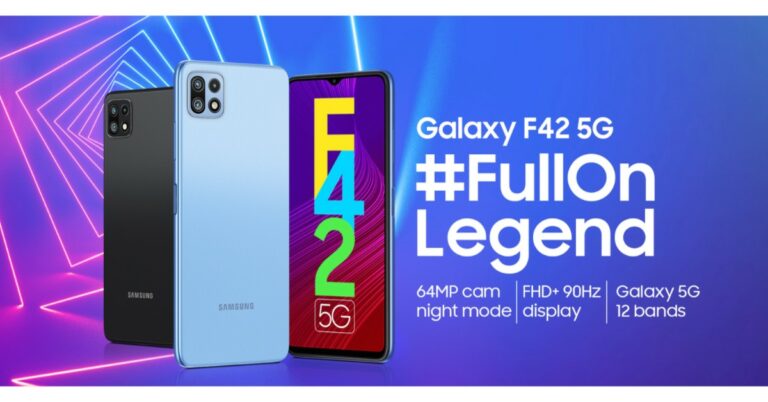
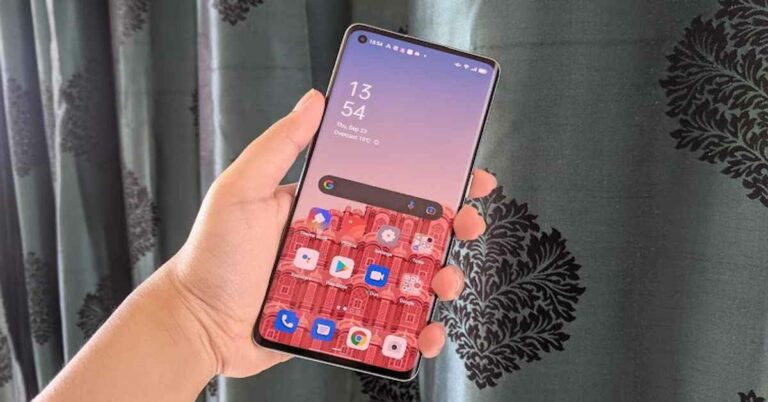
 The right edge of the smartphone has the Power button sandwiched on it while the volume rocker keys are on the left. The SIM tray, USB Type-C port, speaker and microphone are at the bottom while the secondary microphone is at the top. We could reach the keys easily at all times and one-handed usage was no problem at all. Another great thing about the device is its weight. It’s very refreshing to see a smartphone with a display and battery like Oppo Reno 6 Pro weigh just 177 grams.
Flip over and you will see the front panel of the smartphone, which is protected by a layer of Corning Gorilla Glass 5. As we mentioned earlier, the screen is curved and it makes the device look all the more premium. The bezels that surround it are really thin, and even the chin at the bottom is only marginally broader, making it ideal for anyone who loves to watch shows and movies on their smartphone. The screen of the smartphone also has a punch-hole camera on the top left and there is an on-screen fingerprint scanner embedded towards the bottom.
Speaking about the screen of the device, Oppo Reno 6 Pro comes with a 6.5-inch full-HD+ AMOLED display that has a refresh rate of 90Hz and a touch sampling rate of 180Hz. The display of the smartphone also comes with HDR10+ playback certification. We think that the display of Oppo Reno 6 Pro is another positive point of the smartphone, even though the company hasn’t upgraded the specifications from that of the predecessor of the device. But nevertheless, it performed well during our time with the handset. The display is bright and vibrant, and the colours showcased were accurate and remained consistent at different viewing angles. The sunlight readability was good too, and the images appeared sharp and clear at all times. Playing games and watching Netflix shows on the handset was a delightful experience thanks to the screen.
The right edge of the smartphone has the Power button sandwiched on it while the volume rocker keys are on the left. The SIM tray, USB Type-C port, speaker and microphone are at the bottom while the secondary microphone is at the top. We could reach the keys easily at all times and one-handed usage was no problem at all. Another great thing about the device is its weight. It’s very refreshing to see a smartphone with a display and battery like Oppo Reno 6 Pro weigh just 177 grams.
Flip over and you will see the front panel of the smartphone, which is protected by a layer of Corning Gorilla Glass 5. As we mentioned earlier, the screen is curved and it makes the device look all the more premium. The bezels that surround it are really thin, and even the chin at the bottom is only marginally broader, making it ideal for anyone who loves to watch shows and movies on their smartphone. The screen of the smartphone also has a punch-hole camera on the top left and there is an on-screen fingerprint scanner embedded towards the bottom.
Speaking about the screen of the device, Oppo Reno 6 Pro comes with a 6.5-inch full-HD+ AMOLED display that has a refresh rate of 90Hz and a touch sampling rate of 180Hz. The display of the smartphone also comes with HDR10+ playback certification. We think that the display of Oppo Reno 6 Pro is another positive point of the smartphone, even though the company hasn’t upgraded the specifications from that of the predecessor of the device. But nevertheless, it performed well during our time with the handset. The display is bright and vibrant, and the colours showcased were accurate and remained consistent at different viewing angles. The sunlight readability was good too, and the images appeared sharp and clear at all times. Playing games and watching Netflix shows on the handset was a delightful experience thanks to the screen.
 In a nutshell, we would say that the design and display of Oppo Reno 6 Pro will certainly not disappoint you. If looks matter to you when buying a phone, you would be happy with Oppo’s latest offering. The display could have been upgraded, but even then, we can’t complain about its performance. The phone could also include a stereo speaker at this price, it would have made a great addition to a package that’s already good.
 Finally, coming to the performance of Oppo Reno 6 Pro, we think that it did an excellent job. The smartphone could handle even heavy multitasking like streaming episodes from Netflix and navigation simultaneously (we weren’t driving ourselves of course!). Everyday tasks were an absolute cakewalk for it, but that’s what we expected from such a high-end phone. The biometric scanners of the device worked very smoothly and were very quick. The on-screen fingerprint scanner as well as the facial unlock didn’t disappoint us even once – not even when our finger was sweaty or when we tried unlocking our phone in dimly lit areas.
 Gaming was another good experience on Oppo Reno 6 Pro and we are impressed by the fact that the device doesn’t heat up even after we stayed glued to the phone for playing games for long. We tried an array of games on the smartphone ranging from Temple Run 2 to heavy-graphic ones like Asphalt 9: Legends, and they all ran well. The battery life of Oppo Reno 6 Pro is quite long-lasting and even with usage involving two active Instagram accounts, gaming, watching Netflix shows and listening to Spotify pretty obsessively, the battery lasted for more than a day. Even when the battery falls below 20%, it lasts for quite a while. What’s even better is that it charges almost completely in about 30 minutes.
 Finally, let’s talk about the cameras of the smartphone. Oppo Reno 6 Pro comes with a 64MP primary lens, an 8MP ultra-wide lens, a 2MP macro sensor and a 2MP monochrome sensor. It also has a 32MP camera on the front panel for selfies and video calls.


 We should mention that the cameras on the device come without optical stabilization, which is a downside at this price point. The upside of the cameras is the Bokeh Flare Portrait filter. As the name suggests, it adds Bokeh effect to your videos even when the subject is moving. We tried to use it and it gave us some good results. There is another fun mode on the camera called AI Color Portrait filter using which you can click images with a monochrome background around the subject.

 The right edge of the smartphone has the Power button sandwiched on it while the volume rocker keys are on the left. The SIM tray, USB Type-C port, speaker and microphone are at the bottom while the secondary microphone is at the top. We could reach the keys easily at all times and one-handed usage was no problem at all. Another great thing about the device is its weight. It’s very refreshing to see a smartphone with a display and battery like Oppo Reno 6 Pro weigh just 177 grams.
Flip over and you will see the front panel of the smartphone, which is protected by a layer of Corning Gorilla Glass 5. As we mentioned earlier, the screen is curved and it makes the device look all the more premium. The bezels that surround it are really thin, and even the chin at the bottom is only marginally broader, making it ideal for anyone who loves to watch shows and movies on their smartphone. The screen of the smartphone also has a punch-hole camera on the top left and there is an on-screen fingerprint scanner embedded towards the bottom.
Speaking about the screen of the device, Oppo Reno 6 Pro comes with a 6.5-inch full-HD+ AMOLED display that has a refresh rate of 90Hz and a touch sampling rate of 180Hz. The display of the smartphone also comes with HDR10+ playback certification. We think that the display of Oppo Reno 6 Pro is another positive point of the smartphone, even though the company hasn’t upgraded the specifications from that of the predecessor of the device. But nevertheless, it performed well during our time with the handset. The display is bright and vibrant, and the colours showcased were accurate and remained consistent at different viewing angles. The sunlight readability was good too, and the images appeared sharp and clear at all times. Playing games and watching Netflix shows on the handset was a delightful experience thanks to the screen.
The right edge of the smartphone has the Power button sandwiched on it while the volume rocker keys are on the left. The SIM tray, USB Type-C port, speaker and microphone are at the bottom while the secondary microphone is at the top. We could reach the keys easily at all times and one-handed usage was no problem at all. Another great thing about the device is its weight. It’s very refreshing to see a smartphone with a display and battery like Oppo Reno 6 Pro weigh just 177 grams.
Flip over and you will see the front panel of the smartphone, which is protected by a layer of Corning Gorilla Glass 5. As we mentioned earlier, the screen is curved and it makes the device look all the more premium. The bezels that surround it are really thin, and even the chin at the bottom is only marginally broader, making it ideal for anyone who loves to watch shows and movies on their smartphone. The screen of the smartphone also has a punch-hole camera on the top left and there is an on-screen fingerprint scanner embedded towards the bottom.
Speaking about the screen of the device, Oppo Reno 6 Pro comes with a 6.5-inch full-HD+ AMOLED display that has a refresh rate of 90Hz and a touch sampling rate of 180Hz. The display of the smartphone also comes with HDR10+ playback certification. We think that the display of Oppo Reno 6 Pro is another positive point of the smartphone, even though the company hasn’t upgraded the specifications from that of the predecessor of the device. But nevertheless, it performed well during our time with the handset. The display is bright and vibrant, and the colours showcased were accurate and remained consistent at different viewing angles. The sunlight readability was good too, and the images appeared sharp and clear at all times. Playing games and watching Netflix shows on the handset was a delightful experience thanks to the screen.
 In a nutshell, we would say that the design and display of Oppo Reno 6 Pro will certainly not disappoint you. If looks matter to you when buying a phone, you would be happy with Oppo’s latest offering. The display could have been upgraded, but even then, we can’t complain about its performance. The phone could also include a stereo speaker at this price, it would have made a great addition to a package that’s already good.
 Finally, coming to the performance of Oppo Reno 6 Pro, we think that it did an excellent job. The smartphone could handle even heavy multitasking like streaming episodes from Netflix and navigation simultaneously (we weren’t driving ourselves of course!). Everyday tasks were an absolute cakewalk for it, but that’s what we expected from such a high-end phone. The biometric scanners of the device worked very smoothly and were very quick. The on-screen fingerprint scanner as well as the facial unlock didn’t disappoint us even once – not even when our finger was sweaty or when we tried unlocking our phone in dimly lit areas.
 Gaming was another good experience on Oppo Reno 6 Pro and we are impressed by the fact that the device doesn’t heat up even after we stayed glued to the phone for playing games for long. We tried an array of games on the smartphone ranging from Temple Run 2 to heavy-graphic ones like Asphalt 9: Legends, and they all ran well. The battery life of Oppo Reno 6 Pro is quite long-lasting and even with usage involving two active Instagram accounts, gaming, watching Netflix shows and listening to Spotify pretty obsessively, the battery lasted for more than a day. Even when the battery falls below 20%, it lasts for quite a while. What’s even better is that it charges almost completely in about 30 minutes.
 Finally, let’s talk about the cameras of the smartphone. Oppo Reno 6 Pro comes with a 64MP primary lens, an 8MP ultra-wide lens, a 2MP macro sensor and a 2MP monochrome sensor. It also has a 32MP camera on the front panel for selfies and video calls.


 We should mention that the cameras on the device come without optical stabilization, which is a downside at this price point. The upside of the cameras is the Bokeh Flare Portrait filter. As the name suggests, it adds Bokeh effect to your videos even when the subject is moving. We tried to use it and it gave us some good results. There is another fun mode on the camera called AI Color Portrait filter using which you can click images with a monochrome background around the subject.

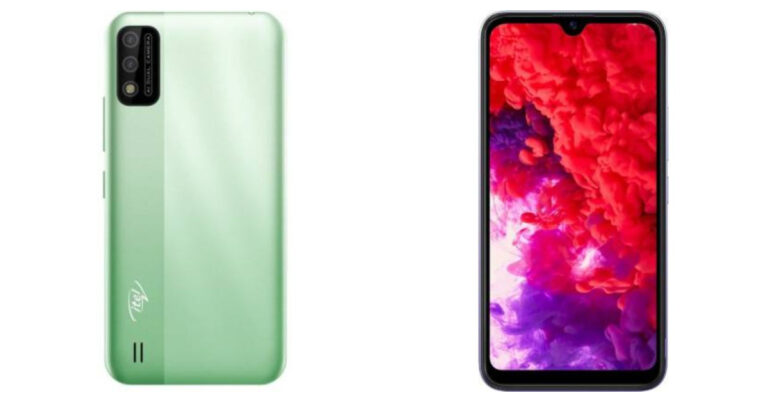
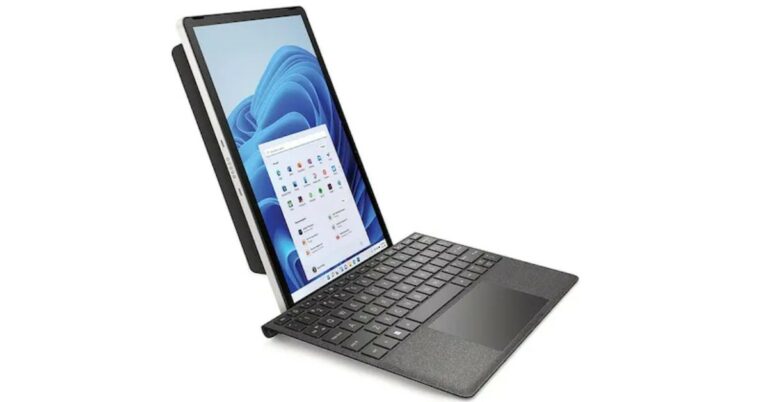



 Google and Hiber are currently leading the charge to get the internet into every single home on the planet. Google’s approach involves launching large helium balloons that transmit an internet connection to a tower that can be accessed.
Hiber’s solution is slightly different. They are launching shoebox-sized satellites into low orbit, which then orbit the Earth sixteen times a day. These will connect to a modem plugged into your computer and transmit data as they fly over your home.
Considering the world is already heavily reliant on the internet, it will surprise many people to know that only half the world has a permanent internet connection. While this is largely down to socio-economic issues, these companies want to connect the world, so everyone can succeed using the web.
Google and Hiber are currently leading the charge to get the internet into every single home on the planet. Google’s approach involves launching large helium balloons that transmit an internet connection to a tower that can be accessed.
Hiber’s solution is slightly different. They are launching shoebox-sized satellites into low orbit, which then orbit the Earth sixteen times a day. These will connect to a modem plugged into your computer and transmit data as they fly over your home.
Considering the world is already heavily reliant on the internet, it will surprise many people to know that only half the world has a permanent internet connection. While this is largely down to socio-economic issues, these companies want to connect the world, so everyone can succeed using the web.
 Google and Hiber are currently leading the charge to get the internet into every single home on the planet. Google’s approach involves launching large helium balloons that transmit an internet connection to a tower that can be accessed.
Hiber’s solution is slightly different. They are launching shoebox-sized satellites into low orbit, which then orbit the Earth sixteen times a day. These will connect to a modem plugged into your computer and transmit data as they fly over your home.
Considering the world is already heavily reliant on the internet, it will surprise many people to know that only half the world has a permanent internet connection. While this is largely down to socio-economic issues, these companies want to connect the world, so everyone can succeed using the web.
Google and Hiber are currently leading the charge to get the internet into every single home on the planet. Google’s approach involves launching large helium balloons that transmit an internet connection to a tower that can be accessed.
Hiber’s solution is slightly different. They are launching shoebox-sized satellites into low orbit, which then orbit the Earth sixteen times a day. These will connect to a modem plugged into your computer and transmit data as they fly over your home.
Considering the world is already heavily reliant on the internet, it will surprise many people to know that only half the world has a permanent internet connection. While this is largely down to socio-economic issues, these companies want to connect the world, so everyone can succeed using the web.


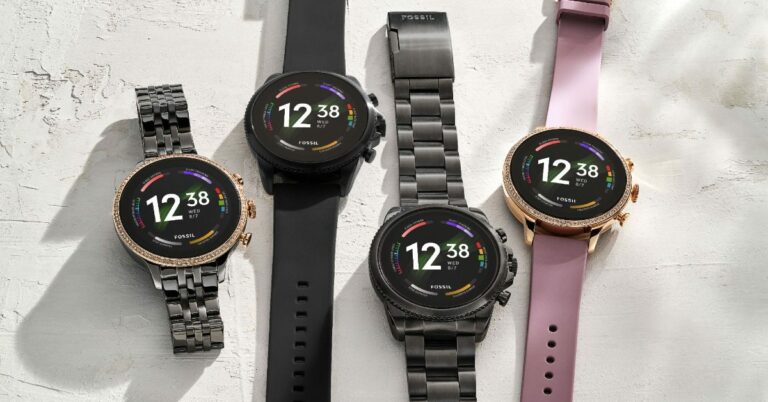
 Read Also: Fossil Sport smartwatch with Google’s Wear OS launched
The Fossil Gen 6 is also packed with all the features of a fitness tracker. These include an upgraded heart rate monitoring sensor, too. That allows continuous tracking and improved signal accuracy and a new blood oxygen monitoring (SpO2) sensor. Other sensors include an accelerometer, altimeter, gyroscope, off-body IR, compass, ambient light sensor and is swim-proof up to 3ATM (30 metres).
To keep your Smartwatch connected all the time the company has included a lot of sensors including Bluetooth V5 LE, Wi-Fi, GPS, and NFC SE. The watch is compatible with both Android and iOS devices. The battery can be charged by a 4 pin charger that supports fast charging as well.
Fossil also mentioned that the smartwatch can be charged up to 80 per cent in approximately half an hour and can last for more than 24 hours (when fully charged). Users can also switch to Extended battery mode to fetch multiple days of battery life. As the watch natively supports Google Assistant, one can use the watch hands-free anytime.
For the latest gadget and tech news, and gadget reviews, follow us on Twitter, Facebook and Instagram. For newest tech & gadget videos subscribe to our YouTube Channel. You can also stay up to date using the Gadget Bridge Android App. You can find the latest car and bike news here.
Read Also: Fossil Sport smartwatch with Google’s Wear OS launched
The Fossil Gen 6 is also packed with all the features of a fitness tracker. These include an upgraded heart rate monitoring sensor, too. That allows continuous tracking and improved signal accuracy and a new blood oxygen monitoring (SpO2) sensor. Other sensors include an accelerometer, altimeter, gyroscope, off-body IR, compass, ambient light sensor and is swim-proof up to 3ATM (30 metres).
To keep your Smartwatch connected all the time the company has included a lot of sensors including Bluetooth V5 LE, Wi-Fi, GPS, and NFC SE. The watch is compatible with both Android and iOS devices. The battery can be charged by a 4 pin charger that supports fast charging as well.
Fossil also mentioned that the smartwatch can be charged up to 80 per cent in approximately half an hour and can last for more than 24 hours (when fully charged). Users can also switch to Extended battery mode to fetch multiple days of battery life. As the watch natively supports Google Assistant, one can use the watch hands-free anytime.
For the latest gadget and tech news, and gadget reviews, follow us on Twitter, Facebook and Instagram. For newest tech & gadget videos subscribe to our YouTube Channel. You can also stay up to date using the Gadget Bridge Android App. You can find the latest car and bike news here.  Read Also: Fossil Sport smartwatch with Google’s Wear OS launched
The Fossil Gen 6 is also packed with all the features of a fitness tracker. These include an upgraded heart rate monitoring sensor, too. That allows continuous tracking and improved signal accuracy and a new blood oxygen monitoring (SpO2) sensor. Other sensors include an accelerometer, altimeter, gyroscope, off-body IR, compass, ambient light sensor and is swim-proof up to 3ATM (30 metres).
To keep your Smartwatch connected all the time the company has included a lot of sensors including Bluetooth V5 LE, Wi-Fi, GPS, and NFC SE. The watch is compatible with both Android and iOS devices. The battery can be charged by a 4 pin charger that supports fast charging as well.
Fossil also mentioned that the smartwatch can be charged up to 80 per cent in approximately half an hour and can last for more than 24 hours (when fully charged). Users can also switch to Extended battery mode to fetch multiple days of battery life. As the watch natively supports Google Assistant, one can use the watch hands-free anytime.
For the latest gadget and tech news, and gadget reviews, follow us on Twitter, Facebook and Instagram. For newest tech & gadget videos subscribe to our YouTube Channel. You can also stay up to date using the Gadget Bridge Android App. You can find the latest car and bike news here.
Read Also: Fossil Sport smartwatch with Google’s Wear OS launched
The Fossil Gen 6 is also packed with all the features of a fitness tracker. These include an upgraded heart rate monitoring sensor, too. That allows continuous tracking and improved signal accuracy and a new blood oxygen monitoring (SpO2) sensor. Other sensors include an accelerometer, altimeter, gyroscope, off-body IR, compass, ambient light sensor and is swim-proof up to 3ATM (30 metres).
To keep your Smartwatch connected all the time the company has included a lot of sensors including Bluetooth V5 LE, Wi-Fi, GPS, and NFC SE. The watch is compatible with both Android and iOS devices. The battery can be charged by a 4 pin charger that supports fast charging as well.
Fossil also mentioned that the smartwatch can be charged up to 80 per cent in approximately half an hour and can last for more than 24 hours (when fully charged). Users can also switch to Extended battery mode to fetch multiple days of battery life. As the watch natively supports Google Assistant, one can use the watch hands-free anytime.
For the latest gadget and tech news, and gadget reviews, follow us on Twitter, Facebook and Instagram. For newest tech & gadget videos subscribe to our YouTube Channel. You can also stay up to date using the Gadget Bridge Android App. You can find the latest car and bike news here. 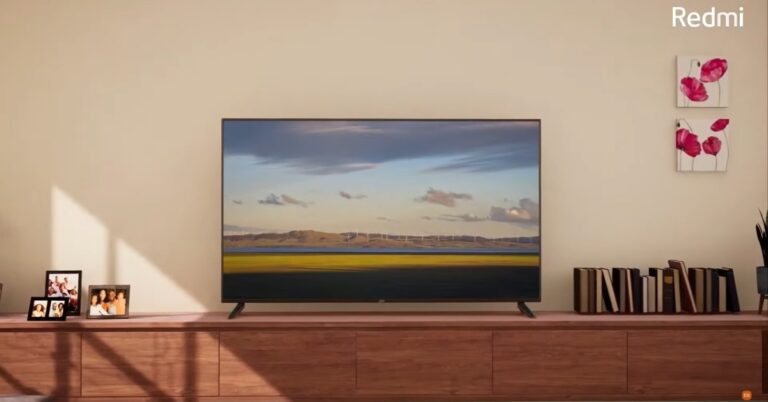
 Read Also: Apple TV+ (Plus) service goes live in India and across the world
For connectivity, The Redmi Smart TV 32 and Redmi Smart TV 43 will have dual-band Wi-Fi and Bluetooth v5.0. There is also a treat for gamers by the company. The company introduced an Auto Low Latency mode that is claimed to help reduce the latency rate when using the TVs with a gaming console. Ports included are two HDMI, two USB 2.0, an AV, 3.5mm headphone jack, Ethernet, and an antenna port.
Both the 32-inch and 43-inch variants of the TVs are full-HD panels that can display 16 million colours. With electronics, the company takes care of the environment as well by using eco-friendly Eco-Packaging.
For the latest gadget and tech news, and gadget reviews, follow us on Twitter, Facebook and Instagram. For newest tech & gadget videos subscribe to our YouTube Channel. You can also stay up to date using the Gadget Bridge Android App. You can find the latest car and bike news here.
Read Also: Apple TV+ (Plus) service goes live in India and across the world
For connectivity, The Redmi Smart TV 32 and Redmi Smart TV 43 will have dual-band Wi-Fi and Bluetooth v5.0. There is also a treat for gamers by the company. The company introduced an Auto Low Latency mode that is claimed to help reduce the latency rate when using the TVs with a gaming console. Ports included are two HDMI, two USB 2.0, an AV, 3.5mm headphone jack, Ethernet, and an antenna port.
Both the 32-inch and 43-inch variants of the TVs are full-HD panels that can display 16 million colours. With electronics, the company takes care of the environment as well by using eco-friendly Eco-Packaging.
For the latest gadget and tech news, and gadget reviews, follow us on Twitter, Facebook and Instagram. For newest tech & gadget videos subscribe to our YouTube Channel. You can also stay up to date using the Gadget Bridge Android App. You can find the latest car and bike news here. 
 Press the power button for 3 seconds on either your Android smartphone or iOS device (depending upon your iOS device the restart method may vary) and choose the restart option. After the restart is completed try opening Instagram again. If the problem persists try the next steps.
 Press the power button for 3 seconds on either your Android smartphone or iOS device (depending upon your iOS device the restart method may vary) and choose the restart option. After the restart is completed try opening Instagram again. If the problem persists try the next steps.

 Read Also: How to fix the bad signal strength of Android and iPhones

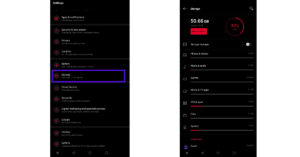
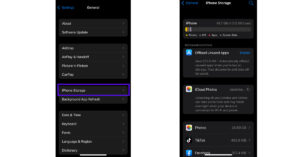 If you notice that there is less storage space on your device. Try clearing up some clutter and try opening the application again.
Read Also: Google resolved Gmail and Chrome Crash issue
If you notice that there is less storage space on your device. Try clearing up some clutter and try opening the application again.
Read Also: Google resolved Gmail and Chrome Crash issue
 It is a possibility that Instagram is crashing for everyone. This problem can occur due to server problems from Instagram. Checking it is very simple. Just visit DownDetector to check for any outage issues with Instagram. If yes, don’t worry the issue gets fixed in some time usually.
 These are the top 7 ways to fix Instagram crashing on Android and iOS, which will help you and make your social media platform running back again. We also advise checking for updates of phone OS as well. It is rare for this to cause an issue, but updating the phone operating system via the settings menu of the phone will fix any firmware related issues causing the crash.
For the latest gadget and tech news, and gadget reviews, follow us on Twitter, Facebook and Instagram. For newest tech & gadget videos subscribe to our YouTube Channel. You can also stay up to date using the Gadget Bridge Android App. You can find the latest car and bike news here.
These are the top 7 ways to fix Instagram crashing on Android and iOS, which will help you and make your social media platform running back again. We also advise checking for updates of phone OS as well. It is rare for this to cause an issue, but updating the phone operating system via the settings menu of the phone will fix any firmware related issues causing the crash.
For the latest gadget and tech news, and gadget reviews, follow us on Twitter, Facebook and Instagram. For newest tech & gadget videos subscribe to our YouTube Channel. You can also stay up to date using the Gadget Bridge Android App. You can find the latest car and bike news here. 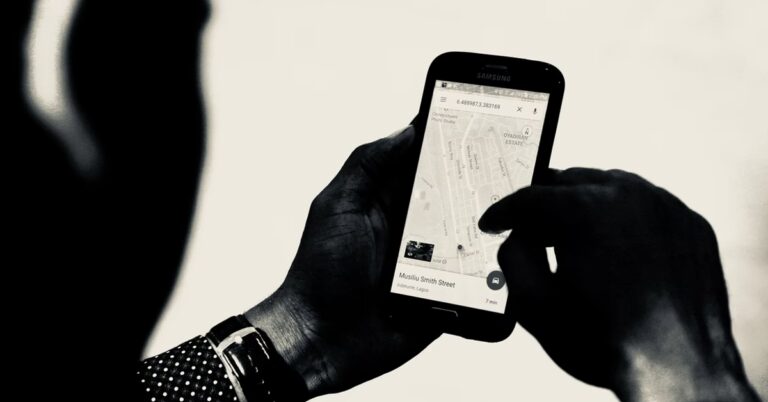
 It is a built-in solution to find your lost android. One can find their lost phone or be it their family’s or friends. All you need is an active internet connection and the lost device should be switched on. One has to log in to their Google account and easily get their device’s location.
Usually, the application comes pre-installed on your Android smartphone. Just head to google.com/android/find to get the most accurate location of your smartphone. You can also choose to ring the device or secure it remotely. If the application is not available on your device, download it via the link below.
Download Here
It is a built-in solution to find your lost android. One can find their lost phone or be it their family’s or friends. All you need is an active internet connection and the lost device should be switched on. One has to log in to their Google account and easily get their device’s location.
Usually, the application comes pre-installed on your Android smartphone. Just head to google.com/android/find to get the most accurate location of your smartphone. You can also choose to ring the device or secure it remotely. If the application is not available on your device, download it via the link below.
Download Here
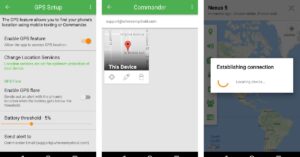 It is a full anti-theft solution for your Android device. All you need to do is install the application and set it up on the target device. Where’s My Droid will help you lock your device and get GPS coordinates with SMS commands.
Once you get near the lost device, make it ring to find the exact location. There is also a pro version of the application available, which along with the free features like tracking location, ringing, locking, and wiping data can also take pictures, access location history and tell your device stats.
Download Here
Read Also: Star Wars Jedi: Fallen Order 15-minute long gameplay trailer
It is a full anti-theft solution for your Android device. All you need to do is install the application and set it up on the target device. Where’s My Droid will help you lock your device and get GPS coordinates with SMS commands.
Once you get near the lost device, make it ring to find the exact location. There is also a pro version of the application available, which along with the free features like tracking location, ringing, locking, and wiping data can also take pictures, access location history and tell your device stats.
Download Here
Read Also: Star Wars Jedi: Fallen Order 15-minute long gameplay trailer
 Family Locator works as the name suggests. It is a family-oriented GPS tracking application where one can create a private group by adding your family members or friends. The users can chat with each other knowing their precise location.
Along with this, people in each circle can know each other’s locations with the arrival and departure alert features. The app also alerts in emergency cases like crashes or lockout. Family Locator is available on all smartphone platforms.
Download Here
Family Locator works as the name suggests. It is a family-oriented GPS tracking application where one can create a private group by adding your family members or friends. The users can chat with each other knowing their precise location.
Along with this, people in each circle can know each other’s locations with the arrival and departure alert features. The app also alerts in emergency cases like crashes or lockout. Family Locator is available on all smartphone platforms.
Download Here
 It is the service offered by Google Maps which can be used to track back your phone. All you need to do is share your live location with friends or family with few taps on your smartphone. Head to the location sharing option and choose contacts. Once done the live location will be shared until it is turned off.
In case you forget to turn off the location sharing, Google will send reminder emails to confirm that. In the options, you can also see the battery percentage along with the location. Maps also has a feature called “Timeline” which is helpful when the device sharing location is turned off. It will help you track the last shared location by the device.
Download Here
Read Also: This is how you can refrain apps from tracking your phone’s location
It is the service offered by Google Maps which can be used to track back your phone. All you need to do is share your live location with friends or family with few taps on your smartphone. Head to the location sharing option and choose contacts. Once done the live location will be shared until it is turned off.
In case you forget to turn off the location sharing, Google will send reminder emails to confirm that. In the options, you can also see the battery percentage along with the location. Maps also has a feature called “Timeline” which is helpful when the device sharing location is turned off. It will help you track the last shared location by the device.
Download Here
Read Also: This is how you can refrain apps from tracking your phone’s location
 It is also a parental control app that doubles up as a smartphone tracker. It tracks down locations with high accuracy. Other features like activity report, blocking apps and knowing suspicious calls or messages are also included in the application.
You can access the device application usage and even block websites in the paid version of the application. It is especially useful for guardians to keep an eye on their children or track their movement.
Download Here
This is the list of the top 5 apps to track your android phone for free. For most of the purposes, Google’s find my device is more than enough for regular users. The other applications can still be used for going the extra mile if you want additional features. All the applications in the list are free with some offering premium services on a subscription basis.
For the latest gadget and tech news, and gadget reviews, follow us on Twitter, Facebook and Instagram. For newest tech & gadget videos subscribe to our YouTube Channel. You can also stay up to date using the Gadget Bridge Android App. You can find the latest car and bike news here.
It is also a parental control app that doubles up as a smartphone tracker. It tracks down locations with high accuracy. Other features like activity report, blocking apps and knowing suspicious calls or messages are also included in the application.
You can access the device application usage and even block websites in the paid version of the application. It is especially useful for guardians to keep an eye on their children or track their movement.
Download Here
This is the list of the top 5 apps to track your android phone for free. For most of the purposes, Google’s find my device is more than enough for regular users. The other applications can still be used for going the extra mile if you want additional features. All the applications in the list are free with some offering premium services on a subscription basis.
For the latest gadget and tech news, and gadget reviews, follow us on Twitter, Facebook and Instagram. For newest tech & gadget videos subscribe to our YouTube Channel. You can also stay up to date using the Gadget Bridge Android App. You can find the latest car and bike news here. 


 Lau said that with the codebase integration, OxygenOS 12 build quality has been improving and software updates are becoming more timely. And more broadly speaking, over time we have seen that the two operating systems have been gradually converging in terms of the fundamental user experience. This will create the best possible product experience for users with more resources as a larger and more integrated organization.
The OnePlus and Oppo aims to focus on one unified operating system and strengthen them by collaborating OxygenOS and ColorOS skins. Nevertheless, this company promised to keep the DNA of OxygenOS and provide an upgraded experience. Also it will customize the unified OS specifically for OnePlus devices for instance by keeping it as clean and lightweight as before and continuing to support unlock bootloaders.
For the global OnePlus devices the new unified operating system will be shipped to OnePlus next flagship series in 2022. The integration will be fully completed together with the next major Android update in 2022. The company will be sharing more about when specific devices will receive the new OS at a later date.
This clearly hints at the fact that there won’t be a OnePlus 9T, OnePlus 9T Pro this year. OnePlus CEO Pete Lau has also stated, “This year we will not be launching a T-series product.”
For the latest gadget and tech news, and gadget reviews, follow us on Twitter, Facebook and Instagram. For newest tech & gadget videos subscribe to our YouTube Channel. You can also stay up to date using the Gadget Bridge Android App. You can find the latest car and bike news here.
Lau said that with the codebase integration, OxygenOS 12 build quality has been improving and software updates are becoming more timely. And more broadly speaking, over time we have seen that the two operating systems have been gradually converging in terms of the fundamental user experience. This will create the best possible product experience for users with more resources as a larger and more integrated organization.
The OnePlus and Oppo aims to focus on one unified operating system and strengthen them by collaborating OxygenOS and ColorOS skins. Nevertheless, this company promised to keep the DNA of OxygenOS and provide an upgraded experience. Also it will customize the unified OS specifically for OnePlus devices for instance by keeping it as clean and lightweight as before and continuing to support unlock bootloaders.
For the global OnePlus devices the new unified operating system will be shipped to OnePlus next flagship series in 2022. The integration will be fully completed together with the next major Android update in 2022. The company will be sharing more about when specific devices will receive the new OS at a later date.
This clearly hints at the fact that there won’t be a OnePlus 9T, OnePlus 9T Pro this year. OnePlus CEO Pete Lau has also stated, “This year we will not be launching a T-series product.”
For the latest gadget and tech news, and gadget reviews, follow us on Twitter, Facebook and Instagram. For newest tech & gadget videos subscribe to our YouTube Channel. You can also stay up to date using the Gadget Bridge Android App. You can find the latest car and bike news here.  Lau said that with the codebase integration, OxygenOS 12 build quality has been improving and software updates are becoming more timely. And more broadly speaking, over time we have seen that the two operating systems have been gradually converging in terms of the fundamental user experience. This will create the best possible product experience for users with more resources as a larger and more integrated organization.
The OnePlus and Oppo aims to focus on one unified operating system and strengthen them by collaborating OxygenOS and ColorOS skins. Nevertheless, this company promised to keep the DNA of OxygenOS and provide an upgraded experience. Also it will customize the unified OS specifically for OnePlus devices for instance by keeping it as clean and lightweight as before and continuing to support unlock bootloaders.
For the global OnePlus devices the new unified operating system will be shipped to OnePlus next flagship series in 2022. The integration will be fully completed together with the next major Android update in 2022. The company will be sharing more about when specific devices will receive the new OS at a later date.
This clearly hints at the fact that there won’t be a OnePlus 9T, OnePlus 9T Pro this year. OnePlus CEO Pete Lau has also stated, “This year we will not be launching a T-series product.”
For the latest gadget and tech news, and gadget reviews, follow us on Twitter, Facebook and Instagram. For newest tech & gadget videos subscribe to our YouTube Channel. You can also stay up to date using the Gadget Bridge Android App. You can find the latest car and bike news here.
Lau said that with the codebase integration, OxygenOS 12 build quality has been improving and software updates are becoming more timely. And more broadly speaking, over time we have seen that the two operating systems have been gradually converging in terms of the fundamental user experience. This will create the best possible product experience for users with more resources as a larger and more integrated organization.
The OnePlus and Oppo aims to focus on one unified operating system and strengthen them by collaborating OxygenOS and ColorOS skins. Nevertheless, this company promised to keep the DNA of OxygenOS and provide an upgraded experience. Also it will customize the unified OS specifically for OnePlus devices for instance by keeping it as clean and lightweight as before and continuing to support unlock bootloaders.
For the global OnePlus devices the new unified operating system will be shipped to OnePlus next flagship series in 2022. The integration will be fully completed together with the next major Android update in 2022. The company will be sharing more about when specific devices will receive the new OS at a later date.
This clearly hints at the fact that there won’t be a OnePlus 9T, OnePlus 9T Pro this year. OnePlus CEO Pete Lau has also stated, “This year we will not be launching a T-series product.”
For the latest gadget and tech news, and gadget reviews, follow us on Twitter, Facebook and Instagram. For newest tech & gadget videos subscribe to our YouTube Channel. You can also stay up to date using the Gadget Bridge Android App. You can find the latest car and bike news here. 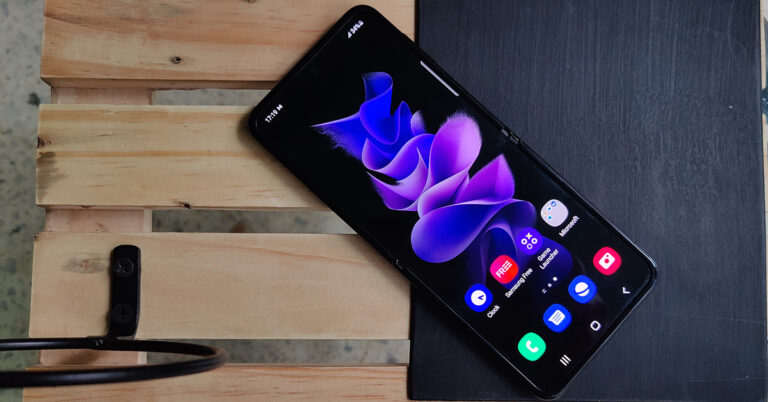
 Out of the box, the Samsung Galaxy Z Flip 3 is what we were looking for in the last two versions. A super sturdy body and a larger secondary touchscreen on the outside. It has both. So, let’s start with the exteriors first. The users get a 1.9-inch display outside that has a resolution of 260 x 512 pixels. This one is a Super AMOLED touchscreen. Samsung has added a few widgets like a sound recorder and timer to it, and a few more can be added via the widget’s menu.
When slammed shut the outside display will show the time. It will also light up when you get a phone call or a notification. Both the outside panels are made of metal (that does not attract too many fingerprints) and the spine also has a stronger metal with Samsung branding on it. With the external screen, users also get dual cameras as well as an LED flash on the outside.
Out of the box, the Samsung Galaxy Z Flip 3 is what we were looking for in the last two versions. A super sturdy body and a larger secondary touchscreen on the outside. It has both. So, let’s start with the exteriors first. The users get a 1.9-inch display outside that has a resolution of 260 x 512 pixels. This one is a Super AMOLED touchscreen. Samsung has added a few widgets like a sound recorder and timer to it, and a few more can be added via the widget’s menu.
When slammed shut the outside display will show the time. It will also light up when you get a phone call or a notification. Both the outside panels are made of metal (that does not attract too many fingerprints) and the spine also has a stronger metal with Samsung branding on it. With the external screen, users also get dual cameras as well as an LED flash on the outside.
 Flip it open and you are greeted by a large 6.7-inch FHD+ dynamic AMOED display. This one is a 120Hz display that sports HDR10+ and 1,200 nits of peak brightness. The screen to body ratio is about 89%. Yes, the screen here is not fully edge to edge, as the folding screen needs to be held tightly within a good frame. Nonetheless, it looks extremely beautiful. Here you will also find a screen protector with a selfie camera in a cutout on top.
Talking a bit more about other physical attributes, the Samsung Galaxy Flip 3 has a power button on the right side that doubles up as the fingerprint sensor, too. Nine out of ten times the sensors registered the fingerprint and opened the phone for us. So it is quite precise. Above it, the users gets a volume rocker key. While the SIM tray is placed on the left and the loudspeaker grille as well as USB Type-C charging port can be found at the bottom. Users also get a couple of MICS on the device, too.
Our time with the screen was filled with delight. There is a dig in the middle part of the smartphone, which now we were used to as after all the smartphone is a foldable one. However, that does not hinder the viewing experience. The experience is seamless, and we loved watching Netflix shows and playing games on it. The screen does not wash out under direct sunlight, and you get to see vibrant colours, deep blacks, and crisp text no matter how harsh or low the light is. It truly gives you a premium smartphone experience.
Flip it open and you are greeted by a large 6.7-inch FHD+ dynamic AMOED display. This one is a 120Hz display that sports HDR10+ and 1,200 nits of peak brightness. The screen to body ratio is about 89%. Yes, the screen here is not fully edge to edge, as the folding screen needs to be held tightly within a good frame. Nonetheless, it looks extremely beautiful. Here you will also find a screen protector with a selfie camera in a cutout on top.
Talking a bit more about other physical attributes, the Samsung Galaxy Flip 3 has a power button on the right side that doubles up as the fingerprint sensor, too. Nine out of ten times the sensors registered the fingerprint and opened the phone for us. So it is quite precise. Above it, the users gets a volume rocker key. While the SIM tray is placed on the left and the loudspeaker grille as well as USB Type-C charging port can be found at the bottom. Users also get a couple of MICS on the device, too.
Our time with the screen was filled with delight. There is a dig in the middle part of the smartphone, which now we were used to as after all the smartphone is a foldable one. However, that does not hinder the viewing experience. The experience is seamless, and we loved watching Netflix shows and playing games on it. The screen does not wash out under direct sunlight, and you get to see vibrant colours, deep blacks, and crisp text no matter how harsh or low the light is. It truly gives you a premium smartphone experience.
 However, for night shots we would suggest turn on the night mode. With it, the results become much better, though it does take a second or two extra to click the picture, but the wait is worth it. There are plenty of modes if you are a photography lover within the native app and PRO modes for images and videos give you a lot of control.
 4K videos can be shot at 60FPS, but here optical stabilisation is missing. When the phone is slam shut, users can also quickly access the rear camera by double-pressing the power button. And by using the volume key you can use the outside screen to click a quick selfie image.
Talking about which, the inside selfie camera is no less. The Samsung Galaxy Flip 3 sports a 10MP selfie camera. We loved the results with it. We extracted some superb selfies with it and were very happy with how the colours are very close to life in the clicked images. But for even better selfies you can always shut it and use the external screen and cameras. Videos with the internal cam can be shot in 4K at 30FPS, which have decent details and colours, but we do like the one shot from the 12MP ones better.
Another great feature of the cams is the half and half mode. You can just fold the screen to 90 degrees and keep the smartphone on a table or flat surface to shoot a stable image or video, without the need of a tripod. This is something vloggers would love. Over that, the Samsung Galaxy Flip 3 comes with IPX8 rating, which means it is water-resistant. If you end up spilling your cold coffee on it, just wipe it off and the phone will still run properly. Features like Wi-Fi 6, 5G and Bluetooth 5.1 are incorporated in this smartphone.
4K videos can be shot at 60FPS, but here optical stabilisation is missing. When the phone is slam shut, users can also quickly access the rear camera by double-pressing the power button. And by using the volume key you can use the outside screen to click a quick selfie image.
Talking about which, the inside selfie camera is no less. The Samsung Galaxy Flip 3 sports a 10MP selfie camera. We loved the results with it. We extracted some superb selfies with it and were very happy with how the colours are very close to life in the clicked images. But for even better selfies you can always shut it and use the external screen and cameras. Videos with the internal cam can be shot in 4K at 30FPS, which have decent details and colours, but we do like the one shot from the 12MP ones better.
Another great feature of the cams is the half and half mode. You can just fold the screen to 90 degrees and keep the smartphone on a table or flat surface to shoot a stable image or video, without the need of a tripod. This is something vloggers would love. Over that, the Samsung Galaxy Flip 3 comes with IPX8 rating, which means it is water-resistant. If you end up spilling your cold coffee on it, just wipe it off and the phone will still run properly. Features like Wi-Fi 6, 5G and Bluetooth 5.1 are incorporated in this smartphone.

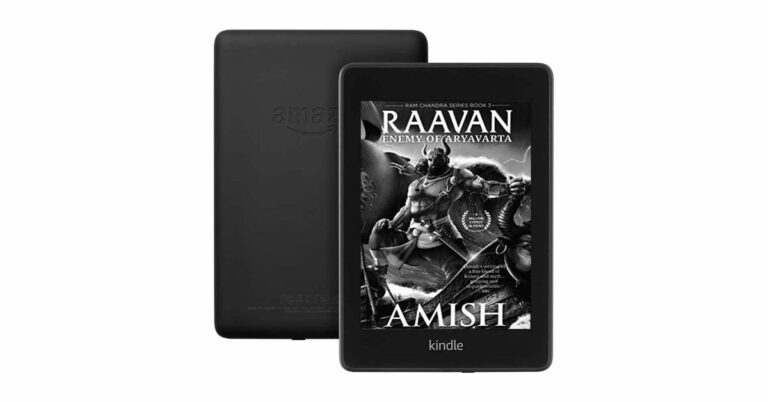
 On the other hand, the Kindle Paperwhite Signature Edition comes with an additional auto-adjusting front light that automatically adjusts the brightness of the display based on the lighting around you so you can comfortably read in all conditions.
The devices come with improved battery life therefore they offer 10 weeks of battery life. With a 10W charger it takes 2.5 hours to completely charge them. The Kindle Paperwhite Signature Edition features wireless charging and can be used with any compatible Qi wireless charger (sold separately).
The new generation of Kindle includes IPx8 rating and is designed to withstand accidental drops in the bathtub, hot tub, pool, and ocean. Besides this, both the devices come with Whispersync and Whispersync for Voice that saves and synchronizes your last page read, bookmarks, and annotations from your Kindle eBooks across all of your Kindle devices and apps, so you can pick up where you left off on any device.
The book covers allow you to see the cover of the book you are currently reading on the lock screen of select Kindle devices, too. Wordwise offers short, simple definitions that automatically appear above difficult words and the Accessibility option lets you access devices and reading applications which work with assistive technology, features that support a variety of reading needs, tools that enable anyone to become a Kindle author, and more than 12 million screen reader supported books.
The new Kindle Paperwhite models come with instant access to the Kindle Store. The Massive selection offers millions of books, comics and magazines, including the latest best sellers. Whereas Kindle unlimited brings unlimited access to an ever-growing selection of over two million eBooks. Additionally, Prime members can read from a rotating selection of thousands of books, magazines, and more—at no additional cost towards your Prime membership.
For the latest gadget and tech news, and gadget reviews, follow us on Twitter, Facebook and Instagram. For newest tech & gadget videos subscribe to our YouTube Channel. You can also stay up to date using the Gadget Bridge Android App. You can find the latest car and bike news here.
On the other hand, the Kindle Paperwhite Signature Edition comes with an additional auto-adjusting front light that automatically adjusts the brightness of the display based on the lighting around you so you can comfortably read in all conditions.
The devices come with improved battery life therefore they offer 10 weeks of battery life. With a 10W charger it takes 2.5 hours to completely charge them. The Kindle Paperwhite Signature Edition features wireless charging and can be used with any compatible Qi wireless charger (sold separately).
The new generation of Kindle includes IPx8 rating and is designed to withstand accidental drops in the bathtub, hot tub, pool, and ocean. Besides this, both the devices come with Whispersync and Whispersync for Voice that saves and synchronizes your last page read, bookmarks, and annotations from your Kindle eBooks across all of your Kindle devices and apps, so you can pick up where you left off on any device.
The book covers allow you to see the cover of the book you are currently reading on the lock screen of select Kindle devices, too. Wordwise offers short, simple definitions that automatically appear above difficult words and the Accessibility option lets you access devices and reading applications which work with assistive technology, features that support a variety of reading needs, tools that enable anyone to become a Kindle author, and more than 12 million screen reader supported books.
The new Kindle Paperwhite models come with instant access to the Kindle Store. The Massive selection offers millions of books, comics and magazines, including the latest best sellers. Whereas Kindle unlimited brings unlimited access to an ever-growing selection of over two million eBooks. Additionally, Prime members can read from a rotating selection of thousands of books, magazines, and more—at no additional cost towards your Prime membership.
For the latest gadget and tech news, and gadget reviews, follow us on Twitter, Facebook and Instagram. For newest tech & gadget videos subscribe to our YouTube Channel. You can also stay up to date using the Gadget Bridge Android App. You can find the latest car and bike news here. 
 Step 3 – There will be the option of either pasting a URL or Uploading an image. One can also drag and drop the image they want to search.
 Google Images will automatically detect the image and show the results accordingly
 Read Alos: Xiaomi’s Mi Mix 4 to come with reverse wireless charging
 Step 3 – Select the Desktop site option from the setting dropdown.
 Step 4 – Now the site will work in the same manner as the desktop site.
Step 5 – Tap on the camera icon next on the search bar.
Step 6 – Now you can either paste a URL or upload an image.
Step 7 – If you decide to upload an image and choose a file, the UI will give you the option to either use the camera to click a photo or select a file from the file manager.
Step 4 – Now the site will work in the same manner as the desktop site.
Step 5 – Tap on the camera icon next on the search bar.
Step 6 – Now you can either paste a URL or upload an image.
Step 7 – If you decide to upload an image and choose a file, the UI will give you the option to either use the camera to click a photo or select a file from the file manager.
 Read Alos: Snapdeal to offer ‘90 minutes reverse pick-ups’ service
After uploading the file, Google will automatically show all the results related to the image uploaded.
Read Alos: Snapdeal to offer ‘90 minutes reverse pick-ups’ service
After uploading the file, Google will automatically show all the results related to the image uploaded.
 Step 3 – Now head to images.google.com upload the screenshot.
Step 4 – Search for the image by the methods above and you will find the details of the video too.
Step 3 – Now head to images.google.com upload the screenshot.
Step 4 – Search for the image by the methods above and you will find the details of the video too.
 Step 4 – Under the Basic Info tab, there will be your profile picture.
 Read Also: How to change your Amazon Prime video profile picture
Step 5 – Click on the profile picture and press remove.
Read Also: How to change your Amazon Prime video profile picture
Step 5 – Click on the profile picture and press remove.
 In case you want to change the profile pic, then press change. By this method, your profile picture will be removed or changed. It will take a little time for all the devices to update so worry not if you still see your profile picture on some devices.
 Read Also: How to show your profile picture and not video in Zoom
Step 3 – Choose the Manage your Google Account option in the Google setting tab.
Read Also: How to show your profile picture and not video in Zoom
Step 3 – Choose the Manage your Google Account option in the Google setting tab.
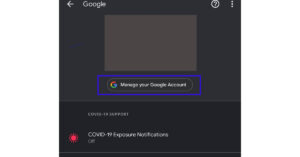 Step 4 – On the bottom of the personal information page, tap on the profile picture under the Basic info option.
Step 5 – Tap on the profile picture and select the remove option from there.
Step 4 – On the bottom of the personal information page, tap on the profile picture under the Basic info option.
Step 5 – Tap on the profile picture and select the remove option from there.
 With these steps, one can easily remove their Google profile picture or change it. For iOS devices, one needs to install Gmail to perform this method as the application does not come pre-installed in Apple devices.
For the latest gadget and tech news, and gadget reviews, follow us on Twitter, Facebook and Instagram. For newest tech & gadget videos subscribe to our YouTube Channel. You can also stay up to date using the Gadget Bridge Android App. You can find the latest car and bike news here.
With these steps, one can easily remove their Google profile picture or change it. For iOS devices, one needs to install Gmail to perform this method as the application does not come pre-installed in Apple devices.
For the latest gadget and tech news, and gadget reviews, follow us on Twitter, Facebook and Instagram. For newest tech & gadget videos subscribe to our YouTube Channel. You can also stay up to date using the Gadget Bridge Android App. You can find the latest car and bike news here. 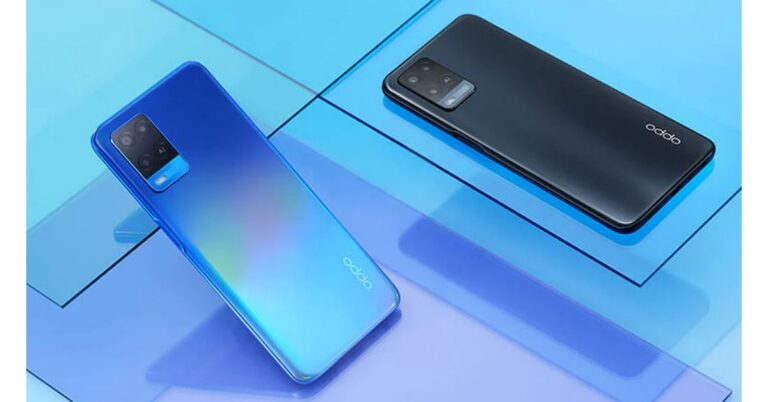


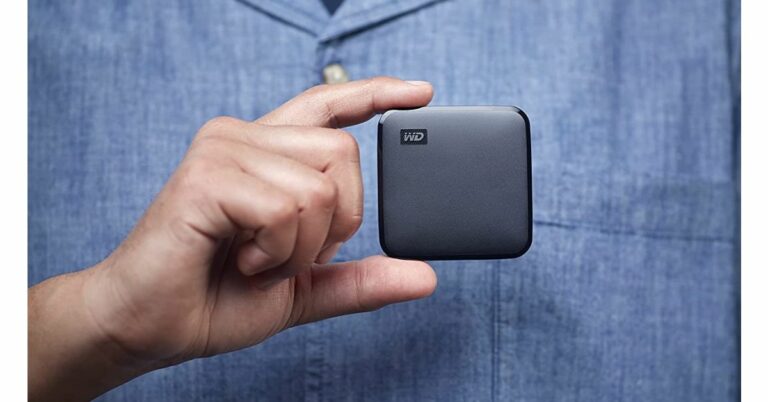

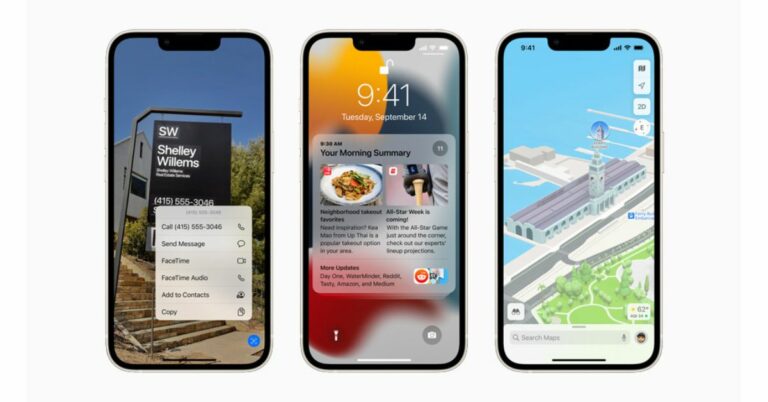



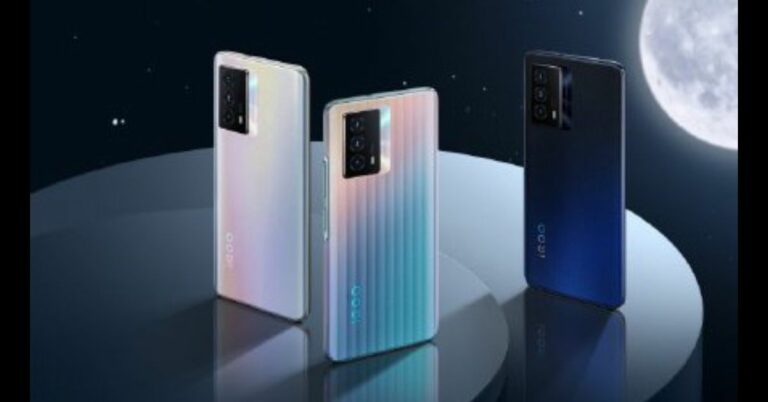
 Moreover, iQoo Z5 5G is tipped to be priced under the Rs 30,000 price segment in the country. The device has been listed on Amazon and the dedicated landing page confirmed the availability of the phone on the e-commerce platform.
For the latest gadget and tech news, and gadget reviews, follow us on Twitter, Facebook and Instagram. For newest tech & gadget videos subscribe to our YouTube Channel. You can also stay up to date using the Gadget Bridge Android App. You can find the latest car and bike news here.
Moreover, iQoo Z5 5G is tipped to be priced under the Rs 30,000 price segment in the country. The device has been listed on Amazon and the dedicated landing page confirmed the availability of the phone on the e-commerce platform.
For the latest gadget and tech news, and gadget reviews, follow us on Twitter, Facebook and Instagram. For newest tech & gadget videos subscribe to our YouTube Channel. You can also stay up to date using the Gadget Bridge Android App. You can find the latest car and bike news here. 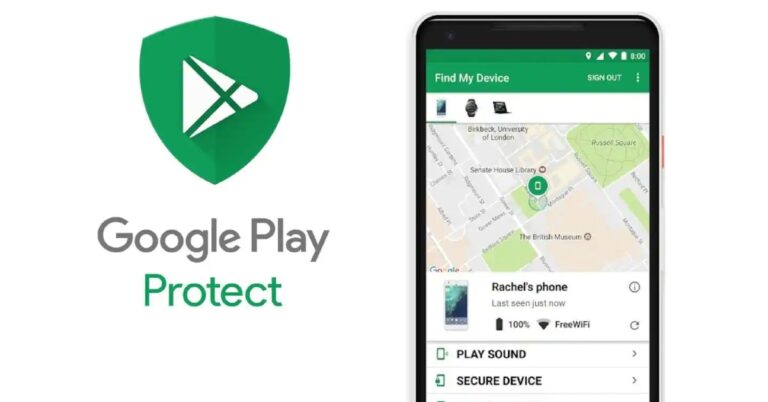
 Step 4 – Now one can either ring the phone or secure the device remotely, which will require account sign in. The location of the phone will be shown on the map.
Read Also: How to track your lost or stolen iPhone
Step 4 – Now one can either ring the phone or secure the device remotely, which will require account sign in. The location of the phone will be shown on the map.
Read Also: How to track your lost or stolen iPhone
 Step 3 – Tap on the “Your Timeline” option.
Step 4 – Now according to filter search you can see where your smartphone has been.
Step 3 – Tap on the “Your Timeline” option.
Step 4 – Now according to filter search you can see where your smartphone has been.
 With these options, it’s easy to retrieve your phone back if you do not have a third-party tracking application on your Android smartphone. With the help of Google’s Find My Phone features searching for your lost phone becomes as easy as a Google Search.
For the latest gadget and tech news, and gadget reviews, follow us on Twitter, Facebook and Instagram. For newest tech & gadget videos subscribe to our YouTube Channel. You can also stay up to date using the Gadget Bridge Android App. You can find the latest car and bike news here.
With these options, it’s easy to retrieve your phone back if you do not have a third-party tracking application on your Android smartphone. With the help of Google’s Find My Phone features searching for your lost phone becomes as easy as a Google Search.
For the latest gadget and tech news, and gadget reviews, follow us on Twitter, Facebook and Instagram. For newest tech & gadget videos subscribe to our YouTube Channel. You can also stay up to date using the Gadget Bridge Android App. You can find the latest car and bike news here.