



In This Article
 The Google Assistant can be used to set your routine tightly. The omniscient assistant can help you to remind you when is your next appointment or on Monday or maybe tomorrow making you prepare everything in advance. Another option to use Google assistant to increase your productivity is to mark your calendar with important dates on which you have your meetings or appointments. You can also ask the AI about the day how it is going to be, let’s say the weather or your plans for the day so that it does not coincide with your work planned out. Just say, “ok Google schedule a meeting” followed by date and time.
 By using the Assistance integration with “Google keep on Android” you can make memos of all important things. You command by saying “Hey Google, take a note” followed by the topic you want to make note of. The note will be saved into Keep and will be available whenever you need it next. Make sure you have the right setting to use this feature. You can do this by setting Keep as your preferred note-taking service on your phone. Go to the Google Home app and tap settings and find “Notes and lists” and select “Google Keep” from the list.
Read also: The new feature of Facebook’s Messenger will allow direct chat with WhatsApp users
By using the Assistance integration with “Google keep on Android” you can make memos of all important things. You command by saying “Hey Google, take a note” followed by the topic you want to make note of. The note will be saved into Keep and will be available whenever you need it next. Make sure you have the right setting to use this feature. You can do this by setting Keep as your preferred note-taking service on your phone. Go to the Google Home app and tap settings and find “Notes and lists” and select “Google Keep” from the list.
Read also: The new feature of Facebook’s Messenger will allow direct chat with WhatsApp users
 IFTTT stands for “If this, then that”. Using the IFTTT feature in Google assistance you can create your command. For example, if you command it is time to wake up then your automated coffee maker turns on. The function works with chains of conditional statements, which are called applets. The IFTTT can connect all your devices to activate your command.
For the latest gadget and tech news, and gadget reviews, follow us on Twitter, Facebook and Instagram. For newest tech & gadget videos subscribe to our YouTube Channel. You can also stay up to date using the Gadget Bridge Android App.
IFTTT stands for “If this, then that”. Using the IFTTT feature in Google assistance you can create your command. For example, if you command it is time to wake up then your automated coffee maker turns on. The function works with chains of conditional statements, which are called applets. The IFTTT can connect all your devices to activate your command.
For the latest gadget and tech news, and gadget reviews, follow us on Twitter, Facebook and Instagram. For newest tech & gadget videos subscribe to our YouTube Channel. You can also stay up to date using the Gadget Bridge Android App. 
In This Article


In This Article
 With the new update of FaceTime Apple is going to introduce SharePlay. This means the update will let Apple users share music viaApple music, share TV shows, or movies, and share the screen while using FaceTime. Apart from this FaceTime has many other upgrades such as spatial audio, new microphones modes separating the user’s voice from the background noise, and voices in FaceTime call sound feature. Another addition is the Portrait mode in FaceTime letting the users blur their background.
Read more: WWDC21: Everything you should know about the new iPadOS 15
With the new update of FaceTime Apple is going to introduce SharePlay. This means the update will let Apple users share music viaApple music, share TV shows, or movies, and share the screen while using FaceTime. Apart from this FaceTime has many other upgrades such as spatial audio, new microphones modes separating the user’s voice from the background noise, and voices in FaceTime call sound feature. Another addition is the Portrait mode in FaceTime letting the users blur their background.
Read more: WWDC21: Everything you should know about the new iPadOS 15
 The notification update in iOS 15 will bring a whole new experience with notifications. It has been redesigned adding the contacts profile photo for people and also a larger icon for apps and other notifications. A new notification summary gathers non-time-critical notifications for delivery at a more proper time. The on-device intelligence notifications are now categorised according to priority, with the user priority notification always at the top. For example, the critical messages that are more than important will not be missed if all the settings are right.
 The iOS 15 will remodel Safari for a better internet browsing experience on iPhones. The updates will make the Safari users surf the browser with one hand easily by making it easier to reach the controls. The Controls are expected to be brought at the bottom of the screen for convenience with a new compact tab that hangs at the bottom of the display. The tab can now easily be swiped and it also has a Smart search field. The iOS 15 update will also feature a voice search on Safari to enhance internet use, in the end enhancing productivity.
For the latest gadget and tech news, and gadget reviews, follow us on Twitter, Facebook and Instagram. For newest tech & gadget videos subscribe to our YouTube Channel. You can also stay up to date with the Gadget Bridge Android App.
The iOS 15 will remodel Safari for a better internet browsing experience on iPhones. The updates will make the Safari users surf the browser with one hand easily by making it easier to reach the controls. The Controls are expected to be brought at the bottom of the screen for convenience with a new compact tab that hangs at the bottom of the display. The tab can now easily be swiped and it also has a Smart search field. The iOS 15 update will also feature a voice search on Safari to enhance internet use, in the end enhancing productivity.
For the latest gadget and tech news, and gadget reviews, follow us on Twitter, Facebook and Instagram. For newest tech & gadget videos subscribe to our YouTube Channel. You can also stay up to date with the Gadget Bridge Android App. 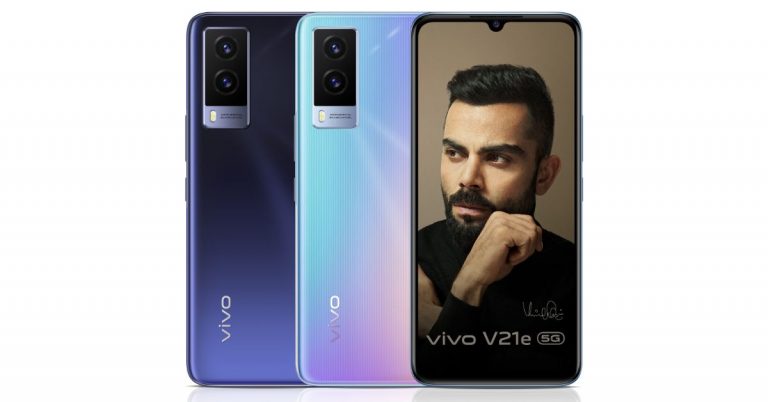
 Vivo V21e 5G tech specs
Vivo V21e 5G features a 6.44-inch full-HD+ AMOLED display offering 1,080×2,400 pixels of resolution. The device runs on Funtouch OS 11.1 based on top of Android 11 out of the box. The handset is powered by an octa-core MediaTek Dimensity 700 SoC paired with Mali G57 GPU for graphics. The mobile phone will come in a single 8GB of LPDDR4x RAM that comes with software extension support of up to 3GB and 128GB of storage. The storage can be expanded up to 1TB using a microSD card.
In terms of imaging, Vivo V21e 5G features a dual camera set up on the back of the phone that includes a 64-megapixel primary sensor with an f/1.79 aperture and a secondary 8-megapixel sensor ultra-wide-angle with an f/2.2 aperture. For taking selfies there is a 32-megapixel sensor on the front having an f/2.0 aperture.
The 5G ready phone packs a 4,000mAh battery with support for 44W fast charging. According to the company, it can charge from zero to 72 percent in just 30 minutes. There is dual-band Wi-Fi, 5G, LTE, Bluetooth, GPS, and a USB Type-C port in terms of connectivity. There is an in-display fingerprint scanner along with face unlock, ambient light sensor, proximity sensor, accelerometer, gyroscope, and e-compass as sensors on the phone.
For the latest gadget and tech news, and gadget reviews, follow us on Twitter, Facebook and Instagram. For newest tech & gadget videos subscribe to our YouTube Channel. You can also stay up to date using the Gadget Bridge Android App.
Vivo V21e 5G tech specs
Vivo V21e 5G features a 6.44-inch full-HD+ AMOLED display offering 1,080×2,400 pixels of resolution. The device runs on Funtouch OS 11.1 based on top of Android 11 out of the box. The handset is powered by an octa-core MediaTek Dimensity 700 SoC paired with Mali G57 GPU for graphics. The mobile phone will come in a single 8GB of LPDDR4x RAM that comes with software extension support of up to 3GB and 128GB of storage. The storage can be expanded up to 1TB using a microSD card.
In terms of imaging, Vivo V21e 5G features a dual camera set up on the back of the phone that includes a 64-megapixel primary sensor with an f/1.79 aperture and a secondary 8-megapixel sensor ultra-wide-angle with an f/2.2 aperture. For taking selfies there is a 32-megapixel sensor on the front having an f/2.0 aperture.
The 5G ready phone packs a 4,000mAh battery with support for 44W fast charging. According to the company, it can charge from zero to 72 percent in just 30 minutes. There is dual-band Wi-Fi, 5G, LTE, Bluetooth, GPS, and a USB Type-C port in terms of connectivity. There is an in-display fingerprint scanner along with face unlock, ambient light sensor, proximity sensor, accelerometer, gyroscope, and e-compass as sensors on the phone.
For the latest gadget and tech news, and gadget reviews, follow us on Twitter, Facebook and Instagram. For newest tech & gadget videos subscribe to our YouTube Channel. You can also stay up to date using the Gadget Bridge Android App. 

 These helmets give users an interactive joystick control and boast a 6-axis triple image stabilization patented technology that lets users experience the showroom as if the users were physically there. At the moment the company is running a pilot in the Delhi-NCR region including Gurugram and Ghaziabad. Apart from parenting with car dealers the company has also started collaborating with two-wheeler brands and is currently available at Kawasaki and Honda Two Wheelers dealerships in Delhi-NCR.
 The users will be able to reserve newly launched cars, live pay for accessories and have them delivered and installed at their home.
Aside from this, the company has plans to expand its service to other stores, malls and shops for a virtual shopping experience.
For the latest gadget and tech news, and gadget reviews, follow us on Twitter, Facebook and Instagram. For newest tech & gadget videos subscribe to our YouTube Channel. You can also stay up to date using the Gadget Bridge Android App.
The users will be able to reserve newly launched cars, live pay for accessories and have them delivered and installed at their home.
Aside from this, the company has plans to expand its service to other stores, malls and shops for a virtual shopping experience.
For the latest gadget and tech news, and gadget reviews, follow us on Twitter, Facebook and Instagram. For newest tech & gadget videos subscribe to our YouTube Channel. You can also stay up to date using the Gadget Bridge Android App. 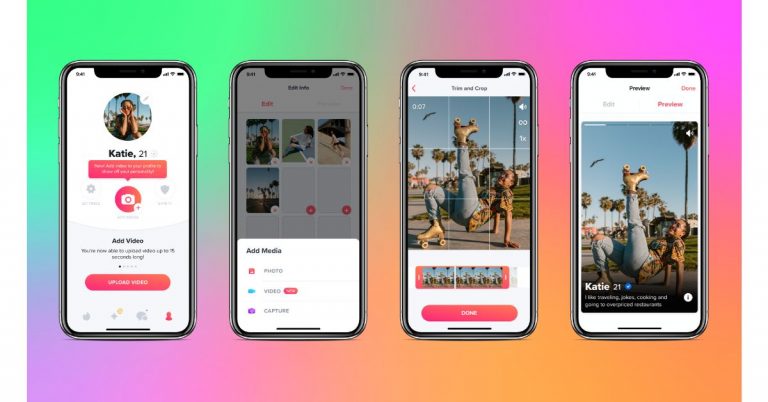
 To find out the right person, a new Explore section that allows members to navigate by interest, activity or content type. This new section within the app will let you discover matches who share similar Passions and explore different sides of Tinder-like Festival or Chef Mode.
 Hot Takes and other in-app events will be live in the Explore section when it launches later this summer. The Hot Takes section will give an opportunity to the members to chat with someone before they match in a low-stakes session of the feature’s namesake. As the timer counts down they’ll choose if they want to pair off as a match or let the timer expire to meet someone new. This space will allow them to chat before they match, letting their flirty banter be their first impression. This space will be open for all the members on Tinder every day from 6 p.m. until midnight local time.
For the latest gadget and tech news, and gadget reviews, follow us on Twitter, Facebook and Instagram. For newest tech & gadget videos subscribe to our YouTube Channel. You can also stay up to date using the Gadget Bridge Android App.
Hot Takes and other in-app events will be live in the Explore section when it launches later this summer. The Hot Takes section will give an opportunity to the members to chat with someone before they match in a low-stakes session of the feature’s namesake. As the timer counts down they’ll choose if they want to pair off as a match or let the timer expire to meet someone new. This space will allow them to chat before they match, letting their flirty banter be their first impression. This space will be open for all the members on Tinder every day from 6 p.m. until midnight local time.
For the latest gadget and tech news, and gadget reviews, follow us on Twitter, Facebook and Instagram. For newest tech & gadget videos subscribe to our YouTube Channel. You can also stay up to date using the Gadget Bridge Android App. 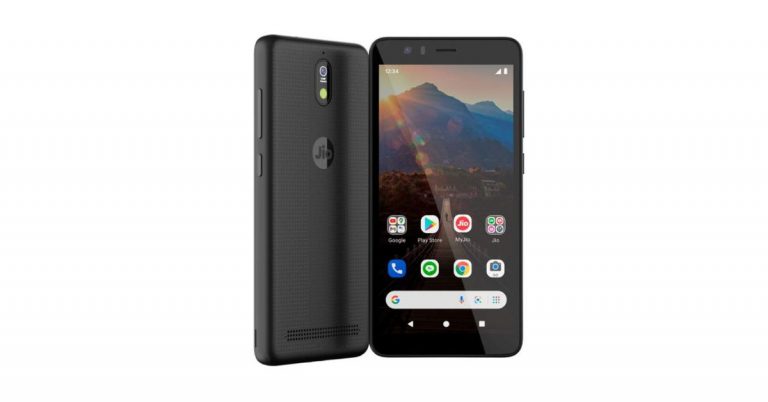
 Using App Actions, people can utilize their Google Assistant to deliver a great experience with many of the Jio apps on this device. In addition to asking for the latest cricket scores or a weather update, users can also ask Google Assistant to play music on JioSaavn or check their balance on My Jio.
Speaking about the joint effort, Sundar Pichai, CEO, Google and Alphabet said, “Our vision is to bring affordable access to information for Indians in their own language, to build new products and services for India’s unique needs, and to empower businesses with technology. I’m excited that today, we can announce the next steps in this vision, starting with a new, affordable Jio smartphone, created with Google. Our teams have optimized a version of our Android OS, especially for this device. It will offer language and translation features, a great camera, and support for the latest Android updates. It is built for India and it will open up new possibilities for millions of new users who will experience the internet for the very first time.”
For the latest gadget and tech news, and gadget reviews, follow us on Twitter, Facebook and Instagram. For newest tech & gadget videos subscribe to our YouTube Channel. You can also stay up to date using the Gadget Bridge Android App.
Using App Actions, people can utilize their Google Assistant to deliver a great experience with many of the Jio apps on this device. In addition to asking for the latest cricket scores or a weather update, users can also ask Google Assistant to play music on JioSaavn or check their balance on My Jio.
Speaking about the joint effort, Sundar Pichai, CEO, Google and Alphabet said, “Our vision is to bring affordable access to information for Indians in their own language, to build new products and services for India’s unique needs, and to empower businesses with technology. I’m excited that today, we can announce the next steps in this vision, starting with a new, affordable Jio smartphone, created with Google. Our teams have optimized a version of our Android OS, especially for this device. It will offer language and translation features, a great camera, and support for the latest Android updates. It is built for India and it will open up new possibilities for millions of new users who will experience the internet for the very first time.”
For the latest gadget and tech news, and gadget reviews, follow us on Twitter, Facebook and Instagram. For newest tech & gadget videos subscribe to our YouTube Channel. You can also stay up to date using the Gadget Bridge Android App. 
In This Article
 For your child’s safety to use technology in the right way possible Apple has featured parental control on the iPhone. By using the parental control system you can manage the content and privacy restrictions. There are other options as well such as blocking certain apps. Check out the steps to know to make the setting for parental controls. Read below.

 While browsing the internet your child needs a safety net. Apple iOS has options to limit the web content for your child’s safety. Use the settings to avoid unwanted access to the website. Here are the steps for the settings.

In This Article
 The first option available to delete all the duplicate blurry photos from your iPhone is from settings. Though it takes some amount of time it is safer and more secure. This option can be performed if there are not a lot of photos in your library. Here are the steps.
 This app uses a smart machine learning algorithm to remove all the duplicate or blurry images from your iPhone. Gemini has two options: Similar images and Clutter images. To remove clutter images you have to pay for the feature. However, you can still use similar options and delete the images for free. Here is the guide.

In This Article
 The first app on the list is Tripadvisor to make your travel better. Downloading the app on the phone during all your excursions will help you with many options from planning your trips to making a booking for a trip. The app gives you the best guidance for the vacation you are taking, where to stay, what to do, and where to eat. The advice is from trusted and honest travellers who have visited the place before and have completed the same journey
Download from Google Play Store
Read Also: Which one is better, eSIM or a regular SIM? Let’s find it out
The first app on the list is Tripadvisor to make your travel better. Downloading the app on the phone during all your excursions will help you with many options from planning your trips to making a booking for a trip. The app gives you the best guidance for the vacation you are taking, where to stay, what to do, and where to eat. The advice is from trusted and honest travellers who have visited the place before and have completed the same journey
Download from Google Play Store
Read Also: Which one is better, eSIM or a regular SIM? Let’s find it out
 The next app on the list for all your travel needs is Wanderlog which you can download from Play Store for free. The app will help with all your travel plans, even if it is a road trip or a group trip. The app provides a lot of travel solutions for your adventure and it is the easiest to use. On the app, you can search for flights, hotels, and the most happening locations in the place. The app also lets you view plans on your travel map and map your route for travel.
Download from Google Play Store
Read Also: In Pictures: Microsoft’s new office in Noida, India inspired by Taj Mahal looks like a 5-star hotel
The next app on the list for all your travel needs is Wanderlog which you can download from Play Store for free. The app will help with all your travel plans, even if it is a road trip or a group trip. The app provides a lot of travel solutions for your adventure and it is the easiest to use. On the app, you can search for flights, hotels, and the most happening locations in the place. The app also lets you view plans on your travel map and map your route for travel.
Download from Google Play Store
Read Also: In Pictures: Microsoft’s new office in Noida, India inspired by Taj Mahal looks like a 5-star hotel
 The Triplt app is one of the best travel apps available. Triplt lets you gather all your scatter inbox into a single itinerary and makes that travel more organised that you can also access offline. The app also syncs all your travel plans to your phone calendar and has the option to share it with your travel partner for more convenience. Check out the app for your travel needs.
Download from Google Play Store
The Triplt app is one of the best travel apps available. Triplt lets you gather all your scatter inbox into a single itinerary and makes that travel more organised that you can also access offline. The app also syncs all your travel plans to your phone calendar and has the option to share it with your travel partner for more convenience. Check out the app for your travel needs.
Download from Google Play Store
 This app on the list is for all travel needs when it comes to flights, hotels, and the care you will definitely want. The app is ideally made to give you the best deals on flights by comparing all the flight prices available. You can also book a flight directly after comparing the prices on the app to make your travel easier. Skyscanner also searches for amazing hotel discounts. Try the app when you plan your next trip.
Download from Google Play Store
This app on the list is for all travel needs when it comes to flights, hotels, and the care you will definitely want. The app is ideally made to give you the best deals on flights by comparing all the flight prices available. You can also book a flight directly after comparing the prices on the app to make your travel easier. Skyscanner also searches for amazing hotel discounts. Try the app when you plan your next trip.
Download from Google Play Store
 The next app is particularly for all travel in India. Holidify is the best travel app for your travelling in India and is the highest-rated trip planner app reviewed by many travel experts. The app helps you choose where to travel best with the best travel advice on the app. Holidify will help you find the cheapest and fastest way to reach anywhere in India.
Download from Google Play Store
The next app is particularly for all travel in India. Holidify is the best travel app for your travelling in India and is the highest-rated trip planner app reviewed by many travel experts. The app helps you choose where to travel best with the best travel advice on the app. Holidify will help you find the cheapest and fastest way to reach anywhere in India.
Download from Google Play Store
 The app has the world’s largest community of travel bloggers and travel planners. The app can give you more than just travel planning. It will let you discover a location, give information, hidden destinations, hotels, etc. The app also allows you to share your itineraries and travel stories and help you check for travel packages.
Download from Google Play Store
The app has the world’s largest community of travel bloggers and travel planners. The app can give you more than just travel planning. It will let you discover a location, give information, hidden destinations, hotels, etc. The app also allows you to share your itineraries and travel stories and help you check for travel packages.
Download from Google Play Store
 The app is unique in its own way by letting you connect to many hosts for your stay. The app will help you find the perfect place to stay on any day you require. On the app, you can message your host directly for convenience and ask for directions and all the assistance you will require. The app is new with many exciting ideas that you should definitely try once on your travel plans.
Download the app from the Play Store
The app is unique in its own way by letting you connect to many hosts for your stay. The app will help you find the perfect place to stay on any day you require. On the app, you can message your host directly for convenience and ask for directions and all the assistance you will require. The app is new with many exciting ideas that you should definitely try once on your travel plans.
Download the app from the Play Store
 Hopper is one of the best Android apps For travellers. You can use Hopper to track the price of flight tickets and book them at a time when they’re available at the lowest possible price. Hopper even sends you a notification when the price of a flight ticket drops from its normal fare. If you don’t want to book a ticket right away, you can freeze its price for a nominal fee. Apart from booking flight tickets, you can use Hopper to reserve hotel rooms and rent cabs.
Download from Google Play Store
Hopper is one of the best Android apps For travellers. You can use Hopper to track the price of flight tickets and book them at a time when they’re available at the lowest possible price. Hopper even sends you a notification when the price of a flight ticket drops from its normal fare. If you don’t want to book a ticket right away, you can freeze its price for a nominal fee. Apart from booking flight tickets, you can use Hopper to reserve hotel rooms and rent cabs.
Download from Google Play Store
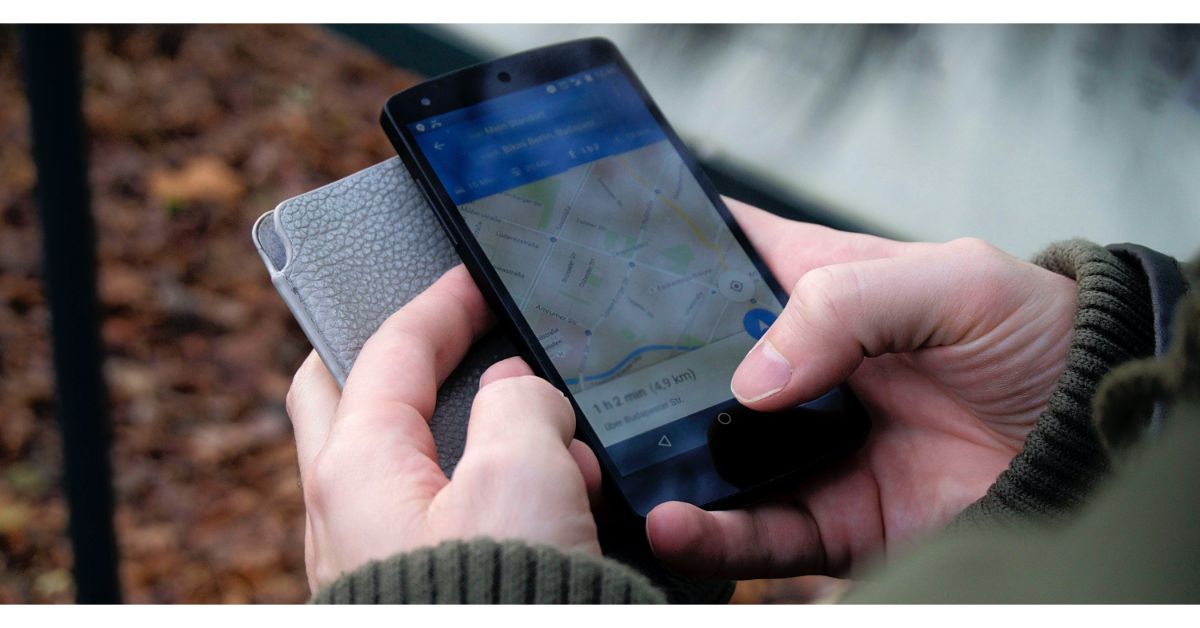 Google Maps is the quintessential navigation app, which makes it perfect for road trips. You can create custom routes on the map, ensuring that you hit all the off-the-highway places you want to see on the way to your destination. Apart from navigation, you can use Google Maps to find anything from public toilets to common local attractions around you. The app also allows you to save places in a custom list so you don’t forget about the places you want to see.
Download from Google Play Store
Google Maps is the quintessential navigation app, which makes it perfect for road trips. You can create custom routes on the map, ensuring that you hit all the off-the-highway places you want to see on the way to your destination. Apart from navigation, you can use Google Maps to find anything from public toilets to common local attractions around you. The app also allows you to save places in a custom list so you don’t forget about the places you want to see.
Download from Google Play Store
 Agoda is a comprehensive travel-planning app which lets you book anything from hotel rooms to flight tickets. You can choose from over 200 airlines (domestic and international) and 4,000,000 accommodations (which includes hotels, villas, and BnBs). The app’s search engine lets you compare flight prices in real-time. If you’re working on a budget, Agoda has helpful price filters which will help you find something within your range.
Download from Google Play Store
Read Also: Dell Technologies Introduces the Alienware x16 R2 in India
Agoda is a comprehensive travel-planning app which lets you book anything from hotel rooms to flight tickets. You can choose from over 200 airlines (domestic and international) and 4,000,000 accommodations (which includes hotels, villas, and BnBs). The app’s search engine lets you compare flight prices in real-time. If you’re working on a budget, Agoda has helpful price filters which will help you find something within your range.
Download from Google Play Store
Read Also: Dell Technologies Introduces the Alienware x16 R2 in India
In This Article
 The many features of Apple iOS 13 or later include the dark mode option to make the visuals on the screen better. The dark mode is designed especially for low-light screen use and also for night. Turning on the dark mode will make your notification and widgets bring about a darker hue. The option to use the features can be manually enabled o disabled or you can set it to automatic. Check the guide below to enable the dark mode on your iPhone.
 The dark mode is also featured on the iPadOS. The dark mode has been a desired feature by many users of Apple products. The dark theme not only results in saving your eyes but also maintains battery consumption. Look at the steps below to enable the dark mode on your iPad and to have another visual experience. Here is the guide.

There will be a system-wide dark mode with the redesigned app icon and rounded corners throughout Windows 11. The new operating system is likely to include a widget icon that is designed to slide out and provide quick access to news, weather, and other web content. New snap controls can be accessed from the maximize button on all apps. The company is said to have taken a lot of inspiration from Windows 10X which was scrapped later on. The users will be able to snap windows side by side or arrange them in sections on your desktop. Besides this, Microsoft is also said to be working on the new app store for windows. The company’s CEO Satya Nadella and chief product officer Panos Panay both will be presenting the new Windows operating system. The Chief commented, “Soon we will share one of the most significant updates to Windows of the past decade to unlock greater economic opportunity for developers and creators. I’ve been self-hosting it over the past several months, and I’m incredibly excited about the next generation of Windows.” Moreover, some product configuration keys were also spotted in the leaked Windows 11 build that carries titles of Windows 7 and Windows 8.1. This indicates that the next generations of Windows will be brought as a free upgrade for users on older Windows operating systems such as Windows 7 and Windows 8.1 other than WIndows 10.here's a first look at Windows 11. There's a new Start menu, rounded corners, a new startup sound, and more https://t.co/VDS08QPsl5 pic.twitter.com/OkCyX3TtmI
— Tom Warren (@tomwarren) June 15, 2021


In This Article


In This Article
 The first solar panel on the list is by LOOM, which has 390 Watts-24 volts. This solar panel is one of the best options to install on rooftops for a residential system since it generates 30-50% more power than average other solar panels. The frame of the panel has been tested super strong and with middle support for lasting life. It has 24 V battery charging and comes with a 19% Cell Conversion efficiency. When you buy the product the company Loom solar Pvt. Ltd provides you with a pre-installed junction box with diodes and also comes with a pair of pre-attached 1M wire & MC4 connectors.
Price: Rs 50,000
Buy on Amazon.in
The first solar panel on the list is by LOOM, which has 390 Watts-24 volts. This solar panel is one of the best options to install on rooftops for a residential system since it generates 30-50% more power than average other solar panels. The frame of the panel has been tested super strong and with middle support for lasting life. It has 24 V battery charging and comes with a 19% Cell Conversion efficiency. When you buy the product the company Loom solar Pvt. Ltd provides you with a pre-installed junction box with diodes and also comes with a pair of pre-attached 1M wire & MC4 connectors.
Price: Rs 50,000
Buy on Amazon.in
 The next on the list is the Microtek Solar panel with 150 Watts and 12 V. The solar panel has a multi-crystalline silicon solar cell type and the frame is made up of Anodised aluminum alloy with low iron glass. The main features are optimal output over decades with a very good low light response and it is suitable for on-grid as well as off-grid applications. The solar panel has been tested with a Damp heat test, thermal cycling test, and humidity freeze test. And best of all, the solar panel comes with a 25 years performance warranty.
Price: Rs 8,000
Buy from Amazon.in
Read more: OnePlus Nord CE 5G price tipped to start at Rs 22,999 in India, back panel design also revealed
The next on the list is the Microtek Solar panel with 150 Watts and 12 V. The solar panel has a multi-crystalline silicon solar cell type and the frame is made up of Anodised aluminum alloy with low iron glass. The main features are optimal output over decades with a very good low light response and it is suitable for on-grid as well as off-grid applications. The solar panel has been tested with a Damp heat test, thermal cycling test, and humidity freeze test. And best of all, the solar panel comes with a 25 years performance warranty.
Price: Rs 8,000
Buy from Amazon.in
Read more: OnePlus Nord CE 5G price tipped to start at Rs 22,999 in India, back panel design also revealed
 This solar panel is from a trusted Indian manufacturing brand having service centers across India. This Luminous solar panel has excellent low light performance, an Anti-reflective coating, and high torsion resistance against wind and snow loads. The features come with advanced EVA encapsulation, PID resistance technology to avoid power loss. The dimension of the solar panel is 1976x991x40 (mm). The best part of the panel is it gives you 25 years of performance warranty.
Price: Rs 25,000
Buy it from Amazon.in
Read also: Samsung Galaxy S21+ review: Very close to perfection
This solar panel is from a trusted Indian manufacturing brand having service centers across India. This Luminous solar panel has excellent low light performance, an Anti-reflective coating, and high torsion resistance against wind and snow loads. The features come with advanced EVA encapsulation, PID resistance technology to avoid power loss. The dimension of the solar panel is 1976x991x40 (mm). The best part of the panel is it gives you 25 years of performance warranty.
Price: Rs 25,000
Buy it from Amazon.in
Read also: Samsung Galaxy S21+ review: Very close to perfection
 The next solar panel is also from Loom solar panel having 190 Watts/12 Volt. This solar panel can withstand high wind and snow load and it also has a resistant aluminum frame which allows the panel to last for decades. It is compatible with both on-grid and off-grid inverters. The solar panels come with pre-installed diodes in the Junction box with a pair of 40-inch cables and MC4 connectors. The panel has been marked with A+grade and it also has anti-PID Mono cells having a conversion efficiency of 20%.
Price: Rs 20,000
You can buy it on Amazon.n
All of the above will be delivered to your doorstep by Amazon India. Do check with your local electrician before ordering and check which one will suit you best and is compatible with the inverter installed.
For the latest gadget and tech news, and gadget reviews, follow us on Twitter, Facebook and Instagram. For newest tech & gadget videos subscribe to our YouTube Channel. You can also stay up to date using the Gadget Bridge Android App.
The next solar panel is also from Loom solar panel having 190 Watts/12 Volt. This solar panel can withstand high wind and snow load and it also has a resistant aluminum frame which allows the panel to last for decades. It is compatible with both on-grid and off-grid inverters. The solar panels come with pre-installed diodes in the Junction box with a pair of 40-inch cables and MC4 connectors. The panel has been marked with A+grade and it also has anti-PID Mono cells having a conversion efficiency of 20%.
Price: Rs 20,000
You can buy it on Amazon.n
All of the above will be delivered to your doorstep by Amazon India. Do check with your local electrician before ordering and check which one will suit you best and is compatible with the inverter installed.
For the latest gadget and tech news, and gadget reviews, follow us on Twitter, Facebook and Instagram. For newest tech & gadget videos subscribe to our YouTube Channel. You can also stay up to date using the Gadget Bridge Android App.

In This Article
 Before the release of macOS 10.5 Catalina in 2019, the backup to your Mac was with the iTunes app. Now after macOS 10.5 released you can connect your iPhones with the USB cable and back up to your Mac swiftly. Check the steps below to back up your data to your Mac.
 After you have completed your backup process from your iPhone to your Mac. It is suggested to better encrypt your back for safety and security. The encryption process is easy and simple. Follow the steps below.

In This Article
 The first benefit of downloading this app is you can create your personal cookbook. It is very simple to search for recipes on the Web and add them to your personal list on the cookbook or edit them. Now you will never need a paper or memorise them. The app also features a Whisk Meal Planner for you to plan your meal in advance and the option is entirely free to access. The most interesting part is you can copy recipes from any website you have visited and liked the recipe. You can edit the copied recipe and add comments to it. Download the app and make cooking more exciting.
Download from Play Store
The first benefit of downloading this app is you can create your personal cookbook. It is very simple to search for recipes on the Web and add them to your personal list on the cookbook or edit them. Now you will never need a paper or memorise them. The app also features a Whisk Meal Planner for you to plan your meal in advance and the option is entirely free to access. The most interesting part is you can copy recipes from any website you have visited and liked the recipe. You can edit the copied recipe and add comments to it. Download the app and make cooking more exciting.
Download from Play Store
 Cheftap is the most organised coking app you will find. It allows you to use tags, search and sorting to help find recipes easily. You can easily take out the recipe from any blog and also use the app as a meal planner effortlessly. The app’s unique feature lets you create menus of food and meals you cook regularly. Over that, it also offers you to make copies of recipes and let you create your own. The meal planner of this app is of great help; it will help you track what is in stock and what is not. Use the app and enjoy cooking effortlessly.
Download the app on Play Store
Read more: Apple to unveil its online store in India on September 23
Cheftap is the most organised coking app you will find. It allows you to use tags, search and sorting to help find recipes easily. You can easily take out the recipe from any blog and also use the app as a meal planner effortlessly. The app’s unique feature lets you create menus of food and meals you cook regularly. Over that, it also offers you to make copies of recipes and let you create your own. The meal planner of this app is of great help; it will help you track what is in stock and what is not. Use the app and enjoy cooking effortlessly.
Download the app on Play Store
Read more: Apple to unveil its online store in India on September 23
 The app is like using social media for people who love cooking. You can have access to thousands of recipe ideas, and cooking experiences are shared by people on the app. You will never run out of recipes in this app. The app lets you browse a collection of recipes or search by specifics via ingredients, seasonal dishes, and more. The app will not just provide cooking knowledge but will let you share all your recipes with others.
Download it from Google Play Store
Read also: World Food Day: Top gadgets that will help you prepare great food at home
The app is like using social media for people who love cooking. You can have access to thousands of recipe ideas, and cooking experiences are shared by people on the app. You will never run out of recipes in this app. The app lets you browse a collection of recipes or search by specifics via ingredients, seasonal dishes, and more. The app will not just provide cooking knowledge but will let you share all your recipes with others.
Download it from Google Play Store
Read also: World Food Day: Top gadgets that will help you prepare great food at home
 The next best app for cooking is Tasty, which has some unique features. The app will not only give you access to more than 3,000 recipes but also be a coach with the all-new-step-step instruction mode. The app will also keep your screen awake during your cooking so you don’t have to check your phone often making it so convenient. Tasty lets you search the recipe on the app according to social plans, ingredients, dietary needs, difficulty, speed, cuisine, and more making your recipe search more easy and simple. Check out the app on Google Play Store.
Download it on the Play Store.
For the latest gadget and tech news, and gadget reviews, follow us on Twitter, Facebook and Instagram. For newest tech & gadget videos subscribe to our YouTube Channel. You can also stay up to date using the Gadget Bridge Android App.
The next best app for cooking is Tasty, which has some unique features. The app will not only give you access to more than 3,000 recipes but also be a coach with the all-new-step-step instruction mode. The app will also keep your screen awake during your cooking so you don’t have to check your phone often making it so convenient. Tasty lets you search the recipe on the app according to social plans, ingredients, dietary needs, difficulty, speed, cuisine, and more making your recipe search more easy and simple. Check out the app on Google Play Store.
Download it on the Play Store.
For the latest gadget and tech news, and gadget reviews, follow us on Twitter, Facebook and Instagram. For newest tech & gadget videos subscribe to our YouTube Channel. You can also stay up to date using the Gadget Bridge Android App. 


In This Article


 The new Clubhouse app designed mainly for podcasts has not yet featured a chat option but you can connect with users through Instagram or Twitter. When a user signs up to Clubhouse, it allows them to connect their Instagram or Twitter. When you link your primary Instagram and Twitter account the app gives an option to let you connect to other Clubhouse users. You can connect via social network accounts. Read the following steps to know how to check their social account and connect.