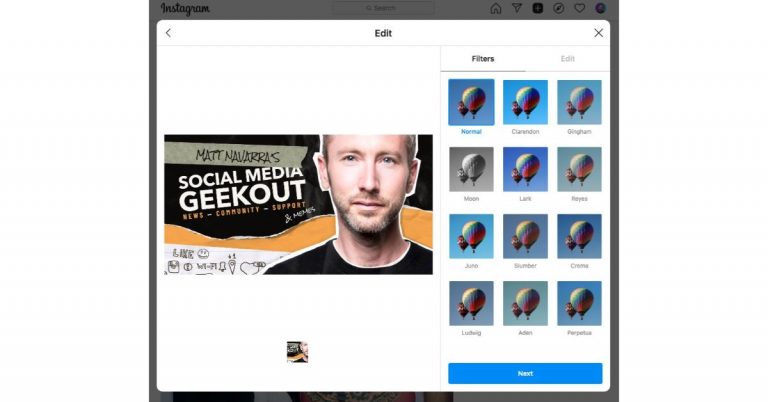
Instagram is testing a new feature on its platform that will allow users to publish posts from the desktop website on Mac as well as PC. A new toggle will allow doing so via Instagram’s desktop website.Last month a similar functionality was spotted being tested on the photo share sharing platform. But this time some screenshots have been shared to demonstrate the alleged upcoming feature to publish feed posts from the desktop version of the app. At the moment this is under testing and only a few numbers of users can have access to the first live test of this feature. Like we said before a new toggle + will appear on the upper right corner, just between the messenger and the explore button.According to Matt Navarra, some of the users including him have the new “+” icon in the top bar on the Instagram Account. When clicked the desktop version of Instagram allow the users to upload images or videos from their PC or Laptop to social media channel. In addition to this, you will also have the options to apply filters edit photos and videos before posting them just like you on the mobile application of Instagram. So possibly the parent company Facebook will soon launch this feature for the public in its next update.
Right now it only shows the options to publish photos and videos and does not offer the option for Stories or Reels uploads. But some also suggest that soon Instagram.com will facilitate IGTV upload on its platform. So if you are one of those lucky ones who is getting the options to upload posts via the desktop version of the social media channel then you can follow our step by step guide on How to post on Instagram from your PC or desktop.
First things first, sign in to Instagram.com
Now click on the “+” icon in the top bar
On clicking this icon it will enable you to upload images or videos directly from your PC hard drive.
Now select any image you like from your device.
Once the desired photo is selected you will get the option to crop the image size in four different option.
If you prefer to apply any filters the platform offers you a wide range to choose from.
You can also adjust the colours, brightness, saturation and others
In the case of uploading videos, once you have selected a video you will have the option to select the frame and toggle to turn on or off the sound.
Now you are done with editing the photos or video add caption, location and alt text and hit publish.
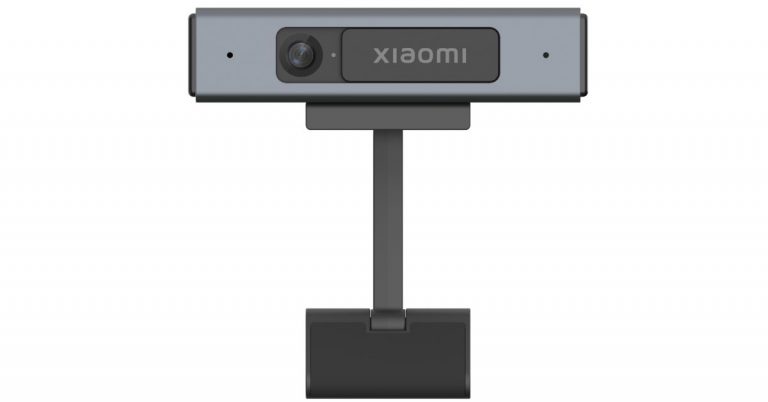
Xiaomi has officially launched its new offering which is basically a webcam for its TVs. Yes, Xiaomi has introduced Mi TV Webcam in India for personal virtual gatherings and professional business meetings. It offers a full-HD resolution and a 71-degree field of view. The new Xiaomi webcam comes integrated with far-field microphones that make it perfect to be mounted on a Smart TV for video calling purposes. Mi TV Webcam pricing and availabilityMi TV Webcam has been launched in India with a price tag of Rs 1,999. The device will be available for purchase via Mi.com, Mi Home and Mi Studio from June 28 onwards. With the launch, the company aims to take on the OnePlus TV Camera that was launched this month along with the new OnePlus Televisions at Rs 2,499.Mi TV Webcam specificationsMi TV Webcam is capable of capturing full-HD (1080p) videos at 25fps. The Xiaomi Webcam offers a 71-degree field of view and includes dual far-field microphones for better visual and sound quality. The microphones are said to capture crystal clear audio up to 4 meters, marking a safe and comfortable distance between the screen and the consumers. In addition to this, the device also includes an in-built 3D Image Noise Reduction algorithm to suppress noise in any image appearing in low light. The Mi TV Webcam by Xiaomi has a ‘Simple Plug and Play video’ mechanism that allows it to be mounted on a Television or a PC. It holds an adjustable magnetic base that allows one to attach the device seamlessly to any metal surface on your device for a firm grip. It comes with a 1.5m Removable USB Type C port that assures connectivity across all TVs, Laptops, and Desktops, and allows interchange between Type C and Type-A cables to connect. Moreover, you can make video calls from your Smart TV with Google Duo, however, it is compatible with not only Mi TVs or Redmi TVs but any Android TV and all laptops (Running Windows & macOS). Keeping in mind the user’s privacy the webcam comes with a physical shutter, adding an extra layer of safety offering complete security to users.
For the latest gadget and tech news, and gadget reviews, follow us on Twitter, Facebook and Instagram. For newest tech & gadget videos subscribe to our YouTube Channel. You can also stay up to date using the Gadget Bridge Android App.
WhatsApp has become one of the most reliable messaging apps available on all app stores. The app keeps updating new features to give the user a better experience. One of the best updates so far is the settings to control who can add you to WhatsApp groups. This can be really convenient for those groups you want to avoid and for those who want more privacy. Follow the below steps.
In This Article
Enable the Privacy setting on your Android phone:
Before enabling the settings to stop people from adding you to WhatsApp groups you have to make sure your phone has the following update. The WhatsApp app has to be updated to the latest version of 2.19.308 or higher. If you have updated to this latest version it is easy to limit the groups who can add you. Follow the steps to enable the settings.
Download the app if you have not or open it if you have downloaded it
On the homepage click on the vertical three-dot for options
Now go to Settings
And select Privacy
You have to press on Groups
On the Groups page, three options are given: Everyone, My contacts, Nobody.
Choose any of the options by clicking on the circle icon next to the option on the left
And if you choose the option Nobody then the admin of the group will have sent you a private invitation for you to join the group
Before you enable the privacy settings and limit the contacts of who can add you to the WhatsApp group you have to update the app first. Make sure you have updated the app to the latest version of 2.19.112 or higher. If you are sick of strangers or people you barely keep adding you on WhatsApp groups this setting is the best option available. Here are the steps to make the settings on the iPhone.
Open the app on your iPhone
And go to the setting by clicking the gear icon on the right bottom corner
From the setting page tap on Privacy
And select groups from the list
When you have a tap on groups three options will appear on the screen: Everyone, My contacts, Nobody
You can choose My contacts or Nobody
If you click on Nobody the person who wants to add you to a group has to send you a private invitation link for you to join the group.
And you can decide if you want to join the group or not
LinkedIn has been the most favoured social network platform for connecting professionals with each other. The Networking sites also allow you to grow your career by connecting you to other fellow professionals. But as everything comes to an end if you ever decide to delete your LinkedIn account, here are the steps you should follow. Check the guide below.
In This Article
Delete account from Setting and Privacy:
You can remove your account from the settings and privacy page. Remember, once you hit the delete button it means you will permanently close your account and remove all the information from the site. Read the steps below to delete the account.
There is another option for deleting your LinkedIn account. But this process is for deleting your Linkedin profile for a temporary period. This step is just in case if you want to get some time off from LinkedIn, but are not sure if you want to completely delete it or you know you will surely want to come back to LinkedIn again. The option is best suited if you do not want to start from scratch when you want to use a LinkedIn account again. Follow the steps below steps to temporarily disable your LinkedIn profile.
Open any internet browser and open the LinkedIn website
Enter your username and password and log in to your LinkedIn account
Go to the taskbar and click on the profile icon on the top right corner
From the drop-down menu select the Settings and privacy
Now click on Account
From the next window scroll down and search for the option Hibernating your LinkedIn account
You have to click on the Hibernating button
Now the page will show on screen: Everyone needs a break once in a while
Answer few questions before temporary disabling it
With the launch of Windows 11, the excitement of what will the update bring is always filled with curiosity. As far as we have researched the new Windows 11 will be benefiting all sorts of its users ranging from business users to gamers. The update will be programmed to make sure it is applicable for the future with competition from other popular OS. The new Windows will have a new exciting addition featuring all your Android apps to Windows now. The following are the top 5 features of Windows 11.
In This Article
An all-new Taskbar:
As mentioned, with the competition at risk from popular OS (Windows 11) is updating the taskbar, which will now be placed at the center. The icons on the taskbar placed at the center will help you access the apps easily and will be more attractive for visuals. The taskbar will also be resized by making it taller than before. The icons on the taskbar will now be rounded and new widgets to open multiple functions are also there. Another attractive feature is the Snap layout that will let you manage multiple screens at once.
Microsoft Teams as default
Solution 3: Install the latest version of Microsoft Teams (Image Credit: Microsoft)The new Windows 11 will bring built-in Microsoft teams to its update. This update is targeted at the business user since there is an increasing user base of Microsoft Teams. With the built-in Microsoft Teams, it will let you video call or schedule video meetings easily with its integrated feature. Conducting your business on the new Windows 11 will be just a few clicks away.
Read more: The next-generation Windows to be showcased on June 24: What to expect from Microsoft’s next major software update
Introducing Android Apps to Windows
The update will let the Android user be comfortable with Windows 11 use. The new update of Windows is integrating Android apps into Windows 11. For more clarity, you will be able to use your Android apps on your Windows computers by downloading the apps from the Amazon app store. After the download, you will be able to run your apps on the system. Your favourite and popular apps will be placed on the corner of the screen for easy access.
Game enhancements
Windows will also upgrade the gaming experience in Windows 11 OS. The update will integrate the Xbox Game pass and support DirectStorage for faster loading of the game on PC. The Auto HDR function has been brought to Windows PC, which has HDR compatible monitors.
Read also: How to remove the news and interest widget from the Windows 10 taskbar?
Voice control and more Gesture control
Windows 11 will give more control to gesture and voice controls. With haptic feedback pen-stylus use on the computers is designed to be better. The new keyboard function will work better and can be compared with smartphone keyboards, too. The update will bring cursor controls while holding down the space bar, swipe movement, and also an emoji menu. The voice command has also been enhanced and now you can dictate text and also delete text.
For the latest gadget and tech news, and gadget reviews, follow us on Twitter, Facebook and Instagram. For newest tech & gadget videos subscribe to our YouTube Channel. You can also stay up to date using the Gadget Bridge Android App.
Microsoft has officially announced the Windows 11 operating system. The new OS is now less complex and brings you simplicity. It’s modern, fresh, clean and beautiful. The whole interface has been redesigned from the new Start Button to sound, font and icons; everything has been refreshed with new placements and new features. So now the new generation of Windows has been announced and we have got all your questions answered here in this article from minimum system requirements to its availability and free upgrade.If you want to know what’s new with the fresh Windows 11 clickhere.
In This Article
Minimum system requirements for Windows 11
The all-new Windows 11 will require 1 gigahertz (GHz) or faster with 2 or more cores on a compatible 64-bit processor or System on a Chip (SoC). This will include Intel Core, Pentium, Evo chipsets, AMD’s Ryzen chipsets and others. In addition to this, the system is required to have 4GB of RAM and 64GB of storage. On the other hand, Windows 10 should at least have 1GB RAM and 16GB storage. The company also recommends that the system should have DirectX 12 compatible graphics / WDDM 2.x(Intel, Nvidia, and AMD) with a 9 inch bigger display with an HD resolution of 720P. Lastly Microsoft account and internet connectivity required for setup for Windows 11 Home. If your device does not meet these requirements, you may not be able to install Windows 11 on your device and might want to consider purchasinga new PC.
Windows 11 Availability and free upgrade
PCs with Windows 11 pre-installed will be available later this year from a broad section of retailers. The company has worked with Dell, HP, Lenovo, Samsung, Surface and others to ensure most PCs you can buy today will be ready for Windows 11 – across a variety of form factors and price points. Besides this Windows 11 will be available through a free upgrade for eligible Windows 10 PCs and on new PCs beginning later this year. The free upgrade will begin to roll out to eligible Windows 10 PCs sometime in Late November and continuing into 2022. Specific timing will vary by device. From next week the company will be releasing an early build of Windows 11 to the Windows Insider Program. To check if your current Windows 10 PC is eligible for the free upgrade to Windows 11, visitWindows.com todownload the PC Health Check app. One must also ensure that they have enough free storage space to install updates and you may need to check to see if your hardware is still supported by your Original Equipment Manufacturer (OEM).It should be noted that not all Windows 10 PCs that are eligible to upgrade to Windows 11 will be offered to upgrade at the same time. Once the rollout begins, you can check if it is ready for your device by going to Settings/Windows Updates.
For the latest gadget and tech news, and gadget reviews, follow us on Twitter, Facebook and Instagram. For newest tech & gadget videos subscribe to our YouTube Channel. You can also stay up to date using the Gadget Bridge Android App.
After PUBG along with 117 other apps were banned in India concerning privacy settings. Krafton, one of the developers of PUBG, has released its Indian version of the game dubbed Battleground Mobile India for Android users. The developers have promised to follow all laws and regulations made by the Indian government after the original version owned by Tencent company was banned in India. However, it has come to light that some data of the Battleground Mobile India players have been exchanged with a server in China, as claimed by a new report. Read below for everything you need to know. Clouds of allegations have been looming against Krafton, the developers of the Indian version of PUBG, which was recently introduced as Battleground Mobile India, and also shareholders in the Tencent company who owned the global version of PUBG. Battleground Mobile India can now be downloaded from the Play Store on any Android device in India.
Read more: Battlegrounds India Mobile: Everything we know so far and when will it officially launch?Image Courtesy: Battlegrounds Mobile India/FacebookThe game which was released recently came under the scanner again regarding the privacy of some of its downloads. According to a new report, some players are claiming in anonymity that the information sent and received in Battleground Mobile India APK is from China mobile communications servers in Beijing, the Tencent-run Proxima Beta in Hong Kong, as well as Microsoft Azure server in the US, Mumbai, and Moscow. The claim was reported to be backed up by testing through a data packet sniffer app on an Android phone and yielded the result that it was run by China Mobile Communication Corporation and the server is situated in Beijing China.
Read also: Facebook will release Instagram for kids under 13: Features and ConcernsPUBG Lite shuts down in India: Reasons and contradiction with the PUBG Mobile India (Image Credit: Xbox)With the undesired circumstances that are prevailing, Krafton has acknowledged the glitch. Kraton has commented that the organisation has come across the subject of the personal data of some of its users being shared. The company will contain the situation and has installed a small update in the game that will cut off the Chinese servers and prevent data sharing. Krafton has also made an official statement concerning the privacy of all its users. “Krafton is fully aware of the recent concerns over data handling in regards to BGMI early Access test. Similar to global mobile games and apps, Battleground Mobile India also uses third-party solutions to provide unique game features. In the process of using these solutions, some data was shared with third parties. Its privacy policy fully discloses that the app may transfer some user data, with the user’s consent to the privacy policy and choosing to migrate their accounts. No data has been shared in violation of the privacy policy.The data shared with third parties are only to enable certain features. In the meantime, Krafton will continue to closely monitor and protect any data being transferred to unexpected and restricted IP addresses before the official launch. -Krafton”Hopefully, with the update and the Krafton statement the privacy concern will be solved rapidly and the users can enjoy the game with no worries.
For the latest gadget and tech news, and gadget reviews, follow us on Twitter, Facebook and Instagram. For newest tech & gadget videos subscribe to our YouTube Channel. You can also stay up to date using the Gadget Bridge Android App.
Microsoft has officially lifted the curtains from its next iteration of the Windows operating system. The new Windows 11 now looks more refined and has been optimised for speed and efficiency. The whole OS has been redesigned and the new generation now lets you customise multiple desktops, personalize your widgets, snap to with snap grids, superior graphics, new themes and all new Microsoft store with Android apps. Also, Amazon has collaborated with Microsoft to bring Amazon Appstore to Windows users. Talking about the details first Microsoft has brought a more simplified Windows 11 design that will help users to be more productive. It looks less cluttered, fresh and contemporary. From the Start button to each icon has been redesigned and has been given a new space for more control. The Start Button has been moved to the centre from the screen’s corner edge, making it more discoverable. The new Microsoft Windows 11 now brings Snap Layouts, Snap Groups and Desktops to provide multitasking and to help you organize your windows and optimize your screen. The users will be able to create separate Desktops for each part of their life and customize them to their liking for instance Desktop for work, gaming or school. With the introduction of Chat from Microsoft Teams, you can instantly connect through text, chat, voice or video with all of your contacts, anywhere, across Windows, Android or iOS. The Chat has been integrated into the taskbar this will allow you to connect with friends and family through Teams, allowing you to instantly mute and unmute, or start presenting directly from the taskbar.For PC gamers, Windows 11 has more for you like superior graphics and Auto HDR. The company has put some latest gaming technology DirectX 12 Ultimate to provide immersive graphics at high frame rates. DirectStorage for faster load times and more detailed gameplay and Auto HDR for a wider, more vivid range of colours for a truly captivating visual experience. What’s more, with Xbox Game Pass for PC or Ultimate, gamers get access to over 100 high-quality PC games with new games added all the time. You can easily find people to play with, no matter if they’re playing on a PC or console.Next, Microsoft Windows 11 lets you personalise Widgets with a new personalized feed powered by AI and Microsoft Edge. This will bring you closer to the news and information. Now, you can open a similarly curated view directly from your desktop. When you open your personalized feed it slides across your screen like a sheet of glass so it doesn’t disrupt what you’re doing.The new Microsoft Store will bring more apps than before but will make it easier to search for apps, games, shows, movies with curated stories and collections. In addition to this, Microsoft Windows 11 has also brought third-party apps like Microsoft Teams, Visual Studio, Disney+, Adobe Creative Cloud, Zoom and Canva to the Microsoft Store. Moreover, for the first time, the company has also announced plans to bring Android apps to Windows later this year. The user will discover Android apps in the Microsoft Store. For this, the tech giant has collaborated with Amazon so that the users can download the apps like TikTok or Khan Academy Kids through the Amazon Appstore.Microsoft also assures just like the last generation of OS all the applications will work on Windows 11 withApp Assure, a service that helps customers with 150 or more users fix any app issues they might run into at no additional cost.Microsoft Windows 11 availabilityAccording to Microsoft, the new generations of Windows will be available through a free upgrade for eligible Windows 10 PCs and on new PCs beginning this holiday. You can check if your current Windows 10 PC is eligible for the free upgrade to the new one visWindows.com todownload the PC Health Check app. As per the software giant, the free upgrade will begin to roll out to eligible Windows 10 PCs this holiday and continuing into 2022. Next week the company is beginning an early build of Windows 11 to the Windows Insider Program.
For the latest gadget and tech news, and gadget reviews, follow us on Twitter, Facebook and Instagram. For newest tech & gadget videos subscribe to our YouTube Channel. You can also stay up to date using the Gadget Bridge Android App.
The AI technology-powered Google assistant can make our work more efficient. The Google Assistant can help you schedule meetings, take notes, or even command it to answer your calls and video meetings. The internet-based assistant can be put into various activities such as using it for routines so that you don’t miss anything important and also to set reminders. See the below guide
In This Article
Set routines and reminders:
The Google Assistant can be used to set your routine tightly. The omniscient assistant can help you to remind you when is your next appointment or on Monday or maybe tomorrow making you prepare everything in advance. Another option to use Google assistant to increase your productivity is to mark your calendar with important dates on which you have your meetings or appointments. You can also ask the AI about the day how it is going to be, let’s say the weather or your plans for the day so that it does not coincide with your work planned out. Just say, “ok Google schedule a meeting” followed by date and time.
Use it for important phones calls and video meetings:
While you are a handful completely in the zone while working you do not have to move or lift a finger. To increase productivity you can always activate Google assistant with your voice that is set to your voice recognition. For instance, for a phone call, you can say “hey google” call with the name on your contact. The internet-based phone call command works well when you need to make or answer an important call when your hand is full. You can make use of Google assistance for video meetings, maybe it is for answering your incoming video call by giving a command the video will emerge on your screen directly. You can set a reminder of an important video meeting that you had made. Also commanding Google assistant to make group video calls for that important meeting is very easy.
Read more: How can you make Amazon Alexa learn new tricks and commands?
Use it to take down notes and make To do list:
By using the Assistance integration with “Google keep on Android” you can make memos of all important things. You command by saying “Hey Google, take a note” followed by the topic you want to make note of. The note will be saved into Keep and will be available whenever you need it next. Make sure you have the right setting to use this feature. You can do this by setting Keep as your preferred note-taking service on your phone. Go to the Google Home app and tap settings and find “Notes and lists” and select “Google Keep” from the list.
Read also: The new feature of Facebook’s Messenger will allow direct chat with WhatsApp users
IFTTT integration:
IFTTT stands for “If this, then that”. Using the IFTTT feature in Google assistance you can create your command. For example, if you command it is time to wake up then your automated coffee maker turns on. The function works with chains of conditional statements, which are called applets. The IFTTT can connect all your devices to activate your command.
For the latest gadget and tech news, and gadget reviews, follow us on Twitter, Facebook and Instagram. For newest tech & gadget videos subscribe to our YouTube Channel. You can also stay up to date using the Gadget Bridge Android App.
The e-commerce website Flipkart is hosting Daily Trivia Quiz. Every day it brings a bunch of new questions for its users. By answering them correctly you can win exciting prizes. The questionnaire is based on questions related to general knowledge. Also, the users can win free vouchers and super coins, among other offers via the daily quiz. June 25 Flipkart Daily Trivia Quiz Answers has already gone live on its platform.
The participant should be at least 18 years old and should have a valid login ID. The Quiz is available on the mobile platform and not the web version. E-commerce conducts the quiz on daily basis and goes live at 12:00 AM IST and runs till 11:59 PM IST. The winners are announced within 15 days from the date of participation that can be viewed under the Gems/Rewards section in the app.
In This Article
How to participate in the Flipkart Daily Trivia Quiz
To participate download the Flipkart app on your phone. Then open the Flipkart app then head to Game Zone. Now click on the Daily Trivia Banner or search for Daily Trivia. Enter the game and answer all 5 questions with correct answers.
June 25 Flipkart Daily Trivia Quiz Answers
Question 1: Against which team did Virat Kohli smash his highest T20I score?
Answer:West Indies
Question 2: What is Queensland’s premier cricket ground in Brisbane affectionately known as?
Answer:The Gabba
Question 3: Who fell short by 7 runs to become 1st player with 3 triple tons in cricket?
Answer: Virender Sehwag
Question 4: Which of these international cricketers has not played for the Saurashtra team?
Answer:Murali Vijay
Question 5: Who will lead the Indian team in the 2020 U-19 World Cup in South Africa?
Answer: Priyam Garg
Daily the e-commerce website Amazon brings a quiz for its customers to win exciting new prizes every day on its platform. The Amazon Quiz can be played daily from 12 AM to 11:59 PM. Today you have a chance to win Rs 10,000 Amazon Pay Balance. All you need to do is answer all the questions correctly to win exciting prizes such as gadgets and Pay Balance.
Daily a new set of questions is presented in front of the participants that gives millions of people across the country to win exciting prizes. The quiz contains 5 questions that are based on general knowledge and current affairs. After clearing the daily quiz their name will be shortlisted for a lucky draw to select a winner. The results will be announced at the end of the month. To increase your chances of winning, daily Gadget Bridge updates all the answers to the questions so that you might win something by answering all the questions correctly. Check out today’s answers for the Amazon quiz to win Rs 10,000 Amazon Pay Balance.
June 25 Amazon Quiz Answers
Question 1: What first in India did Tvasta build at the IIT-Madras campus in collaboration with Habitat for Humanity’s Terwilliger Center for Innovation?
The answer is- 3D-printed house
Question 2: Which of these Indian companies features in the TIME 100 Most Influential Companies 2021?
The answer is- BYJU’S
Question 3: Yanbu Commercial Port is among the ancient ports on the Red Sea. In which country is it located?
The answer is- Saudi Arabia
Question 4: Identify this iconic French dish.
The answer is- Ratatouille
Question 5: What was the real name of this legendary boxer?
The answer is- Cassius Clay
Apple has introduced iOS 15 in June 2021 and our view is that it looks promising. The new update of iOS will bring many new features and gestures. The word on the update is that it will enhance productivity, you will be seeing an added upgrade to Face-time, update on reducing distraction, more AI on discovering information, and make-over of maps, weather, and wallet etc.Here Are some features that will better your productivity:
In This Article
Upgrade to FaceTime:
With the new update of FaceTime Apple is going to introduce SharePlay. This means the update will let Apple users share music viaApple music, share TV shows, or movies, and share the screen while using FaceTime. Apart from this FaceTime has many other upgrades such as spatial audio, new microphones modes separating the user’s voice from the background noise, and voices in FaceTime call sound feature. Another addition is the Portrait mode in FaceTime letting the users blur their background.
Read more: WWDC21: Everything you should know about the new iPadOS 15
Focus
The Focus mode will come in iOS 15 is going to be a new update on Apple iPhones bringing in the Apple creativity trademark. The functionality of the Focus feature is that it lets the users create their “Custom Focus”, which will organise all the apps that are allowed to notify them. Giving the iPhone customers to be productive when they are in the moment with no disturbance on the screen or from notification. Even Home Screen will only pop out the relevant apps and widgets based on the user’s context.
Read also: iOS 14.5 will be released next week: Features and method to install it
Redesigned Notifications:
The notification update in iOS 15 will bring a whole new experience with notifications. It has been redesigned adding the contacts profile photo for people and also a larger icon for apps and other notifications. A new notification summary gathers non-time-critical notifications for delivery at a more proper time. The on-device intelligence notifications are now categorised according to priority, with the user priority notification always at the top. For example, the critical messages that are more than important will not be missed if all the settings are right.
A new Safari:
The iOS 15 will remodel Safari for a better internet browsing experience on iPhones. The updates will make the Safari users surf the browser with one hand easily by making it easier to reach the controls. The Controls are expected to be brought at the bottom of the screen for convenience with a new compact tab that hangs at the bottom of the display. The tab can now easily be swiped and it also has a Smart search field. The iOS 15 update will also feature a voice search on Safari to enhance internet use, in the end enhancing productivity.
For the latest gadget and tech news, and gadget reviews, follow us on Twitter, Facebook and Instagram. For newest tech & gadget videos subscribe to our YouTube Channel. You can also stay up to date with the Gadget Bridge Android App.
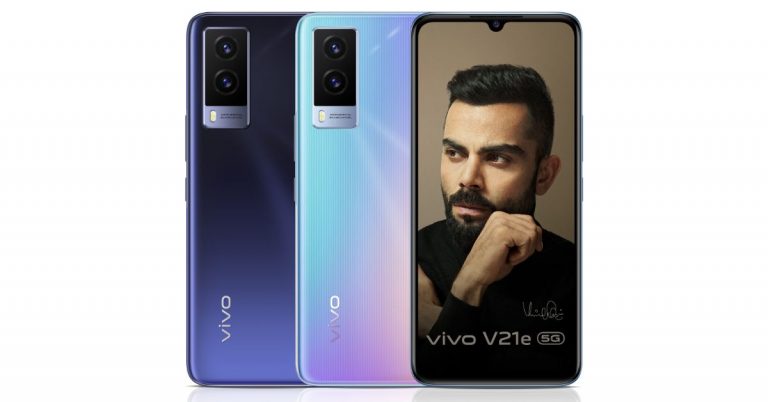
The Chinese smartphone company Vivo has officially unveiled its new smartphone in the Indian market. The Vivo V21e 5G is the latest addition to the Vivo V21 series in India. The device is powered by MediaTek Dimensity 700 SoC. There is a 4,000mAh battery onboard that is supported by 44W fast charging. Other key highlights of the smartphone include an AMOLED display, a dual rear camera setup and slim bezels on the sides; however, the chin area is relatively thicker from the side bezels.Vivo V21e 5G price and availabilityVivo V21e 5G has officially launched in India today. The company has introduced it in a single 8GB RAM with 128GB storage options. The device is priced at Rs 24,990 and is now available for purchase in the country. The phone is accessible via the Vivo India online store, Amazon, Flipkart, Bajaj Finserv EMI Store. Later on, it will be bought via TataCliq and Paytm.As an introductory offer, the company will be offering Rs 2,500 cashback to the HDFC Bank cardholders and on EMI transactions. This offer can be availed through the Vivo India store which is valid till June 30. Amazon will be providing a voucher valued at Rs 1,000 on the purchase of the smartphone.Vivo V21e 5G tech specsVivo V21e 5G features a 6.44-inch full-HD+ AMOLED display offering 1,080×2,400 pixels of resolution. The device runs on Funtouch OS 11.1 based on top of Android 11 out of the box. The handset is powered by an octa-core MediaTek Dimensity 700 SoC paired with Mali G57 GPU for graphics. The mobile phone will come in a single 8GB of LPDDR4x RAM that comes with software extension support of up to 3GB and 128GB of storage. The storage can be expanded up to 1TB using a microSD card.In terms of imaging, Vivo V21e 5G features a dual camera set up on the back of the phone that includes a 64-megapixel primary sensor with an f/1.79 aperture and a secondary 8-megapixel sensor ultra-wide-angle with an f/2.2 aperture. For taking selfies there is a 32-megapixel sensor on the front having an f/2.0 aperture.The 5G ready phone packs a 4,000mAh battery with support for 44W fast charging. According to the company, it can charge from zero to 72 percent in just 30 minutes. There is dual-band Wi-Fi, 5G, LTE, Bluetooth, GPS, and a USB Type-C port in terms of connectivity. There is an in-display fingerprint scanner along with face unlock, ambient light sensor, proximity sensor, accelerometer, gyroscope, and e-compass as sensors on the phone.
For the latest gadget and tech news, and gadget reviews, follow us on Twitter, Facebook and Instagram. For newest tech & gadget videos subscribe to our YouTube Channel. You can also stay up to date using the Gadget Bridge Android App.
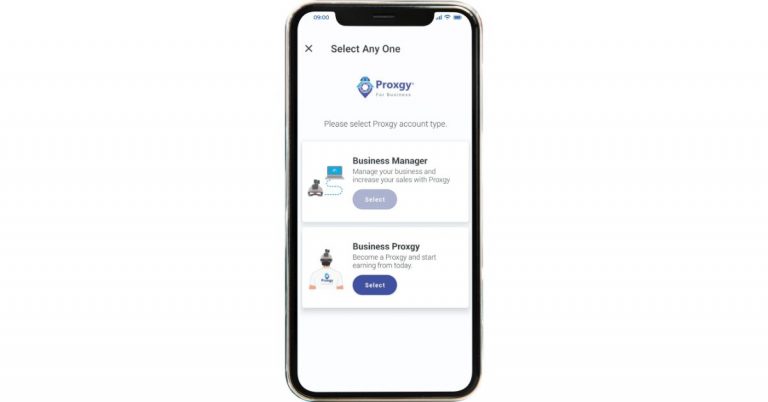
Proxgy Services an application that lets you connect virtually, travel shop and more. The application is available for both Android and iOS devices and it uses a network of on-site proprietary technology along with human interactions to give you an on-demand, immersive real-time experience. Now it has enabled live visit to car showrooms at the comfort of your home. This is a good addition to its services considering the ongoing COVID situation in the country.So if you are planning to buy a new car at the same time want to avoid visiting showrooms and store now you can visit, inquire, shop and request for a test drive of cars by live visiting car showrooms on the Proxgy android app. Proxgy has partnered with multiple renowned car brand showrooms including Ford, Honda, Hyundai, Renault, Skoda, Tata Motors, Volkswagen and Volvo.
How does this work?
So Proxgy is an app available on App Store as well as Google Play Store. This lets you connect with assisted sellers and experienced sales executives at these car dealerships in a real-time, live and on-demand manner. When connecting with a sales executive it gives you a 360 degree 3D interactive viewing of the showroom as they have been provided with Proxgy’s proprietary smart helmets. These helmets give users an interactive joystick control and boast a 6-axis triple image stabilization patented technology that lets users experience the showroom as if the users were physically there. At the moment the company is running a pilot in the Delhi-NCR region including Gurugram and Ghaziabad. Apart from parenting with car dealers the company has also started collaborating with two-wheeler brands and is currently available at Kawasaki and Honda Two Wheelers dealerships in Delhi-NCR. The users will be able to reserve newly launched cars, live pay for accessories and have them delivered and installed at their home. Aside from this, the company has plans to expand its service to other stores, malls and shops for a virtual shopping experience.
For the latest gadget and tech news, and gadget reviews, follow us on Twitter, Facebook and Instagram. For newest tech & gadget videos subscribe to our YouTube Channel. You can also stay up to date using the Gadget Bridge Android App.
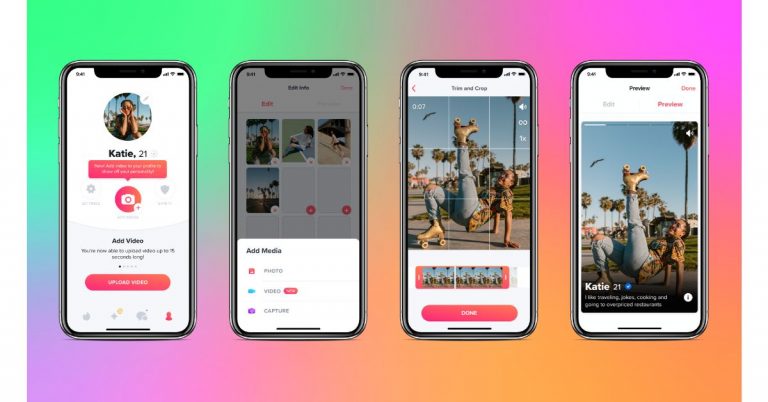
The online dating application Tinder is now rolling out new features to its platform to enhance the user experience. The dating app will be getting videos on their profile, Explore section and a Hot Takes section. So now the users will be able to add a video to their dating profiles. Additionally, they can find matches based on shared interests with the help of the Explore section.Not long ago, Tinder came up with the functionality to block your relatives or your ex-partner by their contact number to avoid awkwardly swiping. And now the dating app will be offering new features like videos in profiles, an Explore section, and a Hot Takes section.Commenting on the release of the new features, Jim Lanzone, CEO of Tinder said, “Tinder is overwhelmingly the most popular way to make meaningful new connections around the world” He further added, “Meanwhile, a new generation of daters is asking for more from us in the post-Covid world: more ways to show off their authentic selves, more ways to have fun and interact with others virtually, and more control over who they meet on Tinder and how they communicate. They also want to date in a less linear fashion, at their own pace, and with the hope that sparks might fly with someone unexpected. Today’s launch lays down the building blocks for all of this and more – a deeper, multi-dimensional experience that expands the possibilities of Tinder as a platform.”To provide a new social experience the user can add a video to their profiles. This feature will allow the users to express themselves through videos on their profiles. The company thinks that the video feature will allow the members to express themselves through videos in their profiles. To find out the right person, a new Explore section that allows members to navigate by interest, activity or content type. This new section within the app will let you discover matches who share similar Passions and explore different sides of Tinder-like Festival or Chef Mode. Hot Takes and other in-app events will be live in the Explore section when it launches later this summer. The Hot Takes section will give an opportunity to the members to chat with someone before they match in a low-stakes session of the feature’s namesake. As the timer counts down they’ll choose if they want to pair off as a match or let the timer expire to meet someone new. This space will allow them to chat before they match, letting their flirty banter be their first impression. This space will be open for all the members on Tinder every day from 6 p.m. until midnight local time.
For the latest gadget and tech news, and gadget reviews, follow us on Twitter, Facebook and Instagram. For newest tech & gadget videos subscribe to our YouTube Channel. You can also stay up to date using the Gadget Bridge Android App.
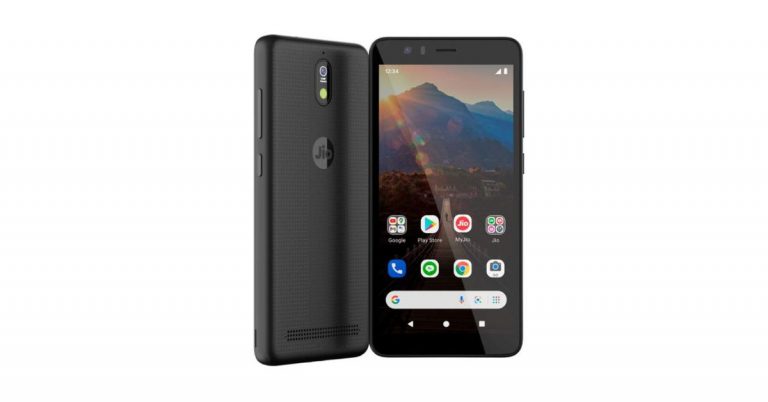
Reliance Jio is one of the largest telecom service providers in India. The company has just concluded the 44th Reliance Annual General Meeting (AGM) today in Mumbai. Last year the company gave an insight on what innovations it is working on and revealed its partnership with Google that will help the Jio Platforms expand further in India. At its today RIL AGM 2021 virtual event the firm has introduced a budget 4G smartphone called JioPhone Next that has been developed in collaboration with Google. The device is slated to bring a more customised Android experience for its users.JioPhone Next is the result of a binding partnership between Mukesh Ambani’s Reliance Jio partnership and Google. The tech giant invested Rs 33,737 crores for a 7.7 percent stake in Jio Platforms to help it expand further in India. As of now, the Indian Telecom company has just announced its low cost 4G smartphone. The pricing and the availability details are yet to be revealed. However, the device is said to hit the stores from September 10 on the occasion of Ganesh Chaturthi in the country. According to the company, the device will first debut in India and will make its way to other markets globally.At the Reliance AGM, the company also showcased the device which has a full touch display whereas the power and the volume rocker are positioned on the right side of the device.Announcing the phone, Mukesh Ambani, Chairman and Managing Director, Reliance Industries Limited said, ” JIO has truly democratized digital connectivity in India… by offering the highest quality, most affordable 4G broadband services in the world. Google and Jio teams have jointly developed a truly breakthrough smartphone that we are calling JioPhone Next. JioPhone Next is powered by an extremely optimized version of the Android operating system. While being ultra-affordable, the JioPhone Next is packed with cutting-edge features like the Google Assistant, automatic read-aloud of screen text, language translation, smart camera with augmented reality filters and much more. This is testimony to a global technology company and a national technology champion working jointly to make a breakthrough product. The JioPhone Next will be available in the market from the auspicious date of Ganesh Chaturthi, 10TH SEPTEMBER, this year.The device will be featuring a smart camera and will support AI filters as well. The device has been designed by Google for Jio. In addition to this, the device will offer clearer photos at night and in low-light situations to HDR mode that brings out the wider colour and dynamic range in photos. Google has also partnered with Snap to integrate Indian-specific Snapchat Lenses directly into the phone’s camera, and we will continue to update this experience.JioPhone Next will also have support for the latest Android releases and security updates. With Google Play Protect built in the phone will stay protected from malware and other cyber threats. The users will be able to listen to any content on your phone screen by tapping the ‘Listen’ button. Users who might not be able to read content in their language, with a tap of a button, can now translate what’s on their screen and even have it read back to them in their language.Using App Actions, people can utilize their Google Assistant to deliver a great experience with many of the Jio apps on this device. In addition to asking for the latest cricket scores or a weather update, users can also ask Google Assistant to play music on JioSaavn or check their balance on My Jio.Speaking about the joint effort, Sundar Pichai, CEO, Google and Alphabet said, “Our vision is to bring affordable access to information for Indians in their own language, to build new products and services for India’s unique needs, and to empower businesses with technology. I’m excited that today, we can announce the next steps in this vision, starting with a new, affordable Jio smartphone, created with Google. Our teams have optimized a version of our Android OS, especially for this device. It will offer language and translation features, a great camera, and support for the latest Android updates. It is built for India and it will open up new possibilities for millions of new users who will experience the internet for the very first time.”
For the latest gadget and tech news, and gadget reviews, follow us on Twitter, Facebook and Instagram. For newest tech & gadget videos subscribe to our YouTube Channel. You can also stay up to date using the Gadget Bridge Android App.
Monitoring your child with the parental control option is the best way to track your child’s iPhone for safety. Children can be at times mischievous. It is safer to control the settings on their iPhones to be safe and secure. Here are some of the ways to track your child’s iPhone for safety purposes.
In This Article
Using Parental Controls on iPhone: On a child’s iPhone
For your child’s safety to use technology in the right way possible Apple has featured parental control on the iPhone. By using the parental control system you can manage the content and privacy restrictions. There are other options as well such as blocking certain apps. Check out the steps to know to make the setting for parental controls. Read below.
Content and Privacy restriction
Open the iPhone screen lock or the screen if there is no lock
Now find Setting and tap on it
Select Screen time
Now “turn on screen time”
Click continue and choose press “this is my child iPhone”
Now on Downtime, you can set the screen time
Next, you can go to the App limit page and set the app limit and the time amount
Search the Content & privacy page and you can create a passcode that is different from any passcode on the phone
While browsing the internet your child needs a safety net. Apple iOS has options to limit the web content for your child’s safety. Use the settings to avoid unwanted access to the website. Here are the steps for the settings.
Use the gear icon and you can open the settings on the iPhone
After that, you have to navigate to the Screen time options
Now you can Press on the Content & Privacy restrictions
And then make sure you find the Content restriction button
Next search for Web content
On the Web Content page, there are options: Unrestricted Access, Limit Adult Websites, and Allowed Website only
You can choose one according to the setting you need
There are also other options you can further make below: Always allow and Never allow
You can use those option to restrict a particular website and also only allow a particular website
Capturing stunning images is one of the best products of an Apple iPhone. No matter the iPhone’s model or series, it always takes beautiful photos. Getting nice pictures is one thing, another thing is the storage of those photos. They always need a lot of space in your iPhone’s memory. And all the duplicate or blurry photos on the storage take up the unnecessary space you will need to store those candids. Here is the guide to get rid of duplicate or blurry images.
In This Article
Remove the duplicate blurry photos manually:
The first option available to delete all the duplicate blurry photos from your iPhone is from settings. Though it takes some amount of time it is safer and more secure. This option can be performed if there are not a lot of photos in your library. Here are the steps.
Unlock your phone lock and open the screen
Open the Photo app
Carefully scroll down all images and find the one which is blurry and duplicate
Select the photos by long-pressing them until a blue tick comes at the bottom of the image
Now after selecting find the delete button with a Bin icon on the bottom right corner
And if you want to delete it permanently and free up more space: Go to recently deleted and try doing select all and delete it
Delete using a third-party app: Remo Duplicate Photo remover
The other possibility to remove the duplicate blurry images from your iPhone is by using a third-party app. The Remo app is recommended as it is a free app that can delete unnecessary photos. And also the app is simple and easy to use. Here is how you delete the duplicate blurry photos.
Download the app on your phone
Allow the access to your photos and it will start scanning: Duration of scanning depend on the amount of image on the library
After scanning the app will categorise the photo in two: Exact and Similar
Exact are identical copies and Similar are photos that look close to one another
Now Select the photos from each category with the tick and delete them using the button in the bottom right corner with the bin icon
This app uses a smart machine learning algorithm to remove all the duplicate or blurry images from your iPhone. Gemini has two options: Similar images and Clutter images. To remove clutter images you have to pay for the feature. However, you can still use similar options and delete the images for free. Here is the guide.
Download the app
Let the app scan your library photos
After the scan is complete under the Similar option
Travelling to a new place can make you forget stress. Exploring those places you read about or have heard about is always filled with excitement and is overwhelming. When you make that adventurous journey make sure you have some of these apps. The apps will not only guide you but also give the best options available around the vicinity. So, here are the top 10 Android apps for travellers.
In This Article
Tripadvisor
The first app on the list is Tripadvisor to make your travel better. Downloading the app on the phone during all your excursions will help you with many options from planning your trips to making a booking for a trip. The app gives you the best guidance for the vacation you are taking, where to stay, what to do, and where to eat. The advice is from trusted and honest travellers who have visited the place before and have completed the same journey Download from Google Play StoreRead Also: Which one is better, eSIM or a regular SIM? Let’s find it out
Wanderlog: Travel Itenary & Road Trip Planner
The next app on the list for all your travel needs is Wanderlog which you can download from Play Store for free. The app will help with all your travel plans, even if it is a road trip or a group trip. The app provides a lot of travel solutions for your adventure and it is the easiest to use. On the app, you can search for flights, hotels, and the most happening locations in the place. The app also lets you view plans on your travel map and map your route for travel.Download from Google Play StoreRead Also:In Pictures: Microsoft’s new office in Noida, India inspired by Taj Mahal looks like a 5-star hotel
Triplt: Travel Planner
The Triplt app is one of the best travel apps available. Triplt lets you gather all your scatter inbox into a single itinerary and makes that travel more organised that you can also access offline. The app also syncs all your travel plans to your phone calendar and has the option to share it with your travel partner for more convenience. Check out the app for your travel needs.Download from Google Play Store
Skyscanner: Flights, hotels, car hire
This app on the list is for all travel needs when it comes to flights, hotels, and the care you will definitely want. The app is ideally made to give you the best deals on flights by comparing all the flight prices available. You can also book a flight directly after comparing the prices on the app to make your travel easier. Skyscanner also searches for amazing hotel discounts. Try the app when you plan your next trip. Download from Google Play Store
Trip Planner: Travel India App by Holidify.com
The next app is particularly for all travel in India. Holidify is the best travel app for your travelling in India and is the highest-rated trip planner app reviewed by many travel experts. The app helps you choose where to travel best with the best travel advice on the app. Holidify will help you find the cheapest and fastest way to reach anywhere in India. Download from Google Play Store
Travel Planner App to Plan Trips by Tripoto
The app has the world’s largest community of travel bloggers and travel planners. The app can give you more than just travel planning. It will let you discover a location, give information, hidden destinations, hotels, etc. The app also allows you to share your itineraries and travel stories and help you check for travel packages. Download from Google Play Store
Airbnb: Vacation Rentals & Experiences
The app is unique in its own way by letting you connect to many hosts for your stay. The app will help you find the perfect place to stay on any day you require. On the app, you can message your host directly for convenience and ask for directions and all the assistance you will require. The app is new with many exciting ideas that you should definitely try once on your travel plans.Download the app from the Play Store
Hopper
Hopper is one of the best Android apps For travellers. You can use Hopper to track the price of flight tickets and book them at a time when they’re available at the lowest possible price. Hopper even sends you a notification when the price of a flight ticket drops from its normal fare. If you don’t want to book a ticket right away, you can freeze its price for a nominal fee. Apart from booking flight tickets, you can use Hopper to reserve hotel rooms and rent cabs.
Download from Google Play Store
Google Maps
Google Maps is the quintessential navigation app, which makes it perfect for road trips. You can create custom routes on the map, ensuring that you hit all the off-the-highway places you want to see on the way to your destination. Apart from navigation, you can use Google Maps to find anything from public toilets to common local attractions around you. The app also allows you to save places in a custom list so you don’t forget about the places you want to see.
Download from Google Play Store
Agoda
Agoda is a comprehensive travel-planning app which lets you book anything from hotel rooms to flight tickets. You can choose from over 200 airlines (domestic and international) and 4,000,000 accommodations (which includes hotels, villas, and BnBs). The app’s search engine lets you compare flight prices in real-time. If you’re working on a budget, Agoda has helpful price filters which will help you find something within your range.
Download from Google Play StoreRead Also:Dell Technologies Introduces the Alienware x16 R2 in India
Conclusion
These are the top 10 Android apps for travellers in 2024. Embarking on a road trip? Check out this article to know which gadgets you must carry with you. Think we missed out on an essential travel app? Let us know in the comments!
Till now the white screen, which releases blue light has been very common but the dark mode has arrived on Apple products. The visual experience is awful if you are working in a dark room with the blue light on, the screen is not healthy for the eyes also. Now you can use a dark display theme on your iPhone and iPad. Here are the steps to switch on the dark mode.
In This Article
Enable dark mode on iPhone:
The many features of Apple iOS 13 or later include the dark mode option to make the visuals on the screen better. The dark mode is designed especially for low-light screen use and also for night. Turning on the dark mode will make your notification and widgets bring about a darker hue. The option to use the features can be manually enabled o disabled or you can set it to automatic. Check the guide below to enable the dark mode on your iPhone.
Unlock your iPhone and go to settings
Find Display & Brightness
Now click on Dark with a tick under the appearance section
If you want to set it to automatic on the same page Toggle the automatic from the control center
For the automatic setting there some options you can use the Nightshift options or the Schedule options that you can set time to
After setting it to automatic you can control the dark mode by swiping up the screen from your home screen
From swipe-up, you can manage many functions from schedule to brightness levels
The dark mode is also featured on the iPadOS. The dark mode has been a desired feature by many users of Apple products. The dark theme not only results in saving your eyes but also maintains battery consumption. Look at the steps below to enable the dark mode on your iPad and to have another visual experience. Here is the guide.
For settings by voice, you can ask Siri to set the settings for you
Manually, open the screen lock and go to settings
There are two options to use dark mode: From the Control center and Display & Brightness
From Display & Brightness: Setting> Display & Brightness
Click on the tick for dark
You can also toggle for automatic is right below the tick for dark mode
And go to options below automatic toggle and set to the options given: Custom or Sunset to Sunrise
From Control Center: Settings> Dark Mode
You can tap on the Dark mode button to turn it on or off
Microsoft is all set to launch the next generation of the Windows update at the Microsoft Event. This is going to be a virtual event that will be hosted today via an online presentation. At the tech event today the software giant will be taking the wraps off Windows 11 that will succeed the existing Windows 10 operating system. The company will be showcasing the new interface and animations that will be coming to the new OS. Here is more in the story that you should know about just before the official announcement of Windows 11.How to Watch the Livestream of Microsoft Event?The Microsoft Event for the launch of the next generation of Windows will kickstart at 11 AM ESR that is 8.30 PM IST. The live stream link has gone live on the company’s official website so you can catch the event live there.What you can expect from today’s Windows 11 launch event?Ahead of the official announcement, a major leak has revealed the design and feature to come with the arrival of Windows 11. The users will get to see a whole new interface which will include a redesigned Start menu, app icons shifted to the centre of the taskbar and a more clear tray area. The app icon and the Start menu can either be moved to the centre of the taskbar or to the left side. The Live Tiles are said to be completely removed from the Start menu. In short, the interface will look more simplified with pinned apps and a lot more.
There will be a system-wide dark mode with the redesigned app icon and rounded corners throughout Windows 11. The new operating system is likely to include a widget icon that is designed to slide out and provide quick access to news, weather, and other web content.New snap controls can be accessed from the maximize button on all apps. The company is said to have taken a lot of inspiration from Windows 10X which was scrapped later on. The users will be able to snap windows side by side or arrange them in sections on your desktop.Besides this, Microsoft is also said to be working on the new app store for windows. The company’s CEO Satya Nadella and chief product officer Panos Panay both will be presenting the new Windows operating system. The Chief commented, “Soon we will share one of the most significant updates to Windows of the past decade to unlock greater economic opportunity for developers and creators. I’ve been self-hosting it over the past several months, and I’m incredibly excited about the next generation of Windows.”Moreover, some product configuration keys were also spotted in the leaked Windows 11 build that carries titles of Windows 7 and Windows 8.1. This indicates that the next generations of Windows will be brought as a free upgrade for users on older Windows operating systems such as Windows 7 and Windows 8.1 other than WIndows 10.
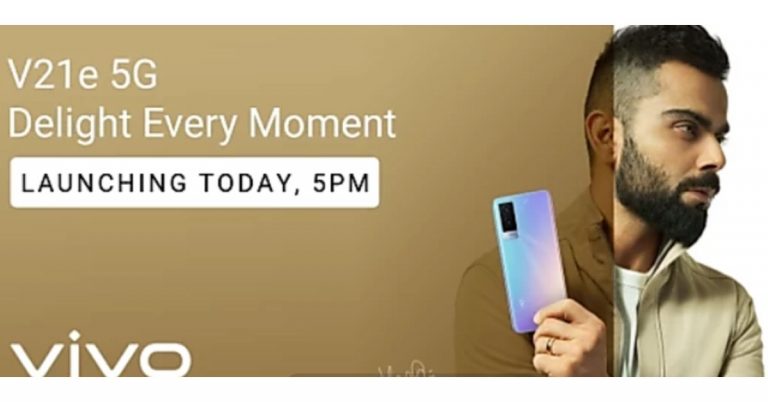
The Chinese smartphone company, Vivo, is all set to launch its new smartphone in its premium mid-range V-Series. The company will be introducing Vivo V21e 5G in the Indian market today as its second addition to the Vivo V21 line-up. The device also got listed on Flipkart ahead of the official announcement. As per the microsite the phone will be offered in an 8GB of RAM and to carry 44W fast charging support.As per the company Vivo V21e 5G will belaunchingin India at 5 PM in the evening today. Before arriving in the country the device was first launched in Malaysia a few months back with an octa-core Qualcomm Snapdragon 720G SoC paired with 8GB of RAM and 128GB of storage. Whereas a Geekbenck listing suggests that it would be carrying a MediaTek Dimensity 700 SoC that may be paired with 8GB of RAM. The Geekbench scores are 462 in single-core tests and 1,502 in multi-core. Moreover, it would also ship Android 11 out of the box. Rumours suggest that Vivo V21e 5G will be featuring a 6.44-inch Full HD+ AMOLED display and fuelled by a 4,400 mAh battery with 44W fast charging support. On the other hand, the dedicated microsite on Flipkart suggests that the upcoming smartphone will be 8GB RAM with 3GB expandable RAM and a 44W fast charging support. Additionally, there will be a 32-megapixel selfie camera and a dual camera set up on the back of the phone highlighted with a 64-megapixel primary sensor. It will also come in two colour options. To recall, in Malaysia it was made available in two different shades of Diamond Flare and Roman Black.Coming to the pricing, just ahead of the official launch, the Vivo V21e 5G price is tipped to be at Rs 24,990 for the 8GB RAM with 128GB storage which is on the higher side. In Malaysia, it was introduced at MYR 1,299 that translates to Rs 23,299.
For the latest gadget and tech news, and gadget reviews, follow us on Twitter, Facebook and Instagram. For newest tech & gadget videos subscribe to our YouTube Channel. You can also stay up to date using the Gadget Bridge Android App.
The e-commerce website Flipkart is hosting Daily Trivia Quiz. Every day it brings a bunch of new questions for its users. By answering them correctly you can win exciting prizes. The questionnaire is based on questions related to general knowledge. Also, the users can win free vouchers and super coins, among other offers via the daily quiz. June 24 Flipkart Daily Trivia Quiz Answers has already gone live on its platform.
The participant should be at least 18 years old and should have a valid login ID. The Quiz is available on the mobile platform and not the web version. E-commerce conducts the quiz on daily basis and goes live at 12:00 AM IST and runs till 11:59 PM IST. The winners are announced within 15 days from the date of participation that can be viewed under the Gems/Rewards section in the app.
In This Article
How to participate in the Flipkart Daily Trivia Quiz
To participate download the Flipkart app on your phone. Then open the Flipkart app then head to Game Zone. Now click on the Daily Trivia Banner or search for Daily Trivia. Enter the game and answer all 5 questions with correct answers.
June 24 Flipkart Daily Trivia Quiz Answers
Question 1: Who played the role of Rustom Billimoria in the 2017 film Rangoon?
Answer: Saif Ali Khan
Question 2: In whose honour did Pandit Ravi Shankar compose the Raga Mohankauns?
Answer: Mahatma Gandhi
Question 3: Which band released the iconic album Sgt. Pepper’s Lonely Hearts Club Band?
Answer: The Beatles
Question 4: Courteney Cox was offered which part before she played Monica in the TV show Friends?
Answer: Rachel
Question 5: Former Miss World Manushi Chhillar is all set to make her Bollywood debut opposite
Answer: Akshay Kumar
Today’s Amazon Quiz has gone live now and the e-commerce platform Amazon is giving you a chance to win Rs 20,000 Amazon Pay Balance. It can be played daily from 12 AM to 11:59 PM. Millions of its customers are trying their luck by participating in the daily quiz to win free gadgets as well as Amazon Pay Balance. All you need to do is log in to your Amazon app on your device and participate in today’s quiz.
Every day Amazon brings a fresh questionnaire that consists of five easy questions based on general knowledge and current affairs. By submitting correct answers the contestants can win exciting prizes such as iPhone X, iPhone Xs, Seagate HDD, GoPro Hero 8 Camera, LG Smartphones, Bose Sound Touch 20 Speakers, OnePlus 7T among others. One thing to note is that the quiz is not available for the desktop platform, you can only participate in the quiz from 12 AM to 11:59 PM via mobile app. After giving all the correct answers to the question you will get shortlisted for a lucky draw to select a winner. The results will be announced at the end of the month. Check out today’s answers for the Amazon Quiz to win Rs 20,000 Amazon Pay Balance.
June 24 Amazon Quiz Answers
Question 1: Which international organisation recently released ‘Immunization Agenda 2030’?
The answer is- WHO
Question 2: The ‘Plain of Jars’ is a mysterious megalithic archaeological landscape located in which country?
The answer is- Laos
Question 3: In which country is an AI powered drone project set up to detect and map the most important habitats of Maui and Hector dolphins?
The answer is- New Zealand
Question 4: This character was named in honour of whom?
The answer is- The second person to walk on the Moon
Question 5: This infamous Pripyat sign can be found at the entrance to which complex?
The answer is- Chernobyl
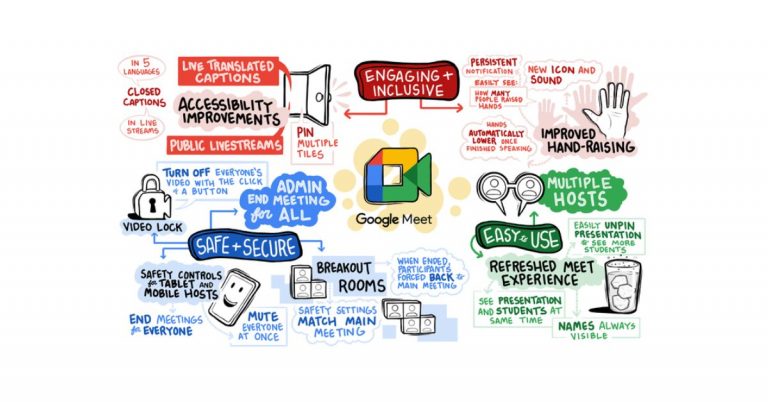
Recently Google rolled out an update for Google Meet offering more improvements to automatic hand lowering, better notification and others. In a new development, soon the video conferencing app users will get more education-focused features including controls for moderators and admins. Additionally Google Meet will also get YouTube live streams, live translated captions and more. Another important feature to arrive in the coming future is the Video lock that will allow the host to close the video for all the participants immediately.At its, The Anywhere School 2021 online event the tech giant Google announced to bring a lot of new education-focused features to Google Meet in its next update. According to the company, the teacher and co-teacher in a Classroom class will be meeting hosts in Meet by default, enabling multiple teachers to share the load of managing a class. The students will also be able to automatically become admitted to the meeting once the teacher arrives. Additionally, those not on the Classroom roster will have to “ask to join” and only the teacher(s) can allow them into the meeting. With these features, the company aims to make Google Classroom safer and more secure by design.All meetings, initiated from Meet or Calendar will get features like, host ends breakout rooms, participants will get a warning and then will be forced back into the main hosts can meeting. Moreover, the hosts can match the breakout room safety settings with the safety settings from the main meeting. To avoid distractions, hosts will be able to turn off everyone’s video at once with a “video lock.” Whereas hosts using tablets and mobile phones will get important meeting safety controls, like the ability to end meetings for everyone on the call and mute everyone at once. Giving more control to the admins, this month onward new settings to the Admin console will be added so that school leaders will be able to set policies for who can join their school’s video calls and whether people from their school can join video calls from other schools. However, the new addition will not affect the default experience and will only change if your admin changes the current setting.New settings to control whetherQuick access is enabled by default, and other settings to control whether people can use the chat in meetings. On the other hand, admins with Education Standard and Education Plus will be capable to end any meeting in their organization directly from the investigation tool, and Quick access will be automatically turned off so nobody can rejoin the meeting without the host present all at once.Google Meet users can also unpin your presentation or minimize their self-feed to see more of their students on the call and also differentlayout options to customize what you want to focus on. Whereas meetings not initiated from Classroom will soon start supporting multiple hosts, therefore, you will be able to choose co-hosts in meetings, and all meeting hosts will have access to safety controls. As we mentioned before Google will be improving the hand raise featurein Meet so that it is easier to notice and address raised hands and teachers can more easily see and hear who raised their hands. Google Meet also supports closed captions in five languages and the user will also be able to pin multiple tiles to customize what they want to focus on. For example, students can easily pin a sign language interpreter and the teacher so they can see both at the same time.Adding more features Google will also be introducing live translated captions to Meet so that you can listen to someone speaking one language and see real-time captions in another language. Also soon the users will be able to use closed captions during private live streams as well as most public live streams streamed right to YouTube so anyone outside of your institution can attend. This feature is ideal for school board meetings, school events and more. However, this will be released in beta this year and will be rolled out to customers with the Teaching and Learning Upgrade or Education Plus in early 2022.
For the latest gadget and tech news, and gadget reviews, follow us on Twitter, Facebook and Instagram. For newest tech & gadget videos subscribe to our YouTube Channel. You can also stay up to date using the Gadget Bridge Android App.


 Mi TV Webcam specifications



















 Vivo V21e 5G tech specs















 Hopper is one of the best Android apps For travellers. You can use Hopper to track the price of flight tickets and book them at a time when they’re available at the lowest possible price. Hopper even sends you a notification when the price of a flight ticket drops from its normal fare. If you don’t want to book a ticket right away, you can freeze its price for a nominal fee. Apart from booking flight tickets, you can use Hopper to reserve hotel rooms and rent cabs.
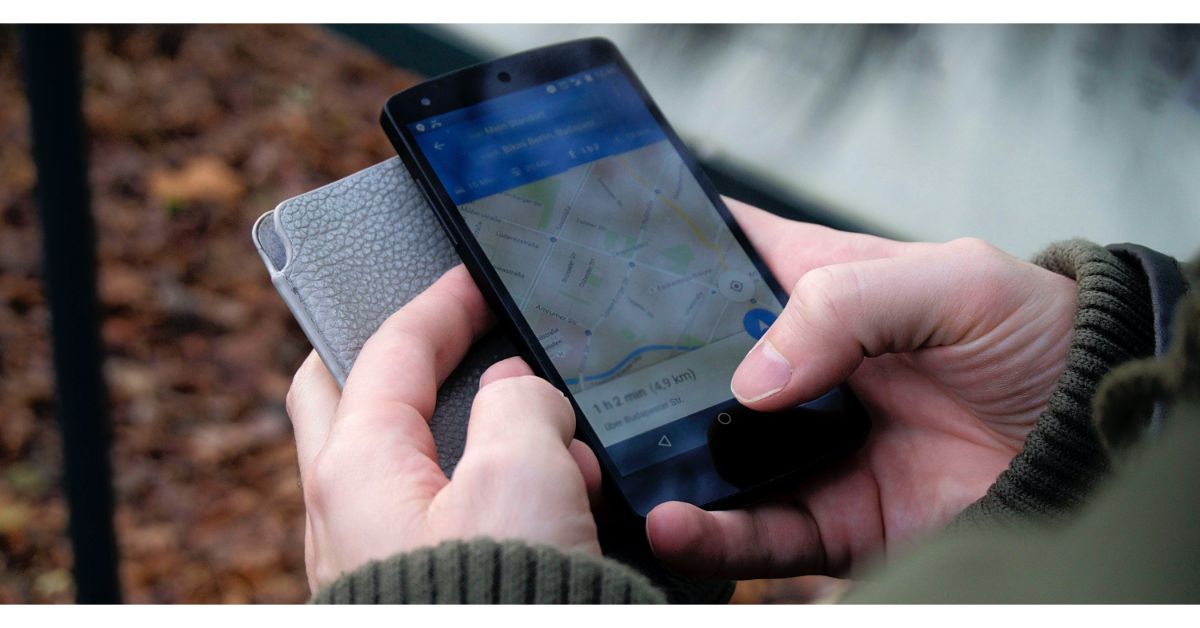 Google Maps is the quintessential navigation app, which makes it perfect for road trips. You can create custom routes on the map, ensuring that you hit all the off-the-highway places you want to see on the way to your destination. Apart from navigation, you can use Google Maps to find anything from public toilets to common local attractions around you. The app also allows you to save places in a custom list so you don’t forget about the places you want to see.
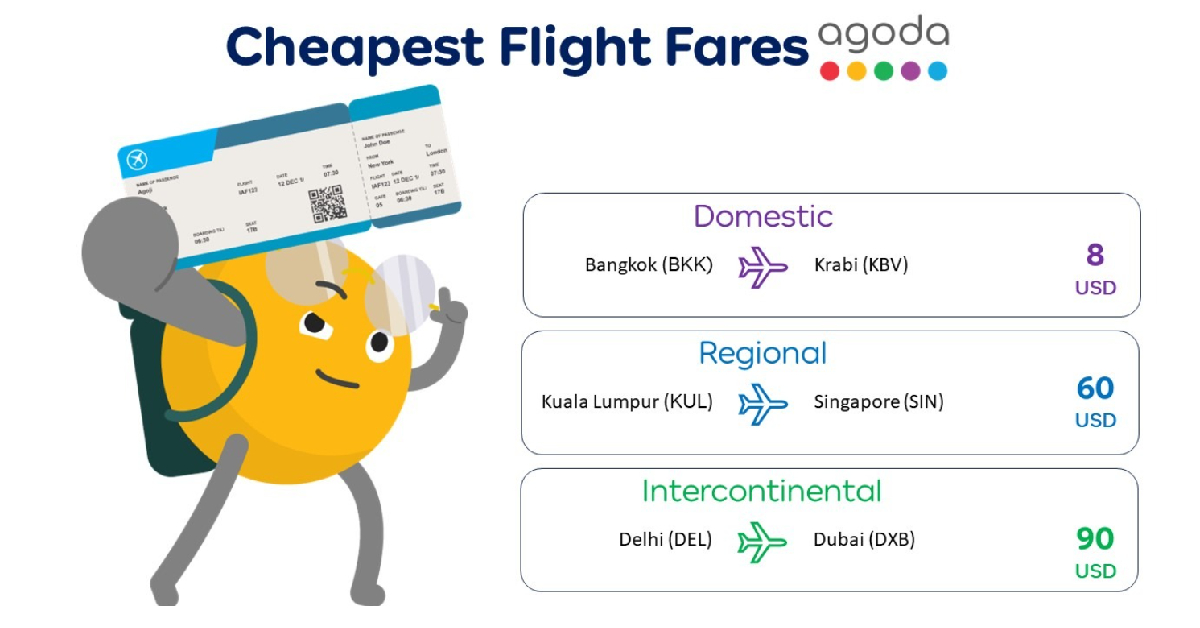 Agoda is a comprehensive travel-planning app which lets you book anything from hotel rooms to flight tickets. You can choose from over 200 airlines (domestic and international) and 4,000,000 accommodations (which includes hotels, villas, and BnBs). The app’s search engine lets you compare flight prices in real-time. If you’re working on a budget, Agoda has helpful price filters which will help you find something within your range.