In This Article
Playfit Slim review: Design
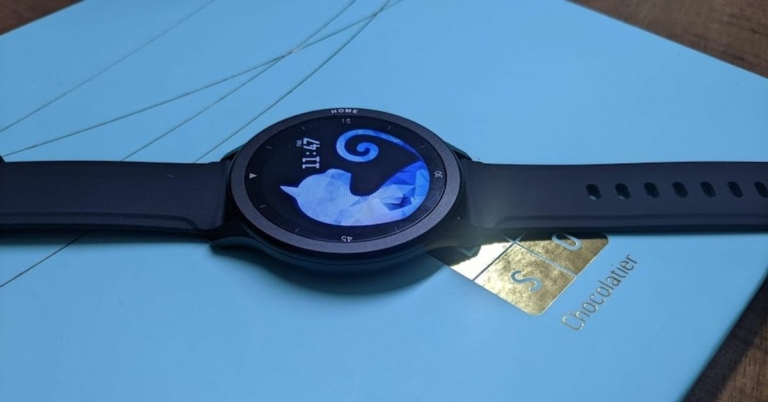
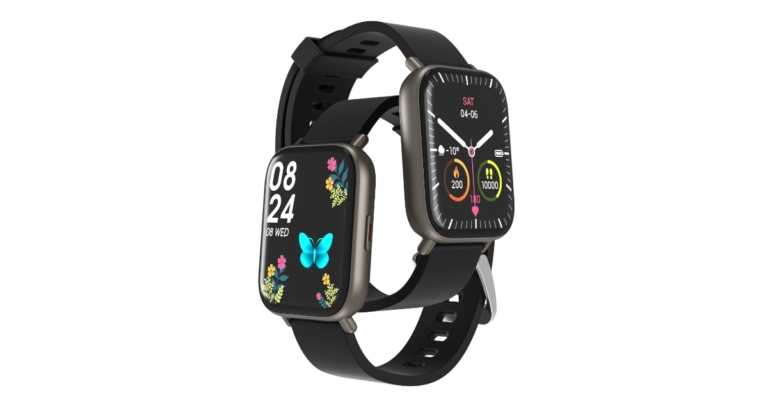
The look and feel of the Playfit Slim smartwatch is elegant and premium in spite of its pricing. The dial of the smartwatch is made of aluminium and it has a solid build. The device is available in Galaxy Black and Mystic Blue colours, and the one that we got for review was dressed in Black. The dial of the Playfit Slim watch is dominated by the 1.28-inch round IPS LCD display that is surrounded by thin bezels and has a 2.5D cover plastic. While the plastic helps in case the smartwatch drops, it is prone to getting fingerprints. Speaking about the display of the device, it has a decent level of brightness and clarity, and sunlight readability was good too. We didn’t face a problem using the smartwatch outside our house. The watch has silicone straps that were mostly comfortable to wear and didn’t cause any irritation to the skin. Coming back to the dial, on its right side, the Home button of the smartwatch is placed that can be used as the Power button, to wake up the watch, to go back to the previous screen and obviously, to go back to Home from any given function. On the back of the dial, the heart rate sensor and the charging slot are placed.
 Overall, we can say that although the Playfit Slim cannot be called a stunner, it does have a good design and it looks tasteful. It was too big for our wrist, but when we asked someone with a broader wrist to try it on, it didn’t look out of place. You would easily be able to wear the smartwatch to your work meetings as well as to a casual party.
Playfit Slim review: Performance
Now, let’s shed some light on the performance of the Playfit Slim smartwatch. The device runs RTOS or real-time OS, which is basically a lighter, trimmed down version of the regular software. Several other smartwatches that fall under the same price range also run the same operating system. Playfit Slim has a number of functions that it can perform including tracking steps and sleep, measuring heart rate and blood-oxygen levels, and it comes with 24 sports modes. The last one is easily one among its USPs, since there is array of sports that it helps in tracking including Outdoor Running, Swimming, Cycling, Table Tennis, Skipping, Badminton, Tennis, Walking, Climbing, Basketball, Football, Baseball, Volleyball, Cricket, Rugby, Hockey, Spinning, Dance, Gymnastics, Jumping Jacks, Boating, Sit-Up, Yoga, and Indoor Running. For connectivity, the smartwatch supports Bluetooth 5.0. To connect the smartwatch to your smartphone, you will first have to download the PlayFit app from Google‘s Play Store or iOS App Store, and then follow a few mentioned steps. We had no trouble setting up the watch and anyone who’s even slightly digital savvy would be able to do it without any help. As with all other smartwatches, you need to have your smartphone’s Bluetooth on at all times. Once you do this, you would be able to see all the menus on the smartwatch and the app will show you your stats too. One has the option of picking from several watch faces to customise the watch according to themselves.
The step tracking of the device seemed to be accurate at most times, unless we were driving, then it obviously got confused with the movement. But we don’t really count that as a con, as most other smartwatches have the same problem.
The sleep tracking and the heart rate tracking seemed accurate as well, but there were times when they didn’t show up on the app. We tried to measure our Blood-oxygen level too, and firstly we should mention that it would only happen if you would put an Oxymeter on your ring finger, or press the top of the same finger hard for a few seconds. But the good thing is, that result always matched the one on the Oxymeter, which is definitely a plus.
We also tried using the various sports modes on Playfit Slim, and we were impressed by the consistency with which it tracked our activity. If you are into sports or are a fitness freak, this smartwatch is definitely for you. One, it offers to track so many sports, and secondly, it does it well.
Last but not the least, the battery level of the smartwatch, which was touted by the company to be of 7 days, actually lasts. Although we didn’t use it for a whole 7 days, we noticed that even after 5 days of our usage, only 50% of the juice was gone. So it could have easily lasted us 7 days.
Pros
To connect the smartwatch to your smartphone, you will first have to download the PlayFit app from Google‘s Play Store or iOS App Store, and then follow a few mentioned steps. We had no trouble setting up the watch and anyone who’s even slightly digital savvy would be able to do it without any help. As with all other smartwatches, you need to have your smartphone’s Bluetooth on at all times. Once you do this, you would be able to see all the menus on the smartwatch and the app will show you your stats too. One has the option of picking from several watch faces to customise the watch according to themselves.
The step tracking of the device seemed to be accurate at most times, unless we were driving, then it obviously got confused with the movement. But we don’t really count that as a con, as most other smartwatches have the same problem.
The sleep tracking and the heart rate tracking seemed accurate as well, but there were times when they didn’t show up on the app. We tried to measure our Blood-oxygen level too, and firstly we should mention that it would only happen if you would put an Oxymeter on your ring finger, or press the top of the same finger hard for a few seconds. But the good thing is, that result always matched the one on the Oxymeter, which is definitely a plus.
We also tried using the various sports modes on Playfit Slim, and we were impressed by the consistency with which it tracked our activity. If you are into sports or are a fitness freak, this smartwatch is definitely for you. One, it offers to track so many sports, and secondly, it does it well.
Last but not the least, the battery level of the smartwatch, which was touted by the company to be of 7 days, actually lasts. Although we didn’t use it for a whole 7 days, we noticed that even after 5 days of our usage, only 50% of the juice was gone. So it could have easily lasted us 7 days.
Pros
- Solid build and good design
- Lasting battery
- Could be more feature-rich
- Sleep and heart rate data doesn’t reflect in the app at times





 If you are making a list of social media platforms and do not include Facebook then you are missing out on a big thing. Facebook is by far the most famous social media platform, it has its users from teenage school kids to retired old citizens. Everyone uses Facebook on a daily basis to get updates from the life of friends and family.
 Signal is a cross-platform centralised encrypted instant messaging service. With Signal you can send text messages and share photos and videos to your contacts. It is a very good alternative to Whatsapp.
 Initially,
  If you want to connect with people and do not waste time scrolling through memes, and videos then
  If you love Facebook and are also looking for a job then
  Line is another good alternative to
  If you love sharing each moment of your life on the go, then Snapchat is the social media platform you should be looking for, it allows users to send photos and
  If you are looking for some great ideas or inspiration for your upcoming project then you can also use Pinterest. It is an image sharing social media platform. You can add
 It is a microblogging and social media site that allows users to post multimedia and other content to a short-form blog. The network also supports HTML editing; if you’re skilled enough, you can completely customise the look and layout of your page.
 Weibo is Chinese Twitter. With more than 500 million users, it is one of the most popular social networks in the world. Most of the famous CEOs of
  TikTok is an app that does not need any kind of introduction, with its approach to short format video content it has taken the world under its massive wave. The social media app is banned in many countries including India, but if you have access to this app you can definitely use it.
 Discord is also another quite famous social media platform. It is widely popular among gamers as a lot of
  Telegram is an instant messaging platform that is somewhat similar to WhatsApp. But it also comes with a lot of cool features, you can create groups of more than 200 people on Telegram. It is also used to watch some exclusive video content. It is available for both Android and iOS
 It is one of the oldest social media platforms, before the rise of Facebook and Twitter this was the largest social media platform across the globe. The main focus of the platform is in music but you can also upload blogs on it as well.
  If you are bored of using Whatsapp then you can also check out viber, which is an instant messaging tool. You can use it to make free voice or video calls and send messages and it can be used on desktop as well.
 Skype is a web conferencing and social media platform that is quite popular. The platform also provides instant messaging functionality and you can use it to share texts, images, videos, and audio files. Skype was very popular and was synonymous to video calling before Zoom and
  It is also a good alternative to Whatsapp, it allows you to connect with people using your app ID. You can use it to send text messages or share photos and videos. It also supports voice and video calls. The app is also banned in some countries including India.
 Flickr is a popular photo sharing social media platform that allows users to share the photos and graphic designs. You can also join groups and connect with new people with shared interests. On Flickr users can share original, high-quality images on the platform or discover relevant images from other users.
 Twitch is a live streaming platform that is mostly used by games to live stream their gameplay videos. The platform has about 10 million monthly broadcasters. Users can interact with live streams from other gamers and comment on them.







 The Oodle Marketplace is an online marketplace based in California, US. Oodle is currently the largest classifieds aggregator, aggregating sites like eBay and ForRent. Oodle also has pretty much the same features as Craigslist, but it also serves as a social network. So you can add friends just like
  eBay is an American multinational
  There is no doubt that almost everyone is on Facebook, and Facebook has also enabled many of its users to buy and sell products more quickly and with more convenience and security than Craigslist.
  ClassifiedAds.com is a free classified ads website in which you can post an ad, browse through the listings, and contact sellers for free. ClassifiedAds.com, one of the oldest buy-and-sell sites, features thousands of listings in every category you could think of. You can get everything you can think of on this site.
 Locanto is also a great alternative for Craigslist, and it is a more streamlined version of it. You can post ads in nearly 60 countries worldwide, including the U.S., China, Canada, Vietnam, and many more. You can call this a one-stop shop for all of your needs. You can look for local events, jobs, cars, and real estate on this platform. The platform also offers many features and has a better-looking interface that is easy to use.
 Another great alternative for Craigslist is Geebo. The site is not as popular as eBay or Craigslist, but it is still a great place to buy and sell products online. The interface of the site is similar to that of Craigslist; hence, it is very easy to use for non-techie users as well.
  OfferUp is one of the best alternatives to Craigslist in the USA. It is one of the biggest marketplaces for the exchange of used goods. This includes clothing, furniture, toys, pet care items, vehicles, home goods, sporting utilities, and more. You can also look up services like lawn care, tutoring, driving lessons, home maintenance, and more. The website has a ‘free stuff’ section for users who want to get rid of their products as soon as possible. As of now, OfferUp is only operational in the United States of America.
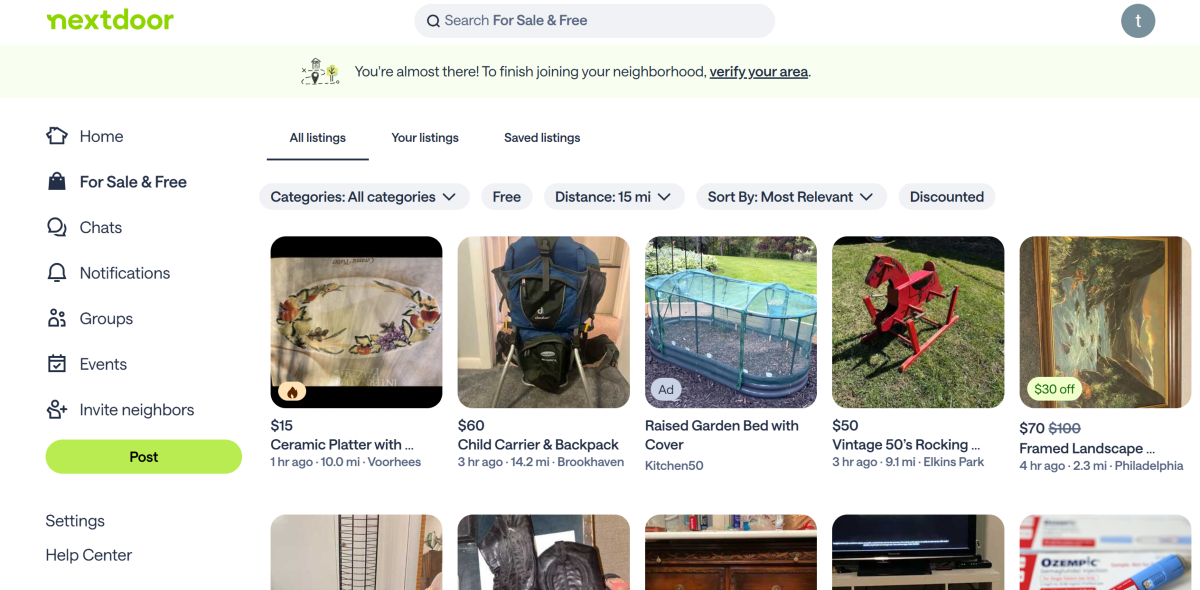 Nextdoor is a platform that links you to your neighbourhood community. You can use it to form connections, seek help about local matters, advertise services, or simply make friends around you. Its ‘For Sale & Free’ section is where the trading activity takes place. You can scroll through the products posted by people near you or browse categories like appliances, automotive, clothing and accessories, furniture, electronics, home decor, musical instruments, and more. If you need help with something specific, you can make a post about it.
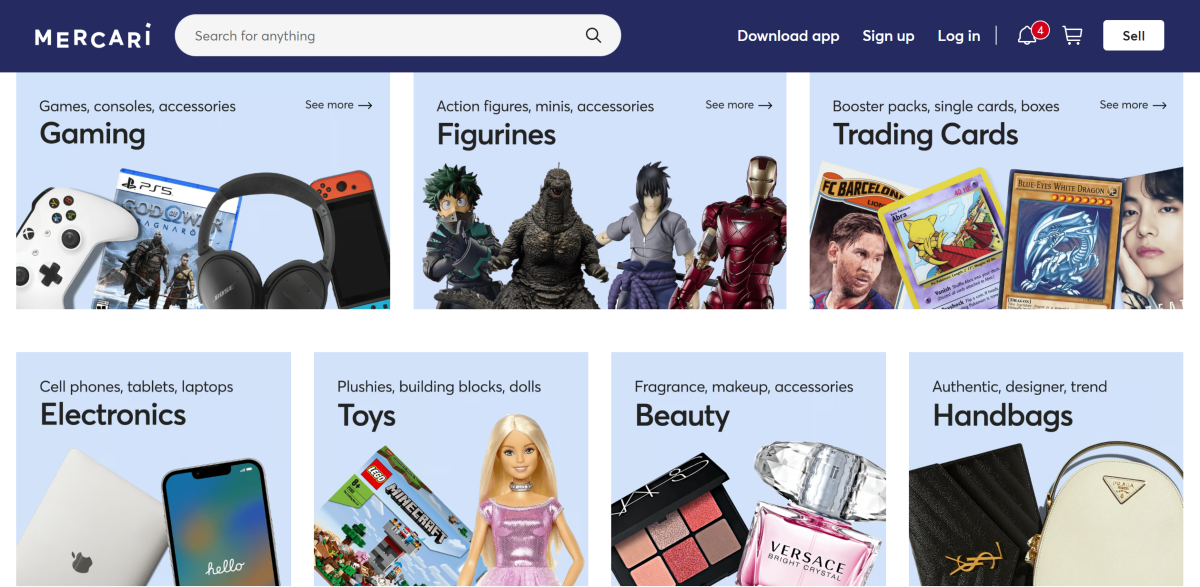 Mercari is a great marketplace for trading gaming and fandom-related stuff. The website has a separate section for trading cards. You can also look up gaming titles, action figurines, and other used merchandise on this website. Other than that, Mercari deals in toys, clothing, sporting utilities, tools, books, pet care stuff, cameras, smartphones, and more. What we like about Mercari is that the stuff listed on it is divided into distinct subcategories.
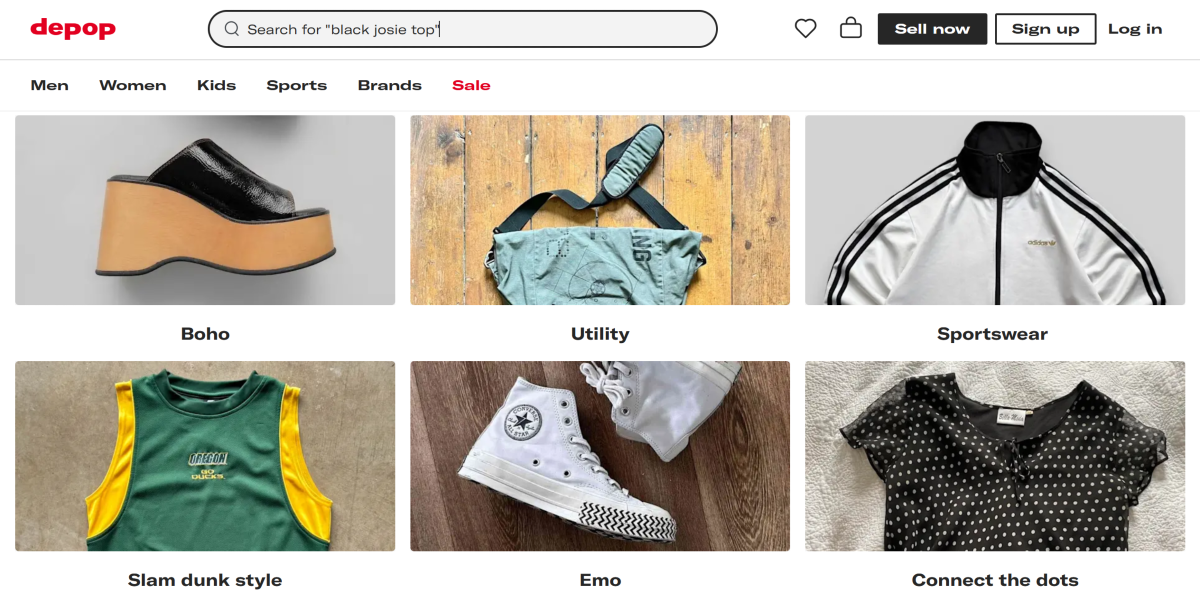 If you’re obsessed with staying in tune with the latest fashion trends, you need to check out Depop. One of the most popular platforms for used fashion goods, Depop makes it easy to catch all the items from a particular brand. If you like something, you can check out the seller’s profile to see the rest of their inventory. What separates Depop from other platforms in this list is its accessible and user-friendly layout and a richer collection of items.



 Now you might be thinking that Amazon is already in India right? Yes, it is in India and we know it. But there are still certain products that are not available on Indian Amazon so you can pick those products from Amazon.Com. According to the company’s website, it takes 9 to 12 business days for standard shipping orders. One big advantage of this store is that buyers will not have to pay shipping charges. So it’s just time to search on Amazon.Com and place your order. You can check out Amazon.Com by clicking
  eBay is an American multinational
  Macy’s is originally known as R. H. Macy & Co. Macy’s is one of the largest U.S. department store companies by retail sales with its 516 stores including 11 flagships stores. It also offers to ship products to India as well. So you can check out the website and look at the products for you and you will be able to get it delivered to your home within a few weeks of time. You can check out Macy’s from
  Newegg Commerce, Inc. is an online retailer of items including computer hardware and consumer electronics. It offers the best prices on







 While watching your favourite rom-com
  Apart from the ad-free experience you also get to experience the original content from YouTube. YouTube Originals is basically a collection of exclusive shows that are made by YouTube, and are only available on the platform. So, if you want to watch some exclusive content then you can also get YT Premium.
  If you can live with ads and do not want to pay extra for exclusive content, then YT Music Premium can be a deal maker for you. With YT Premium you also get YT
  If you live in an area where the internet connection is bad and you rely on offline content then also YT Premium can be a great option for you. With Premium, you can download videos in Full HD resolution and store them on your
  If the above benefits were not a deal maker for you then playing videos in the background can be. With the Premium subscription on YouTube, you also get the ability to play videos in the background. So now, you can enjoy your favourite




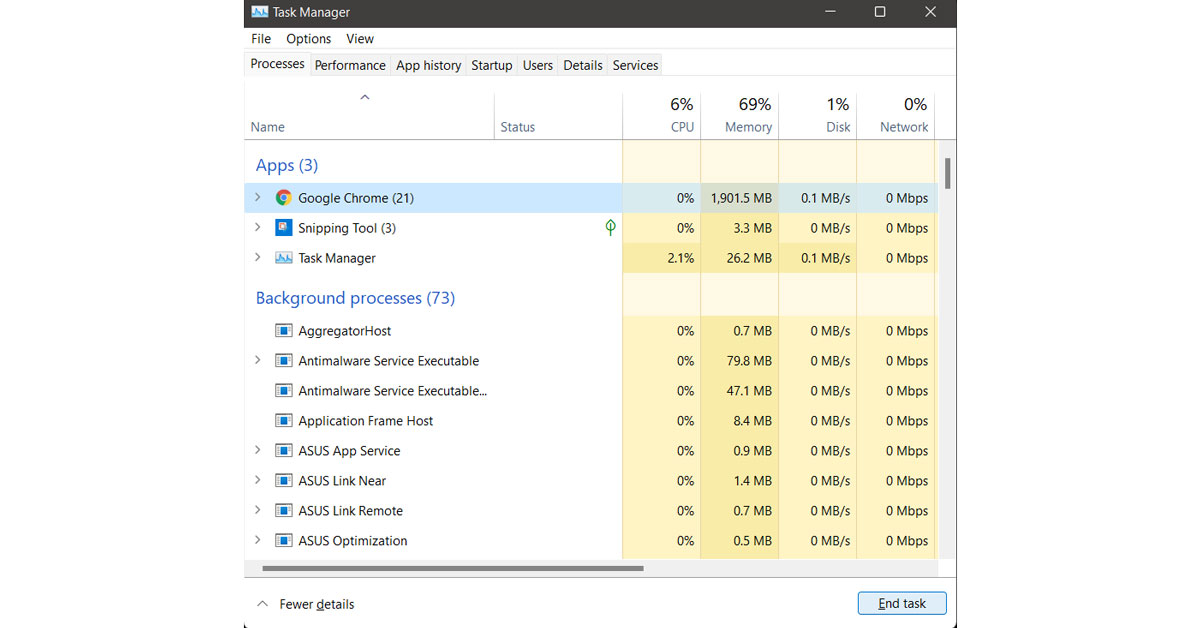
 Alt+F4 is a shortcut on windows to kill or quit apps in an instant. This shortcut is quite handy in most situations. So, the next time when you find yourself in this situation where you can not quit the app just press the shortcut combo Alt+F4 and that is it.



 Step 2: Tap on Manage your Google Account.
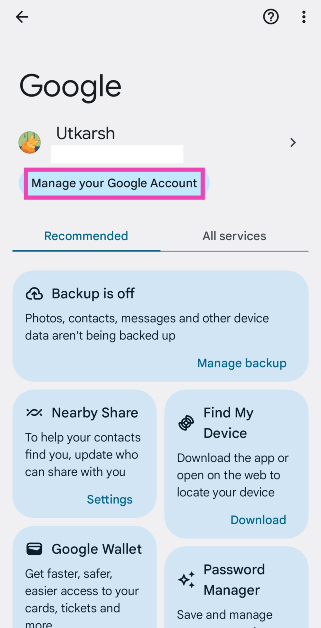 Step 3: Switch to the Data and privacy tab.
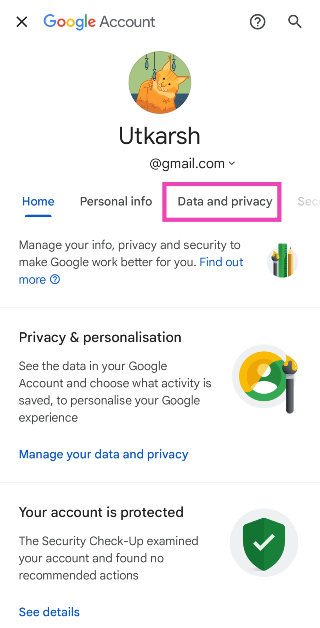 Step 4: Scroll down and tap on My Activity.
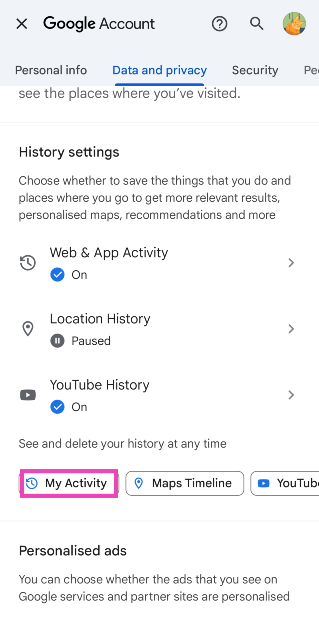 Step 5: Tap on Delete.
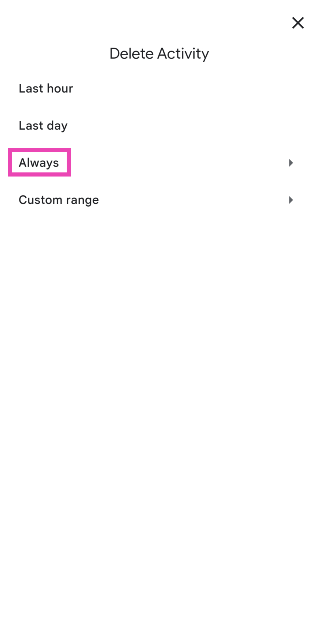
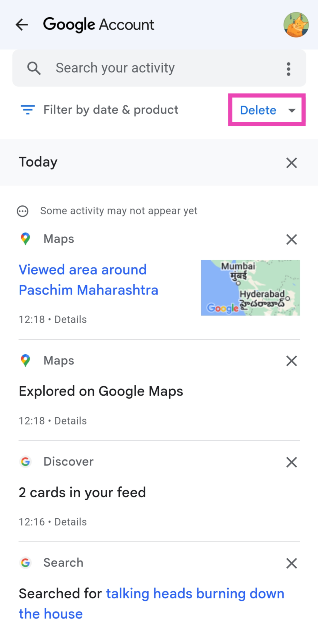 Step 6: Select Always.
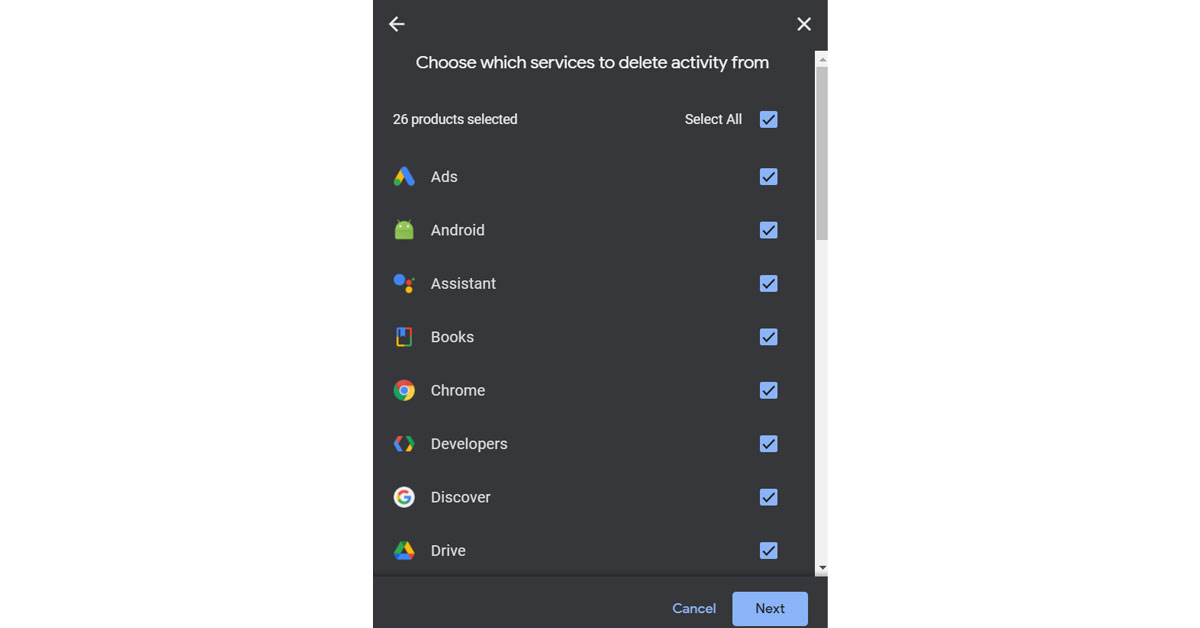
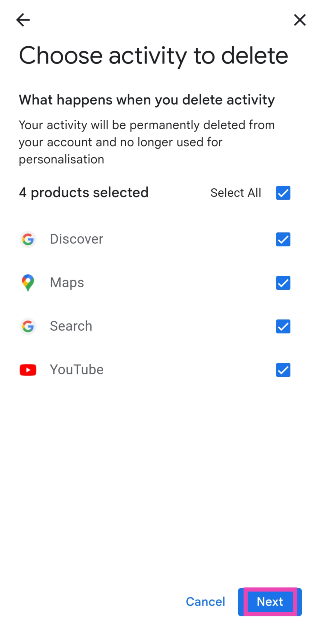
 Step 7: Select the services from which you wish to delete your activity and hit Next.
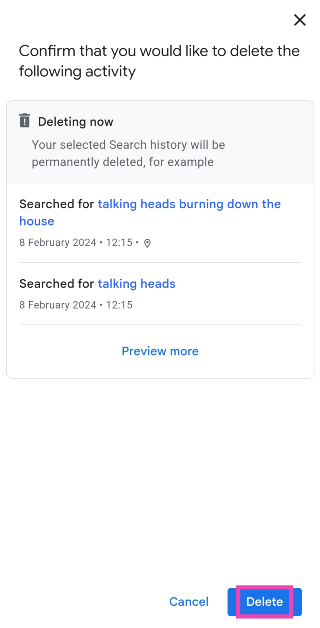
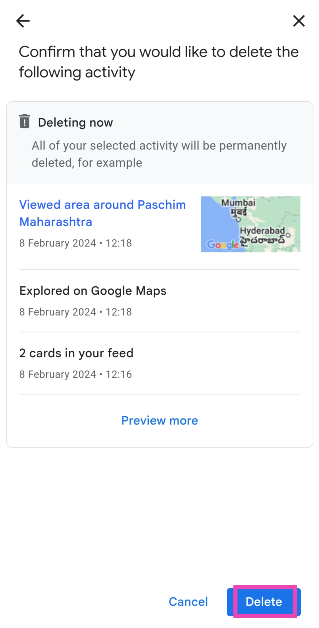
 Step 8: Hit Delete.
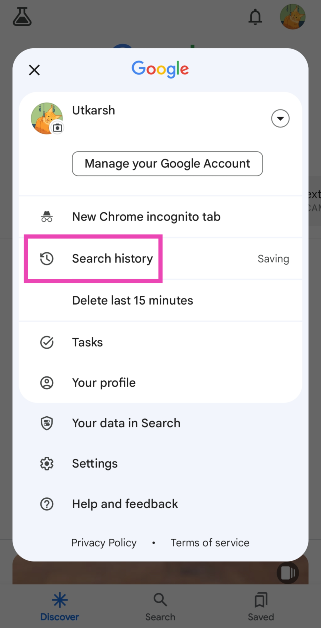
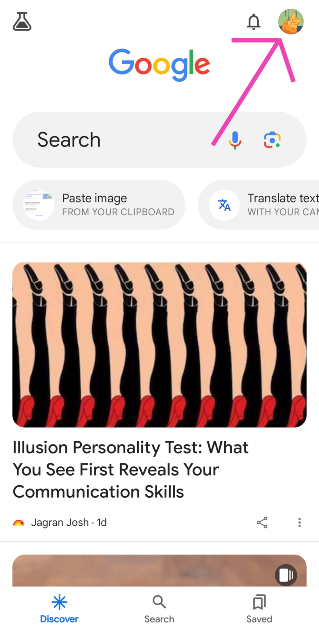 Step 2: Select Search History.
 Step 3: Tap on Delete.
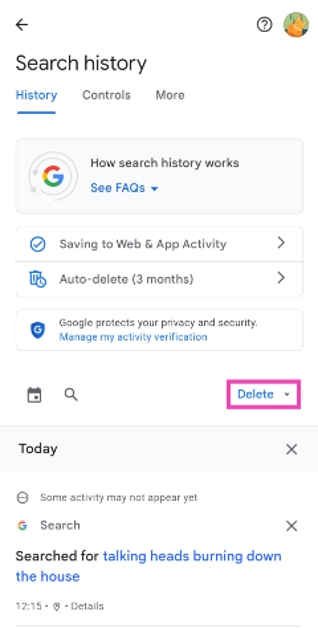 Step 4: Select Delete all time.
Step 5: Hit Delete.
Step 4: Select Delete all time.
Step 5: Hit Delete.