Amazon Quiz is getting more popular these days as more people have started participating in the quiz in the hope to win free gadgets as well as Amazon Pay Balance. The e-commerce platform brings Amazon Quiz on its mobile platform every day. The quiz can be played every day from 12 AM to 11:59 PM. Today you can stand a chance to win Rs 10,000 Amazon Pay Balance.
The Amazon Quiz has gone live on its platform. Every day it brings a new questionnaire to which the participants have to answer correctly. It consists of a total of five questions to which you have to answer correctly to enter the lucky draw. All the questions are based on general knowledge and current affairs. Amazon will announce the result of the quiz at the end of the month. Only app users are eligible to participate in the Quiz. To help our readers to clear the Amazon Quiz successfully, every day we update all the Amazon Quiz questions with their correct answers on our website to let you win Rs 10,000 Amazon Pay Balance. You can increase your chances of winning prizes by daily participating from 12 AM to 11:59 PM. We have already updated all the answers to today’s quiz below.
June 22 Amazon Quiz Answers
Question 1: Which organisation outlines the global strategy on occupational safety and health?
The answer is- ILO
Question 2: Whereabouts’ is the latest book released by which famous author of Indian origin?
The answer is- Jhumpa Lahiri
Question 3: Microsoft entered into a partnership with whom to build the world’s most powerful weather and climate forecasting supercomputer by 2022?
The answer is- UK Met Office
Question 4: These towers are located in which Asian country?
The answer is- Kuwait
Question 5: Identify the person.
The answer is- Walt Disney
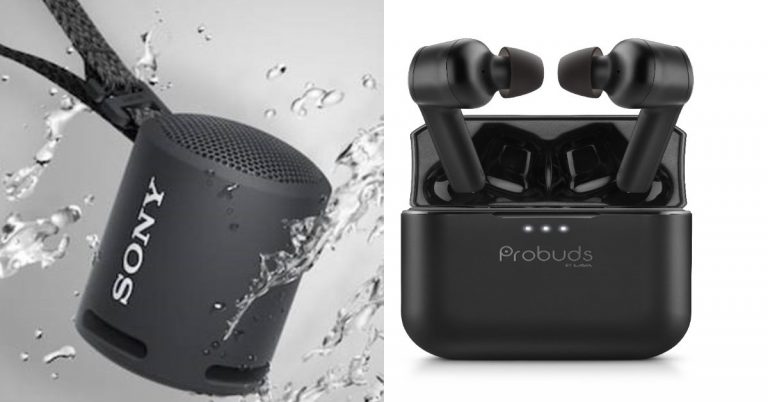
On the special occasion of World Music Day, Sony India and India mobile maker Lava has introduced new audio products in the Indian market. Sony has introduced the SRS-XB13 Extra Bass portable wireless speaker that comes with an IP67 rating for dust and water resistance and is powered by Bluetooth for connectivity. On the other hand, Lava has announced its entry into the true wireless segment with the launch of its first-ever true wireless earphones- Lava Probuds.Sony SRS-XB13 Extra Bass portable wireless speaker price and specificationsSony SRS-XB13 Extra Bass portable wireless speaker has been launched in India with a price tag of Rs 3,990. It will be available for purchase at Sony retail stores (Sony Center and Sony Exclusive),www.ShopatSC.com portal, major electronic stores and on Amazon and Flipkart portal in India from today onwards.Coming to the features the new Sony SRS-XB13 Extra Bass portable wireless speaker comes with an Extra Bass and passive radiator that enhances low-end tones, boosting the bass. With Sound Diffusion Processor and has a single 46mm speaker driver. With its DSP technology, the Sound Diffusion Processor expands sound to fill up any space.The device is ideal for the outdoors and comes with a rugged design having an IP67 rating for protection from water and dust resistance. It has a multi-way strap that can be hung anywhere, whether that be on your backpack or on your wrist or even from a parasol. The Sony SRS-XB13 delivers up to 16-hours battery life with a battery indicator on your phone that shows the amount of charge left. It can be connected with other devices via Bluetooth and is incorporated with Google’s Fast Pair technology that allows you to quickly connect compatible Android smartphones or tablets.This Bluetooth speaker from Sony will be available in Black, Light Blue, Pink, Powder Blue, Taupe, and Yellow colour options.Lava Probuds price and specificationsLava Probuds have been launched in India at a retail price of Rs 2,199. The device will be available for sale starting June 24 via Lava e-store, Amazon, and Flipkart in the country. The company has also introduced a special introductory offer in which the earbuds can be grabbed for just Rs. 1. The special offer is valid from 24th June 12.00 pm onwards, until stocks last.Speaking of the features the Lava Probuds come with 11.6mm advanced drivers and MediaTek Airoha chipset to provide an immersive audio experience with powerful sound with deep bass and ensure no voice distortion during calls. The TWS earphones offer 25-hour long music playtime which is backed by a 55 mAh (each bud) battery and 500 mAh case battery.There is an instant ‘Wake and Pair Technology’ which power on the earbuds and enter connection mode as soon as charging case lid is opened. The Lava Probuds uses Bluetooth v5.0 which offers seamless as well as instant connectivity. In addition to this, the TWS earphones come with an IPX5 rating for water and sweat resistance. Additionally, Probuds enable users to directly access the voice assistant function by gently tapping twice on the right earbud.
Now you will be able to watch YouTube while using other apps with the new PiP mode in Apple products. YouTube is introducing this feature to iPhone and iPad users. The feature will be available for YouTube premium subscriptions. When you close the YouTube app the video you were watching will be displayed in a small window, which you will be able to move on the screen. Here is everything you need to know about picture-in-picture by YouTube.
In This Article
Compatibility of OS
The picture-in-picture mode is already available for Android, but it is coming soon for iPhone and iPad users who have a YouTube subscription. An iPad with IOS 14 update or later, and iPhones with iOS 14 or later will be able to feature this mode. The PiP mode lets you watch YouTube videos in a mini player while simultaneously browsing other apps on the mobile. The mini player can move across the screen and also let you resize by pinching two fingers.
Read also: Twitter’s new feature will allow users to play YouTube videos in tweets within the app
Multitasking while using the phone
Now while you are watching YouTube you can Facetime also with the picture-in-picture mode. Multitasking on iPhone and iPad is made possible with the new feature. PiP will work even when you are using YouTube from Safari. You will still be able to multitask with a small window over other apps.
Read more: Microsoft released EA Play on Xbox Game Pass for PC and Auto HDR Preview for Windows
How to use PiP (picture-in-picture)
Before learning how to enable picture-in-picture mode you must have a Youtube premium subscription. And the mode should be enabled from any browser Chrome or Safari.
Open the Web browser from your iPhones or iPad.
Log in to your account which has a YouTube premium subscription.
Now search for any video you want to watch on the search bar and click the video.
Once you play the video, put the video on fullscreen by tapping the square icon.
Now tap on the video that is playing and you can view the controls.
Click the picture-in-picture button from the top-left side which is just next to the close button.
You can also use double tap or swipe up to enable the picture-in-picture mode.
Once you are in the picture-in-picture mode you can drag the mini window or resize it and use other apps while still playing YouTube video.
And you can exit the picture-in-picture mode by clicking on its icon from the top-right side in the small window.
You can also go to full screen by double-tapping on the video that is playing.
With lockdown still in place and less interaction with other people, the OTT platform has become a happy place for many. If you are a big fan of movies that stream on Netflix and Amazon Prime Video. These are the 5 best upcoming movies on the platforms. The list includes different genres so make sure you check them out.
In This Article
On Netflix:
The movie’s content on Netflix has become a favourite of many viewers’. Netflix gives the option to choose from three plans to enjoy your movie time on Netflix. Whichever you subscribe to, the movies on the list will be available but may differ in quality according to your plan. Here is the list of movies on Netflix.
Dhamaka:
This Bollywood movie is from the thriller genre of films with a great cast. The movie is directed by Ram Madhvan. Dhamaka is a drama-thriller film about a TV reporter starring Kartik Aaryan in the lead role. This is one of those movies that will not let you blink a lot and get hooked on the story and the performance. The story is about an ex-TV news anchor star attempting to make a career comeback.
The next on the list for the best upcoming movie on Netflix is Haseen Dillruba, a must-watch movie. The story of the movie starts with a woman who is under investigation as a suspect in her husband’s murder, revealing a thorny marriage that is seen to be only blurring the truth. The cast is also played by some very talented actors starring Taapsee Pannu as the woman who is under investigation. The movie is an offbeat thriller genre flick.
Release date: 2 July 2021
Jaadugar:
This movie on the list is from the romantic comedy genre to make you laugh throughout the movie with its amazing cast. Jitendra Kumar is in the lead role who is best known for his natural acting skills, and his acting ability to make people laugh, giving you flashbacks of a similar event. The romantic story of the movie starts with a small-time magician of a small town trying to win a football trophy with no particular athletic skills to marry the love of his life.
Release date: August 14 2021
On Amazon Prime Video
Amazon Prime Video also gives you great content, the recently released “The Family Man” season two was an incredible show and is a ‘not to miss’. The subscription on Amazon Prime starts from 999/year and you can access a wide range of genres on the OTT platform.
Toofan:
The movie is a sport-genre movie that should be full of adrenaline. The cast is also very great with Farhan Akhtar in the lead role-playing a national boxer. The story of the movie will give you a glimpse of how a boxer faces struggles in his journey to reach national-level competitions. The ups and downs faced by the boxer that will be shown in the movie will get you motivated and know more about the sport.
The last movie on the list is an English movie and Sci-fi action genre film. The lead role of the cast is Christ Pratt who we have seen in dozens of cinemas. The story of the movie starts with a soldier sent to the future to the year 2052 to fight against the alien invasion and attempt to make the world a better place. This movie is a must-watch and should be on your list to watch on Amazon Prime Video. It will be filled with some action pack scenes to enjoy.
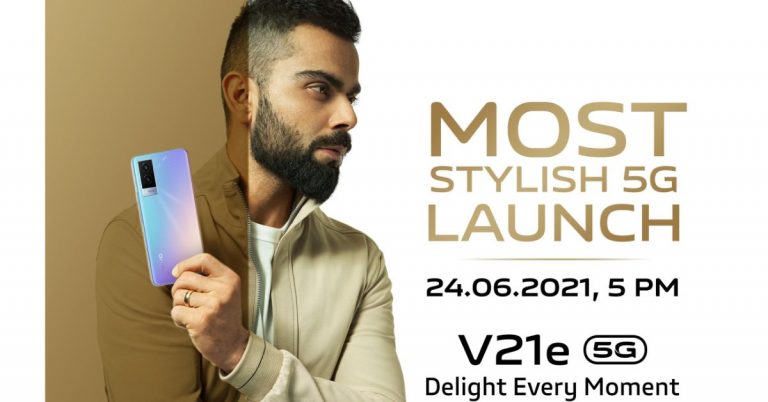
The Chinese smartphone company, Vivo, today officially announced when its next smartphone in its V-series will launch. Yes, the company has confirmed to expand its premium mid-range smartphone series in the country with the launch of the Vivo V21e. It should be noted that this is the second addition to the lineup after the Vivo V21 smartphone which was launched in India in April this year.The company took to Twitter to announce the arrival of Vivo V21e in India. As per the Tweet the company has decided to launch the device on June 24 at 5 PM. Prior to launch, the device has also been listed on the Flipkart app to tease its features as well as its availability.As per the listing, the device will be available in 8GB RAM with 3GB expandable RAM and a 44W fast charging support. Additionally, there will be a 32-megapixel selfie camera and a dual camera set up on the back of the phone highlighted with a 64-megapixel primary sensor. It will also come in two colour options. Earlier the device was released in two different shades of Diamond Flare and Roman Black.Prior to this announcement, Vivo V21e was spotted listed on Geekbench and a BIS website. The Geekbench scores are 462 in single-core tests and 1,502 in multi-core. According to the listing, the device will run Android 11 out of the box and is expected to be powered by MediaTek Dimensity 700 SoC that may be paired with 8GB of RAM. To recall in Malaysia the device was launched with an octa-coreQualcomm Snapdragon 720G SoC paired with 8GB of RAM and 128GB of storage.The upcoming phone is also tipped to feature a 6.44-inch Full HD+ AMOLED display and fuelled by a 4,400 mAh battery with 44W fast charging support. As far as the pricing is concerned the Vivo V21e is expected to be priced at Rs 24,990 for the 8GB RAM with 128GB storage options. In Malaysia, it was introduced at MYR 1,299 that translates to Rs 23,299.
For the latest gadget and tech news, and gadget reviews, follow us on Twitter, Facebook and Instagram. For newest tech & gadget videos subscribe to our YouTube Channel. You can also stay up to date using the Gadget Bridge Android App.
Though Microsoft has said they will be supporting Windows 10 till 2025, the hype is all about Windows 11 and its big launch. Before Microsoft makes the official launch of Windows 11 this is everything we know and what all features are to be expected from the Windows OS upgrade. Here is all you need to know about the new Windows 11.
In This Article
A fresh start menu:
The new Windows OS by Microsoft is expected to come with a clutter-free centered start menu. It will no longer have live tiles and will feature standard icons that show pinned apps. The simplified start menu will help to find the right application software or features very easily. It will allow you to access recent files faster and also let you restart or switch off the devices.
Rounded edges or corners:
Windows 11 is believed to be using rounded corners for menus or apps, all over the operating system. In terms of folders icons, it seems to be more colourful and playful. And you will be hearing a new windows sound too, but they managed to retain the Control-panel and Taskbar. Microsoft will also include the earlier Windows widgets designed to let you slide and quick access to news and weather.
New snap control:
Microsoft is about to introduce a new snap control in the Windows 11 features. The snap controls can be accessed from the maximize button on all apps. With this new feature, you can now quickly move the Windows side by side or easily arrange them in sections on your computers.
Read more: How to add or remove another email account to your Gmail app?
Colorful Interface:
The new Windows version will make visuals more vivid and by increasing the visual appeal. Microsoft will let you choose more colours for files and folders making it more refreshing. But the Windows Web Store interface is likely to stay the same with access to all the same apps available today on the Web Store.
Read also: Everything you need to know about Snapchat’s new AR glasses Spectacles 3 and drone
A new set-up experience: Xbox experience:
In Windows 11 a better set-up has been included by Microsoft. It has been said that it is very similar to Windows 10X. And it will upgrade Windows 11 through a set of steps to configure Windows. The Xbox app will be integrated with the new Windows that gives you quick access to the Xbox Game bar and Windows Game Mode. Now for a seamless experience, you will be able to visit the Xbox store and other utilities in MS Windows 11.
For the latest gadget and tech news, and gadget reviews, follow us on Twitter, Facebook and Instagram. For newest tech & gadget videos subscribe to our YouTube Channel. You can also stay up to date using the Gadget Bridge Android App.
When Deepfakes hit, we were all shocked by it. Even people who are deep in the tech world were shocked by the way the technology was applied. But, let’s be honest, it was a problem that would likely affect only the most famous of people on a planet of nearly 8 billion. And they would also have the resources to prove that deepfake images were fake and to protect their image in court. Deepfakes were malevolent, but the way they quickly became famous and then faded away suggests the world will mostly have a healthy scepticism about them from now on.
Still, what deepfakes represented was a threat of pervasive misinformation, especially through social media. And that threat could still materialize, but perversely, in a strange twist, a social media company has now introduced a new kind of fraudulent image that is a more far-reaching and democratic threat than deepfakes ever were.
Facebook has just released their TextStyleBrush tool. It allows you to highlight text and re-create the font. This could be on road signs, buildings, businesses and so on. But it also works on hand-written script, which means that Facebook’s new tool can be used to forge signatures and spoof legal documents.
This will likely lead to a rise in forgeries, particularly since the pandemic has led to an increased need for electronic signature tools and the ability to digitally sign documents.
In turn, the rise in forgeries and fake electronic signatures means we need even more security than before when we sign on the dotted line. Secure ways to sign documents are in increasing demand and that goes for digital even more than physical documents.
Enter Smallpdf’s eSign tool. It’s a tech solution to a tech problem.
Smallpdf’s online signature tool has 256-bit TLS encryption. Plus, it also has international compliance, like eIDAS. About that security level, it’s actually military-grade, so you don’t need to worry about bad actors getting a hold of your documents and manipulating them.
The electronic signature tool is also quick and easy to use. You can upload and sign files in less than a minute, and you can request signatures from up to 100 people if you need to.
When you do invite someone to sign a document, they can click a link and sign right away to get it back to you immediately. It’s straightforward and simple to use.
The other thing is, there are some other electronic signature tools out there, but most aren’t integrated with 19 other PDF management tools and a document management system.
Smallpdf’s eSign tool is the most convenient and straightforward way to sign a PDF online. You can share your documents, get signatures and send signed files. And for the actual act of singing itself, you can use a few different options, your trackpad, mouse or even upload a signature from your camera. It couldn’t be easier.
Guest Author: Emily Jennings
For the latest gadget and tech news, and gadget reviews, follow us on Twitter, Facebook and Instagram. For newest tech & gadget videos subscribe to our YouTube Channel. You can also stay up to date using the Gadget Bridge Android App.
Google Meet is getting a new update that brings the improved hand-raising feature. To recall, this feature was first introduced to the video conferencing app in November last year. In addition to this, there will be more improvements to automatic hand lowering, better notification and more. The company has pushed the update, which will be done in a staged manner. The news comes by way of a blog post that mentions the improvements over the hand-raise feature that will allow the users to be more noticeable during an online meeting or a class. The blog post reads, “We’re improving the hand raise feature in Meet so that it is easier to notice and address raised hands.”As per the company, the users will now notice an updated and improved visual icon and animation on the video tile. So that the people can be more acknowledged the tiles of people with raised hands will be moved to more visible in the video grid. In addition to this, the user will also get an audio notification when the first raised hand is raised. A clickable notification that shows the number of raised hands and which links to an ordered queue of all participants with raised hands and a participant’s hand will be automatically lowered after they speak. As per the blog post, this feature will come on by default and there will be no admin control for this feature. For the end-users as well the functionality is on by default and likewise there is no end-user setting for this feature. The improved hand raise feature will be made viable in meetings organized by users with Workspace Essentials, Business Standard, Business Plus, Enterprise Essentials, Enterprise Standard, Enterprise Plus, Education Fundamentals, Education Plus, Nonprofits, as well as G Suite Business customers. While meetings organized by users with Google Workspace Business Starter, G Suite Basic customers and users with personal Google Accounts will not get access to the hand raise feature.
In This Article
How to raise or lower your hand?
All you need to do is Scroll to the bottom of the screen > click Hand raise. In a similar way you can lower your hand by scrolling down at the of the screen > click Lower hand. Also, all the participants in the group call will be notified when someone raises their hand. A Hand Raise icon appears on the participant’s self-view and they’re moved to the main grid so moderators can see the participants who have their hands raised. Only you and the moderator have the control to lower the hand. When the moderator lowers your hand, you receive a notification. If you speak and don’t lower your hand, your hand is automatically lowered. You can click “Cancel” to keep your hand up.
How to lower hands as a moderator?
The moderator has the ability to lower the hand if someone raises. The moderator will get notified and a notification will be seen at the bottom of the meeting window. To dismiss the notification, click Close X or Open Queue. Besides this, you can also open the people panel to view and lower your hands.
For the latest gadget and tech news, and gadget reviews, follow us on Twitter, Facebook and Instagram. For newest tech & gadget videos subscribe to our YouTube Channel. You can also stay up to date using the Gadget Bridge Android App.
Windows 11 will be revealed on June 24 and it is great news for Windows OS lovers. There are rumors spreading around about the leaked version of Windows 11. Before being hasty and installing on your computers consider the below reasons. The beta builds of the upcoming Windows 11 are leaked but be cautious like all beta versions, they can be unstable. Read the reasons below.
In This Article
Downloading from Untrusted Source
The first very reason not to install the beta version is, you will be downloading the leaked Widows 11 from an unlicensed source. Moreover, Microsoft has not approved the leaked version and it is unrecognised software. Downloading the leaked version will put you at risk since you will be downloading it from a link found on the web, an unreliable source. The bigger question, you have no guarantee of what will be on the file you will be downloading from the link.
Risks of bugs in the software
Another reason you should not consider downloading the leaked version right now and wait for the big reveal on June 24 is the risk of bugs. The beta version has been reviewed as being cumbersome while installing the operating system, which takes an awful amount of time. The risks of containing bugs in the downloaded version are the biggest problem. The bugs can lead your computers to crash and lead to many other problems. Moreover the unofficial Windows 11 available is unfinished software.
Updates on Windows 10: continue using Windows 10
You can still use the Windows 10 operating system better than the leaked version of Windows 11. Microsoft also has recently announced that it will support Windows 10 till 2025. So even after the new Windows 11 operating system is released the Windows 10 user will still be receiving many new updates, another reason to stick to Windows 10 for now instead of the leaked beta version.
Read more: 5 best ways to secure your Windows PC in 2021
No technical support from Microsoft
The beta version of Windows 11 which has been leaked is considered unfinished and unofficial. Any problems faced by you when installing or after installing the leaked version on your system Microsoft will not help or assist you in fixing the problem. The software being unstable from start has not been well received from many technical experts, it may be the risks of viruses or problems in or after installing the version.
Read also: Laptop speakers not working? How to fix having no sound on your laptop
Possible way of spreading viruses
As said, the build version of the leaked Windows 11 is 21996.1 is expected to have an overhaul of the Windows 10 interface. There runs a great possibility of an attempt to spread viruses when such a leaked version is floating on the internet. To begin with, there are many complaints reported on the web that many users trying to install the leak are facing the problem “PC can’t run Windows 11”. The error shown on the screen might be a possible virus and forcing the system to install might lead to an outbreak of the virus. So it is advised to be cautious.
For the latest gadget and tech news, and gadget reviews, follow us on Twitter, Facebook and Instagram. For newest tech & gadget videos subscribe to our YouTube Channel. You can also stay up to date using the Gadget Bridge Android App.
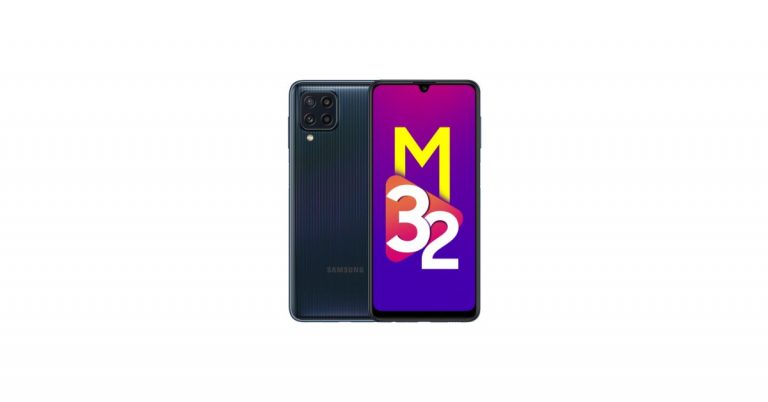
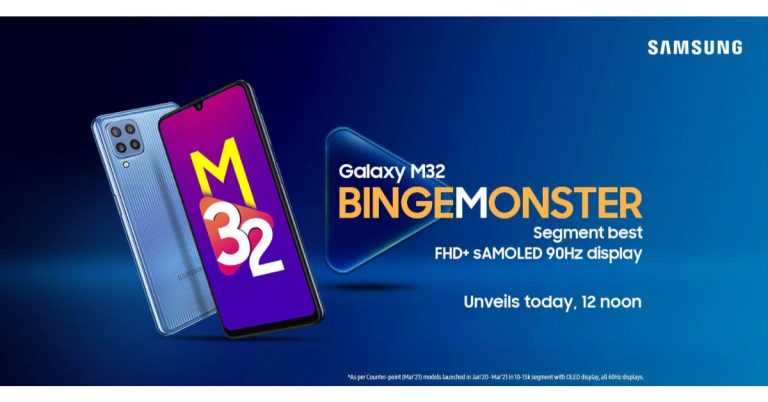
Samsung Galaxy M32 has been officially launched in India today. The key highlights of the handset are said to include a 90Hz Super AMOLED display and a 6,000mAh battery with 25W fast charging support. In addition to this, there is a quad rear camera set up and comes loaded with the Samsung Pay Mini app and AltZLife.Samsung Galaxy M32 price and availabilitySamsung Galaxy M32 has been launched in India with a starting price of Rs 14,999 for the 4GB RAM with 64GB storage options. The 6GB RAM with 128GB storage is priced at Rs 16,999. The device will be available in two colour options of Black and Light Blue. The phone will go on sale starting June 28 via Amazon, Samsung.com and all key retail stores.As an introductory offer, consumers can avail of an instant cashback worth Rs 1250 while paying with ICICI cards which brings the effective ownership price of the 4GB with 64GB variant to Rs 13749 and 6GB with 128GB variant to Rs 15749.Samsung Galaxy M32 specificationsSamsung Galaxy M32 features a waterdrop-style 90Hz 6.4-inch full-HD+ Super AMOLED display. It offers up to 800 nits of brightness while the 90Hz refresh rate provides a shorter length of motion blur by minimizing afterimage in-display transition and shorter MPRT (Motion Picture Response Time) which allows faster and smooth display. In addition to this, the display is protected with Corning Gorilla Glass 5 that prevents scratches and breakage. The device runs on One UI 3.1 on top of Android 11 and under the hood, there is an octa-core MediaTek Helio G80 SoC with up to 6GB of RAM with 128GB of storage.The device comes with a quad rear camera setup which includes a 64-megapixel primary camera with f/1.8 aperture, an 8-megapixel ultra-wide-angle lens with 123-degrees of FoV, a 2-megapixel macro sensor and a 2-megapixel depth sensor. For taking selfies, there is a 20-megapixel front-facing camera. Galaxy M32 also comes with a slew of camera modes like Hyperlapse, Slow motion, Food Mode, Pro mode and AR zone.The Samsung Galaxy M32 is backed by a 6,000mAh battery which supports 25W charging and comes with an in-box 15W fast charger. The phone is claimed to deliver 130 hours of music playback, 40 hours of talk time and 25 hours of video playback. In terms of connectivity, there is 4G LTE, Wi-Fi, Bluetooth, GPS/ A-GPS, USB Type-C, and a 3.5mm headphone jack. The smartphone also includes a side-mounted fingerprint sensor.
For the latest gadget and tech news, and gadget reviews, follow us on Twitter, Facebook and Instagram. For newest tech & gadget videos subscribe to our YouTube Channel. You can also stay up to date using the Gadget Bridge Android App.
Streaming YouTube has become a synonym for watching videos on the internet. YouTube uploads a wide range of content for you to binge-watch with no difficulties. But YouTube does also upload restricted content. How do you watch it? Follow the tricks below and watch your online videos on YouTube without any restrictions.Read Also:Vivo V30e launched in India, price starts at Rs 27,999
In This Article
Method 1: Alter the URL
This has to be the first trick and the easiest way to watch Youtube online videos with content warnings. You can do this trick by changing the URL (Uniform Resource Locator) of the restricted videos.
Open YouTube: App or Website on mobile or laptop
Search for the videos on the search bar
If the videos show Content Warning
Go to the URL enter nsfw in front of youTube:
For example after www. You can put nsfwyoutube.com
Method 2: Download video using an App
Another possibility of watching the flagged video on YouTube is watching the video by downloading it. There are many apps available both for Android and IOS. Using the third-party app will help you watch the restricted video without signing in or confirm the age. Copy the URL on the app and download it. Watch uninterrupted age-restricted videos by downloading the videos from an app
Read more: Top 10 VPN services for secure and anonymous browsing
Method 3: Using a proxy or VPN
Using a proxy is the oldest trick to watch a content warning video on YouTube. Many wonder if it even works? It does work if you are using the right proxy sites or apps. Proxy helps to hide your IP address and lets you watch the videos even when you are not signed in on YouTube. The proxy or VPN will switch your IP address to the region you choose and you will be able to access the video.Read also:Google seems to be preventing apps from accessing installed app inventory on Android devices
Method 4: Use Invidious
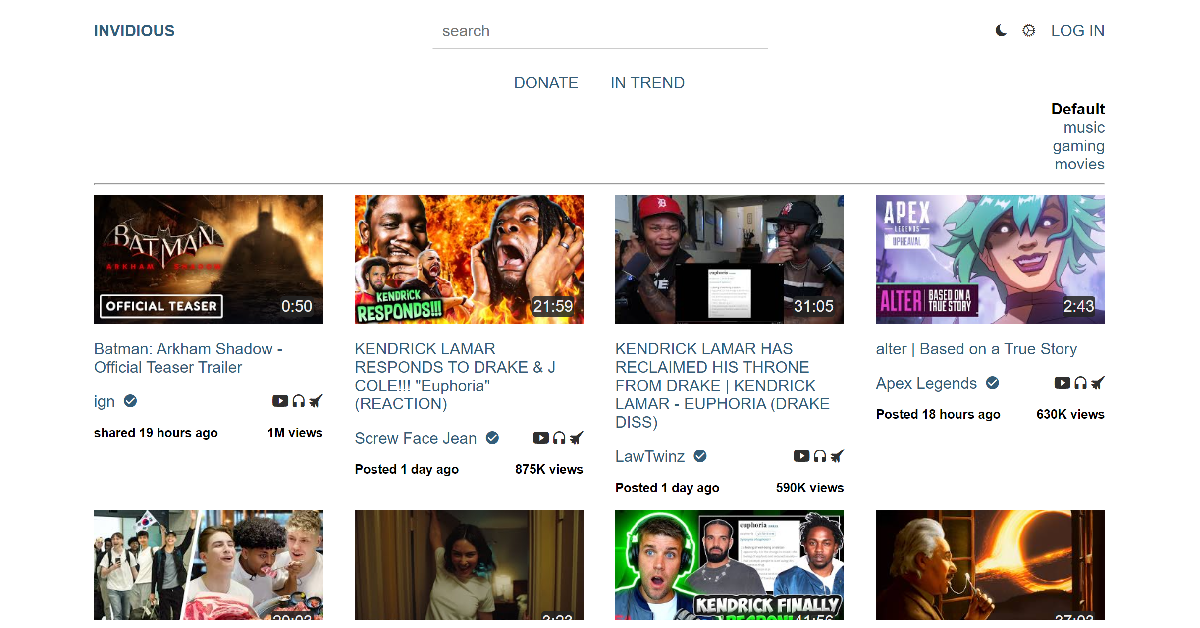
Invidious is a front-end alternative for YouTube. Open this link and click on Use Invidious. Select a host from the list. Now, simply type the title of the restricted video in the search bar or paste its URL to view it. You will be able to bypass any content restriction barriers and be able to watch any video without needing to log in using your Google account.
Method 5: Turn off restricted mode
Another option to stream the content warning videos is turning off the restricted mode on YouTube. You can toggle off the restriction in easy steps and watch the online videos without any difficulties.
For the desktop user, it is easy steps, go to the settings icon, and scroll down the portal open up, and toggle off the “Restriction mode” at the bottom.
For Mobile: Go to the profile icon, click on the icon, setting, general, and you can turn off the restriction mode.
Frequently Asked Questions (FAQs)
How do I watch a video on YouTube in Incognito Mode?
Tap your profile icon in the bottom right corner of the screen and select Incognito Mode to watch videos without their record being logged in your watch history.
How do I watch a geo-locked video on YouTube?
If a YouTube video is not available for your location, you can access it by using a VPN to select a server outside your country.
These are the top 5 ways to watch restricted YouTube videos without signing in using your Google account. Read this article if you want to download a YouTube video on your device. Got any other workarounds to this issue? Let us know in the comments!
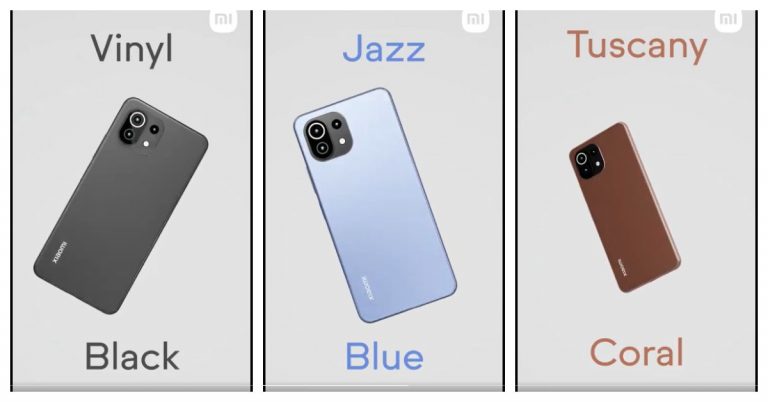
Just ahead of the June 22 India launch of Mi 11 Lite, Xiaomi has revealed the device’s colour options it will be available in. As per the recent teaser by the company, its upcoming phone will be offered in three colour options. In addition to this reveal, the company has also showcased a video teaser on Twitter, which shows the back of the handset as well as the three colour options. To recall, Xiaomi Mi 11 Lite was launched in China along with Mi 11 Ultra and Mi 11 Pro in March this year. Xiaomi took to Twitter to share the first video teaser of Mi 11 Lite. As per the company’s latest reveal, the device will arrive in three colour options: Jazz Blue, Tuscany Coral, and Vinyl Black. All the three colour variants are said to be inspired by a region in Italy, a music genre & phonographic records. Besides the colour option, the new video teaser also gives a glimpse of the back of the smartphone which not only shows the new shades but its triple rear camera setup. The Mi 11 Lite India launch is taking place on Tuesday which is June 22 at noon. The launch event is not yet confirmed but the company is expected to host it online only. Additionally, Flipkart also listed the phone to suggest its online availability in the country.
We're very excited to reveal 3 beautiful color variants of #Mi11Lite 😍
🟤 Tuscany Coral 🔵 Jazz Blue ⚫️ Vinyl Black
These colors are inspired by a region in Italy, a music genre & phonographic records
Mi 11 Lite 4G pricing and specificationsThe price of the smartphone has not been disclosed but in the European market, it was launched at EUR 299 that translates to Rs 26,600 for the 6GB RAM with 64GB storage option. Whereas the price of the 6GB RAM with 128Gb storage options is unclear. In India, the device is expected to be priced under Rs 25,500.Mi 11 Lite will arrive with a 6.55-inch full-HD+ AMOLED display with 1,080×2,400 pixels of resolution and 90Hz refresh rate support. It will run MIUI 12 on top of Android 11 and is going to be powered by the Qualcomm Snapdragon 732G SoC.For the photos and videos will equip a triple camera set up on the rear panel that includes a 64-megapixel primary sensor with an f/1.79 aperture. Further assisted by an 8-megapixel ultra-wide-angle lens with f/2.2 and a 5-megapixel tele-macro camera with f/2.4 aperture. For taking photos and videos there is a 16-megapixel front-facing camera with an f/2.45 aperture.On the connectivity front, Xiaomi Mi 11 Lite will include Wi-Fi, 4G, Bluetooth v5.1, NFC, GPS, and a USB Type-C port. The sensors on the phone include a proximity sensor, ambient light sensor, accelerometer, gyroscope, electronic compass, linear motor, IR Blaster and a side-mounted fingerprint scanner. It comes with a 4,250mAh battery that supports 33W fast charging.
For the latest gadget and tech news, and gadget reviews, follow us on Twitter, Facebook and Instagram. For newest tech & gadget videos subscribe to our YouTube Channel. You can also stay up to date using the Gadget Bridge Android App.
The South Korean giant Samsung is going to introduce a new smartphone in its affordable M-Series in India today. The company has scheduled to launch Samsung Galaxy M32 at 12 noon in the country. The key highlights of the handset are said to include a 90Hz Super AMOLED display and a 6,000mAh battery that is claimed to last for a whole day on a single charge.Before its launch in the country, Samsung has already listed the device on Amazon by creating a dedicated microsite to tease its availability. The company has not yet revealed much about the device but as per the listing, there will be a quad rear camera set up on its back that will include a 64-megapixel primary sensor. Additionally, there will be a 20-megapixel selfie camera sensor on the front. It will also come with a 6,000mAh battery. There will be a 6.4-inch full-HD+ Super AMOLED display with a 90Hz refresh rate and 800 nits of peak brightness.The key specs of the Samsung Galaxy M32 have been leaked via Google Console listing that appears to be authentic when compared with the recently surfaced specs on the Samsung site.The device is said to feature a full-HD+ display with 1,080×2,009 pixels of resolution. It will run on Samsung OneUI based on top of Android 11 and powered by an octa-core MediaTek MT6769T SoC (MediaTek Helio G80) with 6GB of RAM.As per the DEKRA certification website, Galaxy M32 will be equipped with a quad rear camera setup that will also include a 64-megapixel primary camera with f/1.8 aperture, an 8-megapixel ultra-wide-angle lens with 123-degrees of FoV, a 5-megapixel macro sensor and a 2-megapixel depth sensor. For taking selfies, there is a 20-megapixel front-facing camera. In addition to this, it will ship a 15W fast charger.The company has not yet revealed the price but hinted that Samsung Galaxy M32 will debut in India under Rs 15,000 price segment. The device is rumoured to arrive in two variants of 4GB RAM with 64GB storage and 6GB RAM with 128GB storage options. It is likely to be offered in two colour options of Black and Blue.
For the latest gadget and tech news, and gadget reviews, follow us on Twitter, Facebook and Instagram. For newest tech & gadget videos subscribe to our YouTube Channel. You can also stay up to date using the Gadget Bridge Android App.
The e-commerce website Flipkart is hosting Daily Trivia Quiz. Every day it brings a bunch of new questions for its users. By answering them correctly you can win exciting prizes. The questionnaire is based on questions related to general knowledge. Also, the users can win free vouchers and super coins, among other offers via the daily quiz. June 21 Flipkart Daily Trivia Quiz Answers has already gone live on its platform.
The participant should be at least 18 years old and should have a valid login ID. The Quiz is available on the mobile platform and not the web version. E-commerce conducts the quiz on daily basis and goes live at 12:00 AM IST and runs till 11:59 PM IST. The winners are announced within 15 days from the date of participation that can be viewed under the Gems/Rewards section in the app.
In This Article
How to participate in the Flipkart Daily Trivia Quiz
To participate download the Flipkart app on your phone. Then open the Flipkart app then head to Game Zone. Now click on the Daily Trivia Banner or search for Daily Trivia. Enter the game and answer all 5 questions with correct answers.
June 21 Flipkart Daily Trivia Quiz Answers
Question 1: Who directed the Shahid Kapoor and Amrita Rao starring film Vivah?
Answer: Sooraj Barjatya
Question 2: Kya kare kya na kare, Yaaro sun lo zara and Hai rama are songs from which iconic film?
Answer: Rangeela
Question 3: Galli Galli Sim Sim’ is a Hindi adaptation of which popular English show?
Answer: Sesame Street
Question 4: Who won the Filmfare Award for Best Supporting Actor in 2017 for Kapoor and Sons?
Answer: Rishi Kapoor
Question 5: Which of these directors did not direct their son’s debut film?
Answer: Yash Chopra
Amazon Quiz for June 21 has gone live. The interested people can participate in the quiz every day to win exciting prizes being offered by the company. The company puts up 5 general questions to which you have to answer correctly. You can submit your answers by choosing from the options given. Today you have a chance to win Rs 5,000 Amazon Pay Balance
Every day the e-commerce platform brings a new set of questionnaires which consists of five easy questions based on current affairs and general knowledge. The Amazon Quiz can be played from 12 AM to 11:59. You have to answer all the questions correctly to enter into a lucky draw. The results of today’s quiz will be announced at the end of the month. Only one person will be declared a winner. If you don’t know the answers do follow Gadget Bridge because here we update all the answers to the Amazon Quiz on our website. So, here are the answers to the June 21 Amazon Quiz and win Rs 5,000 Amazon Pay Balance.
June 21 Amazon Quiz Answers
Question 1: In 2021, which High Court became the first in India to live stream judicial proceedings on a YouTube channel?
The answer is- Gujarat High Court
Question 2: Jagdish Khattar, who recently passed away, was the managing director of which company from 1999 to 2007?
The answer is- Maruti Udyog Limited
Question 3: In April 2021, which Indian state got affected by Lunglei forest fire?
The answer is- Mizoram
Question 4: Which republic declared independence from this country in 1948?
The answer is- Israel
Question 5: He is famous for writing which of the following best-selling books?
The answer is- A Brief History of Time
Apple devices do give very good battery life. But there might be many reasons you are draining the battery health. One of the preventative measures is to timely check the health status of your iPhone and iPad battery. Charging the battery helps you use the device but every charge affects the health of the battery. And with the device getting older the battery health also deteriorates. Below is the guide to check the battery health of iPad and iPhone.
In This Article
Check the battery health of your iPhone
The battery of devices tends to weaken with the load of usage it takes. Every device’s battery comes to a point where it needs to be replaced, but there is a way to make that wait longer. For iPhone users, there are features on the devices where you can check the battery health. Apple iPhones running iOS 11.3 and higher have Battery Health tools built-in. The Battery Health tool shows you the iPhone’s maximum capacity and peak performance capability. These are the steps to check the health of the iPhone.
Go to the Settings app
And click on the Battery option
At the bottom of the screen, you will graph your battery level of usage and activity
Go to Battery Health by clicking it, it will show grim news of your battery
You can also see other option: Maximum capacity and Peak performance capability
The option will indicate the health of the battery
When it comes to maintaining the battery health of Apple devices, iPhones have the upper hand. Since on the iPad, there is no feature of Battery Health. And yes, the iPad does not have the option of Battery Health, but you can still check the status of your iPad battery by using a third-party app like iMazing or coconutBattery. You can download the app on your computer/iPad and you can know the lifespan of your battery and know the battery health of your Apple iPad. The following guide is the for iMazing app where you can check your iPad battery health. Follow the steps.
First down the iMazing on your computer
Now connect your iPad to your computer via the USB cable
Launch the app by opening it
Once it is open on the bottom right corner click the battery icon
A page will pop out of the screen: “Battery” on the top
The page will show you all the run-downs of the iPad health
You will also see a green circle that indicates the battery health of the iPad
The health status of the iPad battery will also be given in the numeric form
Sony has expanded its Bravia Television Series in India with the launch of the new QLED TV in India. The company has introduced a 65-inch Sony Bravia XR OLED X80J. The new Sony television is powered by Cognitive Processor XR for the immersive viewing experience that delivers more depth and texture with pure blacks and dazzling light with XR OLED Contrast. Whereas the XR Triluminous Pro reproduces 3D colour depth. In addition to this, the TV is also supported by XR Motion Clarity technology that minimizes blur during high-speed scenes.Sony Bravia XR OLED X80J (XR-65A80J) Price and availabilitySony Bravia XR OLED X80J (XR-65A80J) has been launched in India with a price tag of Rs 2,299,990 for the 65-inch model. There will be a 55-inch and a 77-inch model that will be joining the A80J OLED series later on. As of now, the XR-65A80J model is available for purchase across all Sony Centers, major electronic stores and e-commerce portals in the country.Sony Bravia XR OLED X80J (XR-65A80J) specificationsThe 65-inch model of Sony Bravia XR OLED X80J (XR-65A80J) is powered by the Cognitive Processor XR that is said to be a new processing method that goes beyond conventional AI, designed to think like a human brain providing a revolutionary experience that completely immerses the viewer in their favourite content. It divides the screen into numerous zones and detects where the “focal point” is in the picture. It can also cross-analyze an array of elements at once, just as our brains do. For more depth and texture the QLED TV comes integrated with XR OLED Contrast. It adjusts the brightness for higher peaks in glare and deeper blacks in shadow. WHereas the XR Triluminous delivers real-life natural colours as seen to a human eye. The Sony Bravia XR OLED X80J (XR-65A80J) also includes XR Motion Clarity Tech that controls moving images precisely to minimize blur so that pictures remain true with less loss in brightness during high-speed scenes, therefore, keeping them smooth, bright and clear. The Television is also supported by Dolby Vision and Dolby Atmos technology for enhanced image quality.There is Acoustic Surface Audio+ that makes sure that sound comes directly from the centre of the screen, while the XR Surround technology offers the 3D Surround Upscaling. The Bravia XR signal processing technology enables this TV to reproduce multi-dimensional sound for a truly immersive experience. In addition to the QLED Tv also offers ultra-smooth gaming with dedicated game mode, HDMI 2.1 compatibility, including 4K 120fps, VRR and ALLM.The new line-up also has support for hands-free voice control with Google Assistant and Alexa. The Apple AirPlay 2, and HomeKit integrates your Apple devices like iPads and iPhones with your Sony TV for effortless content streaming.
For the latest gadget and tech news, and gadget reviews, follow us on Twitter, Facebook and Instagram. For newest tech & gadget videos subscribe to our YouTube Channel. You can also stay up to date using the Gadget Bridge Android App.
Aadhar card has been signified as an important identity verification all over the country. The implication of the Aadhaar card is the 12 digit number that is printed on the card. The number serves as proof of identity and address applicable to anywhere in India. Aadhaar cards are issued through the post and you can also download them using an app or by visiting the UIDAI website. Here is how to download an E-Aadhaar.
In This Article
Download from mAadhaar app
Any individual who is a citizen of India irrespective of age and gender, and also satisfies the verification process laid down by the Unique Identification Authority of India (UIDAI) can apply for Aadhaar. The number issued in the Aadhar card is unique for each individual and will remain for a lifetime. Once the Aadhaar is applied and has been issued by the concerned authority you can download it on your smartphone using the mAadhaar app. The Adhaar app can be downloaded on both Android and iOS stores. To install the app and download E-Aadhaar follow the steps.
Using your smartphone open Google Play Store for Android or App Store for iPhone
To download the app search for mAadhar in the search bar
To download the right app check for the developer’s name which is to be “Unique Identification of India”
Download and once you open the app accept the terms and conditions
Read the guideline and language preference carefully
Open the app and create a new password
Go to Download Aadhaar under My Aadhaar
Options to select for generating E-Aadhaar: Aadhaar number, Virtual ID number, Enrolment ID number.
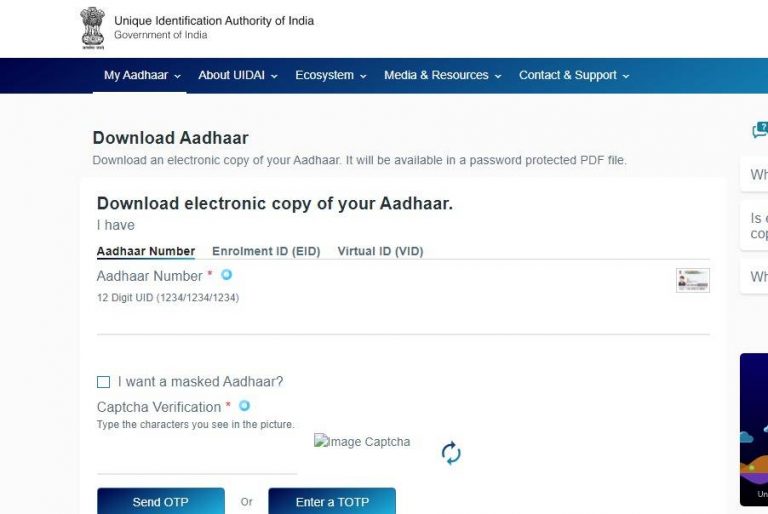
Aadhaar cards establish the uniqueness of every individual based on geography and biometric information. With the digital platform moving at a pace the option to download an E-Aadhaar has been enabled for convenience. You can download your E-Aadhaar from the UIDAI website if you have applied for it before. See the steps to download from the website:
Visit the official website of UIDAI
When the page open go to My Aadhaar
Under the “My Aadhaar” section go to Download Aadhaar
Choose the option: Aadhaar number, Virtual ID, Enrolment ID
Enter the right number: Option choose masked Aadhaar
Authenticate the captcha
Enter the OTP send to your registered mobile number
Apple ID helps you connect to all Apple devices. The unique ID created will keep your settings and Apple services up to date on all of your Apple devices. It protects the security of your personal information from any unauthorised login. And in case, you want to remove your Apple ID from your devices you have the option to remove it. Follow the guide in case you want to remove the Apple ID from your iPhone or iPad.
In This Article
Remove on your iPhone
The Apple ID helps you access many Apple services: Apple Store, Apple Music, iTunes, as well as the cloud. Apple ID creates an identity on the iOS and Mac devices. Hence, connecting your Apple ID is important so that you stay connected with apps and data including photos and documents, emails and text messages, and even your iTunes library. However, when you decide to not use the device anymore or decide to sell the device it is advised not to keep the Apple ID on the device. Apple devices allow you to remove your Apple ID in a few easy steps using the device settings.
On your, iPhone go to settings: Gear-shaped icon
Click on the Apple ID on the top of the screen
Now tap on the iTunes & App store
Then go to Apple ID
Tap View Apple ID
Then click Remove this device
Again go back to the Apple ID page: before iTunes & App store
Connecting Apple ID on your Apple devices gives you accessibility to your private data and apps on any Apple device. To know little about Apple ID it is an authentication method for iPhone, iPad, Mac, and other Apple devices. It helps you to connect with all the Apple devices with one account. When creating an account or Apple ID requires some personal information. So when you want to sell away a device or give away a device it is advised to always remove the Apple ID before giving it away. See how to remove your Apple ID on your Apple ID for safer use. Here is the guide.
On your iPad go to settings
And tap on the image or name icon on the top
Go to iTunes& App store
Click the Apple ID on the top of the screen
Press View Apple ID
Click Remove this device
Now the page will open to enter the password and email ID
Poco X2 users have been complaining of some camera issues with the company. The device comes equipped with a quad rear camera set up and was launched in India earlier last year. The users of the phone have reported the unresponsive camera app when the rear camera is launched. The affected users are mostly reported from India and now the company has issued a fix for the non-working rear camera of Poco X2.Until now there was no fix for the Poco X2 camera issue. As per the users, every time the camera app is launched on the handset it shows a black screen, freezes or crashes unexpectedly. The users have been reporting this issue for some time and now the company has shared a manual fix guide for the handset’s camera functioning.
Here is how to fix the Poco X2 camera issue for smooth functioning
According to Poco India support, less than 0.2 percent of the total Poco X2 user base in India have been experiencing the camera issue. For this, the company has detailed out some manual fixes which are expected to work for most of the devices. Follow these software solution protocol mentioned below:
Clean the camera app data: Open settings and search for managed apps.
Now search for the camera and then open Clear Data.
Then Clear all data and hit OK.
The next step is to reboot the device
After following the above-mentioned steps, check if the camera is working.
In case the issue persists, the Poco X2 users are requested to follow the hardware solution protocol below:
The issue should be reported on the Services and Feedback app which can be found in the app drawer.
Upload the logs under the camera section.
After reporting the issue, approach Poco India support or your nearest authorised service centre along with the feedback ID generated by the app.
One should take a prior appointment before visiting the service centre.
To recall,Poco X2 was launched in India last year and it comes equipped with a quad rear camera set up that includes a 64-megapixel primary sensor with f/1.89 aperture. Further assisted by an 8-megapixel wide-angle lens with a 120-degree field of view, two-megapixel macro lens and a 2-megapixel depth sensor for portrait shots. While on the front it sports a dual-camera setup with the 20-megapixel main camera sensor and a 2-megapixel depth sensor for taking selfies and video calls.
For the latest gadget and tech news, and gadget reviews, follow us on Twitter, Facebook and Instagram. For newest tech & gadget videos subscribe to our YouTube Channel. You can also stay up to date using the Gadget Bridge Android App.
We had been intrigued to use the Vivo X60 Pro smartphone ever since it was launched. The device runs Qualcomm Snapdragon 870 processor, sports triple rear cameras with support for gimbal stabilization, and has a curved display. Who wouldn’t want to use it? We got the chance and we spent a few days using it extensively and here’s our review of Vivo X60 Pro:
In This Article
Vivo X60 Pro design and display
In terms of the design, the Vivo X60 Pro smartphone does bear a resemblance to its predecessor, but then that’s hardly a reason to complain because it looks sleek. The handset’s front panel is dominated by its 6.5-inch AMOLED display that is curved on both sides and is outlined by thin bezels. The selfie lens of the smartphone is placed in a hole-punch camera that is placed in the centre of the top of the screen. If you enable the fingerprint lock, it will appear on the lower half of the display. Flip over and you will see the back panel of the Vivo X60 Pro which has a matte finish and is protected by a layer of Corning Gorilla Glass 6. There is a camera module on the top left of the back panel that houses three lenses and an LED flash. On the bottom left, you can find the Vivo branding. The metallic Power and the Volume Rocker keys are sandwiched on the right edge of the smartphone. The bottom edge has the speaker grill, Type-C charging port and SIM tray, and the microphone, while the secondary microphone is placed on the top.
It is worth noticing that Vivo X60 Pro is available in Midnight Black and Shimmer Blue colour options, and the one that we got for review was dressed in Black.
Coming to the 6.56-inch AMOLED Full-HD+ display, it comes with a maximum refresh rate of 120Hz, however, the option of switching it to 60Hz is also there on the device. In fact, with Smart Switch enabled, the smartphone automatically switches between 60Hz and 120Hz. The display of the device is great and the colour reproduction is excellent. We watched several shows on Netflix and YouTube during our time with the device and the experience was flawless. Even the sunlight readability and the viewing angles of the smartphone were good. Vivo X60 Pro’s display is protected with Schott Xensation Up glass.
To sum it up, we would say that although the design of Vivo X60 Pro is very premium and several aspects contribute to the upmarket looks. However, at this price point, it could have also included some other features like IP rating and wireless charging. The display, on the other hand, offered a great experience to us at all times.
Vivo X60 Pro performance and cameras
Before talking about the performance of the Vivo X60 Pro, let’s take a minute to discuss the rest of its specifications. The device is powered by Qualcomm Snapdragon 870 processor and comes with 12GB of RAM and 256GB of internal storage. The smartphone houses a 4,200mAh battery and comes with a 33W charger. For imaging duties, there is a 48MP primary camera coupled with a 13MP ultra-wide sensor and a 13MP Portrait sensor. On the front panel, there is a 32MP selfie camera. Vivo X60 Pro runs Android 11 skinned with the company’s own Funtouch OS 11.1. Despite being so expensive, the smartphone comes with quite a few bloatware apps including Moj, Prime Video, Amazon, DailyHunt, Facebook, Snapchat, etc. The device also has V-Appstore, which along with DailyHunt sends quite a few notifications. While DailyHunt can be uninstalled, V-Appstore cannot. In terms of connectivity, Vivo X60 Pro comes with support for dual-band Wi-Fi, 4G VoLTE, 5G, and Bluetooth 5.1.
As expected, Vivo X60 Pro’s performance is super smooth and the smartphone can handle any task that’s thrown at it. We used the device extensively during our time with it and multitasked a lot on it, but there was nothing that made the performance lag even for a minute. We multiple apps on the smartphone, a lot of them were graphic-heavy, but there wasn’t anything that didn’t run smoothly.
We have already mentioned that our experience with watching shows on Netflix was good. The video experience was great and the phone didn’t warm up. The sound quality was good too, but in this price range, we have seen better than Vivo X60 Pro’s audio output. We also played several games on the smartphone including Asphalt 9: Legends. We didn’t notice any stutter while playing the game, even though it has some very heavy graphics, but we did see that the battery fell quickly while gaming. However, this doesn’t mean that we don’t recommend the handset for gamers.
Coming to the battery life, the smartphone’s juice lasted at least a day for us with moderate usage. Gaming, watching Netflix shows and a lot of camera usage will reduce this time, but the 33W charger can fully charge Vivo X60 Pro’s battery in an hour so it’s hardly something to complain about.
Finally, let’s talk about the cameras of the Vivo X60 Pro, which are certainly a positive aspect of the handset. The 48MP primary camera has a Sony IMX598 lens and besides this, the device also comes with a 13MP ultra-wide angle lens and a 13MP portrait sensor. The camera app on Vivo X60 Pro is simple to use and has several modes that the user can choose from. It is also backed by AI so cameras can get switched automatically depending on how close you are to the object, and there is a scene optimizer too.
Clicked by the 48MP primary camera
The shots that we clicked from the primary camera turned out to be excellent. We tried clicking from the lens in daylight, during the night and even indoors, and it performed well regardless of the conditions around. There is also an option of clicking images in 48MP UHD, and you might like the feature if you like zooming in a lot on pictures. However, they were grainy on zooming in as compared to the default 12MP shots that are taken from the primary lens. The lens also comes with a gimbal stabilisation system, which means that it physically moves to alter out the shakes while clicking pictures or shooting videos. The feature existed on the smartphone’s predecessor too, and we think it’s a huge plus.
Clicked by the 13MP ultra wide camera
As expected, the quality of images does drop when the cameras are switched, but it wasn’t at all bad. It may not match up to the primary camera, but the image quality remained good. Both the 13MP cameras – ultra-wide and portrait – managed to click images with a good amount of details. The lenses clicked decent pictures in low light too, although enabling the Night Mode improves the output a lot.
Finally, the 32MP selfie camera takes amazing shots in well-lit as well as in dimly-lit surroundings. We are really happy with the selfies we managed to click from Vivo X60 Pro. To make it better for selfie lovers, the device gives users a lot of control in terms of letting them see the effect of filters or different levels of blur before clicking pictures from the front camera. To sum it up, we would again say that the cameras of the smartphone are definitely among its best aspects.
Verdict
At Rs 49,990, Vivo X60 Pro competes with one of the best smartphones in the market. And also, we can say confidently that it is a worthy competitor. The performance is smooth, the display gave us a great experience, and the cameras are simply amazing. Even gaming on the device was good. These are more than enough reasons to go for the device. While the bloatware on the smartphone and the lack of IP rating and wireless charging are cons, if they aren’t deal breakers for you, you would be happy with Vivo X60 Pro.
Pros
After it was banned in India, PUBG Mobile has finally succeeded with Battlegrounds Mobile India, which is a dedicated and exclusive game for the Indian market. Also, the open beta went live on Thursday and was made available for download via Google Play. However, we are pretty much sure the game will not last in the beta phase as it might get launched soon. Until the original version is not launched, you can enjoy the beta version. So for those who were eagerly waiting for the relaunch here is our guide on how to download the Battlegrounds Mobile India on Android devices.
How to download and install Battlegrounds Mobile India on Android devices:
To become a tester all you need to do is join the testing program for Battlegrounds Mobile India by clicking on thislink.
Once you have joined the testing program, download and install the Battlegrounds Mobile India app from theGoogle Play Store which is 721 MB in size. So before installation make sure you have sufficient storage on your device.
The next step is to open the app on your phone and select from the preferred options from HD and Low-spec.
Log in and you are good to go.
Another way of accessing the game is by downloading the Tap Tap app. Here is our step-by-step guide:
PDF files have been used for documentation widely. If you are using PDF files daily you should learn how to edit and compress them. The Portable Document Format better known as PDF in daily terms provides you with the best format to store your valuable documents. The storage of PDF files can be compressed to free up disk space. This is how you can compress PDF files for free.
In This Article
Compress the PDF using Adobe Acrobat
Adobe Acrobat can optimise your PDF file size to the file size you require. The process of compressing a file in Acrobat online is fairly simple. You have to copy or upload the file in the Adobe tool and it lets you reduce the size of the file without compromising its quality. The Adobe Acrobat online compression tool can let you compress files up to 500 MB. To check the size of the file after compression you can check it on Properties. Follow the steps to compress PDF files in Adobe Acrobat.
Go to the online page
Select the file you want to compress from your device
This option is for Mac users. There might be a lot of restricted functions when you use a Mac. Downloading an application can be harder. But you can compress a PDF file using the Preview application and save storage. Preview is Apple’s native image viewer app that is automatically included in most versions of Mac OS. Follow to learn how to compress a file on a Mac.
Open Preview on your Mac: looks like an overlapping snapshot in your application folder
Click menu bar
From the drop-down menu click menu
Select a file on the dialog box and open
Click file again on the menu and from the drop-down menu select export
From the top of the page on the screen choose the option and enter as required
PDF files are to present documents in a manner independent of application, hardware, and operating system. A large size PDF file can take up a lot of storage on your device. PDF is now accepted widely for work or education for the documentation process. However, a PDF often needs to be compressed to a particular size. EasePDF lets you convert the PDF file is an easy step. EasePDF is an online PDF converter specialising in PDF conversion technology. The online PDF converter has more than 20 tools for its users. EasePDF is more than a converter you can merge, unlock, and protect your PDF also. These are the steps to follow:
Click on the Compress PDF option shown on the screen
Now upload your PDF file on the page
Select the Mode or it has its default selection by clicking recommended
Press Compress PDF
And save your file
Use Small PDF
Small PDF is another website you can use to compress any PDF to a more desirable size. Simply go to the Small PDF website, select the ‘Compress PDF’ option, drop a file in the red box or upload a file from your PC, choose a compression level, and let the website do its thing. Once the PDF has been compressed, hit the ‘Download’ button.
Use Adobe Acrobat Pro
If you use the Adobe Acrobat Pro tool on your PC, you don’t need a third-party tool to compress a PDF. Simply open the PDF in Acrobat Pro, click on ‘File’, select ‘Compress PDF’, and choose the destination for the compressed file.
Frequently Asked Questions (FAQs)
Which are some of the best online tools to compress a PDF?
You can use Small PDF, Adobe Online Compressor, and Ease PDF to reduce the file size of any PDF for free.
How long does it take to compress a PDF?
Depending on the file size, it can take anywhere between a few seconds to a couple of minutes to compress a PDF.
These are the top 5 ways to compress PDF files for free. If you know any other online tools that can accomplish this task for free, let us know in the comments! If these methods do not work for you, let us know and we will suggest other options!
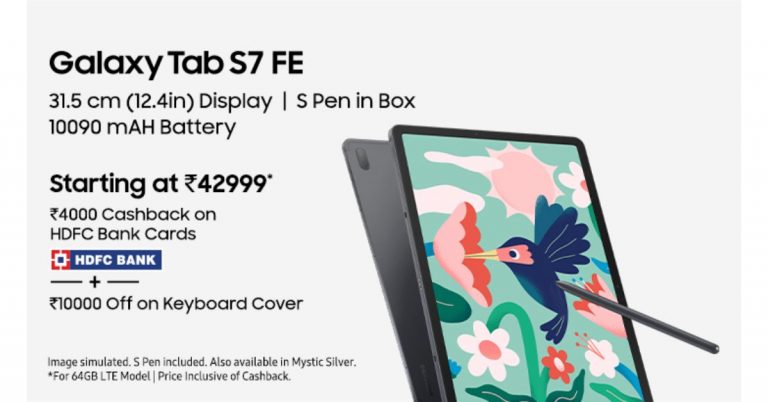
Samsung today has officially announced the launch of two new tablets in the Indian market. The company has introduced Samsung Galaxy Tab A7 Lite and Galaxy Tab S7 FE that were launched in the UK prior to coming to India. Both the devices come with different specifications as well as are similar in design. The Galaxy Tab S7 FE is an affordable variant of the expensive S7 whereas the Galaxy Tab A7 Lite is a toned-down variant of Tab A7. Samsung Galaxy Tab S7 FE, Samsung Galaxy Tab A7 Lite price and availability detailsSamsung Galaxy Tab S7 FE has been launched in India with a price tag of Rs 46,999 for the 4GB RAM with 64GB storage whereas the 6GB RAM with 128GB storage variant at Rs 50,999. The Tab will be offered in four colour options of Mystic Black, Mystic Green, Mystic Pink, and Mystic Silver. On the other hand, the Galaxy Tab A7 has been introduced in two variants: LTE and Wi-Fi. Both the variants will be available in 3GB RAM with 32GB storage priced at Rs 14,999 and Rs 11,999 respectively.Both the tablets are scheduled to go on sale in India on June 23 via Samsung.com, Samsung Exclusive Stores and leading online and offline retail partners. The launch offers include Rs 4000 cashback on HDFC Debit Card and Credit Card transactions and Rs 10000 off on the Keyboard Cover. Not only this, on Galaxy Tab A7 Lite, you can get up to 6 months of no-cost EMI which means that you can now own Galaxy Tab A7 Lite starting at Rs 2499/- per month.Samsung Galaxy Tab S7 FE 5G specificationsSamsung Galaxy Tab S7 FE features a 12.4-inch WQXGA TFT display with 2,560×1,600 pixels of resolution. The device runs on Samsung One UI based on top of Android 11 and is powered by Qualcomm Snapdragon 750G SoC with up to 6GB of RAM and 128GB of storage options. The storage can be expanded up to 1TB via a microSD card.The tablets come with an 8-megapixel main rear sensor that supports 1080p video recording at 30fps. On the front, there is a 5-megapixel camera sensor for taking selfies. In terms of connectivity, there is Bluetooth v5, USB Type-C port, Gigabit Wi-Fi GPS, and a USB Type-C 3.2 Gen1 port. There is an accelerometer, compass, gyroscope, ambient light sensor, and hall sensor. Moreover, it packs a 10,090mAh battery with 45W fast charging support.Samsung Galaxy Tab A7 Lite specificationsSamsung Galaxy Tab A7 Lite is highlighted with an 8.7-inch WXGA display having 1,340×800 pixels of resolution. Under the hood, there is an octa-core SoC paired with 3GB of RAM and 32GB of storage. The internal storage can be expanded up to 1TB using a microSD card. The tablet features a 5-megapixel camera sensor for taking selfies on the front. On the connectivity front, there is Wi-Fi 802.11ac, Bluetooth v5, GPS, USB Type-C, and a 3.5mm audio jack. Sensors on the Tab include an accelerometer, compass, and ambient light sensor. The device is backed by a 5,100mAh battery that supports 15W fast charging.
For the latest gadget and tech news, and gadget reviews, follow us on Twitter, Facebook and Instagram. For newest tech & gadget videos subscribe to our YouTube Channel. You can also stay up to date using the Gadget Bridge Android App.
Google Chrome has been the best browser choice for browsing the internet. Google Chrome’s natural choice of a search engine is Google, but you also have the option to change the default search engine. The web browser is ideal for many internet users whether you are using a smartphone or a computer, you always have the option to change the default browser. Look at the guide below for know-how.
In This Article
How to change on the Computer: Windows or Mac
Google Chrome is developed by Google, but it does not necessarily mean you have to use Google’s search engine. There are many options to choose from to make your default search engine in Google Chrome. Yahoo, Bing, and DuckDuckGO are some of the options. Even if you are using Google Chrome on any platform Windows 10, Linux, Android, or IOS the browser still permits you to change the default search engine according to your preference. Here are the steps to change the default search engine in Google Chrome.
Open your computer: Windows or Mac
And open the Google Chrome application
Now find the vertical three-dot on the top right corner
From the drop-down menu select settings
And from the left panel option: Find Search engine
Click Search engine and go to manage search engine
Now from the option of search engine select your preference
After selecting click on the three-dot menu
And choose to make default
If Google search engine is not available on the options list you can use the Add option on the top right corner.
When the search engine page pops up enter google.com and add
On a smartphone using Google Chrome is often misled to think Google is the only search engine option. Google services are integrated very much on a smartphone but there are options to change the default search engine according to what search engine you want. Here are the steps you can take to change the default setting on your smartphone.
Open the Google Chrome app on your smartphone
Now go to the vertical three-dot option
Click on the setting by going down the page
On the search engine option input the search engine you want
Now using the blue colour input the default search engine provided on the list


















 Samsung Galaxy M32 specifications


 Invidious is a front-end alternative for YouTube.









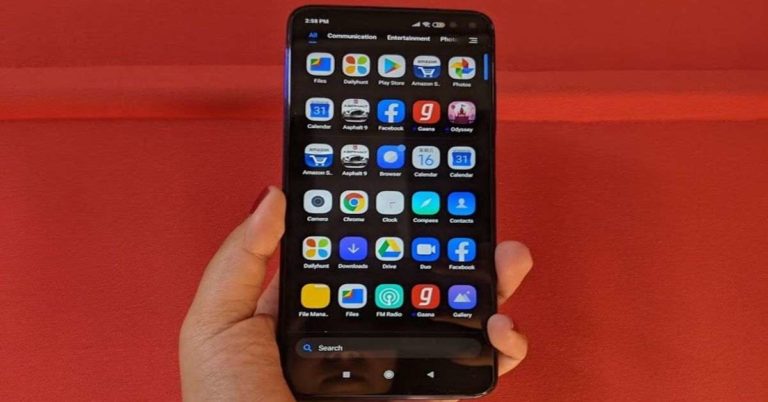
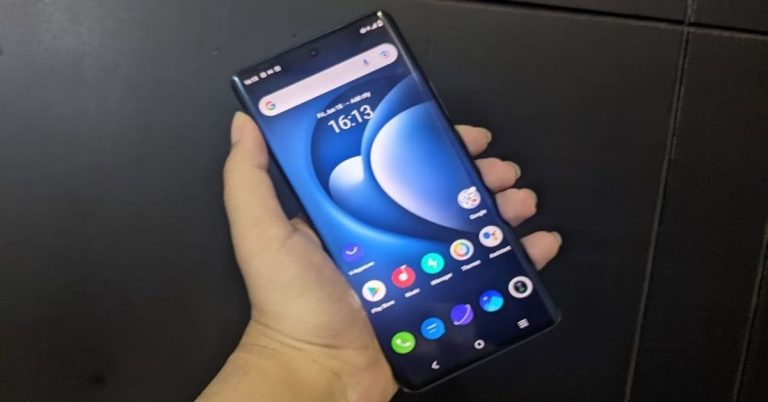
 It is worth noticing that Vivo X60 Pro is available in Midnight Black and Shimmer Blue colour options, and the one that we got for review was dressed in Black.
Coming to the 6.56-inch AMOLED Full-HD+ display, it comes with a maximum refresh rate of 120Hz, however, the option of switching it to 60Hz is also there on the device. In fact, with Smart Switch enabled, the smartphone automatically switches between 60Hz and 120Hz. The display of the device is great and the colour reproduction is excellent. We watched several shows on Netflix and
It is worth noticing that Vivo X60 Pro is available in Midnight Black and Shimmer Blue colour options, and the one that we got for review was dressed in Black.
Coming to the 6.56-inch AMOLED Full-HD+ display, it comes with a maximum refresh rate of 120Hz, however, the option of switching it to 60Hz is also there on the device. In fact, with Smart Switch enabled, the smartphone automatically switches between 60Hz and 120Hz. The display of the device is great and the colour reproduction is excellent. We watched several shows on Netflix and  To sum it up, we would say that although the design of Vivo X60 Pro is very premium and several aspects contribute to the upmarket looks. However, at this price point, it could have also included some other features like IP rating and wireless charging. The display, on the other hand, offered a great experience to us at all times.
 As expected, Vivo X60 Pro’s performance is super smooth and the smartphone can handle any task that’s thrown at it. We used the device extensively during our time with it and multitasked a lot on it, but there was nothing that made the performance lag even for a minute. We multiple apps on the smartphone, a lot of them were graphic-heavy, but there wasn’t anything that didn’t run smoothly.
We have already mentioned that our experience with watching shows on Netflix was good. The video experience was great and the phone didn’t warm up. The sound quality was good too, but in this price range, we have seen better than Vivo X60 Pro’s audio output. We also played several games on the smartphone including Asphalt 9: Legends. We didn’t notice any stutter while playing the game, even though it has some very heavy graphics, but we did see that the battery fell quickly while
As expected, Vivo X60 Pro’s performance is super smooth and the smartphone can handle any task that’s thrown at it. We used the device extensively during our time with it and multitasked a lot on it, but there was nothing that made the performance lag even for a minute. We multiple apps on the smartphone, a lot of them were graphic-heavy, but there wasn’t anything that didn’t run smoothly.
We have already mentioned that our experience with watching shows on Netflix was good. The video experience was great and the phone didn’t warm up. The sound quality was good too, but in this price range, we have seen better than Vivo X60 Pro’s audio output. We also played several games on the smartphone including Asphalt 9: Legends. We didn’t notice any stutter while playing the game, even though it has some very heavy graphics, but we did see that the battery fell quickly while  Coming to the battery life, the smartphone’s juice lasted at least a day for us with moderate usage. Gaming, watching

 Finally, the 32MP selfie camera takes amazing shots in well-lit as well as in dimly-lit surroundings. We are really happy with the selfies we managed to click from
 Another way of accessing the game is by downloading the Tap Tap app. Here is our step-by-step guide:



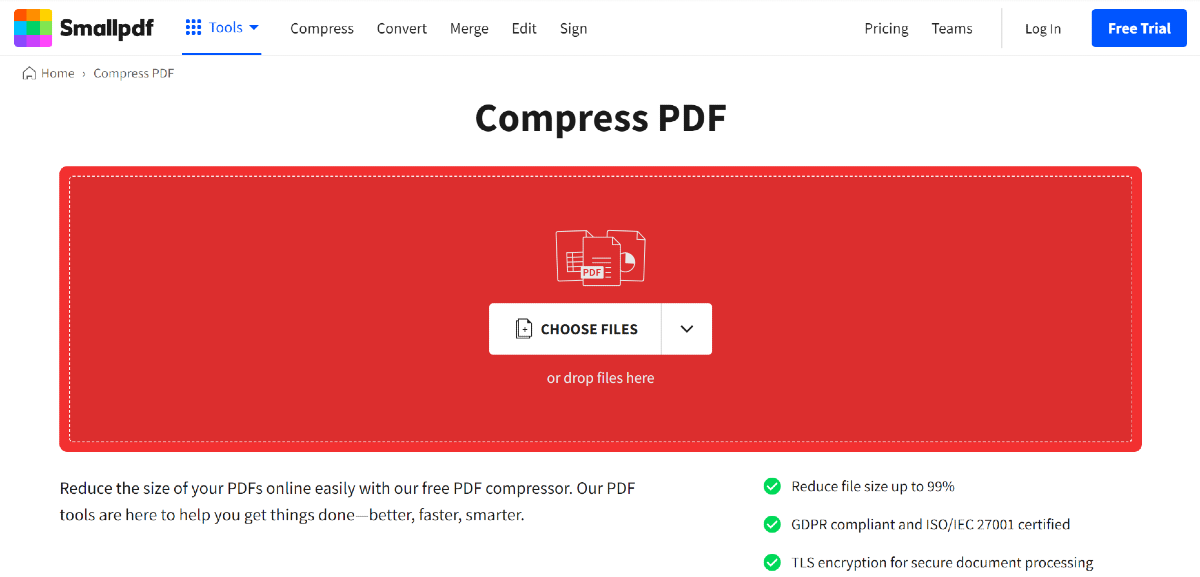 Small PDF is another website you can use to compress any PDF to a more desirable size. Simply go to the
 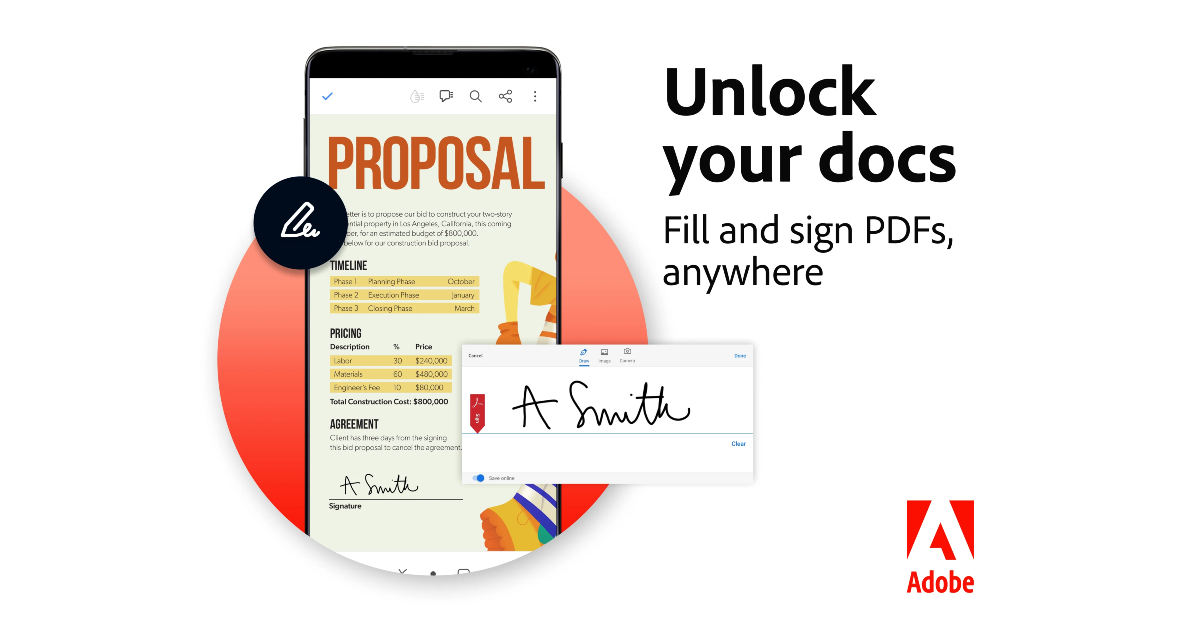 If you use the Adobe Acrobat Pro tool on your PC, you don’t need a third-party tool to compress a PDF. Simply open the PDF in Acrobat Pro, click on ‘File’, select ‘Compress PDF’, and choose the destination for the compressed file.
 Samsung Galaxy Tab A7 Lite specifications