Recently, the OnePlus 10 Series was confirmed to launch in January 2022. The upcoming lineup is now available for pre-registration. The company has however only revealed that it will be introducing the OnePlus 10 Pro but speculations suggest that the vanilla OnePlus 10 might also make its debut on the same day.OnePlus 10 Pro has been listed in China on its official website and JD.com and is now available for pre-registration. The company is said to announce the official launch date of the smartphone on January 4. The dedicated page created for the upcoming smartphone highlights the key specs of the smartphone. The listing also shows the OnePlus logo and the Grey colour option on the bottom portion of the back-end.The device is confirmed to be powered by Qualcomm Snapdragon 8 Gen 1 SoC. It is going to feature an LTPO 2.0 display.The new OnePlus 10 Pro Concept Video Renders revealed the device’s form factor as well as the colour options available. Black, Green, Purple, and Silver are said to be the four colour options for the device.According to the leaked renders, the OnePlus 10 Pro will have a curved display and rounded edges. In terms of design, the phone retains the alert slider, as well as the power button, on the right side of the frame. The volume rocker, on the other hand, is located on the opposite side of the frame. The OnePlus flagship smartphone has a USB Type-C port on the bottom frame, but no headphone jack.The alleged renders showed a large rectangular camera module with the Hasselblad logo engraved in the middle of the back panel and Hasselblad engraved in the corner. In addition, the renders revealed a hole-punch cutout in the top left corner of the screen, with slim bezels.It is also expected to have a 6.7-inch LTPO AMOLED display with a resolution of 2,048 x 1,080 pixels. A 120Hz refresh rate will be supported by the screen. The phone is also expected to have an IP68 rating, which means it will be dust and water-resistant. It’s rumoured to come with the Oppo and OnePlus’s joint operating system.As previously stated, the OnePlus 10 Pro will be equipped with a Snapdragon 8 Gen 1 processor, as well as up to 12GB of LPDDR5 RAM and up to 256GB of UFS 3.1 storage. The handset could have a 5,000mAh battery, according to the report.The OnePlus 10 Pro is expected to have a triple-camera setup on the back, with a 48MP primary sensor. There’s also a 50MP ultra-wide-angle lens and an 8MP telephoto lens. In addition, the front camera will be upgraded to 32MP.
For the latest gadget and tech news, and gadget reviews, follow us on Twitter, Facebook and Instagram. For newest tech & gadget videos subscribe to our YouTube Channel. You can also stay up to date using the Gadget Bridge Android App. You can find the latest car and bike news here.
In the year 2021, some good smartphones with even better cameras than the previous year were released. If you’ve been using a basic phone for photography and want to take it to the next level by upgrading to a smartphone with a good camera that’s capable of not only photography but also video recording, this year many brands have released some intriguing camera-focused smartphones that have improved not only the rear but also the front cameras. Here is a list of the 5 best camera phones of 2021 that you can look out for.
In This Article
Samsung Galaxy S21 Ultra
The Samsung Galaxy S21 Ultra has a 6.8-inch Edge QHD+ Dynamic AMOLED 2X Infinity-O Display with a resolution of 1,4403,200 pixels. HDR10+ is supported, as well as a 120Hz adaptive refresh rate. This phone, like its siblings, runs One UI on top of Android 11. There’s an octa-core Exynos 2100 SoC under the hood, along with up to 16GB LPDDR5 RAM and 512GB of storage.The phone has a quad-camera setup on the back, which includes a 108-megapixel primary sensor with f/1.8 aperture and OIS support. A 12-megapixel Dual Pixel sensor with an f/2.2 aperture, a 10-megapixel telephoto lens with an f/2.4 aperture and 3x optical zoom, and a 10-megapixel telephoto lens with an f/4.9 aperture, OIS support, and 10x optical zoom round out the package. The phone also has a second laser autofocus sensor, and the camera setup supports 100X Space Zoom. A 40-megapixel selfie camera with an f/2.2 aperture is located on the front.
Vivo X70 Pro Plus
The Vivo X70 Pro Plus has a 6.78-inch ultra HD AMOLED display with a 120Hz refresh rate. The Qualcomm Snapdragon 888+ SoC is at the heart of the device, along with an Adreno 660 GPU.A 48MP Sony IMX578 ultra-wide-angle sensor, a 50MP primary sensor, a 12MP portrait, and an 8MP periscope lens will make up the X70 Pro+’s quad-camera setup. The selfie camera is unchanged, but there is a 5,000mAh battery with fast charging support of 55W Flash Charge and 50W Wireless Flash Charge.
iPhone 13 Pro Max
The iPhone 13 Pro Max has a 6.68-inch Super Retina XDR display with ProMotion, which has an adaptive refresh rate of up to 120Hz, allowing for a faster and more responsive touch experience. An A15 Bionic chipset with 5-nanometer technology powers the devices, which features a new 6-core CPU with two new high-performance cores and four new high-efficiency cores. It has a new 5-core GPU that provides the fastest graphics performance, making it ideal for video apps, high-performance gaming, and a variety of new camera features. The device has a triple rear camera setup, which is a highlight in terms of cameras. A 12-megapixel ultra-wide shooter, a 12-megapixel wide-angle lens, a 12-megapixel telephoto lens, and a LiDAR scanner are all included.
Mi 11 Ultra
The Mi 11 Ultra features a quad-curved 6.81-inch 2K WQHD+ E4 AMOLED display with a resolution of 3,200 1,440 pixels and HDR10+ support. The display panel supports a refresh rate of 120Hz and a touch sampling rate of 240Hz. A secondary display on the back is a 1.1-inch AMOLED touch screen with a resolution of 126294 pixels.Mi 11 Ultra is powered by Qualcomm Snapdragon 888 SoC with Adreno 660 GPU and runs MIUI 12 on top of Android 11. It comes with up to 12GB of LPDDR5 RAM and 256GB of UFS 3.1 storage.The Xiaomi Mi 11 Ultra has a rectangular-shaped triple rear camera setup with a multi-functional secondary display for notifications, battery level, and weather alerts, which is the phone’s biggest highlight. A 50-megapixel Samsung GN2 primary wide-angle sensor with f/1.95 aperture and OIS support is included in the camera setup. There are two 48-megapixel Sony IMX586 ultra-wide-angle and tele-macro sensors onboard as well (5x optical and 120x digital zoom). All three sensors can record 8K video at 24 frames per second. A 20-megapixel sensor is located on the front of the device for selfies and video calls.
OnePlus 9 Pro
The OnePlus 9 Pro comes with a slew of impressive features. It has a 6.7-inch QHD+ AMOLED LTPO Fluid Display 2.0 screen for the display. The refresh rate varies depending on the type of content, ranging from 1 Hz to 120 Hz.The device runs Android 11 with Oxygen OS 11 and is powered by Qualcomm Snapdragon 888 processor with 5G support. The phone’s Hasselblad-branded quad rear camera system, which includes the main camera, features a 48MP Sony IMX789 sensor and a 50-megapixel Sony IMX766 ultrawide sensor in terms of camera capabilities. A telephoto lens with an aperture of 8 megapixels and a 2-megapixel depth camera sensors are also included. A 16-megapixel sensor is available for selfies. The camera can shoot at a resolution of 8K at 30 frames per second (FPS). You can also shoot slow-motion video in 4K at 120 frames per second.
For the latest gadget and tech news, and gadget reviews, follow us on Twitter, Facebook and Instagram. For newest tech & gadget videos subscribe to our YouTube Channel. You can also stay up to date using the Gadget Bridge Android App. You can find the latest car and bike news here.
Welcome everyone to the biggest, best consumer technology and gadget awards, welcome to Gadget Bridge Awards 2021. This is the third time we are doing our yearly awards to know the best of the best in the tech and gadget journey. All the nominations of Gadget Bridge Awards 2021 can be found here. This year too, we saw the much-needed lockdown and due to which the markets were shut, but after that things improved drastically and everything became almost normal (thanks to the vaccination drive, as well). We saw a wide variety of gadgets throughout 2021 and this time we said why not increase and appreciate more tech toys. So, yes, we can proudly say we are the biggest tech and gadget awards of 2021, with over 32 categories.
We were overwhelmed in some months because of the sudden inflow of gadgets, but we powered through and took it up as a challenge. We thank you, our readers, viewers, listeners and well-wishers who have been standing strong with us, along with the rest of the industry. The new year started with a bang and some cool smartphones were launched in early 2021. Then in mid-2021 we again saw some great gadgets coming to life, including televisions, laptops, smartwatches, cameras, and tablets. The year was business as usual.
You, our audience has helped us decide the People’s choice smartphone, gadget and brand of the year 2021. Thousands came forward and voted on both Twitter and on our voting forum to decide the winners here. We got a clear winner in two categories, while the third one saw a gadget win by just a few percentage points.
So, without further ado let’s get started and see who the winners are in each of the 33 categories. These are Gadget Bridge Awards 2021: The biggest, best consumer technology and gadget awards of the year.
Here are the winners of the Gadget Bridge Awards 2021:
In This Article
Best Smartphone Of The Year 2021
Like last year, this was by far one of the toughest categories when it comes to smartphones. We put in a lot of thought and retested some of the features. The winner won by the tiniest of margins.
The contenders here are Samsung Galaxy S21 Ultra, OnePlus 9 Pro, Vivo X70Pro Plus, Mi 11 Ultra and Samsung Galaxy Z Fold 3.
Winner: Samsung Galaxy S21 Ultra.
It comes with an Exynos 2100 chipset with Quad-Core CPU clocking at 2.91GHz. This speed only kicks in when the phone demands it. Like when playing graphic hungry games or apps. Otherwise, to conserve battery the lower speed cores stay alive. With this, the Samsung Galaxy S21 Ultra has 12GB RAM and 256GB storage (the device we got for review). Graphics are provided by Mali-G78 MP14 GPU.
Best Camera Phone Of The Year 2021
This is one of our favourite categories of the Gadget Bridge Awards 2021. We love to tinker around with cameras especially when it is on a smartphone. We saw some great nominations this year too.
The contenders here are Samsung Galaxy S21 Ultra, Vivo X70 Pro Plus, iPhone 13 Pro, Mi 11 Ultra and OnePlus 9 Pro.Winner: Vivo X70 Pro Plus
The technical specifications of the Vivo X70 Pro Plus include a Qualcomm Snapdragon 888+ 5G chipset that is the fastest in the current gen of CPUs. It is partnered with Adreno 660 for graphics, up to 12 GB of RAM and 512GB of fast UFS 3.1 storage. Together it makes up for a mean tech specs sheet.
For battery, the company has installed a 4,500 mAh one inside, which some might think is less, but on our tests, it lasted for a full day. Besides, it comes with a 55W faster charger in the box, that can recharge it in a jiffy.
Best Budget Smartphone Of The Year 2021
The segment is one of the most crowded and brutal classifications when it comes to smartphones. A lot of devices were launched in this one year here. The smartphones makers left no stone unturned to make our choice very-very tough. But alas we found the one that stands on the top of the podium.
The contenders here are Moto E7 Power, Samsung M12, Infinix Hot11s, Poco M3 Pro and Redmi Note 10 Pro.
Winner: Redmi Note 10 Pro
The smartphone is powered by Qualcomm‘s Snapdragon 732G processor clubbed with up to 8GB of RAM. The device has up to 128GB of onboard storage and in case that’s not enough for some users, they have the option of installing a microSD card of up to 512GB. Redmi Note 10 Pro runs Android 11 skinned with MIUI 12 that brings several customizations to the device. It houses a 5020mAh battery and sports quad rear cameras (64MP+8MP+5MP+2MP), and a 16MP selfie camera.
Best Gaming Smartphone Of The Year 2021
Gaming is now part of everyone’s life. Many of us play casually as well as professionally. Smartphones were the first weapon of choice to level up our gaming skills. Last year the category was won by Asus ROG Phone 3 and this year will its elder brother step up on to the top of the podium? Let’s find out.
The contenders here are Asus Rog Phone 5, Oneplus 9R,Poco F3 GT, Iqoo 7 Legend and Samsung Galaxy S21 Ultra.
Winner: Asus Rog Phone 5
The smartphone comes screaming in with the top-of-the-line Qualcomm Snapdragon 888 chipset. This is the absolute best when it comes to premium performance and gaming capabilities.
The is partnered with Adreno 660 graphics. With that, you get 8, 12 or 16 GB of RAM. The one we are testing has 12GB RAM and 256GB storage. The 8GB RAM version comes with 128GB storage, the 16GB RAM model also comes with 256GB storage. The storage is UFS 3.1 supported.
For audio, there is stereo sound available as there are twin loudspeakers available on the ASUS ROG Phone 5. These are optimised for the best gaming sound with DTS:X so that you always end up getting chicken dinner in PUBG.
Best Mid-Range Smartphone Of The Year 2021
A tough decision for us, as the votes were very close between two smartphones. The Oppo and Poco. But the previous had a wee-bit more firepower in the mid-range category.
The contenders here are Oppo Reno 6 Pro, Oneplus 9rR, Samsung A52s, Poco F3 GT and Mi 11x.
Winner: Oppo Reno 6 Pro.
The smartphone is powered by the new MediaTek Dimensity 1200 processor clubbed with 12GB of RAM and 256GB of internal storage. The handset houses a 4,500mAh battery and supports 65W fast charging. The device runs ColorOS 11.3 that gets with itself some customizations like always-on display, really-cool animated wallpapers, a dedicated gaming mode, and more.
There are some pre-installed apps on Oppo Reno 6 Pro including Soloop, Snapchat, Facebook, Josh, Hey Fun, Moj, et al. While most of them can be uninstalled, you’ll have to live with Hot Apps and a few other apps from Oppo’s family. This is a downside as some of them really spammed us with notifications during our time with the phone, and we didn’t really expect this from a device that is this expensive.
Best Mid-Range Camera Phone Of The Year 2021
A new category created this year is this one. There are plenty of smartphones, which launched this year in the mid-segment that came with very powerful cameras. So lets’s see which one comes out on top here.
The contenders here are Xiaomi Mi 10i, Samsung Galaxy F62, Oneplus Nord 2, Vivo V21 and Samsung Galaxy A52s.
Winner: Xiaomi Mi 10i
The smartphone is powered by Qualcomm‘s Snapdragon 750G SoC and it is available in three storage options – 6GB RAM/64GB storage, 6GB RAM/128GB storage and 8GB RAM/128GB storage. The handset houses a 4,820mAh battery and it comes with a 33W fast charger in the box.
Mi 10i runs Android 10 skinned with the company’s MIUI 12.0.3 and the software of the device is highly customised. There is plenty of bloatware on the device and we often received notifications for promotional content, which is obviously something that hampered the user experience. Something that we really want Xiaomi to improve on. Not that they have not done it, but there is room to improve.
Best Selfie Smartphone Of Year 2021
Another fresh category we created in the 2021 awards is for selfie lovers. People love clicking selfies and there are plenty of smartphones in the market for that. We went through a ton of phones to find out the winner here.
The contenders here are Samsung Galaxy S21+, Vivo X70 Pro Plus, Apple Iphone 13 Pro, Mi11 Ultra and Oneplus 9R.
Winner: Vivo X70 Pro Plus
The Vivo X70 Pro Plus is by far one of the best we have seen this year. You get best in class Zeiss lenses here, with a gimble attached to it. This means you get super steady shots no matter what the situation is. Also, the primary shooter has a glass lens by Zeiss on it, which is much better than the usual plastic lenses found on most smartphones.
The Vivo X70 Pro Plus comes with 32MP wide-angle lens with f/2.5 aperture size. The story here is also very lively. We were able to squeeze out excellent selfies during the day, but quality fell a little in low light. So, our suggestion is to use the rear cameras if you are shooting at night. The front camera can also shoot videos in 4K at 60FPS, which as said is great for vloggers. The colours are very close to life and you do not see any ghosting or details lost here.
Best Vlogging Smartphone Of The Year 2021
Whether you are creating videos for YouTube or for TikTok, you need a great smartphone for that. Makers are producing specific phones as well as features in them to cater to this audience, so it made perfect sense to create a class to appreciate them.
The contenders here are Samsung Galaxy S21 Ultra, Apple iPhone 13 Pro, Oneplus 9 Pro, Vivo V70 Pro Plus and Samsung Galaxy Flip 3.
Winner: Apple iPhone 13 Pro
Under the hood, Apple has put the latest Bionic A15 chipset that is the latest and the fastest from the company. This is coupled with up to 1 TB of storage, so all those who were bickering about the brand, not including a memory card slot in the iPhone can simply buy larger storage driven iPhone 13 Pro. The RAM and battery size have been bumped up and together with the latest CPU from Apple, the smartphone can open the most intense of games and apps in a blink of an eye. Battery life has become better in the Apple iPhone 13 Pro, too. You will get a few additional hours of playtime if you compare it to the previous version. Also, iPhone 13 Pro is water and dust resistant and comes with an iOS 15 operating system out of the box.
People’s Choice Smartphone Of The Year 2021
This is our first people’ choice awards category of 2021. This is where all of you helped us decide. You voted and this smartphone won. There was a clear champion here.
The contenders here are Apple iPhone 13 Pro, Samsung Galaxy S21 Ultra, Mi 11 Ultra and Oneplus 9 Pro.
Winner: Apple iPhone 13 Pro
The Apple iPhone 13 Pro has triple 12 MP cameras that take care of ultra-wide, wide, and telephoto shooting experience. There is a TOF 3D LiDAR sensor included, which is great for adding depth to images. This has become better and the depth in shots is far superior when compared to its previous gen.
Not to forget, the imagery has become much better from all three camera sensors. In our test, we got to see exceptional results in the day and at night. There was hardly a time of the day when we could not adjust the settings and get the shot we wanted from the phone. A new cinematic video mode has been added in the native camera app that will adjust the subject focus automatically. If there are two subjects in the video and one looks away from the camera the focus will automatically move on to the other person. Which by the way can be shot in 4K at 60FPS (frames per second).
People’s Choice Gadget Of The Year 2021
Good close completion here as well. Again you decided the winner, and we presented it as the clear winner. Let’s find out who won.
The contenders here are Samsung Galaxy Z Fold 3, Amazon Echo Show 10, Apple Ipad Pro 2021 and Asus Rog Zephyrus Duo 15 2021.
Winner: Samsung Galaxy Z Fold 3
The smartphone comes with a Qualcomm 888 chipset that has an octa-core CPU with a max clock speed of 2.84GHz. The graphics are provided by Adreno 660 GPU and it comes in two models. One model sports 12GB RAM with 256GB storage and the other has 12GB RAM with 512GB storage. Both support UFS 3.1 for faster performance of storage and better power efficiency. There is a 4,400 mAh battery inside, which does keep the phone alive for more than 21.5 hours under nominal use, which includes few hours of calling an hour of gaming and 1-2 hours of social media and YouTube browsing and playback.
People’s Choice Brand Of The Year 2021
You decided which is the tech brand of the year. The decision was unanimous and some of us in the team did see this one coming.
The contenders here are Xiaomi, Samsung, Apple and Amazon.
We are all about tech and gadgets and these tech toys made to the top of our lists of Gadget Bridge Awards. We would have loved to award multiple winners here, but only one can win. This particular gadget has become better over time and still is something out of a Sci-Fi movie.
The contenders here are Samsung Galaxy Z Fold 3, Dyson Purifier Hot + Cold, Canon Eos R3, Apple Ipad Mini 2021 and Apple Watch Series 7.
Winner: Samsung Galaxy Z Fold 3
The operating system on the Samsung Galaxy Z Fold 3 is Android 11 with Samsung UI 3.1 skin on top of it. Thanks to the 12 GB RAM and the latest Snapdragon 888 chipset, we hardly came across any lag. The apps and games open in a jiffy and the 120Hz browsing and scrolling experience is top-notch. You get a lot of quick options in the drop-down quick settings menu and users can quickly access recently used apps from the sideswipe menu. We love an app drawer in a smartphone, and this mobile device also has one, so that everything on the home screen looks neat and not cluttered.
Hatke Gadget Of The Year (Design) 2021
Now let’s move to the Hatke categories that have something fresh about them. These gadgets are Hatke (different) when it comes to design. All of them had something unusually cool about them (design-wise). But one stood out as we have never seen this design feature anywhere else.
The contenders here are Asus Aio 241e’, Fitbit Luxe, Oneplus Nord 2 Pac Man Edition, Samsung Flip 3 and Dyson Purifier Hot+Cold.
Winner: Oneplus Nord 2 Pac Man Edition
OnePlus Nord 2 Pac Man Edition comes with a dual film rear cover featuring the OnePlus and Pac Man branding. The rear panel highlights the PAC-MAN elements – such as the game’s iconic PAC-DOTS and PAC-MAN himself. It boasts a glossy phosphorescent design that glows in the dark to reveal a neon maze inspired by PAC-MAN. It also comes with a DIY PAC-MAN phone holder that is inspired by the popular Penrose stairs and symbolizes PAC-MAN’s iconic gameplay loop.
Hatke Gadget Of The Year (Performance And Utility) 2021
The next one in the Hatke series is for performance and utility. The swag value of these gadgets is very high when it comes to the fresh new approach. Let’s see who the contenders are here.
The contenders here are Sharp Qnet Air Purifier Kc-G60m-W, Philips Fresh Air Mask, Sandisk Ixpand Wireless Charger Sync, Sony Ht-S40r and Xiaomi Beard Trimmer 1c.
Winner: Philips Fresh Air Mask
The fan on Philips Fresh Air Mask has 3-speed modes, which can be accessed with the LED-lit button on the fan panel from the outside. Sweat is the biggest problem of any facemask, but with this one (thanks to the fan) you hardly find any sweat drops on your face even when you are in hot temperatures. Charging the Philips Fresh Air Mask is also very easy and one can do that with any USB charger using the supplied cable.
Best Value-For-Money Laptop Of The Year 2021
What do we all want from a gadget? Value for money, especially when it comes to a gadget like a laptop, which we will use for years to come. The choices here were very competitive, but finally, we came to a conclusion.
The contenders here are Acer Aspire 5, Asus Vivobook Flip 14 2021, Xiaomi Mi Notebook Ultra, Asus C214 and HP Pavilion 14.
Winner: Xiaomi Mi Notebook Ultra
So what all do you get under the hood? We are reviewing the Xiaomi Mi Notebook Ultra with the Intel i5 11th Gen (11300H) CPU that has 4 cores and a clock speed of up to 4.4GHz. This is partnered with 16GB RAM (3,200MHz frequency), which is soldered on the mainboard and 512GB of NVMe SSD. For graphics, you will get an onboard Intel Iris XE graphics unit. Other features include WiFi 6 for fast network connectivity and Bluetooth 5.1 support.
Best Laptop Of The Year 2021
A flurry of laptops were launched in the year 2021. The demand was very high this year too, as many were working from home due to the pandemic. Some great runners in this category but one stood out of the pack.
The contenders here are Asus Zenbook 13 Um325u, Dell XPS 15 (2021), Acer Swift X, Xiaomi Mi Notebook Ultra and Hp Envy 14 (2021)
Winner: Acer Swift X
Acer Swift X laptop features a 14-inch FHDQuad HD IPS LED Backlit TFT Acer ComfyView Display. The screen offers 1920 x 1080 pixels of resolution 85.73% screen-to-body ratio, 300 nits brightness, 100% sRGB and 16:9 aspect ratio. The laptop is powered by AMD Ryzen 5 5600U Hexa-core processor and is paired with NVIDIA GeForce RTX 3050 GPU for graphics with 4GB of GDDR6 VRAM and up to 4.4 GHz, 8 cores, and 16 processing threads The Acer laptop comes with 16 GB of onboard LPDDR4X system memory and up to 2TB SSD, PCIe Gen3 8 Gb/s, NVMe (upgradable up to 1TB).
Best Gaming Laptop Of The Year 2021
After gaming smartphones, a category that flourished during the year 2021 was gaming laptops. As PC gaming grew, more companies introduced their portable gaming notebooks that can give tough competition to desktop gaming machines and gaming consoles.
The contenders here are Alienware M15 R5, Asus TUSF Dash F15, Lenovo Legion 5, Acer Helios 300 (2021) and HP Victus 15 (2021)
Winner: Asus TUSF Dash F15
The Asus TUF Dash F15 gaming laptop we reviewed had the Intel Core i7 version that supports 3.3 GHz. But this is just a quad-core CPU, which is not super best for high-end gaming, but does get the job done on medium to high settings with the NVIDIA 3070RTX GPU for most games.
The above is coupled with 16GB RAM, 8GB of which is soldered on the motherboard and 8GB is removable. Most super-thin gaming laptops (this one is 19.9mm thin) like these come with soldered RAM, which has its own pros and cons. Pro is the thinness of the notebook and the con is if it gets ruined, you need to replace the motherboard. Users also get 1TB NVMe PCIe 3.0 SSD. Windows 10 Home is the native OS on the Asus TUF Dash F15 gaming laptop.
Best Tablet Of The Year 2021
Tablets are the preferred choice if someone wants good performance and portability yet does not want to burn a hole in his/her pocket. These became great alternatives to laptops for students and office goes who wanted to attend online classes or a Zoom call in the year 2021.
The contenders here are Apple iPad Mini 2021, Samsung Galaxy Tab A7 Lite, Lenovo Tab P11 Pro and Nokia T20.
Winner: Apple iPad Mini 2021
It features an 8.3-inch screen with a Touch ID. The device will be available in Wi-Fi and a cellular variant. The iPad Mini has support for 5G connectivity. It has a 12-megapixel ultra-wide camera with Centre Stage and a new speaker system. Moreover, the new line-up will have support for the second generation of Apple Pencil. It comes with a USB Type-C port.
Best Value-For-Money Smart TV Of The Year 2021
Another segment where we sought great value for money is TVs. The sector has flared up in 2021 and many from across the globe brought the best. We tested out quite a few, but only one can be crowned as the winner.
The contenders here are Acer P Series Android TV, Mi Tv 5x, Daiwa 4k UHD TV and OnePlus U1S 50-Inch.
Winner: OnePlus U1S 50-Inch
Best TV Of The Year 2021
We have said this before many times, the idiot box is not so idiot anymore. Televisions are seen as a family member now and with the odd times we live in, stuck at home, these smart machines kept us entertained. A lot of great candidates this time and by the smallest margin, we do have a champion.
The contenders here are Mi QLED TV 75, OnePlus TV U1S 65-Inch, Sony XR A80J and LG OLED C1.
Winner: Mi QLED TV 75
Best Feature-Packed TV Of The Year 2021
In this grouping, we were looking for a TV that has not just good but a really good amount of features. We came across many that gave a few additional features, but this one stood out as it gave a lot of extra features over the regular ones.
The contenders here are Sony XR A80J, TCL Mini Led C825, LG OLED C1 and Mi QLED TV 75.
Winner: TCL Mini LED C825
TCL Mini LED QLED 4K C825 supports Dolby Vision IQ and packs 120Hz MEMC and TCL’s exclusive algorithm that makes viewing action-packed content glitch-free. It comes with Game Master with a dedicated HDMI 2.1 port for the gamers to allow them to play even high-quality games with smoother processing and powerful optimization. The Mini LED technology on the Television promises wide colour gamut performance coupled with high contrast ratio and HDR. The device also supports local dimming that gives the viewers a totally immersive viewing experience. According to the company, the use of mini LEDs will also result in thinner and lighter product designs.
Best Projector Of The Year 2021
When we were deciding new categories for the year 2021, projectors were one of the first that came to our mind and we all agreed upon. The type is one of the most populated so the decision here was tough for us. But we pulled up our socks and finally came to a conclusion.
The contenders here are Viewsonic LS600WE, Optoma HD30HDR, Viewsonic X100-4K, Panasonic Pt-Rz990 and Optoma UHD35+.
Winner: Optoma UHD35+
Best Home Improvement Device Of The Year 2021
IOT (Internet of things) has expanded gadgets especially built for home. These gadgets help to elevate or better your household. We came across some neat and nifty gadgets in the year 2021 that are all worthy of gratitude, but only one can win.
The contenders here are Amazon Echo Show 10, Flexnest Flexbike +, EZVIZ C6n WiFi Camera, Dyson Purifier Hot+Cool and Mi 360 Security Camera 2K Pro.
Winner: Amazon Echo Show 10
Amazon Echo Show 10 does everything the regular Echo speakers do and more. The sound of the speakers is great. If you are throwing a small party at home, this speaker is all you need to fill the room with great tunes.
Best Smartwatch Of The Year 2021
Year after year we see even better, faster and longer-lasting (when it comes to battery life) smartwatches in India. Every big and small tech company has at least 1 smartwatch in its treasure chest now. This was a toughie for us, but we finally came to a decision.
The contenders here are Amazfit Bip U Pro, Samsung Galaxy Watch 4, Apple Watch Series 7 and Oneplus Watch.
Winner: Apple Watch Series 7
With the launch of the new Apple Watch Series 7 the company introduced redesigned OS for the watch to utilise the bigger display, the watch supports all the sports modes paired with Apple Sports+. The new OS has the support of a small keyboard in the UI that utilises the bigger display and can come in handy for replying to texts on the go. It can show the user their ECG, has cycle mode to know the speed one is riding at and has fall detection. The Watch is WR50 waterproof, making it ideal for surfing. With 100% recyclable aluminium the new watch is more durable and has IP6X dust resistance, too.
Best Fitness Wearable Of The Year 2021
A very crowded segment in India is of fitness wearables. The market was flooded with branded and non-branded wearables in the year 2021. The choice here for us was simple, pick the one which gives you the best bang for the buck and has the best features on offer.
The contenders here are Oppo Band Style, Huawei Band 6, Fitbit Charge 5 and Mi Band 6.
Winner: Fitbit Charge 5
The Fitbit Charge 5 features a 1.04-inch colour AMOLED touchscreen display with 450 nits of peak brightness. It offers an always-on display with 20 colourful clock faces to customize what information you want to see most. It allows you to swipe a finger, view your stats, and receive/send notifications from/to your smartphone. The Fitbit Fitness band also comes with a built-in GPS + GLONASS, SpO2 sensor, skin temperature sensor, and optical heart rate monitor. The device can also withstand up to 50 metres in water, which makes it swim-proof. The watch also includes NFC and is compatible with Android 8.0 or higher devices and iOS 12.2 or higher Apple products.
Best Headphones Of The Year 2021
After sight, sound is the most important feature for a wholesome entertainment experience. Headphones or earphones provide you with great sound at a personal level and there were many exceptional runners here. The choice was hard for us, but one pipped the others because of its superb design.
The contenders here are Audio Technica ATH-102USB, Sennheiser IE300, PLAYGO BH47 and Ptron Tangent Plus V2.
Winner: Sennheiser IE300
The Sennheiser IE300 have been made for people who want nothing short of pure audio excellence. The 7mm audio drivers in these earphones supply excellent highs, mids and bass. Built for comfort listening, the IE300 provided us with a superb audio experience. But the gamer in us kept shouting, try them out while gaming. To our amazement, in many ways, these were better than the professional Razer headphones we have been using for gaming.
Best Value For Money Wireless Earphones 2021
We all want bang for our buck. Value for money gadgets is one of our favourites so it made perfect sense for us to honour an ace in the wireless earphones sector too.
The contenders here are Sennheiser IE100, Noise Flair Touch, PLAYGO N37 and Ptron Tangent Plus V2.
Winner: PLAYGO N37
The PlayGo N37 works with any BT device, as it supports Bluetooth version up to 5.0. We tested it out with a lot of devices including a Samsung smartphone as well as our laptop. The sound is very nice. For the value, the bass is good and voice clarity is superb. We played songs from Spotify as well as Amazon Music and not once did we feel they were underpowered. The earbuds are also magnetic so you can clasp them together magnetically in the neck and they will not fall off.
Best Wireless Earphones Of The Year 2021
Another segment that grew exponentially in 2020 is of wireless earphones and it grew further in 2021. Oppo, Vivo, OnePlus, Samsung and Xiaomi got new and fresh wireless earphones to the Indian market. All of them did a very good job, but one stood out of the pack.
The contenders here are Oppo Enco X, Nothing Ear 1, Apple Airpods 3, Oneplus Buds Pro and Samsung Galaxy Buds Pro.
Winner: OnePlus Buds Pro
The bass in the OnePlus Buds pro is simply superb, with the highs and lows quality much better than its competition. We used them with various audio apps including Spotify and they surprised us at each step. More so, since they are LHDC and Dolby Atmos optimised.
Best Bluetooth Speaker Of The Year 2021
WE have seen this class grow exponentially in the last few years. Whether it is just casual listening or you are throwing a small party a BT speaker is the perfect companion. We did see some good fresh new Bluetooth speakers coming to town in the year 2021.
The contenders here are JBL Charge 5, Sony SRS XG500, Sony SRS-XB13 and Mi Portable Bluetooth Speaker 16W.
Winner: Sony SRS XG500
The Sony SRS XG500 portable speakers are absolute headbangers. The sound is incredible and one of the best we have seen from any portable speaker from the Japanese major. Consumers get an array of speakers here. In total there are 6 speakers on the Sony SRS XG500. There are two square style X-balanced speakers in the front (middle), with twin high-efficiency tweeters next to them on each side (placed behind the cloth mesh) and two passive radiator audio drivers on both sides.
Best Streaming Service Of The Year 2021
Everybody amped up the OTT game in the last few years. As people turned to streaming services when doing nothing at home, the providers added new shows and movies to be watched in the cozy surroundings. There was plenty of action, drama and comedy going on in each one of them. But in the end, it is all about great content and who delivers it the fastest.
The contenders here are Disney+ Hotstar, Prime Video, Apple TV+ and Netflix.
Winner: Netflix
Best Music App Of The Year 2021
With the emergence of smartphones, an app that became very popular in the last five years belongs to the music series. So, we decided let’s honour the music streaming services in the apps category, hopefully, next year we would be able to add more app sections in the Gadget Bridge awards. As for now here are the nominees.
The contenders here are Apple Music, Amazon Music, Spotify and Jio Saavn.
Winner: Spotify
Best Camera Of The Year 2021
Yes, our smartphones can click lovely pictures, but still, we love the very handy camera for the best shots. These devices capture your memories in the form of pictures or moving pictures. Some innovative new products came to life in 2021, too. We wish there could be two winners but there is space for only one on the top podium step.
The contenders here are Panasonic Lumix GH5M2, Nikon Z9, Canon EOS R3 and Sony Zv-E10.
Winner: Canon EOS R3
Best PC/Laptop Accessory Of The Year 2021
The last category in this year’s awards is for PC/Laptop accessories. Yes, this one is also freshly added making the list strong for consumer tech and gadgets. We loved a lot of gadgets that were launched for this section and here are the top nominees and then the winner.
The contenders here are Logitech Mx Anywhere 3, D-Link Ax1500 R15 Ai Router, Rapoo GK500 Keyboard and Dell Web Cam.
Winner: Logitech Mx Anywhere 3
The Logitech MX Anywhere 3 is a workhorse, which the work from home force wants. This is a mouse that actually lowers a lot of your burden. To begin with, it works with multiple operating systems, including Mac and Windows. The company does give a USB wireless connection dongle with it; however, you do not require it as it can connect with Bluetooth easily.
The sensor in the Logitech MX Anywhere 3 has a max DPI value of 4,000 which is excellent if you work on large screens. Most of the functions can be customised using the Logitech Options software. Users can customise the scroll click button, the side buttons and even the mode key just above the scroll wheel. Or they can use some of the pre-sets already present in the software for apps like Adobe Photoshop and Microsoft office suite. So, this way the side buttons are pre-customised for each software you use and you do not have to change it every time you open the software.
So these are all the categories and winners of the biggest tech and consumer gadgets awards: Gadget Bridge Awards 2021. Congratulations to all the winners and Good luck to everyone and we shall see you next year!
For the latest gadget and tech news, and gadget reviews, follow us on Twitter, Facebook and Instagram. For newest tech & gadget videos subscribe to our YouTube Channel. You can also stay up to date using the Gadget Bridge Android App. You can find the latest car and bike news here.
Modern day hackers are very smart and can hack your personal accounts and details from you. If you are on youtube and you do not want your channel to not get hacked then you should be very careful, and use all the protective measures you can. But if your channel is already hacked then this is how you can recover youtube channel.Just follow these steps and you should be able to recover your YouTube account.
In This Article
Act immediately
As soon as you get to know that your channel or account has been hacked you don’t have to panic and just act as quickly as possible. Write on your social media platforms about it so that if the hacker uses it for wicked intention then your followers already know that they do not have to fall for the trap. Use Twitter and Instagram to reach out to Google and YouTube and ask for help.Read also: How to start a YouTube channel?
Try to reset the password
If your account ever gets hacked the first thing that you should always do is reset the account password and change the password. While changing the password you should always remember that the new password is completely different from the previous one, it would make it difficult for the hacker to guess and hack again. The password should contain both upper cases and lower case letters with special characters and numbers along with it. The combination of letters, numbers, and characters will make the password stronger.
Report that channel is hijacked
Reporting that your channel or account has been hijacked is also a very important step to remember if your channel gets hijacked. You should report about channel hijack as early as possible so that you can get the channel very soon. You can report channel hijack by the given step
Open the YouTube support page on the browser, and click get support on the top right corner of the screen.
Go to get Creator Resources then go to Channel access issue and select Get help with a hijacked account.
Then follow the upcoming steps to recover your YouTube account.
In today’s era when we have to remember a lot of passwords, it is obvious that we keep forgetting passwords for our social media accounts and also WiFi. If you have forgotten the password of your WiFi and now you can not access it, we have some simple hacks/ways by which you can recover it. In this article, we will guide the best 7 ways to recover a Wi-Fi password. Just follow these simple ways and you should be able to recover your wifi password
In This Article
Check if the password is on the WiFi router
If you have forgotten the wifi password of your home then recovering the password would be very easy. You just need to grab the Wi-Fi router and look for any sticker pasted on the router. You could find a sticker on which the password of the wifi network is mentioned, of course, if you have changed the password this trick won’t work. The password will be mentioned by name SSID, Wi-Fi password, Default password, password, or something like that. Just see the password from there and you are good to go.
Recover the WiFi password in Windows 11
So if you have a Windows machine that you use and it is also connected to the WiFi that you forgot, you can use it to find the WiFi password. Just follow these steps
Go to the settings in your Windows 11 PC, then click on Network and Sharing.
Scroll down and click on the More Network adapter option under Advance network settings, and a window will pop up.
Select your WiFi and then click on wireless properties.
Change the tab to security and you will find the WiFi password over there.
Press the WPS button to connect to another Windows device
If you do not have a Windows PC connected to the WiFi network then you should follow this step
Take your router and examine it if it has a button that says WPS.
If yes then press the button and you should be able to connect any device to the network for a while
Connect your Windows PC to it.
Now that you have connected the pc to the wifi network just follow the first way and you should be able to recover the password.
Recover Wi-Fi password with an iPhone or iPad
If your iPhone or iPad is connected to the Wi-Fi network whose password you have forgotten you can recover it with the help of an iPhone or iPad. You can use PassFab iOS Password Manager. Just follow the steps given
Install the PassFab iOS Password Manager on your PC or laptop and connect it to your iPhone or iPad.
Once you connect your device using a USB cable, begin the scan to initiate the recovery process.
And as soon as the scan completes, you’ll recover your password, now just note it down anywhere so that you can find it later on.
Recover WiFi password on an Android smartphone
Step 1: Go to Settings and select ‘Connections’.
Step 2: Select WiFi and tap on the gear icon next to the WiFi network you’re connected to.
Step 3: From the bottom menu select ‘QR Code’ and take a screenshot or select ‘Save as image’.
Step 4: Download a QR code scanner app and load the screenshot to read it.
Step 5: You will be able to see the WiFi password. Look for it right after the WiFi network name and WPA security tag.
How to find out a forgotten Wi-Fi password on a Google Pixel smartphone
Finding out the WiFi network’s password is way easier on a Google Pixel smartphone. Just follow these simple steps.
Step 1: Go to Settings and select ‘Network and Internet’.
Step 2: Tap on ‘Internet’ and select the WiFi network you’re connected to.
Step 3: Select ‘Share’ and type in the pin or scan your fingerprint for verification.
Step 4: The WiFi password will be displayed just below the QR Code.
Find through router settings
You can also find Wi-Fi passwords through your WiFi router settings, just find out which brand router you are using and search how to open IP settings in that router and then follow these steps
Open your web browser and type the default IP of your router most of the routers have 192.168.0.1.
Then login to the setup page if you have not changed these settings before then the username and password will be mentioned on your router
From there you can look for the SSID option and you can change or view the wifi password from there.
Frequently Asked Questions (FAQs)
How do I access my router’s gateway on my PC?
Launch your preferred web browser, type 192.168.1.1, and hit Enter to visit your Wi-Fi router’s web portal on your PC. If this doesn’t work, find out your router’s IP address and enter it in the address bar.
How do I share my Wi-Fi password with someone else if I don’t know what it is?
Go to Settings>Connections>WiFi Network Settings and hit the QR Code option at the bottom of the screen. Scan this QR Code on the device that wants to connect to the internent.
How do I recover the WiFi password on a Google Pixel smartphone?
Pixel smartphones have a special feature that displays the WiFi password of the network they are connected to. Simply go to Settings>Network and Internet>Internet, select your WiFi network, and hit Share. After you have verified yourself, you will be able to view the WiFi password.
Read also: How to boost your WiFi signal while you are working from home
Conclusion
These are the top 7 ways to find out or recover a Wi-Fi password in case you forgot what it is. These methods will work on Windows, Android, and iOS devices just fine. When it comes to smartphones, only Pixels can directly display the WiFi password. You will need to use a QR Code scanner app for the rest.
Vivo V23 5G series India launch is scheduled to take place on January 5. The news is confirmed by the company via a small teaser shared on Twitter. The company has also shared some posters depicting a dual selfie camera setup and colour changing rear panel.The Vivo V23 5G series will be available in India on January 5. The tech giant has officially teased the launch of the upcoming smartphone series in India via Twitter. According to the tweet, the new smartphone series launch will begin at 12 noon IST. The upcoming lineup will be available via Flipkart as it has also been listed on the e-commerce platform as well on the company’s official website. Both the microsites tease some key specifications of the Vivo V23 5G series. However, the firm has not yet confirmed how many smartphones will be released in the country but according to the landing page, the series will include two models Vivo V23 5G and Vivo V23 Pro 5G.Moreover, other shared teasers suggest Vivo V23 series will have a hue-changing back panel as the light changes. The company is teasing it as “India’s first colour changing smartphone”. The smartphone is seen changing colour from golden to bluish-green. However, the colour changing capability for Vivo V23 5G and Vivo V23 Pro 5G is limited, according to Vivo.Speaking about the specifications, the Vivo V23 5G series’ key specifications are revealed on the microsite. The device is said to come with an ultra-slim 3D curved display. The standard variant has a metal flat frame on the sides and it will be powered by MediaTek Dimensity 1200 5G SoC. The microsite further mentions that the Vivo V23 5G is to be offered with 8GB of RAM, with 4GB of additional RAM.As the name suggests the Vivo V23 5G series will have 5G support as well. Speaking more about the design and specifications the devices will also have a triple-camera setup on the back, with the primary sensor being 108 megapixels. A wide-angle sensor and a macro sensor are among the other lenses available. A super-wide-angle sensor with night mode support will be added to the front-facing 50-megapixel dual selfie cameras.As the launch of the Vivo V23 5G and Vivo V23 Pro 5G approaches, the remaining specifications will be revealed in stages. So keep an eye on Gadget Bridge.
For the latest gadget and tech news, and gadget reviews, follow us on Twitter, Facebook and Instagram. For newest tech & gadget videos subscribe to our YouTube Channel. You can also stay up to date using the Gadget Bridge Android App. You can find the latest car and bike news here.
Google Play Store is home to millions of apps with a variety of uses, some of them are for entertainment purposes and some for productivity. If you are looking for an Android app that can change your voice this is the right place for you, we have collected the 7 best apps to change your voice on Android phones.So, whether you just want to pass your time or shoot a horror short film this list will be handy for you.
In This Article
Voice Changer by AndroidRock
Download from Google Play StoreWith an app size of just under 7MB and over 10M downloads, this voice-changing app is one of the best available on the Play Store. Since the size of the app is very less, you also need not worry about the storage on your phone. The app lets you change your voice with different filters that include bee, old man, martian, fan, hoarse, drunk, underwater, and many more. To change your voice you just need to press the record button on that app and after that, you will be provided with different filters to choose from. If you already have a recording available on your phone then you can also use that. Read also: How to create your own custom emoji on Android
Snapchat
Download from Google Play StoreMany users use Snapchat to make and break streak records with their friends. While almost all the users use Snapchat to show their life on the go, it also has a feature to change the voice. There is not any specific button or section to change voice but you can use some of the filters available on Snapchat to change your voice. Just search for filters on the app and you can change the voice.
Funcalls
Download from Google Play StoreThis is another voice-changing app that is available on the PlayStore for free. The app lets you choose from a few different voice effects in the app. The best part of the app is that you can also prank someone with its in-call voice-changing feature, which lets users change their voice during a call. However, the calling feature on the app is paid only, you have to buy it in order to trick someone. Another downside to the app is that it does not provide many filters to choose from.
Voice Changer Voice Recorder
Download from Google Play StoreThe app sits just under 7MB and is quite decent to change the voice. The app has some less silly effects like a karaoke reverb effect that adds a bit of echo to your voice. Apart from this, the app has the most popular voice-changing filters that include an old man, bees, an alien, a giant, and a robot.
Voice Changer – Voice Effects
Download from Google Play Store
This nifty voice-changing app allows you to parse your voice recordings through several different fun filters. If you want to get more creative, you can use this app to dub different voices on a video. Apart from human voices, Voice Changer’s library contains quirky animal sounds. You can make your voice sound like a sheep, bee, dog, and more. Want more? Try out the zombie and alien voice effects as well! If you want your voice recordings to have a soothing touch, you can add ambient background sounds to them as well.
Voices AI – Change Your Voice
Download from Google Play Store
Harnessing the power of AI, this app lets you change your voice to that of popular celebrities like Elon Musk, Barack Obama, Mark Zuckerberg, Ed Sheeran, Taylor Swift, and more. The best part is that it supports several languages. English, Hindi, German, and Spanish are some of the languages that this app supports. Apart from short voice notes, you can upload voice recordings up to 2GB in size and let Voice AI work its magic.
These are the top 7 apps you can use to change your voice on Android. While all of these apps are free to download, some may have additional features hidden behind a paywall. If there’s any other app you love to use to clone your voice, let us know in the comments!
Sometimes you might get an issue with some apps connecting them with mobile data. Most of the users are dependent on mobile data and if any apps do not get connected to the internet, that can be very annoying for everyone facing the issue. If you are facing this issue or have faced this issue then this article will tell you 9 ways to fix apps not working on mobile data on an Android mobile.Just follow these hacks/ways and you will be able to solve the issue.
In This Article
Restart the phone
If you get any type of errors or bugs with your phone it is advised to restart the phone before jumping ahead with further procedure. Restarting the phone starts all the apps afresh and chances are that your issue will be solved. Also, it is good practice to restart your phone every now and then.
Check mobile data limit and connection
Check whether you are connected to the internet or not and also you should check if the data has been stopped because you have used the daily quota. This should be the second step before jumping to some technical measures.
Turn off Data Saver
Step 1: Go to Settings and select Connections.
Step 2: Tap on Data Usage.
Step 3: Tap on Data Saver.
Step 4: Turn off the toggle switch for Turn on now.
Re-Insert SIM card
You should also try to remove and insert the SIM card on your phone. If this is a network issue then this way the issue can be resolved and after that, you will be able to use mobile data with the app that you wanted.Read also: 5 ways you can charge your Android smartphone faster
Turn Airplane mode on and off
Another way to fix the network issue is by turning on and off the ‘Airplane Mode’. This is a quick way to solve any network issue and let it be apps not working on mobile data on Android phone issues. You can find an airplane icon in the quick settings, you can turn on or off the airplane mode from there.
Check if Data is Disabled for the App
If you are unable to use mobile data only on selected apps, then chances are that you might have accidentally changed the data usage setting of the app. To change the setting again just follow these steps:
Open the Settings app on your phone.
Go to app management and find the app that is not able to use mobile data.
Then go to data usage details of the app and turn on background data if it is disabled.
Clear the cache data of the app
Restarting the phone and turning the airplane mode on and off, resolves the network issue present on the phone. But if the problem is still there with your phone then you have to clear cache files and data of the app that is not working properly. To do this just follow these steps:
Open the Settings app, scroll down to App Management and tap on it.
Find the app that is not working and tap on it.
Go to Storage and clear all data.
This should solve the issue.
Enable Data Roaming
If you are in a different state, then you need to turn on the Data roaming option in order to use the internet. This might be the reason that you were unable to use the internet with a few apps. Just follow these steps to turn on data roaming:
Go to the Settings on your phone.
Then go to SIM cards and mobile data and select the SIM that you are using.
Then turn on data roaming.
Check if the app’s servers are down
If you’re having trouble with a specific app, it is very likely that the fault lies with the app itself and not your mobile data connection. The best way to find this out is by checking if the app is experiencing a server outage. Go to Downdetector.in and search for the app. If you see a spike in realtime user reports, the app’s servers are likely down. Wait until the services are restored to begin using the app again.
Frequently Asked Questions (FAQs)
Why are the apps on my phone not working on mobile data?
If the apps on your phone are not working while your device is connected to mobile data, it is likely because you have run out of your allotted data limit or your network strength is low.
Why doesn’t Google Drive upload images when I’m on mobile data?
Since uploading images to Google Drive takes a lot of data, it only works when you are connected to WiFi. This can be changed from Drive settings.
How do I turn off the data saver on my Android phone?
So, these were some ways/hacks by which you can solve the issue of apps not working on mobile data on an Android mobile. If you’re performing tasks like updating your phone’s OS, backing up your WhatsApp chats, or uploading videos to Google Drive, you will need to connect to a WiFi network since these tasks utilise a great volume of data.
The Chinese smartphone company Oppo has specially announced the launch of a special edition smartphone in the market. The company has introduced Oppo Reno 7 5G New Year Edition. The special version of the original Oppo Reno 7 5G comes wrapped in a velvety red colour scheme and a unique Tiger logo as well. While the specifications of the smartphone remain the same as the standard model.
In This Article
Oppo Reno 7 5G New Year Edition price and availability details
Oppo Reno 7 5G New Year Edition has been launched in China at CYN 2,699 which translates to Rs 31,800 for the 8GB RAM with 128GB storage variant. While the price of the 256GB storage variant is set at CYN 2,999 which converts to Rs 35,400 and the 12GB RAM with 256GB storage option comes with a price tag of CYN 3,299 that is approximately around Rs 38,900. All the variants will be available in a bold Velvet colour option and can be purchased via the company’s official website. The phone has only been released in China and there is no word whether the smartphone will be rolled out internationally. Note that the Oppo Reno 7 series is also yet to be released in other markets.
Oppo Reno 7 5G New Year Edition specifications
A 6.42-inch Full HD+ AMOLED display with 1,080×2,400 pixels of resolution is featured on the Oppo Reno 7 5G. The aspect ratio is 20:9, and the refresh rate is 90Hz. The phone is powered by the Snapdragon 778G chipset and runs ColorOS 12 on top of Android 11. The device is offered with up to 12GB of LPDDR4x RAM and up to 256GB of UFS 2.1 storage.Also read:Oppo Reno 7 5G and Reno 7 Pro 5G Indian pricing tippedThe device features a triple rear camera system with a 64MP primary sensor, an 8MP wide-angle lens, and a 2MP macro lens. There’s also a 32MP Sony IMX709 front-facing camera for selfies and video calls. A 4,500mAh battery with 60W lash charge support is also included. 5G, 4G LTE, Wi-Fi 6, Bluetooth v5.2, GPS/ A-GPS, NFC, and a USB Type-C port are among the connectivity options.The Oppo Reno 7 5G New Year Edition also has a Tiger logo engraved on the back panel as the company states that 2022 is the Chinese Year of the Tiger.
For the latest gadget and tech news, and gadget reviews, follow us on Twitter, Facebook and Instagram. For newest tech & gadget videos subscribe to our YouTube Channel. You can also stay up to date using the Gadget Bridge Android App. You can find the latest car and bike news here.
Micromax IN Air Funk 1 Pro are a stylish TWS earphones from the Indian smartphone manufacturer. Qualcomm Clear Voice Capture (cVc) 8.0 and an environmental noise cancellation feature are included in the earbuds. The TWS earphones have an IP44 rating and are equipped with 13mm drivers and quad microphones. So, here’s our long-term review of the Micromax IN Air Funk 1 Pro, which you should definitely look into if you’re looking for a new true wireless earphone for casual listening that’s also affordable.
In This Article
Micromax IN Air Funk 1 Pro: Design
Micromax’s IN Air Funk 1 Pro are budget-friendly true wireless earphones. Looking at the case first, we notice that it has a glossy finish and that there are some scratches on it, which could be due to the packaging. However, after only a few days of use, the glossy finish attracts fingerprints and even more scratches.Otherwise, we thought the construction quality and design were excellent. The charging case is small and sturdy. With one hand, you can easily open the case. The hinges are also of excellent quality, and the ear tips are aesthetically pleasing. On the front, there is an IN logo with an LED light. It has a Type-C charging port on the bottom, and the battery capacity and other details are listed on the back. The TWS earphones have an IP44 rating, which means they can withstand splashes of water, sweat, and dust.The earbuds are magnetised to the case. These lightweight in-ear headphones have an in-ear design. The earbuds have a glossy finish as well. The earphones lack physical buttons in favour of a touch-sensitive panel. These earbuds feature Bluetooth 5.2, 13mm drivers, and a quad mic setup. Overall, we liked the design and quality of Micromax’s new TWS earphones.
Micromax IN Air Funk 1 Pro: Performance
When it comes to performance, the Micromax IN Air Funk 1 Pro’s pairing process is simple. Simply remove them from the case, locate them on your device, and click to connect them to your smartphone.The Qualcomm QCC3040 chipset with cVc 8.0 powers the Micromax IN Air Funk 1 Pro. Aside from that, Bluetooth 5.2 and Aptx are also supported.In terms of sound quality, we put these Micromax true wireless earphones to the test, both indoors and out. It produces a good sound, with clear highs, lows, and mids, but it is not as loud as we are accustomed to hearing loud music. However, there is one advantage: these sounds aren’t particularly loud, but they last a long time on a single charge. Even though they have 13mm audio drivers, the bass isn’t as deep as it could be, but it’s not bad either.The audio quality on both sides is crystal clear thanks to the quad mic setup, which means two mics in each earbud.The IN Air Funk 1 Pro is touch-sensitive rather than having a physical button. The music pauses and resumes when you double-tap. You can easily switch to the next track by doing a triple tap on the right earbud, and the previous track by doing a triple tap on the left earbud. The Google Assistant is activated when you press the button for a long time.However, the sound quality is adequate, especially when used while gaming, but there is some lag to be found. On the fliside, we did not notice any lag while listening to music, but (as said) you will notice some lag in gaming because these earphones are not designed for gaming, rather just for everyday use. In terms of battery life, the Micromax IN Air Funk 1 Pro has a great deal to offer. This lasts up to 7 hours on a single charge, and when combined with the case, it provides a total of 32 hours of battery life.The Micromax TWS earphones also have ENC, which means that as soon as you put them on, a vacuum is created, effectively blocking out as much ambient noise as possible. As a result, they offer passive noise cancellation rather than active noise cancellation. So make sure to choose the right ear tip size for you, as this will not only ensure a secure fit but also improve sound quality.A Qualcomm chipset and quad-array mics are included in the Micromax IN Air Funk 1 Pro. The headphones have a total battery life of 32 hours. The vocals are crystal clear, and the instrument separation is excellent. You get good bass that isn’t overpowering but is sufficient for everyday use. We tried a variety of music genres and were generally pleased with the results, especially given the earbuds’ low price. To summarise, if you’re looking for a TWS with a good design and quality for everyday use, you should definitely look into them.
27 December 2021 Amazon Quiz has gone live. Customers from different parts of the country are participating in the daily quiz. The quiz begins from 12 AM to 11:59 PM. Those participating in the quiz can win exciting prizes by answering all the questions correctly. Today participants have a chance to win Rs 15,000 Amazon Pay Balance.Amazon quiz brings an opportunity for its customers to win Amazon Pay Balance ranging from Rs 1,000 to Rs 50,000. The Quiz can be played from 12 AM to 11:59 PM. The e-commerce platform brings a fresh quiz on a daily basis which consists of five questions related to general knowledge and current affairs. The participants need to answer all the questions correctly and their names will be selected for a lucky draw. The winner will be announced at the end of the month. One wrong answer could eliminate you from the quiz. If you manage to answer all the questions correctly you can stand a chance to win Rs 15,000 Amazon Pay Balance today. Only app users are eligible to participate in the Quiz. Check Out 27 December 2021 Amazon Quiz Answers.
In This Article
27 December 2021 Amazon Quiz Answers
Question 1: Who has recently launched his new venture- a video resume platform called ShowReel?
Answer: Sabeer Bhatia
Question 2: Who recently criticised many billionaires by saying that the brightest minds should work toward saving Earth, not space travel?
Answer: Prince William
Question 3: Maratha Mandir cinema hall recently resumed shows of which film with which it has set a Guinness World Record?
Answer: Dilwale Dulhaniya Le Jayenge
Question 4: This character features in a 2007 movie, featuring which superhero group?
Answer: Fantastic Four
Question 5: Who recently won the ATP finals for the second time in his career in this sport?
If you also do attend a lot of meetings over video call clients as Google meet, Zoom, or any other platform, then there would have been some times when you would have been bored in the meeting and you just wanted to leave it. If this ever has been the case with you then you are in the right place because we will guide you through how to play video in loop in Zoom to fake attendance at a meeting.This hack can be very useful for those boring meetings in which you just need to mark your attendance and nothing else. Just follow these steps and you should be able to play video in loop in zoom to fake attendance at a meeting. Here are the steps:
Open the camera app on your laptop, if you can not find the app you can just search in the menu option and you will be able to find it.
Now that you have found the camera app, it is time to open it and record a 20-30 second video of yours in which you have to pretend that you are listening to an actual meeting.
Now before attending a meeting, find a dark room for yourself and put dark tape on the camera of the laptop. Some laptops have a privacy shutter, you can also use that. Just make sure that the feed from your laptop’s camera is completely dark.
Now, connect to the meeting that you did not wish to join.
When in the meeting, click on the arrow icon sitting close to the camera button.
Tap on choose a virtual background, and select add a video to add your video that you recorded earlier.
2020 and 2021 have been tough for the overall electronics market, not just smartphones. Due to chip shortage manufacturers had to delay the launches on phones and in some cases, they had to stop production due to the deficiency. But, it looks like 2022 will be a new start in the smartphone market and we will get to see many exciting launches. Here is a list of new smartphones launching in the first 3 months of 2022.So if you were planning to gift a brand new phone to yourself or to a family member of yours, this is a great place for you to know about upcoming smartphones before their launch.
In This Article
OnePlus Nord 2 CE
Image Courtesy- 91 MobilesThe first phone on our list is OnePlus Nord 2 CE. After taking the smartphone market literally under fire, OnePlus is going to launch the new Nord 2 CE in early 2022. Nord 2 CE will be a very important launch for OnePlus as it has to clear the burn marks from the company Nord lineup. The phone is expected to launch in the last of March 2022 and it is tipped to cost around Rs 28,000 in India. The phone could feature a 6.4-inch FHD+ AMOLED display with a 90Hz refresh rate and Dimensity 900 chipset under the hood. The phone is also expected to have a 4,500mAh battery with 65W fast charging support.
Vivo V23 Series
Image Courtesy- GSMArenaVivo has confirmed that the launch of its awaited V23 series phones will be on 5th January 2022. The phones will come with an exclusive feature of colour-changing back glass which will make the first phone to have this feature in India. Although Vivo has not made any announcement for the specs but from the promo, we could figure out some of the specs. V23 will sport a 64MP triple camera setup while the Pro variant will come with a 108MP camera system. The rest of the specs are still unknown.Read also: OnePlus Nord CE 5G teased to feature a triple rear camera set u
Samsung Galaxy S21 FE
Image Courtesy: CoinBRSWith Galaxy S20 FE, Samsung had entered into a new market and it was also an instant hit. Samsung Galaxy S20 FE was an all-around good Samsung flagship at an affordable price. Based on the most recent specs leak, the Galaxy S21 FE will have a 6.41-inches 120Hz FHD+ AMOLED display. Powering this setup will be Snapdragon 888 or Exynos 2100 chipset and a 4,500 mAh battery with 25W charging speeds. The phone will come somewhere in January 2022
Samsung Galaxy S22 Series
Image Courtesy-GizmochinaIn the flagship world, Samsung’s S series is the most important series. They are the flagships that come at the starting of January, and they set the bar for the upcoming premium smartphones. The S21 series was a hit series and it looks like Samsung will shake the market again with its S22 series. Few details of the upcoming flagship from Samsung have leaked online and they go as follows- There will be three phones in the S22 series just like last year, regular S22, S22+, and the S22 Ultra. The expensive S22 ultra could feature a 6.8- Inches QHD+ AMOLED display with an adaptive high refresh rate. The S22 Ultra can also be seen with an S-Pen in it, which means that it will replace the Note series.
OnePlus 10 Pro
Image Courtesy: Waqar KhanOnePlus is also a very important player in the smartphone market and it looks like we could see a flagship phone from OnePlus in early 2022. The OnePlus 10 Pro is expected to come with LTPO Fluid 2.0 AMOLED display, Snapdragon 8 Gen 1 with 8GB/12GB RAM option, and 128GB/256GB internal storage option. The phone is expected to come with a triple camera setup, with Hasselblad’s colour calibration.Read also: Xiaomi 11i Hypercharge confirmed to launch in India on January 6, 2022
Poco F4 Pro
Image Courtesy- notebookcheckPoco is Xiaomi’s sub-brand that took the market under the wave of their first phone, the Poco F1, after that Poco has been continuously making value for money phones. The Poco F4 Pro is expected to come in the first quarter of 2022. The expected specs of the phone are: 6.67-Inches AMOLED display, Snapdragon 870 processor which is coupled with 8GB of RAM, and a triple-camera setup with a 48MP primary, 8MP ultra-wide, and 5MP cameras.
YouTube is a very popular video streaming platform and many of us watch YouTube to take a break from our hectic schedule. By default YouTube stores all your search history and it will be shown to you every time you press the search icon. Well if you want to hide the search history of your account then you are at the right place. We will guide you through how to stop YouTube from saving your search history. Just follow these simple steps and you will be able to hide your search history.
In This Article
Hide search history in the mobile app
If you use an Android or an iOS device then there are just a few steps to stop the search history. Just follow the steps below-
Open the YouTube app on your Android or iOS smartphone.
Then click on your profile picture on the app.
Then tap on Settings.
Then go to History & Privacy.
The final step is to check the pause search history option and that’s it.
You can also turn off the watch history as well if you want. Search history is everything that you searched for on the YouTube search bar and watch history shows every video that you have watched. So if you want to stop the watch history as well then you can check that option as well.Read also: Now you can protect your Activity History on Google with a
Hide search history on the Web app
If you binge-watch YouTube with your Windows PC or your Mac, then turning off the search and watch history will be a bit different. Just follow the steps given and you will be able to pause search history and watch history on your Windows PC and Macs. Here are the steps:
Open your web browser which you use, and search for YouTube.
On the top right corner, you will be able to see your profile picture, tap on that.
After you have clicked on the profile picture, just click on Your data in the YouTube option.
From there you will be able to pause search history as well as watch history on YouTube.
Watch videos in incognito mode
Step 1: Launch the YouTube app.
Step 2: Tap on the You tab at the bottom right corner of the screen.
Step 3: Select Turn on Incognito from the list of options.
Once you are in incognito mode, the videos you watch will not be reflected in your watch history. Your suggestions and feed will not be influenced by the videos you watch. To switch back to your account, tap on the You tab again and select Turn off.
Frequently Asked Questions (FAQs)
How do I stop the search history and watch history on YouTube?
If you don’t want your search history and watch history on YouTube to reflect the videos you watch on the app, simply turn on the incognito mode from the ‘You’ tab.
What does the incognito mode on YouTube do?
Apart from not logging newly watched videos in your watch history and search history, turning on incognito mode also prevents the videos you watch from having an effected on the content suggested to you.
Is there an incognito mode on YouTube’s desktop website?
This is how you can also stop the search history and watch history on the YouTube mobile app and YouTube web app. If you find yourself using the incognito mode on YouTube more often, you would be better off using a throwaway YouTube account for videos that you don’t want to watch on your main account. You can even clone the YouTube app on your device and sign into it using your throwaway account.
Scam calls are a big problem, and the situation is getting worse day by day. With over 202 Million spam calls, India sits just below Ukraine at the fourth position when it comes to most spammed countries on the planet. This may sound unbelievable, but it’s true that over 202 million spam and scam calls were made by just one spammer in India in 2021. With these many spam calls, Indians have been losing a big chunk of money from their banks. You don’t wanna lose your hard-earned money right? Follow these 9 methods to stop or block spam calls on your phone.
In This Article
Block spam calls on Android
With any Android device on/or above Android 5.0 Lollipop, you can block spam calls, just follow the steps given below-
Open the dialer app on your phone, and hit the three-dot menu.
Then go to the settings and hit Caller ID & Spam.
You will get the option to filter spam calls.
This is a quick and simple way in which you do not have to install any other third-party app.
Block spam calls on a Samsung smartphone (One UI)
Samsung users can follow these steps to block spam calls on their smartphones.
Launch the native dialer app and hit the ellipses at the top right corner of the screen.
2. Select Settings.
3. Turn on the toggle switch for Caller ID and spam protection.
Block spam calls on iPhone
Apple also provides an option to block spam calls in the native calling app. Just follow the given steps-
Open the Settings app, and scroll down to find the Phone app.
Then, check the Silence unknown callers option.
This feature is available for iOS 13 and above, so if you have an older version of iOS installed on your iPhone it is the right time to install it. Also, do you know that now updating your phone regularly is a bad habit and can reduce the life of your phone? Check out the article on our page to know more about bad habits that kill your phone by clicking here.Read also: India secures 9th spot in global spam call ranking: Truecaller
Share your phone number carefully
Admit it, we all make the mistake of sharing our personal contact numbers every time we go to a shopping mall. You must have received many calls during the season sales and festive sales from the malls, and you can stop that by not providing your phone number. It is not necessary at all to share your contact number at the time of billing unless you want to be spammed by even more malls and call centres than you are already being. You can always deny giving your contact number, if the cashier still asks for it you can just give him a random contact number.
Register your phone number in NDNC
Adding your phone number to the NDNC (National Do Not Call) registry will separate out any spam calls that were under the regulations. To do this you just need to send “START 0” to 1909 from your phone number. NDNC is created by TRAI (Telecom Regulatory Authority of India). The sole purpose for the creation of NDNC is to prevent unwanted Marketing SMS and calls from Telemarketers.
Get the latest mobile number series
When getting a new number for yourself don’t just go for an easy and fancy number, because chances are that if the number was used before you got that, then that person might have subscribed to some services. So if you opt for that phone number then you will get those annoying spam calls on your new fancy phone number. So it is advised that you should always search for the latest series available for your operator in your region and choose a new number.
Block an individual number
Keep getting spam calls from one number? Block it and move on. Here’s how.
Launch the dialer app on your phone and switch to the call history tab.
Locate the number responsible for spam calls, tap on it, and hit the options icon.
3. Hit Block.
Use Truecaller
Third-party apps like Truecaller are quite popular and are very effective in filtering out scam calls. Truecaller allows you to stop spam calls. To enable spam call filtering in Truecaller just follow these steps.
Install and open the app.
Press the three-dot menu on the top right and go to settings.
From there enable call blocking features.
You can get the premium version of Truecaller in order to get some extra features.
Use Hiya
Hiya is another Caller ID that allows you to block spam calls on your phone. Not only does this app recognise and block all spam calls, but it also lets you look up user reports related to that number. You can add to these reports to let other users know the kind of spam a specific number is pushing. Flagging scam callers not only blocks them from contacting you again, but it is also helpful to other users. Apart from that, you can search for any unknown number and check who it belongs to.
Frequently Asked Questions (FAQs)
How do I block spam calls on an Android phone?
Go to Phone>Settings>Caller ID & Spam and turn on its toggle switch.
How do I block spam calls on my iPhone?
Go to Settings>Phone and turn on Silence unknown callers.
Which are some good apps to block spam calls on a smartphone?
So, here is how you can stop or block spam calls on your phone. These hacks/ways are not 100% effective, but they will definitely filter out most spam calls. If you know any other way to keep spam calls at bay, let us know in the comments!
Amazon is back with another quiz on its mobile platform. The Amazon Quiz is conducted every day for its customers. Customers from different parts of the country are participating in the daily quiz. Today’s Amazon quiz is now live on the Amazon App. The participants can play the 25 December 2021 Amazon Quiz and get a chance to win Rs 25,000 Amazon pay Balance.The Amazon Quiz can be played from 12 AM to 11:59 PM. For those who are unaware of the quiz, the e-commerce platform brings a fresh quiz on a daily basis which consists of five questions related to general knowledge and current affairs. The participants need to answer all the questions correctly and their names will be selected for a lucky draw. The winner will be announced at the end of the month. One wrong answer could eliminate you from the quiz. Only app users are eligible to participate in the Quiz. Check Out 25 December 2021 Amazon Quiz Answers.
In This Article
25 December 2021 Amazon Quiz Answers
Question 1: Sandra Mason will replace Britain’s Queen Elizabeth II as head of state of which Caribbean nation?
Answer: Barbados
Question 2: With which brand has Ruskin Bond collaborated on a book to encourage handwashing among children?
Answer: Lifebuoy
Question 3: Which popular singer has recently released her new single titled Easy on Me, almost five years after her previous album?
Answer: Adele
Question 4: In the 2021 film adaptation of which book who is playing the character of Paul Atreides?
Answer: Timothee Chalamet
Question 5: What was this platform’s first original series?
Festivals are the best time to buy gadgets, gifting them to your loved ones and making them feel special. This time around most of the companies and e-commerce platforms offer great deals and discounts on gadgets. However, choosing a perfect gift can be a big challenge as we often get confused about choosing an ideal gift for our family and friends. So here we have listed out some Christmas tech gifts for your loved ones if they are tech-savvy.
In This Article
Last-minute Christmas tech gifts you can get for your loved ones
Fitness tracker
Samsung Galaxy Watch 4: If your friend or a family member is a fitness enthusiast you should consider gifting this smartwatch. The watch runs on One UI Watch 3, based on the new Wear OS. It comes with a 1.2-inch AMOLED touch display. The device includes Optical Heart Rate, Electrical Heart and Bioelectrical Impedance Analysis. Read the review here.Price: Rs 24,720
Buy from AmazonMi Smart Band 6: Mi Smart Band 6 is another perfect gift for a fitness freak. The device features a 1.56-inch (152×486 pixels) AMOLED touch display. It comes with 30 workout modes and offers up to 14 days of battery life.Price: 3,499
Buy from Amazon
TWS earphones/ Neckband/ headphones
Nothing ear 1 TWS earphones: Nothing ear (1) have 1.6mm dynamic drivers. There are high-definition microphones and ANC features with two settings: light mode and maximum mode. With this case, the Nothing Ear 1 provides 5 hours of listening time and 34 hours of additional playtime.
Price: Rs 5,999
Buy from FlipkartVivo Wireless Sport Lite neckband earphones: Vivo Wireless Sport Lite neckband earphones are equipped with an 11.2mm dynamic driver unit. The neckband also comes with a low latency rate of up to 80ms which results in a theatre-like audio experience. The device also includes a Call Noise Cancellation feature and can run for 18 hours (play music of AAC codec at 50% volume) and can last for 13 hours (play music of AAC codec at 100% volume).
Price: Rs 1,999
Buy from Vivo e-storePhilips TAH6506BK headphones: Philips TAH6506BK headphones feature 32 mm neodymium drivers. The Bluetooth multipoint pairing is included that allows connecting the headphones to two devices at once and the option to switch between them as per the need. These also feature Active Noise Cancellation with internal mics in its ear cups, which filter out the background noise you don’t want to hear. On a single charge, the headphones are said to have a total playback time of up to 30 hours, and up to 25 hours with the ANC turned on.
Price: 5,799
Buy from Amazon
Bluetooth speaker/ Smart speaker
Sony SRS-XB12Sony SRS-XB12: Right now Sony is running Christmas sale on its platform. It is offering up to 30 percent off on speakers. The Sony SRS-XB12 is a portable wireless speaker that features EXTRA BASS and offers a battery life of up to 16 hours. The Bluetooth speaker is dust and waterproof as well.Price: 3,590
Buy from Sony Centre
Air Fryer
Kenstar Aster Digi 1500-Watt Oxy Fryer: Not only this air fryer can per gifted but you can purchase it for yourself if you are a foodie but health-conscious too. It has a digital control and 7 presets. There is a non-stick coating inside and a timer for up to 30 mins.
Price: 5,990
Buy from Amazon
iPhone 13
Vijay Sales has today announced Apple Days Sale. The original price of the iPhone 13 starts at Rs 79,900 but during the sale, you can get it for as low as Rs 61,000. So now is the best time to buy the iPhone 13.
Price Rs 61,000
Buy from Vijay Sales
On the occasion of the New year, Vijay sales has announced the Apple Days Sale on its platform. The retailer is offering exciting deals on Apple products like iPhone 13, iPhone 13 Pro, iPhone 13 Pro Max, iPhone 13 mini, iPhone 12, and iPhone 11. In addition to this, there are discounts on other devices like MacBooks, iPads, AirPods and HomePods. The sale is now live and will run till December 31.Other than discounts on Apple products, Vijay sales is also offering cashback of up to Rs 10,000 to HDFC cardholders and on EMI transactions. Consumers can avail best deals on all Apple products across its 110+ retail outlets as well as Vijaysales.com.During the Apple Days Sale Apple iPhone 13 will be available at Rs 75, 900 in addition to this if you are an HDFC customer you can get a flat cashback of Rs 6000 on the purchase of the phone. According to the retailer, if you wish to exchange your existing smartphone & if it carries a minimum exchange value of Rs 5000, it will be topped by another 3000 at Vijay Sales taking the total discount amount to Rs 18,000, therefore, bringing the final price of the iPhone 13 price down to Rs 61,900.Similarly, the price of the Phone 13 mini starts from 66,400 with an additional cashback of Rs 6000 on HDFC Bank Cards.iPhone 13 Pro price will start at Rs 1,13,900 with an additional Cashback of Rs 5000 on HDFC Bank Cards. On the other hand, iPhone 13 ProMax pricing now starts at Rs 1,23, 400 with a similar additional cashback as the Pro model gets.The price of the iPhone 11 starts at Rs 47,400 with an extra cashback of Rs 4,000 on HDFC Bank Cards and iPhone 12 starts at Rs 61,299 along with Rs 5000 off to HDFC Bank cardholders. One can also get a flat 10% off in stores on purchase of Any Apple Care + with iPhone.Besides the Apple iPad 9th gen will be available at a discounted price of Rs 29,600. In addition to this HDFC cardholders can avail of Rs 3,000. iPad Air 4th price will begin at 50,900 and iPad Pro starts at Rs 67,500 along with Rs 4,000 additional HDFC Bank card discount. There will be a flat 10 percent off if you purchase them with any Apple Care+ scheme through offline stores.In the same way, MacBooks are also up for sale on Vijay Sales. During the sale period, the price of the MacBook Air with Mi chip will start at Rs 83,610(with additional Rs 6,000 HDFC Bank card discount). MacBook Pro with M1 chip will price will now begin at Rs 1,10,619(Rs 7,000 bank discount), MacBook Pro With Latest M1 Pro Chip price now starts at Rs 1,81,200 (with 10,000 bank discount). Also, you will get 15% Off in stores on purchase of Any Apple Care + with MacBook.Coming to the Apple Watch, the Series 7 will be available at Rs 39,100 and if you have an HDFC card then you can get an additional cashback of Rs 3,000. Similarly, the Apple Watch SE price will start at Rs 27,900 during the Apple Days sale with Rs 2000 additional cashback to HDFC Bank cardholders.Other devices like AirPods and HomePod Mini are also upon sale.
For the latest gadget and tech news, and gadget reviews, follow us on Twitter, Facebook and Instagram. For newest tech & gadget videos subscribe to our YouTube Channel. You can also stay up to date using the Gadget Bridge Android App. You can find the latest car and bike news here.
Recently the OnePlus Nord 2 CE 5G was spotted listed on the Bureau of Indian Standards (BIS) website hinting at the imminent launch in the country. Now the device is tipped to arrive in the country as soon as February 2022. Previous speculations suggested that the alleged smartphone will be launched earlier in 2022 possibly in January.According to tipster Yogesh Brar, OnePlus Nord 2 CE is expected to get launched before February next year. His tweet reads, “Reading stories about the OnePlus Nord 2 CE launching soon as it popped on some database. Well, the stories are incorrect, the phone has been sitting on BIS for a long time now (nothing exclusive). Like I said in a detailed leak last week, it will not launch anytime before February.”Also Read:OnePlus Nord 2 CE 5G bagged BIS certification, may launch in India soonOnePlus has not yet officially confirmed the existence of the OnePlus Nord 2 CE but its appearance on the BIS website confirms that launch might take place in early 2022. The phone was spotted with model number IV2201 on the Indian regulatory site last week. The information about the smartphone’s launch in February may also be believed as the company recently confirmed the launch of its flagship OnePlus 10 Pro. The next-gen series launch is scheduled to take place in January and this could be the reason for the delay of Nord 2 CE.OnePlus Nord 2 CE 5G renders were leaked previously on the internet. The phone has been spotted in two colour schemes grey and olive. According to the photos, the device would feature an AMOLED display with a hole punch design. The volume rocker is on the left side of the frame and the power button is on the right side. The handset’s bottom features a microphone, speaker grille, headphone jack and USB Type C port. A fingerprint sensor will also be integrated into the display. In terms of optics, the OnePlus Nord 2 will feature a triple rear camera sensor contained inside a rectangular module.On the specifications front, OnePlus Nord 2 CE is said to run OxygenOS 12 on top of Android 12. The gadget is also likely to be powered by a MediaTek Dimensity 900 SoC with 6GB of RAM and 128GB of internal storage as well as 12GB of RAM and 256GB of internal storage. The device is rumoured to include a 6.4 inch full HD+ AMOLED display with a refresh rate of 90Hz. With a punch hole cut out for the selfie, Corning Gorilla Glass will protect both the display and the back panel. Plastic will be used for the side frames.Also Read: OnePlus Nord CE 5G Long Term Review: A simple smartphone with clean UI, good for daily usageA triple camera arrangement on the rear of the smartphone has a 64MP primary OmniVision sensor, an 8MP ultra-wide lens and a 2MP macro lens. On the front, there is a 16MP camera for selfies and video calls. It features a battery capacity of 4,500mAH and enables 65W rapid charging.The OnePlus Nord 2 CE 5G is rumoured to include three card slots for SIM and microSD cards. The addition of the triple card slot is an improvement over the previous model because the OnePlus Nord CE lacks a MicroSD card slot. Also, the phone is likely to be lacking the alert slider, which may disappoint some.
For the latest gadget and tech news, and gadget reviews, follow us on Twitter, Facebook and Instagram. For newest tech & gadget videos subscribe to our YouTube Channel. You can also stay up to date using the Gadget Bridge Android App. You can find the latest car and bike news here.
According to the latest Krafton blog post, Battlegrounds Mobile India is going to ban the use of rogue devices. The permanent device ban on the popular Battle Royale game came into operation from today onwards, that is December 24. So from now onwards, those using illegal means to do cheating during the gameplay will be permanently prohibited and the smartphones running the cheating software.Now Krafton will not only penalise or prohibit the cheating user accounts on BGMI, but it will also permanently ban the devices. The new banning policy change will come into effect from today. While announcing the permanent device ban to deal with cheating it said, “If the use of illegal programs is detected with a mobile device by the newly applied security logic, the device will be permanently banned from using BGMI.”Also Read:Here are the steps taken by Krafton to remove cheaters from Battlegrounds Mobile IndiaBefore the device ban policy, Krafton used to only ban Battlegrounds Mobile India users’ accounts if they were found to be cheating. “Up until now sanctions were given only to the accounts, but now the mobile devices will be banned as well, making fair gameplay far more effective. We will continuously strive to eradicate any unfair gameplay, especially the use of illegal programs to provide our fans with the utmost pleasant gaming experience,” it further added.Previously Krafton has banned 25,19,692 accounts permanently and 7,06,319 accounts temporarily. In order to deal with cheaters, the developers also listed out strict measures that were taken to stop the use of unfair means to beat out other players, therefore, undermining the overall experience. Krafton earlier also advised players to avoid giving access to other people in their accounts. In addition to this Kraton is also keeping an eye on YouTube for any channels that promote illegal programs and if any are identified, their channels will be blocked immediately as the company is working with YouTube.
For the latest gadget and tech news, and gadget reviews, follow us on Twitter, Facebook and Instagram. For newest tech & gadget videos subscribe to our YouTube Channel. You can also stay up to date using the Gadget Bridge Android App. You can find the latest car and bike news here.
Gmail is the most used e-mail client of all. It is easy to use and you do not have to install, log in or create a separate Google account for this mail. Gmail, Google Photos, and Google Drive are all integrated into one account and you can seamlessly use all of them. But, sometimes you can’t accept mail on your Gmail because of storage issues. If you are facing this problem then this article is for you, here are the best ways to fix the ‘Gmail storage is full issue. Just follow these simple ways/hacks and you will be able to create space in your Gmail.
Clear spam, trash, and other unwanted mail
If you have ever signed on to any platform using your Gmail account, then you will be bombarded by many emails on your account. Every mail that you receive takes up some storage from your Gmail account and it is better to delete all the old and unnecessary trash from your Gmail. Just go to the trash folder and delete all the emails, and do the same with spam and old emails. Also, you can unsubscribe to the newsletters, which you don’t want, just open any mail from which you do not want regular updates, and scroll down to the bottom you will see an unsubscribe button hit that, and follow the next steps.Read also: How to block emails in Gmail and Outlook
In This Article
Manage space in Google Drive and Google Photos
Since your Gmail, Google Photos, and Google Drive are linked to a single Google account the base 15GB of limited storage is shared between these three. Google has also removed unlimited storage functionality for Photos, so now every photo or video that you back up on the Photos app will take storage. So if you have storage issues with Gmail, then chances are that the photos app is the culprit here. Just turn off the automatic backup option and delete some photos and videos.The same is the case with Google Drive, it also shares storage with the other two. So, if you have shared some large files on Google Drive with someone and you forgot to delete them, it’s the perfect time to delete those files and make some storage in your Gmail inbox.
Empty the social/update tab
If you use your Gmail account to sign in to any app like Swiggy, Linkedin, or any other then those apps keep sending you a lot of updated emails that take up storage on the device, just delete them all and you will have some more storage in your account.
Save all your emails on your computer
Several third-party tools and email clients allow you to move your emails to the local storage on your computer. Once that’s done, you can simply clear your Gmail inbox. Before you link your Gmail account to a third-party client enable POP by going to Settings>Forwarding and POP/IMAP.
Buy more storage
If you use Gmail very often and you are a power user and share a lot of big files, then you should buy storage from Google. By default, Google gives 15GB of free space to every user. So if you need extra space you can always buy some extra storage.
Bonus Tip
You can search for large emails as well. Just type larger:5m in the search box of your email. This will show you all emails that are larger than 5 MB. Then you can easily delete them. You can use any number with M (1M, 5M, 10m) and Gmail will show you emails larger than those sizes. Remember to clear the trash after you delete these large emails.
Frequently Asked Questions (FAQs)
How do I clear unwanted emails on my Gmail account?
To manage or clear unwanted emails on your Gmail account, routinely clear out the trash, social, and spam folders. Unsubscribe from newsletters forwarded by services that you use.
How do I filter large emails on Gmail?
If you want to view the emails with a large file size in your Gmail inbox, simply type large:5m in the search box and hit Enter. This will display all the emails larger than 5MB.
How do I save my emails on my computer?
Third-party email clients like Thunderbird, Outlook, and Windows Mail let you download your entire email inbox to your computer after you have successfully linked your Gmail account to them.
Read also: How to clean-up your Gmail?
Conclusion
By following these simple hacks/ways you can solve the ‘Gmail storage is full’ issue. To ensure that you don’t hit the maximum storage capacity prematurely, manage your inbox on a regular basis by clearing out spam and unsubscribing from unwanted newsletters and emails.
Have you participated in the Amazon Quiz today? If not then participate in the 24 December 2021 Amazon Quiz as it has already gone live on the app. The daily quiz can be played from 12 AM to 11:59 every day on the mobile app platform. Today the e-commerce is giving the chance to win Rs 20,000 Amazon Pay Balance.Every day Amazon brings a fresh quiz for its customers. By participating in the quiz the participants can win an Amazon Pay Balance of up to Rs 50,000. The quiz can only be played on the mobile app as it is not available for the desktop platform. The quiz contains five easy questions and you have to answer all the questions correctly. The participants will then be shortlisted for a lucky draw to select a winner. Whereas the results are declared at the end of the month. Check out today Amazon quiz answers to win Rs 25,000.
24 December 2021 Amazon Quiz Answers
Question 1: Who is the first representative from India to serve as Chairman of the World Steel Association?Answer: Sajjan JindalQuestion 2: Kushinagar International Airport was recently inaugurated in Which Indian state?Answer: Uttar PradeshQuestion 3: Which country recently launched its first homegrown rocket, Nuri?Answer: South KoreaQuestion 4: What book of this author has to do with immortality?Answer: The picture of Dorian GrayQuestion 5: What was the name of this character’s brother in the famous books of Sir Arthur Conan Doyle?Answer: Mycroft
For the latest gadget and tech news, and gadget reviews, follow us on Twitter, Facebook and Instagram. For newest tech & gadget videos subscribe to our YouTube Channel. You can also stay up to date using the Gadget Bridge Android App. You can find the latest car and bike news here.
Grand Gaming Days in India has been announced by Amazon. The newly announced sale for gamers features a variety of offers and deals on gaming accessories. Gaming laptops, desktops, and monitors, advanced headphones, gaming consoles, graphic cards, and televisions will all be available at discounted prices on the shopping portal.Customers can find great deals on gaming laptops, desktops & monitors, advanced headphones, gaming consoles, graphic cards, and TVs from well-known brands such as Lenovo, Acer, ASUS, LG, HP, Sony, Dell, Corsair, Cosmic byte, JBL, and others. The promotions will run until December 25, 2021.Customers can save up to 40% on large screen TVs with high resolution, more RAM, and a faster refresh rate, which improves gaming performance. They can also take advantage of no-cost EMI and exchange offers, as well as price reductions on select models.Here are some of the most popular gaming products on Amazon.in, along with seller offers and deals:
In This Article
Gaming Laptops, Desktops and Monitors
During the Amazon Gaming Grand Gaming Days, ASUS TUF Gaming F15 Laptop is available for Rs 56,990, which is a great deal. This gaming laptop is equipped with Powered by Intel Core H-Series processors and GeForce GTX 1650 Ti graphics.Victus by HP FHD Gaming Laptop price now starts at just Rs 58,990. One can also avail of Rs 5,000 off on exchange. It is powered by Intel Core R5-5600H processor and a dedicated Nvidia RTX 3050 graphics card with 4GB DDR6 memory.The Intel Core i5 11th generation processor powers the HP Pavilion Gaming Desktop. The Nvidia GeForce RTX 3060Ti graphics card has 8GB of dedicated DDR4 RAM and 16GB of computer RAM. With preinstalled Windows 11 and a 1TB SSD, you can enjoy smooth multitasking and excellent performance. The price of this gaming desktop is INR 1,02,490.MSI GF75 Thin Gaming Laptop is priced at Rs 59,990. The MSI GF75 Thin Gaming Laptop is equipped with a 10th Generation Intel Core processor. Your GF75 is powered by an Intel Core i5 processor with GeForce GTX 16 Series graphics. While the 144HZ gaming display provides the most vibrant visuals.
Gaming accessories, routers and TVs
JBL Quantum 100 by Harman, Wired Over-Ear Gaming Headphones are now available at a discounted price of Rs 1,999. Whereas Logitech G435 Wireless Gaming Headset now comes at Rs 6,995.On the other hand EvoFox X-Team Fireblade TKL Gaming Keyboard and Spirit Gaming Mouse Combo are now selling for Rs 1,410 while Logitech G502 High-Performance Wired Gaming Mouse can be bought for Rs 3,995 during Grand Gaming Days Sale on Amazon.Other devices like gaming routers are up for sale on Amazon. Netgear Nighthawk Whole Home Mesh WiFi 6 System, 4-Stream Wi-Fi 6 Router and Orbi High-Performance AC3000 Tri-band Whole Home Mesh WiFi System are selling at a sale price of Rs 12,999, Rs 8,049 and Rs 18,499 in the country.Whereas Gaming TVs like Sony Bravia (55) 4K Ultra HD Smart LED Google TV KD-55X80AJ and Redmi 139 cm (55 inches) 4K Ultra HD Android Smart LED TV are available for purchase at Rs 76,990 and Rs 44,999 respectively.
For the latest gadget and tech news, and gadget reviews, follow us on Twitter, Facebook and Instagram. For newest tech & gadget videos subscribe to our YouTube Channel. You can also stay up to date using the Gadget Bridge Android App. You can find the latest car and bike news here.
Tecno has officially launched a new series of smartphones in the Indian market today. Just a few months back this year the company launched Camon 17 series and today it has released its successor Tecno Camon 18 in the country. As of now only one device has been introduced featuring a 5,000mAH battery and FHD+ display and a triple rear camera set up. The device is powered by a MediaTek Helio G85 processor. Read on to know more.
In This Article
Tecno Camon 18 price in India and availability details
Tecno Camon 18 price in India has been set at Rs 14,999 for the single 4GB RAM with 128GB storage variant. The smartphone will be offered in the hues of Dusk Grey and Iris Purple. With every Tecno Camon 18 purchase, the company is also including its Buds 2 true wireless earbuds worth Rs 1,999 free of cost. Starting on December 27, the smartphone will be available online and in stores.
Tecno Camon 18 tech specifications
The Tecno Camon 18 has a 6.8-inch full HD+ screen with a resolution of 1,080×2,460 pixels. The screen also has a 120Hz touch sampling rate, 396 ppi, and 500 nits of maximum brightness. The mobile phone runs Android 11 with the HiOS 8 skin on top. The device is powered by a MediaTek Helio G85 octa-core processor with 4GB of LPDDR4 RAM and 128GB of storage. Tecno also allows you to use unused storage to virtually expand the built-in memory up to 7GB.In terms of cameras, a 48-megapixel primary sensor with an f/1.79 aperture, a 2-megapixel depth sensor, and an AI lens, as well as dual flash, are included in the Tecno Camon 18’s triple rear camera setup. Slow-motion, night video mode, video bokeh, and other modes are also available. In addition to this, the company’s TAIVOS technology, the smartphone also has 2K video recording and a low-light photography mode. Upfront there is a 48-megapixel hole-punch camera for taking selfies and video calling.The Tecno Camon 18 is powered by a 5,000mAh battery that supports 18W charging.
For the latest gadget and tech news, and gadget reviews, follow us on Twitter, Facebook and Instagram. For newest tech & gadget videos subscribe to our YouTube Channel. You can also stay up to date using the Gadget Bridge Android App. You can find the latest car and bike news here.
Reportedly, the Redmi Note 11 4G global variant has received certification from the Bureau of Indian Standards (BIS). The smartphone has also been certified by the National Broadcasting and Telecommunications Commission (NBTC). This indicates that Xiaomi may be planning to launch the device in India at some point in the near future. To recall the phone was launched in China earlier this month however the phone was also previously tipped to make its way to the Indian market.According to a report Redmi Note 11 4G global variant has been listed on BIS website bearing model number 2201117Ti. Similarly, the device with a slightly different model number 2201117TG was also listed on Thailand’s National Broadcasting and Telecommunications Commission (NBTC). The i and the G suffix at the end of the model number suggest Indian and Global variants.Meanwhile, model number 2201117TG for the Redmi Note 11 4G has shown up on the Camera FV-5 website. According to the Camera FV5 Database listing the upcoming smartphone will have a 50MP primary camera with an f/2.0 aperture and support for electronic image stabilisation (EIS). The handset will feature a 13.1MP front-facing camera with an f/2.4 aperture, a 99.4-degree horizontal field of view, and an 82.3-degree vertical field of view.The Redmi Note 11 4G global variant’s specifications are unknown. However, rumours suggest that the phone will be powered by Snapdragon 680 SoC and will be fuelled by a 5,000mAh battery. Besides, the other specifications are expected to be the same as the Chinese variant.
Specifications for the Redmi Note 11 4G
A 6.5-inch Full HD+ display with a hole punch cutout in the centre is featured on the top of the Redmi Note 11 4G. The display has a 90Hz refresh rate and a 180Hx touch sampling rate. The screen also has a 20:9 aspect ratio and a contrast ratio of 1500:1. The device’s operating system is MIUI 12.5 and is based on Android 11. The Redmi Note 11 4G features a MediaTek Helio G88 processor, 6GB of LPDDR4X RAM, and 128GB of EMMC 5.1 storage. In addition, the device comes with a 5,000mAh battery that supports 18W fast charging.
For the latest gadget and tech news, and gadget reviews, follow us on Twitter, Facebook and Instagram. For newest tech & gadget videos subscribe to our YouTube Channel. You can also stay up to date using the Gadget Bridge Android App. You can find the latest car and bike news here.


 The device is confirmed to be powered by Qualcomm Snapdragon 8 Gen 1 SoC. It is going to feature an LTPO 2.0 display.
The new OnePlus 10 Pro Concept Video Renders revealed the device’s form factor as well as the colour options available. Black, Green, Purple, and Silver are said to be the four colour options for the device.
According to the leaked renders, the OnePlus 10 Pro will have a curved display and rounded edges. In terms of design, the phone retains the alert slider, as well as the power button, on the right side of the frame. The volume rocker, on the other hand, is located on the opposite side of the frame. The OnePlus flagship smartphone has a USB Type-C port on the bottom frame, but no headphone jack.
The alleged renders showed a large rectangular camera module with the Hasselblad logo engraved in the middle of the back panel and Hasselblad engraved in the corner. In addition, the renders revealed a hole-punch cutout in the top left corner of the screen, with slim bezels.
It is also expected to have a 6.7-inch LTPO AMOLED display with a resolution of 2,048 x 1,080 pixels. A 120Hz refresh rate will be supported by the screen. The phone is also expected to have an IP68 rating, which means it will be dust and water-resistant. It’s rumoured to come with the Oppo and OnePlus’s joint operating system.
As previously stated, the OnePlus 10 Pro will be equipped with a Snapdragon 8 Gen 1 processor, as well as up to 12GB of LPDDR5 RAM and up to 256GB of UFS 3.1 storage. The handset could have a 5,000mAh battery, according to the report.
The OnePlus 10 Pro is expected to have a triple-camera setup on the back, with a 48MP primary sensor. There’s also a 50MP ultra-wide-angle lens and an 8MP telephoto lens. In addition, the front camera will be upgraded to 32MP.
For the latest gadget and tech news, and gadget reviews, follow us on Twitter, Facebook and Instagram. For newest tech & gadget videos subscribe to our YouTube Channel. You can also stay up to date using the Gadget Bridge Android App. You can find the latest car and bike news here.
The device is confirmed to be powered by Qualcomm Snapdragon 8 Gen 1 SoC. It is going to feature an LTPO 2.0 display.
The new OnePlus 10 Pro Concept Video Renders revealed the device’s form factor as well as the colour options available. Black, Green, Purple, and Silver are said to be the four colour options for the device.
According to the leaked renders, the OnePlus 10 Pro will have a curved display and rounded edges. In terms of design, the phone retains the alert slider, as well as the power button, on the right side of the frame. The volume rocker, on the other hand, is located on the opposite side of the frame. The OnePlus flagship smartphone has a USB Type-C port on the bottom frame, but no headphone jack.
The alleged renders showed a large rectangular camera module with the Hasselblad logo engraved in the middle of the back panel and Hasselblad engraved in the corner. In addition, the renders revealed a hole-punch cutout in the top left corner of the screen, with slim bezels.
It is also expected to have a 6.7-inch LTPO AMOLED display with a resolution of 2,048 x 1,080 pixels. A 120Hz refresh rate will be supported by the screen. The phone is also expected to have an IP68 rating, which means it will be dust and water-resistant. It’s rumoured to come with the Oppo and OnePlus’s joint operating system.
As previously stated, the OnePlus 10 Pro will be equipped with a Snapdragon 8 Gen 1 processor, as well as up to 12GB of LPDDR5 RAM and up to 256GB of UFS 3.1 storage. The handset could have a 5,000mAh battery, according to the report.
The OnePlus 10 Pro is expected to have a triple-camera setup on the back, with a 48MP primary sensor. There’s also a 50MP ultra-wide-angle lens and an 8MP telephoto lens. In addition, the front camera will be upgraded to 32MP.
For the latest gadget and tech news, and gadget reviews, follow us on Twitter, Facebook and Instagram. For newest tech & gadget videos subscribe to our YouTube Channel. You can also stay up to date using the Gadget Bridge Android App. You can find the latest car and bike news here. 
 The device is confirmed to be powered by Qualcomm Snapdragon 8 Gen 1 SoC. It is going to feature an LTPO 2.0 display.
The new OnePlus 10 Pro Concept Video Renders revealed the device’s form factor as well as the colour options available. Black, Green, Purple, and Silver are said to be the four colour options for the device.
According to the leaked renders, the OnePlus 10 Pro will have a curved display and rounded edges. In terms of design, the phone retains the alert slider, as well as the power button, on the right side of the frame. The volume rocker, on the other hand, is located on the opposite side of the frame. The OnePlus flagship smartphone has a USB Type-C port on the bottom frame, but no headphone jack.
The alleged renders showed a large rectangular camera module with the Hasselblad logo engraved in the middle of the back panel and Hasselblad engraved in the corner. In addition, the renders revealed a hole-punch cutout in the top left corner of the screen, with slim bezels.
It is also expected to have a 6.7-inch LTPO AMOLED display with a resolution of 2,048 x 1,080 pixels. A 120Hz refresh rate will be supported by the screen. The phone is also expected to have an IP68 rating, which means it will be dust and water-resistant. It’s rumoured to come with the Oppo and OnePlus’s joint operating system.
As previously stated, the OnePlus 10 Pro will be equipped with a Snapdragon 8 Gen 1 processor, as well as up to 12GB of LPDDR5 RAM and up to 256GB of UFS 3.1 storage. The handset could have a 5,000mAh battery, according to the report.
The OnePlus 10 Pro is expected to have a triple-camera setup on the back, with a 48MP primary sensor. There’s also a 50MP ultra-wide-angle lens and an 8MP telephoto lens. In addition, the front camera will be upgraded to 32MP.
For the latest gadget and tech news, and gadget reviews, follow us on Twitter, Facebook and Instagram. For newest tech & gadget videos subscribe to our YouTube Channel. You can also stay up to date using the Gadget Bridge Android App. You can find the latest car and bike news here.
The device is confirmed to be powered by Qualcomm Snapdragon 8 Gen 1 SoC. It is going to feature an LTPO 2.0 display.
The new OnePlus 10 Pro Concept Video Renders revealed the device’s form factor as well as the colour options available. Black, Green, Purple, and Silver are said to be the four colour options for the device.
According to the leaked renders, the OnePlus 10 Pro will have a curved display and rounded edges. In terms of design, the phone retains the alert slider, as well as the power button, on the right side of the frame. The volume rocker, on the other hand, is located on the opposite side of the frame. The OnePlus flagship smartphone has a USB Type-C port on the bottom frame, but no headphone jack.
The alleged renders showed a large rectangular camera module with the Hasselblad logo engraved in the middle of the back panel and Hasselblad engraved in the corner. In addition, the renders revealed a hole-punch cutout in the top left corner of the screen, with slim bezels.
It is also expected to have a 6.7-inch LTPO AMOLED display with a resolution of 2,048 x 1,080 pixels. A 120Hz refresh rate will be supported by the screen. The phone is also expected to have an IP68 rating, which means it will be dust and water-resistant. It’s rumoured to come with the Oppo and OnePlus’s joint operating system.
As previously stated, the OnePlus 10 Pro will be equipped with a Snapdragon 8 Gen 1 processor, as well as up to 12GB of LPDDR5 RAM and up to 256GB of UFS 3.1 storage. The handset could have a 5,000mAh battery, according to the report.
The OnePlus 10 Pro is expected to have a triple-camera setup on the back, with a 48MP primary sensor. There’s also a 50MP ultra-wide-angle lens and an 8MP telephoto lens. In addition, the front camera will be upgraded to 32MP.
For the latest gadget and tech news, and gadget reviews, follow us on Twitter, Facebook and Instagram. For newest tech & gadget videos subscribe to our YouTube Channel. You can also stay up to date using the Gadget Bridge Android App. You can find the latest car and bike news here. 
 The phone has a quad-camera setup on the back, which includes a 108-megapixel primary sensor with f/1.8 aperture and OIS support. A 12-megapixel Dual Pixel sensor with an f/2.2 aperture, a 10-megapixel telephoto lens with an f/2.4 aperture and 3x optical zoom, and a 10-megapixel telephoto lens with an f/4.9 aperture, OIS support, and 10x optical zoom round out the package. The phone also has a second laser autofocus sensor, and the camera setup supports 100X Space Zoom. A 40-megapixel selfie camera with an f/2.2 aperture is located on the front.
 A 48MP Sony IMX578 ultra-wide-angle sensor, a 50MP primary sensor, a 12MP portrait, and an 8MP periscope lens will make up the X70 Pro+’s quad-camera setup. The selfie camera is unchanged, but there is a 5,000mAh battery with fast charging support of 55W Flash Charge and 50W Wireless Flash Charge.
 The device has a triple rear camera setup, which is a highlight in terms of cameras. A 12-megapixel ultra-wide shooter, a 12-megapixel wide-angle lens, a 12-megapixel telephoto lens, and a LiDAR scanner are all included.
 The device runs Android 11 with Oxygen OS 11 and is powered by Qualcomm Snapdragon 888 processor with 5G support. The phone’s Hasselblad-branded quad rear camera system, which includes the main camera, features a 48MP Sony IMX789 sensor and a 50-megapixel Sony IMX766 ultrawide sensor in terms of camera capabilities. A telephoto lens with an aperture of 8 megapixels and a 2-megapixel depth camera sensors are also included. A 16-megapixel sensor is available for selfies. The camera can shoot at a resolution of 8K at 30 frames per second (FPS). You can also shoot slow-motion video in 4K at 120 frames per second.
For the latest gadget and tech news, and gadget reviews, follow us on Twitter, Facebook and Instagram. For newest tech & gadget videos subscribe to our YouTube Channel. You can also stay up to date using the Gadget Bridge Android App. You can find the latest car and bike news here.
The device runs Android 11 with Oxygen OS 11 and is powered by Qualcomm Snapdragon 888 processor with 5G support. The phone’s Hasselblad-branded quad rear camera system, which includes the main camera, features a 48MP Sony IMX789 sensor and a 50-megapixel Sony IMX766 ultrawide sensor in terms of camera capabilities. A telephoto lens with an aperture of 8 megapixels and a 2-megapixel depth camera sensors are also included. A 16-megapixel sensor is available for selfies. The camera can shoot at a resolution of 8K at 30 frames per second (FPS). You can also shoot slow-motion video in 4K at 120 frames per second.
For the latest gadget and tech news, and gadget reviews, follow us on Twitter, Facebook and Instagram. For newest tech & gadget videos subscribe to our YouTube Channel. You can also stay up to date using the Gadget Bridge Android App. You can find the latest car and bike news here.  The phone has a quad-camera setup on the back, which includes a 108-megapixel primary sensor with f/1.8 aperture and OIS support. A 12-megapixel Dual Pixel sensor with an f/2.2 aperture, a 10-megapixel telephoto lens with an f/2.4 aperture and 3x optical zoom, and a 10-megapixel telephoto lens with an f/4.9 aperture, OIS support, and 10x optical zoom round out the package. The phone also has a second laser autofocus sensor, and the camera setup supports 100X Space Zoom. A 40-megapixel selfie camera with an f/2.2 aperture is located on the front.
 A 48MP Sony IMX578 ultra-wide-angle sensor, a 50MP primary sensor, a 12MP portrait, and an 8MP periscope lens will make up the X70 Pro+’s quad-camera setup. The selfie camera is unchanged, but there is a 5,000mAh battery with fast charging support of 55W Flash Charge and 50W Wireless Flash Charge.
 The device has a triple rear camera setup, which is a highlight in terms of cameras. A 12-megapixel ultra-wide shooter, a 12-megapixel wide-angle lens, a 12-megapixel telephoto lens, and a LiDAR scanner are all included.
 The Xiaomi Mi 11 Ultra has a rectangular-shaped triple rear camera setup with a multi-functional secondary display for notifications, battery level, and weather alerts, which is the phone’s biggest highlight. A 50-megapixel Samsung GN2 primary wide-angle sensor with f/1.95 aperture and OIS support is included in the camera setup. There are two 48-megapixel Sony IMX586 ultra-wide-angle and tele-macro sensors onboard as well (5x optical and 120x digital zoom). All three sensors can record 8K video at 24 frames per second. A 20-megapixel sensor is located on the front of the device for selfies and video calls.
 The device runs Android 11 with Oxygen OS 11 and is powered by Qualcomm Snapdragon 888 processor with 5G support. The phone’s Hasselblad-branded quad rear camera system, which includes the main camera, features a 48MP Sony IMX789 sensor and a 50-megapixel Sony IMX766 ultrawide sensor in terms of camera capabilities. A telephoto lens with an aperture of 8 megapixels and a 2-megapixel depth camera sensors are also included. A 16-megapixel sensor is available for selfies. The camera can shoot at a resolution of 8K at 30 frames per second (FPS). You can also shoot slow-motion video in 4K at 120 frames per second.
For the latest gadget and tech news, and gadget reviews, follow us on Twitter, Facebook and Instagram. For newest tech & gadget videos subscribe to our YouTube Channel. You can also stay up to date using the Gadget Bridge Android App. You can find the latest car and bike news here.
The device runs Android 11 with Oxygen OS 11 and is powered by Qualcomm Snapdragon 888 processor with 5G support. The phone’s Hasselblad-branded quad rear camera system, which includes the main camera, features a 48MP Sony IMX789 sensor and a 50-megapixel Sony IMX766 ultrawide sensor in terms of camera capabilities. A telephoto lens with an aperture of 8 megapixels and a 2-megapixel depth camera sensors are also included. A 16-megapixel sensor is available for selfies. The camera can shoot at a resolution of 8K at 30 frames per second (FPS). You can also shoot slow-motion video in 4K at 120 frames per second.
For the latest gadget and tech news, and gadget reviews, follow us on Twitter, Facebook and Instagram. For newest tech & gadget videos subscribe to our YouTube Channel. You can also stay up to date using the Gadget Bridge Android App. You can find the latest car and bike news here. 
 It comes with an Exynos 2100 chipset with Quad-Core CPU clocking at 2.91GHz. This speed only kicks in when the phone demands it. Like when playing graphic hungry games or apps. Otherwise, to conserve battery the lower speed cores stay alive. With this, the Samsung Galaxy S21 Ultra has 12GB RAM and 256GB storage (the device we got for review). Graphics are provided by Mali-G78 MP14 GPU.
 It comes with an Exynos 2100 chipset with Quad-Core CPU clocking at 2.91GHz. This speed only kicks in when the phone demands it. Like when playing graphic hungry games or apps. Otherwise, to conserve battery the lower speed cores stay alive. With this, the Samsung Galaxy S21 Ultra has 12GB RAM and 256GB storage (the device we got for review). Graphics are provided by Mali-G78 MP14 GPU.
 The technical specifications of the Vivo X70 Pro Plus include a Qualcomm Snapdragon 888+ 5G chipset that is the fastest in the current gen of CPUs. It is partnered with Adreno 660 for graphics, up to 12 GB of RAM and 512GB of fast UFS 3.1 storage. Together it makes up for a mean tech specs sheet.
For battery, the company has installed a 4,500 mAh one inside, which some might think is less, but on our tests, it lasted for a full day. Besides, it comes with a 55W faster charger in the box, that can recharge it in a jiffy.
The technical specifications of the Vivo X70 Pro Plus include a Qualcomm Snapdragon 888+ 5G chipset that is the fastest in the current gen of CPUs. It is partnered with Adreno 660 for graphics, up to 12 GB of RAM and 512GB of fast UFS 3.1 storage. Together it makes up for a mean tech specs sheet.
For battery, the company has installed a 4,500 mAh one inside, which some might think is less, but on our tests, it lasted for a full day. Besides, it comes with a 55W faster charger in the box, that can recharge it in a jiffy.
 The smartphone is powered by Qualcomm‘s Snapdragon 732G processor clubbed with up to 8GB of RAM. The device has up to 128GB of onboard storage and in case that’s not enough for some users, they have the option of installing a microSD card of up to 512GB. Redmi Note 10 Pro runs Android 11 skinned with MIUI 12 that brings several customizations to the device. It houses a 5020mAh battery and sports quad rear cameras (64MP+8MP+5MP+2MP), and a 16MP selfie camera.
 The smartphone comes screaming in with the top-of-the-line Qualcomm Snapdragon 888 chipset. This is the absolute best when it comes to premium performance and gaming capabilities.
The is partnered with Adreno 660 graphics. With that, you get 8, 12 or 16 GB of RAM. The one we are testing has 12GB RAM and 256GB storage. The 8GB RAM version comes with 128GB storage, the 16GB RAM model also comes with 256GB storage. The storage is UFS 3.1 supported.
For audio, there is stereo sound available as there are twin loudspeakers available on the ASUS ROG Phone 5. These are optimised for the best gaming sound with DTS:X so that you always end up getting chicken dinner in PUBG.
The smartphone comes screaming in with the top-of-the-line Qualcomm Snapdragon 888 chipset. This is the absolute best when it comes to premium performance and gaming capabilities.
The is partnered with Adreno 660 graphics. With that, you get 8, 12 or 16 GB of RAM. The one we are testing has 12GB RAM and 256GB storage. The 8GB RAM version comes with 128GB storage, the 16GB RAM model also comes with 256GB storage. The storage is UFS 3.1 supported.
For audio, there is stereo sound available as there are twin loudspeakers available on the ASUS ROG Phone 5. These are optimised for the best gaming sound with DTS:X so that you always end up getting chicken dinner in PUBG.

 The smartphone is powered by Qualcomm‘s Snapdragon 750G SoC and it is available in three storage options – 6GB RAM/64GB storage, 6GB RAM/128GB storage and 8GB RAM/128GB storage. The handset houses a 4,820mAh battery and it comes with a 33W fast charger in the box.
Mi 10i runs Android 10 skinned with the company’s MIUI 12.0.3 and the software of the device is highly customised. There is plenty of bloatware on the device and we often received notifications for promotional content, which is obviously something that hampered the user experience. Something that we really want Xiaomi to improve on. Not that they have not done it, but there is room to improve.
The smartphone is powered by Qualcomm‘s Snapdragon 750G SoC and it is available in three storage options – 6GB RAM/64GB storage, 6GB RAM/128GB storage and 8GB RAM/128GB storage. The handset houses a 4,820mAh battery and it comes with a 33W fast charger in the box.
Mi 10i runs Android 10 skinned with the company’s MIUI 12.0.3 and the software of the device is highly customised. There is plenty of bloatware on the device and we often received notifications for promotional content, which is obviously something that hampered the user experience. Something that we really want Xiaomi to improve on. Not that they have not done it, but there is room to improve.
 The Vivo X70 Pro Plus is by far one of the best we have seen this year. You get best in class Zeiss lenses here, with a gimble attached to it. This means you get super steady shots no matter what the situation is. Also, the primary shooter has a glass lens by Zeiss on it, which is much better than the usual plastic lenses found on most smartphones.
The Vivo X70 Pro Plus comes with 32MP wide-angle lens with f/2.5 aperture size. The story here is also very lively. We were able to squeeze out excellent selfies during the day, but quality fell a little in low light. So, our suggestion is to use the rear cameras if you are shooting at night. The front camera can also shoot videos in 4K at 60FPS, which as said is great for vloggers. The colours are very close to life and you do not see any ghosting or details lost here.
The Vivo X70 Pro Plus is by far one of the best we have seen this year. You get best in class Zeiss lenses here, with a gimble attached to it. This means you get super steady shots no matter what the situation is. Also, the primary shooter has a glass lens by Zeiss on it, which is much better than the usual plastic lenses found on most smartphones.
The Vivo X70 Pro Plus comes with 32MP wide-angle lens with f/2.5 aperture size. The story here is also very lively. We were able to squeeze out excellent selfies during the day, but quality fell a little in low light. So, our suggestion is to use the rear cameras if you are shooting at night. The front camera can also shoot videos in 4K at 60FPS, which as said is great for vloggers. The colours are very close to life and you do not see any ghosting or details lost here.
 Under the hood, Apple has put the latest Bionic A15 chipset that is the latest and the fastest from the company. This is coupled with up to 1 TB of storage, so all those who were bickering about the brand, not including a memory card slot in the iPhone can simply buy larger storage driven iPhone 13 Pro. The RAM and battery size have been bumped up and together with the latest CPU from Apple, the smartphone can open the most intense of games and apps in a blink of an eye. Battery life has become better in the Apple iPhone 13 Pro, too. You will get a few additional hours of playtime if you compare it to the previous version. Also, iPhone 13 Pro is water and dust resistant and comes with an iOS 15 operating system out of the box.
 The Apple iPhone 13 Pro has triple 12 MP cameras that take care of ultra-wide, wide, and telephoto shooting experience. There is a TOF 3D LiDAR sensor included, which is great for adding depth to images. This has become better and the depth in shots is far superior when compared to its previous gen.
Not to forget, the imagery has become much better from all three camera sensors. In our test, we got to see exceptional results in the day and at night. There was hardly a time of the day when we could not adjust the settings and get the shot we wanted from the phone. A new cinematic video mode has been added in the native camera app that will adjust the subject focus automatically. If there are two subjects in the video and one looks away from the camera the focus will automatically move on to the other person. Which by the way can be shot in 4K at 60FPS (frames per second).
The Apple iPhone 13 Pro has triple 12 MP cameras that take care of ultra-wide, wide, and telephoto shooting experience. There is a TOF 3D LiDAR sensor included, which is great for adding depth to images. This has become better and the depth in shots is far superior when compared to its previous gen.
Not to forget, the imagery has become much better from all three camera sensors. In our test, we got to see exceptional results in the day and at night. There was hardly a time of the day when we could not adjust the settings and get the shot we wanted from the phone. A new cinematic video mode has been added in the native camera app that will adjust the subject focus automatically. If there are two subjects in the video and one looks away from the camera the focus will automatically move on to the other person. Which by the way can be shot in 4K at 60FPS (frames per second).
 The smartphone comes with a Qualcomm 888 chipset that has an octa-core CPU with a max clock speed of 2.84GHz. The graphics are provided by Adreno 660 GPU and it comes in two models. One model sports 12GB RAM with 256GB storage and the other has 12GB RAM with 512GB storage. Both support UFS 3.1 for faster performance of storage and better power efficiency. There is a 4,400 mAh battery inside, which does keep the phone alive for more than 21.5 hours under nominal use, which includes few hours of calling an hour of gaming and 1-2 hours of social media and YouTube browsing and playback.

 The operating system on the Samsung Galaxy Z Fold 3 is Android 11 with Samsung UI 3.1 skin on top of it. Thanks to the 12 GB RAM and the latest Snapdragon 888 chipset, we hardly came across any lag. The apps and games open in a jiffy and the 120Hz browsing and scrolling experience is top-notch. You get a lot of quick options in the drop-down quick settings menu and users can quickly access recently used apps from the sideswipe menu. We love an app drawer in a smartphone, and this mobile device also has one, so that everything on the home screen looks neat and not cluttered.
 OnePlus Nord 2 Pac Man Edition comes with a dual film rear cover featuring the OnePlus and Pac Man branding. The rear panel highlights the PAC-MAN elements – such as the game’s iconic PAC-DOTS and PAC-MAN himself. It boasts a glossy phosphorescent design that glows in the dark to reveal a neon maze inspired by PAC-MAN. It also comes with a DIY PAC-MAN phone holder that is inspired by the popular Penrose stairs and symbolizes PAC-MAN’s iconic gameplay loop.
 The fan on Philips Fresh Air Mask has 3-speed modes, which can be accessed with the LED-lit button on the fan panel from the outside. Sweat is the biggest problem of any facemask, but with this one (thanks to the fan) you hardly find any sweat drops on your face even when you are in hot temperatures. Charging the Philips Fresh Air Mask is also very easy and one can do that with any USB charger using the supplied cable.
 So what all do you get under the hood? We are reviewing the Xiaomi Mi Notebook Ultra with the Intel i5 11th Gen (11300H) CPU that has 4 cores and a clock speed of up to 4.4GHz. This is partnered with 16GB RAM (3,200MHz frequency), which is soldered on the mainboard and 512GB of NVMe SSD. For graphics, you will get an onboard Intel Iris XE graphics unit. Other features include WiFi 6 for fast network connectivity and Bluetooth 5.1 support.
 Acer Swift X laptop features a 14-inch FHDQuad HD IPS LED Backlit TFT Acer ComfyView Display. The screen offers 1920 x 1080 pixels of resolution 85.73% screen-to-body ratio, 300 nits brightness, 100% sRGB and 16:9 aspect ratio. The laptop is powered by AMD Ryzen 5 5600U Hexa-core processor and is paired with NVIDIA GeForce RTX 3050 GPU for graphics with 4GB of GDDR6 VRAM and up to 4.4 GHz, 8 cores, and 16 processing threads The Acer laptop comes with 16 GB of onboard LPDDR4X system memory and up to 2TB SSD, PCIe Gen3 8 Gb/s, NVMe (upgradable up to 1TB).
 The Asus TUF Dash F15 gaming laptop we reviewed had the Intel Core i7 version that supports 3.3 GHz. But this is just a quad-core CPU, which is not super best for high-end gaming, but does get the job done on medium to high settings with the NVIDIA 3070RTX GPU for most games.
The above is coupled with 16GB RAM, 8GB of which is soldered on the motherboard and 8GB is removable. Most super-thin gaming laptops (this one is 19.9mm thin) like these come with soldered RAM, which has its own pros and cons. Pro is the thinness of the notebook and the con is if it gets ruined, you need to replace the motherboard. Users also get 1TB NVMe PCIe 3.0 SSD. Windows 10 Home is the native OS on the Asus TUF Dash F15 gaming laptop.
The Asus TUF Dash F15 gaming laptop we reviewed had the Intel Core i7 version that supports 3.3 GHz. But this is just a quad-core CPU, which is not super best for high-end gaming, but does get the job done on medium to high settings with the NVIDIA 3070RTX GPU for most games.
The above is coupled with 16GB RAM, 8GB of which is soldered on the motherboard and 8GB is removable. Most super-thin gaming laptops (this one is 19.9mm thin) like these come with soldered RAM, which has its own pros and cons. Pro is the thinness of the notebook and the con is if it gets ruined, you need to replace the motherboard. Users also get 1TB NVMe PCIe 3.0 SSD. Windows 10 Home is the native OS on the Asus TUF Dash F15 gaming laptop.
 It features an 8.3-inch screen with a Touch ID. The device will be available in Wi-Fi and a cellular variant. The iPad Mini has support for 5G connectivity. It has a 12-megapixel ultra-wide camera with Centre Stage and a new speaker system. Moreover, the new line-up will have support for the second generation of Apple Pencil. It comes with a USB Type-C port.


 Amazon Echo Show 10 does everything the regular Echo speakers do and more. The sound of the speakers is great. If you are throwing a small party at home, this speaker is all you need to fill the room with great tunes.
 With the launch of the new Apple Watch Series 7 the company introduced redesigned OS for the watch to utilise the bigger display, the watch supports all the sports modes paired with Apple Sports+. The new OS has the support of a small keyboard in the UI that utilises the bigger display and can come in handy for replying to texts on the go. It can show the user their ECG, has cycle mode to know the speed one is riding at and has fall detection. The Watch is WR50 waterproof, making it ideal for surfing. With 100% recyclable aluminium the new watch is more durable and has IP6X dust resistance, too.
 The Fitbit Charge 5 features a 1.04-inch colour AMOLED touchscreen display with 450 nits of peak brightness. It offers an always-on display with 20 colourful clock faces to customize what information you want to see most. It allows you to swipe a finger, view your stats, and receive/send notifications from/to your smartphone. The Fitbit Fitness band also comes with a built-in GPS + GLONASS, SpO2 sensor, skin temperature sensor, and optical heart rate monitor. The device can also withstand up to 50 metres in water, which makes it swim-proof. The watch also includes NFC and is compatible with Android 8.0 or higher devices and iOS 12.2 or higher Apple products.
 The Sennheiser IE300 have been made for people who want nothing short of pure audio excellence. The 7mm audio drivers in these earphones supply excellent highs, mids and bass. Built for comfort listening, the IE300 provided us with a superb audio experience. But the gamer in us kept shouting, try them out while gaming. To our amazement, in many ways, these were better than the professional Razer headphones we have been using for gaming.
 The PlayGo N37 works with any BT device, as it supports Bluetooth version up to 5.0. We tested it out with a lot of devices including a Samsung smartphone as well as our laptop. The sound is very nice. For the value, the bass is good and voice clarity is superb. We played songs from Spotify as well as Amazon Music and not once did we feel they were underpowered. The earbuds are also magnetic so you can clasp them together magnetically in the neck and they will not fall off.
 The bass in the OnePlus Buds pro is simply superb, with the highs and lows quality much better than its competition. We used them with various audio apps including Spotify and they surprised us at each step. More so, since they are LHDC and Dolby Atmos optimised.
 The Sony SRS XG500 portable speakers are absolute headbangers. The sound is incredible and one of the best we have seen from any portable speaker from the Japanese major. Consumers get an array of speakers here. In total there are 6 speakers on the Sony SRS XG500. There are two square style X-balanced speakers in the front (middle), with twin high-efficiency tweeters next to them on each side (placed behind the cloth mesh) and two passive radiator audio drivers on both sides.


 The Logitech MX Anywhere 3 is a workhorse, which the work from home force wants. This is a mouse that actually lowers a lot of your burden. To begin with, it works with multiple operating systems, including Mac and Windows. The company does give a USB wireless connection dongle with it; however, you do not require it as it can connect with Bluetooth easily.
The sensor in the Logitech MX Anywhere 3 has a max DPI value of 4,000 which is excellent if you work on large screens. Most of the functions can be customised using the Logitech Options software. Users can customise the scroll click button, the side buttons and even the mode key just above the scroll wheel. Or they can use some of the pre-sets already present in the software for apps like Adobe Photoshop and Microsoft office suite. So, this way the side buttons are pre-customised for each software you use and you do not have to change it every time you open the software.
So these are all the categories and winners of the biggest tech and consumer gadgets awards: Gadget Bridge Awards 2021. Congratulations to all the winners and Good luck to everyone and we shall see you next year!
For the latest gadget and tech news, and gadget reviews, follow us on Twitter, Facebook and Instagram. For newest tech & gadget videos subscribe to our YouTube Channel. You can also stay up to date using the Gadget Bridge Android App. You can find the latest car and bike news here.
The Logitech MX Anywhere 3 is a workhorse, which the work from home force wants. This is a mouse that actually lowers a lot of your burden. To begin with, it works with multiple operating systems, including Mac and Windows. The company does give a USB wireless connection dongle with it; however, you do not require it as it can connect with Bluetooth easily.
The sensor in the Logitech MX Anywhere 3 has a max DPI value of 4,000 which is excellent if you work on large screens. Most of the functions can be customised using the Logitech Options software. Users can customise the scroll click button, the side buttons and even the mode key just above the scroll wheel. Or they can use some of the pre-sets already present in the software for apps like Adobe Photoshop and Microsoft office suite. So, this way the side buttons are pre-customised for each software you use and you do not have to change it every time you open the software.
So these are all the categories and winners of the biggest tech and consumer gadgets awards: Gadget Bridge Awards 2021. Congratulations to all the winners and Good luck to everyone and we shall see you next year!
For the latest gadget and tech news, and gadget reviews, follow us on Twitter, Facebook and Instagram. For newest tech & gadget videos subscribe to our YouTube Channel. You can also stay up to date using the Gadget Bridge Android App. You can find the latest car and bike news here. 
 Write on your social media platforms about it so that if the hacker uses it for wicked intention then your followers already know that they do not have to fall for the trap. Use Twitter and Instagram to reach out to Google and YouTube and ask for help.
Read also: How to start a YouTube channel?
Write on your social media platforms about it so that if the hacker uses it for wicked intention then your followers already know that they do not have to fall for the trap. Use Twitter and Instagram to reach out to Google and YouTube and ask for help.
Read also: How to start a YouTube channel?
 While changing the password you should always remember that the new password is completely different from the previous one, it would make it difficult for the hacker to guess and hack again. The password should contain both upper cases and lower case letters with special characters and numbers along with it. The combination of letters, numbers, and characters will make the password stronger.
 Write on your social media platforms about it so that if the hacker uses it for wicked intention then your followers already know that they do not have to fall for the trap. Use Twitter and Instagram to reach out to Google and YouTube and ask for help.
Read also: How to start a YouTube channel?
Write on your social media platforms about it so that if the hacker uses it for wicked intention then your followers already know that they do not have to fall for the trap. Use Twitter and Instagram to reach out to Google and YouTube and ask for help.
Read also: How to start a YouTube channel?
 While changing the password you should always remember that the new password is completely different from the previous one, it would make it difficult for the hacker to guess and hack again. The password should contain both upper cases and lower case letters with special characters and numbers along with it. The combination of letters, numbers, and characters will make the password stronger.

 Step 2: Select WiFi and tap on the gear icon next to the WiFi network you’re connected to.
 Step 3: From the bottom menu select ‘QR Code’ and take a screenshot or select ‘Save as image’.
 Step 4: Download a QR code scanner app and load the screenshot to read it.


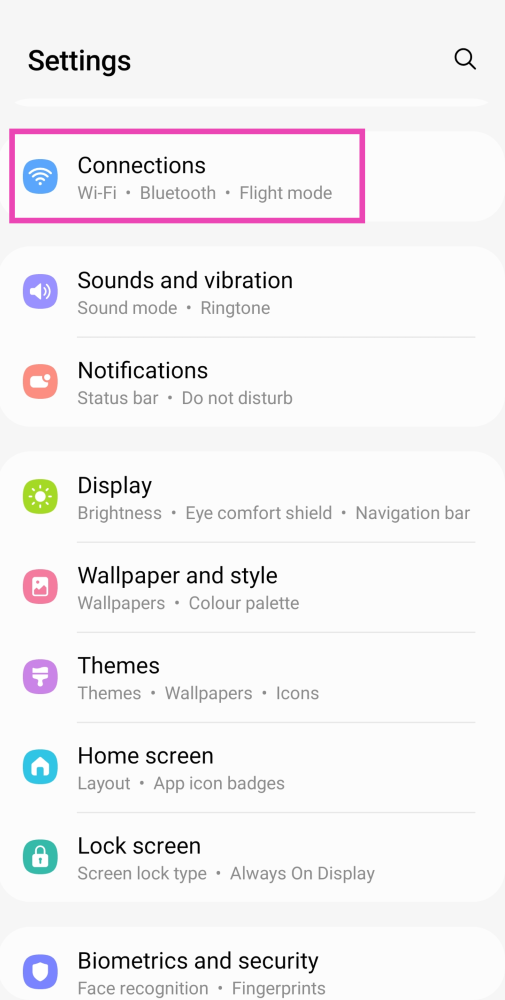 Step 2: Select WiFi and tap on the gear icon next to the WiFi network you’re connected to.
 Step 3: From the bottom menu select ‘QR Code’ and take a screenshot or select ‘Save as image’.
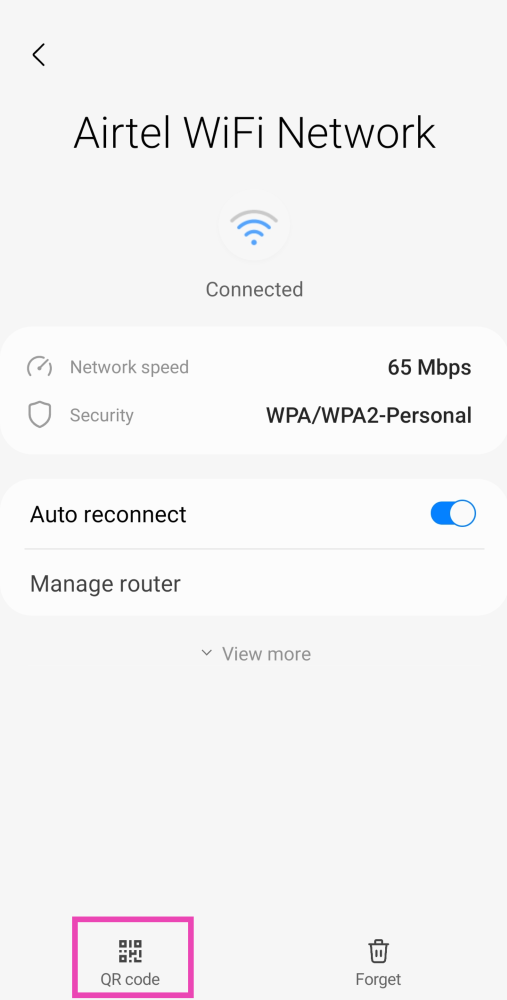 Step 4: Download a QR code scanner app and load the screenshot to read it.
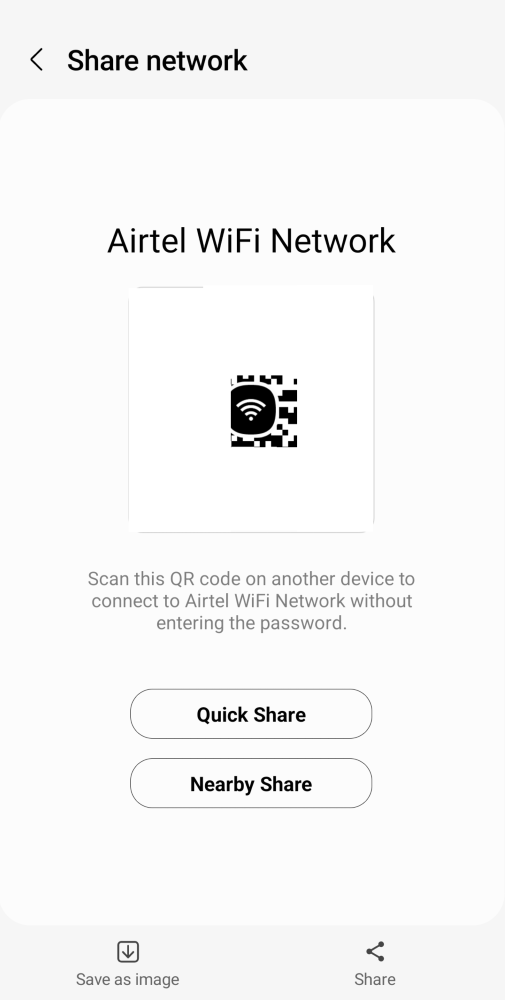 Step 5: You will be able to see the WiFi password. Look for it right after the WiFi network name and WPA security tag.
 Step 2: Tap on ‘Internet’ and select the WiFi network you’re connected to.
 Step 3: Select ‘Share’ and type in the pin or scan your fingerprint for verification.
 Step 4: The WiFi password will be displayed just below the QR Code.


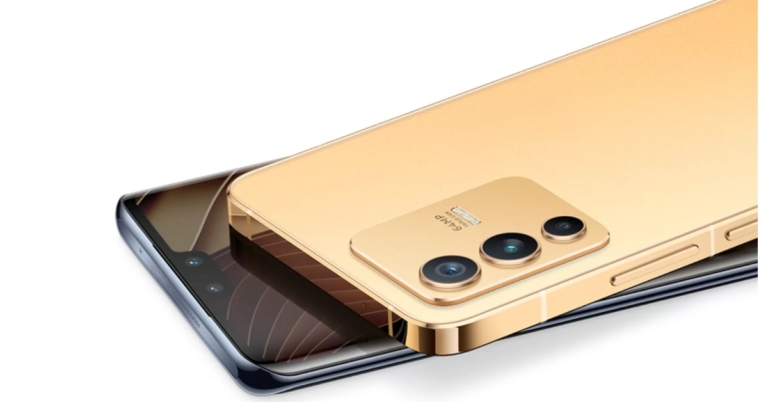
 Speaking about the specifications, the Vivo V23 5G series’ key specifications are revealed on the microsite. The device is said to come with an ultra-slim 3D curved display. The standard variant has a metal flat frame on the sides and it will be powered by MediaTek Dimensity 1200 5G SoC. The microsite further mentions that the Vivo V23 5G is to be offered with 8GB of RAM, with 4GB of additional RAM.
As the name suggests the Vivo V23 5G series will have 5G support as well. Speaking more about the design and specifications the devices will also have a triple-camera setup on the back, with the primary sensor being 108 megapixels. A wide-angle sensor and a macro sensor are among the other lenses available. A super-wide-angle sensor with night mode support will be added to the front-facing 50-megapixel dual selfie cameras.
As the launch of the Vivo V23 5G and Vivo V23 Pro 5G approaches, the remaining specifications will be revealed in stages. So keep an eye on Gadget Bridge.
For the latest gadget and tech news, and gadget reviews, follow us on Twitter, Facebook and Instagram. For newest tech & gadget videos subscribe to our YouTube Channel. You can also stay up to date using the Gadget Bridge Android App. You can find the latest car and bike news here.
Speaking about the specifications, the Vivo V23 5G series’ key specifications are revealed on the microsite. The device is said to come with an ultra-slim 3D curved display. The standard variant has a metal flat frame on the sides and it will be powered by MediaTek Dimensity 1200 5G SoC. The microsite further mentions that the Vivo V23 5G is to be offered with 8GB of RAM, with 4GB of additional RAM.
As the name suggests the Vivo V23 5G series will have 5G support as well. Speaking more about the design and specifications the devices will also have a triple-camera setup on the back, with the primary sensor being 108 megapixels. A wide-angle sensor and a macro sensor are among the other lenses available. A super-wide-angle sensor with night mode support will be added to the front-facing 50-megapixel dual selfie cameras.
As the launch of the Vivo V23 5G and Vivo V23 Pro 5G approaches, the remaining specifications will be revealed in stages. So keep an eye on Gadget Bridge.
For the latest gadget and tech news, and gadget reviews, follow us on Twitter, Facebook and Instagram. For newest tech & gadget videos subscribe to our YouTube Channel. You can also stay up to date using the Gadget Bridge Android App. You can find the latest car and bike news here.  Speaking about the specifications, the Vivo V23 5G series’ key specifications are revealed on the microsite. The device is said to come with an ultra-slim 3D curved display. The standard variant has a metal flat frame on the sides and it will be powered by MediaTek Dimensity 1200 5G SoC. The microsite further mentions that the Vivo V23 5G is to be offered with 8GB of RAM, with 4GB of additional RAM.
As the name suggests the Vivo V23 5G series will have 5G support as well. Speaking more about the design and specifications the devices will also have a triple-camera setup on the back, with the primary sensor being 108 megapixels. A wide-angle sensor and a macro sensor are among the other lenses available. A super-wide-angle sensor with night mode support will be added to the front-facing 50-megapixel dual selfie cameras.
As the launch of the Vivo V23 5G and Vivo V23 Pro 5G approaches, the remaining specifications will be revealed in stages. So keep an eye on Gadget Bridge.
For the latest gadget and tech news, and gadget reviews, follow us on Twitter, Facebook and Instagram. For newest tech & gadget videos subscribe to our YouTube Channel. You can also stay up to date using the Gadget Bridge Android App. You can find the latest car and bike news here.
Speaking about the specifications, the Vivo V23 5G series’ key specifications are revealed on the microsite. The device is said to come with an ultra-slim 3D curved display. The standard variant has a metal flat frame on the sides and it will be powered by MediaTek Dimensity 1200 5G SoC. The microsite further mentions that the Vivo V23 5G is to be offered with 8GB of RAM, with 4GB of additional RAM.
As the name suggests the Vivo V23 5G series will have 5G support as well. Speaking more about the design and specifications the devices will also have a triple-camera setup on the back, with the primary sensor being 108 megapixels. A wide-angle sensor and a macro sensor are among the other lenses available. A super-wide-angle sensor with night mode support will be added to the front-facing 50-megapixel dual selfie cameras.
As the launch of the Vivo V23 5G and Vivo V23 Pro 5G approaches, the remaining specifications will be revealed in stages. So keep an eye on Gadget Bridge.
For the latest gadget and tech news, and gadget reviews, follow us on Twitter, Facebook and Instagram. For newest tech & gadget videos subscribe to our YouTube Channel. You can also stay up to date using the Gadget Bridge Android App. You can find the latest car and bike news here. 
 Download from Google Play Store
Many users use Snapchat to make and break streak records with their friends. While almost all the users use Snapchat to show their life on the go, it also has a feature to change the voice. There is not any specific button or section to change voice but you can use some of the filters available on Snapchat to change your voice. Just search for filters on the app and you can change the voice.
Download from Google Play Store
Many users use Snapchat to make and break streak records with their friends. While almost all the users use Snapchat to show their life on the go, it also has a feature to change the voice. There is not any specific button or section to change voice but you can use some of the filters available on Snapchat to change your voice. Just search for filters on the app and you can change the voice.
 Download from Google Play Store
With an app size of just under 7MB and over 10M downloads, this voice-changing app is one of the best available on the Play Store. Since the size of the app is very less, you also need not worry about the storage on your phone. The app lets you change your voice with different filters that include bee, old man, martian, fan, hoarse, drunk, underwater, and many more.
To change your voice you just need to press the record button on that app and after that, you will be provided with different filters to choose from. If you already have a recording available on your phone then you can also use that.
Read also: How to create your own custom emoji on Android
Download from Google Play Store
With an app size of just under 7MB and over 10M downloads, this voice-changing app is one of the best available on the Play Store. Since the size of the app is very less, you also need not worry about the storage on your phone. The app lets you change your voice with different filters that include bee, old man, martian, fan, hoarse, drunk, underwater, and many more.
To change your voice you just need to press the record button on that app and after that, you will be provided with different filters to choose from. If you already have a recording available on your phone then you can also use that.
Read also: How to create your own custom emoji on Android
 Download from Google Play Store
Many users use Snapchat to make and break streak records with their friends. While almost all the users use Snapchat to show their life on the go, it also has a feature to change the voice. There is not any specific button or section to change voice but you can use some of the filters available on Snapchat to change your voice. Just search for filters on the app and you can change the voice.
Download from Google Play Store
Many users use Snapchat to make and break streak records with their friends. While almost all the users use Snapchat to show their life on the go, it also has a feature to change the voice. There is not any specific button or section to change voice but you can use some of the filters available on Snapchat to change your voice. Just search for filters on the app and you can change the voice.
 Download from Google Play Store
This is another voice-changing app that is available on the PlayStore for free. The app lets you choose from a few different voice effects in the app. The best part of the app is that you can also prank someone with its in-call voice-changing feature, which lets users change their voice during a call.
However, the calling feature on the app is paid only, you have to buy it in order to trick someone. Another downside to the app is that it does not provide many filters to choose from.
Download from Google Play Store
This is another voice-changing app that is available on the PlayStore for free. The app lets you choose from a few different voice effects in the app. The best part of the app is that you can also prank someone with its in-call voice-changing feature, which lets users change their voice during a call.
However, the calling feature on the app is paid only, you have to buy it in order to trick someone. Another downside to the app is that it does not provide many filters to choose from.
 Download from Google Play Store
The app sits just under 7MB and is quite decent to change the voice. The app has some less silly effects like a karaoke reverb effect that adds a bit of echo to your voice. Apart from this, the app has the most popular voice-changing filters that include an old man, bees, an alien, a giant, and a robot.
Download from Google Play Store
The app sits just under 7MB and is quite decent to change the voice. The app has some less silly effects like a karaoke reverb effect that adds a bit of echo to your voice. Apart from this, the app has the most popular voice-changing filters that include an old man, bees, an alien, a giant, and a robot.
 This nifty voice-changing app allows you to parse your voice recordings through several different fun filters. If you want to get more creative, you can use this app to dub different voices on a video. Apart from human voices, Voice Changer’s library contains quirky animal sounds. You can make your voice sound like a sheep, bee, dog, and more. Want more? Try out the zombie and alien voice effects as well! If you want your voice recordings to have a soothing touch, you can add ambient background sounds to them as well.
 Harnessing the power of AI, this app lets you change your voice to that of popular celebrities like Elon Musk, Barack Obama, Mark Zuckerberg, Ed Sheeran, Taylor Swift, and more. The best part is that it supports several languages. English, Hindi, German, and Spanish are some of the languages that this app supports. Apart from short voice notes, you can upload voice recordings up to 2GB in size and let Voice AI work its magic.
 Have you ever wanted to greet your kids with a voice recording from Santa? SpeechLab makes it possible. With a diverse library to choose from, you can clone your voice into that of famous celebrities. If you don’t want to speak into the mic, SpeechLab allows you to convert text into speech. As of now, SpeechLab supports 29 languages (including Hindi, Portuguese, English, Russian, and more) for its text-to-speech feature.
Read also: Will it clean the Google Playstore? Google’s new policy to curb appsWill it clean the Google Playstore? Google’s new policy to curb apps
Have you ever wanted to greet your kids with a voice recording from Santa? SpeechLab makes it possible. With a diverse library to choose from, you can clone your voice into that of famous celebrities. If you don’t want to speak into the mic, SpeechLab allows you to convert text into speech. As of now, SpeechLab supports 29 languages (including Hindi, Portuguese, English, Russian, and more) for its text-to-speech feature.
Read also: Will it clean the Google Playstore? Google’s new policy to curb appsWill it clean the Google Playstore? Google’s new policy to curb apps

 Step 2: Tap on Data Usage.
 Step 3: Tap on Data Saver.
 Step 4: Turn off the toggle switch for Turn on now.
 If you get any type of errors or bugs with your phone it is advised to restart the phone before jumping ahead with further procedure. Restarting the phone starts all the apps afresh and chances are that your issue will be solved. Also, it is good practice to restart your phone every now and then.
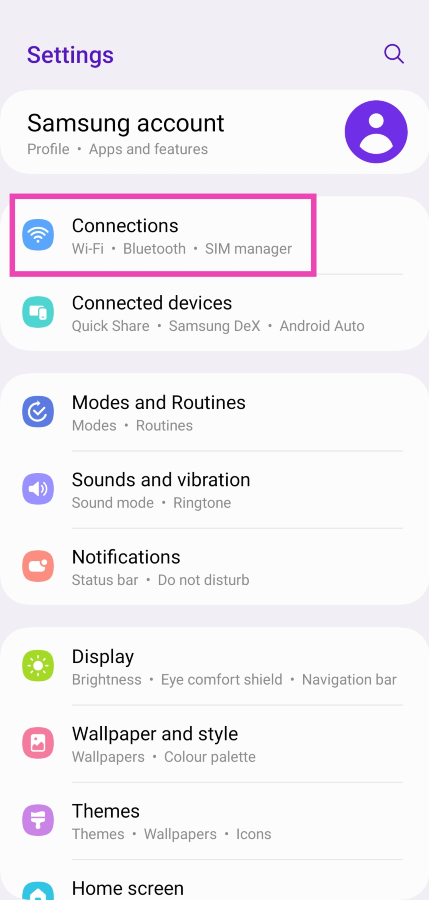 Step 2: Tap on Data Usage.
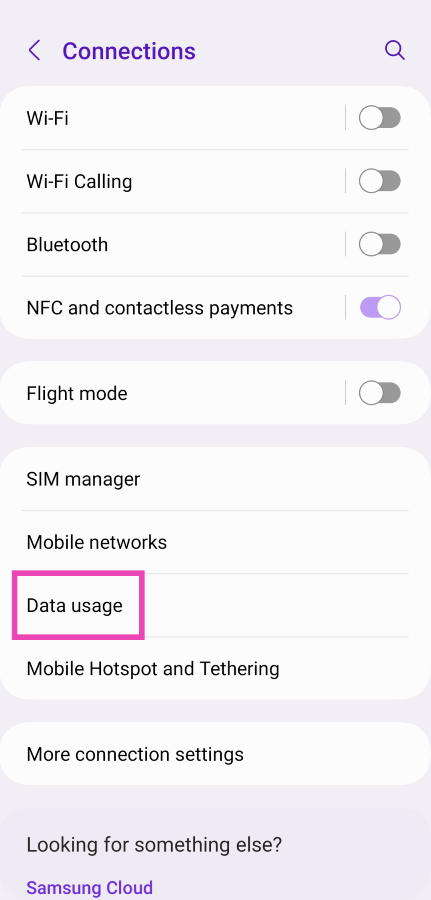 Step 3: Tap on Data Saver.
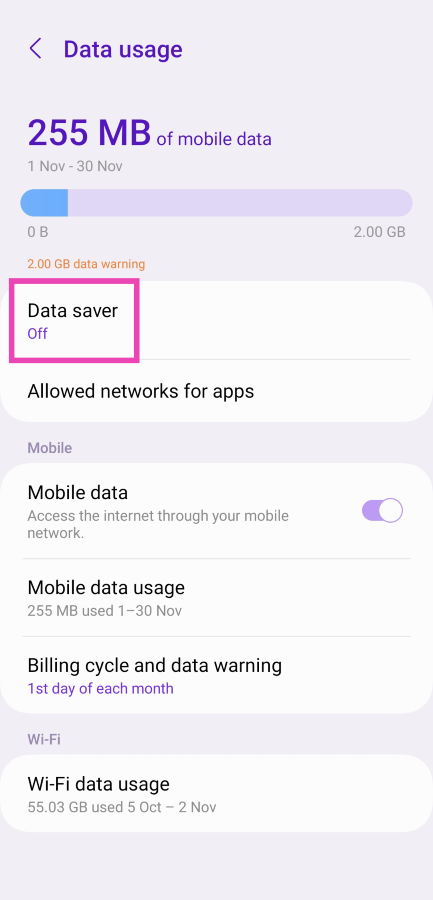 Step 4: Turn off the toggle switch for Turn on now.
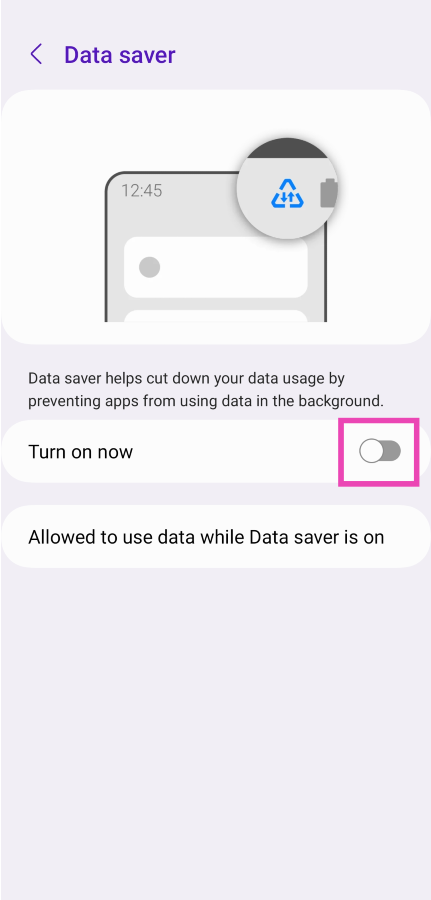
 You should also try to remove and insert the SIM card on your phone. If this is a network issue then this way the issue can be resolved and after that, you will be able to use mobile data with the app that you wanted.
Read also: 5 ways you can charge your Android smartphone faster
You should also try to remove and insert the SIM card on your phone. If this is a network issue then this way the issue can be resolved and after that, you will be able to use mobile data with the app that you wanted.
Read also: 5 ways you can charge your Android smartphone faster
 Another way to fix the network issue is by turning on and off the ‘Airplane Mode’. This is a quick way to solve any network issue and let it be apps not working on mobile data on Android phone issues. You can find an airplane icon in the quick settings, you can turn on or off the airplane mode from there.


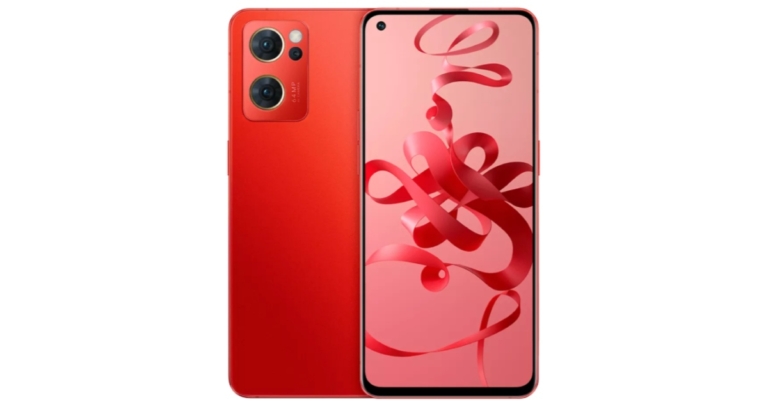


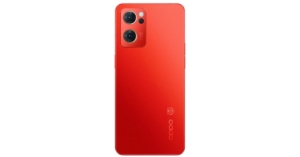

 Otherwise, we thought the construction quality and design were excellent. The charging case is small and sturdy. With one hand, you can easily open the case. The hinges are also of excellent quality, and the ear tips are aesthetically pleasing. On the front, there is an IN logo with an LED light. It has a Type-C charging port on the bottom, and the battery capacity and other details are listed on the back. The TWS earphones have an IP44 rating, which means they can withstand splashes of water, sweat, and dust.
 The earbuds are magnetised to the case. These lightweight in-ear headphones have an in-ear design. The earbuds have a glossy finish as well. The earphones lack physical buttons in favour of a touch-sensitive panel. These earbuds feature Bluetooth 5.2, 13mm drivers, and a quad mic setup. Overall, we liked the design and quality of Micromax’s new TWS earphones.
 In terms of sound quality, we put these Micromax true wireless earphones to the test, both indoors and out. It produces a good sound, with clear highs, lows, and mids, but it is not as loud as we are accustomed to hearing loud music. However, there is one advantage: these sounds aren’t particularly loud, but they last a long time on a single charge. Even though they have 13mm audio drivers, the bass isn’t as deep as it could be, but it’s not bad either.
The audio quality on both sides is crystal clear thanks to the quad mic setup, which means two mics in each earbud.
The IN Air Funk 1 Pro is touch-sensitive rather than having a physical button. The music pauses and resumes when you double-tap. You can easily switch to the next track by doing a triple tap on the right earbud, and the previous track by doing a triple tap on the left earbud. The Google Assistant is activated when you press the button for a long time.
However, the sound quality is adequate, especially when used while gaming, but there is some lag to be found. On the fliside, we did not notice any lag while listening to music, but (as said) you will notice some lag in gaming because these earphones are not designed for gaming, rather just for everyday use.
In terms of battery life, the Micromax IN Air Funk 1 Pro has a great deal to offer. This lasts up to 7 hours on a single charge, and when combined with the case, it provides a total of 32 hours of battery life.
In terms of sound quality, we put these Micromax true wireless earphones to the test, both indoors and out. It produces a good sound, with clear highs, lows, and mids, but it is not as loud as we are accustomed to hearing loud music. However, there is one advantage: these sounds aren’t particularly loud, but they last a long time on a single charge. Even though they have 13mm audio drivers, the bass isn’t as deep as it could be, but it’s not bad either.
The audio quality on both sides is crystal clear thanks to the quad mic setup, which means two mics in each earbud.
The IN Air Funk 1 Pro is touch-sensitive rather than having a physical button. The music pauses and resumes when you double-tap. You can easily switch to the next track by doing a triple tap on the right earbud, and the previous track by doing a triple tap on the left earbud. The Google Assistant is activated when you press the button for a long time.
However, the sound quality is adequate, especially when used while gaming, but there is some lag to be found. On the fliside, we did not notice any lag while listening to music, but (as said) you will notice some lag in gaming because these earphones are not designed for gaming, rather just for everyday use.
In terms of battery life, the Micromax IN Air Funk 1 Pro has a great deal to offer. This lasts up to 7 hours on a single charge, and when combined with the case, it provides a total of 32 hours of battery life.
 The Micromax TWS earphones also have ENC, which means that as soon as you put them on, a vacuum is created, effectively blocking out as much ambient noise as possible. As a result, they offer passive noise cancellation rather than active noise cancellation. So make sure to choose the right ear tip size for you, as this will not only ensure a secure fit but also improve sound quality.
A Qualcomm chipset and quad-array mics are included in the Micromax IN Air Funk 1 Pro. The headphones have a total battery life of 32 hours. The vocals are crystal clear, and the instrument separation is excellent. You get good bass that isn’t overpowering but is sufficient for everyday use.
The Micromax TWS earphones also have ENC, which means that as soon as you put them on, a vacuum is created, effectively blocking out as much ambient noise as possible. As a result, they offer passive noise cancellation rather than active noise cancellation. So make sure to choose the right ear tip size for you, as this will not only ensure a secure fit but also improve sound quality.
A Qualcomm chipset and quad-array mics are included in the Micromax IN Air Funk 1 Pro. The headphones have a total battery life of 32 hours. The vocals are crystal clear, and the instrument separation is excellent. You get good bass that isn’t overpowering but is sufficient for everyday use.
 We tried a variety of music genres and were generally pleased with the results, especially given the earbuds’ low price. To summarise, if you’re looking for a TWS with a good design and quality for everyday use, you should definitely look into them.
 Otherwise, we thought the construction quality and design were excellent. The charging case is small and sturdy. With one hand, you can easily open the case. The hinges are also of excellent quality, and the ear tips are aesthetically pleasing. On the front, there is an IN logo with an LED light. It has a Type-C charging port on the bottom, and the battery capacity and other details are listed on the back. The TWS earphones have an IP44 rating, which means they can withstand splashes of water, sweat, and dust.
 The earbuds are magnetised to the case. These lightweight in-ear headphones have an in-ear design. The earbuds have a glossy finish as well. The earphones lack physical buttons in favour of a touch-sensitive panel. These earbuds feature Bluetooth 5.2, 13mm drivers, and a quad mic setup. Overall, we liked the design and quality of Micromax’s new TWS earphones.
 In terms of sound quality, we put these Micromax true wireless earphones to the test, both indoors and out. It produces a good sound, with clear highs, lows, and mids, but it is not as loud as we are accustomed to hearing loud music. However, there is one advantage: these sounds aren’t particularly loud, but they last a long time on a single charge. Even though they have 13mm audio drivers, the bass isn’t as deep as it could be, but it’s not bad either.
The audio quality on both sides is crystal clear thanks to the quad mic setup, which means two mics in each earbud.
The IN Air Funk 1 Pro is touch-sensitive rather than having a physical button. The music pauses and resumes when you double-tap. You can easily switch to the next track by doing a triple tap on the right earbud, and the previous track by doing a triple tap on the left earbud. The Google Assistant is activated when you press the button for a long time.
However, the sound quality is adequate, especially when used while gaming, but there is some lag to be found. On the fliside, we did not notice any lag while listening to music, but (as said) you will notice some lag in gaming because these earphones are not designed for gaming, rather just for everyday use.
In terms of battery life, the Micromax IN Air Funk 1 Pro has a great deal to offer. This lasts up to 7 hours on a single charge, and when combined with the case, it provides a total of 32 hours of battery life.
In terms of sound quality, we put these Micromax true wireless earphones to the test, both indoors and out. It produces a good sound, with clear highs, lows, and mids, but it is not as loud as we are accustomed to hearing loud music. However, there is one advantage: these sounds aren’t particularly loud, but they last a long time on a single charge. Even though they have 13mm audio drivers, the bass isn’t as deep as it could be, but it’s not bad either.
The audio quality on both sides is crystal clear thanks to the quad mic setup, which means two mics in each earbud.
The IN Air Funk 1 Pro is touch-sensitive rather than having a physical button. The music pauses and resumes when you double-tap. You can easily switch to the next track by doing a triple tap on the right earbud, and the previous track by doing a triple tap on the left earbud. The Google Assistant is activated when you press the button for a long time.
However, the sound quality is adequate, especially when used while gaming, but there is some lag to be found. On the fliside, we did not notice any lag while listening to music, but (as said) you will notice some lag in gaming because these earphones are not designed for gaming, rather just for everyday use.
In terms of battery life, the Micromax IN Air Funk 1 Pro has a great deal to offer. This lasts up to 7 hours on a single charge, and when combined with the case, it provides a total of 32 hours of battery life.
 The Micromax TWS earphones also have ENC, which means that as soon as you put them on, a vacuum is created, effectively blocking out as much ambient noise as possible. As a result, they offer passive noise cancellation rather than active noise cancellation. So make sure to choose the right ear tip size for you, as this will not only ensure a secure fit but also improve sound quality.
A Qualcomm chipset and quad-array mics are included in the Micromax IN Air Funk 1 Pro. The headphones have a total battery life of 32 hours. The vocals are crystal clear, and the instrument separation is excellent. You get good bass that isn’t overpowering but is sufficient for everyday use.
The Micromax TWS earphones also have ENC, which means that as soon as you put them on, a vacuum is created, effectively blocking out as much ambient noise as possible. As a result, they offer passive noise cancellation rather than active noise cancellation. So make sure to choose the right ear tip size for you, as this will not only ensure a secure fit but also improve sound quality.
A Qualcomm chipset and quad-array mics are included in the Micromax IN Air Funk 1 Pro. The headphones have a total battery life of 32 hours. The vocals are crystal clear, and the instrument separation is excellent. You get good bass that isn’t overpowering but is sufficient for everyday use.
 We tried a variety of music genres and were generally pleased with the results, especially given the earbuds’ low price. To summarise, if you’re looking for a TWS with a good design and quality for everyday use, you should definitely look into them.




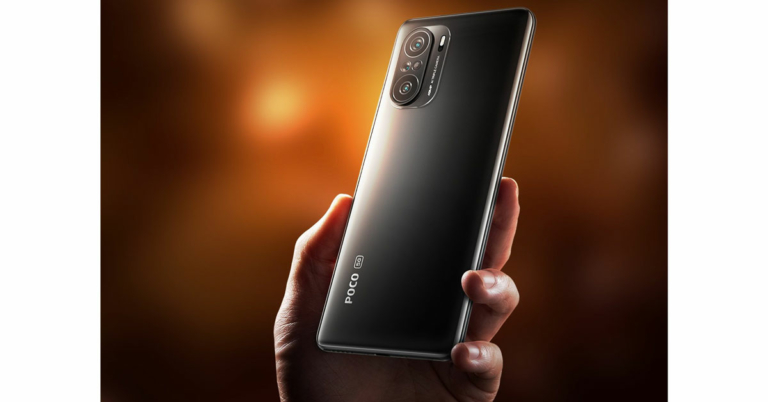

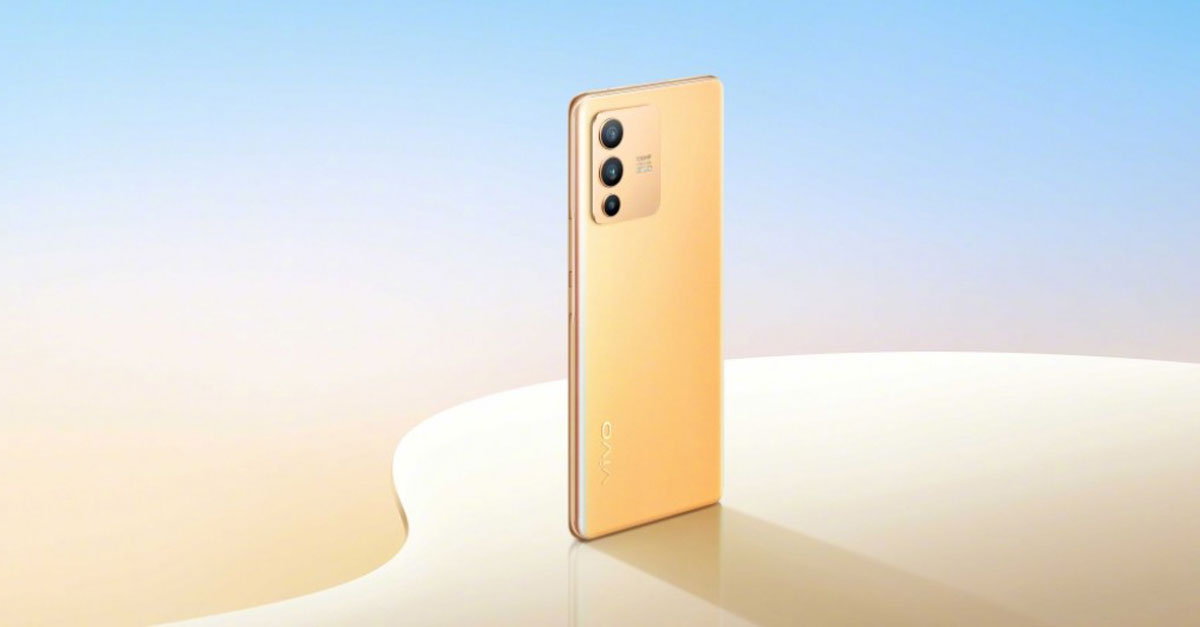


 Xiaomi has revealed in a recent teaser that the Xiaomi 11i Hypercharge will launch on 6th January 2022. The teaser shows that the phone is capable of mind-blowing super fast 120W charging. It may have a 6.67-inch AMOLED panel with MediaTek Dimensity 920.
This is how the first three months are gonna look like in the smartphone market and now you can decide which phone to buy in 2022.
Read also: Confirmed: OnePlus 10 Pro to debut in January 2022
For the latest gadget and tech news, and gadget reviews, follow us on Twitter, Facebook and Instagram. For newest tech & gadget videos subscribe to our YouTube Channel. You can also stay up to date using the Gadget Bridge Android App. You can find the latest car and bike news here.
Xiaomi has revealed in a recent teaser that the Xiaomi 11i Hypercharge will launch on 6th January 2022. The teaser shows that the phone is capable of mind-blowing super fast 120W charging. It may have a 6.67-inch AMOLED panel with MediaTek Dimensity 920.
This is how the first three months are gonna look like in the smartphone market and now you can decide which phone to buy in 2022.
Read also: Confirmed: OnePlus 10 Pro to debut in January 2022
For the latest gadget and tech news, and gadget reviews, follow us on Twitter, Facebook and Instagram. For newest tech & gadget videos subscribe to our YouTube Channel. You can also stay up to date using the Gadget Bridge Android App. You can find the latest car and bike news here. 
 Step 3: Select Turn on Incognito from the list of options.


 Step 3: Select Turn on Incognito from the list of options.
 Once you are in incognito mode, the videos you watch will not be reflected in your watch history. Your suggestions and feed will not be influenced by the videos you watch. To switch back to your account, tap on the You tab again and select Turn off.
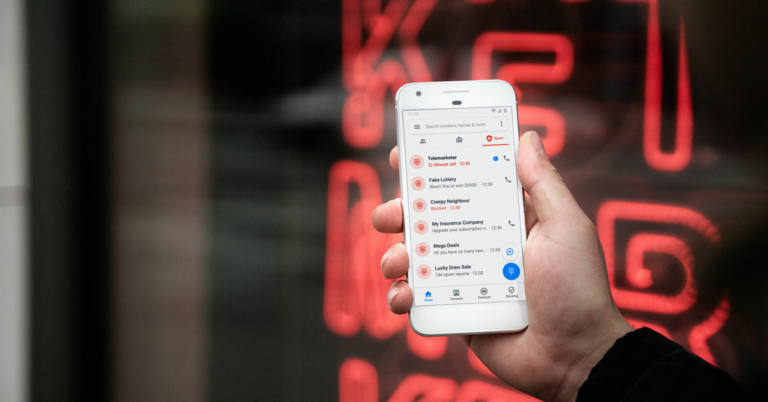
 2. Select Settings.
 3. Turn on the toggle switch for Caller ID and spam protection.
 3. Hit Block.


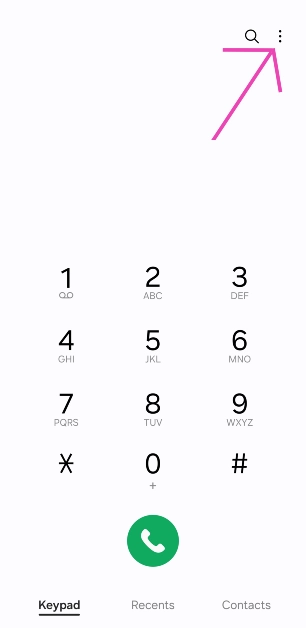 2. Select Settings.
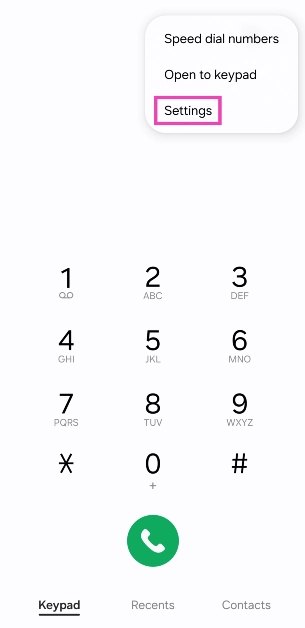 3. Turn on the toggle switch for Caller ID and spam protection.
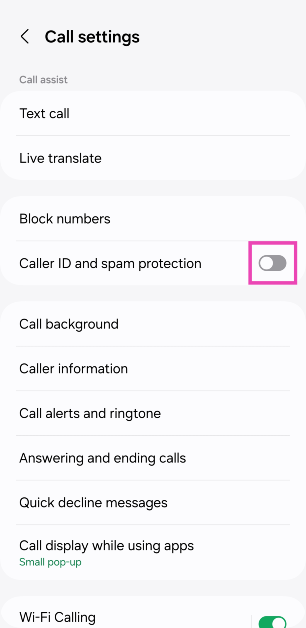

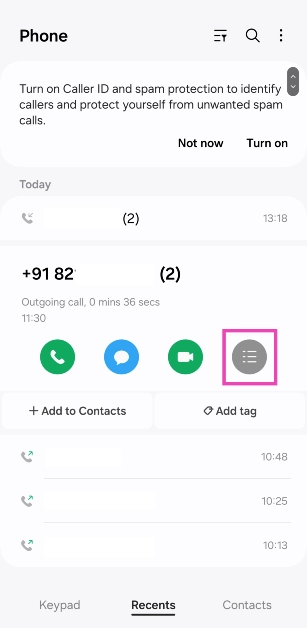 3. Hit Block.
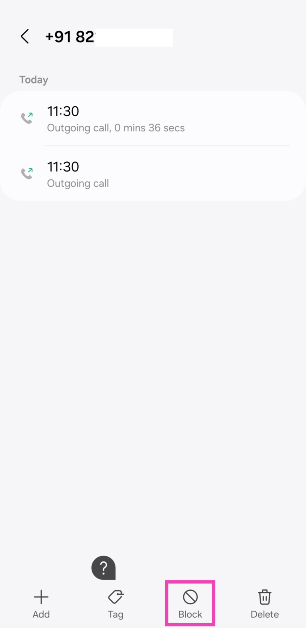




 Samsung Galaxy Watch 4: If your friend or a family member is a fitness enthusiast you should consider gifting this smartwatch. The watch runs on One UI Watch 3, based on the new Wear OS. It comes with a 1.2-inch AMOLED touch display. The device includes Optical Heart Rate, Electrical Heart and Bioelectrical Impedance Analysis. Read the review here.
Price: Rs 24,720
Buy from Amazon
Samsung Galaxy Watch 4: If your friend or a family member is a fitness enthusiast you should consider gifting this smartwatch. The watch runs on One UI Watch 3, based on the new Wear OS. It comes with a 1.2-inch AMOLED touch display. The device includes Optical Heart Rate, Electrical Heart and Bioelectrical Impedance Analysis. Read the review here.
Price: Rs 24,720
Buy from Amazon
 Mi Smart Band 6: Mi Smart Band 6 is another perfect gift for a fitness freak. The device features a 1.56-inch (152×486 pixels) AMOLED touch display. It comes with 30 workout modes and offers up to 14 days of battery life.
Price: 3,499
Buy from Amazon
Mi Smart Band 6: Mi Smart Band 6 is another perfect gift for a fitness freak. The device features a 1.56-inch (152×486 pixels) AMOLED touch display. It comes with 30 workout modes and offers up to 14 days of battery life.
Price: 3,499
Buy from Amazon
 Nothing ear 1 TWS earphones: Nothing ear (1) have 1.6mm dynamic drivers. There are high-definition microphones and ANC features with two settings: light mode and maximum mode. With this case, the Nothing Ear 1 provides 5 hours of listening time and 34 hours of additional playtime.
Price: Rs 5,999
Buy from Flipkart
Nothing ear 1 TWS earphones: Nothing ear (1) have 1.6mm dynamic drivers. There are high-definition microphones and ANC features with two settings: light mode and maximum mode. With this case, the Nothing Ear 1 provides 5 hours of listening time and 34 hours of additional playtime.
Price: Rs 5,999
Buy from Flipkart
 Vivo Wireless Sport Lite neckband earphones: Vivo Wireless Sport Lite neckband earphones are equipped with an 11.2mm dynamic driver unit. The neckband also comes with a low latency rate of up to 80ms which results in a theatre-like audio experience. The device also includes a Call Noise Cancellation feature and can run for 18 hours (play music of AAC codec at 50% volume) and can last for 13 hours (play music of AAC codec at 100% volume).
Price: Rs 1,999
Buy from Vivo e-store
Vivo Wireless Sport Lite neckband earphones: Vivo Wireless Sport Lite neckband earphones are equipped with an 11.2mm dynamic driver unit. The neckband also comes with a low latency rate of up to 80ms which results in a theatre-like audio experience. The device also includes a Call Noise Cancellation feature and can run for 18 hours (play music of AAC codec at 50% volume) and can last for 13 hours (play music of AAC codec at 100% volume).
Price: Rs 1,999
Buy from Vivo e-store
 Philips TAH6506BK headphones: Philips TAH6506BK headphones feature 32 mm neodymium drivers. The Bluetooth multipoint pairing is included that allows connecting the headphones to two devices at once and the option to switch between them as per the need. These also feature Active Noise Cancellation with internal mics in its ear cups, which filter out the background noise you don’t want to hear. On a single charge, the headphones are said to have a total playback time of up to 30 hours, and up to 25 hours with the ANC turned on.
Price: 5,799
Buy from Amazon
Philips TAH6506BK headphones: Philips TAH6506BK headphones feature 32 mm neodymium drivers. The Bluetooth multipoint pairing is included that allows connecting the headphones to two devices at once and the option to switch between them as per the need. These also feature Active Noise Cancellation with internal mics in its ear cups, which filter out the background noise you don’t want to hear. On a single charge, the headphones are said to have a total playback time of up to 30 hours, and up to 25 hours with the ANC turned on.
Price: 5,799
Buy from Amazon
 Samsung Galaxy Watch 4: If your friend or a family member is a fitness enthusiast you should consider gifting this smartwatch. The watch runs on One UI Watch 3, based on the new Wear OS. It comes with a 1.2-inch AMOLED touch display. The device includes Optical Heart Rate, Electrical Heart and Bioelectrical Impedance Analysis. Read the review here.
Price: Rs 24,720
Buy from Amazon
Samsung Galaxy Watch 4: If your friend or a family member is a fitness enthusiast you should consider gifting this smartwatch. The watch runs on One UI Watch 3, based on the new Wear OS. It comes with a 1.2-inch AMOLED touch display. The device includes Optical Heart Rate, Electrical Heart and Bioelectrical Impedance Analysis. Read the review here.
Price: Rs 24,720
Buy from Amazon
 Mi Smart Band 6: Mi Smart Band 6 is another perfect gift for a fitness freak. The device features a 1.56-inch (152×486 pixels) AMOLED touch display. It comes with 30 workout modes and offers up to 14 days of battery life.
Price: 3,499
Buy from Amazon
Mi Smart Band 6: Mi Smart Band 6 is another perfect gift for a fitness freak. The device features a 1.56-inch (152×486 pixels) AMOLED touch display. It comes with 30 workout modes and offers up to 14 days of battery life.
Price: 3,499
Buy from Amazon
 Nothing ear 1 TWS earphones: Nothing ear (1) have 1.6mm dynamic drivers. There are high-definition microphones and ANC features with two settings: light mode and maximum mode. With this case, the Nothing Ear 1 provides 5 hours of listening time and 34 hours of additional playtime.
Price: Rs 5,999
Buy from Flipkart
Nothing ear 1 TWS earphones: Nothing ear (1) have 1.6mm dynamic drivers. There are high-definition microphones and ANC features with two settings: light mode and maximum mode. With this case, the Nothing Ear 1 provides 5 hours of listening time and 34 hours of additional playtime.
Price: Rs 5,999
Buy from Flipkart
 Vivo Wireless Sport Lite neckband earphones: Vivo Wireless Sport Lite neckband earphones are equipped with an 11.2mm dynamic driver unit. The neckband also comes with a low latency rate of up to 80ms which results in a theatre-like audio experience. The device also includes a Call Noise Cancellation feature and can run for 18 hours (play music of AAC codec at 50% volume) and can last for 13 hours (play music of AAC codec at 100% volume).
Price: Rs 1,999
Buy from Vivo e-store
Vivo Wireless Sport Lite neckband earphones: Vivo Wireless Sport Lite neckband earphones are equipped with an 11.2mm dynamic driver unit. The neckband also comes with a low latency rate of up to 80ms which results in a theatre-like audio experience. The device also includes a Call Noise Cancellation feature and can run for 18 hours (play music of AAC codec at 50% volume) and can last for 13 hours (play music of AAC codec at 100% volume).
Price: Rs 1,999
Buy from Vivo e-store
 Philips TAH6506BK headphones: Philips TAH6506BK headphones feature 32 mm neodymium drivers. The Bluetooth multipoint pairing is included that allows connecting the headphones to two devices at once and the option to switch between them as per the need. These also feature Active Noise Cancellation with internal mics in its ear cups, which filter out the background noise you don’t want to hear. On a single charge, the headphones are said to have a total playback time of up to 30 hours, and up to 25 hours with the ANC turned on.
Price: 5,799
Buy from Amazon
Philips TAH6506BK headphones: Philips TAH6506BK headphones feature 32 mm neodymium drivers. The Bluetooth multipoint pairing is included that allows connecting the headphones to two devices at once and the option to switch between them as per the need. These also feature Active Noise Cancellation with internal mics in its ear cups, which filter out the background noise you don’t want to hear. On a single charge, the headphones are said to have a total playback time of up to 30 hours, and up to 25 hours with the ANC turned on.
Price: 5,799
Buy from Amazon

 Kenstar Aster Digi 1500-Watt Oxy Fryer: Not only this air fryer can per gifted but you can purchase it for yourself if you are a foodie but health-conscious too. It has a digital control and 7 presets. There is a non-stick coating inside and a timer for up to 30 mins.
Price: 5,990
Buy from Amazon
Kenstar Aster Digi 1500-Watt Oxy Fryer: Not only this air fryer can per gifted but you can purchase it for yourself if you are a foodie but health-conscious too. It has a digital control and 7 presets. There is a non-stick coating inside and a timer for up to 30 mins.
Price: 5,990
Buy from Amazon

 Amazon Kindle (10th Gen) is last on our Christmas tech gifts list. It has an adjustable front light and comes with a 167 ppi glare-free display. It offers 8GB of storage and longer battery life.
Price: 7,999
Buy from Amazon
For the latest gadget and tech news, and gadget reviews, follow us on Twitter, Facebook and Instagram. For newest tech & gadget videos subscribe to our YouTube Channel. You can also stay up to date using the Gadget Bridge Android App. You can find the latest car and bike news here.
Amazon Kindle (10th Gen) is last on our Christmas tech gifts list. It has an adjustable front light and comes with a 167 ppi glare-free display. It offers 8GB of storage and longer battery life.
Price: 7,999
Buy from Amazon
For the latest gadget and tech news, and gadget reviews, follow us on Twitter, Facebook and Instagram. For newest tech & gadget videos subscribe to our YouTube Channel. You can also stay up to date using the Gadget Bridge Android App. You can find the latest car and bike news here. 
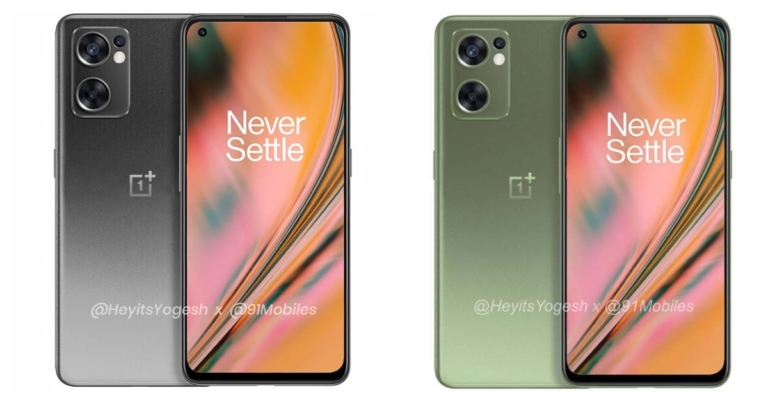


 Also, you can unsubscribe to the newsletters, which you don’t want, just open any mail from which you do not want regular updates, and scroll down to the bottom you will see an unsubscribe button hit that, and follow the next steps.
Read also: How to block emails in Gmail and Outlook
Also, you can unsubscribe to the newsletters, which you don’t want, just open any mail from which you do not want regular updates, and scroll down to the bottom you will see an unsubscribe button hit that, and follow the next steps.
Read also: How to block emails in Gmail and Outlook
 Also, you can unsubscribe to the newsletters, which you don’t want, just open any mail from which you do not want regular updates, and scroll down to the bottom you will see an unsubscribe button hit that, and follow the next steps.
Read also: How to block emails in Gmail and Outlook
Also, you can unsubscribe to the newsletters, which you don’t want, just open any mail from which you do not want regular updates, and scroll down to the bottom you will see an unsubscribe button hit that, and follow the next steps.
Read also: How to block emails in Gmail and Outlook
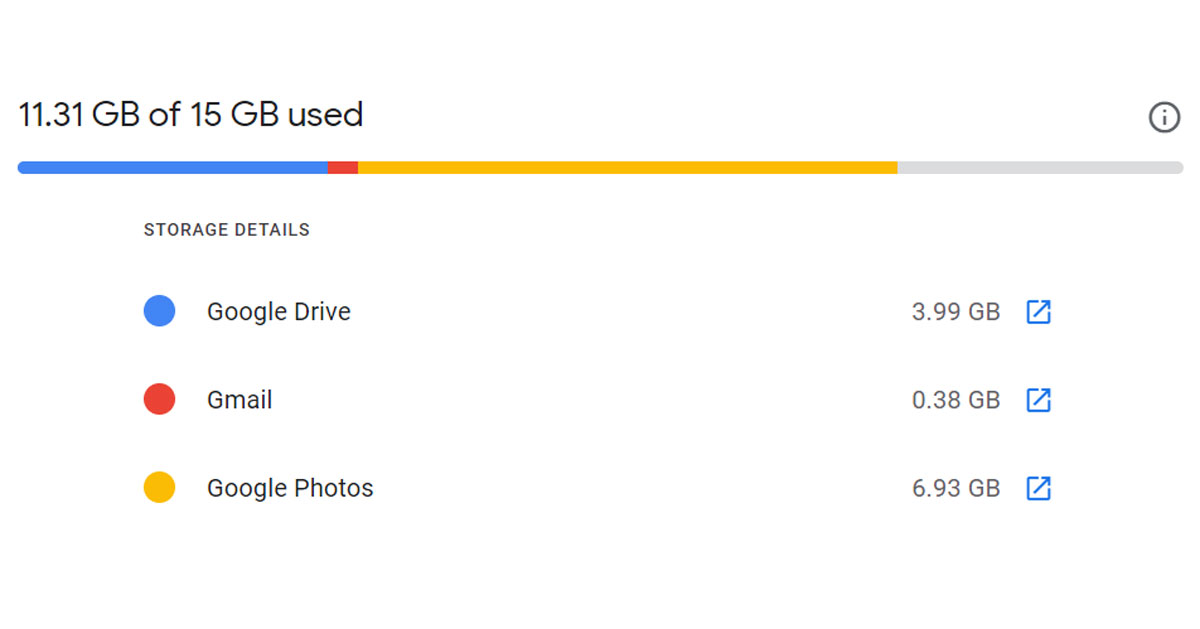 So if you have storage issues with Gmail, then chances are that the photos app is the culprit here. Just turn off the automatic backup option and delete some photos and videos.
The same is the case with Google Drive, it also shares storage with the other two. So, if you have shared some large files on Google Drive with someone and you forgot to delete them, it’s the perfect time to delete those files and make some storage in your Gmail inbox.
So if you have storage issues with Gmail, then chances are that the photos app is the culprit here. Just turn off the automatic backup option and delete some photos and videos.
The same is the case with Google Drive, it also shares storage with the other two. So, if you have shared some large files on Google Drive with someone and you forgot to delete them, it’s the perfect time to delete those files and make some storage in your Gmail inbox.