Dell Alienware launches its new gaming laptops in India

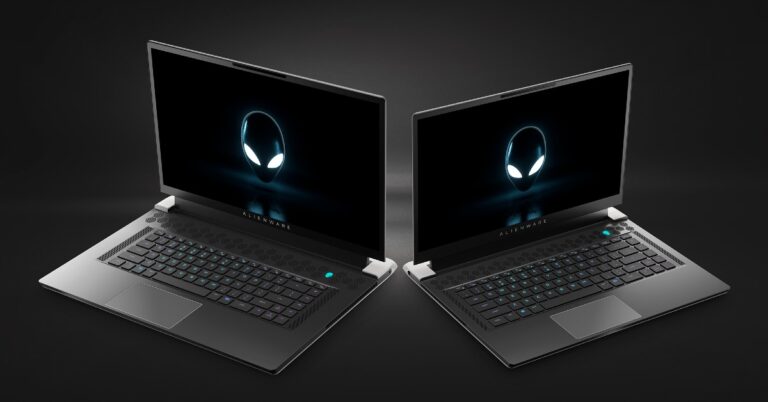
Dell’s Alienware series is known for setting up a benchmark in the gaming laptop segment. Alienware is an American hardware subsidiary of Dell. The company has announced and launched 5 new laptops for its Indian customers. Laptops being launched are Alienware X17, X15, XPS 17, XPS 15, and G15. The company has announced all the specs for its upcoming laptops. Here are all the specifications and prices for the new laptops.

Alienware X17 & X15

There is a significant upgrade in thermals made by the company. It is claimed the new cooling system is 25% more efficient than the current Alienware Cryo-Tech. The laptop has a massive 17.3-inch display having a 1080p display panel and 360 Hz refresh rate. The company also offers an optional Cherry MX mechanical keyboard setup on the go. The laptop is powered by the latest Intel offering i.e Core i9-11900H CPU. On the GPU side, the laptop is powered by Nvidia GeForce RTX 3080. Paired with 32 GB of RAM and 1TB internal storage. The Windows Hello IR camera for Biometric security. The specification of X15 remains the same, just a smaller screen size of 15.6-inches and no Cherry MX mechanical keyboard in this option. Price of X17: Starting from Rs 2,90,990 Price of X15: Starting from Rs 2,40,990 Read Also: Dell unveiled Alienware x15 and Alienware x17 gaming laptops with Tiger Lake-H CPUs and GeForce RTX 30-Series GPUs

Alienware XPS 15 & XPS 17

These laptops are focused on multimedia consumption and editing. Both the laptops offer 4K UHD+ touchscreen display with 500 nits of brightness, DisplayHDR 400 certification,100 percent Adobe RGB,1,600:1 contrast ratio, 99 percent DCI-P3 typical. Although the purpose of this laptop is completely different it is nowhere slow and the company has made no compromise regarding the internal specification. Intel’s Flagship 11th gen Intel Core i9-11900H CPU paired with RTX 3050 Ti GPU comes in it. The laptops will have a quad-speaker design being 2 x 2.5W woofers and 2 x 1.5W tweeters, which support Waves MaxxAudio Pro technology. The only difference between them is screen size being XPS with 15.6-inches and XPS 17 supports 17.3-Inches, respectively. Price of XPS15: Starting from Rs 2,23,990 Price of XPS17: Starting from Rs 2,64,490 Dell G15 Read Also: Dell XPS 13 with 11th Gen Intel Core processor launched in India

Dell G15

This laptop is a new budget segment gaming notebook by the company. Even though they have slashed the price there is no compromise regarding hardware. The display is a Full HD 15.6-inch panel with a 120 HZ refresh rate and 25 nits of peak brightness. The company will launch G15 in two CPU variants and multiple GPU pairs. The first option is Intel’s 11th gen Core i7. The other option for AMD lovers is the Ryzen 7 5800H processor. There are a total of 3 GPU options to choose from. These include Nvidia GeForce RTX 3060, Nvidia GeForce RTX 3050, or Nvidia GeForce RTX 3050 Ti.  Price of Dell G15: Starting from Rs 82,990 It’s really exciting to see Dell and Alienware’s new lineup of laptops for all budget segments. We feel that in their premium option the company should have planned more CPU and GPU offerings by AMD as it would have attracted AMD fanboys a lot. For the latest gadget and tech news, and gadget reviews, follow us on Twitter, Facebook and Instagram. For newest tech & gadget videos subscribe to our YouTube Channel. You can also stay up to date using the Gadget Bridge Android App. You can find the latest car and bike news here.

New drone rules 2021 in India: Relaxations on approval, fewer forms and lesser fees

Until now there was a strict drone policy in India. But now it has been updated, which brings a lot of relief on approval, fewer forms and nominal fees. The new drone rules 2021 in India eases geographical restrictions as well.   The Drone Rules 2021 also do away with the security clearance before any registration or licence issuance. The Indian government has today announced the new drone policy that ensures ease of drone use in India. As per the fresh norms, the Unmanned Aircraft Systems also known as UAS Rules 2021 has been replaced with liberalised Drone Rules, 2021. It brings a lot of relaxation on clearance to fees.  With the new drone policy, there is no need for any registration or licence issuance for the use of drones in the country. Also, the permit fees to operate drones has been reduced to nominal charges. According to the government, the relaxation will create employment and economic growth due to their reach, versatility, and ease of use, especially in India’s remote and inaccessible areas. In view of its traditional strengths in innovation, information technology, frugal engineering and huge domestic demand. It is also aimed to benefit all sectors of the economy like – agriculture, mining, infrastructure, surveillance, emergency response, transportation, geo-spatial mapping, defence, and law enforcement.

Read on the key benefits of the new Drone Rule 2021 in India:

The Civil Aviation Ministry has abolished several approvals like unique authorisation number, unique prototype identification number, certificate of manufacturing and airworthiness, certificate of conformance, certificate of maintenance, import clearance, acceptance of existing drones, operator permits, authorisation of R&D organisation, student remote pilot licence, remote pilot instructor authorisation, drone port authorisation etc. The number of forms has been reduced from 25 to 5. Whereas the type of fee has been reduced from 72 to 4. As per the new drone policy, the quantum of the fee was reduced to nominal levels and delinked with the size of the drone. For instance, the fee for a remote pilot license fee has been reduced from INR 3000 (for large drones) to INR 100 for all categories of drones; and is valid for 10 years. Read on the key benefits of the new Drone Rule 2021 in India: According to the Civil Aviation Ministry, the Digital sky platform shall be developed as a user-friendly single-window system.  There will be minimal human interface and most permissions will be self-generated. In addition to this, the interactive airspace map with green, yellow and red zones shall be displayed on the digital sky platform within 30 days of publication of these rules.  For the operation of drones in India, no permission is required now in the green zone. The Green zone means the airspace up to a vertical distance of 400 feet or 120 metres that has not been designated as a red zone or yellow zone in the airspace map; and the airspace up to a vertical distance of 200 feet or 60 metres above the area located between a lateral distance of 8 and 12 kilometres from the perimeter of an operational airport. Whereas the Yellow zone is now reduced from 45 km to 12 km from the airport perimeter. Also, no remote pilot licence is required for micro drones (for non-commercial use) and nano drones.  As per new Drone Rules 2021, there is no need for security clearance before issuance of any registration or licence and Type Certificate, unique identification number and remote pilot licence by R&D entities operating drones in their own or rented premises, located in a green zone. No restriction on foreign ownership in Indian drone companies and the import of drones to be regulated by DGFT. The requirement of import clearance from DGCA has also been abolished. On the other hand the coverage of drones under Drone Rules, 2021 increased from 300 kg to 500 kg.  This will cover drone taxis also. Now onwards DGCA shall prescribe drone training requirements, oversee drone schools and provide pilot licences online. The Remote pilot licence is to be issued by DGCA within 15 days of the pilot receiving the remote pilot certificate from the authorised drone school through the digital sky platform. Moreover, the testing of drones for issuance of Type Certificate to be carried out by Quality Council of India or authorised testing entities. Also, a type certificate will be required only when a drone is to be operated in India. Importing and manufacturing drones purely for exports are exempt from type certification and unique identification numbers. Nano and model drones (made for research or recreation purposes) are exempt from type certification. Manufacturers and importers may generate their drones’ unique identification number on the digital sky platform through the self-certification route. In addition, the new drone policy of India also eases the process specified for the transfer and deregistration of drones through the digital sky platform. As per the government, the drones present in India on or before 30 Nov 2021 will be issued a unique identification number through the digital sky platform provided, they have a DAN, a GST-paid invoice and are part of the list of DGCA-approved drones.  There will be Standard operating procedures (SOP) and training procedure manuals (TPM) to be prescribed by DGCA on the digital sky platform for self-monitoring by users.  No approvals are required unless there is a significant departure from the prescribed procedures. The maximum penalty for violations has now been reduced to Rs 1 lakh. Safety and security features like ‘No permission – no takeoff’ (NPNT), real-time tracking beacon, geo-fencing etc. to be notified in future.  A six-month lead time will be provided to the industry for compliance. Drone corridors will be developed for cargo deliveries. Lastly, the Drone promotion council is to be set up by the Government with participation from academia, startups and other stakeholders to facilitate a growth-oriented regulatory regime. For the latest gadget and tech news, and gadget reviews, follow us on TwitterFacebook and Instagram. For newest tech & gadget videos subscribe to our YouTube Channel. You can also stay up to date using the Gadget Bridge Android App. You can find the latest car and bike news here.

Mi TV 5X with Patchwall 4 and adaptive brightness launched in India

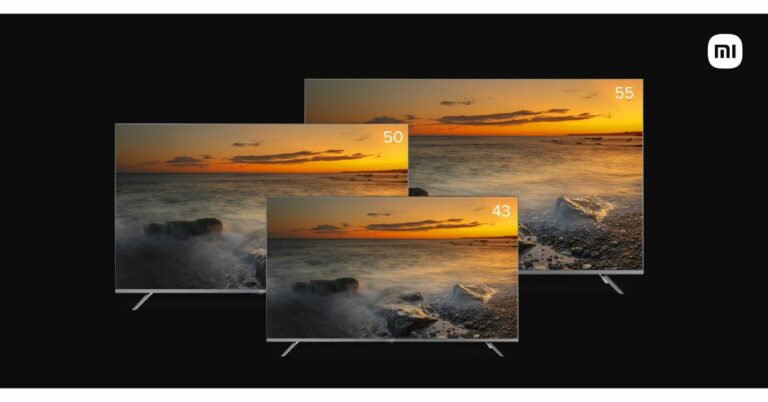
Xiaomi today hosted its Smarter Living 2022 event in India where it introduced a few new products. The company announced the launch of its new TV series namely Mi TV 5X. This is a follow up of the popular Mi TV 4X series that includes 43-inch, 50-inch, and 55-inch models. The latest arrival of the smart TV will be available in the same screen sizes in the Indian market. Both the models come with thin bezels along with a metal finish and the latest PatchWall interface.

Mi TV 5X price and availability

Mi TV 5X comes with a starting price of Rs 31,999 for the 43-inch model. The price of the 50-inch variant is set at Rs 41,999 and the 55-inch model at Rs 47,999. The device will be available across Mi.com, Flipkart.com, Mi Home, Mi Studio and Croma, starting September 7 in the country. There will be up to Rs 3,000 instant discount to the HDFC Bank Credit Cards holders as well as on Easy EMIs. There will be up to 9 months of no-cost EMI offers from the leading Banks and NBFCs. Mi TV 5X

Mi TV 5X tech specs and features 

Mi TV 5X will be made available in three different sizes of 43-inch, 50-inch, and 55-inch models. It is powered by Vivid Picture Engine 2 that uses a Photo-electric sensor that smartly adapts to the ambient lighting conditions, thereby providing users with a comfortable viewing experience. According to the company the latest version has been programmed to provide exceptional colour accuracy and vibrancy for stunning visuals in all conditions.  The Mi TV 5X offers a “Billion Colour View”, covering 94% of the DCI-P3 standard. In addition to this, the television equips a 4K display panel that boasts 3840 x 2160p resolution and offers support for all popular codecs including Dolby Vision, HDR10, HDR 10+, Hybrid Log-Gamma (HLG). The device also includes the company’s own ‘Reality Flow Engine’ that interpolates frames when needed to ensure blur-free and smooth viewing while watching sports or playing games. The newly launched Mi TV comes with the latest version of Patchwall – Patchwall 4. The new UI has been thoroughly optimized to provide faster search results, quick transitions between apps and lag-free content discovery. The User Centre and App Inputs have been moved to the first fold for easy access. User Centre acts as a personal hub for users where they can save their favourite content, watch new trailers, check their subscription plans and much more. Mi TV 5X runs on the Android 10 version out of the box that brings access to over 5,000 apps and games from Google Play along with built-in Chromecast and Google Assistant support. It also features the Mi QuickMute feature that allows users to mute the TV by simply double-tapping the volume down key.   The speaker on the TV offers an output of 40W with clear three-dimensional audio and rich bass. It features Dolby Atmos support and access to voice commands to search and access entertainment, get answers, control the TV and also operate their smart home devices. The Television offers 2GB of RAM along with 16GB of storage.  It brings support for eARC, ALLM via the three HDMI 2.1 ports that also enables next-gen gaming with the latest consoles. For connectivity, there are two USB ports, a LAN port, one optical port, 3.5 mm jack and an Ethernet port for all additional connectivity. It also brings support for both 2.4GHz/5GHz Wi-Fi connectivity. For the latest gadget and tech news, and gadget reviews, follow us on TwitterFacebook and Instagram. For newest tech & gadget videos subscribe to our YouTube Channel. You can also stay up to date using the Gadget Bridge Android App. You can find the latest car and bike news here.
Best ways to upload videos and images without losing their quality and without compression

Sharing photos has become an integral part of taking photos. But sending or uploading your pretty photos online makes it look frizzy. This is because while uploading a picture on any socials the application uses a compression algorithm to save its server space and traffic. Compression of photos and videos results in decreasing quality for both aspects. But worry not, we have some simple ways to upload videos and images without losing their quality or without compression so you can share your experience with your loved ones.

Google Photos

Probably the easiest and underrated feature of Google Photos. Own a Google account? Just open Google photos and upload your photos on it. Before that just make sure that the upload setting is set to lossless quality. Just press the share option after that and select the recipient and you are good to go. The best part about Google photos is it also backs up and syncs your photos and videos. You can access your photos and videos easily from anywhere, all you need is a device with an internet connection. Remember, there is a limit of 15GB for free storage in Google Photos.

Cloud Sharing

Cloud sharing is one of the best ways to share photos, videos or even files with others without any compromise. Why this method is so successful is because there are tons of options to choose from. Some of the best ones are Google Drive, Microsoft OneDrive and iCloud. All you need is to upload the photo or video into the cloud service of your choice and then head to the share options. There is no worry about your data getting leaked as there are tons of options available for sharing your file. The sharing link will only open the desired file you send. Also, there are customisation options like setting the file as viewable or downloadable accordingly. It is advised to get to know the service you want to use properly before starting. All the applications are available on both PC and smartphones. Lossless image and video Read Also: How to get Apple music lossless?

WiFi Direct

WiFi direct is like sending your files over Bluetooth just with increased speed and lesser range. WiFi direct simply connects two devices via WiFi with each other, and can be on a phone or laptop’s inbuilt hotspot. One of the devices acts as an access point and another device connects directly to it. The best part of WiFi direct is that multiple devices can connect through one access point. There are many third-party apps as well to make this process hassle-free. Apps like Send anywhere, Nearby share or AirDrop(in apple specific) allows you to just select the file you want to share and follow the steps and guides in the application itself. Your file will be sent to the receiver in no time.

Email

We often forget emails can now carry multimedia as well, although there is a limit on the file size you can share. Unlike other social media applications, it does not compress your photo. Sending photos through email, in the good old way, is very easy. All you have to do is know the recipient’s email address. After entering the details just head to the attachment and attach the images and videos you want to share. After attaching just click send and your files are sent directly to the person you want to share the multimedia file with. Read Also: How to schedule send your emails in Gmail? These are the ways through which you can send video and photos without losing the quality of the file. Although there is another old fashioned way of sending your file is through Bluetooth, but it is a slow process. The sharing gets limited to one person as well as the range is limited to 10 metres. Comparatively the above ways are much faster and advanced and will come in handy. For the latest gadget and tech news, and gadget reviews, follow us on Twitter, Facebook and Instagram. For newest tech & gadget videos subscribe to our YouTube Channel. You can also stay up to date using the Gadget Bridge Android App. You can find the latest car and bike news here.

Mi Notebook Ultra and Mi Notebook Pro debuts in India with 11th Gen Intel Core processors and Intel Iris Xe graphics

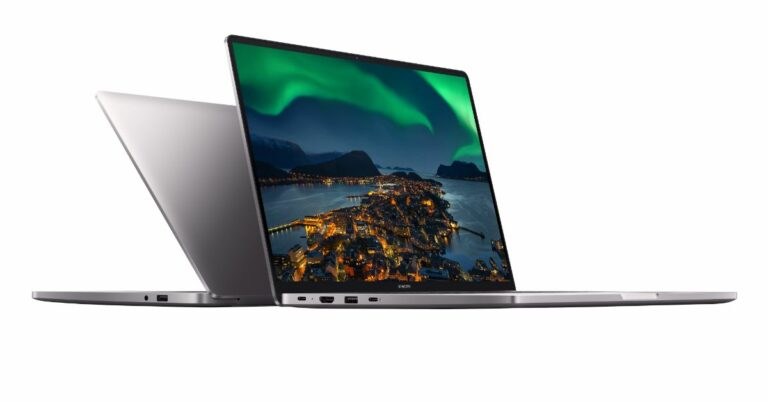
Chinese electronics brand Xiaomi today at its Smarter Living 2022 event introduced a host of electronic items in India. Mi Notebook 2021 is one such item to launch at the event today. The latest lineup includes Mi Notebook Ultra and Mi Notebook Pro that come powered by 11th Gen Intel Core processors with Intel Iris Xe graphics. Both laptops also include all-day battery life, Type-C fast charging, and Thunderbolt 4 along with a backlit keyboard. 

Mi Notebook Ultra specifications and pricing

Mi Notebook Ultra comes with a unibody design made out of a single block of Series 6 Aluminium, an aircraft-grade metal alloy, precisely cut using a CNC machine. The body chassis is further taken through a process of sandblasting and anodization for a Lustrous grey finish.  The laptop weighs 1.7 kg and is 17.9mm thick. The device features a 15.6-inch Mi-Truelife+ display with 3,200×2,000 pixels and 16:10 aspect ratio. The Mi laptop comes with a 90Hz refresh rate, 300 nits peak brightness, 100 percent sRGB coverage. The screen is TUV Rheinland low blue light certified and has DC dimming as well. Under the chassis, there is Intel Core i7-11370H CPU/ Core i7-11370H paired with Intel Iris Xe graphics. It offers up to 16GB of DDR4 RAM and 512GB of NVMe SSD storage for storing content. Mi Notebook Ultra specifications and pricing The Mi laptop also includes a 720p HD camera with a 2D array dual-microphone setup, providing great video and call quality. In addition to this, the Mi Notebook Ultra has a  70 WHr battery and offers up to 12 hours of battery life. Also, with the 65W USB Type-C charger, it can charge from 0 to 50% in just under 45 mins. The device further includes Wi-Fi 6, Bluetooth v5.1, a Thunderbolt 4 port, HDMI port, USB Type-C port, two USB Type-A ports, and a 3.5mm audio jack for connectivity.  For additional security, the power button doubles up as a fingerprint scanner which supports Windows Hello for fast, secure and easy login. The backlit keyboard comes with three levels of illumination (off, dim and bright). Each key comes with a deep travel distance of 1.5 mm with a concave curved top making typing easier and more accurate with the right tactile feedback. The price of the laptop starts at Rs 59,999 for the Core i5 processor and 8GB of RAM while the Core i5 processor and 16GB of RAM will be available at Rs 63,999. The price of the Intel Core i7 processor with 16GB of RAM is set at Rs 76,999.

Mi Notebook Pro specifications and pricing

Mi Notebook Pro is made out of an Aircraft-grade Series 6 Aluminium alloy chassis. This unibody design enables it to be lightweight at just 17.3mm thin and 1.4 kg lighter. It features a 14-inch 2.5K display with 2,560×1,600 pixels of resolution and a 16:10 aspect ratio. The screen supports 300 nits peak brightness, 100 percent sRGB coverage, TUV Rheinland certification. The notebook is powered by 11th Gen Intel Core i5 and i7 Tigerlake H35 processors with Iris Xe graphics coupled with up to 16GB of RAM and 512GB of SSD storage.  Mi Notebook Pro specifications and pricing The keyboard uses scissor switches with a comfortable travel of 1.3mm. Users can also enjoy fast and secure login with the fingerprint scanner that is embedded within the power button. Both the laptops run on Windows 10 Home and will be eligible for a free upgrade to Windows 11 when available. They also come preloaded with MS Office Home & Student Edition 2019, and Mi SmartShare.  The price of the Mi Notebook Pro with an Intel Core i5 processor and 8GB of RAM starts at Rs 56,999. The Core i5 with 16GB RAM options will be available at Rs 59,999 whereas the Core i7 with 16GB RAM will retail in India at Rs 72,999.

Availability 

As per Xiaomi both Mi Notebook Ultra and Mi Notebook Pro will be available across Mi.com, Mi Homes, Amazon.in and retail stores starting August 31. The HDFC card members can avail of additional discounts up to Rs 4500. For the latest gadget and tech news, and gadget reviews, follow us on TwitterFacebook and Instagram. For newest tech & gadget videos subscribe to our YouTube Channel. You can also stay up to date using the Gadget Bridge Android App. You can find the latest car and bike news here.

Best SD and memory card readers under Rs 500 for your Windows PC

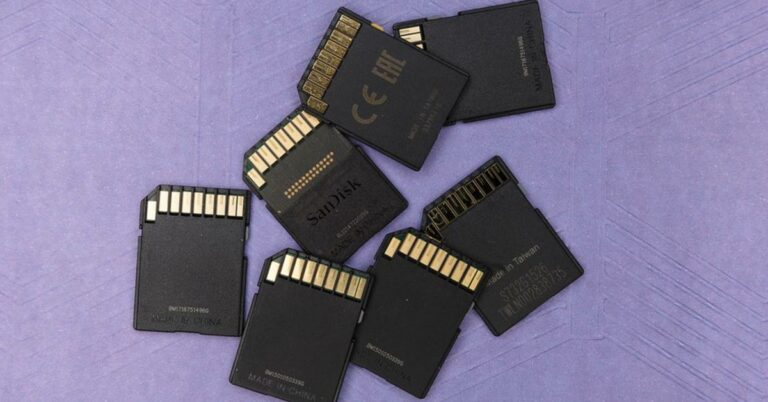
SD cards and memory cards are the source through which you store your photos and videos on camera or mobile phones (with microSD cards) mostly. SD cards come in handy when it comes to transferring those photographs and videos to your system. Few of the Systems come with an inbuilt SD card reader and all you have to do is insert your SD cards there and you are good to go.  Talking about the systems which do not give SD card readers, they need external card readers for transferring any data from the card to the PC. Usually, good SD cards come with a big price tag and are very bulky. This list is exactly to eliminate such problems. This list contains the top affordable SD and memory card readers under Rs 500 that will come in handy.

SeCro Type-C 

SeCro Type-C SeCro is at the top of our list as it has the modern USB Type-C. Due to Type-C support, it can be directly plugged in your Mac or Windows laptop with USB-C support. You can also connect this device directly to your supported mobile phones and tablets. The device is capable of transferring your data fast as it is equipped with a newer 3.1 USB-C, which will be ideal for faster read and write speeds. The reader supports a wide range of SD cards as well as Micro SD cards. Price: Rs 499 Buy Here Read Also: USB 4 is coming: Everything you need to know

SeCro USB 3.0

SeCro USB 3 SeCro USB is an alternative for the Type-C variant of the same company. It is a lightweight and compact card reader which has faster transfer speeds as compared to normal traditional USB 2.0. The finish of the product looks premium and its size makes it travel friendly. It supports a wide variety of SD cards. It’s also commendable by the company that in this compact form factor they managed to put a MicroSD card reader as well. People looking for a compact card reader with USB 3.0 fast transfers can surely go with this card reader. Price: Rs 499 Buy here

Brand Conquer SD Card Reader

Brand Conquer SD Card Reader This card reader is really exciting as it can support multiple devices. Brand Conquer has 3 types of input ports USB 3.0, type-c and a micro USB. There are a lot of older phones which support micro USB OTG transfer. This is the exact spot where this device shines as it will transfer your photos with faster speeds. The card reader supports a wide range of SD cards and MicroSD cards and is compact in size Price: Rs 374 Buy here Read Also: Xiaomi Mi 11 smartphone likely to house Snapdragon 875 SoC

iBall CR CR24

iBall CR CR24 iBall CR CR24 is a compact Pendrive styled USB card reader. As we know iBall is a popular and reliable brand in India, the company is trusted with tons of products among many of its customers. The device is paired with USB 2.0 and supports multiple types of SD cards and Micro SD cards. The card reader is made of plastic, yet the fit and finish feels premium in hand. This is the best card reader in the segment for people who want a trusted brand value with a little compromise in transfer rates. Price: Rs 441 Buy here 

TEC TAVAKKAL All in One

TEC TAVAKKAL All in One This device is not exactly a solo card reader but due to its features, it was a great pick for this list. This device has a total of 7 ports which consist of 3 USB 2.0 ports, 2 SD card ports, 1 MicroSD port and M2 card support. The company also provides lifetime customer care support for its device. This USB hub is ideal for people who multitask a lot and operate multiple devices all at once. Price: Rs 379 Buy here These were the top picks for the SD and memory card readers under Rs 500. These devices will not only increase your productivity but also not punch a hole in your pockets. Please see that the prices may fluctuate at the time of buy and we have no control over them. They are on the list of under Rs 500 at the time of this article. For the latest gadget and tech news, and gadget reviews, follow us on Twitter, Facebook and Instagram. For newest tech & gadget videos subscribe to our YouTube Channel. You can also stay up to date using the Gadget Bridge Android App. You can find the latest car and bike news here.

Best Anti-Virus protection for your PC: Paid and free

Most of the data nowadays are stored in a system either it can be a MAC or a Windows PC for normal consumers. Viruses lead to damage to your system and make it slow. Antivirus is required not only to provide protection to your system from malware and viruses but also to save your precious data from online trackers and malicious software. Here is the list of our top picks when it comes to Anti-Viruses (both paid and free), which will keep your system safe and running smoothly.

1. Norton 360 with LifeLock Select

Norton 360 with LifeLock Select It is the most used Anti-Virus by many big companies. Norton offers device protection for up to 5 devices. No matter which device it is, an Apple device, Android or Windows, Norton 360 got you covered. It provides safe browsing tools, password manager to lock up your passwords safely. Norton also provides 100GB of cloud storage to save all the data you wish. Norton backs it up and keeps it secure. The software comes up with an IP VPN to mask your IP and Location with LifeLock giving you fraud alerts and theft protection. It’s a family solution clubbed with a parental lock, making it ideal for everyone. Although the Antivirus is not free it’s worth spending a little extra. Price: Rs 1,349.00 onwards Download here Read Also: Beware of spyware and protect your devices

2. Bitdefender Antivirus (Free)

Bitdefender Antivirus (Free) Bitdefender is the best free alternative if you want good protection against viruses for your device and don’t want to spend a lot. There is also a total security version that is paid and lets you pair up to 5 devices in the subscription. The device can be either Apple, Android or Windows. It also has parental control making it ideal for kids. The free version has all the basic functionalities and is very easy to set up. Bitdefender is packed with features like real-time monitoring, virus protection, malware, spyware and ransomware. One can always buy a subscription if he/she is satisfied with the product else the software remains completely free for lifetime. Download here

3. Kaspersky Antivirus and Internet Security

Kaspersky Antivirus and Internet Security Kaspersky is a lightweight security solution for your system that doesn’t eat up a lot of system resources. Primarily designed for Windows and macOS it provides a lot of features like detecting viruses, trojans, worms, spyware and adware. Kaspersky has built-in password protection that doesn’t allow malware to deactivate your antivirus automatically and take over your system. It automatically disables suspicious links and keeps track of instant messages and emails for protection. With 24/7 free technical support, it’s really ideal software for your system. Although it is only available in the paid versions, the company often offers free features inside the software as a loyalty bonus. Price: Rs 479.20 onwards Download here Read Also: Buying a new PC? Here’s why you need anti-virus protection

4. Malwarebytes

Malwarebytes Malwarebytes is specially targeted towards malware removal from your system. MAC’s are expected to be the most secure devices, but even they can have malware attacks on them. Malwarebytes provides real time protection from malware and also scans your system continuously for suspicious files. For sudden attacks on your system, this software can be your go-to as it provides 14 days free trial with limited functionalities. Although even with limited functionalities it can easily save yours under attack system. One can always buy a subscription after the 14 days expiration and pay extra for supporting up to 5 devices. Download here

5. AVG Free

AVG Free AVG is a free solution for basic vulnerabilities protection. AVG Free works as all in one solution, it comes with virus protection as well as a system cleaner built-in. AVG protects your system from virus attacks and malware takeover. It has built-in hacker protection which will let you know if there is anything suspicious with your system. While protecting your data it also makes sure that the system is running smoothly with its clean up utilities and tools. The antivirus is completely free with limited features and full features can be unlocked by buying the premium version. These are the top picks for antivirus for giving your system the best protection it needs. Although Windows Defender is more than enough to protect your system against viruses and threats, when you need extra protection tools with multiple devices to support these antiviruses really shine. For the latest gadget and tech news, and gadget reviews, follow us on Twitter, Facebook and Instagram. For newest tech & gadget videos subscribe to our YouTube Channel. You can also stay up to date using the Gadget Bridge Android App. You can find the latest car and bike news here.

Fitbit Charge 5 fitness band with always-on display launched in India

The American smart wearable manufacturer, Fitbit, now acquired by Google, has announced the launch of a new fitness band in India and globally. The company has introduced the Fitbit Charge 5 which comes with upgraded features and design over its predecessor Fitbit Charge 4. Unlike its predecessor, the watch comes with a thinner design while the display is brighter. It further includes the most advanced health and fitness tracker, to help keep a pulse on your fitness, stress, heart health, sleep and overall well being. Fitbit Charge 5 pricing and availability details Fitbit Charge 5 has been launched in India with a price tag of Rs 14,999. The fitness band will be offered in Graphite/ Black, Platinum/ Steel Blue, and Soft Gold/ Lunar White colour options. The device is now available for pre-order and will be available for purchase starting this fall.  Fitbit Charge 5 fitness band The Fitbit Charge 5 is available in the US at $179.95 that translates to Rs 13,300 whereas in Europe it will be selling at EUR 17.95 that comes around Rs 15,600 and in Australia at AUD 269.95 translating to Rs 14,500. Fitbit Charge 5 specifications Speaking of the specification, the Fitbit Charge 5 features a 1.04-inch colour AMOLED touchscreen display with 450 nits of peak brightness. It offers an always-on display with 20 colourful clock faces to customize what information you want to see most. It allows you to swipe a finger, view your stats, and receive/send notifications from/to your smartphone. The Fitbit Fitness band also comes with a built-in GPS + GLONASS, SpO2 sensor, skin temperature sensor, and optical heart rate monitor. The device can also withstand up to 50 metres in water, which makes it swim-proof. The watch also includes NFC and is compatible with Android 8.0 or higher devices and iOS 12.2 or higher Apple products.  With six months of Fitbit Premium, the Fitbit Charge 5 will offer deeper insights, actionable guidance and a range of more than 500 workouts, plus mindfulness and nutritional content. Additionally with new w Daily Readiness experience, coming soon to Charge 5, as well as Sense, Versa 3, Versa 2, Luxe and Inspire 2 devices, you can understand if your body is ready for a workout or if you should prioritize recovery instead. The Premium members can also access more than 200 workouts from certified trainers and popular brands like Daily Burn, barre3, obé and new high energy workouts from LES MILLS.  As per the company, the fitness tracker will provide you with a score based on your fitness fatigue (activity), heart rate variability (HRV) and recent sleep. You’ll also get an analysis of what impacted your score, and suggestions like a recommended target Active Zone Minutes goal, along with Premium content to help you make the best decisions for your body.  The ECG app will track your heart rate 24/7 and provide notifications when you are above or below your personal ranges, and while many factors can affect your heart rate, a high or low heart rate may be an indication of a heart condition that requires medical attention. You will also receive sleep tools as part of your well-being like daily Sleep Score, Sleep Stages and SmartWake alarms. Premium members also receive a deeper analysis and guidance to improve sleep quality.  For the latest gadget and tech news, and gadget reviews, follow us on TwitterFacebook and Instagram. For newest tech & gadget videos subscribe to our YouTube Channel. You can also stay up to date using the Gadget Bridge Android App. You can find the latest car and bike news here.

Redmi 10 Prime set to launch on September 3 in India, the company confirms

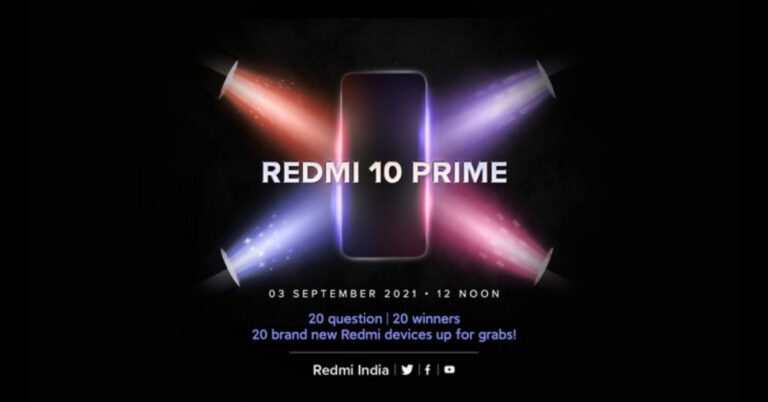
Xiaomi’s sub-brand, Redmi, has officially announced the launch of its new smartphone in India next month. The company itself confirmed to introduce the Redmi 10 Prime in the country on September 3. In addition to this, the company has also revealed the key features of the upcoming budget smartphone. The device is speculated to be a rebranded variant of Redmi 10 that debuted last month only.  Redmi 10 Prime launch in India is scheduled to happen on September 3. The company took to Twitter to confirm the launch date of the upcoming smartphone. Additionally, the Chinese smartphone brand has also teased the key specs of the handset, which includes a hole-punch display with an adaptive refresh rate. Moreover, the phone will also include dual microphones. 

Redmi 10 Prime expected pricing

The device is said to be a rebranded variant of Redmi 10 as the model number spotted on the  Bluetooth Special Interest Group with a model number 21061119BI that is identical to the Redmi 10. So if that is to be believed then the Indian model will be priced around the global pricing of $179, which translates to Rs 13,300 for the 4GB RAM with 64GB storage. The 4GB RAM with 128GB storage was launched at $199, which comes to be around Rs 14,800 and the 6GB RAM with 128GB storage is priced at $199, which translates to Rs 16,600.
Redmi 10 Prime
Redmi 10

Redmi 10 Prime expected specifications

Speaking of the specification, the Redmi 10 Prime is likely to feature a 6.5-inch full-HD+ AdaptiveSync display with 1,080×2,400 pixels of resolution and up to 90Hz refresh rate. The phone is expected to be powered by an octa-core MediaTek Helio G88 SoC, and up to 6GB of RAM and 128GB of storage. Redmi 10 Prime could also include a quad rear camera setup with a 50-megapixel primary sensor. Further assisted by an 8-megapixel ultra-wide, two 2-megapixel sensors for macro and depth photography. Upfront there will be an 8-megapixel sensor for selfies and video calling.  The phone may also come with a 3.5mm headphone jack and dual speakers along with a side-mounted fingerprint sensor and AI face unlock. It could boast a 5,000mAh battery with 18W fast charging.  For the latest gadget and tech news, and gadget reviews, follow us on TwitterFacebook and Instagram. For newest tech & gadget videos subscribe to our YouTube Channel. You can also stay up to date using the Gadget Bridge Android App. You can find the latest car and bike news here.

Samsung Galaxy M32 5G with a quad camera and Dimensity 720 SoC launched in India

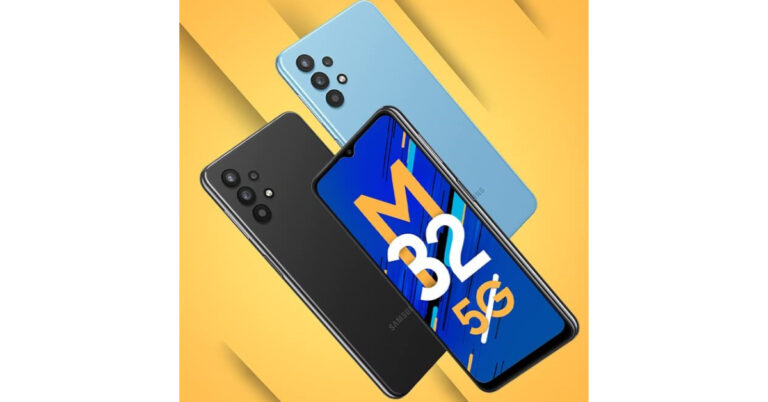
After being teased for some time, Samsung has officially announced the launch of the Galaxy M32 5G smartphone in India. The smartphone will be available via Amazon in the country. It will be powered by an octa-core MediaTek Dimensity 720 SoC and a quad rear camera setup. The device also supports 12 5G bands for better connectivity and promises two-year OS upgrades. Samsung Galaxy M32 5G price and availability details Samsung Galaxy M32 5G has been launched in India in 6GB RAM with 128GB of storage at Rs 20,999. The 8GB RAM with 128GB storage model will be available at Rs 22,999. The device is scheduled to go on sale from September 2 and will be available on Samsung.com, Amazon.in, leading online portals and select retail stores. Galaxy M32 5G will have an introductory offer of Rs 2,000 Instant Cashback on ICICI Credit Cards and EMI transactions. The handset will come in two colour options of  Slate Black and Sky Blue.  Samsung Galaxy M32 5G price and availability details Samsung Galaxy M32 5G tech specs Samsung Galaxy M32 5G comes with a 6.5-inch HD+ TFT Infinity-V display along with 60Hz refresh rate support. The device also features Dolby Atmos support on wired and Bluetooth headsets. The phone runs on OneUI 3.1 on top of Android 11 and offers Samsung Knox, Samsung’s defence-grade security platform, to safeguard personal information and data in real-time. Under the hood, there is an octa-core MediaTek Dimensity 720 SoC, paired with up to 8GB RAM and 128GB storage. The internal storage can be expanded up to 1TB using a microSD card.  Samsung Galaxy M32 5G price and availability details It also supports 12 5G bands-N1, N3, N5, N7, N8, N20, N28, N38, N40, N41, N66, N78 for a super-fast and smooth 5G experience. According to the company, the data speed in a 5G network could be 20x faster than 4G with a 10x decrease in latency and 10x more efficient IoT connectivity. Furthermore, it comes with two years of guaranteed OS upgrades. For gamers, the AI-based Game Booster offers advanced gaming performance and a lag-free gaming experience.  In terms of photography, Samsung Galaxy M32 5G features a quad rear camera setup that includes a 48-megapixel primary sensor. Furthermore, there is an 8-megapixel ultra-wide-angle sensor, a 2-megapixel macro shooter, and a 2-megapixel depth sensor. Lastly, the device comes with a 13-megapixel front-facing camera for taking selfies. The handset boasts a 5,000mAh battery that supports 15W fast charging. The phone delivers up to 106 hours of music playback, 36 hours of talk time, 19 hours of internet usage time and 20 hours of video playback on a single charge. On the connectivity front, there is 5G, Wi-Fi, Bluetooth, and GPS.  For the latest gadget and tech news, and gadget reviews, follow us on TwitterFacebook and Instagram. For newest tech & gadget videos subscribe to our YouTube Channel. You can also stay up to date using the Gadget Bridge Android App. You can find the latest car and bike news here.

26 August 2021 Flipkart Daily Trivia Quiz: Answer to win exciting prizes

The e-commerce website Flipkart is hosting Daily Trivia Quiz. Every day it brings a bunch of new questions for its users. By answering them correctly you can win exciting prizes. The questionnaire is based on questions related to general knowledge. Also, the users can win free vouchers and super coins, among other offers via the daily quiz. 26 August 2021 Flipkart Daily Trivia Quiz Answers has already gone live on its platform. The participant should be at least 18 years old and should have a valid login ID. The Quiz is available on the mobile platform and not the web version. E-commerce conducts the quiz on daily basis and goes live at 12:00 AM IST and runs till 11:59 PM IST.  The winners are announced within 15 days from the date of participation that can be viewed under the Gems/Rewards section in the app.

How to participate in the Flipkart Daily Trivia Quiz

To participate download the Flipkart app on your phone. Then open the Flipkart app then head to Game Zone. Now click on the Daily Trivia Banner or search for Daily Trivia. Enter the game and answer all 5 questions with correct answers.

26 August 2021 Flipkart Daily Trivia Quiz Answers

Question 1: Which of these players did not score a century in the 2015 ODI World Cup? Answer: Ajinkya Rahane Question 2: In Ramayana, who left Sita near sage Valmiki’s ashram after Rama banished her? Answer: Lakshmana Question 3: In which field does the Indian government give the Sant Kabir Award? Answer: Textile Question 4: Which of these is a subdivision of the geological time period ‘Holocene’? Answer: Meghalayan Question 5: Who is the subject of the biographical film ‘Kaptaan: The Making of a Legend’? Answer: Imran Khan
For the latest gadget and tech news, and gadget reviews, follow us on TwitterFacebook and Instagram. For newest tech & gadget videos subscribe to our YouTube Channel. You can also stay up to date using the Gadget Bridge Android App. You can find the latest car and bike news here.

26 August 2021 Amazon Quiz: Participate to win Rs 5,000 Amazon Pay Balance

26 August 2021 Amazon Quiz has gone live now and the e-commerce platform Amazon is giving you a chance to win Rs 5,000 Amazon Pay Balance. It can be played daily from 12 AM to 11:59 PM. Millions of its customers are trying their luck by participating in the daily quiz to win free gadgets as well as Amazon Pay Balance. All you need to do is log in to your Amazon app on your device and participate in today’s quiz. Every day Amazon brings a fresh questionnaire that consists of five easy questions based on general knowledge and current affairs. By submitting correct answers the contestants can win exciting prizes such as iPhone X, iPhone Xs, Seagate HDD, GoPro Hero 8 Camera, LG Smartphones, Bose Sound Touch 20 Speakers, OnePlus 7T among others. One thing to note is that the quiz is not available for the desktop platform, you can only participate in the quiz from 12 AM to 11:59 PM via mobile app. After giving all the correct answers to the question you will get shortlisted for a lucky draw to select a winner. The results will be announced at the end of the month. Check out today’s answers for the Amazon Quiz to win Rs 5,000 Amazon Pay Balance.

26 August 2021 Amazon Quiz Answers

Question 1: With five goals to his name, who won the Golden Boot award for the top goal-scorer at Euro 2020? The answer is- D) Cristiano Ronaldo Question 2: Which band played at Madison Square Garden on June 20 for the iconic venue’s first concert since before the pandemic? The answer is- D) Foo Fighters Question 3: In July 2021, Ashleigh Barty became the first woman from which country to win the Wimbledon singles title in 41 years? The answer is- C) Australia Question 4: This app was created by former students of which American University? The answer is- D) Stanford University Question 5: What is this iconic tower in Paris locally called? The answer is- C) La Dame De Fer
For the latest gadget and tech news, and gadget reviews, follow us on TwitterFacebook and Instagram. For newest tech & gadget videos subscribe to our YouTube Channel. You can also stay up to date using the Gadget Bridge Android App. You can find the latest car and bike news here.

Top software to clean the clutter on your Windows PC

Is your Windows laptop or computer not performing according to the way when you first bought it? Probably the reason is your system is cluttered up with junk files. Various apps which are of no use and the remains of uninstalled apps clog the system and make the processing speed slow. This clutter also takes a lot of space, lowering your storage. There is an inbuilt application on your windows to clean things up but often we need a deeper clean and for that, we need a specialist. Here is a list of such top software for cleaning the clutter in your Windows PC.

1. Iolo System Mechanic

Iolo System Mechanic  Iolo is no basic cleaning application as it has features like security apps, driver scrubber, password manager and system mechanic. The application also works as an AntiVirus and malware remover making it stand out from other cleaning applications. The interface is also available in dark mode to soothe your eyes. It has two options: a quick scan and a deep scan. The deep scan however takes a lot of time. Iolo also comes with a LiveBoost technology which makes sure no application is using your CPU or RAM in the background unnecessarily. There are many more features available in the application, however, the company charges extra for premium features. Download here

2. CCleaner

CCleaner CCleaner is more focused on the privacy of its user. The software has an automatic driver updater that will update your drivers so you don’t fall for any kind of security vulnerability issues. Also updating drivers to their latest versions will make your system run at optimum performance. CCleaner scans unused applications and files taking up space in your storage. The application points out redundant settings and kills auto startup of applications in the background or during startup. It automatically clears saved cookies and trackers to better your privacy. CCleaner is free for 14 days and needs a subscription to use afterwards. Download Here Read Also: How to keep your smartphone cool while gaming

3. IObit Advanced SystemCare

IObit Advanced SystemCare What makes IObit Advanced SystemCare stand out from every cleaner is its advanced AI technology, which the software uses. It learns the user’s behaviour and removes junk files and clutter accordingly. The software has a strong defragmentation algorithm that helps to clear a lot of space covered with system junk and application residue. The application even takes care of your private data by protecting it and fixes security vulnerabilities. After buying the pro version you can also unlock the Boost internet speed option, which will come really handy during these work from home times. Download here Read Also: Amazon Introduces Upgraded Echo Show 8 (2nd Gen) These applications will not only boost your productivity but also keep your system clutter-free and snappy. There are many cleaning applications and tools present in the market but these applications stand out in the crowd and have some unique features. For the latest gadget and tech news, and gadget reviews, follow us on Twitter, Facebook and Instagram. For newest tech & gadget videos subscribe to our YouTube Channel. You can also stay up to date using the Gadget Bridge Android App. You can find the latest car and bike news here.

How to take a screenshot in Google Chrome incognito mode (2024)

Google Chrome is one of the most used browsers across all the platforms. Making sure of the security, Google Chrome doesn’t allow you to take screenshots in Incognito mode. As soon as you try to do so you are intercepted with a message saying ‘Taking Screenshots isn’t allowed’. Although there is a simple trick you can take screenshots even in incognito mode very easily. Here is how you can do it. Read Also: Best Ways to View Saved Passwords in Google Chrome (2024)

Take a screenshot in Google Chrome incognito mode (Android)

Step 1: Open the Google Chrome application on your Android smartphone. Step 2: In the Chrome application, tap on the address bar. Step 3: Type –  chrome://flags Step 4: Now, head to the search bar at the top of the page. Step 6: Search for the option that says ‘Incognito Screenshot.’ Step 5: Tap on the option and select Enable.

Take a screenshot in incognito mode (PC)

Unlike its Android counterpart, Google Chrome for Windows does not limit the user’s ability to take a screenshot. You can take a screenshot of the incognito tab on your PC at any given time using the tool of your choice. Our favourite method is using the Windows + Shift + S key combination to trigger the Snipping Tool. Once triggered, use the mouse or touchpad to select the part of the screen that you want to capture. The image will be saved in the screenshots folder.

Bonus Tip: Take a screenshot in incognito mode on Mozilla Firefox

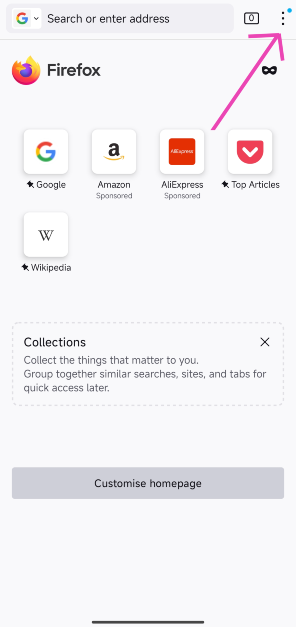
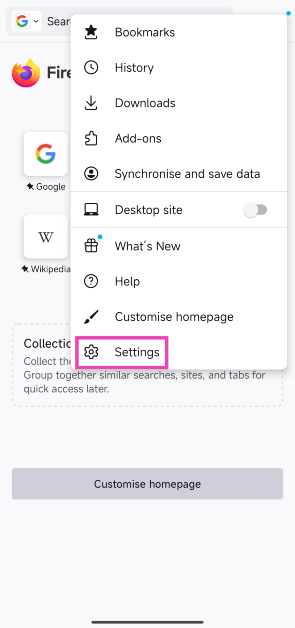
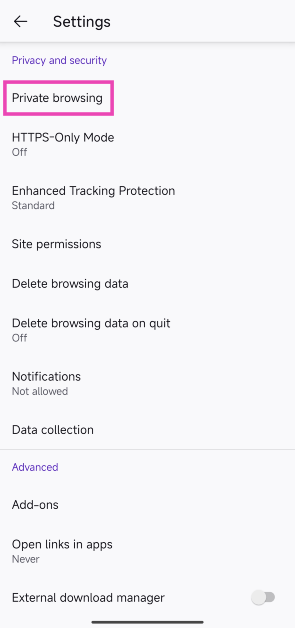
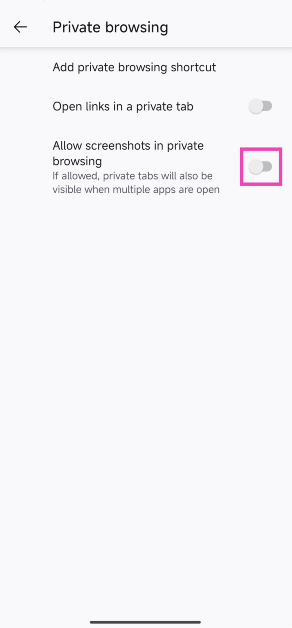
Step 1: Launch the Mozilla Firefox browser on your Android phone. Step 2: Tap the ellipses at the top right corner of the screen. Step 2: Tap the ellipses at the top right corner of the screen. How to take a screenshot in Google Chrome incognito mode (2024) Step 3: Hit Settings. Step 3: Hit Settings. How to take a screenshot in Google Chrome incognito mode (2024) Step 4: Scroll down and select Private browsing under Privacy and security. Step 4: Scroll down and select Private browsing under Privacy and security. How to take a screenshot in Google Chrome incognito mode (2024) Step 5: Turn on the toggle switch for Allow screenshots in private browsing. Step 5: Turn on the toggle switch for Allow screenshots in private browsing. How to take a screenshot in Google Chrome incognito mode (2024)
Frequently Asked Questions (FAQs)

How do I take a screenshot in Google Chrome incognito mode?

Type and enter chrome://flags in the address bar, search for ‘Incognito Screenshot’ and hit ‘Enable’. Restart the app. Once that’s done, you will be able to take a screenshot in incognito mode.

Do third-party screenshot apps work in Google Chrome’s incognito mode?

No, Android prevents third-party apps from taking screenshots in Chrome’s incognito mode.

How do I take a screenshot in Mozilla Firefox’s incognito mode?

Go to Settings>Private Browsing and turn on the toggle switch for ‘Allow screenshots in private browsing’. Read Also: How to take a screenshot on a Mac?

Conclusion

After completing this process Google Chrome will ask you to restart the application. After successfully restarting, you will be able to take screenshots even in Incognito Mode. However, use these steps only when it’s absolutely necessary as the incognito mode is meant to secure your privacy.

SanDisk Ixpand Wireless Chargers launched in India at Rs 1,999 upwards

Consumers nowadays are always looking for fast solutions. Western Digital being the mother company of SanDisk today announced Ixpand wireless charger that can take backup of your device as well. The company aimed towards two major problems an average consumer faces. Firstly is running out of battery juice during the day and secondly being running out of storage. Western Digital made sure that the process remains hassell free so it’s not at all difficult for a common person to use its new device. Here is everything you want to know about this new technology introduced by SanDisk.

In This Article

Features

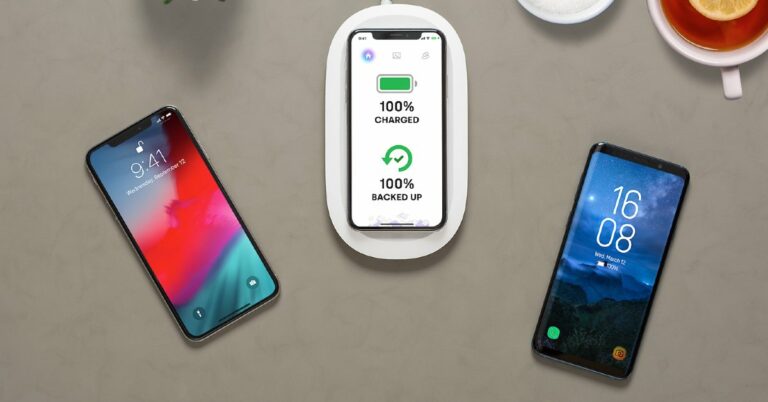
Ever felt lazy to backup your data? The process is not only time taking but also energy consuming. The need of backing up your data by yourself is over, with SanDisk Ixpand Wireless Charger. A person can not only charge their phone but also back up selected data to the onboard storage available within the charger All a consumer needs to do is download the application on your device which is available inside the box as well as behind the charger. After installing the application just select the data you want to back up. Users can also select contacts from the list as well as backup. After all these steps all the user has to do is place their device on the wireless Ixpand charger and all your selected data will be backed up easily. Most of the chargers don’t come with a power brick but SanDisk has got you covered in this condition as well. They include a fast charging brick inside the box, which can charge your device with 10W wirelessly. Yes, there are faster chargers in the market but they don’t locally sync your data while charging. Read Also: Best wireless fast chargers under Rs 10,000

Pricing

Currently, there are 3 variants available for Ixpand wireless chargers. The first is the standard charging mat with a 10W charger and 256 GB local storage capacity priced at Rs 9,999. SanDisk thought about people who don’t want storage just want to wirelessly charge their smartphone. Consumers can buy only the charging variant for Rs 2,999, which will include a 15W faster charger supporting Quick charge 3.0. Already got a fast charging brick and just want the charging mat? In that case, the consumer can go with the Ixpand wireless charging dock available at Rs 1,999. It’s really exciting to see the technology advancing so fast and consumers are getting new features to experience having a quick solution to every small problem. Currently, in India, the product is available with only 1 storage option as compared to 3 in the international market. We also expect the company to bring more models with higher storage capacity as there is an increase in storage consumption. For the latest gadget and tech news, and gadget reviews, follow us on Twitter, Facebook and Instagram. For newest tech & gadget videos subscribe to our YouTube Channel. You can also stay up to date using the Gadget Bridge Android App. You can find the latest car and bike news here.

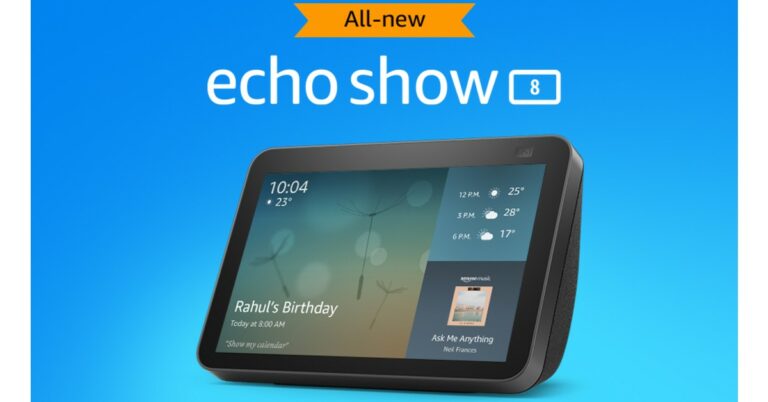
Amazon Introduces Upgraded Echo Show 8 (2nd Gen)

After the success of the first-generation Echo Show, Amazon finally brought out its 2nd gen of Echo Show 8. The show sits exactly in between its 5-inch and 10-inch siblings. After major upgrades over amazon’s Echo dot series, an update on the show series was needed as well. Here are a few of the changes and similarities.

In This Article

Looks

Talking about the looks, not much has changed. The body has an 8-inch touch screen, which is quite responsive displaying your personalised screen that you can customise according to your taste. The screen also supports multimedia functionalities and streams. Your favourite content will be shown in a HD resolution of 1,280X800. All the button controls are housed on the top edge with microphones to capture your voice commands. On the top rim of the Echo Show 8 houses the new camera setup. Amazon has taken care of privacy by providing a microphone on/off button and a mechanical switch for the camera shutter. The device is covered with fabric like material in the back matching the colour tone of the front frame. The Echo Show 8 gen 2 is available in two colours black and white.  Also Read: Should you leave the Wi-Fi router on at night?

Features and price

There are few changes in both hardware and software of the device. One major change is on the chipset, which is the new MT8183 as compared to the older MT8163 on the previous model.  Even if the previous gen never felt slow the new chipset will make the new gen snappier. Also, a major upgrade is the new 13-megapixel wide angle camera, which will zoom and pan according to your face for all the meetings and video calls you want to attend onboard.  The previous generation’s 1MP camera was not that great and the company did a good job replacing it with a decent sensor now. It feels like the same sensor used in Echo show 10 with an auto framing feature minus the motorized tracking capabilities has been picked up.  Like all the Echo devices it also supports Amazon Alexa support which will listen to all your commands with a 4 microphone setup. The smart assistant can perform tasks like playing music, streaming your favourite content, making voice and video calls on your command. The device has a dual 2.0-inch speaker with a passive bass radiator resulting in a clear non muffled sound. You can also remotely monitor your place with its camera making you worry less about your home when you are away. Also Read: Oppo introduces Apple-like MagVOOC flash charging technology With the current generation of the Echo Show 8 release company has really listened to its customers. There might not be a lot of changes than the previous gen. The company really focused on necessities and made the Echo Show 8 really value for what you spent. The device is priced at Rs 13,999 but the company is selling it at a discounted price of Rs 11,499 for a limited time. For the latest gadget and tech news, and gadget reviews, follow us on Twitter, Facebook and Instagram. For newest tech & gadget videos subscribe to our YouTube Channel. You can also stay up to date using the Gadget Bridge Android App. You can find the latest car and bike news here.

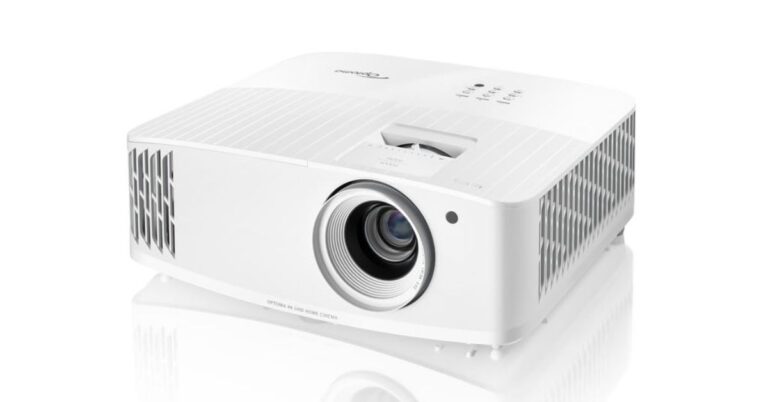
Optoma becomes number one in India and globally in DLP Projectors & 4K UHD segments

Taiwanese multinational company that manufactures projectors, all-in-one LED displays and image processing equipment Optoma today announced that it became the number one DLP projector brand globally. Also, the company achieved the number one position in DLP Projectors & 4K UHD segments in India for Q2, 2021 as per the PMA report.  Speaking about this achievement Mr. Vijay Sharma, Country Head, India, Optoma Corporation said that “ We are pleased to announce that despite the pandemic situation and challenging market conditions, we have managed to maintain an upward curve in sales. We registered demand coming from across segments, especially the home segment. This growth in the first six months of 2021 is a result of our advanced technology-based product launches and our proper understanding of the current circumstances of the Indian market. We expect the trend to continue in the second half of the year too.” The Taiwan based projector firm Optoma Corporation stated that it’s the only projector brand to have reflected the growth trend in the first half of 2021 by becoming the No.1 projector brand in the 4K UHD segment. According to the company earlier it has doubled its market share in ProAV and home segment in 2020.  But now Optoma has achieved a growth of more than 50% market share in the Short Throw projector category to become s No 1 brand in India for the DLP projectors & 4K UHD category during Q2, 2021. Furthermore, Optoma claims that to get the top position the company has pulled off more than 33% of the market share in Q2, 2021. Now, the company has future plans to aggressively tap the home entertainment segment, ProAV and education projector category with an array of new product launches for these categories.  The company recently introduced Optoma UHD33 4K UHD Home Theatre Projector in India. It features a 240Hz refresh rate and delivers vibrant and blur-free visuals and HDR10 support. This projector also comes integrated with gaming mode and dynamic black tech. It supports 4K @60Hz immersive gaming and offers Ultra-low 4.2ms latency@1080P 240Hz for PC games. The Optoma UHD33 comes with 3,600 ANSI lumens of brightness and delivers a 1,000,000:1 contrast ratio, along with HDR10 and HLG (Hybrid-Log Gamma) compatibility. For the latest gadget and tech news, and gadget reviews, follow us on TwitterFacebook and Instagram. For newest tech & gadget videos subscribe to our YouTube Channel. You can also stay up to date using the Gadget Bridge Android App. You can find the latest car and bike news here.

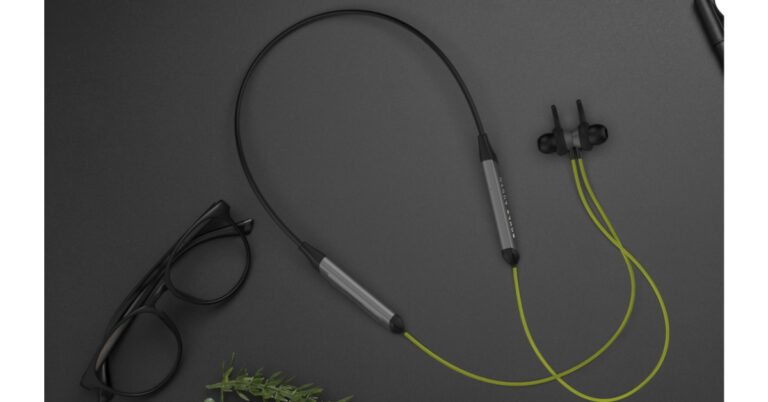
Boult Audio ProBass Qcharge earphones with 24 hours of battery life launched in India

0
Indian audio brand Boult today announced the launch of new neckband-style earphones in the Indian market. The Boult Audio ProBass Qcharge in-ear earphones deliver 24 hours of battery life. In addition to these, all the devices are IPX5 certified for water and sweat resistance. In addition to this, the Boult earphones come with voice assistant support and built-in Aerospace-grade alloy micro-woofers for extra bass. Boult Audio ProBass Qcharge earphones price and availability The Boult Audio ProBass Qcharge in-ear earphones have been launched in India with a price tag of Rs 1,999. The device can be purchased through Amazon in three colour options of Black, Blue, and Green. It will also bring a 1-year standard industry warranty. Boult Audio ProBass Qcharge in-ear earphones Boult Audio ProBass Qcharge earphones tech specs Boult Audio ProBass Qcharge earphones come with a neckband along with an in-ear design aimed toward an active lifestyle. The flexible and lightweight soft rubber design neckband is built for grip and style, while the extra-soft silicone ear tips and ear fins ensure a good grip and all-day comfort. The entire body is IPX5 certified for sweat and water resistance ideal for sweating it out of the gym. It also has a 60-degree angled tunnel design for a comfortable fit. The earphones come with an inbuilt aerospace-grade alloy micro woofer that produces a rich and precise audio signature. It also produces deep bass, isolating noise in any environment. A simple tap can help you with a hands-free experience as there is Google and Siri voice assistance support that will keep the users updated with the latest news or weather reports. Simply ask for directions, change music tracks or dial back home with just your voice. Besides this, the Boult Audio ProBass Qcharge in-ear earphones offer a 24 hours playtime on a single charge. The fast charging technology allows the battery to charge from 0 to 100% in just 30 minutes. And with a mere 15 minutes of charging, you can hit the road for a good 15-hour journey. For the latest gadget and tech news, and gadget reviews, follow us on TwitterFacebook and Instagram. For newest tech & gadget videos subscribe to our YouTube Channel. You can also stay up to date using the Gadget Bridge Android App. You can find the latest car and bike news here.

How to remotely access your PC from anywhere in the world

It’s been months since everyone is working from home and are online. Finally, after the government gave some relief we could return back to our office and roaming jobs. It has often happened that the file required by you has been left behind at home in your PC and there is no way you can go back. This guide will come in handy for these situations. You can connect to your device securely and access your system in a few clicks. Not only can the user get files from his/her home system but can also control it remotely. Here is how to do it.

Built-In Tools

Microsoft and Apple both have their built-in tools so you can access your desktop remotely 

For macOS

Apple also sells a full fedge version but charges a premium amount to the users to use it completely. Although that option is not meant for day to day users. The paid version is made for network management and IT professionals. Similar options are available for normal users by staying in the same network. Here is how to remotely access your MAC from anywhere in the world. Step 1 – In your home MAC, go to System Preferences. Step 2 – Click on Sharing option. Step 3 – Check the Screen Scaring checkbox. Step 4 – On another machine running macOS and signed in with your account, open Finder. Step 5 – Head to the shared section. Step 6 – Select your home MAC here to enable screen sharing, now you can access or fetch any file. Read Also: Top 5 Android apps you can use to transfer large files

For Windows

Microsoft makes their own remote access tools, too. Although this feature is only available for users having windows professional or Enterprise version on there pc, which means most of the people who use the Home version are not eligible to use it. Step 1 – Go to start and select settings. Step 2 – Click System and select Remote Desktop. Step 3 – Enable Remote Desktop. Step 4 – On the local machine go to Remote Desktop Connections. Step 5 – Select the device you want to connect with. Note – The pc can also be accessed with the Remote desktop application on both Android and MAC’s. Read Also: 5 free web services you can use to transfer large files

Third-Party Applications

There are tons of third-party applications available for users to download and install on the system. All they have to do is install these applications on their system and allow remote access. One of the most popular applications among these is TeamViewer. For home usage, this application is absolutely free and for advanced features, they charge an amount for the premium version. TeamViewer is a handy application to control remote desktops and Share files across platforms. After installing from www.teamviewer.com just follow the onscreen instructions and you can access your machine from anywhere. Other than TeamViewer, users can also see Anydesk. Anydesk works the same way as TeamViewer but it’s very lightweight. The User just needs to head to the official website and download. It’s a really lightweight application and needs no setup. Just share the personal key with the computer you want to connect and you are good to go. This list was an easy guide to how to access your files from anywhere. Users can also consider using Google Drive to access the files directly from the cloud. This is also a handy process to access your files from a remote location. Although this option is very limited as only the files saved in the cloud can be accessed and not your full PC. For the latest gadget and tech news, and gadget reviews, follow us on Twitter, Facebook and Instagram. For newest tech & gadget videos subscribe to our YouTube Channel. You can also stay up to date using the Gadget Bridge Android App. You can find the latest car and bike news here.

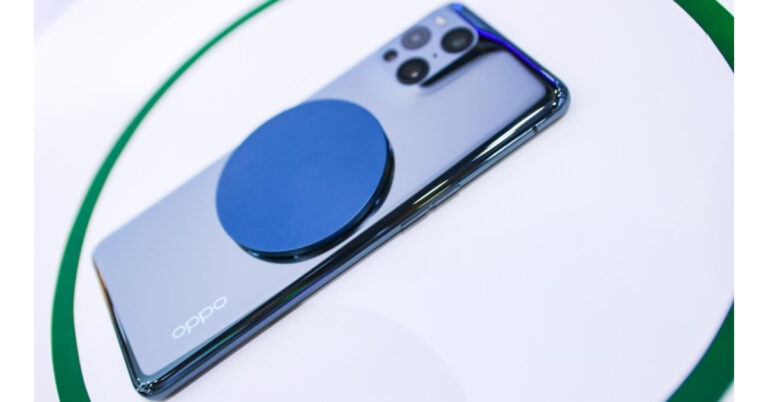
Oppo introduces Apple-like MagVOOC flash charging technology

Oppo today showcased MagVOOC flash charging series, in-car connectivity, and more at the Smart China Expo 2021. Oppo is the second company after Realme to copy Apple’s MagSafe magnetic wireless charging. RealmeDart comes in two variants 15W and 50W. Oppo’s magnetic system charging technology comes in two versions 40W and 20W, and a power bank. Unlike Apple’s MagSafe, the Oppo magnetic wireless charging is compatible with Android devices; however both work in a similar fashion but with much higher speeds. Oppo has announced the 40W and 20W MagVOOC flash charging series. The charger simply gets attached to the back of the phone via magnets and sends power to Android devices wirelessly.  This new series includes the MagVOOC wireless power bank, which uses a magnetic alignment system to ensure precise alignment between the phone and the charger. It comes with a 4,500mAh capacity and can be capable of sending 20W to supported devices. This is Qi-enabled and is compatible with smartwatches as well as TWS earbuds. The power bank takes about two hours to completely charge.
MagVOOC wireless power bank
In addition to this, the 20W MagVOOC ultra-thin flash charger comes with a  split design making the whole charger thinner. The design of both devices allows them to be easily portable. Both the devices feature a portable design. The supported Qi-standard can send up to 10W of power. MagVOOC wireless flash charging stand According to the company, the MagVOOC wireless flash charging stand helps users save up to 60% of preparation time as compared to conventional wired charging. It is capable of charging newer devices at 40W capacity and the older models at 30W. Additionally, it is Qi-enabled and can send up to 15W power without MagVOOC. On the other hand, the Oppo Air charging can send up to 7.5W of power to a phone which is inches away but perfectly aligned at various angles. One can continue to use the phone while it is being charged. Lastly, the company also demonstrated in-car smartphone connectivity capabilities at the event, including the digital car key, remote vehicle control on OPPO Find X3, remote vehicle control on OPPO Watch 2, as well as in-car flash charge. As per the company, the remote vehicle control on OPPO Find X3 or OPPO Watch 2 enables users to remotely turn on air conditioning through an APP. It will also allow users to search for their cars by sounding the horn from a distance. Additionally, the users can also access its advanced in-car flash charge, which supports OPPO’s 65W VOOC USB flash charge and 40W VOOC wireless flash charge while driving.  For the latest gadget and tech news, and gadget reviews, follow us on TwitterFacebook and Instagram. For newest tech & gadget videos subscribe to our YouTube Channel. You can also stay up to date using the Gadget Bridge Android App. You can find the latest car and bike news here.

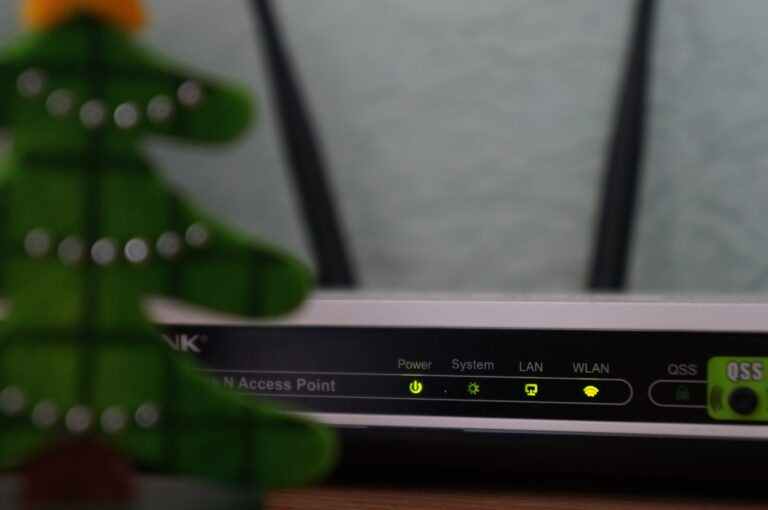
Should you leave the Wi-Fi router on at night?

Once the Wi-Fi router is placed in your home or workplace it is rarely looked after again until you need to reset it. Now the question arises is it ok to leave the router switched on all the time? The answer is yes you can. Routers are designed that way so that you can keep them switched on all the time. Although resetting it once in a while can prevent internet connectivity issues. This is a much-debated topic that it’s not safe to keep Wi-Fi switched on all the time. Although here are some facts you should consider paying attention to on why you should keep your Router off at night.

1.Conserve Energy

Prices of electricity have experienced a massive hike in some parts of the Country. Usually, at night most people don’t use the internet, yet the Wi-Fi router is kept on. In use or not, routers still consume energy to stay switched on all the time. Usually, companies set up their routers to go on standby to conserve electricity but it differs from company to company. Although, don’t expect a large slash of bills on your electricity. But consider them lower as compared to keeping Wi-Fi on at night.

2.Security

Most of your smart devices are connected to your Wi-Fi. All the personal information and data passes through your router. At night most of the people are unaware and fast asleep. For hackers, it’s the best time to get through your Wi-Fi easily. At night people’s security is vulnerable and compromised. It’s always advised to keep a strong password for your Wi-Fi connection. A desperate and skilled hacker will wait for the night and hack into your system. Switching off the router at night just reduces the vulnerability of your systems and devices from getting hacked. Should you leave the Wi-Fi router Read Also: Amazon Smart Plug launched in India for Rs 1,999

3.Overheating

Routers heat up because of all the data sending and transmitting they do. Especially the older routers heat up a lot if left switched on for longer periods of time. Excessive heat can result in slower internet speeds and loss of connection. Overheating may also occur because of problems in the router, due to which the device is struggling to transmit. Periodically shutting off your router will prevent overheating of the device for a short span of time.

4.Surge Protection

Surge protection is another reason for shutting your router down at night. Electric surges can cause devices to short circuit, which can also further result in hazards like fire. If the device is switched off it automatically becomes safe from any surges. Electric storms can also cause damage to your device if they are regularly plugged in. Yes, they can happen in the middle of the day as well but at night most of the places are vulnerable as users are sleeping. If it’s an absolute necessity to get your router plugged in all the time. It’s better to buy a surge protector and plug the router through it. Read Also: How to reset your Fitbit to factory settings? These are a few of the points which we feel could be some good reasons to plug your Wi-Fi router out at night. Also, few scientists have also proposed that the radiation emitted by Wi-Fi routers can be very harmful and can affect your sleep as well. So, it is best to turn it off when you are about to hit the bed for a good night’s sleep.  For the latest gadget and tech news, and gadget reviews, follow us on Twitter, Facebook and Instagram. For newest tech & gadget videos subscribe to our YouTube Channel. You can also stay up to date using the Gadget Bridge Android App. You can find the latest car and bike news here.

Guide to playing fantasy football on all devices

Fantasy football is, without a doubt, the ultimate companion to the football season. Fans can create their own team and then draft in the best players possible to fill their roster. Those selections then earn points for the team based on the real-life performances of the players chosen in the NFL. Usually, you enter your team in a league (or several) and the fantasy team with the most points at the end of the season wins the league. Fantasy football is now a worldwide phenomenon, the basis of which has even been picked up by other sports like baseball, soccer and cricket. However, it had fairly humble beginnings. The idea behind fantasy football came from a group of businessmen and NFL officials in 1962, and the initial league included six ‘managers’ who would track all the latest results and updates using newspaper reports and television broadcasts. Fantasy football then began to spread across the US during the 1980s through word of mouth and the development of more leagues and honing of the rules. By the mid-80s, national fantasy football leagues were available. In 1997, its popularity truly exploded when CBS launched the first-ever online fantasy football competition and were then followed by Yahoo, which offered the first free competition that could be played online. Since then, the game has only continued to grow at an exponential rate and, in 2010, the NFL itself decided to get involved by developing its own fantasy football platform. Now, fantasy football is available not just online but on a wide variety of different platforms and devices. Obviously, one of the most established is on a computer or laptop. Here, you simply visit the website of the supplier you are using. For example, if you’re playing fantasy football with DraftKings, you would just head to the fantasy section of their website and sign up. Then, each time you want to check on your team or make changes, you just visit the same section of the website and log in. It’s a handy way of keeping on top of your team while at home, or even at work (just try not to let your boss see!). Of course, an even more convenient way of playing fantasy football is on your smartphone. Now, major suppliers of fantasy competitions offer their own app for you to use right on your phone, making it very easy to dip in and out wherever you are. The apps offer all the functionality of the website but with a smoother experience and everything is all in one place. You can sign up, create a team and join leagues from the app. You can then also make changes to your lineup, make trades and monitor stats. These apps are also available on tablets and other devices like Chromebooks that have a suitable operating system. Outside of the apps that allow you to play fantasy football directly, there are other ones that help you get the most out of your experience and your roster. For example, the Fantasy Football Draft Wizard assists you in plotting and executing a successful draft strategy. After all, draft day is arguably the most important day of the fantasy football season and this wizard helps identify which players you should be aiming for and helps you plan for various different eventualities. So, how should you go about becoming a championship-calibre manager in your fantasy football league? Well, the first step is to find a reputable and secure supplier to play with, whether that’s the NFL’s official platform or elsewhere. Once you’ve joined a league, you’ll need to prepare for draft day. Do your research into players, positions and potential outcomes for the season and always have backups – a player can only go to one team in a fantasy league, so don’t pin all your hopes on one guy! When your roster is full, you then need to keep on top of all the latest news and results to make sure you’re maximising the potential of your lineup; you don’t want to have selected a starting quarterback who, in real life, has just been sidelined for two months because of an injury. You obviously won’t be able to watch every single game that’s played, so, instead, it’s a good idea to keep track of results and news on sports sites and channels. There are also several sites dedicated to keeping fantasy managers up to date on players and teams. Most leagues will also allow trades, so you can swap out players from your team with those from another manager. This can be particularly useful when there are tough fixtures coming up for one or more of your players and you want to trade them for some who are more likely to earn points for your team. Fantasy football has grown from a small game played by a select few in backroom lounges and hotel rooms to a global juggernaut that can be accessed from the phone in your hand. Whether you play on your computer or a phone/tablet, there’s a wide variety of ways you can create and mould your dream roster. For the latest gadget and tech news, and gadget reviews, follow us on TwitterFacebook and Instagram. For newest tech & gadget videos subscribe to our YouTube Channel. You can also stay up to date using the Gadget Bridge Android App. You can find the latest car and bike news here.

OnePlus Buds Pro pricing revealed, to be available via Amazon 

The Chinese smartphone company OnePlus last month introduced its two new products in the Indian market — OnePlus Nord 2 5G and OnePlus Buds Pro 2. At the time of the launch, the company did not reveal the price of its TWS earphones. But now the company has shared the pricing and the availability details of the audio device. The new pair of True Wireless earbuds are an upgrade to the OnePlus Buds and comes with ANC and three microphones. Check out the sale details below. OnePlus Buds Pro 2 price and availability details OnePlus Buds Pro 2 price in India has been set at Rs 9,990. The device will go on sale via Amazon, OnePlus.in, OnePlus Experience Stores as well as partner retail stores in the country from August 26 at 12 noon onwards. The audio device will be available in two colour options of Glossy White and Matte Black. OnePlus Buds Pro pricing revealed, to be available via Amazon 

OnePlus Buds Pro specifications

OnePlus Buds Pro features an in-ear design with silicone ear tips and the design of the stems of the buds is shorter than its predecessor. The TWS earphones equip 11mm, dynamic drivers, along with Dolby Atmos support. It has been incorporated with adaptive noise cancellation along with three microphones that are said to reduce environmental noise by up to 40 decibels. The ANC offers three different modes, namely Extreme, Faint, and Smart. The Extreme Mode offers a noise reduction of up to 40db while the latter two offers a noise cancellation of up to 25db. The audio device also includes the company’s own OnePlus Audio ID to balance the audio as well as customised sound experience. OnePlus Buds Pro comes with Bluetooth 5.2, and HeyMelody app support for non-OnePlus phones. The TWS earbuds deliver a latency rate of as low as 94 milliseconds while using Pro Gaming mode. The device is claimed to provide 7 hours of playtime and 31 hours of additional playtime when ANC is turned off. When the feature is turned on it provides 5 hours of playtime. With just 10 minutes of charge, the earbuds can last for 10 hours. In addition to this, the charging case comes with support for wireless charging. Apart from endurance, the device is IP55 certified for water and dust resistance.  For the latest gadget and tech news, and gadget reviews, follow us on TwitterFacebook and Instagram. For newest tech & gadget videos subscribe to our YouTube Channel. You can also stay up to date using the Gadget Bridge Android App. You can find the latest car and bike news here.

Lava Probuds 2 TWS earbuds featuring 14 mm dynamic drivers launched in India

Indian Mobile manufacturer Lava has announced the launch of its latest true wireless earbuds – Probuds 2. The device comes with 14 mm dynamic drivers and delivers up to 23 hours of battery life. The TWS earbuds come with a button-like design and are compatible with both Google and Siri voice assistance.  Lava Probuds 2 price in India and availability Lava Probuds 3 have been launched at Rs 1,699 in India. But the company will be selling them at an introductory price of Rs 1,399. The TWS earphones will be available for purchase via Lava E-store, Amazon and Flipkart in the country. The sale will begin on August 26 at 12 noon.  Lava Probuds 2 price in India and availability On the launch of Lava Probuds 2, the company has also announced a unique BYOB (Break Your Old Buds) contest that will give some lucky participants a chance to win free buds. To participate, the participants have to just register themselves on the Lava website and pledge to break their old earphones (wired or wireless). The winners will be chosen via lucky draw. The contest is now live and runs until August 26 till 12 noon. Lava Probuds 2 TWS earbuds specifications Lava Probuds 2 comes integrated with 14 mm dynamic drivers that are stated to deliver powerful sound along with thumping bass. The TWS earphones are said to have been ergonomically designed after performing various trials and studying inner ear contours which makes them ideal for prolonged use. It features a button-like design for a comfortable and secure fit. It comes in a classic black colour with a stunning matte finish. The buds are compatible with both Google and Siri voice assistance. It also includes intuitive gesture control which provides an easy touch and access control from the buds for music and calls. The Lava Probuds 2 are further incorporated with an instant wake and pair technology and Bluetooth v5.0 that ensures seamless connectivity. In terms of battery, the Probuds 2 delivers up to 23 hours of battery life. Each bud offers 5 hours of playtime and 18 hours from the charging case. The TWS earphones are IPX5 certified for protection against sweat and splash.  For the latest gadget and tech news, and gadget reviews, follow us on TwitterFacebook and Instagram. For newest tech & gadget videos subscribe to our YouTube Channel. You can also stay up to date using the Gadget Bridge Android App. You can find the latest car and bike news here.

24 August 2021 Flipkart Daily Trivia Quiz Answers: Answer to win exciting prizes

The e-commerce website Flipkart is hosting Daily Trivia Quiz. Every day it brings a bunch of new questions for its users. By answering them correctly you can win exciting prizes. The questionnaire is based on questions related to general knowledge. Also, the users can win free vouchers and super coins, among other offers via the daily quiz. 24 August 2021 Flipkart Daily Trivia Quiz Answers has already gone live on its platform. The participant should be at least 18 years old and should have a valid login ID. The Quiz is available on the mobile platform and not the web version. E-commerce conducts the quiz on daily basis and goes live at 12:00 AM IST and runs till 11:59 PM IST.  The winners are announced within 15 days from the date of participation that can be viewed under the Gems/Rewards section in the app.

How to participate in the Flipkart Daily Trivia Quiz

To participate download the Flipkart app on your phone. Then open the Flipkart app then head to Game Zone. Now click on the Daily Trivia Banner or search for Daily Trivia. Enter the game and answer all 5 questions with correct answers.

24 August 2021 Flipkart Daily Trivia Quiz Answers 

Question 1: In tennis, what scores follow a deuce? Answer: Advantage Question 2: Founded in 1947, what sport does Nascar govern? Answer: Auto racing Question 3: In which country is the hard court men’s tennis tournament ATP Cup played? Answer: Australia Question 4: Who is the first bowler to take a hattrick in the T20I match? Answer: Brett Lee Question 5: Which of these is a gymnastics pose? Answer: Level
For the latest gadget and tech news, and gadget reviews, follow us on TwitterFacebook and Instagram. For newest tech & gadget videos subscribe to our YouTube Channel. You can also stay up to date using the Gadget Bridge Android App. You can find the latest car and bike news here.