-
In This Article
BBC Good Food
 BBC is one of the most famous British channels that offers tons of food programs. From the start, till now, the channel has grown a lot and has a dedicated application for just food now. With the BBC Good Food application, you open doors to over 10,000 recipes to choose from. These recipes are from users and famous celebrity chefs.
The application lets you save your favourite recipe or save it into your personal collection to try it later. The recipes are laid in a step by step format making it really easy for users to understand. There is absolutely no charge for this application. All you have to do is create your account and you are good to go.
Price: Free
Download: iOS, Android
BBC is one of the most famous British channels that offers tons of food programs. From the start, till now, the channel has grown a lot and has a dedicated application for just food now. With the BBC Good Food application, you open doors to over 10,000 recipes to choose from. These recipes are from users and famous celebrity chefs.
The application lets you save your favourite recipe or save it into your personal collection to try it later. The recipes are laid in a step by step format making it really easy for users to understand. There is absolutely no charge for this application. All you have to do is create your account and you are good to go.
Price: Free
Download: iOS, Android
-
Big Oven
 Ever opened your refrigerator and come up with some ingredients you don’t know what to do? This application will help you. In this busy world going out and buying specific ingredients sounds like a hassle. BigOven solves your problem here too. In this app, you can search for specific ingredients and the application will suggest some good recipes.
All you have to do is enter 3 ingredients and the application will show up dishes that can be made using them. BigOven uses a social media approach to attract new consumers. Meaning?In the application you can also see what others are cooking. With over 3 million recipes and options for making a grocery list, it is one of the best applications that you can consider.
Price: Free
Download: iOS, Android
Ever opened your refrigerator and come up with some ingredients you don’t know what to do? This application will help you. In this busy world going out and buying specific ingredients sounds like a hassle. BigOven solves your problem here too. In this app, you can search for specific ingredients and the application will suggest some good recipes.
All you have to do is enter 3 ingredients and the application will show up dishes that can be made using them. BigOven uses a social media approach to attract new consumers. Meaning?In the application you can also see what others are cooking. With over 3 million recipes and options for making a grocery list, it is one of the best applications that you can consider.
Price: Free
Download: iOS, Android
-
Allrecipes Dinner Spinner
 A community of 50 million people along with developers run this application. It’s a place where millions of people either cook professionally or as a hobby around the world. Not only limited to cooking, but the users also upload their personal recipes on this app so you can ensure home-like taste with a personal feel.
Choose among many recipes that people suggest, you can start with noting down the ingredients with its inbuilt feature. Users can also filter recipes according to ingredients and diet. The application also lets you choose any food or cross out ingredients you are allergic to or you dislike. If you are an international citizen it will also show you nearby grocery stores.
Price: Free
Download: iOS, Android
Read Also: World Food Day: Top gadgets that will help you prepare great food
A community of 50 million people along with developers run this application. It’s a place where millions of people either cook professionally or as a hobby around the world. Not only limited to cooking, but the users also upload their personal recipes on this app so you can ensure home-like taste with a personal feel.
Choose among many recipes that people suggest, you can start with noting down the ingredients with its inbuilt feature. Users can also filter recipes according to ingredients and diet. The application also lets you choose any food or cross out ingredients you are allergic to or you dislike. If you are an international citizen it will also show you nearby grocery stores.
Price: Free
Download: iOS, Android
Read Also: World Food Day: Top gadgets that will help you prepare great food
-
Cookpad
 A social media platform in which all you have to do is make an account and browse recipes. The user interface of the application manages the recipes and organises them into different categories. The application works offline as well so you can save recipes and look at them even without the internet.
It shows you recipes people are cooking all around the world and choose any one of them which you love. As it is also a community-driven application it’s very easy to learn new recipes and enhance your skills using Cookpad.
Price: Free
Download: iOS, Android
A social media platform in which all you have to do is make an account and browse recipes. The user interface of the application manages the recipes and organises them into different categories. The application works offline as well so you can save recipes and look at them even without the internet.
It shows you recipes people are cooking all around the world and choose any one of them which you love. As it is also a community-driven application it’s very easy to learn new recipes and enhance your skills using Cookpad.
Price: Free
Download: iOS, Android
-
Fork plant-based recipes
 Inspired by the documentary “Forks over knives” this application is all about how to eat vegan food. If you are a vegan or follow a vegan diet, this application will surely help you. Fork Plant-based recipes consist of 500+ meals you can make yourself on a daily basis without using any animal products, processed or refined ingredients.
The developers add many recipes in frequent intervals of time so you don’t run out of ideas or recipes. The application claims that following this diet will reverse chronic diseases such as diabetes and heart disease due to the composition of recipes. There are no complicated recipes here and with the grocery list feature, this application is a gem for people on a vegan diet.
Price: $5 (Rs 375)
Download: iOS, Android
Inspired by the documentary “Forks over knives” this application is all about how to eat vegan food. If you are a vegan or follow a vegan diet, this application will surely help you. Fork Plant-based recipes consist of 500+ meals you can make yourself on a daily basis without using any animal products, processed or refined ingredients.
The developers add many recipes in frequent intervals of time so you don’t run out of ideas or recipes. The application claims that following this diet will reverse chronic diseases such as diabetes and heart disease due to the composition of recipes. There are no complicated recipes here and with the grocery list feature, this application is a gem for people on a vegan diet.
Price: $5 (Rs 375)
Download: iOS, Android
-
Epicurious
 The application is very popular with over 35,000 recipes that all the people have tested and rated within the application. Not only do you find recipes from the Epicurious team but also big giants like Bon Appetit, Gourmet magazine, and Harper Collins. Just find the food you want to cook and make a shopping list in the application itself.
This new food apps also includes voice-over commands so you don’t have to look at your screen again and again to follow the cooking instructions. The user interface is very easy so you won’t have a hard time navigating. Sadly the application was removed from Android PlayStore and now is available only on Apple App Store.
Price: Free
Download: iOS
The application is very popular with over 35,000 recipes that all the people have tested and rated within the application. Not only do you find recipes from the Epicurious team but also big giants like Bon Appetit, Gourmet magazine, and Harper Collins. Just find the food you want to cook and make a shopping list in the application itself.
This new food apps also includes voice-over commands so you don’t have to look at your screen again and again to follow the cooking instructions. The user interface is very easy so you won’t have a hard time navigating. Sadly the application was removed from Android PlayStore and now is available only on Apple App Store.
Price: Free
Download: iOS
-
Food Network Kitchen
 Food Network is a popular TV channel in many countries. They make delicious food and show mouth-watering recipes. Well, with Food Network Kitchen it’s the same but now you don’t have to sit in front of the TV to learn them. With their dedicated application, you can learn and saviour 70,000+ recipes made by celebrity chefs.
These recipes are available in both text and video format so you can enjoy them according to your taste and understanding. The searching for recipes is seamless as well. Just type the ingredient or name of the chef, the application will search its database to find the best match for you. Adding to this the application has a meal planner ideal for people who are calorie-conscious.
Price: Free
Download: iOS, Android
Read Also: Flipkart introduces Voice Assistant in Hindi and English
Food Network is a popular TV channel in many countries. They make delicious food and show mouth-watering recipes. Well, with Food Network Kitchen it’s the same but now you don’t have to sit in front of the TV to learn them. With their dedicated application, you can learn and saviour 70,000+ recipes made by celebrity chefs.
These recipes are available in both text and video format so you can enjoy them according to your taste and understanding. The searching for recipes is seamless as well. Just type the ingredient or name of the chef, the application will search its database to find the best match for you. Adding to this the application has a meal planner ideal for people who are calorie-conscious.
Price: Free
Download: iOS, Android
Read Also: Flipkart introduces Voice Assistant in Hindi and English
-
Kitchen Stories
 Have very little time, say 20-30 minutes only? Kitchen Stories is a new food apps that is perfect for you. It focuses on a more visual rather than a textual approach. The instructions are easy to understand with high definition photos and videos make it even easier and interesting to cook with. It has thousands of dishes to choose from, you can consider Kitchen Stories for a Bon appetit.
Price: Free
Download: iOS, Android
Have very little time, say 20-30 minutes only? Kitchen Stories is a new food apps that is perfect for you. It focuses on a more visual rather than a textual approach. The instructions are easy to understand with high definition photos and videos make it even easier and interesting to cook with. It has thousands of dishes to choose from, you can consider Kitchen Stories for a Bon appetit.
Price: Free
Download: iOS, Android
-
Oh She Glows
 With 140 plant-based dishes and 120+ gluten-free ones. The application is perfect for those who like eating healthy. The application has step by step photos of mouth-watering dishes that will make you fall in love with earthing health.
The application lets you filter your allergies, diet information, dish type and seasoning you like. Every recipe has information about what you are eating like calories and other nutrition information. Users can save a particular recipe so they do not have to find it again and again.
Price: $2 (Rs 150)
Download: iOS, Android
With 140 plant-based dishes and 120+ gluten-free ones. The application is perfect for those who like eating healthy. The application has step by step photos of mouth-watering dishes that will make you fall in love with earthing health.
The application lets you filter your allergies, diet information, dish type and seasoning you like. Every recipe has information about what you are eating like calories and other nutrition information. Users can save a particular recipe so they do not have to find it again and again.
Price: $2 (Rs 150)
Download: iOS, Android
-
SideChef
 Entering the world of cooking? SideChef is the application for you. This application teaches you the basics of cooking while having a library of over 10,000+ recipes that can be searched by specific ingredient or category. For each recipe, there are images, videos and audio files available for your ease.
If you want to cook some dish for fewer people or you are allergic to some ingredients. Fret not, the application will alert you of a recipe accordingly. You can even email yourself the list of ingredients that are needed. If you are an international user you can also order groceries directly from the application itself.
Price: Free
Download: iOS, Android
Entering the world of cooking? SideChef is the application for you. This application teaches you the basics of cooking while having a library of over 10,000+ recipes that can be searched by specific ingredient or category. For each recipe, there are images, videos and audio files available for your ease.
If you want to cook some dish for fewer people or you are allergic to some ingredients. Fret not, the application will alert you of a recipe accordingly. You can even email yourself the list of ingredients that are needed. If you are an international user you can also order groceries directly from the application itself.
Price: Free
Download: iOS, Android
-
Supercook: Recipes by ingredients
 This application a is new food app that tells you what you can make with minimum ingredients. Just gather a list of things you have in your fridge and input them into the application. Supercook will tell you what are the best dishes you can make from them.
If you don’t like the suggestions, which the application gave you, don’t worry as it does a web search for you as well. For making it even more user friendly, the application separates recipes according to categories such as dairy, vegetables, baking, spices, meats, beverages, and more.
Price: Free
Download: iOS, Android
Read Also:Best YouTube Channels to Follow: For recipes and home cooking
This application a is new food app that tells you what you can make with minimum ingredients. Just gather a list of things you have in your fridge and input them into the application. Supercook will tell you what are the best dishes you can make from them.
If you don’t like the suggestions, which the application gave you, don’t worry as it does a web search for you as well. For making it even more user friendly, the application separates recipes according to categories such as dairy, vegetables, baking, spices, meats, beverages, and more.
Price: Free
Download: iOS, Android
Read Also:Best YouTube Channels to Follow: For recipes and home cooking
-
Paprika
 This application is a food manager app rather than an application with a database full of recipes. Loved some recipes that you saw online? Save it on Paprika. Additionally, this application allows you to craft a grocery list and do meal planning. Paprika can also come in handy when you want to scale down ingredients depending on servings. After one step is finished, strike off the step to keep yourself organised when cooking.
Price: Free(Android), $5 (Rs 375) for iOS
Download: iOS, Android
This application is a food manager app rather than an application with a database full of recipes. Loved some recipes that you saw online? Save it on Paprika. Additionally, this application allows you to craft a grocery list and do meal planning. Paprika can also come in handy when you want to scale down ingredients depending on servings. After one step is finished, strike off the step to keep yourself organised when cooking.
Price: Free(Android), $5 (Rs 375) for iOS
Download: iOS, Android
-
Tasty
 A brand owned by BuzzFeed. They started with making food recipes and the network has grown ever since. The application is like Instagram stories for recipes. Users can filter recipes according to their tastes. The instructions in the application are very simple and really easy to follow. There is also a feature in the application that does not let your phone’s screen turn off making it easy to follow recipes even if your hands are dirty.
Price: Free
Download: iOS, Android
A brand owned by BuzzFeed. They started with making food recipes and the network has grown ever since. The application is like Instagram stories for recipes. Users can filter recipes according to their tastes. The instructions in the application are very simple and really easy to follow. There is also a feature in the application that does not let your phone’s screen turn off making it easy to follow recipes even if your hands are dirty.
Price: Free
Download: iOS, Android
-
Weber Grill
 Who doesn’t like grilled food? And if you are a fan too, you are up for a treat. Weber iGrill is an application solely dedicated to grill food. The application is loaded with Grill recipes, be it a snack, breakfast or dinner. For the recipe, you choose it and the app sets timers automatically as different foods take different times on the grill. Just enter the amount of meat/veggies you are cooking, it will determine the time required.
Price: Free
Download: iOS, Android
Who doesn’t like grilled food? And if you are a fan too, you are up for a treat. Weber iGrill is an application solely dedicated to grill food. The application is loaded with Grill recipes, be it a snack, breakfast or dinner. For the recipe, you choose it and the app sets timers automatically as different foods take different times on the grill. Just enter the amount of meat/veggies you are cooking, it will determine the time required.
Price: Free
Download: iOS, Android
-
Yummly
 This is an AI-based recipe finding app that gives you suggestions according to your recent searches. With a database of thousands of recipes, Yummly makes sure you are never bored. You can also filter your searches using a variety of parameters such as lifestyle, allergens, diets, and more. Users can buy everything related to cooking from groceries to utensils in this application.
Price: FreeDownload: iOS, Android
For the latest gadget and tech news, and gadget reviews, follow us on Twitter, Facebook and Instagram. For newest tech & gadget videos subscribe to our YouTube Channel. You can also stay up to date using the Gadget Bridge Android App. You can find the latest car and bike news here.
This is an AI-based recipe finding app that gives you suggestions according to your recent searches. With a database of thousands of recipes, Yummly makes sure you are never bored. You can also filter your searches using a variety of parameters such as lifestyle, allergens, diets, and more. Users can buy everything related to cooking from groceries to utensils in this application.
Price: FreeDownload: iOS, Android
For the latest gadget and tech news, and gadget reviews, follow us on Twitter, Facebook and Instagram. For newest tech & gadget videos subscribe to our YouTube Channel. You can also stay up to date using the Gadget Bridge Android App. You can find the latest car and bike news here. 
 Step 4 –
 Step 3 –
 Step 4 –









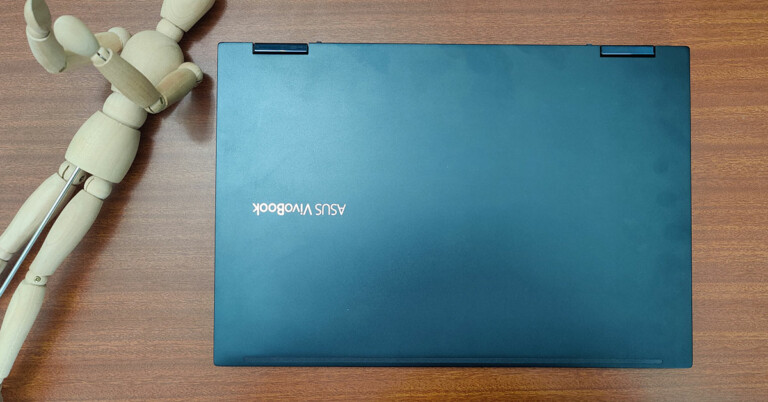
 The 14-inch touch display can swivel all the way to the back and the laptop comes with a stylus (with two buttons) since it is a touchscreen. A magnet attachment is also part of the package to hold the stylus in place. The resolution of the screen is Full HD and screen to body ratio is 82%. It is a glossy screen, which can display brilliant colours and crisp text. We watched a few movies on it via Netflix and loved every bit of it. We edited a couple of images on Photoshop too and that experience was very good. The stylus does a wonderful job in case you create a lot of imagery on Adobe Illustrator.
 The trackpad on the Asus Vivobook Flip 14 has a fingerprint sensor on it, which is a good move, however, the trackpad is slightly small for our liking. As far as the ports are concerned the laptop has 2 USB ports, 1 USB Type-C, 3.5mm audio/MIC, HDMI, and microSD card slot. The power button is also positioned along with the other ports on the right side. Overall, the notebook has a sturdy feel to it with strong hinges and good plastics, dressed in midnight blue colour.


 On our tests, the notebook hardly flickered. It can handle your daily task along with games such as PUBG (at medium settings) at 60fps just fine. However, since this is more of a work cum play machine, Asus has put in Windows 10 Home in it. We were hoping to get Windows 10 Pro in this machine. Users will be allowed to upgrade to Windows 11 when it rolls out fully, but that to will be the Home edition. There was a little bit of bloatware found in the OS, but thankfully all of it can be removed. Users also get a trial of McAfee anti-virus and Microsoft Office 2019 apps on it.
The keyboard of the Asus Vivobook Flip 14 is backlit and very good to work with. The laptop also excels in the sound department as the speakers are tuned by Harman Kardon. There is no ethernet port in the device, but it does support the super-fast Wi-Fi 6 technique, so internet connectivity was never an issue. Zoom
On our tests, the notebook hardly flickered. It can handle your daily task along with games such as PUBG (at medium settings) at 60fps just fine. However, since this is more of a work cum play machine, Asus has put in Windows 10 Home in it. We were hoping to get Windows 10 Pro in this machine. Users will be allowed to upgrade to Windows 11 when it rolls out fully, but that to will be the Home edition. There was a little bit of bloatware found in the OS, but thankfully all of it can be removed. Users also get a trial of McAfee anti-virus and Microsoft Office 2019 apps on it.
The keyboard of the Asus Vivobook Flip 14 is backlit and very good to work with. The laptop also excels in the sound department as the speakers are tuned by Harman Kardon. There is no ethernet port in the device, but it does support the super-fast Wi-Fi 6 technique, so internet connectivity was never an issue. Zoom 






 Read Also:



 Step 2 –
  Step 4 –
 Step 5 –
 Step 3 –
 Step 5 –
 Step 6 –
  Step 7 –
 Read Also:










 Step 2 –
 Step 3 –
 Note –
  Read Also:

 Step 3 –
 Step 5 –
 Step 7 –
  Step 9
 Step 10 –
 Step 11 –
 Step 12 (extra step) –
 Read Also:
 Step 2 – Click Check for updates.